Category: Containers

  • Containers: All Your Base are Belong to Us

    Containers: All Your Base are Belong to Us

    The world is still changing. No surprise there, but the direction and velocity have been modified by the growth of container usage. Back in 2015, we at devopsy.kinsta.cloud showcased a survey we performed that said container usage was staged to take off. That it did, with a vengeance. No matter the category—pilot programs, test, production—it seems to have a greater penetration each year.

    And why not? There are a whole collection of benefits to containers—smaller footprint than VMs, more portable than cloud instances, more agile than … well, any of the alternatives. And the weaknesses—the use (and abuse) of IPTables and persistent problems with persistent storage—are being addressed at a rapid clip.

    But It’s Not All Roses

    Sorry to say that there is, as always, a fly in the ointment. We have to identify weaknesses in new architectures to plan for them and overcome them. And container infrastructure is not immune to this process. Nothing is perfect.

    The first problem is with overall security. Your container management system is now the center of the world. A single point of penetration that could yield dozens to thousands of infected servers. It is like a magnet to ne’er-do-wells. Protect it, lock it down, follow advice on Container Journal and Security Boulevard about how to keep your system as protected as possible.

    That was the easy one. We have a ton of experience protecting important central systems.

    The more difficult ones all revolve around your physical infrastructure and where it meets your virtual container infrastructure. Look at all the boxes in your data center and the services they provide, then map out how those services integrate with your containers. Once you’ve mapped them, work the mappings into your DevOps projects. Load balancing and storage provisioning are two areas in which what a traditional DC does is duplicated inside the container environment, and where that processing is to occur should be a conscious choice about what is best for the application, not a decision based on what is easiest/in front of you.

    It is an (arguably) bigger issue with storage. Just because the container can grow or shrink its internal storage does not make it the right place to position a fair selection of your data. Think about what will be needed in the future—with or without the application that this container or container set represents—and make a conscious choice about what is ephemeral data that can go away should an instance die versus what is needed long-term. Work those choices into DevOps processes. It can be a pain to access persistent data that is remote to a container, so make the painful parts automated via your DevOps processes.

    Both of these problems are compounded in most (but not all) cloud environments. Too much cloud functionality is designed to lock users in. While that has been a standard practice in IT for decades, the problem with containers is that they are inherently portable. Build them to be so. Yes, lock-in functionality always brings benefits, but mobility lets a team choose where best to deploy a container system with each inflection point (purposely being vague here—a highly agile/DevOps shop could have daily inflection points, while a single team just piloting containers in their DevOps environment may only have them on occasion when something large changes with the system). Should something change at a preferred cloud vendor that makes them no longer preferred, the fewer modifications required to move to another platform the better. So building default container/container management into the DevOps toolchain is preferred to building in vendor-specific options when a choice is available. Storage is an easy one to point at and say “choice might not be available.” Allocating disk is not very portable between platforms, but if that’s one of only a handful of things that must change, portability is still an option.

    In short, containers are coming, and they’re coming fast. Build them into your DevOps toolchain as portable solutions that automate the worst of the speed bumps. Make conscious choices about where infrastructure-based functionality should reside, and implement based upon those choices.

    And keep rocking it. If moving from any other environment (with the arguable exception of cloud), containers will be faster to spin up and to spin down. Just address the issues before they hit you, and all will be well.
    — Don Macvittie

  • You Have a Box: The Impact of Containers on DevOps

    You Have a Box: The Impact of Containers on DevOps

    To continue the discussion from my last blog post, you have a box. Increasingly, you only have to ask, “What do we want to put in it?”

    It is interesting to see the growth and change in IT over time. The advent of containers is the focus of this particular blog, but there are many other topics that would be fun to cover in the same manner.

    The fact is that containers have become our blank puzzle pieces. We take it, make it what we need and drop it in. They relieve us (for the most part) of the need to worry about deployment issues and allow us to focus on getting the part of the app they represent right.

    But those deployment issues didn’t go away, they’re simply obfuscated. Networking, security, storage and even capacity still have to be concerns of IT, just not concerns of a given app or its developers. That creates a separated world of issues, sometimes a split world of issues—such as networking inside/outside the container environment—but these are largely things we’ve had to deal with since the advent of virtualization, just in a larger scope.

    The true promise of multi-cloud comes with containers, also. Each cloud vendor wants to lock users into their container architecture, of course, but nothing stops a shop from running containers and container management on cloud instances of their own, maintaining the highest level of portability for the cost of some extra management headaches. In the end, where it is running is even less important in the container world, and that allows what it does to gain more importance.

    Management of containers has a bit more overhead; after all, hardware or cloud management needs are the same, and the configuration/management of containers is layered over those needs as an additive. But that’s a worthwhile cost to bear if the result is that tomorrow the container could be thrown to a cloud instance, and the next day for whatever reason—capex versus opex, data accessibility, whatever—could be brought to a local server. Maximum flexibility makes the cost of maintaining another layer of management.

    And much of that layer of management can (and usually is, in my experience) be folded into DevOps practices, precisely because a container is 100 percent software. That means the overhead is not nearly as large as it seems. And what isn’t well-covered by DevOps is simply an extension of virtualization.

    So with containers, you have a box. The management of the box is handled by DevOps. The only question that really matters is, “What are you going to put in the box?” And that’s pretty cool: Less to worry about during development means more time to make whatever goes in the box rock.

    And the innovation around those boxes is just getting geared up, I think. We already see things such as shops/projects with a container life expectancy of less than a minute that are inconceivable in other environments. Not that they’re all good ideas, but the more people doing things in a different manner, the more opportunities for really great discoveries to come along.

    And you will be there. Filling boxes with cool new apps. Pretty sweet.

    — Don Macvittie

  • DevOps and Containers: A Network Divided

    DevOps and Containers: A Network Divided

    The growth of DevOps and containers has created some interesting split responsibility scenarios. Not that this is necessarily a bad thing, but it is something that bears watching and fixing when it becomes problematic.

    Today’s topic is networking. Plenty of bits have been spewed about the situation, but it persists and is even getting more complex as architectures diversify.

    Specifically, today’s topic is about the dual responsibility built into today’s networking. Generally speaking, network operations staff are still managing the complex hardware and software environments that deliver packets to your systems. What they do and how they do it is changing—but at a much slower pace than areas fully pulled into DevOps. There are many reasons for this, and I won’t delve into them here, but the truth is that managing a production network and dealing with hardware vendors bring unique responsibilities and constraints that aren’t there in a software world.

    That’s experience talking, from a developer who learned network administration. Software is easier and more adaptable, and that is directly reflected in the impact of DevOps.

    But we have drifted into a world in which that infrastructure is still mission-critical and still has those same constraints, while the software layer of networking—driven primarily by containers—has grown up in parallel with a different set of people often responsible for it. And that software network can be mighty complex. I shudder to think about what the iptables look like on some—maybe hundreds—of your machines.

    Cloud has much the same effect, but since cloud instances often are publicly exposed, they tend to have networking people involved to make sure routing is correct and verifiable, and to help InfoSec people determine that the instance is as locked down as possible (and we can all name companies that wish this were true).

    Still, the complexity of cloud spawned companies including CloudCoreo (now a part of VMware), which automate a bunch of network verification and security checks just because there are so many points that require touching. So cloud isn’t the nirvana of shared responsibility either. Yet.

    As DevOps and container adoption has grown, it is natural that responsibility for container/container management networking would have spilled over into the development or application administration side. After all, once a subnet is configured for a cluster and software is managing the subnet, which is integrated with the rest of container management, it feels right to have the Dev/deploy team manage it.

    And it might be. Like all things DevOps, this is a continual improvement exercise. Having someone who knows exactly what is going on between pods/clusters/networks is important, though. Breaks can cause outages that cost money. Knowledge is the key to fixing breaks and container networking is generally super-complex. Even if you are providing standard IP addresses on a corporate subnet to each container, container management networking is still complex and can still break.

    So if you haven’t already, get the networking team involved in inter-/intracontainer communications. Make certain you know what is going where and what should go where.

    You won’t regret it, when things inevitably break that cannot be repaired by dropping the instance and spawning a new one to replace it.

    — Don Macvittie

  • Portability Shmortability: Most Applications are Going Nowhere

    Portability Shmortability: Most Applications are Going Nowhere

    I’m a huge fan of the idea of taking our super-duper applications and deploying them where it makes most sense. I always have been. Those of us in application development spent forever bemoaning the fact that our applications weren’t all that portable between operating systems. In fact, looking back through the history of computers, you find there has always been one roadblock or another to stop portability.

    First there was byte order and instruction set, and we’ve largely overcome those. Internationalization wreaked havoc on us all for a while, and we overcame that. We’re still pretty mightily struggling with OS-dependent things such as windowing systems, but browser-based apps have largely overcome those also. Java takes a lot of heat for a lot of reasons, but it did improve portability of apps written in it. Maybe not “Write once, run anywhere,” as was often claimed—things such as file locations were still OS-specific—but still a lot closer than compilers that were deeply tied to the operating system they ran on. Virtualization and containers have enhanced portability in another dimension, letting the developer take the OS with the app.

    We have overcome a ton of issues, and advancing technology has introduced a ton more. Now we have to either choose mobile targets or find a tool we like that can generate code for wildly different mobile systems from a single source. DevOps really isn’t helping with this process—though it will, eventually. By automating the build process, the target will be switchable at the targeting end, meaning our app—given a tool that can multi-target—can be built for whatever mobile platform the cool kids are playing with today, and the ones that are considered “cost of entry” can be generated in the same run.

    So far, so good, right? We find problems, we overcome problems, DevOps helps us overcome them faster with a wider selection of outputs …

    And then we hit the data.

    Vendors in a variety of spaces would love to paint you a picture where it doesn’t matter. It does. The mass of your data, wherever it resides, is a pull like gravity to new application development. And it should be.

    Some will try to explain to you that in the age of APIs, it doesn’t matter where the data actually resides: You can get it.

    But it really does matter, and this is not Utopia. Even if you ignore the performance implications of data being latency-infested miles away from applications that need to use it non-stop, those APIs are only a viable option if the data can be secured and protected. By definition, an API is an advertisement that whatever data/service it fronts can be found right here. For applications that traditionally are data center apps, it might be possible to expose your customer file or other critical data via API and then lock down access to the API by IP …

    But then we quit ignoring the latency problem. If every bit of data an app needs has to flow from San Francisco (or Tokyo, or Bejing, or London, or wherever) to Seattle before the calling app can do what it needs to and then has to be sent off again to Albuquerque (or Rostov, or Madrid, or wherever) the delays will, by definition, be more than they would be if the app sat with the data and had to transfer over a 1GB (or 10GB) connection between servers before sending it to users.

    This means most data-heavy apps, no matter the level of agile or DevOps, aren’t likely to move. Vendors with a stake in the process will trot out the one or two customers they convinced to make such a move to tell you how great it is, but performance math and security sense tell you it is only great until things get busy or that exposed API is used by bad actors to vacuum user data.

    Some applications have smaller datasets and can move the data with the app. Other applications can be architected not to care where the data is. A few don’t need a database at all. Move these applications to whatever platform makes sense. Make the CD for them retargetable.  Most serious business applications rely too much on core data to fall into these categories. And thus, they aren’t moving, unless someone comes up with a viable way to move a ton of data between platforms that is safe and fast and effectively translates where necessary.

    So, that’s what we need to see next in the march of portability. We currently have containers that can be run pretty much anywhere and languages that will work on pretty much any platform. We need data tools that can alleviate the current set of non-portability/latency constraints and get data where it is needed, when it is needed, securely.

    Unfortunately, I don’t see that happening soon. So addressing the issue, “Where do we target our new application?” will have to start with the question, “Where is the bulk of the data it needs?” At least for now.

    Most of you knew that, because you’re living it. I just thought you might have a use for a third-party article about it. Because someday, you will have this conversation with someone who isn’t living it. Enjoy.

    — Don Macvittie

  • Jump-Start Your Kubernetes Journey with JenkinsX

    Jump-Start Your Kubernetes Journey with JenkinsX

    Containers are very quickly being adopted as the stable way of deploying services. More and more organizations are adopting immutable architecture and containers provide an excellent way to achieve that.

    But along with the stability comes the complexity of deployment, along with managing workload, scaling and updating. That’s in addition to having to create a reliable and repeatable process to continuously build and ship these containers to a production ready state. Kubernetes is one option: It provides features to reliably manage production workloads for your services.

    So now developers have to learn Kubernetes, as well as how to prepare their application for Kubernetes and create the pipeline for continuous integration and continuous deployment (CI/CD). Developers also must determine what is the best approach to get this done and where to start.

    JenkinsX: CI/CD for Kubernetes

    JenkinsX is an open source CI/CD solution for the modern cloud platform for developing and managing applications on Kubernetes. It’s the automation that helps an application move to Kubernetes, deploying various services on Kubernetes to manage an application’s CI/CD journey.

    Developers simply focus on their product and its features and JenkinsX will manage the Kubernetes deployment. It’s opinionated yet flexible, and provides extensive customization. Users can create a Kubernetes cluster using JenkinsX on AWS, Azure, Google or even locally on minikube or minishift. Developers who already have their own Kubernetes cluster and its RBAC (Role Based Access Control) enabled can simply install JenkinsX on top of it.

    JenkinsX provides various templates, and, since it’s open source, more templates are added daily. Developers can do a quickstart with a templated version of spring boot application, a golang project, node, open-liberty, python-http and more. It will create a git repo for a template application and then connect to developer’s github account to push this template to a repo. Also, it sets up the required webhooks to talk to Jenkins, which is installed on Kubernetes as part of the JenkinsX setup.

    JenkinsX also creates namespace environments in Kubernetes. By default, it will create a staging and production environment that can be modified.

    Once changes are made to a templated quickstart application and a pull request is created, the process kicks in and pushes the payload using webhooks to jenkins. The pipeline jobs then kick in to start the build process.

    After the application builds in its own container, the next stage begins to create a docker image and push it to the internal docker registry. Helm charts are generated for the application and stored in the internal hosted chart museum. It is then deployed to a preview environment and developers can view or run tests against the application even before the pull requests are merged.

    As the pull request is reviewed and merged to the master branch, a job kicks in to deploy that application on to the environments. JenkinX implements GitOps, so any and every change is triggered from the github repository. It creates a pull request to the environment repository and adds a change to deploy this application in this environment., validates the pull request and automatically merges it, kick-starting the final deployment stage.

    An environment is mapped to a specific namespace, the application container is then deployed in that namespace, a service is created and all the required mappings are configured. Also, a URL is spit out for developers to hit their application.

    Developers then push their changes, grab a coffee (this step is optional) and few minutes later they get the URL to access the application in that environment.

    That’s the standard workflow. As you might have noticed, JenkinsX is very different from the traditional Jenkins approach. Jenkins provides complete flexibility, whereas JenkinsX provides an opinionated approach. Given everything is in the template repo it creates, you can always modify them to your requirements.

    A Jenkinsfile is created for the pipeline jobs that can be edited to add another stage. Helm charts are created and can be updated if required. Users can disable the default environment it creates the first time and have their own set of persistent or disposable environments.

    This is a great approach toward automating of various different tools we use today to build and deploy our applications on Kubernetes. There are a few features I would love to see added, such as different deployment strategies, support for internal docker registries and maintenance features to clean up obsolete images. That said, JenkinsX removes much of the learning curve and jump-starts your Kubernetes and container journey.

    — Saurav Sen

  • Reducing Risk in Applications Using Docker Containers

    Reducing Risk in Applications Using Docker Containers

    Docker. It seems like in this day and age you are either using Docker containers or you are going to use Docker containers. If you haven’t jumped on the bandwagon yet, check out a previous article, “Docker: The New Ordinary.” If you are on the wagon or are thinking about it but have concerns about their security, it’s time to read on.

    José Manuel Ortega (jmortega.github.io ) is a software engineer and security researcher in Spain. I recently watched his presentation online titled, “Testing Docker Images Security.” He gave an overview of typical Docker deployments, explained the attack surface and threats, presented how to detect vulnerabilities and outlined a couple of best practices. In short, his advice will help you learn how to better secure your Docker containers.

    (New to Docker? Read this paragraph; all others skip ahead.)  If you aren’t sure what Docker is, José offered this explanation: “Docker containers wrap a piece of software in a complete file system that contains everything it needs to run: code, runtime, system tools, system libraries—anything you can install on a server, regardless of the environment it is running in.”

    That is, containers are isolated but share an operating system and, where appropriate, binaries and libraries. Docker provides an additional layer of isolation, making your infrastructure safer by default. This makes the application life cycle faster and easier to configure, reducing risks in your applications.

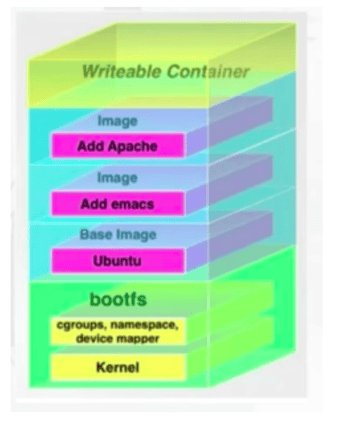
    For starters, José laid out Docker’s default mechanisms for security:

    • Linux kernel namespaces
    • Linux Control Groups (cgroups)
    • The Docker daemon
    • Linux capabilities (libcap)
    • Linux security mechanisms like AppArmor or SELinux


    Screen Shot 2018-04-08 at 7.17.58 AM

    José walked through others tools, add-ons, best practices, etc., to increase Docker container security. I will cover most of them here.

    Docker Inspect Tool. The Docker Inspect Tool is built into Docker. It provides information about the host name, the ID of the image, etc. and it comes up when you start Docker.

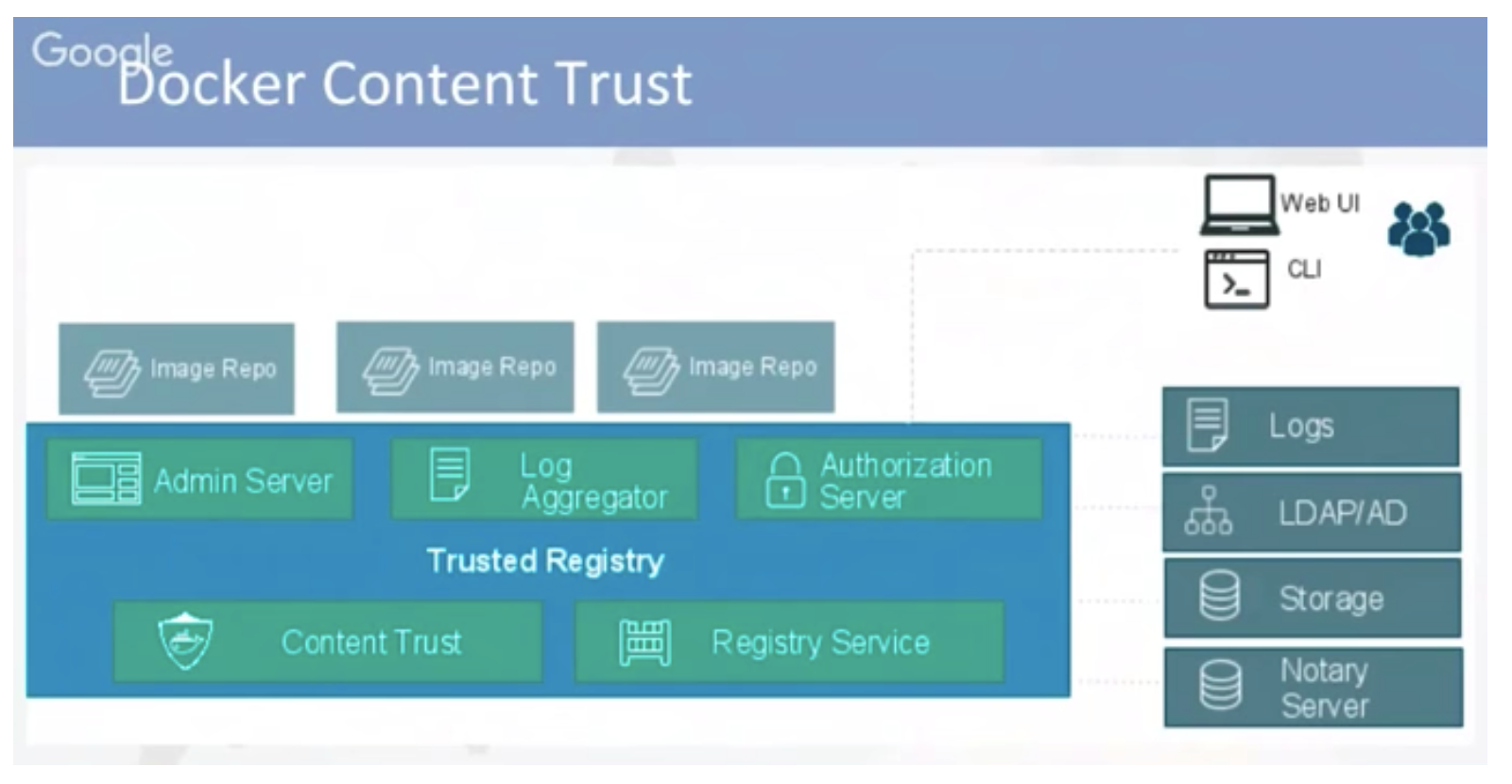
    Docker Content Trust. It protects against untrusted images. It can enable signing checks on every managed host, guarantee integrity of your images when pulled and provide trust from publisher to consumer.

    Screen Shot 2018-04-08 at 7.19.01 AM

    Docker File Security. Docker files build Docker containers. They should not write secrets, such as users and passwords. You should remove unnecessary setuid and setgid permissions, download packages securely using GPG and certificates, and try to restrict an image or container to one service.

    Container Security. Docker security is about limiting and controlling the attack surface on the kernel. Don’t run your applications as root in containers, and create specific users for testing and policing the Docker image. Run filesystems as read-only so attackers can not overwrite data or save malicious scripts to the image.

    José provided a useful checklist to check the security of a Docker container, but it’s not a short one. Remember, if you are going to deploy hundreds or thousands of these containers, you’ll want to ensure consistent handling of security concerns to keep the hackers at bay:

      • Do not write secrets to Docker files
      • Create a user
      • Follow version pinning for base images, packages, etc.
      • Remove unnecessary setuid, setgid permissions
      • Do not write any kind of update instructions alone in a Docker file
      • Download packages securely
      • Do not download unnecessary packages
      • Use COPY instead of ADD
      • Use the HEALTHCHECK command
      • Use gosu instead of sudo whenever possible
      • Use no-cache (if applicable) when building
      • Enable Docker Content Trust
      • Ensure images are free from known vulnerabilities
      • Ensure images are scanned frequently throughout your DevOps pipeline
      • Ensure your images, packages are up to date
      • Use file monitoring solutions for image layers (if required)

    Auditing Docker Images. You can scan your images for known vulnerabilities with a wide variety of commercial and open source tools such as:


    All of these solutions can be integrated in one element of your CI/CD pipelines — some can be integrated in multiple places.

    José explored these solutions and best practices in more detail and offered up technical implementation tips in his full talk, available for free here. If you are working on or interested in Docker security, his talk is worth your time.

    Thirsty for more DevOps discussions led by practitioners (not vendors)?  You too can binge watch 99 other talks from the All Day DevOps conference here.

    — Derek E. Weeks

  • Shippable Extends Scope and Reach of CI Service

    Shippable Extends Scope and Reach of CI Service

    One of the attributes of building a continuous integration (CI) platform on top of Docker containers is that it’s highly portable. Shippable is making good on that promise by delivering versions of its namesake CI platform that can be employed on Mac OS X, CentOS and Windows platforms as well as to the Ubuntu distribution of Linux.

    In addition, Shippable is make available a beta release of an analytics module that promises to improve overall DevOps efficiency.

    Manisha Sahasrabudhe, vice president of product management for Shippable, said the company’s namesake CI platform for managing application release cycles now supports every type of platform commonly employed in a DevOps environment.

    DevOps teams can now run jobs across multiple operating systems that share access to the same GitHub or Bitbucket repositories. The latest release of Shippable also provides those teams with the ability to granularly allocate a pool of available resources for each job running, Sahasrabudhe said.

    Other new capabilities include support for custom scripts and images, as well as the ability to run tasks inside or out of a container.

    Finally, Sahasrabudhe said DevOps teams can now also make of an analytics add-on module that DevOps teams can employ to identify bottlenecks, for example, and track various key performance indicators. The analytics module is intended to help organizations move more rapidly down the DevOps maturity curve.

    Individual organizations are move down that maturity rate at significantly different paces. But when it comes to DevOps, Sahasrabudhe noted the larger the organization is the more chaotic IT tends to be. Because Shippable is made available as a software-as-service (SaaS) application, the company is in a unique position to enable organizations to compare how they are performing various tasks compared to the rest of the Shippable customer base. Those same organizations are also keenly interested in what’s holding up application development. They may not necessarily be able to eliminate a bottleneck, but deeper insights into the overall process should enable the organization to plan better, Sahasrabudhe said.

    For example, organizations typically have a choice of programming tools at their disposal. Analytics could be applied to inform them as to how well any specific programming tool is being used to build specific applications by not only that organization, but also the entire Shippable customer base in aggregate, Sahasrabudhe said. Further on, Shippable also expects to be able to apply both machine and deep learning algorithms to the data its collects to provide even more predictive analytics, he said.

    One of the primary reasons many organizations are starting to shift all kinds of management platforms into the cloud is to create a central repository of knowledge that can be easily accessed from anywhere in the globe. Most application development projects today are highly distributed endeavors. Hosting the tools needed to manage those projects enables developers to continue working locally on their own code, while still giving the organizations insights and control over the overall project.

    Analytics provided via the cloud is not a substitute for a project manager. But it does provide a means for everyone across the organization, including business leaders, to have a much firmer grasp of the realities of modern application development.

    — Mike Vizard

  • How to Isolate Development Environments: Vagrant vs. Docker

    How to Isolate Development Environments: Vagrant vs. Docker

    “It works on my machine.” This line has become an excuse often overused by developers to escape the burden of having to investigate problems experienced by end users that they are unable to replicate on their development machines. While this may excuse developers—after all, they didn’t experience the problem during development and therefore couldn’t have anticipated it happening to some users—it doesn’t solve the problem.

    Sometimes, issues are caused by end user mistakes, such as skipping a step in an installation process. Often, however, the problem arises from some disparity in the development and server or user environments. With the vast assortment of machine configurations in use—different operating systems, hardware specifications and software versions—even the slightest differences in development and production device configurations can cause dramatic differences in the behavior of many applications.

    This can be a serious issue, as it requires members of the development and operations team to identify the root cause of the problem, which potentially introduces unexpected and often significant delays in deployment and production schedules. Especially in the DevOps culture where rapid development, frequent deployment and highly dependable releases are of highest priority, such unexpected delays are completely unwelcome.

    Thankfully, there are a number of tools that have emerged to address this very problem. In this article, we take a close look at two popular tools with two different approaches to solving the problem of environment disparity: Vagrant and Docker. Like many DevOps tools and technologies such as continuous integration, these tools work well with all types of project setups, including IT outstaffing (dedicated development teams). Let’s compare these two solutions and see which types of scenarios each one is best fit for.

    Vagrant vs. Docker

    Vagrant offers to solve the aforementioned problem by enabling developers to easily create and manage virtual machines (VMs) in which they can develop, test and deploy applications. By using a VM, a developer or DevOps engineer is assured that as long as the application is run within the virtual machine, its behavior will be the same regardless of the actual hardware and operating system of the computer that the VM is running on.

    Docker offers a similar solution, but uses a different technology. Instead of using virtual machines, it uses containers, which are similar to Linux Containers (LXC) that are included in Linux systems. Containers serve a similar purpose as virtual machines, but at a much less extensive level and, therefore, are much more lightweight. Rather than isolating an application in its own virtual computer with a full operating system, containers simply isolate an application inside an environment with the minimum components necessary to run the application. This includes system libraries and tools, settings and configuration files and a runtime environment. Compared to virtual machines, containers consume much less resources from the actual machine on which it is being hosted. Docker has a comprehensive documentation library that includes information on what Docker and Docker containers are, how to install Docker and how to execute a Docker run.

    Vagrant and Docker share some common goals. For instance, in software development, both tools enable a more streamlined and consistent software development and deployment workflow by eliminating the need to worry about the application behaving differently in different machines. Moreover, it offers some degree of security to the host machine: Since the application is isolated from the rest of the system, issues caused by one application should remain within the scope of its environment and should not break the rest of the system.

    There are, however, a number of important differences between Vagrant and Docker that make them suitable for different types of applications. Let’s examine more closely how these two differ.

    Scope of Isolation

    While both Vagrant and Docker wrap applications into isolated environments, they differ in the degree to which these applications are isolated—or, effectively, the scope of the isolated environments. For Vagrant, the scope is the entire operating system: An application can access any and all components of the full virtualized machine and operating system it is being run in. For Docker, on the other hand, the scope is much narrower, as an isolated environment is limited to a single application or service: Each container is created specifically for an application. Effectively, this implies that with Vagrant, a single isolated environment can run multiple applications at once, while with Docker, running multiple applications will typically require the use of a separate isolated environment for each one.

    Resource Consumption

    Since Vagrant virtualizes an entire machine with a full operating system, it naturally has a high overhead cost and consumes a lot of resources from the host machine. With Docker, on the other hand, an app within a container shares the same kernel—the core module or component of an operating system—with both apps in other containers and the host machine itself. This enables containers to have much less overhead and subsequently consume much less resources from the host machines than do virtual machines. In effect, a host machine running apps with containers can run up to three times as many applications as it can with virtual machines. Moreover, since launching apps within containers won’t necessitate having to wait for the virtual OS to boot up, launching apps can also be substantially faster with Docker than it is with Vagrant.

    Limitations

    Vagrant and Docker also have their own limitations. Docker, for instance, is currently natively available to two operating systems: Linux, where it uses the Linux Kernel, and Windows, where it uses the Windows kernel. Docker is also available for MacOS, although it runs Docker containers on top of a Linux virtual machine. Moreover, Docker has some security issues—its use of containers make it less secure than Vagrant. Since applications within Docker containers share the same kernel with each other and with the host machine, it’s possible for a malicious program within a Docker container to affect other containers and even harm the host machine itself.

    While Vagrant, which uses virtual environments, is much more secure in this regard, it is limited in that it is meant only as a tool for development and generally not recommended for use in production environments. In other words, it is meant to provide a convenient way to virtualize the environment of the server to which an application is eventually going to be deployed, but once in production, the application must be run directly on the host machine. On the other hand, Docker provides a consistent environment for applications throughout the entire software development workflow, from creation to production.

    Conclusion

    Being able to isolate applications into their own controlled environments has proven to be extremely useful for software development, as it eliminates many hardware and software incompatibility problems that applications may run into when executed in different machines. This is particularly useful in DevOps environments, as it streamlines the whole software development workflow by eliminating sources of unexpected problems, thereby potentially shortening development cycles.

    We have looked into two popular tools for environment isolation, Vagrant and Docker. Both isolate applications from the host machine, although to varying degrees and using different technologies. Vagrant uses virtual machines, which can support multiple applications at once, but can be heavy on resource consumption and is only recommended for use during development. Docker, on the other hand, uses containers, which support only single applications, but is much lighter in terms of resource consumption and can be used both during development and during production.

    As such, these two tools cater to different business needs. If you require the development of a complex system of multiple applications interacting with each other, using Vagrant may be beneficial, but if you’re aiming to create a single portable application and want to minimize resource consumption, then Docker is the way to go.

    — Myron Monets

  • Persistent Storage: You’ll be Hearing More

    Persistent Storage: You’ll be Hearing More

    As containers take over the IT environment, a problem that has existed since virtual machines (VMs) became popular has become more urgent: how to keep persistent storage, and keep it consistent.

    Just as a business designed for foot traffic of 50 to 100 people per hour does not work well when it sees 500 to 1,000 people per hour (think Black Friday in most places these days), storage designed to hold data that persists across instances and even installations often struggles in containerized environments.

    There are a couple of reasons why this is so.

    First, we now treat our servers as disposable resources. If one dies, we leave it dead and simply spin up another. Normal processing keeps the dead server for later evaluation, but many shops do not follow this best practice. The issue has to do with servers that die when writing to persistent storage—what was the state of the write? Did it get interrupted mid-transfer? Luckily, applications can be designed to account for this, and the increasing prevalence of transactional processing in applications that are not based on a database management system (DBMS) shows that people are doing just that.

    Second, the number of server instances hitting those persistent stores is higher in a containerized environment—they are smaller, lighter and faster to spin up and their container density is generally higher than VM density. Contention issues go from zero to full-on when an app goes from “one server is writing to this persistent store” to “two servers are writing to this persistent store.” And often there are hundreds of servers writing to the persistent store. As mentioned, the stop-gap is to implement some form of transactional processing to prevent writes and overwrites.

    Persistent Storage: It’s Got Issues

    The problem is, we end up with transactional processing written into dozens or hundreds of server instances to protect a small number of persistent disks. This is not optimal, and at a minimum increases software complexity.

    That’s why you’ll be hearing more. Here are a few places working on simplified but powerful persistence ideas:

    {code} Rex Ray

    Originally part of EMC, {code} is Dell’s open source group and it has led the charge on the container storage interface (CSI) that facilitates persistent storage. Examples the company has implemented include databases and Minecraft, but the technology works for anything that must be stored on disk.

    Container Orchestration Engines and Cloud Providers

    All of the well-known container orchestration engines (COE) and infrastructure-as-a-service (IaaS) cloud vendors have methods to handle persistent disk—some more transactional than others and some more work than others. Expect this process to become standardized (and possibly for that standardization to take the form of CSI above) in the next year or so. If persistent data is critical to your container environment, it is worth looking at how each solves the problem, as some of the solutions are procedural (such as Docker’s recommendation), and thus are somewhat portable across COE solutions. The weakness of IaaS providers is portability between systems, but that is true of all IaaS procedures/solutions at this time.

    Virtualization Engines

    Both VMware vSAN and Microsoft NTFS have systems for providing persistent disk. While much of this is the simple case of “disk that doesn’t disappear when the container does,” that is the bulk of persistence needs. Expect the support to continue to expand, perhaps even going so far as to implement 100 percent transactional shares.

    Storage Array Vendors

    Storage array vendors have useful tools for this area. While what you use to access their storage is not too terribly large a concern to these vendors, they do have a vested interest in seeing that their storage meets the needs of the changing enterprise. As such, they are delving into methods to help make persistent storage available and consistent. This is not a huge stretch for the vendors, as the systems they produced were always intended for multiple access. Where they lag (and where Rex Ray steps up) is in interoperability/interchangeability of vendor solutions.

    Conclusion

    For those with controlled access to persistent/shared storage, these issues are not that big a deal. For high-volume or high-turnover DevOps installations, though, persistent storage is another link in the chain of reliability that must be protected. Keep kicking it, and hopefully before your need becomes urgent, a solid system will be in place to manage and protect persistent stores.

    — Don Macvittie

  • DevOps Gets More Exciting in 2018

    DevOps Gets More Exciting in 2018

    As 2017 winds down and the IT industry prepares for 2018, there are a number of DevOps trends that everyone should be keeping their eyes on. It’s not so much that something incredible and explosive is expected in the new year. Rather, 2018 will be a time when DevOps starts to mature alongside other trends important to developers.

    These trends don’t guarantee organizations will be immediately successful with DevOps. Most still will struggle with the management aspects of DevOps, especially the need to keep feuding silos within IT working together as one happy group. Assuming developers, QA, and Operations can all learn to get along and act as a team, the technology supporting DevOps will continue to improve and the ecosystem will grow.

    Here are some of the DevOps trends that Amalgam Insights is following for 2018:

    Everyone Loves Containers and the Ecosystem Grows

    Containers have become a common technology in many IT departments. Although the majority of applications remain housed on single servers and virtual machines, container deployments are growing. Containers are an important enabling technology for DevOps—by creating small, transportable bits of applications, containers make it easy for IT silos to work from the same page.

    In 2018, growth in container deployments is expected to accelerate as large companies outside the software industry, such as those in financial services and health care, adopt microservices infrastructure. Containers that are especially suited to microservices will continue to expand rapidly.

    Increased container growth is also due to an expanding ecosystem. More companies have entered the market with products necessary to large-scale production applications. Products now exist for securing, managing, deploying and enhancing container services that weren’t available a few years ago. What’s more, containers are now available in all the major cloud services including Oracle Cloud, Microsoft Azure, AWS, IBM Cloud and Google Cloud. Containers are becoming enterprise-ready and large enterprises are feeling more confident using them.

    Takeaway: Growth in the ecosystem contributes to growth in container deployments while expansion of containers entices companies to enter the ecosystem. Containers have reached mainstream normalization and we expect to see fast expansion throughout 2018.

    Kubernetes Eats the Container Orchestration World

    In the container orchestration space, Kubernetes has become the tool of choice. Orchestration is the deployment and management of container clusters and is necessary to deploy them at scale. Kubernetes, originally a Google open source project and now managed by the Cloud Native Computing Foundation, has become the most popular orchestration tool available. That became obvious when Docker decided to distribute and support Kubernetes, despite having invested in its own orchestration system called Swarm. CoreOS, Microsoft Azure, Red Hat OpenShift, Docker and others have their own enterprise distributions as well.

    Kubernetes brings to the container ecosystem a relatively easy way to manage containers at scale. In large container deployments, containers are constantly being spun up, shut down, moved and copied. Once container clusters are in place, they must be monitored for security and service failure.

    During development, there will be a number of clusters that must be managed for development, test and final release to production. Doing this manually is close to impossible when even a moderate number of containers are in the DevOps pipeline. Kubernetes provides the tools and workflow to simplify these tasks.

    Takeaway: As container production clusters grow and as they are integrated into the DevOps pipeline, the need for orchestration becomes acute. Kubernetes has won the game and is now the tool of choice for orchestration. 

    The Pipeline is Getting More Integrated

    DevOps is often described of as a “pipeline,” In this context, a pipeline is a linear workflow that moves from build to test to release. As DevOps becomes more common in organizations, the pipeline grows to include additional test phases, monitoring and continuous improvement to create more of a cycle than a linear flow.

    One of the great impediments to making DevOps a reality is a lack of tools that support the entire pipeline. There are plenty of tools that help build applications, such as IDEs and code repositories from companies such as IBM, Microsoft, GitHub and Oracle, as well as dozens of open source products. Testing is well-supported with test data management and test plan management tools from companies such Atlassian, Informatica and Oracle. Release management and deployment products are widely available from Atlassian, Microsoft, IBM and many other companies. The problem lies not with the support for the individual steps in the pipeline, but with the integration of these tools to provide a complete end-to-end workflow. This creates a disjointed workflow, prone to errors and supportive of silos instead of collaboration.

    This is changing, however, and announcements late in 2017 herald toolsets that can provide a continuous DevOps pipeline. A great example of this is the newest versions of Microsoft’s developer tools that were debuted at Microsoft Connect(); in November 2017. Tying together the Visual Studio debugger with Kubernetes allows developers to test and debug as close to the production environment as possible and then deploy cluster to the test environment. That, plus the upgrades to Team Server, shows the commitment Microsoft has to creating integrated DevOps systems.

    Takeaway: While DevOps tools are still more or less disjointed, we are seeing a movement to fully integrated toolsets that enable the end-to-end DevOps pipeline.

    2018 is the Year of DevOps—Unless IT Management Gets It Wrong

    This coming year could be the year that DevOps truly takes off and becomes mainstream. Those who believe it is already mainstream now are fooling themselves. Management may believe their organization is implementing DevOps, but too many barriers still exist—especially management itself. IT departments remain heavily siloed and independent of each other, as do development tools. DevOps at scale requires, above all else, a collaborative and cooperative approach. Sadly, that does not yet exist in many IT departments. As tools reach maturity and best practices become common, managers become the inhibitors of DevOps. New management structures, incentives and thought processes need to be in place or the money spent on tools is wasted.

    Takeaway: All the DevOps pieces are in place except for the breaking down of functional silos that exist in IT departments. 2018 may be the year of DevOps if IT managers can create a new environment of cooperation.

    About the Author / Tom Petrocelli

    Tom Petrocelli is a contributing analyst with Amalgam Insights. His area of interest is collaboration and new ways of work, developer tools, IT project efficiency, governance and methodologies and DevOps. Most recently, Tom worked for a large, global banking corporation. Previously, he was the research director for Enterprise Social, Mobile and Cloud Applications at Neuralytix. He is an experienced marketing, technology and business executive with 30+ years in the computer technology industry. Tom’s background spans software engineering, systems architecture, IT, product management and marketing and general management. Connect with him on LinkedIn and follow him on Twitter.