Author: Don Macvittie

  • Culture, Not Changing Much in DevOps

    Culture, Not Changing Much in DevOps

    One of the things that has bemused me from day one of the DevOps movement is how culture is viewed with an odd dichotomy. It is simultaneously DevOps’ greatest strength and its greatest weakness.

    Of course, there is a simple and reasonable explanation for this phenomenon. DevOps wants to change culture. Cultures that are resistant to change are typified as “bad” and those that are not are typified as “good.” It is never that simple, but that’s how the portrayal goes.

    After a decade, you would think we’d have massive IT culture change supporting DevOps initiatives at one level or another (somewhere on a scale from pilot project to corporate standard) pretty much everywhere.

    But data seems to indicate that this is not the case. Disclaimer here: I fall more on the “automation” side of the “What is DevOps, really?” question. I don’t think that matters here, since I’m pointing at data from the DORA “State of DevOps Research Report,” which is 1,900 of you all speaking, not me.

    Image Credit: DORA State of DevOps Report

    Most of the coverage on this report is by people who have bet their entire career on DevOps—a solid bet, but one that can lead to stilted coverage, which takes all the positives and hoists them high. And there is a lot of positive to be found. But I’ve noticed a trend of not looking at the data with a critical eye. The bit that I’d like to focus on today is what DORA labels “Firmographics”—a breakdown of respondents by title.

    Only 27 percent of those who responded were on a DevOps team. Presumably because Google is a sponsor of DORA, it included Site Reliability Engineering with DevOps teams, and that’s a fair inclusion, since SREs by definition are doing DevOps.

    Consider that data point representing “culture change” in a world where the respondents are, by self-identification, doing DevOps. Some will argue this is the wrong way to look at it, but one of the issues that culture people bring up constantly is breaking down silos and organizing around product or product portfolio instead of development and operations. But it seems more as though organizations are knocking holes in silos and communicating through them—which means we should pay more attention to that style of DevOps and quit harping on organizational change. Again, this fits well with my world view, which has always been “That specialist in a shared bit of hardware is not moving to a DevOps team.” The EMC specialist (for example) adds value to the entire org because of their domain-specific knowledge, not because of their deep understanding of the entire DevOps toolset. Once you’ve carved out exceptions for storage, networking and platform specialists, moving everyone to a DevOps team is pretty moot.

    I won’t conjecture why only 27 percent are moved into dedicated teams, nor why that number did not go up from 2017. I have a predilection toward “because it’s not necessary,” but likely there will be two camps when this discussion gains steam because more reports show a low rate of change—Group A will be, “Because those people are resisting change,” while Group B will be, “Because those people don’t feel they need change.” Guess what? That will be the same group of people, and that angle of discussion will be irrelevant. The important bit will be, “Are you completing everything you need to get done, and what is your structure?” That’s where the meat of the discussion will need to occur. Because by deduction, 73 percent of people participating in the DORA survey are doing DevOps while not being on a dedicated (eg: reorged) team.

    And that’s perfectly okay, as long as they’re achieving the goals, that’s what matters. The how is useful when deciding to move in a certain direction, but delivering is the thing IT should—and generally is these days—be gauged on.
    — Don Macvittie

  • DevOps and Security: Focus on Importance

    DevOps and Security: Focus on Importance

    Why have I written “DevOps and Security” and not DevSecOps or one of the other names that floats around? Because this post is aimed to apply to everyone—not just those far enough along to have melded some of their security practices into DevOps.

    Note: After I wrote this article but before I posted it, Bill Doerrfeld wrote this excellent example/solution post. It’s worth a read.

    From the beginning, DevOps has struggled with a couple of touch points that don’t give themselves easily to the “frenetic movement” of DevOps. Security is one of those items. If your organization does manual vulnerability assessments, it is unlikely that this testing slips well into the DevOps process chain.

    Most organizations that are dead set on making DevOps their primary dev/test/deliver platform have simply put limitations on security—limiting what long-running processes can be part of DevOps or dropping unaccommodating processes altogether. Some spectacular failures have occurred because of this type of thinking—and more will come—but for many the benefits of DevOps outweigh the risks. Will I get flamed for this paragraph? No doubt. That doesn’t make it untrue.

    Given that IT has almost never given security the full leeway/authority that they want—and in shops where IT did, business often stepped in to say no—this really is not a massive change from how we have always done business. Just in the modern development environment, where a ton of libraries come from outside and configuration is software or data, there is a greater risk from running roughshod over the security team.

    So what can security do to minimize the risk? Start looking more at enterprisewide and architectural risk. Accept that app or app portfolio team X is not going to give you time/resources to thoroughly vet their product and focus on things such as configuration files and malicious code embedded in that external library “Bob’s Really Good GIF Drawer™” that the team insists on using. Focus on the database configuration being in GIT or a shared (public/private) repository and what mischief might come about should attackers get at that repository. Run some of the increasingly sophisticated checkers against external libraries and review the results. As has been the growing case for years now, use automation to at least minimally check apps for things such as SQL Injection, but focus actual man-hours in places that might impact more of the organization. It might be worth the fight to get a full-on security review for applications or an application portfolio that touches the customer database, but perhaps not so much for the app used to schedule a conference room, even if customers are using it (unless it touches the customer database, of course; then see the first part of that statement).

    Worry about network configuration as code, database configuration as code and the whole slew of unique security issues that come from public cloud. They’re manageable, and there are tools to help. Just make sure you have it down, because architecture is going to be the new target. A hacker doesn’t have to hack your DC if you left a public cloud storage bucket misconfigured and the data they want is in that bucket.

    In too many organizations, the CISO is increasingly treated as chief compliance officer (assuming compliance does not interfere with DevOps cycles) with less to do with security and more to do with legal protection should security fail. Don’t be that organization. Security doesn’t have to be perfect; it just has to make you a hard enough target that only someone who really has it in for your company will keep trying.

    As for Devs doing Agile and Ops doing DevOps, as has been true from the beginning, some of the security burden needs to fall to you. Security doesn’t have its hands in what you do every day, so ask them for guidance, learn from them; make it so they need to be active in every step, then include them in every step, because the security environment changes faster than almost anything else in IT. And when you are implementing monitoring, include security monitoring. In most DevOps shops, the question isn’t, “What can we monitor?” but rather, “In this wealth of data, what do we want to monitor?” Well, the answer should include, “What security thinks will help protect us and our customers’ data.”

    As automation continues to increase, this tension will continue to ease, and focus can increasingly shift to locking down the really important bits such as database configurations and repositories. Until then, keep fighting the good fight and protect your customers’ ass(ets).

    — Don Macvittie

  • Survey Says: Digital Transformation is Hard

    Survey Says: Digital Transformation is Hard

    IDG and Insight Datalink recently conducted a survey into how companies were doing on their digital transformation journey. Like so much in technology these days, it is easy to feel as though you’ll be left behind if you aren’t well on your way with digital transformation.

    You’re not.

    Who Are You People, Anyway?

    The survey had decent industry distribution and was focused on director level and above in larger organizations, with more than a third of respondents in financial services or high tech. So in short, a third of respondents are the very organizations most motivated to implement a digital transformation project.

    Nearly Half of Respondents Haven’t Even Started

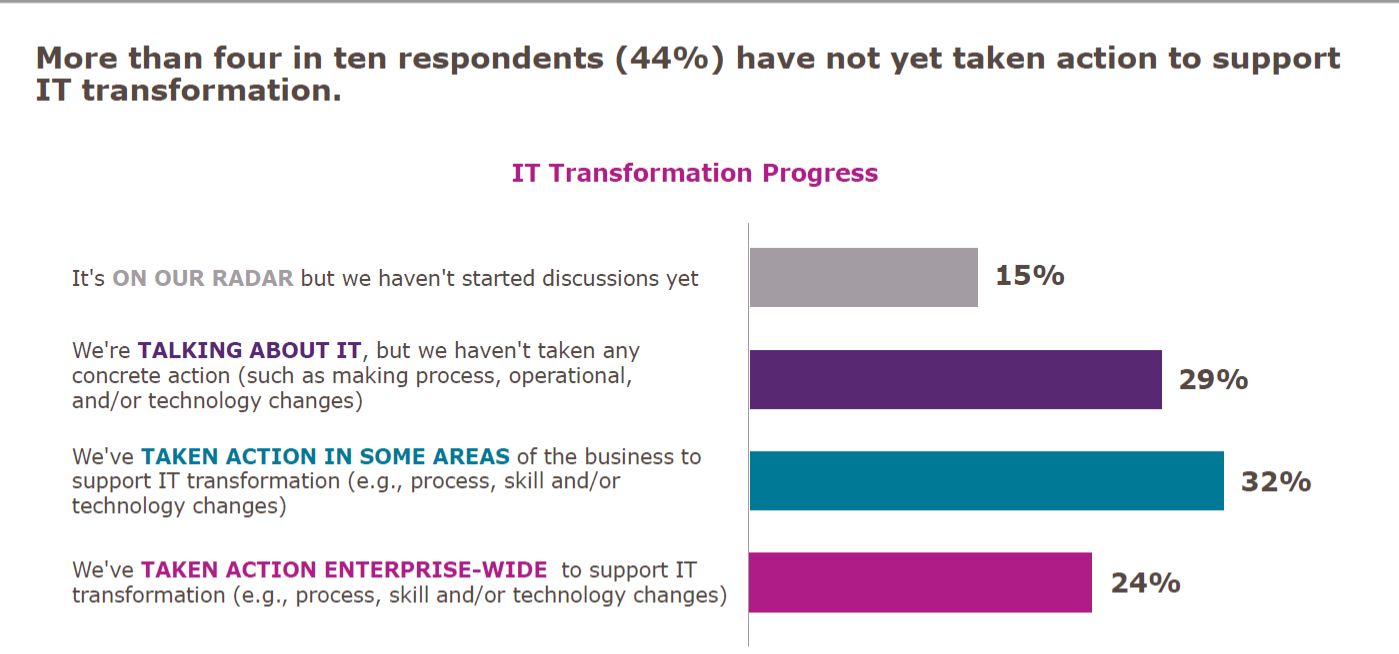
    Let’s get the easy one out of the way first: The survey showed that a significant proportion of companies had done nothing more than talk about digital transformation.

    Adding up “It’s on our radar” and “We’re talking about it,” we get to 44 percent of respondents who haven’t even started. In fact, due to the nature of digital transformation, I would argue that less than 1 in 4 are actually doing it. Then there is the 24 percent who are undertaking enterprise-wide transformation: You can convert projects, but that isn’t transforming the way you do business. It is a start, so I admit this is well and truly a debatable statement, but true transformation is cross-app, cross-team, agile and locale-mobile.

    Why So Small?

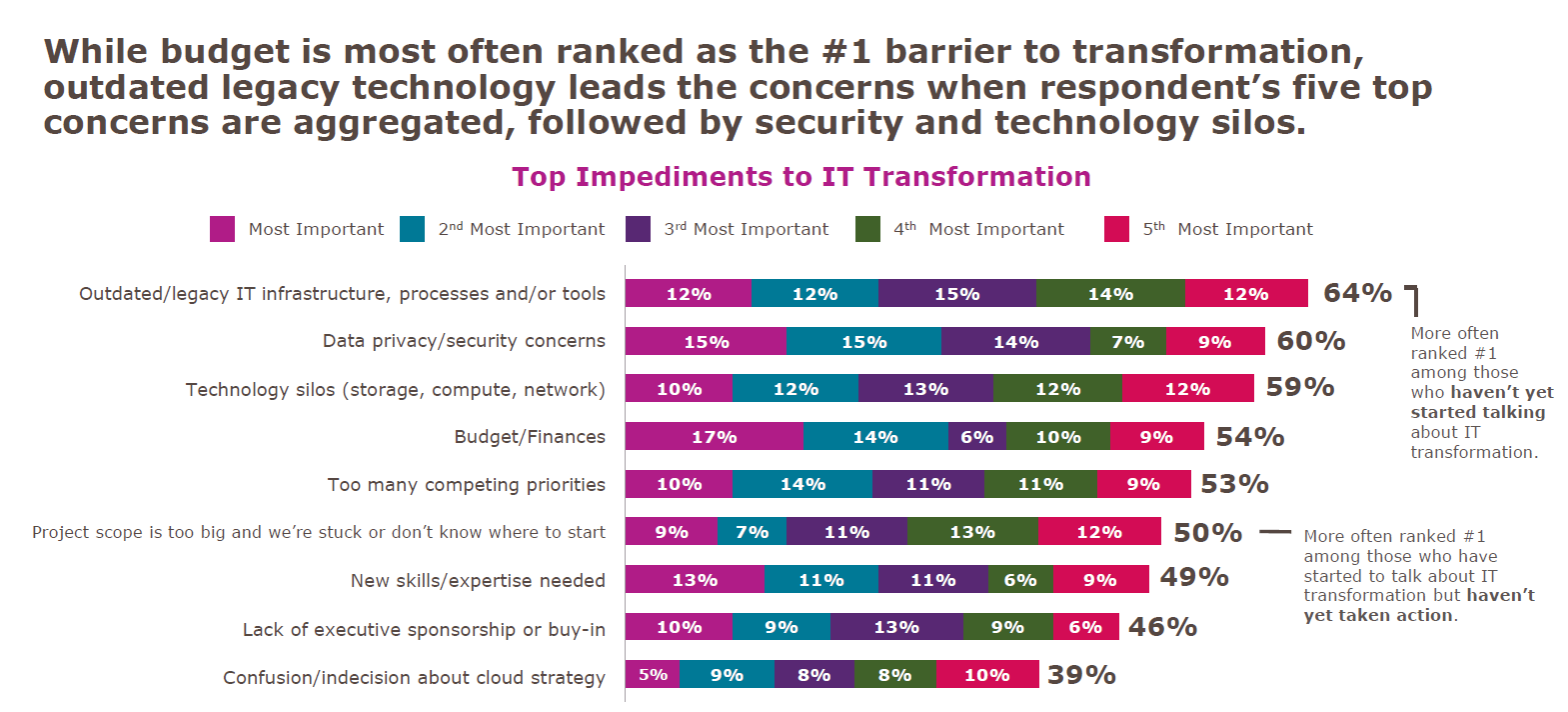
    Since we frequently hear about digital transformation and how important it is, “Why are the numbers so low?” is a valid question. The truth is that transformation of complex infrastructures is difficult. There just isn’t any way to get around that fact. When there is a mainframe with heaps of data and a midtier that often has replication of mainframe functionality on it, then separate apps that are doing web-based transactions in (insert language here, but normally Java in the above environment), there are many parts that are complex, and something as simple as moving and/or rationalizing data stores can be majorly complex.

    But I won’t go on and on here, I’ll simply show you what IDG found.

    Looking at mainframe toolsets in particular, there have been massive steps forward over the last several years to make them more compatible with modern development and deployment practices. But making use of those changes often requires updating systems that are not otherwise broken. And there is always the risk that such updates will break something. The more research an organization does into modernization tools, the more comfortable they are that there is a valid path—but that doesn’t make it easy when it is added work.

    Data privacy also ranks high, and that is because IT has been dealing with locking down data in a data center for ages. Additionally, some spectacular configuration mistakes in public cloud datastores have made us all gun-shy. There are solutions to data security in public cloud from a variety of companies, but that doesn’t change that we’ve all followed “due to bucket misconfiguration” stories while cringing.

    Technology silos are a fact of IT. There can be some breaking down of those silos, but they are unlikely to disappear completely. The EMC specialist or Cisco specialist are unlikely candidates for elimination in the quest for reduced silos. (I just picked two roles whose knowledge sometimes astounds me—both for the depth these people can have, and for the requirement that they need that depth.) Working your network and storage teams into the digital transformation without undermining the thing that makes them valuable—their silo-specific knowledge and insight—is a challenge that can be achieved, but not by “breaking silos”; more like, “increasing communications between silos while reducing silo behavior.”

    If You Dive Like That, You’ll Stall!

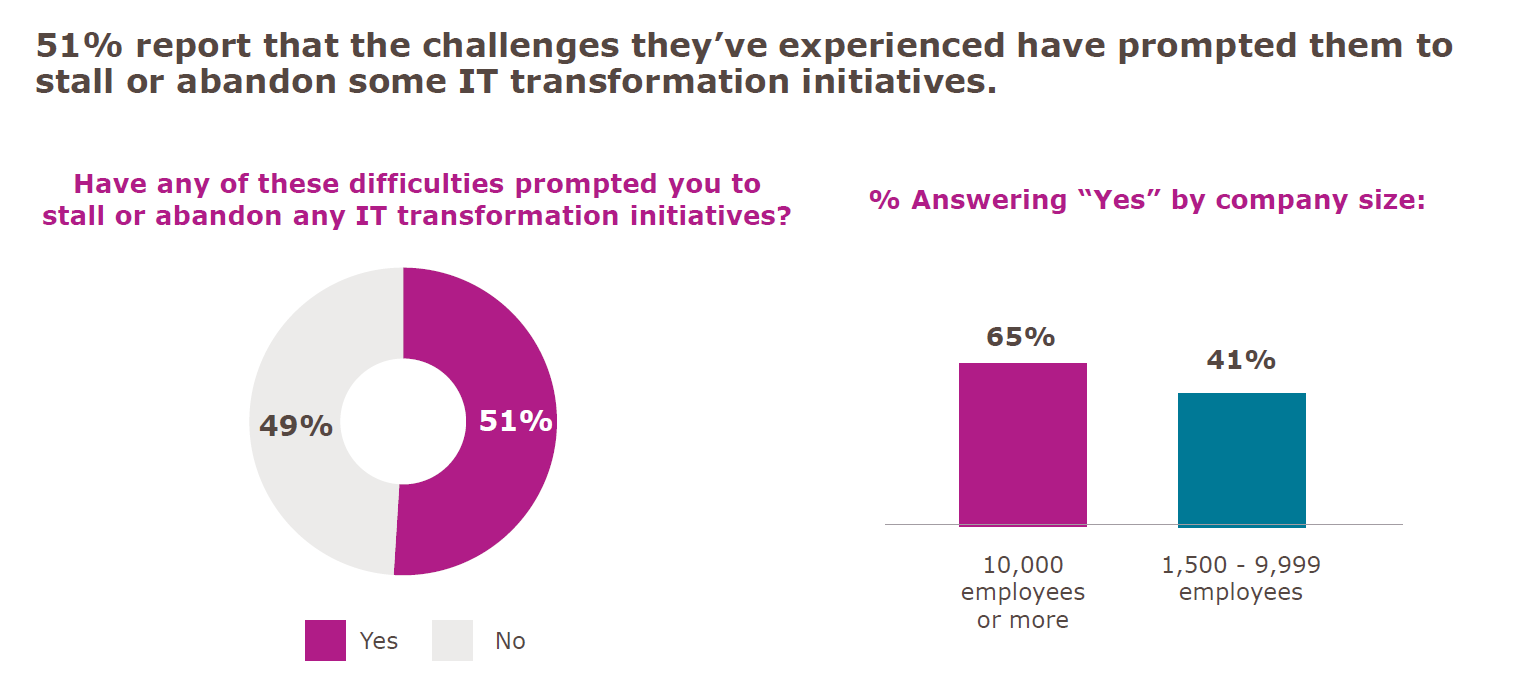
    The last point in this survey that I’d like to address is the “Stalled Digital Transformation Initiatives” slide. (There is a ton of good data in this survey, but these three fit together really well, so I pulled them out.) The fact is that if you are attempting to transform a complex system, you will have wins and losses. Some things will work out better than you planned, while others will not work out as you had hoped at all. I believe that, due to the question’s wording, that is what we are seeing here:

    Yes, 51 percent would be appalling in any other context, but the question was, “Have any of these difficulties prompted you to stall or abandon any IT transformation initiatives?”

    Any is a big word. In fact, any is the largest word in that question. If it were worded with “your” instead of “any,” I will guess the positive answers would be a limit approaching zero.

    If you pronounce a large reorganization and implementation of a slew of new processes, statements such as “that doesn’t fit our infrastructure” are going to shake out. That doesn’t spell doom and gloom for digital transformation; it is simply another obstacle to overcome. Dropping it for now, while focusing on the more viable portions of the plan is common sense, unless whatever isn’t working is core to the transformation. Then it still causes you to stall while figuring it out.

    Honorable Mention

    On average, respondents said they expected more than one-third of their digital transformation activities to be conducted by third parties. That’s a big chunk. Not “off-shoring” big, but still a large portion of work they expect to outsource to get the job done.

    So. Much. Typing.

    Okay, I’m about to shut up now. The takeaway is pretty straightforward. Contrary to hype, you’re not behind on your digital transformation. It’s a tough job, and knowing what you hope to get out of it before starting will help you to continue when things get rough. And they will get rough. The word “transformation” should tell you that. But keep going: There is better/faster/smarter/more mobile out there if you can stay on track, and because they are complex systems getting complex modifications, slow and steady does indeed win the race.

    And just remember, you’re responsible for those horribly complex, hard-to-transform systems doing what they do. Every day. Making them better and easier to manage is a no-brainer, but so is taking a moment to bask in the idea that you’re keeping things running in an environment that is complex.

    — Don Macvittie

  • The (Tool)Chains That Bind

    The (Tool)Chains That Bind

    As DevOps functionality continues to expand, we’re looking at a new vista for freedom of applications. Our apps can be moved around as we need them; we can build-test-deploy on the fly; and we have the ability to monitor whatever is needed. The price we pay is one we gladly take up: implementing new toolchains to drive the transition and getting those toolchains integrated into the entire development and operations process. Yes, we have an entire organizational side, too, but for this blog, we’ll talk about tools.

    Why Tools?

    Why are we going to discuss tools alone if this is about DevOps? Because it is a different set of problems to move from one organizational structure to another versus moving from one toolset to another. While DevOps is giving us independence from a lot of traditional infrastructure issues, the reality is that it is creating dependencies upon the very tools/toolchains we are using to gain that independence.

    Confusing? Let’s try looking at it differently. The new vendor lock-in will be DevOps tools. While they are freeing us from vendor lock-in on several fronts, you are unlikely to make a quick move from, say, Ansible to Puppet or vice versa. It can be done, and some organizations even do a little of both to make sure their options are open. But most shops will pick one and run with it, because that creates a single training and maintenance direction.

    Why Now?

    I (and others) have alluded to this issue in the past, but it is of growing importance as vendors start to take what should be cross-portable tools and customize them to limit portability. Container management, for example, is available on every major cloud vendor these days, but using the vendor’s bundled container service is convenient and more difficult to move away from. That is but one example of many.

    And the importance of these tools/toolchains is growing at the same time that their use is growing. Soon, in a DevOps-heavy shop they will be essential and locked-in as if they were cemented.

    So, What Are You Saying?

    Pick DevOps tools as if they will be there for decades. This is not how DevOps teams are encouraged to think, but you are building a DevOps infrastructure that, if adopted broadly in the organization, will be difficult to move away from to any significant degree. Just like these days you would need a driving reason to port thousands or hundreds of thousands of lines of code, DevOps scripts are growing and the number of DevOps scripts are multiplying. As you fold security, storage and networking into that environment, and build real-time reporting that you are going to rely on for years to come, make certain what you have is good, if not great. In many ways, DevOps thrives on “good enough” without thought to long-term futures, but the investment required to have a fully developed DevOps environment strongly implies that what an average enterprise is doing today will be what it is stuck with for a good long while. That’s not a place for “good enough” if you know there is better out there.

    It’s Not All Unchangeable

    Some bits of the environment can change over time, of course. Better data collation/integration technologies no doubt will take over for whatever you are using for reporting now, as well as AI-based solutions that can plow through the growing pile of machine-generated data to get a systemic view of what is happening. But for the most part, build it like you’ll be maintaining it for years to come, because much of the environment you will be.

    — Don Macvittie

  • Boxes vs. Services: The Infrastructure Equation

    Boxes vs. Services: The Infrastructure Equation

    Infrastructure is changing as more services replace the need for hardware-based architectures

    There has been a lot of change in the last few years, and that change shows no sign of slowing down. I’m one of those people who likes to know they could work offline if needed, yet in this day and age if you want me to install a fat client on my laptop, I go looking at your competition.

    Granted, for me the selection of these apps is small—I like having Office on my desktop to be able to use it to write or create presentations at will, regardless of whether I’m connected—but for most people, it is growing at a faster pace. The idea of buying a monolithic system that you have to install and maintain is becoming less and less appealing.

    That same syndrome is occurring in the data center, too, but with a twist. It is largely infrastructure that is feeling this pinch. Just prior to cloud/container mania, the idea was that each non-compute box in your infrastructure was a platform. It offered you a ton of functionality, all designed to simultaneously lock you in and help you get your job done. All in all, it wasn’t a bad trade-off, and we can see the same idea in the large public cloud vendors.

    The difference is, with an infrastructure box, you were making a serious investment upfront that offered you other functionality to sweeten the deal. Once that investment was made, it was natural and realistic to want to take advantage of the bundled platform functionality rather than search for yet another box to drop in your network.

    Containers and what survived of software-defined networking (SDN) have changed all of that. The ability to quickly spin up something in software that fits your needs perfectly and can be automated with your DevOps toolchain makes the idea of a platform box—with its high cost of entry and bells and whistles you will never use but might have to lock down—seem quaint.

    In the agile/DevOps world, boxes for low-level infrastructure are still necessary. Don’t get me wrong on that. If you are a large org, you are using one of a few vendors to do core switching and routing. But top-level (layer 4-7 and 8) networking is not something you would use those static boxes for.

    It used to be that all networking functionality was the same—it needed to be rock-solid and slow to change to guarantee that apps were functional. Over the last few years we have seen a move from “all networking is networking” to “this is low-level stuff that must be rock-solid, that is closer to application layer stuff that we can change rapidly, and thus need not be in the ‘rock solid’ category.” Load balancing is a great example of this (and yeah, I used to work for F5, which is the king of load-balancing): Load balancing was a network function that you went to a hardware vendor for if you were beyond a certain size. The resulting physical box might serve one or 100 apps and required specialized training or experience to manage.

    Today, load balancers are a systems function that you go to a software vendor for and work into your network with as many copies of the software load balancing as you needed. Or you turn on load balancing within your container management system and manage it there. Either way, it fits in with your agile/DevOps environment better, and is easier to get budget for your project.

    I expect to see this change intensifying. There is power in physical boxes for some things, but there is also power in portability and packaged deployment scripts. And a physical box is not portable to a public cloud, nor is it readily dropped into container management tools (though container management integration is getting better in most network security/performance appliances). Portability and ease of use will win over technical edge, in my opinion. Not because people are cheap and lazy, but because portability is key to agility and they are too busy.

    There are still things that just aren’t that portable, and I have yet to see convincing tools to make them that portable. Data is my go-to example because it is easy. If you have 2TB of data, your portability options are limited. For those with 2PB of data, there is no real option; the app is going where ever the data is, and that data is unlikely to move. Oh, if you were motivated, there are ways to move that much data, but then you’ve just shifted the problem to the new platform, because the data is still largely non-portable, and apps will have to go where the data is. Again.

    But for most functionality? Anything that can be made into highly portable software will be. And that software will run wherever it is most needed or most beneficial to the user.

    All in all, this is a good result. Multi-core, multi-network, multi-terabytes of memory PCs can rival many appliances for speed and functionality, and portability plus ease of integration makes software a winner. Just stay aware of where/when a physical box still makes sense, because the world doesn’t change as fast as high-tech marketing wants you to believe. A working appliance that does what is needed quickly should not be ripped out just because a software solution is available.

    But you knew that. Because you all rock. Keep kicking it, and use whatever solution serves the business best—which is a different equation for every business.

    — Don Macvittie

  • DataOps: DevOps Plus Big Data

    DataOps: DevOps Plus Big Data

    In traditional DevOps, there are the complimentary forms of development operations (that I call DEVops), and development operations (that I like to call devOPS). Between them they automate the toolchain and bring the people working on getting an application out to users onto the same team—not necessarily the same organizational team, but using their strengths in tandem to meet the needs of the business.

    DataOps is an interesting extension of DevOps. You still need all of the coding side to get data into the system and queries consistently maintained. You still need all of the operations side to get your database/noSQL/whatever up and running. In fact, while the development side in a DataOps environment might be (but isn’t necessarily) lighter, the operations side is almost always more complex. No matter the big data engine in use, it is a complex system in addition to other supported systems in a normal environment. My first installation of a big data environment (Cloudera, as it happens) was a weeks-long learning voyage. Only after I’d completed it did I use an automation tool (which is no longer available) to make it easy. My second round was hours … But it assumed the knowledge I had gained in the first attempt.

    The other bit of DevOps—ongoing monitoring and management—is also more complex in a big data environment, but we’ll come back to that in a moment.

    Once the normal DevOps systems are in place, ETL/data import tools will need to be supported also. The volume that these tools crunch through in a day makes their inclusion in DevOps in a data-heavy environment critical. If the data uptake is slow or the data itself inaccurate, there is an impact on the organization. This step also requires inclusion of data scientists, people who traditionally have not been pulled into the DevOps model. But they are the ones that can gauge the accuracy of data, and normally are responsible for data acquisition anyway.

    Which brings us to the monitoring and management stage of DataOps. Normally when we talk monitoring and management in DevOps, we are talking about tools that ultimately help with things like availability, responsiveness, auto-scaling and recovery. DataOps needs all of these things, like any other application does. And we’ve already mentioned that it has a complex environment embedded in your complex environment. But it also (some would argue more importantly) needs data monitoring. A knowledge of the state of the data is imperative. Whether from a piece of code gone wrong or data poisoning, monitoring the health of big data archives is essential to keep results from getting out of whack. This monitoring will again involve the people who know the data—data scientists by whatever title. This iterative process will need to run relatively constantly, checking on whatever makes the data valuable, normally using cross-field checks to verify that data hasn’t somehow been corrupted, or comparing trending averages to current average to monitor for sudden swings in results.

    Of course, for a system (and in research there are many) that spins up, finds results and spins down, the monitoring part is less essential, but for anything that keeps accessing and adding to the data pool, it is the key to a healthy application or application portfolio based upon the dataset.

    If all that sounds a bit intimidating, you’re not alone. The phrase “DataOps” has been around for a few years, and while data scientists use it, it hasn’t yet gained serious traction in the enterprise. Here’s how I would approach it as CIO: Given that DevOps is running on other projects, that is the low-hanging fruit. Given the rate of change for servers (as queries—particularly long-running ones—increase and decrease, systems needs change is one example), traditional DevOps is a greater benefit to big data than many other corporate systems. So roll out DevOps first without serious concern for DataOps beyond how DevOps impacts ETL—not ETL data quality, but ETL data availability/performance. Only when the system and the team are in place and the software/hardware/code part of the overall system is fully in a DevOps environment, start looking at ways to move data into it. Data monitoring will be the big one, but ETL under the initial round of DevOps implementation will have shown places it could be improved and ETL data integrity can be added, so improving those areas also. A measured, step-by-step approach that builds off of organizational experience is key here. Data monitoring and management will require different tools than normal DevOps monitoring and management, so having the data scientists look into available toolsets and how they mesh with existing tools early on will help with eventual implementation.

    Make no mistake, it is a big job, moving large data driven environments to DevOps. But the benefits are increased awareness of data quality and data quality issues, along with more responsive systems and teams that DevOps offers every business application. The amount of data available to any give organization is currently on a massive increase as IoT, open datasets, partnerships and ML drive greater pools. It is worth getting the automation and cooperation of DataOps into the mix as early as possible.

    — Don Macvittie

  • You Have a Box: The Impact of Containers on DevOps

    You Have a Box: The Impact of Containers on DevOps

    To continue the discussion from my last blog post, you have a box. Increasingly, you only have to ask, “What do we want to put in it?”

    It is interesting to see the growth and change in IT over time. The advent of containers is the focus of this particular blog, but there are many other topics that would be fun to cover in the same manner.

    The fact is that containers have become our blank puzzle pieces. We take it, make it what we need and drop it in. They relieve us (for the most part) of the need to worry about deployment issues and allow us to focus on getting the part of the app they represent right.

    But those deployment issues didn’t go away, they’re simply obfuscated. Networking, security, storage and even capacity still have to be concerns of IT, just not concerns of a given app or its developers. That creates a separated world of issues, sometimes a split world of issues—such as networking inside/outside the container environment—but these are largely things we’ve had to deal with since the advent of virtualization, just in a larger scope.

    The true promise of multi-cloud comes with containers, also. Each cloud vendor wants to lock users into their container architecture, of course, but nothing stops a shop from running containers and container management on cloud instances of their own, maintaining the highest level of portability for the cost of some extra management headaches. In the end, where it is running is even less important in the container world, and that allows what it does to gain more importance.

    Management of containers has a bit more overhead; after all, hardware or cloud management needs are the same, and the configuration/management of containers is layered over those needs as an additive. But that’s a worthwhile cost to bear if the result is that tomorrow the container could be thrown to a cloud instance, and the next day for whatever reason—capex versus opex, data accessibility, whatever—could be brought to a local server. Maximum flexibility makes the cost of maintaining another layer of management.

    And much of that layer of management can (and usually is, in my experience) be folded into DevOps practices, precisely because a container is 100 percent software. That means the overhead is not nearly as large as it seems. And what isn’t well-covered by DevOps is simply an extension of virtualization.

    So with containers, you have a box. The management of the box is handled by DevOps. The only question that really matters is, “What are you going to put in the box?” And that’s pretty cool: Less to worry about during development means more time to make whatever goes in the box rock.

    And the innovation around those boxes is just getting geared up, I think. We already see things such as shops/projects with a container life expectancy of less than a minute that are inconceivable in other environments. Not that they’re all good ideas, but the more people doing things in a different manner, the more opportunities for really great discoveries to come along.

    And you will be there. Filling boxes with cool new apps. Pretty sweet.

    — Don Macvittie

  • IBM and Red Hat: Now, That’s an Interesting Combination

    IBM and Red Hat: Now, That’s an Interesting Combination

    Like everyone else, Sunday night I got a surprise with the pre-announcement of IBM’s intent to acquire Red Hat (I might have seen it a little earlier than the rest of you, as a friend from IBM shared it as soon as it was public). I’ve been mulling this over and checking out the information being provided thus far, and have some early thoughts:

    • No matter what, some people aren’t going to like this.
    • Very much like Microsoft purchasing GitHub, you’ll see negative knee-jerk reactions.
    • Early indicators are that it is good for everyone.

    Of course, since the acquisition isn’t expected to close for about a year, all we have is early indications, but they do seem positive.

    Fear for Open Source

    IBM goes a long way to assuaging the instant fear that many will have. From the press release to the investor relations call, the company makes it very clear that Red Hat will operate on its own. IBM stops short of saying, “wholly owned subsidiary,” but is keeping all that makes Red Hat, well, Red Hat. That will likely change over time—it does for any acquisition—but for the near future, Red Hat’s strategies and values will continue. So those people who will inevitably equate this to the death of open source can be safely shushed or ignored.

    Customer Concerns

    Red Hat knows that there is an open source equivalent to everything it does, and as such it treats those willing to fork over money either for support or more polished products as if they could walk away tomorrow. There is nothing in any of the released documentation to suggest this will change. In fact, “keeping Red Hat’s strategy” specifically was mentioned to investors, and this world view informs all of their strategy. One Red Hat person I worked with years ago put it: “We need to give them a reason for paying us when they don’t have to. That’s where support and service come in.” In the short term, that does not appear to be changing.

    Cloud Boom!

    IBM is right, the future of cloud is in two narratives: one of cloud portability and another of on-premises for stuff that just isn’t that portable. IBM plus Red Hat is in a unique position to serve those two markets and offer up DevOps toolsets based on standards that will spin up whatever, wherever. Between them, they work with every major public cloud vendor, support containers and have fingers deep into the private cloud space. If their predictions that workloads will continue to move toward on-demand is accurate, it will be difficult to find a better solution set than the two can offer together.

    So Overall, it Looks Good

    I was in discussions on several social media platforms over the course of Sunday evening about this, and the consensus seems to be that it could be far worse. If Red Hat were for sale, think through all the companies that would see benefit in owning Red Hat, and could afford the price tag IBM paid. There are not a lot that could be counted on to “Let Red Hat be Red Hat.” Over the long term, IBM can’t either, but that is simply business. In the short term, it is reasonable to expect that not much will change except Red Hat customers get pitched more IBM software and gear, while IBM offers Red Hat standard with their other offerings. Other potential purchasers would likely completely fold Red Hat into their business, thereby destroying what makes the company unique. So if Red Hat was going to be sold, the face the two companies are putting on it is the best we could hope for.

    Ops Side Love

    Red Hat has done a good job of integrating containers as they came along, and Ansible provides decent configuration support for a variety of deployment targets. Merging that with IBM’s cloud work should offer a streamlined DevOps pipeline that can handle whatever target you want it to configure. Oh, certainly there will be speed bumps along the way—we do live in a time of change, which brings them along—but portability plus programmed configurability will (as IBM has hinted) equate to prequalified stacks that can then be dropped into deployment toolchains.

    Not too Long to Wait

    While the official merger will not be consummated until late next year, expect to see the two organizations use their longstanding partnership to begin exploring cross-company cooperation before that. We should see the first fruits of this arrangement relatively quickly, and unless Red Hat’s investors find some reason to vote down a HUGE raise of their per-share stock value, expect that the cooperation will continue to ramp up until the acquisition is completed.

    If Red Hat Stays the Same…

    Given that IBM has said Red Hat would stay the same for the foreseeable future, that means all you are doing with the company can keep going, and you can pick and choose which of the partnership options that are bound to come along pre-completion you wish to take advantage of. That’s a benefit to the customer. So grab what you like and keep making your DevOps environment better.

    — Don Macvittie

  • DevOps and Containers: A Network Divided

    DevOps and Containers: A Network Divided

    The growth of DevOps and containers has created some interesting split responsibility scenarios. Not that this is necessarily a bad thing, but it is something that bears watching and fixing when it becomes problematic.

    Today’s topic is networking. Plenty of bits have been spewed about the situation, but it persists and is even getting more complex as architectures diversify.

    Specifically, today’s topic is about the dual responsibility built into today’s networking. Generally speaking, network operations staff are still managing the complex hardware and software environments that deliver packets to your systems. What they do and how they do it is changing—but at a much slower pace than areas fully pulled into DevOps. There are many reasons for this, and I won’t delve into them here, but the truth is that managing a production network and dealing with hardware vendors bring unique responsibilities and constraints that aren’t there in a software world.

    That’s experience talking, from a developer who learned network administration. Software is easier and more adaptable, and that is directly reflected in the impact of DevOps.

    But we have drifted into a world in which that infrastructure is still mission-critical and still has those same constraints, while the software layer of networking—driven primarily by containers—has grown up in parallel with a different set of people often responsible for it. And that software network can be mighty complex. I shudder to think about what the iptables look like on some—maybe hundreds—of your machines.

    Cloud has much the same effect, but since cloud instances often are publicly exposed, they tend to have networking people involved to make sure routing is correct and verifiable, and to help InfoSec people determine that the instance is as locked down as possible (and we can all name companies that wish this were true).

    Still, the complexity of cloud spawned companies including CloudCoreo (now a part of VMware), which automate a bunch of network verification and security checks just because there are so many points that require touching. So cloud isn’t the nirvana of shared responsibility either. Yet.

    As DevOps and container adoption has grown, it is natural that responsibility for container/container management networking would have spilled over into the development or application administration side. After all, once a subnet is configured for a cluster and software is managing the subnet, which is integrated with the rest of container management, it feels right to have the Dev/deploy team manage it.

    And it might be. Like all things DevOps, this is a continual improvement exercise. Having someone who knows exactly what is going on between pods/clusters/networks is important, though. Breaks can cause outages that cost money. Knowledge is the key to fixing breaks and container networking is generally super-complex. Even if you are providing standard IP addresses on a corporate subnet to each container, container management networking is still complex and can still break.

    So if you haven’t already, get the networking team involved in inter-/intracontainer communications. Make certain you know what is going where and what should go where.

    You won’t regret it, when things inevitably break that cannot be repaired by dropping the instance and spawning a new one to replace it.

    — Don Macvittie

  • Automated Management with Modern Architectures

    Automated Management with Modern Architectures

    We’ve come a long way. Just five years ago, with virtual machines (VMs) and decent monitoring, I would never have considered active automated system repairs for the average organization.

    There were many reasons for that. Monitoring was spread out and required a lot of work to spin together. The volume of logs from monitoring was generally huge once logging was consolidated, and that was the best source of automated recovery information. The time it takes a VM to start up and the space that a fully installed VM took up on disk were both negatives to doing automated response.

    But that was then, this is now. And the world has changed. A lot.

    Most companies using cloud or container based architectures with DevOps are doing monitoring. Tools such as DataDog and ExtraHop between them monitor the application side of performance and the networkwide responsiveness of the application infrastructure. Most container-based architectures are using one or both with alerting to keep track of their system’s and instance’s performance. Add in container management systems, and the infrastructure to support systemwide automation is starting to look pretty darned complete.

    Beyond Monitoring

    The most advanced DevOps and automation shops have gone a step further and are using these tools to do automated management on top of monitoring. While tooling varies—and I do not mean to use the above two as the only solutions—they show well the two sides of monitoring: application and environment (in the case of ExtraHop, networking). Most organizations have a wider selection, including in-source tooling and other monitoring systems. But a few have stepped up to basing the decision to auto-correct on these tools. If ExtraHop is showing extreme response times from an instance, but other instances are responding just fine, that scenario can trigger spinning up a new instance and taking the old one down. The same is true if DataDog shows one instance is taking forever to process requests, while other instances are performing admirably. If the overall system response time is lagging, new instances can be automatically added, either by directly spinning them up or making a call to the container management system to do so.

    In the case of the failing machine, companies that have been doing this for any length of time will happily tell you to keep the instance taken offline so you have a record of what went wrong and can fix it. Heartbleed would have been a different beast had this been followed, and others will give you the same story of, “It’s hard to troubleshoot when the evidence is destroyed.” So while many companies tend to think along the lines of, “If we pulled it down and replaced it, we don’t need it anymore,” what should be done is, from the start, set up to keep the container and take time to look at it to help determine what went wrong before it goes wrong again on a different instance.

    No Muss, No Fuss

    The idea of the “self-healing network” is certainly nothing new. The difference is that machine speed, monitoring tools, management tools and platform have all evolved to a point where all of us can implement it. That doesn’t remove work around problems with responsiveness, but it does offer a stopgap that will keep many applications up and responsive while you figure out why they’re having issues.

    One key is to have an alert system that lets the team responsible know what has happened. If automation replaces an instance, the team needs to know which instance it took down so it can grab the files and figure out what happened. If three of those notices come across in 10 or 15 minutes, you have a definite problem that needs more proactive interaction.

    For clarity: My caveats every time I say “this works” are simple—network issues (inside or outside your network) may be causing perceived performance issues, and these systems can’t do much about that. Hardware failures are not resolved by dropping an instance and spinning up a new one, etc. But until monitoring and management alerts reach alarming stage, the application is likely humming along. And the team can focus on enhancements, not spinning up replacement instances. The larger the server base, the more important this is.

    New products, enhancements to existing products, fixed bugs, improved architectures—concentrating on these issues instead of keeping the system live is always a win.

    So if you’re not using automated management, it certainly is worth a look. Your environment is unique, and it fits better in some than others. So I’ll leave it to you to evaluate in light of your architecture. But if you can free up time, I highly recommend you do.

    — Don Macvittie