Author: Don Macvittie

  • An Embarrassment of Riches

    An Embarrassment of Riches

    History says people rarely appreciate what they have in the heat of the moment. Our highly connected and high-speed world is no exception to this rule. The things that frustrate us are in our faces, while the things that make nearly everything better/safer/faster are taken for granted.

    That is every bit as true in IT as it is in life. We expect our deploys and releases to go easily, because life is far easier in that regard than it was even 10 years ago. We get frustrated when things don’t work out, because they so often do.

    The one area Agile has addressed is that most shops don’t beat the person responsible for an issue until they leave. That’s not to say no one is judgmental, it just isn’t official policy to brow-beat even stupid mistakes. The goal is to get better, not to bash the person responsible for the mistake. Most of the time this is a downright positive change. Particularly since, in complex systems, it is often not one individual’s error, but many.

    Before Agile, I rushed out a fix to a piece of software used by several large banks. They needed the fix, and I was most qualified to do it. I used the file handle for the printer to open a printer, and wrote to it. All went well in test and we shipped it out. The results were catastrophic corruption of one set of databases for several large banks.

    Unknown to me, someone had re-used the printer file handle if certain conditions were met, and opened it on the database. It being reserved for printers, that never occurred to me, and I simple reopened it and used it. The strange conditions that pointed it at the database were never encountered in test, and I was responsible for some serious damage to our reputation and the banks in question’s confidence in our software.

    Thankfully, our development team was already on “do it fast, don’t point fingers,” so it was mentioned that better testing could have been done, and we implemented plans to do just that, using scrubbed customer data. And the root cause–using a reserved file handle for access to something else–was fixed. My own angst as having created the mess made me sit with operations while they rebuilt the destroyed databases one at a time, using some astounding Unix command line wizardry. In the end, the software and the team were better off for the experience. And I got an early lesson in not trusting that code would behave as-expected.

    The point being, bashing me for a mistake that put us all on high-stress because our biggest customers were rightfully angry would not have solved the problem. Letting me work through, identify root causes with the test team and get things straight worked better.

    We’re facing a similar hill in DevOps today. Do you test in production? How much do you test in production? What if you have similar totally unforeseen issues crop up?

    The answer is you must test in production. Inevitably, there will be errors in production, it is far better to find them early and fix them than to test in production because the app is live and there were things you couldn’t test outside of production. Either way, you’re testing in production, the question is how much control do you have.

    This is one of the strong suits of DevOps. Using things such as feature flags, monitoring and AIOps, you can spin up a small percentage of production servers with changes. Or deploy parallel servers in production for low-server-count apps, then just stream a few customers to them to test out new changes. Yes, those customers might have a terrible experience if there is some unforeseen issue, but better a few customers than all of your customers if you rolled out without testing. For some industries, building a list of people willing to be used to test new features like this can be a marketing ploy.

    Our frustration at things going wrong will still be there, but the joy of catching those problems before major catastrophe hits our production servers should be there, too. Not long ago, you rolled it out to everyone and dealt with the consequences. Crashes were big and even more frustrating. Better to have a few customers impacted and the ability to fix issues before it’s an emergency.

    I’ve said it before, we work in astounding times with giant leaps forward in responsiveness. Take advantage of them. And take time away from making and running great software to appreciate them, if only for a moment.

    Then add more features and fix more bugs. We are in the heat of the moment after all.

    — Don Macvittie

  • Optimism Matters and so Does a Sense of Wonder

    Optimism Matters and so Does a Sense of Wonder

    I’m a terrible video game player. For as much fun as people have with me at the table for Table Top RPGs (TTRPGs), I’m a pain when playing video games.

    As a guy with a masters in computer science, and years of experience ranging from embedded drivers to enterprise architecture, I see bugs or bad design decisions in video games and they tweak my sense of right and just. Ask my wife and youngest about playing Fortnite with me, you’ll get an earful. My wife uses her masters to analyze what could have happened in the code, and why it’s understandable. I fume and say “Yeah, well the code–not me, not the other guy–just eliminated me.”

    In short, I’m jaded where video games are concerned. As a casual gamer, I see the bad even while the good all around is rocking–EPIC devs, you’re doing a great job, particularly with the rate of change the game sees. Gamer rage is about the occasional oddity like getting stuck waist deep in the snow. Or about things beyond your control, like Skill Based Matchmaking that isn’t.

    I’ve noticed a trend in the portions of DevOps that I keep an eye on lately–fatigue. A sense that the change is non-stop, and the volume will just keep increasing. It only makes sense, we’re knee deep in sea change and new terms, products and processes seem to crop up on a daily basis. It can be wearing. Just looking at requirements for jobs–there is the persistent joke about 2000 years’ experience in Jenkins for a reason–it shows a fractured and constantly changing environment that begets unrealistic expectations.

    This has a tendency to make people jaded about new technologies and techniques. After all, Agile and DevOps have brought a huge return on investment, the law of diminishing returns might be kicking in, right? And lots of new shiny have turned out to be smoke and mirrors.

    The thing is, the rate of change in DevOps is still moving so fast because there is still more to gain. Continuous optimization, aka AIOps, is cool and promises a lot. Automated testing is still ramping up, even though automation of build tests is solid in most environments. Other kinds of testing (security, regression, live and even A/B) are still lagging, and test automation is offering help.

    What we need to do is try to keep that sense of hopefulness that we embarked on DevOps with. New tools might give us an appreciable ROI. They might free up time for time-constrained teams, which is the best ROI you can hope for. New processes might address shortcomings in existing ones. Will new tools and techniques always pan out? No, your environment is unique so even popular tools or techniques might not be best fit for your particular organization/apps. That’s okay, keep poking around at what’s new and remember the wins.

    I’ve got like a 4% win rate in Fortnite. Those other 96 games out of a hundred? All learning experiences to (hopefully) increase my win rate. Same with evaluating new tools. The failures feed the successes. It’s far easier to go “Product X didn’t work for us, and this is very much like it. Let’s look closely before even trying a pilot.”

    While there are more people in IT these days by conscious career choice, the bulk of us are still here because of the wonder moments–first time you got code to compile, spun up a cloud instance, figured out network segmentation or divided physical disk into partitions. The same sense of new and exciting should be brought to the current set of changing technologies, while still rock-starring your job. After all, it is some pretty astounding stuff we’re getting to play with every day.

    Maybe I’ll take my own advice, chill a bit when playing video games. After all, that’s another space that has jumped light-years in quality and availability.

    — Don Macvittie

  • Free DevOps Training at DOI’s Global SKILup Day

    Free DevOps Training at DOI’s Global SKILup Day

    The DevOps Institute (DOI) is hosting a global training day called Global SKILup Day on Dec. 10, 2019. It’s a free virtual event and they have arranged for some of the brightest minds in the DevOps space to speak/train during the course of the day.

    Why global? They truly are planning on a follow-the-sun approach to training, with courses going on in each of the different regions throughout the day. In total, the event will run for 18 hours and span the globe–meaning where ever you are, free training is available to you.

    The SKIL (Skills, Knowledge, Ideas and Learning) part of this free training day is DOI’s training methodology for the next phase of DevOps. They have been conducting SKILup Days around the globe for a while now, and this appears to be a virtualized extension of that effort.

    “What type of training,” you ask? Well, here’s a list of topics broken down by DOI.

    No matter what your interest and/or needs are, there will be something that you can pick up at this training.

    As of this writing, there are 15 speakers to cover 18 hours in three regions, so while I am not party to their internal planning, this author would guess they are still filling out the engagements. Considering we’re nearly two months away, that’s not terribly surprising. What is surprising is the list of speakers contain a high percentage of recognized experts. That’s good for the training, because superstars who can’t present generally don’t have the name recognition these presenters do. And a huge chunk of effective of training is presentation.

    So go sign up! Grab a spot, set the systems to do long builds and learn something new. I like to go to these type of events simply because our little lab is set in its ways, and getting exposed to new methods/ideas keeps things from getting to stale. I won’t be taking up space at DOI though, as I’d rather leave it for all of you when space is limited.

    Since my current responsibility is for a testing lab, this is more important for those of you who are running public facing systems that represent your organization. If I were, the big one for me would be AIOps, because it kind of snuck up on me while working on continuous test and integrating new tools into the DevOps toolchain. In fact, my recent piqued interest in the topic came from looking at an integration and the tool was big on AIOps–though CI/CD Reference Architecture would be cool too. Attempts to standardize are interesting, because even though some parts have stabilized, we still very much live in the land of flux.

    Pick something you don’t think you care too much about along with things you do. You just might find a good reason to care, and it will help you continue to rock it.

    Disclaimer: I have contracted for DevOps Institute in the past (through Ingrained Technology), but I am not currently engaged by them. I shared this because it is free training, and who doesn’t want to know about that?

    — Don Macvittie

  • Continuous Optimization: An Idea Whose Time Has Come?

    Continuous Optimization: An Idea Whose Time Has Come?

    Agile makes development deliver code faster. CI makes testing move faster and CD makes delivery faster, but what keeps track of the volume of change all of this introduces and delivers optimizations faster?

    That is the question Opsani wants you to be asking. And it’s a valid question. Optimization in a complex and constantly changing software world becomes more important–if it can keep up. Opsani thinks it can, with a little AIOps to help anyway.

    The premise is simple. There are ways to adjust the environment that might increase performance and/or reduce costs. Those ways are individually relatively simple (such as JVM settings or cloud instance sizing), but combined they make a complex web that impacts performance as a whole, with individual bits sometimes helping and sometimes hurting.

    Up JVM memory on a large instance and it might help. Switch to a smaller instance later, and that JVM change may cause problems on the smaller footprint, for example. So something more dynamic is needed. As code changes, best optimization options might change also. As the other parts of the environment change, that magnifies the concern that applications are not running at their best and might be costing too much money.

    Opsani’s answer to this problem is continuous optimization. Using AIOps to check different combinations of settings at a rate that operations staff couldn’t manage even if they did have the time. And they generally don’t.

    From my (not their) perspective, there are two pieces to this puzzle. First is gathering inputs and determining performance, second is tweaking settings. Then repeat. Seems simple but the environment continuous optimization would work in is increasingly complex. Any look at how many places optimization can occur in a given environment–from VM/Instance to code to network to management platform to storage/database choices–there is a lot going on, and all of these settings can impact each other.

    Hence the idea of continuous optimization appeals to me. They’ve got the interfaces that one would expect to gather inputs, names such as Jenkins, DataDog and New Relic. They’ve got the interfaces to enact and test out changes too, with interfaces to products such as Kubernetes, Terraform, Rancher and Wavefront. So it certainly appears they’ve got the basics covered. Of course there are vendor interfaces I’d like to see that aren’t in the list of integrations, and no doubt the same is true for you. But the core is here, getting to the monitoring and management tools most companies use regularly.

    Opsani seems to be aware of the different comfort levels of various organizations, also. Able to run in dev or test as well as production. Since every organization has a different taste for putting new ideas into production, this is a good idea, though personally I would aim for eventual production rollout, just because that is where the rubber meets the road. Having it running as part of normal operations means even that small change that reduces responsiveness of your application by 25% (we’ve all seen it) will be detected, and Opsani can try changing some of the environment to compensate.

    When I spoke with them, we did not discuss cost, but we did discuss savings. For budget-sensitive environments, it is worth looking into the cost in your organization versus the potential savings in actual monthly dollars. Here is a screenshot showing the cost measure combined with the performance measure. Reducing monthly overhead to pay for a tool that also improves performance might just be a no-brainer–if it suits your environment.

    I can’t say if it suits your environment, nor can any other analyst/pundit. That’s for your organization to decide. But the idea of continuous optimization is a good one. Opsani is not alone in working on this problem, so even if this particular tool doesn’t suit your needs, you can look for others that do. I recommend getting the demo and seeing what they’ve got, and how it might help in your environment.

    — Don Macvittie

  • Split Software Adds Feature Monitoring to Feature Delivery Toolset

    Split Software Adds Feature Monitoring to Feature Delivery Toolset

    One of the issues that has long plagued both development and test is determining exactly where problem code exists. The increasing rate of change that agile and DevOps have brought to projects makes this problem worse than ever because changes today can impact code from yesterday–or yesteryear.

    The constant flux that modern software is in makes tracking down issues that much harder. This is offset a little bit by the fact that changes are generally smaller and more incremental because there are several iterations to get improvements into place and short sprints are the norm. But not completely offset, because a defect may just now be showing up, even if it was introduced several iterations ago.

    Feature Delivery tools offer the ability to group changes into features, then turn them on and off as needed. In the case of Split, they can also be phased in to see impact upon users. While the name uses “feature”, any code change like “feature enhancement” is included.

    The announcement pertains to new functionality called Feature Monitoring. This new addition to the toolset allows monitoring of features in production to show the DevOps team what is happening with their changes in real time. It also allows for advanced targeting of users so small groups can get the updates and evaluations made on how the changes impact those users in production.

    Feature monitoring captures error data, and feature tagging ties that data to features, meaning defect identification and resolution can both happen at a faster pace. Less looking where there isn’t a problem, and more information about how buggy a new release is.

    Given that I’ve recently written a fair amount about testing and the issues test DevOps team members face with rate of change, this seems custom-designed to address those issues. While there is no silver bullet, the faster issues can be identified, assigned and repaired, the better the overall application quality will be–and that is what this announcement is about.

    Not having used the tools yet, I can imagine some thought has to go into inter-related functionality, but that has always been true–you have to know what works as an overall system and can be placed together in a release versus what has to be held back if a given piece is incomplete. The way I envision Feature Delivery, and more specifically Feature Monitoring, being used would be smaller pieces than an entire release. Even if a new feature is going live, someone knows what inter-related pieces must be complete, so simply shifting that knowledge left will allow effective feature tagging.

    Finally, the ability to turn updates on and off by changing flags means less downtime, and if planning is done well, the virtual or complete elimination of rollback plans. Agile and DevOps talk of fix and re-release, but we’ve all seen scenarios where that simply isn’t an option, and this may be the solution we’ve been looking for–rollback by changing a flag that changes what code is executed. Flag-checking occurs in code with if-then’s though, so after many iterations code clean-up, it would likely need to be done just to keep the code from being overburdened with nested logic for iterations that are known to be stable.

    I think I’ll add this to my list of markets/products to dig deeper into and actually put to the test. We have a set of servers sitting idle at the moment, and a mobile app we use for testing, perhaps we’ll take some time to test out flagging and nesting.

    In the meantime, it is definitely worth a look. Anything that eases test burden and might remove the need for rollback planning is worth a look. Meanwhile, keep kicking out the tools that run business.

    — Don Macvittie

  • When Shift Right is Shift Left

    When Shift Right is Shift Left

    In some areas of IT, we utilize the idea of shift right quite a bit. Testing and security are two areas where it comes up often. The idea is that tracking late in the process–usually while the application is in production–leads us to find more insidious issues that might have remained hidden, and gives us a kind of quick reaction force to mitigate issues.

    All true, and it works relatively well. Some shops use this concept to push off necessary testing, but for the most part it allows us to keep moving while assuring the system is essentially correct. But the idea of catching issues late in this iteration might be misguided. It does do just that, but in the world of cyclical iterations, shift right is also shift left for a future iteration. The idea being that we’re catching something today that will be resolved for the next iteration. And presumably for every iteration after that.

    We often put a temporary fix to resolve the in-production issue, then list it as something to be more permanently resolved in a future iteration. Adding to a future iteration’s to-do list is the ultimate shift left. And that matters. We’re catching it late for this iteration, but early for the next one. And as a result, overall quality increases.

    Standardizing this process would be the next step. If it’s an easy fix–a minor change to code or config–it’s shifted right. If it’s a larger issue that will need to be considered in a future iteration, it is considered shifted left for that iteration. It’s an input, not just a fix. And an input that deserves a high priority if it reflects a negative impact upon the running system.

    In the daily grind, this is pretty much irrelevant. We have a problem and say, “there, that’ll keep it going. Put in an issue to make a better fix and move on.” But in the next iteration’s prioritization, it is far more relevant, “we have this massive pile of things to do, what makes this iteration?” Should include a heavy weighting for things that are limping along on a manual fix. Often, the existence of a workaround reduces the weighting, and these things don’t make the cut. But permanent fixes mean you don’t have to hustle around fixing the same old problem each time the app is deployed, and that’s greatly what DevOps is all about.

    There is an interesting dichotomy between shops/groups with a high iteration rate and those with a much slower cadence. The cost of not permanently fixing these issues is too high when you’re deploying frequently, so they tend to be handled this way already. But slower iteration shops/groups often will let these fixes slide in favor of new functionality. The burden this creates is not worth a shiny new bit on the UI. Start slating permanent fixes for production issues as highest priority, don’t add steps to deployment because you failed to resolve the more fundamental issue.

    DevOps requires speedy resolution, but long-term, any type of development effort requires adequate resolution. With iteration after iteration, you are paying a price for putting off fixes, so don’t. Shift them left in the next iteration, and spend that time of each release on something more productive.

    — Don Macvittie

  • VMware Adds Cloud Automation for DevOps

    VMware Adds Cloud Automation for DevOps

    Those who follow my blog will recall that I covered (and did some work for) CloudCoreo, a cloud security and compliance start-up. What the company was working on was intriguing to me because it pulled many things into the realm of DevOps through automation at a time when cloud security was a big issue.

    It’s still a big issue, and the former CloudCoreo product has been enhanced and integrated into VMware’s growing DevOps infrastructure as VMware Secure State. I hopped on a call with Jason Needham, senior director of product management, multicloud security at VMware, to get an idea of what was new and how the product was integrated with VMware’s other offerings.

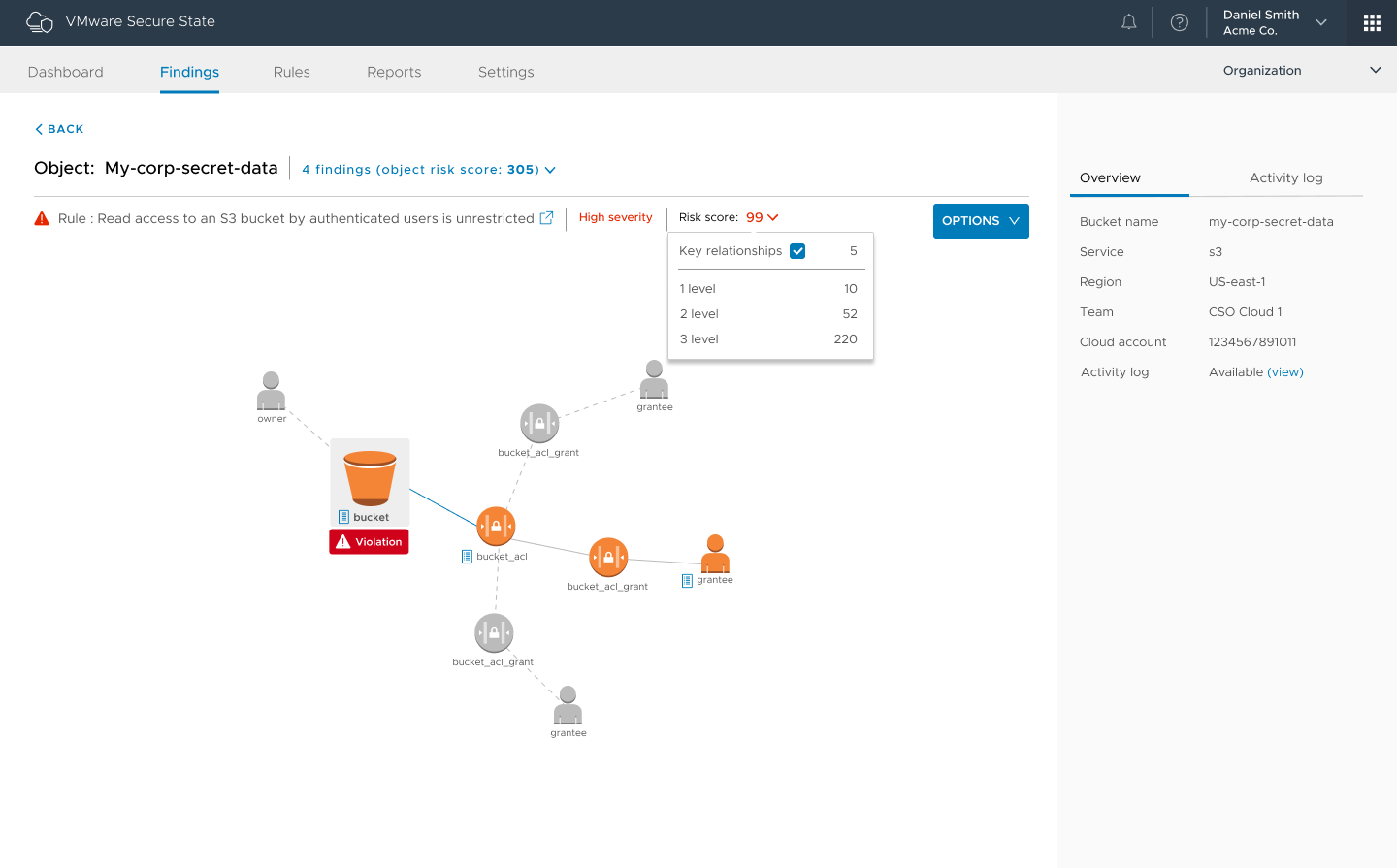
    We’ll get the thing that will interest every risk manager out of the way first. Secure State can tell you about buckets and their current security settings. It can tell you how to fix them. Considering the number of high-profile leaks caused by insecure buckets, I figured I’d mention that even before I talked about how Secure State fits with other VMware offerings. You’re welcome.

    Figure 1: Of the many violation chains available in the product, “authenticated user” buckets are one of the coolest, IMO.

    Secure State is part of VMware’s Cloud offering (grouped with CloudHealth and WaveFront), bringing security and compliance to multicloud. The cool bit is the level of automation, which allows teams to include cloud infrastructure security and compliance with DevOps efforts. That is where the world is headed, and VMware Cloud sees a greater level of DevOps automation than most alternatives just because it was conceived with APIs aimed at automation in the first place. Adding checks for rights and security settings, even compliance, into the DevOps cycle is breaking down one last wall (now we’re basically waiting for someone to do something astounding for cloud storage).

    Part of Secure State is near real-time reporting on status/state. This is big in environments that have real-time reporting for everything else, adding in the one missing piece. It is far better to be told, “There is a problem right now with instance X,” than to be fighting attackers. One of the examples Needham offered was of a project that was used via a small subset of tools: One day a report came in that it was being accessed via JVM instead of the normal methods. In this case, it turned out to be a new developer trying to get work done, but you can imagine such a warning being a heads up that you had an attack going on.

    The other interesting bit is risk scoring, officially known as Smart Risk Scoring. The ability to get a prioritized risk list allows DevOps teams to focus on what is most important. When there is so much for security to get done, this is a huge benefit.

    Disclaimer: I haven’t used this version of the product. That means I can’t say “This rocks!” but if Secure State delivers, it certainly will.

    Anything that adds automation and visibility is a welcome addition to the DevOps stack, making life easier and helping you to rock it.

    — Don Macvittie

  • IBM Extends z/OS Toward DevOps Again

    IBM Extends z/OS Toward DevOps Again

    A few months ago, I wrote about the release of Zowe, the first Open Source project based on z/OS. Zowe is a framework for including z/OS in your applications with less pain than we have traditionally suffered. IBM supported this project as part of its view that enterprises need to have interoperability between platforms.

    This belief also drove IBM’s recent announcement of new pricing models, along with enhanced cloud and container support that will help users tie mainframe access directly into the DevOps toolchain.

    First, let’s cover the pricing. IBM has brought “Pay as you grow” type pricing to the mainframe. While owning a mainframe means you are already expending funds, the new model is designed to simplify licensing and adjust what you are paying based upon actual consumption. It’s not a revolutionary idea, but it is wholly new to the mainframe scene and places mainframe pricing in the same pre-determinable model as cloud. IBM signed on some of z/OS’s biggest developers to offer similar pricing with Broadcom, BMC and Compuware either joining with IBM or offering similar programs.

    And Containers!

    But that’s not the exciting part for those of us in DevOps. The exciting part is the announcement of IBM z/OS Container Extensions. The ability to drop standard containers onto a z/OS partition and use them as an interface to traditional mainframe data/subsystems is huge from a DevOps perspective. This puts both the processing power of the mainframe and the stable data/subsystems into the DevOps cycle by allowing containers to be treated like any other container. Of course, I haven’t (and due to current work requirements probably won’t) played with it, so I’m likely glossing over some issues that users will run into, the potential is staggering. To finally have mainframe access that fits into the DevOps toolchain like any other system would is huge, and shows that IBM is listening to the market. I’ll be following along to see how it rolls out; I’ve got a fair number of associates working in mainframe shops who will keep me posted, but if you roll out Container Extensions, please let me know how it went.

    Cloud Interop?

    I’m less excited about IBM z/OS Cloud Broker. This announcement talks about the ability to spin up z/OS environments in IBM Cloud Private. It seems to me that this is counter to most users’ needs, but I can see that some larger z/OS environments might well have asked for it—rather than pull in another mainframe just for seasonal bumps, the ability to provision in the cloud is appealing. However, the number of organizations that fall into this category is small, though important from an “IBM customer” perspective, so it makes sense that the company went this route, but it’s less about new technology and more about giving important customers a tool to avoid large “forklift” upgrades, IMO.

    And Containers!

    I’m still thrilled to see Container Extensions. I’m looking forward to following where that goes. IBM has been pretty open about the fact that this is a road it is on, not a destination, so no doubt Container Extensions is just a stop along the way. But if it makes it easier for today’s crop of developers and DevOps engineers to access the mainframe sitting in their DC, I’m all for it, and can’t wait for the next stop on this road.

    — Don Macvittie

  • The Right DevOps Tool for the Job

    The Right DevOps Tool for the Job

    Innovation and environment are only two factors in determining which DevOps tools are best for your organization

    Any time there is a movement in IT that involves a new space and new toolsets, there is sudden growth, then inevitably consolidation and, finally, a selection of tools that suit the needs of most customers. Then the cycle starts over. Usually by this point, users have developed a defense mechanism about their choices regarding which solutions to implement and discussions can get heated.

    I’m happy to say that the last bit—heated discussions—has not occurred with DevOps the way it has with other technologies (think the browser wars, OS dominance or even cloud service provider preferences). There is the occasional “You’re doing it wrong,” but not the wild-eyed flame-wars so far.

    But the other two? Yes, yes indeed. DevOps has been through a couple of cycles, and the end is nowhere in sight. I don’t necessarily see that as a bad thing; in fact, as long as innovation is occurring, you have the opportunity to look at changes and decide what can best help your DevOps efforts.

    My mantra since the language wars was that C, C++, VB, etc., were the “right tools for the job.” I have kept that mantra for all of IT. It is easy to adapt the tools you are familiar with—to do more than they were designed to—and most shops have fallen into this trap at some point. But a serious look at what is available and where the market seems to be evolving usually stops this kind of adaptation.

    Some shops use Jenkins for far more than it was designed for. It’s a great tool, but at some point, the benefits of using tools aimed at a given piece of the DevOps toolchain outweighs the fact that Jenkins could handle that bit.

    The popularity of Puppet is starting to cause the same issues, if anecdotal evidence is to be believed. In words I use to my children, “Just because you can, doesn’t mean you should.”

    The environment always plays a role in the “right tool for the job,” but it should not be the major factor. Having a DevOps tool that you already know that could do the job is one answer—but quite often not the best answer.

    So, use resources like us here at devopsy.kinsta.cloud, and your favorite site for IT ratings and reviews. Do some feature research, think about what it would take to make your existing tools do the same job, and consider bringing in new tools to achieve a given goal. We see so much change these days that sticking with what you know on this one tiny bit of the toolchain, may seem reasonable, but make sure you are not missing out on additional functionality or suitability to task over the long term.

    — Don Macvittie

  • Alerting Consolidation: What’s the DevOps Impact?

    Alerting Consolidation: What’s the DevOps Impact?

    Over the last 12 to 18 months, the monitoring and alerting piece of the DevOps toolchain has been going through some serious consolidation. Companies are bracing to compete with the world or getting picked up by larger DevOps players, making their product more appealing through integrations.

    In general, if such changes don’t impact your toolchain, I say ignore them. The exception is when it appears the entire submarket might need to get aligned to survive, because that means at some point your toolchain likely will be affected.

    So, to recap the source of this blog, in the last short while OpsGenie has become a part of Atlassian, VictorOps has become a part of Splunk and PagerDuty has filed for an IPO. It is likely the rest of the market will have to match these three or admit to eroding market shares. In a competitive market where customers are using a fraction of the available functionality of a given product, deeper integrations (like come from ownership) or bold road maps (like come from IPOs) can have an impact on what customers choose to use.

    Alerting—and monitoring in general—is still relatively new to its current incarnation, and unlike some markets there are still very real differentiators in it. Most alerting engines have a core of functionality built in, while a lot more functionality can be had through integrations with other products. Some focus on the network to garner the bulk of their alert conditions, while others focus on application performance and still more watch the infrastructure closely. While all do a bit of each of these things, they still definitely have a focus. That will change over time as the market either settles down or fragments. I’m hoping it will settle down; we have enough sub-markets in DevOps already.

    All I’m suggesting is that you stay in contact with your vendor of choice and watch the overall market. Some of the changes might create a situation in which an alternative is appealing, and that is worth looking into, but other changes might negatively impact your chosen solution, which is absolutely worth noting.

    If your product of choice is clipping along in a way that is acceptable/useful to you, by all means stay with it. There’s no sense changing a product simply because of possibilities. But being aware can help you navigate the market changes that are well underway and very well might hit you right in the stack.

    — Don Macvittie