Author: Don Macvittie

  • SRE: How Do You Get to Blameless?

    SRE: How Do You Get to Blameless?

    Site reliability engineering (SRE) is the companion to DevOps. If we take my normal divisions of DEVops versus devOPS, traditional DevOps is mostly the developer side, and SRE is mostly the Ops side. This isn’t a perfect comparison, but it is a good starting point, and for this blog, I’ll run with it.

    While DevOps focuses on getting releases out consistently, quickly and with minimum disruption, SRE focuses on putting those releases into a robust infrastructure. Tracking application issues, regardless of whether you’re using DevOps, always requires information about the software and hardware infrastructure. SRE takes the proactive steps to try and make sure the environment is stable and designed to host the applications being thrown onto it. When that process fails, SRE attempts to identify the code/architectural problem and resolve it without blaming staff members—hence, the idea of “blameless.” It’s about the environment and improving it, not about the individual and punishing them.

    There are a lot of interesting parts of SRE that most IT groups could look at and see as a good place to start taking advantage of. Closely tracking errors in a cross-section of IT interest areas—by application, by infrastructure, by toolset—means problem areas can be definitively identified and fixed. But there is more behind SRE. In this example, once tracking of where errors occur more frequently is in place, a selective reduction in deployments using that piece of the IT puzzle can go into effect until the issues are resolved. This is not unlike what we are doing today, but it is formalized and has measurements around it that generally are not in place.

    Which brings us to Blameless, a company that just came out of stealth to champion SRE. While some large organizations with large application footprints are using SRE already, Blameless is offering a platform to make SRE more accessible to companies without large staff and application footprint.

    We took a bit of time to talk with Blameless last week, and their vision is a strong one: Address directly what DevOps addresses more indirectly. Build and environment that can measure and improve the entire application ecosystem.

    If nothing else, the idea of error budgets is intriguing. Counterintuitive at first glance, the idea of saying, “Piece X gets Y amount of issues before we start backing off of it or raise the priority to fix the underlying issues,” is a solid one.

    If your organization is looking for a mechanism to improve reliability and stability while reducing time to resolve issues, SRE in general and Blameless specifically are worth a closer look.


    — Don Macvittie

  • How Mainframes Live On

    How Mainframes Live On

    TL/DR: Highly controlled change is sometimes the best answer.

    For much of my career, I’ve worked in mainframe shops. I have never worked on a mainframe team, but I have worked closely with them. I’m in Northeast Wisconsin, and at one point we had the highest per-capita number of mainframes in the world, so pretty much anyone from this area can say the same. They were the “stable core” of the system for which I was the “new shiny”—and at times, that was painful.

    If you’re an established enterprise, even after years of trying to eliminate the mainframe, you probably still have one. They don’t go away so easily because, despite frustrations with rate of change, they do host core systems in established organizations and are reliable. I have seen similar in client server systems that are core to the business.

    We are reaching a point where there are some great products out there to help modernize the mainframe and/or split up client/server applications. Some of them have been around a while (Linux) and are coming into wider adoption, some of them are building on that bit of more familiar interface and many are simply making the UI more familiar to developers like me that only ever developed in a mainframe terminal for college, if at all.

    One of the main reasons why mainframes and future iteration’s applications are “sticky” is because they, and the systems they host, are generally reliable. No matter what you think of the timeline for updates, the data coming out of the mainframe and more controlled distributed applications is considered accurate in most organizations, over most other sources.

    To be clear, there are groups like this from each successive wave of computing. The client/server app that replaced your mainframe customer information system has learned over time that a fault in their system impacts the core of the business, for example.

    The goal is to increase the rate of change, without undermining the reliability. You hear a lot about throw-away instances and “fail fast,” but dropping your billing system isn’t really an option, so these need to be tempered with the knowledge of what failure implies in core systems.

    Make the change, do the modernization, but listen to lessons learned on core systems. Take into account that your informational website being down is a serious problem for marketing, but the billing system being down is a disaster for the company. There is a degree of difference, and the approach should be less about continuous deployment and more about stable deployment. Yes, it can be a scale, and you can start the motion from one to the other slowly to make sure you’re covering your bases.

    In short, assess the risk levels of these systems before deciding how to proceed. This is pretty much common-sense advice—but better to read it and not need it, than to find out when corporate revenues are impacted.

    I worked at one shop where a certain core application was using technology that was a couple of generations old and no longer supported. The pool of available developers was shrinking, but it was an important application. This type of thing is where modernization is critical; having someone say, “We don’t touch that,” is no longer acceptable. That story ends in disaster when the system fails, and no one knows how to troubleshoot—let alone fix—it.

    As with so many things, the balancing act is up to you; determine your organization’s level of risk acceptance, then determine the impacts of this application being unavailable and proceed from there.

    Each step of mainframe development is a little different from what developers coming out of college expect, but there are new tools and mechanisms available of which these developers can take advantage.

    — Don Macvittie

  • Smashing the (DevOps) Stack for Fun and Profit

    Smashing the (DevOps) Stack for Fun and Profit

    Most organizations that I deal with have a similar story for the promulgation of DevOps in their data center. The story is similar for bringing in most new technology and techniques: A team that usually does a new project without any attachments—relatively small compared to projects at the center of the business—adopted DevOps from the start. A smaller (by far) number shoehorned DevOps into an existing project as a first taste. Some decided to go “all-in” and “convert” IT to DevOps. This is a painful method; I can’t say I recommend it. I suspect my friends at those organizations wouldn’t recommend it, either.

    When I say “DevOps” in this sense, I am talking more about process and procedure changes, even cultural changes, rather than tools. My experience is that most companies that have been around longer than the last spring shower started adopting the tools of DevOps before they started looking at ways to streamline the process. And that isn’t a terrible thing at all. It doesn’t matter what marketing spin is used to sell the product; if it makes your life better or allows you to react faster, implementing it is worth consideration. I just wanted to be clear what we’re talking about here.

    Those companies that started small generally grew small, also. It is a big deal to move that 20-year-old codebase with a ton of processes that touches everything into DevOps when compared to saying, “New projects will use DevOps.” This, too, is in line with what we’ve always done. Iterative replacement has always been the case, where the large, important systems are concerned. In a couple of industries I am familiar with, I’d even argue that those large, important systems weren’t completely upgraded to Customer Information Control System (CICS), so don’t hold your breath on seeing them completely upgraded to DevOps. But that is a different blog.

    Once a critical mass has been hit, these shops start referring to themselves as a “DevOps shop” or “DevOps first shop.” This is the point I want to talk about today (though it took me a bit to get here).

    You’ve got a bunch of apps or a couple of application portfolios that are now running under DevOps. In most organizations, the tool sets are not a perfect match. Indeed, in some organizations the DevOps toolchains look like they were assembled on opposite day. Teams tend to be more standardized, but even team composition varies from project to project, as do communications.

    This is the next point of inflection in DevOps growth. You have it in your grasp to jump again, from amazing to truly amazing.

    Time to smash the DevOps stack.

    Get the teams together, build a list of each system used at each step in the process for each app, each manual intervention, each communications channel—essentially each difference between DevOps teams—and start to look for synergy. If one team is using ChatOps, check out what benefits they perceive from doing so and if ChatOps fits all teams. Does one team have a standard process to roll from continuous delivery to continuous deployment? Check it out. If you have several disparate DevOps teams, it is almost guaranteed that one team will handle DevSecOps better than the others. Take a look at what/how they’re doing and promulgate it to less security-intensive projects as needed.

    Basically, build the corporate process/toolchain from what is successful. That sounds like simple advice, but it isn’t. Teams often love their tools and processes, and are certain their choices are better than others. It takes work to get to a common understanding and there are always exceptions in a complex environment: “Well, yes that works, but for our app, we have this thing over here that makes it not possible/feasible/affordable.” It requires extra work, but that’s always true. Because the environment is complex and has been for a long time, these issues have always existed; you’re just dealing with them with new processes.

    Keep kicking it! Keeping the virtual lights on is as important as keeping the physical lights on in today’s environment. Unless your company is listed in “haveibeenpwned” emails, or your website has been suffering catastrophic outages, you are kicking it.

    — Don Macvittie

  • Automation: We Have Not Yet Achieved Balance

    Automation: We Have Not Yet Achieved Balance

    I’m going to start this week’s blog out with a very clear statement that regular readers will already be aware of: I fall on the automation side of the DevOps equation. I see DevOps as automation first, process second. The problem is getting to that “second” part. The act of automating the entire pipeline should, by example, show the benefits of integrating these disparate tools and disparate teams. But it seems it often does not.

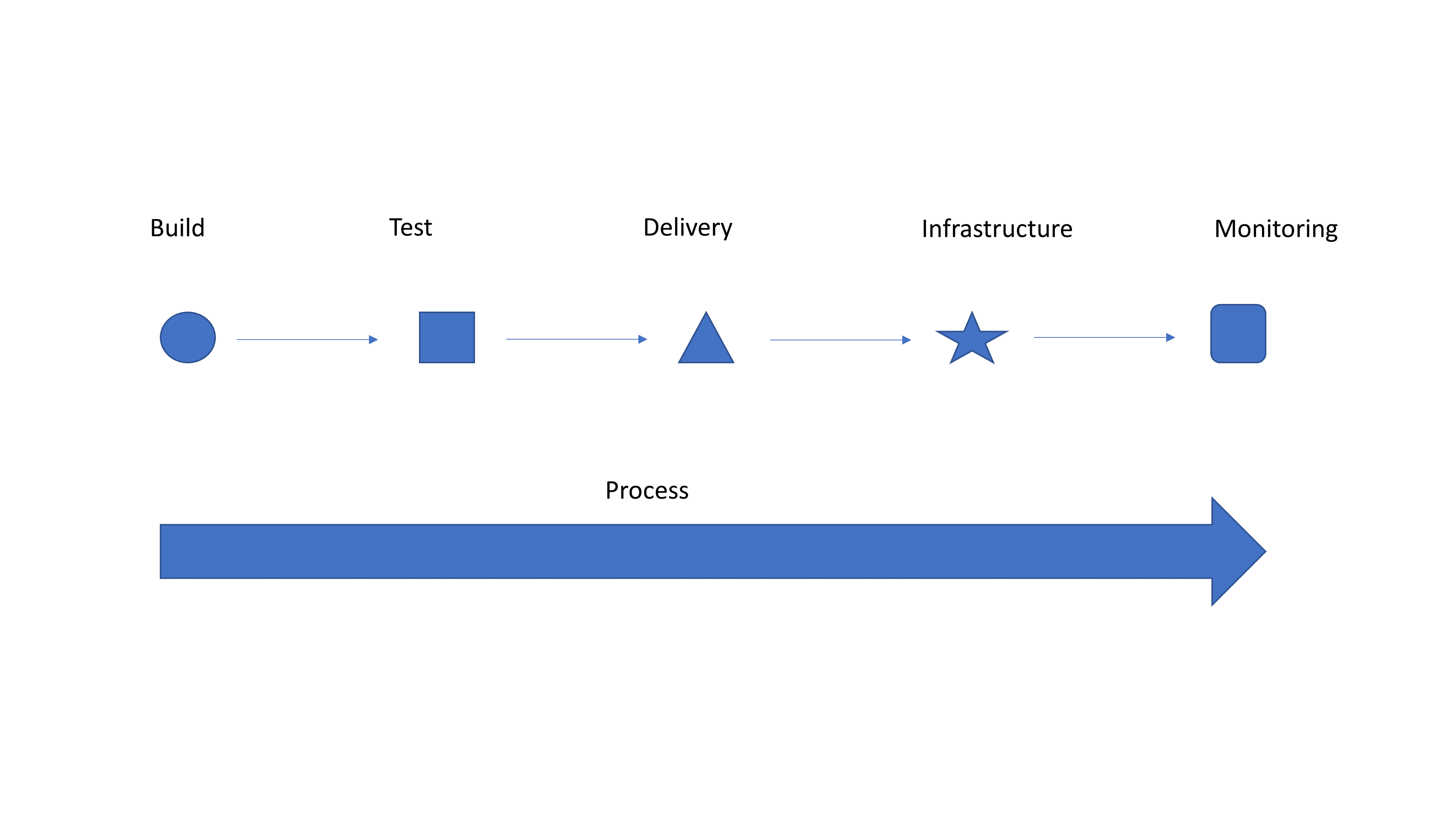
    Simple Graphic for Discussion

    So I’m going to take a second to tell you why it should. If you have integrated tools and teams, kudos! Hopefully you get absolutely nothing out of this blog, and you are enjoying a drink on a beach somewhere while your entire operation is taking care of itself. Everyone else, please read on.

    Look at the generic graphic. Notice how each step on the top is a different shape? That’s because they are individually implemented with limited integration of both people and processes. So you have a tool to submit for testing … Does testing (or monitoring at the end) feed back into your bug tracking system? Does it create tickets to get stuff done? When a container fails, is it simply dropped and a new one spun up to replace it because “they’re just cattle”? If so, does the system take steps to keep the failed container—or at least information about it—alive so troubleshooting can occur? Ignoring failed instances that were replaced and their impact on users was low is exactly how CloudBleed happened a couple years ago.

    Automate first, get the benefits of automation and drive faster delivery. Then take advantage of all that automation and make it into a streamlined process. It’s a massively complex system, even if you deliver everything on a single “platform,” so it will never be perfect. But issues that occur with regularity can be automated also to provide integration between systems. Isolating an instance and sending a notice to the defect tracking system that it is alive but not communicating (because it has been replaced) is something that is relatively easy to script/integrate and offers the ability to find what actually went wrong. Contrasted with just dropping the instance and starting a new one, this process is an order of magnitude better, and with integrated teams, Dev and Ops can work together to resolve whatever caused the instance to go down.

    Strong integration and a smooth pipeline is what technologies such as application release automation are designed to deal with, but most shops see these tools as “unnecessary” overhead. I disagree. Find one you like—there are a million of them—and use it to connect things. It’s just one step, but it is a step to transforming your operational delivery systems from unique snowflakes to part of a collection that works together.

    That’s it. Automate first because the gains are phenomenal, but don’t stop there. Really—don’t. You are doing yourself a disservice if you do. The whole “We’re going to change your world!” crowd is annoying, because changing your world is your decision, but listen to them anyway, and see which of their ideas fit your organization. You’ll be surprised once automation is solidly in place how much of what the process side of DevOps offers makes sense.

    — Don Macvittie

  • Open Mainframe Project: Zowe Ready for Prime Time

    Open Mainframe Project: Zowe Ready for Prime Time

    There is a lot of interest in updating mainframe technology/interfaces across traditional enterprises. As development environments and toolsets have evolved outside the mainframe, there is a struggle to keep up—partially because backward compatibility requirements make wild changes difficult and partly because the very architecture of mainframes is different.

    There have been several fragmented efforts over the last few years—some of them quite good—to update how a mainframe is accessed from external source and the ways that developers can code for the mainframe. After all, the number of developers proficient in mainframe toolsets continues to decline while the number of workloads does not, so something has to change.

    The Open Mainframe Project’s Zowe attempts to address these issues in ways that are both more widely applicable and more technologically advanced. It takes advantage of Open Source REST systems to front-end hardcore mainframe functionality, so developers who are accustomed to application server development can call things such as Spring Boot-based interfaces and use languages including Node.Js to access their mainframe systems.

    This week, OMP announced that Zowe 1.0.0 is production-ready. That means serious experimentation can be started at your organization to see if it addresses some or all of your mainframe modernization needs.

    There will likely always be some (at least operational) differences in mainframe systems usage because the software infrastructure is designed a certain way, but increasing modern tool usage makes learning those different parts easier across the board. By implementing a vendor-independent architecture that has guidelines for users and vendors to add functionality from anywhere, Zowe is a powerful and expandable tool for getting the job done.

    I sound a bit like a fanboy, but for most verticals, this is an issue that will continue to be a pressure point. It’s been more than a decade since companies started bringing back retirees to work on mainframe projects because new developers did not have the skills or interest to complete those projects. As more and more skilled CICS/RPG/PLI/etc. developers and mainframe operations specialists retire, this pressure will increase until it is resolved or unbearable. So I am a fanboy of any company/solution that is addressing this space instead of flocking off to the coolest new DevOps tool du jour. I’ve not yet used Zowe, so can’t directly recommend it, but reading over their documentation, I believe it’s a good idea to use tools we’re familiar with. So I’m rooting for it.

    If you test it out, drop a comment and let the rest of us know what you think.

    And keep rocking it. Whether in VS-2019 or VT-70, you are making the company engines hum.

    — Don Macvittie

  • APIs and DevOps

    APIs and DevOps

    As always, there are interesting trends in DevOps, and I wanted to point out one that is starting to bother me: the “API economy,” and how it impacts DevOps decision-makers.

    Traditional infrastructure—SAN, LAN, physical systems, etc.—were generally controlled the best from the command line. While there are a million of them, Cisco IOS is probably the one that you’ll remember best (or you stopped using to read this—just depends upon the shop). When large-scale automation started, these command lines became a bit problematic. After all, scripting was possible, but painful, and often had non-portable hardcoded values.

    Virtualization, and later cloud—and even later SDN and NFV—all made this better, but on a layer over the top of (and normally not well integrated with) the physical layer. Years ago I bemoaned that we had doubled the workload of operations by re-implementing what was already implemented at the physical layer. So we were configuring the physical—even for cloud you have to get to the cloud—and then configuring the virtual.

    Then “Software Devs as Kingmakers” came along, followed by “the API Economy,” and finally we started to see some serious attention paid to APIs by infrastructure vendors that should have done so long ago (some former employers of mine might belong in this group).

    Here is the thing: There is a difference between having an API and having an API that is useful. When shopping for solutions, be they physical or software, don’t allow APIs to be a check box because it’s “the API Economy.” And don’t assume that an API useful to DEVops is what is needed to automate infrastructure. Monitoring APIs—particularly ones that provide you detailed information about an app as it runs—are useful to DEVops, and assuming you have tools that are or can be integrated, might provide value to devOPS.

    But monitoring is not management. devOPS is increasingly automated, and increasingly needs viable APIs that can help them deploy/configure infrastructure. Vendors are responding, but the quality of APIs at this point in time varies widely. So make certain that evaluation looks at APIs available with an eye to suitability to task. devOPS needs management and might be able to use monitoring, while DEVops generally needs monitoring and has little use for management.

    This is not 100% true of course, there are a billion different shops, most doing things in slightly different ways, but think of storage (because it can be done in few enough words to fit in a blog)… An app needs access to storage, ways to be notified of storage space limitations, and possibly to metadata. Operations needs to provision, migrate, backup, replicate… The list goes on. These all contribute to the availability and quality of the application, and are all DevOps, but the focus is different. And having a simple “number of blocks free” API will not help with the DevOPS needs even if it helps developers manage a piece of the application.

    But we have more options than we ever did before! So fear not, just watch what your prospective vendors are doing, and check in with long-term vendors on occasion, too—because things are constantly changing, nearly always improving.

    And keep rocking it. Presumably you are working this out already, knowingly or not, or you wouldn’t have time to read this blog.

    — Don Macvittie

  • DevOps Hiring: What Do You Need?

    DevOps Hiring: What Do You Need?

    IT has long had a problem with hiring. I’m not certain where it started; most of us blame HR, and that’s probably incorrect, but gives us someone to blame. It’s that we post jobs with insane requirements. Sometimes this is done to keep the applicant pool down, but most of the time it is a simple case of throwing in the kitchen sink. We have laughed at advertisements that wanted applicants to have more years in a given technology than the technology has existed. The laughter was because someone quipped, “So what we really want is only liars to apply.”

    But it doesn’t stop there. How many advertisements have you seen for a person to join an already good-sized team of developers, and the requirements include experience in every single language/tool the person might encounter—and sometimes ones the organization might use in a year or so? And DevOps, with its increase in toolsets and broadening complexity, make this problem worse.

    If you want good DevOps team members, you have to focus your search. We’d all love to have unicorns who could do it all on day one, but those people don’t really exist. Even with experience in every single tool in your chain, they still have to learn apps and environment. Try to craft job requirements that focus on the couple of core tools, and then filter for ability to learn and adapt. Because the only certainty about IT at this point is that technology will be shifting, so focusing on the tools you are using today is pretty limited.

    Role plays a part in this also. While we like to pretend DevOps is one thing, it is a rare application or portfolio for which there are not specializations on the team. If you are looking for someone who will lean more toward the DEVops side, do you really need them to be operational wizards with three years each in storage, networking and container management? Conversely, if you are hiring someone more for the devOPS side, do you need them to have expansive experience in Javascript, or do they just need to know who to call if it gets beyond their ability?

    Maybe your company is one of those shops where everyone on team X is expected to be an expert at everything. Kudos for you, but there aren’t a ton of those people out there. There is a different mindset to DEVops versus devOPS, and even if unofficial, most employees lean one way or have a more proficient side. If a candidate fits the bill in an area you are weakest, consider training them on the job in the area you are strongest, rather than waiting for who knows how long for the perfect person to fill the open req.

    And we still have a need for hardware specialists. I’ve said it before, but do you want your EMC (or Cisco or whomever) person to be a generalist, or do you want that person to make the infrastructure that underlies a huge chunk of your applications hum? Hire specialists for specialized skills, hire broad knowledge for app-spanning needs.

    It’s been a problem for years, and only you can fix it. Call out overambitious job postings and make managers ponder what they’re actually looking for. You know you have a need, you know what the position will do. Help hone down postings so that they fit the actual requirements, not some blue-sky version of potential requirements.

    And get the best people for the job. After all, you are going to have to work with them.

    — Don Macvittie

  • DevOps and Agile: Your New Year’s Resolution

    DevOps and Agile: Your New Year’s Resolution

    Don’t apply Agile principles to DevOps. That’s not how it works.

    We in the west often celebrate the new year with a promise to do more or less of something in the coming year. While these promises are often broken, they can occasionally be transformational.

    And it’s time your organization had a transformational one: More DevOps, less Agile++.

    It is still a pervasive issue that people look at the successes of Agile development and attempt to apply them to the operations side. That’s not how it works. Really. There is a fundamental difference between DEVops and devOPS that means what is perfect for one is terribly imperfect for the other.

    While having a developer who specializes in the language du jour is important for a DevOps project—just like having a systems administrator that is proficient in given platform X—that really is where the similarity ends.

    Operations is a daily thing. It takes specialized knowledge and uses it to keep systems purring along on the chosen platform with vendor X, Y and Z. For a lot of organizations, storage has moved to the cloud. For a lot more it has not, and there is a difference there. But in the end, management of that massive blob of storage falls on your storage specialists. If your environment is internal, they’re worried about hardware and software both, but even if you’ve taken a massive leap to the cloud they have access and backup and hierarchy concerns.

    And given our worry about virtualization sprawl, a large number of organizations seem to have pitched that out the window when cloud and DevOps came along. Those instances still need monitoring and management, even if some of it is automated. In fact, the growth in numbers pretty much negates the automation goodness.

    So take a close look at the devOPS side of your operation. Think about it. Include it in DevOps from the start, rather than applying Agile principles to a group that it just doesn’t fit well. We’ve (mostly) gotten past the “Developer is Kingmaker” mentality, and have started to reintroduce standards so that we don’t have 50 different database products to support. But far too many have yet to truly approach DevOps as an integrated whole that relies on the wisdom of operations—even though operations is going to be involved with this project far longer and more intimately than development.

    And they are disparate functions. DevOps makes getting to market and maintaining the application far more streamlined, but when it comes down to it, 90-plus percent of you aren’t keeping a java developer watching an application for life. They’re moving on to the next project, and operations is left with more of development’s input and advice than previously, but all of the responsibility.

    So step up, apply DevOps in the manner it makes sense for a given bit. If you are running DevOps on VMware, operations input will be different than if it is on physical servers or public cloud or private cloud. Take that input and develop around it. Personally, I’m a fan of application release automation (ARA) for achieving the melding, but however you do it, don’t say, “We’re DevOps,” and mean, “We’re going to wedge Agile into the entire org,” anymore.

    And have a great year! Here’s to more apps, more responsiveness and more security!

    — Don Macvittie

  • The Limiting Factors of Microservices Also Apply to FaaS

    The Limiting Factors of Microservices Also Apply to FaaS

    In enterprise development and deployment, the pattern is easy to detect. A big monolithic application is targeted for re-architecting as a microservices architecture. People excited about microservices get together and break up the design to make it far less monolithic and far more loosely coupled.

    If your organization is lucky, it is at this stage that those responsible realize that breaking a monolithic application down too far is bad for complexity, performance, monitoring and maintenance—pretty much everything re-architecting is supposed to fix.

    Far too many organizations don’t realize this until the implementation phase, though. First, a metric ton of little tiny microservices are deployed, then the organization realizes that functionality such as database access can be applied much more efficiently through one larger service that handles all interaction with the database for the app, rather than through five or 10 smaller services that replicate code and end up calling each other anyway.

    Function as a service (FaaS) has much the same issue. It is an astounding solution for some uses, but in the end, users must consider what access the function requires to other parts of the system and what task is being achieved. The early uses of FaaS are well-documented; longer running independent jobs such as image or video processing were a bit early hit, for example, particularly for services that have highly varying traffic rates. But other uses, such as handling bottlenecks in traffic spikes (hello holiday shopping season!) or out-of-band operations processing, are less documented at this point. Entire applications have been designed from the ground up in serverless, but they are relatively few in terms of overall applications out there.

    FaaS is highly suited to DevOps, because upgrading the function is as simple as redeploying code. There are no concerns about OS or library version, because those are largely beyond your control. But that is as big a negative as it is a positive. There is no flexibility in OS version or library inclusion because those are beyond your control—for the most part, anyway.

    As with the vast majority of new technologies, expect adoption of serverless to grow and the hype to grow more quickly. It is definitely in the market where we have seen massive shifts—virtualization and then containers really did live up to the hype in terms of usage—but it needs to have a driving reason for adoption. Look closely at what your application and its DevOps toolchain are doing before hopping into the deep end. For some uses, FaaS is the fastest/easiest/lowest-maintenance solution. But that does not make it the Swiss army knife that virtualization and containers have proven to be. Indeed, if you think persistent storage is painful under containers, try it in a FaaS environment—as just one example.

    FaaS is useful in many scenarios, but just remember where/when/why you are adding FaaS into your DevOps processes, and take advantage of on-demand processing with few scaling limitations while avoiding seeing everything as a FaaS problem because FaaS is the FaD.

    — Don Macvittie

  • Containers: All Your Base are Belong to Us

    Containers: All Your Base are Belong to Us

    The world is still changing. No surprise there, but the direction and velocity have been modified by the growth of container usage. Back in 2015, we at devopsy.kinsta.cloud showcased a survey we performed that said container usage was staged to take off. That it did, with a vengeance. No matter the category—pilot programs, test, production—it seems to have a greater penetration each year.

    And why not? There are a whole collection of benefits to containers—smaller footprint than VMs, more portable than cloud instances, more agile than … well, any of the alternatives. And the weaknesses—the use (and abuse) of IPTables and persistent problems with persistent storage—are being addressed at a rapid clip.

    But It’s Not All Roses

    Sorry to say that there is, as always, a fly in the ointment. We have to identify weaknesses in new architectures to plan for them and overcome them. And container infrastructure is not immune to this process. Nothing is perfect.

    The first problem is with overall security. Your container management system is now the center of the world. A single point of penetration that could yield dozens to thousands of infected servers. It is like a magnet to ne’er-do-wells. Protect it, lock it down, follow advice on Container Journal and Security Boulevard about how to keep your system as protected as possible.

    That was the easy one. We have a ton of experience protecting important central systems.

    The more difficult ones all revolve around your physical infrastructure and where it meets your virtual container infrastructure. Look at all the boxes in your data center and the services they provide, then map out how those services integrate with your containers. Once you’ve mapped them, work the mappings into your DevOps projects. Load balancing and storage provisioning are two areas in which what a traditional DC does is duplicated inside the container environment, and where that processing is to occur should be a conscious choice about what is best for the application, not a decision based on what is easiest/in front of you.

    It is an (arguably) bigger issue with storage. Just because the container can grow or shrink its internal storage does not make it the right place to position a fair selection of your data. Think about what will be needed in the future—with or without the application that this container or container set represents—and make a conscious choice about what is ephemeral data that can go away should an instance die versus what is needed long-term. Work those choices into DevOps processes. It can be a pain to access persistent data that is remote to a container, so make the painful parts automated via your DevOps processes.

    Both of these problems are compounded in most (but not all) cloud environments. Too much cloud functionality is designed to lock users in. While that has been a standard practice in IT for decades, the problem with containers is that they are inherently portable. Build them to be so. Yes, lock-in functionality always brings benefits, but mobility lets a team choose where best to deploy a container system with each inflection point (purposely being vague here—a highly agile/DevOps shop could have daily inflection points, while a single team just piloting containers in their DevOps environment may only have them on occasion when something large changes with the system). Should something change at a preferred cloud vendor that makes them no longer preferred, the fewer modifications required to move to another platform the better. So building default container/container management into the DevOps toolchain is preferred to building in vendor-specific options when a choice is available. Storage is an easy one to point at and say “choice might not be available.” Allocating disk is not very portable between platforms, but if that’s one of only a handful of things that must change, portability is still an option.

    In short, containers are coming, and they’re coming fast. Build them into your DevOps toolchain as portable solutions that automate the worst of the speed bumps. Make conscious choices about where infrastructure-based functionality should reside, and implement based upon those choices.

    And keep rocking it. If moving from any other environment (with the arguable exception of cloud), containers will be faster to spin up and to spin down. Just address the issues before they hit you, and all will be well.

    — Don Macvittie