Author: Derek E. Weeks

  • From a Commodore 64 to DevSecOps

    From a Commodore 64 to DevSecOps

    We all know the story: a farm, a kid, a Commodore 64, and a modem maxing out at 300bps. A few unexpected phone bills later, and young Ian Allison is figuring out how to game the system so he can keep using his newfound gateway to the world of tech. According to Ian, that is where he began building the foundation of skills for his career in computer security.

    At the recent All Day DevOps conference, Ian (@iallison), now with Intuit, talked about his history of being “that” security guy. You know, the one who thinks developers don’t care about security or deadlines and, really, are just plain “stupid.” But, don’t worry, he is enlightened now and realizes that we all have the same goal: Everyone wants to build a secure system.

    Ian realized that “security doesn’t understand how developers or operations works. Security solves for security, but that leaves everyone else in their own place.” He started his enlightenment when his career path led him to a place called DevSecOps; that is, DevOps where security plays a more integral role.
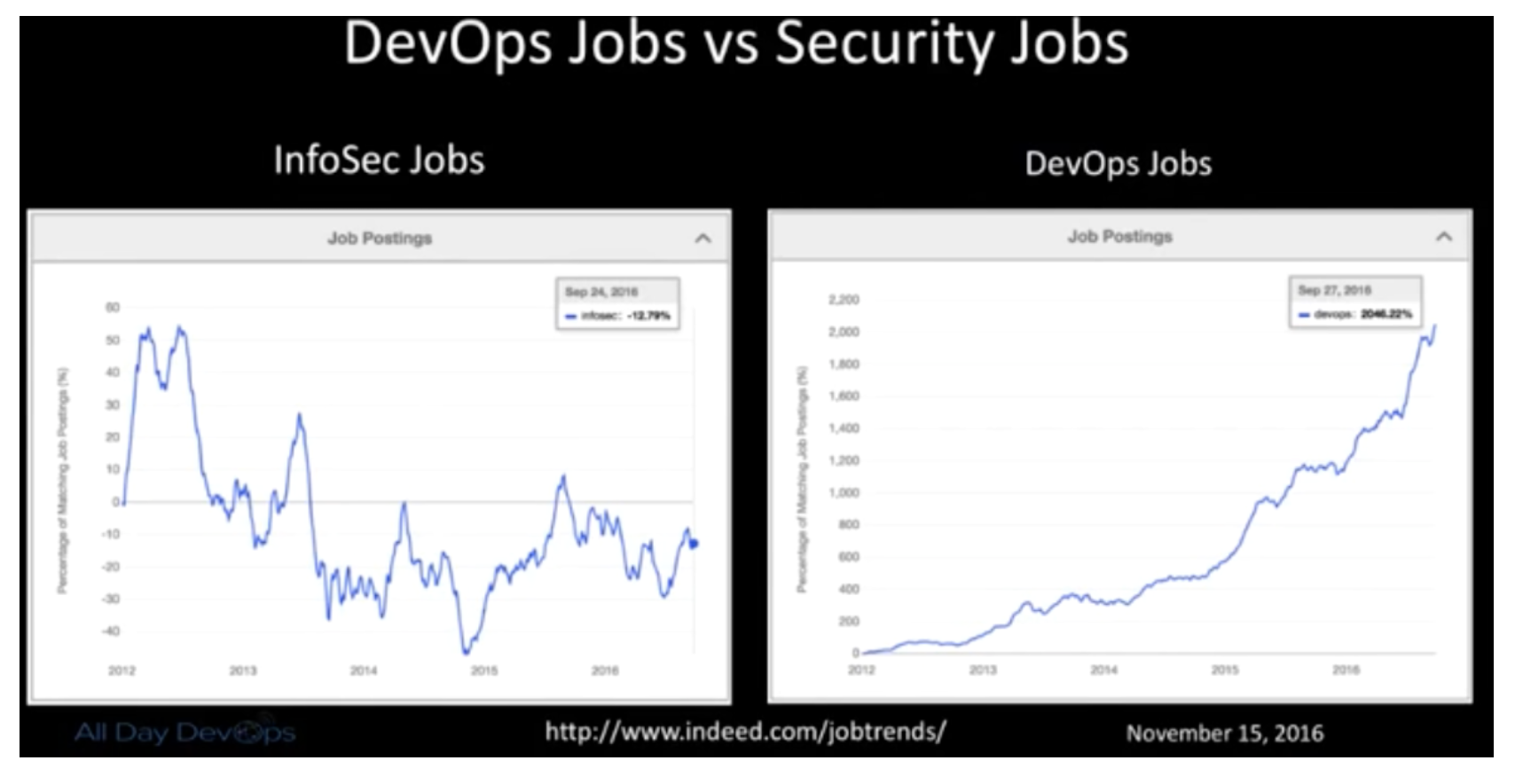
    Ian pointed out that traditional InfoSec relies on compliance, regulations, appliances and perimeter (CRAP). He then realized the selfishness of his own and his peer’s perspective: Remediation is left up to the developers, the feedback they get are 200-page scanner reports, and it only solves problems for security and compliance. It doesn’t help developers reach their shared goal of a secure system.

    DevOps creates an opportunity for security to get a better view into our infrastructure, operations and development efforts.  DevOps is not only fast, lean and efficient, but when done right, it is also collaborative and empathetic. Couple speed with collaboration and empathy, and DevSecOps can blossom.

    Here is the reality that Ian was facing: Scanners find the absolute bare minimum; bad default configs are a HUGE problem even with SaaS vendors; manual testing can uncover defects that have been hiding for year; and the attackers are more skilled and motivated.

    How do you implement it and make it better?

    • Allow Dev teams to assume the risk of their decisions.
    • No more Security exceptions or signoffs.
    • Security is everyone’s responsibility.
    • Test the crap out of your own stuff like an attacker would.

    At Intuit, Ian wanted to help build stronger bridges between development, operations and security teams.  To do this, he set up a Red Team to:

    • Use same tactics as attackers.
    • Only scope is “Don’t take down production.”
    • Need to adapt and evolve like an attacker.
    • Prove risks actually exist.
    • Should be writing their own exploits.
    • Should have ongoing campaigns that mimic attackers.
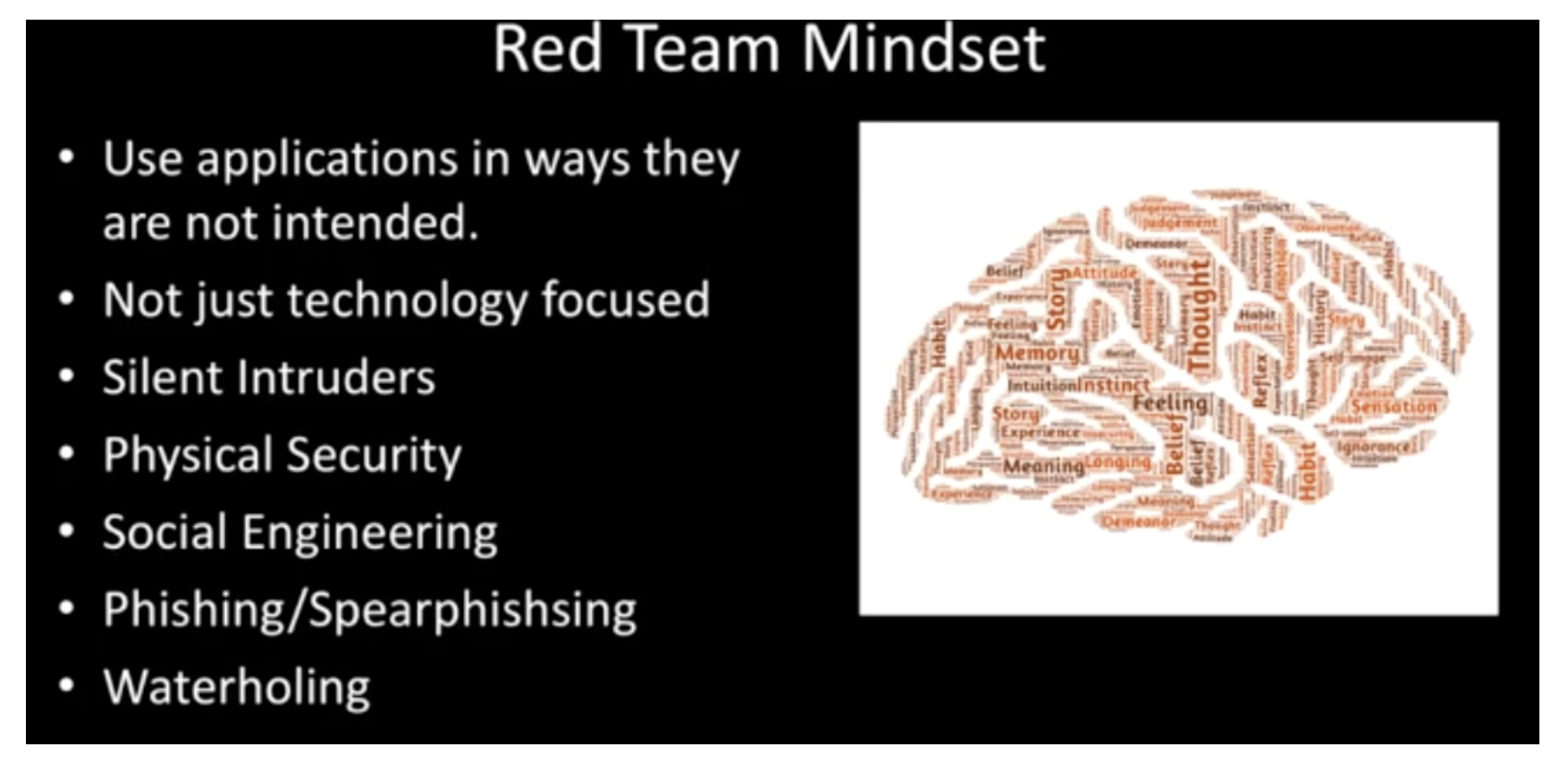
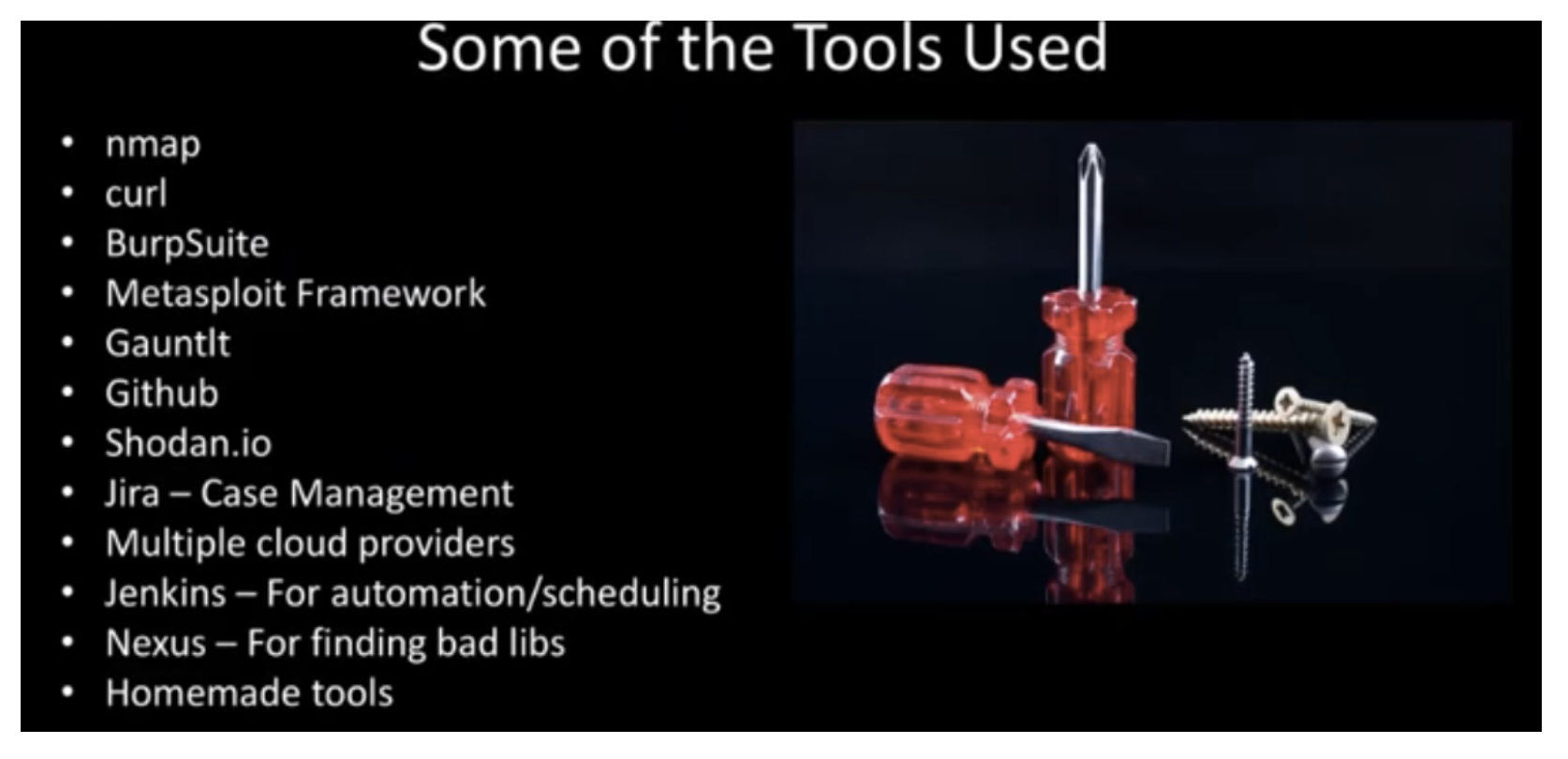
    The Red Team started small and lean and focused on the cloud. It worked like an Agile DevOps team, working manually with the use of some tools. In the end, the team found, reported and fixed thousands of vulnerabilities not found by scanners.
    Ian goes into more details and lessons learned in his full All Day DevOps conference session (just 30 minutes). The other 56 presentations from the All Day DevOps Conference are also available online, free-of-charge here.

    This blog series is reviewing sessions from the All Day DevOps conference from November which hosted more than 13,500 registered attendees. Last week I discussed, “System Hardening with Ansible.” Next week, look for my review of an awesome session by Erlend Oftedal:  “There is No Server: Immutable Infrastructure and Serverless Architecture.”

    — Derek E. Weeks

  • All Day DevOps: DevOps at Massive Scale

    All Day DevOps: DevOps at Massive Scale

    When you have a billion users, people notice. That’s where our story about DevOps and Yahoo! starts. For Kishore Jalleda and Gopal Mor, both engineers at Yahoo!, when something goes wrong on a Yahoo! page, people will notice. Correction: a lot of people will notice.

    Of course, Yahoo!, like all services on the internet, constantly improves its products. In fact, it has 100+ iterations and experiments happening at any given time. Some changes bring new innovation to the forefront and others alter the user experience.

    When iterations and experiments are served in front of loyal users who have become comfortable with a specific user experience, they sometimes react with a natural resistance to the change. When change causes, or appears to cause, breaks in service, the backlash can be crippling. Frequent spurts of backlash resulting from these changes became known to some Yahoo! Insiders as “the bad years.”

    At the recent All Day DevOps conference, Kishore and Gopal shared how Yahoo! turned to DevOps practices to recover from “the bad years.” In their presentation, “Launching Products at Massive Scale: The DevOps Way,” Kishore said, “DevOps is about eliminating technical, process and cultural barriers between idea and execution, using software.” Specific to each of these, Kishore recommends the following:

    Culture of ownership and excellence: Own life cycles within Development, fix root causes and have pride in the product.

    Processes: Design or engineer processes to be fast and agile. Work should be iterative, support learning and provide fast feedback cycles. Let the machines to the heavy lifting.

    Tools: Solve operations problems with software. Use open-source tools that are self-service, reusable, friendly and easy to use.

    At Yahoo!, the DevOps practice is built on three functional pillars: deliver products to market quickly; prevent defects from reaching customers; and, repair production issues quickly.

    Speaking of repairing production issues quickly, Gopal discussed resiliency. With its user base, downtime (or lack thereof) is critical to Yahoo! and the challenges are many:

    • Distributed multilayer architecture
    • 100s of subsystems
    • Complex request flow
    • Change is the only constant

    While it may be counterintuitive, Gopal demonstrated how the combined system is weaker than the weakest subsystem.

    To ensure optimum uptime, Gopal said we need to:

    1. Analyze the entire range of failure types
    2. Understand their rate and impact level
    3. Plan to cover all failure types
    4. Conduct fire drills – test, test and test.

    Specifically, how does Yahoo! ensure high availability? It maintains four layers of resiliency in the serving stack:

    Speculative retry – Deliver the page again after a predefined latency is exceeded. This addresses longtail latency and intermittent failures.

    Per-module fallback – Cache non-personalized modules to front-end servers and serve cached content for failed modules. You need to ensure the cache is refreshed often, that you implement strong validation of the cache’s data and you check for backward compatibility if the TTL is high.

    Fullpage failsafe – Cache the entire page without personalized data and ads and with minimal interaction. This is used when the entire page cannot be served. Yahoo! uses auto-scale AWS servers to serve these pages so its servers are not negatively affected.

    Failwhale page –  The “we will be right back” page that lets users know, yes, your internet is working, but our service isn’t – temporarily. Please try again. Obviously, a last resort, but a necessary one.

    There is a lot here and you don’t have to have a service at the scale of Yahoo! to benefit for the experience. You can dive into Kishore and Gopal’s full All Day DevOps conference session (just 30 minutes) to learn more about their learnings from the DevOps front lines. The other 56 presentations from the All Day DevOps Conference are also available online, free-of-charge here.

    This blog series is reviewing sessions from the All Day DevOps conference from November, which hosted over 13,500 registered attendees. Last week I discussed, “Docker, the New Ordinary.” Next week, look for “System Hardening Using Ansible,” from Akash Mahajan.

    — Derek E. Weeks

  • All Day DevOps: System Hardening with Ansible

    All Day DevOps: System Hardening with Ansible

    The DevOps pipeline is constantly changing.  Therefore, relevant security controls must be applied contextually.

    We want to be secure, but I think all of us would rather spend our time developing and deploying software. Keeping up with server updates and all of the other security tasks is like cleaning your home: you know it has to be done, but you really just want to enjoy your clean home. The good news is you can hire a “service” to keep your application security up to date, giving you more time to develop.

    At the recent All Day DevOps conference, Akash Mahajan (@makash), a founder/director at Appsecco, discussed hardening your system’s security with Ansible. In addition to his role at Appsecco, Akash is involved as a local leader with the Open Web Application Security Project (OWASP).

    Misconfiguration

    During his presentation, Akash mentioned the OWASP Top 10 Security Vulnerabilities list, zeroing in on No. 5: Security Misconfiguration. To determine if you comply with the guidelines, No. 5 on the list asks:

    • Is any of your software out of date?
    • Are there any unnecessary features enabled/installed including ports, services, accounts, pages or privileges?
    • Are default accounts and their passwords enabled/unchanged?
    • Are security settings and libraries not set to secure values?

    I am sure no one reading this article still uses the default administrator password, but can we say the same of your peers? Have you gotten around to installing the latest software patches on your server?


    Automation

    If a task can be automated, developers automate it. So we should automate our security tasks too, where we can. OWASP provides guidance here, suggesting you should:

    • Have a repeatable security hardening process.
    • Ensure your development, QA and production servers are configured identically but with different passwords.
    • Automate the process to minimize the effort required to setup a new secure environment.
    • Implement a process for deploying all new software updates and patches in a timely manner to each deployed environment.
    • Run scans and audits periodically to help detect future misconfigurations or missing patches.

    This is all part of security hardening, which is, “the process where we identify default configuration present on a system and apply changes that will change the configuration to secure values.” This can be applied to your network, transport, application, and kernel networking parameters.

    Ansible Playbooks

    Ansible is one of the solutions Akash likes to work with, but there are others solutions on the market that provide similar value. Without trying to endorse or evaluate one solution over another, let me share perspectives from Akash’s experience with his toolset.

    Why does he like it? It boils down to playbooks. An Ansible playbook is a codified security document, allowing you to describe the desired state of a system, rather than the specific steps of how to get to that state. As Akash points out, things change—it is better to have the end state described rather than have to change commands when the system changes.

    Other advantages of playbooks include:

    • Playbooks are written in YAML providing us with structure that we can learn and train on
    • Playbooks are text files, so we can use Git for version control
    • Managing playbooks is just like managing any software project
    • Playbooks are infrastructure as code but for security
    • Playbooks consist of roles, a key aspect of security
    • Numerous playbooks are available as open source

    The bottom line is you can—and you should—automate your security hardening process. Your users and other stakeholders will thank you and, most of all, you will thank yourself because you can spend more time on the things you love to do.

    Ansible is just one example of a solution that can be used to automate your security tasks. If you want to know more, Akash goes into further detail on getting started with Ansible in his full All Day DevOps conference session (just 30 minutes). The other 56 presentations from the All Day DevOps Conference are also available online, free of charge here.

    This blog series is reviewing sessions from the All Day DevOps conference from November which hosted over 13,500 registered attendees. Last week I discussed, “DevOps at Massive Scale.” Next week, look for “Operationalizing a Red Team for Fun and Profit,” delivered by Intuit’s own Ian Allison.

    — Derek E. Weeks

  • All Day DevOps: Exploring the New Ordinary

    All Day DevOps: Exploring the New Ordinary

    There you were. You heard about Docker, become mesmerized, floated into its new, special world … and then all chaos broke out. Things were not that easy and you scrambled for knowledge. Some folks saw the light and stepped forward, while others are still trying to figure the out the happy path home where containers will become part of their new ordinary.

    This is the true story of Daniël van Gils (@foldingbeauty), a developer at Cloud 66, and the 12 steps he laid out in his Docker journey. He shared this journey during his presentation at the recent All Day DevOps conference, and I’ll share a summary of his steps here. His journey will take you full-circle, from your “ordinary IT world” to the “very special container world” and back, to where the container world is the new ordinary.

    Containerization continues to be a hot topic in the software world, and one that is only going to grow and mature. As it matures, questions still abound:

    • How can you implement containerization into your organization?
    • Have you already started but run into roadblocks?
    • How can you be the hero of your organization’s journey?

    Daniël addressed this journey in his talk, “Docker Inside/Out,” at the recent All Day DevOps Conference.

    Daniël’s journey started in the Ordinary World (#1), the world you might be in now. You are at a conference, you read a book, you talk to some colleagues and you want to jump into containers. You receive the Call to Adventure (#2) … but you are human, you like the safe, you fear the unknown, so you want to Refuse the Call (#3).

    Thankfully, others—including Daniël—have taken the journey. They can take you under their wings, coddle you and then push you out of the nest. You Meet a Mentor (#4) and follow your heart. The heart is the good stuff—it is the core. Like most people probably would have, Daniël chose an artichoke to illustrate his point.

    The heart of the artichoke is the good stuff, but the outer leaves protect the heart and make up the whole artichoke. Each aspect of an organization has something that drives them—their heart:

    • Development – building elegantly performing code
    • Operations – stable, performing code
    • Business – delivering the right services to customers
    • Customers – consuming the service they want

    Your drive to satisfy the heart’s desire gives you the courage to Cross the Threshold (#5). You have a containerization machine, such as Docker. You put code in, creating nice little containers.


    Now that your infrastructure is set up, you test and know where your allies and enemies are (#6). The most important lesson here is that shortcuts are your enemy. Shortcuts are evil, promising a life of ease but delivering a life of pain.

    Daniël offers his Approach (#7) through the Docker journey to ensure you’re successful. You must KISSSSS:

    Keep It…

    • Slim – remove what you don’t need
    • Secure – ensure you have the latest updates; remove all secrets
    • Speedy – Follow best deployment practices and run performance tests
    • Stable – Use version numbers for your Docker files
    • Set – Immutable. Don’t put databases or complicated volumes into your containers. You can, but the the technology is still too new.

    The next steps in his journey cover Ordeals, Death and Rebirth (#8). Once you pass this point in the journey, you’ll understand what it takes to run Docker in production and have shown the proof of concepts. You’ll then reap the Rewards (#9) and have clear visibility to your Road Back (#10) to the new ordinary.

    For the successful heroes on this journey, now is your moment to shine.  The next steps: your Resurrection (#11) and to Return with Elixir (#12) where containers are now the new ordinary.

    If you want to learn more about Daniël’s Docker journey, be sure to watch his full All Day DevOps conference session (only 30 minutes). The other 56 presentations from the All Day DevOps Conference are available online, free-of-charge here.

    This blog series is reviewing sessions from the All Day DevOps conference from November, which hosted more than 13,500 registered attendees. Last week I discussed, “One Team, 5,000 Jobs: Life in the DevOps Jungle.” Next week, look for “Launching Products at Massive Scale: The DevOps Way” presented by Kishore Jalleda and Gopal Moore.

    — Derek E. Weeks

  • One Team, 5,000 Jobs: Life in the DevOps Jungle

    One Team, 5,000 Jobs: Life in the DevOps Jungle

    Damien has 5,000 jobs. While you might gasp at that workload, Damien is not stressing out. All 5,000 jobs are automated within his team’s Jenkins pipelines. How does he do it? Damien follows four key principles to keep his cool in the job jungle: self-service, security, simplicity and extensibility. But you might be surprised that one of his most important survival techniques is treating his pipeline as “not code.”

    At the recent All Day DevOps Conference, Damien Coraboeuf (@DamienCoraboeuf, nemerosa.com) discussed how his organization got out of the job jungle. Even with 5,000 jobs in Jenkins, Damien has a tiny team of six running it while supporting a large band of developers around the world.

    During his session, Damien laid out how a pipeline, the backbone of a Jenkins job, is constructed. Spoiler alert: It is pretty simple; hence, the magic of Jenkins. However, it gets complicated quickly, so Damien shared four principles his team strives toward:

    • Self-service. They don’t want the Jenkins team to be a bottleneck, and they don’t want to have to deploy an army just to run Jenkins.
    • Security. With teams of developers—many of whom they have never met—security and control is critical.
    • Simplicity. Developers can focus on developing rather than Jenkins.
    • Extensibility. As they grow and capabilities are dreamed up or implemented, their system needs to be able to adapt.

    Core to their implementation and their goals of self-service, simplicity and extensibility is the Job DSL Plugin. While Jenkins has a robust user experience, as jobs are added, it can get cumbersome and clumsy. The Job DSL Plugin brings order, automation and consistency to the jobs. Damien walks through the basics of the plugin and its benefits, noting that it treats the pipeline as code.

    Treating the pipeline as code allows the team to reuse code through versioned libraries and easily manage thousands of jobs. Requiring developers to manage more work as code does offer benefits, but giving that many people access to the code also produces security risks. So, Damien’s team actually treats the pipeline as “not code” by describing the pipeline using properties files. It also allows them to use the pipeline as metadata, so queries and reports are almost enjoyable.


    Damien’s team also utilizes the Seed plugin, which they maintain, to “help automate the generation and management of pipelines,” tighten security by keeping projects locked to teams and increase automation through hooks.

    The Seed plugin shares some functionality with the popular Pipeline plugin, which is maintained by a large community. However, the Pipeline plugin does not allow for treating the pipeline as “not code.” Damien’s vision is that one day Seed will be an extension of Pipeline.


    Damien’s team has done a tremendous job of running Jenkins across the enterprise. In fact, he just wrote me with an update that since November, his company has scaled to 7,000 jobs while still following the same principles.  If you want to learn more about how his team does it, be sure to watch his full All Day DevOps conference session (only 30 minutes). The other 56 presentations from the All Day DevOps Conference are available online, free of charge, here.

    — Derek E. Weeks

  • DevOps: Making the Boring Things Stay Boring

    DevOps: Making the Boring Things Stay Boring

    “I, For One, Welcome Our New Robot Overlords,” is the title of Mykel Alvis’ (@mykelalvis) session at the 2016 All Day DevOps Conference. He wasn’t trying to curry favor with the new robot rulers, a lá Kent Brockman, but, instead, was evangelizing on the importance of precision in DevOps.

    Mykel is the DevOps Coach at Cotiviti Labs, the development arm of Cotiviti. Every day it handles healthcare data, which as you know happens to be some of the most regulated and protected data around. As Mykel said, “We don’t do cat pictures on the internet.” A mistake, breach, security flaw, etc., could mean the exposure of privacy and financial data for millions of people. But, it is a large organization, with exposure that needs to be managed. It has 200-plus repositories, three to four deployments per day, 15 developers and 0 operators (sort of). Without the right discipline and rigor, costly mistakes could happen.

    Hence, Mykel’s need for the robot overlords. As he noted during the conference session, robots have, “Lower utility, but greater predictability.” They do exactly what they are told, and they do it the same way, every time. By contrast, humans are superior to responding to unpredictable events. Mykel’s goal is to leverage the strengths of each. Cotiviti Labs has systems, policies, procedures and a culture in place that supports the automation of tasks as much as possible to ensure mistakes are kept to a minimum and the humans can focus on the unpredictable. The company is striving to make the boring things stay boring. Cotiviti calls it “The Labs Way” and here is how it does it:

    • Treat everything as code. Everything. Infrastructure, data, everything. As an example, it performs pull requests to get status updates for executive reports.
    • Test the code. 
    • Perform formal releases. Cotiviti builds its code in very specific ways, with extremely rigid gatekeeping processes.
    • Releases produce immutable artifacts. Once something has been released, it will never change it. It could, but it doesn’t.
    • Keep everything. Not in a huge, unorganized file system. In an organized repository.
    • Failing tests mean a failed build.
    • Design your systems to be automated. Cotiviti doesn’t do things that can’t be done automatically.
    • Deal with those systems only through automation. This is probably the most challenging thing it does since it is extremely hard to convince developers to write their code to do this.
    • Operations IS developing. Operations is not a bucket for development. Operations is a development task. You treat it like it is real code.
    • Because everything is code. Everything.
    • All defects are defects of code.


    To achieve this, Cotiviti:

    1. Standardizes
    2. Evaluates
    3. Tests
    4. Discards the useless
    5. Owns it

    None of this comes easy. It challenges norms. It pushes boundaries. It mandates discipline. (Pull quote – “Discipline is the bridge between goals and accomplishment.” – Jim Rohn) Your team has to understand you have a way to do things, there is a reason, and it will reduce risks and make sure everything works. It will keep the boring, boring.

    You can watch Mykel’s full presentation from the All Day DevOps conference here (30 minutes).  The other 56 presentations from the All Day DevOps Conference are available online, free-of-charge here.

    Want more to read? This is blog series is reviewing sessions from the All Day DevOps conference from November which hosted over 13,500 registered attendees. Last week I discussed, “DevOps for Small Organizations: Lessons from Ed”. Next week, look for “Getting out of the Job Jungle with Jenkins,” a discussion by Damien Coraboeuf.

    — Derek E. Weeks

  • DevOps for Small Organizations: Lessons from Ed

    DevOps for Small Organizations: Lessons from Ed

    Ed was demoralized. He had just heard a speaker who would change his life. He knew he needed to change, and he knew what the end goal was. He just didn’t know how to get there. He needed fresh air. He needed endorphins. What better way to do that than go on a six-hour run through some of the seedier neighborhoods of Vegas to the edge of the desert.

    Ed Ruiz (@eruiz06) is the senior director of IT for the Association of Schools and Programs of Public Health (ASPPH), and I heard him share lessons learned from his conversion to DevOps during the marathon All Day DevOps Conference (free, online).

    Here’s where his journey started. Earlier that year, ASPPH recognized a need to modernize its membership structure. The organization had ballooned from 31 to 106 members. Ed had a staff of 10, supporting 54,000 students and 13,000 faculty serving in 141 countries. ASPPH was steeped in following the Microsoft Enterprise handbook, deploying via the waterfall method every thee to six months, and recognized it needed to update its IT infrastructure.

    There, among the glitter and glam of a ballroom on the Strip, Ed heard DevOps Evangelist Andi Mann (@AndiMann). Ed was glued to what Andi had to say. “This is what our organization needs,” he thought. But he quickly became demoralized because he didn’t know how to lead the drastic change.

    During Ed’s run following Andi’s keynote, he realized he need to start with a vision. Spoiler alert: Ed was successful, but not without a few hiccups. Ed shared four lessons he learned during the session to help the rest of us pursuing our DevOps journey.

    1) Articulate a Vision. Your team needs to understand what the organization does, why it is important, and how this change allows the organization to be more effective.

    2) Start with Culture and Sharing. The DevOps mantra emphasizes the equal importance of Culture, Automation, Measurement and Sharing (C.A.M.S.). Too often people are drawn to automation and measurement first. It is what they know. It is the DevOps tools that are fun to implement. According to Ed, overemphasis on tools is a huge mistake. DevOps is called DevOps because it is implementing a culture of sharing between development and operations. Automation and measurement are tools to facilitate sharing, but if your team isn’t on board with culture and sharing, DevOps will fail.

    3) Prune the Bad Apples. We all know that person (they go by many names: Dr. No, Negative Nelly, Milton). You don’t want that detractor in your organization. When Ed decided to keep a  Dr. No on his team because of his technical acumen, it took half of Ed’s team quitting before he realized the bad apple needed to be pruned from the tree. Dr. No’s negativity was contagious and led to poor morale that was eroding the culture needed for success. Ed’s advice? You can teach skills, but you can’t teach a positive attitude. Hire for the attitude first.

    4) Leadership Buy-In is Essential. Priorities and budgets will change and setbacks will happen. When you have buy-in from the leadership, it creates room to fail. You can pick yourself back up and take another step toward your vision.

    We don’t know what else happened in Vegas over those five days, but we do know Ed came home a changed man and he changed his organization. We all can take some lessons Ed learned and apply them to our own transition to DevOps.


    http://https://www.youtube.com/watch?v=Kv6PJTp3uq4&feature=youtu.be


    You can watch Ed’s full presentation from the All Day DevOps conference here (30 minutes).  The other 56 presentations from the All Day DevOps Conference are available online, free-of-charge here.

    — Derek E. Weeks

  • Confessions from Fannie Mae, Liberty Mutual and Capital One

    Confessions from Fannie Mae, Liberty Mutual and Capital One

    Learn from real-world stories from presenters at the All Day DevOps conference …

    True Story

    Over the past few years, Fannie Mae transformed the way in which it delivered software. Deploys increased from 1,200 per month to 15,000 per month.  At the same time, productivity increased by 28 percent while costs were reduced by 30 percent.

    But, how did Fannie Mae do it?

    During the All Day DevOps conference, more than 13,500 practitioners from around the world came together to learn from their peers in the industry. Barry Snyder, senior manager of DevOps at Fannie Mae, was one of 57 practitioners who shared his real-world journey through his enterprise transformation.

    Choke Point or Checkpoint?

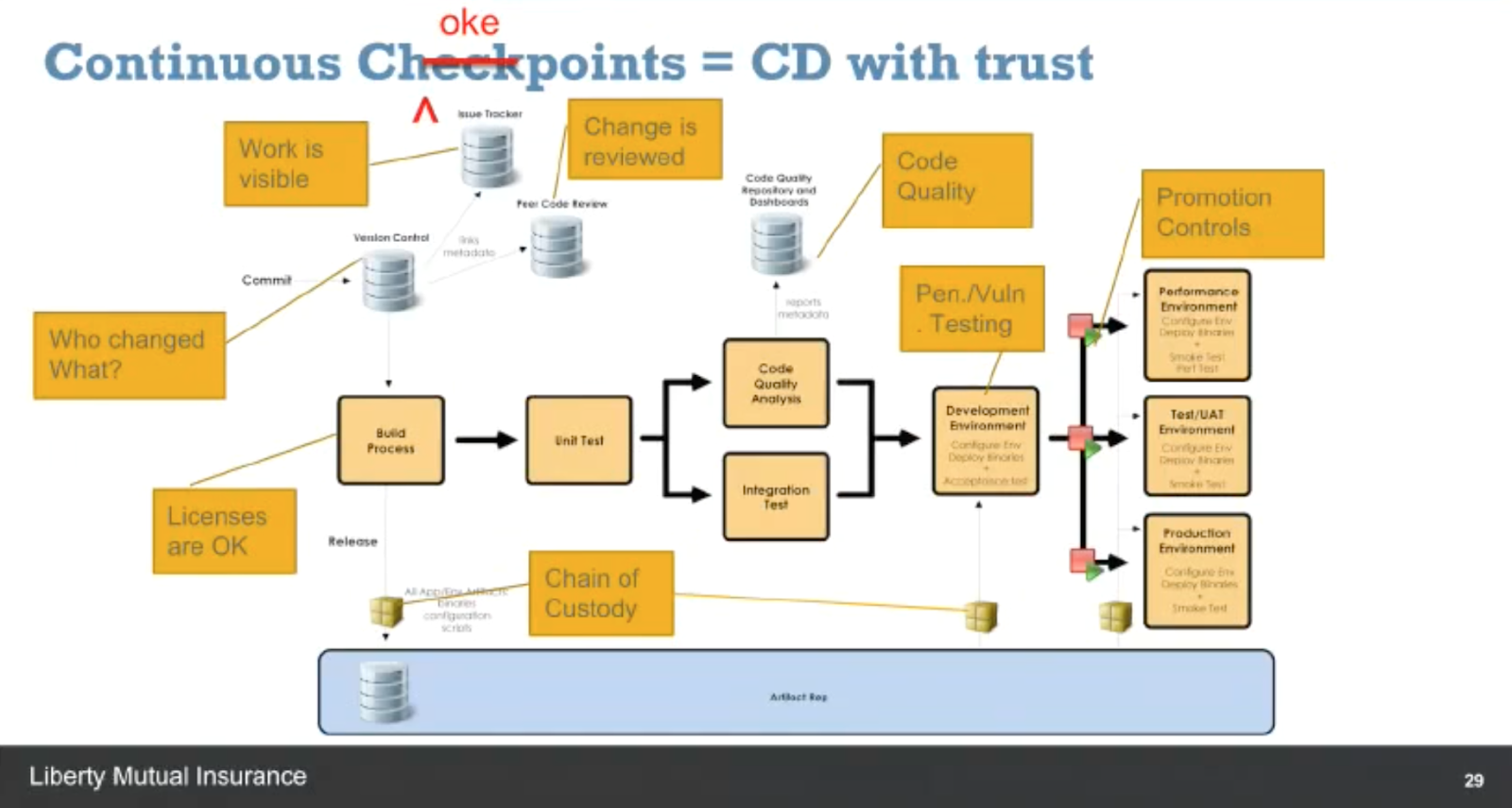
    Eddie Webb, director of Software Delivery Platforms at Liberty Mutual, also shared his organization’s journey into DevOps.  Eddie described how Liberty Mutual evolved its organization, tool chain and processes to go from 20 percent of builds being deployed to 60 percent over the past 18 months. He described how the company documented its value delivery chain and identified all of its choke points in the continuous delivery process that would need to be automated to achieve its new velocity and quality targets.

    Screen Shot 2016-12-05 at 11.35.04 AM.png

    Run the Gauntlet

    The All Day DevOps conference recorded more than 57 practitioner-led sessions (30 minutes each) including those from Barry and Eddie. Every session is now posted online and is free to watch. The conference itself had three tracks: CI/CD, Automated Security and Modern Infrastructure, including:

    • Application Secret Management with KMS – Andrey Utis of Capital One
    • Getting out of the Job Jungle with Jenkins – Damien Coraboeuf of Clear2Pay
    • Serverful Computing – Taking One for the Team – Paul Czarkowski of Blue Box Group

    One of the best ways to learn about DevOps is to hear from the experiences of others who have run the gauntlet. Take 30 minutes this morning, at lunch or at home this evening to watch your first online session with All Day DevOps On-Demand.

    — Derek E. Weeks

  • All Day DevOps

    All Day DevOps


    Over the past year, I have traveled to and delivered presentations at 18 DevOps events. I’ve also heard that over the past several years, John Willis has participated in more than 200 DevOps events. But not all of us have the time or budget to get ourselves and our teams out to these events where we can learn from other practitioners.

    This is why we’ve assembled the All Day DevOps Conference for Nov. 15.

    Free DevOps

    All Day DevOps will deliver 57 practitioner-led sessions over 15 hours and 15 time zones. No vendor pitches are allowed. To break the travel and budget barrier for you and your teams, we are delivering every session live, online and free of charge. Every session will also be recorded. We are doing this because we want to share global DevOps expertise with everyone.

    All Day DevOps

    DevOps Brains

    More than 3,500 people have now registered for the conference. We have an awesome speaker lineup covering three tracks: Modern Infrastructure, CI/CD and Automated Security. Here is a sample of some of the great sessions being delivered:

    • CI/CD
      • Meta Infrastructure as Code: How Capital One Automates our Automation Tools with an Immutable Jenkins, by George Parris (Master Software Engineer at Capital One)
      • Speaking for the Dead: Critical Positive Lessons from Waterfall and Monolithic Architectures, by Michael DeHann (Former CTO & Founder of Ansible)
      • I, For One, Welcome Our New Robot Overlords, by Mykel Alvis (DevOps Computational Demonologist at Cotiviti)
    • AUTOMATED SECURITY
      • Stop Changing Your Password, by Chris Swan (CTO Global Infrastructure at CSC)
      • System Hardening using Ansible: Application Deployment + Configuration Management + Continuous Delivery, by Akash Mahajan (Lead at OWASP Bangalore)
      • Building Codes for Building Code, by Josh Corman (Director of Cyber Statecraft at Atlantic Council)
    • MODERN INFRASTRUCTURE
      • Terraforming Your Infrastructure: From Beginner to Semi-Pro in 30 Minutes, Britt Treece (Production Engineer at PhishMe)
      • DevOps Friendly Doc Publishing for APIs & Microservices, by Mandy Whaley (Director of Developer Experience at Cisco)
      • Monitoring, Hold the Infrastructure – Getting the Most out of Lambda, Michael (DevOps Evangelist at DataDog)

    Don’t Just Listen, Talk DevOps

    One of the big pieces of input we have received from the community is that everyone wants an opportunity to interact. This is why we are building a dedicated team room in Slack for you. Every attendee will have the chance to interact with the speakers in the Slack room. Q&A will be live, online and freely accessible. We will also have Birds-of-a-Feather channels set up for those with questions to be helped by those with answers.

    Register Now

    If you would like to join us, can you register for free.  A big thanks goes out to Alan and his team at devopsy.kinsta.cloud for helping us spread word of the event here. We are really excited to have teams from North America, Europe, Asia, and Australia joining us for the event!

    www.AllDaydevopsy.kinsta.cloud

    screen-shot-2016-10-24-at-12-35-39-pm

    — Derek E. Weeks

  • Government Asks: What’s in Your Software?

    Government Asks: What’s in Your Software?

    Multiple agencies across the U.S. government are paying closer attention to the software they are buying. More specifically, they want to know what open-source and third-party components were used to build the software applications. For example:

    Similar moves by the National Institute of Standards and Technology (NIST), Underwriters Laboratories (UL) and the U.S. General Services Administration’s (GSA) 18F Group have also been noted over the past year. The common thread among these initiatives is a need for a Software Bill of Materials.

    According to wikipedia, a “Software Bill of Materials (software BOM) is a list of components in a piece of software. Software vendors often create products by assembling open source and commercial software components. The software BOM describes the components in a product. It is analogous to a list of ingredients on food packaging.”

    What’s in Your Software?

    Nowadays, that question is not difficult to answer. Where software applications of the past were coded from scratch—each one being like a unique snowflake, today’s applications are assembled with reusable open-source and third-party components.  With 80 percent to 90 percent of an application now built from open-source and third-party components, it is easy for organizations to quickly produce a Software Bill of Materials.

    The Same Rules Apply to Software

    You don’t want to purchase spoiled food, buy a car with defective airbags or have a relative receive a defective pacemaker. Modern society would not accept products built this way. The same rules apply to software.

    Recent analysis of 25,000 applications that revealed 6.8 percent (about 1 in 16) of components used by development teams included a known security defect. The defects are known security vulnerabilities in open-source and third-party components used to build the applications. With known defect rates in software manufacturing so high compared to other manufacturing industries, it’s no wonder government agencies are paying more attention.

    The Same Guidelines Apply Outside of the Government

    Industry organizations including the American Bankers Association (ABA) and the Energy Sector Control Systems Working Group (ESCSWG), along with private sector organizations that include Exxon and The Mayo Clinic, are also mandating use of a Software Bill of Materials. Producing a Software Bill of Materials will soon be a common practice across development organizations, just as it is across other manufacturing industries.

    A bill of materials provides a useful ingredient list. For some organizations, that ingredient list serves to inform businesses and government organizations that they are not buying products with known defective parts. Other organizations will rely on the bill of materials as a point of record for what parts were used within a released software application—again, another common practice in manufacturing.

    Just yesterday, I received a recall notice from Toyota informing me that my car had a known defective Takata airbag. Toyota knows exactly what part was used in the car it sold me 10 years ago and tracked me down. The company informed me that it is working on a remedy to fix or replace that defective part in my car.

    Imagine if application developers, using a Software Bill of Materials, could do the same thing as Toyota. Imagine the next OpenSSL heartbleed-like vulnerability is announced tomorrow. How many software practices could immediately identify if they used the specific version of that flawed component in their application. How many of those organizations could track that component down in seconds? How many of them would offer to remediate that critical defect in a timely manner?

    It’s Not Just Rules—It’s Software Supply Chain Optimization

    One of my favorite quotes from “The Phoenix Project” (a must-read novel about DevOps) goes like this: “You win when you protect the organization without putting meaningless work into the IT system. And you win even more when you can take meaningless work out of the system.”

    An average application includes 106 open-source and third-party components. If you select the best components, you can build the best software. Use known defective components and you are introducing waste, rework and technical debt into the system—a.k.a., meaningless work.

    Producing a Software Bill of Materials can help organizations quickly identify what parts have been used in an application—good or bad. In a recent discussion with VMTurbo’s Chief Architect, Sylvia Isler, she noted: “Zero tolerance for risk is also why some customers require us to provide proof that our applications do not contain hidden security or licensing vulnerabilities.” Not only does their zero-tolerance policy improve customer satisfaction, it also helps them by removing meaningless work from their system. Customers are happy and so are their development teams.

    screen_shot_2016-07-29_at_4-53-51_pm

    A Free Software Bill of Materials in 15 Seconds

    There are companies that provide services to help users create a Software Bill of Materials. Sonatype, for example, offers the service for free service. Analyzing a typical application might take 20 seconds, and produces a list of all open-source components identified by their name, version and license type, and listing known security vulnerabilities, adoption rates, age and other attributes.

    If governments and customers are paying closer attention to what’s in the software they are buying, it might just be time to figure out what’s in the software you are building.

    — Derek E. Weeks