Author: contributor

  • Gene Kim, DOES17 Speakers Discuss the Deployment Age

    Gene Kim, DOES17 Speakers Discuss the Deployment Age

    In a special episode of Electric Cloud’s Continuous Discussions (#c9d9), Gene Kim and speakers from the upcoming DevOps Enterprise Summit San Francisco (DOES17) discussed the deployment age, and how DevOps practices and automation can unburden teams and boost productivity.

    The panel included: Mik Kersten, CEO of Tasktop; Robin Yeman, fellow at Lockheed Martin; Courtney Kissler, VP of digital platform engineering at Nike; and, our very own Sam Fell and Anders Wallgren.
    Continue reading for some of their top takeaways:

    Kersten discusses the importance of spreading the word about DevOps tooling: “I think the best thing we can do is accelerate this turning point by giving the rest of those 15 million developers working in all of those other companies the tools that they need to apply these technical practice and to reorient their organizations to actually leverage them.”

    Yeman on the multiplier effect of automation: “DevOps is definitely all about the people, but the automation enables people to have such a higher outcome and better business results. It’s almost like a force multiplier for companies.”

    It’s crucial to look at the bigger picture of software delivery, advises Wallgren: “If you don’t have a big picture of what your value stream is from one end to the other, it’s hard to convince people that the problem they’re looking at is in fact not the right problem to be focusing on, or whether that is the right or wrong problem.”

    Organizations that employ transformational leaders succeed, claims Kim: “We see people driving DevOps transformations in large complex organizations, specifically the DevOps enterprise community, and my claim would be that these people are being promoted at a rate far higher than the population at large. My interpretation of this is that the value that’s being created by these leaders is appreciated and they’re being put into roles where they’re being asked to make an even greater contribution across even a broader portion of the organization.”

    You can’t just optimize for cost and efficiency anymore, explains Kissler: “There’s this realization that we’re all shipping software and really embracing that and understanding that organizations that have typically optimized for cost and efficiency are not going to win. And so, optimizing for speed to value, the value stream is a huge shift as well.”

    Yeman explains the awesome leadership structure at Lockheed Martin: “At Lockheed, most business leaders were engineers at one point in time. So, if you’re looking at the President or the Vice President, they started out in software, or systems, or as a tester. They have to have depth in their area because then they can really empathize with what we’re building and with, you know, the people that are building it.”

    More on the wonders of automation, per Kersten: “Agile has scaled up, but it kind of hit a brick wall until automation came into play and organizations realized that they needed reliable, predictable, and safe ways to deploy. I think one of the most interesting things that happened when the technical practice matured around that automation layer is all of the other gaps it uncovered.”

    Wallgren on the ironic manual nature of the software delivery industry: “I think that one of the paradoxes of what we do in software teams is we don’t use software at all, most of the time, to help us produce our own software. We use people.”

    Kim reflects on revelations after reading “Disrupt or Die” by Jedediah Yueh: “The real value that DevOps will create is not going to be in the FAANGs, the Facebook’s, Amazon’s, Apple’s, Netflix’s, and Google’s of the world, but it really is in the large brands in every industry vertical as they either disrupt, get digitally disrupted, or digitally disrupt themselves.”

    Kissler on how to respond to the exponential growth of digital disruption: “I think the acknowledgement of where we’re at and where we need to go and how fast we can get there is a huge component of responding to the digital disruption.”

    Watch the full episode:

    Want more Continuous Discussions (#c9d9)? We hold our #c9d9 podcast every other Tuesday at 10 a.m. Pacific. Each episode features expert panelists talking about DevOps, Continuous Delivery, Agile and more.

    Check out all past episodes and panelists here.

    About the Author / Anders Wallgren

    Anders Wallgren is chief technology officer at Electric Cloud. Anders has over 25 years’ experience designing and building commercial software. Prior to joining Electric Cloud, he held executive positions at Aceva, Archistra, and Impresse and management positions at Macromedia (MACR), Common Ground Software, and Verity (VRTY), where he played critical technical leadership roles in delivering award winning technologies such as Macromedia’s Director 7. Anders holds a B.SC from MIT.

  • How to Make Your Software HIPAA-Compliant

    How to Make Your Software HIPAA-Compliant

    Creating software for the healthcare industry must always follow strict requirements and limits set by both state regulators and medical organizations. In this article, we will focus on becoming compliant with HIPAA (the Health Insurance Portability and Accountability Act of 1996) by building a proper IT solution for corresponding institutions, while also considering the HIPAA compliance software checklist.

    By the end of 2017, the North American healthcare IT market is forecast to value $31.3 billion. According to Healthcare IT News, the annual growth rate is about 7.4 percent, which will allow the market to become almost $10 billion bigger than it was in 2012. Why has the market grown so fast? The main reason is the need to implement more IT systems in medical organizations, thus creating a higher demand. Of course, there are also other factors that drive market growth.

    Other factors that increase the healthcare IT market include:

    • A growing pressure to cut medical costs;
    • A high demand for healthcare system integrations;
    • A higher ROI due to implementing IT systems in health care;
    • Serious governmental financial support;
    • The need for computerized physician order entry (CPOE) adoption; and
    • Aging populations.

    Healthcare IT tools must correspond to all HIPAA requirements to make medical institutions integrate them. Let’s talk about the major aspects of software development in this industry.

    How to Become HIPAA-Compliant

    Here, we will cover the elements that must be implemented in software for medical organizations to ensure HIPAA IT compliance. Based on the following recommendations, developers can adopt the features they need to adhere to all requirements.

    Audits

    According to the Act, healthcare providers must perform regular audits to identify possible risks for data breaches or privacy violation. A HIPAA-compliant software should utilize these audits to analyze the compliance level of a particular medical organization and provide it with detailed information concerning risks and current errors, including recommendations. The audits may include a form of quizzes, which will make them easy to use for medical staff.

    Recovery Plan

    The above-mentioned audits will help forecast risks or detect errors related to HIPAA compliance. On the other hand, a remediation plan will allow healthcare providers to correct mistakes and prevent their reappearance. That is why such plans have to be included in medical software. Furthermore, every medical institution has to develop its own recovery plan, taking into account its specialization and implemented systems. The software should be able to initiate a particular plan for a specific situation.

    Documentation

    The main task of any medical software is to work with documents. Since the software helps facilitate documentation processing, many healthcare providers implement such systems in their organizations.

    Required principles, which software development organization Archer Software uses in its own projects, for medical software in documentation processing include:

    • Comprehensibility;
    • Simplicity;
    • Strict structure; and
    • Secure data storage

    HIPAA violation fees are huge. The price of breaking a rule can reach up to $1 million. Reliable data storage, which protects from hacker attacks, will allow organizations to save money and ensure electronic protected health information (ePHI) security.

    Managing Relationships with Business Associates

    HIPAA-compliant software must also handle the company’s relationships with its business associates, including contractors responsible for managing ePHI. A system must monitor the execution of specific agreements regulated by the Omnibus Rule of HIPAA. This will help healthcare providers ensure the security of PHI while entrusting it to business associates.

    Security

    It is almost impossible to fully exclude the risk of data breaches in any medical organization. Software must be able to detect those breaches, create a corresponding report and apply preliminary measures to avoid further data “sharing.” It also has to prevent data breaches by blocking the use of portable data storage devices.

    HIPAA Compliance Checklist for Software Development

    Below is a list of all the necessary elements for HIPAA-compliant software, based on the safeguards listed in the HIPAA Security Rule. The implementation of these elements will allow your software to ensure both ePHI security and privacy.

    The necessary features for HIPAA-compliant software include:

    • User authorization;
    • Access control;
    • Authorization monitoring;
    • Data backup;
    • Remediation plan;
    • Emergency mode;
    • Automatic log off; and
    • Data encryption and decryption.

    Now that we’ve covered off the requirements for IT solutions designed for medical organizations, let’s proceed to the aspects of hospital management software development.

    Hospital Management System Development

    Besides HIPAA rules, custom hospital management systems (HMSs) have to correspond to other internal requirements that will allow medical staff to get as many advantages as possible from using the medical software without compromising patient privacy or data security.

    The requirements for HMSs are as follows:

    • An HMS has to be comprehensive for any medical employee.
    • The UI must be highly informative and laconic.
    • The system has to have a user access control based on employee responsibilities.
    • An HMS must contain a reliable security system that encrypts stored data.
    • The software has to provide functionality for extending or improving clinic automation.

    Taking into account the tremendous financial penalties for violation of HIPAA principles, healthcare institutions strive to implement IT systems that fully correspond to the requirements of the Act. That is why software developers have to be aware of new state requirements in the healthcare industry to offer medical organizations convenient IT solutions at a reasonable cost. This is especially crucial for startups just entering this market. This knowledge will allow healthcare providers to get HIPAA compliant software and help IT outsourcing companies grow their business.

    About the Author / Adam Edmond

    Adam Edmond is a technology writer, interested in the cloud, app and software developing niche. However, he can’t stand mathematics. Edmond has also lead courses in visual effects, animation and digital marketing for both the Western Australia School of Art and Design and Murdoch University. Connect with him directly.

  • Browser Isolation: Staying in Front of Internet-Borne Attacks

    Browser Isolation: Staying in Front of Internet-Borne Attacks

    Secure Remote Browsing Offers New Approach to Thwart Ever-Changing Cyberthreats

    Cybersecurity is a moving target, requiring constant vigilance to counter the cat-and-mouse tactics of malicious agents. Because enterprises are only as strong as the weakest link in their protection against internet threats, phishing schemes and rogue email attachments, proactive and defensive activities are essential.

    Each day new variations of internet-borne threats are contrived, making cyberdefense a tough challenge—especially as organizations increasingly rely on the web and browser-based applications for business-critical processes. In just a three-month period last year, 18 million malware samples were detected, as reported by PandaLabs—an average of 200,000 new threats every day.

    Unfortunately, it is not a matter of if but when you may be a target of a malware or ransomware attack. Digital evil lurks behind every click, and existing security frameworks no longer are effective. A new mindset and tools are needed to isolate cyberattacks, and prevent them from penetrating networks and devices before they can wreak havoc.

    Defense-in-Depth Strategy

    When establishing a cybersecurity strategy to defend against browser-based threats, it is important to assess the best approach for minimizing risk with finite resources.

    Maintaining a balance between performance and security is important. Implementing security measures that are too restrictive can degrade the user experience and reduce productivity. Being too lenient can leave the door wide open, increasing organizational vulnerability to a breach.

    All it takes is one employee who unknowingly clicks on a malicious link or downloads an infected file to put an entire organization at significant financial risk. According to a study conducted by IBM, the global average cost of a data breach is $3.62 million.

    In addition to existing security technologies, such as firewalls, antivirus programs, anti-malware systems, proxies and web-filtering solutions, a multilayered approach also must include remote containers and browser isolation.

    The Emergence of Secure Remote Browsing

    Secure remote browsing has been identified as a top technology in 2017 by Gartner. Otherwise known as remote browser isolation (RBI), this technology is rising in importance as a new method to strongly enhance web security and endpoint protection. Implemented in conjunction with existing security frameworks, it serves as an added measure of protection that eliminates enterprise threats without compromising the user experience.

    Browser isolation serves as an effective solution for addressing the human element that is responsible for triggering so many browser-borne threats. It provides a fully interactive, native user experience while ensuring that potential malware never reaches the endpoint. Utilizing secure remote browsing, users can browse the internet as they normally do without noticing any latency or other telltale signs.

    Remote browser isolation technology delivers unparalleled levels of security. To neutralize the great risk of encountering rogue links or corrupt files, a remote virtual browser isolates actual web browsing from the endpoint device. A newly created container is allocated within a remote “safe zone” for every remote browsing session and tab, disposing of the container once the user exits the session or tab.

    Once a browsing session is complete or inactive, the container is discarded along with any potential malware that may have accumulated during the browsing session. There is no performance degradation or noticeable latency that occurs during this process. Enterprises have the flexibility to utilize any HTML5-based browser on any operating system or device.

    While not all remote browser isolation solutions are clientless, those that are enable organizations to minimize the IT overhead and complexity associated with ongoing updates and endpoint installs, on which antivirus and other security solutions depend to block cyberthreats from reaching end-user devices.

    Browser isolation effectively augments existing web security frameworks, serving as a lead security measure that adds measurable power to existing IT investments, with minimal operational demands.

    About the Author / Daniel Miller

    Daniel Miller is the Director of Product Marketing at Ericom Software. He has more than 15 years of industry experience in corporate and product marketing, business development, and product management, supporting an array of technology services, hardware and software solutions—with a strong focus on cybersecurity in recent years. He frequently shares his insights on cybersecurity at industry conferences and podcasts, and regularly contributes articles to enterprise security publications. Daniel holds graduate degrees in Behavioral Sciences and Business Administration.

  • How to Succeed with DevOps by Outsourcing Software Development

    How to Succeed with DevOps by Outsourcing Software Development

    The DevOps journey can be successful when you use offshore outsourcing software partners, but it requires careful attention from your IT leaders.

    The old saying, “The only constant is change,” has never been more true for software development, whether your company is a SaaS provider or a manufacturer of discrete products that rely heavily on software delivered by your IT department. For the past several years we have seen four key movements:

    1. The continued adoption of outsourced software development. As far back as 2013, it was reported that 2 out of 5 CIOs surveyed planned some sort of outsourced software development for the coming year.
    2. Increased outsourcing options. While outsourcing to India is still a legitimate option today, it’s certainly not the only viable option available. Companies are now able to answer the question: “What country will provide my outsourced programming team?” in multiple ways.
    3. Agile as a mainstream methodology. Software development teams continue to embrace Agile as the preferred methodology for software development projects.   
    4. Interest in—or adoption of—DevOps. Since the term “DevOps” was introduced by Andrew Shafer and Patrick Debois at the 2008 Agile conference in Toronto, large and small companies alike have shown increased interest in embracing DevOps and the promise it holds for rapid software deployment.

    The current state of tools and service provider capabilities should entice IT leaders to adopt (or continue to adopt) DevOps methods for software development. More than ever before, there are capable teams of programmers across the globe that you can tap into for a successful software.

    There is No Substitute for Good Process

    The goals of higher output and greater efficiencies and even “continuous deployment” through DevOps have their roots in elite manufacturing methods such as kanban and lean manufacturing. Like its manufacturing method cousins, DevOps success hinges on good process. To see improvements through the use of DevOps, you must have clear understanding (and description of) your current software development process. You need to communicate your processes clearly in words and pictures with your outsourcing partner. Issues that are birthed out of shortcomings in your DevOps process will be exponential when you add the variable of outsourced development into your work steps.

    Key Takeaway: DevOps is only possible through good process. If you’re not committed to good analysis and continual improvement of your processes, then the use of an outsourced software developer will only allow you to create flawed software and generate chaos more rapidly.

    Tools Create Speed

    If good process is the engine of DevOps, then automation tools are the gasoline that makes the well-designed process run with speed. Automation of good process makes it possible to eliminate bottlenecks in the software development cycle—you can truly “sprint through your sprints.” Perform an inventory of your tools:

    • Are you able to seamlessly (and automatically) promote code?
    • Can you perform test-driven design?
    • Can you perform test-driven development?
    • Can you easily associate features and fixes with promoted code?
    • How do you perform regression testing?

    Key Takeaway: Automation tools must be used with consistency by you and your outsourcing partner. These tools will enable the process that you all follow daily in the development activities of your project.

    Choose Wisely

    Having the right outsourcing partner for software development is important. To outsource successfully in a DevOps approach, you must be very selective in your choice of an outsourced software development team.

    • The best partners employ a programming staff that have achieved the major certifications that are important for your DevOps project needs. Moreover, a good partner invests in its programming staff’s training on a continual basis. We like to see evidence that its programming staff regularly renews their certifications.
    • Experience. Equally important is having a software outsourcing team with demonstrated experience in your business vertical (example: discrete manufacturing, banking, etc.) and expertise in the system functional area (e.g. finance, e-business order processing, warehouse management, etc.). Of course, the software development team also should be versant and have demonstrable experience in the use of Agile and DevOps techniques.
    • The right partner should be neither too large nor too small. The outsourcing company needs a pool of programmers large enough to keep with the intended work pace of your project. Conversely, we caution IT managers to be wary of extremely large outsourcing companies. Your project and company must be “big enough to matter” to the partner you select. If you are seen as too small in terms of the revenue opportunity, the outsourcing company will defer attention and its top talent to larger customers, who are more able to influence decision-making.

    Key Takeaway: To succeed with DevOps outsourcing, you need the right partner, based on attributes of skills, demonstrable experience, and a size that’s proper for your company.

    Metrics Matter

    John Adams, the second U.S. president, once famously said, “Facts are stubborn things.” DevOps presumes a culture of continuous improvement—and our metrics help demonstrate that improvement. We collect metrics so we can accurately measure pace of work, quality of software produced, level of effort and so on. We measure events over time to see if we are improving, worsening or stagnant. Metrics are a critical means of communication and mutual accountability between your company staff (IT and business) and the outsourcing partner who is writing your software. In a DevOps-driven outsourcing relationship, you’ll regularly capture and report on metrics (estimated and actual) such as:

    • Lead Time: In software development, you need to measure the time elapsed from concept to the point delivery of the completed software. From project to project or even epic to epic, you want to see an increase in speed to deliver software.
    • Sprint Time: Teams using Agile will have sprints measured in a few days, instead of months, for the typical time for work grouped in “phases” or “activities,” using traditional development methods. Be sure to track metrics for your sprints.
    • Sprint Volume: How many sprints are needed to complete a story? How many sprints are needed for a version? For each of these metrics, look for consistent volume (i.e. number of sprints produced) over time.
    • Issues and Open/Close Rates: Measure how many production issues are reported AND closed within a specific time frame. Observe and take action on trends rather than establishing a hard and fast number; there’s no “right answer.”

    Key Takeaway: Metrics allow you and your outsourcing partner to objectively assess the pace and quality of rapid work being performed in a DevOps/Agile-driven development project.

    Collaboration is Key

    It almost goes without saying that you and your outsourcing partner will need to have good, regular rhythms of communication. This continuous collaboration is essential because you and your vendor-partner team are:

    • Operating in a common disciplined way using DevOps methods.
    • Performing work through a common set of tools.
    • Progressing through the project goals in a series of rapid sprints.
    • Capturing and analyzing team metrics to ensure project health.

    Honestly assess what barriers might exist to good collaboration. Do you need to ramp up your real-time collaboration tools? Do you have a master calendar of formal meetings where the agenda will drive good information-sharing, decision-making and issue resolution?

    Are time zone differences an issue? This may affect the geographic location from which you will select your outsourced development team. In a recent survey, one-third of U.S. companies that outsourced to India considered the 10-hour (or more) time difference to be a big challenge. Very often the “core team” in an outsourcing software provider will be working hours that are completely opposite of normal U.S. business hours. Some companies find that a “nearshore” outsourcing partner helps optimize collaboration. Because the outsourcing partner is in the same time zone as your IT leadership team, it’s easier to schedule meetings or even have impromptu discussions, which are so important in software-development methodologies such as Agile.

    Key Takeaway: DevOps and Agile require high collaboration. Set yourself up for success by ensuring there will be no reasonable impediments to good collaboration.

    A Perfect Storm – and Opportunity

    The recent evolution in best thinking and adoption of DevOps, and the parallel growth in options for software development outsourcing together create a kind of perfect storm in software development. The potential of DevOps is augmented by the inherent continuous-change nature of Agile. We see the ability to transfer work across the “virtual shop floor” of development without geographic constraints. This new programming paradigm of DevOps, partnered with Agile, is now matched by equally exciting (and relevant) growth in the options for delivering high-quality code from anywhere across the globe.

    About the Author / Steve Mezak

    Steve Mezak is founder and CEO of Accelerance, a leader in global software development outsourcing, as well as the author of “Software Without Borders,” co-author of, “Outsource or Else: How a VP of Software Saved His Company,” and a CIO columnist.


  • Building a Services and IoT Platform with DevOps, Part 3

    Building a Services and IoT Platform with DevOps, Part 3

    Business needs and IoT demands are taking new dimensions in connecting millions of devices, people, process, tools and systems. With endless possibilities of creating new IoT solutions, DevOps teams are the key players who handle the challenges in successfully rolling out a IoT solution while handling the business, development, operations and infrastructure demands in the background. This article focuses on some of the DevOps best practices to adopt during IoT development, enabling faster time to market.

    DevOps practices to adopt during IoT development

    1. Adopt Security by design – Teams need to be educated and made aware of security threats. Use threat models mitigation techniques such as using authentication; storing secrets separately and protecting those secrets; using tamper-resistant protocols, digital signatures, timestamps, audit trails, encryption, authorization policies, filtering; and running services with least privileges during security design and development.
    2. Shift left security analysis and security testing – Integrate security analysis tools, customize security compliance rules and run security testing as part of continuous integration pipeline, generate security threat reports on vulnerabilities and act on these threat reports to fix issues early in the development phase and minimize the security risks.
    3. Follow security standards during development such as security development life cycle (SDL), which has guidelines and measures for building the software for devices and application components of IoT platform.
    4. Perform code reviews for device software, application software, PaaS rules and configurations, as quality assurance can become a huge risk given the complexity of the infrastructure, millions of devices connecting and dynamic environment configurations. Code review tools need to be integrated to the CI pipeline with pull request code review.
    5. Use the right branching policies in a version control repository, including precommit/preflight builds, pull requests for merging the code changes and access control for maintaining branches and using the right branching strategies, as there will be multiple fragmented development and deployment pipelines for devices and application developments to reduce the overhead. Use distributed repository/central repository with traceability and auditability based on the requirements.
    6. Automate deployments and create deployment pipelines for device development, application development, infra-automation scripts development with build and deployment pipelines targeting for different target endpoints.
    7. Customize the builds and release pipelines to pull the packages from multiple build and deployment pipelines to integrate and deploy as units of deployment.
    8. Plan for frequent release cadences—say, monthly—for application rollouts. Release cadences for firmware update rollouts can be planned for three to six months, as device updates cannot be pushed so often.
    9. Continuously monitor deployments – Use a release management tool for orchestrating the releases and release coordination activities, with gated checks and approvals with a view of what is getting deployed to each environment, as well as traceability and audit.
    10. Enable feedback loops and automated alerts if firmware deployments or application updates fail.
    11. DevOps teams can define key tenets, criteria to be met and standards to be followed for the devices; infrastructure to be provisioned; device protocols usage and standards in connecting to existing/new devices and services. This can reduce the complexity in development and deploying to multiple varied devices by following the same protocols for connectivity and communication.
    12. Train the team of developers, QA and hardware developers on how to do continuous integration for IoT development, follow agile and lean practices and ensure security criteria for all layers of the application and in process.
    13. Adopt user-centric test automation and end-to-end testing approaches and build robust test cases in perspective of testing a complete flow, with devices/services that may not be in your scope but will be part of your overall IoT platform ecosystem.
    14. Create/utilize container based test environments and device simulators coupled with service virtualization for functional testing.
    15. Automated infrastructure provisioning – Use the right configuration management tools to automate the infrastructure along with dependencies to create environments through code instead of provisioning basic VMs.
    16. Use container and cluster management tools such as Docker Swarm or Kubernetes for service discovery, auto-scaling, self-healing and scheduling.
    17. Use RBAC, service accounts and security access controls in the infrastructure templates/scripts that are created instead of individual user credentials to limit the risk of unauthorized users provisioning the environments using scripts. Build security in devices, cloud security, application security and infrastructure automation templates. Use secrets, key vaults, encryption methods and certificates to secure the credentials and access control.
    18. Configure individual build and deployment pipeline jobs for application development and infra-automation development, as there will be a huge development effort involved in automating the infrastructure.
    19. Create infrastructure verification tests with scripting tools such as Python or use testing frameworks such as Pester or any other open-source tools and integrate the infrastructure tests with the CI/CD pipeline. Ensure to run these tests every time the infrastructure is provisioned.
    20. Version-control the infrastructure templates, scripts, user profiles, environment configurations and device configurations apart from source code.
    21. Set up a centralized dashboard of monitoring tools to monitor the clusters, nodes, firewall rules, VMs, applications, devices and services. Feedback should flow back to developers/QA/DevOps teams.
    22. Configure applications to provide logging about exceptions, memory leakages and response times and push the logs to the monitoring tools or the dashboards in monitoring tools.
    23. Use the telemetry from the applications and devices to derive the analytics graphs/trends and set up KPIs/metrics to measure application performance/availability, as well from derive business metrics to set SLAs for DevOps and operations, to improve productivity.
    24. Ensure DevOps teams have close coordination with dev/QA teams of both software and hardware teams, as managing IoT platforms need more skill and expertise in hardware and software in the IoT domain.
    25. Manage legacy and cloud infrastructure with multicloud management platforms, and monitor and optimize the infrastructure usage.
    26. Create a DevOps governance plan/guide, with clearly defined access control policies, access rights for devices, control limits on infrastructure provisioning in different clouds, limits on PaaS/IaaS services to be used, etc., and standardize the process to be followed in DevOps/development/testing/operations, tools, etc.

    Following DevOps practices for application development has become quite streamlined in recent years. However, in IoT, where traditional methodologies and practices are followed in industrial enterprises, adapting to agile methodologies and following DevOps practices coupled with right DevOps-skilled team, tools and expertise can streamline and simplify IoT developments.

    About the Author / Lavanya Subbarayalu

    Lavanya Subbarayalu is Senior Architect working with Technology Office in HCL Technologies. She has expertise in IOT, Azure, DevOps consulting & Microsoft technologies. She is associated with DevOps COE, working on design and Development of DevOps solutions and consulting tools. Connect with her on LinkedIn.

  • 3 Practical Steps to Employing DevOps

    3 Practical Steps to Employing DevOps

    Everyone seems to be talking about DevOps but, if you are new to it, it might all seem a little overwhelming. One of the hardest things about DevOps is knowing where to begin. This is because to “do DevOps” its seems you have to suddenly start using a lot of new processes and tools at once.

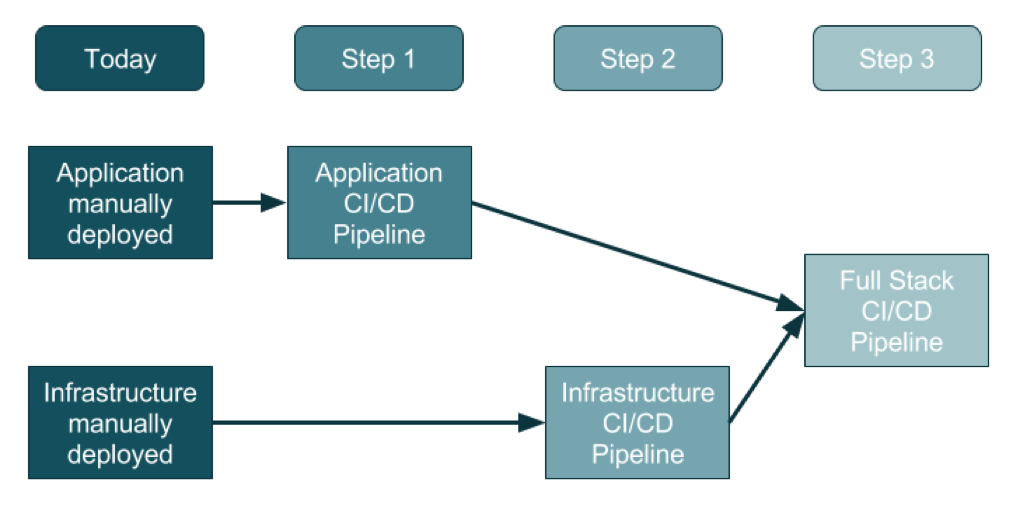
    For an organization that doesn’t use DevOps today, the adoption of this three-step method will promise a generally clean approach.

    Source: https://ukcloud.pro/

    Step 1: Creating the Application Pipeline

    Regardless of the type of application, the pipeline looks—at a distance—very similar. The goal is to weave application releases into a new coordinated process that looks something like this:

    1. The developer makes changes locally to their laptop/PC/Mac, and upon completion (including testing, etc.) issues a Pull Request.
    2. Code review kicks in, the developer changes are reviewed and accepted and a new release can be created.
    3. Someone, or the system, runs a procedure to create a release artifact, which could be a Java JAR file, a Docker file or any other kind of unit of deployment.
    4. Someone, or the system, copies the artifact to the web or application servers and restarts the instances.
    5. Database migrations/updates may be additionally applied, although the database is often left outside of the application release process.

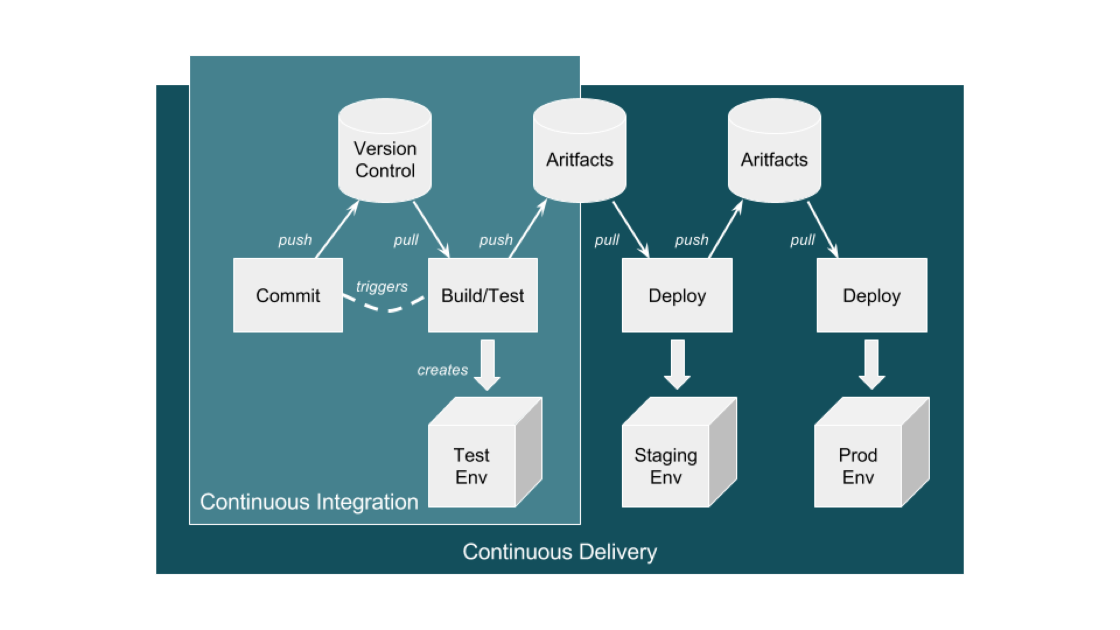
    This process evolves into an automated application-only continuous integration and continuous deployment (CI/CD) pipeline by using a toolset to automate the process as shown in the diagram below:

    Source: https://ukcloud.pro/

    A Typical CI/CD Pipeline


    However, be aware that this isn’t ideal (yet), because at this point the application alone is being released (injected) into existing environments.

    Why is this potentially an issue? If the developer has altered the local environment as well as the application but these local environment changes are not part of the release, then they’re not in version control. And, if they are not applied at the same time as the application, then the application will break and the common argument occurs: “Well, it works on my machine!” The solution is for application and infrastructure releases to be synced—and hence steps 2 and 3.

    Step 2: Creating the Infrastructure Pipeline

    Ideally, the infrastructure team has learned from the developer team’s DevOps and CI/CD pipeline journey and can expand and adapt it for the infrastructure (which increasingly is a public cloud).

    There are some differences with the infrastructure pipeline, specifically around units of deployment that are now the infrastructure layers in environments, the things that surround an application such as the DNS, load balancers, the virtual machines and/or containers, databases and a plethora of other complex and interconnected components.

    The big difference here is that the infrastructure is no longer described in a Visio diagram: it is brought to life in code, in a configuration file, in version control—this is infrastructure as code (IAC).

    Before this, a load balancer was described in Visio diagrams, Word documents and Excel spreadsheets of IPs and configurations. This is now swapped to describe everything about the load balancer in a configuration file.

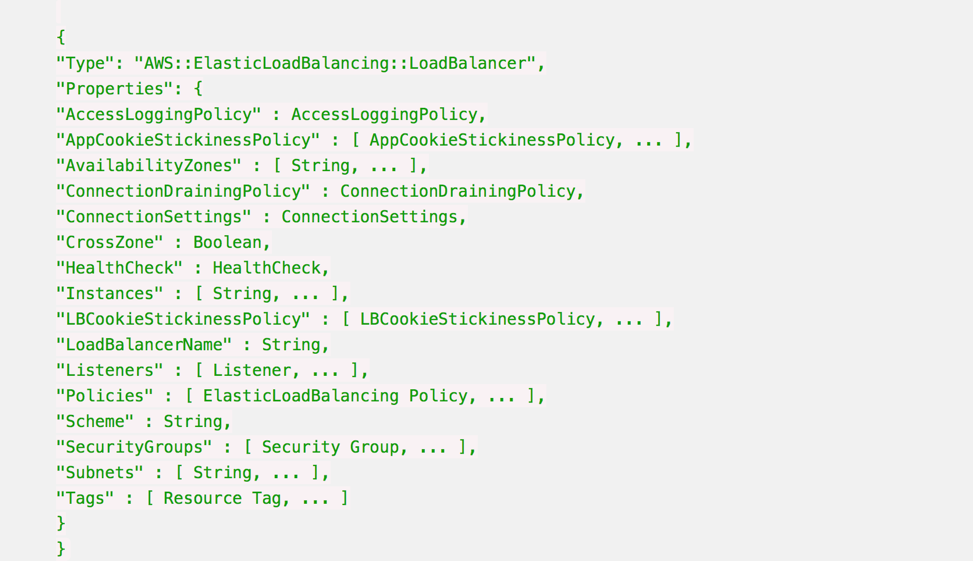
    Here’s an example AWS CloudFormation Configuration for a Load Balancer:

    Whenever this file is changed in Version Control, such as changing the subnets a load balancer can point to, then the automation engine can update an existing infrastructure environment to reflect that one change, and any dependencies that change.

    It also means that you can apply this template to multiple environments just by changing the environment name from staging to production, for example, and be very confident that all environments are consistent, from the developer laptop to production.

    It is also possible to make the templates dynamic to change their behavior according to the environment, so in production the environment will scale out across three datacenters, but on a developer’s laptop it will use a local VirtualBox single-system.

    Step 3: Creating the Full-Stack Pipeline

    The goal of a full-stack pipeline is to ensure that the application and infrastructure changes over time are in sync, both in version control and the release deployments across each pipeline stage. And a developer should never say, “It worked on my laptop!” when a release fails in production.

    The popular CI/CD tools can now automate the full stack because everything is programmable. This means everything can be captured in version control, and the same configuration can use dynamic input parameters to build an environment on a developer’s laptop, or a QA system in the cloud or updates to production.

    Imagine a developer makes an application change that also requires a change to the database, the web instance scaling configuration and the DNS. All of these changes are captured in one version control branch and the developer builds a system on their laptop from this branch, and tests it.

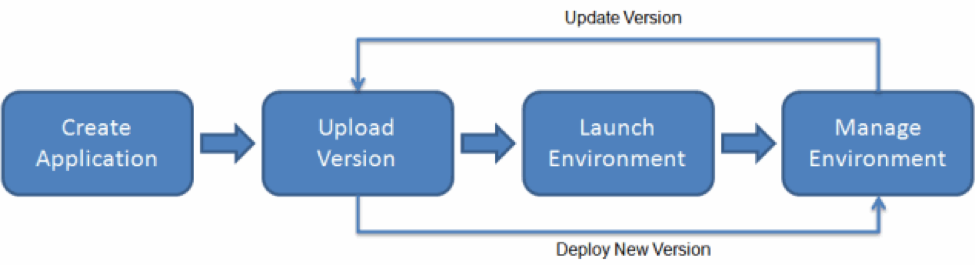
    This is what platform-as-a-service systems can do. By adding an environment configuration file inside the same code base as your application, you can ensure that you have bound your application to the infrastructure. 

    AWS Elastic Beanstalk Example

    This is the target end goal, though it takes a lot of practice, and learning, to get there. It can be very satisfying to watch a build and a deployment, seeing the automation use tags and dynamic configurations to build, or update, the target environment with application and infrastructure changes.

    About the Author / Sarah Lahav

    Sarah Lahav is CEO of SysAid Technologies. As the company’s first employee, Sarah Lahav has remained the vital link between SysAid Technologies and its customers since 2003. She is the current CEO and former VP of Customer Relations at SysAid – two positions that have fueled her passion in customer service. Connect with her on LinkedIn and Twitter.


  • Tips for Creating Unit Tests for Mobile Apps

    Tips for Creating Unit Tests for Mobile Apps

    Mobile app testing ensures your application is working perfectly without any freezes, bugs or crashes. There are unit, auto, system and acceptance tests, and in this article we will talk about unit testing for mobile apps.

    First, let’s discuss what unit tests are in general. Unit testing checks whether certain parts of the code work correctly. In other words, it helps us produce more robust and maintainable code. Each one small test is dedicated to a small feature. All of them are connected, however, so you get a kind of chain. If any part of this chain fail, the whole chain will fail as well.

    As a part of mobile application testing unit tests may be written at any phase of development or even before development (test-driven development, or TDD, is one of the iOS unit testing best practices). With this kind of development, you let your tests drive the development process. They indicate what you do, what you should do next and what the result should be. Testing controls the design.

    Thus, unit testing is the first step to perfectly working code. But it also is the primary means for your software quality assurance. In this article we’ll explain how to do mobile apps unit testing on an iOS example and give you a small iOS unit testing tutorial.

    Do I Need to Conduct Unit Testing?

    Does everyone need to do unit testing? The short answer is no. The long answer is that it  is a very good tool, though it isn’t necessary in all situations.

    You don’t need unit testing if:

    1. your app is very small and simple. If your app is small, it will be faster to check everything manually because there’s not that much logic to be checked.
    2. you don’t plan your app to work in the long term and you need it only for a demonstration.
    3. you’re a super-human who writes perfect code without any mistakes.

    If you don’t fall into any of these categories, then unit testing is what you need. At first, this kind of testing may seem too time-consuming. Lack of time is mentioned as one of the most serious problems related to testing, but actually performing unit testing can save a lot of time and improve development speed. In addition, it can serve as a kind of documentation for your library. We at Mobindustry spend up to 30 percent of our development time on testing.

    Unit tests have two main purposes:

    1. Reduce the number of bugs by making sure that our class/module/component is working as expected with all possible inputs.
    2. Reduce the number of regressions by making sure that our new functionality, bug fixes or refactoring hasn’t broken any existing functionality.

    How Do Unit Tests Work?

    How to create iOS unit testing? Xcode has built-in support for unit tests and works as an iOS unit test framework. You can use Xcode by pressing cmd+U or via the menu by selecting Product -> Test. xCode will run all active tests and generate a report with results (passed/failed). All failed assertions are indicated. Code coverage data is also generated in this framework, which allows you to get to any class and check which lines of code were called and how many times they were called.

    Types of Unit Tests

    Unit test for iOS can either check the UI or the logic of the application. Logic ones have a few subtypes:

    • Regular ones are used to check straightforward functionality.

    func testExample() {

    let account = Account()

    account.amount = 100.0


    account.withdraw(20.0)


    XCTAssert(account.amount == 80.0, "Account should have current amount of 80.0 but has

    (account.amount)")

    }

    This is used to simply check if the withdraw() method is working correctly.

    • Asynchronous tests use XCTestExpectation to check for expected outcomes.

    func testExample() {

    let url = URL(string: "http://www.google.com")

    let expectation = XCTestExpectation(description: "expectation_description")


    let task = URLSession.shared.dataTask(with: url) { (data, response, error) in

    if let error = error {

    XCTFail("Error: (error.localizedDescription)")

    return

    } else if let statusCode = (response as? HTTPURLResponse)?.statusCode {

    if statusCode == 200 {

    expectation.fulfill()

    } else {


    XCTFail("Request failed with status code (statusCode)")

    expectation.fulfill()

    }

    }

    }

    task.resume()


    waitForExpectations(timeout: 10) { (error) in

    XCTFail("Expectation (expectation.description) has failed")

    }

    }


    This one will check if Google’s website is available (i.e. if it returns status code 200).

    XCTestExpactation is used to wait for the async task to finish. An Expectation will either finish successfully by calling the fulfill() method or will fail if the timeout time has passed but fulfill() hasn’t been called.

    • Measure ones check heavy logic:


    func testExample() {

    self.measure {

    let lotOfObjects = []

    for obj in lotOfObjects {

    obj.makeCalculations()

    }

    }

    }


    You can create this test to measure how much time and how many resources are spent on particular calculations inside the measure() block.

    Tips on Unit Testing for Mobile Apps

    • Remember the structure

    The common AAA approach to structuring is the most common and convenient way to write tests. AAA stands for:

    1. Arrange – the part that allocates all necessary objects and sets up initial parameters
    2. Act – the part that executes the logic
    3. Assert – the part that checks if the obtained results match the expected results

    Сode written this way is easy to read and use, which means it’s easier to maintain.

    • Cover only necessary things with tests

    Some people think it’s necessary to cover every single part of your code with a unit test. This approach is actually time-consuming, complex and completely useless.

    There are four types of code you may have in your project. Let’s look at them starting with the most extreme options:

    1. Simple code without any dependencies: Probably everything is already clear with this kind of code and there’s no point in assessing it.
    2. Complex code with lots of dependencies: If you have this kind of code, it’s a good idea to refactor. There’s no need to cover this code because we’ll rewrite it, which means new classes will appear and method signatures will change. Why write something that won’t be used? Of course, such code also needs quality assessment, only on a higher level.
    3. Complex code without dependencies: This code contains algorithms or business logic. This is the perfect kind of code for testing because these are very important parts of the system.
    4. Moderately complex code with dependencies: Such code links different components together. Tests are very important here; they tell how exactly components must interact.

    Usually, they cover the following areas of code:

    • Common functionality, core models, classes and their interaction
    • Main UI workflows
    • Crucial logic
    • Bug fixes

    Unit tests may be applied not only for these areas. They can actually be used for testing almost any functionality.

    Don’t cover trivial functions and system functions.

    • Test only one thing at a time

    The idea is to divide your application into different independent modules that are able to work by themselves without interacting with other parts of the application. This allows you to work on each module separately and simplify the code. If you check several things at the same time, sooner or later your code will become overloaded and too complex. It will become difficult to support it and use.

    • Name your tests logically

    It’s very important to name your tests properly and assign them to the correct parts of your project. Many projects have tests that no one is running because of inconvenient placement and naming. Here are some tips for logical structure:

    1. Choose a logical location in your version control system: They have to be part of your version control. Depending on your needs they can be organized differently, but here’s a common recommendation—if your app is monolithic, put all of them in a Tests folder; if it has many components, store relevant tests in each component’s folder.
    1. Choose a convention for naming: One of the best ways to do this is to add a test project to each project you build.
    1. Use the same convention for naming test classes that you use for naming project classes: If you have a class ProblemResolver, it’s a good idea to add a class called ProblemResolverTests. Each class should work only on one thing; otherwise, your tests will be very hard to manage.
    • Work with mocking objects

    You can use different fake objects to make the testing process easier. There’s no need to allocate and manage a huge class or component just to use a single method from it. Such fake objects can be divided into two groups:

    • Stubs
    • Mocks

    Stubs are fake methods for returning a predetermined response. The main use for stubs is when interacting with an API. The idea is not to wait for the actual connection to finish but to return predefined data or a predefined error instantly.

    Let’s assume we have an app where you can add a friend connection. There’s a FriendListViewController that displays a list of all your friends. This friend list can be downloaded from the backend, so there’s an ApiManager class with a method like this:

    ApiManager.shared.getListOfFriends(withCompletion: { (friends) in

    let friendsListVC = FriendListViewController.init(friends: friends)


    //Present friendsListVC

    }) { (error) in

    //Display error


    }

    This method has a completion handler, and we need to wait till it finishes.

    But we actually don’t need to wait because we don’t need any APIs or even an internet connection. We need to make sure FriendListViewController is working correctly, and all we need for that is some list of friends; it doesn’t matter where they come from. So we’ll introduce an ApiManagerStubs class that will duplicate methods from the actual ApiManager but will not perform any actual API requests.

    For this particular test, we’ll write a method for getting a list of friends:

    func getListOfFriends() -> [Friend] {

    let friend1 = Friend.init(name: "Bob", surname: "Barker", age:34);

    let friend2 = Friend.init(name: "John", surname: "Doe", age:30);


    return [friend1, friend2];

    }

    After that we can easily allocate and test FriendListViewController.

    func testExample() {

    let friends = ApiManagerStubs.shared..getListOfFriends()


    let friendsListVC = FriendListViewController.init(friends: friends)


    //Testing friendsListVC.tableView

    }

    Mocks are fake objects that partially duplicate real objects, allowing you to check if a method was called or a property was set after certain events.

    In the example above, when a friend is deleted we need to clear the chat history for this friend. We have some class like ChatManager for this functionality. But again, for this, we don’t need to actually delete any data or call any APIs; we just need to check if the corresponding callbacks are triggered. So we’ll introduce the mock object ChatManagerMock, which behaves like ChatManager, only instead of deleting data it just remembers which callbacks were triggered.

    class ChatsManagerMock {

    var deleteFriendWasCalled = false


    func clearChatHistoryForFriend(_ friend: Friend) {

    deleteFriendWasCalled = true

    }

    }

    Now we can implement our test as follows:

    func testExample() {

    let friends = ApiManagerStubs.shared.getListOfFriends()


    let friendsListVC = FriendListViewController.init(friends: friends)


    let mock = ChatsManagerMock()

    friendsListVC.chatsManager = mock


    //Trigger Delete action for first friend in the list

    friendsListVC.deleteFriendButtonAction(nil, index: 0)


    XCTAssert(mock.deleteFriendWasCalled, "deleteFriendWasCalled should have been called")

    }

    Conclusion

    Unit tests are a very powerful tool to help developers avoid bugs and spot them quickly when they do appear. They help you maintain your code, but at the same time they need maintenance as well. The big problem of many projects is tests that no one uses, and to avoid it you need to stick to some rules. Your tests must:

    • be reliable;
    • not depend on the environment they’re run in;
    • be easy to maintain;
    • be easy to read and understand (even a beginner QA has to be able to understand what’s going on);
    • have a standard naming convention; and
    • be launched regularly and be automated.

    Following these basic rules will help you get a working system. Each test will check only one thing. Your tests will be specifications for class method; it will tell all about what input they expect and what other system components expect as the output. There are very few systems like this. Such systems have an actual specification, and there’s usually not very much text in it—only basic features, server schemes and a “getting started” guideline. The life of such projects no longer depends on people; developers may come and go while the system is reliably tested and tells all about itself with the help of its own tests.

    About the Author / Svetlana Cherednichenko

    Svetlana Cherednichenko is a content writer. Currently she is a part of Mobindustry marketing team. She is an active member of the debate movement and she is a winner of two regional tournaments. Now she is in the process of improving her skills in graphic design and learning new frameworks. She graduated from the Dnipropetrovsk National University. Svetlana likes to travel, read about tech news and play video games. Connect with her on LinkedIn.

  • DOES17 Speakers Share Insights on Live Podcast

    DOES17 Speakers Share Insights on Live Podcast

    As DevOps Enterprise Summit San Francisco (DOES17), slated for Nov. 13-15, inches closer, event founding partner Electric Cloud hosted a special episode of Continuous Discussions (#c9d9), featuring some of the conference speakers. During the discussion, the speakers shared some of their recent DevOps transformation stories and a bit about what to expect during their talks at the conference.

    The panel included:

    • John Esser, senior director of IT and data center operations at AdvancedMD;
    • Gary McKay, scrum master at Somos;
    • Aloisio Rocha, agile product owner at NetEnt;
    • Manish Aggarwal, software engineering manager at Intel;
    • Marc Priolo, global software configuration manager at Urban Science;
    • J. Paul Reed, managing partner at Release Engineering Approaches;
    • Marc Hornbeek, principal consultant – DevOps at Trace3;
    • Gary Gruver, founder and CEO of Gary Gruver Consulting; and
    • our very own Sam Fell and Anders Wallgren.

    Here is a list of the most memorable takeaways from the discussion:

    Every company is different, so approaching a DevOps transformation will vary based on the organization, explains Esser. “Every company has a different set of constraints, a different culture, different things they value. So you can’t just say, ‘Oh, I’ve got this DevOps hammer, and I’m going to start pounding away.’ We understand the principles, but how to apply those and how to execute those principles are quite different.”

    McKay on the success of moving from mainframe to microservices with his “Team Dragon” concept: “Team Dragon was formulated to make sure that our CI/CD process as well as our deployment and release processes were consistent. Coming from a mainframe environment to, say, a distributed microservices environment, there are differences not only in culture, but processes and technology. We wanted to make sure all that was managed efficiently and effectively, so that we could do deployments when we needed to do deployments.”

    Rocha on the NetEnt DevOps journey and what inspired the transformation: “We’ve gone from a place where the business was expanding, but deployments and deliveries were not scaling with the business to working on how to tackle it with automation, working with the deployments and making the deployments visible to everyone.”

    Aggarwal will be talking about the DevOps journey at Intel at DOES17: “I will be covering as to how a lot of organizations, including Intel, are trying to board the journey of DevOps. They are successful to an extent, but how to make sure that the quality, which is the sole purpose of this journey, does not get left behind.”

    Priolo on his pipeline-as-a-service strategy: “We have a pipeline-as-a-service strategy. That’s where we want to make sure that our developers can concentrate on developing instead of trying to figure out how their code is getting into our production environment.”

    Gruver’s simple advice on starting your DevOps transformation: “In the beginning, you need to create some positive momentum. You need to find the things that are the most broken in the development and deployment operations. You need to highlight them. You need to get them fixed. Then you need to market those changes, so that you get some positive momentum for the transformation.”

    Don’t forget about the human factor of release engineering, says Reed: “[At DOES17] we’re going to be going through a little bit of the human factors that are related to release engineering. There’s a couple of facets of that. It’s sort of, ‘How do you go about doing the work,’ and then also a bit about how we treat others, the net system.”

    It’s important to include all teams on your transformation journey, per McKay: “The secret is inclusiveness. Making sure that the mainframe team is part of the microservices process and making sure that we, in our haste to get things done very quickly and very effectively, make sure that we bring them in. We make sure that their roles are purposeful and that they’re part of the process and not just, ‘Oh, you’re just some mainframe guys. We’re just going to ignore you.’”

    Esser on the core values of DevOps: “DevOps as a whole is not limited just to an architecture. DevOps, at its core, is about working better together and increasing the flow of value across the whole value pipeline.”

    It’s important to find the right balance between allowing your developers to be unique, but also adhering to the rules, says Priolo: “The real challenge is trying to find out a way to allow developers to still have their snowflake ability, while still complying with the standards of the company. It’s not to make everything stringent and follow the same exact path. It’s to create a pipeline that gives them the flexibility, but still gives us the ability to do auditing, to make sure that the code is being checked at its proper place.”

    Sometimes it takes a big mistake or bug to make you realize you need DevOps, explains Rocha: “Our process was intense before, to say the least, especially when some scary bug came or a heavy compliance requirement came in that we had to fulfill in a short amount of time. That made us realize we have to fix this.”

    Wow – Aggarwal’s team at Intel went from almost complete manual testing to 100 percent automation in seven years: “When we started about seven years ago, 99 percent of our testing was manual, and everything was repetitive. The work was getting more challenging, and the sheer amount of it was growing with every release. So it was very important to bring that under control. The only way of doing that was end-to-end automation. When I say, ‘end-to-end,’ it’s not 99 percent. It’s 100 percent totally touchless automation.”


    Reed on the human factor of versioning: “Versioning really is about humans communicating with each other. They’re trying to encode information into that version number, which is, I think, one of the reasons you see people bikeshedding that a lot.”
    DevOps can expose your longstanding problems, says Gruver: “When you start trying to increase the frequency of build/test cycles or deploy cycles, you see inefficiencies repeating. You see the trends. There’s a bunch of tools in the DevOps toolbox that enable you to go after that.”


    Moving from monolith to microservices is not an overnight transition, explains Wallgren: “Time and time again we hear the difficulties that everybody has with legacy applications or monolithic applications. The transition away from mainframes is not an overnight kind of thing. They’re not going anywhere, anytime soon.”

    There’s still value in mainframes, and getting that to customers is key, explains Fell: “There’s a ton of value locked up in mainframes and being able to get that out to other people in a service-oriented sort of way. It’s a hard migration to do, but that cultural aspect of making teams feel like they’re comfortable working with one another is critical to getting through that part of the process.”

    Watch the full episode:

    About the Author / Anders Wallgren

    Anders Wallgren is chief technology officer at Electric Cloud. Anders has over 25 years’ experience designing and building commercial software. Prior to joining Electric Cloud, he held executive positions at Aceva, Archistra, and Impresse and management positions at Macromedia (MACR), Common Ground Software, and Verity (VRTY), where he played critical technical leadership roles in delivering award winning technologies such as Macromedia’s Director 7. Anders holds a B.SC from MIT.

  • Standardizing a Process that Drives Secure-By-Design

    Standardizing a Process that Drives Secure-By-Design

    In “Building Security into Code + Culture,” I described how our culture of coding is predicated on chaos, and the critical challenge for organizations is to establish the right mix of processes and tools that support a smarter, risk-based approach to development. A key aspect of this strategy is, of course, to implement a sense of order within the chaos that enhances security without hindering the speed of innovation.

    I overviewed a number of different recommendations to approach secure by design, such as making code more mature and baking in security measures and privacy/contractual compliance from the start. I also emphasized that organizations should tackle the rules, tools and fears pillars that help shape the culture, as each of these can be transformative in helping people use the right approach or method. Making the rules and defining fears is relatively straightforward, and with the right degree or training and awareness your organization can adapt.

    But what about tools? The right tools can do wonders to “force” people to use better, smarter, more secure methods—that is, if such tools exist. Though I have not done a deep dive into whether there are any robust development tools integrated with security software, I’m a realist and will go out on a limb to say none of them have reached maturity just yet. In light of this, it’s essential that organizations focus on standardizing the overarching process that will enforce privacy and security by design, development and deployment.

    The first thing to do is set the business drivers behind the process from a legal standpoint. Gather and research the privacy regulations and compliance requirements that affect your organization. Analyze and then translate these using a risk-based approach to security controls requirements, and then publish these as an awareness catalogue available to all developers across your organization. You should also ensure that training is available, on-demand and on a just-in-time basis, for any developer on any desired control.

    Next, set the technology drivers by prescribing to secure coding practices defined by the industry, such as the Web Application Security Consortium (WASC) – Threat Classification system (based on Open Web Application Security Project [OWASP] Top 10) and SysAdmin, Audit, Network and Security (SANS) Top 25 (which are based on the Mitre – Common Weakness Enumeration [CWE]).

    At this point, you must ensure that all your applications and systems comply with the security controls requirements catalogue you created. These can be batched into smaller parts that are handled by developers or teams of developers, all of which use your security controls requirements catalogue and industry-standard secure coding practices. Again, you’ll want to make sure that training sessions are available on a just-in-time basis for any developers who need them!

    Upon completion of each section or unit, code must be validated and verified for trust. Peer code review is the first step—have your developers present their work and provide the logic to a different team of developers. You can always employ static code analysis to scan code for any weaknesses, defects or violations of best practices, and subsequently enter the bug fix stage if any are detected.

    Then, you can merge the code branches into the main and compile for run time, so you can conduct live vulnerability scanning and penetration testing. Again, these should be based on the industry-standard secure coding practices adopted across your organization. At this point, you should be able to establish reasonable assurance for the release version of your application or system by having published artifacts for review by entities such as auditors or clients.

    Continuous improvement will require adding new features and subsequent emphasis on the validation and verification process. I would also recommend repeating the entire process from start to finish on a regular basis to reinforce the process, perhaps annually or semi-annually. And of course, if there are any major changes or shifts (as there are likely to be) in your privacy regulations, compliance requirements or secure coding practices, this will absolutely need to be addressed at the organizational level so your process addresses these head-on.

    Privacy and security are such important topics today because they are an artifact of the youth of the computer software industry. If this industry was more mature, then the outcome would be quality code. For some reason, it’s okay to create buggy, weak and inadequate software in a world in which we wouldn’t tolerate buggy, weak or inadequate cars, airplanes, bridges, buildings … and the list goes on. And the reason for this is pretty obvious: People are acutely aware that cars, airplanes, bridges and buildings put their very lives on the line, whereas software “just” makes them susceptible to things such as identity theft and ransomware.

    This is the message we’re sending: It’s not OK to kill people, but it’s perfectly acceptable to ruin their lives. This is not OK! It’s time for organizations to standardize the processes that drive secure-by-design, and embrace necessary and fundamental changes to how we approach development. As developers and IT professionals, the onus is on us to shape a better world driven by quality software.

    About the Author / Robert Hawk

    Robert Hawk is Resident Security Expert at xMatters. He has extensive experience in Information Systems Security, Computer Security, Cyber Security, Information Assurance, as well as Governance, Risk, and Compliance (GRC) Management. He specializes in frameworks and standards from: ISO/IEC, NIST, IEEE, IETF, ITU-T, Common Criteria, AMI-SEC, NERC, CIS, DoD, ANSI, PCI, and ISECOM. Robert is a lifelong researcher, innovator and instructor. Connect with him on LinkedIn.

  • Building a Services and IoT Platform with DevOps, Part 2

    Building a Services and IoT Platform with DevOps, Part 2

    BCG’s latest IoT market research finds that predictive maintenance, automated inventory and self-optimizing production are some of the top use cases driving the need to build internet of things (IoT) platforms by 2020.

    As we think of building IoT solutions, it’s important to have a deep understanding of the business-level considerations and architectural design-level considerations before selecting the right IoT platform. This article talks about some of the important factors to consider in selecting an IoT platform.

    Considerations for Selecting the Right IoT Platform

    Following are some of the considerations in selecting a right IoT platform or IoT solution provider.

    Business Need and Requirements: Identify the business needs, estimate the ROI, identify what specific business and architectural use cases needs to be addressed.

    Examine the core differences in different IoT solution providers and analyze their evaluate out-of-the-box features against the defined business/technical limitations for the use cases you have identified before deciding to build custom or off-the shelf solution.

    Global Presence and Business Stability: Identify whether the existing IoT solution providers have a global footprint with datacenters across the geos, which will enable you to scale in that business region as your business grows.

    Device Management: Check if the platform and the hardware is supported by the IoT provider and supports remote monitoring of the devices and maintain over-the-air updates to the devices.

    Data Analytics: Look for options on how data will be stored, the data storage options to store large volumes of data, with segregation and storage of device and telemetry data, in addition to the extraction and reporting tools and dashboards.

    IoT Data Collection: Identify how data can be collected from the devices and how your devices can communicate to the respective platform (cloud or local). Each vendor has different means of collecting the data from the remote devices, For example, Azure IoT uses Azure IoT Hub while AWS uses Rules Engin, to connect and communicate to the devices and collect the data.

    Edge Computing: Identify the network latency, how to filter the data selectively from different devices and relay it to the cloud, the connectivity of devices that are not exposed to internet through a field gateway, the customization of the gateway and protocols and how to achieve quicker response times with different IoT platforms.

    IoT Protocols and Standards: Examine whether the device list supported by the vendor is developed as per the standards defined by IoT consortiums and whether the vendor supports standard protocols or uses any proprietary technologies.

    Compatibility and Extensibility: Examine for the compatibility of the devices to the vendor platforms, support for additional new devices to the platform and support for customization/extensibility of WRT gateway protocols and device rules.

    Storage: Identify platforms/IoT vendors that provide big data storage, data security, compliance and data recovery options.

    Security:  Think security at all levels from ground up—device-level security, device-to-cloud security, cloud security, data security and privacy, user-level security, application security and end-to-end security.

    Pricing and Hosting Models: Finally, compare hosting models and pricing models offered and any hidden costs. Pricing varies from per device to per million message-basis, per message volumes/day, cloud usage and other factors.

    IoT Architectural Considerations

    Hardware and Software Heterogeneity: The platform should support for various hardware and software devices from a wide range of device manufacturers, multiple devices, device operating systems and support multiple protocols including MQTT, web sockets and AMQP. It also should support device management and monitoring of connected/non-connected devices and seamlessly connect with multiple network providers.

    Enhance Security: The system should have security and privacy for device, users, device and user identity, authentication and authorization with policies, data protection (encryption/decryption) for data at rest and in motion, data attestation, SAS-based token per unique publisher, certificates, TLS authentication support and adhering security standards to enable developers to follow security standards during device development and security testing.

    Hot/Cold Data Path Analysis: Determine the network latency, support for high-scale data ingestion, support for high-scale data processing and high data retention options, support for segregating device metadata from telemetry data storage and the ability to perform analytics on the data with customizable dashboards.

    Scale Efficiently: The system should support for hyperscale deployments of individual data processing units such as event hubs, stream analytics and AWS Kinesis and also support millions of device and scale between small to hyperscaled dimensions of devices and telemetry.

    Flexibility: The platform should be extensible to use third-party solutions for individual conceptual components in IoT solutions and should support integration with business applications/workflows and REST APIs/CLIs for communicating to the systems from external systems.

    DevOps Automation: There should be support for the adoption of build, test and deployment automation for device and other solution components in an IoT solution with the right set of tools for DevOps. Testing and monitoring are key in DevOps automation with user-centric end-to-testing and automated releases of firmware updates to the remote devices. The platform you choose or building should be driven with DevOps capability.

    QoS, Cost: Other key factors to consider include maintaining data and devices, monitoring devices, scalability, reliability of systems, backup and disaster recovery of data and devices, performance of the devices, the network and pricing models (based on messages sent/received, per devices, cloud transactions, message size, throttling limitations of cloud based components, cost of ingress/egress/compute/storage/services/business apps/devices/security, etc.).

    Lower Barrier to Entry: The platform should support the ability to evaluate, prototype, deploy and scale quickly; lower the barriers to trying IoT out-of-the-box/preconfigured solutions; and support new development and experimentation with the data to refine and derive useful business metrics from telemetry.

    Building an IoT platform may be challenging, but making critical decisions on business factors and design considerations such as device management, security, storage, analytics and pricing before selecting a platform can help achieve ROI and lead to building a mature IoT platform.

    About the Author / Lavanya Subbarayalu

    Lavanya Subbarayalu is Senior Architect working with Technology Office in HCL Technologies. She has expertise in IOT, Azure, DevOps consulting & Microsoft technologies. She is associated with DevOps COE, working on design and Development of DevOps solutions and consulting tools. Connect with her on LinkedIn.