Author: contributor

  • 5 Biggest Ways to Fail at DevOps

    5 Biggest Ways to Fail at DevOps

     The mission of DevOps is simple: Ship software, do it frequently, do it well and reliably. Repeat. Repeat.

    Every day, more organizations are turning to DevOps to deliver more frequent software releases, with the result that agile software delivery is gaining traction quicker than expected. Just how rapidly it is being adopted was revealed in research by Right Scale in 2016, which found 81 percent of enterprises were using it.

    Failing to Plan, Planning to Fail

    But despite its growing popularity, the overarching concept of DevOps is still new to many organizations and things don’t always go according to plan. Implementations can—and do—go wrong.

    Here are the five biggest reasons why DevOps initiatives go south, and what you can do to fix them.

    Failure No. 1: Not defining what DevOps means to your organization

    The definition of “DevOps” is not always clear, and can have different meanings from one organization to the next. Developers may equate it with a specific approach to software builds, using popular tools such as Chef, Puppet, Jenkins, Git or Docker. Meanwhile, IT management might see it as a continuation of existing processes with an emphasis on faster time-to-market and lightweight release procedures.

    For organizations launching rockets or running economies, “DevOps” means something very different than what it means to a startup. If a software release still involves the use of a change management tool such as BMC’s Remedy, is it really DevOps? If it takes an hour to deploy a QA build, is it really DevOps?

    Without a common definition, teams will argue over what DevOps is and why it’s being used. Before introducing technology and processes under a DevOps initiative, organizations need to agree on a definition, be clear about what they are trying to accomplish and draw boundaries between DevOps and more structured approaches to IT service management.

    Failure No. 2: Focusing on tools and techniques, while forgetting the teams

    The second mistake many enterprises make is to elevate technology as the primary driver of DevOps at the expense of important processes that ensure quality software is meeting customer expectations.

    It isn’t enough to hire a few release engineers, provide them with virtual machines (VMs) and permission to install Jenkins and Puppet. For any initiative, the technology should not be the only consideration, people and processes also need to be taken into account.

    More environments can always be created, but don’t expect teams to scale overnight. Many companies adopt DevOps, moving to faster, more frequent releases driven by the needs of individual projects, before realizing that an increase in the frequency of software delivery can lead to QA and release management burnout.

    If organizations are introducing more automation to accelerate their time to market, the impact of DevOps initiatives on the teams needs to be considered closely.

    Failure No. 3: Ignoring governance entirely

    A lot of the rhetoric in favor of DevOps is rooted in the idea that developers need to take a proactive approach to evade change-averse administrators.

    DevOps in the enterprise often emerges from one or two groups deciding to stage a “revolution” against an ineffective IT organization. When a company has a large system and intractable releases that take months, teams often lose patience with the process and are tempted to break the mold and move quickly.

    The first teams to embrace DevOps were breaking the rules by design. They were comprised of independent teams free to innovate outside centralized IT structures. But while this approach works in smaller startups, it is not effective in many enterprises.

    An organization with dozens of independent teams creating continuous deployment pipelines may sound good in theory, but it doesn’t work so well in practice. DevOps isn’t about reducing the number of governance gates. On the contrary, it enables more effective, more frequent governance gates to shine a light on complex release orchestration challenges.

    Failure No. 4: Failing to account for risk

    Many companies dive head first into DevOps without a full understanding of how it will affect risk associated with software releases.

    When a company transitions from a slower, ITIL-focused process to a more agile, DevOps-focused reality, release managers are often expected to “wing it” toward the end of the release cycle. Many organizations forget to factor in risk for decisions about production. Software can be delivered faster, but the enterprise still requires governance gates.

    Changes to production facing systems require rigorous change management, along with release management function to track conflicts and risk. One way to streamline the process is through continuous delivery management, which allows teams to conduct multiple simultaneous releases while integrating existing tools, that operations expect to have in place, to track and manage risk.

    Failure No. 5: Running DevOps without metrics

    DevOps teams often start out eagerly working to make change to an organization’s infrastructure and release process, but they can also bite off more than they can chew.

    Even though DevOps teams may want to reinvent a release process overnight, IT managers should still define metrics to evaluate whether initiatives are a success. Managing the slow transition to DevOps tools and techniques over several quarters can be difficult while prioritizing ongoing software development and release management.

    It’s good practice to regularly check in with developers and system administrators not on the team and objectively assess the results. When pulling together a DevOps team, organizations should define roles and responsibilities to bring greater efficiency. It is essential to keep track of release and environment metrics to make informed decisions about particular initiatives from the DevOps teams.

    As DevOps continues to grow in adoption and popularity, more organizations will seek to use it to speed software delivery and success. By avoiding these five common mistakes, they can ensure their initiatives have a better chance of success.

    About the Author / Dalibor Siroky

    Dalibor Siroky is the CEO and co-founder of Plutora with 15 years of leadership, consulting, enterprise product and operations experience across Australia, Asia and Europe. Prior to Plutora, Siroky was founder and managing director of Finotaur, provider of independent management consulting services, and CIO of financial advisory software at Macquarie Bank, head of solution architecture at Commonwealth Bank of Australia and management consultant at PricewaterhouseCoopers. Siroky received his MBA from the University of Chicago Booth School of Business. Connect with him on LinkedIn and follow him on Twitter.
  • DevOps Challenges in C/C++ Projects

    DevOps Challenges in C/C++ Projects

    “C++ is not only the most powerful language in terms of performance, but it’s also a great language! It has true generics, it is expressive, and one of the most loved languages out there by programmers.”

    — Diego Rodriguez-Losada, SW Engineer at JFrog and creator of Conan.io

    This very powerful language that has unbeatable performance continues to be used and favored in all industries. However, while DevOps has become pervasive in other major domains of software development such as Java, implementing modern C and C++ DevOps hasn’t been easy, despite solutions out there that can actually help.

    Let’s take a look at the challenges C/C++ developers face, and then see how they can be solved.

    tl;dr

    C and C++ are are favored by many developers for many great reasons. However, implementing modern DevOps and continuous integration in C and C++ projects isn’t easy. It is still challenging due to the nature of the C/C++ programming languages and ecosystem. Today, we have the knowledge and experience to identify the requirements we need to meet today’s DevOps needs for C and C++. And I’ll demonstrate with the below case study that this is possible.

    Building C and C++ Projects

    Ideally, we want the CI/CD flow from the developer changes to production to be as smooth and fast as possible. However, when compared to other development languages, C/C++ developers face greater challenges:

    • Long build times: This is not because C and C++ compilers are slow. In fact, they are blazing fast and some of the most advanced and brilliant pieces of technology in the whole IT world. But, C/C++ have the problem of headers and the preprocessor basically copying every included file again and again in each translation unit, bloating the lines of code that they have to compile. There are some mechanisms as pre-compiled headers that can partly alleviate the issue for second and subsequent rebuilds. Also, C/C++ languages are used many times for huge projects compared with other languages, with millions lines of code (MLoc)—a typical AAA game has 20 MLoc.
    • Diverse platforms and ecosystems, different build systems: C and C++ are ubiquitous. They are used in computers, embedded devices, mobile devices and more. But in every platform they will use different compilers (such as MSVC cl.exe in Windows, GCC in Linux, apple-clang on OSX) and with many different build systems. CMake, MSBuild and Makefiles or autotools are widely used, but companies are also using many other build systems, even developing their own custom solutions.
    • Binary compatibility: C and C++ are built to native/binary code, but binaries compiled with a certain compiler version are not compatible with other compilers, or even with the same compiler of a different version. This problem is known as ABI (Application Binary Interface) incompatibility, which other languages don’t have to deal with. ABI incompatibilities can result in link errors, which are easy to catch at build time, but oftentimes can produce runtime errors.
    • Code inlining and embedding: Shared libraries directly embed native code of static libraries they are linking. But not only that, even static libraries might embed code declared in headers from another library. This means it might be necessary to rebuild binary artifacts from source code libraries that have not been modified at all, just because some of its dependencies have changed.
    • Lack of standard for OSS: OSS libraries can host their source code in GitHub, GitLab or Bitbucket, but that doesn’t make them ready to use. Users need to build binaries from sources (which can be painful), retrieve prebuilt binaries from a system package manager (which may be obsolete and in any case different for each platform) or by using other installers or precompiled modules (which must be downloaded from a website). After that, they typically also require different tweaks to the consumer build system, which is also different for each platform.

    Modern DevOps Requirements for C and C++

    Given the above list of challenges, what are the modern DevOps practices and tool requirements for C and C++ projects?

    • Manage and reuse binaries: Building from sources every time is very expensive, error-prone and doesn’t scale for large projects. Reusing binaries should be consistent for different platforms, and deal with the ABI compatibility issues.
    • Manage all binaries in a single repository or server: Creating and maintaining packages in several systems (such as apt in Debian, rpm in RH, nuget/choco in Windows and pkg in OSX) is very costly for developers or DevOps engineers. Being able to store, manage and retrieve binaries from the same location is a great simplifier of infrastructure and flows, thus a big time saver.
    • Adapt to any build system, platform and tool, from legacy to latest: Creating good CI and package management would be much simpler if everyone was using a single build system. But thinking projects can migrate to a build system is plainly naive. The cost of migrating some libraries or projects to a new build system is a huge investment that can take months. Processes and tools must be able to adapt to to deal with any build system and existing legacy tool.
    • Have good integrations with other tools: Not only build systems, but tools must integrate as simply as possible with other kinds of tools. For example, continuous integration platforms such as Travis and Appveyor cloud services for Linux/OSX and Windows, popular for being free for OSS projects, as well as Jenkins, which is the de facto standard in the industry for proprietary code. Also tools must integrate well with popular IDEs such as Visual Studio or XCode and testing, coverage, static analysis, multiple control version systems, etc.

    Conan C/C++ Package Manager Case Study

    Conan is a free OSS C/C++ package manager. It is decentralized, portable, and multi-platform, running on many operating systems, such as Windows, Linux, Mac, BSD and Solaris, but targeting any possible target of C/C++ applications.

    Here’s how Conan addresses the above requirements:

    • Conan is able to build, upload, and share binaries for any number of different configurations. It manages binaries, retrieving the correct one for each corresponding platform as needed, and is also able to build from sources when necessary, minimizing ABI incompatibility issues.
    • Conan packages and pre-built binaries can be uploaded to a server and shared within They can be shared privately within a team or companywide, using the OSS conan_server or JFrog Artifactory Pro. If desired, Conan packages can be distributed worldwide using JFrog Bintray either with private or public repositories, completely free for OSS projects. All different binaries for all supported platforms can be uploaded and managed in the same server with exactly the same interface.
    • Conan works with any build system. It includes built-in integrations with CMake, Visual Studio, Makefiles, SCons, QMake and more. It also has good user-side extensibility to support any other build system, using “generators.” This means extensions can be developed to translate the Conan dependencies model to any build system format and generate files that can be read by those build systems.
    • Conan integrates well with different CI systems, with specific tools and helpers for Travis, Appveyor and GitLab, and also features custom DSLs in the Jenkins Artifactory Plug-in.

    Conan package recipes are written in Python, so they can be used to easily customize behavior to a great extent with standard Python syntax, allowing users to easily plug-in many different tools that were previously mentioned in this article: static analysis, testing, code coverage, and more.

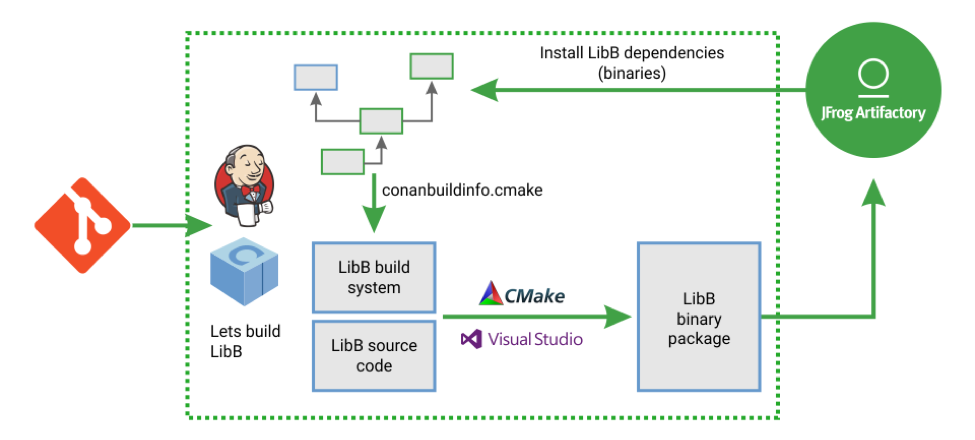
    Let’s take a look at a typical flow, from a DevOps perspective, to illustrate how Conan works. First, a developer makes some source code changes to a specific library (LibB), committing and pushing these changes to the shared version control system server (Git Repo).

    Diagram: CI Cycle example for C/C++ with Conan, Artifactory and Jenkins (build systems: CMake, VS, MakeFile)

    Then the CI system will listen to the Git repository, ideally with Git hooks since polling is not recommended, and fire a job for it (Jenkins). Below is an example of how this would be defined with a Jenkins pipeline:

    The first stage in the above example is straightforward. The second stage invokes the package creation that is internally split into the two subtasks:

    1. The LibB dependencies are retrieved in binary form, to avoid rebuilding them from sources and wasting time.
    2. The dependency graph for all transitive dependencies is built and one or more files are written. In this example, LibB uses CMake as the build system and Conan generates a “conanbuildinfo.cmake” file that includes all of the dependencies information to enable LibB find and correctly link to them. Conan will then call the LibB build system to generate a binary package for it. And finally, in the last Jenkinsfile stage “Upload packages,” the generated binary is uploaded to the Conan package server (JFrog Artifactory). The LibB binary package is immediately available for consumption by developers or other CI jobs.

    This example illustrates a build configuration for a 32-bit architecture as specified in the  “conan create” command with the “-s arch=x86” argument. Note that many additional configurations can be built in parallel using parallel tasks and jobs for different compilers, OS, architectures and more.

    Conclusion

    C and C++ have extra challenges compared to other programming languages in development. This also makes it more challenging when trying to implement modern DevOps, but not impossible. C/C++ has been overlooked and it’s time we update the tools to meet the needs of developers. What DevOps principles and practices are you implementing with your C/C++ projects?

    About the Author / Baruch Sadogursky

    Baruch Sadogursky is the Developer Advocate at JFrog. For a living he hangs out with JFrog’s tech leaders, writes code around the JFrog platform and its ecosystem, and then speaks and blogs about it all. He has been doing this for the last dozen years or so, and enjoys every minute of it. He also is a professional conference speaker on DevOps, Java and Groovy topics, and is a regular at the industry’s most prestigious events including JavaOne (where he was awarded a Rock Star award), DockerCon, Devoxx, DevOps Days, OSCON, Qcon and many others.  His full speaker history is available on Lanyrd. Follow him on Twitter @jbaruch on Twitter, or read his blogs here and here.

  • What Developers Want, and How to Give It to Them

    What Developers Want, and How to Give It to Them

    Software is at the core of every modern business, and software-driven companies are disrupting most traditional industries. As the demand for rapid delivery in digital services grows, companies are looking for ways to release products and upgrades in weeks instead of months, or in days instead of weeks. Many DevOps groups are adopting the continuous integration/continuous delivery/continuous deployment cycle of Agile software development to address the high velocity of releases and faster time-to-market requirements. In the CI/CD/CD cycle, developers and testers continuously integrate and test new code, deliver applications and upgrades to production, and from there, deploy them to customers through cloud- or web-based venues.

    But in most companies, dev/test teams are dependent on IT and operations (IT Ops) teams to provide the physical and software stacks they need, and IT Ops teams can’t provide developers and testers with infrastructure and applications fast enough to meet the ongoing and relentless pace of the CI/CD/CD cycle.

    DevOps Challenges

    The most common IT Ops obstacles are long procurement and provisioning cycles, lack of automation and organizational silos.

    Long Procurement and Provisioning Cycles: In many software companies, the IT Ops team has a lengthy procurement and provisioning cycle, and developers may have to wait anywhere from several days to a few weeks for IT Ops to handle each request.

    Lack of Automation: Developers may be using an outdated IT ticketing system to request infrastructure and software. Each time a developer issues a ticket request, an IT Ops person must follow a certain workflow to fulfill that request, and must complete each step before sending the ticket on to the next IT Ops person in the chain. These workflows often consist of time-consuming manual steps. For example, an IT admin may spend hours manually copying database software from a file server over to the hardware using command line interface (CLI) scripting. The admin must then install and configure the database software and connect it to the network.

    Organizational Silos: In large enterprises, individuals or sub-teams fulfill certain tasks for a dev/test request separately from the others. These silos turn IT Ops procurement into a long series of handoffs, where each team member must complete their assigned tasks before handing the job off to another team member.

    What’s a company to do? The answer is to implement a self-service, automated private or hybrid cloud. Here are some of the reasons for this approach.

    On-Demand, Self-Service Provisioning

    Every developer is different, and each should have the power to create their own workspace. A self-service cloud automates the provisioning process by letting developers and testers manage their own initial deployments and configurations. The cloud platform should offer a set of automated provisioning tools to allow developers and testers to create their own dev/test environments. The cloud solution should include both a self-service user interface and an API-driven infrastructure-as-code that lets developers create VMs and databases, access storage, set up network connections, etc., using RESTful API coding.

    An Intelligent, Well-Organized User Interface

    A self-service cloud should have an intelligent user interface (UI) that gives developers access to a set of common infrastructure tools and applications. Ideally, a self-service UI should allow IT Ops administrators to assign resources in an organized manner. Admins should be able to designate business units (BUs) on the UI (i.e. “AppDevTeam1,” “WebDevTeam1”) based on units within the company, assign team members to BUs, and designate current projects (i.e. “AppDevProject1”) on the UI according to BU. They should also be able to assign quotas to each BU (i.e. AppDevTeam1 gets 100 VMs, 25 vCPU cores, 100GB memory and 400GB storage), and to each individual project (i.e. AppDevProject1 gets 10 VMs, 5 vCPU cores, 8GB memory and 40GB storage).

    An Application Store

    A self-service private cloud should have an online “application store” that provides single-click access to common tools and services for CI/CD, workload management, middleware and storage back-ends.

    Seamless, Two-Way Hybrid Cloud Migration

    A self-service hybrid could should have seamless, two-way migration to allow developers and testers who have public cloud access to easily move applications and workloads back and forth between public and private clouds.

    Administrative Dashboards

    A self-service cloud should have a set of administrative dashboards that allow the IT Ops team to control access to resources on the UI. These dashboards should deliver complete visibility into which teams and team members are using which resources, and allow the IT Ops team to perform admin tasks such as:

    • Creating user accounts and passwords on the UI
    • Creating BUs, and projects for each BU, on the UI
    • Assigning developers and testers as “members” of a certain BU or project
    • Assigning self-service infrastructure tools (compute, storage, network) on the UI, and set quotas for those tools according to BU or project
    • Importing new applications to the application store or the UI.

    A Software-as-a-Service Platform

    A software-as-a-service (SaaS) platform with portal-based access is the best venue for a self-service cloud solution. A SaaS platform offers the flexibility to do upgrades and customization to the various features of the UI, application store and administrative dashboards. The flexibility of the SaaS private-cloud solution gives it the potential to become the de facto standardized platform for CI/CD/CD in Agile software development.

    In short, DevOps teams need to keep up the CI/CD/CD pace in a modern enterprise, and self-service cloud platforms offer the self-provisioning and customized workspaces that keep developers productive and happy.

    About the Author / Kamesh Pemmaraju

    Kamesh Pemmaraju leads product management, product marketing, and technology partnerships at ZeroStack. Kamesh is a seasoned product management/marketing leader with a strong engineering and consulting background. In his most recent product roles at Mirantis and Dell, he focused on delivering private and hybrid cloud solutions to enterprises. He holds a Master of Science in Computer Science from Indian Institute of Science. Connect with him on LinkedIn and Twitter.

  • 3 Best Practices for Better Incident Response

    3 Best Practices for Better Incident Response

    It only takes a headline-grabbing mass internet outage or two to drive home the financial and brand incentives of keeping an application up at all times. That’s why in today’s DevOps organizations, incident response is a common topic of conversation.

    There’s a lot of talk within the DevOps community about organizational processes and designs for effective incident response such as the Incident Command model, as discussed by our friends from Fastly in this talk. We also frequently discuss technologies and tools for incident response, spanning monitoring, alerting, logging, mitigation and many other focus areas. At NS1, we make use of the Incident Command model and have invested in the usual array of technologies for incident response, along with developing many of our own.

    Even after investing significant time considering how to respond to an incident and the budget they allocate for related technologies, it’s still possible for organizations to fail to respond effectively when a real incident arises. As a provider of mission-critical DNS and traffic management services for many of the largest internet properties, we know there’s little room for failure. We’ve learned that augmenting our processes and technologies with three simple practices makes a huge difference in real-world incident response situations.

    The Value of a Good Checklist

    A good checklist is a favorite tool of mine when it comes to effective incident response. A checklist is a simple, concise, easy-to-understand tool to help an operator recall key steps to take in a particular situation. In an intense incident response scenario, it can be easy for an operator to skip or forget steps in their response. Rather than being overly prescriptive, a checklist’s job is meant to help an experienced professional who is familiar with the systems they’re operating make the best use of their knowledge in a high-pressure situation.

    A checklist that I have really come to appreciate doesn’t have anything to do with DevOps or networked systems operations. It is the Cessna 172S Emergency Procedure for engine failure during flight:

    In his book, “The Checklist Manifesto,” Atul Gawande discusses this checklist in depth. This example demonstrates some of the key principles behind a good checklist: it’s simple and short, not overly specific or prescriptive; it’s limited to only the most important actions the operator needs to recall during an incident mitigation; and, because of its simplicity and clarity, it helps the operator calmly execute those key actions.

    This Cessna checklist offers another great lesson for operators of today’s IT infrastructure. As Gawande writes, “Because pilots sometimes become so desperate trying to restart their engine, so crushed by the cognitive overload of thinking through what could have gone wrong, they forget this most basic task: FLY THE AIRPLANE.” In IT operations, it’s no different—we can sometimes become so distracted by root cause analysis and the desire to know why an incident has occurred that we forget to focus on mitigation first—analysis can come later, once the incident is resolved.

    Running Drills

    It’s possible to have well-vetted checklists, great tools and technologies and the best organizational models, but they all can be forgotten in an instant of panic if people aren’t used to using them. So, how do we get great at using them all in real-world situations? Through practice.

    Any incident response strategy needs to incorporate fire drills because they ensure we regularly exercise our processes, tools and checklists in simulated scenarios that approximate real-world incident response situations. There are a number of ways to create fire drills with respect to networked systems. One tool we often discuss in the technical operations community is one built by Netflix called Chaos Monkey, a software embodiment of what has become an emerging discipline: chaos engineering. It’s a methodology for improving the resilience of a distributed system by creating failure situations—for example, by randomly “breaking” virtual servers in a distributed application to force failure handling systems to engage. This is a kind of “automated” fire drill that drives resilient architecture.

    A “war game” that simulates DDoS attack situations is another drill we have benefited from. We build tools similar to those used by sophisticated attackers and regularly exercise our DDoS mitigation response by literally attacking production systems. In this type of fire drill, we split our team into attackers and defenders (similar to the red/blue team approaches used by information security organizations for penetration testing). We’ve learned that running good DDoS war games requires us to attack real systems with real attack techniques, which helps us understand the dynamics of our distributed systems and builds muscle memory in our team around key steps needed to respond to real-world incidents. We’ve also found that fire drills such as these are great tools for team-building; they’re almost like running football or soccer scrimmages at the end of a long practice session, helping everyone on the team understand how they can best contribute and what “position” they should play in a real-world event.

    Analyzing After the Fact

    Postmortem or retroactive analysis is a final practice for driving effective incident response.  After any incident, real or simulated, a thorough review of the incident and the response is critical. Asking and carefully answering some simple questions about the response to the incident is the key: What happened and why? What worked well in our response? How could we have responded more effectively?

    The reason to do this type of analysis is to apply learnings from the incident and create a feedback loop, so that in the future, your team’s response to incidents in general—and certainly to similar incidents—is more effective. Obviously, it’s critical to fix any issues that surface during an incident response in your systems, incident response processes and mitigation tools. You should also review relevant checklists after an incident: what was missed, or what was confusing? And finally, feed the outputs of real or simulated incidents into your fire drills so you can practice similar scenarios in the future.

    Be Prepared

    Like death and taxes, incidents are going to occur. Companies that deliver content or applications in networked systems need to be prepared for them. Best practices such as creating a simple checklist and conducting drills helps a team’s incident responses improve over time, helping to reduce stress during an actual incident and increasing the likelihood of a swift resolution.

    About the Author / Kris Beevers

    Kris Beevers is founder and CEO of NS1. He is a recognized authority on DNS and global application delivery, and often speaks and writes about building and deploying high performance, at scale, globally distributed internet infrastructure. He holds a PhD in Computer Science from RPI. Prior to founding and leading NS1, he built CDN, cloud, bare metal and other infrastructure products at Voxel, which was acquired by Internap in 2011.

  • Cloud Orchestrators: Beneficial in a Multi-Cloud Environment

    Cloud Orchestrators: Beneficial in a Multi-Cloud Environment

    Recent outages of leading cloud providers affecting thousands of business worldwide, such as the Amazon Web Services S3 outage that occurred in late February, have forced many CIOs and CTOs to think hard about their cloud strategies, including whether a multi-cloud environment would be of benefit.

    ROI and Business Impact

    During AWS’ four-hour disruption, S&P 500 companies lost $150 million to $160 million, according to analysis by Cyence, a startup that models the economic impact of cyber risk.

    Web monitoring company Apica, which watches internet performance issues worldwide, discovered that 54 out of the top 100 internet retailers were impacted with a decrease of 20 percent or greater in performance, and three websites went down completely—Express, Lululemon and One Kings Lane—resulting in a high impact in business.

    During this outage, according to Apica spokesperson, Apple and other ecommerce sites were likely spared for an easy reason: They have designed their sites to spread themselves across multiple cloud vendors, so if a problem crops up in one cloud service, it doesn’t hurt them. This is, naturally, the recommended way to use a cloud service.

    Apple, Walmart, Newegg, Best Buy, Costco and, surprisingly, Amazon/Zappos were not affected by the outage.

    Organizations have since started looking for different means to avoid data loss and downtime and to better support different applications, not to mention resilient application support, customer management and data analytics. This is where multi-cloud computing can help solve the challenges and which focuses provisioning, managing and monitoring workload across many clouds.

    Multi-Cloud Computing

    Multi-cloud computing is termed as the use of more than one cloud environment, all of the same type or a mix of types, to satisfy business requirements. An enterprise can choose which workloads can be moved to different clouds, depending upon the service offered by cloud vendors, matching the business need.

    This article discusses the need of multi cloud adoption, its benefits and challenges in managing multiple cloud environments and how multi-cloud orchestrators help solve the challenges.

    Market Trend

    According to research firm IDC, by 2020 more than 85 percent of enterprises will adapt to multi-cloud architectures encompassing a mix of public cloud services, private clouds, community clouds and hosted clouds, driving up the rate and pace of change in IT organizations.

    According to research firm MarketsandMarkets:

    Cloud Model 2016 2021
    The Multicloud management market $939.3 million $3.4 billion (compound annual growth rate of 29.6%,)
    The hybrid cloud market $25.28 billion $84.67 billion


    What is Driving Multi-Cloud Adoption?

    All workload and business requirement cannot be the same—this is one of the primary drivers of a multi-cloud reality.

    Unique Needs: You can run each workload where it performs best, for the lowest cost.

    Legacy Apps: You can avoid the pain of migrating legacy apps to a new platform.

    Desire to Diversify: You can avoid vendor lock-in and latency while creating redundancy.

    Benefits of Multi-Cloud Computing

    • Flexibility: Companies can deploy to public, private and hybrid clouds using a range of services.
    • Reduce the expenditure: Competitive prices and services from different cloud providers enable companies to achieve optimum cost expenditure.
    • Enhanced autonomy: Companies avoid keeping all their IT workloads in one cloud provider’s basket.
    • Customization and enhanced IT performance: Customization leverages the best-of-breed capabilities from multiple cloud vendors.
    • Migration: Containers and microservices-based applications can be migrated easily across clouds.
    • Hardware diversity: Relying on multiple locations and multiple providers significantly reduces the chances of impacting QoS.
    • Avoid data loss and downtime: Using more than one cloud services helps an organization avoid data loss and downtime attributed to a breakdown in any single component in hardware, software, storage or network.
    • Multiple Geo Availability: Companies can leverage cloud vendors’ data centers in multiple geographies, enabling to scale the business.

    Challenges of Managing Multi-Cloud Environment

    While there’s a lot of talk about moving things between clouds, the reality is it’s still fairly new. Though clouds have become smart enough to put an end to data lock-in, every vendor deployment comes with its own set of challenges, such as unique portals and processes that companies need to manage and can be put into three different categories.

    Technical challenges

    • API: No single model of integration or infrastructure automation can work, as each cloud provider will provide a different API to access different cloud services.
    • Behaviors: There are many differences in how clouds behave for common actions or under certain circumstances. For example, some clouds automatically provision storage upon launch of a server or instance, while others do not.
    • Resource sizes and types: Each cloud provider will offer different sizes and types of compute, storage and network resources; hence, the IT team must think about provisioning with optimum resource size and type needed for their workloads.
    • Operating system images: Each cloud provider will provide a unique set of operating system images, which makes it difficult to run the workload using the same image in other cloud.
    • Hypervisors: Each cloud provider leverages different, and sometimes proprietary, hypervisor options.
    • Application stacks: Some cloud providers may provide a selection of common, preconfigured application stacks (such as LAMP or Java or .NET).
    • Add-on services and features: Each cloud provider will offer extra add-on services and features above and beyond basic compute, network and storage resources. These may include load balancing, application servers, analysis tools or databases.
    • Security capabilities: The access control capabilities will vary across cloud providers, becoming more complex if different providers demand different password complexities or authentication measures.
    • Network Capabilities: Each cloud offers different ways to define subnets, security groups and network gateways, increasing difficulty in network planning.

    Operational Challenges

    • Testing: Deploying apps to multiple clouds requires platform-specific testing, which needs separate automate tests targeting multiple cloud platforms.
    • Tool diversity: DevOps tools have to keep pace with the rapid changes being made to the platforms.
    • Maintaining security and governance: Companies will need to go through rules and regulations of each service provider to adhere to security compliance.
    • Managing applications and infrastructure configurations across multiple cloud stacks: This can be difficult since the cloud platforms do not share a common API, which exposes different service definitions and billing models.
    • Technical support and expertise: Extra administrative work and research is required to to determine the best provider and whether its services are compatible.
    • Geo-availability: Expand the business into new markets can be a challenge, as not all cloud providers have global footprints and offer data centers only in limited locations.

    Business Challenges

    • Cloud brokers: Managing cloud brokers is an additional cost while using multiple clouds.
    • Billing and Pricing: Each cloud provider offers unique pricing models as well as different billing capabilities, which necessitates the need for governance and cost optimization, providing summary along with detailed cost tracking across clouds.
    • Skill sets and training: A lack of skill set and expertise in different clouds in the organization can lead to outages of workloads and increase cost/effort.
    • Planning and execution: It can be difficult to choose the services that match a company’s business needs, pricing, governance and team’s expertise.

    How a Multi-Cloud Orchestrator Helps

    Regardless of the challenges, multi-cloud environments are growing, thanks in part to multi-cloud orchestration tools, which can prove to be a right fit to address above discussed challenges.

    These orchestration tools have the capability to make multiple cloud providers look like a single provider ensuring configuration of all cloud dependencies within one configuration model. These tools enable companies to automatically deploy and manage multi-cloud environments.

    Some of the big players in this segment are RightScale, OneOps, Cloudify and IBM Cloud orchestrator, which provide a standard set of interfaces and capabilities across a multi-cloud environment.

    We have identified some parameters which current multi-cloud management platforms are well-equipped to handle:

    • Planning and Execution of an application from design to transition to deployment.
    • Installation & configuration of infrastructure packages & services in an automated way.
    • Provisioning of application environment.
    • Deployment plan and execution.
    • Cost Management: Suggestion of cost effective cloud services and single dashboard to track the cost associated with different cloud services.
    • Monitoring of entire application stack.
    • Security & Governance as to who can view, create, execute environment related activities.
    • Blue-print Templates which can be easily reused to create a new environment.
    • Reporting: View a report of instances that are consumed by your organization across multiple clouds.

    Conclusion

    Multi-cloud orchestrator tools help address some of the above  challenges to configure, provision and deploy several cloud environments, as well as integrate service management from a single, self-service interface.

    Though present multi-cloud orchestration tools offer a more time- and cost-effective solution to manage different cloud providers for organizations to focus on larger business objectives, virtually all products in this category are young—bugs and inconsistencies can and will occur. Additionally, security can be a concern for many of the popular orchestration tools. Many APIs offered are not securely encrypted by default and need to have SSL added separately.

    We can say there is still a huge scope of improvement for multi-cloud orchestration tools to build more secure, easy-to-set up standardized workflows across different cloud providers to cover the challenges which multi-cloud computing era offers.

    About the Author / Rashi Sharma

    Rashi Sharma an architect working with Technology Office in HCL Technologies. She has expertise in AWS, DevOps consulting & configuration management methodologies. She is associated with DevOps COE, working on design and Development of DevOps solutions.

  • Is DevOps Transformation a Holy Grail?

    Is DevOps Transformation a Holy Grail?

    Both development and operations teams are popping up in enterprises all over the world, and even though DevOps programs are still in the early stages, our ultra digital world calls for even more software applications. This is why many analyst and consultants alike believe that, in the near future, DevOps will be even more powerful than legacy IT. DevOps will be something businesses of all sizes will not be able to live without and the sooner you initiate the DevOps transformation, the better.

    Why DevOps Transformation?

    One of the most exciting aspects of DevOps is enacting technology practices and architecture that help organizations create an agile and continuous product flow, from development to testing, operations and all the way to deployment while increasing stability, reliability and security at the same time.

    More importantly, adopting DevOps can enact changes in the culture of your business, such as allowing teams to work more quickly with more independence. Back in the days before DevOps, deploying even a minor update, upgrade or bug fix would involve literally hundreds of developers doing weeks worth of work.

    Today’s top-performing businesses and DevOps adopters are deploying much faster, and the products they release generally have greater reliability. Still not convinced that DevOps is the holy grail? Consider the following.

    Focus on Speed, Not Cost

    Do you want to achieve the same capabilities of Amazon and Netflix? Of course! Who doesn’t? It’s easy to make an excuse that they have a lot of money to spend, but, when we look deeper, companies that achieve DevOps success are more focused on optimizing speed, not cost. Organizing and optimizing for cost creates functional silos for networking and database people, server admins and many others.

    When you optimize for speed, you are willing to cultivate talent from within, increase engineers’ salary and send them to conferences. You would not necessarily do these things if you were simply optimizing for cost. There are a whole bunch of techniques we can use to optimize for speed, such as using small, cross-functional teams that can deploy value to the customer independently without having to rely on hundreds or, in some cases, thousands of people.

    Best of all, you don’t have to be a big conglomerate to make this transition. Even small and medium-sized businesses can choose to optimize for speed, break down silos and get their product to market faster. After all, this is what DevOps is all about.

    Software Speed vs. Quality

    Businesses that rely on developing and deploying software to support or supply their customers often are faced with choosing speed or quality. If you go to market before your competitor(s), you could be cutting corners in terms of testing and quality assurance, which can ruin your launch. However, if you wait until your code is perfect, you could end up lagging behind in the race for the next big breakthrough. Fortunately, the DevOps approach can resolve this dilemma while improving the bottom line.

    Way back in 2015, the “State of DevOps Report” collected the DevOps health and habits of more than 20,000 tech professionals and found that top performers using DevOps show more agility and reliability in their releases and they were twice more likely than non-DevOps users to exceed productivity goals. In the roughly 800 companies that had a stock ticker symbol, the top performers had an almost 50 percent higher market capitalization growth over three years. This indicates that DevOps is great for IT performance as well as organizational performance.

    What everything boils down to is that all modern businesses are increasingly more reliant on technology when it comes to acquiring new customers and bringing value to those customers. It is becoming increasingly apparent that agility and speed are key attributes for companies who want to win in today’s marketplace.

    DevOps Transformation Guide

    With all of the benefits listed above, you are probably eager to get started with DevOps. Here is a simple step-by-step guide to assist you in your DevOps transformation.

    1. Conduct an Enterprise Readiness Audit – The highest probability of a successful DevOps transformation is when it is championed from the very top. The participation of business leaders is just as vital as operations, security and development teams. To get everyone on the same page and to ensure that your DevOps transformation gets off to a good start, seek assistance from an experienced, external consultant or coach. The purpose of this first step is to get executives to buy in, create mutual goals and get an understanding of what an Agile-DevOps program looks like.
    2. Create a DevOps Center of Excellence (CoE) – One of the most important things you must do here is designate an Executive DevOps lead with enterprise authority. There is no use in creating this Center of Excellence at the incorrect organizational level. It must be spearheaded by someone who has the support and trust from all branches of the organization including delivery and vendors.
    3. Create a Program Governance – Such a program will include creating a communications plan, an enablement program as well as establishing program KPIs. In terms of making a cultural impact on your organization, this is perhaps the most important step. The roles and responsibilities of practitioners will change with Agile and DevOps and it is vital that they understand collaborations between structures where historically animosity could have existed so they can break down these organizational silos. The KPIs will also need to be transitioned from individual metrics to holistic customer business results.
    4. Create a Project Intake Process – Project intake really sets the tone for how successful each new sprint that comes into the program will be. What matters here is not the tools and process, but rather the proper sizing of the tools and process. There is a need to fit for purpose when selecting accelerators, toolchain and development methods. Once it is created, the communication of the intake process needs to be disseminated across the organization. Keep gathering feedback and and continuously evolve and mature based on this feedback.
    5. Identify and Initiate Pilots – To achieve the highest probability of success, apply this step to a specific portfolio of applications or a domain solution. The purpose here is to create a value-stream map of a specific application with company wide participation on all levels. This needs to be done with the necessary amount of detail to identify manual and automated processes, end-to-end process tooling and the people and skills that are involved.
      The next aspect of the intake project is the collaboration between the subject matter experts from the Center of Excellence with the project team. The goal is to advise on “to-be” processes with proper tooling, reusable assets and automation. As the application goes through the development and test cycle, be sure to identify and capture the KPIs for the program in order to compare with existing KPIs.
    6. Scale Your DevOps Program – This final step involves taking feedback from the pilot metrics and scaling them by taking different application portfolios and running multiple release trains. It is not enough to merely do automated deployments and daily builds. The last, but by no means least, piece of the DevOps puzzle is constant feedback and optimization.

    Key Takeaways

    • To keep up with top-performing businesses and stay alive in today’s ultra-competitive, fast-paced environment, implementing DevOps is an absolute must. DevOps is not solely reserved for giant enterprises such as Amazon and Netflix and can be implemented in any-size organizations.
    • In the not too distant future, DevOps will become something businesses of all sizes will not be able to live without. To reap all the benefits DevOps has to offer, the sooner you make the transition to DevOps, the better.
    • With DevOps, there is no longer a reason to choose between speed and quality when deploying your software. When implemented properly, DevOps will allow you to deploy software with both agility and reliability increasing your customer base and the bottom line.
    • The step-by-step approach mentioned above can and should be implemented in any flavor and variety that best suits each individual organization’s needs and constraints.  Pay particularly close attention to large gaps or excessive deviations as they are red flags which will need to be corrected.

    About the Author / Stanislav Ivaschenko

    Stanislav Ivaschenko is a certified AWS solutions architect at Squadex with more than 10 years of professional experience in building, delivering, supporting and optimizing a broad range of software applications. From bare metal to the cloud, from monolith architecture to microservices his expertise and experience help to meet business needs for startups, mid-sized companies and large enterprises. He has experienced a large number of DevOps and infrastructure related tools, services and management practices.

  • The Impact of DevOps and Continuous Testing in 2018

    The Impact of DevOps and Continuous Testing in 2018

    At its core, DevOps is meant to touch an entire organization; however it’s heavily weighted in the software development life cycle (SDLC). That’s why DevOps is going mainstream in 2018. Companies are making the business benefits of DevOps a top priority—it’s all about delivering value to the customer faster through maximum automation of the release cycle/processes. And that begins with organizations realizing that to mature their DevOps processes, they need continuous testing as part of their continuous integration practice.

    Cross-platform Engagement and IoT Will Mean More Devices—and More Apps

    With organizations shifting processes and innovation to a mix of digital technologies—a concept known as digital transformation—consumers are engaging with different apps across various platforms 24 hours a day, seven days a week. Add in the rise of internet of things (IoT) devices, which allow for seamless transitions across smartphones, TVs, tablets and other devices. Now is the time for optimum user experience (UX).

    In 2018, industries such as financial services, health care, retail and automotive will fully embrace IoT. We may also see new types of applications replacing current ones, as consumers and developers embrace the constantly evolving innovative capabilities coming in 2018. However, until the C-suite implements the tools needed to keep up with the growing demand for cross-platform upkeep and testing, other industries will experience slow adoption.

    A critical step in delivering flawless UX is testing, and lots of it. Never has there been more to test, measure and develop than in this digital revolution we are seeing today.

    Frequent New Releases Will Require Even Faster Updates

    As the number of platforms consumers engage with rapidly grows, so does the pressure for developers to ensure apps are running as they should at all times. Same goes for the pace of cloud adoption: Cloud test labs will need more sophisticated capabilities, meaning more platforms and blind spots which require continuous optimization to ensure market readiness. This need for faster turnarounds on update releases and bug fixes will multiply in 2018.

    To maintain and grow customers and profitability, CIOs must recognize the importance of empowering developers with the tools and time to implement continuous testing across the SDLC. Tools, such as those powered by automation and the cloud, increase efficiencies and free up time developers previously spent on manual quality-checking, allowing them to ensure the apps they are producing are keeping up with consumer expectations. If users feel their app is not delivering on the experience they want, they will delete it and move on to the next competitor, which has a direct negative impact on the company’s bottom line.

    Outdated Technologies Will Make for Even Slower Updates

    There is a suite of new tools being introduced to the market for all stages of the SDLC in the hopes of keeping up with the heightened speed of testing. As many DevOps environments struggle to adapt their pipelines to these new tools, many are powered by emerging technologies including machine learning and automation. In 2018, developers should ditch outdated infrastructure and processes in favor of more modern architectures, including implementing microservices.

    Modernizing pipelines will allow developers to design in next-gen engagement methods such as artificial intelligence (AI), augmented reality (AR) and virtual reality (VR) without compromising velocity.

    AI Will Experience Its Shining Moment (for Some)

    In the coming year, AI will start to move from a theoretical concept to a commonly applied technology, especially within the DevOps space. However, developers first must understand what they want AI to help them accomplish—and how—within the SDLC and across the DevOps pipeline. One logical place to start is figuring out how they can best leverage it to analyze test automation strategies.

    The value of a well-oiled, or not-so-well-oiled, DevOps process can make or break an organization. As the new year begins, be sure to include the IT leadership in these conversations to ensure developers are getting what they need, when they need it, to keep business moving as usual. IoT, AI and the cloud are just a few things to keep in mind as the industry moves to implement the latest tools in 2018.

    About the Author / Eran Kinsbruner

    Eran Kinsbruner is the lead technical evangelist at Perfecto and the author of the “Digital Quality Handbook.” He is a software engineering professional with nearly 20 years of experience at companies such as Matrix, Qulicke & Soffa, Sun Microsystems, General Electric, Texas Instruments and NeuStar. He holds various industry certifications such as ISTQB, CMMI, and others. Eran is a recognized mobile testing influencer and thought leader. He is also a patent-holding inventor (test exclusion automated mechanism for mobile J2ME testing), public speaker, researcher and blogger. Follow him on Twitter, connect with him on LinkedIn and check out his professional mobile testing blog.

  • How Systems Engineering Can Help Avoid Product Development Pitfalls

    How Systems Engineering Can Help Avoid Product Development Pitfalls

    Product development programs all start with great optimism regarding their potential to provide an excellent product to customers, along with excellent profits to the company. But research shows that a majority of product developments end in failure. The reasons for each failure are unique, but the overarching reason often can be described as the lack of systems engineering.

    I managed a program several years ago that is a great example of how programs that have an excellent idea, sound technical basis and talented people working on them can still fall into this trap, and how systems engineering and a systems mindset can rescue these programs from the brink of failure and propel them to a successful conclusion.

    Here’s the scenario: Scientists working for a Department of Defense electronics supplier devised and patented a method for doubling the frequency range of a radar amplifier in the same physical footprint. Additionally, advances in technology allowed two of the most sensitive components to be replaced by components that were substantially more reliable, increasing the amplifier’s projected life by more than 500 percent. Further, these new components were not destroyed by the absence of a vacuum, allowing easier, faster and cheaper repair of the parts. Funding was secured, and the product development process commenced. The project was not plagued by requirements issues (though many product developments are), as the performance requirements were identical to the product it was replacing, aside from the increase in bandwidth and reliability.

    Unfortunately, prototypes were failing to meet the requirements in either bandwidth, power or both. As the program neared the end of its allocated development funding and the pressure on the engineering team increased, each subsequent amplifier prototype was billed as being “full spec,” with multiple changes made in each iteration to meet this promise. Each prototype failed to live up to this billing, and the program was eventually deemed a failure and scheduled for termination.

    How did this program devolve to this point? The scientists and engineers involved were brilliant individuals with a history of successful projects and a long list of patents to their names. The requirements were well-understood, and the program had avoided the all-too-common pitfall of neglecting to consider how the piece would fit into the overall system and its effects on upstream and downstream components, overall system power and cooling budgets, etc., which tends to happen in projects run by component designers that focus on the design and capabilities of their particular widget. However, as the program budget and schedule for development was steadily consumed, those involved felt obliged to make each next prototype do everything, rather than taking a deep breath, seeing how far they’d come and how far they had left to go and then creating a road map to get there.

    When I was brought in to the program and we had secured some additional development funding, we got down to the business of creating the road map. In addition to the electronics company’s scientists and engineers, we brought in experts from both academia and a federally funded research and development center to review the initial concept and progress to date, determine whether the program had a path forward and, if so, delineate a series of experiments that would culminate in a successful prototype.

    Termination of programs is always an option and should not necessarily be viewed as a bad outcome for a program in dire trouble. In evaluating whether it the right move, look beyond the siren call of spent budget, take a stark look at the chances for success and determine if the program or project can still deliver its anticipated benefits. Many programs in trouble attempt to recover by “dumbing down” the requirements; while that may offer an  “out” for a development that is in trouble and allow the program to move to the next phase, ask whether continued investment in the system worth the lesser benefits of a product that meets the revised, easier requirements.

    After careful review, we determined that the program had a path to success. A series of six prototypes were planned: three experiments to evaluate the performance of individual design changes, a fourth to combine successes from the three experiments, a fifth planned to be production representative/fully specification-compliant and a sixth to show repeatability.

    With this new plan in place, the project was able to proceed in a systematic fashion without pressure to produce instant success. Previously, multiple improvement ideas were incorporated into each new prototype with the hope that this would be the full-spec version, and the program could then proceed into production (and the company could reap its financial reward). Experiments were defined up front, and their results were evaluated without the uncertainty of multiple changes masking the successes (or failures) of individual changes.

    Success was achieved on the fourth prototype, and the program eventually was successful in creating a significant capability and reliability enhancement for this weapon system. Much of the credit belonged to the hard work and dedication of the engineering leader for the electronics firm (who received its Product Development of the Year award). But even more so, the credit for this dramatic (and very unusual) recovery was earned by the team that had the wherewithal to take a step back and apply basic systems engineering principals to lay out a plan to recover the project from its death spiral.

    All too often, companies or program offices bring in a “Cleaner,” but many of these are just tyrants who bully everyone into working long hours, hoping that if you try everything under the sun, something will work. A systems engineer, however, has the composure to take a step back and review, despite the immense schedule pressure. Rather than rushing into the next setback, a systems engineer will look at what the program or project is supposed to accomplish (high-level requirements), review the efforts underway to support those requirements and set a plan with discrete steps and measurable progress points. By not trying to do everything all at once, wherein successes and failures are indistinguishable and possibly masking each other, having a systematic (there’s that word “system” again) approach allows the system engineer to move toward a path that will result in meeting the original requirements.

    About the Author/ Jay Schatz

    Jay Schatz is senior program manager at Base2 Solutions. He is a high-performing technical project management and program management professional with the breadth of experience that comes from over 22 years of experience managing programs for the aerospace industry and in the US Air Force. Jay is currently providing program management and systems engineering support to the Boeing 787 program, providing expert advice to clients on program management, supplier relations and engineering solutions. Connect with him on LinkedIn.

  • DevOps Gets More Exciting in 2018

    DevOps Gets More Exciting in 2018

    As 2017 winds down and the IT industry prepares for 2018, there are a number of DevOps trends that everyone should be keeping their eyes on. It’s not so much that something incredible and explosive is expected in the new year. Rather, 2018 will be a time when DevOps starts to mature alongside other trends important to developers.

    These trends don’t guarantee organizations will be immediately successful with DevOps. Most still will struggle with the management aspects of DevOps, especially the need to keep feuding silos within IT working together as one happy group. Assuming developers, QA, and Operations can all learn to get along and act as a team, the technology supporting DevOps will continue to improve and the ecosystem will grow.

    Here are some of the DevOps trends that Amalgam Insights is following for 2018:

    Everyone Loves Containers and the Ecosystem Grows

    Containers have become a common technology in many IT departments. Although the majority of applications remain housed on single servers and virtual machines, container deployments are growing. Containers are an important enabling technology for DevOps—by creating small, transportable bits of applications, containers make it easy for IT silos to work from the same page.

    In 2018, growth in container deployments is expected to accelerate as large companies outside the software industry, such as those in financial services and health care, adopt microservices infrastructure. Containers that are especially suited to microservices will continue to expand rapidly.

    Increased container growth is also due to an expanding ecosystem. More companies have entered the market with products necessary to large-scale production applications. Products now exist for securing, managing, deploying and enhancing container services that weren’t available a few years ago. What’s more, containers are now available in all the major cloud services including Oracle Cloud, Microsoft Azure, AWS, IBM Cloud and Google Cloud. Containers are becoming enterprise-ready and large enterprises are feeling more confident using them.

    Takeaway: Growth in the ecosystem contributes to growth in container deployments while expansion of containers entices companies to enter the ecosystem. Containers have reached mainstream normalization and we expect to see fast expansion throughout 2018.

    Kubernetes Eats the Container Orchestration World

    In the container orchestration space, Kubernetes has become the tool of choice. Orchestration is the deployment and management of container clusters and is necessary to deploy them at scale. Kubernetes, originally a Google open source project and now managed by the Cloud Native Computing Foundation, has become the most popular orchestration tool available. That became obvious when Docker decided to distribute and support Kubernetes, despite having invested in its own orchestration system called Swarm. CoreOS, Microsoft Azure, Red Hat OpenShift, Docker and others have their own enterprise distributions as well.

    Kubernetes brings to the container ecosystem a relatively easy way to manage containers at scale. In large container deployments, containers are constantly being spun up, shut down, moved and copied. Once container clusters are in place, they must be monitored for security and service failure.

    During development, there will be a number of clusters that must be managed for development, test and final release to production. Doing this manually is close to impossible when even a moderate number of containers are in the DevOps pipeline. Kubernetes provides the tools and workflow to simplify these tasks.

    Takeaway: As container production clusters grow and as they are integrated into the DevOps pipeline, the need for orchestration becomes acute. Kubernetes has won the game and is now the tool of choice for orchestration. 

    The Pipeline is Getting More Integrated

    DevOps is often described of as a “pipeline,” In this context, a pipeline is a linear workflow that moves from build to test to release. As DevOps becomes more common in organizations, the pipeline grows to include additional test phases, monitoring and continuous improvement to create more of a cycle than a linear flow.

    One of the great impediments to making DevOps a reality is a lack of tools that support the entire pipeline. There are plenty of tools that help build applications, such as IDEs and code repositories from companies such as IBM, Microsoft, GitHub and Oracle, as well as dozens of open source products. Testing is well-supported with test data management and test plan management tools from companies such Atlassian, Informatica and Oracle. Release management and deployment products are widely available from Atlassian, Microsoft, IBM and many other companies. The problem lies not with the support for the individual steps in the pipeline, but with the integration of these tools to provide a complete end-to-end workflow. This creates a disjointed workflow, prone to errors and supportive of silos instead of collaboration.

    This is changing, however, and announcements late in 2017 herald toolsets that can provide a continuous DevOps pipeline. A great example of this is the newest versions of Microsoft’s developer tools that were debuted at Microsoft Connect(); in November 2017. Tying together the Visual Studio debugger with Kubernetes allows developers to test and debug as close to the production environment as possible and then deploy cluster to the test environment. That, plus the upgrades to Team Server, shows the commitment Microsoft has to creating integrated DevOps systems.

    Takeaway: While DevOps tools are still more or less disjointed, we are seeing a movement to fully integrated toolsets that enable the end-to-end DevOps pipeline.

    2018 is the Year of DevOps—Unless IT Management Gets It Wrong

    This coming year could be the year that DevOps truly takes off and becomes mainstream. Those who believe it is already mainstream now are fooling themselves. Management may believe their organization is implementing DevOps, but too many barriers still exist—especially management itself. IT departments remain heavily siloed and independent of each other, as do development tools. DevOps at scale requires, above all else, a collaborative and cooperative approach. Sadly, that does not yet exist in many IT departments. As tools reach maturity and best practices become common, managers become the inhibitors of DevOps. New management structures, incentives and thought processes need to be in place or the money spent on tools is wasted.

    Takeaway: All the DevOps pieces are in place except for the breaking down of functional silos that exist in IT departments. 2018 may be the year of DevOps if IT managers can create a new environment of cooperation.

    About the Author / Tom Petrocelli

    Tom Petrocelli is a contributing analyst with Amalgam Insights. His area of interest is collaboration and new ways of work, developer tools, IT project efficiency, governance and methodologies and DevOps. Most recently, Tom worked for a large, global banking corporation. Previously, he was the research director for Enterprise Social, Mobile and Cloud Applications at Neuralytix. He is an experienced marketing, technology and business executive with 30+ years in the computer technology industry. Tom’s background spans software engineering, systems architecture, IT, product management and marketing and general management. Connect with him on LinkedIn and follow him on Twitter.

  • Moving Security Beyond SSH and PKI

    Moving Security Beyond SSH and PKI

    SSH (secure shell) is still the most common method of remotely accessing a Linux server, which makes it a common target for attackers attempting to infiltrate corporate networks. While the protocol itself carries a number of advanced security properties, it does allow for human error, opening the door for unwarranted privileged access to sensitive company resources.

    Keeping track of all valid credentials across a company is something that IT departments continually struggle with. The stakes are high if they fall into the wrong hands, essentially handing over the proverbial “keys to the kingdom.” A recent study by Dimensional Research found that 90 percent of respondents do not have a complete and accurate inventory of all SSH keys, and 63 percent don’t actively rotate keys, even when an administrator leaves the company.

    Managing privileged access to servers has always been a rigorous exercise in key management. There are a number of best practices to follow to avoid the many common pitfalls, such as storing private keys in a vault service or maintaining a strict rotation policy, but they don’t get to the crux of the matter: The credentials are static. Here’s a (not so) crazy thought: What if we got rid of them entirely? Static credentials are a thing of the past, representing the failed perimeter model of corporate security.

    Problems with Traditional PKI

    The traditional PKI (public key infrastructure) that backs SSH was built for a different time, when a key exchange meant enough to grant trust. Without a proper authentication process, there is no clear way to attribute to a person, nor a feasible way to provide any historical context. As these keys get issued and distributed across fleets of infrastructure and cloud services, the challenge only compounds. Each public key accrues more privileges over time; the longer it’s been alive, the more likely it’s been shared with a resource, making it extremely difficult to track and subsequently revoke. With this model, time is a bug that can’t be fixed.

    Authorizing a specific request should also go beyond the mere presence of the public key within the authorized_keys file of the server. Independent of authentication, authorization is about who should and should not be able to access a specific server from a known device, and what permissions they have on the machine. You may have a policy that states only members of the engineering team can only access a production server through a bastion host. Adhering to that policy in practice, however, is impossible without a proper authorization process.

    Enter Zero Trust Security

    We’ve come to a consensus across the industry that the network perimeter is breaking down in the modern cloud era. It’s time to take that one step further and agree on a new model of trust attestation to match, where decisions are removed from the network layer and handled correctly at the application layer. Flipping the model around like this means starting with zero privileges by default, and only granting access to a resource once a request has been fully authenticated and authorized. Verify, then trust—the mantra of Zero Trust.

    Google’s BeyondCorp is the marquee example of Zero Trust done right, an internal initiative meant to better secure how employees access corporate resources. The end result is a carefully crafted distributed system that makes real-time trust decisions based on what is known about a user and their device, allowing the thousands of Googlers across the globe to work securely from any location without the use of a VPN. BeyondCorp is just one example, and we’ve seen more and more companies start to adopt a similar approach.

    Ephemeral Client Certificates

    The thinking behind ephemeral credentials is that a request triggers independent authentication and authorization processes, where a trust attestation is made against the policies of the resource. If valid, a single use credential is issued, which is used to initiate a secure session with the resource. This credential is tightly scoped to the specific request, rendered useless in any other scenario.

    The fundamentals of this workflow can be accomplished through a client certificate-backed PKI architecture. Client certificates became a supported feature of OpenSSH in 2011 with the introduction of version 5.4. Unlike standard SSH keys, which carry no metadata, certificates are cryptographically verifiable metadata objects that can inject information such as usernames, roles and more. Time now becomes a feature because the scope of the credential truly represents a dynamic attestation of trust.

    The fine-grained access controls inherent in a client certificate-backed PKI architecture solves for the problems with SSH keys because the credential can be tied to an actual user. The threat vector of lost, stolen or misused credentials is also eliminated, saving managers from the numerous headaches associated with SSH key management.

    To put these ephemeral credentials into action, you need to surround the client-certificate PKI with the supporting access controls. Companies with the means can build their own system similar to Google’s BeyondCorp, but this is no simple task, as you need to operate your own Certificate Authority along with a distributed system capable of performing dynamic authentication and authorization against policies in real time.

    About the Author / Ivan Dwyer

    Ivan Dwyer is the VP of Product Marketing at ScaleFT, working with the community to raise awareness around BeyondCorp and Zero Trust for organizations of all kinds looking to modernize their security architecture. Connect with him on LinkedIn and follow him on Twitter.