Author: contributor

  • Operations Management Puts the ‘Ops’ in DevOps

    Operations Management Puts the ‘Ops’ in DevOps

    Awareness and anticipation of operational management, best practices can improve your app at every stage of its life cycle

    How important or interesting you find the “operations management” aspects of DevOps methodologies likely depends on your background, experience and how many operational horror stories you have lived through. If you have been on the hot seat when services are impacted, woken up in the middle of the night when major outages occur or dragged into blame-battle war room calls while you and your team scramble to restore service, then the importance you place on operations management may be very high.

    However, if you have avoided such experiences, it would surprise no one if the operations management aspects of DevOps are not top of mind. When everything is smooth sailing, then it is understandable that you might be reluctant to make any significant changes to your daily routine. However, in agile, fast-moving environments, things can go wrong very fast, even if your organization separates duties intentionally to create an “operational firewall” to keep ill-advised code or configuration changes to a minimum. Using effective ways to lend your app expertise to assist during impactful situations can make your life much easier and limit disruption to conducting your other duties.

    You may work in an organization which is new to owning and managing operations management tools. It is becoming more common for organizations outside of a central IT operations team to do so as scopes of responsibility expand. Several analyst firms have published recent studies that nearly half of purchase and usage of operations tools is already done outside of IT operations teams. This trend is predicted to grow to the majority in a few years.

    Configuration and automation tools are also becoming more commonly owned outside the data center. Such shifts in responsibility make efforts of operational skill-building, incident readiness and resolution more challenging. As the number of different groups deploying these tools expands, the likelihood of overload of notifications, alerts, events and general operational noise starts to rise dramatically. Note: I will be presenting a webinar on how new operations management tools can help you carry out the best practices, join me in this conversation Thursday, Oct 26.

    Organizations deploying new apps and management tools in the cloud naturally look to manage those workloads from the cloud as well. Other organizations with legacy applications often are managing digital transformation leading to transformative projects for operations management. Whether your organization is already leveraging cloud-based tools or you are part of an organization undergoing transformation, you may have the challenge of a hybrid set of workload deployments, both cloud-based and on-premises. For your organization, this could mean finding a pragmatic complementary approach to deploy and manage the new, cloud-based applications and their associated management tools. Such an approach may not need to be isolated from your current tools and methods. Sufficient tool interoperability could support a federated, phased path.

    In this blog series, we will explore the common operational challenges many DevOps teams are facing today, how traditional IT operations best practices could be leveraged for use in a DevOps methodology and how new operations management tools can help you carry out those best practices to meet your goals on an on-going basis.

    Here’s a preview of the forthcoming blog topics:

    Let the Noise Wail Without Going Deaf

    Unless your applications and services exist in a vacuum sealed chamber of silence, agile development, continuous rollouts and updates and infrastructure system changes create a plethora of events that range in severity of impact, validity and meaningfulness. Those events tend to come from multiple monitoring and configuration tools or reflect many different parts of your applications and underlying services. This mixture of events and alerts leads to what is commonly known as operational “noise.”

    Smart Ops Action: Taking the Right Action for Ops Traction

    Empowering anyone in your organization who contributes to restoring service when incidents occur can ensure their time is well spent, with the intended results. All too often, operations teams effectively identify and triage incidents, yet fall short of empowering first responders to actually resolve problems. Bolstering your team’s efforts to take the actions necessary to resolve the situation at hand and restore service promptly is achievable—if done right.

    Boring is Best! How Can You Thrill Your DevOps Stakeholders with Boredom?

    Strive for stability and structure in production without stifling development agility. Don’t try to thwart the innovation and chaos that results from agile development and constant rollouts—get structure and stability where you have control so you can focus your talented team members to be supportive, valuable contributors to innovation and agility.

    Fuel innovation and make your stakeholders smile with boredom by effectively turning chaos into stable operations.

    If you’re a veteran IT operations practitioner with years of experience helping your company’s applications, services and underlying infrastructure run efficiently, these tips may be obvious. Hopefully you’ve been successful advocating these best practices to your development and line of business colleagues.

    If you are new to operations—and especially if you are amongst the growing population of DevOps professionals who are understandably reluctant to conduct triage, investigation, diagnosis or resolution of operational incidents—rest assured there is relief. Tried-and-true best practices carried out with new, easy-to-use tools can empower your team to conduct these unwanted tasks like a seasoned veteran, regardless of operational experience. Learn more.

    About the Author / James Moore

    James Moore is Principal Offering Manager, IBM, responsible for offering management and strategy for IBM HybridCloud Operations Insight solutions including IBM Cloud Event Management, Runbook Automation and Alert Notification. James joined IBM from the Candle acquisition in 2004, where he was product manager for Candle’s Application Response Time product lines. James has over 15 years’ experience in event management, application performance management, and business service management. Connect with him on LinkedIn and Twitter.
  • How an Integrated Tool System Helps Implement DevOps

    How an Integrated Tool System Helps Implement DevOps

     DevOps is the marriage of application development teams with system operations teams, their philosophies and actions.

    In an agile environment, development, testing and operations all must work together to meet frequent iterations, releases and delivery goals. This calls for a collaborative development environment that supports data orchestration with other lifecycle tools.

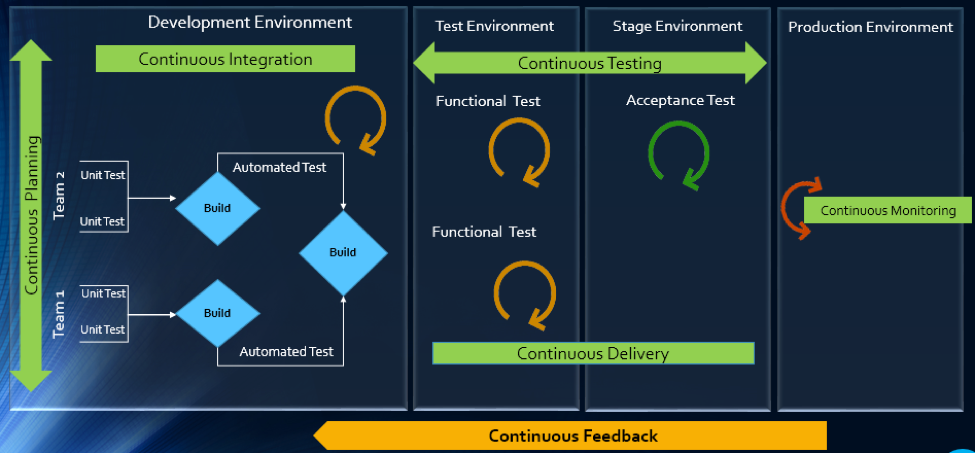
    The article will explain how multitool integration support can help organizations perform the DevOps life cycle, which includes continuous planning, continuous integration, continuous testing, continuous monitoring, continuous delivery and continuous feedback mechanism.

    The Drivers of DevOps

    Today, with the increasing competition and the need for an early market release, the software development industry is undergoing a paradigm shift. Agility has become an inevitable process across all organizations. In addition, shorter ROI cycle spans, frequent releases, increased CRs and different IT systems and tool technologies have made the situation critical.

    The industry demands higher transparency, maximum visibility, minimum turn-around time, lesser human intervention and efficient processes at every stage, from development to delivery.

    However, organizations that use specialized tools to manage builds, deployments and delivery processes continue to face difficulties when it comes to data orchestration and process automation across the tool chain.

    In an agile environment, developers and testers need to ensure not only that code changes work and integrate well, but also  that frequent iterations do not make the product unstable. Hence, seamless cross-tool collaboration is very important here.

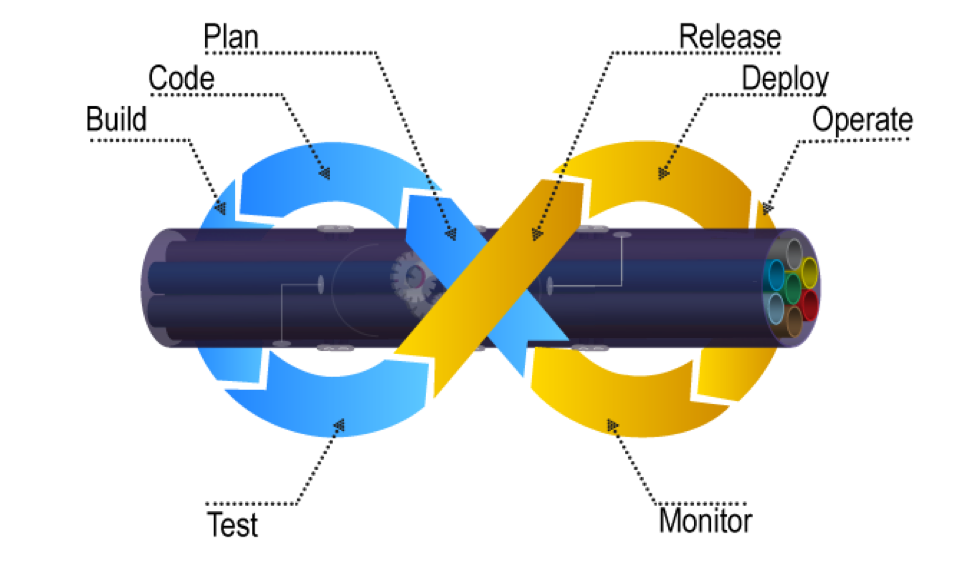
    The process chain consisting of Code –> Build –> Provision –> Test –> Defect Fix –> Deploy –> Release needs to run continuously and smoothly without compromising delivery deadlines or the product quality.

    Automation is the Catch Line

    With the rising demand for continuous delivery and sprint-based development, manually setting up a test, build and deployment environment is burdensome and time-consuming.

    Software teams need to automate the entire cycle of build, provisioning and deployment of test environments, including the tools, scripts and test data to ensure rapid delivery. They also need to collaborate around the application architecture and monitor event-action-based mechanism for seamless data flow across the tool chains.

    Reports show the most important DevOps components are IT automation, agile development and collaborative teaming of personnel. Therefore, without centralized orchestration of tools, achieving DevOps is not a realistic situation. Since organizations spend around 73 percent of their DevOps budget in tool acquisition, it is important they know how to get the tools working together to overcome DevOps obstacles.

    In the process of connecting their existing and new toolsets, most organizations search for an integration methodology that is scalable, reliable and easy to maintain. Point-to-point integration between tools help, but to a limited extent. Even a single change in integration rules involves complex coding and high maintenance across development, test and deployment cycles.

    How ESB-based Integration Can Help

    An enterprise service bus (ESB)-architected integration hub connects both the existing and the new tools to support a seamless data flow between them across the DevOps life cycle.

    Once integrated, the data from both the development and the operations tools become readily available for use to every stakeholder. The benefit of using ESB-based integration is that you can add or remove any tool based on your connectivity requirements.

    In a typical scenario, DevOps teams use a series of cross-functional tools starting from project planning to delivery and operations. Neither of these tools comes with built-in integration features, which results in inconsistent flow of information among tool users.

    Project managers use application lifecycle management (ALM) or Agile planning tools to detail the scope of work and tracking progress reports. Upon unit testing, developers use a different tool to check in a code from their integrated development environment (IDE) to the source code management (SCM) repository. They also perform a code quality analysis before committing to the SCM.

    In such a scenario, continuous integration (CI) can be achieved only when developers bring these planning, unit testing, code analysis and SCM tools under one roof. That is, connecting the tools through a common integration hub. It also helps developers to manage everything from within the IDE.

    After successful check-ins, build engineers trigger the SCM tools for automated build and testing. Upon a successful build, testers engage in continuous testing using manual and test automation tools, followed by provisioning for continuous deployment. They also perform load testing, API testing and security testing using separate tools. An integration support helps to keep the real-time data flowing between the build and the testing tools uninterrupted and seamless.

    A DevOps system also includes application performance monitoring (APM) tool for continuous monitoring of memory consumption, CPU usage, database health and release tracking. Operations team use help desk/ IT service management (ITSM) tools for continuous feedback generation and customer support. And delivery managers use continuous delivery tools for defining and tracking release pipeline through graphical interface.

    When all these tools are connected to a central integration hub, product release and help desk operations become faster and efficient. The integration between development and ITSM tools facilitates continuous feedback generation, which helps to improve the product quality.

    Through an integrated tool ecosystem, project managers can create a DevOps workflow based on business logic and automate the data movement across tool systems. Business analysts, developers, testers and delivery managers can also get real-time update on development progress and keep track of actionable items. Supervisors can route cross-tool data to a central repository and generate meaningful reports and analytics before taking business decisions.

    Fig: ESB Integration Bus Facilitating Adoption of DevOps

    An ESB-based integration tool helps organizations to implement and leverage the best DevOps practices by establishing connections across all participating tools. An integrated tool ecosystem helps achieve the following:

    • Real-time collaboration between development, delivery and operations tools
    • Continuous planning from requirements capturing and review to design and code analysis
    • Cross-tool traceability for defining relationships between various data objects
    • Test strategy implementation for continuous testing
    • Continuous integration through automatic triggering of build on successful completion of code check-in
    • Continuous testing through workflow based automatic triggering of both manual and automated test cases
    • Scheduled test automation script execution enabling continuous delivery
    • Continuous monitoring of release quality through reports and dashboards
    • Automated defect identification and resolution for faster help desk response
    • End-to-end traceability providing better release predictability and change impact analysis
    • Meaningful reports, metrics and KPIs for quick decision-making
    • Continuous delivery through tracking release pipeline

    How Inter-tool Connectivity Brings Continuity

    To understand the stages of engineering practice, let us consider a sample DevOps scenario in an IT service organization.

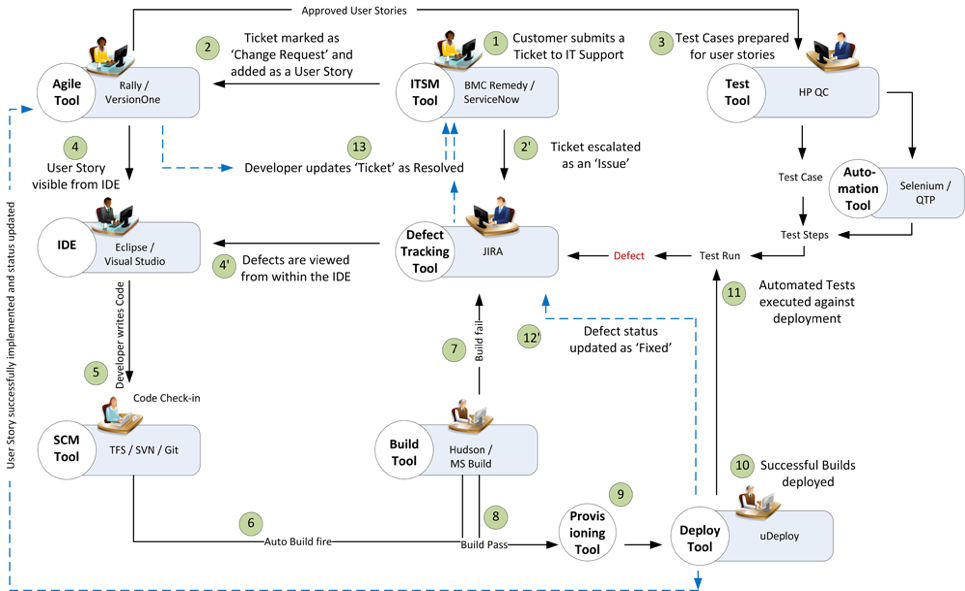
    The organization uses an ITSM tool to manage support tickets submitted by customers. On submission of a ticket, it is automatically passed on to an ALM tool as user stories or defects for internal development.

    On allotting to a sprint, developers and testers view the user stories or defects from IDE, SCM and test tool. Once the coding is complete and codes get checked in at an SCM tool, an automatic build gets triggered using a build tool. Upon successful completion of the build, tool provisioning is done through a virtual machine.

    The successful build can be automatically deployed using a deployment tool and automated tests can be executed through a test automation tool. The test results are then captured and linked with test cases and the source requirements for traceability.

    The defects that are raised in the defect tracking tool for failed test cases can be automatically routed to developers for fixing.

    Fig: DevOps scenario achieved in a collaborative tool environment

    Once connected to an integrated tool system, users get a complete visibility of the tool records and their relationships from within their own tools. Developers, testers and help desk managers can get complete traceability view between development artifacts and change requests or defects.

    When all the tools participating in DevOps sync with each other, developers can easily view the support tickets reported by the operations team right from their own IDE.

    The help desk team also gets a real-time update whenever a change request gets implemented or a defect is resolved by the development team. It eliminates the latency in communication between the Dev and Ops teams to a great extent.

    In addition, customers get frequent updates from the help desk team, which makes them happy and confident about the product performance.

    Conclusion

    Implementation of DevOps is not a “Do once and forever” type of task. Just deploying the right set of tools to the right users will not serve the purpose. Proper connectivity between and across the DevOps tools chain is necessary if you want to create a collaborative work environment around the Dev and Ops teams.

    An integrated tool system saves considerable amount of time and effort, which would otherwise be wasted on manual execution, monitoring and reporting of data during DevOps implementation.

    About the Author / Sanat Singha

    Sanat Singha is a senior technical and web marketing writer. He takes special interest in ALM process, technologies and tools integration as an industry. Sanat does content marketing, professional blogging, social media promotion and website analytics.

  • Building Security into Code and Culture

    Building Security into Code and Culture

    Organizations tend to have a very predictable approach to security: reactive. Most don’t really care about security until something bad happens. But with data regulations and requirements becoming more rigid around the globe and cybercrime only continuing to escalate, the notion of security as an “add on” or an afterthought is quickly becoming outdated. Today, an organization without adequate security measures is like a skydiver without a parachute—sure, the parachute doesn’t guarantee a 100 percent safe experience, but wouldn’t you rather have one than go without?

    A big problem, however, is that the modern approach to security remains inadequate. Most companies simply layer piecemeal measures over their existing infrastructure, not realizing that this isn’t an effective way to mitigate risk. Instead of adding on bits and pieces of security such as firewalls and antivirus programs, organizations should strive to incorporate security principles into the very foundation of their IT, in both the code and the culture.

    This is what Microsoft sought to do with its SD3+C principles, e.g. Secure by Design, Secure by Default, Secure in Deployment and Communications. While all of these are designed to impose better security measures throughout the development process, the first two arguably provide the highest security benefits. This is because they prevent the introduction of vulnerabilities in the first place while minimizing the potential exposure of software—so-called “attack surfaces.”

    Security and safety by design has thus far achieved greatest maturity in the automobile industry. Modern-day cars have more than 100 different safety and security features, including redundancies, and are rigorously tested for verified assurance. While crash tests destroy vehicles and take time to conduct, they ultimately teach us invaluable lessons that make them 100 percent worth the investment.

    Baking security measures into design and development is likewise a better approach when it comes to code, but it presents a problem: Developers, by nature, don’t want to take the time to build safety nets. A major criticism of SD3+C is that it slows down innovation by forcing developers to make more considerations than “make something really cool at lightning speed.”

    This reaction isn’t surprising when you consider the culture of coding, including the process by which we teach new developers. Hacker culture has long carried a certain kind of allure, romanticizing the role of the developer as a creative, clever and adventurous rogue. It elevates those resourceful individuals that can overcome software challenges in the fastest, nimblest, slickest way—not necessarily the securest.

    It’s never been the standard to teach the morality, ethics or laws of coding; instead, we teach people how to code and let them take off running. But the modern digital age has required us to put the brakes on and rein in that spirit. It’s like teaching someone to drive a Ferrari at breakneck speeds but not about the rules of the road, and then later expecting them to steer within the lanes, stop at red lights and not exceed speed limits.

    Bring Order to Code Chaos

    Our culture of coding inherently perpetuates chaos, but now we need to implement some degree of order, and this is a tough challenge. We need to drive a risk-based approach to development that introduces order into chaos without hindering innovation.

    How do we begin to accomplish this? The first thing to consider is changing how you approach code in the first place by making it more robust. Typically, code can’t be easily changed once it’s written; a single line may be easy to manipulate, but at several million lines, you risk severing the ecological connections that make the app work, and changing any one piece could break the entire application. With your code in such a susceptible state, it’s far too resource-intensive to maintain.

    The solution is to make it more mature in the first place. Make your code modular enough so that it can be amended in part when necessary, and then you can easily bake in additional security measures and eliminate dependence on firewalls and antivirus as your first (or only) line of defense.

    Second, consider the privacy law and contractual requirements of your organization, and address them directly in your code from the start. Understand that different types of privacy data will need to be handled differently and require different levels of protection across technical, physical and administrative dimensions. Whether you deal with payment card industry (PCI) or protected health information (PHI), you should be intimately familiar with the standards governing the protection of data your organization deals with.

    Now, what about culture? In its simplest essence, we can think of culture as comprised of three basic factors: rules, tools and fears. Where rules exist, you should apply them; where tools exist, you should use them; and as an organization, you should be “afraid” of the same things, because common fears tend to be strong motivators for groups of people or the masses. The only re-transmission of culture is through awareness, training and immersion.

    An important point I invite you to consider is that human beings won’t do anything without a reason, whether real or imagined. Humans are experienced-based learners not knowledge-based learners. For this reason, we learn valuable lessons from mistakes and failures. An important aspect of this is timely communications. When something has gone wrong we need to be able to get the right people on task to work toward planning mitigations, learning lessons and making things better.

    One way to effectively change or reshape your culture is to enforce the rules—for instance, the new General Data Protection Regulation (GDPR) mandates severe fines and consequences for PII data breaches (which is, in fact, similar to penalties enacted by the auto industry years ago).

    Another is to provide better tools and processes that essentially “force” (or, more kindly, compel) your team to use the right approach or method.

    Finally, you can employ fear, uncertainty and doubt, otherwise known as “FUD.” Though it may sound a bit sinister, FUD can be a very effective way to govern—although on its own, it’s a very tenuous and fragile kind of power. This is why you balance it with rules and tools, so that the overarching objective will resonate in both the hearts and minds of your team: Keep your organization happy and healthy.

    Because this is the reality that modern digital organizations must face: It doesn’t matter how innovative or bleeding-edge you are unless your business stays healthy! A tree that is well-rooted and cultivated to grow properly and upright will weather the worst storms, and ultimately live a long and prosperous life. Remember that Ford once had to introduce critical safety measures to the Model T, and nobody was worried about hydraulic brakes, seat belts and padded dashboards slowing us down.

    About the Author / Robert Hawk

    Robert Hawk is Resident Security Expert at xMatters. He has extensive experience in Information Systems Security, Computer Security, Cyber Security, Information Assurance, as well as Governance, Risk, and Compliance (GRC) Management. He specializes in frameworks and standards from: ISO/IEC, NIST, IEEE, IETF, ITU-T, Common Criteria, AMI-SEC, NERC, CIS, DoD, ANSI, PCI, and ISECOM. Robert is a lifelong researcher, innovator and instructor. Connect with him on LinkedIn.

  • QA/Testing and DevOps: Partners, Not Adversaries

    QA/Testing and DevOps: Partners, Not Adversaries

    Software testing and QA is sometimes given low priority during development. The idea of treating software testers as adversaries by the developers seems old-fashioned and is short-sighted. It’s hard to believe that such an attitude can still exist, and yet it still persists, even in a modern DevOps team. But a DevOps-focused software team benefits when it considers QA/testing as an integral part of developing high-quality applications.

    In a business setting, the hidden costs of buggy or unsecure software are lost productivity, revenue and extra work by the development team (and even extra work by users, if the software isn’t running right). QA/testing helps test for system flaws, vulnerabilities and security issues, so why wouldn’t a DevOps team be supportive?

    QA/testing can help an enterprise avoid big mistakes. In fact, the DevOps Institute notes, “With the advent of DevOps and the movement to break down silos between developers and operations, it becomes critically important that all members of an IT team—regardless of what tools they use, or role they play—understand the essentials of testing.” And, according to Puppet, a standard for automating the delivery and operation of software, high-performing enterprises build quality testing into each stage of their software development process.

    Make QA/Testing a Priority

    Whether your DevOps-focused developers are handling the QA/testing themselves or passing it along to QA/testing specialists, it’s something that must be done. Ideally, developers themselves would handle QA/testing in an integrated DevOps environment, and that’s why some developers see it as an unwelcome chore. It’s not something they’re usually trained in, and they might struggle with it or see it as a burden. That could be the reason why some DevOps teams hit a “software testing bottleneck.” As data from a Vanson Bourne survey commissioned by Appvance shows, 73 percent of 200 enterprise IT decision makers in the United States have adopted DevOps processes, but 57 percent of those adoptees experienced a bottleneck during software testing that impacts how quickly new and updated software can be released.

    On the flip side, the developer’s company may have QA/testing professionals in-house, so the developers are hands-off in that area. Needless to say, the relationship between developer and the QA/testing pro could get a little rocky. Just think about it: The role of the QA/testing specialist is to find problems and point out issues with the developer’s code. Or, perhaps the developer or engineering staff is lagging behind schedule, so the team inevitably needs QA/testing to rush its processes, further creating a tense or adversarial relationship between the two groups.

    At one of my startups a while back, we worked for months on our first software release of a web application for an online marketplace. Late on a Wednesday night, we let the CEO of our company try it out—and the app immediately crashed. “Gee,” I said, “It was working on my computer.” Of course, it really wasn’t. We had synchronization problems, which are common in multi-threaded applications that access the same information for multiple users. And we made the mistake of letting the CEO be the first simultaneous user to try it out (creating a bad impression), instead of making organized QA/testing a priority at our company.

    QA/testing in a DevOps environment can help your team avoid mistakes, so passion for app functionality doesn’t supersede quality and robust bug-free software. In the end, what you need from your team is passion for both functionality and quality/testing. Otherwise, you’ll deliver a faulty product and lose customers or users—unnecessarily—because of a bad first impression by your software.

    Two Approaches for Integrating QA/Testing with DevOps

    When you’re integrating QA/testing into your DevOps environment, there are two different approaches or procedures to ponder. First is the more traditional test of the full system, sometimes called integration testing. The second is test driven development (TDD), which is popular in Agile and Scrum methodologies. The main difference between the two is in how software code is tested. During integration testing, developers review and test the code. Then, for critical facets of the software, a peer review of code is completed. Afterward, testers create scripts and deploy an array of integration and system tests. These could include scalability testing, load testing, stress testing and very importantly, security testing. Code vulnerability, SQL injections and malicious code would be things to think about.

    Under TDD, the order in which testing appears in the cycle is reversed. Each developer first writes “unit tests” and then writes the code. This is done iteratively in such a way that every discrete section of code is automatically tested. When new code is sent to the integration server, the tests go with it. The server itself runs unit tests for all the code that developers deposit in the server. On top of this, testers design system and integration tests to run automatically by the integration server. Finally, testers perform any manual tests that are impossible to automate. In this way, the integrity and quality of the code is constantly guaranteed.

    Academic studies and field experience suggest that TDD increases development time by approximately 15 percent … but hold on. Experience also shows that total cost of ownership of TDD-developed software is lower than software using integration testing only. It’s worth noting that by using TDD and integration testing, a company can deploy software of world-class quality that exhibits less than 0.3 errors per 1,000 lines of code during 18 months of use.

    QA/Testing: A Partner in Your Software’s Success

    If you’re hesitant about integrating QA/testing into your DevOps team and instead tempted to outsource it, you may want to push pause. It’s actually quite challenging if you do development in-house and expect to simply outsource what you think is independent QA with cheap testers. Outsourcing QA/testing and assuming that piece is done is not really outsourcing—it’s staff augmentation at a distance and it usually doesn’t work. You don’t want a “siloed team” to handle a critical component such as QA/testing. Instead, outsource QA/testing and bring your in-house and outsourced teams together around a common DevOps culture and mindset.

    DevOps experts Bob Aiello and Leslie Sachs, in an IBM report, say quality software “… requires not only a shift in behavior, but a dramatic shift in the organizational culture as well.” So whether you outsource or have an in-house squad, your developers and the entire team should take ownership of QA/testing, and remain open to new ways to test code efficiently.

    Ultimately, QA/testing should not be viewed as a time-consuming, disruptive chore by anyone on your team or in your enterprise. Think of it as a partner in your software’s success—not an adversary.

    About the Author / Steve Mezak

    Steve Mezak is founder and CEO of Accelerance, a leader in global software development outsourcing, as well as the author of “Software Without Borders,” co-author of, “Outsource or Else: How a VP of Software Saved His Company,” and a CIO columnist.


  • Making the Data Work for You: Data Visualization Techniques

    Making the Data Work for You: Data Visualization Techniques

    When Peter F. Drucker, the father of modern management, performed a two-year in-depth analysis of the General Motors corporation in the 1940s, he undertook what may have been the world’s most ambitious big data analysis ever at that time. However, when he gave the results to GM chairman Alfred Sloan, Al was not happy.

    In fact, Sloan refused to acknowledge Drucker’s work. He never mentioned it again and banished his colleagues from referencing the resultant book (Concept of the Corporation) around him.

    Alfred Sloan may not have been ready to act upon the harsh reality of his company’s data, but modern businesses thrive on this sort of analysis. Big data has consumed every industry on earth, from automobiles to cosmetics to hotels and far beyond.

    Businesses that use the power of data visualization will outperform the ones that don’t, every time. If you are responsible for the success of a B2B business, this article is going to show you why data visualization is one of the most powerful tools at your disposal.

    The Goal of Data Visualization

    There are two ways you can use big data visualization tools to make your data work for you. You’ll make it easier to parse your own data, identifying trends and finding opportunities to improve your business. You’ll also use it to convey your ideas to other people, improving your conversion rate for B2B sales that can make or break your bottom line.

    Understanding Your Data

    When it comes to better understanding your own data, visualization is everything. Even a small business has an incredible amount of data at its disposal. Social media statistics, front-end stats such as how long users spend on certain web pages, sales and refund statistics by time of day and product … the list goes on and on.

    You have to start by figuring what data is most relevant. Ed Baker, former head of growth at Uber, points out that every great business needs a “north star metric.” This is the single variable that, if it improves, the entire business does better. Once you identify your north star metric, you can see how other variables feed into that metric. Data visualization is crucial for parsing the information and making these big decisions.

    Conveying Ideas to Other Businesses

    You can use well-visualized data to convey ideas to other people that might be near-impossible to express otherwise. Have you ever sat in a meeting, desperately trying to show somebody why your idea makes sense, and yet completely failing to do so?

    I’ve had conversations where my brain is about to melt out of my ears, because I think I’m making perfect sense yet the other party simply does not grasp the idea. In a B2B context, this failure to communicate can cost hundreds of thousands of dollars. That’s a critical failure to get the job done. Data visualization is a very cost-effective way to improve your odds of making the sale.

    When you’re trying to sell a premium service or product to another business, don’t just tell them why it makes sense—show them. Use the visualization techniques in the rest of this article to remove all doubt that you’ve got the right idea.

    The 7 Basic Tools of Quality

    There are dozens of different ways to visualize data. It depends on what kind of information you want to look at. However, the best way to start is by understanding the “seven basic tools of quality.”

    Made famous in post-war japan by Kaoru Ishikawa, these tools are simple yet potent data visualization methods that most people can learn in a few hours. While not the most intricate or powerful visualizations available, they are elegant and widely understood. When you use one of these tools, you can rest assured that everybody at the table will be comfortable following along.

    You want to use these methods of visualization whenever it is possible. Only move into more esoteric or powerful tools when the situation necessitates it. By the time you are working with complex multi-variate data visualizations, you’ll probably need a dedicated data scientist to make it all work. These tools are an easy and cost-effective way to get started.

    Here are the seven basic tools, with a brief synopsis of how each one works:

    Cause-and-Effect/Fishbone Diagram

    A quick and simple method to use when you are working backwards from a known outcome, asking the question: “Why did it happen?” This tool is often too simple for detailed analysis, but can be great for mid-conversation visualizations on the back of a napkin.

    Check Sheet

    We’ve all used check sheets in our day-to-day lives. This is a great way for small groups to keep track of simple data, such as, “How often are the following conditions being met?”

    An example of a check sheet in action would be a coffee shop that wants to track common issues with customers. You could have the barista check a box whenever something goes wrong: Customer says drink tastes bad, customer leaves before drink is ready, customer gets confused while ordering and becomes agitated, etc.

    Control Chart

    This is a X & Y axis chart where the horizontal axis is the flow of time and the center of the vertical axis represents the average value of the other variable. The top and bottom of the vertical axis are the outer bounds for that variable. The control chart is a simple way to visualize data for a single variable moving through time.

    Histogram

    You’ve probably heard the word “Histogram” a lot, but may not know what it is. This is a chart where the horizontal axis consists of columns representing one variable and extending upwards to show the relationship with a second variable on the vertical axis.

    Pareto Chart

    A chart consisting of columns and a line, sort of like a blend between the Histogram and the Control Chart. However, Pareto charts do not necessarily reflect the passage of time. The columns are always ordered from largest to smallest and the line is the sum of the data represented by the columns.

    Scatter Diagram

    This is a simple diagram that plots two different variables with lines across an X and Y axis, meant to show correlations between them.

    Flow Chart

    Also known as an “if-than” chart, this shows the potential sequence of actions or thoughts within a mental or physical process. For example: If the client likes coffee, ask them how they like it. If not, offer them water. If the client says they like the coffee with cream, add cream. If not, prepare it black. This sort of data is awkward to express through pure language, but quite easy to grasp when placed in a flow chart.

    Advanced Data Visualization

    There are many, many forms of advanced data visualization. This is the stuff that Peter Drucker was trying to do back in the 1940’s—capturing huge amounts of data across an entire corporation and then synthesizing it into the most elegant possible form.

    If you want to go beyond the seven basic tools, you’ll need help. This isn’t the sort of thing that an employee or even an ambitious executive can tackle over the course of a few days. A team of data experts will need to spend a lot of time and energy to craft the perfect visualizations for you. With that said, here are a few advanced techniques to consider:

    Heat Maps

    Heat maps are used to show density of activity across a geographical space. This can be utilized to understand city traffic, or to look at where your employees spend time within an office building.

    Beyond the physical world, you can use heat maps on websites to see where users tend to move their mouse, or even where they tend to glance at. For example, video game developers and social media platforms use heat maps of user eye-gazing data to optimize their visual layouts.

    Word Clouds

    A word cloud is a visualization where many different words are scattered about in a “cloud,” with larger words being more common. You can use these to understand the most common sentiments being expressed in customer reviews, company emails or other text communication.

    While cheap word-cloud-generators exist, there are many reasons why they do not work. An effective word cloud needs to deal with factors ranging from color to glyph shape and beyond.

    Comparative Graphs

    Comparative graphs combine several copies of the basic power tool charts, by for example putting several control charts on top of each other to compare larger numbers of variables and factors. While comparative graphs are simple to understand in theory, they are difficult to put together in a way that is practical.

    Using Data Visualization for Your Business

    The best way to understand data visualization is to give it a try. You can get started with basic visualizations on your own, but you’ll want to contact an expert to really make your data work for you.

    After all, it isn’t enough to put a few variables into a chart. You need to understand how to collect the right data, compile it into useful visualizations, and then act upon that data in an effective way.

    About the Author / Alexey Semeney

    Alexey Semeney is the CEO of DevTeamSpace, where he leverages his knowledge and expertise in product design and remote team management to build a unique software development platform. Connect with him on LinkedIn.

  • Bridging the Gap Between ITSM and Software Engineering

    Bridging the Gap Between ITSM and Software Engineering


    Considering the individual roles of IT service management (ITSM) and software engineers, it seems obvious they should work closely together. ITSM tracks internal and external customer issues, and engineering fixes code-related issues (such as defects) that IT cannot fix on its own.

    However, more often than not, coordination between these two departments is poor, which—critically—undermines customer response times and damages application satisfaction. It’s important to remember that the quality of customer response isn’t just about speed, it’s about giving customers insight into the state of the issue.

    The disconnect between ITSM and engineers—caused by individual priorities and semantic differences—makes this real-time insight difficult. Both teams have individual and shared concerns, and separating these while simultaneously improving collaboration is a big challenge.

    Addressing this relationship is an important step in optimizing ITSM and DevOps integration, alongside focusing on IT help desk enhancement requests to product management, and tracking code from build to release and back.

    The Flow of Information on Things that Matter

    Most of the tickets generated by the IT help desk can be handled internally with no help from engineering, but it’s the tickets that do need help that require consideration. For these issues, there needs to be an open flow of information on the things that matter between these two teams.

    IT help desk must give engineering enough information to understand the defect and its impact on the customer. Meanwhile, engineering needs to be able to give the help desk a sense of when to expect the fix, when the fix is done and be able to request more information when required.

    Information that should be shared from the help desk to engineering includes the following:

    • Severity – Engineering needs a sense of the importance of the defect. If everything comes in as “High Priority,” nothing is high priority. The help desk must understand that engineering already has its own internally generated set of defects, as well as defects found by QA and other sources. For these customer defects to be prioritized and fixed in a timely manner, engineering needs to know how impactful they are to the customer.
    • Description – This is perhaps the most important piece of information the help desk can pass along. The more contextual information that can be shared, the better. It’s immensely important to provide engineering with the necessary steps to reproduce the specific defect, which version of your tool the customer is using, the general environment, etc. Sometimes this is best in structured fields, whereas other times it’s important to simply write out everything.
    • Screenshots and other visual information – Along with the written description of the problem, engineering often requires logs and/or screenshots. As the saying goes, “A picture is worth a thousand words.”

    Now that engineering has the vital information it needs to fix the defect, it has a responsibility to provide useful information back to the help desk:

    • Planned release – This should not be a firm commitment, but rather an estimate to give the help desk general timing. While the actual date of the fix may vary, it’s still useful to be able to tell a customer,”This is coming soon” vs. “We realize this is a problem and it’s on our backlog to fix.”
    • Engineering status – While this is a single defect to your customer and to them only has one status, there are really two statuses your organization will care about:
      • Status of the ticket in your ITSM tool
      • Status of the defect in your defect tracking/agile planning tool

    It’s very important that the ITSM tool contains both statuses to provide more information and context to the help desk. Imagine the benefit of knowing that the defect is “In Triage,” “In Progress,” or “In Verification” and being able to provide that information to a customer.

    • Actual release/released – As opposed to the planned release information, this lets the help desk know that the customer’s issue has been resolved. Imagine running a report from your ITSM tool indicating the defects fixed in your most recent release. Your IT help desk can proactively reach out to customers to let them know to upgrade, enabling you to offer more proactive customer communications.

    Finally, and perhaps most important, you allow your teams to talk about the “same thing” even when it exists in different tools and they speak a different language. There are four core ways to do this:

    • Cross tool tracking – Each artifact in each system should have the ID (and ideally URL) of its twin artifact in the other system. If a help desk representative needs to talk to an engineer about a defect, the rep needs to let engineering know which defect it is in the engineering tool, not just in the ITSM tool.
    • Routing – IT help desks often support multiple products, each of which have multiple components that may belong to a different engineering team. The help desk needs some indication which component and/or team should work on the defect. This information will help the IT help desk know which team to reach out to for help.
    • Filtering – Not every ticket in the ITSM tool needs engineering help (that’s a good thing). However, there should be some indication on the IT ticket if it has been sent to engineering. You do not want to send the same defect to engineering twice (confusing) or to assume it’s been sent when it hasn’t (poor time to resolution or issue overlooked).
    • Communication – IT and engineering need a shared way to talk about a specific defect that they both care about. The closer this communication can be to the native commenting that already occurs, the better. Ideally this is not via email as that communication vehicle does not stay attached to the artifacts in question, meaning information can be hard to find or get lost.

    The Benefits

    Customers will love it – Improved communication means happier customers. Customers can plan their upgrades with more certainty, and their trust grows since your organization is able to deliver on its promises. No longer will they feel like their issues are being thrown into a black hole.

    Better engineering focus – Engineering gets pulled in a variety of directions, contending with feature work as well as internally generated defects. The more information it has, the easier it is to prioritize and deliver more value to customer. Without the ability to share the severity of a defect, you risk two undesirable outcomes:

    • The defect is fixed instead of more important work, which hurts all your other customers.
    • Other less important work is prioritized, which can threaten your relationship with this customer.

    Better trust across your organization – Open communication fosters trust and understanding. Providing insight into prioritization and status let’s your help desk feel part of the development process. No longer will staff feel like they’re sending problems into a black hole with no idea when they will be fixed. Enhanced cross-team communication also helps engineering to avoid feeling like work is simply being thrown over the fence. Obtaining more context around a defect is invaluable.

    Next Steps for Total DevOps Integration

    To fully integrate your ITSM and engineering teams, there are still (at least) two other processes to implement:

    • A method for the IT help desk to provide enhancement requests to your product team: These enhancement requests are similar, but distinctly different from the defects described above. Consequently, they need to be prioritized and triaged by a different team.
    • The other process to implement is the traceability from task to code to build and back again. In order to properly inform customers that their problem is fixed in this version of your product, it’s important to correlate features, stories and bug fixes with the actual version of your product that includes them for the first time.

    Bridging the gap between ITSM and engineering teams brings your company closer to customers. While making your organization work as a unified whole is an incredibly complex problem, addressing this relatively small—but vital—piece of the puzzle helps you on your journey to integrating your whole software value stream. This change of mindset—combined with connecting all teams, tools, disciplines and processes in an enterprises’ software value stream— optimizes collaboration, productivity, efficiency and, most importantly, value delivered to the customer.

    About the Author / Trevor Bruner

    Trevor Bruner is a Product Manager for Tasktop Technologies. His background includes experience in financial services, oil and gas and as a Navy submarine officer. Connect with him on LinkedIn and Twitter.
  • With a Multicloud Infrastructure, Control is Key

    With a Multicloud Infrastructure, Control is Key

    Ask any developer or DevOps manager about their first experiences with the public cloud and it’s likely they’ll happily share some memories of quickly provisioning some compute instances for a small project or new app. For (seemingly) a few pennies, you could take full advantage of the full suite of public cloud services—as well as the scalability, elasticity, security and pay-as-you-go pricing model. All of this made it easy for teams to get started with the cloud, saving on both the IT budgets and infrastructure setup time. Public cloud providers AWS, Azure, Google Cloud, Rackspace and others made it easy to innovate.

    Fast forward several years and the early promise of the cloud is still relevant: Services have expanded, costs have (in some cases) been reduced and DevOps teams have adapted to the needs of their team by spinning up compute instances whenever they’re needed. But for many companies, the realities of their hybrid-IT infrastructure necessitates support for more than one public cloud provider. To make this work, IT Ops needs a control layer that sits on top of their infrastructure, and can deliver applications to customers over any architecture, including multicloud. This is true, no matter what the reason teams need to support multi-cloud environments.

    Prepare for the Worst

    As any IT Ops manager, or anyone who has lost access to their web app knows, outages and cloud service degradation happen. Modern Ops teams need a plan in place for when they do. Many companies choose to utilize multiple public cloud providers to ensure their application is always available to worldwide customers, even during an outage. The process of manually re-routing traffic to a second public cloud in the event of an outage is cumbersome, to say the least. Adding an app delivery control plan on top of your infrastructure allows companies to seamlessly and automatically deliver applications over multiple clouds, factoring in real-time availability and performance.

    Support Cloud-driven Innovation

    Ops teams often support many different agile development teams, often in multiple countries or from new acquisitions. When this is the case, it’s likely that the various teams are using many architectures on more than one public cloud. Asking some dev teams to switch cloud vendors is not very DevOps-y. A better option is to control app delivery automation with a cloud-agnostic control plane that sits on top of any cloud, data center or CDN architectures. This allows dev teams to work in their preferred cloud environment, without worrying about delivery.

    Avoid Cloud Vendor Lock-in

    Public cloud vendors such as Amazon Web Services or Microsoft Azure aren’t just infrastructure-as-a-service (IaaS) vendors, they sell (or resell) products and services that could very well compete with your company’s offering. In the beginning, using a few cloud instances didn’t seem like such a big deal. But now that you’re in full production and depend on one of these cloud providers for your mission-critical app, this no longer feels like a great strategy. Adding a second public cloud to your infrastructure lessens your dependence on a single cloud vendor who you may be in “coopetition” with.

    Multiple-vendor sourcing is a proven business strategy in many other areas of IT, giving you more options during price and SLA negotiations. The same is true for IaaS. Cloud services change often, as new services are added or removed, and price structures change. Taking control over these changes in public cloud service offerings, pricing models and SLAs is another powerful motivator for Ops teams to move to a multi-cloud architecture. An application delivery automation platform that can ingest and act on cloud service pricing data is essential.

    Apps (and How They’re Delivered) Have Changed

    Monolithic apps are out. Modern, distributed apps that are powered by microservices are in. Similarly, older application delivery controllers (ADCs) were built for a static infrastructure world, before the cloud (and SaaS) were commonly used by businesses. Using an ADC for application delivery requires a significant upfront capital expense, limits your ability to rapidly scale and hinders the flexibility to support dynamic (i.e. cloud) infrastructure. Using ADCs for multiple cloud environments compounds these issues exponentially. A software-defined application delivery control layer eliminates the need for older ADC technology and scales directly with your business and infrastructure.

    Regain Control

    Full support for multicloud in product may sound daunting. After all, Ops teams already have plenty to worry about daily. Adding a second cloud vendor requires a significant ramp-up period to get ready for production-level delivery, and the new protocols, alerts, competencies and other things you need to think about. You can’t be knee-deep in the details of each cloud and still manage infrastructure. Adding in the complexity of application delivery over multiple clouds can be a challenge, but much less so if you use a SaaS-based application delivery platform. With multicloud infrastructure, control is key.

    About the Author / Andrew Marshall

    Andrew Marshall is the Director of Product Marketing for Cedexis, and has driven product marketing efforts at New Relic, Amazon Web Services and Microsoft. Connect with him on LinkedIn.

     

  • Is AWS Cloud Per-Second Billing Boon or Bane for DevOps Engineers?

    Is AWS Cloud Per-Second Billing Boon or Bane for DevOps Engineers?

    Amazon’s introduction of its AWS services in 2006 with a per-hour billing model for compute resources was a game-changer for the IT world. Since then, AWS has taken over the cloud computing market as a leader, while broadening the range of cloud services offered every year. However, the per-hour billing business model was one of the major issues for many customers—in particular, those who had applications using EC2 for only minutes at a time.

    Recently, AWS announced support for per-second billing of its EC2 service, addressing the aforementioned concerns. Of course, this also created controversy among the per-hour supporters. While I won’t get into the pros and cons across the whole enterprise, one group in particular is affected from the new per-second model: DevOps engineers.

    Here are the top five implications for DevOps teams as a result of per-second billing:

    Autoscale without worrying about cost

    Most engineers were vary of autoscaling at will, mostly because of EC2’s hourly charges even though they might need additional compute capacity for just 15 minutes. With per-second billing, DevOps engineers don’t have to worry—it’s as simple as scaling your EC2 instance as you need to, and when you need to.

    No more custom logic for hourly batches

    Many customers use EC2 for jobs and batch processing purposes. Due to the hourly pricing, engineers have written custom logic to benchmark and constantly tune the number of nodes in their batch clusters to ensure they are cost-optimized. Per-second billing frees up headaches for DevOps engineers that are using EC2 for batch processing and job clusters.

    The need to speed up EC2 launches

    With per-second billing, it’s important to take advantage of prebaked Amazon Machine Images (AMI) for launching your EC2 instances, instead of complete configuration setup on every instance launch. This will reduce the costs for you, by saving anywhere from five to 15 minutes. It’s time to create prebaked AMIs for faster instance launches, ultimately saving costs.

    Dilemma of Lambda or EC2

    Be prepared to compare whether to use Lambda or EC2 for new workloads and applications more often than you are used to. Your benchmarking between Lambda and EC2 has become a little more dicey. The serverless lambda just got competition from EC2 again.

    Your big data just got easier

    With EMR also supporting per-second billing, your job has become a lot easier. As a , you no longer need to constantly benchmark your EMR clusters for number of nodes and job processing times to be optimized for per-hour billing.

    DevOps engineers have a lot to benefit from per-hour billing, but also much to consider when it comes to time-to-deployment and choosing a compute service. Now is the the time for DevOps engineers engineers to bring these concerns to their CIOs to make a smooth transition to the new AWS business model.

    About the Author / Vijay Rayapati

    Vijay Rayapati, CEO of cloud management platform company Botmetric, identifies himself as a technology entrepreneur, passionate about creating products, building high-performance teams, and solutions that solve real-world business issues. Vijay is a popular speaker in India and the US, and has co-authored a popular book, “Learning Big Data.” Connect with him on LinkedIn and Twitter.

  • Bridging the Gap Between ITSM and Software Engineering

    Bridging the Gap Between ITSM and Software Engineering

    Considering the individual roles of IT service management (ITSM) and software engineers, it seems obvious they should work closely together. ITSM tracks internal and external customer issues and engineering fixes code-related issues (such as defects) that IT cannot fix on its own.

    However, more often than not, coordination between these two departments is poor, which—critically—undermines customer response times and damages application satisfaction. It’s important to remember that the quality of customer response isn’t just about speed, it’s about giving customers insight into the state of the issue.

    The disconnect between ITSM and engineers, often caused by individual priorities and semantic differences, makes this real-time insight difficult. Both teams have individual and shared concerns, and separating these while simultaneously improving collaboration is a big challenge.

    Addressing this relationship is an important step in optimizing ITSM and DevOps integrations, alongside focusing on IT help desk enhancement requests to product management, and tracking code from build to release and back.

    The Flow of Information on Things that Matter

    Most of the tickets generated by the IT help desk can be handled internally with no help from engineering, but it’s the tickets that do need help which require consideration. For these issues, there needs to be an open flow of information on the things that matter between these two teams.

    IT help desk must give engineering enough information to understand the defect and its impact on the customer. Meanwhile, engineering needs to be able to give the help desk a sense of when to expect the fix, when the fix is done and be able to request more information when required.

    Information that should be shared from the help desk to engineering includes the following:

    • Severity – Engineering needs a sense of the importance of the defect. If everything comes in as “High Priority,” nothing is high priority. The help desk must understand that engineering already has its own internally generated set of defects, as well as defects found by QA and other sources. For these customer defects to be prioritized and fixed in a timely manner, engineering needs to know how impactful they are to the customer.
    • Description – This is perhaps the most important piece of information the help desk can pass along. The more contextual information that can be shared, the better. It’s immensely important to provide engineering with the necessary steps to reproduce the specific defect, which version of your tool the customer is using, the general environment, etc. Sometimes this is best in structured fields, while other times it’s important to simply write out everything.
    • Screenshots and other visual information – Along with the written description of the problem, engineering often requires logs and/or screenshots. As the saying goes, “A picture is worth a thousand words.”

    Now that engineering has the vital information it needs to fix the defect, it has a responsibility to provide useful information back to the help desk:

    • Planned release – This should not be a firm commitment, but rather an estimate to give the help desk general timing. While the actual date of the fix may vary, it’s still useful to be able to tell a customer,”This is coming soon,” rather than, “We realize this is a problem and it’s on our backlog to fix.”
    • Engineering status – While this is a single defect to your customer and to them only has one status, there are really two statuses your organization will care about:
      • Status of the ticket in your ITSM tool
      • Status of the defect in your defect tracking/agile planning tool

    It’s very important that the ITSM tool contains both statuses to provide more information and context to the help desk. Imagine the benefit of knowing that the defect is “In Triage,” “In Progress,” or “In Verification” and being able to provide that information to a customer.

    • Actual release/released – As opposed to the planned release information, this lets the help desk know that the customer’s issue has been resolved. Imagine running a report from your ITSM tool indicating the defects fixed in your most recent release. Your IT help desk can proactively reach out to customers to let them know to upgrade, enabling you to offer more proactive customer communications.

    Finally, and perhaps most important, you allow your teams to talk about the “same thing” even when it exists in different tools and they speak a different language. There are four core ways to do this: 

    • Cross-tool tracking – Each artifact in each system should have the ID (and ideally URL) of its twin artifact in the other system. If a help desk representative needs to talk to an engineer about a defect, the rep needs to let engineering know which defect it is in the engineering tool, not just in the ITSM tool.
    • Routing – IT help desks often support multiple products, each of which have multiple components that may belong to a different engineering team. The help desk needs some indication which component and/or team should work on the defect. This information will help the IT help desk know which team to reach out to for help.
    • Filtering – Not every ticket in the ITSM tool needs engineering help (that’s a good thing). However, there should be some indication on the IT ticket if it has been sent to engineering. You do not want to send the same defect to engineering twice (confusing) or to assume it’s been sent when it hasn’t (poor time to resolution or issue overlooked).
    • Communication – IT and engineering need a shared way to talk about a specific defect that they both care about. The closer this communication can be to the native commenting that already occurs, the better. Ideally this is not via email as that communication vehicle does not stay attached to the artifacts in question, meaning information can be hard to find or get lost.

    The Benefits

    Customers will love it – Improved communication means happier customers. Customers can plan their upgrades with more certainty, and their trust grows since your organization is able to deliver on its promises. No longer will they feel like their issues are being thrown into a black hole.

    Better engineering focus – Engineering gets pulled in a variety of directions, contending with feature work as well as internally generated defects. The more information it has, the easier it is to prioritize and deliver more value to customer. Without the ability to share the severity of a defect, you risk two undesirable outcomes:

    • The defect is fixed instead of more important work, which hurts all your other customers.
    • Other, less-important work is prioritized, which can threaten your relationship with this customer.

    Better trust across your organization – Open communication fosters trust and understanding. Providing insight into prioritization and status let’s your help desk feel part of the development process. No longer will staff feel like their requests are being ignored with no idea when they will be fixed. Enhanced cross-team communication also helps engineering to avoid feeling like work is simply being thrown over the fence. Obtaining more context around a defect is invaluable.

    Next Steps for Total DevOps Integration

    To fully integrate your ITSM and engineering teams, there are still (at least) two other processes to implement:

    • A method for the IT help desk to provide enhancement requests to your product team: These enhancement requests are similar, but distinctly different from the defects described above. Consequently, they need to be prioritized and triaged by a different team.
    • The other process to implement is the traceability from task to code to build and back again. To properly inform customers that their problem is fixed in this version of your product, it’s important to correlate features, stories and bug fixes with the actual version of your product that includes them for the first time.

    Bridging the gap between ITSM and engineering teams brings your company closer to customers. While making your organization work as a unified whole is an incredibly complex problem, addressing this relatively small, but vital, piece of the puzzle helps you on your journey to integrating your whole software value stream. This change of mindset, combined with connecting all teams, tools, disciplines and processes in an enterprise’s software value stream, optimizes collaboration, productivity, efficiency and most importantly, value delivered to the customer.

    About the Author / Trevor Bruner, Product Manager, Tasktop

    Trevor Bruner is Product Manager at Tasktop Technologies. His background includes experience in financial services, oil and gas and as a Navy submarine officer. Connect with him on LinkedIn and Twitter.


  • DevSecOps and DevNetOps: New Heroes in the DevOps Saga

    DevSecOps and DevNetOps: New Heroes in the DevOps Saga

    The evolution of DevOps is by no means done, but it’s safe to say that there is enough agreement and acceptance to declare it a hero. DevOps has helped glorify IT to the point where it’s no longer preventing business, nor a provider nor a partner of the business.

    Often IT is the business, or its vanguard for competitive disruption and differentiation.

    Splintering the success of this portmanteau hero, we now hear more and more of two trusty sidekicks: DevSecOps and DevNetOps. Lesser known in their adolescence, these tots are still frequently misunderstood, are still forming their identities, and still need a lot of development if they’re to enter the IT hall of fame like their forerunner.

    Just as the terms look, DevSecOps and DevNetOps are often assumed to be about wrapping DevOps principles around security and networking: operators hope to assuage technical debt and drudgery by automating in proficiency and resiliency. For networking, I’ve covered how there is a lot more to that than coding, but to be sure, these sidekicks certainly espouse operators learning how to do develop while DevOps was equally, if not more, about developers learning to operate.

    The Shift Left: SecDevOps and NetDevOps

    As if it wasn’t hard enough to tell what DevSecOps and DevNetOps want to be when they grow up, we’ve gone and given them alter egos: SecDevOps (aka “rugged” DevOps) and NetDevOps. Think about them exactly as the words look—it’s about the shift to the left. Left of what?

    Traditional DevOps practices focus on business-specific applications development. The development timeline is known as a concept to cash, and with all the superpowers of DevOps we try to reduce our enemy—the lead time and repeatable processes between code and cash.

    Security and building infrastructure, like networks, were considered supporting tasks, not revenue-generating nor competitive advantages. Thus, security and networking were far to the right on the timeline with concerns that deal with operational scale, performance and protection.

    Today’s shift left propels security and infrastructure considerations earlier down the timeline, into coding, architecture and pre-production systems. It’s a palpable penny-drop amid daily news of security breaches and infrastructure outages causing technology-defined establishments to bleed money and brand equity.

    Fill the bucket with cash, but don’t forget to forestall the leaks!

    DevOps and Infrastructure: Challenge and Opportunity

    Automation sparks have flown over the proverbial wall into the camp of I&O pros. Operators trading physical for virtual, macro for micro, converged for composed, and configuration for code is proof that the fire has caught security and networking. Controlling the burn now, is key, so that healthier skills and structures arise in place of the I&O dogma and duff. Fortunately, this is precisely the destiny for our newfound heroes, DevSecOps and DevNetOps.

    However, doing DevSecOps and DevNetOps, embracing security and networks as code, we mustn’t be so credulous as to forget the formidable DevOps practices and patterns that need transforming along the ultimate automation journey. Testability, immutability, upgradability, traceability, auditability, reliability and other you-name-it-abilities are not straightforward to achieve.

    Discounting “aaS” technology consumed as a service, a fundamental challenge to innovating SecOps and NetOps, compared to application ops, is that applications are crafted and built; security and networking solutions are mostly still bought and assembled.

    Security and network infrastructure as code is something that needs to be co-created with the vendors. Other than in the cloud, it will take a while before security and networking systems are driven API-first, and redesigned to offer simulation, finer disaggregation into microservices, and orchestration with scale and resilience.

    While this will land first in software-defined infrastructure, there is still a way to go to manage most software-defined security and networking systems with continuous practices of artifact integration, testing and deployment. Hardware and embedded software will be even more challenging.

    Finding Strength in Challenge

    So on one hand, DevOps is evolving with security and networking shifting left. On the other hand, traditional security and networking ops are transforming with DevOps principles.

    Is the ultimate innovation to squeeze out those traditional operations altogether? Does NetDevOps + DevNetOps = DevOps?

    There is a parallel train of thought and debate, with success on both sides. Purist teams cut out operations with the “you build it, you run it” attitude. Other companies such as Google have dedicated operations specialist teams of SREs. While the SRE reporting structure is isolated, SRE jobs are very integrated with that of development teams. It’s easy to imagine the purist approach, subsuming security and networking into DevOps practices, but only if we assume the presence of cloud infrastructure and services as a platform. Even then, there is still substantiation for the SRE.

    Layers below, however, somebody still needs to build the foundations of the cloud IaaS and data center hardware. As they say, “Even serverless computing is not actually serverless.”

    Underpinning the clouds are data centers. And then there’s transport, IoT, mobile or other secure networks to and between clouds. In these areas, it’s obvious there is a niche for our two trusty sidekicks, DevSecOps and DevNetOps, to shake up ops culture and principles. These two heroes can rescue software-defined and physical infrastructure from the clutches of so many anti-pattern evils, like maintenance windows and change controls (ahem, it’s called a “commit”).

    We may not require rapid experimentation in our infrastructure, but we would warmly welcome automated deployments and updates, failure and attack testing drills, and intent-driven continuous response. They will boost resiliency and optimization for the business and peace of mind for the builders.

    Teams operating security, networks and especially clouds, need to honor and elevate DevSecOps and DevNetOps, so that on the journey now afoot, our teams and our new heroes may realize their potential.

    About the Author / James Kelly

    James Kelly is a lead expert architect on cloud and software-defined networking at Juniper Networks. He also serves as a private yoga instructor, and previously, he founded a capital management firm in Ottawa, Canada. Connect with him on LinkedIn and Twitter.