Tag: WordPress

  • WordPress Hacks: Best Ways to Protect WordPress from Hacking

    WordPress Hacks: Best Ways to Protect WordPress from Hacking

    When it comes to website security, even an iota of prevention is really worth a large pool of measures to restore a website from its affected state. WordPress websites are most vulnerable to security attacks from sophisticated hackers as well as the bots that are capable of exploiting security vulnerabilities. These security vulnerabilities range from weak passwords, outdated themes and plugins, and poor-quality web hosting.

    But, there are several time-tested measures that can prevent such security compromises and risks and keep a website performing and secure. 

    Make Use of Strong Passwords

    Weak passwords often cause security risks for websites. You can prevent such risks by using strong passwords and for this, you can use tracking tools such as 1Password that can track all the passwords and prevent you from using the same password on all your internet accounts. The tool also prevents you from using easy and easily rememberable passwords. Thanks to the tool you can only use unmemorable, long, difficult passwords.

    Using this tool you can easily test the strength of the existing passwords and can create passwords that are long, complex and not easy to guess. The tool helps you maintain all your web accounts with strong passwords. 

    Updating WordPress Core, Themes and Plugins

    Most updates of the WordPress core, or the themes and plugins, come to mitigate the security loopholes and risks. This is why making updates once a month is far from enough. Whenever a vulnerability will surface, your non-updated website can be the first victim of the security risk. This is why one must update as soon as there is an available update. For all the plugins that don’t come with important features and functions, one can use a Shield WordPress Security plugin to auto-update. 

    Insist on WordPress Hardening 

    There are several WordPress hardening methods that can easily prevent hacking from taking place. Let’s have a quick look at these hardening methods.

    • Add extra allow/deny rules through your .htaccess file.
    • Keep login URLs restricted to specific IP range(s).
    • Safeguard your wp-config file.
    • Prevent image hotlinking and mobile directory browsing.
    • Do not use public WiFi or VPN to log in to the website.
    • Remove unused WordPress plugins and files.
    • Keep the server clean.

    Prevent a WordPress Hack with a Website Firewall

    A vast majority of WordPress websites are frequently hacked as they are more vulnerable to security risks than other CMS platforms. A common issue that security experts stumble upon often is that WordPress version update is often not possible, thanks to the incapabilities of plugins or themes. This is when a WordPress website can easily become vulnerable to hacks.

    For such cases, enabling a WordPress firewall is strongly recommended to provide security patches for your website. A Web Application Firewall (WAF), when enabled, can take on such security risks. A WAF basically works like a pass for your website visitor traffic, and effectively filters out bad requests comprising hack attempts, exploits, DoS attacks and many more.

    A WordPress firewall does the following things to strengthen WordPress security:

    • Prevents all future hacking attempts by detecting and thwarting all hacking methods and behaviors, thus keeping your WordPress website protected against malicious attacks. 
    • The firewall provides a virtual security update for your WordPress website software, even when the website doesn’t have any new security updates.
    • A WordPress firewall also blocks brute force attacks or any unwanted visitors from accessing the wp-admin or wp-login page and makes use of brute force automation to detect your password.
    • It deals with Distributed Denial of Service (DDoS) attacks that basically try to overload a web server or the resources of an application with too many requests. By blocking DDoS attacks, a WAF ensures constant accessibility and performance of a WordPress website in all circumstances. 
    • A WordPress firewall helps boost WordPress performance by storing website caches and keeping bounce rate lower. This also ensures optimum website engagement, business conversions and steady search engine ranking. 
    • The cloud-based WordPress firewall solutions, besides preventing attacks, also boost WordPress website speed by using a Content Delivery Network (CDN). 

    Make Sure You Have an SSL Certificate Installed

    This is a basic and very important security measure for most websites. It safeguards data by encrypting the data you and users use and transfer via a website. For example, when one submits a contact form or uses login in web pages, the data that is transferred remains encrypted. With SSL installed on a website, secure login can be ensured even while traveling. While some hosts and hosting plans provide this for free, with some you need to use a separate SSL plugin for the purpose. 

    Avail Better Web Hosting

    Choosing good hosting companies can also be crucial for your WordPress security. Some hosting service providers such as WP Engine, Kinsta, Site Ground and a few others are great for WordPress security. These service providers take care of routine security scans and provide cleaning of hacked websites for free. Apart from performance, one should also consider security aspects for website hosting. 

    Taking Backup of Your Site

    Though taking regular backups may not always be effective for preventing a WordPress hack, they can sometimes play a great role in disaster recovery. It is particularly useful in preventing a website database from damages due to malicious attacks. 

    Continuous Website Monitoring

    Finally, continuous monitoring of websites can help greatly in tracking and mitigating security risks of all types. Setting Google Search Console alert is important concerning all issues on your website. Apart from that, you should monitor the error logs on your website through the cPanel File Manager or FTP (SFTP). You should also see the Raw Access Logs on the server to keep track of the users accessing website files on the site. You should also use a plugin called Shield WordPress Security plugin and use its Audit Trail feature to keep track of all the file changes and website accessibility issues. 

    Conclusion

    All the above-mentioned ways are time tested as successful to prevent security attacks and keep security vulnerabilities at check. These measures, besides a meticulous choice of plugins and themes, can help a WordPress website perform well and remain secure.

  • 5 Questions to Ask Remote Web Developers

    5 Questions to Ask Remote Web Developers

    Great web developers are waiting to be hired. Your company could seize upon the opportunity—but only if you’re willing to be patient, dedicated and a little creative.

    Don’t scare away qualified remote web developers with a few poorly worded questions or a mistimed probe. Ask direct and concise questions that can help you understand the candidate.

    Be sure to include the questions listed below to ensure you’re interviewing a remote web developer to the best of your ability:

    1. Have You Worked Remotely Before?

    Remote work is different from many traditional forms of work. For a company to properly manage a remote web developer, the web developer must have a solid understanding and knowledge of remote working environments.

    If an exceptional web developer candidate hasn’t telecommuted before, it doesn’t bar them from the pool of qualified candidates. However, it is easier to onboard and retain remote web developers who have had the experience of working remotely beforehand.

    2. Are You Familiar with Popular Web Development Frameworks?

    Remote web developers, like any other web developer, must stay abreast of the latest trends and advancements in the web development field. To master their craft, they must keep a running knowledge of the latest tools, frameworks and web programming languages.

    An experienced web developer should, at the very least, be aware of a large and robust framework such as Bootstrap. They should be able to explain how the framework works, why web developers use it (it’s much better to utilize a framework to save time, in most cases) and the drawbacks of utilizing a premade framework.

    3. How Much Experience Do You Have with Web Programming Languages? Are You Familiar with Server-Side Languages?

    Every web developer should be proficient in HTML and CSS. Scripting languages such as Angular.js, Express.js and JSON are important, too. JavaScript adds interactivity to websites. HTML acts as the skeleton and CSS acts as the design.

    Preferably, an experienced remote web developer candidate will have three to five years of experience with these languages.

    It’s also important to ascertain whether the web developer you’re interviewing has the ability to code the back end of websites. Do they know how to set up a database? Do they understand how to store values in a website’s database?

    4. Which Content Management Systems Do You Use?

    A content management system (CMS) helps streamline organizing, adding and managing content for a website.

    One of the most popular CMS is WordPress. Web developers leverage CMS to utilize built-in structures and architectures to create dynamic blogs and alluring corporate websites.

    Setting a website up with a CMS also makes it easier for writers, marketers and designers to tweak already-developed websites. They can add content without needing the web developer to intervene.

    5. Are You Comfortable with Regular Phone and Video Meetings? Do You Have Experience with Telework Software?

    Remote work has unique challenges. One of the most challenging aspects of working remotely is maintaining communication. Miscommunication can occur more easily for remote workers, so it’s important that you keep communication lines open and stress the importance of speaking clearly and confidently.

    It’s much better if a candidate already has experience with telecommunication software such as Zoom, Skype or Slack. Knowing how to interact via these technologies will lessen the chances of miscommunication in telework environments.

    Conclusion

    How you conduct a remote web developer interview is entirely up to your organization. There are several methods for conducting technical interviews, telework interviews and startup interviews. Each one of them is effective in a unique way; very few are ineffective or harmful. Adding a few questions to your interview script could help make whichever strategy you employ more effective.

    Ask remote web developers about their experience working remotely. Remember to ask about experience with certain telework software programs and telecommunication applications. On the technical side, be sure to ask about programming skill, familiarity with web frameworks and their experience with CMS.

    Companies that seek to hire remote web developers should take note of the interview questions listed above. By asking these five questions, interviewers can gain a great deal of insight into a web developer candidate’s habits, passions and challenges.

    Using these interview questions should make the vetting and hiring process easier for everyone, helping interviewers assess a candidate’s adaptability, experience and dedication.

    — Anthony Coggine

  • Hosting Scalable WordPress on AWS

    Hosting Scalable WordPress on AWS

    Do you own or manage a WordPress site? Is it complex, with a lot of traffic? I’m going to show you the ideal architecture to host a highly available and scalable WordPress site on AWS.

    This blog is intended to show a distributed architecture in AWS for WordPress CMS websites. You will be able to identify the different layers of services needed to run a high-traffic WordPress site.

    The Concepts of a Highly Scalable and Available Environment

    Let’s start by looking at what a highly scalable and available environment means—and what it includes:

    High Availability: On IT it means that a system can operate without any service disruption or interruption for a long time, as well as a system that has redundant components. (In our case, the redundant Infrastructure will be our high availability — thanks, AWS, for making this easier!)

    Distributed Services — Loose Coupling: The art of distributing different components of a system in the same network. We will be doing this to leverage the load of any resource and have dedicated hosts for a service.

    Scalability: A system’s ability to monitor the user demand and automatically increase or decrease resources. This scalability will be provided by the following AWS Resources: AWS ELB, AWS EC2, AWS S3, AWS RDS.

    One essential part of innovation is always to stay up to date and implement the best technology available.

    First Things First

    If you are planning to follow this blog, it is because you are looking to migrate to Amazon Web Services or you already have an environment or some resources allocated there.

    If you are already on AWS, we have also compiled a very concise checklist, which is available here.

    Architecture Diagram

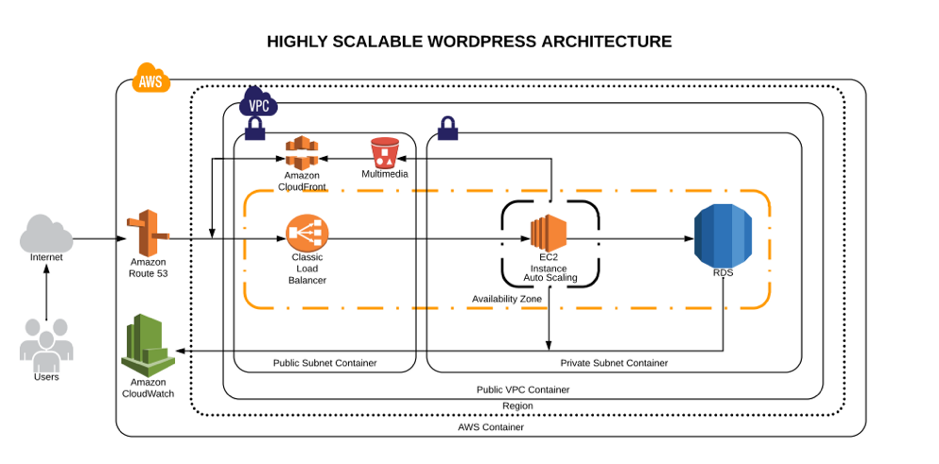
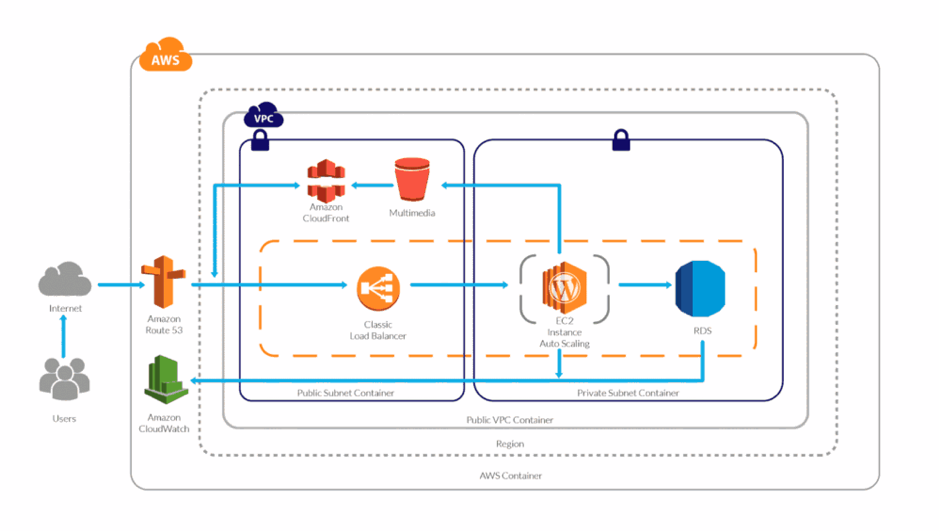
    High scalable and available WordPress environment on AWS Cloud

    AWS Services Explained

    1. Route53: This service will help us to manage all the upcoming requests (traffic) for our domain. AWS Route53 will also be the DNS manager, so here we will point our domain registrar to be the manager. Once it has been migrated here, we can add the A records, Cnames or TXT records and many other more.
    2. AWS VPC: The AWS VPC is a service that allows us to have a private network in which we will allocate our cloud computing resources. That means nobody has access to it—only ourselves.
    3. AWS Private Subnet: The private subnet is the subnet in which we are going to deploy the resources we don’t want outsiders to have access to. In this case, our database will be only accessible by the application.
    4. AWS Public Subnet: The public subnet is the subnet in which we are going to deploy the resources we want to make public — such as the server for our website.
    5. AWS S3: Amazon Simple Storage Service will be our content storage solution. Here, our WordPress installation(s) will have the content available whenever it scales up or off.
    6. AWS CloudFront: CloudFront combined with S3 will help us to spread the content faster to the end users. This way our WordPress multimedia content will be spread all over the AWS CDN network (edge locations), which will be used from our application to reduce the latency. Users will be served by the closest edge location available. So faster content = faster site.
    7. AWS Load Balancer: Here is the tricky part. The AWS ELB will allow us to distribute the traffic load between our instances available or in use depending on how the auto scaling is set.
    8. AWS EC2: Instances—also called “VMs”—the service on AWS for acquiring computing power. AWS EC2 will allow us to host our WordPress site and files we need.
    9. AWS Autoscaling: This will be the solution for our highly available and scalable WordPress site. AWS Autoscaling will take care of always having a minimum quantity of instances available for the public, and in case something goes wrong, it will replace the instance with a healthy one. This way our site will always be available. Autoscaling will also benefit our WordPress by creating instances based on the traffic demand and will help us to save costs while the traffic is low.
    10. AWS RDS and Multi A-Z: RDS will be the service in which we will host our WordPress database. The service is completely free and fully managed by AWS, which means we won’t need to worry about the database management anymore. Also useful is that RDS instances can have replication between them, which adds even more scalability. Also, enabling the Multi-Availability Zone (Multi A-Z) feature will provide us high availability. Keep an eye on this, however, since the price will is double for the RDS.
    11. AWS Cloudwatch: AWS Cloudwatch will be our trusted supervisor. Cloudwatch will be in charge of monitoring all the resources in our AWS account. It will keep an eye on the metrics that are predefined or as default by AWS resources, such as CPU usage, memory usage, disk IO and networking.

    Did I forget about EFS? Nope. In my experience, EFS has not been a huge help when it comes to sharing the WordPress files only. However, you can try using EFS; that way, the content will be replicated much faster and easier.

    If you want to learn more about the technologies and the approach that should be taken to create this kind of environments, take a look at this post.

    Millions of Page Views Served

    Here’s how this environment will be able to serve millions of page views/visitors:

    Traffic Flow

    Once visitors hit your domain on their browser their request is passed to the internet, then routed to your DNS manager. The DNS manager (Route53) will solve the request to the specified server and the web server then will serve the application.

    WordPress High Performance

    What will happen when your traffic increases? Here is an example:

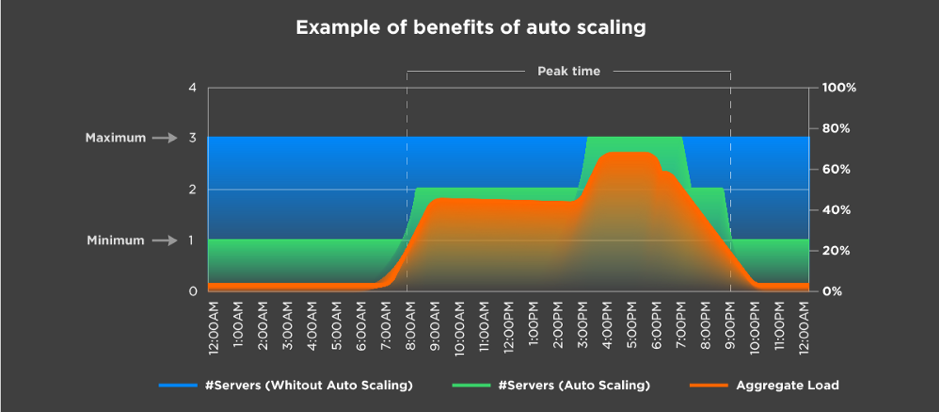
    Autoscaling example

    Let’s say you have set the autoscaling to one as the minimum number of instances and a maximum number of three instances. Based on different metrics, your environment will be able to scale out depending on the load it receives.

    In the image above, we can see that depending on the aggregate load, the environment continues to satisfy the demand by creating more instances as it grows. The same happens the other way.

    This means a lot when you are calculating the TCO of your cloud environment. It also means you won’t run out of memory or other resources; instead, you will have a more available system.

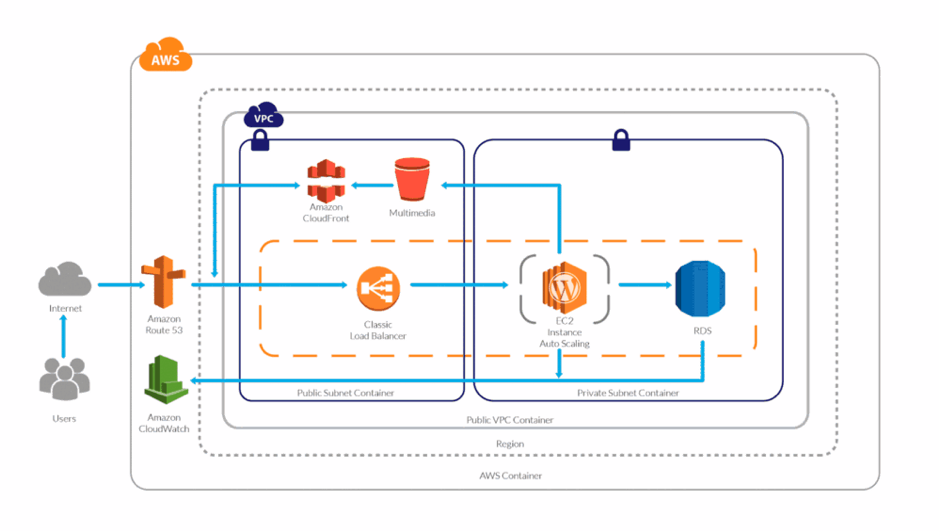
    And you might be wondering, What is going to happen to my AWS Resources? Here’s a visual:

    WordPress High Performance Scaling

    The answer is simple: More demand or traffic, more servers to meet it.

    Server Caching/WordPress Caching

    Server-side caching or WordPress-side caching happens with a plugin or is embedded in AH host. Whenever someone requests the homepage, for example, the request is passed to the database to retrieve the homepage information. Caching creates a temporary file (I say temporary, because you can specify the expiration) so when your request comes, it will check for the files it generates instead of processing the request to the database.

    This way, we can serve faster pages/content to our users and reduce the database consumption.

    If you yet don’t have a caching system implemented, make sure you do from now on, as it speeds up your website dramatically.

    Content Delivery Network

    In a few words,  the content delivery network (CDN) the network of servers or services in which your content will be hosted and this network will be used to transfer the content to all the visitors. Using a CDN will help you to spread your content around the world faster than having it hosted on your server.

    CPU/Memory Performance

    Based on the CPU and memory metrics, our stack will be able to scale up or scale in as desired. This way our response time will always be the same between all the servers and no instance will experience overload due to CPU or memory (these are the annoying 500’s errors).

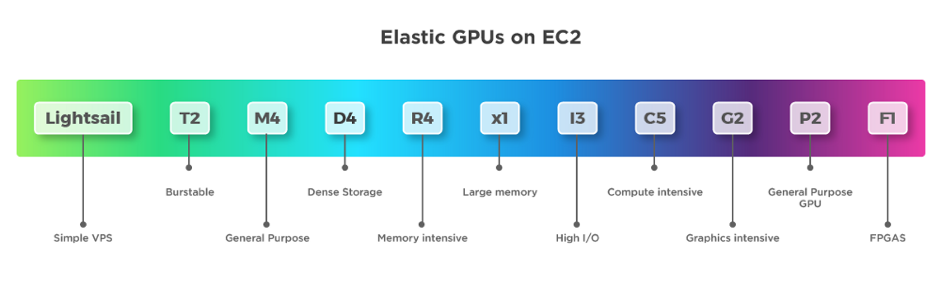
    Instance Types

    On AWS we have different instance types that we can use depending on the workload we have. It’s important to choose the right instance type.

    AWS instance types


    If you don’t know which to use, read this blog.

    Definitely using the correct instance type for our WordPress will help, as well as selecting the number of resources for it to run.

    And there you have it —you now know how your site can support millions of page views with a distributed system.

    Backup and Disaster Recovery

    It is essential to have a backup strategy as well as a disaster recovery solution in case something happens to our WordPress installation or our environment. Luckily, AWS offers a lot of redundancy between all its services.

    There are different ways in which we can protect our application and users’ data:

    1. WordPress plugins to back up the site (S3).
    2. Disaster recovery for infrastructure (physical).
    3. Backup for user data (DB — RDS).
    4. Backup for application code.

    Amazon Web Services already provides different backup solutions for all its services, so we can create backups for the RDS with one click and perform the configurations for backups with EC2.

    Pro Tips

    1. To increase the performance use a database, query and page caching plugin.
    2. Increase the RDS performance with a dedicated Aurora RDS.
    3. Use S3 and CloudFront to deliver the content faster.
    4. Enable alarms on AWS Cloudwatch.
    5. Enable the billing alarm to avoid unwanted charges for usage.
    6. Use Reserved Instances—if you are going to stay in AWS for a long time reserve, it can save you up to 30 percent.
    7. Use a version control system to track your changes and deploy to the instances.

    Conclusion

    This article outlines what I consider an ideal architecture for a high-performance/high-traffic WordPress site. As you can see, Amazon provides us with all the tools and technologies to do it, but sometimes it can be challenging.

    As always, if you think I missed anything, please post it in the comments!

    If you would like to get more techie blogs, subscribe to our newsletter.

    — Guillermo Vélez