Tag: version control

  • 7 Best Practices for Continuous Delivery Success

    7 Best Practices for Continuous Delivery Success

    Continuous delivery refers to the development of software in short and ongoing build-test-release cycles along the deployment pipeline. Repeated testing of processes and scripts before deployment to production means most errors are discovered early on and have minimal impact. Plus, finding and fixing such errors is much easier with fewer changes per release—software is released faster and more frequently with fewer deployment problems due to a heavy focus on visibility, instant feedback and incremental changes.

    To accomplish this, companies must have a straightforward and repeatable deployment process. Most reliable, of course, is an automated deployment pipeline that can feed into any environment.

    We have identified seven continuous delivery best practices that are supported by a set of complementary task-specific tools, in what’s known as the “DevOps toolchain,” to automate the process from end to end and minimize human error.

    Version-Control Everything

    The native code deployment process generally includes a built-in safety net, preventing out-of-process, locally generated artifacts from entering the production environment. Every change a developer makes must be documented in the source control repository or it is not included in the build process. If a developer copies an artifact generated locally to a test environment, the next deployment will override this out-of-process change.

    This insistence on having a single source of truth—and a reliable one—creates a stable foundation for all development processes. However, the processes are only as strong as their weakest link. That’s why the primary golden rule for effective continuous delivery is to version-control everything. What works well for code also will preserve the integrity of configuration, scripts, databases, website html and even documentation.

    Build Binaries Once

    Not every organization’s build process is the same or uses the same tools, but every build process in a single organization must be completely consistent. Whether the build is a single file deployed to an automated test environment or a complex build with several different possible deployment versions, each build version should happen exactly the same way and result in unique binary artifacts.

    This one-time-only compiling eliminates the risk of untracked differences due to various deployment environments, third-party libraries or different compilation contexts or configurations that will result in an unstable or unpredictable release. Save the compilation phase output (the binaries) to a binary repository, from which the deployment process can retrieve the relevant artifacts.

    Deploy the Same Way Every Time

    An inconsistent deployment process can become a source of configuration drift across environments, especially with the rapid releases common in a continuous delivery system. As a result, valuable time and effort are wasted in identifying and addressing difficulties arising from the application working in one environment and not another.

    For a reliable process in all environments, then, the same set of steps must be repeated from start to finish. This ensures the same results in lower environments, with more frequent deployments (such as integration, QA, etc.), as in higher environments (pre-production and production), with fewer deployments.

    Smoke Test

    Smoke testing deployments is a very rapid way to make sure that the most crucial functions of a program work and will pass basic diagnostics. This non-exhaustive software testing (of all elements, such as services, database, messaging bus, external services, etc.) does not provide the same fine-grain comprehensiveness as full test suites; however, it can be run frequently and quickly, often in a matter minutes (rather than hours or days). This allows for a much quicker turnaround on what can become very time-consuming and basic issues.

    The faster the feedback loop works (especially with automated test tools such as Telerik, QTP, TestComplete), the higher the final product’s quality will be and the quicker it will reach its release-ready state.

    Deploy into a Production-like Environment

    Each new deployment (using, for example, IBM uDeploy, CA Release Automation, XebiaLabs, Automic) should be made into an environment that mimics as closely as possible the actual final production environment. This includes infrastructure, operating system, databases, patches, network topology, firewalls and configuration. By validating software changes in this type of detailed pre-production environment, mismatches and last-minute surprises can be effectively eliminated and applications can be released safely to production at any time.

    Instant Propagation

    Continuous delivery by definition must be an ongoing process of building, testing and releasing. Every check-in to a source control repository should trigger compiling (if needed) and packaging by a build server. This, in turn, should automatically initiate certain predefined testing until the software can either be marked as releasable or returned to development.

    Continuous integration tools (e.g., Jenkins / CloudBees, Bamboo, TeamCity) ensure that cascade of actions along the delivery pipeline is consistent, automatic and instant. Thus, development teams merge developed code and get feedback from automated test tools many times a day, for a more efficient deployment and update process.

    Include the Database

    No list of continuous delivery best practices would be complete without advising that the database be managed using the same basic protocols that ensure secure and reliable source code, task, configuration, build and deployment management. However, many times this is neglected because the database is unlike other software components or compiled code that are easily copied from development to testing to production. Yet, the database is actually a repository of the most valued and irreplaceable asset—our data—and preserving it accurately is imperative to continuous delivery.

    Although the database poses several unique challenges, specialized database tools such as enforced database source control (for all environments), a database build automation tool and database release and verification processes can ensure a stable resource in your DevOps chain.

    Considering these seven continuous delivery best practices will allow you to create a deployment pipeline with increased productivity, faster time to market, reduced risk and increased quality.

    The key to ensuring a quick, robust and accurately repeatable continuous delivery is, as we have seen, automation, deployment consistency, comprehensive testing and database version control. With these fail-safes in place, pushing the “release to production” button can be done much more often and with much more confidence.

    About the Author / Yaniv Yehuda

    yaniv-e1404303491389Yaniv Yehuda is the co-founder and CTO of DBmaestro, an enterprise software development company focusing on database development and deployment technologies. Yaniv is a DevOps expert who spent the last couple of years raising awareness about the challenges surrounding database development and deployment, and how to support database continuous delivery. Connect with him on LinkedIn and Twitter.


  • Netskope Draws Strength from DevOps In Support Of Scrum Development

    Netskope Draws Strength from DevOps In Support Of Scrum Development

    Netskope keeps enterprises and their data secure despite the unbridled mix of approved and unapproved mobile apps in the market and on employee devices. Employees use unapproved mobile apps (BYOA) on their BYOD smartphones, tablets, and laptops when connected to networks away from the enterprise. IT professionals are keenly interested in tools that help them to have visibility into these apps and devices and to secure them.

    Enterprises face many issues with mobile apps. They confront challenges where data location and access as well as security are concerned when complying with PCI DSS, HIPAA, SOX, GLBA, FISMA, FERPA, and the ISO standards. Netskope works to control app usage, protect enterprise data, and maintain compliance on various endpoints whether the device is on premise or remote / mobile, all in real-time.

    “Netskope uses a distributed policy enforcement model that lets your people use these apps securely so you don’t have to block them completely,” says Abhay Kulkarni, VP of Engineering, Netskope.

    Netskope’s Security Duties Dictate Its Development Path

    “We do not follow Continuous Delivery,” says Kulkarni. Here are two of the many reasons for that.

    First, Netskope’s customers demand that software releases are predictable. “Our customers are large enterprises that want predictable change windows so they can ensure that they make the necessary changes on their side or that they prepare for our updates,” says Kulkarni.

    Second, because Netskope is a SOC-1 Type-II and SOC-2 Type-II certified company, it must comply with the requirements that comprise these certifications. Tightly-knit change management is critical to SOC certification. “As we do each change, we need to make sure that all changes meet the security, availability, integrity, and confidentiality criteria of these certifications by testing the entire product end-to-end,” says Kulkarni.

    But Netskope follows other DevOps principles such as using its own adaptation of a well-accepted source control workflow model as well as an automation model, a model for bootstrapping machines, and also models for software installation and change management.

    Netskope performs a balancing act between complying with SOC-1 and -2 trust services criteria and principles and maintaining rapid feature development. On the one hand, they manage to limit what individual developers can do on production machines—many times disallowing access. On the other hand, they use Sumo Logic to enable their coders to peruse anonymized logs in order to gauge how the service they instantiated is working.

    Goals, Tools, & Challenges

    “The key goal for Netskope’s DevOps approach is to ensure developer responsibility for running, monitoring, and scaling their services,” says Kulkarni. Netskope’s developers and operations staff work together from design through development while complying with a common framework, which helps in resolving development issues and brings consistency to data center operations, according to Kulkarni.

    Netskope holds developers individually accountable for making their software ready for automated deployment. To help with that, Netskope uses familiar tools such as Ansible, which helps Netskope to automate everything in production. “Right from bootstrapping a machine to changing network configurations, we automate all commonly repeated tasks,” says Kulkarni.

    Netskope deploys Sumo Logic agents using Ansible as a part of bootstrapping so that machines are configured from the get go to send logs to Sumo Logic. “Each service has standard logging methods that allow Netskope to create performance dashboards and to track errors,” says Kulkarni. Netskope uses a number of other tools that are commonplace in DevOps, such as Nagios, a monitoring tool and various external monitoring tools for tracking end user performance.

    The biggest challenge for Netskope was not in tooling but in building a DevOps culture where developers lead the charge in responsibility for quality, error-free operation of their services. “In a non-SaaS world, developers ship a version of their product and celebrate. However, shipping a SaaS product is just the beginning. There is really no celebration since you are now responsible for the upkeep of the services,” explains Kulkarni.

    A Trip Through Netskope’s Development Process

    Netskope starts with a Scrum sprint planning meeting where in they decide what features to address for the given sprint. “We try to be realistic about our expectations in delivering code in a sprint by applying quality criteria—i.e. we expect code to be of a certain quality or else we cannot deploy it,” says Kulkarni.

    Then developers bundle various modules on a single branch, which they test for functionality, security, performance, and integration. As the modules and the branch increase in stability, the developers upgrade them from one stack to the next until everything is deemed fit for a production deployment, explains Kulkarni.

    Results

    “Often we see proactive notifications from developers about issues they see in production. Detecting problems before our customers see them is a key benefit of the DevOps model,” says Kulkarni.

  • From here to there: practical first DevOps steps

    From here to there: practical first DevOps steps

    I’m a bad programmer.

    There, I got that out of the way.

    The truth is, I’m a sysadmin that writes code infrequently, on an island, and out of disciplined requirement, release, or QA practices. I need to run an ETL that kicks a file transfer. I’ll write some code. I’ve got a workflow that needs a crappy but functional web UI. Now I’m a developer. But in between these kinds of projects are days, and sometimes weeks of meetings and planning and dozens of things that are not code, which means by the time I come back to actual programming, I’m starting fresh every time.

    I don’t think I’m alone. I think there are a lot of sysadmins in the world with functional perl chops, but because they don’t code daily, they don’t approach problems with an inherently code-focused approach. Systems are still running, the internet is still on, so this way of solving problems must be OK. It is, but there are drawbacks.

    Rolling changes out to 4 dozen of your 8 dozen systems and verifying each received a 4 line change to that logship script with scp? Good luck with that. The old SA just left, and now you need to find all his stuff? GLHF. Some report hasn’t been sending for 4 days, what changed?! Yeah… yeah.

    Where software development got it right

    Great systems need three things: consistent configuration, maintainability, auditability. Good dev & deploy practices get you all three. Version control systems like git provide a great mechanism to manage code, version, and collaborate in reliable and predictable ways. Issue trackers, like Jira or Rally that integrate with version control let you easily tie specific changes back to the original reason for the change. Deployment systems like Jenkins and Capistrano give you one stop interfaces to track what got deployed where and when and by whom.

    Take it as given that few SA teams are using all of these approaches for their work today. Probably you’ve got a ticket system, and you definitely get yelled at if you don’t comment your scripts. Maybe those comments link back to the work order number? Migrating what you do today to a more DevOps focused approach isn’t going to happen overnight. So how do you start?

    Version control or GTFO – Yeah. I know. It’s on the list! No. Stop what you are doing, and gather all of your nginx.conf’s, your limits.conf, pg_hba.conf, and commit them to a git repo. I can’t emphasize this enough – if you are not enforcing version control in your systems administration team you’ll reap the whirlwind.

    Change, Commit, Test. Welcome to the new DevOps discipline. You’re going to hate it at first, but 7 months from now when the webservers are flopping because somebody changed something, you’ll be grateful for a quick and reliable rollback.

    Puppet or Chef or Ansible – get a basic setup. One master, three nodes. My starting point here was user management, I setup a basic user-add class, and let it manage ssh keys. Let that soak for a couple weeks and slowly roll it out to the rest of your infrastructure. Ten bucks says you find a dozen hosts with inconsistent UID’s that you’ve been meaning to fix for years.

    Once that feels comfortable, move some basic scripts into your setup, roll those out slowly. Take the db configurations, commit them to the repo, and move ’em over to configuration mangaement too. The point is, moving to configuration management systems is not an atomic event across your entire infrastructure, iterate against it. Make small weekly changes that roll up to quarterly progress.

    Here’s where the rubber meets the road:

    “Git is going to suck because deploying is so much easier when you just vim a file on a server” – Every Sysadmin Ever

    If you’ve got a repo, and you’ve got say, puppet… it’s a pretty easy step to have commits to that repo pulled and auto-deployed to your puppet managed nodes. Which means rollbacks can be too.

    Pay off your tech debt – I don’t have to tell you about the 4 dozen scripts you’ve got out there, unmanaged, brittle, and needing constant tweaks to keep them lined up with system changes. These are the bread and butter of system administrators, and can provide a great opportunity to implement change. Next time you have to touch that script for a new SCP server, stop. Stop! Do this instead:

    • check it in to your git repo, with some meaningful comments about what it does
    • add it to your configuration management system (puppet/chef/ansible)
    • if it’s bash or perl, rewrite it as python. It’s going to take a bit more time to rewrite all your scripts, but spending this time gets you more comfortable writing code regularly, and gets you more familiar with a modern scripting language.

    Walk the path

    Whatever your system or your goals, the hardest part of adopting DevOps approaches is going to come down to time. Reading through this myself, I’m struck by what an insensitive jerk I am. “Hey guys I know you totally have tons of free time, just starting doing everything you regularly do but add a ton of extra work too. Kthxbai”. The reality is, I probably am a jerk, but you don’t have to think about moving to DevOps as a shining city on a hill that you can reach with enough late nights. It’s a journey, a path, a way, not a place to arrive.

    Find a way to start making small changes to your existing processes that line up with the best of the development world. Decide to add 10% more time to a proposed project to allow for it to be handled with these methods. If you begin to turn your steps onto the DevOps path, you’ll quickly realize you’ve already arrived at your destination.


  • Perforce: The biggest little secret in DevOps

    Perforce: The biggest little secret in DevOps

    Quick can you name a company that is 15 years old, never took a dime of venture money, has over 250 employees, over 10,000 customers and was widely profitable from day one? Until last week me neither. That was when I  was briefed by Dhruv Gupta, Director, Product Marketing and Bob Dever, Director, Corporate Marketing for Perforce.

    perforce customersPerforce is a DevOps powerhouse. Take a look at the customer cloud to the right to get an idea of who some of the 10,000+ customers they have are. Perforce is all about version control. They do that and do it well. Whether you are talking about version control of your code, documents or analytics, Perforce has a solution for you.

    When you think about it, you can see why Perforce is such a DevOps play.  DevOps is all about continuous delivery or at least rapid release.  How can you accelerate your releases without keeping track of the different versions? Without version control you quickly have a mess. Perforce has in some ways enabled continuous delivery and rapid iteration. They truly are the biggest, little secret in DevOps.

    For many years Perforce was really the only choice in town for version control (there were others, but it became a leader in the space pretty quickly) but the rise of GIT, a distributed version control system (DVCS) gave some an alternative. But GIT lacked the enterprise features (read security and team management) that larger organizations needed.  Its popularity among lone wolf and smaller dev teams though was unmistakable. It is easy.

    Perforce has recognized this and has just released a new hybrid version of their solution. This hybrid version allows developers and dev team managers to use GIT and Perforce’s P4 in one hybrid version control platform. A best of both world solutions give DevOps teams the ability to move fast with GIT and have the security and enterprise functionality that P4 allows.

    When you start thinking about DevOps Unicorns like Netflix for instance or Salesforce, the sheer magnitude of what Perforce is managing comes into clarity. In Salesforce for instance you have 3,000 Engineers making 4,000 – 9,000 Code Changes a day with 550,000 Tests / Hour. Keeping versions straight is not the kind of thing you do in a spread sheet.

    It in a Continuous Delivery environment where Perforce really shines. They are making a big bet on enterprises adopting the Continuous Delivery model. However there are some fundamental questions to answer first. According to Perforce though you need to define what does Continuous Delivery mean to you? They conducted a survey:

     perforce cd


    According to Perforce they think of Continuous Delivery as this:

    • Deliver working product to users as quickly as possible
    • Every change (check-in) leads to a potential release
    • Give business the option to release – what, when, to whom
    • A change in process and culture

     perforce cd pipeline

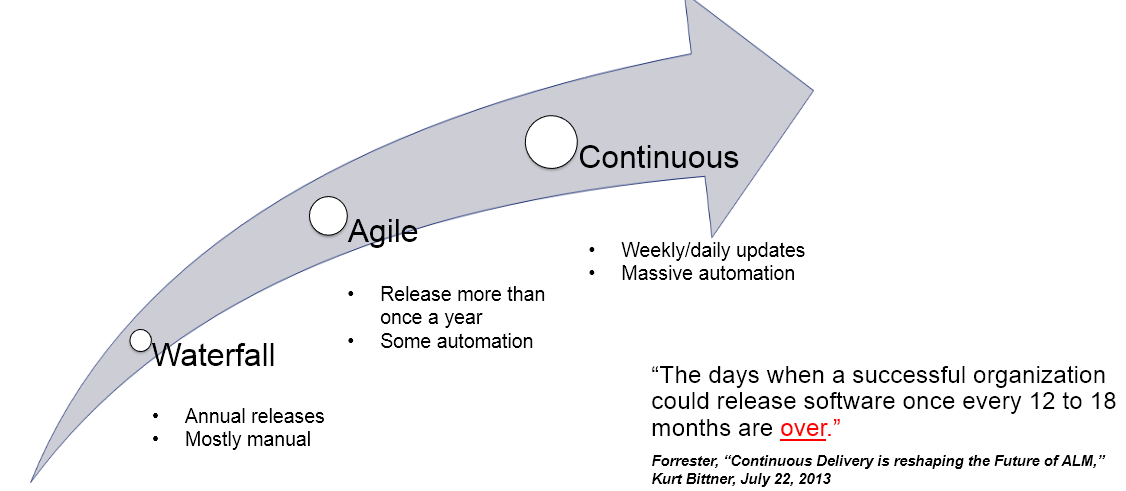
    Most importantly though, Continuous Delivery is not just something Perforce thinks is crucial. Waterfall release models are obsolete and even Agile is just a way stop towards Continuous.

     perforce cd arrow


    According to Perforce’s own survey they see Continous Delivery attaining critical mass:

     perforce cd adoption

     Is this a case of when you are a hammer everything is a nail or are we at the dawn of the age of Continuous Delivery? Perforce is making a bet that it is. They are already very successful, any more and they may just lose their status as the biggest, little secret in DevOps.