Tag: version control

  • Configuration-as-Code: Trends and Predictions for 2024

    Configuration-as-Code: Trends and Predictions for 2024

    Configuration-as-code, often abbreviated as CaC, is an innovative approach to managing and provisioning computing resources. It refers to the practice of handling changes, deployments and updates to software and systems via code rather than manual processes. CaC allows for a version-controlled, reproducible and automated method of managing environments, leading to more consistent and reliable systems.

    The essence of configuration-as-code is to treat system configurations the same way that software code is treated. This means that configurations are written in a code format, stored in a version control system and applied through automated processes. This approach brings several benefits, including consistency, repeatability and the ability to test changes before applying them to live environments.

    This concept is not just a theoretical approach but rather a practical tool for managing modern digital infrastructure. It’s a key component of DevOps practices, enabling teams to move faster while maintaining control and minimizing the risk of operational issues. Configuration-as-code is a critical tool for managing complex systems and achieving the highest levels of operational efficiency and reliability.

    The Evolution of CaC in Recent Years

    Over the past several years, configuration-as-code has grown from a niche concept into a mainstream practice adopted by many leading technology companies. This evolution has been driven by several factors, including the increasing complexity of digital systems, the rise of cloud computing and the broader adoption of DevOps practices.

    In the early days, system configurations were often managed manually or through ad-hoc scripts. This approach was prone to errors, hard to scale and lacked visibility into changes. As systems grew more complex, the need for a more robust, scalable, and reliable method of managing configurations became apparent. This led to the creation of configuration-as-code.

    The rise of cloud computing has been a significant driver in the adoption of configuration-as-code. With cloud platforms, resources can be provisioned and managed via APIs, making it possible to handle configurations through code. This has allowed for much greater scalability and flexibility enabling companies to manage large, complex environments more effectively.

    The adoption of DevOps practices and increasingly mature automation frameworks have also contributed to the growth of Configuration as Code. As infrastructure-as-code (IaC) becomes the norm, CaC is becoming a staple of modern DevOps practices.

    Trends in Configuration-as-Code for 2024

    Looking ahead to 2024, several trends are likely to shape the future of configuration-as-code:

    Increased Adoption of Cloud-Native Environments

    As more companies adopt cloud-native technologies, the use of configuration-as-code is set to increase. Cloud-native environments are inherently dynamic and complex, making them an ideal fit for configuration-as-code. With CaC, teams can manage these environments more effectively, ensuring consistency, scalability, and reliability. Cloud-native technologies like Kubernetes and Docker also natively support configuration-as-code, making it easier for teams to adopt this approach.

    Use of AI and Machine Learning in Configuration Management

    Artificial intelligence and machine learning are set to play a significant role in the future of configuration management. With AI and ML, teams can automate even more aspects of configuration management, reducing the risk of human errors and freeing up time for more valuable tasks. For example, AI could be used to predict the impact of configuration changes, while machine learning could help automate the process of optimizing configurations for performance and cost efficiency.

    Shift Toward Immutable Infrastructure

    Immutable infrastructure means that servers are never modified after they’re deployed. Instead, any changes are made by deploying a new server with the desired configuration. This approach reduces the risk of configuration drift and ensures a consistent environment. Configuration-as-code is a key enabler of immutable infrastructure, making it easier to manage and deploy servers in a repeatable, automated way.

    Collaboration and Democratization of CaC

    Finally, the trend towards collaboration and democratization in technology will also influence configuration-as-code. With CaC, configurations become more visible and accessible, allowing for greater collaboration between teams. This can lead to better decision-making, less siloed working, and improved overall outcomes. At the same time, configuration-as-code also enables democratization by making it easier for non-technical stakeholders to understand and participate in configuration management.

    Predictions for Configuration-as-Code in 2024

    CaC is Becoming a Cornerstone in the DevSecOps Approach

    The integration of development, security and operations—commonly known as DevSecOps—aims to embed security practices into the DevOps process. As we look towards 2024, configuration-as-code is set to become a cornerstone in the DevSecOps approach.

    By treating infrastructure as code, teams can apply the same security practices they use for application code to their infrastructure. This includes performing code reviews, using automated testing, and tracking changes to the environment. With configuration-as-code, security can shift left—being considered earlier in the development process—leading to more secure systems.

    Moreover, configuration-as-code can help bridge the gap between security and operations teams. It allows for a shared language and shared tools, fostering better collaboration and communication.

    Growth of CaC-as-a-Service

    Configuration-as-code-as-a-service is an emerging trend that is set to grow significantly by 2024. This approach allows businesses to outsource configuration management to a specialist third party, which uses configuration-as-code to automate the process. Cloud-based configuration management solutions provide advanced capabilities such as secrets management, centralized configuration management and orchestrated workflows.

    Version Control Features Specifically Designed for CaC

    Version control systems are a key component of configuration-as-code. They allow teams to track changes to their environment, revert back to previous versions if necessary, and collaborate more effectively. In 2024, we can expect to see the evolution of version control systems with features specifically designed for CaC.

    These features might include support for infrastructure-specific languages and better integration with infrastructure tools. Version control tools might also introduce improved support for collaborative configuration workflows, making it easier for teams to work together on infrastructure configuration.

    Increased Role of CaC in Managing Edge Computing Environments

    As we move into 2024, we can expect to see an increased role for configuration-as-code in managing edge computing environments. Edge computing is rapidly growing due to its ability to bring computation and data storage closer to the location where it is needed, improving response times and saving bandwidth.

    With the rise of edge computing, managing these environments becomes increasingly complex. CaC can automate the process of setting up and maintaining these environments, reducing human error and increasing efficiency. This also allows for consistency across different environments, leading to more reliable systems.

    In conclusion, the future of configuration-as-code looks promising. As we move towards 2024, we can expect to see an increased role for CaC in managing edge computing environments, its evolution as a cornerstone in the DevSecOps approach, the growth of CaC-as-a-Service, and the evolution of version control systems specifically designed for CaC. These developments promise to bring about greater efficiency, security and collaboration in the realm of infrastructure management.

  • Steps for Migrating Code Between Version Control Tools

    Steps for Migrating Code Between Version Control Tools

    Code migration can be tricky if you’re not prepared. Follow these steps for a worry-free migration.

    Almost all source code contains some format of delicate information, whether it be configuration-related information such as database credentials or information on how the web application functions, such as a web template.

    If such information is disclosed, this information potentially could be used by an attacker to discover logical flaws and escalate into a successive chain of attacks. These include attacks such as SQL injection, database takeovers, cross-site scripting, remote code execution and, sometimes distributed denial of service.

    To achieve solution for conducting a risk-free and systemic migration, we need to plan three stages for the code migration process: pre-migration, migration and post-migration.

    Key Considerations During Pre-Migration

    • License cost
    • Administration cost
    • Developer productivity
    • Security of data
    • Training of team
    • Total cost of ownership
    • Knowledge on all connected tools with application lifecycle management
    • Agile adoption policies and CI practices
    • Team structure – distributed or co-located?
    • File types – Do you have large binary files?
    • Need file locks?
    • Users have the appropriate permissions to fetch and push
    • Builds are successful, and all your tests are passing

    Key Considerations or Challenges During Migration

    • Test environment
    • Capacity planning
    • Compute capacity
    • Benchmark the current version control system
    • Network connectivity
    • Access between source and target servers
    • Load testing
    • Access control
    • Aim to migrate over a weekend when nobody needs to check-in

    Key Considerations During Post-Migration

    • Data integrity verification
    • Data size check
    • Automated acceptance testing and reporting
    • Dependencies are intact and build doesn’t break
    • Link between files and folders is not broken
    • Load testing
    • Backup and sync jobs

    Moving to Distributed Version Control from Centralized Version Control

    When migrating code from a centralized version control system such as Apache Subversion (SVN) to a distributed version control such as GIT, here are the steps to take:

    • Evaluate the tools and methods you’re planning to utilize
      • Build and test
      • Code reviews
      • Release management
    • Select a branching strategy for GIT
      • long-lived feature branch
      • Short-lived feature branch
      • Bug fix branch
      • Dev branch

    Reference: https://guides.github.com/introduction/flow/index.html

    https://nvie.com/posts/a-successful-git-branching-model/

    • Decide whether you want to migrate history; if yes, then determine how you will achieve this—you may need another third-party tool to resolve your task.
      • There are many tools available in market that can migrate a whole history of all branches from a centralized tool to GIT.
      • Almost all version control systems collect how files change between versions, including rename, merge and rollback. GIT version control tool stores versions as a snapshot of the entire repository.
    • Retain your old version control system for a set time after migration.
      • During and after a migration, developers sometimes need access to the history in the old version control system, so you can’t just shut the old system down once you’ve migrated.
      • There should be some text file committed in GIT which should explain how/when the GIT branches were migrated from the old system and what all branches are migrated.
    • Remove binaries and executables from source control.
      • You should avoid commit large binary files to a repository. Once they’ve been committed to a repository, they will remain in the repository history and in every upcoming clone.
      • Migrating to Git provides you the opportunity to remove these binaries from your codebase and instead use a package management system.
    • Give knowledge transfer to your team in the concepts and practice used in GIT.
      • It is mandatory for developers to understand how Git stores change and how commits form a history of development and how all things work in GIT.
      • Identify training materials.
    • Perform the actual migration to GIT.

    Suggestions:

    • Keep the following types of files: code files, versioned assets such as graphics and large configuration files.
    • Remove the following types of files: database dumps, log files.
    • Use a vulnerability checking tool.

    Conclusion

    By following the above key steps, you can have a systemic and risk-free migration. Planning, then acting, is critical in a successful code migration process.

    — Amit Anan

  • 3 Practical Steps to Employing DevOps

    3 Practical Steps to Employing DevOps

    Everyone seems to be talking about DevOps but, if you are new to it, it might all seem a little overwhelming. One of the hardest things about DevOps is knowing where to begin. This is because to “do DevOps” its seems you have to suddenly start using a lot of new processes and tools at once.

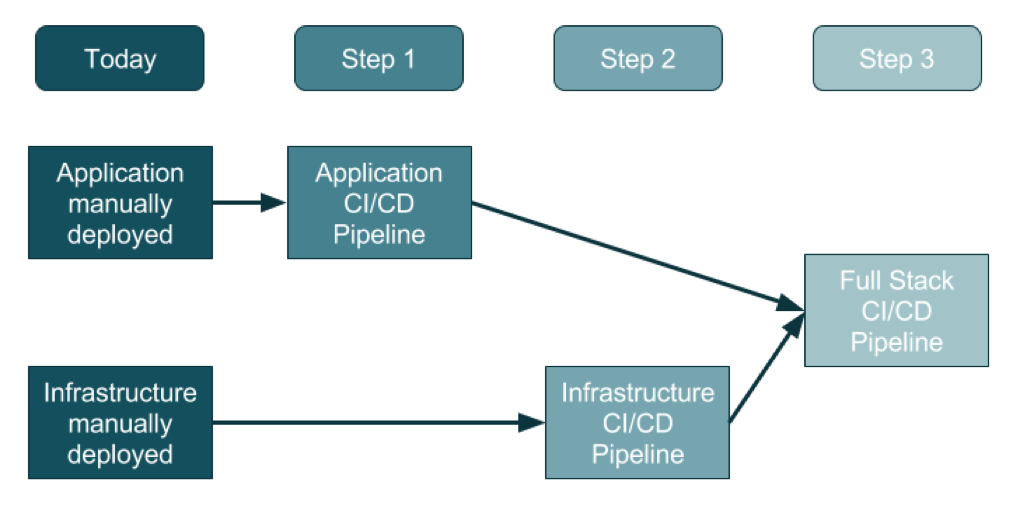
    For an organization that doesn’t use DevOps today, the adoption of this three-step method will promise a generally clean approach.

    Source: https://ukcloud.pro/

    Step 1: Creating the Application Pipeline

    Regardless of the type of application, the pipeline looks—at a distance—very similar. The goal is to weave application releases into a new coordinated process that looks something like this:

    1. The developer makes changes locally to their laptop/PC/Mac, and upon completion (including testing, etc.) issues a Pull Request.
    2. Code review kicks in, the developer changes are reviewed and accepted and a new release can be created.
    3. Someone, or the system, runs a procedure to create a release artifact, which could be a Java JAR file, a Docker file or any other kind of unit of deployment.
    4. Someone, or the system, copies the artifact to the web or application servers and restarts the instances.
    5. Database migrations/updates may be additionally applied, although the database is often left outside of the application release process.

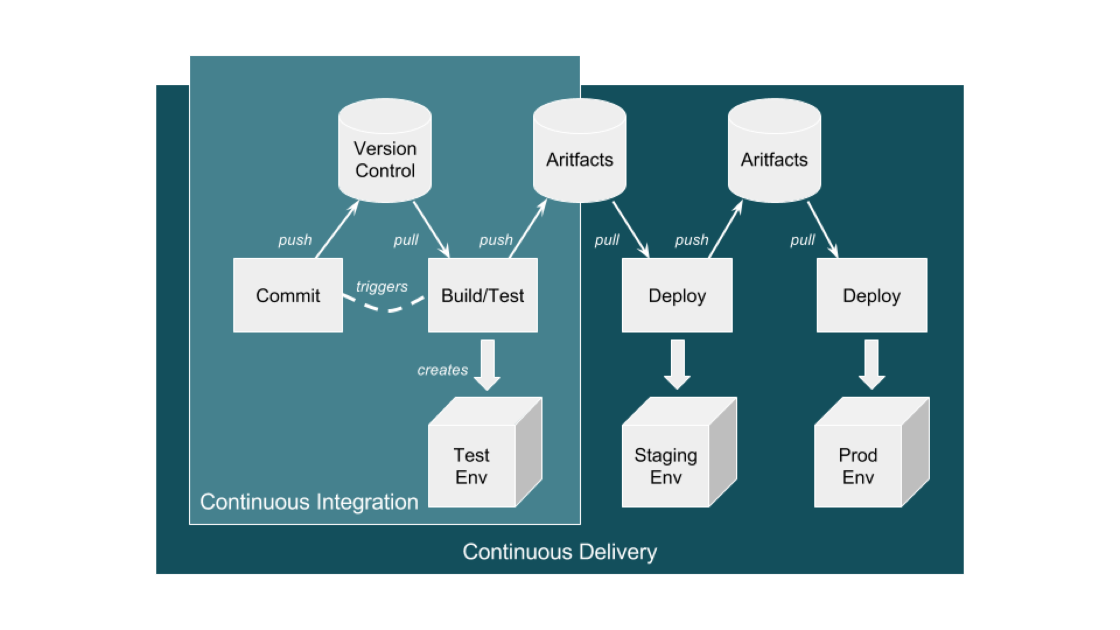
    This process evolves into an automated application-only continuous integration and continuous deployment (CI/CD) pipeline by using a toolset to automate the process as shown in the diagram below:

    Source: https://ukcloud.pro/

    A Typical CI/CD Pipeline


    However, be aware that this isn’t ideal (yet), because at this point the application alone is being released (injected) into existing environments.

    Why is this potentially an issue? If the developer has altered the local environment as well as the application but these local environment changes are not part of the release, then they’re not in version control. And, if they are not applied at the same time as the application, then the application will break and the common argument occurs: “Well, it works on my machine!” The solution is for application and infrastructure releases to be synced—and hence steps 2 and 3.

    Step 2: Creating the Infrastructure Pipeline

    Ideally, the infrastructure team has learned from the developer team’s DevOps and CI/CD pipeline journey and can expand and adapt it for the infrastructure (which increasingly is a public cloud).

    There are some differences with the infrastructure pipeline, specifically around units of deployment that are now the infrastructure layers in environments, the things that surround an application such as the DNS, load balancers, the virtual machines and/or containers, databases and a plethora of other complex and interconnected components.

    The big difference here is that the infrastructure is no longer described in a Visio diagram: it is brought to life in code, in a configuration file, in version control—this is infrastructure as code (IAC).

    Before this, a load balancer was described in Visio diagrams, Word documents and Excel spreadsheets of IPs and configurations. This is now swapped to describe everything about the load balancer in a configuration file.

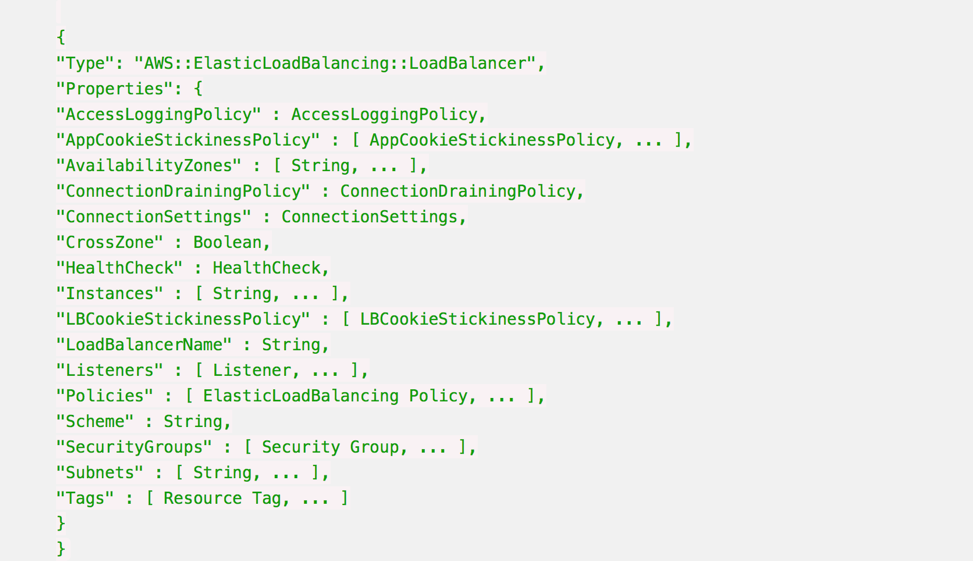
    Here’s an example AWS CloudFormation Configuration for a Load Balancer:

    Whenever this file is changed in Version Control, such as changing the subnets a load balancer can point to, then the automation engine can update an existing infrastructure environment to reflect that one change, and any dependencies that change.

    It also means that you can apply this template to multiple environments just by changing the environment name from staging to production, for example, and be very confident that all environments are consistent, from the developer laptop to production.

    It is also possible to make the templates dynamic to change their behavior according to the environment, so in production the environment will scale out across three datacenters, but on a developer’s laptop it will use a local VirtualBox single-system.

    Step 3: Creating the Full-Stack Pipeline

    The goal of a full-stack pipeline is to ensure that the application and infrastructure changes over time are in sync, both in version control and the release deployments across each pipeline stage. And a developer should never say, “It worked on my laptop!” when a release fails in production.

    The popular CI/CD tools can now automate the full stack because everything is programmable. This means everything can be captured in version control, and the same configuration can use dynamic input parameters to build an environment on a developer’s laptop, or a QA system in the cloud or updates to production.

    Imagine a developer makes an application change that also requires a change to the database, the web instance scaling configuration and the DNS. All of these changes are captured in one version control branch and the developer builds a system on their laptop from this branch, and tests it.

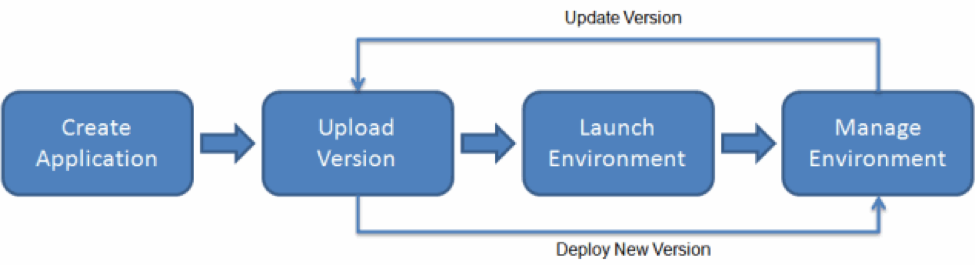
    This is what platform-as-a-service systems can do. By adding an environment configuration file inside the same code base as your application, you can ensure that you have bound your application to the infrastructure. 

    AWS Elastic Beanstalk Example

    This is the target end goal, though it takes a lot of practice, and learning, to get there. It can be very satisfying to watch a build and a deployment, seeing the automation use tags and dynamic configurations to build, or update, the target environment with application and infrastructure changes.

    About the Author / Sarah Lahav

    Sarah Lahav is CEO of SysAid Technologies. As the company’s first employee, Sarah Lahav has remained the vital link between SysAid Technologies and its customers since 2003. She is the current CEO and former VP of Customer Relations at SysAid – two positions that have fueled her passion in customer service. Connect with her on LinkedIn and Twitter.


  • Using Application Deltas in Deployments

    Using Application Deltas in Deployments

    Developers have been versioning their source files since the early days of Unix. Anyone else remember SCCS? Back in those days, storage was at a premium: Disks were small and very expensive and it was too inefficient to store a complete copy of each version of the source file. So version control tools would simply store deltas—the changes made from one version of the file to another. This was more efficient; if you only changed one line in a 3,000-line file, the system would simply store the new line and some metadata about where it fit in the file and who made the change.

    Some tools would save the latest version of the file and use reverse deltas to record the changes if you wanted to revert to an earlier version. This was usually more efficient, since generally developers want the latest version of a file. As such, it was more efficient to apply deltas to get earlier versions than it was to start with a 3-year-old file and roll forward through 472 changes to get the file you wanted.

    These days, disk storage is literally 3 million percent cheaper than it was in 1981. (The storage in my phone would have cost $38 million in 1981!) Because of this, storing deltas is not the panacea it used to be. In addition, CPUs now can crunch numbers faster than they used to, so it’s possible now to use math to compress and store a complete copy of the new version of the file. That’s what modern revision control tools such as Git do.

    Now that’s all very interesting, but the title of this post is, “Using Application Deltas in Deployments.” So why am I rattling on about source code versioning?

    Well, here’s the rub: While deltas may no longer have much of a part to play in tracking changes to source files, they most certainly do when it comes to deploying applications, and for similar reasons that plagued us (or our parents!) 30 years ago.

    Applications are Made of Components

    Let’s be frank: An application that consists of a single binary on a single server is not going to need deltas. That would be akin to a change to a single-line source file. All you need to do is to replace the old binary with the new and you’ve deployed. But applications are getting more complex:

    • The application may be split across multiple servers. An n-Tier application may have different tiers running on different servers (and even different operating systems).
    • The application could be wholly or partially containerized. You can have multiple containers each running different microservices.
    • There could be database changes associated with an application change. Indeed, the application change could consist solely of a database change. Database updates are pretty much always deployed as deltas; alter scripts are used to add and remove columns, tables and indexes.

    In the same way a single binary can be built from lots of different source files (each of which is under its own version control), an application can be made up of lots of different binary components. Clearly, if the application consists of lots of different components and those components are resident on different servers or containers, then deploying every component every time a new application version is deployed would be wasteful, time-consuming and error-prone.

    An application version “delta,” therefore, would track which components have changed between the version of the application being deployed and the versions of the components on the target environment. This allows the deployment tool to only deploy the components that have changed. So what do we need to track to make this work?

    • Component Versions. Obviously, we need to version each individual component so we know which version of which component is included in any particular application version.
    • Which component version is present on any particular endpoint within a target environment. That way, if the application we’re about to deploy has version 5 of a component (a DLL or a WAR file, say) and version 5 is already present in the target environment, then we don’t deploy that particular component.

    This approach has a number of advantages. You can deploy to an existing environment and only deploy the components that have changed, minimizing the downtime and reducing the risk of failure. You can deploy to a newly provisioned environment and deploy all the components within the application. Then, if you need to fire up a new virtual machine (or a container), the deployment pushes everything. But the next time you deploy to that environment, only the components that have changed are deployed.

    Database Deltas

    We may need to consider special cases when it comes to database components. Remember we mentioned that database changes are nearly always delivered as deltas, SQL “alter” scripts that make changes to the previous version of the database schema? Well, if all you’re doing is deploying the next version of the application, then that works fine. However, what if you’re deploying a version that’s several releases ahead of what’s in the environment? This can easily happen if the test and production environments are “pulling” deployments into their environment (as opposed to having them “pushed” via a continuous delivery process). Now, just applying the alter script that is associated with this application version won’t work in any environment that doesn’t contain the previous version of the application.

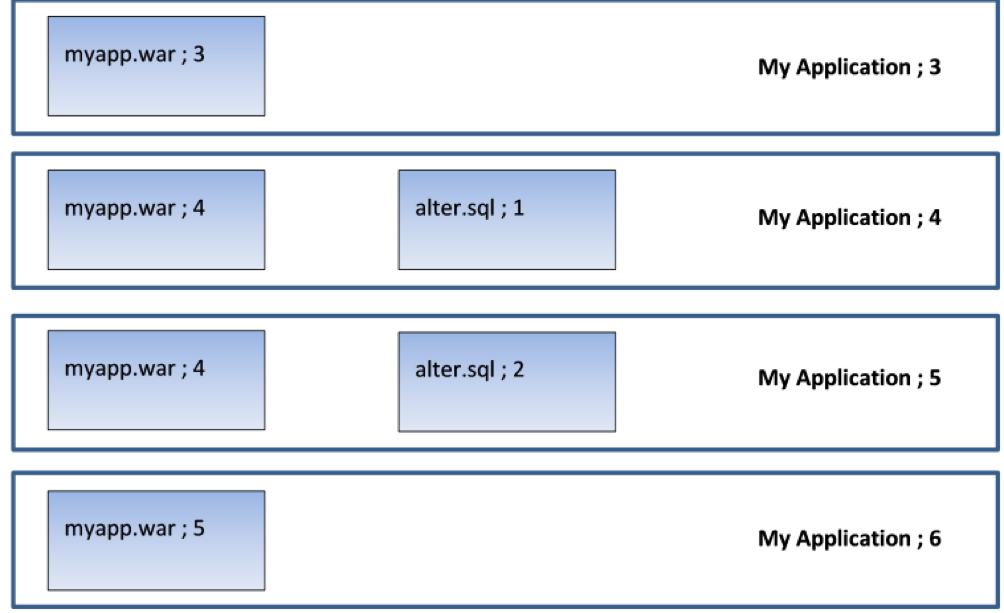
    Picture an application (“My Application”) that is up to version 6. It has two components: a WAR file and a database component that contains alter scripts that roll the database schema forward. Here is what the last four versions look like:

    So version 3 has a new version of the WAR file; version 4 has a new version of the WAR file and a database alter script that adds a column to a table. Version 5 only changes the database (it amends a stored procedure which uses this new column). Version 6 applies a new change to the WAR file.

    Now, in a continuous delivery process, the test rig being targeted will receive each new version. So when version 4 is deployed, the rig will receive version 4 of the WAR file and the alter script will be executed to add the column to the table. Then, when version 5 is deployed, only the DB alter script will run (alter.sql;2) to amend the stored procedure. The WAR file is not deployed, since the server already contains version 4 of the WAR file. When version 6 is deployed, only version 5 of the WAR file is deployed. This is exactly what we want.

    But now what happens when we move to user acceptance testing (UAT)? By this stage, we’ve done as much automated testing as we can get away with; in UAT, real users need to log on to our test system to make sure they’re happy with everything. So we’re not going to do a “push.” In UAT, the test lead does a “pull” when they’re ready to accept the new version of the application for testing. So they pull “My Application Version 6” into their test environment and get their testers lined up with coffee and pizza.

    But what happens if the test environment is currently on version 3? Well, for the WAR file, there’s no problem—there’s a difference in the component version for the WAR file so the new version is deployed. But what happens to the database? There are no alter scripts associated with version 6 of the application, but without applying alter.sql;1 and alter.sql;2, the database schema is not going to be valid for use with myapp.war;5. The testing will fail, not so much “falling at the first hurdle” as “falling in the paddock.”

    Deltas allow us to cure this issue. What we need to do is identify the components that represent the database changes and get them to be applied in sequence for each interim version. In that way, successive database “deltas” are applied to roll the database forward to the correct schema version before the required version of the application is deployed.

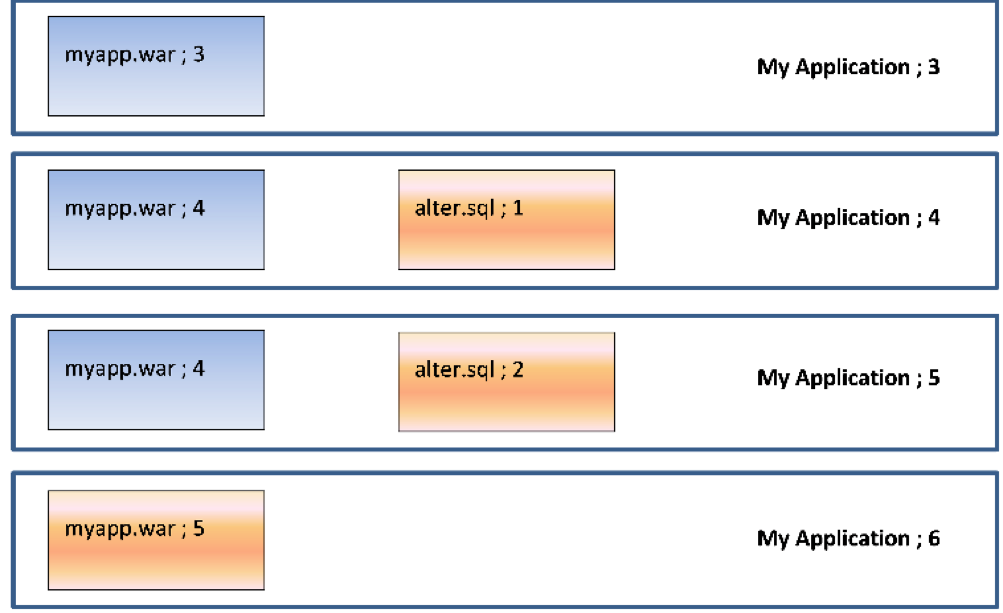
    So, in our case, going from version 3 to version 6 would deploy the following components:

    So we will deploy (and run) alter.sql;1 to add the new column, then alter.sql;2 to amend the stored procedure and, finally, deploy myapp.war;5. Deltas mean we do the minimum required to get the application version to the desired state.

    Conclusion

    Versioning the components that make up an application means it is easy to determine the deltas (changes) between one application version and another. Recording what version(s) of the components are on the endpoints in a target environment makes it easy to only deploy the components that have changed, minimizing downtime and making the deployment quicker and less error-prone. Identifying the deltas for a database gives us the ability to roll databases forward and jump between releases, which is invaluable when transitioning from an agile “push” to a waterfall-centric “pull” deployment model.

    — Phil Gibbs