
Tag: testing

  • Help Developers Thrive by Finding the Right Platform

    Help Developers Thrive by Finding the Right Platform

    If our developers have what they need to create the best possible applications, they—and our customers—benefit

    Goji Investments was founded on the principle of democratizing access to real estate, business lending, renewables and other alternative investments. The idea is to allow financial service organizations to provide traditionally unavailable investment opportunities to private investors on a global scale. A critical component of the Goji plan for success is the investment platform. Not only do we make the application available as a white-label solution, it can easily integrate into other platforms via APIs. We wanted to create a modular platform that we could update in pieces when needed and easily scale up as clients came online.

    High-Performance Development Teams

    A major reason for Goji Investments‘ success in these first few years is our high-performance development organization, which is instrumental in building and delivering the vision of the investment products needed to generate new business. As we’ve moved from simply building our applications into making them more scalable, we’ve focused on getting the right tools in place for Ops and Dev. Of course, bonus—it makes developers happier if they have cool tools to use.

    One of the things we try to do is keep our application/platform deployment process as agile as the applications themselves—constantly looking to improve and making updates whenever necessary, whether needed to deploy new technologies and applications or based on feedback from the team. The idea is to keep our DevOps pipeline operating smoothly and efficiently.

    One of our key operational strategies is that if we make our developers happy at work, they will deliver better quality applications, which results in happier end users. Of course, developers like to create to come up with innovative ways to deliver great features. One roadblock to coding innovation is performing repetitive low-level tasks, so we’ve actually gone out of our way to automate whatever we can and free up Dev resources for more value-specific application development.

    Automating Deployments is a Start, but Just a Start

    We automate the deployment process through GitHub. Each developer pushes their own services into GitHub themselves, where it goes through a quick review process. After review (if it passes), it’s merged into the master. Any master merge triggers build pipeline execution (which is using ThoughtWorks GoCD), and this automation includes several rounds of testing: unit test and integration test followed by an automated acceptance test. Developers have the option of executing additional tests themselves when desired.

    Any new master is promoted into pre-prod, which mirrors production. When changes are finally rolled into production, we use HashiCorp Nomad’s blue-green deployment capabilities—if a problem were to occur (which means it was missed in official testing), Nomad takes care of any rollback needs.

    The stack is fairly straightforward: The applications are written in Java and run on a DropWizard framework in containers. Nomad is our orchestration platform. One of our foundational principles when selecting application and infrastructure technologies is the ability to automate our deployment processes. We’ve done a fairly good job of automating anything we possibly could, but automating monitoring was more difficult. Our traditional APM tool was fine for alerting us to issues such as an EC2 crash or a resource availability issue for a reboot, but if we wanted to actually troubleshoot the issue we essentially just had to examine logs and hope we could see something out of the ordinary.

    As much as everyone is excited about writing data into logs, combing through those logs to troubleshoot application issues is a waste of time and valuable developer resources. After all, operating 20 different microservices that cover everything from taxes and payments to customer notification required optimization of each element of the DevOps pipelines. The last piece we added was performance monitoring.

    The Value of End-to-End Distributed Tracing

    There’s a great line from Jurassic Park: “T-Rex doesn’t want to be fed. T-Rex wants to hunt.” Well, developers don’t want to be analyzing log files; they want to code. In fact, they want to be creating the next great feature. To get our dev team out of the weeds, we began thinking about a different way to get—and analyze—application performance data.

    We wanted a system that added observability, monitored performance, managed service levels and included visibility from our end user requests all the way into our back-end systems. Oh yeah, we also wanted all of that to happen automatically so that our developers never had to worry about anything other than their own features. Installation, agent setup, discovery, mapping, alert configuration and reporting—as much as possible without requiring human setup.

    We knew tracing was critical—so much so that we avoided missing any problems by specifying a 100% solution, wanting a complete trace of every request to the application.

    Troubleshooting Application Performance Problems

    The real reason you buy application monitoring software is to solve problems, so optimizing our ability to find bottlenecks and eliminate them is a key component of our monitoring solution. First, like the other aspects of monitoring, we didn’t want to have to spend time configuring thresholds for warning and danger alerts. Our need was for automatic anomaly detection with event analysis. Every little bit helps keep our dev team focused on dev, not analyzing data—especially in logs.

    Of course, sometimes, you can’t help it; you have to look at log data, but we wanted to be smarter about that, too. We wanted our application monitoring tool to automatically integrate log analysis tools so that all data could be analyzed at the appropriate level whenever needed.

    Don’t Forget Testing

    Sometimes, testing gets lost in the value of a good monitoring solution. While we weren’t necessarily looking for a testing tool, we knew if a monitoring solution could also operate effectively in test (that’s not just the ability to run in test; rather, I mean the ability to add value in the testing process), well, so much the better.

    It turns out that our applications are quite complex, and that complexity can create lengthier test cycles—commonly in this scenario:

    We recently released a new feature for distributing dividends. As you can imagine, this is a fairly important feature, so we wanted to ensure that it operated as desired and expected. We were especially concerned with being able to scale the feature appropriately. We set up a stress scalability test that took 20+ hours to run (essentially processing hundreds of thousands of payments).

    What we didn’t count on was having to stop some way into the test for someone to either submit an optimization update or actually fix a bottleneck—getting 10-12 hours into the test, then having to halt it and restart it—over and over and over again. We started thinking we might never finish.

    This is one of the pain points we hoped to solve with an automated way of monitoring. By pointing the automatic APM solution at our test environment, not only did we not have to configure anything (or even set up a special start command) but we also got almost immediate feedback on any change (both positive and negative). It also pinpointed the exact location in the code where the problem occurred, so the developer could almost immediately update their code and initiate a restart of the test. Finally, we could pick any two runs and compare their execution and performance to identify the real problem.

    Two things happened:

    • We were able to iterate different runs ~5 times faster.
    • We got such great bottleneck and debugging data from our solution that we cut the runtime of the test from 20 hours to less than one hour.

    Give Developers the Tools to Shine

    While all employees like to succeed, developers especially love when they can rise above their challenges and deliver high-performance code. We like to give our dev team the best possible tools to help them achieve this excellence. Approaching the decision process for selecting a tool for them should be handled no differently than thinking about your end users:

    • Identify pain points.
    • Find a resolution.
    • Execute the solution.

    For our development team, that meant relieving them of low-thought repetitive tasks that we could automate and stop making them spend their time culling through performance logs.

    Making the Right Choice??

    The long and short of it is that we replaced our legacy APM tool with a solution that delivers the automation we crave and eliminates the need for log deep-dive analysis to solve any problem. It also supports log analysis with various integrations, which was important to us.

    We get a trace of every single call, which is important to the Ops and customer support teams—and they profile every production process automatically, which gives our developers more than enough information to take action.

    Ultimately, we’ve accelerated our application delivery and update processes, streamlined testing and monitoring. And our developers are super happy that we give them the tools they need and then challenge them to make the best possible applications using those tools.

  • Shift Left … With In-Sprint UI Test Automation (?!?)

    Shift Left … With In-Sprint UI Test Automation (?!?)

    UI testing is really the most intuitive testing approach imaginable: Just find someone who can represent the target user and let them poke around in the interface they use for their daily work—the UI. It’s natural. It’s intuitive. And it’s still the predominant method used for testing most software releases today.

    This human-driven testing can never stop. Having smart testers creatively explore the UI using their creative, analytical minds to uncover issues that disrupt the user experience is absolutely essential. But it’s also essential to perform a level of regimented, routine checking with each change to ensure the modifications don’t introduce strange side effects. Performing such tedious checking at the required frequency and speed would be torture for human testers. Hence, the push toward test automation.

    You would think, then, that the natural place to start with test automation would be to automate the most natural of all testing: humans interacting with the UI. Not so: UI test automation is actually one of the most dreadfully difficult test automation approaches.

    Tests automated at the UI level historically have a fair share of issues. They’re slow to run. They’re fast to break. They’re somewhat technical and tedious to create even for common modern technologies such as web and mobile. They’re much more difficult to create when you have to deal with custom desktop applications, packaged applications, extremely old technologies, extremely new technologies or Citrix/remote applications. And creating automated UI tests typically requires a fully implemented—and stable—UI.

    If you’re aiming for in-sprint test automation, this means that tests need to be implemented in that tiny sliver of time between when developers complete the final UI code (with a successful build) and when the sprint is supposed to be completed. Guess what? That rarely happens. Within the sprint, teams can certainly tackle human UI testing (a.k.a. exploratory testing). But automated UI testing? That’s often delayed until a later sprint … and/or scrapped altogether.

    Clearly, there are a lot of issues with UI test automation. But if you really think about these issues, it all boils down to one thing: The test automation doesn’t think like a human:

    • A human can interact with an application’s UI quite rapidly (the human eye can process 24 images per second).
    • A human is not derailed by interface changes. Something such as a reimplemented drop-down menu or a new way to display results won’t phase a human tester at all.
    • A human brain can interact with extremely old technologies (such as mainframes and COBOL-based apps) along with whatever new technology happens to be released tomorrow. And if your application is migrated from a monolith to a microservices architecture, the same tester’s brain can still test its UI in exactly the same manner.
    • A human tester might not recognize whether the application is installed on their machine or is accessed via desktop-virtualization. They can test its UI just the same.
    • A human doesn’t really need to wait for a fully implemented (and stable) UI implementation. They can start working on their tests the moment a rough prototype is available. And they can start performing tests as soon as the UI is at least kinda—If the underlying technical implementation is still shifting a bit, it’s not necessarily a showstopper.

    So, if the key problems with UI test automation stem from the fact that human intelligence is greater than test automation, why not try to address those problems with the next best thing: artificial intelligence. By tapping the power of AI, we can achieve UI test automation that’s as smart and resilient as a human, but as efficient and scalable as a machine.

    For this to work, the technology must learn how to understand user interfaces in the same way that a human can. For example, it needs to know that a drop-down is a drop-down just by “looking” at it. With that accomplished, you—well, any human, really—can define test automation by simply providing a natural language explanation of what business process should be tested (e.g., “Enter 10,000 in the list price input, click the confirm button, then … “).  AI-driven test automation can take it from there. There’s no need to deal with shadow DOMs, web assemblies and the like. Emulated tables on SAP can be automated without any special customization. It’s not going to fail the next time there’s a minor UI tweak, and you won’t have to rebuild your tests if the application is reimplemented in a new technology.

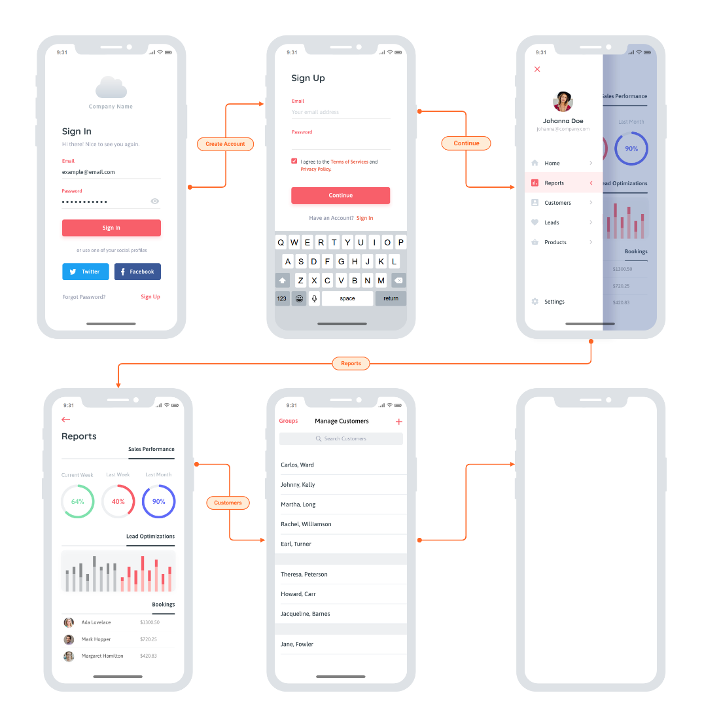
    In terms of shift left, you can start implementing your UI tests as soon as the team sketches out a rough prototype or mockup. Advanced UX designs like this are a great starting point:

    You really could start anywhere though. Even more rudimentary whiteboard sketches would enable you to start on UI test automation without waiting on the actual implementation. This means less crunch time each release and ultimately eliminates the ripple effect of testing delays, unfinished stories and “hardening sprints.” And it enables an interesting flavor of TDD: Start running these automated UI tests before implementation begins, then have developers write code that makes them pass.

    The catch? It’s not so easy to make UI test automation so easy. Two things to watch out for: accuracy and speed. For this to work, the technology must be able to accurately recognize and interact with UI controls that it’s never seen before. This requires visual object detection as well as optical character recognition (OCR). And that’s the easy part; the difficult part is doing this at speed. For a while now, AI-driven automation solutions have been struggling to come close to the speed of human processing. On average, you’re looking at tools processing 1.8 images per second, while humans can handle 25. You don’t need automation that mimics human speed, though—you need to beat it. If you want this UI testing to run as part of your continuous testing as a core part of your CI/CD process it needs to vastly surpass the speed of the human eye and the human brain.

    Once you overcome that little challenge, AI-driven UI testing will remove a lot of not-so-artificial conflict on Agile dev teams:

    • Testers waiting on developers to finish the UI so they can start implementing tests—and avoid the dreaded crunch time at the end of sprints.
    • Developers waiting on testers to finish tests so that the user story is deemed “done done” within the current sprint.
    • All the retro finger-pointing you get when delayed or unfinished testing results in unfinished user stories.

    I admit: when you first tell the team that UI test automation will help you complete testing sooner, it could be a hard sell. But after a few rounds of having UI test automation ready before developers write a line of code, I’m confident that you’ll find some real support for this artificial intelligence-driven testing approach.

  • 3 Ways Traceability Boosts Decision-Making, Accountability

    3 Ways Traceability Boosts Decision-Making, Accountability

    Traceability can be a key tool to allow for a streamlined process of complex decision-making

    New software is being developed at an incredible pace to help make our lives easier. This doesn’t change the fact that humans are still held accountable for product development decisions, whether these are made with or without advanced analysis tools. To make informed choices, product development professionals need tools that allow them to see comprehensible information in real-time as change is happening, both within the team’s structure and throughout the system in which their product exists.

    Modern traceability makes it possible to both manage and respond to change in a systematic, auditable and confidence-enhancing way. Below, we will discuss three ways traceability has evolved to support key decision-makers in a number of industries.

    Modern traceability captures when you make a decision

    Decisions often have varying levels of durability. Sometimes, when you make a decision, you know then and there it’s final. Other times, you make what seems to be a minor choice and you end up dealing with the repercussions for years to come. With this level of uncertainty, it is essential to have mechanisms that allow you to see when decisions are made. As I discussed in a previous article, “5 Ways Traceability is Changing to Bolster the Remote Workforce,” this process can be compared to a map. By leading a team through every step of their processes, modern traceability helps product developers reach their goals without any surprises.

    Often, products are expected to be maintained for years. This is significantly more challenging when you can’t properly track where a ruling originated or a change was made. While the team may move quickly in the development process, the record should always live on to provide future context where it’s needed.

    Modern traceability provides people the context of what they’re working on as they go, not after the fact

    Rather than rely on sharing often lengthy and disparate documents or running time-consuming general meetings, traceability allows teams to streamline their collaboration. Mapping out work items, including owners and contributors, gives people a reason to care and to trace those items carefully. It helps everyone know why they’re there, what they are discussing and how to address it.

    Many smaller companies are fortunate to get by using Word documents and other legacy tools for their traceability measures. However, as these companies grow, so do the complexities. That’s why traceability has been evolving to account for the multi-dimensional nature of requirement, test and risk management. For a company that is seeing major growth to be truly successful, all related variables must work together continuously, at scale and across teams. Legacy tools simply do not provide the agile capabilities that modern traceability does.

    Traceability captures and tracks past decisions and allows users to access them

    Traceability is all about relationships. Each product in development has its own particular set of customers, stakeholders and internal team members associated with it. Therefore, traceability is only possible if these individuals can be accurately connected to the items for which they are responsible.

    Knowing who made a decision and what information they accessed is equally as important as the information itself. If you can’t quickly piece that together, your traceability is incomplete. The responsible thing to do is to ease the process by keeping useful records. It doesn’t need to be forced behavior if it’s captured along the way as a byproduct of doing your job.

    Overall, accountability is incomplete and past decisions can’t easily be seen, learned from or built upon without robust, modern traceability tools. It’s much harder to legitimately hold someone accountable when they’re working in the dark. However, when done correctly, traceability can be used as a key tool to support genuine liability and allow for a streamlined process of complex decision-making.

  • PagerDuty Applies AIOps to IT Incident Management

    PagerDuty Applies AIOps to IT Incident Management

    PagerDuty, at its online Summit20 conference today, unveiled a bevy of updates that apply machine learning algorithms across a wide range of workflows across the PagerDuty incident response platform.

    In addition, PagerDuty today announced it will acquire Rundeck, a provider of an IT automation platform that auto-remediates incidents by enabling playbooks to automatically execute whenever there is an issue, for $100 million.

    Jonathan Rende, senior vice president of products for PagerDuty, said the overall goal is to make IT teams more efficient by applying AIOps at a time when organizations are trying to reduce to the total cost of managing increasingly complex IT environments.

    At the same time, Rende said PagerDuty is also moving to reduce the fatigue that inevitably ensues when trying to determine the relationship between the thousands of alerts that all the elements of an IT environment can now generate. The goal is to provide IT teams with more context and actionable intelligence, said Rende.

    As part of that effort, PagerDuty is now integrating change events that occur in code repositories via new integrations with GitHub, Puppet and Evolven. The bulk of IT incidents stem from changes made to the IT environment so via these integrations it will become easier to identify the most likely root cause of an issue, said Rende.

    PagerDuty has also added new capabilities to its Service Directory that employs machine learning algorithms to dynamically surface dependencies between people, changes, incidents and services in real-time. As IT environments become more complex thanks to the rise of microservices, he said it’s now more critical than ever to track relationships across workflows spanning multiple IT teams. The challenge is that existing manual processes can keep pace with the rate of change now occurring in IT environments, Rende added.

    PagerDuty is also moving to reduce the number of alerts that are generated by enabling the PagerDuty Event Intelligence module to surface recommendations generated by machine learning algorithms that suggest ways to group alerts to better streamline incident responses. In addition, IT teams can now pause alerts if they decide to allow systems to auto-remediate before they decide to intervene.

    The company is also extending the reach of an application programming interface (API) for analytics it created to enable IT teams to launch queries against the data collected by PagerDuty. In addition, PagerDuty is making available an Analytics Maturity Model that provides access to benchmark data from more than 13,300 customers to both compare their efforts with other IT teams and discover additional best practices.

    PagerDuty today also announced one-click integration with the Zoom video platform to enhance collaboration, as well as extending its existing integration with Microsoft Teams to include a similar one-click capability.

    Finally, PagerDuty also launched an instance of its platform for customer service teams that also provides enhanced integrations with Zendesk and Salesforce Service Cloud. With more organizations dependent on digital business processes to survive, Rende said the need to automate customer service processes has never been more pressing.

    At the same time, IT teams are struggling to keep pace with the rate of tickets being generated by employees who are now working from home. Put it all together and it becomes abundantly clear that continuing to rely on legacy approaches to IT incident management will simply not suffice.

  • Crowdtesting: How to Ensure Quality in Disruptive Times

    Crowdtesting: How to Ensure Quality in Disruptive Times

    The practice of crowdtesting has taken on greater importance during the COVID-19 pandemic, for good reason

    Entering 2020, digital transformation projects and initiatives dominated tech spending for most companies. But, between a global pandemic and fiscal uncertainty around the world, spending must be shrinking, right?

    Think again.

    If anything, the pandemic has created a sense of urgency for many companies, accelerating digital transformation in organizations. According to June data from TEKsystems, 56% of digital experience leaders—companies with mature digital transformation strategies—have increased spending on digital transformation. Remarkably, more than one-third of digital experience laggards—those that have historically had limited digital transformation initiatives in place—also increased spending on digital transformation projects.

    The rush can be attributed to COVID-19. For businesses, it has changed the future of work. Distributed workforces are nothing new, but very few companies were prepared to deal with a fully distributed model in which all employees are working remotely. The pandemic has changed buyer behaviors, too. In lieu of malls and brick-and-mortar stores, people have turned to e-commerce sites for the bulk of their shopping. Legacy companies, such as Pepsi, for example, are building direct-to-consumer e-commerce sites in response to the evolving market dynamics.

    Digital is now the primary means of communication for businesses. Digital quality is no longer a niche issue for the application and DevOps teams; it is a strategic business imperative in the C-Suite.

    Apps Everywhere, At All Times

    Apps need to be tested by real users, on every device, network and operating system, across the globe and at all times. The typical workday used to be 9 to 5, but that’s no longer the case. With most workforces now remote, the days are longer and the diversions greater (yes, I’m looking at you, juggling Zoom calls and your daughter’s remote learning plan at school). Customers, too, have higher demands for the technology they use. There can be no downtime; downtime means customers will look for alternatives, becoming ex-customers and resulting in lost revenues.

    In today’s extremely fragmented device landscape, QA teams face increasing difficulties in keeping up with the myriad device/OS combinations they need to test on. For obvious reasons, purchasing and maintaining a nearly endless pool of devices is not an option—not only is it too expensive but it’s also time-consuming and harms the team’s productivity.

    Beyond logistics, QA teams must collect data from real-world testing to make informed decisions. No matter how many test cycles are run, QA teams can’t uncover all unexpected bugs and edge cases unless they include in-the-wild testing in their strategy.

    To test anything related to hardware in an efficient manner, leveraging a community of remote testers is the best way to obtain reliable results without burdening internal QA resources, generating disproportionate costs or missing out on important use cases.

    Crowdtesting Replaces Offshoring as the De Facto Way to Test Software

    With a market greater than $50 billion in India alone, there is no denying the offshoring model worked. But, the pandemic exposed pre-existing cracks in the model, causing many businesses and entire industries to regroup, re-evaluate and find new ways to accomplish tasks that just a few months prior would have been routine.

    When the pandemic hit, the supply chain broke. Testing and product development facilities built on product teams working collaboratively in close proximity struggled to keep up with the most basic needs of their customers. Outsourcing companies and their employees lacked the infrastructure to work remotely, negatively impacting the business continuity of their clients.

    This new reality leaves companies that are used to the offshoring model for testing and QA with one big question: what is the best way to test software and digital experiences in a post-COVID-19 world?

    While crowdtesting has been a factor in application and digital testing for more than a decade, it has taken on increased importance as internal QA teams can no longer maintain business continuity while working remotely and the offshoring model has faltered amid the pandemic.

    The reason the crowdtesting model remains a reliable answer even during COVID-19 is that it is always done remotely, via a community of vetted testers who already work in remote environments. This setup allows testing teams to maintain business continuity, while often improving test coverage across devices, operating systems, geographies, demographics and more.

    As an example, let’s look at how the Israeli government used crowdtesting to bring its tracing app to the country. The Israeli Ministry of Health developed the app using cellular GPS data to provide alerts on areas with high concentrations of COVID-19 infections. The app is designed to prevent COVID-19 spread by notifying people who were in the vicinity of verified coronavirus carriers. Similarly, healthcare provider K Health has used crowdtesting to help it launch a new COVID-19 diagnostic feature. K Health was already using crowdtesting services prior to the onset of the pandemic to ensure its mobile app functioned properly across all relevant device/OS combinations and timezones but found the scalability and reliability of the model meshed perfectly with the demands on healthcare providers in the new normal. When K Health offered free services to all Louisiana residents, crowdtesters were there to scale testing at a moment’s notice and provide 24/7 test coverage for the K Health app.

    It was urgent to get the app out quickly, but it also needed to work properly. Did push notifications go through promptly and to everyone? Would the app work across devices, and in different configurations? Since launching the app in March, the Ministry of Health has been able to leverage continuous crowdtesting to identify dozens of bugs that could have prevented Israelis from using the app or trusting its results.

    For example, the testers discovered that the app crashed when it was used in dark mode, and certain situations led to the app showing that it detected data even when data and location services were off. Since this second error was directly related to the main functionality of the app, it represented a very critical bug for the Ministry of Health to fix.

    Crowdtesting uses real devices and real people in their daily environments, which accounts for all these variables that are not seen in traditional labs and offshoring facilities. That makes crowdtesting a valuable testing approach even after the COVID-19 pandemic and resulting lockdown ends.

  • How API Testing Can Save You Thousands

    How API Testing Can Save You Thousands

    API testing before launch can mean the difference between a $25 cloud database bill and a $30k bill

    Usage-based billing is a popular payment model in cloud-based SaaS platforms. The idea is that you only pay for the amount of data your project uses, which is great for companies that have finite metrics on their usage amount.

    It’s like getting a glass of water from your kitchen sink. Every time you open the faucet, you know your water bill will go up a few cents (actually much less than that, but for example). So let’s say the water faucet is the cloud platform and the glass represents your API requests.

    One of the ways organizations rack up exorbitant usage-based bills is from critical mistakes in the API request code. For example, your neighbor asks for a glass of water and you fill 10 glasses, or you forget to turn the faucet off after you fill the glass. This is very similar to what can happen in usage-based billing on SaaS platforms, especially for cloud-based API requests.

    An Expensive Example of Data Requests Gone Wrong

    A crowdfunding app in Colombia known as Vaki was shocked to receive a $30,000 USD bill from Google Firebase, due to some pretty simple mistakes. The company had rushed its product to launch, then noticed the app was running incredibly slowly after a version merge.

    Vaki had two choices: either take down the website or try to debug the app in a race against the money-clock. The company chose the latter option and discovered that its API was coded in such a way that with every visitor to their site, it needed to call every document of payments to see the number of supporters of a campaign or the total collected, on every page of the app.

    In other words, the company sent more than 40 billion requests to Firestore in less than 48 hours—an immensely costly mistake, although Vaki managed to work it out with Google in the end. One problem is that Vaki worked on the code while the site was already live, when any of these tools for API testing may have helped the company find the problem before launch.

    It is very important that tech teams debug every request to servers before release. Analyze if the number of requests and data transfer make sense and if your company will support the costs of the host with a big load of traffic. Otherwise, you will just catch loops or un-optimum requests with a huge bill or with your site down.

    API Learnings From Mistakes

    While cloud-based databases such as Amazon, Google Cloud and Microsoft Azure provide a pay-per-hour model, Firebase bills based on a 100k-250k read/write/delete requests to the database. So technically if you stay within this range, your bill shouldn’t amount to more than $25.

    But this also means you need to have perfect code with no mistakes or loops. Vaki was reading every document entry in a certain collection to calculate the total collected and support values for each time a user looked at a particular view.

    In other words, if a crowdfunding campaign had 100 donations, the app would call to the database once, but the reading would equate to 100 reads twice, which means a total of 200 read requests.

    Obviously, when you hit something like 2 million views on a campaign, the read requests to the database will very quickly exceed the billions. And to Google’s credit, this isn’t a get-money schemed it cooked up because it’s very easy to stay within the target metrics.

    In Vaki’s case, it was a simple human error in the data structure that wasn’t optimized for efficiency, and eventually, the company would’ve run into other problems, such as maxed out database connections.

    How to Keep Usage-billing to a Minimum

    Hosting apps today are fairly cheap, but databases can quickly grow out of control if they aren’t optimized efficiently. When it comes to traffic flow between the different parts of your application, read and write requests are the most frequent occurrence in the entire flow.

    So even though the front end may be fast to boot, it’s your backend that needs to be checked, especially as serverless architectures don’t typically offer backend data sessions. So as the backend requires more space and processing power, your overall bill increases.

    There are a few key takeaways from all this. One is that you’ll need to re-think your approach to how your data will have an impact on the total number of reads and writes, and how much processing power is required, which basically means optimizing your code for efficiency and long-term stability.

    The other takeaway is the importance of testing your API before launch, so that you can catch the sort of flaws that Vaki experienced before the product actually goes live.

  • How to Run a Remote GameDay

    How to Run a Remote GameDay

    For those unfamiliar with the term, a GameDay is a dedicated day for running chaos engineering experiments on our systems with our team. The goal is cooperative, proactive testing of our system to enhance reliability. By getting the team together and thinking through your system architecture, you can test hypotheses and evaluate if your systems are resilient to various kinds of failures (and if they are not resilient, fix them before those weaknesses impact customers).

    But how can we have productive GameDays in a distributed, remote context? This article highlights the differences that exist between running a GameDay with everyone in the same room at the office or data center versus running a GameDay with everyone working remotely. This post is meant to be a resource now that we’re all working from home as a result of COVID-19. First I outline the differences, then I talk about how to be successful despite these differences, and in some cases enhance your potential for success because of them.

    What Makes a Remote GameDay Different?

    Because all of the participants are spread out, communication will be a challenge at first, especially for teams that have little to no experience with it. Learning how to hold standup meetings, communicate about system changes and updates and coordinate work such as deployments will be a challenge.

    Distractions can also be a big deal. When everyone is locked in a conference room it’s easy to run a distraction-free GameDay. It’s more difficult when we are remote and have kids and pets running around, FedEx deliveries and random family noises. Have a plan to mitigate the best you can. Some find headphones helpful, while others move into the basement or a bedroom and lock the door. Find something that works for you.

    You also need to think about the risk of someone’s internet connection going down or their PC/laptop crashing. Create alternate ways to dial in to conference calls. Make sure every team member has a backup team member standing by ready to take over that person’s role if needed. When a required role is being performed by someone remotely, there is always a chance their internet connection could go down. There needs to be a contingency plan for someone to take over their role if that happens. This can be a team member who already has a role and is capable of taking on another concurrently or someone who was only participating as an observer.

    For teams that are remote-first and have been working this way for a long time, much of what we outline here may be old hat. But it can be easy to fall into bad habits for anyone, so if your team was used to running GameDays weekly in the office, it’s important to keep that muscle memory even in the new paradigm.

    How to Prepare for a Remote GameDay

    Here are the ways you must prepare.

    Define

    Define the GameDay. Specify the exact chaos experiments that the team will run, and exactly which systems the team will target. Define the goal. Is it to:

    1. Replay/reproduce circumstances that lead to a past outage?
    2. Retest something that caused a problem in a previous test that you believe you have fixed and want to confirm?
    3. Ensure that a new system has the proper monitoring set up and working with alerts and metrics?
    4. Something else?

    Time

    Set the date with a beginning and end time. This will likely require coordination with people. Be sure to account for time zones if your team is spread out nation- or worldwide. Set a clear agenda for the GameDay that includes:

    1. Assigning which tasks will be done by which team member and the timing involved. This orchestration is especially useful with team members working from a distance because it frees up communication channels for use in dealing with problems or for the leader to give direction without interruption.
    2. Whiteboarding of the current system architecture to paint a clear picture of what you are going to attack and what you expect might be impacted. Doing this remotely requires the use of some imagination and forethought. One option is to use a diagramming app while sharing your screen over a video conference.
    3. A short team debate on assumptions to get everyone on the same page.
    4. Clearly defined chaos experiment test cases and scoping to limit test magnitude, length of time and blast radius. To prevent problems, make sure you have a halt or abort plan and can stop the experiment easily if unexpected problems arise.
    5. The execution of the chaos experiment. Ask questions like, “What changes are observed in monitoring data?” and “Is this the behavior we expected?” Collect and document the information.
    6. A recap at the end to discuss what worked, what didn’t and how to use what was learned.

    People

    Identify which team(s) will participate and make sure everyone on those teams is ready. Make sure all stakeholders are available and will be present in the appropriate communications venues.

    1. Identify the incident manager on-call (IMOC).
    2. Define the on-call rotation.
    3. Notify everyone on the on-call team(s).

    Comms

    Set up dedicated, real-time communication venues for the duration of the event. This is where all activities will be coordinated and where all reports will be sent.

    1. Create a dedicated instant messaging channel using Slack, Hangouts, Skype or whatever your company currently uses. Test and make sure all involved are invited and can access the channel.
    2. Create a dedicated video conference using Zoom, BlueJeans, Webex or whatever your company currently uses. Test and make sure everyone involved can access it.

    Final Steps

    The agenda will be the same as in an onsite GameDay. Communicate it in advance. Include information about the schedule, the activities and the roles, specifying who is responsible for what. Typically two hours is more than enough time for a bit of an introduction, a discussion of assumptions and the day’s test design.

    During the introduction, the designated test leader will make sure everyone understands what will be tested, the parameters for how the blast radius is set, the magnitude of the attack to be run and the expected outcome. Another team member is assigned to monitor the metrics. Others may be assigned to monitor other systems that may end up being involved.

    Communication is key, especially because if the test causes unexpected problems. Everyone needs to know immediately so that the test can be stopped and any damage dealt with right away. It’s actually a good thing if you find unexpected issues because then you can fix them.

    It’s also a good thing to take time to celebrate when an experiment yields an expected result. Rejoice together that your team’s implementation of self-healing or recovery mechanisms kicked in and worked as expected. Allow yourself to take the opportunity to call out the immediate wins and not just the issues you find.

    Conclusion

    Running your first GameDay can be intimidating, but with good preparation, any team can be successful. Doing the same thing with everyone working remote can be even more intimidating. It doesn’t have to be! Keep up good habits and set clear agendas, have concrete start and end times, go in with a plan and execute. Your customers will be happier if your team is figuring out problems before they ever had the chance to experience them.

  • DevOps Unbound: Exploring Acceleration and Automation, Setting DevOps Free

    DevOps Unbound: Exploring Acceleration and Automation, Setting DevOps Free

    We are launching a new video series Thursday, Aug. 6, called DevOps Unbound. DevOps Unbound will focus on DevOps, automation, CI/CD and testing, featuring leaders in these areas as we explore the challenges and issues software delivery and IT teams face every day. How do we go faster, smarter with better quality? DevOps Unbound!

    The series will premier on our TechStrong.tv streaming network and should start around 10:40 a.m. Eastern tomorrow, August 6th. It will be available on Linkedin Live (on the devopsy.kinsta.cloud page), Facebook Live (devopsy.kinsta.cloud, Container Journal or Security Boulevard pages), YouTube on the DevOpsTV channel and the MediaOps sites. Additionally, the show is available on-demand on our devopsy.kinsta.cloud mobile app and our devopsy.kinsta.cloud OTT channels on Roku, Apple TV and Amazon Fire TV. Finally, all episodes will be available on-demand on Digital Anarchist, our streaming video platform. The series is sponsored by our friends at Tricentis.

    New episodes will run every other week. Also planned is a monthly DevOps Unbound roundtable, open to the public and featuring a revolving panel of experts around a given theme. The first live monthly roundtable will be Aug. 18, around the theme “DevEverythingOps.” Roundtable discussions do require registration; you can register for the first event here.

    Premier Episode August 6th

    The premiere episode features Dr. Grigori Melnik, CPO of Tricentis, and James Bach, the developer of session-based testing and a highly respected expert in testing. We will explore the history of testing and how it has adapted over the years to allow for more automation, help testers and developers be more efficient and accelerate the software release process.

    These are two people renowned in their fields who arrived here from very different paths. Bach is a high school dropout who was bitten fiercely by the computer bug. He was a game developer and then a coder who became one of Apple’s first test engineers in 1987. Dr. Grigori Melnik has a Ph.D. in testing and is a respected authority in both the academic and business worlds.  Though they come from different backgrounds, they have more in common than you might think. It was a great discussion and one I think you will really enjoy.

    Future episodes of the bi-weekly show will feature topics including DevSecOps, open source, cloud-native, CI/CD, SDM, DataOps, observability and more. We think DevOps Unbound will quickly become an essential part of your DevOps information arsenal.

    We are always on the lookout for future topics and guests. If you think you would like to take a giant leap with DevOps Unbound, reach out to me at unbound@devops.com with your idea and we can follow up.

    BTW, DevOps Unbound is just one of several new shows we are premiering on TechStrong TV and Digital Anarchist. Another is CISO Talk, featuring Unisys CISO Mathew Newfield and me. That will be on TechStrong TV this coming Monday. More announcements to come about new, recurring shows.

    We recognize that people want to see video content and at MediaOps/devopsy.kinsta.cloud we are producing lots of exciting new video content. Stay tuned.

  • CNCF Looks to Increase Open Source Sandbox Projects

    CNCF Looks to Increase Open Source Sandbox Projects

    The Cloud Native Computing Foundation (CNCF) today announced it has simplified the process it employs to enable open source software to become a sandbox project managed under its auspices.

    Priyanka Sharma, general manager for the CNCF, said the organization is looking to increase the number of open source projects that make up the cloud-native ecosystem. While the CNCF is best known for its efforts to govern the development of Kubernetes, the organization’s mission spans a wide range of cloud-native technologies. Many of those projects are now applicable to both microservices-based and monolithic applications that can be deployed in the cloud or in an on-premises IT environment.

    Key changes to the sandbox process include a simplified submission process using an application that asks the project owners how their project fits as part of the cloud-native ecosystem. Applications are listed in a spreadsheet available publicly for comment, with review by the Technical Oversight Committee (TOC) scheduled on a bi-monthly cadence. The existing Special Interest Group (SIG) recommendation and TOC sponsorship requirements for sandbox projects have been replaced by a simple vote for acceptance by the TOC.

    There are currently 31 sandbox projects being developed under the auspices of the CNCF. The new process for approving sandbox projects has already been applied to 11 of them. Each sandbox project has signed over the rights to the intellectual property for that project to the CNCF, which then attempts to attract more developers to participate in the ongoing effort to increase the adoption of that project.

    In some cases, CNCF projects will compete with one another for acceptance. The CNCF is committed to not becoming a “king maker,” said Sharma.

    Obviously, the CNCF is not the only organization trying to advance the adoption of open source software. In addition to The Linux Foundation, of which the CNCF is a part, there are older organizations such as the OpenStack Foundation and the Eclipse Foundation, which, to varying degrees, compete with one another to become the entity through which open source projects are governed.

    The number of open source projects being launched has increased exponentially in recent years as IT vendors transform their business models. Many now contribute their core software to an open source project in the expectation that increased adoption will lead to demand for commercial support services.

    That shift in many ways has led to a change in terms of how innovative software is brought to market. Not too long ago open source software was viewed primarily as a way to create the free equivalent of an existing operating system or database. Today, the bulk of emerging software in the enterprise starts out as open source projects.

    Much of that transition began when more IT organizations adopted “open source first” approaches to IT in the wake of the economic downturn that began in 2008. As the current downturn brought on by the COVID-19 pandemic deepens, it’s probable the preference for open source software is only going to increase in the months and years ahead.
