Tag: testing

  • The Importance of Customer Experience Observability

    The Importance of Customer Experience Observability

    Ask anyone to name their favorite brand, and they’ll often respond with minimal hesitation. Prod a little further and the importance of customer experience (CX) is sure to play a major role in their response. In fact, 96% of consumers say CX is a key factor in their choice of loyalty to a brand. This sentiment is even more powerful post-pandemic, with 58% of consumers saying they place more importance on CX when making purchasing decisions than they did pre-pandemic.

    Will the importance of CX only increase? That’s a safe bet. So how does a business get to Apple, Disney or Amazon-level CX? Reliability is a good place to start.

    Reliability—in the context of a digital-first business—is the ability to quickly identify and resolve issues before they reach the customer. Reliability is a critical demand of both consumers and enterprises as they pursue digital transformation, especially cloud migration and automation.

    Achieving reliability may sound rather straightforward, but many factors in DevOps often work against reliability. For instance, many DevOps teams focus solely on technical performance metrics but turn a blind eye to CX metrics like churn rate or net promoter scores (NPS). Some business leaders fix this with advanced AI and machine learning technology, but too often those solutions don’t live up to expectations enough to provide a return on investment (ROI).

    Observability, on the other hand, is an approach that collects and analyzes data on every component of a system, application and infrastructure—from performance to security to accessibility. This information allows DevOps teams to glean insights on the reliability of actions performed within a unique business environment, such as an interactive voice response (IVR) system or a contact center.

    Gartner defines observability as the evolution of monitoring into a process that offers insights to speed innovation and enhance CX. To establish digital observability, DevOps teams should consider the following components.

    Enable Automated Testing of Digital Technology Functions

    Every day, companies are losing revenue due to a lack of customer experience observability. Forrester reported that more than $1 billion in potential revenue is being left up for grabs. This is largely due to poor comprehensive customer experience technology investment decisions. As DevOps teams work to deliver new CX innovations—like personalized VR shopping experiences or advanced AI-based chat support functions­­—they do their best to foresee potential flaws or bugs. However, flaws will inevitably creep in. That’s why consistent observability is crucial. Observability helps DevOps practitioners see these issues quickly and gives them optimum time to respond before it becomes a costly threat to customer experience.

    To provide this level of observability, data must be available, accurate and analyzed in real-time. This requires automated solutions because the faster a data set can be analyzed, the more value it will deliver. Automated testing tools work by generating thousands of synthetic omnichannel interactions to test the customer journey from the outside-in—from the network through IVRs to digital apps and routing systems, all the way to agents at their desktops. Automated testing of elements such as connectivity, responsiveness, quality and functionality can help DevOps teams ensure quality is achieved throughout the entire CX development life cycle.

    Determine How Test Data Will be Used to Improve Reliability

    Detecting issues early also requires precision and intentionality that answers questions like: What data will be collected? Who will own and examine the data? Why does that data matter to our business? Being able to analyze, organize, manipulate and share test data helps DevOps teams have greater ownership and oversight over information that’s constantly coming in.

    DevOps organizations benefit from using a platform that centralizes all voice call test data for the entire team so that nothing is missed, and the data can cover a wide array of use cases. Typical test datasets might include information on factors such as customer persona labels (for example, Gold, Silver and Bronze customers or labels by Line-of-Business), order status or payment methods. A centralized monitoring and testing platform allows DevOps teams to create and import comma Separated Values (CSV) files to create a test dataset for a specific IVR and then use it to test the organization’s other IVR systems to save time by not re-creating it manually. It’s also important for internal teams to be able to track who is modifying test data, when it’s being modified and which test cases are using specific datasets.

    Dedicate an Executive Champion of Customer Experience

    Eighty-four percent of businesses that focus on improving CX report an increase in revenue. Executive investment in CX is critical here and considering the ROI, should not be a difficult sell. To go even further, businesses should consider establishing a leadership role that is responsible for proactively addressing CX and reliability.

    For CX digital transformation initiatives to succeed, they must be led by an executive leader who can champion the need to drive cultural change and strategic investments. Appointing an executive to this role will ensure that CX initiatives aren’t siloed from DevOps teams, but also from the rest of the enterprise, including sales, marketing, operations and more.

    Some organizations choose to create an entirely new chief CX officer role so that the leader can give their full attention to CX transformation initiatives, processes and technologies. Others, depending on the company’s organizational structure, may decide to appoint these responsibilities to the current COO, CIO or CMO. Whatever the decision, the digital transformation leader must have broad authority that covers budget, people and processes in order to be effective in their role.

    Focusing on observability within customer experience technology will help organizations improve their reliability as a brand. With greater observability and automated testing capabilities, DevOps teams will be empowered to innovate faster and deliver higher-quality solutions that will improve customer interactions and solidify brand loyalty for years to come.

  • Why Software Usability Testing Is Essential

    Why Software Usability Testing Is Essential

    Keeping an eye on the bigger picture is important when doing just about anything. This adage holds true when testing software, too. There’s no doubt that the QA testing process for software is essential. It makes sure everything is running smoothly and as it should. But generally speaking, it doesn’t always fully take into account the user perspective. Even though developers, designers and testers all try to keep the end user in mind when building and testing, there is no true way to anticipate and test for the variability of actual user experience in the wild.

    This is why it is essential to consult actual users. That’s where the process of usability testing comes in. Every organization should consider implementing the practice before a software product launch.

    Usability Testing Defined

    Unlike functional testing, usability testing hones in on the user’s experience of a product. It focuses on how an application works in the real world with real users. In-house, it’s easy to test a feature and check a box to say it works. But that’s not necessarily the way an application will be used by every user in every situation.

    Usability testing involves having participants complete a few tasks with an application. Then, depending on how easy or difficult those tasks were, testers and developers can decide which, if any, improvements and changes need to be made. Usability testing helps organizations accomplish three key goals:

    1. Uncover opportunities to improve
    2. Identify issues in design
    3. Learn about intended user behaviors

    Differences Between Testing Types

    Software usability testing is sometimes confused with other similar approaches to quality assurance and control. Let’s look at and clarify similarities and differences between these methods.

    • User research versus usability testing: User research comes earlier in the software development life cycle and actually involves usability testing, but it also includes other components like interviews, surveys and focus groups to identify the behaviors of users.
    • User testing versus usability testing: User testing is put into place to validate a product idea. It’s used to understand how a user approaches a given situation and how a product might help address that situation. Usability comes later in the process of testing that specific product.
    • User acceptance testing versus usability testing: User acceptance testing confirms that a product works as intended; it’s about functionality. But usability testing will get into the specifics of user opinions, expectations and actual experience.

    Types of Usability Testing

    There isn’t just one way to conduct usability testing. There are a few options organizations can choose from based on differing objectives.

    • Moderated versus unmoderated: Moderated usability testing involves a moderator facilitating the progress of a tester through a series of tasks. This gives an organization the opportunity to ask questions during specific parts of the process. An unmoderated approach allows a user to complete tasks entirely at their own pace. This method can be conducted at any time, anywhere.
    • Remote versus in-person: In-person testing gives UX researchers the ability to provide specific devices to avoid technical issues, although it might mean missing issues with a user’s actual device that occur in the wild. It also allows for observing non-verbal reactions. Remote testing, on the other hand, allows users to complete tasks as they might in the real world from anywhere and with their actual device.

    Some specific usability testing methods and techniques that can be used include:

    • Screen/video recording: Gives insight into how long it takes to navigate and click through a website, application, system, etc. as well as tracking non-verbal cues.
    • Usability lab: A dedicated testing location. All variables can be controlled so the focus remains on the testing.
    • Guerilla testing: This is done in the wild, recruiting a few people to do a quick software test. While this can be quick and cheap, you can’t ensure you’re testing your specific target audience.
    • Contextual inquiry: Testing in a participant’s own environment with an interview and/or third-party observation of their use of the product. This allows researchers to know things like what device is used and where and how the application is used.
    • Usability testing partners: These are third-party organizations with testing expertise and access to a broad pool of participants that can be recruited and cultivated based on client needs.

    Benefits

    Usability testing can deliver a variety of benefits to an organization, including:

    • Direct feedback from the target audience
    • Cost savings through addressing concerns earlier in software development
    • Detection of usability issues before launch
    • Real-world testing
    • Unbiased assessment

    Costs and Challenges

    The most obvious concerns at the beginning of the software development life cycle are are development costs and time-to-market. While usability testing can take time and involve costs of its own, ultimately, the practice aims to address those concerns; in the long run, it is more expensive to launch a flawed product with poor user experience. A few factors that must be considered when it comes to the time and cost involved in performing usability testing include:

    • Sample size
    • Gathering the right participant profiles
    • Breadth and depth of testing practices
    • Amount of time allocated to the test

    All things considered, when done right usability testing delivers ROI that more than makes up for the cost and time involved.

    Consider the implications when an application is launched and certain users are frustrated with the experience and are left with a negative feeling toward the brand. Usability testing addresses this concern and allows for issues to be discovered and fixed earlier in the development life cycle. Investing in developing and testing for a positive user experience is always worthwhile and effective.

  • How AI Will Drive Digital Twin 3.0

    How AI Will Drive Digital Twin 3.0

    Testing is a critical task for digital twins, and AI will increase the efficacy of the testing model moving forward

    Physics calculations may work perfectly well in theory. On a blackboard, academic science is pretty predictable (outside of the quantum realm, perhaps). Yet, nothing is manufactured in a complete vacuum, is it? When it comes to real-world settings, millions of factors could impact the state of a physical object — material, friction, temperature, pressure, altitude, wear… the list goes on.

    With so many tangible conditions increasing the likelihood of deviation, it can be difficult to reproduce a digital twin that accurately represents real-world conditions. This is, in part, why some believe the next generation of digital twins will be more driven by artificial intelligence (AI). By leveraging neural networks created with sensor data, production could trust intelligence gathered from trends across data points instead of solely relying on theoretical models. This could enable better predictability, optimized operational performances and overall improved products.

    To discover what the next generation of digital twins will look like, I recently met with Faustino Gomez, co-founder and CEO of NNAISENSE. Below, we’ll define what a digital twin is and why the concept needs an upgrade. We’ll also explore a few digital twin use cases to see how the next wave of AI-driven digital twins will be “learning directly from the data,” as Gomez describes.

    What Is a Digital Twin?

    No, we’re not discussing your cyber clone. Digital twins are a bit less transhuman than that. Put simply, a digital twin is a digital duplicate of a physical object or system. Digital twins are commonly used across many industries to monitor and test intricate apparatus. Industrial manufacturing, for example, often leverages a digital twin to monitor production and test the performance of equipment within a simulated environment.

    Digital Twin 1.0

    Some of the first digital twins are attributed to NASA. By reproducing mechanical objects locally, NASA could diagnose issues and test solutions for physical components 200,000 miles away in space, far beyond direct human intervention.

    The digital twin concept also found roots in other mechanical devices, such as jet engines, enabling on-the-ground mechanics to diagnose issues in the air. Using digital twins, smart factories could mimic the behaviors of manufacturing robots to test behavior and identify potential bottlenecks.

    Digital Twin 2.0 Adds More Data

    Using a digital twin, engineers could represent complex interworkings of joints and parts within a computer screen — a 3D reflection of the device. As opposed to constructing physical models, virtual simulations significantly reduced the effort and resources required to test new concepts and diagnose problems. But, simulating reality in a black box wasn’t always easy.

    Reproducing complex physical counterparts with a digital twin is wrought with complications that can be difficult to model in a standard CAD simulation, said Gomez. So, engineers began taking measurements from physical devices, such as vibrations or temperature, and integrating actual production data into the twin. This enabled operators to better forecast system performance by considering real-world elements. Yet, truly predictive forecasting was still lacking. That’s where AI comes in.

    Digital Twin 3.0 Adds AI

    Up until recently, digital twin and AI have been independent concepts. But with the advent of more sensors and greater data collection, integrating AI is becoming an inevitable evolution of the digital twin, said Gomez.

    Adding an AI layer to a digital twin would involve training a deep learning model using hundreds of time-series data outputs from sensors. Generating this data would require capturing a chronological view of how systems work functionally for some time. “Then, take data and split it,” said Gomez. “Use some to train, some to test.” The process is not too dissimilar to Walk Forward Testing, common in financial trading, added Gomez.

    Instead of using traditional statistics methods and standard physics, a neural net could unify data and find nonlinear relationships between data regardless of type. The end result could quickly identify cause-and-effect correlations between data sets (which simulated physics engines may miss) and predict future conditions based on new input.

    Use Cases

    With better intelligence, you get a more accurate depiction of possible outcomes. The use cases for crystal ball digital twins are numerous. Gomez described how 3D printing and factory maintenance could utilize digital twins:

    • Additive 3d printing: 3D printing metal powder involves a complex thermodynamic process with high-intensity lasers. The process is often less than perfect, leaving cold and hot spots from layer to layer, but ignoring them could result in a defect. By analyzing each layer’s thermal displacements, a deep learning model could be trained on the intricate details of the process. This could be used to build a more refined process model, essentially enabling manufacturers to “pre-compute the part.”
    • Predicting glass quality: Gomez described how a specialty glass company utilizes AI-driven digital twins. Their process model takes sensor readings at various chambers throughout its molten melt and cooling process, analyzing temperatures to maintain a uniform mix. Based on their controls, operators can predict what glass quality will be in the future. Essentially, it’s “a user assistance system based on a digital twin,” described Gomez.

    As you can see in the examples above, a digital twin isn’t necessarily a single object — it could represent an entire process model for a large industrial operation. According to Gomez, having this digital twin could boost testing and R&D, improve development time, and decrease time to market.

    Digital Twin 3.0 Forecasts the Future

    For digital twins to become more effective, these simulations must be faithful to current and future real-world conditions. But, computing tests for situations involving wet chemicals, unstable materials, or thermodynamics is tricky. Therefore, to Gomez, predicting such dynamics really requires “learning directly from the process model,” he said.

    The key thing here is a neural net doesn’t care what it’s monitoring. Be it torque, matter, friction, temperature, fumes or vibration, the model will learn regardless of what’s thrown at it. While the benefit here is you don’t have to know physics or chemistry, setting up this process requires much customization, which could differ significantly on the type of materials and process at hand.

    The fusion of disparate data sets could bring interesting capabilities for testing and forecasting. Yet, quality and quantity of data is paramount, noted Gomez. Furthermore, these models won’t spring up in an instant — they must be tested and validated using real-world dimensions before deemed useful. While digital twin 3.0 is a promising step forward, more research will be required to ensure the predicted digital future reflects the physical outcomes.

    AI-infused digital twins use “data from the process to predict what the process will be in the future,” said Gomez. This goes far beyond traditional 3D representations to produce more faithful, predictive digital twins.

  • Best of 2020: Dear Staging: We’re Done

    Best of 2020: Dear Staging: We’re Done

    As we close out 2020, we at devopsy.kinsta.cloud wanted to highlight the five most popular articles of the year. Following is the fourth in our weeklong series of the Best of 2020.

    Dear Staging,

    I’ve been thinking a lot lately, and I’ve come to the decision that it’s time for us to go our separate ways. Our time of working together in the software delivery process has come and gone, and I just can’t look past your shortcomings anymore. I would say it’s not you, it’s me, but let’s not kid ourselves: It is you.

    You’re Too Expensive to Keep Around

    For starters, you’re way too much of a burden on my wallet. With your memory-based cache, web servers and application servers that query a database, you’re costing me more than $100K per environment—and that’s just for your most basic architecture. After factoring in your maintenance fees, necessary certifications, and infrastructure costs, you’re just not practical anymore.

    Businesses regularly review their expenses with a fine-tooth comb and cut out anything that doesn’t provide efficiency and value. You, Staging, offer neither of those, and it no longer makes sense to invest in a dummy environment.

    You Can’t Fulfill My Needs

    When I test my code, I want to know that it works in production. Staging, you can’t give me that. Your environments and your data are different than that of production, which causes inaccuracies in my test results.

    As a tester, this means just because my code works in staging, it won’t necessarily work in production. It’s beyond frustrating when my code passes its test in staging but then fails when it reaches production. You’ve broken my confidence too many times here, and it’s just unacceptable.

    You’ve Lost Your Significance

    I need to test in an environment that makes an impact and provides meaning to my work, and you don’t give me that. If my staging environment is down, it’s not a big deal, and people don’t care to fix it.

    Yes, there was a time when you were relevant, but that was years ago when software development was still gaining traction and staging was the default rather than a choice. Now, I can’t even get anyone else to care about you. When your system goes down, no one will give you the time of day because you’re old, outdated, and not a priority.

    You Slow Me Down

    My time is valuable, and I’m wasting it when I spend it with you. For starters, it’s hard to create an exact replica of production, which means I have to create new data when I test in a staging environment. Because of this, my test results from staging don’t give me the same level of accuracy, so I end up doing more work for less quality.

    Additionally, most companies have more than one staging environment, and it takes time to individually test in each one. Most importantly, end users are not going to use my product in staging; they’re going to use it in production. Why not cut out the middleman and go straight to where the action is?

    I’ve Found Someone New

    Her name is Production, and she gives me what I need. One of the biggest factors is that I’ll never know the differences between you and production until I test there.

    With feature flags, I can safely test in production without fear of breaking something or negatively affecting the customer experience. They allow me to target specific users, which means I can choose exactly who sees the changes I make to the feature. All other users must wait for me to give the green light before they can see the new feature.

    As you can see, Staging, it’s time for us to go our separate ways. We’re no longer compatible, and Production more than fulfills my every need. I’d say good luck in finding someone who considers you valuable, but the truth is, it may be time for you to hang it up permanently.

  • Early vs. Late-Stage DevOps Testing: The Benefits of Both

    Early vs. Late-Stage DevOps Testing: The Benefits of Both

    Companies that are working toward optimizing DevOps processes have over the past few years adopted a practice of testing throughout the software application design, development and production phases—a practice of continuous testing throughout the product life cycle. This includes shifting testing operations “left,” i.e. beginning testing earlier in the life cycle, to catch any software malfunctions or errors as early in development as possible.

    While shifting testing left is critical when it comes to reducing the cost of late-stage software corrections, DevOps teams must also remember that software malfunctions may arise at any stage in the development process, as well as post-production.

    The Early Bird Gets the (Software) Bug

    Continuously testing software throughout the product life cycle is a strategy used to optimize DevOps processes. Continuously testing software from design to production throughout its life cycle provides DevOps teams with an uninterrupted flow of software testing data. DevOps teams can use this data to inform software design and development based on the performance successes and failures of previous and existing products.

    Shifting testing left—earlier in the software development cycle—enables companies to catch as many software errors as early as possible to avoid potentially costly redesigns in later-stage development. Shifting left was a crucial area of focus for many of the companies featured in the recent “Forrester Wave for Continuous Functional Test Automation” (CFTA).

    Shifting testing left significantly not only reduces the overall cost of software development but also hastens time to market. DevOps teams can avoid a back-and-forth pattern, or context switching, which involves switching between developing various features of the software as they are tested and verified. Context switching to test various software functions also risks fatiguing and frustrating software developers, as they may be forced to repeatedly revisit and redesign certain software features when they could be focusing on more critical aspects of the product. When DevOps teams are burdened with tight deadlines, they may end up cutting corners, creating more risk for errors that may present themselves to the product’s end user.

    Late-Stage Testing: Removing the Rest of the Bugs

    However, just because a software application works in its current testing environment doesn’t mean it is unbreakable. How many times have you seen a product such as a dishwasher or a fridge operate perfectly in the store during a demonstration, only to get it home and discover it doesn’t fit or the power cable doesn’t reach the same power outlet as the old machine? How many times have you ordered a product, even one that you’ve used countless times before, and opened the packaging to discover it was broken or had some kind of defect? In the same vein, how many times have you ordered an electronic device that required a charger or electronic port type that you or your computer did not possess? It’s not exactly the great end user experience product design teams had in mind when they were designing the product. For DevOps teams that neglect shift-right testing, that’s exactly the negative end user experience they are risking with their software products.

    Shifting DevOps testing right, also referred to as “testing in-production,” is the opposite of shifting left. Shifting right involves testing software later in the product life cycle in late-stage development and even as far as production. This strategy enables DevOps teams to identify and fix bugs that may only arise after shift-left corrections have been made. In other words, if a DevOps team uses shift-left testing to catch bugs earlier, they will then go in and correct those errors. But how do they know that more bugs won’t arise in the production environment? That’s where shifting right comes in. In this respect, shifting left and shifting right are critical aspects of a continuous testing strategy that should be used together to perfect software validation processes.

    Shift-right testing also helps to enable a seamless end user experience. A company’s test environment and end user environment may not be exactly the same. When applications are deployed to different cloud or on-premises environments than those in which they were tested, it’s nearly impossible to predict how those varying environments will affect the performance of the product.

    Even if the end user environment and testing environments are the same, it’s an unfortunate but inevitable fact of life that things break. Unless software companies are truly continuously testing their products, which includes production phases, they will fail to identify and fix any bugs before their customers can point them out. While customers appreciate rapid fixes when they point out an issue, it’s a poor substitute for a product that customers never have any problems with. Companies and DevOps teams that hope to perfect software development processes are embracing a continuous testing strategy, also known as DevTestOps, and they should be careful not to turn a blind eye to the post release part of the software development life cycle by ignoring the importance of shifting testing right. While shifting left and shifting right are separate  strategies, they should not be viewed as mutually exclusive and DevOps and testing teams must work together to develop the best products possible while simultaneously eliminating the need for back-and-forth development and testing patterns.

    If companies truly hope to fully optimize DevOps processes, they must embrace a practice of truly continuous testing that spans the entirety of the product life cycle from design through production. Ultimately, this not only enables developers to close the loop on their development cycle to develop more robust, effective applications, but it also provides the competitive advantage of a faster-time-to-market.

  • The State of Commercial and Retail App Testing 2020

    The State of Commercial and Retail App Testing 2020

    When the folks at Testlio approached me to review their “State of App Testing 2020″ report, I had some mixed feelings. These reports can sometimes be too broad; they can say what is not, but not help a team decide where to go. Still, it would only cost me five minutes of my time to see if it was worth writing about, and it came highly recommended, so I took a look. I am glad I did. Today, I’ll analyze the report itself, hit some of the highlights from the survey results and provide some analysis to help you decide if the information is relevant for you—and what you should do about it.

    First of all, the report is short. This is a feature. You won’t have to dig through 68 pages of information—six pages just doesn’t provide an opportunity to provide “fluff.” There are no long opening editorials by someone with an impressive title and list of hypothetical things that survey respondents pick between that will “become important” next year. Instead, Testlio simply anonymized its client information and re-used it to determine averages. This replaces the multiple-choice survey (which was likely filled out by someone abstracted from the work) with the actual data of the work. Testlio knows how often its customers’ applications go to production; it knows the scores of those applications in the Google and Apple stores. From that, the company can draw inferences in the relationship of shipping speed and quality. Finally, the report is grounded in a specific domain—that is, retail and business applications. The distinction between the domains is clear enough that readers won’t walk away trying something that won’t apply to their industry.

    Let’s talk about what the report says.

    In addition to Testlio’s data, the report borrows from other sources to draw a picture. One of the most important observations they made was a connection between quality, speed and customer adoption.

    Quality Matters

    I was amazed to read that 50% of users will not download an application with a 3-star rating, and 85% won’t download one with two stars. That isn’t a huge surprise, as I was recently brought into a project rescue for an application with 2.2 stars (and yes, thousands of ratings) in the Apple store. Trusting that data, that meant the application had less than half the potential users it could have—and the core reason for the app was not to sell a product but instead to promote brand loyalty.

    That data creates a strong argument for an investment in quality in mobile software. Yet, it is also a lagging indicator of quality, the result of poor quality. Put differently, app store reviews are sort of an “aww, shoot” metric. We put the software into the wild and hope it scores well. If the score is good, we have a party. If it is bad, we say “aww, shoot.” Instead of lagging metrics, the result, my interest is in leading metrics, the cause. What actions can we take to improve the scores?

    That’s when things get really interesting.

    Release Speed Matters

    The folks at Testlio grouped mobile applications into two categories: one group that released three times per month and another that released less often. (The average for the study was 2.4 releases per month.) I recently worked with a team that used something like the Scaled Agile Framework (SAFe) to manage deploys about once a quarter, with perhaps a patch in the middle.

    As it turns out, the more frequently released software had higher review scores, about 7% on average. That’s a counterintuitive result worth examining. I am not suggesting you ship twice as often. However, it does make sense that teams that ship more frequently have a small amount of change between releases. That change is likely to be more localized. A large program with teams of teams that tries to integration-test at the end—say the last sprint out of six—is likely to have a lot of uncertainty. The developer who fixes a bug is unlikely to be the one that created it; the “fix” may have unintended consequences that are difficult to test out. At the very least, be very careful about slowing down release schedules in the name of quality, as the results may be lose-lose.

    Let’s move on to device coverage.

    Device Coverage Matters

    Although they have an identical rating system, Testlio found Android OS applications across the board ranked slightly lower than their Apple iOS cousins. That is, the average score for the top 30 commercial and retail apps on iOS is 4.6 and 4.3 on Android. Personally, I think it is fantastic to have these hard numbers at the top of the field rather than opinions from a small group who responded to a survey. The challenge with this data, like the release cadences, is that you have to infer a reason. Testlio proposed three: that acceptance to the Apple Store itself is more difficult (Apple has internal tests); that as a premier brand, Apple has a “halo” effect; and that Android devices are simply too fragmented. With 24,000 different Android devices as of 2015 and too many to count now, it is likely that some older devices have some problems that could not be tested for; thus, a few bad reviews from rare models pulls down the scores.

    One thing Testlio didn’t see shrinking was the size of the test group. The top 30 clients averaged 18 testers per week, and over the time of the survey had at least eight and as many as 38 testers. These would be the people who work on all the different devices checking for compatibility, in addition to doing the human testing that is not, or should not be, automated. What is changing is how those testers are deployed, for more visual inspection, flexing with project needs, instead of a defined group that will be a bottleneck some of the time and over-capacity at others. Personally, I’m a fan of the Agile, whole-team approach, but they make a case for test augmentation with flexibility in the mobile application space, which reminds me of Jon Bach’s chapter in the book, “How To Reduce The Cost of Software Testing.” As an editor on that book, I’ll be the first to admit we picked a terrible title. At the time, we were working through the ideas that would eventually come to be known as Lean Software Testing, which seems to be what Testlio is suggesting.

    App Testing Conclusions

    There’s a fair bit more to the survey, including the amount of device testing occurring, locations for test sourcing worldwide and how distributed testing is working, especially as remote work has become the norm.

    As I said, I was pleased to see some hard data for once, and the challenge will be figuring out what we as an industry can make of it.

    What do you think? Share your thoughts below.

  • Want To Deliver Better Software Faster? Use Automation

    Want To Deliver Better Software Faster? Use Automation

    Despite the evident evolution of the software industry, many enterprises continue deploying testing practices that require intensive time and effort, while also facing increased pressure to do more and work faster. I like to call this phenomenon “scattered islands,” as it describes the disconnect in maturity and capability across the testing landscape. The key differentiator here is automation, the impact of which can be found throughout all the phases of software testing, from test planning to defect analysis repair and feedback loop. Even so, the industry has just begun unlocking the true potential of automation in testing.

    AI-driven automation holds the potential to completely transform software testing from an end-to-end testing lifecycle perspective.

    Gap Between Knowledge and Action

    The shortage of test automation is one of the biggest barriers when it comes to releasing new software to the market. In fact, most software testing is still done manually. Enterprises are embracing Agile and DevOps approaches for faster software release cycles to meet customer expectations. However, the bulk of the testing life cycle—especially the planning and design stages—continue to be manual and inefficient. Undetected software quality issues translate into production. The reduced speed-to-market is costing businesses trillions of dollars.

    Strangely, the software industry has yet to embrace automation applications. According to a  study by Kobiton, more than half (55%) of respondents believe automating testing would be an asset to software quality. And yet, most aren’t doing it. In that same study, 76% of respondents say they manually conduct most of their testing; 73% are running at least 100 tests prior to each software release manually—not automatically.

    How Software Testing Is Adopting Automation

    Organizations are starting to deeply consider how to adopt assisted and automated practices across the testing life cycle. That spans from test creation to data management and beyond. Automation is quickly becoming critical for effectively meeting customer requirements, because it offers important benefits: faster time-to-market, increased efficiency and improved quality.

    Now, most organizations are applying automation little by little to improve productivity and stay at par with the demands of development and release cycles. For instance, they may apply automation to test execution or defect management. However, this stilted approach is inadequate for today’s scale.

    Some have speculated that organizations may be leery of full-scale automation due to the looming fear that it would cost the testers their jobs. This is a misconception. Automation isn’t taking jobs, but it is changing them. Testing will become more about predictive rather than preventive methods. With the agile development environment, these methods are being implemented starting with the planning phase.

    By conducting testing through automation tools, organizations can address issues faster. And that means testers will be able to upgrade their skills. With their deep domain expertise, they’ll be eligible for other business roles and not just IT roles.

    Start Small and Expand

    Ultimately, the goal with automation is to become autonomous. Therefore, it’s important to understand that not all tools are created equal. Many startups have entered the market with test automation tools, some of which make lofty promises about improved speed. But there is no tool that automates test scenario creation or provides intelligent test selection. What organizations can do is identify areas where it makes the most sense to start introducing automation and begin to implement it gradually.

    It’s key to remember that organizational support is imperative to successful deployment. Without it, projects aren’t likely to succeed. It’s easy to get stuck in the status quo because “that’s always how we’ve done it.” To move to automation there must be a desire for change. Being the change agent in the organization and finding support before embarking on this journey is crucial.

    Jumping Into the Automation Pool

    AI is rapidly becoming core to every industry and function, including the software industry. AI-based automation enables enterprises to take their software to market faster and reap unparalleled business benefits that come with agility, speed and reliability in their software release cycles. Software testing is only one application of this type of automation. Test automation not only relieves testers of the burden of repetitive tasks but can also perform additional testing that might not otherwise get done because it is difficult to do manually.

    Although the numbers clearly indicate that bugs and rework incur higher costs for organizations to maintain the status quo, many still hesitate to embrace the innovation. Most organizations agree that automated testing would be of tremendous benefit, and the hesitation indicates that early adopters will have a competitive advantage. With well-informed strategy and integration, test automation can enable you to deliver better software, faster and transform your business exponentially.

  • Testing in Production 101

    Testing in Production 101

    A top priority for developers is knowing that their new feature code will work in production before their user base has access to it. That’s why testing in production has been gaining popularity in the software development industry.

    Developers need to know that they can safely deploy their code to production and have the power to specifically target internal teammates, test the functionality and validate the design and performance of the feature. They also need the flexibility to fix any bugs or defects that emerge. After all of these boxes have been checked, it’s time to turn on the feature flag and give your user base access to the new feature—already knowing that it works in production.

    Testing in production provides the fast results that developers expect, but how do you get started? This step-by-step guide provides best practices and order of operations for what to implement to successfully test in production.

    Benefits of Testing in Production

    You wouldn’t let your users log into your staging environment and use your software that way, so why would you use dummy environments to test features before they’re released? Answer: That’s just the way it’s always been done. For years, the process has been to deploy code to staging, have the QA team test in staging and then deploy to production after testing. But when your staging test results don’t match your production results, what do you do? How do you tell the QA engineer who tested the feature in staging that it broke in production? More importantly, what’s the point of all the effort that was put into testing in staging if it doesn’t give you the same test results as production?

    Feature flags let you avoid those issues by testing in production and confirming the feature will successfully function in the environment that it will ultimately live in.

    The bottom line is that customers don’t care how a feature performs in a staging environment. They care that it works when they need to use it, and the only way to guarantee it will work in production is to test it in production.

    Implementation Plan

    Still not sure where to get started? The following plan lays out step-by-step instructions for the first 30, 60, and 90 days of your implementation.

    First 30 Days

    During the first 30 days, the focus should be on project alignment and familiarizing and educating yourself on the feature flag management tool you decided to use. This time should be spent hammering out the details to ensure testing in production will work for your team, and one vital part of that is revisiting the team’s automation framework to make sure it is easy to use and implement. The automation framework needs to be able to write end-to-end tests and have adequate reporting so the team is updated on details when a test fails. By skipping this step, your automation framework will become an obstacle that hinders your future testing in production and becomes more of an annoyance than a benefit. Do not skip this step!

    For those onboarding a new tool to manage your feature flagging and experimentation, the next step is to configure the tool to your needs. This can include setting up SSO, permissions, user creation and user maintenance. When these are complete, it’s time to implement the appropriate SDK.

    These first 30 days are also a good time to set baseline metrics for benchmarking. These metrics can include things such as time to release, page load time, percentage of bugs in production versus staging, percentage of bugs found before release versus after release, etc. With these baseline metrics, you have a standard to which you can compare any changes, and once a feature has been released, you can quickly measure its performance and make any necessary process improvements.

    Days 30 to 60

    During the next 30 days, prioritize setting up your feature flag management tool to mirror your current environment setup. For example, if you currently have Dev, Test, QA, UAT and Prod in your software development life cycle (SDLC), you should have those accurately reflected in your tool. Eventually, you will narrow this down to only production and dev here to mirror a true testing in production setup, but for now, these environments should mirror your current environment setup in your application.

    With your environment set up, you can grant segments of teams access to each environment in the ‘Allowlist’ section of your feature flag configuration. For example, if your product team currently validates features after releasing to production, you can add a segment for the product team and allow them to have access to the feature in production. This ensures the team will still have access to the feature even when the feature flag is off.

    The next step is to differentiate between test data and real data from production. This can be done by setting up a boolean for test entities in production such as “is_test_user = true” for the test users and “is_test_user = false” set automatically for real production users. For business intelligence (BI) tools used with products such as Datadog and Looker, create a separate database for all of the test users’ activity. This gives you the ability to make business decisions based on real user data rather than data from automated tests in production.

    For this phase of the process, it’s also crucial that your team is abiding by the same definition of done. Your team must agree that a feature cannot be labeled “done” until the tests are running in production and the flag has been turned on for 100% of your users.

    Days 60 to 90

    You’ve reached the home stretch, and now the fun begins: your first real test in production. To start, deploy your first feature to production with the default rule off for safety. This ensures that only the targeted users will have access to the feature. Next, run your automation scripts in production with targeted test users, as well as the regression suite to guarantee previously released features are not affected by your changes. With the feature flag off and only your targeted team members having access to the feature, you will officially be testing in production. This is the time to resolve any bugs and validate all proper functionality. It’s important to remember that because end users do not yet have access to your feature, they will not be impacted if anything does go wrong.

    After you’ve resolved the issues that appeared in your first test and you’re confident the feature will work properly, it’s time to use a canary release to open up the feature to 1% of your user base. The next days will be spent monitoring error logs and growing your confidence in the feature until you feel it’s appropriate to increase the percentage of users that can access your feature. Once you reach 100% of users and you know without a doubt that the feature works, it’s time to turn on the default rule for the feature.

    By the time you reach the 90-day mark, you should have a regular test cadence and the next step is to work with your product team to determine which tests will run at which cadence. For example, you could schedule your lower priority test suite to run nightly, while your high-priority test suite runs hourly. Be sure to set up alerts to be automatically notified when a test fails so that you can immediately analyze the failure.

    With 90 days of testing under your belt, circle back with your team to reflect on what was successful during the process and where the team can make improvements. By aligning your team this way and tweaking the process to make it work best, you’re setting up your team to achieve optimal performance.

    Let Your Fear Go

    When testing in production, one of the biggest obstacles to overcome is fear. Teams are scared of negatively impacting their user base, negatively impacting data and generally creating a mess in production. While these fears are valid, they can all be avoided with feature flags. When feature flags are implemented correctly, they open up a world of possibilities for testing. So put your fears aside and trust in the abilities of feature flags!

  • Applitools Integrates Testing Platform With GitHub

    Applitools Integrates Testing Platform With GitHub

    Applitools announced today that its test automation tools have been integrated with GitHub and GitHub Actions in addition to being available on the Microsoft Visual Studio App Center.

    Company COO Moshe Milman said these integrations make it possible to add testing tools that incorporate machine learning algorithms, dubbed Visual AI, to a DevOps workflow using the Applitools Eyes testing platform. Those tests are run on a cloud platform dubbed Ultrafast Grid.

    The goal is to make it possible to easily correlate code changes across different versions of updates to web and mobile applications using any testing framework and programming language, said Milman. Visual AI can now be applied to every build and pull request, he noted.

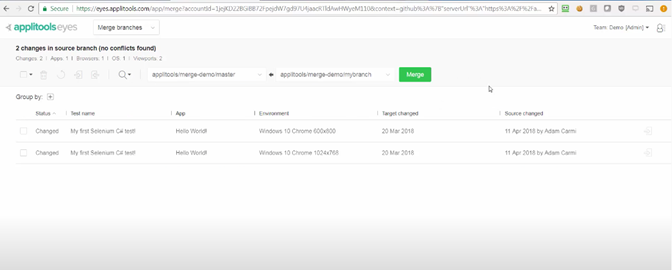
    When feature branches are created, Applitools instantly mirrors those feature branches to create a new set of baseline images. That approach simplifies the automated testing of all feature branches without impacting the trunk and its tests, he said, noting as pull requests are merged back in, the integration automatically updates the target branch with the source branch’s baseline images in a way that ensures no conflicts exist between branches.

    The Applitools approach to AI testing also provides developers with more control based on the application use cases, he added. For example, different settings can be applied to test a medical application that requires perfect alignment of pixels versus an e-commerce application that may not require as much fidelity. Developers can then resolve regression issues by employing root cause analytics.

    In general, Milman said the number of organizations that are applying DevOps processes now to the development of both web and mobile applications is increasing. Mobile applications are core to digital business transformation initiatives that have accelerated in the wake of the COVID-19 pandemic. Many of those applications are being built using components that typically are shared through repositories such as GitHub, which Milman noted creates the imperative to integrate testing tools with code repositories and other DevOps platforms.

    It’s still early days as far as applying AI to application testing is concerned. However, it’s now more a matter of when versus if organizations will be relying more on AI to test applications. As the number of testing platforms that include AI capabilities expands, each IT team will need to evaluate which approaches provide the most accurate testing.

    Nor is it clear to what degree AI might reduce the need for dedicated application testing teams. More responsibility for testing applications has been shifting left toward developers for several years now. Nevertheless, an independent test review of an application before it is deployed is always a good idea. AI capabilities in testing tools should reduce the most common mistakes the developers seem to make regularly.

    As part of an effort to make it tools more widely accessible, Applitools also makes Applitools Eyes along with its GitHub integrations available for free for open source projects hosted on GitHub that sign up to be part of Applitools’ open source plan.

    Regardless of how DevOps teams gain access to those tools, the future of application testing promises to be a lot let less monotonous.