Tag: testing

  • Moving from ‘Tester’ to ‘Quality Enabler’

    Moving from ‘Tester’ to ‘Quality Enabler’

    Speed versus quality. Can you really have one while the other exists?

    When Agile came on to the scene, it pushed to get development teams to create code as quickly as possible. Then DevOps came on as a practice that helped these Dev teams and the Ops side of the house to interact and collaborate more on best practices, tools to use and pinpointing issues in operations.

    But the testing practices and QA teams have had challenges keeping up with all this code that is getting thrown their way at an avalanche pace. That is probably why nearly two-thirds of self-proclaimed DevOps practitioners report that their biggest bottleneck occurred in the QA/Test phase. In fact, this cited bottleneck was more than 2 times greater than the No. 2 proclaimed bottleneck, planning (29 percent).

    It’s been said that “the consumer appetite to engage via digital channels is matched only by intolerance for any defects that might have an impact on their user experience and business outcomes.” If organizations are going to speed their delivery pipeline, they need to remember that the success of continuous delivery hinges on the effective employment of continuous testing.

    Part of the problem remains with manual testing practices. You can’t manually test millions of lines of code, then try to figure out the customer experience during integration testing with other internal or third-party systems and API, with hundreds of microservices or varying mobile devices.  The complexities of today’s composite apps make it impossible.

    And traditional, legacy testing tools don’t help, either. Gone are the days of waiting for the UI to be complete before QA teams begin their testing. And gone are the days of developers throwing code over the wall to the testing team and washing their hands of it.

    A few other facts:

    1. Ninety-one percent of QA professionals agree that the role of testing must change to meet the demands of today’s agile development needs.
    2. Only 1 in 3 organizations involve QA in planning requirements.
    3. Fewer than 1 in 5 organizations write new tests each time new code is checked in.

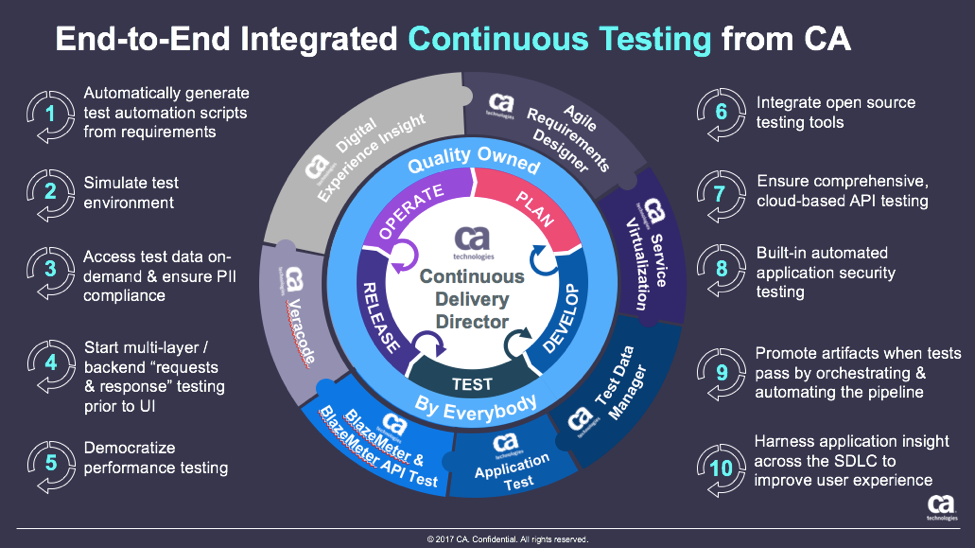
    The idea of continuous testing helps to solve that. Continuous testing is the practice of testing across every activity in the software development life cycle (SDLC) to uncover and fix unexpected behaviors as soon as they are injected. That can’t happen in the above environments.

    A new ebook from CA Technologies and devopsy.kinsta.cloud notes that to continuously deliver software, organizations need to make sure tests, procedures and processes around quality are designed to fit in line with the flow of development, integration and deployment. While continuous testing is dependent upon strategic automation, it is not synonymous with automated testing—a continuous testing process encompasses other important QA activities that impact overall product quality.

    As such, continuous testing depends on four major pillars:

    1. Code Quality – Did developers create the application code correctly?
    2. Pipeline Automation – Can the application code work across environments without manual intervention?
    3. Application Quality – Did developers create the correct features?
    4. Customer Experience – Are users perceiving value in the application delivered?

    These four pillars are discussed in more detail in this continuous testing ebook. You’ll learn the evolutionary journey you can take to shift testing practices left, and really make testing and quality everyone’s responsibility. You’ll even read how GM Financial was able to transform its load practices by implementing some of these practices. See how you can start using these pillars in your QA efforts.

    Now is the time to elevate QA’s new role from that of tester to quality enabler.

    — Scott Edwards

  • Avoiding Application Integration Fails

    Avoiding Application Integration Fails

    Trying to integrate applications on your own can eat your project alive. A seemingly simple project may look harmless when you start, but in the end do-it-yourself software delivery tool integrations can devour your entire software process.

    The problem may be that building simple integrations appears easy. How hard can an integration be? But let’s look at what typically happens with integrations down the road using the example of one developer’s story.

    A developer needs to send defects from Zendesk to JIRA, so he builds a one-way integration based on a workflow action (just a trigger). Soon enough, he realizes he is now managing two tools, and keeping them updated has become a big issue—a very manual process and a huge time-sink. So he designs something to support two-way updates. But that’s just the beginning; each tool changes every few months and an integration that seemed so simple on the surface becomes very complicated.

    Then our developer tries to modify a simple JIRA workflow. Again, it seems straightforward, but it’s not, because the tools involved are constantly changing. There are complexities with workflows, and organizations undertake endpoint system upgrades. As a result, one change to the tool breaks everything he’s done. On top of this, it’s difficult now for him to know the hierarchy or how one item relates to another.

    He starts to consider some of the challenges he’s facing. He needs to consider how the description is written in each tool. They are all different, so how does he make sure he conveys the information correctly every time? And each “simple” integration seems to create more pain points, creating auditability and traceability problems. Meanwhile, he has to manage other tools that are continually added to the mix.

    He’s taken a look at both API and custom-tool approaches. He’s found that API integrations are brittle or they become too popular and then have to be maintained for an entire organization. But the alternative—custom tools—typically fall apart quickly.

    And what happens when our developer decides to leave the company? There’s no one left who knows how to maintain the integrations he created. Meanwhile, new tool replacements mean someone has to build new integrations—and the puzzle becomes even more complicated.

    This short scenario illustrates the unexpected challenges developers face in creating and maintaining integrations. The cost of building and maintaining tool integrations in an always-evolving landscape is deceptively high. And when an integration fails and the organization suffers critical downtime, costs (and tempers) skyrocket.

    Many of the common pitfalls are readily evident, such as rich text problems, but the following three areas may be the most challenging to developers addressing integration issues and can’t be easily avoided:

    • Endpoint system upgrades and schema changes
    • Workflow rules and differences
    • Relationships

    Endpoint system upgrades and schema changes: Much of the time, a different team from the one that developed an integration will perform the upgrade. Perhaps a new field was added. Regardless, simple changes to APIs can blow up an integration. API responses may change formats or the expected values for a field may change. When the team upgrades the system the URL may change, so avoiding duplicates is tough. So, too, is ensuring that the change is seamless. Changing some of the underlying features could result in unexpected behavior (and it will be hard to detect where the problem actually is). It may be that JIRA made API changes that caused custom select fields and comments to fail when using the “old way”; however, other features may continue to work as expected, making this failure silent.

    Workflow rules and differences: Workflows are the complexities between systems. It is hard enough to reconcile teams, let alone the tools they use. Tools may require you to enter required fields, and this can constantly change. And workflows may not match up at all. How can you handle these differences without bouncing field values and allowing complex mappings to reconcile these? What happens when a system has a special action to change a status and fields are required at the same time, but the other system is open and doesn’t reflect this?

    Because of these issues, it is critical to get the teams being integrated (e.g. testing and development) to discuss workflows and where the two teams align. These teams need to understand where workflows overlap so they can undertake proper integrations.

    Relationships: These are not always apparent. As you grow and want traceability, you need to have synchronized relationships. How does this requirement trace to a test? How will you manage those relationships? The tools don’t match the way they manage relationships. Some allow one value, others multiple. Some allow relationships across projects and types, others are more restrictive. In addition to the rules of the system, how do you know what items to link once you have synchronized the artifacts? What happens if only one side of the link is synchronized or the items are not synchronized in the order that you expected?

    Getting this all right requires intelligent systems that can look at one system and translate properly to another

    Avoiding Integration Pitfalls

    The first obvious step in avoiding pitfalls is to identify what they will be and when they’ll pop up. To do this, focus not just on the current problem, but also on the future. Consider the bigger picture, understanding that systems constantly change and teams work differently so there will be additional layers of complexity in any integration project down the road.

    As such, my best advice is for development organizations to focus on the software their organizations are counting on them to deliver, not creating and managing tools to build that software. Put internal resources to work in IT areas where you can create competitive advantage for your company. And consider using third parties to address issues such as integrations.

    About the Author / Shawn Minto

    Shawn Minto is the senior director of Technical Services and Support at Tasktop and one of the original team members working with CEO and co-founder, Mik Kersten, on Mylyn prior to Tasktop’s founding.  Shawn began his career at Tasktop as a software engineer, working on all aspects of the product and directly with our customers to support their needs. Currently he works with customers to understand their tool environments and offers suggestions on how to best leverage Tasktop through deployments and support. In his free time, he enjoys being outside, cooking, and renovation projects. Connect with him on LinkedIn and Twitter.

  • Patrick McClory on Building Successful DevOps Organizations

    Patrick McClory on Building Successful DevOps Organizations

    Patrick McClory has been writing code, managing DevOps and designing scalable application infrastructures for more than 10 years. Most recently, as COO and CTO of DualSpark, he served as an expert Amazon Web Services consultant, helping clients capitalize on the benefits of cloud architecture and design with modern and innovative software, infrastructure and automation strategies leveraging AWS. After DualSpark’s recent acquisition by Datapipe, McClory assumed the role of SVP of Platform Engineering and Delivery Services, where his expertise is put to good use overseeing Datapipe’s global automation and DevOps, as well as its strategic consulting and platform teams. In this role, he manages several teams, including Datapipe’s client-focused service delivery team focused on enabling customers to transform their businesses by leveraging cloud-based patterns and practices.

    devopsy.kinsta.cloud: Tell us a little about your cloud experience, your consulting background and your role with Datapipe?

    McClory: I found myself in the Amazon partner channel probably a little over eight years ago. I worked for a couple of Amazon partners, and then I eventually went to work for Amazon. After having helped lead some of their consulting work in their professional services organization, which was fairly fledgling at the time, I left to form my own organization. It proved to be an interesting divergence for me. Where I previously spent a lot of time helping clients solve technical cloud problems—which is typically technical and very straightforward—I found myself transitioning to the greater software- and people-problem challenges around effectively taking advantage of cloud technologies.

    That’s really how DualSpark was born, both in terms of cloud data architecture, design and consulting. We helped customers understand how to take advantage of the cloud from a business perspective, as well as dive all the way down into the deep, nitty-gritty of exactly how they should technically do it. After eight years of consulting in that world and Datapipe acquiring DualSpark, I found myself in an interesting place where I now run the consultative, the engineering, the client-face role for Datapipe. I also run our platform-engineering team. The big story behind that is trying to take all the knowledge and all the patterns and all of the collective wisdom that we’ve gained over the years, between myself and the team, and building product to help our customers get there faster.

    devopsy.kinsta.cloud: We’re many years into the movement toward DevOps. What do you think we’ve learned the biggest challenges to be when it comes to getting DevOps right?

    McClory: What we’ve learned is that the technical side of the argument, when it comes to actually achieving a DevOps workflow, is probably the least complicated. The real challenge is getting people aligned and focusing the effort in the right direction. For me, that’s been the challenge. But people gravitate toward the tools because they’re easy. Realistically, you can’t take advantage of the tools if you don’t get yourself organized and going in the right direction.

    I’m going to tell a story. There was probably a span of six months where I had the, “What continuous integration tool should I use?” discussion. Invariably, every time, everyone ends up with the same sets of tools. Everybody ends up with Jenkins and, realistically, no one’s always terribly happy with it. Still, it was a six-week conversation, no matter what they eventually chose. Then, rather than starting from nothing, I decided to come to these meetings with a pre-configured system. I would load it into their AWS account, or wherever made sense. They’d see Jenkins hooked up, fully, to their source control toolset. It was highly available and had all of the plug-ins they sought. We took away everything to discuss. We’d then take the next two hours to configure it, play around with the bells and whistles and knobs. Fit it to their purpose. They could always shift to something else down the line.

    We couldn’t believe it, but that tactic worked. I no longer had six-week discussions about CI and what tool to use. I had a two-hour, fit-for-purpose discussion. At that point, bells going off in my head, going this is very interesting. What if we could do this more deeply? What if we did this all the way through the entire stack? What if I gave people multiple options and we just went through and picked it, like a menu? I’m not going to say that’s the overall product design. It’s a little bit more complicated and more intricate than that. The whole goal is to help customers get to the transformative place where they want to be, faster, by avoiding some of the common pitfalls of technologists who like to chase shiny things.

    devopsy.kinsta.cloud: With that in mind, what are some of the biggest challenges when it comes to getting the processes and people in place?

    McClory: IT as an organizational concept within companies that hasn’t done themselves any favors in the last 20 years. There are several different takes on this, but all basically converge on the idea that since the IT service management boom, IT as a discipline hasn’t really matured. Since then, there have been many, many inflection points and/or maturity moments when IT can provide services. But there’s this awesome gap that continues to grow between what the typical IT organization can deliver and what the business is demanding. That’s where shadow IT shows up. It’s like to divergent lines and that gap is shadow IT.

    What’s happened is that IT never, and I say this with the internal acknowledgment that I’m a part of this community as well, really done a great job of connecting our mission to the value of the business. The cost center, the revenue center, there’s all these ways to look at it but at the end of the day, IT is a burden, not an enabler. That’s why a lot of these technologies in DevOps are such a focus. The pain is so great that organizations don’t want to fix the systemic problem because they need to stop the bleeding. Often, what we’ve found is that there’s a combination approach that’s really necessary to build trust within that relationship.

    devopsy.kinsta.cloud: What do you think IT teams must do to flip IT from that unhelpful department to become more aligned with business objectives and profitability? Not that IT must be a profit center, but be more aligned with the business.

    McClory: Being more aligned with delivering value, right? I think it’s two vectors. There’s the one half that’s easy and stereotypical and that’s just because that discipline hasn’t really aligned that way for so long. As silly as it sounds, I find that there’s so much animosity between business and technology organizations on the stereotypical kind of day. There’s a little bit of corporate therapist that we play and we help build bridges, help to realign, help to translate. It’s a surprisingly entrenched issue of people at an interpersonal level.

    It’s not simply between the technologist and the company and the business. It’s also even within the technology organization, between your typical developers and operations organizations. Getting those three views aligned to serving the value of the business is, a lot of times, a matter of helping people to acknowledge that other people are a part of it and that they’re all there to serve the same mission.

    On the other side, there’s also this misnomer that there is a silver bullet, from a tooling capabilities perspective. There are some great tools out here and I’ve both built partnerships with them and used their tooling heavily. One that comes to mind, particularly, is Chef. I love their tools. They don’t solve every problem I have, though. There’s a landscape of tooling that I tend to end up back at that standard configuration management, continuous integration, testing and deployment management, monitoring and alerting. You end up finding good options in each one. Not that they’re perfect solutions, but a lot of organizations are looking for that DevOps in a box. They’re looking for that one capability and they forget that it’s not one thing. Even if people have tried to market it that way. It’s very much a technology plus an organizational culture issue. Not a single technology.

    devopsy.kinsta.cloud: Where do you see your clients now in the curve of DevOps adoption?

    McClory: If you’re looking at a bell curve and cut it into quarters, I think we’re probably in the early phase of the second quarter of adoption. There’s a ton of interest and I think that’s what I would look at, in terms of volume. I see lots of people who’re interested. I don’t remember who said it but to paraphrase, there’s a lot of people talking about it. There are very few people who actually achieve it.

    At the same time, I don’t believe that, to your point, DevOps isn’t a destination, it’s a way of doing things. It puts you on a vector, it pushes you in a direction. It’s never about the destination, it’s about the journey.

    In that respect, I think there are a lot of DevOps practices that start to seep in at the cultural level. As organizations try to be more efficient, we see them coming into some of the automation practices and the tooling side of things much more eagerly than they are the organizational collaboration side. Even that’s starting to break down and, oddly enough, I don’t know that I would blame it on the influx of newer developers or younger developers into the market. Certainly, it plays a role as the—not to wax poetic—the culture of sharing economy, the open visibility outcry from the hipsters perspective, or the millennial view. I think a lot of that I really positively impacted organizations behind the scenes, to open up a lot of that collaboration and visibility that’s necessary to get DevOps right.

    — George V. Hulme

  • Continuous Testing: Solving the Biggest DevOps Bottleneck

    Continuous Testing: Solving the Biggest DevOps Bottleneck

    It’s time to start implementing the practices of Continuous Testing

    Earlier this year, Computing Magazine conducted a fascinating study around the adoption and benefits of DevOps in its DevOps Review 2017 publication. The findings that stood out most fascinating to me where around quality assurance and testing.

    In this survey, the question was asked, “Where are the main holdups in the software production process?” Of all the self-proclaimed DevOps practitioners, a whopping 63 percent said the biggest delays occurring in the QA/Test phase. In fact, this cited bottleneck was more than 2 times greater than the next proclaimed bottleneck, which they felt was in planning (29 percent).  In this same survey, another question asked, “What tends to lose out more in DevOps environments?” While 43 percent said, “Nothing,” nearly 30 percent of these DevOps practitioners said that quality was being sacrificed. When asked which area they wanted to focus on improving in the next year, over 40 percent opted for quality.

    Why is it that quality has taken such a hit?  The study cited two issues: 1) Testing and QA is often siloed from the other parts of the organization, and 2) Testing tools haven’t matured much in the past five years.

    Testing must become a cross-functional operation across the software development lifecycle (SDLC) spectrum, one that involves all teams. Agile developers and testing teams don’t have weeks to test, but hours. Testing hasn’t kept up because it hasn’t applied the methods and concepts of agile development have not been applied to testing and QA processes. By removing the constraints that force testing to the end of a development cycle, developers and QA teams can achieve accurate, automated testing from day one. They can create an integrated pipeline, capable of taking an idea from design to deployment, at speed, without compromising quality.

    Open-source, cloud-based solutions can be the catalyst that brings the speed of agile to testing.  Here are a few examples.

    Better In-Sprint API Testing: Since APIs have become the major component of applications, organizations are shifting their approach from starting testing when the user interface is complete to shifting the focus of testing at the API level.  But the hard thing is finding enough time in a development sprint to test them sufficiently.

    Today’s applications are a collection of microservices and API calls. UI testing alone just won’t cut it. UI testing is very brittle, and whenever it changes, testing breaks. Testing needs to shift left into the development cycle—into sprints. But if you shift testing left to be a focus of the sprints, what kind of API testing can you really do? How comprehensive can they really be?  Creating those API tests has to be quick, and simple.

    Dev and Test teams must utilize automated tools that not only generate API tests, but create an exhaustive set of test cases from the API, then execute those tests. These tools also need to support the most popular open-source testing frameworks allowing developers to run functional API tests as performance tests without any proprietary conversion issues. And, vice versa, developers must be able to take open-source performance tests and be able to run them as functional API tests.

    Orchestrating Testing: A Continuous Delivery Pipeline Manager: “Faster” is becoming table stakes with automation.  The facts show that companies who have widespread agile adoption and are deploying more frequently with significantly reduced lead times. But, this too often leads to release failures, quality issues and disorder with multiple—if not hundreds—of applications rolling through the SDLC. Plus, things slow down significantly with time-consuming handoffs and rework in the release process. DevOps teams, who release features and fixes frequently while significantly reducing errors and manual processes, need toolchain-agnostic pipeline planning, orchestration and optimization solutions that enable them to eliminate spreadsheets, automate test processes and feedback, and continually improve the delivery of revenue-generating features to end-customers. New CD SaaS tools help make this orchestration process easy.

    Performance and Functional Testing Using Open Source Frameworks: More and more organizations are trying to move from legacy testing tools. It’s not so much that these don’t adequately test, but they were never designed to meet the needs of agile development approaches. Rather, they were designed for releases that occurred two to three times per year. But that won’t cut it anymore.

    And as developers begin to incorporate testing activities in the coding process, they need simple-to-use, open-source tools. Luckily, there are such tools like JMeter, Selenium, Gatling, Locust and others. There are even tools that help you convert from legacy platforms to open source technology with ease, and guides to transform existing functional tests created with other tools over to load tests.

    These are just a few examples of how continuous testing eliminates the testing hurdle. With continuous testing, organizations can:

    • Automatically convert user stories from requirements management tools like CA Agile Central or Atlassian JIRA into the minimum number of test cases required for complete code coverage, and being able to adapt automatically to changing business requirements.
    • Reduce test cycle prep time by requesting test data from within requirements.
    • Request, reserve, and create test data at any time, even from requirements phase.
    • Virtualize APIs for better testing, while managing API access to developers.
    • Institute easy API testing that can generate comprehensive test cases (positive, negative, edge case, and SQL injection) and execute those tests automatically.
    • Democratize testing with SaaS-based testing tools so that developers can test early and test often.
    • Speed testing by feeding test data directly and securely to virtual services.
    • Use open-source testing tools such as JMeter, Selenium, Jenkins, Jenkins, Appium, Taurus, Gatling, Locust and more.
    • Orchestrate the application delivery pipeline to promote releases from one environment to the next as soon as all the tests pass and enable faster feedback loops.

    This is testing unleashed, going hand in hand with agile development to accelerate quality into production.

    By adopting next-generation testing practices, DevOps teams have the ability to test early, often, automatically and continuously. To learn more about continuous testing and why it is critical to DevOps and Continuous Delivery initiatives, visit this Continuous Testing informational page.

    — Aruna Ravichandran

  • Top 6 Challenges of API Testing

    Top 6 Challenges of API Testing

    Testing teams face several unique challenges when testing application programming interface (API) implementations. API testing is part of the integration testing process and concerns the communication between two systems—one of which your staff likely has no control over.

    Below you’ll find the following six common challenges when testing APIs and our recommended solutions.

    Initial Setup of API Testing

    Manual testing helps confirm whether something works. Automated testing is necessary with APIs to gauge how well they perform under pressure. Getting the testing infrastructure up and running is often one of the most challenging parts of the process, not because it is particularly difficult, but because it can be a substantial motivation-killer. Once you manage to motivate your team to get through the process, however, it pays off over the long-term.

    Solution: API testing should start in the design phase—how is the API going to be tested? Ensure interval checking of your APIs for 100 percent uptime.

    Updating the Schema of API Testing

    The schema—in other words, the data formatting that handles requests and responses for the API—needs to be maintained throughout the testing process. Any updates to the program that create additional parameters for the API calls need to be reflected in the schema configuration.

    Solution: In today’s API economy, having an ever-changing API helps facilitate the demand. However, there can be downtime caused by those changes. One way to avoid that is to thoroughly test the API in beta and alpha environments. The chances of issues decrease to 90 percent when testing in these environments.

    Testing Parameter Combinations

    APIs handle communication between systems by assigning data values to parameters and passing those parameters through data requests. It’s necessary to test all possible parameter request combinations in the API to test for problems pertaining to specific configurations. A larger project could end up assigning two different values to the same parameter, or create instances where numerical values appear when text values should be. Adding an additional parameter exponentially increases the number of possible combinations.

    Solution: We’ve learned from our customers that having release candidates are important. For example, picking one or two applications to utilize the API on and release it to just those applications. Pick applications that aren’t critical to daily operations. This way you’re able to see how the API is being utilized and if there are any configurational changes that need to be made to have a general availability (GA) release.

    Sequencing the API Calls

    In many cases, API calls need to appear in a specific order to work correctly. This creates a sequencing challenge for the testing team. For example, if a call to return a user’s profile information goes through before the profile is created, the request will return an error. Alternatively, a call to create a map needs to run prior to placing location pins on the map to work correctly. This process can get increasingly difficult when working with multiple-threaded applications.

    Solution: This relates to the point above of having a release candidate to help in managing and seeing what the sequencing of the API calls are. We recommend making a flowchart to visualize the API calls. This will help developers build API calls and integrate them faster without causing issues.

    Validating Parameters

    Testing teams may find validating the parameters sent through API requests challenging as well. The sheer number of parameters and use cases for those parameters can make it a daunting task. The team needs to make sure all parameter data uses the correct string or numerical data type, fits within length restrictions, fits within a designated value range and passes other validation criteria. For example, U.S. phone numbers should appear in a 10-digit format, and returning a 5-digit zip code should trigger an invalidation error.

    Solution: This can be avoided by having continuous synthetic API monitoring to catch the problem early on. Moreover, it should be combined with an APM solution to get an overall 360-degree view. Validating parameters is one of the most important things. It should show you how fast you’re serving those parameters. If making those calls has significant impacts on your system, implementing synthetic and APM solutions will ensure you catch the problem early on.

    Tracking System Integration

    The final challenge is making sure the API testing system is working correctly with the data tracking system. This is necessary to bring back correct responses on whether a call is working correctly. It’s also used to passively monitor API performance. Since this step can come late in the process, the team may be too fatigued to give it the attention it needs.

    Solution: Think about your application in the design phase and how it will integrate with other systems. Different applications have different requirements that need to be met. Make sure you aren’t causing applications to fail by testing in parallel with critical integration systems. This can be accomplished by implementing and including load testing in your continuous delivery.

    API testing is an essential part of application development in the modern business environment.

    About the Author / Sven Hammar

    Sven Hammar is co-founder and Chief Strategy Officer of Apica, a provider of technology for testing, monitoring, and optimizing the performance of cloud and mobile applications. Mr. Hammar has more than a decade of experience and expertise in web performance and web optimization, e-commerce, cloud services, IT entrepreneurship and the Internet. He is also a serial entrepreneur who has founded several successful IT companies over the years. Connect with him on LinkedIn.
  • 7 Highly Effective Continuous Delivery Principles

    7 Highly Effective Continuous Delivery Principles

    If you’re in the IT space and you weren’t born yesterday, then you understand the need for speed. Development and release cycles are now faster than ever as companies implement continuous integration and continuous delivery (CD). Browsers and social media sites, for example, are doing multiple releases a day, and organizations that want to keep up in the information age are implementing continuous delivery. But to ensure successful continuous delivery, there are continuous delivery principles every organization should know.

    Here are seven continuous delivery principles that make highly effective and efficient development and release cycles:

    1. Automate, Automate, Automate. While more and more organizations are recognizing the need to automate their end-to-end release processes and delivery, it can still be a burden if not done correctly. For example, some still refrain from automating unit tests, but this actually slows them down in the long run, especially when human error inevitably comes into play.
    2. Always Be Testing. Obviously, if you want faster and better release cycles, then you need to test constantly. As mentioned, automated testing is a key to continuous delivery, and you don’t want a bottleneck between QA and development clogging up your process.
    3. Small Releases. One of the core continuous delivery principles is that smaller and multiple releases are usually better than one large one. It’s more efficient—and even safe—to keep releasing a few changes then waiting to add a large batch of features and bug fixes before you deliver. Then, if any revisions need to made, it will be easier to make them without affecting the other features.
    4. Use Benchmarks. Adding an automated benchmark suite to your builds will help you optimize your performance by preventing any regressions, which is important if you want a successful continuous delivery.
    5. Use Source Control. Integral to continuous delivery is making sure you can keep adding versions without affecting existing components and features. This not only backs up your SQL code, but also allows for continuous integration and, thus, continuous delivery.
    6. Code Reviews. Many organizations use a hierarchal system for their reviews, which means more and more senior developers have to review the code before it’s approved. A peer-based system in which developers review each other leads to a faster and more efficient process.
    7. Pull Requests. Using a pull request can speed the process significantly. When others can review the author’s code simultaneously as well as suggest modifications before it’s integrated into the master, there will be better communication and fewer bottlenecks.

    Continuous delivery is a not just a great idea, but quickly becoming a must-have, as anyone who uses the agile method will tell you. It’s important, however, that whether you’re introducing this into your organization or looking to optimize your continuous delivery methods, you use the right continuous delivery principles to keep your organization fast and efficient.

    About the Author / Yaniv Yehuda

    Yaniv Yehuda is the co-founder and CTO of DBmaestro, an enterprise software development company focusing on database development and deployment technologies. Yaniv is a DevOps expert who spent the last couple of years raising awareness about the challenges surrounding database development and deployment, and how to support database continuous delivery.

  • ShiftLeft & DevOps: A Narrative Within a Narrative?

    ShiftLeft & DevOps: A Narrative Within a Narrative?

    I procrastinated watching the season finale of “Westworld” just because I ended up reading a day later how Dolores ended the episode! I don’t know who to blame: my inquisitiveness or that guy who couldn’t hold himself. It kind of feels stale when you know the ending.

    Finally, I finished weeding through the multiple narratives across the episodes, and the flashback narrative merged seamlessly with the current one. That got me thinking about using that as an analogy and maybe understand whether the concept of ShiftLeft is really actually a “narrative within a narrative” of #DevOps.

    Ok, so what is ShiftLeft?

    I came across the term at my fav go-to source, @devopsy.kinsta.cloud, where Alan wrote on how much to Shift Left and its diminishing returns, and another very old article on the continuous testing approach, which primarily seeks to test early and often, to catch defects, yeah, early!

    Then it was thrown at me in the context of identifying repeatable activities, often manual with consistent results, performed by the Support & Operations team, and moving that work left from Level-3 all the way to L-0. Empowering the help desk, I would say!

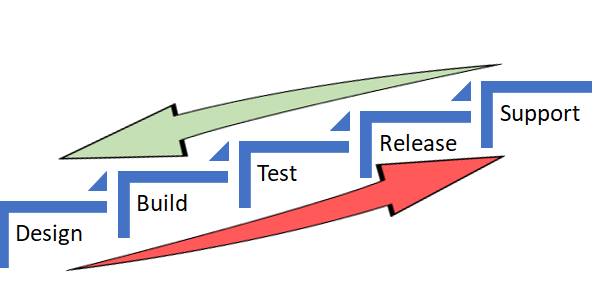
    In both the scenarios, the underlying objective was to catch defects and or reduce life support activities early in the cycle (below) which costs more and more as we move up the food chain, which in turn makes a release and subsequent maintenance cheaper.


    As Alan also referred in the same article to the IBM Study, it’s almost 100 times more expensive to fix an eventual production defect which cost about six times more if caught at Implementation stage or about 15 times more if found during testing. Thus, “Early identification and prevention can improve reliable software delivery” would be the mantra.

    Now, to the crux of this article, Is ShiftLeft not what we aim to achieve via DevOps?

    DevOps basically creates a collaborative, non-siloed cultural change to bring both Development and Operations together early in the game.

    Throw in a bunch of tools to facilitate CI/CD, pull in the security guys early, expand automated testing coverage, include change and release—who are the catalysts, as I call these functions in my earlier article here—squeeze in a few monitoring tools and dashboards and voila! You have a complete and mostly successful DevOps team to dish out the most appetizing feast of quality software repeatedly.

    A table for two (Dev & Ops) has become a party of six! Yaaay!!

    So, from DevOps standpoint, ain’t we doing the same as ShiftLefting (If I may coin the word) with the resulting cost effectiveness, more efficiently?

    We do when we as a team make shorter and frequent sprints; gain insight, not just on how to code better or leaner but also by learning from the masters in Operations who run that software on the infrastructure they monitor and support daily. Or perform the VA scan early, or push a scenario as unit test instead of regression, and/or raise flags on potential capacity challenges.

    So again, isn’t DevOps team already doing that ShiftLefting as part of its charter?

    There is a limit to moving things left, but then, if your organization is still doing wireframes under a waterfall or is in the process of setting up a DevOps team, then this approach could be a stop-gap arrangement, an eventual merging of a narrative within a new narrative.

    But then my argument would be, Why stop-gap and why not a full frontal? Why not embrace the DevOps model, which comes preinstalled with all the ShiftLeft possibilities?

    Even if we are aware how an episode ends, procrastinating raises the risk of being left behind in the race to deliver quality, cost-effective product quickly.

    Technology is redefining businesses: Transportation is an app and soon probably will be driverless; banks are rebranding as tech companies in FinServ business; a fridge can reorder milk; trash cans can be Wi-Fi-enabled! Ah, the internet of things. Is Alexa listening?

    My other relevant posts are here and here.

    Thank you for the time.

    — Abdul Salaam Khurram

  • Avoid Crashes: 5 Best Practices for Load Testing

    Avoid Crashes: 5 Best Practices for Load Testing

    Demanding customer expectations and the rapid distribution of information across social media have made website and applications crashes an off-limits path for today’s companies and organizations.

    Crashes resulting from traffic spikes cause immediate and long-term loss of sales, as well as tarnishing the brand name. When servers or websites go down during highly anticipated events such as Black Friday, the Big Game or before a major concert, the repercussions can be permanent.

    Yet, avoiding the “website temporarily unavailable” screen is also easier than ever before. By performance testing your website continuously and proactively you can easily detect errors, bottlenecks and bugs, and then fix them to ensure your website handles any amount of traffic.

    Here are five best practices for load testing your website or app:

    Define Your Load Goals

    Before starting your tests, you need to figure out what it is that you need to test.

    This includes the number of concurrent users, traffic patterns and areas that users can visit on your site. For example, if your site has 10,000 users concurrent at its peak, but  3,000 arrive in the morning and that total slowly climbs up to 10,000 in the afternoon—and these visitors mostly just browse your homepage—you’ll need to run a different test than if you have 10,000 concurrent users on your website all day long, constantly browsing multiple pages.

    To determine your load goals, you need to engage directly with your business colleagues. For instance, get your product manager to set the system’s expected abilities, ask the marketing team to inform you about any special campaigns that might increase website traffic, and then look at server logs and tools such as Google Analytics to determine previous customer patterns.

    Choose Your Load Testing Tools

    There are multiple open-source load-testing tools that you can use to run your tests.

    JMeter is the most popular tool, but you can also use Gatling, Locust, Tsung, The Grinder or Selenium. See here to learn more about the differences between these toolsets.

    Does this seem complicated? Taurus is an open-source automation test framework that simplifies running these tools, by using a simple YAML script. If you need to run your tests from the cloud, utilizing rich analytics or requiring user collaboration, you might consider using BlazeMeter.

    Take Your System to the Limit

    To make sure you stand up to your load goals, you need a buffer; specifically, you need to make sure that your system can handle heavier loads.

    This ensures that the CPU stays low and you don’t experience memory leaks. However, we also recommend you take your system to the limit and see when and how it fails. This ensures that you know exactly what your system’s weaknesses are, giving you a better ability to fix any errors that might occur.

    This is especially important if you come across an unexpected traffic spike—say, if your competitor’s website crashes and all their customers come running to you. Wouldn’t you rather be prepared for that?

    Monitor Test Results

    Set aside resources for looking at test results.

    Examine KPIs including Response Time and Hits/s, as well as the correlations between them, to learn what your system’s abilities and bottlenecks are. This information will help you see what needs fixing.

    As you continue testing over time, you will be able to identify KPI trends, which will help you monitor system health. We also recommend you monitor backend KPIs like DB Queries, with APM tools.

    Test Again

    So, you’ve tested, you’ve analyzed, and you’ve fixed.

    Now you have one last thing to do: Run your tests again to make sure everything is working smoothly after the committed changes. That ensures nothing gets overlooked. It would be a shame if all your hard work went down the drain due to a minor oversight.

    Now, let’s get testing!

    To get more load testing tips, check out this free whitepaper, “How to Ensure Your Website or App Won’t Fail at Peak Times.” To learn more about BlazeMeter, request a demo.

    — Noga Cohen

  • SauceCon Speaker Profile: Mike Millgate, Optum

    SauceCon Speaker Profile: Mike Millgate, Optum

    Automation architect Mike Millgate wants to work himself out of a job. Of course, he doesn’t want to make himself obsolete. He simply wants to automate testing so that QA teams can free their time to do other strategic exercises, such as exploratory testing and focus on security.

    Mike knows what he’s talking about. At Optum, a health services and innovation company, he manages a suite of tests that runs in three hours, testing 18 different applications and more than 24,000 total test cases. He is passionate about parallelization, and notes that if the tests weren’t running in parallel, they would take 55 days to run.

    At the upcoming SauceCon conference, Mike will present, “Testing at the Speed of Concurrency,” taking attendees on a journey of in-house machine testing into cloud-based testing. He will show what works and what doesn’t, and how to use parallelization to improve efficiency as the machines are increasingly doing the work.

    Mike hopes his presentation will help attendees learn how to perform massive numbers of tests in parallel, whether they are using Sauce Labs or another test platform. His mantra is, “Quality is a team effort,” and says the entire team needs to be equally invested to be successful.

    Mike has been at Optum for 15 years. As an expert in test automation in the healthcare industry, he was brought into the tech surge to help fix healthcare.gov in 2013. His work in the industry helps Optum achieve its goal: to help people live healthier lives and to help make the health system work better for everyone.

    A resident of southern Utah, Mike loves hiking and exploring nearby national parks with his family. He is passionate about foster care and adoption, having adopted three young boys with his wife. Mike also runs daily and has competed in two marathons.

    Would he say test automation is a marathon or a sprint? “If you do it right, you can get a marathon’s worth of testing done in a sprint time frame,” he says.

    Join Mike and other presenters at SauceCon, the first-ever Sauce Labs user conference. SauceCon is a three-day event filled with training, workshops, best practices and visionary content from the leading minds in automated testing. For more on upcoming SauceCon presentations or to register, visit the SauceCon website.

    About the Author / Rebecca Cramer

    Rebecca Cramer is a writer and communications strategist specializing in technology. With more than 20 years of experience across disciplines including marketing, internal and executive communications at companies such as Dell and Quest Software, Rebecca is passionate about creating and sharing good content of all kinds. In her spare time, she enjoys spending time at the beach and hiking in her native Southern California.

  • DevOps is a Lifeline to Connected Mainframe ROI

    DevOps is a Lifeline to Connected Mainframe ROI

    A new IDC white paper sponsored by IBM and CA Technologies reveals the adoption of DevOps is a hallmark of those organizations that are actively modernizing and integrating legacy systems such as a mainframe to support digital transformation.

    Early adopters are blazing a path for faster innovation and greater ROI.

    DevOps Delivers Mainframe Modernization and Integration

    I’m encouraged to see DevOps recognized as an important element in realizing a “connected mainframe” vision. Respondents demonstrated a continued commitment to modernizing their mainframe environment.

    The IDC study confirmed that leveraging Java on the mainframe was one of the most popular approaches. In fact, I’m constantly surprised at how few managers realize that these days, Java and Git can be used by developers in such a way that allows them to completely separate themselves from the mainframe “green screen” environment when coding or maintaining applications.

    DevOps automation has also helped organizations overcome many of the cultural and operational challenges to a fully end-to-end enterprise by aligning application development tools and orchestration chains across multiple platforms and teams.

    Adopt a Business-First Approach

    Customers I’ve spoken with are experimenting with DevOps for mainframe tools and practices, with many piloting new approaches across the life cycle. They’re immediately becoming more agile, realizing shortened development cycles, improved collaboration between distributed and mainframe teams and faster MTTR that maximizes availability. In all, these early adopters have benefited from increased speed to market, improved business agility and better platform economics.

    The IDC study concurs, identifying more effective delivery of applications and services as a powerful cost-saver, with savings of $58,900 per application achieved through increased developer productivity and day-to-day support efficiencies. By helping mainframe organizations to realize improvements at every stage of the application life cycle—from build through test, deploy and operate—DevOps delivers compelling benefits; for example, from our recent study Accelerating Velocity and Customer Value with Agile and DevOps:

    • Advanced DevOps users reduce the time taken to develop, test and release new applications by 42 percent.
    • Advanced agile users reduce their time to decide and act on new opportunities by 40 percent.
    • Advanced agile users accelerate the time to develop, test and release new apps by 36 percent.1

    Excited? I encourage you to catch up on the full IDC White Paper here.

    — Aline Gerew