Tag: Swagger

  • Languages and DevOps: API-First

    Languages and DevOps: API-First

    One of the places development has made significant changes is in the land of APIs. These days, a program almost isn’t considered a proper application unless it offers APIs to do most of what can be done via UI (and even command line). This is a big deal for several reasons; first and foremost, the ability to subdivide the work and then test each subdivision. A proper API does one thing and does it well. Testing can validate that this statement is true for any given API. It also allows for distribution of processing. It is far easier to use a load balancer to scale APIs than it is to scale a monolithic application. And finally, it helps with portability, because with API-first, developer users don’t care what platform it’s running on, just that it can be reached via URL and responds as expected.

    Everything is a trade-off, and there are several places that API-first has issues. Integration testing is objectively harder. Loosely coupled applications, in general, are harder to test, and requiring multiple portions of an application be available to run testing becomes onerous, particularly as the layers of APIs start to build up. Second, security is another issue – particularly if you’re offering a public-facing API, but also for internal usage. Once an attacker has access to the network, internal-only APIs are no different to them than external. Smart IT departments design internal APIs with the same controls that external requires. Third is DevOps in general. API-first grew up in the agile/DevOps world, but because there are cascading dependencies, is actually harder to manage DevOps for than most monolithic applications. Finally, documentation – the bane of API-first’s existence. The number of poorly documented APIs vastly outnumbers the astoundingly well-documented ones. Even well-documented APIs, like Google Places, require some thought and testing to use well. Poorly documented ones – my favorite is, “It’s mysite.com/users – everyone knows what’s in there!” – are next to useless without a learning curve.

    With all of that said, what about languages? That greatly depends on what you’re doing. Users don’t care what language it is implemented in – as noted above, they care that the API can be reached via URI, and that it behaves as expected. So you do have options. Indeed, at this point in the evolution of APIs, the language options are so open that you’ll probably be choosing an API definition language instead of a programming language, and just instruct your definition tool to spit out the language of choice.

    Wait, what?

    For those who haven’t followed API development closely over the last few years, it goes something like this. APIs became standardized, then APIs became a big deal, then smart people started to think in terms of code generation á la ancient 4GLs. What if you could use a specification language to describe what you want to do, then pick your language and tell the tool to generate the API? What if you could do this for the entire API hierarchy? That’s where we are. I’m most familiar with OpenAPI and RAML, but there are a large number of specifications out there, and a larger number of tools to develop in them. Before my API friends freak out, of course this is an over-simplification of what happened. I only have 1000 words, max, and my editor would like less. Relax a bit.

    And then you generate.

    I’ll rely on my own experience here, but there are literally dozens of tools available to get you from idea to API interface (doing the work behind the interface is where you come in). With Swagger CodeGen, the tool I’m most familiar with, you specify the API, then generate server interfaces (they call them stubs), and generate client libraries. Finally, you develop what goes on behind the interface on the server side, and (you or others) use the API on the client side. When I say “generate,” I mean “Tell it your favorite language, and click generate.” It spits out the code you can then use to flesh out your API. It does not spit out the info to get the API into your DevOps toolchain, so you’ll have to do the work for that. Which means the more APIs you can generate in a batch, the less DevOps lifting you’ll have to do (more on that if/when we cover microservices). Since most languages can easily be placed into DevOps via their build tools, I don’t want to make this sound too onerous – security and testing will be a bigger problem, by far.

    API security is slowly getting automated and placed right into generated code, but all the usual bits, like certificate management, still have to be handled. The interesting thing, that hasn’t (yet) gotten a ton of attention, is security of clients. It is far harder to verify that the client library is secure when the purpose of that library is to grant access to your API. I expect we’ll eventually have to get there for some applications, but today, it appears to be largely individual orgs figuring out how best to lock down client libraries, and most of the limiting factors end up server-side.

    I’ve generated Python, Java and Ruby APIs via various toolsets, and considering the problem domain is still relatively small, they work fine. And it saves one piece of the puzzle … but does introduce another piece – coordinating client and server updates via DevOps.

    Keep making the apps that run the world, and use API generators to further standardization, spitting out whatever language you need on the backend, and a portable interface for clients.

    You. Rock.

    Whatever your language of choice, in the end, it will likely be your build tool that links it to DevOps. Your biggest concern for DevOps will probably be portability, at least in the near future. Meanwhile, keep rocking it. You’re doing the work that needs doing, even if it isn’t the part of DevOps everyone is currently buzzing about.

  • 4 Top Tips for Developing a New Feature

    4 Top Tips for Developing a New Feature

    As a backend developer at CA BlazeMeter, I recently had the chance to work on a big feature for our web app. The feature required a massive change on our backend code, a big change on our frontend and multiple migrations. You know what I’m talking about—it was one of those projects that developers fear.

    But, I gained a lot of valuable experience from the project. Not only did we deliver a kick-ass feature, I also learned the importance of teamwork and patience when developing something new. Armed with those two values, and the right tools and technologies, you can deliver a new feature quickly and efficiently.

    Here are a few more things that I learned that should prove helpful whether you’re developing a major feature or one that only requires a minor code change.

    Tip 1: Plan to understand the development requirements

    The process of development starts way before you start coding, with planning. After the product manager decides what needs to be developed, R&D needs to understand the cost: how many days (or weeks) of development the feature will take, how many people will be needed and which APIs are required.

    To do that, the product manager needs to conduct at least three “grooming” sessions with backend, frontend and QA leaders. The grooming sessions start with the product manager presenting the product flow and requirements.

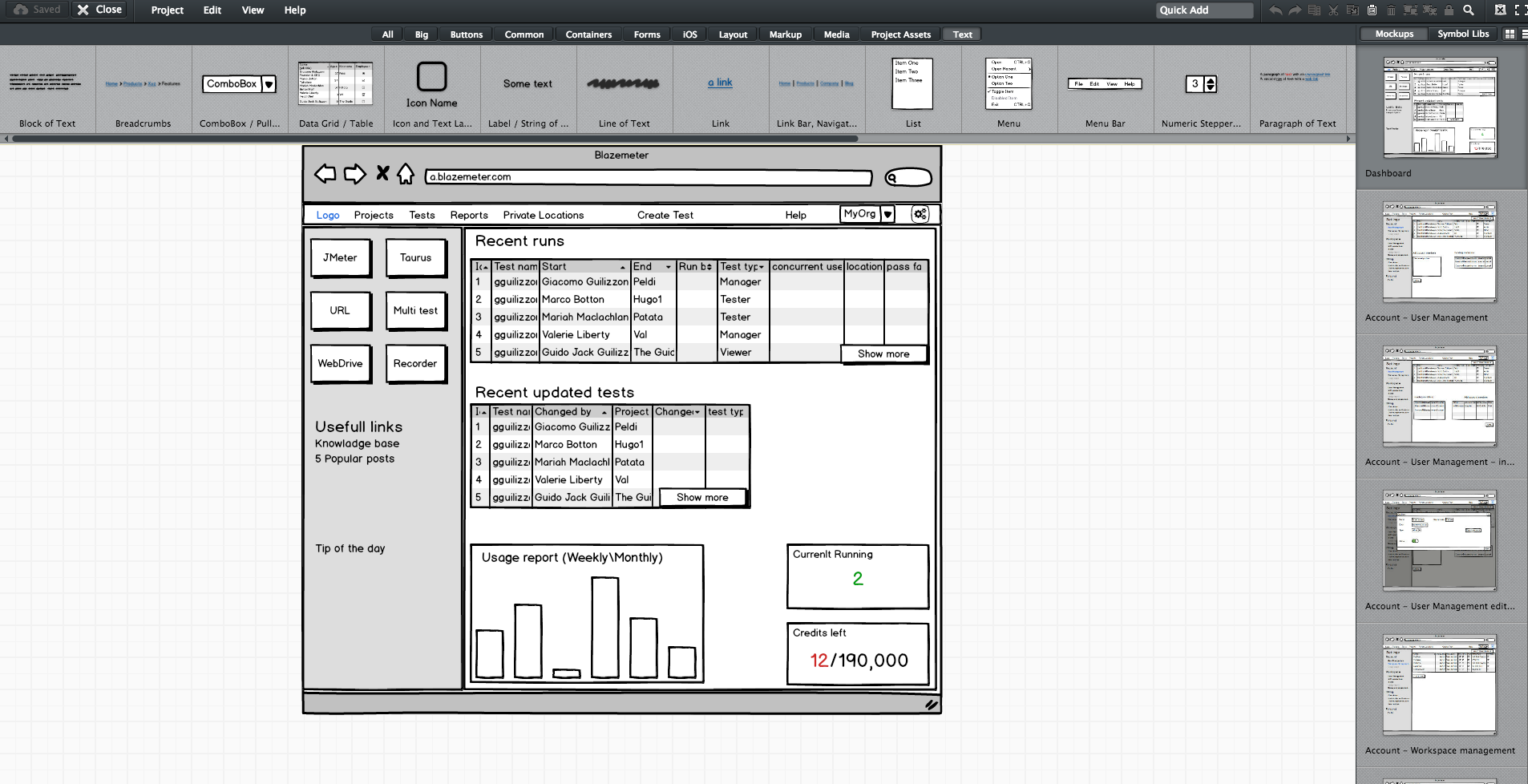
    Since no one wants to read a lot of text (except perhaps the awesome readers of this article), the product manager should prepare mockups. They don’t have to be designed or colorful, but they do need to show the team what the feature looks like in his or her vision. During our grooming sessions, we used Balsamiq, which lets you create screen sketches for how the product is supposed to look, feel and work.

    Editing screen sketches using Balsamiq

    After the initial presentation, the sessions should include a lot of open discussion—asking questions, checking for answers and examining compliance, etc. —until everyone is satisfied and understands what the feature requires from them and from others.

    This is the time and place for frontend, backend and QA to give their opinion about the schedule and to alert and flag any potential problems in development or extreme use cases. It’s the role of the product team to answer questions and change the flow and requirements until there are no R&D rejections.

    Afterward, the frontend and backend leaders need to create a feature development plan, sitting down to determine what data they need to transform the product vision into a real thing. Or in other words, which APIs are required for each flow or button, how long each step is supposed to take, including buffers, and the order of development. APIs are the agreed “contract” between the development teams. After determining the contract terms, each team can proceed individually.

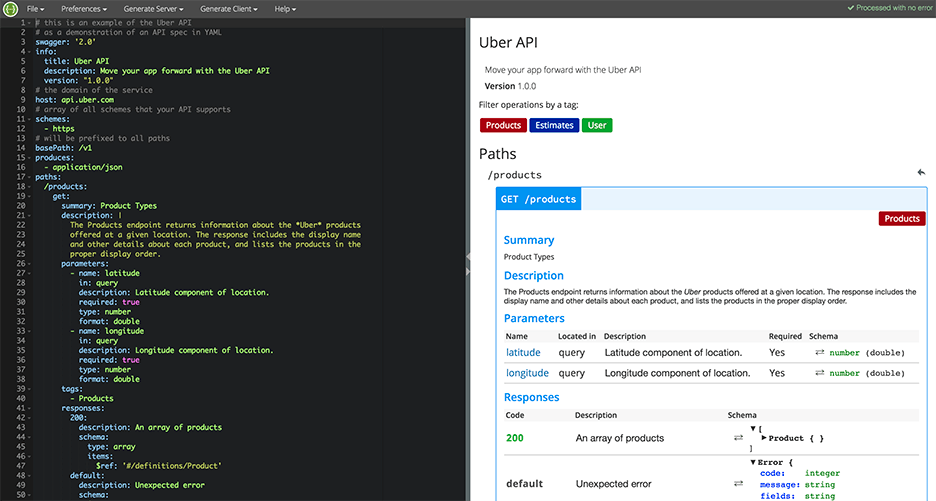
    I recommend you write your APIs in Swagger, which turns YAML files into detailed HTML pages with all the APIs.

    Swagger Editor

    This plan needs to be transparent to everyone working on the project. In fact, it’s even better if each project participant can add and describe scenarios. Tools such as TestLink and Atlassian do just that. Then, when the code is ready, developers can go over the list and see everything is covered.

    We will need to stick to this schedule later on, especially when new demands unrelated to the feature come in, such as fixing bugs. Sticking to this plan is the best way to distinguish the wheat from the chaff of the development process.

    Start writing automation ASAP

    After planning, we want everyone to start working, and not only the backend. To do that, the backend can prepare mocks, either through outsourcing services such as JSON servers, which show inputs and outputs, or by writing dummy code.

    I mentioned earlier that we used Swagger to write APIs. We also used it to generate a server in NodeJS/Python, like this:

    Generating a JSON Server through Swagger

    From this moment on, frontend can begin writing and building screens and QA can start writing API automated testing, by using tools suh as JMeter. At this point, frontend and QA have the response codes and response bodies; they know which features to put where; and which APIs they need and how to use them.

    QA also know which data they’re missing, such as field names and field data. Sure, the backend code isn’t ready yet and all of the automated exams will return “red” instead of “green,” but the main issue is making sure everyone is as prepared as possible.

    This includes load and performance testing. You can use open-source tools such as JMeter, which is enhanced by CA BlazeMeter. By uploading our test script into, configuring the number of virtual users and ramp-up time, determining geo-locations to test from and analyzing KPIs to determine trends and the health of our system, we can ensure our product is delivered to our customers without crashing.

    This is also true about sending code to QA: Developers should test their code themselves and ensure that when they commit their code, it works 99.9 percent of the time.

    By starting automation as soon as possible, you can minimize future bottlenecks in the development process.

    Ensure the team communicates and works together

    Like I said before, teamwork is the most basic requirement when creating a new feature. This is because new questions arise during development and because requirements change. Therefore, everyone in the team needs to be in sync all the time, from the product manager and the designer to the developers and QA.

    Open communication lines are crucial because everyone is working on the same product at the same time, but each developer or QA should be working on a different part of the product and on different functionalities. Communication ensures each person’s work is compatible with the rest of the team’s work. This saves time, prevents frustration and redundancy and ensures maximum professionalism.

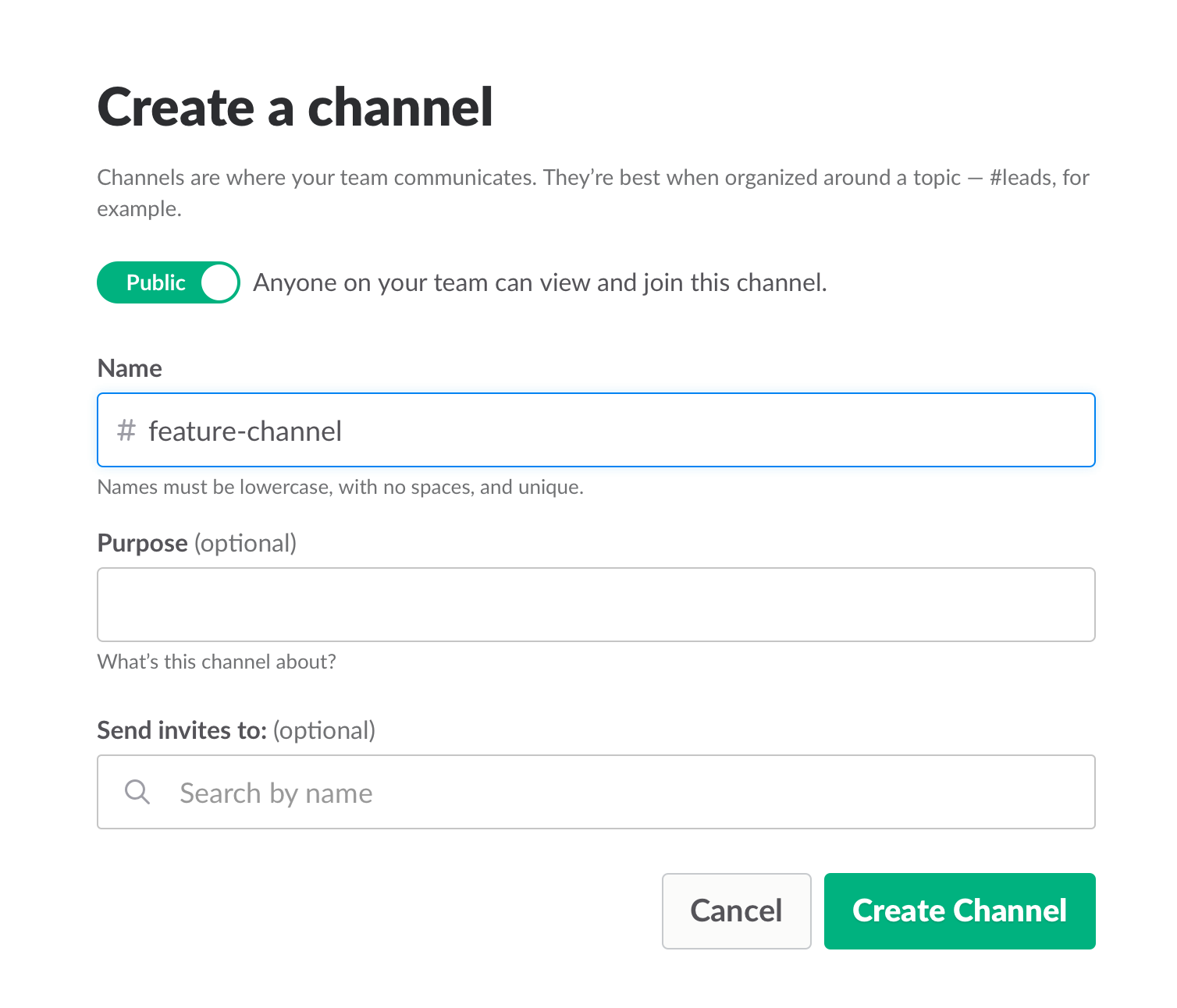
    To make sure everyone knew what was happening, we used Slack and opened a dedicated channel for the creation of this feature. We also had daily (short!) standups where we discussed what we have and what is missing.

    Opening a Slack channel

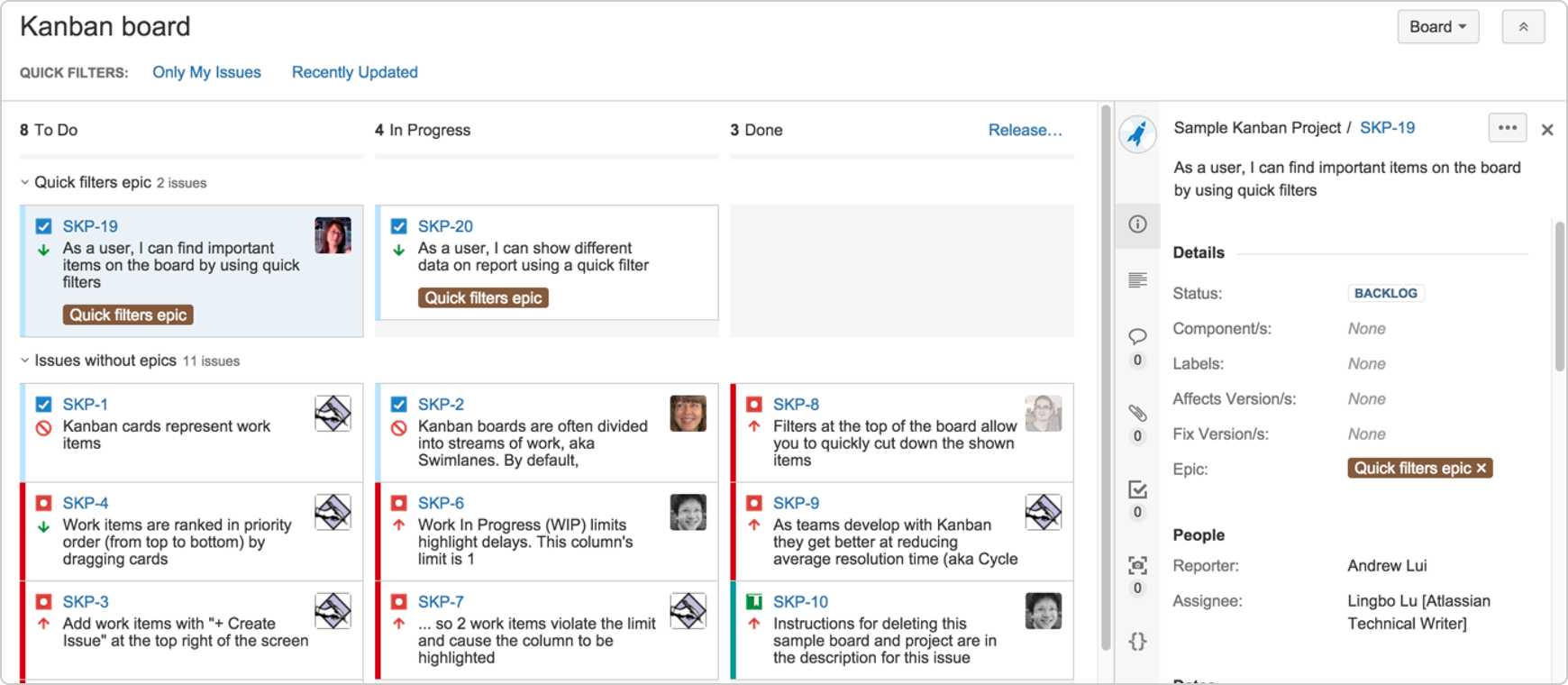
    Communication also includes team and assignment management. JIRA, our primary issue tracking tool, offers Kanban-style, Scrum and fully customizable boards, which show the progress of each development task, including the developer assigned to it, and his or her exact status or phase.

    This helps you understand what other people are working on, and just as importantly, where people are stuck. If you can, get everyone to work in an open space and put a large screen in the middle of it. This lets you stay in sync at all times.

    We used JIRA to open and manage bugs as well. This was helpful when multiple QAs found the same bug. It’s important to carefully choose which tickets are opened and put them under one epic, so everyone stays focused.


    JIRA Dashboard

    Another important aspect of communication is ensuring everyone uses the same terminology, as sometimes people might use the same term to describe different things or different terms to describe the same things. To prevent mixups that could waste your time, make sure everyone is on the same page. For example, do you say “system admin” or “<name (ex. BlazeMeter)> admin”?

    Work on the same development environments

    It’s important that everyone works on identical development environments and even on the same version of the tools and libraries. Otherwise, it could cause an (in)compatibility mess, including a lot of unnecessary back and forth and even might cause bugs to pop up. This environment needs to be as similar as possible to production, but only on a smaller scale.

    Conclusion

    Now look at the feature that came out of all that work here. I’m so grateful that I had the opportunity to work on it with an awesome team.

    I hope these best practices help you the next time you develop a new feature. Don’t forget to keep going agile after development and delivery by running tests in a continuous environment such as Jenkins for every commit.

    CA BlazeMeter works with Jenkins, ensuring you can load test in the cloud and analyze your data while shifting left. You can also use different APM tools, such as New Relic, AppDynamics and CA APM to alert you about errors before QA, which saves time.

    — Dor Atias