Tag: software

  • Database Bottlenecks: The Hidden Cause of App Slow Downs?

    Database Bottlenecks: The Hidden Cause of App Slow Downs?

    Performance problems can cripple mission-critical business apps. If you are lucky enough, your solution could be as easy as adding more WAN bandwidth, a few extra servers or a content delivery network, but the real problem arises when your database becomes your biggest bottleneck. When performance issues adversely impact the applications that keep your business operations running and revenue pumping in, the challenge is more difficult to overcome.

    It can be painstaking, tedious work to examine the architecture for flaws, dive into code for clues on sluggish performance and scour log files looking for correlation events. Among all the areas to examine, the following three problem spots should be high on the list of troubleshooting priorities to remove performance issues:

    1. Connection Pooling Problems
    2. Below Par Query Performance
    3. Insufficient Concurrent Capacity for Handling Heavy Traffic

    When database administrators (DBAs) fail to find and fix bottlenecks in time, businesses lose eyeballs and revenue—sometimes losing customers for life. Every transactional app accesses a relational database, and their biggest problem is the challenge of scaling horizontally. While modern databases support horizontal scale-out, today’s apps aren’t written to leverage this additional capacity.

    An intermediate software layer, database load balancing software, solves this challenge; it makes the apps able to use additional servers without any code changes. It often includes caching as well, which can substantially increase performance—again, with no code changes. Database load balancing not only makes it easy to scale horizontally but also helps you identify other bottlenecks and mitigate them in a matter of minutes.

    Database Load Balancing: The Silver Bullet?

    Database load balancing software comes with analytics tools that precisely pinpoint database issues in real time. It monitors everything from every read and write query to connections, server performance and overall database load. Detailed analytics offer insights into what you need to fix and where to focus your attention to ensure better performance. A load balancer has all the necessary tools needed to resolve performance problems in a timely manner. It efficiently addresses the three major performance problems previously mentioned and significantly improves app performance and availability through:

    1. Connection Pooling and Multiplexing: Database load balancing software can drastically decrease the number of connections to your servers by applying connection pooling and multiplexing. Unlike client-based connection pooling, this approach ensures greater operational efficiency and facilitates easy handling of additional connection spikes.
    1. In-Memory Query Response Caching: The analytics of the software identifies potential queries to cache and lets you cache them with no application changes. For example, you can cache an article in a content management system (CMS) for a day, having the comments section pull from the database to stay fresh. You can cache a zip code table for months. Look for the ability to set time-to-live expiration or automatic cache invalidation so you can ensure atomicity, consistency, isolation, durability (ACID) compliance and transaction safety.
    1. Dynamic Load Balancing: Database load balancing software routes queries from the app to multiple servers in a safe and consistent manner. Its automated read/write split ensures high performance by diverting all the read queries to available read replicas and writes to the master server. This load distribution increases capacity and facilitates an instant scale-out. A load balancer acts like a single point of control that offers deep visibility into performance needs. With real-time insights into the root cause of problems, the entire find and fix process becomes fast, efficient and effective.

    Saddled with the most difficult task of identifying database bottlenecks, DBAs can make their life easy and work efficient by leveraging a feature-rich database load balancer that automates the diagnosis of bottlenecks and gets the data flowing seamlessly.

    About the Author / Tony Branson

    Tony Branson is Database Load Balancing Senior Analyst at ScaleArc. Tony has a passion for dissecting tech topics such as transparent failover, centralized control, ACID compliance, database scalability and downtime effects. On his days off, he can be found watching sci-fi movies, rock climbing or volunteering. Follow him on Twitter.


  • 5 Common Misconceptions of Serverless Technology

    5 Common Misconceptions of Serverless Technology

    The rapid growth in serverless technology affords companies opportunities to save money on server costs and allows developers to save time and focus on coding rather than back-end operations. A challenge with such swift adoption is the difficulty in maintaining a standard understanding. In anticipation of the Serverless Conference, which was held last week in Austin, Texas, we asked experts in Heavybit’s community about common misconceptions.

    Myth #1: Serverless is a Revolutionary New Direction for Software

    “A common misconception is that it’s a revolutionary new direction for software,” says Nick Martin, co-founder and CTO at Meteor. “Really, it’s just the next step in the evolution of making software development faster and easier. Like the compiler, the database and cloud computing did in previous eras, serverless further abstracts away the complexities of modern app development and is part of an ongoing trend to free developers from entire classes of concerns.”

    As for the benefits for developers, Martin notes that developers can now “focus on their application logic and avoid undifferentiated work like provisioning, server management, or load-balancing.” Serverless ultimately “promises to let developers ship apps faster and at a lower cost,” he says.

    Myth #2: Serverless is a Gadget Technology for Hobbyists

    Nick Gottlieb, head of Growth at Serverless Inc. believes that one of the biggest myths is that it’s a ‘gadget’ technology that’s not mature or only for a hobbyist. “While serverless compute is still a very early technology, it’s built on the same core infrastructure that providers like AWS, Google, and Microsoft have been investing in and selling to enterprises for years,” says Gottlieb. Furthermore, “because the underlying infrastructure is battle tested, and the value it provides around cost savings and faster time to market are so great, there is already huge amounts of mission-critical enterprise workloads being done on serverless compute.”

    Myth #3: Serverless Will Hurt the Movement Toward Containers

    “Containers will continue to be front and center in terms of the underlying infrastructure, but that doesn’t mean they will be the primary unit of deployment for developers,” says Lawrence Hecht, author at The New Stack. “Take, for example, a cloud provider that may build its FaaS (function as a service) on top of containers and use Kubernetes to manage that deployment,” he says. “Individual developers would then deploy application components to functions instead of to container images.”

    Hecht notes that this will not happen right away and in the meantime, “We’re seeing emerging companies build dashboards that allow developers to choose which VM, container or function they want to deploy to. Those dashboards are becoming the gateway to the CI/CD pipeline.”

    Myth #4: Serverless is Free of Security Vulnerabilities

    “The biggest security misconception is thinking you no longer need to worry about known vulnerabilities,” says Guy Podjarny, co-founder and CEO at Snyk. While serverless addresses the risk of known vulnerabilities in OS dependencies, such as OpenSSL’s Heartbleed vulnerabilities, “These ‘unpatched servers’ account for the vast majority of successful attacks today. Serverless applications still contain a large and growing number of application dependencies, pulled from npm, Maven, PyPI and more. These components often carry known vulnerabilities, and require diligent monitoring and preventative tools.”

    Myth #5: Serverless Means No More DevOps

    “A common misperception is that it completely absolves development teams from the harsh realities of operating software,” says Joe Ruscio, partner at Heavybit. “While it does promise to almost completely do away with the ‘undifferentiated heavy lifting’ of provisioning and managing infrastructure, understanding how your application code performs in production remains of paramount importance.”

    — Malia Powers

  • The Impact of Automation: Considering 3 Facts

    The Impact of Automation: Considering 3 Facts

    I’ve been interested in the ramification of automation on human employment for a while now. My profession, IT, is bringing more automation to the planet every day. I would be irresponsible to not understand the ramifications of my work.

    Recently in my research I came across three facts that gave me pause. The facts are:

    1. Due to improvements in automation, it takes fewer people to create more goods and services.
    2. We are producing more good and services than we ever have, possibly more than we might ever need.
    3. Just as it takes fewer people to create goods and services, fewer people are garnering more of the wealth being created.

    The implications of these facts are dramatic and the implications are far-reaching. Allow me to elaborate.

    Fewer People Create More Output

    Consider this fact: In 1790 90 percent of the people in the United States were engaged in agriculture. Most of the people fed the population. Two hundred years later, 2.9 percent of the population was engaged in agriculture. A relatively small amount of people create enough food for all.

    Also, consider this one: In 1980 it took 26 people to create a $1 million in output. Today it takes 2.6.

    The pattern is obvious. As time marches on, it takes a lot fewer people to create a lot more wealth. Why? Automation technology. Every year we create more hardware and software that does work previously done by humans. Automation never tires and produces as much as we want, when we want. The trend is strong and consistent. The rate of innovation is increasing. And as the rate increases, more people will be displaced by machines and software. I talked about this extensively in the first article I wrote in this series.

    Let’s move on.

    We’re Producing All We Want — and Then Some

    Today China, India, Brazil, Vietnam, Indonesia, Pakistan, Thailand, Mexico, Italy and Turkey combined produce 18.5 billion pair of shoes year.  That’s more shoes made a year then there are people on the planet. (The current population worldwide is 7.5 billion.)

    Today there are 260 million cars registered in the United States,  which comes out to a little more than one car for every adult in the population.

    The number of cellphones in China in 2014 is 1.14 billion, in India there are 1 billion and in the United States there are 327 million. Just about everybody in these countries has a cellphone. And the prices keep dropping. Eventually, everybody on the planet will have a cellphone—which, by the way, has more computing power than did the computers onboard an Apollo spacecraft.

    Productivity no longer is constrained by the capacity of human labor to create goods. Whereas before the Industrial Revolution not enough goods were produced to satisfy consumer demand, today things are reversed. The modern struggle is finding enough buyers to purchase what’s been made.

    As I mentioned earlier, we’re really good at making as much as stuff as we want, whenever we want. And yet, despite this abundance, there is a problem.

    Wealth is Concentrated to a Few

    A report that came out earlier this year reveals a troubling fact: Eight people on Planet Earth own as much wealth as 50 percent of the rest of the global population. True, there is some dispute going on about the methods by which this number was determined. But, even if the number is 30 percent, the disparity in the distribution of wealth is astounding. More wealth is being concentrated to fewer people even as automation becomes more prevalent. Abject poverty may not be rising, but increased displacement of workers is. As workers become displaced, their wealth diminishes.

    Saying “Things must change” is absurd. Things will change. The question is, “What will that change look like?” Will we have a fully automated society in which there are more than enough shoes to go around, or will we still have a world in which there are those that go shoeless?

    What Do We Do Now?

    In previous articles I’ve talked about Universal Basic Income (UBI) as a possible way to address the problem of providing income for displaced workers. UBI is a viable solution, but not one that will to come to fruition in the near future. The problem is here today. So, what do we do?

    Read on.

    Economic Sustainability Over Economic Growth

    I’ve mentioned many times, there is a good argument to be made that the jobs taken away by automation are not coming back, nor will there be an abundance of new jobs to replace those taken. My prior article supports my assertion. Eighty-eight percent of job displacement is due to automation. The need for human labor is diminishing at accelerated rates. That’s the bad news. The good news is that automation has allowed us to grow our productivity more than we’ve imagined possible. But growth is not the answer. On a planet full of shoes, there are still those who go shoeless. The change we need to make is to move from an economy based on growth to one based on sustainability.

    Changing the Way We Talk About Things

    I’ve come to accept that we cannot grow our way into economic prosperity any more than we can grow our way into good health. In fact, too much growth can kill you—just ask someone who suffers from morbid obesity. So I made the change in how I talk about prosperity. I no longer use the term “economic growth.” Rather, I use the term “economic sustainability.” I am a big believer that thinking follows language. Change the way we talk about something and we’ll change the way we think about that thing. If we want to have a sustainable economy, we need to start talking that way.

    Creating Wealth for All

    Okay, I’ll come clean. I think that given the current trends, too few have too much. More wealth parity is required. But, as we have learned on the terrain, overt wealth redistribution is not the answer. We cannot tell somebody we’re going to take away a part of their wealth without upsetting them. But, we can set an example in the benefit of sharing the wealth to benefit all. We in IT have been doing it for years—it’s called open source. We learned a few years back that when we give it away, we get it back. The trick now is to go beyond IT and make the open-source mindset part of our civic sensibility.

    At some point in the not-too-distant future—say, about 20 years—we will be at almost total automation. If trends continue, there will be few with a lot and a lot with a little. People that don’t have a lot don’t have much to lose. Wealth inequality creates turmoil, unrest and overt aggression. If you think not, take a look at the excesses of France under Louis XIV which, by the time you got to Louis XVI, led to the French Revolution and the Reign of Terror. Or consider that the wealth disparity during the last generation of the house of Romanov led to the Russian Revolution. Nicholas dined in lavish halls while the serfs starved. Lenin prevailed.

    Wealth parity creates political stability and political stability creates prosperity for all. Achieving wealth parity comes about by sharing. Again, we who have code on GitHub know this. Again, the trick is to make the open-source dynamic part of our civic sensibility.

    Let me close by providing one more fact. One of the thing I’ve learned in my research is that as the population rises in a country, so does the GDP.

    Figure 1: Population growth among 9 most populous countries, 1960 -2015 (Source World Bank)
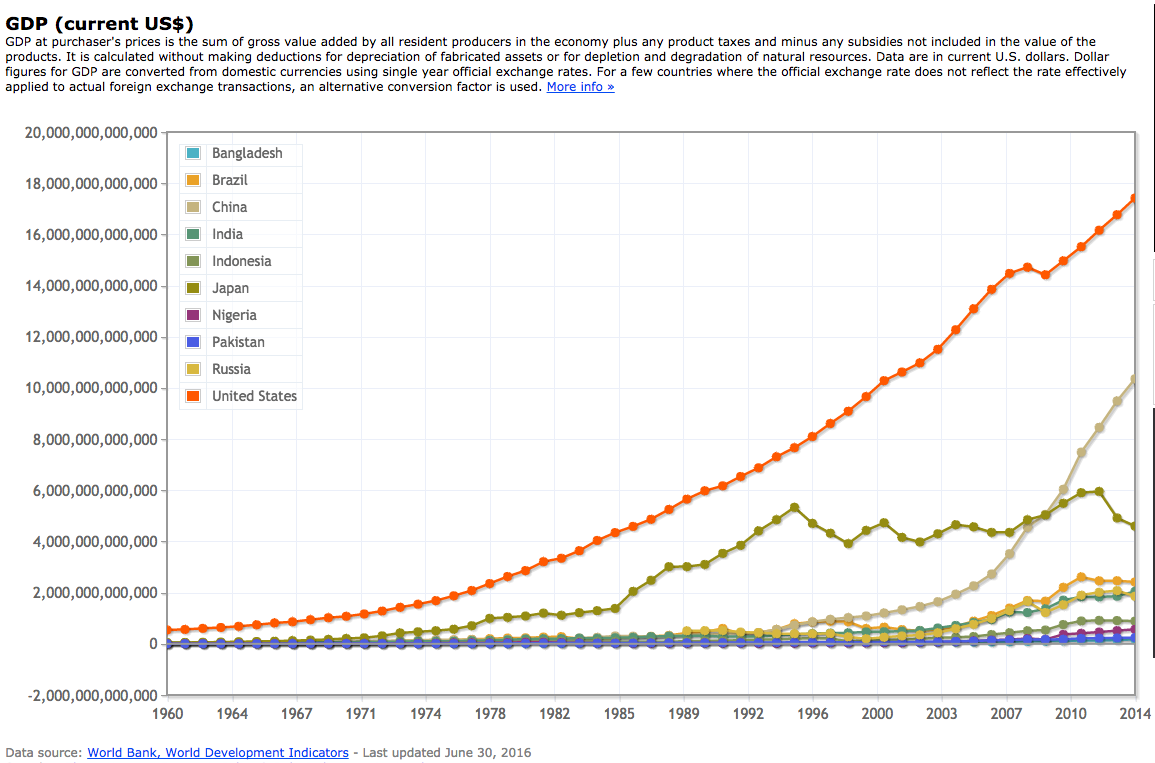
    Figure 2:  GDP Growth, 1960 -2014 (Source World Bank)

    But, again the trend is that the wealth goes upward to a few. So we have a choice. As automation increases, we can learn to share the wealth and create a world that is stable, sustainable and prosperous. Or we can keep the current trend in place, allowing the few to have the most. And because we don’t need a lot of human labor to maintain the levels of production possible, rather than risk ongoing political upheaval and civil unrest, we can just get rid of those that unfortunately are on the wrong end of the distribution curve. Their labor is no longer needed.

    Is such an idea vile and extreme? Yes, it is. Is it one without precedent? I’ll let you be the judge.

    — Bob Reselman

  • How Agile Are Your User Stories?

    How Agile Are Your User Stories?

    Around the world, enterprises are adopting the concept of Agile development. This methodology is based on a set of principles for software development by which requirements and solutions evolve through the collaborative effort of teams. User stories form the foundation of the Agile requirements process, and teams gather to create them by exploring how users will interact with their solutions. To facilitate planning and discussion, teams typically jot down stories on pieces of paper and then physically arrange and rearrange them. It is a curiously old-school process for such a forward-thinking method.

    User stories are so vital because they give developers just enough information to estimate the level of effort needed to implement the functionality described by the story. When written well, they can be powerful, because they help developers and testers view requirements from a customer’s perspective. They provide context and an understanding of what motivates the people who will use the solutions they deliver.

    Struggles with Stories

    Agile represents a significantly different workflow than developers have previously used. As enterprises work to expand and mature their Agile practices across their projects and teams, they struggle to figure out how user stories fit, because:

    • Developers and testers may prefer user stories over a lengthy, text-heavy business requirements document, but user stories are new to most business stakeholders and business analysts. As organizations try to transition to Agile, these individuals struggle to write high-quality user stories that accurately and sufficiently describe all customer needs. They get bogged down writing and managing them and lose focus on the bigger picture.
    • The number of user stories can get out of hand quickly due to complexity. Most enterprise projects involve the development and enhancement of multiple, integrated systems to deliver functionality for a variety of roles. Users can take many paths that often interconnect and overlap with other processes. This can mean hundreds of user stories for a project of any size. Manually recording and managing the wealth of information that the development team needs is not feasible, and user stories can be missed or misinterpreted in the process.
    • Critical nonfunctional requirements—such as those for compliance, security and performance—complicate the adoption of user stories because they weren’t designed to represent those types of requirements. User stories scribbled on sticky notes or created in an Excel spreadsheet don’t support the rigor enterprises need for audits, change management, history and traceability.

    Enterprises want to reap the benefits of Agile for their complicated, expensive, high-risk projects, but they want to manage complexity and risk as well. They need a robust Agile requirements tool to help them, especially for the creation of reliable, consistent and high-quality user stories.

    Making the Shift to an Agile Requirements Tool

    Just as approaches to development have changed, so has the workplace, necessitating a new approach to teamwork. PricewaterhouseCoopers noted in its paper, “Adopting an Agile Methodology, Requirements Gathering and Delivery“: “As companies shift from small projects and teams engaged in Agile to more complex projects and potentially distributed teams, there is a need to shift from paper and spreadsheets to tools that provide workflow, persistence and traceability.”

    The power of best-in-class requirements management tools is that they enable teams to use user stories for development while making it easier for business stakeholders and business analysts to create them. These tools eliminate the need to manually create user stories within the development teams’ Agile tools. They bridge the gap between traditional and Agile requirements, enabling enterprises to scale Agile while managing enterprise concerns.

    The powerful capability sets of tools such as this help teams to:

    • Generate high-quality user stories and tests automatically from process flows. Product owners and business analysts use customer journeys to automatically generate user stories and acceptance criteria with the click of a button. They push these artifacts into the development teams’ Agile management tool of choice, where developers and testers also have access to related requirements information, such as regulatory information, visual models and constraints, supporting a comprehensive understanding. User stories are reliable and consistent, and there is no longer a need to spend time and money to teach business stakeholders or business analysts to write them.
    • Work together to visually define customer journeys. This allows stakeholders to “tell their stories” as they work with product owners and business analysts to collaboratively define customer journeys. Using the familiar construct of user models—with steps, decision points, actors and condition statements—the entire team collaborates to record and analyze processes in a shared workspace. Teams maintain a focus on strategic objectives when making prioritization decisions and spend less time managing a huge list of user stories manually.
    • Reap the benefits of Agile while using enterprise-level capabilities for visualization, traceability and reuse. Support for visual models and the ability to relate them to one another and other requirements artifacts helps teams establish the precise traceability they need to ensure full requirements and test case coverage. It also supports improved change management and decision-making, ultimately leading to higher-quality software. Customer journey models can be reused across projects and teams, as can user stories and other requirements artifacts, saving time and improving consistency.

    Great strides have been made in Agile requirements management tools recently, but many enterprises are still using sticky notes to create and organize their user stories because they don’t know about what these tools can do. A next-generation tool enables organizations to scale Agile across the business and create a common ground for IT and business to meet. With capabilities including visualization, collaboration, traceability, management analytics and reuse, teams are more effective and applications are delivered faster.

    About the Author / Ruth Zive

    ruthziveRuth Zive is Vice President of Marketing at Blueprint. She is a metrics-driven marketing strategist who has worked for two decades serving B2B clients in the technology, healthcare and financial services industries. At Blueprint, Ruth is responsible for product marketing, analyst relations, branding, demand generation and inside sales initiatives. Connect with her on LinkedIn and Twitter.
  • Reasons Why DevOps May Not Work for You

    Reasons Why DevOps May Not Work for You

    DevOps is a great way for many organizations to optimize software design and delivery. Yet, like every other technological innovation in history, DevOps is not perfect. Here are some examples of drawbacks associated with DevOps.

    By no means do I think DevOps is a bad idea in general. I want to be very clear about that.

    However, organizations considering making the move to DevOps—and those that are already doin’ DevOps, as we say here on devopsy.kinsta.cloud—can gain useful perspective by recognizing the difficulties that DevOps can present. Those include …

    Narrower Team Member Roles

    Traditionally, software engineers were expected to bring “full-stack” skills to the table. That meant they should understand the ins and outs of all layers of an application stack.

    Under the DevOps model, each member of the software delivery team has a more rigidly defined role. Coders code, QA engineers test, IT Ops admins administer and so on. These people all talk to each other, but they do not share in the same tasks.

    In many cases, this approach is better because it allows each professional to focus on what he or she does best. But this can be a drawback for full-stack developers. Their broad skill sets are no longer valuable. This is why people such as Jeff Knupp complain that DevOps is “killing” developers.

    There’s a potential downside here for organizations, too. Under DevOps, they have to hire and manage more personnel to make sure there is a specialist who can cover each stage of the software delivery pipeline, rather than investing in a smaller number of full-stack developers.

    Software Feature Bloat

    One of the key advantages of DevOps is that it promotes continuous software delivery. That means new features can be rolled out faster.

    But the ability to add features more easily also raises the risk that software delivery teams will add functionality to software just because they can, not because it’s needed. More features are not always better, even if they can be implemented efficiently.

    Infrastructure Changes

    To make the most of DevOps, most organizations will have to upgrade at least part of their infrastructure to optimize software delivery. Many will need to migrate apps running on virtual servers to containers, for example.

    There is nothing inherently wrong with such infrastructure upgrades. But they are potentially expensive and complicated endeavors, and if you don’t complete them properly, you might not actually get very much out of the other DevOps processes that you implement. Organizations considering DevOps should keep this in mind.

    Half-Baked DevOps

    The final major risk of a DevOps migration is not actually a downside of DevOps, per se. It’s a risk that results from the chance that organizations will implement DevOps imperfectly.

    This can be easy to do, because organizations can mistakenly believe that doing DevOps means simply running a continuous integration (CI) server or changing job titles. In practice, DevOps also requires significant cultural changes and new methods of communication. If you implement a half-baked DevOps environment that includes the tools but not the culture, you’ll likely be worse off than you would without having attempted DevOps at all.

    Conclusion

    Again, I want to be clear that there are lots of good reasons to do DevOps. I’m not trying to go on record as the guy who hates DevOps, because I absolutely don’t. Almost all organizations have much more to gain than to lose by adopting DevOps, if they have not already.

    Still, being aware of the imperfections and risks associated with DevOps is important. DevOps is not a magic pill that will solve all of your software delivery problems with no side effects. If you want to avoid mistakes or unrealistic expectations when doing DevOps, you need to appreciate the drawbacks you may face.

    — Chris Tozzi

  • Is Your Company’s IT a Disaster Waiting to Happen?

    Is Your Company’s IT a Disaster Waiting to Happen?

    Recent IT disasters suggest gaps in hardware testing, backup system testing and inadequate disaster recovery plans.

    Although the summer often is the most profitable season for most airlines, this past summer wasn’t great for several of the largest carriers. In July, Southwest Airlines suffered a 12-hour IT outage, triggered by a router malfunction that quickly took down many of its core operating systems like a house of cards. Worse, backup systems failed to deploy. Flight delays and cancellations continued for a few days.

    A similar disaster unfolded at Delta in August, when a power control module at the airline’s central data center malfunctioned, creating a surge to the transformer and loss of power. Delta’s systems didn’t switch over to backups as planned, causing scheduling mayhem as agents couldn’t access key systems. For both companies, the outages resulted in tens of millions of dollars in lost revenues.

    Sure, both of these outages affected businesses running more traditional IT infrastructure, but even if your company is running in the cloud, your business isn’t immune from a damaging outage. In September, Microsoft Azure experienced two outages lasting several hours each, one in Europe and the other affecting U.S. customers across several key services, including SQL Database, Virtual Machines, Service Bus and Visual Studio team services.

    As software developers and testers, we often focus narrowly on the application and the server it is running on—but there’s a lot more to consider. Hardware and components, backup systems and third-party providers all come into play when testing applications for stability and reliability. Of course, there’s no way to prevent all bad things from happening but there are some steps you can take to cover the bases more thoroughly.

    Look Beyond the Software

    If there were three main lessons learned from these recent IT disasters, they would be:

    1. Assess risk of the whole environment. The quality of your software is only as good as the components it runs on—the hardware, network, power, storage, and other third-party applications are often required. Understand the full picture and all of the dependencies. Categorize applications based upon business criticality and failure rate to focus attention on the pieces that really matter.
    1. Backup systems and processes are not “set and forget.” Spend more time documenting them, testing them and training staff. Make sure that the processes are up to date as IT adds new components and vendors to the system or if the company goes through a merger or acquisition.
    1. Invest according to your risk profile. If your company can’t operate for more than a few minutes without access to certain systems, plan on budgeting for warm or hot failover systems which enable near 100 percent uptime with always-on, parallel systems continually synchronized and ready to go. It’s too expensive to enable this failover capability for your entire environment—you will need to be picky. Some IT assets, such as an airline’s scheduling and reservation systems, deserve top priority and resources, while other assets such as the HR system, can do with less. IT directors also need to frequently investigate the need for upgrading old, unstable infrastructure technologies. Most companies also don’t spend enough time monitoring and testing backup and recovery systems.

    To minimize the risk of a major IT outage bringing down your business and alienating customers, the recipe is as follows: Analyze the points of failure, determine what is reparable and what is not easily fixed (for example, installing software usually can be done much more quickly than building a new server environment) and, finally, install and test failover systems and processes that can maintain basic operations with minimal customer disruption.

    Delta & Southwest: A Quick Analysis

    In both cases, Delta and Southwest had backup systems that did not deploy properly—or, at least, in a timely fashion. The first point of action would include conducting thorough, regular testing of those backup systems and locations and upgrading capabilities if necessary. Second, since no disaster recovery system is foolproof, create manual workarounds for critical system outages. That would have helped tremendously so that customers weren’t completely stranded. Third, create a fully redundant second data center that switches over automatically when the primary data center goes down. Naturally, this is the most expensive option, but depending upon the outcome of the risk analysis, it may be worth the money.

    With Southwest, a router failure caused a cascading effect that brought down the network altogether. It’s not clear if a secondary network was available for failover, although it appears the answer is no. Again, better, more frequent monitoring could have isolated the router problem and alerted IT to fix or replace the hardware before disaster struck.

    Any company with technology from many different vendors should work closely with vendors and partners whenever possible to mitigate possible risks. Vendors often are able to provide insight into how they test their own systems and can even share test cases to assist in validating the end-to-end system. Keep in mind that aging technology is not the only problem—sometimes new technology brings untenable risks. A recent example is the Samsung Galaxy Note 7 and its overheating battery problem and recall. As well, it’s smart to understand how the local utility handles its outages and what if any help it provides to customers in the event of service disruption.

    Planning Ahead

    Large companies with complex IT infrastructures should take a holistic view of critical system availability, considering all of the possible ripple effects from a single point of failure. Today’s systems and networks are increasingly interconnected and interdependent. For both airlines, the effect on customers and employees lasted far beyond the actual outage, as managers struggled to get agents and planes reorganized and rescheduled. Take that risk into any spending calculations for the disaster recovery plan. Companies that have gone through mergers and acquisitions have additional complexities from IT integrations—or lack thereof. Failover strategies should ideally be incorporated upfront as part of any acquisition plans.

    Comprehensive testing strategies are paramount, although sometimes overlooked, in preventing outages. Request information from core vendors, such as the networking equipment provider, on testing processes and ask to see their test cases. Though the vendor should be responsible for ensuring thorough testing of their own products, the customer is always the one to suffer the costs of a downed system. Development and testing teams should get clear on how external systems and providers handle down time and equipment failure. Strive to align the company’s disaster recovery processes with those of partners.

    Finally, for companies running mission-critical systems in the cloud, there are ways to mitigate the effects of an outage. Multi-cloud management tools such as CliQr (now owned by Cisco) allow IT to quickly redeploy workloads from one cloud service to another whenever needed. Containers are also helping in this regard due to the inherent portability benefits of the technology. Companies are using containers to move applications and workloads from region to region within one cloud provider; from cloud to cloud, such as from AWS to Azure; and even from the cloud to an on-premise data center.

    There are many causes of IT outages today, and as IT environments become more multifaceted, supporting more technologies, data and applications all the time, those risks grow. We don’t have an answer to the problem, but there is one strategy: leave no stone unturned. Involving testers and developers in outage prevention and disaster recovery planning is a wise move, indeed.

    About the Author / Kevin Dunne

    Kevin Dunne picKevin Dunne is vice president of strategy and business development at QASymphony. Prior to joining QASymphony, Dunne was a business technology analyst at Deloitte. He can be found online at Twitter and LinkedIn.

  • 5 DevOps Techniques to Improve Software Hygiene

    5 DevOps Techniques to Improve Software Hygiene

    Thinking about frequent food contamination outbreaks, perhaps the old adage, “You are what you eat,” should be modified to, “You are what you eat—as assembled across an unknown supply chain.” Even foods advertised as fresh and healthy can be quite the opposite. And it could be because of just a single unhygienic practice hidden within the food production life cycle.

    It’s not unlike the issues facing modern software development. Now with the advent of open-source, cloud computing and component-based designs, the succulent software morsels we deliver can be fouled by a range of contaminates. And while not as a physically debilitating as a case of gastric flu, the impact on business can be extremely severe, such as major security incidents and compliance breaches—the E. coli of digital software production.

    The good news is that IT organizations can take effective steps to mitigate the risks. Much like food processing, software contaminates can be introduced anywhere code and data is handled and stored—from requirements and coding to testing, release and operations. This means all stakeholders must take responsibility and be held accountable for software quality. To that end, here are five good practices DevOps practitioners can use to improve software hygiene:

    Thoroughly wash test data before handling – Creating, maintaining and provisioning accurate test data is one of the most time-consuming and resource-intensive challenges in continuous delivery. It’s also fraught with business health hazards if teams fail to protect personally identifiable information or continually rely on data that’s well past its use-by date. With public cloud services providing convenient platforms for testing, ignoring these issues will only increase the risk of major compliance breaches. It’s important, therefore, to supplement data migration with fully automated methods to mask and subset sensitive data. Additionally, by continually enriching virtualized or emulated services with realistic test data, teams have a repeatable method for improving the quality and efficiency of testing.

    Pay special attention to open source freshness – Open-source software has become a large contributor to the portfolios of many organizations. But just because something is “free” doesn’t negate an organization’s responsibility for due diligence, including understanding total cost of ownership and mitigating security risks. Even though open-source projects have active communities, that hasn’t stopped code pathogens lying dormant for years (for example, Heartbleed went unnoticed for 2.5 years).  With open source, the onus is on development to retain code “freshness”—something that might be difficult if teams are constantly being pulled onto different projects, or if thorough risk control management isn’t a core competency.

    Don’t leave software lying around for too long – Just as many foods spoil quickly, software release bottlenecks can quickly leave a sour taste for business. Like a truffle imbues a marvelous aroma, modern digital business must be flavored with a continuous stream of application updates. And, since windows of business opportunity close quickly and application lifespans are as short as days, it’s critical any deployment delays are removed. Letting software linger in the release queue also introduces other hygiene issues—for example, teams putting off documentation or code-refactoring because they know they can always get back to it later. Inevitably they never do, and when the code finally gets deployed it’s unclean or laden with defects and bugs.

    Set up a “health inspection” SWAT team – In the traditional “software factory,” application performance management, security auditing and compliance checking often comes late in the software development cycle—leading to delays and conflict. DevOps, with its focus on team collaboration and continuous feedback, aims to rectify this by embedding these practices much earlier. But when resources are limited, it’s not practical to assign a security or operations professional to every agile team; it just won’t scale. What’s key, therefore, is to take a more pragmatic approach; developing teams of specialists and repeatable automated practices others can leverage to remove “bad smells” from code. This could involve:

    • Regular education on web application cross-contamination issues and modern API security techniques
    • Moving application performance management into pre-production to improve quality
    • Auditing services to regularly check composite applications assembled from third parties and open-source software
    • Automatically invoking application security testing before and after release and deployment
    • Methods to automate testing as requirements are modeled and changed—immediately linked to correct data and expected results
    • Scoring mechanisms to highlight security and risk problem areas—all bubbling up to a team and divisional level

    Work with your suppliers – In the rush to embrace modern cloud architectures for application scale and resilience, teams often forget that even the most robust platforms can succumb to problems. Savvy teams understand this, working with their cloud partners using modern monitoring and analytical methods to quickly detect and respond to many complex issues well beyond the scope of traditional rules-based methods and slioed tools. By using a design-for-failure approach, DevOps teams understand that no platform is infallible, preferring instead techniques that quickly anticipate and contain inevitable failures to keep the digital business running.

    Even the tastiest of food can be toxic, and it’s the same with software. However functionally rich our software creations appear to be, contaminates lurk everywhere within the software pipeline. Use DevOps techniques to pinpoint and eradicate “digital spoilage” quickly, and avoid making the business and customers ill.

  • Software Complexity Driving DevOps Automation

    Software Complexity Driving DevOps Automation

    The drivers behind increasing software complexity also are the drivers behind expansive DevOps automation. As the saying goes, “Software is eating the world.” DevOps is gobbling up software, too, engulfing it in practices that are necessary to make it thrive under the pressure of the current environment.

    That environment and those drivers are of keen interest to many. DevOps authority Andy Vitus, partner at Scale Venture Partners, has identified four drivers in particular that are creating the software complexity pushing DevOps automation.

    Multiple Distributed Software Locations

    According to Vitus, by moving software from one server to multiserver to multiple data center deployments, the industry has made software more elaborate. Applications now execute in a distributed manner and in parallel using multithreading inside multiple processor cores; among many servers running multicore processors; and in and between geographically dispersed data centers. This makes software more powerful and reliable, though it demands more DevOps automation to produce it.

    Simply incorporating the ability for software to run in parallel using multithreading adds intricacies to the development process. To keep both the workload and the number of man hours needed during development manageable, automate as much of the additional coding duties and testing as possible.

    “Running applications across servers and data centers requires that you ensure consistency in the data layer,” which will then need new databases to handle the load, says Vitus. Depending on the database, the developer must rewrite the software to be able to use it.

    The entanglements don’t end there.

    With mobile applications, mobile devices and back-end servers both store data. “You have to be a lot more careful about knowing what version of the data is the true one, unless you’ve got a synchronization layer built in,” says Vitus. Either way, programming annoyances can be introduced.

    Getting Lost in Translation

    Expanding development from a single programming language to multiple languages, even for the same project, has made software more convoluted. In legacy development shops, programmers typically used one language for everything regardless of whether it was the best language for their creations. These days teams are applying choice languages such as C++, Python and Go to the tasks to which they are best-suited. “This increases the complexity of security and patch management as you use six, seven or eight different languages all with their own vulnerabilities,” says Vitus.

    While adopting several languages certainly adds to patch management and security headaches, understanding how each language can and must be compatible with the others for them to work together is an entirely new challenge. “The ways that they handle variables and time stamps changes over time, and you have to ensure that different services can still talk to each other,” says Vitus.

    Stacks of Stacks

    Moving from a simple three-tier stack to a distributed microservices architecture catches software development in another snag, Vitus says. The database layer has grown to include in-memory and other database types. As development breaks the application layer into microservices, each potentially with its own data store, the two layers combine to create this new stack.

    Millions of Endpoints

    Finally, moving from deploying servers to deploying servers, mobile and Internet of Things (IoT) takes software down new paths of mostly uncharted territory, says Vitus. “Today you deploy software changes to a back-end server that must talk to a mobile client using iOS or Android or to IoT devices such as dishwashers and light bulbs in smart homes,” he says. “You could be deploying code to millions of devices.” This certainly affects the construction of the code for use on so many different platforms.

    Conclusion

    These drivers help create a magnified need for DevOps automation. Considering the costs of hiring engineers and technicians to do the same development work manually, the world will be watching companies that are pushing for increased automation to displace those labor costs. “To the extent that you can offload some of that to regression tests, you end up saving, and the cost of building a new software product goes down,” says Vitus.

  • DevOps Q&A: Datalink’s Dennis Vickers on MobileApps

    DevOps Q&A: Datalink’s Dennis Vickers on MobileApps

    Companies are custom-building mobile enterprise applications to enhance employee productivity on smartphones. devopsy.kinsta.cloud recently spoke with Dennis Vickers, director of Software Solutions at data center services and solutions provider Datalink about this trend and where DevOps fits in to the process.

    devopsy.kinsta.cloud: Why does applying smartphones to business initiatives require so much additional custom-built software?

    Vickers: Companies have developed and designed legacy software to group things that need to get done together into applications. With mobile application development the focus is more granular in terms of functionality. It’s not that the applications that we designed for the legacy environment don’t fit on the smaller screen, though they don’t. It’s really that the whole concept of having a group of functionalities in a single application doesn’t really work in a mobile environment. You need to rethink the way that not only your applications work but really the way that you do work. You need to think more in terms of granular work than accumulation of work.

    In finance, for example, you might have an application that combines accounts receivable, accounts payable, even expense management. You would have an application that would have all of that functionality in it. For mobile apps, what would make sense is to break out the expense management part of that and make that a mobile app that allows users to be able to use their smartphones to actually capture expenses as they’re incurred, as opposed to having to save a receipt or remember what your expenses were and then go back to an application and fill that in later at the office.

    devopsy.kinsta.cloud: How do you apply DevOps development approaches to provide usability on mobile devices for the most needed features and functions of in-house applications?

    Vickers: Mobile applications tend to be single functions focused on getting something done. Users are much less tolerant of anomalies in the software, whether that anomaly is a bug, a poor user interface or anything that is undesirable about the application. They’re not nearly as willing to look for workarounds with a mobile app as they are with legacy applications.

    You have to have a continuous delivery approach with mobile applications because the time frame between deliveries has to be accelerated. You have to automate that process. We’ve made good use of some of the automation tools, specifically Puppet, around doing continuous delivery. We use tools for source control and QA (quality assurance). Some type of automated delivery process is critical because the turn time for release has to be shortened. There’s just not a willingness for users to wait long periods between releases.

    devopsy.kinsta.cloud: Can you discuss the custom-built software project where you developed a custom equipment maintenance app that feeds into the customer’s proprietary maintenance application?

    Vickers: We developed that for an aerospace company that had a requirement to provide field service for one of the Department of Defense systems. They had to be able to maintain large pieces of equipment. We had to build an application that enabled them to be at the equipment and do the data collection that they needed at that time. It walked them through the data collection process right then.

    Before that, they had a paper process where they would print out instructions, go out and write down the information that they needed to collect, and then go back and enter that into an application. This allowed them to be able to do that closer to the actual event, which cut transcription errors and data collection errors and made the whole process much more efficient. That was an extension of a legacy app that added quite a bit of value.

    devopsy.kinsta.cloud: For that Department of Defense project, were there particular development tools or approaches in DevOps for the software?

    Vickers: We used an agile methodology where we iteratively released the software and did test and review and then essentially layered the application. We provide a layering process as we build and add features to the application. We delivered to the customer through an automated process using Chef. We use Jenkins to do some release management, but we often revert back to Chef or Puppet.

    What we haven’t done a lot of yet, which I think is important and I see growing in the mobile platform, is monitoring. I think that monitoring is an important part of DevOps. I haven’t seen that move into the mobile environment nearly as much as I think it needs to. I think it will happen in the short term. I think there’s some good monitoring tools out there that are coming online or that are maturing and are going to be adopted for mobile app dev.

    devopsy.kinsta.cloud: There was another project where you custom-built a jobs app that enables union members to apply for posted jobs without going into the union hall.

    Vickers: We developed a mobile app so union members can review jobs that are available and request the job through the app. They can receive job assignments and electronic tickets to go out and do that job. It saves traveling down to the union hall on a regular basis and makes the whole process much more efficient.

    The only difference in that project is that we needed to integrate with the back end through an API. The tool we used to help us interface with that API and manage that API integration was Postman. We use it for testing, managing and documenting APIs we build or work with.

  • Build fast, then build right 

    Build fast, then build right 

    This article is a part of a series of pieces on digital innovation, accelerating change and the rise of the coded business from innovators in the Chef community. This article is by Kate Matsudaira, founder of Popforms

    Businesses have always needed speed and scale to meet customer demands. Today though, the kind of speed and scale businesses require to stay ahead of voracious consumer appetites and competitive offerings can only be achieved through a combination of: automation; internal culture shifts internally to integrate developers and IT functions closer together and more closely with the business; the use of commodity hardware; and a willingness to offer and embrace imperfect products. Then, and only then, will companies realize the benefits of moving quickly to deliver product, and also in unlocking innovation in this process to generate new revenue streams.
    For this to work, CIOs and CTOs must fully understand the business. They can no longer just be experts in technology. That’s not enough. For IT to evolve from a cost center to a revenue generator, IT must be integrated and engaged in the enterprise – large and small enterprises alike.

    Take a specialized candy company, for example. Before, it would not have been economical for this kind of business to scale at speed. But now, with minimal expense, it can acquire the compute cycles it needs, automatically deliver working code into its expanded production environment, and keep IT costs down through automation.

    Also, with the cloud and SaaS, costs for technology are way down – or, in some cases even free. This commoditization of technology is hugely positive for IT and its new role in many companies. Technology is no longer such a massive sunk cost. CIOs and CTOs can focus on meeting the quickly changing needs of internal and external customers to drive the business and growth forward and upward.

    That said, the pressure is on to deliver new code and new software solutions much faster, customer demand is relentless and escalating in intensity and speed. There is an almost immediate need that has to be fulfilled each and every day. And only automated and continuous delivery of code can meet that need in businesses of all sizes. It’s clearly a competitive imperative – and one that businesses must now approach differently as demand for “now” replaces demand for “perfect”. I advocate building v1 fast, then building v2 right. This gets product in the hands of consumers quickly and allows the team internally to answer pertinent questions that impact the long-term success of the product including:

    • How quickly will the data grow?
    • How fast will writes need to be?
    • Will it be feasible to write directly to the data store, or do you need a queue to manage

    writes?

    • What will the throughput be, and is it enough?
    • Will the system scale with usage?

    This “Lean Startup” approach to software development – which advocates fast iteration and data collection to hone in on the right product and requirements as quickly as possible – is all about figuring out what customers will use and then building those things.  And these same ideas can be applied to the technical ways we build products, too.

    Put another way – similar to creating a minimum viable product (MVP), build the minimum viable technical implementation that meets the business goals (the product can meet current usage requirements and performance).

    Most engineering teams have been taught to think about the software design and architecture from the beginning and build something that can scale. However, if you don’t have any customers yet, scaling really isn’t your challenge.  So, in some ways, designing for scale when you don’t have to scale yet, is solving the wrong problems.

    Of course, I am not advocating doing something careless, or writing bad code, but don’t over- engineer or solve for problems until you have them.

    In many ways, this process is about looking at the problems differently, and instead of solving the “big” problem, focusing on speed and efficiency – getting the highest ROI (return on investment) for your development resources.

    So you modify your development process to ship the first version quickly, and then once the v1 is out in the wild, plan to start on the v2 right after.

    Then your v2 can address all the problems with the first version of the product. You can improve the usability, cut or add features based on customer usage and feedback, pick the right technology and libraries to power the product, and spend time writing acceptance tests and unit tests that are unlikely to change. And, from a business perspective, you get the product out there faster, so it is easy to understand if it is going to drive revenue and success.

    This process makes sense because it:

    • Reduces the risk of over-engineering
    • If you build the wrong thing you can correct it
    • Chances are you will get to market faster

    So what are the downsides?

    • Total time to build is more than if you just got it right the first time. And operations can be a headache.


    If you do embark on this journey, here are some pointers:

    • Get management buy-in
    • Measure everything
    • Understand that the v2 will take much longer than the v1 and set expectations accordingly
    • Have a tight feedback loop with your customers
    • Make sure v1 and v2 are celebrated equally

    This is the formula organizations need to follow to be more competitive in today’s business of environment of rapidly evolving technology.