Tag: software

  • Eclipse Foundation Formally Releases Jakarta EE 9 Spec

    Eclipse Foundation Formally Releases Jakarta EE 9 Spec

    The post-Java Enterprise Edition (EE) era has formally begun with the release of a long-awaited Jakarta EE 9 Platform and Web Profile specification from the Eclipse Foundation.

    In addition, the Eclipse Foundation has announced that version 6.0.0 of the open source Glassfish application server has now been certified to be compliant with Jakarta EE 9.

    Functionally equivalent to the existing Java EE 8 specification, the release of a Jakarta EE 9 Platform and Web Profile specification is intended to enable IT vendors that have built offerings based on Java to shift their naming conventions to Jakarta EE 9.

    Mike Milinkovich, executive director of the Eclipse Foundation, said now that the Jakarta EE 9 specification is in place IT organizations should expect to see the members of the Eclipse Foundation that contribute to the project begin working more aggressively on a Jakarta EE 10 specification that adds more features.

    Under the auspices of the Eclipse Foundation, Milinkovich added there will be a lot more focus on developing a truly cloud-native implementation of Java EE as work on the next generation of Jakarta EE platform advances.

    The rate at which new capabilities were being added to Java under the stewardship of Oracle had become an issue given the rate at which other programming languages are being advanced. Oracle agreed to relinquish control of the Java specification to the Eclipse Foundation, which in theory should lead to a faster rate of innovation as more contributors participate in an open source project.

    However, Oracle insisted on retaining the rights to the Java trademark because it has support contracts in place for existing instances of Java that provide a significant stream of revenue. Providers of rival platforms based on Java are hoping enterprise IT organizations will shift quickly to Jakarta as part of a way to reduce their support costs at a time when IT teams are under intense pressure to reduce the total cost of IT.

    Despite the rise of a wide range of programming languages in recent years, Java is still widely employed with most enterprise IT organizations, many of whom have been using Java since it was first made available by Sun Microsystems. Reliance on Java is not likely to significantly decline anytime soon; however, most IT organizations are now making greater use of additional programming languages alongside Java. In fact, many of the applications that DevOps teams are building and deploying are made up of modules that were built using different programming languages.

    It may still be a while before a Jakarta EE platform is pervasively employed in IT environments. However, it’s clear a new era that should result in advances that make it easier to deploy applications that are compatible with Java faster has arrived. How those capabilities will manifest themselves may still be unclear, but the fact that they are being worked on should be a comfort to IT organizations that have already invested millions of dollars in training developers how to build Java applications optimally.

  • The Role of DevOps Feedback Loops in Your Value Stream

    The Role of DevOps Feedback Loops in Your Value Stream

    Feedback loops are found in all systems, organic or inorganic. They propel the recirculation of hot or cold air to raise or lower temperatures; they drive the idea exchange that helps businesses fine-tune operating strategies. Yet, nowhere are feedback loops more important but also misunderstood than in software delivery.

    Attaining the “holy grail” of software development—gaining maximum efficiency and maintaining velocity while reducing or eliminating wait times and waste—involves a variety of value stream activities that generate complex feedback loops. These loops are not sequential. They must operate in tandem and in sync with one another within a constrained environment or delivery flow will be disrupted. Understanding, mapping and optimizing this “ecosystem” is essential to ensuring all feedback loops are timed appropriately and no software activity is thrown off schedule.

    Misperceptions of Software Feedback Loops

    Much confusion arises among business leaders regarding the role of feedback loops in software delivery because they are also invaluable in other business activities. There, feedback loops operate in both open and closed systems. A system, whether open or closed, is a set of elements that take inputs through a phased transition to the emergence of an output.

    For example, assume a bank is developing a new depositor service, and although it announces the service will be available soon, it does not solicit specific feedback on how the service will work. Even if it receives random feedback from the public, it is coming from outside the controlled environment. That’s an open system. If the bank hosts customer focus groups and monitors the outcomes of specific variables without any opportunity for outside influences to impact the process, the activity is taking place in a closed system.

    The use of a closed system, whether in business or software development, embraces the principles of systems thinking—the shift in mindset away from linear to circular. With systems thinking, there are a half-dozen defined components, one of which is feedback loops. Understanding feedback loops is an essential part of value stream management to achieve the goal of delivering value to customers faster.

    Feedback loops can have a very positive or negative impact on software flow because awareness of and action on effective feedback impacts all parts of the system. But, before software leaders and teams can address their feedback loops, they must identify them in the value stream and understand the causality of each loop. As you identify feedback loops, patterns start to develop. These patterns can be direct or indirect, and feedback may need to be amplified or throttled, automated or removed altogether based on the loop’s causality.

    Optimizing the System

    Right now, feedback loops are likely disrupting software delivery flow and impeding velocity for millions of companies around the globe because software professionals, from project managers to software engineers, don’t understand them. Even though they recognize that software activities are taking place and that one activity may impact others, they don’t adequately consider the fact that information and material flow are interconnected, as are request flow, development flow and operations flow. They don’t perceive that software delivery is like a three-dimensional game of chess, with the pieces moving around the board multi-dimensionally.

    They also haven’t analyzed their feedback loops in detail so they can adjust based on reality, not perception or plan. Even if they have mapped the flow and the loops, most are unaware of the severe negative consequences even a seemingly minor issue can cause.

    Follow a Real Example

    Here’s an example that mirrors real-life scenarios I have witnessed time and again. Assume that for a new feature request, Epic 1 has entered Intake. The project gets into the Design phase and other work starts moving across the organization. Since everything is interconnected, the User Story ends up in Backlog waiting for the Epic to be completed. Two more User Stories are completed but the Epic has not moved, so they all sit in Backlog.

    Once the Epic clears Design, the User Stories start moving to the Plan phase and the Epic can go straight to Development. Soon, User Stories are In Progress and Material Flow kicks in. Somebody is working on a sprint, and someone else is working on those two pieces of code to make the change or implement a story. The DevOps pipeline is flowing, but not as efficiently as it could.

    Let’s assume instead that teams and managers now understand the feedback loops, and they have been automated to the greatest extent possible. User Stories are automatically moving from Backlog to In Progress once the Epic enters Development.

    When code goes from Build to Test, if a defect is discovered, automated feedback loops can connect to the right User Story and move the code back to In Progress. The developer fixes the defect and it goes right back to In Progress. The company meets its release window.

    In addition, once these elements are connected, and everyone understands these loops, management gains traceability across the value stream, which makes everyone, including customers, happy.

    Beyond the Basics

    The effort described here may sound like a lot of work to the uninitiated, but in practice, the effort more than pays for itself. That’s a great thing because it doesn’t stop here. In our example, as in virtually every software project, there is a lot of valuable human feedback beyond what I have mapped. It could be the information flow from a product manager through a product owner and on to someone tasked with the development portfolio. Or it might flow from testers to the product owner.

    Companies don’t have to map all this flow, but they should understand and address its potential impact. Furthermore, as project specifics, customer mindsets and other variables change, teams should adjust accordingly. That may mean creating, amplifying, throttling or automating feedback loops—or removing them altogether.

    Once organizations have attained a solid footing, they can explore more options. For example, tools, especially with integrations between and among them, can propel and automate the feedback loops, but they should be aligned, from a systems perspective, with the organization’s project workflow.

    Final Thoughts

    Streamlining flow through more efficient feedback loops is only a piece of the puzzle, but it opens up new opportunities such as more easily recognizing and removing waste. It enables organizations to release software faster, which is an imperative for digital transformation.

    Even if they don’t develop software in-house, firms that use enterprise software, from Salesforce to SAP S/4HANA, often have teams that modify it. Plus, customers and end users are all clamoring for a no-touch, self-serve digital experience. If a firm doesn’t provide, its competitors will.

    In mastering the science of delivering quality code at the right level of velocity, companies propel greater innovation, deliver ROI faster, ensure higher quality with lower costs and deliver products that better fit their intended audience and use. They also position themselves to be value stream leaders, and that pleases everyone from the board room to the sales floor.

  • Dell Pushes Computing to the Edge

    Dell Technologies today set its sights on becoming a major edge computing player with the launch of a Dell EMC PowerEdge XE2420 server optimized for space-constrained environments and a smaller version of a pre-integrated Dell EMC Modular Data Center Micro 415 (MDC Micro) ruggedized platform.

    In addition, Dell launched the Dell EMC Streaming Data Platform, a streaming analytics platform based on open source Kafka software. Dell is using Kafka also to provide an embedded management capability known as the Dell Remote Access Controller (iDRAC 9 Datacenter) for its edge computing platforms.

    Matt Baker, senior vice president for Dell EMC strategy and planning, said edge computing applications require a different approach to IT infrastructure because data is being processed and analyzed in real-time. Dell expects that eventually 75% of all data will be created and processed outside of a data center, he said.

    A primary driver of that transition will be the rise of wireless 5G networks, which will make it feasible to build and deploy real-time applications on edge computing platforms.

    Dell, of course, is making a case for distributed IT environment made up of its platform, contending will be easier for IT organizations to deploy and manage.

    The iDRAC 9 Datacenter platform, for example, provides a remote deployment capability that Dell claims can reduce administrator-attended time by up to 99.1% per server after initial setup. The streaming analytics capability, meanwhile, makes it possible to discover trends, fine-tune operations and create predictive analytics to help ensure peak performance and reduce downtime. Dell has also made available an automated certificate enablement tool to enable zero-touch security at the edge and in central locations.

    All told, Dell claims to be collecting nearly 2.9 million data points per server that can be surfaced in as many as 20 different types of reports.

    Baker said Dell has no plans to extend its data streaming analytics capabilities to other platforms, so IT teams will have to decide to what degree they want to standardize on Dell infrastructure versus setting up a streaming analytics platform of their own that is capable of supporting edge computing platforms from multiple vendors.

    Whatever the approach, the one thing that is certain is the way applications historically have been built and deployed is fundamentally changing. Rather than relying primarily on batch-oriented applications that often require large amounts of data to be transferred across networks to either a data center or public cloud, a lot more data is going to be processed at the edge because of application latency requirements. Edge computing applications, for example, will need to process analytics in near real-time to optimize a process or end user experience in milliseconds.

    Naturally, that shift will have profound implications for the management of IT going forward as IT environments become even more distributed than they are today. In fact, the real issue isn’t so much how computing platforms will be deployed at the edge so much as it is how they will be managed, at a time when most IT organizations are already short-staffed.

    — Mike Vizard

  • Decoding the Modern Enterprise Software Spaghetti

    Decoding the Modern Enterprise Software Spaghetti

    Modern enterprise software architecture is growing increasingly complex. Organizations are jumping on the digital transformation bandwagon in growing numbers. They are striving to become more agile and continuously deliver new code, whether on-premises or to support cloud migration efforts. In the process, IT teams are amassing an ever-growing inventory of applications and databases, which generally includes a blend of custom code, open source and commercial applications.

    “Spaghetti code” is what some call a tangled mess of a program—one that is difficult to follow, poorly documented and almost impossible for anyone but the original developer to troubleshoot or upgrade. Even today, when managers and developers take a more structured and disciplined approach to implementing code, the enterprise remains a patchwork of technology, a kind of spaghetti that can be difficult to understand and detangle.

    Given these layers of complexities, it is imperative for organizations to be equipped with the right processes and tools to map out their IT assets. They need to understand how programs and databases interconnect and how a change in one can have implications across the network that imperil availability, performance or security and negatively impact employees and customers. Here are some best practices that enterprises looking for an easier digital transformation journey can follow.

    Gleaning the Impact of Enterprise Software Changes

    Implementing a software change or embracing a new application that has a puzzling code makeup has plenty of inherent challenges—not to mention potential long-term disruptions for multiple departments, functions and processes within an enterprise. Whether an organization is dealing with inherited applications from a merger or acquisition or simple system migrations, much depends on how it is coded. As a result, enterprises must familiarize themselves with the overall layout of the enterprise architecture, down to the code level. This comprehensive level of analysis aids organizations in identifying the full scope and impact of the desired changes or updates.

    This is especially important for software teams who are operating on tight budgets and strict deadlines. Some important factors to consider in a comprehensive analysis include:

    • Identifying the impact of a change request on the software development project or on a business’s IT infrastructure.
    • Determining which software resources must be modified to implement the requested change.
    • Calculating the cost, time and effort needed to perform the change request.
    • Ensuring that the requested change complies with internal and external regulations.
    • Eliminating or minimizing any security risks associated with the change.

    Decoding the Spaghetti With Automated Discovery and Code Mapping

    A study by research firm Enterprise Management Associates (Next-Generation ITAM) found that the average IT organization uses 11 or more different inventory and discovery tools—some even more than 40. However, none deliver the full picture and they can often contradict each other. As a result, the average IT organization spends 15 hours every week manually resolving discrepancies among its various discovery tools. These hours translate to hefty costs.

    Fortunately, new approaches to discovery blend static and dynamic analysis methods that can operate in real-time to decompose software dependencies down to the code level. These new tools provide significant improvements in discovery and mapping, eliminating the need for multiple, redundant tool use and wasteful manual deconflicting.

    According to a recent Forrester survey, 56% of IT managers don’t have a complete view of dependencies between applications or between applications and infrastructure. However, today’s evolving business landscape dictates that technologies must evolve to keep up with an organization’s shifting needs. Software changes, when implemented strategically, can help businesses be more productive, efficient and profitable.

    To ensure that software changes serve this purpose, IT project managers need to implement a solid software change assessment system. With the help of technology, checklists and processes, organizations can outline a path that yields efficiency. They can understand and decode that tangled mess of software called the modern enterprise tech stack.

    — Soumik Sarker

  • 5 Ways DevSecOps Can Manage Software Supply Chains

    5 Ways DevSecOps Can Manage Software Supply Chains

    The unbridled use of open source components within the software supply chain is on a major uptick, according to new research. Even as this surge in open source dependencies fuels faster innovation, the study shows that it comes with high cybersecurity costs, as the number of breaches related to these components is similarly on the rise.

    However, the numbers also indicate there are some clear practices used by the best DevSecOps teams to minimize the risk while maximizing the speed and agility that third-party components offer.

    Sonatype and research partners from IT Revolution and Galois made a thorough analysis of download patterns, software component makeup and DevSecOps behaviors around open source components and third-party libraries for the “2019 State of the Software Supply Chain Report.” Their analysis found that the rate of open source component releases has picked up by 75% in the last two years and that download requests from teams using these components have risen 68% year over year.

    Most tellingly, the study showed that among modern applications today, 85% of the average code base is comprised of open source componentry. Not only are the majority of applications using open source components and libraries, but also they depend on them heavily.

    “The practice of assembling open source component releases into the form of an application screams of efficiency. Developers no longer need to code every line from scratch,” according to the report. “Developers can download component releases in seconds that deliver new capabilities, built by experts outside of their organizations who make their code freely available to others.”

    Perhaps not coincidentally, the study noted a parallel rise in breaches associated with open source component use. Last year 1 in 4 organizations suspected or verified they experienced a breach related to open source components in the last 12 months. That’s a slight improvement over last year’s stats, which had it pinned at 1 in 3 organizations. But since 2014, that rate of breaches has risen by 71%.

    The trouble is, many of the components developers download and integrate into their code are full of dangerous vulnerabilities. For example, just over half of all JavaScript package downloads contain known vulnerabilities, with 1 in 3 rated as high vulnerabilities. One in 10 of those flaws were rated as critical.

    The point the report hammered home is that not all components are created equally. There exists a certain class of well-run open source projects that release updates more frequently, update problematic vulnerabilities faster and remediate flaws more quickly. It is up to DevSecOps teams to systematically manage components, so they leverage more of these high-quality open source projects and try to avoid the riskier open source dependencies.

    “Management of software supply chains is not simply ensuring quality at velocity. Our supply chains are being attacked by adversaries in new and creative ways,” according to the report. It found that organizations that actively manage their supply chains are able to reduce the proportion of vulnerable components by 55% compared to those who do not.

    The report found several software supply chain practices contributed to this reduction of risk, with the following five standing out as the most impactful:

    Develop a governance program: Foundational to this is having some sort of open source governance or standards policies in place, according to the report, which noted that among the best DevSecOps organizations at managing risky components, nearly 3 in 4 have such policies in place.

    Have a process for evaluating and adding new components: As a part of that open source policy, the best teams have standardized processes for how developers add new open source components. This includes how these components are evaluated, approved, standardized and so on. The exemplary organizations are 11 times more likely to use this kind of process for new dependencies.

    Proactively remove problematic components: New vulnerabilities are discovered every day, so simply evaluating a dependency upon its first inclusion in an application can only take an organization so far. The best organizations also take the initiative to look for potential sources of open source vulnerabilities in existing code. That includes proactively seeking out and removing known vulnerable dependencies, as well as reducing the attack surface of the code by eliminating open source dependencies that aren’t being used. The best organizations are 9.3 times more likely to do so.

    Aim to always use the latest versions of components: It should go without saying that the latest version of any given component has the least vulnerabilities. The report showed that component releases that are 3 years or older have a 65% higher defect rate compared to newer components. Exemplary organizations strive to use the newest updates of all of their open source components and are 6.2 times more likely to do so than other organizations. That doesn’t happen accidentally—these teams are 10 times more likely to schedule update dependencies as part of the daily work of DevSecOps teams.

    Use Enforcement Automation: Just having a policy in place is not enough—organizations need to enforce the open source standards to reduce risk meaningfully. The study showed that DevOps practices combined with automated enforcement of policies increase developer adherence to standards by 150%. The exemplary teams with the lowest open source defect rates are 12 times more likely to have automated tools to track, manage and/or ensure policy compliance of open source dependencies.

    All of these best practices add up to less risk from components, as well as less pain for DevSecOps teams, who are three times less likely to consider the process of updating components as painful.

    — Ericka Chickowski

  • How Nailing Predictability Can Double the Size of Your Business

    How Nailing Predictability Can Double the Size of Your Business

    In a rapidly changing world, predictability has never been more powerful. It’s also never been so underrated. While it is easy to think about predictability in terms of repetition or even monotony, predictability in business means being able to correctly estimate how long it will take to complete a project and how risky it is. But maintaining predictability means a few other crucial things: better allocation of resources, less overspend on projects and a deeper understanding across teams on what’s happening with a project. All of this leads to one thing every business ultimately has their eye on: profit.

    One of the biggest pain points in business is delivering projects on time and on budget. Your latest project might be innovative and essential to the future success of your firm, but the truth is, there’s every chance it will cost more than you think—despite your best budgeting efforts—and take longer to complete. In fact, a study found 66 percent of projects in the software industry were not completed on time, 33 percent were blowing their budgets, and 17 percent were not returning the value stakeholders expected. When we’re looking at 17 percent of projects having the potential to take the entire company down with them, it’s not something to be taken lightly.

    This continues to be a massive problem for the software industry. What is needed is more transparency and higher levels of predictability built into processes, which can eliminate obstacles such as project overspend, delays and unhappy customers. I know this from personal experience. We managed to increase the predictability of our core processes by 102 percent in nine months, and as a result, half of our new contracts have been from referrals made by satisfied customers, that in turn received more accurate quotes and time frames for their projects with us.

    To achieve this, you will need to establish KPIs that define predictability and then design tools which consolidate and capitalize on this data. It won’t be easy, but you will have more control than ever before—which is the perfect foundation for innovation. It had always been one of our goals to become more predictable and put the necessary tools, processes and metrics in place when COO Marek Talarczyk made it a priority in January 2017. When you can accurately measure how long something will take, and how risky it is, you can plan costs and revenue, and thus become a valuable partner for other business entities. There will also be fewer problems for key stakeholders, which leads to increased customer happiness and trust. Once your predictability data is consolidated on a single platform, you will also be able to use it to make better hiring decisions in the future, or—as we did—develop a traffic light system which uses a machine learning algorithm to identify which projects are likely to have issues, and then isolates the potential cause. Tools such as this helped us almost double in size in 18 months. Before we made this effort, we were often wasting time and money dealing with project crises.

    Most importantly, companies who can help other companies become more predictable will lead the way in software, design and digital transformation. It means they can develop a precise plan for their business and marketing strategy in advance of the product launch—which is not based on a best-case-scenario guess, but reliable data. There will also be fewer awkward, dissatisfying meetings about cost blow-outs; your key stakeholders can prepare for the costs of development and won’t be surprised by the sudden need for extra budgeting.

    Just remember, the goal is to make accurate predictions on how your projects will play out—and not judge team members based on the KPIs generated by these new tools. Overcoming this concern was one of the first hurdles we faced, but it’s simply a matter of explaining your true intentions. It’s all about solving problems, while predicting challenges and obstacles.

    — Wiktor Schmidt

  • DevOps as Matrix Management

    DevOps as Matrix Management

    How matrix management can help teams work effectively regardless of skills

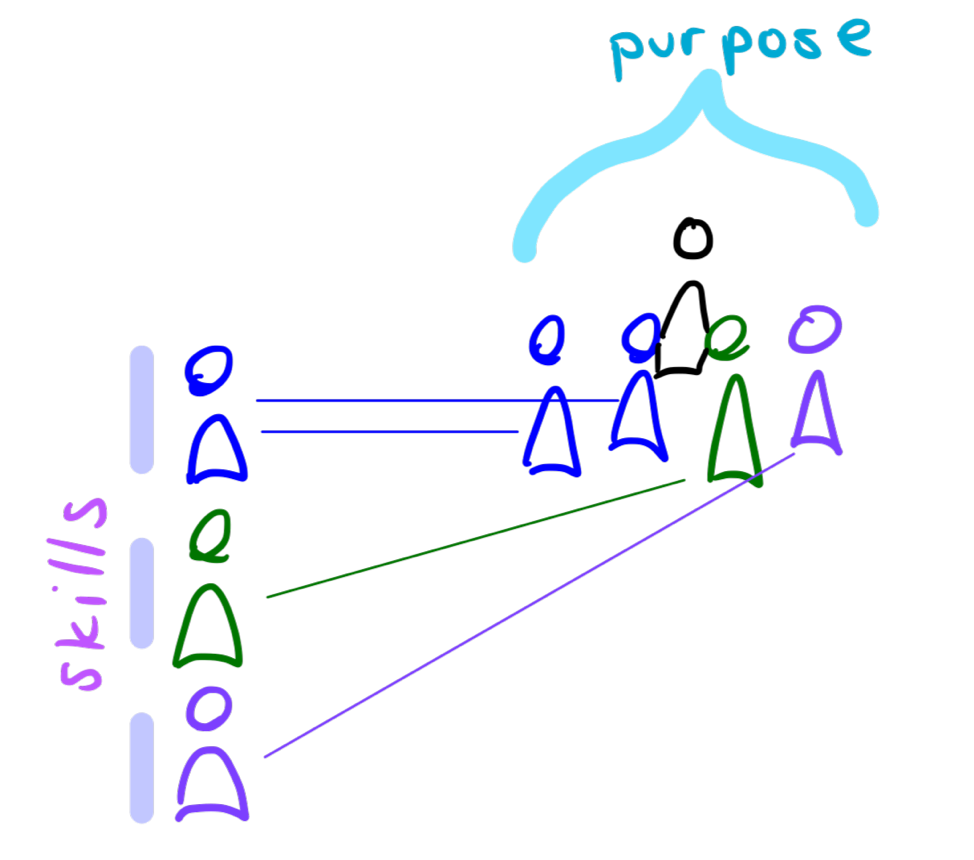
    We want teams to share a common purpose. They need a wide set of skills. If we lead by purpose, then we can’t lead by skill, so how are people going to be evaluated on their professional competence? How will they grow?

    Matrix management. People are led (guided in what to do) by program managers focused on shared purpose. Additionally, they participate in a professional, skill-based hierarchy where they grow in how to do their work best.

    Some challenges: People can feel like they have two bosses. Professional leadership can feel like they don’t have control over the people they’re responsible to grow. Program managers don’t have full control over hiring or training, even if this team’s particular needs are unusual.

    Multidisciplinary Software Teams

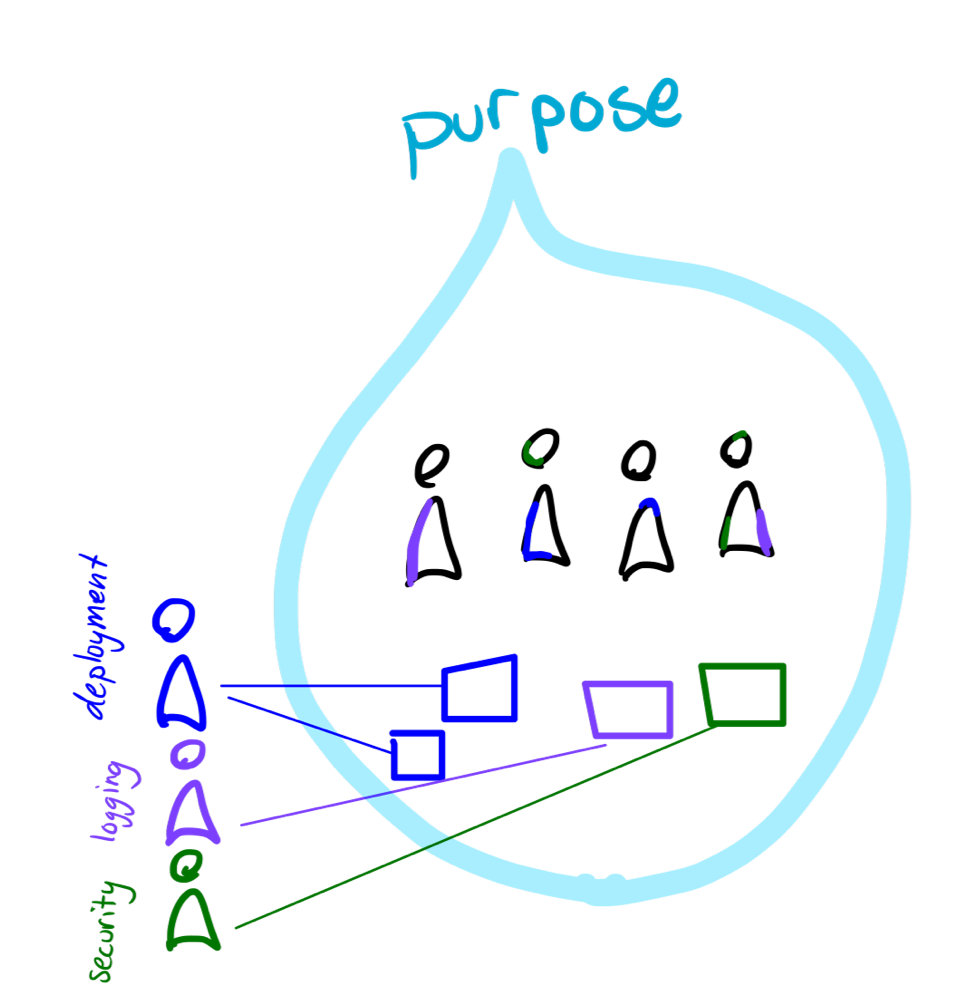
    A complete software development team needs to take responsibility for operations, delivery, observation, security, scaling, testing, accessibility, user experience … so much! How do we add all these skills to one team? With tooling.

    We abstract hardware behind an API. We build self-service spin-up tools. We make builds automatic. The professional leadership in these aspects of software are the people building these tools, whether in the same team or in Development Experience teams. These same people serve as consultants when teams need more expertise.

    The product teams decide what they need to do, and these support teams help with how. When a product team has special needs, they can take more control and make their own delivery, for instance. Until then, people can learn operations at a high level, not the whole stack.

    It is like matrix management, except the contributors stuck in the middle are software, not humans! They don’t mind having one team push their buttons and another change their code. The team behind the tooling feels control. For special needs, the product team is free to “hire” and train their own software.

    In business, matrix management lets multidisciplinary teams share a purpose, while still helping people grow in their professional skill sets. In software, DevOps means each team changes and operates their software, with the help of continually improving automation.

    — Jessica Kerr

  • DevOps Chat: The State of Software Security with Veracode’s Chris Eng

    DevOps Chat: The State of Software Security with Veracode’s Chris Eng

    Every year CA Veracode publishes its “State of Software Security” report, chock full of research about how well software is being secured during development and beyond. It’s eye-opening stuff and definitely worth a read for anyone even remotely interested in helping make software more secure.

    In this DevOps Chat, Chris Eng, VP of research at Veracode, recently discussed with me this year’s report findings and some takeaways that are worthy of noting.

    As usual, the streaming audio is immediately below, followed by the transcript of our conversation.

    Transcript

    Alan Shimel: Hey, everyone, it’s Alan Shimel, devopsy.kinsta.cloud, and you’re listening to another DevOps Chat. Joining us on this episode of DevOps Chat is Chris Eng of Veracode. Now I’m proud to say, actually, that I know Chris, actually, before there even was a Veracode. But – so it goes back a while. Chris, I don’t remember your exact title, but don’t you head up research at Veracode?

    Chris Eng: That’s right, yeah. VP of research at Veracode.

    Shimel: Yep. Welcome and good to have you back on, Chris.

    Eng: Good to be here.

    Shimel: Yep. So, Chris, you know, I’m gonna assume, if people wanna know who you are, it’s Chris Eng – E-N-G. You could look him up. He’s a bonafide cybersecurity warrior, with a long track record of accolades and just being a great guy in the community. On top of that, though, I’m gonna assume people know that Veracode, for the last couple years, has been putting out a report called “The State of Software Security.” In fact, this is volume nine, so which assumes there was eight before then, right, Chris?

    Eng: That is correct. [Chuckles] We do this every year and it gets bigger and better every year.

    Shimel: Yep. So volume nine, you know, it’s CA Technologies Veracode now, of course. Some changes. And, Chris, it’s kind of your baby, right? You shepherd this report every year, no?

    Eng: I’ve been involved in it since the first year we did it. I mean, certainly, going back to the early years, there were a lot fewer of us sharing the burden and doing all of the writing ourselves. And now, thankfully, we can spread that out among more people and get more eyes on it. And that’s actually one of the things that we did this year that was kinda different, is, in addition to ourselves, we worked with some data scientists, over at Cyentia Institute, to actually help us dig into some of the things we really wanted to probe, around remediation work and looking at different organization behaviors. And I’ll get into that in a little bit.

    Shimel: Absolutely. Chris, before we dive into maybe the specifics of this year, let’s just take a minute and talk about, look, nine years running, my god, how the world has changed in nine years. Right? I was talking to the CIO of Box, Paul Chapman, earlier today, and we were just talking about how the world’s changed, let’s say, in the last 20 years but even in the last 9 years. I mean, what we can – you know, security’s still security, and, unfortunately, we still have incidents; we still have vulnerable software; we still have buggy and have trouble closing up vulnerabilities. But the game has changed, though, too, has it, Chris? When you look back, what do you think that some of the biggest changes are?

    Eng: Yeah, it’s definitely undergone a huge evolution. When we started Veracode in 2006, application testing primarily was companies doing penetration tests, maybe once a year, against their most critical applications. And, if anything changed between those, you know, in that one year, you kinda only had a point-in-time assessment. You had a lot of applications, a lot of pieces of software, that were just never being tested at all. And, since then, companies have realized that, number one, they need to test more frequently. That’s the only way that they’re able to release software that is going to be secure and also be able to drive the speed that they want to release new features and new products. Right?

    The other, I think, realization is that you can’t just focus on the most critical applications to the business because attackers don’t really care how they get in, right? If they find a weaker way to – an easier way to get in, through some weaker application that’s not maybe core to the business but is still connected to the same infrastructure, well, they’re gonna go after that. So there’s been a realization that it’s important to understand everything that you have and to actually build software testing and security testing into all stages of the life cycle, right? Fix early and it’ll be a lot cheaper than fixing later on.

    And, you know, we were looking at some of our stats the other day – this isn’t in the report, but to do the first million application scan for our customers took 10 years; the second million scans took one year.

    Shimel: Wow.

    Eng: Right? So that huge rate of increase is just showing that, across the board, across all industries, company sizes, organizations are realizing that they have to scale their software security programs to cover all the bases. And they have to do it continuously, in order to not rack up security debt. So I think that would be the biggest thing that’s changed in how we approach the problem.

    Shimel: I agree. I agree. But, Chris, really, our time’s limited. Let’s jump into this year’s report. I’ve had a quick look through it, the executive summary and some of the other stuff. Boil it down for our listeners. What do you think are the three biggest kinda metrics or facts that jump out here, that they should be aware of?

    Eng: Yeah. Let me give you just a quick –

    Shimel: Sure.

    Eng: – review on – so, like I said, we do this every year. And we take about 12 months of data, so this is across all of the assessments that we do for all of our customers, and it’s anonymized down, of course, and then we look at trends and try and see what’s going on out there, in terms of application security. This data set is about 700,000 application assessments during a 12-month period, and the one big thing that we’ve been able to do this time that we weren’t able to do in the past is actually look at how long flaws are sticking around once they’re discovered. Right? How long is it taking organizations to fix these flaws?

    And so, when we detect something, we’re able to kinda track it across multiple assessments, so let’s say we scan an application today, we find a bunch of flaws, we fix some of them and not others, and then we scan it again in a week. We’re able to identify that certain of those flaws, the ones that we detect the second time, are the same as they were the first time. And so that allows us to actually track the life cycle of each individual flaw until it’s fixed, right? And so we’re able to look at “What does that flaw persistence look like?” Kind of a survivability analysis.

    And, if you look overall, just across all the flaws that we look at, the numbers are not great. It takes 21 days on average to close 25 percent of the findings, 121 days to get to the halfway point, and 472 days to get to the 75 percent point. So that’s a long time, right? That’s over a year, so it’s not a very rosy picture overall. And so we broke this down and, you know, once the report is out, people can kind of look at “What does that look like in terms of different severities, different industries? What kind of patterns do we see there?” But I think the most interesting one, and the one that’ll be most interesting to you, is around the effect of DevOps or DevSecOps on fix velocity.

    Now we don’t have an easy way of saying, for any given application, “Is this a DevOps shop or not?” Right? We can’t – we don’t have that information, so we have to figure out whether or not we think they are, and the proxy that we’ve been using for that is scan frequency, right? If you’re doing CI/CD, you’ve got your scanning baked into your build process or you’ve got it, some way, baked into your automation. And so, if you’re doing a nightly build, for example, you’re doing a test every night. And so we looked at scan frequency to identify that – you know, we think that probably these applications that are being scanned 300-plus times a year, those are probably DevOps shops, right? And the ones that are scanning one to three times a year, probably not.

    And so we’ve got this broken down into buckets. If you have this in front of you, you wanna jump over to page 39 – it’s Figure 43 – and this is what I really want to – this is sort of a – our hypothesis was like, “Yeah, I bet DevOps shops fix faster because they’re scanning more frequently and they don’t wanna rack up as much security debt.” And, in fact, it does show that. Right? We see this one line on the report that says, “Applications that are scanned 300 or more times a year are fixing – they’re getting to the halfway point of fixing in five days and they’re closing 75 percent of flaws within seven days.” Right? So that’s a huge amount better than those averages that I just described to you.

    And we have this broken down by bucket, right? So you have the 300-plus scans per year, you have 51 to 299, all the way down to one to three scans per year, where it takes close to four years for them to get to the 75 percent close mark. So I think that’s actually – this is what we hoped to see. This is what we expected to see. But it’s nice to see the data prove out that, in fact, yes, when you scan often, when you scan early and you stay on top of the findings, this is actually a very doable thing, right? To fix flaws in a reasonable time frame.

    Shimel: Absolutely. Two things there, Chris. No. 1, I would think hand in hand with the DevOps is automation.

    Eng: Yeah.

    Shimel: Right? I’m wondering if part of it is that, in DevOps-enabled cultures and organizations, organizational cultures, whatever – companies doing DevOps – are they automating the scan process and that’s why we’re seeing them doing 300-plus scans? Right? And then they’re deploying more and, if their MO, if their standard process is “Nothing gets deployed without first being scanned,” right, that’s where you start racking up 300-plus scans. Right? I mean, when you –

    Eng: Oh, yeah. Yeah, we’re –

    Shimel: – build that into your pipeline, right, you build that into your CD process, those scans get done.

    Eng: Yeah, we’re assuming that these – you know, we’ve gotten – I think, at the maximum point, there’s one app that was scanned over 1,000 times and, certainly, that’s – I mean, I really hope that’s not a human uploading something or pressing –

    [Crosstalk]

    Shimel: Right, _____ – hitting the “Scan” button –

    Eng: – a button every time, right?

    Shimel: – every time. You would hope not, right?

    Eng: Right. Right. I’m assuming that even the ones that are scanned 50 times a year, right, which I assume to be every week, I assume that those are also –

    [Crosstalk]

    Shimel: Are still better than once _____ –

    Eng: – _____ _____ through a build pipeline. Right? And, any time you can – I mean, and that’s been a big focus for us, just in general, is “How do we remove any human effort required to do the testing? How do you make it easier and more transparent and just remove any barriers to doing that?” And so –

    Shimel: No, heck, how do you – you gotta build it into your CI/CD pipeline. I mean, it has to be part of that. The same way you breathe air, right? If you stop breathing, you die; you don’t deploy software that’s not been tested and scanned. And –

    Eng: Right. Right.

    Shimel: You know, it sounds so simple, us talking about it, Chris, but here’s the fact, right? And not everyone listening to this in our audience has been in security as long as you have or even I have. And a lot of people see the reports, Chris, and they say, “Oh, my God, this is year nine,” and I forgot how many years Verizon is doing their report, and, every year, it’s hard to show progress in some things, right? We do show “Hey, if you scan more, you’re gonna have less vulnerabilities go out the door that aren’t fixed and that were at least – they don’t stay – you know, they get fixed faster.”

    Eng: Yeah.

    Shimel: But the fact is we’re still seeing – you look at the executive summary here, Chris, and it’s not a rosy picture, as you – I think those were your own words. And we still read about breaches every day and 30 million records here and 20 million here. You know, the non-security person says, “What are we gonna do? When does this fundamentally change?”

    Eng: Yeah, I mean, things don’t get solved overnight, right? I mean, if companies have only realized a few years ago that they need to kinda get a handle on all the things that they have and start understanding what their risk posture is, and they’ve got 10, 20, 25 years’ worth of software, thousands of applications, it doesn’t happen overnight; it’s baby steps. Certainly, starting any new greenfield projects with a proper SDLC that’s identifying and fixing issues early is gonna prevent them from building up even more security debt.

    But, yeah, a lot of these – the way I explain some of these things – for example, pass rates on OWASP Top 10 not getting a lot better or the prevalence of certain flaw categories, like cross-site scripting and SQL injection, staying relatively constant – is that some of the more mature apps that have been scanned for a while now, those are actually decreasing. If we sliced those separately, we would see the rate going down. But, when we look at it in aggregate, out of those 700,000 applications that are part of this data set, a lot of those are things that are just being scanned for the very first time ever. And so they’re gonna have a higher prevalence of some of these issues, that the more mature applications will have gotten rid of already. Right? And so they kind of balance each other out.

    And we see this every time. In fact, we should probably start to report on some of those things separately – it’s kind of a difficult thing to do – but I think what’s happening is some of the newer applications are bringing those numbers up and that’s why we see the lines staying relatively flat. There’s a long way to go, but we do see – you know, and things like the DevOps remediation case I just described. I mean, we see little points of optimism, where you can see a clear correlation between a certain behavior and a certain outcome. And so we like to focus on those things, and, yeah, it’s gonna take a while for most companies to really start to chip away at the legacy applications and getting those locked down.

    Shimel: Absolutely. Absolutely. Chris, we’re just about out of time. I should – we should put this out there: for people who are interested in really kinda digging in on the report, where can they get it from? Go to Veracode.com?

    Eng: It’ll be on Veracode.com, starting on October 24th, and, yeah, they can download it there. There’s a huge amount in here. We break it down into different flaw categories. We look at different industries against each other. There’s even a little geographic breakdown and then, of course, like I mentioned, a huge amount of data around flaw persistence and how long it takes organizations to fix flaws, which, I mean, ultimately, is what’s important, right? Doesn’t matter how often you scan if you don’t fix stuff. Right? You don’t reduce your risk unless you fix stuff. So there’s a lot of great data on that, that we’ve never been able to report out before, so we’re really happy to get those out there.

    Shimel: Absolutely. Well, Chris, you know what? I know I got a little hard on you about the – and it’s not your fault that the security industry – and it’s not the security industry ’cause, God knows, we wanna fix the issues and the problems that cause these breaches and things; it’s really just the state of software and where security lies as a priority in a lot of these organizations and managing their risk and so forth.

    But, by the same token, Chris, you know what? First of all, thank you, thank you, thank you, for being involved enough to do this report every year, and, whether the metrics paint a rosy picture or a sad picture, nevertheless, it’s a picture that needs to be told, right? We need this kind of insight; we need the metrics to understand where we are and where we need to be. And so great job, once again, in putting this together. You know, I think it’s as important for non-security people to read these reports as it is for security people. Right? To really –

    Eng: Yeah, we hope –

    Shimel: To –

    Eng: Yeah, we definitely hope people will get something out of it and, hopefully, kind of use that to think about how they are building their own programs, right – how they’re remediating, what do their numbers look like – and, hopefully, kind of informs how different organizations think about scaling up their programs. That’s what we’re hoping, anyway.

    Shimel: Good. All right. Chris, let’s call it a wrap on this; it’s a Friday afternoon here. And, again, thanks for your insight on the report. Thanks for managing this report year in, year out and being involved with it and helping. And we’ll see you soon. We’re coming into conference season; I’m sure you’ll be busy presenting and getting more –

    Eng: I’m sure, yeah. I’m sure we’ll be bumping into each other pretty soon.

    Shimel: Absolutely. Chris Eng, VP of research at CA Technologies Veracode, our guest on this episode of DevOps Chat. This is Alan Shimel, everyone. Have a great day.

    — Alan Shimel

  • Hardware in the Age of Automation

    Hardware in the Age of Automation

    There’s a joke making its way around the internet that goes like this:

    Q: How do DevOps engineers change a lightbulb?
    A: They don’t. It’s a hardware problem.

    The trend to abstract hardware away from the day-to-day work of most IT personnel continues. We in DevOps have given it a name: infrastructure as code. Hardware has been pushed so far back into the recesses of IT that I’ll wager good money to say that today most folks working in information technology have never seen the inside of a data center, and fewer have done something as labor-intensive as run cable wire over a rack of servers. For many, hardware is but a concept that’s made real every month by a bill from Amazon, Azure or Google Cloud.

    But hardware is real and it does matter, a lot. If you don’t think so, look at your cellphone. That little piece of hardware had changed just about everything about how the world works today. The cellphone has made possible not only Tinder, Twitter, Instagram, Uber, Lyft and a multitude of startups that will never see an IPO or private equity buyout, but it also has brought earth-shaking events such as the Arab Spring, Brexit and SpaceX landings into the palms of viewers worldwide.

    Hardware counts and it’s going to count more in the coming years. Those working on the forefront of innovation understand that special hardware is, and will continue to be, a critical factor in the development of increasingly complex software. We’re already seeing the ability to choose specific hardware configurations available on cloud providers such as AWS. For example, the g3.16xlarge EC2 instance type is backed by both CPU and GPU chips. This is only the tip of the iceberg.

    According to Jacob Smith, senior vice president at Packet:

    “People ask what’s next. Well, this stuff [GPUs] is an example of what’s next. It’s not just really expensive stuff, but really specialized stuff. Whenever you start to do something that’s really big and really important, which are a lot of the things we’re doing on the internet and in the world, whether it’s bioinformatics or cars driving themselves, those require really big workloads. There’s a lot of data, a lot of processing and you just can’t do it with generic hardware. The reason that hardware is the next innovation layer is because of all the software you guys have been writing to make software portable and deployable around the world in minutes, now the software wants to touch on the new kinds of hardware. And I think that embracing this is the next wave.”

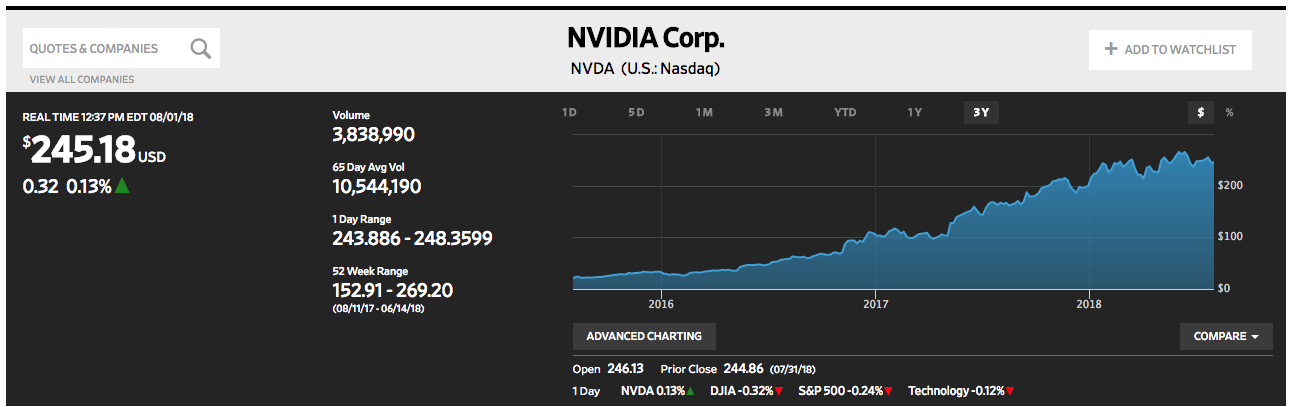
    Packet, and companies like it, are looking forward to a time when computing platforms will move beyond the generic to the specialized. We’re already seeing the trend play out: The value of the stock of Nvidia, a major GPU manufacturer, has gone up 10x in the last three years. (See Figure 1.)

    Nvidia stock has grown 10x in value in over the last three years. (The Wall Street Journal)

    Also, the projected demand for specialized chips is attracting a lot of venture capital (VC) money that’s funding startups such as Cerebras, Wave Computing and Graphcore. Even Google is getting into the specialized hardware business with Tensor Processing Units (TPU). Hardware is indeed becoming very cool again.

    So, what does all of this have to do with automation?

    Automation is a processor-intensive undertaking. And, as AI weaves itself more into the fabric of day-to-day data processing and machine learning, we’re going to see more demand for specialized hardware to handle the activity. In a way, that’s not new; we’ve had specialized hardware for a while now. TV remote controls have been around well before Bluetooth came on the scene. What is new is the degree of intelligence at play in these new devices. All my old-style TV remote control had to do was change the channel when I clicked the button. Today, my remote control recognizes my voice and helps me find a show of interest. It’s a big leap from an operation that responds to a button-click to one that uses voice recognition and inferential lookups.

    As Packet’s Smith pointed out above, as the complexity of software grows, so, too, will the need for special hardware to drive it. The new trend will be to wrap hardware around software. Thus, I have no trouble imagining a new type of hardware that is designed to handle a very particular process—gene editing, for example. Imagine ingesting a pill that is really a nanodevice that contains the intelligence to travel your body and physically alter your genetic makeup. It’s not that far-fetched an idea. Making the idea a reality isn’t so much about the software, it’s the hardware. We don’t have the nanotechnology—yet. Hence, the opportunity.

    Right now, most automation activity is run on generic chips housed in remote data centers around the world. A lot of the work we’re doing is still commodity: Spinning up Kubernetes clusters, facial recognition under Tensorflow, discovering security vulnerabilities using Macie, for example. Yet, as artificial intelligence (AI) becomes more commonplace, the use cases for which AI is appropriate will grow. This growth will require new types of specialized hardware. Engineers will imagine the software and then design the hardware to make it run. We’ll come to a point, which is not that far away, where innovation will be as Smith describes. It will indeed be about wrapping hardware around software. As a result, we’ll go from the “Internet of Things” to the “Internet of Really, Really Smart Things, from the Microscopic to the Gargantuan.” The implications will be profound.

    — Bob Reselman

  • How Automated Testing Can Help the Latest C-Level Issue: Quality Software

    How Automated Testing Can Help the Latest C-Level Issue: Quality Software

    Every year developers gather in San Jose for Apple’s annual WWDC, where software quality is typically a key point of discussion. This year, the company progressed from its 2017 buggy software debacle in full force—it’s a heads-on effort, marked by the industry leader naming 2018 its year of software quality.

    This raises some larger questions around the software industry itself. Has modern IT become so complex that the concept of “bug-free” software is no longer realistic, particularly for a company the size and scale of Apple? Or did Apple recognize this pain point and shift its focus to  software quality in an effort to be the harbinger of change?

    Of course Apple isn’t alone when it comes to the struggle with quality. Buggy software from organizations across the board persists today, but it simply cannot be ignored. Poor quality software creates long-term effects of waning customer confidence, brand erosion and revenue loss. These are very real concerns for the entire C-suite. Quality is no longer an issue limited to Dev or Ops—it’s critical to every organization’s success.

    For example, consider the fact that 88 percent of consumers say they’d abandon an app if they encountered bugs or glitches (source: QualiTest). Nearly half those people are likely to discontinue using an app entirely if they experienced a bug every day. And 32 percent say they would abandon an app the moment they encountered a glitch.

    The cost of acquiring a new customer is 5 to 25 times higher than retaining an existing one. Getting software right the first time through a culture of continuous testing is critical to every business, as it translates directly to retaining customers.


    Budgets for QA and testing are expected to rise to 40 percent in 2019 from 31 percent this year. However, one-third of developers still admit they don’t have enough time to properly test before software deployments. As everyone in this business knows, developers run fast. It is of the utmost importance to ensure software actually works well and will provide the expected customer experience. The garbage in, garbage out model is not an option. To fill the gap, more and more organizations are turning to automated testing.


    Any repetitive, labor-intensive task is typically a good candidate for automation, including those associated with testing. Automated testing involves execution of prescripted tests on a web or mobile app, with test data accessible in detailed reports to help development teams quickly identify issues in the code, as well as any issues in the automated scripts themselves.

    Performance of the automation framework and its scripts is crucial, and should be a high area of focus. Prescripted tests fall into different categories that comprise the test pyramid. They include:

    1. Unit Testing
    2. Code Coverage
    3. Code Syntax Checks
    4. Security Tests and Checks in Code
    5. Integration Tests
    6. UI Tests for Web, Hybrid and Mobile Apps – on multiple cross browsers on various platforms and OS versions

    Once created, automated tests can be run again and again at no additional cost—which is particularly helpful when source code is changed. Since it is much faster compared to manual testing, automated testing translates into considerable time and cost savings.

    Automated testing is especially valuable given the breadth of browsers, operating systems and devices in the marketplace. Consumers today run apps on a countless number of these, so developers must have access to every combination imaginable to deliver the highest level of performance. What good is your app if it doesn’t run (and, by extension, monetize) properly when it gains popularity in some part of the world with users on a different platform from the one you tested on?

    Ensuring that software works on as many options as possible allows a business to reach a maximum number of users. This is where automated testing can help, by executing thousands of different complex test cases during every test run. Testing efficiency can be achieved by executing tests in parallel or grid, and executing CI/CD jobs in parallel. For example, one code is deployed in staging, teams can simultaneously start jobs to test against browsers and cross-browsers, apps and localizations, etc. The result is attaining coverage that would be impossible through manual tests. Teams can scale apps fast, maximize CI/CD workflows, and ship higher quality software faster.

    Attaining CI/CD and automating all the tasks involved in creating a real-time test system is one of the arenas in which the next big software battle will be fought. More importantly, as software continues to eat the world, the C-Suite can no longer ignore the impact of poor quality software devouring your business. Apple’s bold step of identifying 2018 as the year of software quality is a call for other organizations to do the same.

    Automated testing is a key piece of the solution. How is your organization meeting the software quality challenge, and by extension, the evolving standards of customer experience?

    — Ritesh Arora