Tag: software testing

  • mabl Adds Load Testing Tool to Test Automation Suite

    mabl Adds Load Testing Tool to Test Automation Suite

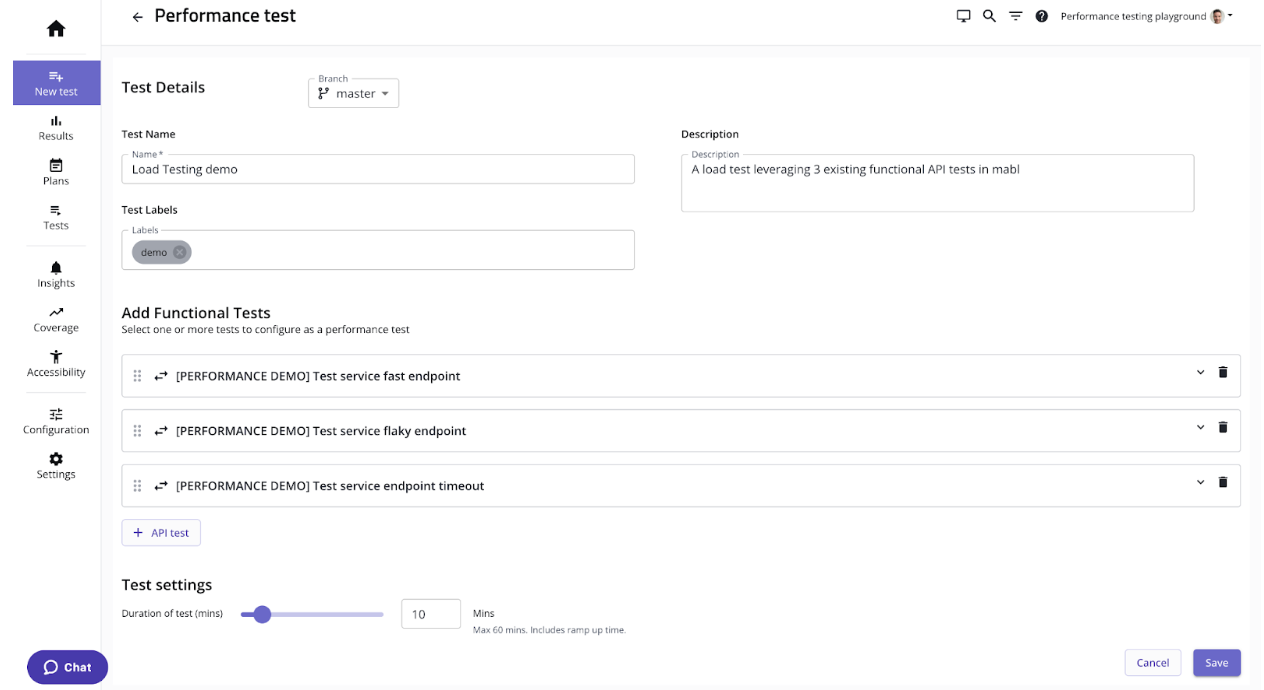
    mabl today added a load testing capability to its portfolio of application testing tools that it makes available via a software-as-a-service (SaaS) platform.

    That capability promises to make it simpler to streamline testing within a DevOps workflow by making available load testing tools that measure application peformance alongside existing mabl tools accessible via a test automation platform.

    Dan Belcher, mabl CEO, said the goal is to make it simpler for developers to run functional and non-functional tests as early as possible within the software development life cycle.

    It’s not clear how much responsibility for testing is shifting left toward developers, but as it becomes simpler to run these tests it is more likely they will be run, noted Belcher. One of the core issues that plagues application development today is the inadequate level of testing. That issue is largely because it takes too much time to create and run relevant tests, he added.

    mabl streamlines that process using a test automation platform based on a low-code tool that makes it simpler to create and manage the testing process. Those tests can be configured to run independently or be integrated with a DevOps pipeline, noted Belcher.

    Shifting testing further left toward developers doesn’t eliminate the need for a dedicated team of testers, but it should reduce the number of routine errors being made. That reduction should free those development teams to focus more of their time and effort on more complex quality assurance (QA) issues, said Belcher.

    Of course, more testing processes will become automated as artificial intelligence (AI) continues to evolve, so most organizations will soon find themselves revamping those processes. In theory, SaaS platforms that aggregate testing data should be in a better position to apply AI models to testing. That’s critical because the pace at which even more complex applications are being built and deployed shows no sign of slowing down.

    In the meantime, DevOps teams should assume they will soon be held more accountable for security issues that arise after an application is deployed. It may be a while, but the number of legislative initiatives focused specifically on application security has increased; it’s only a matter of time before laws that hold organizations liable for security are going to be passed. At the same time, the level of tolerance application software consumers have for issues that arise because some trivial mistake led to, for example, a SQL injection attack, is dropping. The expectation is that application testing is soon going to be a lot more thorough than it has historically been.

    The issue, of course, is that too many development teams tend to view security requirements as obstacles to be overcome rather than as intrinsic elements of the QA process that is supposed to ensure expectations are consistently met and exceeded.

    At this juncture it’s clear that application testing is going to improve. The only thing left to determine now is how much friction will be experienced on the way to achieving that goal.

  • Turning Software Testers Into 10xers

    Turning Software Testers Into 10xers

    How do you make technical processes faster and more scalable? If your answer is simply to automate them, you’re stuck in the 2010s. Today, automation is widespread, and automating processes in a basic sense is no longer enough on its own to maximize efficiency and velocity. Instead, teams who want to excel–who want to become 10xers, so to speak–need to look beyond automation in its simplest form. They must take automation to the next level in a way that makes processes not just a little faster but orders of magnitude faster. Allow me to explain by discussing how software testers can put this principle into practice.

    The Limitations of Basic Test Automation

    When I talk about “automation in its simplest form,” I’m referring to automation that helps to execute core processes.

    In the context of software testing, basic automation means using frameworks like Selenium or Appium, which provide a way for engineers to execute tests automatically. That saves a lot of time and effort compared to executing each test manually.

    To be sure, there’s nothing wrong with simple automation. But the fact is that by now, most teams have caught on to the value that test automation provides. Automatically executing most of your tests no longer makes you much faster than average. It might have been a big deal a decade ago, back when test automation was less widespread, but it’s hardly enough to make you a 10xer today.

    Going Beyond Simple Automated Testing

    What does set you apart? What can testers do to supercharge their efficiency and velocity?

    The answer, again, is to take automation to the next level. Rather than simply using test automation frameworks to execute tests, they can also use automated tools to generate the tests in the first place.

    For example, modern automated testing solutions can automatically create test scripts based on actions that testers perform manually, making it possible to generate tests without having to write any code. That means you can create many more tests in much less time.

    As another example, next-generation automation can supercharge the interpretation of test results. If engineers want to know, for instance, when a screen finishes rendering in an application or when a crash occurred, they don’t have to parse test results manually, or write custom scripts, to find that information. They can leverage modern automation tools that collect that data on their own.

    In a similar vein, modern test automation tools can accelerate the process of troubleshooting tests that fail to run. For example, imagine that an automated test fails because it is supposed to test an element that developers relabeled in the newest version of an application. Traditionally, fixing that issue would have required engineers to review the test, sort through application code and then update the test with the new element ID. But this process could instead be automated using tools that can identify the application elements that a test should assess and update test scripts with the appropriate element IDs, all without requiring manual intervention.

    A Copilot-Inspired Approach to Software Testing

    You could draw analogies between the types of opportunities that modern test automation software makes available to testers and those that AI-powered tools like GitHub Copilot have opened up for software developers.

    If you’re a software developer today, you don’t have to settle for basic automation tools, like continuous integration servers (which automatically integrate code into larger codebases) or source code management platforms (which automatically track changes to code over time). You can also benefit from a new breed of automation tools, like Copilot, which can automatically generate code, unit tests and much more.

    For developers, Copilot is a prime example of a next-generation tool that can dramatically accelerate software development. Developers who learn to use Copilot effectively can work potentially ten times faster than their counterparts.

    The types of next-generation test automation solutions I’ve described above do the same thing for software testers. Instead of relying just on basic automation tools to run tests, modern testers have a host of additional, more powerful automation at their disposal to help create, manage, interpret and troubleshoot tests. Those who learn to use those tools will become the 10xers of today’s generation of software testers.

  • Harnessing the Power of AI Chatbots for Continuous Testing

    Harnessing the Power of AI Chatbots for Continuous Testing

    Artificial intelligence (AI) is revolutionizing the way we develop and test software, especially with the advent of AI chatbots. These intelligent agents have the potential to streamline and automate continuous testing while improving software quality. However, software and QA managers must understand the urgency, opportunities, pitfalls and best practices associated with integrating AI chatbots into continuous testing processes. This blog explains crucial aspects to help your team harness the full potential of AI-driven continuous testing.

    The Urgency of Integrating AI Chatbots Into Continuous Testing

    • Increasing complexity of software applications: Modern software applications are becoming increasingly complex, which makes manual testing time-consuming, error-prone and costly. AI chatbots can analyze vast amounts of data in real-time, identify patterns and learn from the testing process, making them invaluable for continuous testing.
    • Fast-paced development and market demands: Today’s competitive market demands faster release cycles and shorter time-to-market. AI chatbots can help you accelerate testing and development cycles, allowing your team to focus on delivering high-quality software promptly.
    • The growing importance of customer experience: AI chatbots can simulate user interactions and predict user behavior, helping to improve user experiences by identifying potential issues before they become real problems.

    Opportunities for AI Chatbots in Continuous Testing

    • Improved test coverage and accuracy: AI chatbots can execute a large number of tests simultaneously, leading to better test coverage and increased accuracy.
    • Enhanced defect detection: AI chatbots can identify defects early in the development process, reducing the overall cost and time spent fixing them.
    • Efficient resource allocation: By automating repetitive tasks and reducing human intervention, AI chatbots enable teams to allocate resources more effectively, leading to increased productivity.

    Pitfalls to Avoid When Implementing AI Chatbots

    • Over-reliance on AI: AI chatbots are powerful tools, but they should not replace human testers completely. Human intuition, creativity and critical thinking are essential for effective testing.
    • Insufficient training data: To work effectively, AI chatbots require quality training data. Ensure that your chatbot is trained with diverse and representative datasets to minimize the risk of biased or inaccurate results.
    • Integration challenges: Integrating AI chatbots with existing systems and processes can be challenging. Ensure that your team has a clear understanding of the integration requirements and potential issues that may arise.

    Best Practices for Applying AI Chatbots to Continuous Testing

    • Define clear objectives: Establish clear goals and expectations for your AI chatbot to ensure that it aligns with your team’s overall testing strategy.
    • Choose the right AI chatbot platform: Consider factors like cost, scalability, ease of integration and support for programming languages when selecting an AI chatbot platform.
    • Continuously monitor and refine: Continuously monitor your AI chatbot’s performance and make necessary adjustments to improve its effectiveness and efficiency.
    • Foster collaboration: Encourage collaboration between human testers and AI chatbots to leverage the strengths of both.

    Benefits of Applying AI Chatbots to Continuous Testing

    • Improved test coverage and accuracy: AI chatbots can execute a large number of tests simultaneously, leading to better test coverage and increased accuracy. By automating repetitive and complex tasks, AI chatbots can effectively handle edge cases and efficiently test various scenarios, thereby reducing the likelihood of undetected issues in the software.
    • Enhanced defect detection and early issue identification: AI chatbots can quickly identify defects and potential issues early in the development process, reducing the overall cost and time spent on fixing them. By leveraging machine learning and pattern recognition, AI chatbots can predict potential problems and bring them to the attention of developers, allowing for proactive resolution and improved software quality.
    • Efficient resource allocation and increased productivity: By automating repetitive tasks and reducing human intervention, AI chatbots enable teams to allocate resources more effectively. Human testers can focus on higher-level tasks that require creativity, critical thinking, and domain expertise. This leads to increased productivity, as the team can concentrate on delivering high-quality software and improving user experiences.

    Conclusion

    AI chatbots are transforming the landscape of continuous testing, offering unprecedented opportunities to improve software quality and speed up development cycles. By understanding the urgency, opportunities, pitfalls and best practices associated with integrating AI chatbots into continuous testing processes, software managers can effectively harness the potential of these intelligent agents and drive their teams toward success.

  • The Time for Automated Testing is Now

    The Time for Automated Testing is Now

    Skilled software testers continue to be in high demand, and it appears that trend won’t change any time soon. The current labor shortage and a looming recession is giving software development leaders good cause to think about how to attract and keep qualified personnel and, more importantly, enable them to work as efficiently as possible. Added to this scenario is a trend in the software development cycle toward shift left testing, which has put increased pressure on developers to take on testing responsibilities that often require taking on new perspectives and using new tools. Automated testing solves these problems by making it easier to learn how to build a consistent, reliable testing program in less time, requiring less maintenance.

    Add to this the future promise of artificial intelligence or AI-augmented testing platforms and current machine learning (ML) capabilities, such as self-repairing of test scripts, and you have a platform that both levels the learning curve and accelerates efficiency. The sooner organizations can transition from manual to automated testing, the better they can withstand internal and external market fluctuations.

    A Developer and a Tester Walk Into a Bar …

    Traditional software testing is a manual process in which testers are employed to replicate users and are expected to bring that perspective to their work. As such, software testers have a very different mindset than software developers. Where developers are protective of their creative output, software testers are driven by a curiosity to probe the limitations of a system. It stands to reason that the qualities that make someone excel at either of these roles is, likewise, not the same. And yet, with the trend toward shift left testing and continuous integration/continuous development (CI/CD), the industry has blurred the distinction between coder and tester to the dismay of both sides.

    Automated testing removes much of the monotonous work associated with repetitious test plans. It allows testers to focus on writing better scripts, extending the scope of their testing plans and scheduling more powerful load tests. From the organization’s perspective, once you have established a library of reusable test scripts, your testing program will be protected from future turbulence in the employment market, including recession and attrition.

    Low-Code/No-Code

    Regardless of the tool you use, code will be created if you are creating software — even test scripts. Ideally, however, a low-code/no-code tool can hide some of the complexity and promote best practices. Using a low-code/no-code tool can relieve a tester from creating test scripts from scratch by recording manual interactions and offering suggestions. In the case of shift left testing, a low-code tool can eliminate the need to learn entire testing frameworks while still enabling a developer to access code when desired. Automating testing also eliminates the human error inherent in repetitive manual tests. In short, test automation does not diminish the value of skilled software testers and developers; it increases it.

    Placed in the hands of skilled testers, automated testing will only become more powerful, more effective and more critical to your development cycle. It elevates the skills of testers and makes them more productive, accurate and thorough. Test automation also makes for a smoother transition to shift left testing, allowing developers to spend less time testing their software and more time doing the creative work that makes them thrive. In a market where attracting and keeping top talent is only going to get more difficult, anything you can do to lighten the burden on your employees and make them more productive will be a big win for your business. So, the question is not whether you should transition from manual to automated testing but when.

  • 4 Best Practices for Entertainment App Testing

    4 Best Practices for Entertainment App Testing

    Entertainment apps represent a broad category of software, ranging from mobile games, to social media platforms, to streaming video apps and beyond.

    However, all entertainment apps share a few key traits in common:

    They typically host dynamic content that is unique for each user. This makes entertainment apps different from apps where most or all of what each user sees is the same.

    They host rich multimedia content including, in many cases, streaming audio and video.

    They are often created by vendors operating in highly competitive markets, where a poor user experience can send users flocking to competitors’ apps. There is no shortage of apps out there for gaming, video streaming and so on, and if your app fails to perform, your users can easily convert to a competing solution.

    For these reasons, teams responsible for testing entertainment apps must develop a testing strategy tailored to the unique challenges of these applications. Traditional testing tools and methodologies aren’t enough for running tests that support an excellent end-user experience for entertainment software.

    With that reality in mind, let’s take a look at four best practices to follow when testing entertainment apps. These strategies go a long way toward ensuring that entertainment apps deliver the end-user experience that is necessary for maximizing user engagement and retaining users, no matter how complex or dynamic the apps happen to be.

    Testing for Video and Audio Syncing

    An easy – and all too common – way to shred the user experience in an entertainment app is to stream videos where the visual and audio streams go out of sync with each other. Videos need to be perfectly in sync with audio to keep users happy.

    Of course, the challenge that testers face is that most testing frameworks don’t offer an easy means of evaluating whether visual and audio content are in sync with each other, especially when the content is streamed. Frameworks that let you evaluate when content initially loads or when it updates aren’t enough for analyzing sync between visual and audio streams. As a result, teams have traditionally resorted to testing for sync manually, or not testing it at all.

    Fortunately, there’s a better way. Using AI, you can run tests that automatically identify lag between video and audio. In turn, you can detect problems that may cause streams to go out of sync, then fix them before your users experience sync issues.

    Minimize Test Latency

    When you have an entertainment app where content changes in real-time, your tests need to be able to execute and display results in real-time, too. But that’s difficult to do if network latency issues prevent data from moving between your test cloud and your testing tools quickly enough to provide real-time results.

    There are two ways to solve this challenge. First, you could run tests on on-premises devices in order to avoid network latency problems. Alternatively, if you want to take advantage of a test cloud while still achieving real-time results, you can optimize network traffic in a way that minimizes latency and allows test data to flow between your test cloud and your testing tools in a few dozen milliseconds–as opposed to the hundreds of milliseconds traditionally required for packets to flow from tools to the device cloud, and then back again.

    Test Across Geographies

    The way a user based in, say, Barcelona experiences an entertainment app might be quite different from the way one located in New York or Tokyo experiences the same app. The reason why is that the network hops over which data needs to travel, as well as the efficiency of the carrier network that delivers the data, which can have a major impact on how quickly content loads and is streamed. For media-rich entertainment apps, latency and bandwidth limitations can be particularly problematic.

    For this reason, you should be testing your entertainment apps from the perspective of users spread across the world. Doing so allows you to represent multiple geographies and carrier networks in your tests, ensuring that your app performs properly not just from the location where your testing team is located, but from all of the locations where your actual users reside.

    Test for Multiple Screen Resolutions

    Variations in screen resolution can have a significant impact on how content is rendered. Attempting to display content at a screen resolution that software developers didn’t plan for can result in pixelated images, distorted images or images that aren’t fully visible.

    That’s why you should be testing how content on your entertainment app is rendered under different screen resolutions. Testing for just one or a handful of resolutions isn’t enough.

    You can perform these tests manually, by reviewing content rendering by hand. A better approach, however, is to take advantage of AI tools that can automatically compare renderings of the same content under different screen resolutions to detect inconsistencies. That’s a much faster, more efficient, and more scalable way to ensure your content appears as users expect it to.

    Conclusion

    Entertainment apps are a unique category of software, and they require a unique testing strategy. Testing teams need to test for factors that aren’t important for most other types of apps, such as evaluating whether video and audio streams are in sync. They also need to minimize latency during testing and test across multiple geographic locations and screen resolutions. Practices like these are the only means of ensuring that entertainment apps deliver the user experience necessary to succeed in highly competitive niches.

  • Adopting Shift Left Testing in Software QA

    Adopting Shift Left Testing in Software QA

    I am often asked to recommend best practices for building software testing programs. The problem is that it depends on your definition of “best.” What works for an innovative startup developing software and deploying agile development sprints is not necessarily going to suit an established public company launching a new web product. The software development industry is so broad and diverse that there is no one-size-fits-all set of practices I can recommend. Put simply, the “best practices” are those that produce consistent results over time, meaning that they can be standardized. There has been a trend toward shift left testing in the past decade, and I have a few suggestions for getting the most out of development teams taking on this new responsibility.

    Shifting Left Testing Supports Agile Software Development

    “Shift left testing” means testing software for functional quality during the development phase, rather than waiting for the QA testing phase within the traditional software development cycle. Back when software was packaged for sale and deployment rather than delivered as a service, there was time in the development cycle for a dedicated QA phase. Developers started with a concept, analyzed their requirements and came up with a design before beginning to write the code. Once written, the software code would be integrated within existing systems (if needed) and then the software would be passed on to the QA team. Any bugs were sent back to development to be fixed and sent through the cycle again. All of these phases represented a conceptual move from left to right.

    Shift left is a departure from this cycle in which developers test their own software in an effort to speed up the process. This kind of development works particularly well for dev teams engaged in agile development. By having developers test their software as they go, bugs can be identified earlier in the development process, which saves time and resources and enables more thorough testing.

    Shift Left is Also Problematic

    There are some significant problems with the Shift left method that can’t be ignored. Specifically, developers are being asked to perform functions they were never properly trained to do—and often have no real interest in doing.

    Software developers are creative people by nature. Whether self-taught or formally trained, the majority of them have come to their positions in pursuit of creating something. Quality assurance testing, by contrast, is a destructive process. The goal of the QA engineer is to break things—kicking the tires and carefully documenting their destruction. And when you ask your creators to become destroyers, it doesn’t always go well.

    We can’t fault developers for not wanting to find faults in their code. Just as the best builders are not the best demolition experts, software developers want to create and then move on from one project to the next. So their reluctance to engage in testing is understandable. It’s part of who they are. The truth is that most developers find testing a monotonous chore. We need to learn how to encourage and incentivize them to become good testers of their own code.

    Provide an Encouraging Environment

    The first step toward making developers better testers is to educate them on the importance of testing as part of the development process. They may initially think that you’re only interested in saving money on hiring QA testers, or that they are being asked to perform the work of two employees. Introduce shift left testing as an integral part of the development process, explaining that continuous early testing is key to building high-quality software. By putting testing within the context of elevating software quality, developers will become more engaged in the process, raising the stakes and their involvement in projects.

    Make Software Testing Easier for Your Developers

    Since testing is not likely to be the primary interest of your developers, simplifying the task is going to make it at least more palatable to them. Test automation tools can be a big part of this strategy. Automated test scripts can be run flawlessly, frequently, and with much greater load capacity than with manual testing. You’ll be able to scale your tests to mimic a single user, or thousands of concurrent users, to discover how your software holds up under high demand. Pixel-for-pixel aberrations and errors in your graphic user interface (GUI) can be analyzed more quickly and effectively than with manual testing.

    Automated testing also takes much of the monotony out of testing, preventing burnout and resentment among your employees. Writing scripts also has the benefit of being, inherently, a creative, not destructive, process. By integrating the running of scripts into the normal workday of the developer, and emphasizing their value in building the best software possible, testing becomes a valued task, rather than a mindless chore.

    Providing Other Incentives

    When you adopt shift left testing, you just might be asking your developers to take on a role that they don’t enjoy as much as coding. And they may never enjoy it as much. But that doesn’t mean there aren’t actions you can take. If you want to keep your most valued developers happy and encourage them to stay with you, think about providing other incentives that make the entire job package irresistible. Make your company a great company to work for. From the working environment to other perks and compensation, any way you make your team happy can help them manage integrating new responsibilities.

    Testing Tools Lighten the Load

    As test automation technology gets more sophisticated, testing tools that incorporate aspects of artificial intelligence technologies to assist in test script generation and self-repair will play a larger role in enabling your developers to focus on the more creative aspects of the job — addressing design requirements and functionality (the “what” and “why” factors) in novel ways, and leaving more analytical, procedural tasks (the “how” factor) up to the tools. As testing tools perform more of the monotonous tasks for us, and with greater accuracy, developers will have more time for the creative tasks that keep them happy. These technologies are evolving as we speak and will address many of the issues described above. But you might still want to consider buying some doughnuts for the break room.

  • Creating Career Opportunities in Quality Engineering

    Creating Career Opportunities in Quality Engineering

    Software testing is the thread that connects code to customers, ensuring that the code created by development teams works for users and supports customer loyalty. But as the demands of software development are transformed by DevOps and customer expectations rise, the career and role of the software tester is evolving rapidly. Customer expectations have made it imperative for applications to work seamlessly, necessitating evolution in QA and testing.

    As the QA and software testing sector progress—and “quality engineering” becomes the de facto term for creating agile, customer-centric software teams—QE is attracting a more diverse pool of leaders as the career skillset widens. The more quality engineering becomes the differentiator between elite software teams that thrive in a DevOps world and teams that struggle to adapt, the more important it becomes to elevate diverse leaders in the industry.

    Understanding this, mabl recently held a panel discussion with QA and software testing industry veterans who discussed the new era of quality and how these changes are transforming who enters the field.

    The Evolving Role of the Software Tester: Building Professional Confidence

    The constant evolution in software testing and quality engineering, though exciting, also presents a challenge to QA professionals: How to consistently build the necessary skills as well as the confidence to succeed. As quality engineering becomes a multidisciplinary career role that encompasses engineering, functional and non-functional quality management and the customer experience, the question for QE professionals becomes one of continuous learning and the confidence to broach, if not lead, challenging discussions.

    LaDeitra Lee, chief technology officer for Sparx Studio, understands how confidence can sometimes feel elusive—especially for younger pros just getting started. But her message is meant to encourage those just starting out to speak up: “QA knows the most about the product because we know the customer’s perspective, and we’re testing the full product from the front end that everybody sees all the way to the backend … the main thing: You want to make sure you have the confidence in your work,” Lee said.

    When quality engineers have confidence in their skills, they’re better able to collaborate with the rest of the software development team to improve testing strategy and triage defects. But building confidence can be challenging, especially as software testing has embraced coding skills to the point where software developers can specialize in quality as SDETs. However, that doesn’t mean that coding experience is the most essential skill in a quality engineering career. Since quality engineering is all about connecting code to user context, soft skills like empathy are just as critical for the next generation. So, even if QE professionals aren’t expert coders, they can build confidence in their skills by understanding their unique place in the software development process.

    Marjie Carmen, software engineering manager at Arch Insurance, agreed. “When I started out, it was commonly believed that software testers didn’t need programming skills or software engineering skills since the focus was on manual testing. But today, I see QA working hand-in-hand with and having almost the same skills as a software engineer; sometimes even more. I really see quality assurance as equal because they have to know the business side and the perspective of the users and where the industry is going. They have to make really good recommendations about how the product should be and need the confidence to go to the engineering side and say, ‘What’s the fastest way I can get this product tested and in the hands of the user?’”

    Creating Unconventional Career Paths in Software Development

    How has hiring for a tester today changed in the last decade? As quality engineering continues to grow as a profession, many in the field are creating new career paths by moving between different roles throughout the software industry. By supporting these unconventional candidates, Maaret Pyhäjärvi, principal test engineer and prominent QA speaker, said that software development organizations can grow internal talent and help quality engineering develop as a field.

    “We hope that there’s more of this openness for moving from one technical role to another,” said Pyhäjärvi. “There’s always the possibility of learning small slices of technicality. Some of my favorite architects these days are so good at software testing; so good at programming and can really bring the whole team together. So we need to allow that kind of movement where people get to try things and break away from stereotypes.”

    Susan Marie, president of the Triangle Software Quality Association (TSQA) said, “I love the capital-Q quality emphasis because it gives me leverage to do well—that’s just one area of quality. I hate the idea that the job title is the one thing that you’re allowed to do; you need to be giving guidance around what’s expected of you and what other people can expect from you.”

    While technology is always evolving, former Slack senior engineering manager Karine Sully said the main characteristics for the job have been consistent—even as far back as a decade ago. “I always look for people who are curious and who have good communication and organizational skills, especially coming in at entry-level or lower-level. All you need is to be able to think critically and organize your thoughts and be able to communicate what it is you’re doing. Then, you can push beyond that and grow.”

    Given the challenges inherent to working with multi-disciplinary teams, Lee said, “I think what helped me the most is having a sponsor. So my advice for anyone on my team, or anyone that’s looking to grow in their career, is making sure you have someone a few levels above you looking out for you.”

    Fostering Diversity in Software Testing Teams

    Growing responsibilities equal a growing number of requirements and skills for quality engineering careers. Navigating the hiring process is never easy, but succeeding in a rapidly changing field can feel like running a marathon at a full sprint, especially when trying to foster more diversity in software development and testing.

    “…Diversity and inclusion are definitely very dear to my heart, and I feel you have to go where people don’t look like you. So if you want to hire more Black or Hispanic engineers, you have to go to areas where you see more of them,” Lee said. “If it’s engineering that you’re looking for, do your research and find those schools that specialize in that particular area. I’m a part of the National Society of Black Engineers, so I tap into that network if I’m trying to help build a diverse team.”

    Carmen agreed that hiring managers need to look closely at areas where there may be holes to fill. “I got into management by looking at gaps and filling them—it was always my goal to find a gap and say, ‘Hey, I can take that off your hands and in the role.’ So it’s a natural evolution to get the different roles that I’ve had by saying yes to more and different responsibilities.”

    Conclusion

    Though the QA and software testing fields are in the midst of several transformations, the change is opening the door for more people to have successful careers in software quality. Though their role is to ultimately improve the product, that road to quality is usually filled with bugs and unpredictable challenges. When quality engineering professionals are confident in their work, it’s easier for them to lead constructive conversations on improving the product—and facing down the engineering teams, if necessary. Building a diverse and confident next generation for quality is essential to building delightful digital experiences for all.

    “I heard from a very famous pioneer in the engineering industry about QA that ‘We don’t have a magic wand; we can’t test quality into your product, but we can test your product.’” Pyhäjärvi said. “The whole concept of QA engineer, QA quality assurance, QE, I think gives people the illusion that we can do something impossible. We can only show light to the areas of the product that need work.”

  • Testing Challenges in 2022 – Techstrong TV

    Testing Challenges in 2022 – Techstrong TV

    Stephen and Alan discuss the biggest testing challenges in 2022, along with the tools and methods needed to solve them. The video and a transcript of the conversation are below.

    Recording:              This is Digital Anarchist.

     Alan Shimel:            Hey everyone. Welcome to another Techstrong TV interview here. My guest for this segment is Stephen Feloney of BlazeMeter. I think it’s BlazeMeter by Perforce. Is that correct Steve?


    Stephen Feloney:    That’s correct.  


    Alan Shimel:            Yep. And for those who aren’t familiar of course Blaze Meter was originally founded by a friend of mine Alon Girmonsky. Great story around one of the pioneers in open source testing and continuous testing. Blaze Meter was acquired I guess it had to be six years ago, maybe more, by at the time called CA or CA Technologies, Computer Associates. Then it always kind of operated kind of semi autonomously. And then I guess it was last year they found a great home with the folks at Perforce who have also been around a while. And Perforce is of course a leader and really expanded their capabilities from code repository to testing and so many other things. So it was a good match, Blaze Meter and Perforce. We’re happy to see it. Steven so I gave the Blaze Meter story but I can’t give the Stephen Feloney story. I need you to do it.


    Stephen Feloney:    Oh well we’ll need hours to give my story.


    Alan Shimel:            Give us the short version.


    Stephen Feloney:    So I’ve been in testing more or less for 20 some odd years. I came to CA must have been seven or eight years ago. And I was part of the team responsible for acquiring Blaze Meter into CA. And I always had plans for Blaze Meter. And as you mentioned it sort of ran autonomous inside of CA. And then CA was acquired by Broadcom and then once we were in Broadcom I was able to expand Blaze Meter to go beyond performance and we added a multitude of features, virtual services, API testing, API monitoring, grew all that. And now as you said we found a very good home with Perforce and that acquisition happened right at the end of October of last year.


    But I’ve been doing product management work for, I don’t know, about 15 – 16 years almost exclusively in the testing space, a little bit in the mobile space and a little bit in the monitoring space. And what’s interesting is moving around going from testing to mobile development and mobile testing and then into monitoring I now have all of that with Perfecto and Blaze Meter coming together at Perforce. So I have the monitoring. I have the mobile. I have – it’s all coming together. So everything I’ve learned over the years I can make it all come together and work in one spot.


    Alan Shimel:            So give us your best Dr. Evil and tell us isn’t it great when something comes together like that?


    Stephen Feloney:    Yeah. It’s fantastic and I hope to make one billion dollars.


    Alan Shimel:            Absolutely. Good stuff Steve. So look. Let’s first of all we’ve had the pleasure of talking to several of the Blaze Meter folks since the acquisition by Perforce. And it really does seem to be a good match. But what I wanted to kind of focus in on today is maybe the state of continuous testing if you will and then a little bit of what specifically at Blaze Meter what’s new. What’s coming down the pike that we can be on the lookout for here.


    Stephen Feloney:    Sure. Sure. So Blaze Meter historically has been a performance testing solution built upon open source as you mentioned and we were, we play two different roles. We work with centers of excellence who are doing large, massive load tests. And then we work in a shift left world with agile teams. And we were noticing struggles when it came to testing with the agile teams. So when you’re looking at continuous testing, continuous testing is well, a continuum. So it starts off with the development and the agile groups, works along sometimes into a full end to end testing and then continues into production.


    And so if we talk about that continuum we look down at the agile teams and we noticed that they were struggling. They weren’t testing as much as they should. And we interviewed dozens of different companies to try to understand what were their challenges with this. And there were a multitude of challenges. One is they didn’t like using multiple different tools to try to get all the testing done, whether it’s a functional test, a performance test, an API test, unit test, all different types of testing, all of these different tools. Some have to be downloaded onto our devices. Some are in the Cloud. They all have different UIs, reporting. That’s a challenge. And then another challenge was we don’t have time to get data. I mean think about it. When you’re testing you need data.


    Alan Shimel:            Yeah.


    Stephen Feloney:    But it wasn’t just data to run the test because why can’t you do that. Then I need data for the back end system and then I need data if I don’t have my full environments and I’m using mock services or virtual services I now need data for that. How do I get all that data in and make sure it’s all in sync? Because when I’m developing code I have a very limited time to develop that code and get it out the door and if I have to spend time trying to figure out get all this data and sync all this data together, that’s a challenge.


    And then well with that challenge as I mentioned I don’t have my full environment. So now I need virtual services. Where do I get those? Who is developing those? And then I have to figure out what data did they put in? So the mock services, the virtual services as well as the data, two big problems that are hindering people from getting their testing done. And then we have other issues around how do I generation my test. I just want to develop. I don’t want to spend my time creating all these tests. So those are challenges there and then on the flip side if I’m trying to do continuous testing and I’m trying to continue the testing into production what tests do I set up.


    How do I monitor? How do I test in production when I don’t know what I tested, when there’s not a full collaboration across the entire value stream? How do I know what to test in production? Who is creating those tests? Do you have your ops team and are they monitoring or testing the same things that I wanted to test or that I did test in preproduction? So those are quite a few of the challenges that people run into when they’re trying to do continuous testing and continuous testing at scale.


    Alan Shimel:            Absolutely and emphasis on that scale because really that’s where you start seeing the cracks. That’s where you start seeing – when you’re not at scale sometimes you could muscle it. Right? Or fake it even. But when you start hitting scale man, it’s like whatever your weakest points are they’re going to just come right to the forefront.


    Stephen Feloney:    That’s correct.


    Alan Shimel:            You’re doing to say oh my goodness. This doesn’t scale. Right?


    Stephen Feloney:    No. That’s right because you could have like one group, one team, one service that’s able to do something that’s special, unique and they could get that out the door in their own special way. But when you’re trying to scale that either that service or application has grown or you’re trying to scale it in an enterprise as you just said all the cracks show. The whole thing falls apart.


    Alan Shimel:            Agreed. All right. Let’s talk about what’s new at Blaze Meter then. What are we doing to help?


    Stephen Feloney:    Well surprisingly a lot of the challenges I just mentioned we’re able to solve just coincidental.


    Alan Shimel:            I’m shocked.


    Stephen Feloney:    I’m shocked as well. I mean I didn’t know this was coming. Yeah. So one of the things we actually just released on February 3rd was our Blaze Meter test data piece of Blaze Meter. And this combined the ability to whether it’s for performance testing, functional testing, API testing we can generate the data that you need. And that data that gets generated is not just to generate the data to drive a test. We’ll also generate the data if you’re using mock services or virtual services, generate the data for that as well and generate data for system undertests.


    And the idea is all that stays in sync. And we’ll generate the data at the time you want to run the test. So now you don’t have to worry about managing, maintaining the data sets. You don’t have to worry about that. We will generate the data on the fly and to run the tests and to ensure that all that data is in sync. That takes away a lot of the false positives that you’ve seen in the past where things are failing. Oh but it turns out it was the data in the virtual service or the system under test wasn’t set up the right way. And so all of that goes away and you don’t have to put any thought into it.


    Alan Shimel:            Crazy. It’s crazy that no one has thought of this before or kind of implemented this before when it seems rather elementary at some level. Like of course if you want to do this. But I had a conversation with the last guest here on Tech Strong TV and we spoke about the issue is maturation issue. Right? Until your devops processes, until your CICD processes are at such a level of maturity. Right, you don’t even run into this problem because you have problems that pop up before it that kind of take your focus away.


    Stephen Feloney:    Correct. Yeah. So in the past what’s happened is when you were handing it off to a testing team the testing team was used to the problem and they had time to get the data. They had time to set up the data. They had a gold copy of the data sitting around that they would use. They were familiar with it. But as you’re saying the CICD process, the shift left process happened the data problem, the virtualization problem is completely exacerbated. ‘Cause they don’t have the time. They don’t have the ability. They don’t have the skill set. They don’t have the desire to do all that. They want to get their code that they developed and they want to get that out the door as quickly as possible. And testing is sometimes seen as a hindrance. It’s a necessary evil – going back to Dr. Evil. A necessary evil if you will.


    And so anything that we can do to accelerate that and make it much easier for them that is the challenge. So yeah. You could say why wouldn’t someone have done this whole data thing. There are synthetic data generators. Right? There’s open source synthetic data generators. That’s fine. But that just generates the data in one spot. You still have to figure out how to take that, pull that out, put that here, put that there, put that there. And we’re taking care of all of that for you.


    Alan Shimel:            Got it. Very cool. Hey. For people wanting to get more information on that Stephen where can they go?


    Stephen Feloney:    They can go to blazemeter.com.


    Alan Shimel:            Just straight up right on the front page?


    Stephen Feloney:    Yeah. Just right on the front page. It’s our newest part of our release so you’ll see it there. You’ll see blogs. You’ll see help. We have multiple discussions on it. Yep.


    Alan Shimel:            Very cool. Hey. We’re coming up on time here. Anything else coming down the pike or you wanted to let our audience know about?


    Stephen Feloney:    Yeah. So there’s actually quite a few things that are coming down the pike. But one of the more interesting things that we are working on is one of the challenges that I had mentioned is generating tests. So they don’t want to spend the time to even generate the tests. And there’s two things that come with that. One is just generating your API tests. So we’re going to have coming soon an API test generator to help with that and that is combined with our well synthetic data gen. So those two are combined together to help generate that. The next thing that comes which is a natural evolution is you don’t just want positive tests. You need negative tests as well.


    And so that data gen is going to auto generate negative tests for you whether it’s negative data driving a test, putting negative data into your system test or having negative things happen with those mock services or those virtual services. So you want to delay a virtual service. You want to knock a virtual service so it doesn’t respond or just provide different types of data sets to see how well and how robust your system is. And once you do that the next step is all right. So I have negative testing. Then you combine the positive and negative together and now you have chaos testing. And so those are coming down as well.


    Alan Shimel:            Cool. Love it. Any – I don’t want to hold your feet to the fire, make you say anything you’re not supposed to say but what’s timeframes on those if you can talk about them?


    Stephen Feloney:    Well I’ll say this. By the end of the year you’ll see this. I don’t want to give solid timeframes but this year those will be coming out the door.


    Alan Shimel:            Ok. I think that’s fair Stephen. Hey. I want to thank you for coming on and updating, getting us up to speed here.


    Stephen Feloney:    Yeah. Thank you very much.


    Alan Shimel:            Continued success. We’re hoping maybe at some point we’ll see Blaze Meter at a real live conference.


    Stephen Feloney:    Oh I’m hoping to get to real live conference. As much as I enjoy maybe not traveling as much. But the interpersonal interaction.


    Alan Shimel:            Yeah, no. We all miss it.


    Stephen Feloney:    Yeah. I mean it’s a needed. It’s a must.


    Alan Shimel:            Absolutely man. Hey. Steve Feloney. BlazeMeter powered by Perforce here on Techstrong TV. We’re going to take a break and we’ll be right back with another guest.


    Stephen Feloney:    Thank you very much.


    Alan Shimel:            Thanks Steve.


    [End of Audio]


  • Choosing the Right Software Testing Metrics

    Choosing the Right Software Testing Metrics

    A software testing metric is a criterion to track the effectiveness of quality assurance efforts. First, you establish success indicators throughout the planning stage. Then, compare them with the received metric after the completion of the process.

    However, many software QA and test experts tend to focus on how the tests will be executed rather than on the actual information produced by the tests. By this I mean testers often focus on the mere satisfaction of completing all the tests. But is this always a good thing? You can have a 100% pass rate with all green indicators on your dashboard and it is still possible that your tests aren’t strong enough.

    This article will discuss five software testing metrics that might assist QA professionals in evaluating their success.

    Characteristics of a “Good” Testing Metric

    Let’s talk about the features a metric should ideally have.

    Relevant to Business Goals

    Critical KPIs should reflect the primary mission and purpose of a business; for example, monthly revenue growth or the number of new users. Each company chooses its metrics based on what they intend to achieve with their product. While it may seem attractive to succeed in all tests, focusing on the wrong goals can be deceiving. This may impact the app’s work and the entire complex system, such as headless commerce architecture.

    Allows for Growth

    Every metric should allow for improvement. What if you’ve achieved a 100% success rate? The goal may be to keep the metric at this level or to improve it further.

    Encourages Development of a Strategy

    When a metric gives a team a goal, it also motivates them to ask questions to develop a plan. Suppose you need to increase revenue. Consider whether the product requires new features to encourage more purchases. Is it necessary to create a new acquisition channel? Has the competitor launched any new products or features that are attracting new buyers?

    Trackable and Comprehensible

    Good metrics are simple to comprehend and follow. Otherwise, how will the people gathering them make informed decisions? Employees must understand what they can do to improve the outcome.

    Three Tips for Choosing and Measuring Software Testing Metrics

    1. Start by Asking Questions

    Your questions should cover three topics:
    1. What you’re measuring
    2. Strategies and tools to measure it
    3. Reasons to track it

    To avoid analyzing useless metrics, pay attention to the metrics definition process. Sometimes, a small number of backlog bugs means your QA team is doing its job. However, when you break down these bugs into high/medium/low priority issues, you’ll be able to better see the overall program quality and make the needed adjustments.

    2. Don’t Neglect Automation When Calculating QA Metrics

    Automation saves you time on manual data collection and helps ensure your metrics will always be relevant. Let’s assume you use Jira. Set up a Jira Query Language (JQL) request on your Confluence page if you need data on critical bugs every sprint. It will be updated frequently. Or you can employ other tools based on your preferred test management/task tracking system.

    3. Collect Comments and Gradually Improve Metrics

    Once you’ve set up and gathered all the metrics, the feedback and improvement processes start. Pay attention to feedback to improve the efficiency and clarity of your metrics and reports.

    Five Software Testing Metrics to Track

    Now let’s look at some specific examples. Note that different quality aspects matter to varying degrees depending on circumstances.

    1. User Satisfaction

    Here, you’ll want to see the client’s reaction to the product. You use user satisfaction surveys and support tickets that reveal bugs. If you track these quality metrics and work to improve them, the business will grow as you’ll see more satisfied and returning customers. If something’s wrong, you’ll have to do a causal problem analysis and remove the roadblocks.

    2. Process Metrics

    These are internal measurements that have a significant impact on your product quality. For example, you can track lead time and the time it takes between setting the task and code deployment and production.

    One more metric you could use is cycle time. It means time to build a feature after being given the approval to begin working on it. Finally, you can track the time it takes to solve difficulties. This could refer to the speed of resolving tickets or bugs once they’ve been reported.

    As these metrics can be hard to measure, another method to improve process efficiency is to detect where unfinished work starts to pile up in the queue. It can highlight a bottleneck that, if removed, could help your teams become more productive.

    3. Coverage Metrics

    Another indicator of test quality is test coverage. It informs us of the amount of tested code. It’s a method of ensuring that your tests check the code and how much they operate. In this case, it’s better to use a top-down strategy. The first step is analyzing module coverage. Then you consider functionality and, finally, data coverage in each functionality. It means how many different combinations of the potential data inputs you’re covering with tests.

    This group includes such metrics as:
    ● Requirements coverage percentage
    ● Unit test coverage
    ● Manual or exploratory test coverage
    ● Test cases by requirement category
    ● UI test coverage
    ● Integration and API test coverage

    4. Code Quality Metrics

    Evaluating code quality means categorizing the value of code into two categories: Good and bad. There is no single notion of quality because practically every developer defines for themselves what constitutes good code. How can you assess code quality? Tools like SonarQube let you reveal how much technical debt is in a system. You’ll need to classify issues and vulnerabilities, organize them by priority and select what you’re going to focus on.

    5. Bug or Incident Metrics

    Each issue differs in severity, so don’t give all issues equal weight. Some problems are simply suggestions for improvement. Determine which components of quality are more important than others for your company. That said, go beyond just the amount of defects when analyzing the metrics you’ll use.

    What can you extract from incident reports? These results can include:

    ● Total number of bugs
    ● Open defects
    ● Closed defects
    ● The time to close each incident report
    ● Changes since the last release

    Rules for Measuring Software Testing Metrics

    Evaluating metrics in software testing and estimating their success can be frustrating and vague. Here are some tips and suggestions you can use:

    1. Correlate your metrics with project, process and product goals. Keep in mind that a single indicator is not enough for a complete view of your software quality.
    2. Track the progress (or regress) throughout time. Streamline the data collection process through automation, store data in a collaborative resource like a Wiki/Confluence and review outcomes regularly.
    3. Report the statistics to the customer and the team to show your progress. Reports should be easy to understand, so make them helpful and user-friendly.
    4. Check to make sure if the metrics are valid. Keeping track of irrelevant metrics and displaying inaccurate data is out of the question.

    Measurement is an important activity in software testing, such as determining the number of successful tests against how many have failed. All the information you get comes to stakeholders. As a result, they can make informed decisions such as when to release an app.

    How can you monitor your test activities? You need to determine relevant software testing metrics. Choosing the correct testing metrics can be difficult. Frequently, teams opt for metrics that are out of sync with the overall business.

    What can the lack of adequate benchmarks cause? Stakeholders fail to measure progress, identify possibilities for development or control which testing tactics have the most positive impact. All things considered, QA teams need to track individual progress, skill level, and success, as well as code quality, bugs, and coverage.

  • Accelerating Software Testing

    Accelerating Software Testing

    Yves Junqueira is the CEO of YourBase, a software testing accelerator for large codebases. He talks with Alan Shimel about the company, accelerating software testing and the impact on developer productivity. The video is below, followed by a transcript of the conversation.

    Alan Shimel: Hey, everyone. Thanks for joining us here on another segment for our TechStrong TV. My guest this segment is a new company, first-time guest on our TechStrong TV, Yves – and I’m gonna really mispronounce his last name, Junqueira. I’m supposed to have that rolling R, and I just don’t do rolling R’s. Yves, I’m sorry, man. Welcome to TechStrong TV.

    Yves Junqueira: Thank you, Alan. It’s great to be here. You did it good.

    Shimel: Not so good. You know what? In case your mom or your family’s watching, say your name correctly for ’em.

    Junqueira: Yves Junqueira.

    Shimel: Junqueira. Okay. We’re gonna call you Yves, and we go from there.

    Junqueira: Sounds perfect.

    Shimel: So, looking from your background, are you up in Seattle, Toronto? Toronto?

    Junqueira: That’s Seattle.

    Shimel: Seattle. Yes, the mountains. And you know what? Welcome. I’m gonna let you give a little introduction to your company, and you’re a cofounder of it, but go ahead.

    Junqueira: Gladly, yeah. Our company’s called YourBase. We build developer tools for very large code bases. Specifically, we are a software-testing accelerator for large code bases. I used to work at Google for almost ten years, and my cofounder, John, was a principal engineer at Amazon, at AWS. And, yeah, we’re excited to – I’m very excited to be here, Alan.

    Shimel: Absolutely. Well, I’m excited to hear about what you’re doing. So you’re a code accelerator?

    Junqueira: We are a software-test accelerator, yeah.

    Shimel: Software-testing accelerator, excuse me. What exactly is that?

    Junqueira: Yeah, so it’s very important when you’re building software that you actually know that the software is working. You usually have very large teams that’re creating code, and you don’t want one developer to be stepping on each other – on the other’s toes. And so you need a lot of testing to make sure that when you make changes to the software, it’s still working. But as you’re adding new features, you’re adding new tests, and you add new features, and you add new tests, and over time the number of tests in your code base can grow very, very quickly, and it can become a very big problem for developer productivity and developer happiness, because it can take a very long time to actually test code. If you’re making even a small change sometimes in a large code base, it can take hours to ensure that that change works, to run all the tests. So that’s what we help with.

    Shimel: So you’re automating testing. Is that fair?

    Junqueira: We automate the test selection of testing. So, yeah, we help run the tests, but most importantly we help select what are the right tests that are safe but that have to be run for each change. Without having to test the entire world, we use a process called – we use tracing of code to build a dependency graph to then select the right test to run and then just make things more productive for developers.

    Shimel: Sure. Of course, our audience is a very technical audience, familiar with QA and testing and developing. So you’re running a trace route on the code as it’s entered into Git or – because it’s pre-deployment code, right?

    Junqueira: That’s right. It’s pre-deployment code, yeah.

    Shimel: So as the code is put into Git or some other sorta repository, you select what’re the right tests to run and run it on the code. So this all takes place within the repository like a Git-ops kind of thing?

    Junqueira: Yeah. It can take place in the repository connected with a CI, with a continuous-integration tool, or it can also happen during local development. You can have multiple developers working at the same time on the same code base but perhaps making slight – different code changes. And with your base, they are testing their code but also using their colleagues’ testing to – so that they don’t have to repeat the test that their colleagues already ran for the same code base. So they only have to test exact the small changes that they made on their code.

    Shimel: I love it. Sounds great. And then I don’t wanna use the buzzwords, but is it some sort of AI/ML that is picking what’s the right code – what’s the right test to run for this particular code for these particular changes?

    Junqueira: That’s an important question. It’s not AI. We use just simple data structure and algorithms that we collect when doing tracing. And this is actually important, because if we were using just AI or any sort of statistical approach, we would only get a limited confidence that we are testing the right things. So imagine that you’re a financial institution, right, or a hedge fund, where tests are very important. If you don’t catch certain bug, it can cause millions of dollars in losses, right, in lost revenue, for example. So it’s very important that you actually detect the correct regressions in your code, and if we were using just a simple AI approach, we would only, let’s say, have 90 percent confidence that we were running the right tests in your code. That is not enough. So our customers need assurance. They need full confidence, so we use an approach that is a little bit more intrusive, let’s say, because it’s detecting every single function called that is happening during the tests. So it has a little bit of a performance impact during the initial test. But on the other hand, it just provides full confidence rather than being 90 percent confidence that an AI approach would have.

    Shimel: Got it. I mean, big companies using this, small companies, anyone? Who’s the target user here?

    Junqueira:Fortunately, we can scale from small to very large code bases. So we have customers that are very small, just small startups that are getting started but that really want to have the fastest possible development process. But we also have very large code bases of very large companies, public companies, Fortune 500s, that want to keep moving fast. It’s difficult. Imagine if you have a software product that really needs to evolve quickly. Customers these days demand that software developers – that software companies evolve their products quickly. The customer needs are changing fast, and so they need to be able to make software changes very quickly and do it at – have high velocity with the most productivity possible. So what we allow those companies to have is even though they have a very large code base, the larger companies, they can be almost as productive or as productive as if they had a small code base, and this is really magical. This is something that we’re very proud of providing to these companies.

    Shimel: Absolutely. You know what? People always wanna know this, and I realize it might be coming outta left field. Interesting. You worked at Google ten years. Your cofounder’s an AWS guy. How did that come together?

    Junqueira: Yeah. It’s actually a funny story. We met at a random coffee shop. After I had left Google, I was working at random coffee shops here in the outskirts of Seattle, and I had my laptop with me with a bunch of developer stickers there like Linux and Python and GOAL like developers often have. And John had the same, and so we just looked at each other’s laptop. We were at this coffee shop here, and we – okay, we should chat, ’cause we us a lot of the same technologies. So we started talking, and over time I invited John to come to my weekly table games at my house. I host a game night every week, and John started coming, and I started talking about my project, and he was fascinated by it, and he said that software testing and developer productivity are a huge thing for him. And over time, he decided to join. I’m very lucky that he joined me at YourBase.

    Shimel: Love it. And then talk a little bit here about going to market. How’s it been so far?

    Junqueira: Yeah. We spent a long time perfecting the technology. This is a very tricky software. If you get things wrong, you may end up – your customers may end up shipping bugs. My customer’s gonna end up shipping bugs that should have been caught by the tests. But if I don’t decide to run a test or if I don’t give them right insights, they might actually introduce bugs and be less reliable than they were before. But we started just last month. We launched our first public beta now, and we’re very happy about that. So we have a number of design partners that are working with us on this initial release, and people – customers are very happy. The feedback has been fantastic. So last month we launched it to the outside world, and we made a public beta. Now people can just download it from just going to the website, yourbase.io. Anyone can download and test it. We currently support Python as – for code bases. Our technology has to be implemented on a language-by-language basis. So for now we support Python, but we’re going to support Ruby sometime soon. And we’re very excited. The reception from people has been amazing. It’s really fun to be at this stage of the company, where we actually are ready to talk about it to the outside world.

    Shimel: Excellent, man. It is. Having founded more than one company, more than four companies, five companies, it is an exciting time, and I wish you nothing but great luck and success with this. I want to get into the kinds of testing you’re doing, functional testing, unit testing. Is it selenium kinda stuff? What are the kinds of tests you’re doing there?

    Junqueira: That’s a great question. We are very good at tests that don’t cross process boundaries for now. This can be sometimes unit tests and functional tests. We don’t currently support UI tests yet, in part because there are good companies out there that’re already serving this market, and there was just nobody that was focused on the backend and in unit testing and functional testing. But this is a big space, and we’re just getting started. We have feedback from folks that we – they want support for more things, so that’s something that we’re excited to work on.

    Shimel: Excellent, man. Yves, I wanna thank you for coming on and telling folks about YourBase here on TechStrong TV. Come back. Keep us posted on your progress, and best of luck.

    Junqueira: Thank you so much, Alan. It was great to be here, and, yes, absolutely, I would love to come back.

    Shimel: My pleasure. Say your name for us one more time so I don’t – just after I mangle it, at least they got it right.

    Junqueira: Yves Junqueira.

    Shimel: Junqueira. Yves, thank you, man.

    Junqueira: Thank you, Alan.

    Shimel: Oh, the website, yourbase.com?

    Junqueira: Yourbase.io.

    Shimel: IO, yourbase.io, Y-O-U-R-B-A-S-E-dot-I-O. This is Alan. We’re gonna take a break. We’ll be right back with our next guest.

    [End of Audio]