Tag: software development

  • 13 Best Practices of Successful Software Testing Projects

    13 Best Practices of Successful Software Testing Projects

    Thorough testing is vital for quality assurance, and best practices in software testing can yield high-end software at the end. The current post is giving fine clues regarding the prevailing best practices in software testing projects. 

    Recent cyberattacks have proved that security has paramount importance for any software life cycle. The best QA and testing practices can help software development companies to cut the worst incidents considerably.

    Here are 13 best practices to ensure successful software testing projects.

    Rely Only on a Controlled Security Environment for Testing

    Today, many software development companies and freelancers prefer cloud-based testing to capitalize on the cloud’s benefits. Unfortunately, the cloud has tons of vulnerabilities, particularly when the public cloud is in use.

    Software development agencies instead should invest on testing infrastructure and create a secure testing environment locally to avoid the internet and cloud-based vulnerabilities.

    For mobile app testing, regional testing labs and libraries are the best alternatives, where manual and automated testing take place securely and safely.

    Carry Tests Throughout the Software Development Cycle

    Testing only on the QA stage of the software designing process is an inadequate approach. Testing must carry with each major output/feature of the software. Plan the testing schedule right from the beginning stage of the development process.

    Early testing can catch bugs early and cut the defects early. It improves the quality of software and cuts the labor in the final stage of QA, and reduces the cost of quality maintenance. Moreover, it builds the confidence among the team of developers to include some innovations in the product.

    Break Tests in Small Fractions

    When you carry tests frequently and throughout the cycle, take smaller tests to save time and resources. Many tests are longer than we think, so carry such tests in smaller fractions such as UI testing, function testing, security testing, UX testing and so on.

    Write Tests for Maximum Coverage

    Write all types of tests to cover the maximum, if 100 percent is not possible. When you write test cases for valid conditions as well as unexpected conditions/behavior of apps under the test, you can cover maximum.

    Moreover, write test cases in the requirements step for analysis and designing step, too. This way, your requirements also become testable.

    Carry Regression Tests

    You must recognize and segregate your test cases for regression testing. A quick and effective manual regression testing is beneficial for the quality assurance of the. During regression testing, use a bug graph (number of bugs against time for different modules) to predict the most possible buggy part of the app.

    Programmers Should Not Write Tests

    Technically, tests must be written before coding. Programmers should not write tests or test cases for their own code to reduce  the chances of biased tests or a lack of creativity in the test. Tests should carry tests with own perspectives.

    Note and Report All Tests

    When you carry manual testing or automated testing, keep records of all tests. Note all test progress and observations in a file, and incorporate these observations into the final test reports. Thus, you can release absolutely unambiguous test reports and required details.

    Some of the things that should be noted include the bug’s symptoms, the effects it exerts on the entire system, and all possible solutions to make testing meaningful.

    Clean the Test Code Prior to Final Release of Software Product

    When an application under the test requires changes in core code to carry a test successfully, it must be cleaned once the testing process is completed. Therefore, record-keeping of testing code is a highly beneficial practice. In addition, save time and resources by cleaning the testing code from the core code at the time of the deployment of the final application.

    Isolate the Application from Developers

    During the development stage, designers and developers make constant changes mostly in a collaborative manner, particularly when the MVC paradigm has followed. Testing the application within the development environment is not advisable. For unbiased and complete testing, you must isolate the application from the design and programming environment for a declared period of testing.

    Customize Testing

    Write custom testing solutions for each project according to needs and their possible use cases. A module in an app running on a smartphone has different use cases than the tablet environment, so write the test accordingly.

    Accumulated Skilled Testers

    Highly skilled testers in the team is a welcome move for the success. Your testing team must have functional and automated testers with the latest testing skills in their respective areas.

    Similarly, for performance testing, you should have mixed talents with skills on LoadRunner and JMeter testing. Moreover, you should look for additional skills in your testing team such as UFT, HP ALM, Selenium and other open-source tools for advanced testing.

    Build a Target Operating Model for Testing

    Define testing processes, methods, tools, RACI matrix and communications for your testing project. Acknowledge all developers and team members of the QA department regarding these, their project goals and the responsibilities allocated to them.

    The process is termed as the target operating model for testing, and it helps in the successful entry of any new team member to work toward the common objectives.

    Have a Mix of In-house and Offshore Teams

    Collecting a testing team with required skills and investing in testing infrastructure is not always possible with all software development companies, particularly in developed countries where wages are higher.

    Therefore, you have to rely on outsourcing testing/QA team and their infrastructure. However, not all kinds of testing are possible with offshore teams, and you have to mix the tests and talents with offshore and onshore for successful testing.

    For instance, the behavior of the consumers/users of some products are different between the west and the east, and you need to carry such test cases in the west with the help of local or in-house team through applications that were built by the offshore team.

    Conclusion

    We have explored the best practices to enhance the testing projects for better quality and security of your software in the modern age. Experienced and expert software testing developers are mandatory to hit your testing goals.

    About the Author / Tarang Vyas

    Tarang Vyas is a head of the development team at software development company Perception System. He has been in the industry for 15 years. Connect with him on LinkedIn.

  • SauceCon Speaker Profile: Shivani Sharma, Slack

    SauceCon Speaker Profile: Shivani Sharma, Slack

    Just Say No to Flaky Tests: Releasing Code with Confidence

    Shivani Sharma doesn’t like anything flaky—unless it’s baked goods.

    Shivani is senior engineering manager at Slack, working on test automation for Slack’s iOS, Android and web applications. An avid baker, Shivani thinks flakiness should stay in the kitchen.

    Although “flaky” is a common adjective describing automated tests, the Slack test automation team wanted to be better and create value by delivering deterministic results. The team’s mission is “to make our software development process simpler, more productive and our product more pleasant to use.”

    Worthy goals, to be sure. To that end, Shivani will present on, “Releasing Code with Confidence,” at the upcoming SauceCon conference in San Francisco June 6-8. Her presentation will discuss how Slack’s automation team approached the common problem of flaky tests to build a reliable feedback system into their continuous integration pipeline for code hundreds of developers write and release every day. This talk will provide actionable takeaways that can be used in other organizations, too.

    In addition to baking and “crème brûlée-ing,” as she describes it, Shivani is an avid runner and has run eight half-marathons. To give her knees a break, she’s excited to participate in her first Olympic distance triathlon this summer. She has spent 10 years working in Silicon Valley, holding positions at Google, BigFix and IBM, as well as Slack. Shivani holds a BS in Electrical Engineering from UCLA.

    SauceCon, the first-ever Sauce Labs user conference, is a three-day event filled with training, workshops, best practices and visionary content from the leading minds in automated testing. For more on upcoming SauceCon presentations or to register, visit the SauceCon website.

    About the Author / Rebecca Cramer

    Rebecca Cramer is a writer and communications strategist specializing in technology. With more than 20 years of experience across disciplines including marketing, internal and executive communications at companies such as Dell and Quest Software, Rebecca is passionate about creating and sharing good content of all kinds. In her spare time, she enjoys spending time at the beach and hiking in her native Southern California.

  • Measuring What Matters in Evaluating Software Performance

    Measuring What Matters in Evaluating Software Performance

     When developing and deploying a new feature or application, performance (speed, reliability) must be closely analyzed. After all, there’s no benefit to delivering a product if it doesn’t work well or users are forced to stare at a spinning wheel. To get a true view of performance, many organizations rely on metrics—a smart move since metrics, much like the scale, do not lie. Right?

    Unfortunately, that’s not always the case. Even when metrics are used, there often are different interpretations of performance, as well as debate over which metrics should be used in the first place. Metrics can be biased and manipulated, but does that mean we should stop using them? Of course not. Instead, we must learn to weed out bias and metric manipulation.

    What is Bias?

    Bias is not a bad thing; everybody is biased to some degree. Bias is defined as a particular tendency, inclination, feeling or opinion, especially one that is preconceived.

    Two common biases are anchoring and confirmation bias. Anchoring is the tendency to rely on a single piece of information, usually the first piece of information we encounter. The statistics presented first will most likely be remembered and drive decisions, responses and reactions.

    Imagine you’re about to launch a new application, but before doing so you run some performance tests to see how fast the application loads. The initial tests show the load time is 10 seconds. That’s too high, so the team looks for ways to improve performance. A few weeks later response times drop to 6 seconds, a 40 percent improvement. That’s great, and everybody celebrates. But what if initial tests showed page load times of 4 seconds and a few months after launch times crept up 40 percent to 5.6 seconds. Would you still be celebrating? No, you would be looking at what went wrong and trying to fix it. The initial anchor influences whether you see a time as positive or negative. 5.6 seconds is better than 6 but the initial anchor makes 5.6 seem worse.

    Confirmation bias is the tendency to interpret and search for information that confirms a pre-existing hypothesis. If you believe a new feature does not add value to an application, you may be more likely to focus on negative statistics rather than positive ones. If testing shows application load times will increase 15 percent with the new feature, you may use that as proof to delay or stop the release of the feature. If, however, you think the feature is a real game-changer, you will find the research about the 20 percent rule, which says people perceive changes in speed when the difference is at least 20 percent faster or slower. A change in 15 percent won’t be perceived by users. At the core, confirmation bias is about ego and not wanting to be wrong.

    The first step to avoiding biases is acknowledging they exist and everybody—yes even you—is susceptible. But there are ways to avoid them, or at least minimize their impact. Create your own anchor. Do research to determine what is an acceptable response time and use that as the anchor point. Search for facts that support and oppose your viewpoint, and don’t stop with a single site or fact; find multiple sources. Foster an environment where disagreement is encouraged in a positive and constructive manner, and listen to the dissenting viewpoints. Ask better questions and be willing to accept the answers even if they aren’t what you were seeking.

    Avoiding Metric Manipulation

    Metrics should be actionable and tied to business goals as opposed to being purely “vanity metrics”—those metrics that may make everybody feel good, but don’t reflect the true user experience and the consequent impact on the business.

    Specific to measuring web performance, there are countless metrics that can be selected to determine whether a user experience is positive or negative. If you choose to measure the time to the onload event as the core metric, you can recode a page to defer items to after the onload event. The metric will go down, teams will celebrate, but did this have any impact on the user experience? Was the goal really to reduce onload time or was it to better satisfy end users through a faster site in their eyes, increasing conversions and time spent on site?

    Here is a quick checklist you can use to choose the right user performance metrics:

    • Do improvements or declines in this metric impact what really matters: the user perception and business performance? Can this correlation be clearly made? How will this metric show progress towards the businesses goals and objectives?
    • Can the metric be gamed or influenced? Once something is being measured, people may look for ways to game the system and show improvement when in actuality there is none.
    • Is the metric “good enough”—i.e., the best one available, although it may not be perfect? Though not a performance-related example, popular website Medium’s choice of top-line metric illustrates this approach. While most websites rely on unique site visitor numbers as the ultimate gauge for their success, Medium, which views high user engagement as their key success factor, instead measures the time users spend reading articles on the site. This may not reflect the totality of user engagement (visitors who come to the site, but may just scan, not read) but it’s good enough and a more realistic indicator than alternatives.

    Whether we like it or not, people are heavily guided by bias and emotion, and they often manipulate reality (even subconsciously) to support their own motivations. Performance metrics are and always will be central to evaluating software performance, but it’s not enough to just lay out the facts. Organizations must frame and present metrics appropriately and sufficiently, and focus on those that are the most relevant and reliable. These are the keys to delivering the most complete, impartial canvas of performance information, helping guide the best decisions in the interest of the business.

    About the Author / Dawn Parzych

    Dawn Parzych is Director of Product and Solution Marketing at Catchpoint. She enjoys researching, writing and speaking about trends related to application performance, user perception, and how they impact the digital experience. In 15+ year career, Dawn has held a wide variety of roles in the application performance space at Instart Logic, F5 Networks and Gomez. Connect with her on LinkedIn.

  • ShiftLeft & DevOps: A Narrative Within a Narrative?

    ShiftLeft & DevOps: A Narrative Within a Narrative?

    I procrastinated watching the season finale of “Westworld” just because I ended up reading a day later how Dolores ended the episode! I don’t know who to blame: my inquisitiveness or that guy who couldn’t hold himself. It kind of feels stale when you know the ending.

    Finally, I finished weeding through the multiple narratives across the episodes, and the flashback narrative merged seamlessly with the current one. That got me thinking about using that as an analogy and maybe understand whether the concept of ShiftLeft is really actually a “narrative within a narrative” of #DevOps.

    Ok, so what is ShiftLeft?

    I came across the term at my fav go-to source, @devopsy.kinsta.cloud, where Alan wrote on how much to Shift Left and its diminishing returns, and another very old article on the continuous testing approach, which primarily seeks to test early and often, to catch defects, yeah, early!

    Then it was thrown at me in the context of identifying repeatable activities, often manual with consistent results, performed by the Support & Operations team, and moving that work left from Level-3 all the way to L-0. Empowering the help desk, I would say!

    In both the scenarios, the underlying objective was to catch defects and or reduce life support activities early in the cycle (below) which costs more and more as we move up the food chain, which in turn makes a release and subsequent maintenance cheaper.


    As Alan also referred in the same article to the IBM Study, it’s almost 100 times more expensive to fix an eventual production defect which cost about six times more if caught at Implementation stage or about 15 times more if found during testing. Thus, “Early identification and prevention can improve reliable software delivery” would be the mantra.

    Now, to the crux of this article, Is ShiftLeft not what we aim to achieve via DevOps?

    DevOps basically creates a collaborative, non-siloed cultural change to bring both Development and Operations together early in the game.

    Throw in a bunch of tools to facilitate CI/CD, pull in the security guys early, expand automated testing coverage, include change and release—who are the catalysts, as I call these functions in my earlier article here—squeeze in a few monitoring tools and dashboards and voila! You have a complete and mostly successful DevOps team to dish out the most appetizing feast of quality software repeatedly.

    A table for two (Dev & Ops) has become a party of six! Yaaay!!

    So, from DevOps standpoint, ain’t we doing the same as ShiftLefting (If I may coin the word) with the resulting cost effectiveness, more efficiently?

    We do when we as a team make shorter and frequent sprints; gain insight, not just on how to code better or leaner but also by learning from the masters in Operations who run that software on the infrastructure they monitor and support daily. Or perform the VA scan early, or push a scenario as unit test instead of regression, and/or raise flags on potential capacity challenges.

    So again, isn’t DevOps team already doing that ShiftLefting as part of its charter?

    There is a limit to moving things left, but then, if your organization is still doing wireframes under a waterfall or is in the process of setting up a DevOps team, then this approach could be a stop-gap arrangement, an eventual merging of a narrative within a new narrative.

    But then my argument would be, Why stop-gap and why not a full frontal? Why not embrace the DevOps model, which comes preinstalled with all the ShiftLeft possibilities?

    Even if we are aware how an episode ends, procrastinating raises the risk of being left behind in the race to deliver quality, cost-effective product quickly.

    Technology is redefining businesses: Transportation is an app and soon probably will be driverless; banks are rebranding as tech companies in FinServ business; a fridge can reorder milk; trash cans can be Wi-Fi-enabled! Ah, the internet of things. Is Alexa listening?

    My other relevant posts are here and here.

    Thank you for the time.

    — Abdul Salaam Khurram

  • How Much QA is Enough in Software Development?

    How Much QA is Enough in Software Development?

    People working in quality assurance as testers, managers or engineers know what it’s like having to justify their existence; it’s been part of the job for many years. QA experts have had to fight the perception that what they do is a bottleneck, overkill and it slows everyone down.

    Finally, however, QA is getting the attention that it deserves. Companies are gradually investing more in QA skills and tools. This began with the onset of Agile and DevOps—methodologies which have now infiltrated mainstream software development practices everywhere. Since those practices focus on speed, efficiency and quality, engineering leaders have grown to understand that great products are not achievable without adequate QA checks and balances. Another risk is the unflinching nature of high user expectations: Thanks to social media, one user complaint can quickly escalate into others across the web, creating an uncomfortable perception problem for the software provider.

    Robust testing practices can prevent egregious flaws in the software that result in poor user experience and performance—or, worse, a breach. True, testing can sometimes get in the way of speed. Yet no matter how fast you release a product, if it doesn’t work well, no one’s going to buy it, much less use it.

    Nevertheless, we can continually improve the QA practice to fit into modern development teams’ workflow. Testers need to work with developers and master automated testing, while developers need to sometimes engage in testing; everyone should think about the appropriate level and amount of testing. You can have too much of a good thing.

    The Right QA Balance

    The below ideas can help your organization reduce conflict between QA aficionados and those who would rather code and release as fast as possible.

    1: Assess, analyze and report. Developers and testers alike are highly technical; they like numbers. Therefore, the more that the QA team can quantify the risk of an application, provide evidence as to the effectiveness of current QA practices and use metrics to show the need for more QA resources when warranted, the faster that everyone will get on board.

    There are plenty of tools that can deliver common quality metrics such as total number of defects, defect leakage, test coverage, test pass/fail rates, test completion rates, code coverage and application uptime. It’s important to share and discuss these metrics throughout the development team and with product and business managers. What constitutes high quality for the development team may not be the case with executives who are closer to the end user/customer.

    2: The gut check. After metrics, take into consideration the comfort level of your team and company concerning product flaws. In regulated spaces, or for applications that collect sensitive private data, the tolerance for bad code and security gaps is usually low. Gather feedback from different perspectives and roles in the organization for a balanced perspective on the QA practice and areas for improvement.

    3: Get people involved. Quality assurance is no longer a separate activity from development; especially when you are practicing Agile and DevOps, the responsibility for quality is shared. Therefore, developers, business analysts and operations managers all should be doing their work with an eye to quality, delivering feedback regularly to the QA team. Provide opportunities and incentives for any team member to attend events and training related to software quality.

    4: Streamline testing. Test automation tools are helping product teams be more comprehensive in testing, by automating low-risk test cases so that testers can focus their exploratory and manual methods on high-risk or new features. This is a positive development, although testers must take time to learn how to use the tools. Some other ways that can help teams be more efficient in testing include:

    • Conducting more testing early in the sprint. This avoids the 11th hour disaster of finding a major flaw right before the release deadline.
    • Per Agile methods, dividing development tasks into smaller chunks with team members from different disciplines to ensure testing is being done all the time and with visibility by all.
    • Using test driven development (TDD) or behavioral driven development (BDD), which requires that QA, developers and business stakeholders meet at the beginning of a project to agree upon requirements and test cases. Developers then write code against the test, until it passes. New tools are helping bridge the gap by writing requirements and user stories in plain English.
    • Outsourcing part of the testing load during a major project, which can help increase coverage and reduce stress on your team. However, understand that too much outsourcing will undermine any efforts to develop QA as an internal best practice and “mindset” for software teams.

    If your team is committed to QA as a best practice, not an afterthought, those at the top will need to invest properly in the right tools, training and people to get results. Misconceptions about QA still exist; contrary to the view of some DevOps experts, we can’t (and shouldn’t) automate every test. As well, even though developers are now testing the code they write, you still need experienced testers on your team. With the pace of innovation and the high stakes in the marketplace, organizations need more—not fewer—people engaged in testing.

    For testers who love their job, as many of them do, it’s an exciting time to be in the field. Companies increasingly are seeing the value of QA and testers continually are gaining more tools and tactics to excel at helping their organizations produce really great software.

    About the Author / Kyle McMeekin

    Kyle McMeekin is Senior Sales Engineer at QASymphony. Prior to QASymphony, he was a programmer analyst at Cognizant Technology Solutions. Connect with him on LinkedIn.

  • DevOps is a Lifeline to Connected Mainframe ROI

    DevOps is a Lifeline to Connected Mainframe ROI

    A new IDC white paper sponsored by IBM and CA Technologies reveals the adoption of DevOps is a hallmark of those organizations that are actively modernizing and integrating legacy systems such as a mainframe to support digital transformation.

    Early adopters are blazing a path for faster innovation and greater ROI.

    DevOps Delivers Mainframe Modernization and Integration

    I’m encouraged to see DevOps recognized as an important element in realizing a “connected mainframe” vision. Respondents demonstrated a continued commitment to modernizing their mainframe environment.

    The IDC study confirmed that leveraging Java on the mainframe was one of the most popular approaches. In fact, I’m constantly surprised at how few managers realize that these days, Java and Git can be used by developers in such a way that allows them to completely separate themselves from the mainframe “green screen” environment when coding or maintaining applications.

    DevOps automation has also helped organizations overcome many of the cultural and operational challenges to a fully end-to-end enterprise by aligning application development tools and orchestration chains across multiple platforms and teams.

    Adopt a Business-First Approach

    Customers I’ve spoken with are experimenting with DevOps for mainframe tools and practices, with many piloting new approaches across the life cycle. They’re immediately becoming more agile, realizing shortened development cycles, improved collaboration between distributed and mainframe teams and faster MTTR that maximizes availability. In all, these early adopters have benefited from increased speed to market, improved business agility and better platform economics.

    The IDC study concurs, identifying more effective delivery of applications and services as a powerful cost-saver, with savings of $58,900 per application achieved through increased developer productivity and day-to-day support efficiencies. By helping mainframe organizations to realize improvements at every stage of the application life cycle—from build through test, deploy and operate—DevOps delivers compelling benefits; for example, from our recent study Accelerating Velocity and Customer Value with Agile and DevOps:

    • Advanced DevOps users reduce the time taken to develop, test and release new applications by 42 percent.
    • Advanced agile users reduce their time to decide and act on new opportunities by 40 percent.
    • Advanced agile users accelerate the time to develop, test and release new apps by 36 percent.1

    Excited? I encourage you to catch up on the full IDC White Paper here.

    — Aline Gerew

  • CD 101 Podcast: The What, How and Future of Continuous Delivery

    CD 101 Podcast: The What, How and Future of Continuous Delivery

    Now that we’ve arrived at Episode 4 of our CD 101 Podcast, let’s address some basic concepts—like the what and how of it all and the future.

    Wait … perhaps we could—or should—have touched on these key topics earlier. Or not. At least not the future part? Anyway …

    While this (mostly) backwards-looking orientation may seem a bit odd, I’d argue that we’re actually navigating the conversation on precisely the correct path. Let’s rewind for a moment to look at where we’ve come from.

    Episode 1: We highlighted many of the fundamentals of this thing called CD, yet we did so from more of a conceptual and best-practices standpoint. While the ideas and processes involved do resonate in the real world, the topics we cover in this episode are bit closer to the water-cooler conversations we’re hearing about CD as it grows in practical adoption.

    In Episode 2: We covered the whole how do you “realize agility” piece of the conversation. This is important and a precursor to some of these other basic questions. The entire process of digital transformation begins with getting agile and you can’t truly adopt continuous delivery without doing so; therefore, this was another good place to feed today’s discussion.

    In Episode 3: We looked at the prospect of re-inventing the “Modern Software Factory” with agile development and continuous delivery. OK, so, perhaps we were getting a bit ahead of the basics here, but I’d maintain that this is an important piece to consider upfront that builds on these other building blocks. As with the topics covered in Episode 2, it is critical to understand the big picture challenges and benefits before you begin to get your hands dirty.

    And now for some nitty gritty.

    In Episode 4, we hear from Shamim Ahmed, CTO of Continuous Delivery Solutions at CA Technologies, as he answers the nine burning questions he most often hears in speaking to enterprise practitioners as they look to employ DevOps and Continuous Delivery practices in the real world.

    So, while these previous conversations were material, this is a crucial set of topics to consider as you invoke your own strategy, including:

    1. What is the difference between DevOps and continuous delivery?
    2. What are the key impediments/obstacles to achieving speed/quality in CD?
    3. How do we overcome these obstacles?
    4. How do we get started on the CD journey?
    5. What are the key top-level metrics you want to track in a CD program?
    6. What org changes do we need to make to implement CD?
    7. What the key capabilities we need to implement?
    8. How do we integrate all the different tools we have in our environment?
    9. How will the future of continuous delivery evolve?

    OK, that last part is a bit more postulation on our part—though we like to think on the practical side, based on the answers to all these other important real-world adoption dynamics.

    Tune in and hopefully learn a good deal about where your approach stacks up, and needs to evolve.

    As always, you can find said Episode 4 of the Continuous Delivery 101 Podcast by:

    • Listening to it on your computer on YouTube
    • Downloading it from iTunes store
    • Downloading it via the Podcast App by searching for “Continuous Delivery 101 podcast”

    Enjoy!

    — Scott Edwards

  • DevOps in Legacy Systems: A Mission Impossible?

    DevOps in Legacy Systems: A Mission Impossible?

    The word “legacy” evokes mixed reactions from the IT and business crowds alike. For those who depend on legacy systems such as the zSeries and iSeries platforms, it is a way to deliver stable and reliable applications into production. Business stakeholders who may not know the intricacies of the technology often take a view of, “Why fix it when it ain’t broken?”

    mainframe

    On the other hand, for those who haven’t experienced the joys and pains of legacy systems , legacy world will continue to defy their logic and assumptions because their view of the world is shaped by the open system world which has completely different characteristics: being more malleable to change and easy to maintain etc. Hence there is this great divide between the legacy and new worlds. Add Agile and DevOps to the equation with the lofty goals of increased release frequency and reduced lead times, we end up with a divide that is too far to bridge.

    cobol code

    The likes of Gartner have come up with constructs such as two-speed delivery to help deal with this legacy challenge. In my view, there is a problem with the idea of dual-speed because it is based on a wrong analogy to start with — that of allowing vehicles to move at different speeds depending on whether you are on the motorway or a city road. That analogy works well for traffic management scenarios but not for complex IT architectures we see in the enterprise. The dependencies across the systems in the enterprise landscape are just too intricate and too tightly coupled to be defined using such a binary logic. In my experience, I find that many Agile and DevOps transformations hit the roadblock and never achieve the desired levels of productivity and effectiveness because of an oversimplified view of these complex dependencies across legacy and open systems.

    The three biggest challenges that prevent a legacy DevOps transformation are mindset problems, architectural constraints and tooling limitations.

    The Mindset Problem

    “There are no legacy systems, just legacy thinking.” That’s a great quote I heard recently from an engineer in a large organization trying to adopt DevOps at enterprise scale. The initial resistance from teams to move into DevOps ways is due to reluctance to change, emerging from an inertia of doing things a certain way for years if not decades. The mindset problem is as much a problem for those outside the legacy world as those inside. The “outsiders”—typically leadership, management team and consultants—tend to oversimplify the problem and, too often, rely on examples from the open systems world. This just alienates the incumbent legacy teams and makes them even more skeptical of DevOps driven change. The outsiders need to have a genuine appreciation of the challenges with legacy architecture and need to work in collaboration with the legacy teams if they really want to transform their organization.

    Architectural Constraints

    Legacy systems have certain characteristics such as being static, tightly coupled and monolithic blocks of procedural code. These systems were not built for the modern Agile workflows that focus on incremental and iterative deliveries. A significant majority of these systems are written to operate in batch mode.Testing the systems requires cycling through multiple business days, which simply limits the level of agility you want to introduce in the organization. I am currently working with a legacy engineering team in the financial services space where you have to cycle through a minimum of 20 business days to simulate even 70 percent of the test scenarios. However, there are a number of solution options to overcome the architectural challenges; they range from killing applications to migrating to modern platforms or re-engineering legacy code. Not surprisingly, the right approach depends very much on your context.

    Tooling

    Tooling in the legacy world to support a DevOps ways of delivery has always been a challenge. But it is fast changing now, thanks to a number of startups and even old-school IT product companies investing in this space. If you consider zSeries as an example, there are better IDEs (integrated development environments) such as RDz that can replace traditional code editors typically based on “green screens.” These IDEs provide great features such as better navigation, debugging, split views and searches on the legacy code. One of the CIOs I worked with made it clear to his team that he wanted to get rid of “green” screens from the IT floor. There are tools such as SmartBear Collaborator that support a great peer review experience and help bring one of the original XP practice of pair programming to the legacy world. There are tools such as endeavor from CA that promise automated build and deployments in the z-series world. Similarly, there are tools that support test automation of mainframe applications and tools for code coverage and code quality checks on legacy programming languages like COBOL. XATester looks like a promising tool for unit test automation from a Danish startup called Xact.

    While this write-up is not intended to be a compendium of all DevOps and engineering tools, the central message is that there are a number of DevOps tools emerging on the legacy landscape which can help your legacy delivery teams get on to the DevOps and Agile journey.

    What is more important is for organizations to realize that many of these legacy systems will remain part of their IT landscape for the next foreseeable future and it is time to invest in these core systems. They may not look as appealing as the digital platforms, but they are fundamental for businesses and you cannot ignore them on your DevOps journey. DevOps in the legacy world is not going to be smooth, but it is certainly not a mission impossible!

    — Aditya Vadaganadam

  • CD 101 Podcast: How to Build the Modern Software Factory with Agile Development and Continuous Delivery

    CD 101 Podcast: How to Build the Modern Software Factory with Agile Development and Continuous Delivery

    And now, for Episode 3 … you decide if it beats “Star Wars – Revenge of the Sith.”

    I think we accidentally just set the bar pretty low, but …

    … here we go. Let’s begin with a prerequisite pithy quote from an objective industry observer:

    “If agile software development was the opening act to a great performance, continuous delivery is the headliner,” according to Kurt Bittner of Forrester Research.

    Kurt explains this concept further by saying, “The pace at which consumers expect change is causing a crisis in application development and delivery … agile was a good start, but it wasn’t sufficient to drive better business results; continuous delivery forges the broken link in the value chain, connecting business strategy with business results.”

    So there, you have it.  At least according to Forrester, continuous delivery (CD) is one of the most important evolutions of agile methodology within the modern software factory. But, there’s more.

    Andrew Binstock from Dr. Dobbs fairly well echoes this sentiment, saying: “It’s becoming clear that agile alone is no longer sufficient to keep up with the demands of the present day … software complexity and the need for constant updates are making it difficult for leading edge organizations to keep up without moving beyond agile and embracing continuous delivery.”

    Episode 3 of our podcast series discusses the importance of Agile Transformation along WITH Continuous Delivery to automated some of the development, test, and release efforts to remove some of the bottlenecks downstream in the software development life cycle in the build, test and release phases.

    Lean Agile + CD can create these 1+1=3 types of results.

    Episode 3 of the Continuous Delivery 101 Podcast can be found by:

    • Listening to it on your computer on YouTube
    • Downloading it from iTunes store
    • Downloading the podcast from your Podcast App by searching for “Continuous Delivery 101 podcast”

    Thanks for listening!

    — Scott Edwards

  • Release Automation: Delivering the Big Quality Payoff

    Release Automation: Delivering the Big Quality Payoff

    Have you ever gone down the path of testing the latest release of an application only to find out that you had the wrong version?

    Maybe you accidentally grabbed the wrong build or you didn’t have the correct configuration file for the environment you were testing against—or your database wasn’t updated correctly, or the script you were using was still pointing to a prior version of the software.

    Whatever the case, we can agree that keeping track of all the various artifacts, database schema changes, configuration parameters and other components needed to accurately test and deploy an application is both time-consuming and prone to errors.

    Today, many companies are looking to DevOps, continuous delivery and agile development methodologies to shorten their application delivery cycles and reduce the number of errors and the costs associated with application deployment processes. Nearly all enterprise companies are software companies, and their mere existence depends on delivering differentiating products and services via software to their customers.

    It’s imperative to be able to react to customer demands and competitive pressures quickly, if not immediately, to stay ahead of the competition. Gone are the days of yearly release cycles.

    Today we see companies deploying new capabilities into production environments on a monthly, weekly or even daily basis. At some companies, hundreds, if not thousands, of deployments are occurring across dev, test and production environments daily. The old methodologies we once used simply can’t support this type of volume and cadence.

    Employing Release Automation

    So, how are these companies transitioning to this new way of thinking? In a word—automation; specifically, by automating early and often.

    Everything about your release process is a candidate for automation. This includes environment provisioning and configuration automation, build automation, test automation and release and deployment automation.

    A customer of ours recently implemented CA Release Automation, and within eight weeks had automated 90 percent of its deployments. Deployments that once took more than five hours and a team of people now take a matter of minutes.

    “This not only saves us a huge amount of time, but it also mitigates the risk of human error being introduced by manual processes,” said Tim Dallmann, platform engineer at Jewelers Mutual.

    Another customer, a major airline, implemented CA Release Automation and immediately reduced their production outages from an average of 237 over a three-month period, down to 15, seven, six and five over the following four months.

    And Molina Medicaid Solutions reduced their cost of human error by 90 percent, all the while responding quicker to emergency deployment requests and improving deployment quality.

    Automation is critical, but I believe these results prove that implementing a framework to manage and deploy release processes in addition to automation works even better.

    Increased Flexibility and Visibility

    Continuous delivery helps break down barriers often seen between development and operations teams. It provides, even forces, a more collaborative approach and automation is a key enabler of this.

    “One of the best things about automation is that it gives us the flexibility to skill-up end users—deployments in our test environments are no longer solely the responsibility of the operations or IT teams,” explained Dallmann.

    With an application release automation (ARA) solution, artifact, build, configuration and release processes are no longer tracked with spreadsheets or embedded in complicated scripts.

    Increased visibility into these processes ultimately enables all stakeholders to take a more active role in the release process, and access to real-time information can significantly reduce the amount of time and resources needed to resolve and recover from problems when they do occur.

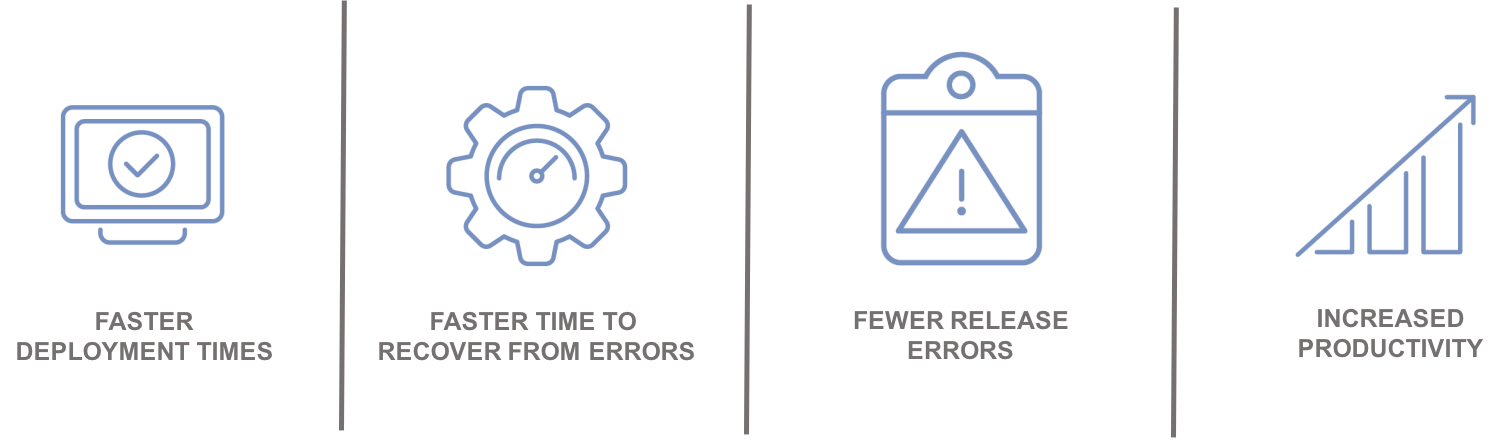
    Automation leads to:

    Integrating with the Ecosystem

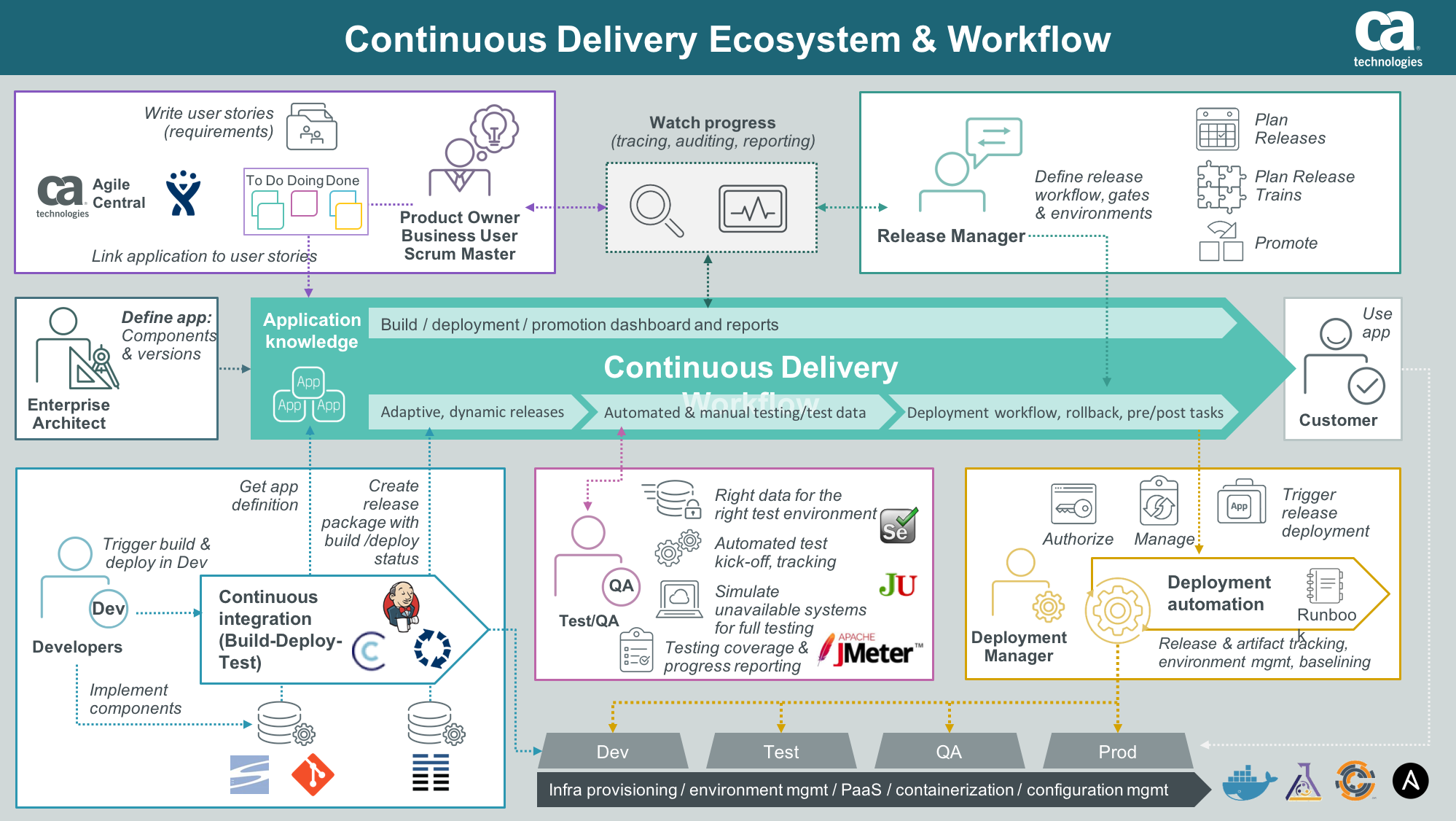
    An enterprise ARA solution can help you create a single control point to streamline all your application delivery processes for better predictability and reduced risk. A critical component of this is the ability to integrate and orchestrate tools and technologies required along the continuous delivery pipeline, including source control, automated testing tools, provisioning and configuration management solutions and change management and performance management solutions.

    Integration with an application lifecycle management solution can provide even further alignment, governance and traceability between development projects and what is ultimately being tested and promoted to production.

    “By integrating the two solutions, we will have a complete audit trail of deployments to help us understand how, where and by whom stories have changed,” said Phil Nickolai, director of application services at Jewelers Mutual.

    “What we really needed was a solution to streamline our whole way of working,” he said. “We had numerous people working on projects, competing for resources and causing complexity. Now we’re back in control and getting smarter every day.”

    The Time Is Now

    Let’s get rid of the problem that exists between the keyboard and information kept in spreadsheets, scripts or emails. Not only will you stop wasting time testing the wrong version of an application, but you can also ensure you have the right test data, the appropriate test cases and the correct configuration parameters for your environment.

    Stress-inducing release weekends and nights become a thing of the past. Developers can spend more time on developing innovative capabilities that generate revenue and keep customers coming back for more.

    — Tim Mueting