Tag: software development

  • Software Complexity Driving DevOps Automation

    Software Complexity Driving DevOps Automation

    The drivers behind increasing software complexity also are the drivers behind expansive DevOps automation. As the saying goes, “Software is eating the world.” DevOps is gobbling up software, too, engulfing it in practices that are necessary to make it thrive under the pressure of the current environment.

    That environment and those drivers are of keen interest to many. DevOps authority Andy Vitus, partner at Scale Venture Partners, has identified four drivers in particular that are creating the software complexity pushing DevOps automation.

    Multiple Distributed Software Locations

    According to Vitus, by moving software from one server to multiserver to multiple data center deployments, the industry has made software more elaborate. Applications now execute in a distributed manner and in parallel using multithreading inside multiple processor cores; among many servers running multicore processors; and in and between geographically dispersed data centers. This makes software more powerful and reliable, though it demands more DevOps automation to produce it.

    Simply incorporating the ability for software to run in parallel using multithreading adds intricacies to the development process. To keep both the workload and the number of man hours needed during development manageable, automate as much of the additional coding duties and testing as possible.

    “Running applications across servers and data centers requires that you ensure consistency in the data layer,” which will then need new databases to handle the load, says Vitus. Depending on the database, the developer must rewrite the software to be able to use it.

    The entanglements don’t end there.

    With mobile applications, mobile devices and back-end servers both store data. “You have to be a lot more careful about knowing what version of the data is the true one, unless you’ve got a synchronization layer built in,” says Vitus. Either way, programming annoyances can be introduced.

    Getting Lost in Translation

    Expanding development from a single programming language to multiple languages, even for the same project, has made software more convoluted. In legacy development shops, programmers typically used one language for everything regardless of whether it was the best language for their creations. These days teams are applying choice languages such as C++, Python and Go to the tasks to which they are best-suited. “This increases the complexity of security and patch management as you use six, seven or eight different languages all with their own vulnerabilities,” says Vitus.

    While adopting several languages certainly adds to patch management and security headaches, understanding how each language can and must be compatible with the others for them to work together is an entirely new challenge. “The ways that they handle variables and time stamps changes over time, and you have to ensure that different services can still talk to each other,” says Vitus.

    Stacks of Stacks

    Moving from a simple three-tier stack to a distributed microservices architecture catches software development in another snag, Vitus says. The database layer has grown to include in-memory and other database types. As development breaks the application layer into microservices, each potentially with its own data store, the two layers combine to create this new stack.

    Millions of Endpoints

    Finally, moving from deploying servers to deploying servers, mobile and Internet of Things (IoT) takes software down new paths of mostly uncharted territory, says Vitus. “Today you deploy software changes to a back-end server that must talk to a mobile client using iOS or Android or to IoT devices such as dishwashers and light bulbs in smart homes,” he says. “You could be deploying code to millions of devices.” This certainly affects the construction of the code for use on so many different platforms.

    Conclusion

    These drivers help create a magnified need for DevOps automation. Considering the costs of hiring engineers and technicians to do the same development work manually, the world will be watching companies that are pushing for increased automation to displace those labor costs. “To the extent that you can offload some of that to regression tests, you end up saving, and the cost of building a new software product goes down,” says Vitus.

  • Building a Foundation for Big Room Planning

    Building a Foundation for Big Room Planning

    When people think of agile, the first thing that comes to mind is a software development team. But agile is much more than that now, as every DevOps practitioner knows. Nearly a decade and a half of practice has shown us that high-performing agile software development teams are critical, but not sufficient on their own. When they operate in a silo, software development teams can easily become disconnected from the business and from other teams. To truly achieve the higher business goals, those development teams need alignment, or else they risk delivering the wrong things or the right things but at the wrong time. That is where Big Room Planning comes in.

    Big Room Planning is the secret sauce for effective agile planning and execution because it brings together all the people in an organization responsible for delivering software value to market—from development and test to program management and the business—to plan collaboratively. When I say bring them together, I don’t mean that figuratively: The key is to bring them together quite literally, assembling all of the stakeholders together in the same room in real time. That can feel quite shocking because it represents such a significant commitment by the company, but that is the point. Making agile work requires a commitment across every level of a company.

    Before the Big Room

    So do you just have everyone roll into a large space somewhere in a hotel’s conference area and hit a home run? Clearly, no. Setting up an effective agile delivery group takes time, and is far more complicated than spinning up agile development teams because of all the roles involved and how each team and individual will approach their part of the work. Most importantly, establishing the leadership changes required to truly change the way an organization works must also take place. Bottom line: Establishing an agile mindset throughout the organization is critical to have a foundation for success.

    There are three distinct phases of preparation required when standing up an agile delivery group (Agile Release Train, in SAFe parlance), which we call:

    • The Ready phase
    • The Sync phase
    • Rhe Go phase

    Each are vitally important, and without success in the earlier phases, your delivery will get bogged down in the latter stages.

    Get Ready

    The Ready phase is probably the most critical, and it establishes the right leadership, organizational mindset, and right group of people required for agile value delivery. Three key steps include:

    • Enterprise value stream mapping
    • Agile organization design
    • Leadership development

    Without these key steps, supported by leadership at every level, you simply cannot instill the cultural and mindset changes required to stick.

    Get Synched

    In the Sync phase, agile practices are instilled first. Agile practices specific to each role requires training and coaching to set in, and we advocate for a four-to-12-week period to ensure everyone understands their role, the ceremonies they will use to ensure collaboration and what artifacts they will use to plan and execute their part of the overall work.

    Once everyone in the delivery group gets it, it’s time to set up a first Big Room Planning event. This typically takes one month of preparation—without which your event is likely to fail.

    Preparing for Big Room Planning should focus on the inputs for the event. First among these is the business vision and context—the domain of executives, line of business leaders, etc. This is essentially the “why” behind what the teams will work on. Key initiatives for the delivery group, with clear outcomes defined (often supported by a lightweight business case), must be communicated effectively to inspire the group. It takes time to put this together.

    Next, develop a feature backlog that represents what the delivery group will be planning out during Big Room Planning. Doing this well is a more rigorous process than meets the eye. Features are the crucial ingredient because they represent the value being built to both the business and the customer, and they represent the key deliverables teams will produce.

    Product managers typically own this step, and if they are not well-prepared, they run the risk of either asking for too much or  asking for the wrong things that won’t have the desired impact on business results. At CA, our product managers go through several iterations of backlog preparation involving stakeholders throughout to company to make sure the priorities are clear.

    Even with a well-formed and prioritized backlog, effective Big Room Planning requires an understanding of the capacity of the organization to build what’s needed. This requires good estimation and a good understanding of the each team’s velocity. Estimation and a team’s velocity are big parts of what we learn during the Sync phase: Over a few iterations, the amount of work (a.k.a. story points) a team can deliver outcomes and provides an understanding of roughly the right capacity needed for effective planning. Doing this well ensures teams will be asked to plan not only the right features during Big Room Planning, but the right amount of features so that detailed planning can take place with enough time to design stories, resolve dependencies and address risks that emerge.

    Then Go

    The Go phase actually kicks off with the Big Room Planning event. The event itself occurs over a two-day period, which marks the starting point for agile execution. If formed well, the right people will be in the room to build value fast. With upfront preparation, the group members will understand what they will be building and why it’s important, and will be set up to create a plan that best delivers the value needed.

    Planning collaboratively ensures that the plan is well-designed across the group. Most importantly, because everyone has a part in building the plan—with the opportunity to work together across teams and across roles, with the ability to challenge and even veto decisions as they form—everyone ultimately feels a strong sense of ownership and commitment to the final plan. A successful outcome almost always ensues, and the group only gets better from there are they learn to prepare, plan and execute together as a cohesive “team of teams.”

    About the Author/Steve Wolfe

    Steve Wolfe photoSteve Wolfe is Senior Principal, Product Marketing for CA Agile Solutions. He has worked for more than 20 years on software products in both hardware and software companies. His experience spans 10+ years in both software engineering management and product management, including 7+ years on agile teams and delivery groups. Steve’s passions include helping organizations learn how to build the right things fast and reliably by applying agile and DevOps practices at scale.  He is a certified SAFe Program Consultant.

  • QA in the DevOps Era

    QA in the DevOps Era

    In software approaches that produce monolithic applications, it is not uncommon to find siloed teams, with development, testing and operations each an island unto themselves. The responsibilities of test and development are distinct from each other and are not meshed into a hybrid team as you might see in advanced DevOps shops.

    “QA (quality assurance) always comes late in the game to verify or test the software developed by the development team against the predefined specifications know as software requirements,” says Venkata Vinay Pandella, team lead at Nisum Technologies Inc.

    That’s the view inside and among these teams in which legacy development approaches still flourish. The rest of the enterprise sees these teams altogether differently from how they see themselves. “Even in a traditional software engineering organization, folks outside the engineering team generally consider Development, QA and Operations teams as a single group with a single responsibility to deliver a quality software product,” says Pandella.

    Even when Dev and Ops do embrace each other, the rest of the enterprise often maintains the same POV it had when Dev, Ops and QA were three entities and not one. How do DevOps and QA see QA after the shift?

    DevOps as a Foundation for the New QA

    Enterprises, the business units, Dev and Ops all expect DevOps to propel software using continuous integration (CI), continuous delivery (CD) and ultimately continuous deployment techniques that are fueled by and gain traction using automation. The more processes that Dev and Ops teams are able to automate, the more that DevOps accelerates the process of software delivery and deployment to the delight of software consumers and the business.

    DevOps enables teams to push software out weekly, daily and hourly through continuous software improvement. This negates the many obvious downsides of applying the traditional software development approach, which requires excessive planning, cross-team coordination, staging, testing and releases of monolithic blobs of software all at once. “Given that companies organically adopt DevOps together with agile software development practices, business managers are able to fulfill the objective to get high-quality software out to market faster,” says Pandella.

    To meet the goals of DevOps, QA must feed into the automated development process and help teams to achieve increasing software quality and faster time to market.

    QA: The Quality Icing on the DevOps Cake

    According to Pandella, QA specialists and teams have a number of roles and responsibilities in DevOps:

    • QA should prevent software defects at the earliest point during the software development process rather than find and report on software bugs after DevOps has produced the software. This will help to ensure that customers experience as few defects as possible.

    • QA takes ownership of and responsibility for continuous software improvement and software quality tracking throughout the software development life cycle.

    • Every QA team member is responsible for identifying problems not just in the product but also in the process, and recommending changes wherever they can to improve the continuous delivery of quality software.

    • Tests must be in code, based on the designed release cadence to publish a new release every week, every day or every hour. There is no room for manual testing—QA must develop automation systems through code that can ensure quality standards are maintained.

    • Automation rules: QA should automate anything that can be automated.

    • QA testers are the quality advocates, influencing both developmental and operational processes. They don’t just find bugs; they look for any opportunity to improve the quality of software through the software development process.

    • QA must move beyond functional testing, because even a small, nonfunctional defect introduced into a critical transaction process on an e-commerce website can bring a business to its knees. Many organizations have mature processes for automating functional testing; they are only beginning to apply these practices to other areas of testing such as security and stress testing. In particular, load testing and stress testing are critical disciplines for DevOps organizations that move at high velocity.

  • Don’t Make Me Code Podcast: A New Heavybit Series on Developer Experience

    Don’t Make Me Code Podcast: A New Heavybit Series on Developer Experience

    Welcome to Don’t Make Me Code, a new podcast that discusses developer experience design and the unique challenges you face when building developer facing products. Don’t Make Me Code is hosted by Steve Boak, co-founder and CPO at Opsee, and David Dollar, co-founder and CEO at Convox.

    This podcast is brought to you by Heavybit, a program that helps developer-focused companies take their product to market.

    In this first episode, Steve and David discuss the origins of the term “DX” (developer experience), they share their thoughts on what makes a great developer experience, and they talk about some of the challenges they face when designing developer-facing products.

    [soundcloud url=”https://api.soundcloud.com/tracks/242787724?secret_token=s-09pht” params=”auto_play=false&hide_related=false&show_comments=true&show_user=true&show_reposts=false&visual=false” width=”100%” height=”166″ iframe=”true” /]

    David: Hi, I’m David Dollar. I’m CEO and co-founder of Convox, a Heavybit company. I’ve been working in developer experience for about the last three or four years now.

    I’ve founded the DX team at Heroku, worked on a whole bunch of open source tools including Foreman, and now working on an open source platform as a service.

    Steve: I’m Steve Boak, the co-founder and head of product at Opsee. We are a monitoring company, and I’ve been working at several monitoring companies over the past six years, helping to help developers improve the experience of their products as well as find bugs in their code and improve the quality of their products.

    And though I didn’t hear the term DX for the first time until a few months ago, it’s been a passion of mine for several years, and it’s nice to finally attach a name to it. And I’m excited about this first episode because we get to unpack the term a little bit and figure out what it means.

    I’ve thought one of the most interesting parts of your background, David, was that you were part of this founding team at Heroku, that sort of created DX, and I’m interested to hear more about that.

    David: Yeah, so I guess this was maybe late 2012, maybe early 2013, right as at Heroku we started to expand, out of being just a Ruby host into being a host for really any language. That meant we also started to see more, you know our standard user before that had been sort of like, and I was ten user building rails and was very, there was sort of one happy path for that.

    As we expanded languages we had Windows users and Linux users and sort of, everybody coming together to try and build really any thing. And that started to get out of hand really fast. So, really, we formed the DX team, brought together basically the people that were in charge of the various languages at Heroku. Somebody in charge of the Ruby, and somebody in charge of Python and Node. Brought us all together into one team and really decided to try and make a consistent experience, sort of the Heroku way, across all of these languages and …

    Steve: And was it called the Developer Experience team from the beginning?

    David: It was, yeah.

    So the first time I heard the term was from Adam Wiggins. He sort of like came to me and said, “Hey, I think we should build this DX team. What do you think?” And yeah, so I mean it sort of exactly described what it is we were trying to do, which was make this nice experience for people building things on Heroku.

    Steve: And when was that? What year was that?

    David: I think it was the end of 2012, but it’s kinda fuzzy at this point. But yeah, it was a while ago.

    Steve: And it does seem to continue to be an important thing for Heroku. I, just in researching the term of it, saw that there’s a Heroku.com/dx, this is a big part of how they market themselves.

    And clearly it’s been important to Heroku for a long time. Like I said, it’s interesting to now talk about this with a name because a lot of us are doing this and have been doing it for a while but, giving it a name gives it so much more weight and it kind of marks how important it is for all of us. Mmm-hmm.

    David: It’s interest … you think of DX and what does that actually even mean? And its, there’s a certain type of user that you’re talking about now, right? When you’re talking about designing an experience for this user that likes to kind of get under the hood and break things apart and do things their own way and sort of knows what’s going on and maybe you could even consider a power user.

    Yeah, you want to make sure that they can sort of do whatever it is they’re trying to do but that the options aren’t overwhelming and that it’s not complete, just utter chaos.

    Steve: Yeah, it’s almost like this partnership that we as the makers of tools that developers then use to build tools for their customers, if they don’t like the product that they’re using that may show in the product that they’re ultimately trying to build. And so it’s this partnership where we all try to write good code and create great products together.

    And I think that’s part of what makes this different from user experience design as a whole, and why it’s interesting as a topic all unto itself.

    David: I definitely agree with that.

    The most rewarding thing about working, I guess in developer experience that I found is when people do things that you never expected them to do.

    You put all the pieces in place, you thought like, “Oh, maybe somebody will use these pieces to build X,” and it turns out that somebody comes and builds something you never even thought of. I think that that’s just really rewarding to see that.

    Steve: And it’s interesting that, I think a lot of product builders in general would probably share that sentiment in terms of the unexpected ways that people find to use their products, and the hacks that they create, and I’ve heard, even with consumer products you know, people being surprised by how the users are actually using the product in ways they never expected, but with developers that really is to another level because they may try to break your APIs.

    They’re much better at exploring the depths of your code and then creating tools that you never expected with it, which is both surprising and wonderful for us.

    David: It’s still largely about aesthetics, right? Like, you’re a good user experience, a good developer experience.

    At the end of the day is this thing easy to use? Is it pleasant to use? Are you able to figure out what’s going on? Does it make me happy to use the thing at the end of the day? So yeah, it takes a different set of things when somebody’s trying to come in and actually build something on top of your product.

    Steve: I remember in the early days of the Google Maps API just how many experiments and apps were being written with that.

    I think, partly, because of how easy and accessible they made it for developers. And I heard a talk from someone on that team talking about that the product that we all knew and loved then was not the first iteration of it and they actually had a much harder to use initial version. Do you know more about the history of that?

    David: I don’t really know.

    Steve: Yeah, but that was one of my first exposures to using another company’s API and it was a really rewarding experience. And they had all this boilerplate code that you could very easily lay down to plot pins on a map and see that.

    Especially for me as a designer it was so rewarding to get that gratifying output. The actual map on the screen with the pins that I had laid out. I think that is a really great way to measure how effective and how elegant your developer experience design is, in how quickly a developer can make something themselves.

    David: One of the barometers I use for the things that I’m building is you look for the blog-posts people are writing around your tools.

    Are they writing a blog post of like this thing was so insane I couldn’t figure out how to use it? Like here’s my giant blog post teaching you actually how to use it because I had to figure all this out. Or are they talking about how easy it made their life? Like, look how awesome this is, you should try it, too.

    Steve: Yeah, and that makes me think of the JavaScript world today and just how many frameworks are being launched, and the competing arguments for this or that. And in some ways this has really gotten good for the development community as a whole because there are so many choices now, and so many good frameworks to choose from. Almost too many, actually.

    And I think we’re starting to see some of that in the JavaScript world. Just competing ideas of how things should be done. And that almost raises a counter-argument to the value of developer experience design that when we open up too many possibilities and don’t create a set of tools, I think you described it in your Heavybit talks as like, sharply …

    David: I like to compose sharp tools. I mean it’s sort of like the Unix philosophy, right? Like, you want to make tiny tools that do one thing really well. You generally want to have some good examples or defaults, like, this is how to use these tools in combinations to make interesting things. But having those tools be sort of separate and composable is where you start to get really interesting things happening that you didn’t expect.

    Steve:

    Yeah, that each piece does its thing really well but also that when combined they can form something greater and that the whole is greater than the sum of the parts.

    David: Right. Like, a good example of that, it’s not really developer experience, but I have TTT, it’s sort of like an infinite variation of all these little components that you can put together, but they also have some default pipelines that come out of the box, you say, like, “Okay I really just want to make my email go to Google drive or something like, just like these nice defaults.”

    It’s really important, I think, when you have all of these choices to really also have the guides through them.

    Steve: Yeah. We use the Amazon APIs a lot now, and they’re an ecosystem all unto themselves. For every product Amazon offers inside of AWS there’s a unique API and many of those APIs seem to have differing views of the world and so, they in some sense they’re prolific in the amount of tooling they create for developers and they clearly have won a huge share of the market with just how much they offer, but it still feels to me like they’re a counter example.

    They seem to have APIs that a lot of us use but not APIs and tools that a lot of developers enjoy using.

    David: Even despite that, like pretty much everybody is still using their Sphinx, right?

    Steve: Yeah.

    David: So there’s something to that.

    Steve: You know, Facebook’s API or Twitter’s API I can’t speak to how good or bad those are but man, a lot of people use them. And there’s something to that, too, that the product as a whole has so much value and impact on the world that you are sort of forced into a place where you need to use it.

    And it doesn’t absolve you from the responsibility to make your tools great for your developers and your partners in this, but yeah, it’s sort of mind blowing to see how much can be done when you are hitting on a big share of the market.

    David: The AWS database is another great example of that. There’s so many options, so many ways to do things that you can, like, it’s great. You can really do anything. Like the sky’s the limit. But there is, like, finding the happy path can often times be, it’s just a lot of trial and error at the beginning.

    You end up just having to build up some expertise around that stuff and eventually you can, okay now I can understand how to design things using these tiny permanents, but yeah there’s not a really great, like I just have some code and I want to put it on the Internet.

    Steve: Yeah, and part of Convox’s business is really helping developers do this, right? That there are in fact so many possibilities to create an infrastructure in AWS, that giving a little guidance is probably a good way of helping developers through that process.

    David: Yeah it’s basically just trying to create a happy path. I think there’s a lot of choices that you don’t necessarily have to make.

    Steve: Yeah, we too, at Opsee, use AWS heavily. It’s a monitoring product designed just for Amazon web hosting. And when we were creating this product we were assuming we would see a pretty high level of consistency in how our customers are configuring their environments, but that was shot down almost immediately.

    There have been no two environments that are the same and so now we’re dealing with a wide variety of customer environments and it’s an example of just how much people can do with these tools, but how differently they’re choosing to do them.

    That though does get to this other interesting question of how we measure the quality of developer experience and how we know that we’re doing well. And we talked already a bit about time to value and how quickly developers can make tools with our products, but then I think it’s also interesting to talk about how that becomes part of how we price these tools. Like, we try to look at how much development time we can save our customers and then try to price the product based on that. Do you try to do something similar?

    David: We’re trying to think about this as a peer developer tool, so rather than, you know a lot of people try to charge for resources, things like that, we’re doing more of like charging per developer that’s using the thing. So we actually, actually creating value for developers I think is sort of the core of what we’re trying to do, so we’re approaching it from that angle.

    Steve: Yeah, and monitoring being a little bit different, we’re mostly trying to measure how much code our developers don’t have to write when they’re using this tool, and what they would have to do in a competing world, but

    I think the one thing that all Heavybit companies, certainly in all developer tools companies share is that at it’s core we’re trying to measure our value that way: How much code can we save developers from writing, and how much time can we save them?

    And that feels in many ways different from normal user experience design and consumer user experience design. That we have to look at that, the value that we’re creating for our users in order to assess our own value. So as designers of developer experience products I think it’s interesting to talk about the inspirations and the other companies that are doing this well.

    The first time I had ever really thought about developer experience as something to be measured was looking at Stripe and how … You said earlier how blog posts and recognition within the community can mean a lot. And I remember hearing lots of developers talk about the quality of Stripe’s documentation, to the point that it became synonymous with a great developer product.

    Like do you have Stripe-level docs? And so they were always a barometer for, you know, are we doing well and who do we measure ourselves against?

    And I feel like they’ve done a great job not just in creating great documentation and great APIs but in great products. I mean even their web design. They’ve taken all aspects of their design to a level that I think was not common in our world when they were doing it.

    David: Yeah definitely. I mean, we use Stripe and I just remember when I was first clicking through their web I was just like, “Wow, this is really nice.” You just have that thought to yourself while you’re using it, so yeah it’s very pleasant to use.

    Steve: And I don’t know, you know in the early days of Heroku I don’t know if you saw much of this but certainly five, six years ago if we designed a UI that was polished and really nice looking there was almost a bit of hesitation among our developer customers that we didn’t have the street cred like, “No, you can’t be good, you can’t be real because no one in our world would do this, would make a product like that.”

    And I think that’s changed a lot over the last few years, but we were almost fighting this uphill battle to try to create an elegant and beautiful user experience because people didn’t expect that.

    David: I certainly think that sentiment has changed. I think having a good design aesthetic, a sense of that, is actually like seen as a good thing in most developer circles now, as opposed to being like, maybe you don’t know what you’re talking about if you have a sense of style or something.

    Yeah, it seems to be important. People really look for it when they’re looking for tools or products and that’s also something that we tend to see celebrated.

    Steve: That’s about all we have time for today.

    If you’re interested in being a guest on the show, or if you have a DX topic you’d like us to dive into you can reach us at dmmc@heavybit.com or on Twitter @dontmakemecode. To learn more about Heavybit visit heavybit.com. And while you’re there, check out the library. It’s packed with amazing talks from founders of developer tools companies and other industry leaders.

  • A Life in Code

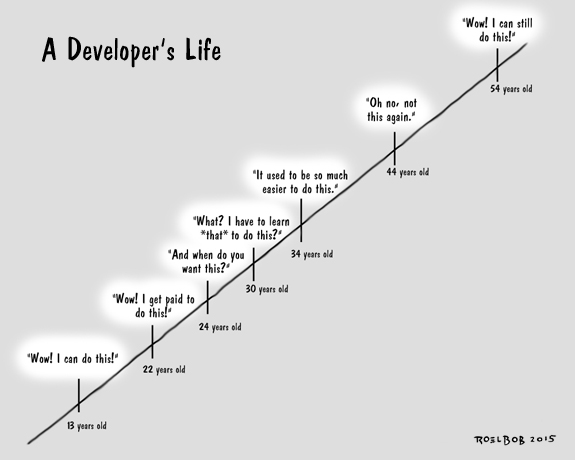
    The Lifetime of a Developer
    “There is no single development, in either technology or management technique, which by itself promises even one order-of-magnitude improvement within a decade in productivity, in reliability, in simplicity.” –Frederick P. Brooks, Jr. http://bit.ly/1IOVbPG

    — ROELBOB

  • To Be Continuous: Empathy in Software Development

    To Be Continuous: Empathy in Software Development

    Thanks for listening to To Be Continuous, a show about Continuous Delivery and software development hosted by Paul Biggar, Founder of CircleCI, and Edith Harbaugh, CEO of LaunchDarkly. In this segment of To Be Continuous, Edith Harbaugh and Paul Biggar talk with Sam Stokes about empathy in software development, how mini-services are the new microservices, and constantly updating software in a constantly updating world. Sam is currently a freelance software consultant and previously was the co-founder of Rapportive.

    This podcast is brought to you by Heavybit, a program that helps developer-focused companies take their product to market.

    [soundcloud url=”https://api.soundcloud.com/tracks/237727552?secret_token=s-k6OKe” params=”auto_play=false&hide_related=false&show_comments=true&show_user=true&show_reposts=false&visual=flase” width=”100%” height=’166′ iframe=”true” /]

    Paul: Alright, Sam, so what’s your favorite thing about continuous delivery?

    Sam: I like to think about it terms of shortening feedback loops. A lot of things that startups do can basically be looked at as doing something and then waiting to get some feedback on it, and then deciding whether to do more of that thing or to do a different thing.

    And continuous delivery is, people talk about sort of reducing the batch size and also about shipping stuff faster and clearly having some kind of automation. And continuous delivery is going to help you with both of those things.

    Paul: So is this specifically on the, sort of on the journey of a small startup towards product market fit? Is that kind of the sense you’re thinking of it as?

    Sam: I see it as applying to teams of different sizes. So for sure in a small startup you’ve got you need to iterate fast, you’ve got all these product ideas. But I think even if you’re a small team in a big company as I was recently working on, and still have a lot of the same pressures you have, product managers who want to try new ideas, you have customers who are sending in feedback all the time—some of which you want to listen to, some of which you want to tune out.

    It’s sort of, in some ways, a lot like being in a startup. At least, ideally it would be. And a lot of the problems you can run into are basically about not being able to close those loops quickly enough.

    Edith: Sam you’re someone who knows a lot about loops, so now might be a good time to introduce yourself.

    Sam: Sure, my name is Sam Stokes. Until recently I was working as a staff software engineer at LinkedIn. And right now I am, I guess a freelance software consultant, thereabout.

    Paul: I feel there’s a little bit of history missing there.

    Sam: Alright. Going back in time a little bit. So I was a co-founder of a startup called Rapportive. That was a plugin for Gmail that when somebody emailed you, would show you a social profile of that person in the right-hand side next to their email.

    So that you could get some insight into who you were talking to and put some more humanity into your communications with people—that’s sort of the way we saw it.

    Paul: That’s still the only plugin to Gmail that I use.

    Edith: I use it, too, and it’s for exactly that reason, ’cause I do a lot of customer development, and it helps so much to do, to empathize. To see that this—

    Paul: Right, right, yeah is a real person.

    Edith: You know, to see their face and you feel a connection.

    Paul: It’s interesting just with kind of customer communication. One of the tools that we use is Intercom. And once I started using Intercom it was the same sort of feeling I got the first time I used Rapportive, that like I feel that there’s a human at the other end of this and I feel I know who that human is and it just changes how you communicate with the people.

    Sam: It’s really motivating to hear and to see other examples as well. We really felt like email and sort of a lot of business communication in general can be sort of cold and formulaic.

    Yeah, just bringing that human element, even just seeing a face. I haven’t used Intercom but I’m guessing they have some similar ideas.

    Paul: Similar, when you send out messages or reply to someone it does the person’s face there.

    Sam: Right, we had a sort of plugin API in the, it was a sort of private beta version of our product and one of the things people used it for, so this would let you plug into the sidebar, people would plug it into their customer database and so they could see something like, they’d get an email from a customer it shows them how long they’ve been a customer, how much they’ve spent in their store—

    Paul: Right, right.

    Sam: What version of the app they’re running, that sort of thing.

    Edith: Was your original idea to do that sort of empathy or was that something that just you iterated into?

    Sam: The empathy was where we started. There were lots of ideas about taking all the information from all these different sources, you know public sources like, truly public sources like Google, quasi public sources like a Facebook profile if you’re friends with them on Facebook, and then private sources like stuff in your company database.

    All stuff that you would be able to search for if you could be bothered to go and do the searching but doesn’t necessarily bring itself to you while you’re talking to that person. And yeah, it was very much, what should you know when you’re talking to this person in order to make them feel like they’re interacting with a real person and an empathetic one.

    Paul: So I remember when you launched Rapportive it was like, or it felt to me like it was, an instant hit and maybe that was just the overnight success that comes after years of trying. I had a doco and what was the kind of software delivery process of that?

    Sam: Hmm, that’s a great question. I guess there’s two parts to that really. So how did it get there and what was our process that allowed us to survive it? So I guess how did we get there, it was a certain amount of luck in that process as there probably always is. We built our prototype and it was a pretty minimal prototype.

    You know, it had the functionality that was like this awful demo website up. The only reason there was a website up was we were trying to raise a seed round at the time, we were applying to OIC. Y Combinator requires that you have a demo site that’s public. They don’t like it to be password-protected. And so we had this thing up where you could install it and we had like 20 users. One of our friends decided that he was going to email a friend of his at one of the blogs, I think it was ReadWriteWeb and say, you know, hey you should check this out.

    And his friend checked it out and it turned out that one of the demographics that really liked the product that we built was journalists because they get a lot of emails from people they don’t know and they want to sort of know an extra nugget. I guess that was one of our takeaways was like, if your startup is really useful for journalists, that’s a great way to get some early press.

    Edith: That’s what worked for TripIt because journalists travel a lot. So TripIt just got all this free press basically ’cause journalists used it, loved it, and blogged about it. Unfortunately, journalists do not do continuous delivery so much.

    Sam: So how do we survive that? ‘Cause what happened in that 24-hour segment was that we went from 20 users up to 20,000.

    Paul: Wow.

    Sam: So I guess one part of it was our CEO had made the original platform choice. His name’s Rahul Vohra, he has a computer science degree, he’s an awesome technologist, but his focus is not generally on writing the software. He’d been writing the prototype, and he was like, ‘I need the quickest thing that I can get to get this market, so I’ll put it on Heroku.’

    Which turned out to be a life-saving decision because when the 1,000 X traffic spike arrived we just added some more dynos. So that was how we didn’t burn down. What did we do after that? I guess in terms of software process we were pretty young as a company, so it was pretty much hack away, read all the tweets. But there was a lot of, what you might call customer development more than software development at the time. So we pretty quickly decided that we were going to try and respond to every single tweet and every single email and so on to like try and live this idea of a good customer experience.

    And I think that helped to sort of amplify the viral effect of that press spike because people were sort of retweeting the things we were saying and getting a generally good feeling about us.

    And so a lot of those tweets were like, ‘Oh I wish I did this,’ or ‘I wish I did that,’ or ‘I wish you could see Twitter profiles in there.’ So it was a little bit of sort of customer support-driven development. Which obviously doesn’t scale but it can be a pretty good way to build some goodwill early on.

    And I think a lot of our users were sort of quite passionate about using us, ’cause they felt like they got that personalized attention.

    Paul: So did the, when you scaled the dynos did it just work?

    Sam: It worked perfectly until we hit the rate limit for the API that we were getting all our data from.

    Paul: The LinkedIn API?

    Sam: At the time we were using a service called RapLeaf.

    Paul: Oh yeah, yeah, I remember them.

    Sam: It wasn’t their main product, but they provided an API which … So basically the thing that Rapportive does, which is take an email address and produce social profiles about that email address. At the time that was entirely just UI wrapped around RapLeaf. We ended up building sort of our own version of that.

    And so we’d been using their API on a sort of demo basis. Because again, 20 users. Yeah, we immediately had to learn about things like request queues, so that our app wasn’t just falling over waiting for their API, and then frantically Biz Dev-ing to try and increase our rate limit, while at the same time figuring out the best ways to get around the rate limit without upsetting the Biz Dev deal. Yeah, we didn’t really have much of a sort of continuous delivery process at the time.

    But I guess not as many people were talking about it—this was 2010. I think the first blog post had come out from Iron View and so on, but I think it wasn’t as, you know, there weren’t full startups supporting it. What we did have was the Heroku deployment model, which was basically like within five seconds of writing the code you can deploy it to production.

    Which if you squint at it, kind of is continuous delivery because you’re saying, all of the bits of your deployment that you have are automated. We didn’t really have many tests at the time, so the tests we had were automated ’cause there weren’t any. Our deployment was absolutely, you do it get push, you don’t have to like move any servers around or anything like that.

    Paul: Seems like the testing model around, or the continuous delivery model around a Gmail plugin is probably going to be a fairly difficult process anyway.

    Sam: We never really had a good answer to, you know, what happens when Gmail changes their UI. The surprising part was it didn’t happen that often. We thought it would be breaking every week and we’d need all kinds of canary accounts and end-to-end testing to monitor that kind of thing. In the end, it happened rarely enough and we noticed quickly enough that we could usually just fix it on the spot. So even when we got better at testing and that sort of cycle of things.

    Paul: We had a problem or I guess solution with GitHub. So GitHub used to be super flaky around two, two and a half years ago, when they were still on Rackspace. And whenever something would go wrong with GitHub we would find out immediately. All of our, all the developments would start failing and so before they knew that there was a problem, we knew there was a problem.

    And we would often like, declare on Twitter, oh we think GitHub’s having a bit of an issue and two minutes later their status would tweet us and then we would retweet their tweet.

    Edith: So they were using you for their free testing.

    Paul: Well, our customers at least.

    Edith: No I mean you were acting as their tester and telling them that—

    Paul: Well, I mean it was very, you know, automated on our but we didn’t have necessarily automated fixes at the start. It kind of happened every, you know, two or three months and they would swear this is the last time and—

    Edith: It’s always the last time.

    Paul: And in the end it happened like six or eight times and by that time we had built a thing that allowed, you know, certain fixes, but it wouldn’t be quite, you know, fully automated process that you would expect if it was happening all the time ’cause it always seemed like it was gonna be the last time.

    Sam: And it’s probably always happening for a slightly different reason or in a slightly different way. It’s actually, it’s an interesting question to me in the subject of continuous delivery in general. People always talk about every time you commit you run your tests, every time you commit, you deploy.

    But that’s actually only one of the kinds of events that you’re dealing with in a software life cycle, right, when something’s actually running. I mean, sure you’re changing the code but also the world’s changing around you. And I feel like you always end up needing a little bit of both—you need something that’s gonna trigger when you change it, but you also need sort of an eye on everything you depend on. And, of course, even figuring out what all those things are can be interesting.

    Paul:

    So I wrote a blog post about this on the Heavybit Blog, I think a while back, and it was about third-party APIs you know, how do you test third-party APIs. And the conclusion that I came to was that, so if you run the tests as part of your test suite, then if something breaks, your test suite will be broken, but also some things will just like randomly break in production.

    And then of course you can’t deploy because your test suite is broken. So you’re in kind of the worst of both worlds. And so what I considered is, is that you need something which, you know, is just permanently monitoring. Like whatever API things you do constantly hits your personal accounts or your test accounts for those things, and then stub it out in your test suite.

    And that way you kind of get that best of both worlds, your test suite doesn’t fall over and you get an actual monitoring event when the third-party service goes down in production.

    Sam: I can tie this to an experience from LinkedIn, actually. So LinkedIn has the model where there’s a staging environment and a production environment. And the staging environment is—I don’t know if it’s technically called a staging environment because it’s not exactly production-like, but what they actually call it is early integration. Because it’s the environment in which teams integrate with other teams.

    And so the idea is you deploy your stuff into EI, early integration, as soon as you can so that if any other team depends on you or vice versa, you can find out there before the thing hits prod. But what you’ve effectively got in EI is this constantly changing environment full of dependencies and you have exactly this problem and different teams which using different solutions to, well, let’s write some integration tests which actually hit the dependencies and then we’ll run them in our test suite when we deploy to EI or when in the build step which—

    Paul: I can’t tell as you’re describing this whether this is a good thing or bad thing.

    Edith: Yeah.

    Sam: I think there wasn’t a clear conclusion, but my conclusion is that it doesn’t work for the same reason that you’re saying.

    You need to know that if your test suite fails, it fails because of something you did. And then you need something else that can fail because of something someone else did.

    But if you’re ever unsure which of things it is, then the signal is lost for both systems.

    Be sure to listen to the full episode. While you’re there check out Heavybit’s library, home to great educational talks from other developer company founders and industry leaders.

  • The Role of APM in Continuous Integration and Continuous Release

    Today’s software-defined and -driven business requires fast changes in business models—a phenomenon permeating successful businesses. What this means is almost every company is learning how to make small, rapid changes and adjustments within their business, especially within software systems. As a result, IT is feeling immense pressure to evolve, and the net result is a major uptick in private cloud environments (especially Apprenda, Pivotal Cloud Foundry and Red Hat OpenShift) and public clouds (especially Amazon and Microsoft) within our install base of large enterprises. These new platforms enable faster development, testing and releasing of software.

    Enterprise customers are getting much smarter by using automation to drive the software life cycle, including continuous integration, and even experimenting with and using continuous release processes. This is no longer a startup scenario; it’s a strategy for our large, enterprise customers. These companies are trying to build agile development and operations teams by changing people, process and technology to enable a DevOps feedback loop:
    image02

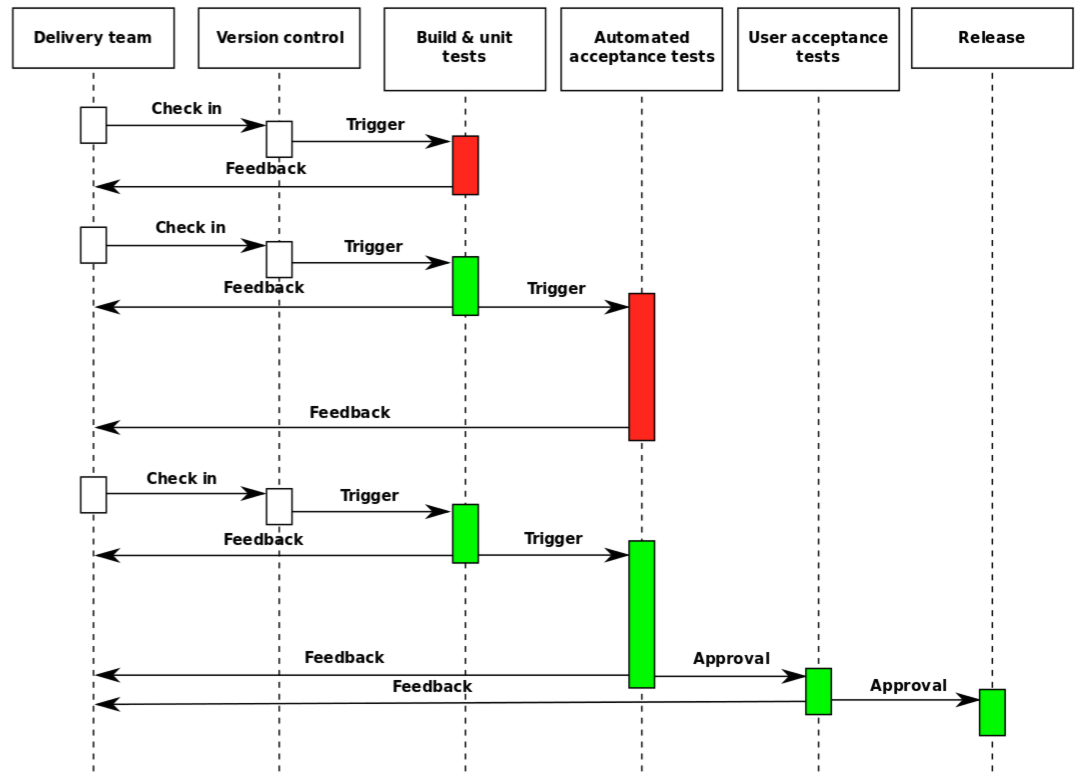
    Wikipedia describes the continuous delivery loop as follows:

    DeliveryLoop

    Within this loop, application performance management (APM) can be part of build, unit, regression and load tests to drive the automated acceptance testing before new code is pushed to production. In fact, at the recent AppSphere 2015 user conference we had several great talks on this subject.

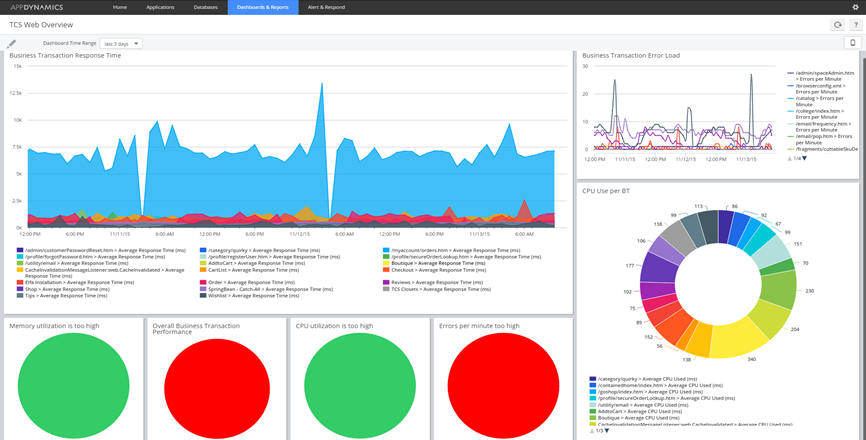
    The first talk was presented by our customer The Container Store‘s  August Azzarello, who discussed, “How The Container Store uses AppDynamics in the Development Lifecycle.” The company began with APM in production, in an effort to improve software quality before production. It began the expansion by installing APM within test, integrating it into functional and performance test suites. It also enabled alerting from dev/test so that developers and testers both understood when there were performance deviations and issues before production.

    Key features the company leveraged in pre-production included dashboards such as this one:image03

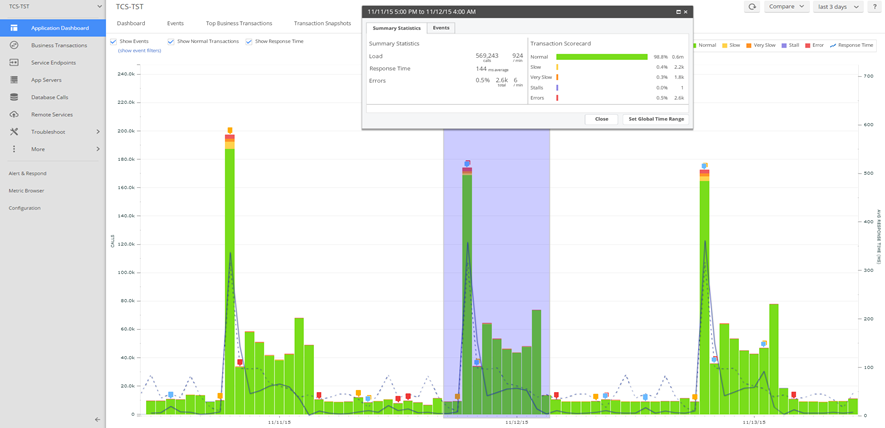
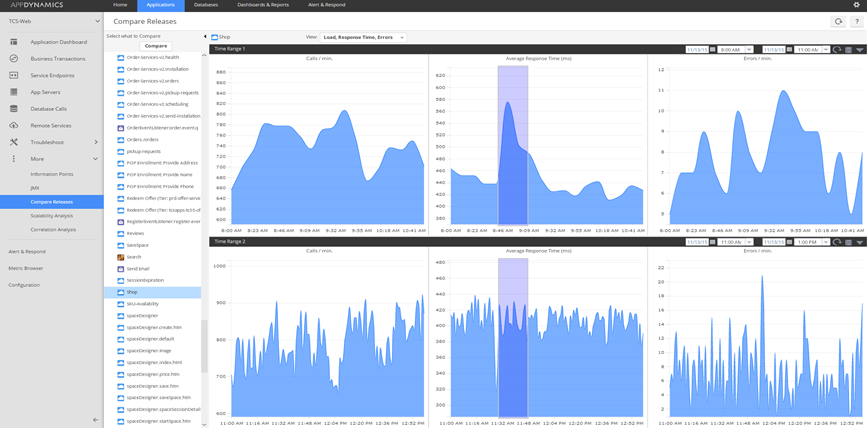
    Comparative analysis views such as this one:

    image04

    And being able to understand between releases if they were improving or degrading:

    image00

    The Container Store is using open source tools including Selenium for functional testing and Locust.io for performance testing.

    During his discussion, August also explained some of the major benefits the company saw from implementing APM in pre-production. Here are some best practices outlined by August in his discussion:

    • Monitor everything
    • Test continuously
    • Performance test early in development life cycle
    • Empower development & QA team members

    Some benefits The Container Store has seen, according to August, are:

    • Set performance expectations before production deployments – about 40 percent improvement since it started using AppDynamics in test
    • Fine-tune alert and business transaction policies prior to production deployments
    • Identify testing requirements and testing gaps
    • Decrease performance test result reporting to 20 minutes from five hours

    One of my favorite talks (which is why I selected it for the deep dive track at AppSphere) was the talk given by one of our senior sales engineers Steve Sturtevant, who came to AppDynamics from PayPal two years ago. In his talk, titled, “DevOps and Agile: AppDynamics in Continuous Integration Environments,” he explained the integration work he did. He also delved into the questions, Can you scale and auto implement monitoring in dynamic environments? Do you quantify the impact of change? Steve also offered a demo with integration between Puppet, Jenkins, ServiceNow and AppDynamics in his examples, with automation throughout the life cycle.

    One of our partners Electric Cloud specializes in continuous delivery and embraces an open ecosystem of technology providers and open source software. It has put together some great resources for people looking to explore the rest of the feedback loop:

  • Software Development of the Future: Partnering with Outside Sources How One Company Found Success with Outsourcing a Major Project

    Software Development of the Future: Partnering with Outside Sources How One Company Found Success with Outsourcing a Major Project

    Untangle develops and designs security software and appliances that protect computers and enterprise networks. By synthesizing enterprise-grade capabilities with consumer-oriented simplicity, our company creates products that are both powerful and intuitive to use. Designed for organizations ranging from small schools and businesses to large campus environments, our open source solutions offer a cost-effective alternative to expensive, inflexible proprietary software.

    In 2007, we were at a crossroads in our software development efforts. We needed to implement a major technology upgrade without delay, but didn’t have internal resources to support the project. The technology at the core of our firewall application with desktop user interface was becoming obsolete, and we needed to replace the existing Java Swing-based user interface with one that was web-based. Building a new UI was not just a massive project; it was a crucial one as well.

    The Untangle Next Generation Firewall includes both free and paid apps that block unwanted content, spyware, and viruses from networks. Our Internet Content Control product gives users insight into and control over all their Internet traffi­c for optimal Internet performance. The usability of the Untangle Firewall was one of the product’s most distinct features. Many of our customers were small businesses and academic institutions with users who were not technical experts, so our management team had to ensure that the new UI delivered the same intuitive user experience as its desktop predecessor.

    To take on development of the new UI, we needed to dedicate a new team of software developers for well over a year. Building a development team based in Silicon Valley was impractical in terms of both cost and availability. Competition for top technical expertise was fierce in Silicon Valley and, as a result, compensation levels were skyrocketing. We ended up selecting Gemini Solutions for the project because they were capable of performing highly complex development work and also had capabilities working with JavaScript libraries, a key requirement of the UI project.

    The Untangle Firewall with its new, web-based UI was launched 18 months after definition. The new browser-based product was a resounding success with our customers. Some firewall products completely ignore usability, but we’re passionate about it. Gemini’s expertise with JavaScript made it possible to replicate the user experience while entirely changing the underlying technology.

    Today, Gemini continues to manage the migration to new JavaScript libraries and supports Untangle with other ongoing software development projects as well. These days, JavaScript libraries are very fancy and, as a result, every migration is a big complex project requiring deep knowledge. Gemini has unsurpassed expertise in this area and maintains ownership of that portion of our development.

    The best advice I can give a company looking for outside software development support is to find an organization worthy of their trust and then to trust them fully. Talented individuals want to be an integral part of the team, and they deserve to be. I would highly recommend looking to outside support when you are working on major products. Make sure that they are a good cultural fit, aren’t passive and aren’t afraid to push back. You want a team that will take initiative and offer suggestions. That’s an element that’s missing in so many outsourcing arrangements, so it is important to do your research before selecting a firm.

    About the Author/Dirk Morris

    dirkWhen he’s not summiting El Capitan or off-roading in Baja, Dirk Morris spends his time as the founder and engineering visionary behind the Untangle network gateway platform. Prior to Untangle, Dirk was Chief Architect at Akheron Technologies, where he invented the patent-pending High Bandwidth Transparent Vectoring used in the company’s proxy firewall engine. He has also held positions as lead engineer at VerticalNet and H.L.L.C. Consulting, developing Java-based distributed monitor and intrusion detection systems. Dirk earned a Bachelor’s degree in Computer Science with a minor in Mathematics from Carnegie Mellon University. He worked on survivability simulations at CERT/CC (Computer Emergency Response Team), the University’s renowned, federally funded Center for Internet security.

  • Building software quality into your Continuous Delivery pipeline

    Building software quality into your Continuous Delivery pipeline

    The modern software development landscape places a premium on speed. It’s good to be first to market. If you’re going to fail then you should fail fast. A rapidly evolving product can be shaped according to customer feedback, and fast turnaround allows you to stamp out defects and hone the software for your audience.

    A continuous delivery pipeline enables you to act and deliver more quickly. But you need to build in quality metrics to ensure it retains a laser focus, and doesn’t become an out-of-control fire hose. It may require some front-loaded effort and resources to set an accurate measure, but the resultant software quality turns short term cost into long term savings.

    Plan for quality

    You can build the expectation of quality into your software development process from the start. Design your tests before a line of code is written. Create a test architecture that can be woven into your CD pipeline. Build a self-adjusting system that applies the right tests at the appropriate time in development, covering unit tests through to performance testing. That way you always have the real-time insight you need into your software quality.

    Why wait?

    Test-driven development can save time and resources. By waiting for functionality to be developed before writing up your automated functional tests you’re creating more steps to complete than is necessary, and slowing down the process.

    You need real examples of each feature and piece of functionality in order to design and implement it anyway, so why not create them from the beginning? They can serve as acceptance tests and keep developers focused on the core requirements for your software.

    This can only work if you ensure that you have group buy-in from day one. All stakeholders must be involved in the acceptance test design. If you fail to get the input you need about what constitutes a holistic view of your software quality, then you can expect feedback that raises new concerns down the line. By that time it will be more difficult and expensive to retro-fit new quality metrics.

    Aim for automation

    The more of your acceptance criteria you can automate, the better. It provides you with a mechanism for taking the temperature of your software whenever you want to, for a clear picture of its health.

    Naturally, there will be acceptance tests that you can’t automate. You shouldn’t try to automate everything. There’s no substitute for human insight and it’s notoriously difficult to predict your end user’s first impressions.

    Functional tests are ideal candidates for automation, provided your test architecture considers optimization for regression and remains flexible enough to accommodate new examples when required. For the most efficient use of your resources you need to build in an understanding of dependencies. You need control over the decision on what to test and when, based on the quality attributes you’re examining.

    Failures will be flagged at the earliest eventuality for all stakeholders, maximizing your opportunity to address them quickly. By building these quality metrics into your CD pipeline you can go live with confidence.


    About the Author/Viktor Clerc

    author-342342342Viktor Clerc is product manager for testing applications at XebiaLabs, a provider of automation software for DevOps and Continuous Delivery helping companies to accelerate the delivery of new software. You may reach him at vclerc@xebia.com.