Tag: software deployment

  • System Initiative Open Sources Digital Twin Tool for DevOps

    System Initiative Open Sources Digital Twin Tool for DevOps

    System Initiative (SI) today announced it is making the digital twin tool it developed to manage DevOps workflows available under an open source Apache 2.0 license.

    Company CEO Adam Jacob said the approach will enable third parties to contribute to a project that is still early in its development cycle while SI provides commercial support via a subscription service.

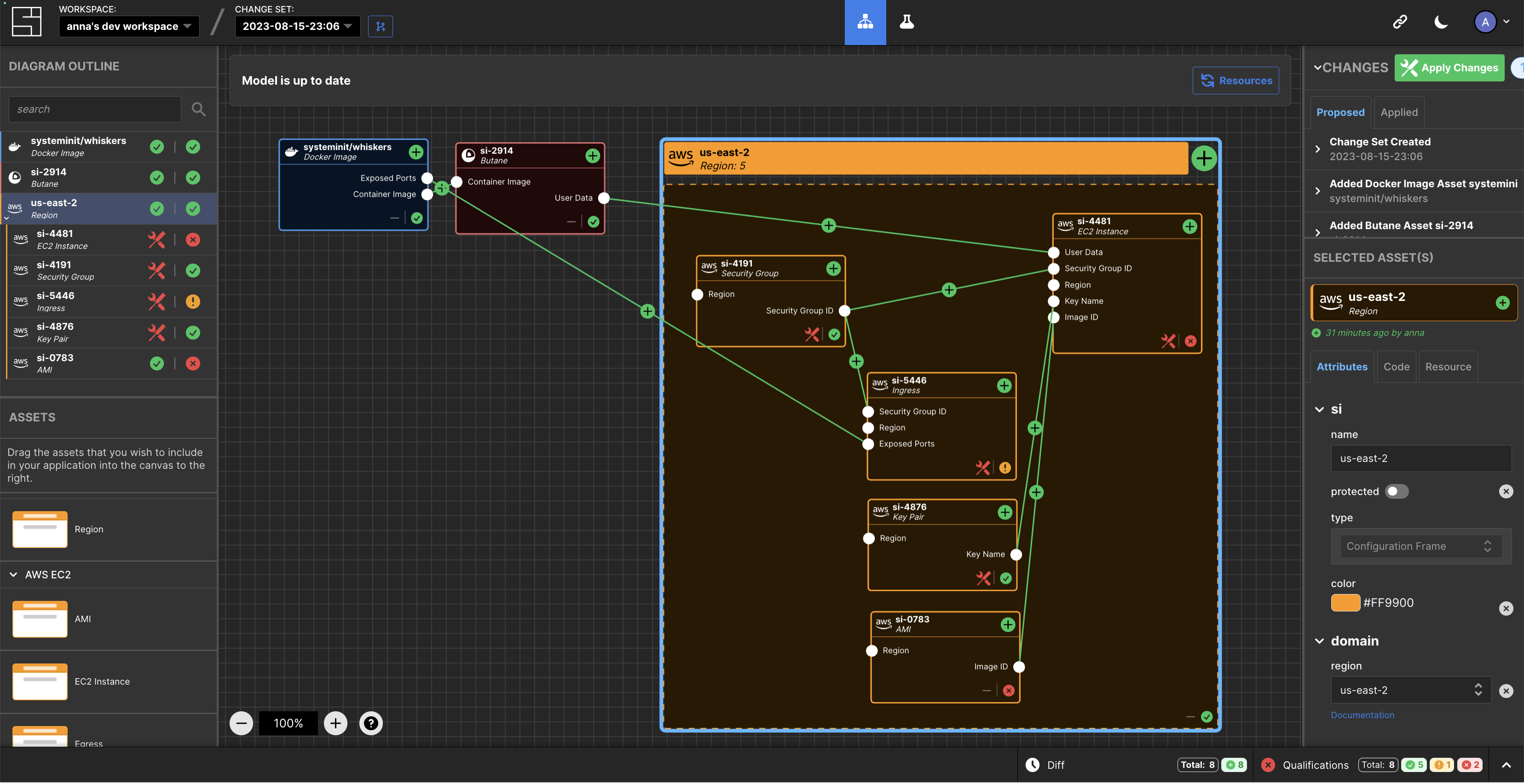
    SI has developed a tool that creates a digital twin of a DevOps environment that provides a level of abstraction that makes it simpler to manage complex workflows at scale.

    At the core of that effort are models of IT environments created by the SI platform accessed via a visual interface. The automation framework built into the platform uses the relationships between models to infer configuration dynamically and generates typescript code that a DevOps team can then apply to automate a task.

    Feedback loops are provided in real-time to give insight into the viability of a configuration, in addition to eliminating the need for state files to track and ‘plan’ versus ‘apply’ stages.

    This approach streamlines a lot of the complexity that creates bottlenecks in DevOps workflows in what heralds the arrival of a new DevOps 2.0 era, said Jacob.

    In general, SI is making a case for an alternative approach to managing DevOps as the existing platforms and framework are fundamentally broken, added Jacob. Models that create digital twins of DevOps environments represent the arrival of a new era of software development and deployment, he noted.

    As more organizations realize their dependency on software to drive digital processes many are then looking to improve the productivity of developers and the DevOps teams that support them. Unfortunately, many DevOps teams are supporting DevOps workflows using custom code that varies widely in quality. Rather than rely on a DevOps engineer to write code, the SI digital twin tool will create code that can be applied more consistently to create DevOps workflows programmatically.

    One of the reasons few organizations today have fully automated DevOps across the application development and deployment process is that it’s simply too difficult to achieve using legacy tools and DevOps platforms. It’s not clear to what degree a digital twin approach to managing DevOps will resolve that issue, but when coupled with the arrival of artificial intelligence (AI) capabilities the way DevOps is managed is clearly about to transform.

    It may take a while for that transition to occur, but DevOps teams that have historically embraced automation are at the very least going to aggressively experiment with technologies that promise to eliminate much of the drudgery that makes DevOps more tedious than need be. The issue, as always, will be determining which technologies live up to the current level of hype being generated in a way that can be easily adopted.

  • Operational Excellence and the Success of Software Deployments

    Operational Excellence and the Success of Software Deployments

    When we talk about best practices for software reliability, the conversation tends to focus on optimizing the applications themselves and the infrastructure that hosts them. The driving idea is reliability must be baked into system architectures and infrastructure from the beginning.

    That’s certainly true. But by focusing too much on the design and implementation of applications, you run the risk of overlooking another crucial element for achieving reliability (not to mention agility and extensibility): a culture of operational excellence.

    It’s only by baking excellence into your organization’s operational culture that you can maximize reliability.

    Let me explain…

    Defining Operational Excellence

    Put simply, operational excellence is a mindset that is embraced across an organization to maximize outcomes and positive results.

    Operational excellence can be reinforced by specific tools and processes, but it’s ultimately a philosophy and a cultural principle. It must be integrated into your organizational culture in order to achieve its full effects.

    Operational Excellence And Software

    Operational excellence is a buzzword that you hear occasionally in the context of business management. It only rarely appears in conversations about software. Nonetheless, the concept has an important role to play in several respects, including making software more reliable and extensible.

    Uniting Disparate Teams

    One of the most pervasive challenges in modern software deployment and management is the fact that every deployment depends on multiple teams. Developers, IT operations, infrastructure engineers and business managers all have a role to play in ensuring that an application is a success.

    Getting all of these teams to work together can be a challenge. The ideal solution, according to the DevOps mantra, is to de-silo your organization by creating a single DevOps teams that oversees development, operations and everything in between. For some companies, that approach will work, but for others, single-team DevOps is not a realistic goal. There will always be some distinction between teams and specializations.

    Yet whether you have a single DevOps team, or multiple teams working toward a common goal, operational excellence can help you achieve the cultural unification necessary to help everyone advance the common good. Operational excellence serves as a cultural goal shared by all teams and team members during the software development and deployment process. By making excellence part and parcel of your culture, you gain a principle that can guide all of your teams, even if they otherwise share little in common culturally—which, generally speaking, is the case; developer culture is not the same as IT culture and certainly not the same as business culture.

    Operationalizing Best Practices

    Another key benefit of operational excellence is that it helps to ensure best practices are actually followed across the software deployment process.

    Most stakeholders in software development and deployment know what they should do when performing their jobs…but they don’t always do it. Your developers might churn out an inefficient function because they are under pressure to meet a deadline and need to deliver something that works, even if they know that they are not following coding best practices. Your IT team may fail to configure granular IAM permissions for a virtual server because they lack the time, even though they know that is not a best practice from a security standpoint.

    Instilling operational excellence into your teams helps to prevent these types of shortcuts. When a culture of excellence prevails, your team will follow best practices, even if they take longer.

    Continuous Improvement

    Human beings are naturally inclined to desire finality. Feeling like we will never reach the end of a task is discomforting (that’s why poor Sisyphus was so unhappy, for example). Yet, this discomfort needs to be managed if your organization is to achieve a culture of continuous improvement. Continuous improvement means your teams constantly find ways to make things better, even if they are already quite good.

    For developers and IT teams, this can be a tough pill to swallow. Developers or engineers who have achieved 99.99999 reliability for their application would probably rather feel proud of what they’ve accomplished than be told they need to add another nine to that figure.

    Still, striving to become even better is what continuous improvement requires. A culture of operational excellence can help ensure that your teams welcome this type of challenge rather than resent it.

    Collective Effort

    When it comes to software development and deployment, personal ownership of any part of the code or process is a risk to the organization. If only one programmer knows how a certain microservice works, or only one IT engineer has the power to create new databases, your organization will lose agility, or it could even end up with a hostage employee situation.

    Instead, software deployment should be as collaborative as possible. Everyone within a given team should understand and (in a pinch, at least) be able to perform everyone else’s job.

    A culture of operational excellence helps to ensure that your teams take a collaborative approach to the way in which they build and deploy software. Instead of letting each individual own part of the process and receive personal credit for its success, operational excellence encourages team members to think of their work as a collective process with collective responsibility for the results. That’s because operational excellence focuses on the success of the organization as a whole rather than individual employees or teams.

    Conclusion

    To be sure, choosing the right architectures, tools and people will do much to help maximize the reliability and effectiveness of your software, but those are only part of the solution. You also need a culture of operational excellence to unite your various teams behind a commitment to best practices, continuous improvement and collective pride in the applications they build and deploy.

    This sponsored article was written on behalf of Eplexity.

    — Chris Tozzi

  • ‘DevOoops’ Moves: Unforeseen Lock-Outs

    ‘DevOoops’ Moves: Unforeseen Lock-Outs

    DevOps’ ultimate aim is to create efficiencies in the software delivery process. But it doesn’t always work out that way. Sometimes DevOps initiatives lead to mistakes—something we lovingly call “DevOoops.” CloudBees recently polled some colleagues and came up with five examples of a DevOoops in action. Following is a discussion submitted by Carlos Sanchez, principal software engineer, about unforeseen lock-outs.

    Scenario:

    When you’re automating deployments using configuration as code, make sure you have the right protections in place (i.e., validation of configuration). Otherwise, it’s easy to lock yourself out, forcing yourself to manually log in to each machine to fix it when a bad change is pushed and deployed to all the machines.

    Having a strong technology solution that securely and centrally stores credentials for the names of people who access those machines is critical to maintaining a successful DevOps program. It’s a no-brainer. When you have to service accounts, you’re much more likely to be able to leverage a fast-acting script to log in and reconcile logouts if credentials are centrally stored than if you had eight individually managed service account-based credentials.

    How do you reconcile lock-outs? How do you avoid the kind of DevOoops situation that can derail all of the good progress you’re making? The process you adopt will depend on what your software development and deployment life cycles look like. Here are several potential approaches:

    • You can use multiple staging and preproduction environments that share common configurations with the production environment. This sets up a process where, before you try to deploy an app or a new configuration to your production environment, you know you have successfully deployed it to environments that are as close as possible to production, multiple times.
    • You can have post-deployment validation scripts run after every deployment and have them validate things such as, Can account X log into environment Y? The scripts should include common or leading indicators of success or failure of a deployment. Once artifacts have been deployed and the system starts, every deployment will immediately run these scripts as part of the deployment process. So, every part of the deployment is automatically validated as success or failure.

    When taking an approach such as rolling deployments, you also need to ensure that broken configurations are identified before they’re propagated across multiple servers or server clusters. This means you need to validate your deployment and your configuration changes before you go to production, validate deployment and configuration changes on first deployment and then validate, validate, validate at each subsequent step.

    By doing all of this, you avoid surprises. You extend a quality-first, continuous validation approach beyond just your application code and apply that to your environment. Avoiding unnecessary lock-outs will help you mitigate risk, eliminate wasted time and avoid bad customer experiences.

    Takeaways

    • As you bake quality into the processes and shift automation left, you need to make sure you validate all changes early and often.
    • Organizations need to implement proper processes, not only for application code changes but also for infrastructure as code changes that manage environments.
    • In automating in pursuit of DevOps, it’s necessary to have a strategy for credentials and secrets management of permissions for your DevOps and production systems.

    — Brian Dawson

  • Enhance DevOps Experience with AWS Smart Tools

    Enhance DevOps Experience with AWS Smart Tools

    DevOps has become the champion of business operations by fostering collaboration between disparate teams, providing a common work framework and paving way for continuous delivery that greatly boosted software development.

    Amazon Web Services (AWS) has become a leading provider of DevOps tools and services and has been instrumental in taking this experience to a higher level.

    So how does AWS elevate the DevOps experience?

    Automation

    DevOps not only eliminates the cultural disparities between two different environments but also eases the software development process by automating its tasks. This has made maintaining and looking after large-scale complex environments easier.

    Earlier, implementing automation in cloud environments was a painstaking process and was similar to implementation/usage in physical or virtual infrastructures. Today, however, leading cloud services providers offer DevOps automation tools as a part of their feature package, making automation a breeze.

    Continuous Integration and Delivery

    AWS CI/CD tools make building, testing and deploying application source—or just securely storing it—simple and organized.

    Continuous Integration and Delivery with AWS DevOps

    • AWS CodePipeline: This is a continuous integration/delivery tool that builds, tests and deploys code in the event of a code change. AWS CodePipeline helps developers introduce code quickly and reliably into the software life cycle.
    • AWS CodeBuild: AWS CodeBuild is a fully managed build service that compiles source code, runs tests and produces deployable software packages that are ready for use. CodeBuild is expandable and processes multiple builds simultaneously, propelling the purpose of continuous integration and delivery.
    • AWS CodeDeploy: AWS CodeDeploy automates code deployments to instances or on-premises servers. This tool helps users to release new features rapidly, avoid downtime during application deployment and manages updates easily.

      Special Features:

      • Automatic deployment
      • Integration with third-party tools
      • Centralized management
      • Integration with other AWS services
    • AWS CodeStar: AWS CodeStar helps users to rapidly develop, build and deploy applications while providing them with a common interface for managing software development activities. It allows users to set up their continuous delivery tool-chain in minutes for faster code release.

    Microservices

    Microservices allows users to build and deploy microservices architecture with the help of containers or serverless computing.

    • Amazon Elastic Container Service: Amazon EC2 services enables users to manage large groups of containerized applications with the help of Docker containers.
    • AWS Lambda: AWS Lambda relieves users from the burden of constantly administering and managing the system while running code for virtually any type of application or back-end service. This Amazon service just requires developers to upload code after, which the system takes care of running and scaling code with high availability.

    Platform as a Service

    • AWS Elastic Beanstalk: AWS Elastic Beanstalk is used to deploy and scale web applications and services developed with Docker, Java and Python on servers such as Nginx. All users have to do is upload the code and the service will handle deployment, including capacity provisioning, load balancing, auto-scaling and app health monitoring.Special Features:
      • Quick Deployment
      • Integration with other AWS Services
      • Application Health Monitoring
      • Easy Access to Application and System Logs
      • Customized Software and Applications

    Infrastructure as Code

    • Chef: This is an infrastructure automation framework that enables easy configuration, deploying and management of servers and applications on a cloud, physical or virtual environment. It sets up the infrastructure by using recipes.
    • Puppet: It can be tedious to tend to each server individually should you need to make configuration and content changes to multiple servers. In such a scenario, Puppet helps to set up each server as an agent that relays information to the AWS Puppet Master Machine about any changes to be executed on that server, paving way for uniformity across all servers.
    • Ansible: Ansible is another configuration management, software provisioning and application deployment tool. Designed for multi-tier deployments, Ansible enables continuous delivery. It designs your IT infrastructure by describing how all your systems can work as a network.

    Amazon Web Services has a number of DevOps tools, all designed to help professionals work more efficiently in the AWS cloud environment. Are you using the AWS tools? If so, what are your thoughts about them? Let us know your thoughts in the comments section below.

    — Veritis

  • Fighting Deployment Anxiety: 5 Tips from the Pros

    Fighting Deployment Anxiety: 5 Tips from the Pros

    You know the feeling: You’ve put in hours of work developing a new feature. It has gone through QA, been tested and passed all stakeholder inspections, and now you’re ready to deploy. Despite your experience and preparation, you have a pit in your stomach. What if something goes wrong and it brings your app to its knees? What if it doesn’t function in your production environment the way it’s supposed to? We’ve all been there. Fortunately, we also have some ways to help.

    Electric Cloud CTO Anders Wallgren recently participated on a webinar with Gene Kim, CTO, researcher and co-author of “The Phoenix Project” and “The DevOps Handbook.” Hosted by devopsy.kinsta.cloud Editor in Chief Alan Shimel, the webinar addresses lessons learn from large-scale DevOps transformations, the business value of DevOps and some of the best tips and tricks for fighting deployment anxiety. We pulled out the top five tips and tricks from Kim and Wallgren for making deployment worries a thing of the past.

    Tip 1: Automate Your Deployment

    A theme throughout the webinar from both Kim and Wallgren was “automation.” One of the big reasons for this is that typically, when you automate your deployments, you’re also automating the diagnosis of problems in those deployments. You can’t always just rely on the exit code of a command-line tool to tell you whether something went right or went wrong. To help keep your deployments healthy, you’ll want to do testing along the way, possibly as a blue-green deployment or a partial deployment. However, if you don’t have automation behind that, it can be difficult to get that accomplished at speed. Without automation, you may start to rely on heroic efforts by individuals—so that every time you are doing a deployment, someone is having to do a figurative tightrope-walk to get everything accomplished. This creates a tough environment for your employees, and can lead to extensive downtime (and lost profits).

    Tip 2: Enable Self-Service Deployments to Any Infrastructure

    You’re probably wondering why this is a separate topic from automated deployments. That’s because the majority of deployments that occur in a given release pipeline aren’t going into production. Most deployments end up in testing environments (for performance testing, regression testing or just developer testing). It’s also important that you give your engineers the ability to use the same deployment methodology (artifacts, process definition, environment definition, etc.) regardless of the location to where they are deploying. From a cost perspective, allowing QA to test on a local Kubernetes cluster might be more cost-effective for your enterprise than running tests on Amazon Container Service. But, allowing teams to use the same approved automation as part of every deployment—to any location—means a more thoroughly rehearsed and therefore less anxiety-inducing deployment.

    The ability to do self-service deployments also gives your teams the ability to move substantially faster when they need to deploy something for testing by avoiding the need to open a ticket and get your Ops teams involved. By allowing self-service deployments, you can avoid the process of running around to find the right person to accomplish the deployment you need to run, and empower your organization to react and build more autonomously across different groups. The result is better-tested and built deployments (resulting in lower deployment stress and fewer errors).

    Tip 3: Self-Service Environments

    We’re continuing to roll with the theme of automation, but this time we’re talking about self-service environments. More often than not, we’re working with complex distributed apps. This means things such as a containerized microservice application, DBMSs, messaging, key value stores, legacy applications and third-party vendors that we need to integrate with—all things that make our deployments complicated. Being able to consistently provision complex environments is a very important part of being able to successfully recreate a deployment as you promote the application through its life cycle.

    It’s important to make sure that your engineers, and in particular, your QA and development engineers, have easy access to environments and that they’re not standing around waiting for access. When you don’t have the ability to get VMs or containers provisioned and configured correctly to receive your application, you run into problems. One of these problems is that your ability to test rapidly just became much more difficult. When you can’t get a near-production quality environment stood up in a few minutes, it means that your bug fix that requires just a few lines of code could potentially take weeks to test. Suddenly you need to requisition a set of VMs to test on (which could take weeks) and another day or two to do the deployment, and only then can you complete your tests. Things become painfully slow. And, when it comes to testing and fixing bugs, slow equals stress.

    Tip 4: Artifact Repositories

    Want to feel more confident about your releases? Look at your artifact repositories. Use of a shared artifact repository in production environments has been shown to be a good are a really good predictor of deployment success. If you’re not versioning your binaries, and have little insight into where binaries are coming from and how they were built, it can lead to failed deployments.

    It may not be easy or simple to get your artifact repositories in line, but it’s a labor that will pay massive dividends in the long term. Electric Cloud worked with a massive online mortgage company that had the challenge of deploying large artifacts (gigabytes) into multiple data centers. To get everything up to speed, it was necessary to transfer those artifacts out of their build and test infrastructure and into their pre-production and production infrastructure. Because of the size of the artifacts and concerns about worldwide availability for the files, Electric Cloud worked with this financial services company to use Amazon S3 as the backing store for the repository server to create a long-term solution that is flexible and scalable.

    Tip 5: Security and Auditability

    If you work in a regulated industry, already know the heartburn auditability and governance can cause. Security is one of—if not the single—most important aspect of many application delivery pipelines. The reality is, we are just beginning to scratch the surface of the problems we will see the in the future when it comes to infrastructures getting hacked. So what’s our tip? Again, it comes back to automation. At ElectricCloud, there is a saying: Automation is auditing, automation is documentation.

    The idea behind this is that by automating your deployment tasks, you are essentially creating a very real and tangible paper trail that shows what you intend to do (the automation definition) and a report of exactly what happened (the automation logs). When you rely on manual deployments, you suddenly take an aspect of repeatability and predictability out of your workflow. At that point, you are forced to report based on people’s spreadsheets, emails and memories. This is one of those things that doesn’t become a big deal until it’s a really big deal, and—to borrow another saying—an ounce of prevention is worth a pound of cure. In the case of auditability and security, being able to retrace your steps because your steps are always the same is a fairly foolproof method to making your audits much more smooth.

    To provide a real-world example for how automation can make auditing and security much less painful, one of ElectricCloud’s clients is an aerospace customer with very stringent and demanding security standards. In the past, at the end of each release, it would have a two-week process where everybody had to sit down and compile a list of every single check-in deployed as part of that release. They had to understand where it got built and exactly how it was tested, and then assemble all of that information in a report. It was an extremely time-consuming, but seemingly necessary process. However, by automating many of the steps in the pipeline, the audit response effort went from a two-week process to just a few hours. They accomplished this because 99 percent of the information they needed was in the automation system and was simply scraped as part of process. The task went from manually pulling that data to just getting into it consumable formats.

    Summary

    By now you’ve certainly seen a theme emerge in our recommendations for reducing the stress of deployments—namely, automate! By putting effort into automation and streamlining your pipeline, you can take what was once a very labor-intensive and sometimes stomach-churning process and make it much more enjoyable. Not only will this save you time and money in the long run, but it will also allow you to focus on building better software, doing more deployments and focusing on the tasks that bring your business and your customers real value.

    For more details on how you can relieve your deployment anxiety, and to hear the rest of the discussion focusing on the lessons learned from large-scale enterprise DevOps transformations and the business value of DevOps, watch the full replay.

    About the Author / Sam Fell

    sam-fellSam Fell is the Head of Marketing at Electric Cloud, responsible for driving awareness and demand for our DevOps Release Automation and Acceleration solutions. For 20 years, Sam has helped companies achieve success by marketing, selling, and implementing DevOps Release Automation, IT Change Management and Application Performance Management solutions. Prior to joining Electric Cloud, Sam held leadership roles at BMC, CA, Marimba and Nimsoft. Follow him on Twitter and connect with him on LinkedIn.

     

  • Q&A: CircleCI’s Kevin Bell on Continuous Delivery

    Q&A: CircleCI’s Kevin Bell on Continuous Delivery

    There’s been a lot of talk and momentum lately when it comes to continuous delivery. And it seems every enterprise has moved part, or all, of its development efforts to continuous delivery—or is at least talking about doing so. But there are many challenges such as security, dealing with legacy systems and internal politics associated with the move. With that in mind, we wanted to get a sense of where continuous delivery stands in the market today. And for that we turned to Kevin Bell of continuous integration and delivery platform maker CircleCI.

    Kevin Bell has been a both developer and product manager of cloud-based software products, and is currently developer evangelist at CircleCI, where he gets to play with almost every deployment-related technology out there, hack a little Clojure and absorb the wisdom of very smart colleagues and customers. We thought it’d be a good idea to get his perspective on continuous delivery in the marketplace.

    Kevin Bell Headshot

    devopsy.kinsta.cloud: I wanted to get a sense from you where your customers are in the range of continuous integration and continuous delivery? What are you observing in the market?

    Bell: I would say continuous integration is a hard prerequisite to continuous delivery. You need to have continuous integration first, and once you have that down, you can expand from that into continuous delivery. Maybe there are people that automate deployments with a minimum of testing in the middle, but you really want to have continuous integration set up.

    Generally, I would say of our customers, on the order of half of the active customers, are deep into continuous delivery. There are certainly people that just use us to test and then do something else to deploy, and then there are those who aggressively, many times a day, deploy to production directly from CircleCI in a totally automated fashion. So we definitely have both extremes and then people that are experimenting in the middle on trying to figure out how to make that jump.

    devopsy.kinsta.cloud: Have you seen many of these changes in the past year? And are many of the changes to continuous integration and deployment happening outside of Internet and SaaS (software-as-a-service) companies?

    Bell: Lots of companies want to do it. So one change I’ve seen in the past year is that, not necessarily a change in the market, but a change in CircleCI’s world is that we have rolled out an enterprise version, which basically means a version of CircleCI that you can deploy behind your firewall. We are seeing a lot of interest in this among bigger companies. And we’re talking to a lot of different types of companies that are not SaaS companies, but are just any kind of company from apparel to finance institutions—just all manner of companies that take their internal software development practice very seriously, and very much want to do continuous delivery and have a modern software delivery methodology.

    It’s kind of just becoming table stakes that you’re going to follow these kinds of practices today, even if you’re not a SaaS startup. It’s not just about software deployment, either. It’s also necessary to attract talent.

    devopsy.kinsta.cloud: I would imagine, because we’re starting to see pilots and success stories, enterprises are seeing that it’s not just speed when it comes to feature release, but once the continuous delivery pipeline is up and running, it’s a more effective way to create and maintain software.

    Bell: That’s definitely a big part of the promise of continuous delivery, and I think it delivers. Pardon the pun. It does let you get software features out faster. If you do end up releasing a bug, it lets you fix it faster. But I think some of the most emotional stories of success that I hear from people talking about the dark old days when they deployed at once every two weeks, or once every month, is just how risky that felt. And when they clicked the big deployment button in those days, how much was at stake and how many things could go wrong because it was such a big blob of software being deployed all at once. A big part of the idea of continuous delivery is that you don’t do those big bang software deployments. You’re always just putting out a little bit at a time, and keep everything in an equilibrium throughout the process.

    devopsy.kinsta.cloud: These enterprises that you were talking to, what are some of the challenges or hurdles they have moving from legacy development to continuous deployment? What are the barriers they need to overcome to get to where they want to be?

    Bell: There’s certainly various barriers, and it depends on the organization. Some organizations have a momentum built around a certain process. Maybe there’s political issues in an organization, maybe they have a new CIO that wants to change how they do things, but they have a lot of legacy software and processes that still operate in the old-mold paradigm that they need to update. So there are a lot of systematic challenges organizations run into. But there are definitely technical challenges, too. And I think just broadly to compare, for example, continuous integration and continuous delivery, I would say that continuous integration has been around longer now and has kind of matured a bit.

    And a lot of the challenges have been uncovered within continuous integration when it relates to complicated and offbeat projects, whether that’s using things like mobile emulators like you can use on CircleCI to do iOS testing, or mobile device clouds, or browser testing, or all these things to kind of fill in the gaps, and test suites for big complicated software has sort of been explored and addressed to a large extent. But in continuous delivery there remain complicated, nontrivial systems that they’re deploying, not just little apps that go to Heroku or something. There’s this whole world of different policies and structures of software and systems that need to be continuously delivered. I think the industry and toolset makers are still exploring how to provide that.

    devopsy.kinsta.cloud: Earlier you mentioned that if an organization wants to attract talent, they need to have these modern development processes in place. So I would imagine developers don’t want to get bogged down, in their view, in old methodologies and want to get aligned with companies that have these more modern practices as part of their career development?

    Bell: That’s come up often at big companies. I would say that category of Fortune 500 companies, and not just software companies, they need to assure potential hires that they have modern software practices, and that even though they’re not a software company per se, that they value developers, and that they’re going to be a good place to work.

  • SolarWinds Powers Instacart’s DevOps Efforts

    SolarWinds Powers Instacart’s DevOps Efforts

    Instacart is an Internet-based home delivery service for groceries. Its mobile app and website enables consumers to leverage its service, which operates in 17 cities across the country. Customers order through the app, and Instacart’s personal shoppers fulfill those orders at local stores. Forbes magazine named Instacart the Most Promising Company of 2015, citing its growth since the company’s 2012 inception, notes Nick Elser, director of Engineering at Instacart.

    DevOps touches critical business applications at Instacart, including the apps and APIs for both iOS and Android mobile operating systems. It also supports back-end systems such as processes rooted in machine learning that assign grocery lists to shoppers and a pipeline that retrieves retail partner product data about available grocery items nightly.

    Key Mobile Development Challenges & Goals

    The Instacart DevOps shop is tasked with maintaining infrastructure in software, expanding the current business apps through innovations, and scoping and building future software for the company and its services. “We needed better infrastructure-monitoring solutions in place to save time and help scale parts of the infrastructure as the company continued to grow,” says Elser.

    Elser and his team looked at SolarWinds‘ capabilities, and were enticed by the Librato cloud-based monitoring tool’s potential to safeguard the performance and uptime of the company’s mobile APIs. “Our customers demand a high level of reliability from their consumer services,” says Elser. “Librato ensures the reliability of our mobile APIs by keeping a close eye on the health of our internal/external services.”

    Instacart hoped to use SolarWinds to support its infrastructure-scaling efforts. By enabling Instacart to leverage aggregates of logging data and statistics reports, Elser and his team could focus on creating an increasingly innovative and fruitful grocery delivery service. “We wanted to concentrate on scaling our operations, fleet of shoppers and metropolitan presence, as well as identifying processes that would enable us to move faster as a team,” explains Elser.

    Applying SolarWinds Tools

    With the software libraries they needed already present in the programming languages and environments they had on hand, implementing the SolarWinds tools to serve Instacart’s intended goals was relatively pain-free. One tool, Papertrail, required only a minor adjustment to existing config files to forward log records.

    Papertrail log management tool eased logging duties for the entire Instacart infrastructure. “I could have Papertrail on all my boxes, give it an endpoint and it would be aggregated into different buckets based on host names,” says Elser.

    Instacart also added SolarWinds’ Pingdom solution to notify the team about website downtime issues. This enabled the team to gauge real-world user experiences with uptime and to assess synthetic transactions for issues that could concern customers. “Pingdom was the most flexible uptime monitoring tool my team could find,” says Elser.

    Librato also proved worth the effort, thanks to its many value-adds. “We received a lot of free advantages with Librato because it came with Amazon CloudWatch integration,” says Elser. This made it fairly trivial to add instrumentation to our apps.”

    Using Librato ultimately enabled Instacart to create graphs to identify correlations in event data—instances where some relationship exists but falls short of cause and effect. Instacart could then use that data to pinpoint and resolve security breaches. “We also use the Librato CloudWatch integration to monitor database loads, as these affect the infrastructure’s health,” says Elser.

    By integrating Librato with Heroku and AWS CloudWatch and applying other SolarWinds apps, Instacart gained visualizations of important infrastructure elements and transparency into its entire software stack for monitoring stack health.

    Other Tools

    Instacart also uses other tools to help its DevOps, including Crashlytics mobile crash and usage tracking application, Urban Airship mobile push notification tool, Branch.io deep-linking application and the Rollbar exception tracking tool.