Tag: Slack

  • CTO.ai Launches SlackOps Tool for DevOps

    CTO.ai Launches SlackOps Tool for DevOps

    CTO.ai has launched SlackOps, a platform for managing DevOps workflows in real-time via the Slack communications and collaboration service.

    Company CEO Kyle Campbell said many DevOps teams are embracing Slack to share updates with one another. SlackOps takes that preference for DevOps a step further to enable complex DevOps processes, also known as ChatOps, to be launched from the Slack command line.

    That approach allows any member of the DevOps team to write a workflow once and securely share it regardless of what language is employed, added Campbell.

    SlackOps also provides access to a public registry that CTO.ai already makes available for sharing developer shortcuts within a specific community.

    Beyond streamlining communications processes across DevOps teams, Campbell said DevOps teams will be able to surface additional insights into workflows using DevOps research and assessment metrics to make them more efficient. SlackOps also makes it easier to onboard new members of a DevOps team, he noted.

    SlackOps is deployed as a container on the Slack platform and can be downloaded via the Slack marketplace in a couple of minutes.

    The goal is to enable organizations to embrace a lean approach to DevOps that enables them to quickly adjust processes as required, said Campbell. Rather than having to commit to a single tool or platform, developers should be able to advance the overall state of DevOps within their organizations without having to be concerned whether a new tool or platform will disrupt communications across the DevOps team.

    It’s too early to say to what degree Slack might emerge as a control plane for managing DevOps processes. It is, however, becoming more popular as a way to communicate across members who employ a broad range of tools. Rather than attempting to force DevOps teams to standardize on a single set of tools and platforms, Slack provides a more flexible means of communicating in real-time that is delivered as a cloud service.

    Of course, there are now plenty of alternatives to Slack. It will be up to each DevOps team to decide which communications medium best suits them. However, embedding a DevOps workflow application within a communications platform could serve to make Slack a more compelling option for many DevOps teams. Regardless of the communications medium, DevOps teams should expect to be more continuously engaged with one another. That may prove to be a critical requirement with most members of a DevOps team working from home for the foreseeable future in the wake of the COVID-19 pandemic.

    As workflows built around asynchronous email messages increasingly are giving way to real-time communications, the challenge many DevOps teams face is finding a way to embrace that higher level of interactivity without members of the DevOps team becoming overwhelmed by the volume of messages being shared. Making the transition to DevOps was enough of a cultural challenge for many organizations. Inundating DevOps teams with real-time messages, not all of which may be pertinent to a DevOps workflow, needs to be tempered by tools that help identify the DevOps signal within all the noise.

  • Atlassian Acquires Halp to Gain Help Desk Based on Slack

    Atlassian Acquires Halp to Gain Help Desk Based on Slack

    Atlassian this week announced it has acquired Halp, a provider of a help desk platform that employs Slack as its user interface.

    Steve Goldsmith, head of product integrations at Atlassian, said Halp will provide organizations with a way to manage lightweight processes via an interface that is already commonly used within many organizations. The goal is to provide a level of integration between Halp and the JIRA Service Desk platform from Atlassian to handle more complex requests, he said.

    The Halp platform has already been integrated with Confluence, a knowledge base platform from Atlassian that enables help desk staff to share best practices for resolving known issues. Deeper integrations with JIRA and Confluence will be forthcoming, added Goldsmith.

    At the same time, Atlassian is working on tighter integration between its service desk platform and Microsoft Teams, which has emerged as a popular alternative to Slack, he noted.

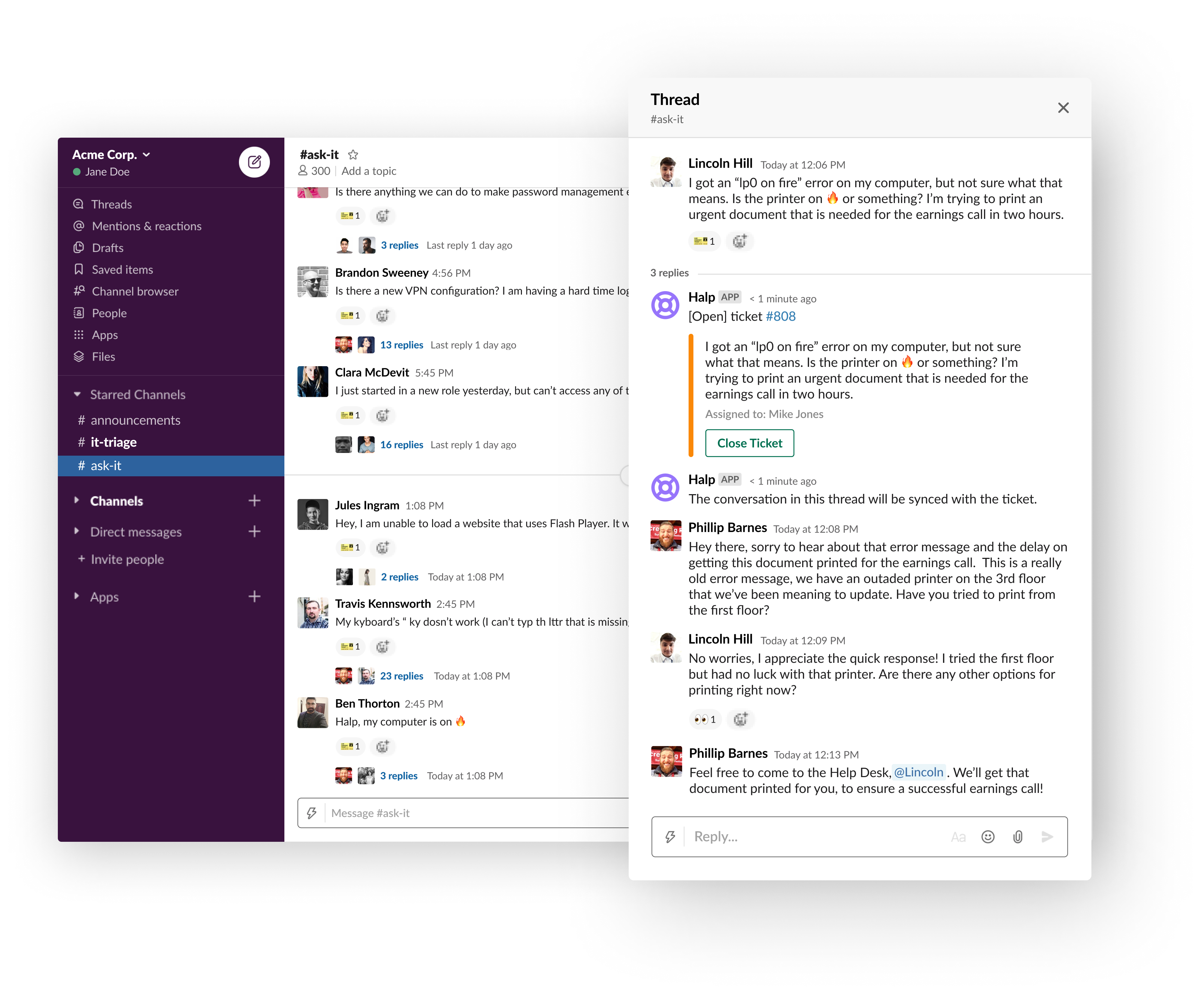
    Halp CEO Fletcher Richman said that approach has gained traction because the biggest challenge when it comes to help desks is making it as easy as possible for an employee to generate a help ticket. Halp addresses that issue by enabling end users to simply drag and drop on an emoji to generate a help desk ticket.

    The help desk staff is then provided a web interface through which they can remotely manage tickets and respond to requests via Slack. That approach eliminates the need for the help desk staff to be physically located in an office or employ a virtual private network (VPN) to access a help desk platform running on a local area network, he said.

    Richman noted too often employees wind up supporting each other because the process of generating a ticket is too complex. At a time when many employees are working from home to help combat the COVID-19 pandemic, it’s not really possible for employees to currently provide that mutual support.

    It’s not really clear to how many employees might ever be heading back into an office at this point, so Halp also provides a way for remote employees to more easily remain productive, he added.

    Slack and JIRA, of course, are already de facto standards among many DevOps teams. Halp should provide developers with a means to instantly resolve a wide range of low-level issues in near real-time by generating a help desk ticket via Slack.

    Richman noted that for any IT service management (ITSM) platform to be successful, it needs to meet users where they are. If the platform is too complex or intimidating, users will look to their fellow employees for help first. Before long, however, all the mutual support saps productivity. By making help just a simple Slack message away, many more issues will be resolved by help desk personnel who already know the right answer, he said.

    It’s too early to say how many more help desk tickets might be generated because of Slack. However, in the wake of the rush to remotely enable the entire enterprise, the need for an easier way to provide support is now more apparent than ever.

  • Automation Hacks for DevOps Teams

    Automation Hacks for DevOps Teams

    DevOps teams are expected to do more work in less time. They need to plan, test, build, secure and release applications at a fast-paced rate. Of course, the DevOps team needs to achieve all of this while maintaining high software quality. This is why automation is a crucial part of the DevOps workflow. The goal is to delegate repetitive tasks to the machine, and free up dev time for more complex jobs. 

    Below are some helpful automation hacks you can apply to boost the effectiveness of your DevOps practices.

    Automating Regulatory Compliance

    Properly managing regulatory compliance is vital for many organizations to avoid fines and operate legally. Although compliance standards vary by industry, most focus on ensuring privacy and confidentiality. To meet these standards, companies must secure data and prove they are taking the appropriate measures. This proof is commonly accomplished with the maintenance of a clear digital trail.

    You can use DevOps automation to log and store digital access trails for your protected data. You can also use automated testing and deployment to ensure that only code that passes compliance tests is deployed. This prevents compliance issues from being pushed to production and helps keep your data secure.

    Automating Development Environments

    DevOps workflows require frequent creation and elimination of environments, for testing, deployment and development. These environments can be created manually but it is more efficient to create environments automatically. This can be done using a golden image with your required configurations.

    Using standardized base images ensures that you are working with consistent environments and standardizes configurations and privileges. These images can be used for local or remote machines and can be initialized automatically.

    There are a variety of tools you can use to create and automate environment creation. Chef and Vagrant are two of the most popular. Both of these tools offer an accessible API and enable you to script automation using common languages and syntax.

    Automating Code Review

    Code review is an essential part of DevOps processes but it is also one of the lengthier and more tedious processes. Automation can help you perform this process more efficiently. Automatic code review works similarly to manual review except it is done using tools that integrate with development environments. These tools can check for styling, security, duplication, complexity and code coverage, and can auto-suggest corrections. Some popular tools for this automation include Codebeat, Code climate and Codacy.

    Automating File Synchronization and File Uploads

    Many DevOps and development teams use the public cloud for quickly spinning up development and test environments. However, what happens when the production environment, or other critical resources used in the dev/test process, are deployed on-premises? Having a fast, automated and reliable way to synchronize files between the on-premise data center and the cloud can save time and headaches.

    There are a few approaches to synchronize files:

    • Scripting file uploads and downloads. The most basic method is to use shell scripts and FTP or SFTP to upload and download files between local and cloud environments. However, this can be fragile, unreliable and difficult to scale.
    • Using APIs of cloud storage services. You can move data to and from the cloud using cloud storage APIs, such as the Amazon S3 API, the Box API or specialized hosting services such as Cloudinary.
    • Hybrid cloud. The ultimate solution is to create a hybrid cloud architecture where applications, developers and users view the local environment and the public cloud as one unit, and data is synchronized transparently in the background.

    Collaboration Tools for DevOps Teams

    There are a number of collaborative tools that teams can use to further boost gains from automation. These tools can help bridge gaps in automation and processes and ensure smooth workflows.

    Slack: a chat tool that DevOps teams can integrate with automation tooling. It includes features for segregating discussions by topic, team or purpose; uploading shared files and documents; and initiating or receiving alerts from automated processes via integrations.

    Jira: a tool that enables you to create and assign tasks. It includes features for scrum and kanban methodologies, unified reporting and backlog tracking. You can integrate it with many common DevOps tools, such as Jenkins.

    Trello: a cloud-based Kanban board tool. It enables you to create project boards that can be shared across teams to track project progress. Through integrations, you can automate the updating of cards or initiate processes when cards are manually moved.

    Asana: another cloud-based Kanban tool. Like Trello, it enables you to track and collaborate on projects across a team. Typically, when teams use tools such as Asana, they create multiple boards for different project aspects. These boards can then be viewed individually or from a central dashboard.

    Conclusion

    Hopefully, this article helped you figure out how to leverage automation for improved efficiency. There are many automation options for DevOps, including automated regulatory compliance, automated infrastructure, automated code review and automated file synchronization.

    For DevOps project management, you can use collaboration tools such as Slack, Jira, Trello and Asana. Remember to make sure that any tool you introduce can be simply and easily integrated into your current environment. The tools of your choice also need to fit the skillset of all collaborators. For ease of use, keep your tooling ecosystem simple and minimalistic.

    — Gilad David Maayan

  • The Accelerating Cloud Wars

    The Accelerating Cloud Wars

    Enterprises have embraced cloud computing at a phenomenal clip, according to newly-released report, A for Adoption, from cloud access security broker provider Bitglass.

    Over the past five years, the report found cloud penetration grew from 24% (in 2014) to 86% of organizations today. Last year, that adoption rate was 81%. Yet, while cloud has helped enterprises to reduce IT capital expenditures and become more agile in meeting business demands, these organizations need to be cognizant of the impact the shift to the cloud has on securing user access—something the report hints as an area where organizations lack.

    For instance, the Bitglass report found, of the 86% of organizations that adopted cloud, only 34% of those have implemented single sign-on (SSO). In addition to tracking SSO usage, Bitglass uncovered adoption rates for a host of different cloud-based tools, including Microsoft Office 365, Google’s G Suite, Amazon Web Services (AWS), Slack, Salesforce, Box and ServiceNow.

    The annual report highlighted the rapid increase in the adoption of a number of services, such as Salesforce and Slack, which respectively increased by 55% and 44%.

    The survey also found that Google’s G Suite, with a 33% adoption rate, is still struggling to regain headway on Microsoft Office 365 and that productivity suite’s 79% adoption rate. At 82%, financial services organizations are the fourth largest adopters of Office 365, while 79% of healthcare organizations have done so.

    Those enterprises that have deployed AWS increased by 43% in one year, reaching 20% adoption across all industries this year. Not surprisingly, the technology industry is the leading implementer of AWS at a 32% rate and is also the leading industry using Slack at 79%.

    One of the greatest challenges when it comes to effectively managing and securing access to the cloud is access management. Interestingly, only 34% of enterprises have implemented SSO for cloud access. However, the amount of SSO adoption varies significantly from industry to industry.

    For instance, the adoption of SSO in financial services grew nearly 41% year over year, while in healthcare that growth reached 30%. However, the technology industry hasn’t embraced SSO much more, having reached a 33% adoption rate. Interestingly, education led SSO adoption at 61%, with the government firmly in second with 46%.

    The adoption of SSO also varied by organizational size. As it turned out, larger organizations are the leading adopters of SSO. In fact, 64% of large firms said they utilize SSO, which is nearly 50% more than what medium-sized organizations reported. That’s more than twice the adoption of small organizations.

    The Bitglass report is based on the company’s scanned analysis of cloud to identify which cloud services were in use across a sample of more than 138,000 companies. According to the company, the analysis included productivity suites such as Office 365, G Suite and messaging apps such as Slack, as well as file-sharing apps such as Box.

    — George V. Hulme

  • 6 Must-Haves When Using Chat for Incident Management

    6 Must-Haves When Using Chat for Incident Management

    Over the last few years, teams have realized the benefits of sharing and distributing knowledge in chat applications such as Slack. Today, teams are extending the use of these applications beyond collaboration by embracing ChatOps. ChatOps empowers teams by bringing complex day-to-day operational work into shared chat channels. If done correctly, it drastically reduces context switching and increases the speed at which teams can tackle tough challenges.

    Companies are realizing incredible benefits by incorporating ChatOps into their incident management workflows. Chat channels provide hyper-effective means to alert teams of issues, take immediate action and collaborate with clarity and urgency. It is for this reason that companies including OpsGenie, PagerDuty and VictorOps have invested in integrating their incident management applications into chat applications such as Slack, HipChat and Microsoft Teams.

    ChatOps to the Rescue

    Ideally, users of a modern incident management solution need to have access to a multitude of features so that they can address specific challenges directly within the chat tool. During an incident, switching between applications to access and collaborate on the actionable data is a waste of time. Keeping the conversation and action in one place, where team members already are, is the key to a fast and successful incident resolution process. That is why ChatOps has emerged as an alternative to the war room concept.

    To get the most out of the technology and resolve problems more quickly and easily, here are six tips to consider when using ChatOps for incident management:

    1. Post Messages with Clarity

    The basic requirement for integrating any application within chat tools is to simply have messages posted within chat channels. However, there are three additional needs to consider when integrating an incident management tool into chat when increasing efficiency is the goal.

    • The integration must be able to post chat messages regardless where the incident originates and additional information added (monitoring, ticketing, or collaboration tools).
    • Messages need to be customized based on the specifics or severity of the incident. Often the basic message needs to be appended with tags or additional information fields.
    • If possible, include a button in the message that allow responders to take instant, prescriptive actions.

    2.  Control How Information is Shared

    Posting every alert and comment into a shared channel can quickly become overwhelming and is considered bad practice. A strong integration enables the creation of separate channels for specific responders and have direct control over what types of alert and follow-up messages are shown.

    A seamless integration also provides the flexibility to receive only the incident actions that are decidedly relevant. Low-priority issues that don’t require immediate action can be filtered and not sent to the chat stream, ensuring the team stays focused on what really matters.

    3. Accelerate Actions

    ChatOps transforms chat into a vehicle through which users take actions and deploy solutions. This virtually eliminates the need for operations teams to switch between applications when responding to an incident.

    Most integrations enable users to execute incident actions using text commands. This method is valid and often preferred. However, deeper integrations simplify tasks by providing interactive buttons that enable users to begin working on incidents with just a click.

    The value of responding to an alert by clicking a button extends beyond simple alert acknowledgement. Enabling all common responses (i.e. assigning an alert, taking ownership, adding notes, muting incidents, etc.) to be executed in this manner accelerates resolution and unlocks the real power of ChatOps.

    4. Instantly Retrieve Supporting Information

    A challenge of a long chat thread is that critical information can get lost within the communications or additional information may be needed. A user might have to leave the channel to look up important details and related information, such as looking at other open incidents, for example.

    The integration of an incident management system into the chat environment needs to allow users to access supporting information at any time. The ability to query not only additional details about a specific incident but also general information regarding on-call schedules and alert policies is a requirement. By empowering team members to access this data directly within the chat interface, they stay focused and are able to respond in the most efficient manner possible.

    5. Create New Alerts

    A common task when managing an incident is to create manual alerts. Again, requiring people to switch applications to complete this task is a distraction and slows the progress.

    Creating new alerts for a team or service right within the chat channel is a necessity. The incident management system then notifies the person on-call automatically. Having the ability to create an alert directly within chat empowers individuals that may not have direct access to the incident management system to report problems efficiently.

    6. Control Access

    When an incident occurs, it is important that corrective action is taken by only the people who are authorized to respond. Mapping (or linking) the chat users to the users within the incident management system enables this level of control.

    Linking the user profiles between the chat and incident management has additional benefits. As alerts are acknowledged and responded to within the chat environment, the events are recorded within the incident management solution. A clear history describing who took each action is recorded for future reporting and analysis.

    While there are many things to consider when integrating incident management into a chat application, the benefits are clear. Response time, ability to collaborate, and team access to incident details are crucial factors for incident resolution.

    About the Author / Serhat Can

    Serhat Can is a Technical Evangelist for OpsGenie. He has contributed to different parts of OpsGenie as an engineer and now tries to spread the word by coding, writing and talking about DevOps. He is still a proud member of the on-call schedules. Follow him on Twitter and connect with him on LinkedIn.
  • SauceCon Speaker Profile: Shivani Sharma, Slack

    SauceCon Speaker Profile: Shivani Sharma, Slack

    Just Say No to Flaky Tests: Releasing Code with Confidence

    Shivani Sharma doesn’t like anything flaky—unless it’s baked goods.

    Shivani is senior engineering manager at Slack, working on test automation for Slack’s iOS, Android and web applications. An avid baker, Shivani thinks flakiness should stay in the kitchen.

    Although “flaky” is a common adjective describing automated tests, the Slack test automation team wanted to be better and create value by delivering deterministic results. The team’s mission is “to make our software development process simpler, more productive and our product more pleasant to use.”

    Worthy goals, to be sure. To that end, Shivani will present on, “Releasing Code with Confidence,” at the upcoming SauceCon conference in San Francisco June 6-8. Her presentation will discuss how Slack’s automation team approached the common problem of flaky tests to build a reliable feedback system into their continuous integration pipeline for code hundreds of developers write and release every day. This talk will provide actionable takeaways that can be used in other organizations, too.

    In addition to baking and “crème brûlée-ing,” as she describes it, Shivani is an avid runner and has run eight half-marathons. To give her knees a break, she’s excited to participate in her first Olympic distance triathlon this summer. She has spent 10 years working in Silicon Valley, holding positions at Google, BigFix and IBM, as well as Slack. Shivani holds a BS in Electrical Engineering from UCLA.

    SauceCon, the first-ever Sauce Labs user conference, is a three-day event filled with training, workshops, best practices and visionary content from the leading minds in automated testing. For more on upcoming SauceCon presentations or to register, visit the SauceCon website.

    About the Author / Rebecca Cramer

    Rebecca Cramer is a writer and communications strategist specializing in technology. With more than 20 years of experience across disciplines including marketing, internal and executive communications at companies such as Dell and Quest Software, Rebecca is passionate about creating and sharing good content of all kinds. In her spare time, she enjoys spending time at the beach and hiking in her native Southern California.

  • ChatOps: Has the Fat Lady Already Sung?

    ChatOps: Has the Fat Lady Already Sung?

    One of the sometimes unsung stars of the DevOps scene is ChatOps. I have heard lots of folks use the term, but what does it really mean to you? ChatOps is a phenomenon that started, perhaps not surprisingly, inside of GitHub. It was only natural that developers leveraging the repository to share and build better code would eventually start collaborating in ways that other messaging options just couldn’t provide.

    Whether ChatOps in GitHub is something that gave rise to the growing enterprise collaboration and chat  product/services market is open for debate. There is no doubt, however, that the 30 (give or take) cloud-based messaging and chat platforms out there today are looking to make their mark in the world of developers, engineers, admins, DevOps and IT professionals. Some of the larger players in the space have already launched features designed specifically to appeal to this set of users, with Atlassian HipChat and Slack among the leaders. But they are not alone. I thought it would be worth the effort to take a look at some of the players and up and comers in the space.

    HipChat has been a strong proponent of ChatOps for a time now. The company has consistently been tagged as a leader and boasts product integrations with many different tools and services. For example, a Puppet integration brings the power of ChatOps to joint HipChat/Puppet DevOps customers. Slack has made strides as well. Integrations with incident management and response providers including VictorOps and PagerDuty are only a few examples of how Slack has given teams the ability to collaborate on and fix problems with just a few clicks.

    Despite the millions of users already using Slack, HipChat, Microsoft Teams, Facebook Workplace and other apps in the market, there is still no definitive proof of whether any of the competitors have won the hearts and minds of the IT professional. In fact, we are seeing many of general IT publications writing about several of these tools because many of their users are in that category. The original ChatOps tool that was brought to life in GitHub, for all we know, may still be king among the IT audience.

    Will the Jury Reach a Verdict?

    There are two things that are certain in the market: The jury hasn’t yet decided if there is a ChatOps winner among the numerous options, and developers and other IT professionals may want to consider other options before reaching a decision. Unfortunately, for as much as the true IT practitioners despise marketing, there simply has been no way to avoid the  buzz that the aforementioned providers have created. Chances are, if you are searching for a solution, one of the biggies is going to pop up in the top of your browser and potentially block you from finding all options available.

    The Choice Gets Tougher

    The foundational similarity between top platforms is that they use cloud-based applications to connect teams in efficient, collaborative and transparent ways. Mobile workflows and the growth of BYOD has increased the popularity of enterprise messaging and chat platforms as they create ways for employees to quickly reach one another on their own terms. Yet even so, enterprise messaging vendors are learning that  to be effective, they must also provide users with agility, security and the ability to execute on change.

    Options to Consider

    The past couple ​of year​s​ have highlighted just how competitive this space is, and how quickly it is moving. If you work in an environment that leverages ChatOps or are considering ChatOps options, the list below presents a few of the lesser-known or up-and-coming platforms out there with the potential to become your ChatOps solution. That is not to say that the big guys such as HipChat or Slack are not worthy. On the contrary; they are great solutions. But some of these others might be worth looking into:

    Newcomer Flock entered the U.S. market in September 2016. With an eye on the developer community, the startup worked quickly to open its API to developers and has started adding integrations with partners such as PagerDuty, Bitbucket and Appsignal. Flock’s biggest differentiator is that it allows developers to build bots, widgets and apps on its framework using Java and Node.js SDKs, which easily feed into Flock’s Appstore for distribution. Flock allows developers  to spin up applications in just days. For developer teams stretched on time and budget, they’ll find the application has GitHub integration, engages quickly after being turned on and offers low costs for its paid version.

    Ryver, founded in 2015, provides all-in-one team collaboration, from chats, posts and files to the option to invite as many team members and guests as needed. Additionally, Ryver has a broad range of functionality that offers the ability to share long-form posts or threaded discussion, and integrates with the likes of Google Docs, Dropbox, Asana, Jira, Twitter and Facebook, among others. Ryver recently rolled out its “Global search” bar, which allows a keyword search to locate multiple matches across conversations and solves email’s common problem of archiving data.

    Third, there’s ChatWork, known as a group app for global teams. ChatWork is available in five languages and says it supports 124,000 customers in 205 countries. Last month, ChatWork announced new features to connect multiple chat platforms through the ChatWork desktop app as well as a new screenshot feature. The multichat and chat service integration features allow users to be logged into multiple ChatWork accounts without having to change browsers or log in and out repeatedly. This comes in handy when using multiple ChatWork accounts, such as personal and business accounts at the same time. It also allows teams that use Gmail, Outlook or Skype to use these services together from a single area within the desktop app.

    eXo Platform began as an open-source project in 2002 focused on implementing the industry’s first Java portlet container. The project grew into a company in 2003, to start working with its first customer, the U.S. Department of Defense. Today, eXo is an all-in-one open-source digital collaboration platform that provides knowledge, document and content management, social engagement and project collaboration tools integrated into your business’s applications. It is full-featured and extensible, and has a great design. eXo helps companies connect their employees, customers and developers through social, collaborative and content-driven intranets, websites and dashboards.

    Assembla is a set of cloud-based task and code management tools for software developers. Created in 2005, Assembla hosts more than 100,000 commercial and open-source projects and is used by more than 800,000 users in 100+ countries. With Assembla, software engineering teams can manage tasks, teams and code in one place with SVN, Perforce, Git repos, cardwall view of tickets for drag and drop planning, wikis and more. Integrations include Slack, Github and Zapier.

    Finally, there’s Salesforce company Quip. Quip was founded in 2012 by Facebook and Google alumni and combines documents, spreadsheets and chat into one experience. With Quip, enterprises can manage projects, finalize budget plans, share meeting notes and stay connected. Quip is used by thousands of the world’s most well-known and innovative companies, including Facebook, NewRelic, Quora, and Pinterest.

    As you can see, there are lots of choices out there if you have not already settled on Slack or HipChat, or if you want to see if something else is better for your situation. If you haven’t heard the singing, there is still time to check them out.

    — Alan Shimel

  • DevOps: Here’s How to Slack Securely

    DevOps: Here’s How to Slack Securely

    With 1.7 million daily active users, it’s clear Slack has come to dominate the team chat world, especially in the tech industry. This, however, means that a fair amount of security is required to ensure that strategic assets remain safe.

    From a security perspective, Slack has done a solid job of keeping its assets on lock, going so far as to score Geoff Belknap from Palantir in 2016 as its chief security officer. The company is also transparent about its approach to security and has dedicated a whole section of its website to it, including interviews with Belknap and others that delve into Slack’s precautions and philosophy around security.

    The company has also certified many of its products to meet strict compliance regulations including FINRA, HIPAA and SOC 2 and 3, which makes it a no-brainer for small teams and enterprises alike.

    So, it’s perfectly possible for companies of all shapes and sizes to lean on Slack for team chat and ops without worrying too much about security. However, no one’s perfect, and Slack’s ubiquity and popularity mean it will always be a target for cybercriminals looking to steal information—that’s basically the nature of being a cloud-based application.

    While, there’s no need to run scared, you do need to be smart about how you use this valuable tool. Here are a few tips for running Slack securely at your organization.

    Use Slack for SecOps

    Slack can be easily used for distributed security alerting, which means every member of your organization can play a role in keeping the business secure.

    Your security operations likely include members of the DevOps team as well as dedicated security folks, and Slack can help all team members integrate security into their workflows seamlessly. DevOps folks may not frequently log in to Threat Stack platform directly. However, any relevant alerts or notifications can be sent to them immediately via Slack, where they can be reviewed and the determination can be made whether further action is needed—all without having to step outside the daily workflow. This means security tasks don’t pose an extra headache, but are just a natural part of the way the company’s operations run.

    Require Two-Factor Authentication

    Slack’s built-in security precautions won’t do you much good unless you actually put them into practice. One great example is two-factor authentication (2FA). It’s up to team owners and admins to require this of their users (otherwise, it will be optional, and most users won’t bother). It is highly advisable you take advantage of this feature, which makes it much more difficult for hackers to tap into your organization’s Slack channels.

    Set Up User Provisioning and Deprovisioning

    Security-minded organizations need to be conscious of and work around insider threats. This also includes employees who have left the company, whether on their own terms or due to an incident.

    To ensure that you do not have any “lurkers” who might be able to take advantage of company information shared on Slack after they have left the company, it’s a good idea to plan ahead for user provisioning and deprovisioning.

    In fact, this should be built into your process for onboarding and offboarding employees, just like it would be for email or any other company asset. If possible, automate the process, so that the moment someone leaves the company, they no longer have access to Slack. To get started, here’s Slack’s guide to provisioning and deprovisioning users.

    Don’t Share Secrets

    Slack is a great place to have secure conversations, which unfortunately can lull some users into a false sense of complete security. “Secure” doesn’t mean you should treat it like it’s watertight; in other words, Slack should never be used to share secrets such as passwords, sensitive customer data or valuable corporate IP—basically, anything that could be considered highly confidential. A good rule of thumb is this: If a piece of information could be dangerous in a hacker’s hands, it doesn’t belong on Slack. Instead, it’s a good idea to use encrypted communication channels, like PGP-enabled email.

    Educate Users

    None of the tips above will do your organization any good if no one knows about them. So make sure that you regularly educate your users about steps they need to take to stay secure while using Slack (such as never sharing passwords there). You should hold user security training whenever new employees come on board, and also make sure to do a refresher now and again with the entire company.

    Additionally, if you change up security protocols around tools like Slack, make sure employees are given a heads up and reminded when new measures go into effect so they know what to expect. Remember: The best offense is a good defense.

    Don’t Slack on Security

    Slack is a great platform with all kinds of benefits for teams. As long as you take the right security precautions, there’s no reason why it can’t be used to its full potential on your team, whether you’re a small shop or a multinational enterprise. As with any other tool, the shared responsibility model is key. Take responsibility for your half of the security equation, and you should be well on your way to a secure Slack implementation.

    — Pete Cheslock

  • 4 Top Tips for Developing a New Feature

    4 Top Tips for Developing a New Feature

    As a backend developer at CA BlazeMeter, I recently had the chance to work on a big feature for our web app. The feature required a massive change on our backend code, a big change on our frontend and multiple migrations. You know what I’m talking about—it was one of those projects that developers fear.

    But, I gained a lot of valuable experience from the project. Not only did we deliver a kick-ass feature, I also learned the importance of teamwork and patience when developing something new. Armed with those two values, and the right tools and technologies, you can deliver a new feature quickly and efficiently.

    Here are a few more things that I learned that should prove helpful whether you’re developing a major feature or one that only requires a minor code change.

    Tip 1: Plan to understand the development requirements

    The process of development starts way before you start coding, with planning. After the product manager decides what needs to be developed, R&D needs to understand the cost: how many days (or weeks) of development the feature will take, how many people will be needed and which APIs are required.

    To do that, the product manager needs to conduct at least three “grooming” sessions with backend, frontend and QA leaders. The grooming sessions start with the product manager presenting the product flow and requirements.

    Since no one wants to read a lot of text (except perhaps the awesome readers of this article), the product manager should prepare mockups. They don’t have to be designed or colorful, but they do need to show the team what the feature looks like in his or her vision. During our grooming sessions, we used Balsamiq, which lets you create screen sketches for how the product is supposed to look, feel and work.
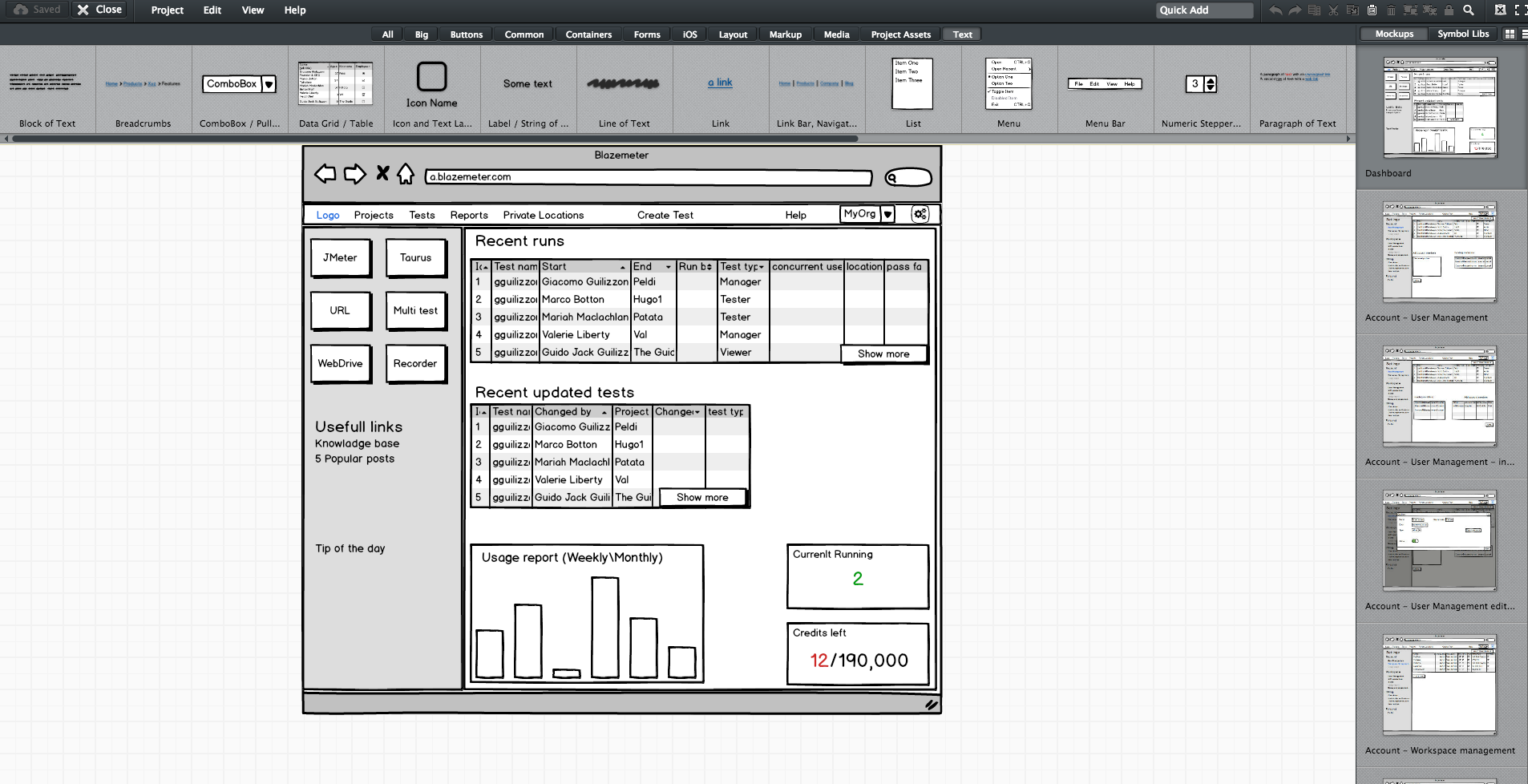
    Editing screen sketches using Balsamiq

    After the initial presentation, the sessions should include a lot of open discussion—asking questions, checking for answers and examining compliance, etc. —until everyone is satisfied and understands what the feature requires from them and from others.

    This is the time and place for frontend, backend and QA to give their opinion about the schedule and to alert and flag any potential problems in development or extreme use cases. It’s the role of the product team to answer questions and change the flow and requirements until there are no R&D rejections.

    Afterward, the frontend and backend leaders need to create a feature development plan, sitting down to determine what data they need to transform the product vision into a real thing. Or in other words, which APIs are required for each flow or button, how long each step is supposed to take, including buffers, and the order of development. APIs are the agreed “contract” between the development teams. After determining the contract terms, each team can proceed individually.

    I recommend you write your APIs in Swagger, which turns YAML files into detailed HTML pages with all the APIs.
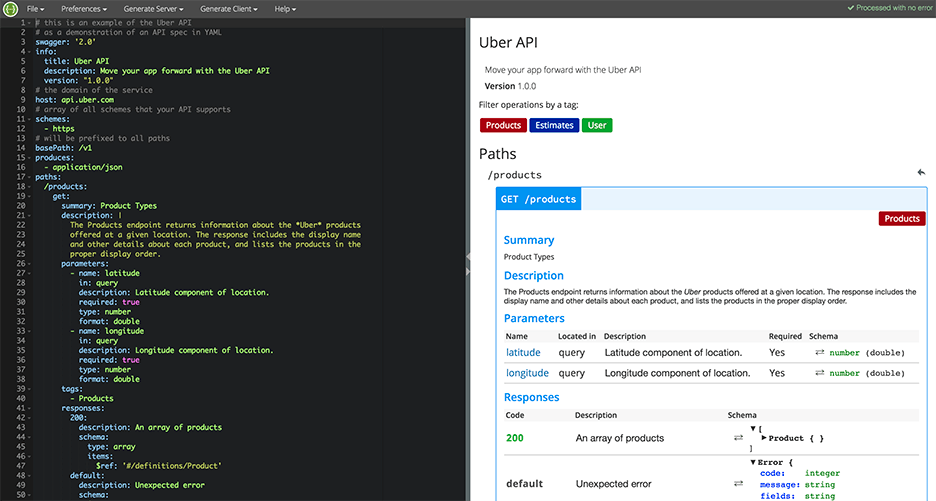
    Swagger Editor

    This plan needs to be transparent to everyone working on the project. In fact, it’s even better if each project participant can add and describe scenarios. Tools such as TestLink and Atlassian do just that. Then, when the code is ready, developers can go over the list and see everything is covered.

    We will need to stick to this schedule later on, especially when new demands unrelated to the feature come in, such as fixing bugs. Sticking to this plan is the best way to distinguish the wheat from the chaff of the development process.

    Start writing automation ASAP

    After planning, we want everyone to start working, and not only the backend. To do that, the backend can prepare mocks, either through outsourcing services such as JSON servers, which show inputs and outputs, or by writing dummy code.

    I mentioned earlier that we used Swagger to write APIs. We also used it to generate a server in NodeJS/Python, like this:

    Generating a JSON Server through Swagger

    From this moment on, frontend can begin writing and building screens and QA can start writing API automated testing, by using tools suh as JMeter. At this point, frontend and QA have the response codes and response bodies; they know which features to put where; and which APIs they need and how to use them.

    QA also know which data they’re missing, such as field names and field data. Sure, the backend code isn’t ready yet and all of the automated exams will return “red” instead of “green,” but the main issue is making sure everyone is as prepared as possible.

    This includes load and performance testing. You can use open-source tools such as JMeter, which is enhanced by CA BlazeMeter. By uploading our test script into, configuring the number of virtual users and ramp-up time, determining geo-locations to test from and analyzing KPIs to determine trends and the health of our system, we can ensure our product is delivered to our customers without crashing.

    This is also true about sending code to QA: Developers should test their code themselves and ensure that when they commit their code, it works 99.9 percent of the time.

    By starting automation as soon as possible, you can minimize future bottlenecks in the development process.

    Ensure the team communicates and works together

    Like I said before, teamwork is the most basic requirement when creating a new feature. This is because new questions arise during development and because requirements change. Therefore, everyone in the team needs to be in sync all the time, from the product manager and the designer to the developers and QA.

    Open communication lines are crucial because everyone is working on the same product at the same time, but each developer or QA should be working on a different part of the product and on different functionalities. Communication ensures each person’s work is compatible with the rest of the team’s work. This saves time, prevents frustration and redundancy and ensures maximum professionalism.

    To make sure everyone knew what was happening, we used Slack and opened a dedicated channel for the creation of this feature. We also had daily (short!) standups where we discussed what we have and what is missing.
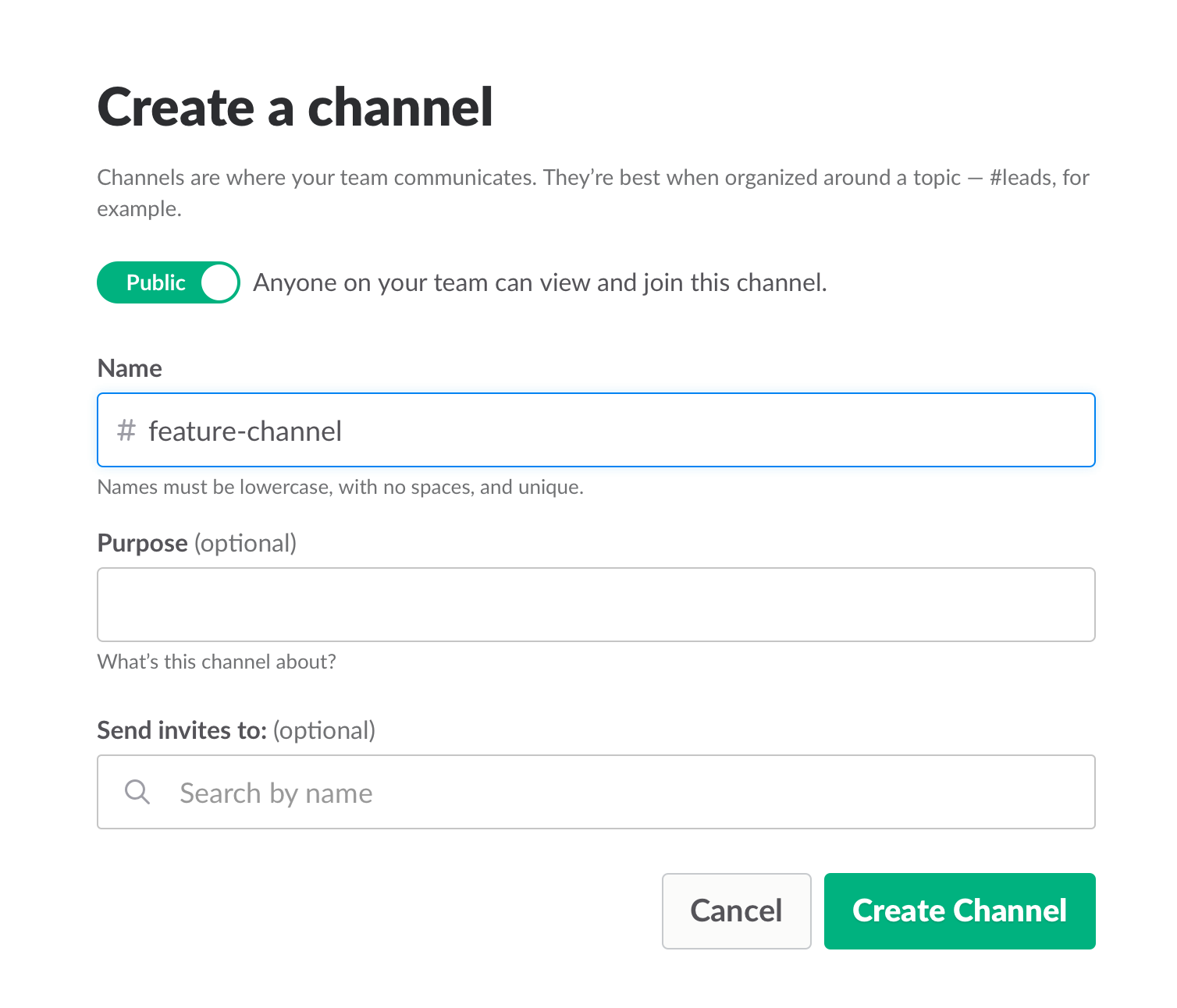
    Opening a Slack channel

    Communication also includes team and assignment management. JIRA, our primary issue tracking tool, offers Kanban-style, Scrum and fully customizable boards, which show the progress of each development task, including the developer assigned to it, and his or her exact status or phase.

    This helps you understand what other people are working on, and just as importantly, where people are stuck. If you can, get everyone to work in an open space and put a large screen in the middle of it. This lets you stay in sync at all times.

    We used JIRA to open and manage bugs as well. This was helpful when multiple QAs found the same bug. It’s important to carefully choose which tickets are opened and put them under one epic, so everyone stays focused.
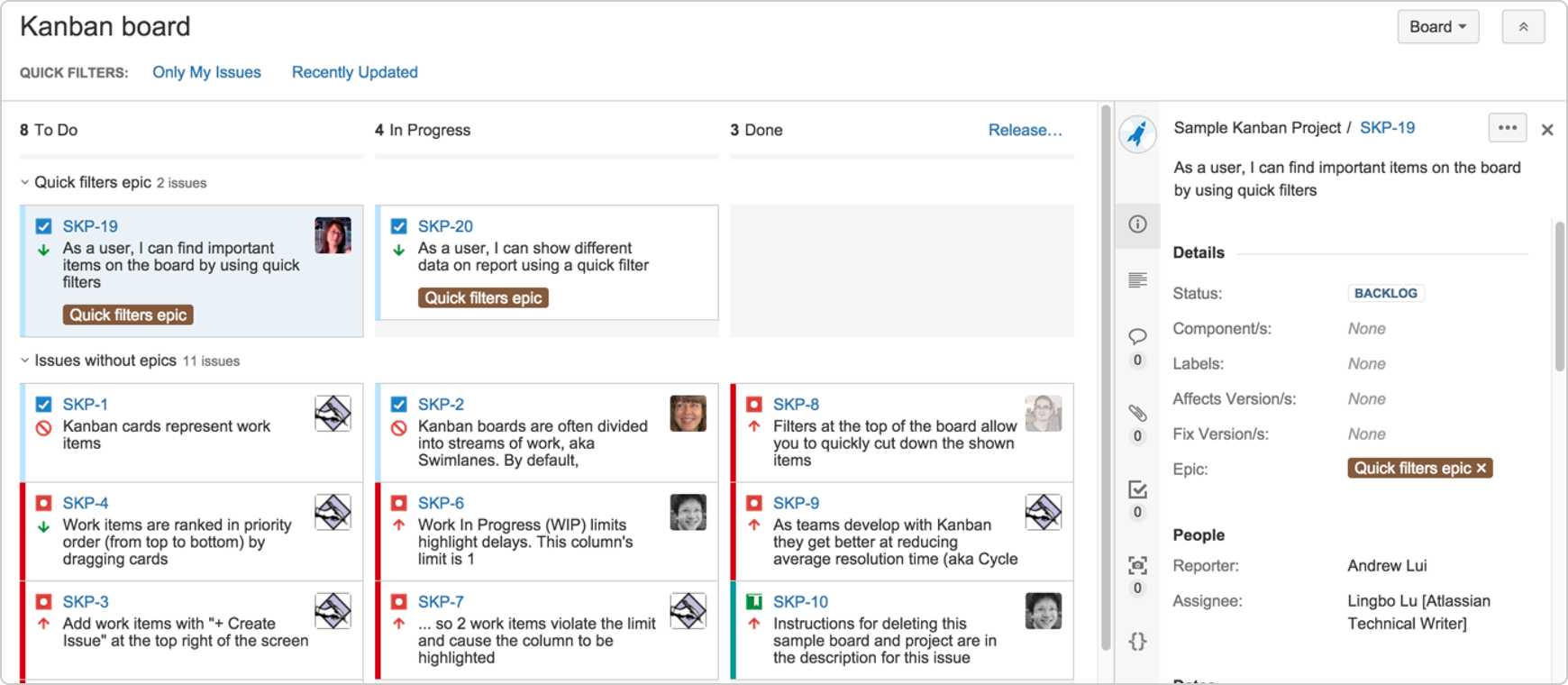
     

    JIRA Dashboard

    Another important aspect of communication is ensuring everyone uses the same terminology, as sometimes people might use the same term to describe different things or different terms to describe the same things. To prevent mixups that could waste your time, make sure everyone is on the same page. For example, do you say “system admin” or “<name (ex. BlazeMeter)> admin”?

    Work on the same development environments

    It’s important that everyone works on identical development environments and even on the same version of the tools and libraries. Otherwise, it could cause an (in)compatibility mess, including a lot of unnecessary back and forth and even might cause bugs to pop up. This environment needs to be as similar as possible to production, but only on a smaller scale.

    Conclusion

    Now look at the feature that came out of all that work here. I’m so grateful that I had the opportunity to work on it with an awesome team.

    I hope these best practices help you the next time you develop a new feature. Don’t forget to keep going agile after development and delivery by running tests in a continuous environment such as Jenkins for every commit.

    CA BlazeMeter works with Jenkins, ensuring you can load test in the cloud and analyze your data while shifting left. You can also use different APM tools, such as New Relic, AppDynamics and CA APM to alert you about errors before QA, which saves time.

    — Dor Atias

  • Confident Financial Solutions is cutting edge with ChatOps for log monitoring

    Confident Financial Solutions is cutting edge with ChatOps for log monitoring

    cfs-logo-retina-c0cdab06f0c380b5877a5bf0c779acafIf I told you a company named Confident Financial Solutions is on the front line of adopting DevOps methods to better serve their customers you might say, “Come again?”  Let’s face it Confident Financial Solutions doesn’t sound like the type of company that would be stretching the envelope of technology. But don’t let the name fool you.  Confident Financial Solutions is a web-based SaaS auto repair loan company and part of the Boulder startup scene. Tech is in their DNA as much as finance and cars are.  So the fact they are using ChatOps to monitor and alert based on their logs should not be suprising.

    What CFS does is offer consumers instant approval on auto repair loans. If your car breaks down and the bill is more than what your budget can handle right now, they allow you to finance the repair. Using a web app interface the entire process is handled online. In that regard they are no different than many other SaaS based apps. So why shouldn’t they use the latest and greatest tools.

    Among the tools they use are Slack for ChatOps and Logentries for log and analytics. Using Slack really sped up the communication among the team according to Kyle Lamy, lead software engineer at CFS. So much so that the email alerts and information generated by their cloud based log management system actually slowed the team down.

    Lamy says that communicating via email versus Slack was just dragging everything down. Email with its long threads and back and forth was just not operating at the speed that CFS business demands. Also switching back and forth from email to Slack was a major time drag. He lobbied both Slack and Logentries to integrate.

    Slack and other ChatOps programs of course recognize that the value they deliver is tied to APIs and integrating with 3rd party tools. Otherwise they are little more than instant messengers.  That is the real pay off for ChatOps. Slack is hard at work with API development as well as acquiring new features.  They just announced that they have acquired Screenhero, a YCombinator spawned screen sharing app that will be integrated into Slack. At virtually the same time it was announced by Logentries that they were now integrating with Slack as well.

    In my conversation with Lamy he said having Logentries alerts and analysis in Slack allowed the team to stay in one tool and more importantly put the responsiveness of his team up to warp speed compared to email.

    Kyle says he sees even more ways that ChatOps applications can integrate with other tools to continue to accelerate team performance. He has already given both Slack and Logentries suggestions on things to do to make the integration even better.

    Based on Kyle’s recommendation I signed up and have set Slack up here for our devopsy.kinsta.cloud team. Being virtual and spread out ChatOps has immediately helped. I set up several different groups so as not to overload the entire team and we are already using it. For ongoing communications it is just so much more efficient than long email threads. It really is a no brainer.

    So if you are not using ChatOps at your company what are you waiting for? Go download Slack for free and give it a try. If you don’t see how it helps please tell me why not.