Tag: shift left

  • Continuous Testing: Shift Left and Find the Right Balance

    Continuous Testing: Shift Left and Find the Right Balance

    You may have heard the term “continuous testing,” but are struggling to understand what it is and how to achieve it. Project teams need to improve their ability to test and perform test automation when needed, not just when possible. Service virtualization allows teams to test earlier and more often in the life cycle, or “shift left,“ by mimicking unavailable systems. Combining test automation with service virtualization enables teams to provide immediate feedback on quality—so issues can be resolved faster and cheaper. Encouraging and embracing this immediate feedback on the quality of the solution enables businesses to deliver high-quality innovative solutions to the market quickly.

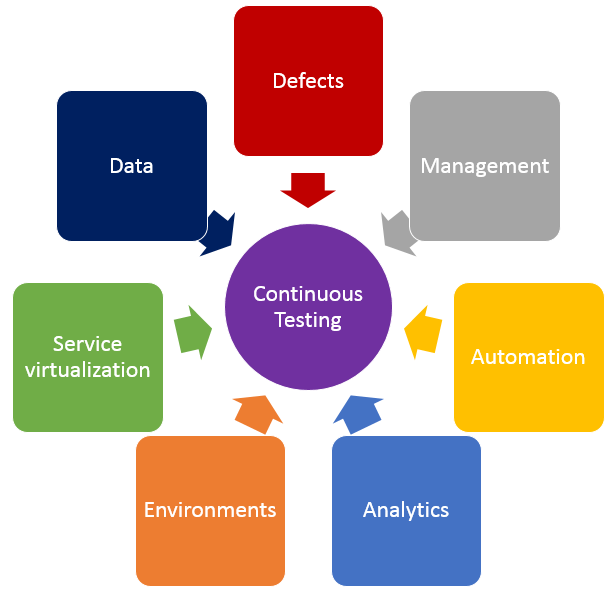
    In addition to shifting left by using service virtualization, finding the right balance of effort across all testing practices is crucial in achieving continuous testing. The diagram below shows the key test practices that enable continuous testing, and teams spend effort on each of these practices regardless of whether they want to. The questions below may help your teams understand where they are spending time, and perhaps where their time might be better spent.
    Testing

    • Defects – Are teams spending too much time logging, triaging or analyzing defects? What about time spent on defects that aren’t “real” defects—where there is a misunderstanding between the test and the code? Or what if they could prevent entire schools of defects from ever being created in the first place?
    • Test Management – Are teams spending time manually crafting status reports and rolling up test execution results? Or do they have a tool that provides that information in real time and allows stakeholders to drill down as needed? How do teams know if they are on schedule with their test effort, behind schedule or even ahead of schedule?
    • Test Automation – How efficient are teams at re-executing existing tests? Do they run most or even all of them manually? If they’ve automated tests, are they focused only on functional tests at the user interface layer, or are they running functional API-layer tests, performance tests and even security tests? Do they have a robust and maintainable test automation framework?
    • Analytics – How do teams know which tests they should run, when and even why they are running those tests at those times? How good is their test effectiveness–meaning, are they running the fewest number of tests that find the largest number of problems? Impact analysis is critical in selecting the right sets of tests to execute whenever they get a new build.
    • Test Environments – Are teams constantly waiting on test environments to be provisioned and configured properly? Do they run tests and discover after the fact that the test environment wasn’t “right,” so they have to fix the environment and then re-run all the tests again? Do they hear from developers, “It works on my machine!” but it doesn’t work in the test environment?
    • Service Virtualization – Are teams waiting for dependent systems to become available before they can “really” test? Are they using a “big bang” approach to conduct end-to-end system testing, where they throw all the components together and hope they work and interact properly? Can teams test exception and error scenarios before going to production? Are they testing the easiest parts first just because they are available, and delaying the high-risk areas for the end of the testing effort?
    • Test Data – Do teams have the needed sets of production-like test data to ensure they are covering the right test scenarios? Are there exception and error scenarios that we can’t execute because they don’t have the right sets of test data?

    If any of these problems or ideas resonate with you, here is guidance on how to get started on the journey to achieve continuous testing.

    First, identify your bottlenecks:

    • How good is your test efficiency – are you able to run the needed tests and provide feedback quickly?
    • How good is your test effectiveness – are you running the fewest number of tests that find the largest number of problems?
    • Bottlenecks may also be upstream or downstream from actual test execution effort – are you waiting on dependent systems, or test environment provisioning?

    Then, look at all aspects of your test effort and focus on the largest bottlenecks first.

    • How long are your delays in test environment provisioning, and are the environments accurate when they are provisioned? If delays are too long and environments aren’t correct, automate your test environment provisioning and configuration to eliminate manual errors and gain accuracy and reliability.
    • Are you waiting on dependent systems to start testing? If so, use service virtualization to simulate those unavailable systems so you can start testing sooner.
    • Are you unable to run all the needed tests before the next build is available? If this is the case, automate your high-risk regression tests to improve test efficiency.
    • Do you find performance problems late in the life cycle, or even in production? Outages can result in long-term damage to a business, so conduct load, performance and stress testing earlier in the life cycle.
    • Do you find significant problems when all systems are integrated? Identify and agree upon system interface and data definitions, and create automated integration level tests for the high-risk integration points.

    Teams that improve their test efficiency and effectiveness significantly reduce their expenses and the time it takes to get high-quality, innovative solutions to users. You can’t test everything, and you can’t automate all your tests, so it is critical to find the right balance. Also key is service virtualization, which allows testing to begin as soon as a build is made by mimicking missing dependencies. By combining test automation and service virtualization, teams can test earlier, or “shift left,” so they gather feedback faster than ever.

    Learn more about using service virtualization to shift left and avoid downtime in test environments in our upcoming webcast:  How Maersk Uses Service Virtualization to Shift Left and Avoid Test Downtime.

    About the Author / Marianne Hollier

    MarianneMarianne Hollier is an IBM and Open Group Master Certified IT Specialist in application development. She has strong, practical expertise in measurably improving the software development life cycle and driving the necessary cultural changes to make it work. She is instrumental in architecting, tailoring and deploying the IBM DevOps best practices as well as appropriate software development tools on many types of projects, from large to small, long to fast-track, agile to traditional. Marianne is especially passionate about all things testing—process, tools, culture and automation. Her experience is broad-based, spanning both custom projects as well as standard software packages that apply to many industries, including refining, pharmaceutical, telecommunications, health care, financial, automotive, government and retail. Connect with Marianne on LinkedIn or Twitter.

  • What Happens to Test in a DevOps World?

    What Happens to Test in a DevOps World?

    I am always surprised by the urban legends around DevOps. One of my favorites is, If you implement a DevOps methodology, you can stop doing test. People famously quote that Netflix only tests in production as evidence of this. This is perhaps more like of game of Telephone, where much of the story gets lost in translation. It is true that Netflix created a tool called “Chaos Monkey” which generates failures in production as a way to test the fault tolerance of its software in large-scale production use.  However, this is not Netflix’s only test; it is an additional type of testing at scale that allows the company to test in new and different ways. Netflix still tests in software development.

    Okay, now that we are past the notion that DevOps is about eliminating testing, let’s look at what really happens with test in the DevOps world. In fact, the goal is for testing to happen everywhere and all the time. Let’s look at the two directions test can shift: left or right.

    Shift Left

    DevOps methodology encourages automation of activities across the entire development process. This can be realized by automating the link between development and test. Often implemented with an automated build tool such as Jenkins, a set of automated tests are triggered whenever a developer completes a build of new code. Of course, this means that both development and testing processes must be automated. Once you reach this goal, then testing can happen all the time. Every time developers want to check in new code, they can trigger a small set of “smoke tests.” If those succeed, they can check in code and when the build happens, they can trigger a larger set of regression tests. The result is a left shift of testing into development.

    Benefits of left-shifting test include:

    • Move testers into scrum teams to work on stories together with developers.
    • Design tests in parallel with development.
    • Give developers and testers the flexibility to help each other to reduce bottlenecks.
    • Early detection of bugs, shortening the critical metric for time between creating a bug and fixing it.
    • Increased transparency of code dependency issues because they are raised during the nightly (or more often) regression testing.
    • Virtual elimination of the test bottleneck that occurs after development is completed.

    Shift Right

    The urban legend about Netflix may be wrong, but that doesn’t mean that there isn’t merit to right-shifting test into production. Automated testing in production is effective for tests that would be impossible to perform outside of production, including scale testing and resiliency testing. Production is also a great place to introduce A/B testing by offering different interfaces to some customers and measuring the differences in business results.

    Benefits of testing in production include:

    • Better understanding of the real production environment and workloads.
    • Early feedback from customers on new features and user experience.
    • Better resiliency.
    • Overall better user experience for customers.

    No Shift

    Wait, if we shift left and shift right, is there any testing left to be performed in test? There are still a range of tests that need to be performed by the test team. With full automation, these tests can be performed at a variety of times and don’t need to be a bottleneck to release.  These tests include:

    • Performance testing
    • End-to-end use-case testing
    • Security testing (don’t think about doing this in production!)
    • Manual testing – often for user interface or mobile testing that is most difficult to automate

    DevOps methodology is not promoting the end of testing, but in fact a widening of testing to encompass all of the steps in the DevOps cycle. You know what they say: Test early and often! And next time you are sitting around the campfire discussing urban legends, let’s leave Netflix out.

    About the Author/Joan Wrabetz

    Joan's image croppedJoan Wrabetz is the CTO for QualiSystems. Most recently, she was the VP and CTO for the Emerging Product Division of EMC. Joan received her MBA at the University of California, Berkley, and MSEE at Stanford, and a BSEE at Yale. She has held teaching positions at the University of St. Thomas, St. Mary’s University and the University of St. Thomas, St. Mary’s University. Joan holds patents in load balancing, distributed systems, and machine learning classification and analytics. Her experience inclues: founder and CEO of Aumni Data, CEO of Tricord Systems, Vice President and General Manager for SAN operations at StorageTek, Founder and CEO of Aggregate Computing, Management and senior technical positions at Control Data Corporation and SRI International, Partner with BlueStream Ventures.

  • DevOps: Shift Left to Reduce Failure

    DevOps: Shift Left to Reduce Failure

    DevOps is all about increasing the feedback loop from idea to customer and back again. Tremendous gains have been achieved in automation and tools to drastically reduce the amount of manual labor involved in progressing down the release pipeline. But mission-critical applications in a highly competitive market cannot afford to go down. Complex applications, environments and infrastructure increase risk, which can cause failure.

    The failure rate of production deployments is still too large. Studies show that the average cost of a production outage is roughly $5,000 per minute, while the average cost of a critical application failure per hour is $500,000 to $1 million.

    Why so much failure? All too often we’re still seeing a lack of consistency across the release pipeline. Many times the provisioning and deployment processes are very different at the opposite ends of the pipeline. But by shifting left the operations concerns, you can achieve much more success in production.

    Understanding How to Shift Left

    The term “shift left” refers to a practice in software development in which teams focus on quality, work on problem prevention instead of detection, and begin testing earlier than ever before. The goal is to increase quality, shorten long test cycles and reduce the possibility of unpleasant surprises at the end of the development cycle—or, worse, in production.

    Shifting left requires two key DevOps practices: continuous testing and continuous deployment. Continuous testing involves automating tests and running those tests as early and often as possible, along with service virtualization to mimic unavailable systems. Continuous deployment automates the provisioning and deployment of new builds, enabling continuous testing to happen quickly and efficiently.

    The first and most obvious way to shift left operations is to work side by side with development in creating the deployment and testing processes. Failures observed in production often are not seen earlier in the life cycle. Many times these failures can be attributed directly to differences in deployment procedures. Development may create its own deployment procedures that are very different from those used by operations for production. Sometimes production procedures are much more manual and may even use different tooling. Operations and development need to take ownership in building standard deployment procedures. The deployment process is then practiced potentially hundreds of times in test environments before reaching production. You then have much more confidence that the production deployment will be successful.

    Another way to reduce the failure rate is to make all environments in the pipeline look as much like production as possible. This is almost impossible using traditional provisioning processes. Production environments usually are much heavier and detailed than are needed by development. But by using cloud and pattern capabilities, you can get much closer.

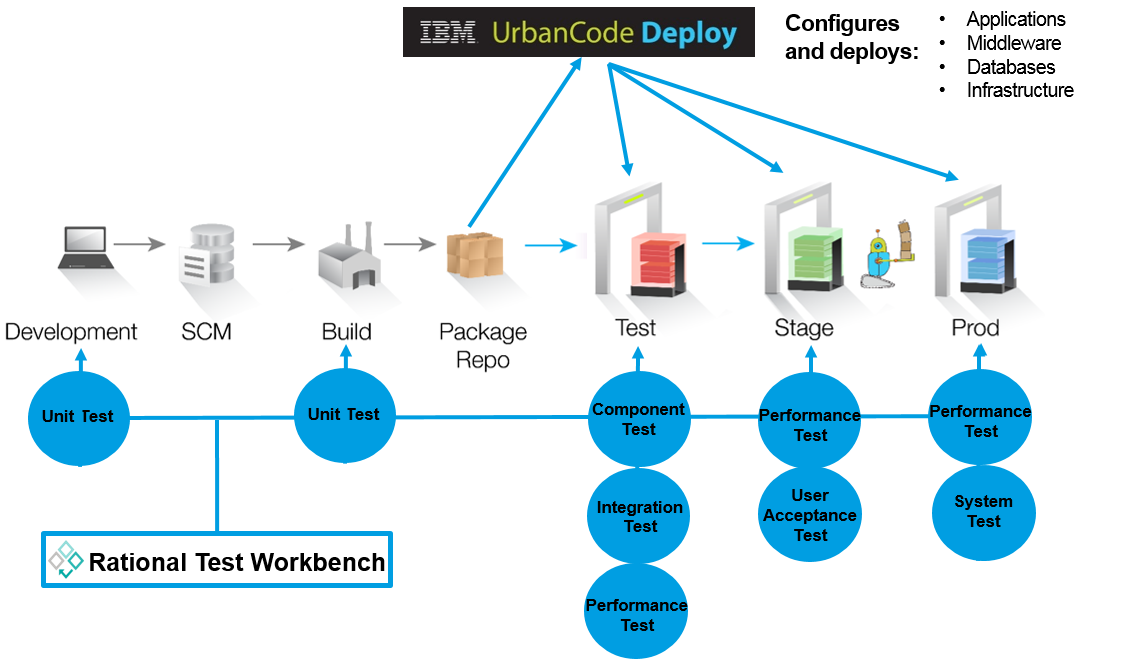
    The ability to use patterns to define consistent environments eliminates the failures that occur simply by configuration inconsistencies. This again requires operations and development to work together in creating the provisioning process so developers create their test environments the same way they are created in production. Using IBM UrbanCode as an example, this can be done by connecting UrbanCode Deploy to an automated self-service provisioning system such as OpenStack HEAT or IBM Cloud Orchestrator connected to OpenStack.

    Picture1

    These standard patterns can be used to create environments for all stages of the pipeline. And by using cloud capabilities you can deprovision these environments as fast as you can create them. This also allows the enterprise to have confidence in their environment patterns. They are tested on a daily basis and, therefore, operations can feel confident that testing is done on production-like environments.

    No one wants to experience production failures—and it is in everyone’s best interest to do all they can to prevent them. At the root of DevOps is the removal of those silos between development and operations. By applying these shift left operations principles you are well on your way to reducing your failure rate.

    The ingredients to make shift left are real and available: automated testing and deployment tools, service virtualization technology, agile practices and cloud environments. The main obstacle that remains is the mindset of delivery organizations. Learn more from the newly updated Application Deployment and Release for Dummies ebook to find out more.

    About the author / Dr. Darrell R. Schrag

    Darrell Schrag

    Dr. Darrell R. Schrag (@devopsdrs) is an experienced software lifecycle consultant specializing in the IBM cloud solution, helping customers establish their cloud strategy across the enterprise. He’s focused on implementing continuous delivery of software applications through the delivery pipeline incorporating cloud and provisioning solutions. He’s experienced in helping clients transition to “born on the cloud” applications utilizing microservices to take advantage of a flexible and nimble cloud platform.

  • DevOpsSec – Creating the Full Triangle

    DevOpsSec – Creating the Full Triangle

    Introduction

    As a discipline, DevOps emphasizes uniting development and IT operations teams through modernized culture, integrated tooling and processes in order to increase the frequency, quality and business alignment of software roll-outs. But while developers and IT Ops teams need to be in lockstep, security cannot be an afterthought.  Rather, DevOps teams need to adapt to include security as an integral part of the agile triangle.

    The challenge facing DevOps teams today however is that incorporating security into their day-to-day work is not always easy or intuitive. Security often runs one step behind or out of sync with lean DevOps teams. In addition, the besieged security professional or team often faces a never-ending barrage of breaches, designed by a large, amorphous and highly motivated hacker ecosystem and resulting in a continually escalating threat environment. In an effort to save time, agile developers may leverage existing code in rapid iterations and quickly deploy them to production through continuous delivery pipelines, without considering existing architectural defects or knowing its defect profile and potential for security vulnerabilities. This can expose organizations to huge risks if left unassessed and mitigated.

    Fortunately, “security at the speed of agile” is entirely possible, allowing organizations to bring new software products and services to the market, while staying in control. Here are some best practices for better aligning security with DevOps objectives, evolving beyond just DevOps to DevOpsSec:

    Shifting security “left” in the DevOps chain

    Like functional quality testing (making sure an application works as it’s supposed to), security testing needs to happen in the earliest possible stages of the development process. Traditionally, the application lifecycle has followed a sequential model – ideation, development, testing and finally, production. Functional testing used to occur only during the testing phase. But now, developers are taking on more responsibility, which helps prevent defective code from getting “baked in” further down the application lifecycle, where it becomes much more time-consuming and costly to undo. However, security is also an extremely important part of the quality equation, and if a security defect isn’t detected early on, a very unpleasant surprise is likely in store as the application gets closer to production. Building in and continuously integrating static code analysis and dynamic security testing into the Agile application lifecycle is a key success factor to delivering a high quality, secure application experience in production.

    Automating security testing, for both developers and testers

    In agile environments, DevOps teams are under constant time pressures. As noted above, developers are expected to develop more and more code, all while assuming greater responsibility for functional quality. Testers, too, are under increased pressure as more frequent application roll-outs mean more testing, in less time. For these reasons, if security testing is going to take place earlier on in the application lifecycle, basic security tests need to be automated. Since security threats are constantly evolving, this kind of automation will not completely rule out all security flaws in production. But it will allow developers and testers to spend more time on their core functions – namely development and functional testing – while lowering the attack surface, once an application does reach production.

    Leveraging Big Data analytics 

    Data generated from DevOps processes and operations, particularly related to automated security tests, often hold a wealth of insights which can be used to step up security validation efforts throughout the application development lifecycle. For example, what code types show the most vulnerabilities and therefore may need more rigorous testing? Which groups of developers are discovering the most security holes in automated tests – such that their development processes may need to be refined — and which groups may not be testing enough? How long are basic security tests taking on average, and how does this need to be factored into roll-out timelines? This type of data can help DevOps teams prioritize and optimize their security testing, and better reconcile security testing requirements with velocity and resources to hit anticipated delivery dates. Also, while using Big Data analytics in production will always be useful (particularly when it comes to detecting new security threats, and determining new automated testing needs), applying Big Data analytics earlier on, to DevOps pre-production data, can prevent more security flaws from making it into production in the first place.

    Fostering a shared vision and objectives

    To date, real progress has been made uniting developers and IT operations teams together in DevOps organizations. Traditional roles and responsibilities within DevOps teams continue to evolve and coalesce, and that’s a good thing. Developers are contributing to testing and taking more responsibility for overall quality. IT ops teams are thinking like developers, analyzing and feeding production data back to developers and testers so they can fine-tune and modify their offerings. Data flows left-to-right, and right-to-left are becoming more automatic and continuous.

    But increasingly, security professionals need to be included in this mix. Developers need to think with security considerations in mind – for instance, will a new feature they want to add to an application bring increased security risk, and if so, how can this risk be minimized? Conversely, security professionals need to think like IT ops teams; for example, making sure a new mobile app doesn’t potentially create a hole for hackers to penetrate back-end systems, and if a hack were to happen, how to contain it and minimize the impact. Only by capturing the right data, communicating and committing to working together can everyone in the DevOpsSec chain make the best, most well-rounded decisions that factor in all concerns, with business success being the top priority.

    Conclusion

    Often, DevOps teams may view security teams as potential logjams preventing them from doing what they want to do – deliver working software quickly to delight users and create competitive edge. But if security in the software supply chain is not addressed, the results may do the exact opposite, frustrating users, freezing business processes or worse, causing massive financial liability and loss of brand goodwill.

    Security is a key ingredient of application quality. By addressing security earlier in the development process; increasing security testing automation; leveraging Big Data analytics and incorporating security in the DevOps mission, organizations can achieve true DevOpsSec and deliver applications that are high-quality, through and through.

    About the Author/ Kelly Emo

    Kelly-Emo- Director-Lifecycle-and-Quality-HP.jpgProduct MarketingKelly Emo, Director, Lifecycle and Quality Product Marketing, HP, Kelly has been involved in all things IT for few decades, including engineering, product management, and product marketing across application development, SOA and middleware, enterprise architecture, IT operations, quality and testing. She now focuses on application lifecycle management, quality, agile development and DevOps. She has worked in other organizations at HP, BEA Software, and Jamcracker Inc .Kelly has a BS in Computer Science from Cal Poly, San Luis Obispo and an MBA from Santa Clara University.
  • Rugged DevOps: From Idea to Automation to Impact

    Rugged DevOps: From Idea to Automation to Impact

    The Idea Behind Rugged DevOps

    josh cormanWhereas DevOps is IT at ludicrous speed, Rugged DevOps is a shift left to find a way to inject security into DevOps from the beginning, says Joshua Corman, CTO, Sonatype and Rugged DevOps founder.

    One way to do that is for Rugged DevOps to establish security parameters and requirements, meet those requirements as the project progresses, and establish and enforce the automated application of new and existing pen tests on software as development teams deliver it to the internal staging environment, in order to confirm software quality.

    Automating Pen Tests? Running the Guantlt Is One Way

    Guantlt is a project and a platform for doing just that: developing tools to hook into pen tests and run them on internally-staged code. The Gauntlt project works to automate security testing using established tools, to disperse standard errors, and to fail code based on test results and software requirements. “The goal is to provide an automated way to attack your software because, what we need in DevOps is to find ways to automatically enforce security quality,” says Aaron Cois, Researcher, CERT Division, Software Engineering Institute, Carnegie Mellon University.

    The industry is developing frameworks such as Gauntlt to support autonomously running pen tests on every newly staged release candidate in order to avoid involving or requiring any manual effort. These frameworks enable an automated system to run unattended tests up to several hundreds of times a day to keep step with as many potential new releases each day. We can’t expect limited human capital to run that many tests in succession. “We want coders to write that automated test once and then go off and do something creative that we haven’t already done,” says Cois.

    All this is necessary to meet security quality standards while maintaining the shortest time to deliver each new release candidate with the confidence that development could release it to production at any time. “We want to fire off Rugged tests against that internal environment. Having that parity environment is what enables the development of more comprehensive and more interesting testing from a security perspective,” says Cois.

    Teams must run pen tests on running code in an environment that mirrors production. That’s the only way to know whether the software will stand up to attack. Teams must be able to add new tests as new threats appear.

    To automate a response to pen test results, coders write conditional ‘if-this-then-that’ rules into Continuous Integration to respond to conditions such that, for example, when any unit test fails, the system fails to build the software. “A lot of organizations start out by saying, well, we’re going to start writing security-focused unit tests and security-focused integration tests, getting our QA department involved and our Integrated Security Department involved early in that process, having them rating those tests and enforcing tests in Continuous Integration,” says Cois.

    Impact: Rugged DevOps in Action

    “Heartbleed and Shellshock were high-profile vulnerabilities that had been present in BASH and Open SSL for a long time and we didn’t know about them. We had to find ways to make sure we weren’t vulnerable to those,” says Cois. Using Rugged DevOps, the security team member can create tests for such new threats and require the tests using CI. As CD quickly fixes bugs, so Rugged DevOps can quickly defend against new threats.

    One hope for Rugged DevOps is that it will bring truly secure coding even to COTS software as DevOps eventually envelopes all software development. DevOps should enable developers to continue to develop COTS software cheaply while adding the inherent security that would prevent a lot of the successful attacks on software that trouble industry today.

    “I don’t know that we will reach that stage quickly since it certainly requires an investment,” says Cois. There first has to be that continued uptake of DevOps approaches and those changes in processes, culture, and mindset. Rugged DevOps has to accompany that or the eventuality of cheap and secure COTS software might never materialize.

    Concluding Remarks

    “People like DevOps because the concrete hasn’t dried yet and people are copying high performers. At the same time, programmers are assembling 90-percent more code from existing open source code,” says Corman. This is good news where those high performers and those who follow in their footsteps fail faster, fix errors sooner, and carefully consider security at every step, as this will magnify secure code. But developers have to build using the higher quality code those high performers are creating, says Corman.

  • Shift Left: Can you be left out?

    Shift Left: Can you be left out?

    One of the most popular terms bandied about in DevOps is “shift left”.  I was at a workshop last month at IBM InterConnect conducted by Sanjeev Sharma and Mustafa Kapadia. They put on a great workshop which was a preview of an exercise they perform in the field for clients.  A central theme of their talk was the idea of shifting left to address issues earlier in the development process.

    iBM, Sanjeev and Mustafa (both of whom write here on devopsy.kinsta.cloud) are not the first or only people who speak about shifting left in DevOps.  Derek Weeks of Sonatype wrote a blog post about it back in September of 2013. Almost a year to the day later, Dibbie Edwards of IBM (and the focus of a good article by George Hulme) wrote a good article about shifting left with continuous testing. Andrew Storms wrote a post here on devopsy.kinsta.cloud some months back about shifting security left in DevOps.  Indeed shift left is generally regarded as a basic foundation of DevOps.

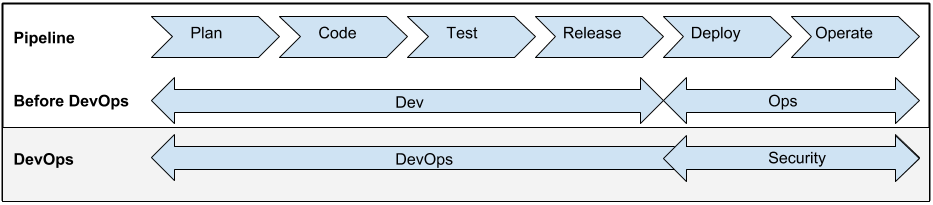
    Before we dive into what this means to you, we should make sure that we all understand what shift left really means.  For me looking at a standard flow of the development/deployment process is the best illustration of this. I think Andrew Storms used a good one in his article, so let’s repurpose it here:

    left 1

    Pay no attention for now to the before DevOps or DevOps rays for now.  Take a look at the top line which is the pipeline.  You can see the flow of an app from plan to code and all the way to operate.  The flow runs from left to right.  At its simplest shift left moves tasks further left.  Security, continuous testing, continuous integration, continuous delivery are all shifted left.

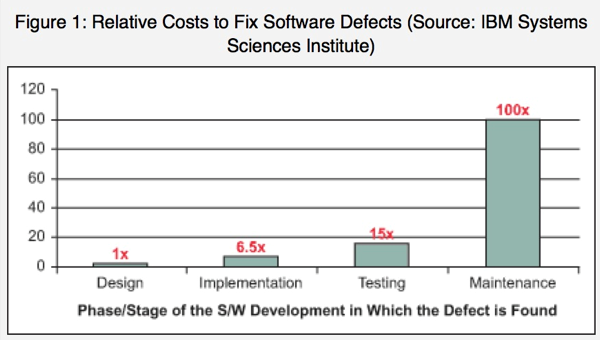
    In doing so potential issues are addressed earlier in the lifecycle. What is this a good thing?  A chart from Dibbie Edwards article gives us the obvious answer:

    left2

    As can be seen the earlier you can get to issues, the cheaper it is too fix them.  That alone is a reason to shift left.  But also concepts such as addressing security issues before it effects your customers is appealing. The same can be said for many other functions you can shift left.

    For me though the question is by shifting everything left, do we just wind up with a big pile at the very left?  How do we prioritize all of these left shifted functions?  You can only shift left so far before you come to the beginning of the time line. This is not the birth of the Universe where you had a big bang which defies the laws of physics.

    At some point can you shift too much left? This is a question I am going to pose to Sanjeev and Mustafa. I also pose it to you the reading audience.

    I recognize that the concept of shifting left is not so efficient that everything that can be shifted is in fact shifted left.  But as we get more efficient, more and more tasks are left shifted in the process. At what point do we reach the point of diminishing returns?

    How do you feel about this? Can we shift too much left? I am interested in some of the different views on this. I am a big proponent of shifting security left, but are there other priorities?

    Let us know your feedback.