Tag: shift left

  • How Organizations Benefit from AWS App Patterns

    How Organizations Benefit from AWS App Patterns

    As a startup, an organization thrives by breaking rules, challenging the status quo and standing for all that is against the norm. The same rules don’t apply once the same organization grows, matures, becomes popular, gains a long list of clients and expands to a global footprint. With scale and growth comes the need for reliability, consistency, being able to deliver the same level of service to all customers and keeping promises made to customers. At this stage, application patterns become indispensable to an organization’s day-to-day functioning.

    Support of the Application Now and Long-Term

    Mid- to large-size organizations typically deal with numerous internal-only applications and external vendor applications. These applications are changed and updated regularly. To support the applications’ needs, and effectively manage them, organizations need a change management system in place.

    A service such as AWS Config helps to audit AWS services that power applications so there’s increased visibility. It tracks changes made by users and applications, and presents a clear picture of how these changes impact AWS resources.

    Enabling Shift-Left Without Additional Overhead

    DevOps bring together Dev, QA and Ops into smaller, cross-functional teams. The goal is to break down silos between teams, facilitate collaboration and drive better results faster. Accordingly, shift-left is a tactic used to encourage QA and Ops teams to play a more pivotal role in the initial Dev stages of the pipeline.

    The benefits are many. QA brings their experience of testing the application to its limits and informs about what’s feasible to implement. Ops chimes in with concerns and things to watch for once deployed. While shift-left is great from a team standpoint, it can meet with hurdles and can fail if communication patterns are random, and ownership of each step is not clearly defined.

    Application patterns encourage systematizing this collaboration between teams. Patterns help to define the type of infrastructure to be used, their configuration and the kind of tools that fit in with the team’s requirements. Application patterns guide decisions and help to make the right choices, and sometimes compromises, at every step.

    Supporting the Advancements in Open-Source Without Fear of Tool Attrition

    There is an explosion of open source tools today. If DevOps teams are attracted to the next shiny new open source tool, they’ll soon find themselves overwhelmed with tools they don’t use and that slow them down.

    Open source tools evolve quickly, and their popularity rises and falls with the times. One look at the open source monitoring space will show you that older tools such as Nagios and Zabbix are now becoming less relevant, and modern container-aware monitoring tools such as Prometheus are taking their place.

    AWS supports the use of the top open source tools; for example, Elasticsearch. The AWS Elasticsearch service integrates seamlessly with Kibana for visualization and delivers the ELK stack without the maintenance.

    Application patterns enable you to define a strategy for tool adoption. You may find the best open source tool in the world, but what’s the point if you can’t use it in your toolchain, or if it slows down the pace of operations? The popular DevOps mantra of people, processes and then tools holds true here.

    Value Stream Management

    Value stream mapping is about visualizing the flow of value from an organization to its customers. In simple words, it’s about taking stock of what you have to offer to customers and monitoring how your offerings change over time.

    Value flows outward to customers, as well as internally between employees and systems. For example, in the context of DevOps, it helps to map the value of Ops to Dev and QA. As these teams are each other’s internal customers, knowing what the value stream is can help remove bottlenecks and drive greater efficiency.

    Building a Team and Culture First

    AWS is a great place to build team culture as it is expansive and includes services for pretty much anything you’ll ever need. You can find tools such as CodePipeline to quicken development pipelines, to make sure everyone on the team is informed of important changes using CloudWatch and SNS queues, and to automate common tasks with Lambda.

    Rather than jumping feet first into AWS and then figuring out how it all works, it pays to first define application patterns and team culture that will govern the way you use AWS. Patterns and culture are closely related. If culture is about the people, application patterns are about the infrastructure and technology stack being used by people.

    Conclusion

    Whether you’re yet to move to AWS or are already on board but not getting the most out of it, application patterns help evolve the way you manage applications in AWS. Application patterns help scale applications over the long term, they enable shift-left for DevOps teams without the friction of overhead. Application patterns make it possible to adopt the right open source tools and find success with them. By using application patterns you can visualize the entire process and drive great efficiency, and finally, they support great team culture within DevOps teams.

    DevOps teams that run their operations predominantly on AWS need not fly blind. Application patterns bring greater visibility, control, collaboration and ultimately value.

    This sponsored article was written on behalf of Eplexity.

    — Twain Taylor

  • Rethinking Data Management in a DevOps Environment

    Rethinking Data Management in a DevOps Environment

    You often hear data is the new oil. This valuable, ever-changing commodity has begun to play a starring role in many cloud-native applications. Yet, according to a number of DevOps teams, data issues continue to plague their efforts to continuously integrate, test and deploy frequent software releases. More specifically, issues with persistent data (and its underlying database engine) often appear to be the culprit.

    Your organization might be pursuing emerging IoT applications that incorporate and analyze sensor data from multiple sources. Or, your DevOps team may be trying to develop applications that extract further actionable insight about customers. Whatever the use case, there’s no doubt back-end database architectures have gained growing importance to the success of such projects. Yet, in many cases, such database systems appear to be having difficulty just keeping up with the pace of today’s DevOps pipelines.

    According to one report on the state of database deployments in 2019, 46% of DevOps teams on an accelerated release schedule (with weekly, or even daily, releases) found it “extremely or very difficult” to speed their database release cycles accordingly. In a related Redgate report on the 2019 State of Database DevOps, 20% of respondents cited slow development and release cycles as one of the biggest drawbacks to “traditional siloed database development practices.” Another 23% saw a higher risk of deployment failure and extra downtime when database changes were introduced in a traditional database environment.

    Getting to the Heart of the Data Problem

    Are such database issues the result of the wrong choice of underlying database technology–such as the use of an RDBMS, NoSQL or even a NewSQL system? Possibly.

    Maybe database issues are also caused by poor (or non-existent) cross-communication between database experts and their developer counterparts? Undoubtedly, this is true as well.

    Would you be surprised to learn both situations (wrong technology and poor communication) are often to blame? Also, to blame is the urge to solve new data problems in the same old way organizations approached their earlier, legacy use cases.

    Ultimately, as with many things DevOps-related, the answer to the data problem is likely to require change along three, separate fronts: People, process and technology. It will also require a fundamental shift in how such issues are approached at the start.

    Starting with People and Process

    Instead of worrying about database slowdowns, what if you began again with how DevOps teams first approach the many facets of the underlying data layer? This means:

    1. From the start of a project, include DBAs as part of the cross-functional DevOps team. This will help promote healthy cross-communication. They will also positively influence the development of appropriate underlying data layers and infrastructure that support your emerging use cases. In larger organizations that manage many data sets, these may be specialized database administrators (DBAs). In smaller companies, these may be more full-stack engineers who also have high-quality expertise in database operations.
    2. Identify early the different data types, domains, boundaries and optimal cloud-native patterns associated with your data. Once these are established, the team can gain a better understanding about the different ways to develop applications and data architectures for each new use case.

    In effect, organizations need to make a concerted effort to shift left with their overall data architecture discussions. This shift allows more of the right questions about data to be asked, answered and incorporated early on in the design of the overall application.

    Asking the Right Questions About Data

    Part of this early collaborative work may involve asking key questions about data. These include the best ways for an application and its users to interact with the underlying data, such as:

    • How will data be ingested and from where?
    • How will we access the data?
    • How and where will we store it?
    • How do we update and/or maintain legacy databases as we build for new use cases?
    • What types of data will we have? How will the types change or be increased over time?
    • How will we query from it? And what are the most common queries users will want to run?
    • How will we manage and scale the data in use?
    • How will we protect the data from data loss, disaster or corruption?
    • How will we secure the data?

    If these questions sound a lot like features in a data lifecycle, you’re right. But, such basic questions about data are often overlooked in the rush to deliver, integrate, test and deploy application code. So often, what happens instead is an application team creates a design, then hands it off saying, “Okay, now create a data architecture to support the application.”

    This fundamental miss with data and collaboration at the start often leads to poor database architecture decisions later. It can also cause DevOps teams to resort to workarounds to accommodate such wrong architecture choices made at the start–which may cause some development teams to choose to circumvent DBA involvement altogether. In this case, they might even find themselves opting to use public cloud services instead (or some other types of data management) to support their application.

    Instead, application teams should choose the path of early collaboration between developers and all functions of IT (including DBAs). This approach can offer better DevOps outcomes. It also helps move organizations toward a future where data architects provide an effective bridge between all parties critical to the application’s success: From the needs of developers to the platforms provided by DBAs and the underlying infrastructures needed to enable them.

    Changing Skillsets, Changing Mindsets

    As with most things DevOps-related, success at the data layer has as much to do with changing the education, mindset and culture toward database architectures and database deployment methods as it does with the specific steps in the DevOps pipeline.

    For example, if most DBAs in your organization are narrowly focused in one area (such as an Oracle DBA or SQL Server admins), your organization may benefit from investing in education to close skill gaps. Such investment can help expand the knowledge and exposure of that workforce to DevOps practices or emerging database approaches to cloud-native application patterns.

    It can also help some organizations to first identify those individuals in the organization who want to transform, innovate and learn about new tools, methods and practices.

    Hiring those with that expertise already in place is another option. When you hire new skillsets, however, the answer may not be just to hire several NoSQL administrators. This tactic will not necessarily solve your data problem, either. It may be just as beneficial (or more so) to hire someone with little specific NoSQL skills but who is good at thinking about data in a different way.

    Business First, Technology Second

    In our practice, we are often asked to weigh in on technology choices to support DevOps efforts in emerging areas such as IoT, Big Data and advanced analytics. Organizations ask us about using traditional relational databases (SQL Server, Oracle, etc.) versus NoSQL databases (MongoDB, Cassandra, etc.). They ask about the merits of one NoSQL iteration over another. They ask about how to manage persistent data in container environments. They even ask about workarounds when the data choices they’ve made cause other unexpected problems.

    We do our best to answer these questions. But, whenever possible, we also tell organizations to back up a few steps and start, instead, from their business objectives:

    • What are you trying to accomplish?
    • What are your business drivers?
    • How do you hope data will be used in these contexts?

    Answers to these questions can help you make better choices about the best data architecture to support your growing applications.

    Ultimately, new tools and technologies can enable a lot of impressive data architectures. But, just throwing tools at the data problem is not enough. Early effort and investment in people, process and cross-departmental communication is just as important to a successful data outcome for any project.

    Many of the discussions we have now are trying to take everyone back to the steps they skipped. This harks back to the fundamentals of software engineering: Addressing things early so you don’t have problems later.

    Unfortunately, data is the one component in the technology stack that you can’t easily undo once you’ve chosen a specific path with your application’s data architecture. When it comes to planning for data, it really is a pay now or pay later equation.

    Isn’t it best to take the time and choose your data path wisely rather than paying later for slowdowns or other issues with deployment and performance?

    — Jeff Bozic

  • Quality Engineering Has DevOps and Agile in the Driving Seat

    Quality Engineering Has DevOps and Agile in the Driving Seat

    As opposed to the traditional software development lifecycle (aka waterfall), today’s Agile and DevOps-based software development process is more outcome-oriented. The unrelenting pace of the changing market landscape has made the hybrid, Agile plus DevOps way of software development absolutely critical in addressing customer demands and staying competitive.

    The focus on Agile and DevOps is necessary due to the high failure rates of traditional software development methodologies. These failure rates are mainly attributed to the glitch-infested, low-quality applications churned out by following legacy methodologies.

    The failure rates had left many companies to bite the dust and brought the key role played by quality in ensuring customer satisfaction and ROI for the business into sharp focus. Also, the IT landscape is witnessing developments such as mergers and acquisitions, increased focus on risk and compliance, data and analytics, the fast rollout of apps and mobile commerce, among others. These have necessitated the software development process to become increasingly agile, streamlined, collaborative and flexible. The reshaping of customer expectations is letting organizations to go beyond shift-left testing or DevOps testing by transforming the QA process into one driven by quality engineering.

    What Is Quality Engineering?

    To meet the growing demand for quality software applications in double quick time, a mere tweaking of the software development process is not enough. What is needed is the adoption of software quality engineering process comprising optimal quality assurance, predictive analytics and monitoring of QA elements to reduce glitches to negligible levels. The process would involve a continuous cycle of feedback and quality improvement based on the same. The quality engineering process offers maximum test coverage in the shift-left scheme of things and ensures outcomes like functionality, security, accessibility, usability, performance and reliability of the software application. It complements Agile and DevOps methodologies and ensures their outcomes to remain consistent with the desired business objectives. Quality engineering, instead of identifying the inherent glitches in the SDLC, focuses more on preventing them altogether.

    Shift Left and Strengthen Right

    Quality engineering services cover the entire spectrum of the SDLC thereby yielding the maximum test coverage and delivering the best quality product. With DevOps testing shifting left, the quality determinants are incorporated right into the product build during the development phase. At the same time, DevOps-based QA focuses on the shift-right approach to ensure the last stage of the SDLC i.e., delivery goes on unhindered and customer feedback is taken in right way and worked upon. The ultimate aim of both shift-left and right is to create and deliver a glitch-free product that meets the requirements of the end-users. Here, since end-users are the ones who ultimately assess quality of a software product based on parameters such as usability, functionality and performance, among others, the feedback mechanism should be responsive enough to understand the issues faced by the end-users and remedy them at the earliest.

    Quality Engineering as an Aid

    Quality engineering (QE) helps to bridge the gap between development and deployment processes, which can arise due to the lack of agility. It harps on the successful strategy of “test early, test often,” to pre-empt challenges that businesses face when testing a software product. Quality engineering ensures the quality of a software application throughout the SDLC–right from the designing stage to its final delivery. QE can be incorporated into the development process by using methods such as Behavior-Driven Development (BDD), Test-Driven Development (TDD) and Acceptance Test-Driven Development (ATDD) respectively.

    Let’s find out what these methods are all about:

    • BDD: In this software development method, the behavior of both the software and business outcomes are taken into consideration. Here, the right sets of tests are automated, leading to an increased collaboration among developers, testers and other business stakeholders.
    • TDD: In this software development process, the QA team writes unit level tests before the development stage. This results in getting an early feedback and helps the development team to refactor its requisites.
    • ATDD: This software development process focuses on writing an acceptance test even before the development phase. This helps the software to meet the acceptance criteria beforehand.

    Quality Engineering and DevOps

    QE, being an end-to-end testing methodology, can offer optimum solutions to businesses struggling with their legacy IT infrastructure. The solutions in terms of continuous testing and integration as mandated by DevOps, can be arrived at by integrating the QA process with the DevOps pipeline. This results in executing processes such as build, test, deploy and deliver in a seamless manner. QE complements DevOps and Agile by detecting glitches right at the beginning of the development process.

    Moreover, QE’s focus on end-to-end testing helps the product to be developed and tested simultaneously. This approach adds teeth to the DevOps’s requirement for continuous integration (CI) and continuous delivery (CD). No wonder, the successful implementation of quality engineering is underpinned on fulfilling the requirements of DevOps and Agile. It further consolidates the benefits achieved from implementing DevOps testing services and Agile testing services.

    QE riding on DevOps and Agile can help businesses to scale up their operations without investing much resources and time. By implementing DevOps test automation and Agile test automation using a test automation software such as Selenium, Robitium etc., businesses can boost their SDLC. QE can help businesses to develop and deploy glitch-free software speedily and deliver enhanced customer experience.

    Conclusion

    The fast-changing competitive business landscape of today requires organizations to streamline their operations, increase productivity and fast forward the delivery of glitch-free software applications. To achieve these objectives, they need to make quality engineering as part of their development and testing cycles. However, QE ends up complementing the Agile and DevOps approach by achieving outcomes such as CI and CD. Furthermore, it leads businesses to get high ROI, better productivity, reduced cost of operations and enhanced customer experience.

    — Akshaya Choudhary

  • Trend Micro Partners With Snyk to Advance DevSecOps

    Trend Micro Partners With Snyk to Advance DevSecOps

    Trend Micro today announced an alliance with Snyk through which alerts about vulnerabilities in open source code will be passed on to the tools Trend Micro makes available to apply virtual patches to both monolithic and microservices-based applications.

    Snyk provides a tool that identifies and fixes vulnerabilities and license violations in open source dependencies and container images. Trend Micro COO Kevin Simzer said his company leverages the alerts generated by Snyk to inform developers and cybersecurity professionals where virtual patches need to be applied.

    Virtual patches are a capability Trend Micro developed to enable IT organizations to address a vulnerability by applying a security policy that limits access to a specific piece of code until a developer can update a monolithic application or replace the containers housing vulnerable code within a set of microservices.

    By working more closely with Snyk, Trend Micro is trying to increase the appeal of its approach to virtual patching among DevSecOps teams, said Simzer. It’s not possible for most developers to address every vulnerability that manifests itself in a timely manner. Virtual patching allows DevSecOps teams to establish which vulnerabilities need to be addressed immediately while making use of virtual patches to protect applications from less severe vulnerabilities until they can be addressed during a DevOps cycle. To advance those capabilities, Simzer noted Trend Micro has already integrated its security offerings with continuous integration/continuous deployment (CI/CD) platforms such as Jenkins.

    Simzer said it will take a while for most cybersecurity professionals to trust developers to address cybersecurity issues during the application development process. However, virtual patches provide a mechanism through which both cultures can collaborate more closely without compromising the rate applications are being built and deployed. The primary reason developers tend not to pay as much attention to cybersecurity issues as everyone would like is because of the deadline pressure most of them are operating under. However, as responsibility for application cybersecurity continues to shift left, more developers are trying to address these issues earlier in the application development process.

    More than 16,000 enterprise IT organizations are already using Trend Micro security offerings to secure both monolithic applications and cloud-native applications based on containers, said Simzer, adding that footprint puts Trend Micro in a position to help organizations embrace best DevSecOps practices.

    Of course, Trend Micro is not the only cybersecurity vendor with similar ambitions. The challenge many organizations will face is defining what processes are best handled by developers invoking application programming interfaces (APIs) versus cybersecurity professionals who are more comfortable employing graphical user interfaces (GUI). There may come a day when more cybersecurity professionals are able to write code, but for now the two camps could not be further apart in terms of the tools they prefer to use. For IT security vendors such as Trend Micro, that means for the foreseeable future, they will continue to need to build GUIs alongside APIs.

    — Mike Vizard

  • When Shift Right is Shift Left

    When Shift Right is Shift Left

    In some areas of IT, we utilize the idea of shift right quite a bit. Testing and security are two areas where it comes up often. The idea is that tracking late in the process–usually while the application is in production–leads us to find more insidious issues that might have remained hidden, and gives us a kind of quick reaction force to mitigate issues.

    All true, and it works relatively well. Some shops use this concept to push off necessary testing, but for the most part it allows us to keep moving while assuring the system is essentially correct. But the idea of catching issues late in this iteration might be misguided. It does do just that, but in the world of cyclical iterations, shift right is also shift left for a future iteration. The idea being that we’re catching something today that will be resolved for the next iteration. And presumably for every iteration after that.

    We often put a temporary fix to resolve the in-production issue, then list it as something to be more permanently resolved in a future iteration. Adding to a future iteration’s to-do list is the ultimate shift left. And that matters. We’re catching it late for this iteration, but early for the next one. And as a result, overall quality increases.

    Standardizing this process would be the next step. If it’s an easy fix–a minor change to code or config–it’s shifted right. If it’s a larger issue that will need to be considered in a future iteration, it is considered shifted left for that iteration. It’s an input, not just a fix. And an input that deserves a high priority if it reflects a negative impact upon the running system.

    In the daily grind, this is pretty much irrelevant. We have a problem and say, “there, that’ll keep it going. Put in an issue to make a better fix and move on.” But in the next iteration’s prioritization, it is far more relevant, “we have this massive pile of things to do, what makes this iteration?” Should include a heavy weighting for things that are limping along on a manual fix. Often, the existence of a workaround reduces the weighting, and these things don’t make the cut. But permanent fixes mean you don’t have to hustle around fixing the same old problem each time the app is deployed, and that’s greatly what DevOps is all about.

    There is an interesting dichotomy between shops/groups with a high iteration rate and those with a much slower cadence. The cost of not permanently fixing these issues is too high when you’re deploying frequently, so they tend to be handled this way already. But slower iteration shops/groups often will let these fixes slide in favor of new functionality. The burden this creates is not worth a shiny new bit on the UI. Start slating permanent fixes for production issues as highest priority, don’t add steps to deployment because you failed to resolve the more fundamental issue.

    DevOps requires speedy resolution, but long-term, any type of development effort requires adequate resolution. With iteration after iteration, you are paying a price for putting off fixes, so don’t. Shift them left in the next iteration, and spend that time of each release on something more productive.

    — Don Macvittie

  • Shift-Left Testing, Continuous Integration and the Mainframe

    Shift-Left Testing, Continuous Integration and the Mainframe

    “Mainframe” is one of the oldest terms in tech. “Shift-left” is much newer.

    You may not think, then, that mainframes and shift-left testing have much in common. But you’d be wrong. Shifting testing to the left can deliver tremendous benefits, even in the context of mainframe applications.

    Let us explain.

    What Is Shift-Left Testing?

    Shift-left testing refers to the practice of performing more tests earlier in the software development lifecycle.

    Traditionally, most testing occurred just before software was deployed into production environments. Testing code at this stage is useful for ensuring it will behave as expected in production, but it comes with drawbacks.

    The biggest drawback of traditional testing is problems are difficult to fix if they are not discovered until just before software is ready to be deployed. At that point, addressing a problem within the code requires determining where specifically the problem exists within the code, removing that code from the application and replacing it with updated code—all without breaking other parts of the application that depend on the original code.

    Shift-left testing helps to address this problem by encouraging software delivery teams to perform tests earlier—typically, starting right after individual units of code are written. Being able to test earlier and more often is especially important in software delivery pipelines based on continuous integration/continuous delivery (CI/CD), where the goal is to roll out application changes on a nearly continuous basis.

    Since bugs that aren’t detected until just before release can take a long time to fix, a lack of shift-left testing puts organizations at risk of not being able to achieve the main goal of CI/CD due to constant delays caused by software quality problems. In addition, shift-left testing reduces the amount of overall end-to-end testing you have to perform.

    You Still Test on the Right

    It’s important to note tests performed earlier in the pipeline don’t replace the testing done just before deployment. They complement them and reduce the chance of having problems go undetected until right before deployment. In this sense, the term shift-left can be a bit misleading; it’s not really about shifting all testing to the left of the delivery cycle, as much as it is starting tests earlier, while continuing to test on the right of the pipeline as well.

    Shift-Left Testing and Continuous Integration on the Mainframe

    Shifting testing to the left makes it easier to fix code problems within virtually any type of application delivery pipeline based on CI/CD. But it can deliver especially critical benefits for software delivery teams striving to bring mainframe applications up to speed with CI/CD.

    There are a few primary reasons why. One is mainframe applications are usually written using older programming languages that were not designed to help developers avoid mistakes. This isn’t to say mainframe languages are especially prone to errors; they’re not. But compared to a language such as Python, which is designed to enforce good coding habits, a language like COBOL doesn’t exactly require programmers to be highly disciplined when they’re typing out their code. Thus, it’s especially important to be able to catch bugs earlier within code written in a mainframe language.

    Another factor is mainframe applications are often part of legacy codebases. When you’re dealing with code and dependencies that are decades old in some cases, you’re at a greater risk of ending up with software quality problems, despite your best efforts. Here again, detecting those problems earlier rather than later means they can be fixed without interrupting the entire CI/CD process.

    Finally—and most important—is the fact that in some cases, there is a large disconnect in terms of skill set and familiarity with mainframe code between software quality engineers and mainframe programmers.

    Your typical QA engineer today didn’t grow up with z/OS and may have limited experience troubleshooting software problems. Given the QA team is typically responsible for running pre-deployment tests, this can pose a problem in the event that QA detects issues with a mainframe application that it has no idea how to troubleshoot, let alone fix. By shifting testing to the left, it’s easier to give developers faster feedback so that they can fix bugs more quickly.

    How to Shift Mainframe Application Testing to the Left

    If you thought mainframes had nothing to gain from the shift-left testing movement, you might also think there aren’t many tools out there to help you do shift-left testing for mainframes.

    Fortunately, that’s not true at all. For unit testing, IBM offers Z Unit, a unit-testing tool for z/OS programs. Z Unit is included in Z Open Unit Test and IBM Developer for z Systems. Using these tools, Z developers can automatically generate unit tests for batch and CICS programs as part of their daily work. These tests can be stored in any standard SCM and can be executed independent of their environment.

    You can even test mainframe apps on non-mainframe hardware using Z Development and Test Environment. The platform creates virtual Z environments on x86 systems so developers can write, build and test their mainframe applications on any standard commodity server or development box.

    Conclusion

    Whether your mainframe applications are decades old or have been written from scratch in just the past few years, there’s nothing stopping you from taking advantage of shift-left testing to help validate them. Doing so will make it easier to achieve CI/CD effectively for your mainframe application, which keeps your software delivery team and your end-users alike happier by reducing bugs and delays.

    Check out the Z Open Unit Test demo.

    — Chris Tozzi

  • Helping Developers Win in the Shift-Left Revolution

    Helping Developers Win in the Shift-Left Revolution

    The shift-left revolution is upon us. Just because it’s a cliche, doesn’t mean it’s not true. As software development organizations continue to implement DevOps culture, processes, and tools, developers are adopting the practice of testing and ensuring the security of their applications as early as possible in the DevOps pipeline.

    This is quite a change from the traditional waterfall method. There, developers dealt with the design and creation of a product or application and security professionals came in after they were finished, to review and test security, flagging any possible issues and sending them back to the software teams to figure it out.

    This fundamental change in the way companies are addressing application security affects many of the moving parts in a software outfit. It requires a new set of processes, practices and tools all to be implemented, all while keeping up with today’s fast-paced release cycles.

    To gain an understanding and insight on how developers are handling this hefty challenge, we polled more than 600 developers in software organizations and asked them about how security figures into their day-to-day tasks and processes, and the tools that help them to address their evolving roles.

    Developers: Owning Their Shift Left

    The first thing that we wanted to learn is whether developers are on board with the shift-left approach that most organizations have adopted for security testing. Our findings showed that, for the most part, developers are taking ownership of the day-to-day operational responsibility for AppSec in their organizations, playing a more significant role on this front to secure their products.

    When asked who owns the day-to-day operational responsibility for AppSec in their organizations, 23% answered that developers own those responsibilities, 21% said DevOps, 28% said software development team leaders owned it and only 29% said security teams in their organizations are the owners.

    developers shift-left chart 1The fact that a whopping 71% of developers put the ownership of AppSec squarely on the shoulders of software development and DevOps folks means that developers are very much on board with the shift-left movement and have taken on the new security tasks that come along with that.

    Breaking it down, we also found that in smaller organizations, more developers and DevOps professionals feel that they own their AppSec responsibilities, while those percentages go down with larger organizations. This can be explained by the fact that often smaller companies have less specialization, requiring developers to branch out of their professional comfort zone. Smaller organizations also tend to allow developers more freedom and flexibility to define their own processes.

    developers shift-left chart 2Do these responses mean that in addition to their focus on innovation, functionality and quality, developers have also added security into their considerations when they are in the process of creating and building projects?

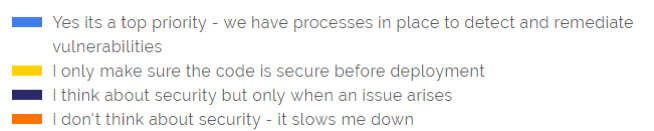
    The answer would appear to be yes, according to 58% of developers in our survey, with an additional 39% saying that security figures into their consideration when issues arise (14%) or that they validate security before deployment (25%). Only 3% of developers said that security is none of their concern since it slows them down.

    Are you taking security into consideration when developing software?

    developers shift-left chart 3

    While their responses show that there is still a ways to go before security is completely baked into development processes, it’s clear that most developers are already in the right direction, making security a priority within their tight schedules.

    The AppSec Process: Who’s On First?

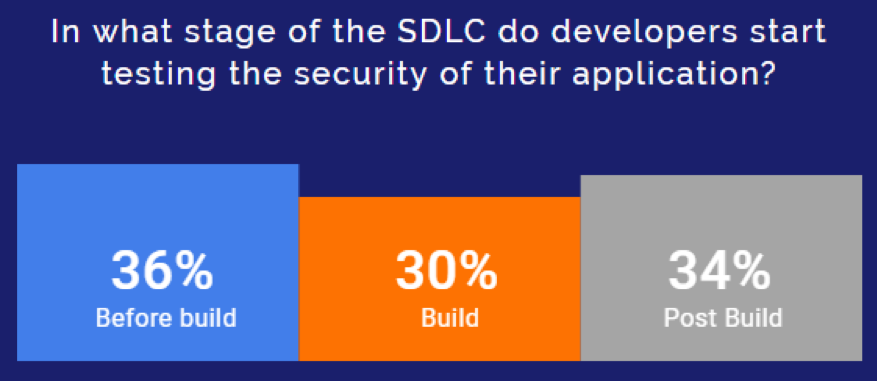
    How does making security a top priority or at least a consideration figure into the different phases in the DevOps pipeline? Practically, where is it being applied? We asked developers at which phase in the software development life cycle (SDLC) they started testing their AppSec.

    Their answers showed once again that developers are taking on security where it traditionally was not a part of their workflow. In fact, many replied that they are integrating security testing tools as early as the pre-build stage, with 36% of the respondents saying that they are testing in their IDE and repositories.

    developers shift-left chart 4Survey results also showed that along with the DevOps processes, they are also adopting tools that help them to shift security further left. 68% of developers report using at least one AppSec technology such as SAST, DAST, SCA, IAST or RASP. All of these automated solutions help security teams and developers detect potential security issues in their products, providing software teams with visibility and control over their AppSec.

    A Question of Remediation

    Until now, survey results show that developers have taken their place on the front lines of AppSec and the shift-left revolution, arming themselves with an impressive collection of automated detection tools. However, these solutions are creating a new set of issues that should worry stakeholders.

    It appears that the much-needed security testing tools are threatening to bury development teams under a mountain of alerts, which they are now required to research and remediate while keeping up with their deadlines. It’s impossible for developers to keep up with all of the security alerts in their inbox, especially considering that many AppSec tools were developed for security teams and focused on widespread coverage (detecting all potential issues), rather than accuracy and prioritization.

    This poses quite a challenge for developers, who say that they are spending a substantial chunk of their very valuable time dealing with remediation-related tasks. A full 42% of the respondents reported that they spend between two and 12 hours each month on these tasks, while another 33% said that they spend 12 to 36 monthly hours on them.

    In light of these time-heavy statistics, it is clear that developers need new technologies and practices that will allow them to prioritize security without slowing down the development life cycle and costing them so many valuable work hours.

    Helping Developers Win the Race to Remediation

    The survey results showed that developers today are required to take the lead when it comes to application security, but need more backup to do so. Detection tools can take developers part of the way, but to empower them through to remediation, organizations must provide them with developer-focused solutions that can help them to close the loop from detection to remediation.

    Once developers are alerted to a newly detected security vulnerability in their project, they need to validate it, assess its impact, research remediation options and perform the remediation path chosen. Currently, these are all time-consuming manual processes that require a level of skill and proficiency.

    With developers poised to face security head-on, organizations expecting them to fully address AppSec need to provide them with the tools that will easily integrate into their native environments and help them take vulnerability management one step further, enabling them to prioritize security alerts so that they can get to the most burning issues first and even automate their remediation process.

    — Ayala Goldstein

  • How Continuous Testing Advances Your Business Goals

    How Continuous Testing Advances Your Business Goals

    The goals of any successful business fit into two broad categories: driving higher revenue and greater operational efficiency. Finding solutions to achieve both of these is an organization’s goldmine.

    Considering the ease of access to new, alternate products from developers across the globe, competition continues to grow. In the software industry, customer expectations magnify cut-throat competition. Users expect newer features, faster releases and ever-improving optimal performance.

    To achieve these core business goals, DevOps teams now develop software with a mindset of continuous delivery. This practice helps organizations achieve faster release cycles while delivering newer features to meet customer demand.

    For most teams, there remains a major ongoing challenge: effective testing within this high-speed delivery cycle. Traditional (non-automated) testing methods became a bottleneck in the CI/CD pipeline mindset, forcing organizations to choose between quality and speed to market.

    Continuous testing helps overcome this problem by weaving testing throughout the delivery cycle by leveraging automation. But what tests should be automated?

    In late 2018, KMS surveyed 135 professionals who successfully implemented continuous testing, for their insights on the process. Of the organizations surveyed, the following tests were always automated:

    • Unit tests (47.4%)
    • Component tests (46.7%)
    • Integration tests (45.9%)
    • UI tests (38.5%)
    • Performance and load tests (57%)
    • Security tests (52.6%)
    • User acceptance tests (34.1%)

    We also found the top three focus areas of test coverage for continuous testing were:

    • Integration tests (55.6%)
    • Security tests (48.1%)
    • UI tests (43.7%)

    As a bottom line, businesses must successfully adopt continuous testing to keep their delivery pipelines in sync with development.

    Despite several benefits arising from continuous testing, KMS found a few challenges for organizations that have adopted this methodology. Seventy-eight percent reported that continuous testing would have been easier to adopt with a directive from their executive leadership.

    What’s more, 78% indicated they would have liked more team ownership of the initiative and 86% would have liked better team collaboration.

    So, how do organizations get executive buy-in and rally the team to adopt the practice? By understanding and communicating how continuous testing directly contributes to achieving the two key business goals of increased revenue and operational efficiency.

    Let’s drill down into increased revenue generation. After all, money is what keeps any business in motion. Businesses drive revenue by:

    1. Solving a pain point for customers.
    2. Encouraging users to adopt their solution.
    3. Having the agility to shift and meet changing consumer needs, with speed.

    To achieve operational efficiencies, businesses focus on:

    1. Achieving shorter release cycles.
    2. Receiving feedback and ability to respond with agility.
    3. A more effective team, without increasing headcount.

    With these goals in mind, there are three core business cases for adopting continuous testing:

    Increased Agility and Confidence in Quality

    Agile is the ideal delivery model for all software companies. True agility means organizations can shift focus quickly and respond rapidly to customer feedback or changes in the market. It also gives teams the freedom to explore new opportunities/solutions. Continuous testing enables this agility by supporting a shift-left philosophy that uses test automation in the earlier stages of the development cycle. Shifting left enables a continuous feedback loop that allows teams to respond to defects and establish better team communication.

    By adopting continuous testing, 80% of professionals found fewer defects escaping to production. Reacting to feedback quickly allows companies to give customers the products they want. An organization can increase revenue by delivering market-disrupting features.

    Automation tools also encourage a testing mindset in developers—80.7% of companies adopting continuous testing have found their developers doing more testing. This mindset shift is critical to achieving agility with better collaboration. It makes the quality of the software the responsibility of the entire team, truly aligning with the Agile Manifesto. As a result, product quality and user experience benefit, and happy customers increase revenue.

    Faster Overall Speed

    Keeping up in today’s market requires shorter release cycles. As I mentioned earlier, adopting continuous testing enables faster sprints by eliminating the testing bottleneck at the end of the delivery life cycle. In fact, 83.7% of companies have achieved shorter release cycles by adopting continuous testing.

    Speeding up the software development life cycle pushes products to market faster. Getting features in the hands of customers before your competition gives your company a huge competitive edge. By adopting continuous testing, companies are not slowed down by antiquated testing initiatives. Speed enables them to compete on a global scale and disrupt the market.

    Lower Operational Expenses

    How do you balance speed and cost? Automation. Continuous testing automates routine tests. By using open source tools such as Katalon, teams can automate with minimal extra expense. This not only helps you test faster, but your team can be more productive—84.4% of companies have achieved better test coverage with the same team size and 67.4% were able to test with smaller teams. Either way, you get more done without investing in additional overhead.

    However, automation is not here to replace testers. Automation in pre-production environments gives your resources the bandwidth to work more strategically: 53.3% of companies that have implemented continuous testing don’t test manually in pre-production environments. Seventy-four percent now have the bandwidth for exploratory testing in production. Use your team and resources where they are most effective, doing the work automation can’t. Ultimately, smart use of resources achieves a sought-after balance of speed and cost.

    By exploring the business cases for continuous testing, companies achieve true agility. The methodology seamlessly aligns with fundamental business goals. Enabling continuous delivery, continuous testing will support revenue growth and operational success for your organization.

    — Mush Honda

  • 6 Traits That Define DevSecOps

    6 Traits That Define DevSecOps

    How do we define DevSecOps? A combination of DevOps and security is readily apparent, but the philosophy goes much deeper. In a recent eBook, The State of DevSecOps, we asked industry experts to define what DevSecOps meant to them. Below, we’ve condensed their answers into five core attributes.

    Following these principles, CIOs or CTOs now have a DevSecOps doctrine applicable to nearly any software development and release environment.

    Security Automation

    DevSecOps emphasizes security objectives within the automation processes. Ben Newton, director of product marketing and evangelism at Sumo Logic, defines DevSecOps as first making security requirements and objectives a clear part of the continuous integration (CI) and continuous deployment (CD) cycle.

    Culture of Security

    DevSecOps establishes a team culture that embraces security concerns. As stated by Ben, a security team must provide “clear guardrails for developers as to what is fair game and what is not appropriate from a security perspective.” Building security expertise to integrate security into the entire DevOps lifecycle is critical.

    De-Siloing IT

    DevSecOps is about eroding boundaries. Just as DevOps has eroded the traditional separation between software engineering and IT operations teams, “DevSecOps further erases the walls between the DevOps team and IT Security,” said Tim Jarrett, senior director of product management at Veracode. “DevSecOps is about building a bridge between the security and DevOps teams,” echoed Dan Hubbard, chief product officer at Lacework.

    Security Shifts Left

    DevSecOps places security earlier on in the development process. IT security is traditionally viewed from a risk avoidance and compliance standpoint. Rather than viewing security as a gate, Tim noted that within DevSecOps, “security is better positioned to integrate earlier in the development cycle where they can actually make a difference.”

    Security Enables, Not Stalls

    DevSecOps supports, not stalls, agile development. DevSecOps doesn’t have to be sluggish. As Dan described, DevSecOps must “support the need for DevOps to move fast, but in a way where security is not ignored.” By embracing a security-as-code mindset and involving practices such as automated threat detection, agility is not sacrificed.

    — Bill Doerrfeld

  • Self-Service Workload Protection for DevOps Teams

    Self-Service Workload Protection for DevOps Teams

    Everyone (or almost everyone) in the DevOps world likes to talk about the importance of security. But too often, these DevOps security conversations end with generic recommendations such as, “Follow the OWASP Top 10.”

    Don’t get me wrong—reference frameworks such as OWASP are great resources for helping to guide DevOps security. But it’s usually far from obvious to many DevOps teams how to bridge the gap between the abstract theory of these frameworks and actual practice. That’s especially true given that many DevOps teams spend their days putting out fires in fast-moving CI/CD environments and have little time to step back and operationalize security best practices, even if they know they should.

    In this article, I’d like to present one real-world strategy for implementing the DevOps security best practices outlined by organizations such as OWASP. That strategy is what I call self-service workload protection. The term refers to making security not just something that DevOps teams recognize as important in the abstract but an easy-to-use service that anyone on the DevOps team can operationalize just like any other process within the CI/CD pipeline.

    In other words, we need a self-service approach for offering workload protection through an accessible library of policies and tooling that DevOps teams can leverage on demand. Let’s take a look at how we can achieve that in practice.

    Understanding Self-Service Workloads

    To understand how self-service workloads work, we need to know the common parameters that define a secure and properly configured application deployment. With that information, security teams can automate the process and offer a complete set of reusable and adaptable tools for DevOps service teams to run.

    The common parameters usually boil down to the following factors:

    • Making sure that all required compliance and security scans run at least once for every deployment. Those scans need to use preventive actions and block insecure deployments.
    • Making sure that for any new vulnerabilities found, we add them to the list of checks. (For example, we should be able to see updated reports for new issues as they’re discovered.)
    • Performing audit reports and continuous security monitors over the development and production sites to capture security issues.
    • Establishing sane and pragmatic secure default policies and authorization profiles.

    The above parameters should be captured and packaged as a self-service solution and used during the normal flow of operations—for example, CI/CD pipelines, validation and compliance checks, creating and uploading a new image to a container registry, etc. This means the security team will have to spend some time to make sure the application of workload protection policies is a team effort.

    For more tips on automating security, check out Symantec’s recent webinar on security and compliance for DevOps.

    How to Make Security Better Via Self-Service Workload Protection

    From the perspective of the security team, the main goal is to make security accessible to everyone in the organization. Not only that, but the tooling and resources they offer need to be documented and easy to use. The DevOps team should be able to plug in security controls without knowing their ins and outs, though they need to have the means to let the security team know if something goes wrong. Let’s explore how we can make this process better.

    Shift-Left Security Through CI/CD Pipelines

    Shift-left security is the main focus point of the security team, and it’s also the most tricky to get right. By adding more security checks and audits earlier in the development process, there’s a risk of stepping into other people’s ponds (which may degrade their workflow experience).

    A better approach is to give more responsibility to the DevOps team and let them determine the best possible integration point. Mistakes will be made, but important lessons will be learned. Gather feedback from the process and, if required, iterate over the agreeables. That way, everyone will benefit. If the appropriate steps are taken, the security team will have a way to apply its security checks during the development process, and the DevOps team will have its infrastructure protected (at least from known risks).

    Test automation and continuous integration points are the most obvious solutions, as they are the most automated parts of the system. The security team can go the extra mile and offer reusable policies and deployment steps that can be added on each deployment type. For example, they could offer a container image that is bundled with security checks and frameworks that test common security issues. The DevOps team can simply enable the checks via the CI/CD dashboard and during the build stage the check would act as a gateway if a security check fails.

    In addition, the security team can share infrastructure policies and secure default configuration via infrastructure-as-code tools such as Terraform using remote state. This could be enabled during infrastructure provisioning by the DevOps team, without configuring anything. Sharing state this way often improves collaboration between departments.

    Pre-Baked Secure Images

    Developers use VMs and containers to package their apps for the DevOps team to deploy them to production. Usually, those images host crucial configuration and services that are specific to that application. What’s more ideal than to have the security team prepare a list of safe-to-use images that are preconfigured with secure defaults and scanned against vulnerabilities? Developers just have to specify the required image by ID so that the DevOps team can use it for all deployments.

    Tip: Symantec’s CWP product is integrates with Jenkins to enable simple, automated vulnerability scanning during the CI/CD process.

    For example, tools such as Packer are used to create identical images for AWS compute instances, and features such as seccomp profiles are enforced to Docker images. With Packer, you can deploy consistent images to the cloud and integrate vulnerability scanning into the process to ensure the deployed images meet GSO guidelines. There is a small caveat here, though: If developers decide to add an external library that needs more capabilities and they don’t inform the security team, then the application might misbehave in production and the DevOps team would be caught unaware. So, it’s important to have a good communication channel and do a security assessment for each new dependency or change introduced to the system. This keeps the self-service agreement working without interruptions or misunderstandings.

    Conclusion

    Letting the DevOps team manage its own self-service affairs when it comes to security controls and compliance requirements is the next major step toward a more productive business model. There are additional costs, but the end results have long-term advantages.

    By having a preset repository of tooling, configuration policies and pre-baked images accessed from secure portals, teams can integrate security from the start while maintaining the benefits of accelerated development. And by doing that, security and DevOps teams can improve their collaboration.

    That’s great news. What’s even better is that we can use a tool that is suited for all the above tasks—Workload Security Protection from Symantec. If you want to learn more about the platform, see how it can help secure your cloud with a free trial.

    This sponsored article was written on behalf of Symantec.

    — Theo Despoudis