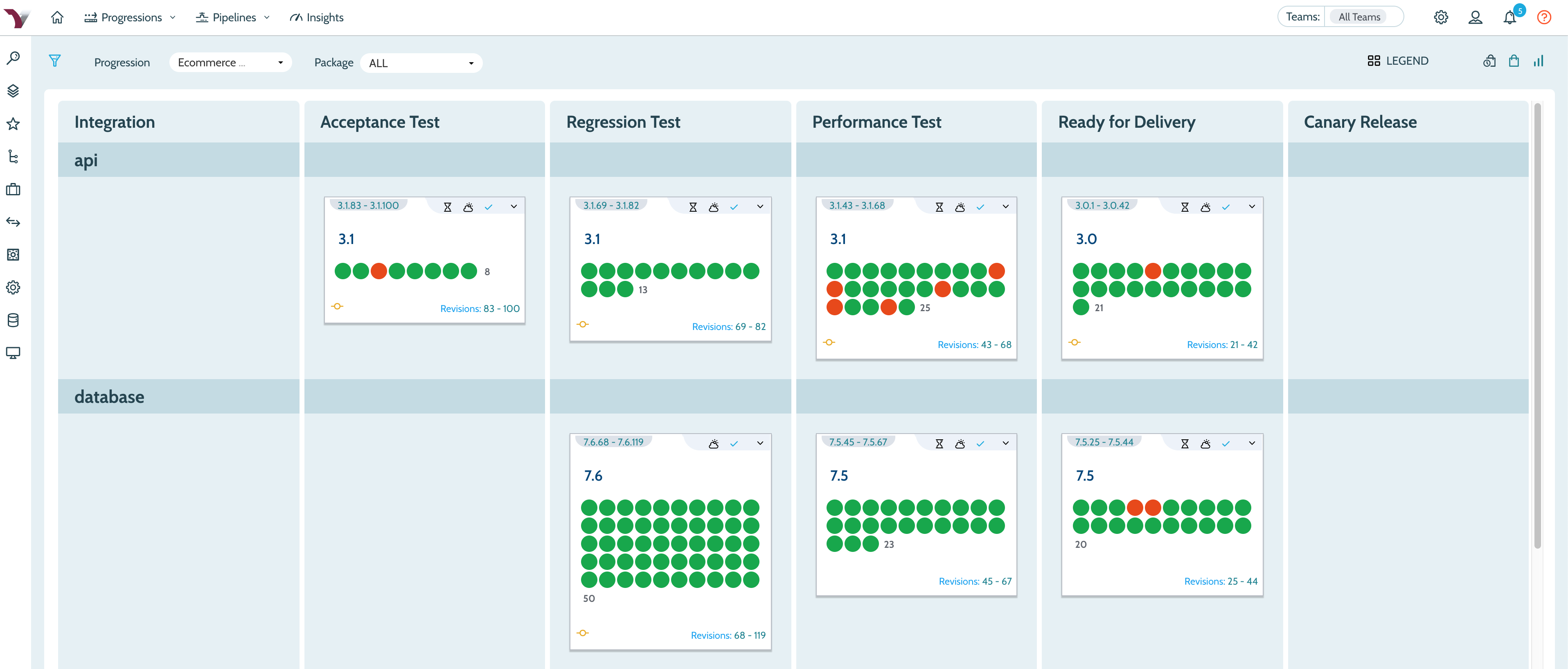
Company CEO Flint Brenton said updates to the VersionOne value stream enterprise management platform will include a revamped user interface that provides more visibility into events occurring within the Continuum continuous integration (CI) platform.
Brenton also said those updates will further advance adoption of agile frameworks such as the Scaled Agile Framework (SAFe), a prescriptive approach to combining best agile development and DevOps practices.
While organizations may opt to employ VersionOne in combination with other CI/CD platforms, Brenton said CollabNet VersionOne provides a more comprehensive understanding of the impact changes to software development schedules will have on the business.
As part of that effort, CollabNet VersionOne also announced VS Exchange, a marketplace for custom and preconfigured Continuum and VersionOne extensions and workflows, and enhancement to the Continuum TestDrive component within the company’s implementation of Continuum that streamline provisioning.
With more organizations than ever starting to appreciate how dependent they are on software, Brenton said business leaders are now looking to exercise more control over software development projects. It’s no longer enough to generate more code, he noted; rather, DevOps teams are now being asked to generate more reliable code that has the greatest impact on the business faster. CollabNet VersionOne enables organizations to achieve that goal by providing a management platform in the form of VersionOne that is layered on top of Continuum.
CollabNet VersionOne is now taking part in a race to infuse more business analytics into a software development lifecycle (SDLC) platform. While SDLC platforms have typically been employed to gather technical metrics, organizations now want to correlate that data against business metrics.
Less clear right now is whether having access to business metrics will influence the selection of one CI/CD platform over another. Over time, the expectation is that various forms of business intelligence capabilities will be a standard capability of the platform, especially as IT leaders continue to assume larger business responsibilities in the age of digital business processes.
It may be a while yet before business and IT roles start to converge. In the meantime, CollabNet VersionOne is clearly betting there will be a lot more collaboration between these two camps going forward. In many ways, the DevOps best practices that organizations have adopted to become more agile are about to be extended to the business processes enabled by software. Savvy business leaders will realize their ability to meet financial goals for any given quarter is tied to the timely manner in which new digital customer experiences are enabled. In fact, there may come a day when IT organizations are able to deliver software updates faster than most businesses will be able to consume it.
Many argue that application security should be the responsibility of a security team. However, while security professionals can contribute, developers are usually the only ones with the technical ability to fix software security vulnerabilities. The same goes for software compliance. When it comes down to it, only developers are equipped to build applications in compliance with specific software standards.
Considering the tight deadlines for development teams, giving them additional duties can present challenges. To help developers deliver secure applications without slowing them down, many teams have adopted DevSecOps—which encourages integrating automated security testing into the DevOps workflows for every release.
DevSecOps helps teams deliver more secure software faster, but what about more compliant software? Many teams trying to achieve software compliance encounter similar challenges as those trying to achieve software security. Luckily for them, they can use similar strategies.
What Does DevSecOps Do?
The fast, iterative software release cycles supported by DevOps workflows present hurdles for software security.
In traditional approaches to securing software, testing occurs toward the end of the software development life cycle (SDLC), after an application’s construction. As a result, most (if not all) of the application is tested at once, and a long, daunting list of security issues is sent back to developers.
However, many teams find this methodology incompatible with DevOps. Development teams don’t have the time—not to mention the budget—to stop whatever they’re doing to sort through a massive spreadsheet of issues.
To solve this problem, organizations can implement DevSecOps by integrating security testing into the shorter, higher-frequency feedback loops of fast DevOps release cycles. Rather than running one big test after developers finish building an application, DevSecOps calls for automated security testing performed early and often. By helping developers check in more secure code, DevSecOps helps reduce the volume of issues QA must identify and send back to them.
If development teams can integrate security testing into DevOps workflows, why not compliance testing?
How to Apply DevSecOps Practices to Software Compliance
While testing for security usually requires a different analysis than testing for compliance, development teams practicing DevSecOps can use a similar approach to compliance testing.
Like traditional application security testing, compliance testing typically happens in the QA environment. A very rough application development and testing workflow looks something like this:
Developers write the code for an application.
QA tests the code while developers move on to another project.
QA sends a list of compliance violations back to developers, requiring them to pause their current work to fix those problems.
There is nothing technically wrong with this compliance testing strategy. However, this approach is frustrating for developers and costly if the list of issues is especially long. To resolve more compliance issues before an application is complete, teams can implement practices inspired by DevSecOps to help developers commit compliant code earlier in the SDLC.
One of these strategies is to integrate automated compliance testing into DevOps release cycles. By testing the application in increments rather than all at once, teams can reduce the number of compliance violations per testing cycle. While it obviously requires higher-frequency testing throughout the SDLC, this approach has proven to be faster than waiting to find issues in QA.
Another approach is to create a sandbox environment in the integrated development environment (IDE) where developers can run tests themselves. Testing their own code as they write it equips developers to check in cleaner, more compliant code, so compliance violations are less likely to show up in QA—or worse, production. This approach has the added benefit of familiarizing developers with code that leads to compliance violations.
These strategies for identifying and resolving compliance violations are not meant to replace QA testing. However, by integrating compliance testing into multiple stages in the SDLC, teams will see fewer issues in feedback loops between QA and development—which better supports DevOps workflows.
What Does This Look Like in the Real World?
As with security testing, integrating compliance testing into DevOps release cycles requires new technologies and workflows, each with a different learning curve.
Regarding technology, static analysis is growing as a popular option to help development teams build compliant applications. Coverage varies between static analysis tools, but in general, the technology can find issues in code quality standards, such as MISRA and CERT C/C++, as well as security standards, such as OWASP Top 10 and PCI DSS.
The static analysis tool or any other technology that teams choose to address, software compliance plays an important role in the workflows they adopt. As discussed earlier, those hoping to keep issues out of QA will want to find solutions that can:
Integrate into the quick feedback loops between testing and development.
Scan code in the IDE as developers write it.
Creating a more continuous cadence of feedback between testing and development could represent a significant shift in a developer’s day-to-day.
While “DevCompOps” doesn’t quite have the same ring, development teams in regulated industries will find cost-cutting benefits by integrating compliance testing into DevOps release cycles.
source{d} has made available an enterprise edition of its software development lifecycle (SDLC) platform that includes visualization and analytics tools along with additional management capabilities. A free community edition of the core source{d} platform, which is stripped of most of the enterprise-class tools, also is now available in beta.
Company CEO Eiso Kant said the enterprise edition of source{d} provides the additional tools enterprise IT organizations require to employ the platform as the equivalent of a business intelligence (BI) application for managing DevOps processes.
The tools can launch queries against a big data repository based on the Apache Spark in-memory analytics engine running on a Kubernetes cluster, which can be populated with actual data or metadata pulled from multiple DevOps tools and platforms. That capability enables IT leaders to then query data that has been joined together in a way that surfaces actionable intelligence, said Kant.
source{d} Enterprise achieves that goal by including Apache Superset, an open source business intelligence web application. The platform also can be extended to support SQL queries launched from other BI tools and project management applications. The enterprise edition also provides access to advanced queries and user-defined functions to address tasks such as code duplication analysis or identity matching.
Finally, source{d} Enterprise provides authentication integration with LDAP and OpenID to limit who can edit or view queries, data sources, charts and dashboards.
Longer-term, source{d} plans to leverage predictive analytics and machine learning algorithms more aggressively as the amount of SDLC data that gets collected by enterprise IT organizations increases.
Kant said many enterprise IT organizations have tried and failed to build the equivalent of source{d} platform mainly because bringing together and then maintaining all the required technologies often becomes too complex an undertaking. Those efforts also have been confined largely to managing processes such as bug fixes versus including all the BI tools needed to manage software development in a way business and IT leaders can align technology initiatives to specific business goals, he said, noting the source{d} approach brings together enabling technologies such as Spark and Kubernetes to enable IT organizations to deploy an SLDC platform on-premises or in a public cloud.
As software development increasingly grows more complex, the days when it could be managed efficiently through a project management application alone have come to an end. At the same time, more organizations realize their success ultimately comes down to how consistently they can deliver a high-quality application experience. For all the hype surrounding digital business process transformation, the core tenet is that most organizations are indeed becoming software companies. As such, they need to borrow many of the SDLC processes that successful software companies employ routinely. The only real difference is they don’t need to develop those processes from the ground up when more turnkey SDLC platforms are emerging.
These days, it’s not enough for companies to offer quality products or services; they must deliver an exceptional customer experience. In fast-changing environments, continual innovation on the front lines of customer service requires an agile and nimble approach.
How important is the automation of development and monitoring for accelerating customer experience (CX) innovation? I recently posed this question to Dr. Nicole Forsgren, research and strategy expert at Google and former chief scientist at DevOps Research and Assessment (DORA). Her response:
“I would say that, today, this is almost just a given to operate effectively. DevOps is definitely more than tooling, but you can’t do it without strong technology solutions that provide automation, monitoring and visualization to people throughout the value chain. This gives visibility to key stakeholders, so you can ensure you are delivering value and your feedback loops are happening.”
This is not a simple concept to execute well. The diverse array of applications and systems that organizations deploy to engage their customers is complex and spans many different technologies, platforms and channels. Ensuring all those applications and systems work together seamlessly to enable customers to consistently accomplish their goals is a daunting challenge. What’s clear today is that how customers perceive their interactions with businesses, shapes brand loyalty.
It’s interesting then, that while most companies recognize the importance of providing an outstanding experience, many have yet to embrace an automated approach for the development of their CX applications. Those enterprises that have successfully accelerated their CX innovation share a common attribute: They have automated both the testing and monitoring of their CX development projects.
Customer-facing applications, such as call center technology, websites, SMS and even chatbots, are the central artery of customer experience. If these applications are not designed, built and deployed properly, it will be costly. To ensure success of CX innovation projects and reduce the risk associated with development/deployment, we must build solutions with testing and monitoring in mind, automate deployment and configuration, and use test data in production to accurately monitor variance from the design.
What’s holding your organization back? There are four important steps organizations can take to boost the speed and quality of CX software development, while reducing their failures.
1. Strive for automation, anywhere you can find it
Aim high—strive for 100 percent automation and take a creative approach to integrating different phases of development. Whether it’s JIRA, Bamboo, Udeploy, Cyara or any other technology that helps automate different parts of your software delivery life cycle (SDLC), have a vision that automates and integrates wherever possible. Success here will deliver smooth and seamless movement of work and deployments into various environments.
2. Don’t underestimate the importance of the feedback loop
In order to improve our CX, we must first understand what challenges customers are encountering right now. This requires real-time monitoring of the actual customer experience—but from the customer’s perspective, not from a hardware perspective, as is traditionally done. If you can monitor and measure customer interactions in the moment and capture them concisely, then you can channel this critical information back to business decision-makers, so changes can be implemented quickly. It’s one example of a feedback loop, and if you can repeat it over and over, you can significantly improve and refine your CX.
3. Take the time to reflect, align and improve
Instill a culture of learning and humility—not finger-pointing and blame. For example, I recommend teams adhere to well-defined Agile Retrospectives, a ritual that enables teams to create a continuous improvement culture in which they reflect on past experiences and define future actions. Retrospectives are only one of the many ways to instill an open-minded culture, constantly focused on improving collective capabilities.
4. Integrate business objectives and measurements with the technology side of the house
I see this as a two-way street. First, help ensure the technology teams understand the impact of their work and give them access to the metrics that are important to the business team, through regular progress reporting. Second, make sure the business team shares their goals and key objectives with the technology teams, rather than simply specifying a requirement. I think it’s important that developers and operations teams understand the business impact of success and failure—and, therefore, the importance of their work. This is a great motivator. Plus, more visibility and tighter integration with business objectives can also result in more creative problem-solving from the innovative thinkers on the IT side.
A Parting Thought: Find Your Anchors
The right decision or strategy is not always clear, but finding two or three pillars as your anchors can be clarifying during decision time. In the CX innovation space, I find two anchors are particularly helpful:
The customers are the reason why we are in business. Are you prioritizing the end-customer experience in this decision? Are you improving it, understanding it better or measuring it more effectively?
What is the business goal you’re aiming to attain? No matter how granular the technical change you’re making, there is almost always a business reason driving it from the top down. Do you know what that driver is? How, exactly, will your change move you closer to that business goal?
At its core, DevOps is meant to touch an entire organization; however it’s heavily weighted in the software development life cycle (SDLC). That’s why DevOps is going mainstream in 2018. Companies are making the business benefits of DevOps a top priority—it’s all about delivering value to the customer faster through maximum automation of the release cycle/processes. And that begins with organizations realizing that to mature their DevOps processes, they need continuous testing as part of their continuous integration practice.
Cross-platform Engagement and IoT Will Mean More Devices—and More Apps
With organizations shifting processes and innovation to a mix of digital technologies—a concept known as digital transformation—consumers are engaging with different apps across various platforms 24 hours a day, seven days a week. Add in the rise of internet of things (IoT) devices, which allow for seamless transitions across smartphones, TVs, tablets and other devices. Now is the time for optimum user experience (UX).
In 2018, industries such as financial services, health care, retail and automotive will fully embrace IoT. We may also see new types of applications replacing current ones, as consumers and developers embrace the constantly evolving innovative capabilities coming in 2018. However, until the C-suite implements the tools needed to keep up with the growing demand for cross-platform upkeep and testing, other industries will experience slow adoption.
A critical step in delivering flawless UX is testing, and lots of it. Never has there been more to test, measure and develop than in this digital revolution we are seeing today.
Frequent New Releases Will Require Even Faster Updates
As the number of platforms consumers engage with rapidly grows, so does the pressure for developers to ensure apps are running as they should at all times. Same goes for the pace of cloud adoption: Cloud test labs will need more sophisticated capabilities, meaning more platforms and blind spots which require continuous optimization to ensure market readiness. This need for faster turnarounds on update releases and bug fixes will multiply in 2018.
To maintain and grow customers and profitability, CIOs must recognize the importance of empowering developers with the tools and time to implement continuous testing across the SDLC. Tools, such as those powered by automation and the cloud, increase efficiencies and free up time developers previously spent on manual quality-checking, allowing them to ensure the apps they are producing are keeping up with consumer expectations. If users feel their app is not delivering on the experience they want, they will delete it and move on to the next competitor, which has a direct negative impact on the company’s bottom line.
Outdated Technologies Will Make for Even Slower Updates
There is a suite of new tools being introduced to the market for all stages of the SDLC in the hopes of keeping up with the heightened speed of testing. As many DevOps environments struggle to adapt their pipelines to these new tools, many are powered by emerging technologies including machine learning and automation. In 2018, developers should ditch outdated infrastructure and processes in favor of more modern architectures, including implementing microservices.
Modernizing pipelines will allow developers to design in next-gen engagement methods such as artificial intelligence (AI), augmented reality (AR) and virtual reality (VR) without compromising velocity.
AI Will Experience Its Shining Moment (for Some)
In the coming year, AI will start to move from a theoretical concept to a commonly applied technology, especially within the DevOps space. However, developers first must understand what they want AI to help them accomplish—and how—within the SDLC and across the DevOps pipeline. One logical place to start is figuring out how they can best leverage it to analyze test automation strategies.
The value of a well-oiled, or not-so-well-oiled, DevOps process can make or break an organization. As the new year begins, be sure to include the IT leadership in these conversations to ensure developers are getting what they need, when they need it, to keep business moving as usual. IoT, AI and the cloud are just a few things to keep in mind as the industry moves to implement the latest tools in 2018.
About the Author / Eran Kinsbruner
Eran Kinsbruner is the lead technical evangelist at Perfecto and the author of the “Digital Quality Handbook.” He is a software engineering professional with nearly 20 years of experience at companies such as Matrix, Qulicke & Soffa, Sun Microsystems, General Electric, Texas Instruments and NeuStar. He holds various industry certifications such as ISTQB, CMMI, and others. Eran is a recognized mobile testing influencer and thought leader. He is also a patent-holding inventor (test exclusion automated mechanism for mobile J2ME testing), public speaker, researcher and blogger. Follow him on Twitter, connect with him on LinkedIn and check out his professional mobile testing blog.
The massive enterprise movement toward all things “digital” has accelerated the adoption of DevOps in all kinds of projects, but particularly in digital transformation initiatives. Apart from the productivity benefits gained by automating software development and rollout, the increased agility has helped move DevOps adoption to gain critical mass in a relatively short time.
However, challenges remain, particularly in ensuring the alignment of the three dimensions of business systems enabled by DevOps—people, process and technology—are coordinated enough to achieve desired outcomes. The “churn” in each of these three dimensions with every software release—particularly given constantly changing technology, constantly evolving operating procedures to support business requirements and end users and the impact the churn has on the “people” dimension—cannot be underestimated.
To mitigate this churn, it is essential to implement a DevOps “composite system” that manages it methodically and systematically to bring some order to the seemingly chaotic mess of managing multiple moving systems at the same time. The composite system should essentially be able to deliver the following capabilities to address people, process and technology:
A Visibility Dashboard for all Stakeholders in the DevOps Value Chain
Visibility and relevance of their work is of prime importance for people to feel connected to a mission. In a typical software development life cycle (SDLC) in an Agile methodology executed through DevOps, there are many stakeholders involved, including business stakeholders, developers, testers, and support services personnel. In an integrated life cycle of constant and continuous software development, testing and rollout, the cycle can seem complex and never-ending. For a successful and motivated team committed to do their best, systems should provide a visibility dashboard customized to each individual based on their role in a project. The dashboard could involve gamification and relative performance visibility of trends at an individual and group/project level.
The purpose of such a dashboard is not just to improve visibility and individual performance but also bring in alignment and connect each member of a DevOps team with a broader mission of the project/company.
Event-driven Technology Automation Spurred by API Integration
The sheer complexity and number of technologies and platforms involved in a DevOps life cycle can be unnerving and intimidating at the same time. Ultimately, the aim of deploying technology to a process is to simplify and create efficient systems. To this end, DevOps technology architecture must be governed by two critical design principles:
An event-driven architecture that enables asynchronous integration of data generated by different tools and technologies involved.
An API-enabled interface at each level of DevOps process flow so that a change in underlying tooling does not (or should not) have an impact on the business.
Data Driven Self-Learning Systems to Constantly Streamline and Improve Processes
In systems heavily laden with interconnected tools and technology, a typical DevOps process is heavily automated. However, this is just a “first generation” maturity of DevOps evolution. Just as with the people dimension, where team members are constantly measured, benchmarked and improved, systems and processes need to evolve continuously.
Because of automation, integrated DevOps systems generate lots of data (systemic/process-related data including build cycle times, testing cycle times and operational data such as issue resolution) that can be harnessed and plowed back in. Next-gen maturity in DevOps is achieved through a data-enabled feedback engine that constantly improves the quality of DevOps processes and their performance. Advanced data analytics and machine learning algorithms can be implemented to monitor, track and improve DevOps performance metrics.
In summary, to implement next-generation DevOps, organizations need to consider a holistic approach to manage changes at people, technology and process levels. Each of these dimensions require unique needs and a keen understanding of what it takes to make a DevOps system work for all stakeholders involved.
About the Author / Madhavan Krishnan
Madhavan Krishnan serves as vice president of Cloud & DevOps solutions at Virtusa. In this role, Madhavan is responsible for competency development, client solutions, and practice team development from Asia and P&L. With more than 17 years of global IT industry experience across multiple technology and business roles, Madhavan’s experience cuts across different dimensions of Virtusa’s IT Services business including global delivery, enterprise architecture, incubating and scaling technology practices with P&L responsibility, and presales and business development. Madhavan is an active participant in various industry and client forums including CII, MAIT and RFID World Asia, and was a member of RFID Integration Consortium in 2005.
Developing web and mobile apps is cool. But in the words of a longtime ballad: “Don’t forget who’s taking you home and in whose arms you’re gonna be …” It’s the back-end services that underpin a lot of those cool apps and make them possible. So yes, servers and relational databases and enterprise applications and sometimes even mainframes are definitely a thing. And in those environments, scripting, batch processing, application integration and operational visibility are a very big thing that, more often than not, is managed by workflow and job scheduling tools.
I argue that the “something—application, code, other” elements used to deliver all those capabilities are logically part of the application and should be treated as such. The fact that “process X” needs to start only after certain data has arrived, been cleansed and inserted into some database is just as much a part of the application as calculating an invoice amount or determining that inventory needs to be replenished.
And if you are still reading, then I submit that you need jobs-as-code.
Simply stated, jobs-as-code means that the jobs—automation rules for business applications—you need to manage and execute systems of record, back-end application components and data pipelines in production are built and managed in the same way as Java, Python, C++ or any other business logic code. In other words, everything that is part of the application should be included in the software development life cycle (SDLC).
Of course, that statement is pretty simple to say but not that easy to accomplish, because traditional workflow, job and batch processing solutions have lived (and most continue to) in the operations world. The practitioners of enterprise scheduling tend to prefer graphical interfaces with a strong emphasis on ease of use and rigid control over access. Traditionally, capabilities such as developer self-service, automated build and test and deploy have not been high on most enterprise job scheduling new feature requirements wish lists. Most commercial solutions, if they do anything, add an API or two and consider the job done. Open-source authors build tools that cater to developers with little to no regard for the multitude of other user types that rely on batch workload.
The resulting state in the industry is that developers spend lots of time building “snowflake” operational plumbing which may be difficult to test, difficult to embed in an automated delivery pipeline and either has to be reworked to make it ready for production or becomes an albatross around the necks of operations teams trying to keep it running. It’s time for the DevOps community and the industry to recognize there is a better way and we all instinctively know what it is.
Jobs-as-Code
To understand jobs-as-code, let’s examine the traditional dev-to-ops handoff from a developer and DevOps perspective.
I write some code and now I want to test. The execution is simple; I want to pull some data from a relational back end, run my code to manipulate the data and push the result set to some other location to serve as a data source for a different application. I need a SQL query, run my Java code and ftp or sftp the result.
I’ve used some interactive tool to extract my test data, debugged my code in Eclipse and just browsed the output with Notepad++. Now I want to construct a flow that either I or any of my teammates can run whenever they want.
Today, I probably brush off my scripting skills, bash or perl or whatever, and write a quick script to run a SQL query, run my java code and then run the file transfer. Easy, right?
Maybe not.
Connecting to the database interactively was so trivial I didn’t even think about it, but doing it in the script is a whole different exercise. I’ve got to get my quotes and escape characters right; I have to make sure I connect without compromising the credentials needed to log in to the database; I even have to figure out what return codes I’m getting and what to do with them. Of course, I need to add some notification so that I’m informed if there was a problem.
OK, got all that done. Now running my Java code is a piece of cake right? Well, it is when running on my machine with my credentials but maybe my teammate has a different environment. Or he’s a .net guy and doesn’t have Java configured the same way as me. Or worse, maybe doesn’t even have it installed. Better add the code to check for all these problems and notification for that, too. And when I get that failure notification, what do I look at to figure out what went wrong? I’d better pipe everything to a log and make sure others can view the log, too, so I make sure I put it on a shared filesystem that others can access.
Let’s not event start on the file transfer! Or, when you have to add additional steps or when you have to run this a 3 a.m. as part of some testing that another group is doing or making sure that database you rely on is up and running, etc., etc., etc.
Eventually, after way more time than I ever thought it would take, that massive script is done. I run it through some test cases and I’m done.
On to the rest of the delivery phases with more testing and probably some more extensions that make the script truly epic.
In those last few stages of getting to production, someone may raise the issue that this new application interacts with some other application that’s managed by some production automation tool. OK, let the rework—or, really, brand new unplanned work—begin. The developers aren’t familiar with the tool and the tool administrators aren’t familiar with the application so you can imagine how well those conversations go. However, they are all professionals and eventually manage to get the job done and the application proceeds to production.
If this long, drawn-out story didn’t already make you uneasy, you may have caught the huge fail that is now just waiting to blow up in our proverbial faces. Most, if not all, the testing was already completed. The new work done at the eleventh hour gets minimal, if any testing, is deployed and—surprise!—has a high failure rate in production.
To add insult to injury, somewhere down the road after all the heroics of getting the application deployed are long forgotten, a failure occurs, as is only natural and to be expected. The poor on-call folks must negotiate through that production tool they aren’t familiar with and isn’t part of their world. And then they encounter that massive, epic script. What’s going on inside of that thing and where did the failure occur? Where are the logs and do we even have all the ones we need? And saving the best for last, after the problem has been identified, how do we restart this process in the middle when half of the processing was already completed?
So What Would Nirvana Look Like?
What if you could create a database query by just coding the SQL statement(s), picking the database you wanted from a list of logical names and requesting notification in case of error and you could express those requirements in a few simple statements? If you want to run it at 3 a.m., you just add that requirement too and then say “run.” The availability of the database is checked, the credentials are secure, there is no scripting, log and output are captured automatically (not just from this run but as many runs as you want, and you can compare one run with another, etc.) and you get whatever notifications you requested. The logic would be solid because it’s been in use for years by organizations like yours, rather than being written under pressure while trying to meet a deadline.
You could write your automation rules (jobs) in some simple notation you were already familiar with such as JSON, store it together with your Java code in git or whatever SCM you use. The jobs could be packaged with the rest of your application and your build, config management and testing tools and could push your entire application including your jobs through the entire delivery pipeline so there are no surprises or additional work required before deploying to production. The facilities to deliver operational visibility, support problem analysis and log and output management would be second to none because they have been evolving with input from community and IT professionals.
Imagine if this magical-sounding solution that implemented Jobs-as-Code was available from github and other public sources? You could download, install and have access to Jobs-as-Code in minutes. You wouldn’t have to submit access requests to IT folks, no purchase requisitions, no messy and complex installations.
You don’t have to imagine. Jobs-as-code solutions already exist. If the tool(s) you’re using doesn’t give you these capabilities, switch! At least start talking to your peers and let them know the better way has arrived. With sufficient demand from the community, the vendors and authors implementing the myriad job management tools may just accommodate you.
From where I sit in the DevOps community, there is often more focus on dev than on ops. Damon Edwards (@damonedwards) of SimplifyOps sought to change that with his talk, “Ops Happens: DevOps Beyond Deployment,” at the All Day DevOps conference.
Damon dove right into the primary, systemic force behind most DevOps problems: silos. The product development process goes like this: Planning—>Dev—>Release—>Operate. The problem lies in the tendency of many enterprises to place similar functions together. Everyone ends up in a silo. Then walls build up between the silos. Eventually, people only know life in their silo, making handoffs even harder.
We often find application knowledge and business intent are heavily emphasized on development side but light on the operations side. Likewise, operational knowledge is heavy on the ops side, but light on the development side. Furthermore, development has ownership but limited accountability, while operations has accountability but no ownership.
While many enterprises are striving toward building cross-functional teams, the reality is that the transformations often stop short of truly integrating operations. The result? Silos remain.
So, one has to ask, why is this so hard?
The reality is that enterprise operations are under tremendous pressure. One side is telling them to go faster and open it up, and the other side is telling them to be more secure and be more reliable. These are often seen as competing priorities.
To solve this, enterprises need to “shift left” in the product development cycle operations activity as much as possible. They need to do as much as possible during development. For the deploy function, enterprises should be:
Writing/running automated tests
Writing/exercising deploy automation
Running security scanning tools
For the operate function, enterprises should be:
Writing/exercising automated runbooks
Writing/exercising monitoring/metrics
Operational control (safely!)
However, shifting operations to the left is much more difficult. How do you do it? Embed ownership.
Let me repeat: embed ownership.
First, those who build something define the procedures to fix it, and those who build something fix it when it breaks.
That sounds simple, but raise questions:
How do you safely and securely give out access?
How do you enable the experts to contribute remediations?
How do you give the experts visibility into operations?
How do you do postmortems days/weeks/months later?
Damon recommended four steps.
Step 1: Establish a secure ops portal
Step 2: Establish a software development life cycle (SDLC) for ops procedures
Step 3: Connect with enterprise management systems
Step 4: Make Compliance really happy
Ticketmaster is a real-life of example of this working at a large, prominent scale. Ticketmaster calls its system, “Support at the Edge” and it involves:
Automated Ops procedures written/vetted by the delivery teams
Ops remained in full control of what can run and security policy
Empowered support teams with self-service ops tasks
Empowered developers with limited self-service operations
Combined with new incident response model
Ticketmaster has seen transformative results. Before Support at the Edge, the average mean time to respond was 47 minutes. Now, support at the Edge has reduced that to just 3.8 minutes in addition to decreasing escalations 50 percent and overall support costs 55 percent. Ticketmaster has seen real results.
Damon has more details in his talk, which you can watch online here. If you missed any of the other 30-minute long presentations from All Day DevOps, they are easy to find and available free of charge here.
Finally, be sure to register you and the rest of your team for the 2017 All Day DevOps conference here. This year’s event will offer 96 practitioner-led sessions (no vendor pitches allowed). It’s all free, online on Oct. 24.
I am always amazed at how many practitioners (or, rather, managers of) tout the benefits of test-driven development (TDD). This inherently changes the role of the traditional developer to one of developer and tester. But it would appear that as long as I am able to construct a test for the innovation I wish to create, all is well in the universe, and I can proclaim the full success of automated test integration with my DevOps processes, sleeping quite well at night from then on.
But in the world before yesterday, testers tend to think differently than developers do. They evolved differently, bearing the scars of applications that tested just fine on the developer’s laptop but somehow died under the myriad circumstances that occurred in the world beyond that original safe harbor. In point of fact, human testers with a variety of automated tools tended to very often “prove” to developers that their sanctified code was not in fact so pious, but actually more “holy” (that is, containing holes) than they thought. Thus, remained the cycle of code/test/code again until the gauntlet to production is navigated successfully.
There is also a certain reality about testing that developers cannot easily overcome. The only category of testing than can easily accompany a new feature or function is primarily functional testing. “Did the function work?” would appear to be the kind of testing a developer could construct to accompany his/her code. Notwithstanding the fox-in-the-hen-house analogy, there are quite a few other kinds of tests that are equally valid in that code moving forward to production. Most of these tests are not easily constructed by the original developers.
One might consider performance testing a bit important. In this instance, I am not only concerned with the validity of my new feature, I am also concerned with its performance (timing) relative to how a user would experience it, and inclusive of the conditions of my production environment. For this to be rightly measured, I may need to ensure all integration testing also has has been completed successfully. And assuming all of this completes as expected, I may still want users to test my app—you know, to see if it is actually what they wanted in reality (after decrypting the requirements from the ancient Egyptian notes of the stories they submitted). Beyond this, some functions appear largely in a batch context, or perhaps only when proximity is achieved in a mobile app, so context is equally important to testing.
The Nuances of Integrated Testing
But getting back to our original question, let us assume I can test something, and let us assume I have tested it. Where do we go from here? Once the validity of my new feature has been tested, should I decouple the test execution from the build automation and move it to a list of regression tests I only execute periodically? That would seem logical, as this test might need to be run again during post-integration testing (particularly if it manipulates data with upstream dependencies). What is the “value” of my test past that first successful occurrence? If it has value, then I must begin to look at all of my testing in the same way I look at code: It needs to be version-controlled.
Pairing functional tests to the versions of the code they validate will allow me to roll test automation forward or backwards to match the version of code in the target testing environment. So, for example, if coding build version 1.5 is in my integration environment and it fails, I can roll it back to version 1.4 and concurrently roll back the tests that were valid for the older version as well. That’s better than using tests designed for version 1.5 of my code, as testing new feature validity against old code is sure to generate errors.
But treating test scripts (or entities) the same way you treat code with version controls is something most organizations have yet to get their heads around. Deploying testing as a part of the post-build deployment automation is equally daunting.
And, of course, none of this addresses the more fundamental question: Does my test have value at all? Because I can test a feature or function, should I test it? Is this feature or function critical to the user experience? Am I testing it in such a way that the user experience will be evaluated? Testing whether a date field allows only valid data to be entered into it seems important the first time we do it. But once the characteristics of a date field have been so ubiquitously defined by software libraries, advanced programming languages or database structures, perhaps continuing to validate that input is excessive and provides diminishing value. Testing the right thing matters as much as testing at all.
Then let us assume we have found the Rosetta stone of items to test and we have created an ability to test this feature with scripts passed down from Olympus. If the continued validity or performance characteristics of this feature remain important to the user experience, perhaps we have not found only something to test but also something to monitor. Here is where we begin to think two years into the future. If part of my DevOps continuum is an ability to integrate version-controlled testing as a capability, why not integrate version-controlled monitoring, as well? (Here’s where the Ops guys of DevOps finally get interested.)
Instead of examining testing from only the perspective of the developer chained to the dictate of TDD, why not examine the life cycle of “evaluation” from a more holistic perspective of coding, integration, performance, users and, ultimately, a monitoring point of view. If my monitoring tools are capable of configuration adjustment, parameter adjustment and ceiling- and basement-level adjustment, then through reading external files or by exploiting API’s shouldn’t we be looking to pair our monitoring profiles with the version of applications we deploy into production discreetly by version? Perhaps a less useful test simply gets retired and a more useful test evolves into a program characteristic that we monitor until the feature itself gets retired.
Integrating the Ops team into discussions about automated monitoring is sure to pique their attention. If nothing else, the ability to turn off monitoring tools during deployments and turn them on again afterward will cut down on “noise,” and help to focus resources only where they are truly needed when alerts emerge. Understanding the difference between how production is monitored vs. the unique needs of the test environments—with the ability to incorporate both into the automation of DevOps—is equally appealing.
In any case, the evaluation of an application includes not only the original tests to ensure validity, but also the monitoring that occurs to ensure continued performance as expected. Thinking about where tests begin and where monitoring is more effective or needed can help to keep both disciplines modest and focused only on what is critical, rather than both attempting to take on the weight of the world. The goal of DevOps is not to increase the frequency and duration of headaches, it is to eliminate them.
To continue the conversation, feel free to contact me.
Ansible Tower is used in a variety of different ways, from traditional configuration management, to custom application deployment, to the orchestration of zero-downtime rolling updates. Companies like Gawker Media use Ansible to deploy their sites more than 10 times an hour. NASA uses Ansible to update security vulnerabilities and to patch manage nasa.gov weekly. Enterprises that make money delivering applications via the web find that Ansible Tower excels at removing IT bottlenecks, automating repetitive tasks, and accelerating the delivery of applications to market.
For IT operations, rolling updates with zero downtime is a very common orchestration pattern that has been discussed at length, but let’s take a look at how Ansible Tower fits earlier into the software development lifecycle and removes bottlenecks in operations, as well as in in development and test.
Ansible Tower offers a number of benefits in the SDLC, specifically to:
Drive consistency between environments
Enable self-service
Improve automated testing
Development
A typical day in the life of an application developer may be to: check out code, make changes, test locally, check in changes.
During the course of this work, the development environment may become infected with small configuration tweaks and hand-crafted software stacks that differ dramatically from the environment that production code is ultimately deployed to.
In fact, a common problem in many organizations is that the development environment may not exactly (or even closely) match what’s in QA, Stage, and Release. Generally, the further away from production you get, the less and less the environments look the same. (Not just the obvious examples like software library versions, but more subtle items like configuration settings, authentication details, etc.).
Inconsistency between code and the software stack that supports the application is a common cause of software errors and resulting production downtime. With Ansible, a playbook captures the desired state of the stack and even the entire environment. Ansible Tower provides a push-button interface that templates how a playbook should be run — deploying consistently and with repeatability.
With Ansible Tower, a playbook is run from a job template, which specifies the parameters and environment details of how to run the playbook, with all of the parameters and options you would normally pass via the Ansible command line. There is no concern that the user will mistype an option or parameter to Ansible, potentially deploying to the wrong environment or with the wrong playbook arguments since the template is triggered via the push of a button (or API.)
Not only do these templates drive consistency between deployments — each time the button is pressed the same result is expected — but they also encourage a tremendous amount of playbook reuse: Multiple job templates can be created that launch the same identical playbook with different parameters. This enables the same playbook to be used between environments or stages of release. The job template can use the same playbook, but target different inventories (corresponding to different stages of release or different environments), pass different options, even use different credentials.
This drives consistency between releases, even across different stages, by ensuring that the same steps to automate provisioning and deployment are followed between each stage.
Screenshot of how to use different job templates with the same playbook, passing different parameters from the user to deploy into different environments
When combined with the the role-based access control capabilities of Ansible Tower, playbooks can be deployed at the push of a button, but in a controlled and easily-audited way. This allows an organization to spread the power of Ansible to any of its users. Even users unfamiliar with Ansible can run playbooks that others have written.
These features are commonly used to enable self-service provisioning of development environments by the developers themselves.
Typically, developers manually construct a development environment that starts out only loosely coupled to the production software stack and deviates further and further over time. Alternatively, developers are forced to request a new development environment from operations teams, usually incurring delays that proliferate throughout the software development lifecycle and lead to late deployments, missed deadlines, and lost business.
Tower enables developers to check out and provision their own development environment, built from scratch and 100% consistent with the software stack used in test, stage, and production — because it is built with the same playbook. Developers log into Ansible Tower and, under RBAC, see only the job templates that they have permission to access and deploy.
Developers do not require any knowledge of Ansible or the playbook. They can provide new parameters and options, specifying perhaps the release tag of the application to be deployed or fine tuning the deployment to fit within the constraints of the environment. The playbook handles provisioning the new servers (e.g. by calling out to VMware or Amazon Web Services), deploying and configuring the software stack, and the actual application under development. The developer presses a few buttons in Ansible Tower, goes and gets a cup of coffee, and then returns to a newly 100% provisioned environment. Tear down and re-provisioning is a snap, so a new environment for pristine development can be deployed at any time.
QA
A typical day for QA might look like this: Program a CI tool to automatically build the codebase periodically, deploy to a test environment, run tests, report results.
At most shops, some of this work is generally automated, usually building the latest code and the deploying the latest code artifacts into test. Deployment of the application stack may not be automated (or easily refreshed between test cycles), leading to the same consistency problem as in development,or worse, because test environments and artifacts are potentially reused between test cycles. Here again, the reuse of playbooks between environments through the Ansible Tower job template will promote consistency between stages of release.
Additionally, the same Ansible Tower self-service capability that can be provided to developers can also be provided to testers. QA may write their own playbooks for automated testing and Ansible Tower can be used to delegate responsibility to QA staff who are not Ansible experts or aren’t comfortable running Ansible on the command line.
In addition to self-service, it is very common to use Ansible Tower in conjunction with a Continuous Integration system in QA to automate not only application deployment in test, but provisioning of the application stack to refresh the test environment between tests.This way, Ansible Tower provides a complete RESTful API that powers the Ansible Tower user interface and makes it possible to programmatically invoke Ansible Tower to do any function that can be performed via point and click in the UI. In this way, a CI tool like Jenkins can be connected to Tower to launch job templates for automated testing. Jenkins is configured to call the Ansible Tower API to launch a specific job template that invokes an Ansible playbook to provision a new QA environment, deploy and configure the appropriate software stack, the correct version of the application, and the test suite. Automated testing can be performed and the environment decommissioned, all within one or more playbook runs.
Just as in development, this ensures that the test environment is consistent with all release stages — that what is being tested is the same as what was developed and what is being deployed into production. Test environments can quickly be provisioned and deployed 100% from scratch, improving your ability to test and to speed up the application to production delivery.
When used in conjunction with with a CI tool like Jenkins, the combination is more powerful than with a CI tool alone: Jenkins can kick off Ansible playbooks to provision environments and deploy the latest code as part of any Jenkins CI job, but under the framework of role-based access control, inventory management, and aggregated job output that Ansible Tower provides.
As you adopt Ansible Tower into Operations, consider also the benefits of Ansible and Ansible Tower throughout your software development lifecycle. Apply automation to eliminate bottlenecks through every stage of release and accelerate the delivery of your applications to market.
Let me know how you are using Ansible Tower in your efforts – we want your input!
Dave Johnson, Senior Technical Director, Ansible. Dave started his career at Red Hat prior to its IPO, ultimately building and leading the sales engineering organization that penetrated the US Oil & Gas, Electronic Design Automation, and Managed Service Provider markets.Prior to joining AnsibleWorks, Dave held executive positions at rPath and Bronto Software, leading engineering and services organizations that spearheaded the transformation of innovative custom solutions into repeatable Products.Dave holds a B.S. in Electrical Engineering and a B.S. in Computer Engineering from North Carolina State University. Contact info: @thisdavejohnson, Linkedin


 Eran Kinsbruner is the lead technical evangelist at
 Madhavan Krishnan serves as vice president of Cloud & DevOps solutions at