Tag: SBoM

  • The IT-DevOps Life Cycle is Like a Pyramid That Keeps Growing

    The IT-DevOps Life Cycle is Like a Pyramid That Keeps Growing

    Don’t let anyone tell you how much easier IT life is these days. It is, in many ways, more fun and productive … but it is not easier. In fact, we’re doing more with less, cubed, at this point. My point is—think of the life cycle as a pyramid. The base is the build++ chain, from VCS to public-facing active protection; the height is the new technologies and systems being bolted on daily—like SaaS tools someone in accounting just signed up for or the new architectures a dev team in a subsidiary just decided to adopt (but which will eventually have to be maintained by IT). And the depth is the completely new capabilities that are required by market forces or regulation – SBOM is the poster child for this group; suddenly, just about every vendor is giving it to you as part of their product.

    No matter which of these axes is growing, the workload is generally growing commensurately. Think about it: If a new product is implemented, it impacts IT’s workload. If a new technology that solves a problem is implemented, it, too, impacts workload. And if a new capability in an existing product is dictated by the compliance team for any reason, this, too, increases workload. This is just the business side, and doesn’t include the fact that most orgs are dropping newly developed applications on a pretty regular basis these days.

    Automation has helped, but it hasn’t solved the problem yet. I believe it can, given time and focus, but for the most part, the demand for new technology to solve age-old problems (“We can’t effectively test” being met with “Here is automated test generation, execution and results filtering”) has been a net increase in workload. Though far smaller than it might have been, it is still increasing. This is true across IT. The test example above applies to app dev and security, with result sets that did not exist six years ago because the process was too expensive in staff hours. It also applies to ops because the processing power to get those tests done – and it is a lot with large test environments – is ops’ responsibility.

    Painting a bleak picture? Nope. Making certain we’re realistic. Trying to ensure that we consider how much we are already doing, and take a chance to implement actual time savers. For example, applying that same test automation to testing (for most orgs, I’m thinking security testing) that was actually being done already will reduce the cost of getting it done. Using SBoM for SCA to contribute to existing compliance saves a lot of time generating that information. Using new coding assistants shortens coding time and (arguably at this point, but inevitably, given the fullness of time) improves code quality, reducing rework, which is costly, even in an agile environment.

    We are growing our capabilities almost daily. I’m just suggesting that, in the process, we backward-apply the good stuff to reduce existing overhead. And as always, this big, complex beast exists and keeps clipping along because you’re there, keeping it fed and stable. Keep rocking it, and save yourself some time by using new technology smartly—there is plenty more to do than whatever you streamline.

    Image source: Photo by Michael Dziedzic on Unsplash

  • Lineaje Allies With Persistent Systems on Open Source Software Remediation Service

    Lineaje Allies With Persistent Systems on Open Source Software Remediation Service

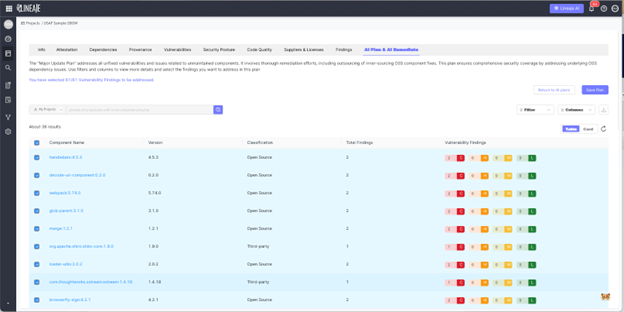
    Lineaje this week revealed it has partnered with Persistent Systems to provide a managed service for remediating open source vulnerabilities that leverages artificial intelligence (AI) technologies.

    Persistent is extending an existing open source software maintenance service by incorporating a Lineaje platform that makes use of machine learning algorithms to analyze software bill of materials (SBOMs) to provide recommendations for fixing code and surface remediations such as updates that should be applied.

    Lineage CEO Javed Hasan said Persistent Systems is augmenting that capability with a dedicated team of specialists that IT organizations can contract to maintain open source code along with previous investments the managed service provider has made in large language models (LLMs) that add generative AI capabilities.

    Options for the services range from simply identifying issues that an internal IT team should address to a white glove offering through which Persistent Systems ensures all open source components are continuously updated.

    In the wake of an executive order issued by the Biden administration that requires federal agencies to better secure their software supply chains, more attention is being focused on the inherent cybersecurity risks associated with employing open source software to build applications. Many open source projects are led by a handful of maintainers that often lack the time and skills required to ensure the components they employ have not, for example, been compromised by malware that might find its way into downstream applications.

    Those maintainers are not being paid, so cybersecurity patches to open source software might not be readily made available, and even when they are, many organizations lack the skills and resources required to apply them in a timely manner. The majority of known vulnerabilities within application environments are still unpatched. Many IT teams are also reluctant to upgrade components for fear of breaking applications that have dependencies that are often difficult to track.

    It’s not known how much of the open source software that many developers routinely incorporate into their applications might contain vulnerabilities that could be exploited, but the level of technical debt that has accrued over the last several decades is considerable. While only a small percentage of those vulnerabilities have been exploited, cybercriminals are becoming more adept at discovering them.

    Hopefully, more contributions to open source projects will improve the overall state of application security, but in the meantime, it’s clear organizations will need to rely more on AI to drive DevSecOps workflows as ever-increasing amount of open source software continues to be relied on to build applications, said Hasan.

    The challenge, of course, is identifying which vulnerabilities, if exploited, will have the biggest impact on the organization. After all, at this point, it’s not possible to defend every application so the focus needs to be on prioritizing remediation efforts based on their actual severity rather than a general rating.

    In the meantime, DevSecOps teams would be well-advised to have incident response plans in place for remediating breaches involving both known and zero-day vulnerabilities that, in addition to being all but inevitable, can now be exploited within minutes of being discovered.

  • It’s Funny How We Forgot About Container Sprawl

    It’s Funny How We Forgot About Container Sprawl

    …Because it sure as heck did not forget about us.

    We are (thankfully) past the days when everything was a container. At least, most of us are. Just like anything else, some orgs will continue that approach for reasons both great and terrible. And all of us still use far more containers than we need, I would say. “One container, one function,” works if you are talking about one whole application, and maybe sometimes for busy parts of an application, but it certainly isn’t needed to host a couple of low-use APIs, for example. My favorite example is separate instances of the same exact application for different teams (not business units – that is a good method to separate business units).

    Thankfully, technology is once again saving us from ourselves and our misdeeds. Processing power is no longer an issue, meaning we can spin up a million containers and keep them running until our public cloud bill arrives. So, it’s not about processing power. I cannot remember the last time that an org was bandwidth-limited, so it’s not about the network. The biggest issue is still security. More containers means a bigger footprint, which inevitably creates more vulnerabilities. Right behind that is container inventory management. What is running where, what images are available and what state are they in, which running containers have drifted from their definition, etc.

    I’m a developer that has sometimes done support for the apps I develop. That means that I laugh at your “Our images do not drift because we’re agile and build-driven.” Of course they do, because troubleshooting is real. The real question is, can you get them back into alignment when the ticket closes? The DevOps toolchain is pretty darned good at that if you let it. Changing a running image and telling no one is a terrible idea that still happens nearly every day across our industry. But technology has brought us drift monitoring. We can be notified of changes as they happen. For those in highly sensitive spaces like FinTech, changes can be blocked in production, but for most of us, we want to know when it is happening and who made the change. And we can get that today.

    Technology has also brought us some wonderful scanning tools from SBOM to SCA to Registry. These tools can give us a list of things for security to worry about in our images. In order to reliably generate these lists, we still have to know what images we are keeping and where—but choose a reliable registry or two, fit them into your DevOps processes and scan on commit. Simple and thorough—as long as everyone uses them.

    Thanks to policy and regulation,  container management tools can offer you a detailed list of not just what instances they’re hosting, but metadata like what image they came from. That helps manage inventory, and by now we are all building hierarchies of images from base to application specific.

    So, we can tell what is running, what images are available to run, how far running images have drifted, what known vulnerabilities exist in both our images and our instances and how compliant we are WRT containers. Dunno about you, but it seems technology has our back yet again.

    You are cranking it out, keeping the lights on, and dreaming of more you could be doing. Use the tools we already have to make it easier and the resulting systems more secure and reliable. You won’t regret it. And once again for those of you whose users never say it: Thank you.


  • Low-Hanging Fruit, 2023 Edition: Part Two

    Low-Hanging Fruit, 2023 Edition: Part Two

    Last time, we discussed setting up a comparative inventory system for your growing API footprint. The idea is that as security catches up to new technology deployments, enterprises will have to step up their game and implement those new technologies. API security is currently the biggest need because of exposure to the world, but not far behind it is container security, which we’ll discuss here.

    The point of container security is to make certain that your images are as secure as possible. Container security looks at source container definitions, added libraries and configuration options inside the container definition files ( or for those of you who prefer them, Docker files).

    A Tempting Target

    We are spinning up a bewildering number of containers these days, and having source images–particularly if they come from the outside–is a tempting target to attackers. Imagine if an attacker can hit the base container definition that all of your “golden images” come from and just insert a call to download a library. Soon, your entire application infrastructure could be a tool for that attacker to do as they wish. And if they’re cautious, they might get away with it for months (as many have).

    The Definition of Containers is Security

    So there is absolutely an imperative to ensure that the definition of containers is security–all of your containers. And there is an imperative to know what software is installed via container definition and what software is actually running on container instances. Much like our discussion about static versus dynamic API scanning, bad actors can modify a running container, so drift detection is half the problem, even while scanning registries and definition files has more appeal from the blast radius perspective.

    There are a lot of tools and vendors that range from simply scanning the files and generating an SBOM to complete container security by scanning the images, using the SBOM to perform software composition analysis, using data feeds to determine which software in the SCA is a threat, and how urgent or broad that threat is and monitoring deployed containers for drift. The more of these an organization implements, the more configuration and maintenance effort, but the payoff is security at a more fundamental level. The whole appeal of a container architecture is recoverability–if things go terribly wrong, we can redeploy easily. But if the source files hold the vulnerabilities, redeploying is temporary at best and likely would warn attackers that you’re onto them.

    Be Proactive

    So a more proactive approach is required. Obtain and install tools that will help you protect your container infrastructure, be they sold as container security, cloud workload protection, SCA or something else. The key is locking down this avenue of attack at the beginning of the software supply chain, not where you get the tools.

    And again, keep rocking it. As I said in the other post on low-hanging fruit, we need this because you all are serving the organization’s needs with the best solution for the job. Now that security technologists understand your new problem domain, let’s get tools into place to continue the protection of all that shiny new stuff.

  • The Security Pipeline

    The Security Pipeline

    Over the last few years, the ability to secure our applications has grown, and deep integration into the DevOps toolchain has, too. There are more tools doing more security checks protecting more of the infrastructure and source than there have ever been. The key is putting them to use intelligently.

    We now have the ability to secure the image an app is based upon, the images that are derived from that original—complete with supporting software. We can get feeds to tell us which bits of our included open source components are insecure and how to protect them; we can scan the source, the assembled application, the APIs and the network. We can put runtime protections in place in front of web apps and in front of APIs. We can even track the long-tail attacks like slow data extraction that are becoming more common as security tools master more obvious attacks.

    That is a great set of security capabilities. And automation puts every bit of it within reach. Your job is to pick the bits you need to increase the security posture of your environment and get them worked into your specific toolchain. This is not all that difficult, but nothing is free, so you will need at least some implementation time and some staff time to work through results. After all, no matter how automated, current solutions do end with a list of changes that need to be made to increase security. Some tools will put a runtime fix in place immediately, but honestly, that is a patch—it only stays in place until you can fix the underlying issue.

    Integrating all of the great security tooling with each other is another aspect that will require some time. Some vendors cover a massive amount of the security testing needed across markets and technologies. These companies show us that even if an organization would rather use best-of-breed, there is a lot of benefit in increasing integrations. For an easy example, consider this: If the software bill of materials (SBOM) generated during the build steps shows that a given framework is included in an application, then active testing via dynamic or interactive application security testing can include extra tests specific to that library.

    Integrations will take effort, but once they’re in place they will enhance application security. There is no perfectly secure application, but the tooling is available to make a given environment less of a target because it is too much work to attack. And that is what you should be shooting for.

    I’ve said before that making security part and parcel of your DevOps practices is mandatory at this point, but that was in reference to the great DevSecOps toolsets currently out there. I’m suggesting now that we include it all–from design to GitOps runtime drift management. Because we can, and the result is reduced risk to the organization.

    And keep rocking it. Honestly, you’re maintaining something worth protecting–that alone means you are successful, even if you aren’t aware of every issue that crops up. Issues are why you’re there, and the systems keep running because you are.

  • ReversingLabs: Increased Focus on Software Supply Chain Security

    ReversingLabs: Increased Focus on Software Supply Chain Security

    A global survey of 300 global executives, technology and security professionals found software containing vulnerabilities (82%) followed by secrets leaked through source code (55%), malicious code (52%) and suspicious code (46%) posed a serious risk to the business.

    Conducted by Dimensional Research on behalf of ReversingLabs, a provider of a platform for securing software supply chains, the survey found 87% of respondents detected significant risks in their software supply chain in the last year. Nearly three-quarters (74%) said legacy application security tools, including static application security testing (SAST) (54%), dynamic application security testing (DAST) (42%) and software composition analysis (SCA) (40%), are ineffective against threats to modern software supply chains.

    A full 88% said software supply chain security is an enterprise-wide risk, but only 60% said their software supply chain defenses were up to the task. Nearly two-thirds (65%), however, acknowledged their organization’s software supply chain security program wasn’t as mature as it should be. As a result, 80% are currently focused on improving security for the software supply chain, with 96% noting a more comprehensive approach to software supply chain security that detects more than vulnerabilities is needed.

    Overall, the survey found nearly all respondents (98%) recognized that software supply chain issues pose a significant business risk. Nearly 90% reported detecting security or other issues in their software supply chain in the last 12 months. Those issues stemmed from internally developed software (47%) as much as open source software (49%), followed by commercial software (30%), the survey finds.

    Tyson Whitten, vice president of global marketing for ReversingLabs, said the survey results make it clear that software supply chain issues extend well beyond open source software dependencies. Use of open source software has expanded greatly over the last decade, but security flaws in software are pervasive, he noted.

    In addition, many of these issues stemmed from software created by contractors and third-party companies, added Whitten. More than half of respondents worked for organizations that use contractors (67%) and third-party development companies (59%) and many organizations don’t have the tools required to review applications before they are deployed in a production environment.

    Software supply chain security has become a major issue in the wake of a series of high-profile breaches. The challenge is shortage of cybersecurity expertise available to secure those supply chains. Usually, someone on the DevOps team needs to emerge as a security champion for the good of the larger application development team. Unfortunately, most developers have had limited exposure to cybersecurity training, so it can take a significant amount of time for those champions to emerge.

    In the meantime, it’s less clear whether organizations will upgrade their DevOps environments to make them more secure, but it’s clear they will soon be held more accountable for application security. Governments around the world are currently drafting legislation that would impose penalties should it be determined an organization recklessly built and deployed software. Once that legislation is passed, it may only be a matter of time before the pressure on organizations to adopt DevSecOps workflows increases. The issue is determining how quickly to get in front of that issue before a potential legal quagmire ensues.

  • Managing Risk

    Managing Risk

    We have built some beautiful toolchains that crank out a finished product on the fly without needing anything close to the level of intervention that was historically required. The most advanced organizations on an automation journey could change a line of code and then wait for the new version to hit production without doing a thing. I say “could” because I don’t know of a single org that does this; there are, of course, checks in place and it’s not single-line changes but projects that release. But the infrastructure is there that would allow them to do this. It’s a high probability that one day we all will.

    The problem is that most organizations only look at risk when building these toolchains and don’t bother with contingency plans. But over the long life of any given toolchain—toolchains that are made up of many moving parts—there will inevitably be the need for contingency plans.

    And it’s certainly not only toolchains—remember when popular libraries were purposely corrupted by their author to make a point? And unless you’ve done your best to ignore it, you’re also aware of faked versions of popular libraries that insert code before continuing on to the original…

    Most organizations do not consider a scenario in which critical libraries are suddenly unavailable or a scenario where a tool is crippled by movement in the market—a vendor making harsh licensing changes, the underlying tech making changes that impact the tool, etc. While it is comforting to think that open source protects us from many changes (and it forking does), that is not complete coverage that entirely protects our systems and toolchain. We need to know what is absolutely critical and how the organization will keep delivering in case that absolutely critical element goes away.

    When I have done disaster planning—of which this is an adjunct—I have done so with a vague generality in mind. We have plenty of work to do, so all I ever wanted was a list of critical parts and an idea of how we would adapt without them. I worked at a place that kept a backup data center in case of total regional disaster—the backup data center was intentionally located on the other side of the country—but most of us don’t need that kind of DR. Certainly not if we can go, “This OSS library is used in 60% of our apps; if we have to, we could adapt this other one,” instead of building infrastructure.

    For OSS dependencies, we have two great options that work together. Generate SBoMs, then correlate usage from those across the entire app portfolio. Then set up and maintain a local repository with point-in-time copies of those libraries that are deemed critical.

    A similar, “Our CI tool is critical, but we could easily port processes and YAML to this other one,” is enough, too—it is absolutely not going to be easy if you ever have to do it, but “We looked at this six months ago and we know what to do,” is far better than “Oh crap, now what?”

    You built it, you operate it, you are rocking it. Just take some time to protect it and you are covered.