Tag: resource allocation

  • CircleCI Surfaces More DevOps Insights

    CircleCI Surfaces More DevOps Insights

    CircleCI today announced it is making it easier for DevOps teams to determine the amount of resources being consumed by its continuous integration/continuous delivery (CI/CD) platform to help make application development teams more efficient.

    Kunal Jain, senior product manager for CircleCI, said via the application programming interface (API) that CircleCI exposes DevOps teams can now determine, for example, which workflows are taking the longest to run or what tests might be creating bottlenecks into the CI/CD pipeline.

    Armed with that insight DevOps teams can also optimize how credits to employ the CircleCI platform are allocated across their DevOps teams, added Jain. That capability should make it easier for DevOps teams to predict how much they are spending per month to run their CI/CD platform, said Jain. Many more IT organizations may opt to access CI/CD platforms using a software-as-a-service (SaaS) approach that limits the need for them to invest in their own IT infrastructure or in some cases even manage the platform.

    DevOps teams have always been sensitive to efficiency but given the current economic climate, minimizing costs is becoming a higher priority for many organizations. As such, DevOps teams need more insights into, for example, how to best break up workflows to keep CI/CD platform costs to a minimum, said Jain. In fact, Jain says the total cost of operating a CI/CD platform is likely to now play a bigger role in selecting a platform as IT leaders demand more visibility into DevOps processes.

    Of course, some DevOps teams may find themselves competing for credits based on how efficient they are. Teams who are more efficient than others could also allow IT leaders to reallocate credits as they best see fit based on the progress being made. In a previous era where compute resources were largely considered to be a nominal cost, many DevOps teams may find access to IT infrastructure might no longer be taken for granted.

    CircleCI claims it runs more than 30 million independent jobs run every month. The company last year committed to exposing more API endpoints to help DevOps team better understand the languages, architectural patterns, code testing patterns, delivery success rates and team practices being employed. Like most providers of CI/CD platforms, CircleCI has made a commitment to making available a much broader range of actionable insights to DevOps teams via its API.

    At this point, it’s unclear what the impact the economic downturn brought on by the COVID-19 pandemic might have on DevOps adoption. Undoubtedly, many organizations will put a hold on some application development projects as they reassess their priorities. On the other hand, with more people working from home, digital business transformation initiatives that require new applications are likely to become a higher priority as organizations seek to reinvent how they engage their end customers. Those projects may even be accelerated as part of a larger business continuity strategy. Regardless of the number of application development projects being launched, the scrutiny of how IT resources are being allocated and consumed is about to increase substantially.

    — Mike Vizard

  • Too Many Projects: Breaking Initiative Overload

    Too Many Projects: Breaking Initiative Overload

    Initiative overload. Those words send a chill down the spine of IT leaders everywhere. Not only are overloaded teams juggling too many projects, morale is usually low, with long hours every week and no end in sight. Yet, leaders can’t arbitrarily kill or stall projects without suffering blowback from somewhere. If you’ve been tapped to lead a DevOps team and you see too many projects in play, breaking initiative overload is a top priority. Here’s where to start.

    It’s very common that highly productive DevOps teams suddenly end up with a list of 20 or 30 “priorities” and rapidly developing gridlock. As the team’s newly anointed coach, you get one shot to fix it. What’s your strategy? Addressing these objectives is critical in breaking initiative overload:

    • Prioritize the right initiatives.
    • Shorten the priority list, ideally to five or fewer projects.
    • Allocate resources so priority projects start and finish promptly.
    • Communicate and defend prioritization with a transparent metric.
    • Identify and plan the “next project up” as priority projects finish.
    • Empower the team with “not a priority right now” if approached.
    • Get buy-in and hold all team members accountable.

    Gather the List

    Sounds complicated, right? Keeping it simple is usually good advice. When you’ve got a long list of projects, first recognize they are not all created equal. Some are truly initiatives, such as that mandate from the CEO for tracking widget sales in real-time. Functional departments have their important projects, providing needed cost reduction or efficiency improvement. You’ll probably see a few wish list projects from various sponsors with weaker justification.

    Next, understand that every project carries a couple of hidden costs. One is the opportunity cost of assigning precious resources to it and not to something else. Another is the switching cost teams incur when they are multitasking too heavily. Neither of these costs can be eliminated; however, they can be optimized within the context of what resources are needed.

    So, make a list of every development project on your radar. List the untouchable initiatives with C-level sponsors. Add the functional projects and those pet project requests. Don’t filter the list at all—anything consuming resources or awaiting start needs visibility. Now, you should see what all the initiative overload chatter in the hallways is about. Take a deep breath, call your team leads together and order your preferred brainstorming chow for a meeting.

    Create the Plot

    Seated around you should be a mix of your best technologists and line-of-business experts. Look at the list together. Sponsors may have justified a project request without a real assessment of merit. If you need someone to speak to a project that team leads haven’t seen, bring in a departmental expert. If they can’t explain it or it’s an outdated request they want to revise, put it in a parking lot. When you’re sure your team leads all understand every project on the list, assign a letter designation for each project.

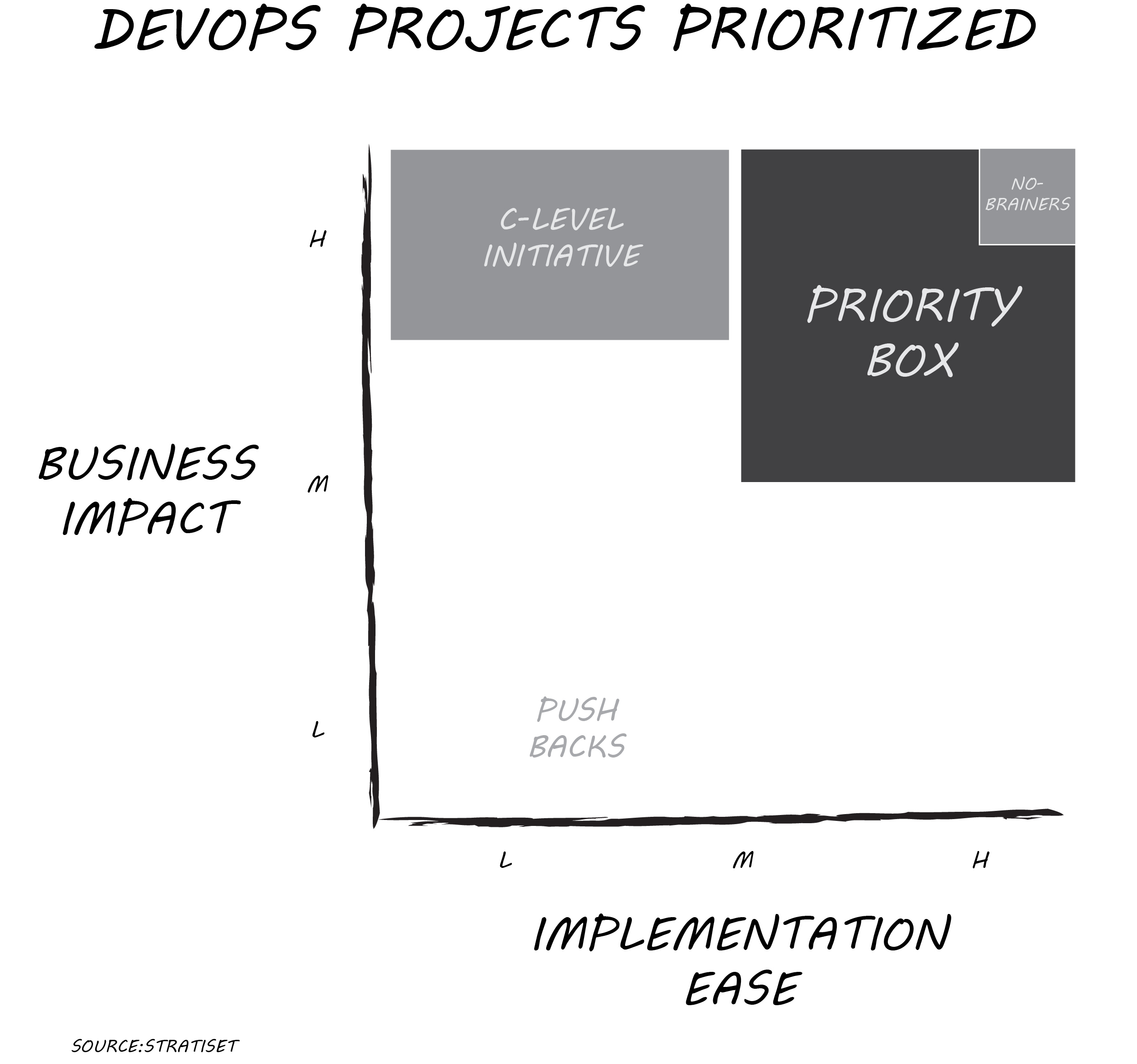
    On your whiteboard or shared screen, plot each project against two dimensions: implementation ease and business impact. Use a relative scale of low, medium or high for each axis. Implementation ease can incorporate many variables including cost of tools, technical difficulty, in-house expertise and more. Business impact can address revenue increase, cost reduction, competitive advantage or regulatory compliance. Don’t worry about absolutes; you’re looking to see how a project compares to all other opportunities. Adjust the pins if necessary after the first few projects are plotted. You’ll get the hang of it in just an hour or two, even if it’s a long list.

    Line Up Priorities

    Few projects are priority no-brainers with high business impact and high implementation ease. More likely, you have several projects in the “priority box,” scoring better than medium/medium. If you have more than five projects there, take another look and jostle pins a bit to get a manageable list. Make sure your available resources match projects identified in the priority box. Allow one exception: That C-level initiative may score as high business impact and low/medium implementation ease. Killing it just because it’s difficult isn’t a good move, but prioritization within context can help address resourcing.

    That’s the priority list you take back to your team. If it’s on that list, work it and finish it. If something isn’t on that list, your team kicks any inquiries on those projects back to you. Push projects with low business impact and low/medium implementation ease back to their sponsors for justification or removal. When one of the priority projects finishes, then and only then start the next best ranking project. Rescore the entire project list after the first group of projects is complete.

    Too easy? Here’s a recent HBR article, “Too Many Projects,” describing a more elaborate approach for bigger initiatives. You may need such in-depth analysis for a C-level initiative requiring more resources. For most projects on your list, more analysis takes substantially more time and likely produces the exact same prioritization as this faster method.

    The key to breaking initiative overload is starting and finishing the right projects. Creating a vetted priority list quickly and getting the team rolling again is well worth the price of an afternoon and some food. Morale will improve rapidly as your team sees progress and the business sees value faster.

    I’d enjoy your feedback on how this process works for you.

    — Don Dingee

  • Catan vs. DevOps Implementation

    Catan vs. DevOps Implementation

    My family has been playing a fair amount of the board game Settlers of Catan lately and, as happens with me, I got to considering the balancing act of the game versus the balancing act of moving to full-on DevOps. Most orgs have some amount of DevOps running at this point, but most have not made the transition, and I think the similarities have something to do with why. So, let’s consider …

    In Catan, you put a settlement at the intersection of three hexagonal tiles. Each tile has a number on it, and those numbers run the quasi-bell curve created by rolling 2d6. There never seems to be a great set of numbers, so you go for the best you can arrange (there are more considerations, such as the type of resources you get for a given hex, but we’ll get to that later). Then you hope that your numbers come up enough to keep you in the game. The game is pretty hot/cold, with the dice seeming to pick a number (regardless of bell curve) and roll it more often in a given game.

    The resources part is important. In Catan, each hex represents one of five resources, each of which you need to win the game. But you can trade resources (at a loss) for other resources, so you don’t have to sit on a hex for each type. This leads to some interesting attempts to get around the fact that the dice rolled against you or there were no good resource/number combinations when it was your turn to set up.

    The parallels are intriguing, though not perfect. You have resources (people/systems/software) and you have goals (project/product/portfolio) that you are trying to reach. Random things (system failures/hackers/budgeting changes) interrupt you more than is convenient (this last one is equivalent to die rolls in the game, but also another game concept called the robber that I only mention for those who play, since explaining the game would make for a long blog). And you have to be a success.

    Choosing to move people to DevOps creates a short-term problem with an eye to long-term gains, since those people moving are both out of their comfort zone and using tools that are new to them. Choosing to dedicate systems to DevOps processes/deployments removes them from the pool of resources available to longstanding systems/processes. It creates a tension of temporarily stretching things so that in the long run you will be better off (much like saving to build a city in Catan when the dice really want you to build roads).

    The difference is, of course, obvious. Catan is a game, and if you lose horribly you just reset the board and demand a rematch. You can laugh at the pernicious nature of the dice when they turn on you just as you were about to do something cool. But in DevOps transformation, you just can’t do that. People’s jobs are on the line, and even if you are at a place where job security isn’t an issue, people’s stress levels still will change based on such wild events. If you haven’t experienced this, have your company announce budget cuts that keep you from implementing part of a transformation stage or have your systems compromised that require the attention of staff that were in charge of moving an application portfolio. It isn’t pretty.

    The key is to keep the goal in everyone’s mind. The end result of a DevOps transformation should be the ability to get changes done faster with better focus on business needs, more complete testing and better communications. Keep talking this up, as there are always roadblocks to large change in any organization. Those improved communications should help people work together to overcome issues and move on. Even if something such as a data breach brings the effort to a halt for a while, when it resumes, an increased focus on the security of data will only make the transformation stronger.

    So figure out how to deploy those resources to the best advantage, keep rolling the dice (so to speak) and keep trying to improve on what the last iteration did. The odyssey will continue unless the org gives up on it; your task is to make the most of each step while you continue to keep those core business systems running.

    — Don Macvittie

  • Core Factors Influencing Java Memory Consumption

    Core Factors Influencing Java Memory Consumption

    Java is known for having an insatiable appetite for resources, requiring strict controls to not exceed budget limits. However, the latest JDK updates and other developments have helped to make Java runtime extremely flexible in terms of memory usage. When configured smartly, Java can be cost-effective for different types of applications—cloud-native or legacy, microservice or monoliths. Today, it’s possible to make Java very slim from the start and scale it up gradually without consuming unnecessary resources.

    Here we’ll take a closer look at the factors influencing resource usage inside JVMs, see what tools can help and how processes can be tuned to gain more elasticity and scalability, ultimately reducing TCO.

    Scaling Possibilities: Virtualization vs. Containerization

    Within JVMs there are several scaling options: vertical, horizontal and a combination of both. To maximize results, it is important to start with a vertical scaling configuration that optimizes RAM and CPU usage inside every instance, based on current load levels. As a next step, these settings will be replicated across all instances while scaling horizontally.

    VMs Scaling

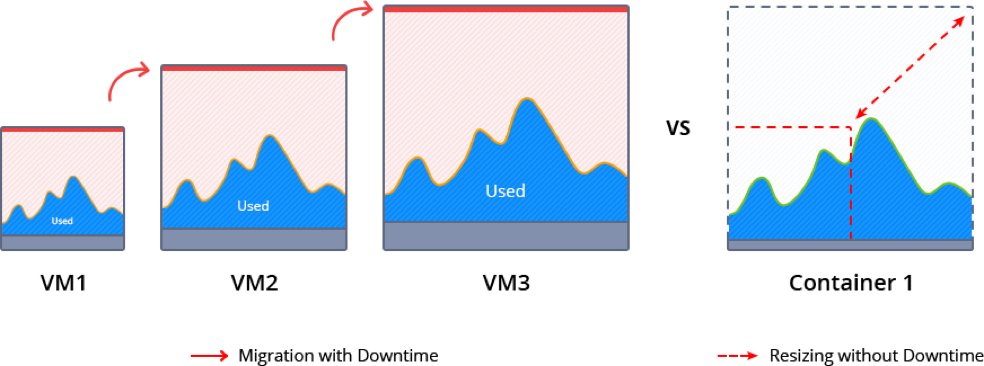
    While starting to run a project inside a VM, it is important to pick the right size machine, as too small an instance can lead to performance issues or even downtimes during load spikes. However, over-allocating will result in wasted unused resources during normal load or idle periods that still must be paid for. This can be a tough choice.

    Start with a smaller VM and scale it as the project grows. When just a bit more resources are required, the cloud vendor can offer you to double the size, as this is the most commonly used scaling step (e.g. see AWS offer below).
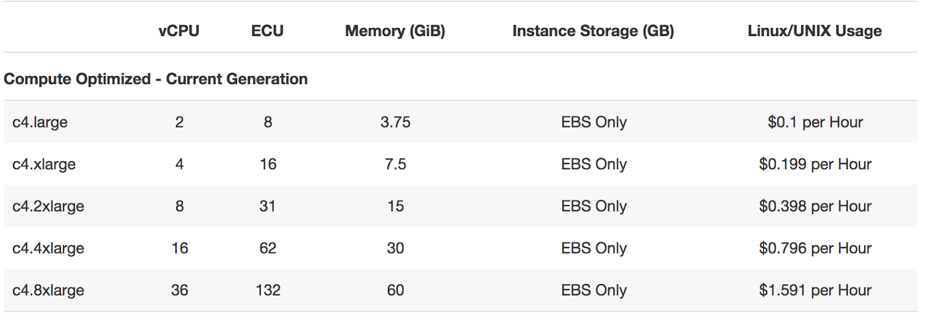
    During such scaling, the current VM normally is paused to migrate and redeploy the application. This inevitably causes some downtime and requires manual intervention.

    Memory ballooning provides a possible way (although rather complicated) to modify the amount of resources inside VMs on the fly without incurring downtime. However, this process is not fully automated and requires special tools to monitor the memory pressure in the host and guest OS and then activate vertical scaling based on the needs. As a result, memory ballooning doesn’t work well in practice, as the memory sharing should be automatic to present the expected advantages.

    Unfortunately, lack of VM elasticity and efficiency in terms of resource usage often leads to overpaying.

    Containers Scaling

    Containerization presents a new way of application packaging that makes resource consumption more granular and flexible, by automatic resource sharing among containers on the same host using cgroups. Unlike VMs, containers’ boundaries can be easily scaled up and down without the need to pause and reboot running instances.
    There are two types of containers: application and system containers. Both use the same scaling approach but they are intended for different purposes. An application container (such as Docker or rkt) typically is more lightweight, runs a single process and is used mainly for creating new projects, as it is easy to build them from pre-existing Docker image templates.

    A system container (LXD, OpenVZ) behaves like a full OS and can run full-featured init systems. This type of container is preferable for monolithic and legacy applications, as it can reuse the originally created design and important “old school” settings.

    Even system containers are much thinner compared to virtual machines, so scaling up and down takes much less time. And the horizontal scaling process is very granular and smooth, as a container can be easily provisioned from scratch or cloned.

    Garbage Collector Choice

    To maximize the efficiency of the above mentioned vertical scaling inside a Java-based container, it is important to select the appropriate garbage collector (GC) and tune it according to the project needs.

    Let’s review five widely used garbage collector solutions:

    • G1: From JDK 9, this modern shrinking garbage collector is enabled by default. One of its main benefits is the ability to compact free memory space without lengthy pause times and uncommit unused heaps. This GC is considered the best production-ready option for vertical scaling.
    • Parallel: A default GC in JDK8, it is a good option for low pauses but not for memory shrinking. This makes it inappropriate for flexible vertical scaling.
    • Serial, ConcMarkSweep (CMS): Both of these are shrinking garbage collectors with the ability to scale memory usage in JVMs vertically. But in comparison to G1, they require four Full GC cycles to release all unused resources. A new JVM option (-XX:-ShrinkHeapInSteps) in JDK 9 can  speed up memory release by bringing down committed RAM right after the first Full GC cycle.
    • Shenandoah: Shenandoah is a rising star among garbage collectors which promises to be the best solution for JVM vertical scaling. Its main benefit over the others is the ability to shrink in live mode without necessity to call Full GC, which helps eliminate significant performance degradation.

    Let’s compare memory behavior with shrinking G1 and non-shrinking Parallel:

    With Parallel, the unused RAM is not released back to OS. JVM keeps it forever, even disregarding the explicit Full GC calls. So even if your application has low RAM consumption, the unused resources cannot be shared with other processes or other containers as it’s fully allocated to the JVM.
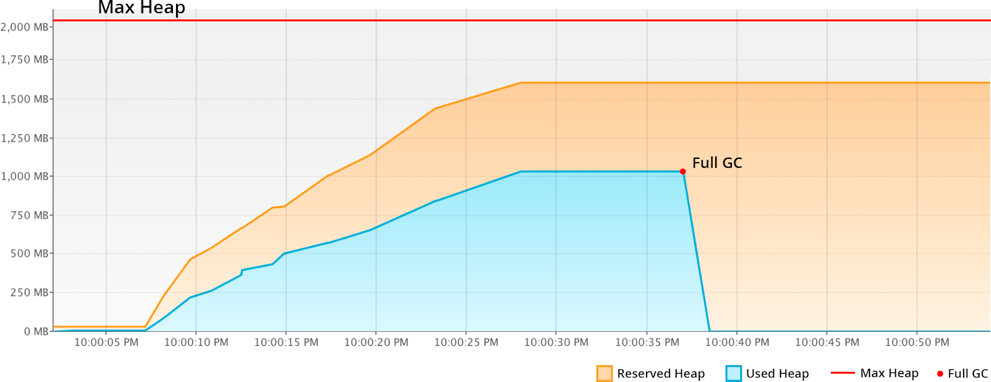
    The modern shrinking G1 garbage collector significantly improves resource utilization compared to the previous example. The reserved RAM increases slowly according to the real usage growth. And all unused resources within the Max Heap limits are not wasted by standing idle, but made available to other containers or processes running in the same host.
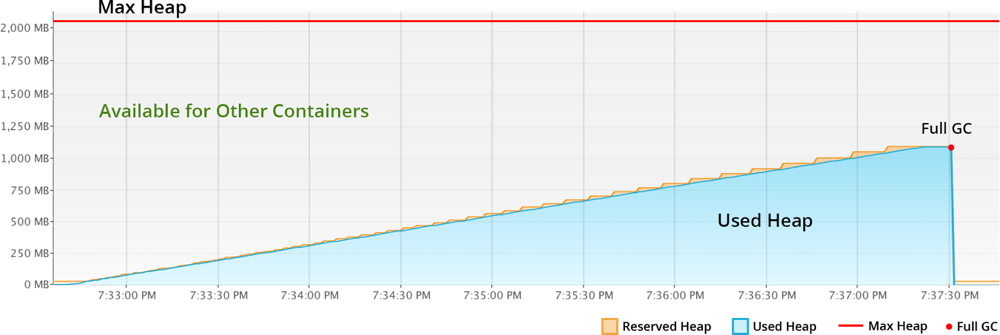
    To summarize, Java applications with non-shrinking GC or non-optimal JVM start options hold all allocated RAM. For scaling Java vertically, the garbage collector should provide memory shrinking in runtime. In other words, it has to package all the live objects together, remove garbage objects, uncommit and release unused memory back to the operation system.

    Charging Model of Cloud Providers

    Nowadays, most of the cloud vendors offer a “pay as you go” billing model. This means that it is possible to start with a smaller machine and then add more servers or migrate to a twice-bigger instance as the project grows. But as described above, usually you reserve more than the application actually consumes to avoid the risk of downtime during the load spikes. As a result, many organizations overpay because the account is charged per VM but not based on the consumed resources inside.

    At the same time, there are providers offering  “pay as you use” billing approaches that became possible with the help of containerization, resource granularity and automatic vertical scaling. The payment is based on the resource units inside container. And the required capacity is provided and reclaimed on the fly in accordance with the load at the current moment. As a result, you are charged based on actual consumption and are not required to make complex reconfigurations to scale up or down.

    Taking into consideration all these factors and implementing the right settings can significantly reduce the costs for Java hosting resources, as well as positively influence application performance as a whole. Cloud and container technologies continue eliminating barriers and offering new opportunities for projects with different architectures and budgets.

    About the Author / Ruslan Synytsky

    Ruslan Synytsky is CEO and co-founder of Jelastic. He designed the core technology of the multilingual cloud platform that runs thousands of containers in a wide range of data centers worldwide. Ruslan worked on building highly available clustered solutions, as well as enhancements of automatic vertical scaling and horizontal scaling methods for legacy and microservice applications in the cloud. Ruslan is actively involved in various conferences for developers, hosting providers, integrators and enterprises. Follow him on Twitter.


  • How DevOps Optimizes Use of Resources

    How DevOps Optimizes Use of Resources

    How is DevOps changing the way we compute? One big DevOps innovation is helping developers and admins consume exactly what resources they need to deploy an app—nothing more and nothing less.

    Traditionally, using (and paying for) only what you need has been tough in all parts of life. If I want to park my car for just 10 minutes on a Baltimore street, I have to pay $1 for a half-hour’s worth of time, because that’s the minimum parking fee. In similar fashion, I pay about $50 a month for the heating bill in the unoccupied house I just bought, even though the heat is turned off, because that’s the minimum monthly charge.

    The problem of having to pay for more than you actually need was a big issue in the pre-DevOps digital world, too. In the past, if you wanted to deploy an app, you had two options. The first was to run it on a bare-metal server. If you did that, to help mitigate the risk of the server becoming overloaded, you’d dedicate more resources to the app than would be necessary during normal usage. That meant paying for capacity that you were not using most of the time.

    The other option was to use a virtual machine (VM). Thanks to tricks such as live-migration and “hot-plugging,” commercial virtualization platforms provided some elasticity to VMs, helping to assure that the VMs consumed only the resources they needed at any given time. But virtualization still means you are wasting resources on hardware emulation and running guest operating systems that needlessly duplicate most of the functionality of the host. Even the leanest VM environment requires you to dedicate more resources to deploying an app than the app actually requires.

    DevOps and the Consumption Revolution

    DevOps technologies are changing all of this. They are revolutionizing the way we consume digital resources and introducing efficiencies that were not possible in the age before DevOps.

    The most obvious example of such innovation is containers. With a containerized app, you get the portability and elasticity that traditionally have been available only from virtual machines. But with containers, you don’t have to waste resources on virtualization. Your apps only consume what they need at any given moment in time.

    Technologies such as Lambda functions on AWS are bringing the same efficiency to the public cloud. With Lambda, you don’t have to pay for virtual servers, memory or disk space on an ongoing basis just to ensure that you have them available when you need them. Instead, you can use Lambda functions to get access to a large amount of compute capacity in the cloud instantly, and stop paying for it the millisecond you no longer need it.

    Also worth noting is all of the automation that DevOps brings to software delivery by promoting continuous delivery practices. In the age of waterfall development, each part of the organization had to wait around on other teams to push code or test results down the pipeline before it could perform its own tasks. With continuous delivery, everyone works continuously and in parallel. The result is no more wasted time and skills.

    In a multitude of ways, then, DevOps is optimizing the digital consumption. In the future, we’ll wonder why we ever accepted “miminum” fees or had to pay for more than what we needed to get the job done.

    — Chris Tozzi

  • 5 Reasons Why Companies Should Analyze Their Logs

    5 Reasons Why Companies Should Analyze Their Logs

    At first thought it might seem as though analyzing logs is something that only affects the IT portion of your business. However, nothing could be further from the truth. In reality, log analysis affects every aspect of your business. This includes finance, legal, human resources, sales and marketing, security and operations. In fact, with log analysis, you’ll discover issues either before or as they happen and avoid both lost time and unnecessary delays.

    There are many benefits to properly analyzing your logs. Your organization can increase revenue, reduce expenses, better manage employees, respond to incidents and even keep yourself out of legal hot water. Read on to learn about the five major business areas impacted by log analysis and why every business needs to analyze its log—and the sooner the better.

    Business Operations

    Probably the most obvious use of log analysis is in supporting business operations. These functions include the following:

    • Detecting critical system errors
    • Identifying key trends
    • Improving operational efficiency
    • Supporting service level agreements (SLA)
    • System troubleshooting

    Early indication of problems can pinpoint money-wasting processes. It also can mitigate risk in support of business continuity. This will help avoid service disruptions that can lead to unhappy customers and lost sales.

    Compliance and Legal

    Every organization has internal policies: security policies, employee policies, legal policies, etc. In fact, most organizations have regulations (such as HIPAA and Sarbanes-Oxley) they must adhere to. Often these regulations are imposed by the government. The only feasible way to ensure policies are followed and regulations are met is through log analysis.

    Log analysis simplifies compliance. It also supports audit requirements, litigation needs, subpoena requests and forensic investigations. In short, log analysis is the only way to ensure an organization stays out of legal trouble.

    Proper Resource Sizing

    One of the worst things any company can do is have the wrong amount of resources to support its business operations. From network bandwidth to storage capacity to CPU cycles, businesses have to get these quantities just right. Not enough resources in any area can lead to poor performance, frustrated customers and, eventually, lost sales.

    Of course, the easy thing to do is just overspec these resources. However, doing that leads to increased expenses, which adversely impact the bottom line. Using logs to determine proper resource sizing is the only way to ensure you have maximized your profits.

    The use of logs can also be used to verify third-party billing. For instance, your company can use your logs to make sure the amount of bandwidth you were charged for by your service provider is actually the amount you used. This, too, can benefit the bottom line.

    Sales and Marketing

    It may not seem as though log analysis can be used to directly impact sales and marketing, but it certainly can. For starters, log analysis can be used to quantify the effectiveness of a sales campaign. Information such as referring sites, pages accessed and conversion rates all can be used to tweak different aspects of the sales effort.

    Log analysis also can be used to optimize website performance in the support of a sales funnel. Information such as customer navigation, traffic loads and conversion errors can be used to improve the sales process. In fact, analyzing logs can be used as a revenue driver in any organization.

    Security

    One of the most important areas in any business today is security. Logs can be used to both proactively protect an organization, as well as forensically investigate security breaches.

    Proactively, logs can be used to accomplish the following:

    • Optimize blocking and filtering of incoming traffic
    • Maximize email virus protection
    • Monitor failed authentication attempts
    • Verify configurations in firewalls

    After the fact, logs can be used to do the following:

    • Assess security policy compliance
    • Initiate incident response
    • Investigate security breaches

    You cannot understand security risks or respond to security incidents without the ability to analyze your logs.

    In short, whether you were aware to it or not, log analysis impacts every department in your organization. It directly and indirectly impacts every company’s bottom line by increasing revenue, decreasing expenses and delighting customers.

    You now know that log analysis is not just a “back office” IT function. Every department in your company needs to use the intelligence contained in your logs to do their jobs better. It is why every business needs to analyze their logs, and now is the time to start.

    About the Author / Ariel Assaraf

    arielassarafAriel Assaraf is a co-founder and CPO at Coralogix. Previously Ariel was a GL at Verint and a Product manager at an elite Israeli intelligence unit.  He is into Software design, UX, growth hacking and basketball. Ariel holds a BEc in Economics and Math from the Open university of Israel. Connect with him on LinkedIn and Twitter