Tag: QA

  • Delivering DevOps’ Business Value

    Delivering DevOps’ Business Value

    DevOps is an interesting space to be operating in right now. More than just culture or a set of tools and processes, DevOps delivers speed and agility that can be truly meaningful for the business. Unfortunately, for most large enterprises, the path to the benefits isn’t always well-known and isn’t assured.

    Over the last five to 10 years, a number of DevOps tools and solutions have emerged: Puppet, Chef, Jenkins, Git, SaltStack, Elasticsearch … and the list keeps growing. Originally, these tools were sought by developers and system engineers for their ease of use and low cost of ownership: You could download it, use it the same day and solve your specific problem. The issue for enterprises,  however, is that nature abhors a vacuum; the problem one developer addressed with Chef is being fixed with Puppet by another developer in a different business unit. Group A is using Jenkins, Group B is using Chef Delivery. In short, after five to 10 years of technology adoption by developers and system engineers, the tooling landscape in the DevOps space is packed to the rafters with competing technologies, all of which are solving similar problems with overlapping features.

    So why should this matter to you at all? Without careful planning, consideration and execution, your business will derive little value from this DevOps exercise.

    Here are a few common pitfalls we see far too often:

    Too Many DevOps Tools Doing Too Few Things

    Building Rube Goldberg devices looks neat on paper, but those mousetraps fail very often in real life. The more tooling and solution handoffs you have, the greater your likelihood of failure: the less likely you are to be able to scale horizontally or vertically, the more toolsets you need to maintain, and the more skills you need on your team. Convoluted messes do not yield speed and agility. If it feels wrong, it probably is. If it is overwrought, look to remove complexity from the landscape.

    Reintroducing Risk and OpEx Spent on Menial Tasks

    As an organization you’re onboarding risk, hidden costs and a lot of the things you just spent the last 10 years automating away: tribal knowledge, lack of governance, lack of compliance, lack of third-party auditability and reporting. Many enterprises spend millions of dollars making it so their admins and developers could spend time on more valuable workstreams, just to throw them back into the salt mines of making continuous integration (CI), continuous delivery (CD) and infrastructure-as-code “work” over umpteen toolsets. The goal isn’t for DevOps to “work”; the goals need to tie to some tangible (i.e. measurable) business benefits. Anything can be made to work, but far fewer IT programs deliver value. Be the people who deliver real value.

    Taxation Without Representation

    All of the stakeholders need a seat at the table. Whether that means forming a SWAT team from operations (all infrastructure domains and security), development, QA or a permanent DevOps matrix organization, all vested interests need a say in how the process and tooling develops for all impacted domains (which is just about everything) across all environments (i.e Dev, Test, QA, Production). Far too often we see one set of stakeholders acting as the service provider for another group of stakeholders playing the role of customer. This is a solution for and by Development and Operations.

    Congratulations, you’re having a baby. Let’s make sure it’s not ugly, okay?

    About the Author / Jesse Langhoff

    Web_Langhoff_Jesse-7633-EditJesse Langhoff is co-founder and CEO of Raindance, a cloud and automation consultancy serving enterprises nationwide. With over 15 years of experience in leveraging technology to address business challenges, Jesse works with customers to determine the optimal path to meeting their goals through the use of automation and solutions provided by the leading vendors in the space. Areas of expertise include strategy and assessments, private/hybrid cloud services, process automation and orchestration, DevOps and operations as a service. Jesse holds an MBA from University of St. Thomas – Opus College of Business.

  • DevOps Chat: Steve Hazel, Sauce Labs

    DevOps Chat: Steve Hazel, Sauce Labs

    I recently had the chance to sit down and speak with Steve Hazel, CTO and co-founder of Sauce Labs. With so much being written and talked about the role of quality assurance (QA) and testing in a continuous integration/continuous delivery (CI/CD) world, it is good to hear from someone like Steve who is an actual thought leader in the space. Steve tells us what he thinks the limits of automated testing are, the future of QA and more. Have a listen for yourself to find out, or follow along with the printed transcript below!


    Alan Shimel: Hi, everyone. Alan Shimel, devopsy.kinsta.cloud here, for another DevOps Chat. Today’s DevOps Chat’s guest—that was a tough one—is Steven Hazel, co-founder, CTO at Sauce Labs. Steven, welcome to DevOps chat.

    Steve Hazel: Hi, Alan. Glad to be here.

    Shimel: Thank you. Glad to have you here, actually. So Steven, there might be some people listening who maybe aren’t familiar with Sauce Labs. So, before we start, why don’t we, if you don’t mind, give our listeners a quick overview? Tell us about Sauce Labs.

    Hazel: Yes. At Sauce Labs, we do automated testing for both web and mobile apps. We run a cloud service that gives our customers access to a wide range of platforms, whether that’s operating systems and browsers for web testing, or mobile devices and emulators and simulators for mobile testing. You can get access to all the different platforms you need to test on, and you can get access to a lot of platforms at once to run your tests in parallel to get through a large test suite rapidly, which is really what people need for today’s continuous integration and continuous delivery workflows.

    Shimel: Got it. Of course, Steven, Sauce Labs was closely linked with around Selenium and some of the open-source testing tools that are out there today, right?

    Hazel: That’s right. Selenium is the dominant web-testing technology. In mobile testing, there’s a variety of technologies, but we support Appium, which also uses the web driver protocol that underlies Selenium. We really think that fitting in with those open-source tools is the smart way to go. It fits with what people are doing.

    It gives people a lot of choices about how they want to do their testing, what kind of languages and frameworks they want to use on their end. So, we just plug right into Selenium tests, if you’ve already got Selenium tests, or Appium tests. You can just change the config and point them at Sauce Labs, and they’ll run unmodified on our systems.

    Shimel: Got it. Steven, we were talking before we started recording today, I was telling you about a recent article we had over on devopsy.kinsta.cloud. The gist of it was basically that DevOps was the death knell for QA. I told you I didn’t agree with that and you agreed with me. You said you didn’t agree with it, either. But for our audience—they’ll respect you a lot more than they respect me—why don’t you agree with that, Steven?

    Hazel: Yeah. I think that to suggest that there’s no longer a role for manual QA when you take on a DevOps process is just not in line with the facts. If you look at what we see large organizations doing, they’re not dropping manual QA for automation. They’re changing the mixture of what they have manual testers doing by quite a lot, but they still have manual testing teams. You still need a manual testing team.

    So, what I see happening, as you start to take on automation, your testing coverage improves dramatically because you can afford to do a lot more testing when you’re automating than was ever possible with a manual testing team. But automated testing, the classic example is exploratory testing. You’re just not gonna get the kind of creative, exploratory walk-through of your app with an automated test that a manual tester can do. I think there’s still a role for QA organizations, beyond just manual testing, in being the other side of the conversation, right?

    A lot of people have the concern that if developers are writing tests, it’s the inmates running the asylum. The exact developers writing the software are the ones deciding whether it’s high quality, and you want another perspective in there. You want a perspective that’s maybe closer to your end user. So, I think that the other side, beyond just manual testing, that you see with QA teams continuing to have a role is in deciding what cases should be tested, whether you have good test coverage, encouraging good testing practices, even when you are automating your tests.

    Shimel: Absolutely. Really, Steven, I guess the boogeyman in the room around the friction with DevOps and QA is automation. There’s some schools of thought that says, “Well, we can automate everything. The more we automate, the better we are.” There’s another school of thought that says, “Well, you can automate as much as you can and automation’s not a bad thing, but there are just gonna be some things that are not automatable, if that’s a word now, or may never be automated. Where do you go in on that continuum?

    Hazel: Well, being someone who’s pushing forward automated testing, I want to see automation go as far as we possibly can. I think that that’s very far. That said, I think that the way the mixture of tests changes as you adopt automation is maybe a little bit counterintuitive. You might imagine, well, we’ll automate some percentage of our manual test cases, maybe 80 percent or 90 percent. Maybe we could get to 100 percent if you’re a zealot for automation.

    But actually, what you see is, it’s not that you’re automating a percentage of what was there in manual testing. You’ll actually have more automated test cases than you were able to do with manual testing. So, if you just looked at the number of test cases, your automated cases are gonna way outnumber the original count of manual test cases just because you can, right? You can now cover a lot more edge cases, a lot more scenarios because of the power of test automation. So, that’s a real advantage to test automation.

    Shimel: Sure.

    Hazel: At the same time, certainly there are things, visual testing, there’s some interesting approaches out there, but I don’t think we’ve yet seen a way of making sure that the app looks right, especially as it changes. You really need a human being involved when there are deliberate visual changes to make sure that they came out right. I think it’s those things where automation really can’t give you an answer about, does it look right? Does it act in a way that’s gonna be acceptable to somebody?

    I think you still need a human being in there at some point, checking those things, but it’s a different process. It’s no longer this phase gate before every change is released that you used to have. It’s now a process that can be made asynchronous from the bulk of your development and release process.

    Shimel: Absolutely. If you don’t mind, Steven, a little bit of time on, you mentioned a little bit, but what do you think of the kinds of tests that lend themselves well to automation? Certainly, a visual test of an interface, different arts. What are the sweet spots for automated testing?

    Hazel: I think certainly at the bottom of the testing pyramid, unit testing brings tremendous value. It’s something that’s very easy to automate in a way that’s completely deterministic, very fast. Gives you really quick feedback as a developer as you’re making changes to the code on whether you’ve broken something. But the coverage with unit testing, the coverage of functionality that may be important to your end users, it’s really hard to achieve. It’s really hard to achieve good, solid feedback from your unit tests that you haven’t broken anything anywhere.

    Functional testing, the next layer up, which is what really we focus on, gives you that complete end-to-end check. You’re actually testing the features of your product and you’re making sure that end to end, with all the various components involved, they work properly. That’s more of a challenge for automation, but we’re seeing, I think, a majority of development organizations out there seeing success automating functional tests and real value from having that be something where you can run through hundreds of test cases in minutes and get feedback to your team. So, that works quite well for automation.

    I think it’s that next level up, as you start to get into the types of tests where you’re looking at, what’s an acceptable experience for the end user? User acceptance testing as distinguished from functional testing, where you’re really starting to look for, does it look right? Does it act right? Is the response time throughout the entire process acceptable?

    You can zoom in and measure a lot of these things very specifically, but getting the answer to, “Overall, though, was it a good experience?” That’s the kind of thing where it’s really tough to cover that with automation.

    Shimel: Yeah, agreed. Steven, if you don’t mind, I’m an old security guy prior to DevOps. One of the things within the security community that we’ve really pushed around is the idea of automated security testing shifting left in a DevOps environment and allowing security testing to be done in an automated fashion at a CI/CD-type of level. Where do you see that in this whole discussion?

    Hazel: Security testing isn’t what we focus on at Sauce Labs, so –

    Shimel: Right, I know.

    Hazel: I’m not an expert in this, but it is something that I follow and care a lot about. I think I see a lot going on with static analysis, with some of these tools that can help to constrain the types of mistakes that you could have in a program, type systems and things along those lines. I think really that’s very badly needed in making code secure. Some of the issues we’ve seen come up over the last few years, things like Heartbleed, the Glibc bug, really those kinds of things aren’t acceptable, aren’t something that we can continue to have happen, and I think the solution really is fully automated tools, like static analysis tools and type systems, that can lock down the code and just constrain the types of mistakes that could possibly happen.

    Shimel: Sure. You know, Steven, I see it as very analogous to the QA situation, which is I think a lot of security people get very territorial around job security because they’re afraid somehow that doing automated security testing earlier in the process—shifting left, so to speak—is somehow gonna affect their livelihoods, or make them obsolete.

    Hazel: I can see that. We see that among QA folks, for sure. To me, that’s a shortsighted view. If the world is getting more intense security problems, more intense quality problems, we’re shipping more software, you just can’t solve it 100 percent by throwing bodies at the problem. I think that what’s gonna happen is not that those people’s careers are in jeopardy; instead, as a society, we’re just gonna do more and better security and quality testing than we’ve been able to do in the past.

    Shimel: Yeah, agreed. Steven, we’re running a little low on time, so let me get just one or two more questions. Sauce Labs has been, in my opinion anyway, for what it’s worth, somewhat of a DevOps darling in terms of really encompassing—you’re living the DevOps model. You’re working with open-source tools, testing and automation, enabling automation. Sauce Labs is a player in the DevOps ecosystem. Where do you see it going?

    Hazel: Well, toward the enterprise is one big trend we’re seeing. Earlier on in the history of Sauce Labs, a lot of our customers were essentially software companies, companies that their primary focus is technology. Now, a lot of our customers are retailers, financial institutions—companies that you don’t think of as primarily a software company, but all of these companies have apps, they have complex web experiences. They’re really adopting DevOps in a big way. They’re moving to what is, for them, a very different process than what they’ve been doing and allows them to ship better software faster, with more complexity than they were able to handle before.

    Shimel: Absolutely. Steven, we are low on time. I’m gonna ask you the final question, which I ask most all of my guests here on DevOps Chats. That is, if you had to recommend one book to our audience that they should read, a must-read for them, over the next six months or a year, what would that book be?

    Hazel: Oh, wow. A book recommendation. I think the obvious choice in a conversation about DevOps is “The Phoenix Project.” If you haven’t read it, you’ve got to read it. It’s a quick, enjoyable read, but it really gets the concept across better than probably anything else is going to. It’s an obvious recommendation, but I still think it’s worth it.

    Shimel: Sometimes the obvious is good. I will just add to that, if you already have read “The Phoenix Project,” Gene Kim’s next book, I think co-written with John Willis and Jez Humble and someone else that I’m blanking on – oh, darn it, the guy who started DevOps, who coined the phrase. Patrick. Patrick Debois. Their new book, I think it’s called “The DevOps Handbook,” will be out, I want to say, in the fall. Not a sequel to “The Phoenix Project,” but another good book to look at.

    Anyway, Steven Hazel, CTO, co-founder of Sauce Labs, thanks for being this episode’s guest on DevOps Chat, and continued success with Sauce Labs.

    Hazel: Thanks a bunch. Thanks for having me.

  • Q&A: Full City Tech’s Higbee on Culture, Part 2

    Q&A: Full City Tech’s Higbee on Culture, Part 2

    In part one of this two-part Q&A we dug into Wes Higbee’s position on instilling a DevOps culture. Higbee, a developer and business consultant, continues his separation of wheat from chaff in the field of DevOps dreams.

    devopsy.kinsta.cloud: How is automation, which is a focal point for DevOps, also a trap?

    Higbee: Focusing on the automation can become problematic if you forget about other things. Something like automation will distract you and you’ll end up having great turnaround times on new features that don’t mean anything to your customers.

    devopsy.kinsta.cloud: Doesn’t failing fast fix that?

    Higbee: Failing fast could help, assuming you have metrics in place that tell you that you’re failing in a way that matters.

    devopsy.kinsta.cloud: Could you please illustrate an example of isolated devs and ops that serve the given purpose better than combining them would?

    Higbee: I have a history of doing projects in the software development space where we had tight collaboration with everybody that’s involved in the process. Users, stakeholders, developers, testers, managers … you name whatever role, people worked closely together. I also have a history of examples where there was no collaboration at all.

    A lot of smaller projects end up in this latter bucket where you really just need one person to create a software system for a very specific purpose. They create the system, they deploy it, and then it just has to be supported at that point because it’s not going to be changed thereafter. It serves its purpose. People are happy with it. It’s probably never going to be changed ever again, so the separation there between dev and ops is perfectly acceptable and if you tried to bring together a whole team of people and synchronize them, it would just be a waste of time because the effort isn’t big enough to justify it.

    Another example would be pretty much any company that has ops staff but doesn’t do their own development. They outsource their development. Sure, there are situations where a project would necessitate everybody working closely together, but I’m sure there are a lot development efforts that happen in this regard where the dev team is outside the organization so there’s going to be functional separation. They developed software, it’s deployed, and maybe it’s never changed again, so there’s really no need for some tight-knit collaboration.

    devopsy.kinsta.cloud: How do recommend helping organizations produce rapid results such that they can rapidly move to a DevOps approach successfully?

    Higbee: First and foremost, I don’t extol any methodology, so I’m not a DevOps consultant. I’m not an agile coach. I think it’s ludicrous when people put these fads in front of their titles. The thing that I do that makes the difference, that produces rapid results is to make sure that we have a common goal, make sure it’s crystal clear and make sure everybody understands it. It’s like hiking to the top of a mountain. Everybody knows how far along we are. They can measure their own progress. They can flag things if we’re headed in the wrong direction like down the mountain. They can always see the goal. It’s always in sight.

    In another example, if you’ve ever gone to an Escape the Room Adventure, everybody is dumped into a room. It’s a group of people who oftentimes are strangers. About 10 people get dumped into a room and the goal in the duration of an hour is to get out of the room. The challenge is set up so it would be pretty difficult to get out in that hour, so if people don’t focus on that goal, then people aren’t getting out of the room.

    I’m not interested in how fast we solve each of the individual puzzles, so we don’t measure those things. We just get to work on getting out of the room. That’s my approach to doing business with people and that’s how people get rapid results. Because if you have a crystal clear goal, then you can go to the last hundred years of management philosophy to find the ways you need to get to your final destination. You aren’t worried about the right way of doing things; you’re just worried about the way that works for your specific situation.

  • Q&A: Full City Tech’s Higbee on Culture, Part 1

    Q&A: Full City Tech’s Higbee on Culture, Part 1

    Every day, more people are hopping on the DevOps magic bus, drinking the spiked punch and singing “Kumbaya.” I imagined everyone I interviewed would offer tales of instilling this undefeatable, undeniable, brand-spanking-new rapid development culture.

    It was refreshing to discover that I was mistaken. Apparently, DevOps is just another methodology for accelerating business success—one for software development.

    In part one of our latest Q&A, we chat with Wes Higbee, software developer, business consultant and president of Full City Tech Co. Higbee ably defends his stance on how special DevOps and instilling a DevOps culture is or isn’t in the grand scheme of things.

    devopsy.kinsta.cloud: So you say that DevOps is nothing new; that you have books collecting dust from the mid- to late-20th century describing similar organizational and management philosophies. What are some examples from those books you have collecting dust?

    Higbee: DevOps is the latest reincarnation of a lot of management philosophies that have been around for a long time. There are a couple of examples to reference. Alan Weiss, author of the book, “Best Laid Plans: Turning Strategy Into Action Throughout Your Organization,” wrote about functional organization at an insurance company that employed him. They had a functional department of typists and a functional department of people that would check the typist’s work.

    Underwriters sent requests to the typists to type up contracts. Typists would type up those contracts and then someone collected those for a separate group of checkers. The checkers would then check them and there was a lot of back and forth correcting errors. This led to a lot of inefficiencies.

    The solution was to take the checkers and pair them up with teams of typists. So a checker could review the work of several typists. That group of people worked together, and it turned out to be much more efficient, productive and effective.

    This is the heart of a cross-functional team, which is a fancy word for teamwork. This is one of the many ideas in the DevOps space, specifically taking developers and ops and putting these two groups of people together instead of having them as completely separate functional units inside the organization.

    Another reference is to pretty much everything Peter Drucker wrote. Specifically with regards to the people who are talking about focusing on the big picture. This is one thing that some people in the DevOps space are getting right. They’re talking about the big picture and not making optimizations to small parts of the picture that then jeopardized the whole, so optimize the whole. This comes from the work of Peter Drucker, “Managing for Results: Economic Tasks and Risk-Taking Decisions.”

    devopsy.kinsta.cloud: You say the danger is in the term DevOps itself; that as with agile, people slap a new name on what they’re already doing and think everything is better. If it’s not the terminology that needs to change to ensure a DevOps cultural transformation, then what is it?

    Higbee: I can’t tell you how many times I’ve encountered DevOps where devs and ops were still siloed. If you want to be successful—and this applies to any methodology—you have to start with real problems and real opportunities, because somebody else’s best practice is your own worst practice. If your customers are happy and your company is successful, you are seeing great profit margins and great growth, why would you change anything?

    Automated tests are something that people extol a lot in the DevOps space. You should have automation of your entire test suite and it should be part of your release process that’s also automated. But if you have no bugs in production, there’s no reason to go adding a bunch of tests to your release process.

    However, if your users routinely experience bugs in their production environment, then it would make sense to start talking about some testing and maybe even some automated testing during your release process. But don’t start with blindly writing tests of everything in the system. Start with the specific parts that are buggy, and you might be surprised how fast you can get those parts covered with some good tests. And then once you’ve done that, stop there.

  • Infrastructure-Testing Dominoes

    Infrastructure-Testing Dominoes

    Understanding the artifacts of a given technology component is critical to an enterprise-class DevOps service offering. Second-most critical is understanding the dependencies between given components. Testing helps illuminate those dependencies.

    For example, let’s assume I have a server running the previous version of the Windows operating system (OS) that I now want to upgrade to the latest version. The previous deployment package of this version of the OS would be an artifact. It should also include all of the test automation I run to validate that version of the OS is working after I install it. The artifact also might include configuration files I deploy when I install that version of the OS on this type of server in this class of environment. Having these bits of automation bundled together allows me to do a successful install of my OS (assuming no hardware errors) on perhaps many servers.

    As I create a new artifact for the latest Windows OS, I keep in mind all the things I had in my last version. I might include a newer config file and perhaps a set of tests (albeit new ones) to make sure it is working when I am done. Bundling all these bits gives me a new Windows OS artifact or package that I can use over and over on this kind of server in this class of environment. The idea is that I am creating a single kind of artifact or package to cover this kind of technology—in this case the latest version of the Windows OS operating system. All my artifacts should be version-controlled. So when I’m done I have an artifact for the previous Windows OS and one for the latest version. Each artifact version has embedded or included testing (pointers to, or discreet automation) to verify the validity of the install, and perhaps a little more to prove the OS works.

    Within my DevOps tooling, I likely have some sort of artifact management system. It may not be as formal as a full-on configuration management database (CMDB) system, but whichever tool I use will have some sort of database to manage my artifacts or packages by version. How long I retain these artifacts will be defined in my retention policies, but likely I will retain every version in use at my company today. This is step one, and it forms the foundation for my next effort in cataloging the dependencies that exist between artifacts.

    Enter the Spider’s Web

    Under the scenario I have described, when I deploy either the previous OS or the latest one, I would run a series of tests specific to that version to ensure the OS is working properly. As an infrastructure engineer, I tend to think my job is done at this point. But it isn’t. To truly validate that my OS is working, I really need to know what is running on the server I just deployed to. If my server was bare or new, then I am really done. But if my server has middleware running on it, then the job is not finished until I re-deploy the right version of the middleware on top of my new OS and verify it is still working properly.

    To pull this off, I will need a catalog of the technologies that depend on each other. The OS example is kind of simple, because it lives at the bottom of the stack where a server is concerned. But on top of the OS might reside a middleware platform (perhaps messaging or a database). On top of the middleware might reside an application or perhaps several applications, depending on the horsepower of the server in question. Upgrading the OS component implies I am redeploying the middleware layer and then the application layer on top of that.

    Enter full-stack engineering. It takes an application-centric view of the world, but this implies a single application-centric view. It looks at one app from top to bottom and treats the entire stack as a single version-controlled artifact. But if you have legacy environments that run multiple applications on the same physical box, perhaps on the same virtual instance, you have the makings of a spider web of dependencies. There are no full-stack solutions (to my knowledge) that have figured out how to incorporate multiple applications at the top of the same stack, varying middleware in the middle and “n” number of virtual instances that ride on one OS on one physical box. Instead, each piece of the technology tends to be treated separately. Thus the need for some sort of catalog that tracks the interdependencies between them all.

    Starting the Domino Testing

    So once I have discreet testing that is version-controlled (or associated with) each type of technology component, I will have to re-execute those tests if anything “under” me undergoes a change. For example, if the version of my WebSphere is upgraded, beyond just the core WebSphere testing that occurs, I really should execute the tests associated with each application to ensure “that app” is still working after the upgrade. You could apply this premise to a database layer (say, upgrading the current version of Oracle, as an example). To really know if the database upgrade was successful, you should run the testing of each dependent app and ensure “that app” still works after the upgrade. The results are likely to be surprising.

    To execute this kind of domino testing, even if you have the web of dependencies defined and the artifacts or packages managed, you can take one of two approaches: redeploy everything, although this method may not actually kick off tests if it detects the versions did not change from the last deployment (smart overwrite), or set up discreet testing jobs within your release orchestration software to execute the entire web of dependencies and track the results. In either case, you are going to need human oversight on whether it is better to keep the new version or roll back to the old one. Only a human can prioritize the impact of what might seem small or catastrophic (based on a human perspective) of a given app or series of apps.

    Impact to the Bottom Line

    True quality can be assessed only through testing. Part of breaking down silo-thinking is taking a holistic view of the technology your organization supports. Just because the OS support engineer’s testing passes does not mean the upgrade was a success. For an upgrade to be a success, the tests of everyone else who relies on that technology underpinning must pass to prove it worked. The entire team needs validation when the underlying infrastructure undergoes change. The dominoes of tests must pass from end to end. Only then can true quality or true success be measured.

    Of course, most engineers are reluctant to have “app software” guys influence whether they did their own jobs right. After all, most software quality problems are in the code, not due to infrastructure errors. However, if the applications upon which your business relies cannot work, no matter what the reason, after an infrastructure upgrade, it is a problem for the entire business, not just the software guys. To tear down the silos, we need to look at impacting events for change across boundaries and drive toward overall results, not just departmental ones. When this occurs, the cost of quality is significantly reduced.

    To continue the conversation, feel free to contact me.

  • Dashboards from Hell

    Dashboards from Hell

    Even organizations with a mature DevOps services model inevitably will hear from executive sponsors about the “need” for a dashboard for DevOps information. Organizations just starting to embrace DevOps won’t have the time to construct one yet, but over time will reach the same conclusion. The need is real, and the value is significant—it is how you get there that makes the difference. Vendors are keen to promote the idea that they already have a dashboard built into their respective products. And this is partially true.

    But the problem with dashboards is not a matter of information, it is a matter of perspective and scope. Ultimately, all of the information an audience wants can be found in the various DevOps tooling used in the continuum of services your organization created. However, locating some of it takes profound knowledge of how each tool operates, adequate security profiles and an elephant’s memory as you click on multiple windows to try to correlate the data you ultimately are seeking across the various tools.

    Before you know it, executives and perhaps even practitioners are calling for a consolidated dashboard that would present this information cleanly. The danger here, of course, is an attempt to consolidate every perspective from every individual audience into a single dashboard for your company. Instead, it is wiser to begin such an effort by breaking down the number of audiences into categories (by need, perhaps) and examining what is already available and what is missing to make a dashboard project effective, and not one originating from hell.

    Dashboards: The Practitioner Perspective

    There is a keen difference in what a typical engineer wants to see as it relates to DevOps from what the other audiences will be looking for: namely, detail. If you consider this part of a dashboard effort the foundational section (i.e. providing the right detail information to the engineers who ask), the remaining higher-level presentations can be built on top of this data. Most engineers are content to just “look into the given tool” to get what they want. But sometimes consolidating this information into a dashboard begins to make more sense.

    Ideally, your company has only one build tool and, again ideally, only one deploy tool. If you have multiple types of both kinds of tooling in these disciplines, you would be better served to pick a winner there than try to use a dashboard effort to consolidate build and deployment data across multiple build and deployment tools. Allowing multiple kinds of build and deployment tools across an enterprise usually winds up in the demand for multiple dashboards from multiple audiences, and before you know it, the dashboard project from Hades once again has infested your organization. A clear winner in build, deployment and release orchestration cuts out this kind of problem.

    Most of the time the need for a dashboard emerges when users are trying to see information in a way the native tooling did not plan for. For example, I want to look at a given server, or class of servers, and a list of everything that is on them (by version). Or as an example, I want to look at these technology components of this type and version and find out every server in my entire data center that they may have been deployed to.

    Some vendors offer internal reporting capability intended to meet these needs. However, using those reporting features should be labeled with “caveat emptor” signage. Typically, vendors apply their reporting directly against online or production data within their respective tools. So an engineer presses the report button on his build tool, and the build reporting function begins to look at its own data from a production viewpoint, instead of from an offline reporting copy of the data. When you start running reports against “live” tools, you get slowdowns, sometimes significant slowdowns.

    To avoid this issue, start with determining what data the engineers need, how often they need it and to where you can copy this information (to form the basis of your dashboard system). You also may wish to examine how the base data is inherently constructed and join some of it where it makes sense, so you are not issuing very large queries joining key data from many tiny tables together before anything sensible emerges for your new dashboard system. Speed of presentation will matter still, even though the data becomes only near-real-time instead of real-time.

    Dashboards: The Business Perspective

    Once you have ascertained the detailed information to satisfy your engineering or practitioner community, it usually needs to be married to your business segmentation to meet the needs of this audience perspective. For example, I may have 30 servers that I use regularly in my e-commerce products or line of business division. My engineers may care less about this designation, as they only care which servers are content servers or database servers or application servers. But my e-commerce business teams look at this information differently. They only want to see “their” servers, not every server in my company. So to accommodate the next perspective audience, I need a way to marry servers and technologies to the product lines or lines of business my company understands.

    This may require an outside or additional database that tracks the raw server name and marries it with the business unit that cares about it. It may also track the application names the same ways, marrying them with the appropriate business unit. But this marriage now offers the ability to pull reports (or dashboard screens) by line of business—it is nearly certain your basic build and deploy tools weren’t designed to show information in this way. This kind of business segmentation, or filtering (in some tools), provides an entirely new way to examine the data. The need to drill down to the details may still exist, but a picture of change relative to a product line or business line becomes a high value-add for the business community who looks at DevOps data.

    The business community looks at DevOps information to help it make decisions based on the state of change at any point in time. E-commerce customers, for example, might get special company notifications of upcoming changes or improvements in their capabilities, as the business community is made aware, and stays current with the planned release events and quality of testing underway. Or those same notifications might be delayed based on a quick look at the same information presented the same way.

    The point is, business users are an important community or audience of DevOps information, and the lens they use to examine data is from a product or line of business construct rather than the raw data aggregated by a practitioner.

    Dashboards: The Executive Perspective

    Executives, no matter the level, usually are more concerned about trends in the information than point-in-time data. For example, a given executive may want to know how many deployments per month are happening out of the development class environment for a given line of business. If you have constructed your dashboard with the architecture laid out above, you should be able to provide this kind of information. The discreet data is stored offline (copied from the build and deploy and other DevOps tools themselves), then married with the business segmentation data. Now it can be presented in trend-over-time manners that executives invariably want.

    It is much more likely that a business team member will use the drill-down features of your dashboard than your typical exec. But having it available up to the executive layer is a huge win when demonstrating the detail of what is going on where and potentially framing the why. The other significant win of having a single dashboard for presenting trending data is the consistency in the presentation across the enterprise. Consider for a moment how many Excel spreadsheets are sure to spring up around the company when execs task their people to produce reports that aren’t available in a dashboard at their fingertips. Each minion of the exec likely will grasp certain data in unique ways, often resulting in bar charts that never seem to line up.

    Having one dashboard—or, rather, one method of presentation of the same data—eliminates having multiple unique minion versions that lack context and often misrepresent the real story. In addition, without having a central dashboard you construct and control, minions will pull data requests against the production copies of build and deploy and release tooling, perhaps slowing these tools down to a crawl while data is gathered. The act of looking at a thing will certainly change the speed of that thing, in this instance.

    Impact to the Bottom Line

    Meeting the 80/20 needs of your primary audiences of DevOps data can be done without tying up programming resources forever. Once you have delivered a core dashboard system with mainline capabilities, your executive or business teams can decide how much more resources they are willing to fund to continue to update and enhance the dashboard. As long as they fund it, you can dedicate the resources you need to keep making it better (see agile). But for most shops, this kind of dashboard is a three-to-six-month effort from end to end.

    Once the dashboard is up and running, it becomes “the” tool in the arsenal of transparency for DevOps services. Granting access to this kind of tool (i.e., setting up user IDs) is significantly simpler than doing it in the multiple of underlying tools you have to administer without it. The cost of administration in a large firm can be substantial if a dashboard is not present. Imagine having to set up a typical user ID in your build tool, deploy tool, configuration management database, testing tool(s), release orchestration tool and monitoring tool—and that’s just to start. Within these types of tools that provide a real service or function are secondary concerns such as security or permission profiles, group memberships, etc. A dashboard only needs a valid company ID, and you are ready to “see” change in motion via DevOps.

    The work effort typical executives “task” their minions to produce reports is usually no small effort, either. While this work effort is rarely captured or understood by the executives who request it, it definitively puts a drain on company resources (both man and machine). A functional dashboard can eliminate this work nearly altogether, and produce a consistent work-product output. Your DevOps strategies should be created to reduce costs and facilitate innovation at every turn. If you need help feel free to contact me, I am still looking at the moment 🙂 .

    To continue the conversation, feel free to contact me.

  • How DevOps is Killing QA

    How DevOps is Killing QA

    If you work in software quality assurance (QA), it’s time to find a new job.

    The overall software development process has always consisted of the following core activities:

    • Creating a requirements analysis;
    • Producing a specification of the software artifact;
    • Constructing the software;
    • Investigating the quality of the product or service;
    • Finding and fixing defects; then
    • Deploying to production.

    In most organizations, this process generally has occurred within one or more methodologies such as waterfall or agile. In waterfall, the testing process occurs relatively late. The software is produced, bugs are found by the QA team and then the software is fixed. These last two practices repeat in a cycle until management is comfortable that it can be released to the public.

    In agile, individuals and teams—including QA—work closely together to release and then update software on an ongoing basis rather than deploy an entire platform all together and all at once. DevOps, as we have written in our “What is DevOps?” guide, is the next generation of agile development. Agile is a way of thinking in software development; DevOps goes one step further and is a concrete cultural change that implements the philosophy within an organization.

    And that implementation eliminates the need for QA as a separate entity in the organization and disperses the responsibility for quality across different teams, even though many have argued that the discipline is still needed in one form or another.

    Past Interpretations of QA in DevOps

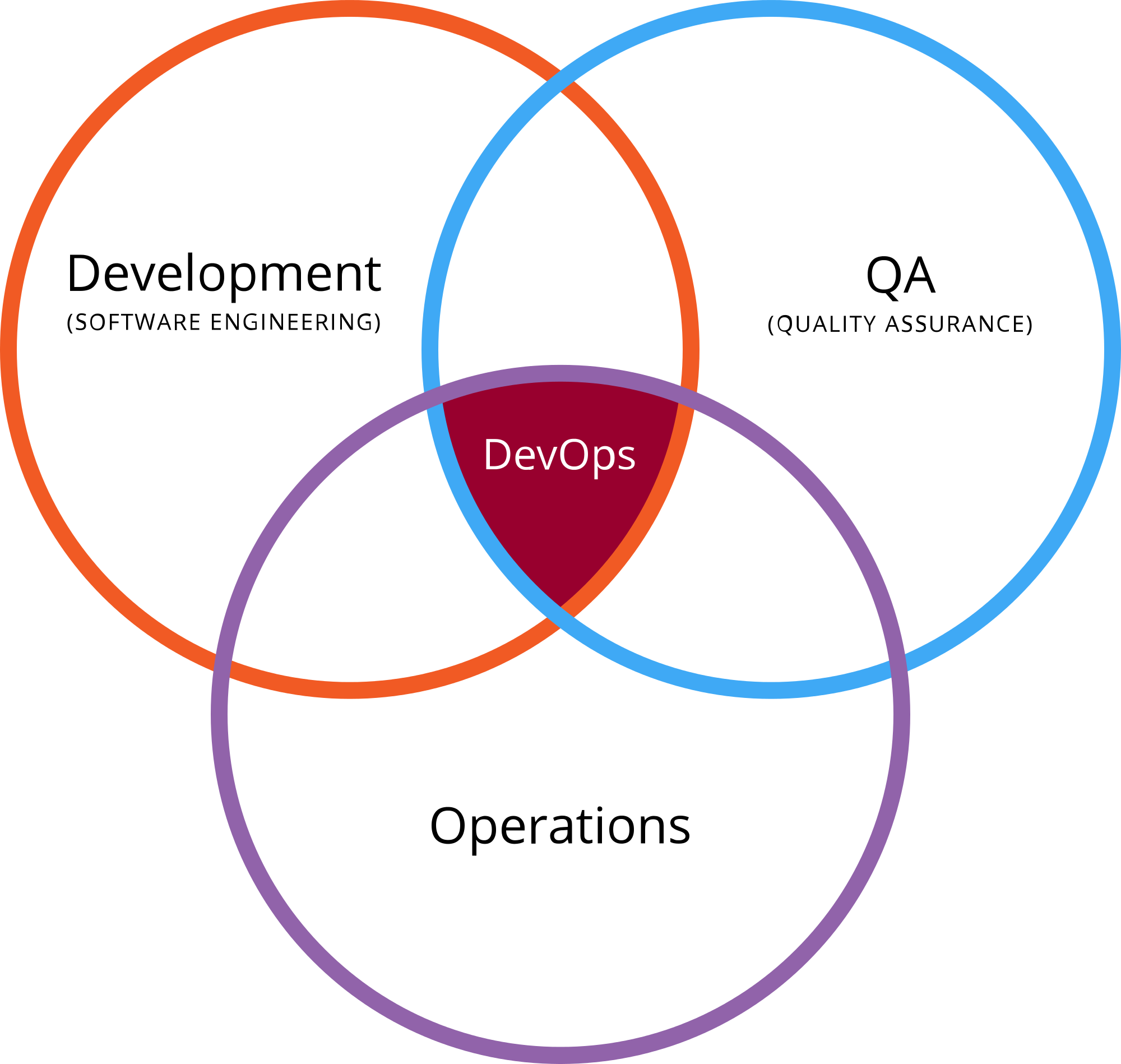
    devops qaOne common argument is that DevOps sits at the center of a Venn diagram of dev, ops, and QA:
    On one side, QA works together with development in trying to push more of their tests into the continuous integration system. Tests must have zero human intervention and generate their own test data.

    On the other side, QA works with operations to collaborate on monitoring tools; perhaps to continuously run smoke tests in production. Chances are that operations is developing scripts for backup and restore of production systems, rollback of deploy, or scripts for disaster recovery.

    Tim Hinds at NeoTYS looks at the issue differently and says that “DevOps QA” is meant to prevent defects rather than find them:

    QA takes a critical role in this organizational structure because they have the visibility and the directive to push code out when it is working, and roll it back when it is not. This is a very different mindset from QA organizations of 10 years ago, whose primary responsibilities involved finding bugs. Today QA groups are charged with preventing defects from reaching the public site.

    With all due respect, both are wrong.

    Why DevOps Does Not Need QA

    DevOps often uses continuous integration (CI) and continuous delivery (CD). In CI, developers use various continuous integration tools to integrate code into a shared repository multiple times each day, and DevOps relies on automation to determine the quality of the version. You cannot have any human interaction if you want to run CD, which ensures that any version of a batch of code in the repository can be released at any given time.

    Essentially, the traditional QA cannot work in a full CI/CD environment. In older structures, the responsibility for software quality was in the hands of QA. Today, it’s part of the DevOps culture and methodology—the developers now own the responsibility rather than a separate entity within the organization.

    Specifically, DevOps entails the use of vendors and tools such as BUGtrack, JIRA and GitHub to aggregate and report software bugs and defects. Test automation tools including Selenium, Cucumber, JUnit, TestNG and JMeter manage, execute and measure functional tests and cycles.

    In the end, if there is a layer of people in the middle between development and operations, then you cannot perform CI and CD seamlessly and, therefore, cannot do DevOps. To run a proper DevOps operation, you cannot have QA at all.

    The Future of QA

    So, what will happen to all of the people who work in QA? One of the happiest jobs in the United States might not be happy for long as more and more organizations move to DevOps and they become more and more redundant.

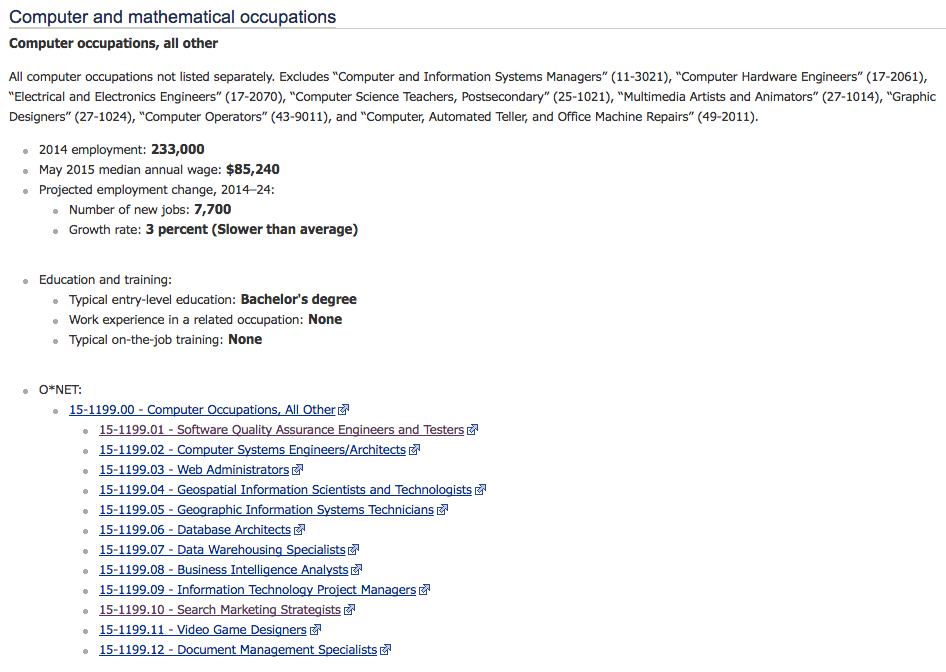
    According to the U.S. Bureau of Labor Statistics (BLS), software quality engineering is one of the high-tech professions whose growth rate is projected to be slower than average:

    qa job outlook

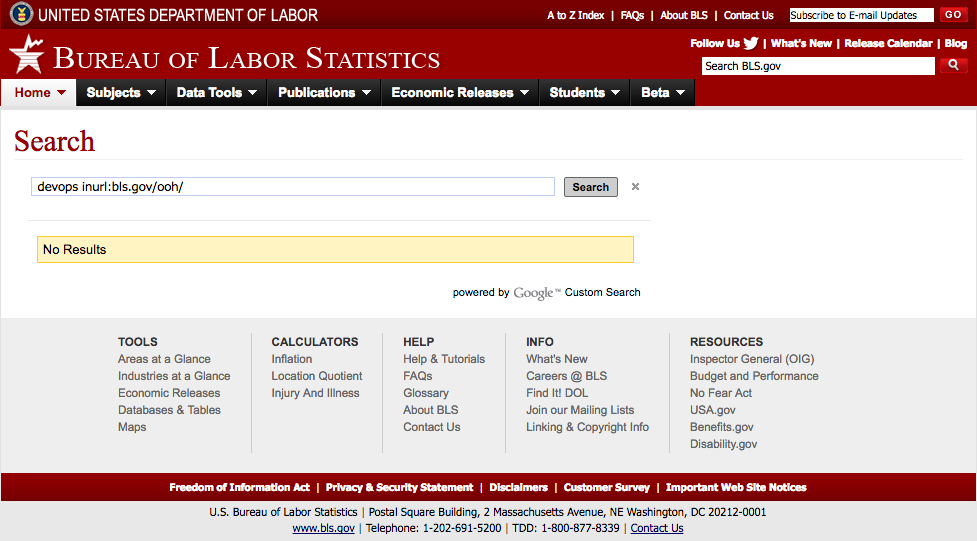
    However, the BLS numbers are likely too generous because the bureau does not yet recognize “DevOps” as a separate profession at all:

    image02

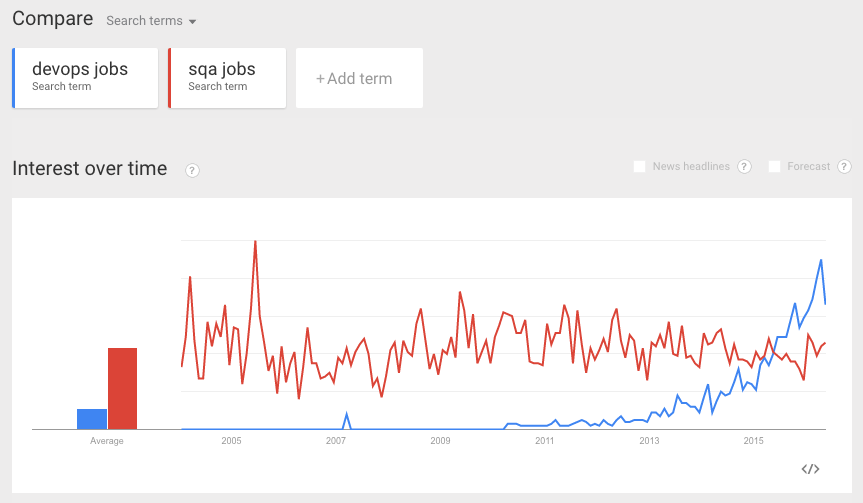
    As evidence, just look at how the relative number of Google searches in Google Trends for “sqa jobs” is slowly declining while the number for “devops jobs” is rapidly increasing:

    qa jobs vs devops jobs

    For QA, the trend definitely does not look good.

  • Q&A: CircleCI’s Kevin Bell on Continuous Delivery

    Q&A: CircleCI’s Kevin Bell on Continuous Delivery

    There’s been a lot of talk and momentum lately when it comes to continuous delivery. And it seems every enterprise has moved part, or all, of its development efforts to continuous delivery—or is at least talking about doing so. But there are many challenges such as security, dealing with legacy systems and internal politics associated with the move. With that in mind, we wanted to get a sense of where continuous delivery stands in the market today. And for that we turned to Kevin Bell of continuous integration and delivery platform maker CircleCI.

    Kevin Bell has been a both developer and product manager of cloud-based software products, and is currently developer evangelist at CircleCI, where he gets to play with almost every deployment-related technology out there, hack a little Clojure and absorb the wisdom of very smart colleagues and customers. We thought it’d be a good idea to get his perspective on continuous delivery in the marketplace.

    Kevin Bell Headshot

    devopsy.kinsta.cloud: I wanted to get a sense from you where your customers are in the range of continuous integration and continuous delivery? What are you observing in the market?

    Bell: I would say continuous integration is a hard prerequisite to continuous delivery. You need to have continuous integration first, and once you have that down, you can expand from that into continuous delivery. Maybe there are people that automate deployments with a minimum of testing in the middle, but you really want to have continuous integration set up.

    Generally, I would say of our customers, on the order of half of the active customers, are deep into continuous delivery. There are certainly people that just use us to test and then do something else to deploy, and then there are those who aggressively, many times a day, deploy to production directly from CircleCI in a totally automated fashion. So we definitely have both extremes and then people that are experimenting in the middle on trying to figure out how to make that jump.

    devopsy.kinsta.cloud: Have you seen many of these changes in the past year? And are many of the changes to continuous integration and deployment happening outside of Internet and SaaS (software-as-a-service) companies?

    Bell: Lots of companies want to do it. So one change I’ve seen in the past year is that, not necessarily a change in the market, but a change in CircleCI’s world is that we have rolled out an enterprise version, which basically means a version of CircleCI that you can deploy behind your firewall. We are seeing a lot of interest in this among bigger companies. And we’re talking to a lot of different types of companies that are not SaaS companies, but are just any kind of company from apparel to finance institutions—just all manner of companies that take their internal software development practice very seriously, and very much want to do continuous delivery and have a modern software delivery methodology.

    It’s kind of just becoming table stakes that you’re going to follow these kinds of practices today, even if you’re not a SaaS startup. It’s not just about software deployment, either. It’s also necessary to attract talent.

    devopsy.kinsta.cloud: I would imagine, because we’re starting to see pilots and success stories, enterprises are seeing that it’s not just speed when it comes to feature release, but once the continuous delivery pipeline is up and running, it’s a more effective way to create and maintain software.

    Bell: That’s definitely a big part of the promise of continuous delivery, and I think it delivers. Pardon the pun. It does let you get software features out faster. If you do end up releasing a bug, it lets you fix it faster. But I think some of the most emotional stories of success that I hear from people talking about the dark old days when they deployed at once every two weeks, or once every month, is just how risky that felt. And when they clicked the big deployment button in those days, how much was at stake and how many things could go wrong because it was such a big blob of software being deployed all at once. A big part of the idea of continuous delivery is that you don’t do those big bang software deployments. You’re always just putting out a little bit at a time, and keep everything in an equilibrium throughout the process.

    devopsy.kinsta.cloud: These enterprises that you were talking to, what are some of the challenges or hurdles they have moving from legacy development to continuous deployment? What are the barriers they need to overcome to get to where they want to be?

    Bell: There’s certainly various barriers, and it depends on the organization. Some organizations have a momentum built around a certain process. Maybe there’s political issues in an organization, maybe they have a new CIO that wants to change how they do things, but they have a lot of legacy software and processes that still operate in the old-mold paradigm that they need to update. So there are a lot of systematic challenges organizations run into. But there are definitely technical challenges, too. And I think just broadly to compare, for example, continuous integration and continuous delivery, I would say that continuous integration has been around longer now and has kind of matured a bit.

    And a lot of the challenges have been uncovered within continuous integration when it relates to complicated and offbeat projects, whether that’s using things like mobile emulators like you can use on CircleCI to do iOS testing, or mobile device clouds, or browser testing, or all these things to kind of fill in the gaps, and test suites for big complicated software has sort of been explored and addressed to a large extent. But in continuous delivery there remain complicated, nontrivial systems that they’re deploying, not just little apps that go to Heroku or something. There’s this whole world of different policies and structures of software and systems that need to be continuously delivered. I think the industry and toolset makers are still exploring how to provide that.

    devopsy.kinsta.cloud: Earlier you mentioned that if an organization wants to attract talent, they need to have these modern development processes in place. So I would imagine developers don’t want to get bogged down, in their view, in old methodologies and want to get aligned with companies that have these more modern practices as part of their career development?

    Bell: That’s come up often at big companies. I would say that category of Fortune 500 companies, and not just software companies, they need to assure potential hires that they have modern software practices, and that even though they’re not a software company per se, that they value developers, and that they’re going to be a good place to work.

  • Embedding Predictive Analytics

    Embedding Predictive Analytics

    For an enterprise with a deep DevOps maturity model, the initial “wow” factor of automation has worn off. At this point, the sexier concepts involve proving continuous improvement. As an example, our first baseline of metrics might have taken the pre-DevOps timings of a typical build and deployment of a given application. We can measure this time against our post-implementation of DevOps automation and show a significant savings in time. This is opportunity time, meaning an employee must be ready to turn around the decision cycle faster to take advantage of the time saved (not be playing solitaire, for example). But once DevOps automation is old hat, the difference between our initial post-DevOps typical build and deployment time and our current one still using DevOps may not be all that significant. But is there more hidden there than meets the eye?

    Establishing Context & Baselines

    At this point context may be a more meaningful measurement. As an example, if my first version of DevOps automation for a deployment contained 35 steps and my current one contains 160 steps it would stand to reason I am “doing more” now in my deployments than I used to do. These additional steps may involve executing more tests than I originally thought to do. They may be interacting with monitoring systems (turning them on and off as appropriate), which reduces “noise” in the alerts my monitoring teams have to respond to. In short, over time, my deployment processes may become “longer” because I am increasing the capabilities or the sophistication of what I do during these deployments. While from a pure timing perspective this may make them longer, it also makes them more powerful and, so, is worth measuring. To know the delta, however, I must have retained older versions of automation to compare against, not just throw away the old every time I update with new steps.

    So let us assume the context of my automation is now fairly stable. I do the same things, more or less, the same way every time I deploy my application. At this point, measuring the functionality of what I do becomes more meaningful. As an example, my deployment automation may complete four main functional tasks to complete, I deploy the code (the app), I deploy the dataset, I deploy the config files and, finally, I run a series of tests on the above. While I may not ever incorporate too many new kinds of things to do in this automation, understanding how long each function takes to complete is relevant to proving continuous improvement. For instance, if my code takes roughly the same amount of time each deployment, as does my config files, but all of the sudden my dataset begins to grow in each deployment (from normal usage), my overall deployments may be getting slower. This is not due to hardware inefficiency or network inefficiency; it is simply due to a larger dataset that keeps growing.

    If on the other hand, it is my test set that is getting progressively longer to execute, that is an indicator of test script inefficiency (given same code, same config and same dataset). If the number of tests being executed has not increased, but the length of time it takes to run them has, there likely is inefficiency in “how” the testing is being constructed or executed. Understanding the context for what is going on in a deployment or similar kinds of automation must occur before introducing predictive analytics can occur.

    Historical Trends Extended

    Predictively evaluating automation is nothing more than taking the data from a historical perspective and extending the trend lines into the immediate future. If for example, my deployment automation is getting four seconds longer each month for the last 12 months, I can reasonably infer the trend will continue, and I can predict the length of time it takes to execute a deployment in the coming months. Understanding “why” this occurs requires a contextual investigation, but predicting its occurrence does not. This may seem inconsequential as we talk about the length of deployment processes of a given app, particularly if my portfolio of apps is small. But if the trend holds true for a portfolio of thousands of applications, the impacts become more consequential. Or if the phenomenon is directly connected to a particular cloud provider and not seen elsewhere, again, the consequences become meaningful.

    Where having “ground-up” predictive analytics (build and/or deployment automation) becomes much more useful is in the construction of release events. Often, release managers are asked to supply an estimated time duration for a given event to factor into the construction of a new release. If a vendor were to integrate more predictive analytical tooling into the release orchestration (RO) toolsets, “random” or “best guess” timing estimates could be replaced by extending historical data into the timing estimation fields. The RO tooling could provide a default timing estimation based on examining historical trends for a period defined by the user. Estimation defaults could always be replaced by a user (assuming discreet knowledge of other impacting events), but at least the new overall lengths of releases then could become significantly more accurate.

    This has special significance for manual tasks. Let’s say our database admin team traditionally takes 40 minutes to perform a given release event update, but now is running significantly longer than that. Having the RO software aware of the historical trends could alert the release manager, as well as the database team manager, during the event to check out why this is occurring. For manual tasks in particular it may be hard for anyone besides a predictive analytics module to determine what timings “should” be, as compared with what they are in a given release.

    Impacts to the Bottom Line 

    The real questions are, Why should a customer care about this kind of feature set? Why should we be looking at the vendors of our tooling to incorporate forward-thinking architectures such as predictive analytics into the tooling they sell us? Because the efficiency it can bring to our DevOps set of services lowers the costs of administration and increases the speed at which we can deliver innovation in general. Over time, trending combined with context can statistically prove continuous improvement of our DevOps services, which is the promise we made to the executive teams that sponsored and made the investment in DevOps to begin with.

    Metrics analysis can occur (usually with a dedicated investment on our part) without a predictive view of the impacts. But this changes the perspective of our analysis to hindsight thinking instead of forward thinking. In essence, we then are simply “reacting” to what has occurred instead of tailoring our environment to alter the picture of future predicted events to be better than the software predicts it to be. We start tweaking the variables to instantly impact future predictions, instead of only examining them in a post mortem.

    This perspective is yet another cultural catalyst for change your business needs. When I talk about changing how an organization “thinks” about innovation, this is one of the key objectives. We take an enterprise from knowing little about the costs of innovation, to having an extensive knowledge, to having a forward view of what is—or what should be, possible. All of this is possible despite the loss of waterfall controls and in the midst of an agile construction model. All it takes is the integration of forward-thinking architectures into the products we select. If our vendor does not offer them, we begin to enlighten our vendors on the value they would bring to us in cost reduction and to them in market capture. If you need help in these areas, feel free to contact me, I am looking at the moment 🙂 .

    To continue the conversation, feel free to contact me.

  • The Automation of Compliance

    The Automation of Compliance

    Consider how much money your enterprise spends on audits. Smaller firms not subject to external regulation should consider how much money is spent on quality assurance—or the lack of it. A business that suffers from a customer-facing quality incident will, at minimum tarnish the brand of its services or at the high end, lose market share altogether. Larger firms that fail audits can suffer from brand tarnishing as well as high fees, not to mention further scrutiny by regulatory agencies.

    Failure to perform or failure to follow proscribed processes inevitably leads to a black eye in front of customers. The entire discipline of governance is premised on avoiding both. Whether your governance practices are efficient or not—and whether your “process” as it sits today leads to quality or not—is not the subject of this review; it is how DevOps and automation can shine a spotlight on both and radically reduce the costs you spend today to achieve them.

    The Spotlight of DevOps

    The spotlight of DevOps begins with consistency that leads to predictability. Automating any given kind of process or technology the same way every time begins to give insight on any “holes” from things that do not work (or work well). If all that changes in your deployment process, for example, are pointers inside a configuration file and the kind of testing executed against this version of the code, you have achieved a build-once, deploy-many state of deployment automation. Operations staff who support the deployment of change or maintain the environments in the software development life cycle (SDLC) begin to  isolate any issues faster because they become familiar with “how” a given kind of technology is automated to deploy. This reduces the total number of deployment errors and, in tandem, reduces the length of time it takes to fix them. Any “process” problems or weaknesses in your governance model become apparent quickly and can be fixed quickly. Limiting variation is the medicine to keep them away in future.

    The spotlight of DevOps next turns to transparency. Offering your entire enterprise visibility or “read only” access to your entire DevOps tooling suite has a profound impact on the transparency of change. As an example, consider that I am a humble accountant in your firm who has submitted an agile story to improve our billing system. I may or may not, given the nature of my job, be co-located near the programming team who will fulfill this request. If our firm specializes in accounting software then perhaps I will co-locate, but if I am only requesting a change to an ancillary or support system, likely not. Without direct access to the programmers through traditional agile co-location, my visibility into the progress of change is limited to the tracking system I submitted the request within (assuming you have one, and don’t use email to do this).

    If I know a programmer in MIS, perhaps I ask him at lunch how my change is coming along. But if I have read-only access to the testing systems, or to the release orchestration (RO) tooling, I may get a much better up-to-the-minute view of exactly where my change is, how it is doing from a quality assurance (QA) perspective, and when it is scheduled for release into production. Based on this news, I may make decisions about how we bill our customers in what time frame to increase overall revenue to the company. I would notify my boss of same (who also has access, but pays less attention), and of any changes that impact the new timeline I create. The marketing team (who also has access) begins to work with public relations (PR) and the advertising guys on customer announcements, etc. etc.

    The net impact of having universal transparency is that audiences who are not traditionally notified or interested in the inner workings of change movement now make decisions based on it. Consider that prior to this systemic access, and the reliability of DevOps to ensure delivery, the only news you got before was from “the IT guy,” who was often wrong. It does not take long before IT loses credibility from being wrong about delivery timelines, and these other audiences begin to pay less attention (if at all). At that point, an “I’ll believe it when I see it,” attitude emerges. And this same attitude infects internal auditors because of what they hear and see from disaffected internal customers who have been misled repeatedly by the failed manual methods of the past (pre-DevOps).

    Processes that are disinfected over time by the consistency of DevOps begin to change the internal company thinking about the delivery of innovation—namely that it can be counted on as accurate. Transparency offered to all audiences of a company increases the visibility into all aspects of innovation delivery and better ideas emerge, both about what to do with completed efforts and how to improve the innovation process itself. And before you know it, your governance and QA processes become efficient, reliable and predictable. Variation is eliminated or greatly reduced, and the costs of operation and innovation begin to decline.

    The Forgotten Stepchild of Automation

    What is rarely a matter of focus in most companies is the secondary ability to automate the compliance history of a given application. Most firms are content (translate, only able to) work with their testing tools to produce logs about a given version of an application now residing in production. A test log does show an auditor the majority of the quality related information about a given version of an application. But the log is a highly limited view of what has taken place. What is needed is the full context of innovation. Enter compliance automation.

    Consider for a moment, that requirements drive the train. Why are we doing the innovation we are doing? Is this a bug-fix, a new feature, a client request, a regulatory requirement? Being able to trace the code itself back to the requirements system that drove the need adds significantly more context than is possible from mere test logs. Next, think about the number of attempts that finally resulted in this version of the application. An automated build tool (part of our DevOps suite) has this information. At this point you could evaluate how many builds and deployments took place in development before a worthwhile candidate emerged to traverse the remainder of the SDLC. An automated deployment tool (part of our DevOps suite) can trace the number of environments this version of the app was deployed into for testing and how long the overall process took to get something moved from development to production.

    And finally, testing is often done from a variety of tools, with results compiled in a variety of result repositories. This information may be available from a solid RO tool that tracks the gated progress of this version of the application, but if it’s not, it still should be sitting in each of the testing tools used throughout the process. Depending on the level of inherent DevOps tool integration (i.e., using a vendor suite) much of this information may “flow” from one tool to the next. But if not, the information does still exist in the logs produced by each of the DevOps tools.

    It may be well worth the application of internal programming resources to put together a tool that gathers all this information (automates the collection and presentation of) for audit purposes. Imagine the reduction in cost of supporting an audit that can gather a simple push-button report (or dashboard) of the entire life cycle of a given version of change. At that point, you have the entire context for a piece of innovation. You know what drove it (requirements). You know what it took to create it (build and deploy). You know the entire history of testing it (testing tools). And, finally, you have the entire governance process used in its deployment to production (RO tooling). But instead of examining multiple tools to collect and present it, you have created a push-button system to do so.

    Impacts to the Bottom Line

    The investment in adding automation to the compliance history of innovation pays off in more than one way. It is not just the ease with which history can be recited. It follows the same principles as DevOps itself. Automation introduces consistency in how audit information is gathered and presented (reducing variability from one audit to the next). Automation introduces transparency if the entire company is given “read only” access to this new system. Automation shows auditors we are not afraid to learn from our mistakes and proud of our accomplishments. And in effect, it reduces the need for audit altogether.

    Typically, regulatory bodies investigate and audit firms where they are uncertain of how the results were obtained. An automated system like this one fully eliminates that need. Transparency as could be offered here, may convince auditors that attention is not warranted here. Keeping in mind the spotlight of DevOps has already improved quality and streamlined process, add to that full transparency of audit materials and the confidence of auditors regarding your company may increase significantly. Routine becomes the only reason to audit, rather than suspicion.

    Invariably the “new” will sometimes result in an error that your current systems and processes (automated or not) will not catch. But this truism is recognized, and accounted for, in how DevOps enables innovation. And if you have this kind of automation in place, it can be demonstrated in how we fixed what we fixed (whether governance or QA). Your strategies in DevOps should help you achieve this level of confidence. (If you need help, feel free to contact me, I am currently looking.)

    To continue the conversation, feel free to contact me.