Tag: QA

  • AI Code Generation Raises New Quality Risks

    AI Code Generation Raises New Quality Risks

    AI coding tools are producing more code, faster, than teams have ever had to absorb before. That productivity story is real, but it comes with a bill that most engineering leaders have not fully paid yet. Technical debt piles up faster. Repetition slips in. Security gaps and quality issues show up in places where nobody was watching, because nobody wrote the code that put them there. Speed alone is not the win it appears to be if the review layer never scales to match.

    Mike Vizard sits down with Mladen Lazic, CTO of Scopic, to work through what it actually takes to keep AI-assisted development from turning into a debt engine. Lazic’s core point is that reviewing AI-generated code is genuinely harder when engineers were not part of how it was created — context is missing, intent is unclear, and the usual mental shortcuts a reviewer relies on stop working. His answer is to keep developers in the loop from the start and treat AI tools as junior developers who need direction, not autonomous builders who ship features alone.

    They get into the mechanics of independent validation. Lazic warns against a common failure pattern where the same AI agent writes the code, generates the tests and reviews the output — effectively grading its own work. Scopic is moving toward separate agents for coding, pull request review and test creation, with some testing agents deliberately blind to the source code so they validate against requirements rather than against whatever the coding agent happened to produce. That separation is what turns AI QA into a real check instead of a rubber stamp.

    Looking further out, Lazic expects the engineer’s job to shift toward instruction, monitoring, verification and improvement rather than raw production. That reframes AI code quality as a durable concern for DevOps, security and application leaders — not a phase to get through. The teams that build better gates, sharper observability and independent QA now will be the ones shipping better software sooner, without eating the debt everyone else is quietly accumulating.

  • AI Is Forcing a Rethink of Software Testing and QA

    AI Is Forcing a Rethink of Software Testing and QA

    SmartBear vice president of AI and architecture Fitz Nowlan explains why maintaining software integrity in the age of artificial intelligence requires organizations to double down on testing and quality assurance. He discusses how AI-driven development increases risk and why stronger QA practices are essential for reliable software delivery.

    Nowlan argues that AI-driven development increases risk in a few ways. More code gets produced, more quickly, which means more surface area for defects and more opportunity for issues to slip into production. He also notes that relying on traditional, manually authored testing approaches can’t keep up with the churn created by AI-generated code. As a result, organizations need to “double down” on testing and quality assurance, and they need to modernize how QA is done.

    A central theme of the conversation is the rise of AI-powered QA. Nowlan explains why the same wave of automation transforming software creation must also transform test management, test execution, and even test authoring. He points to functional specifications—requirements and definitions of correctness—as the source of truth that can guide both what gets built and what gets tested, especially as roles blend across development, QA, DevOps, and product management.

    The discussion also tackles a common concern: can you use AI to test AI-written code without “letting the fox guard the henhouse”? Nowlan says the key isn’t necessarily a different model, but a different structure—separating the frameworks and prompts used for QA from those used for building features, and expanding validation beyond just code to include operational signals like latency and system behavior.

    Finally, Nowlan looks ahead to “vibe coding” and citizen development, where prompts and specs matter as much as source code. His message: speed is great, but reliability still wins—and in an AI-driven world, stronger QA practices are the only way to maintain software integrity.

  • What Does Build Quality Look Like in Software Design?

    What Does Build Quality Look Like in Software Design?

    With rapid developments in artificial intelligence (AI), mobile applications and modern software in the last year, the enterprise software market is expected to grow exponentially. Market revenue is projected to reach $292 billion in 2024, and developers are constantly implementing innovative measures into the software development life cycle (SDLC) to ensure a seamless, high-quality creation process. One of the best ways to achieve this is by leveraging modern build health tools to monitor a multi-faceted project’s overall quality and performance.

    Build health tools automate the creation of executable applications from source code and encompass several areas to ensure the stability and health of the software build process. From automated testing to security scanning, developers rely on these tools and processes when defining a modern approach to software development. Before diving into the intricacies of build health quality, it is necessary to grasp the complete significance of the SDLC when attaining the final product in a global marketplace.

    The Significance of the SDLC

    The SDLC is the process in which developers plan, write, modify and maintain software. This methodology applies to software developed for computers, mobile phone applications, video games and other systems. Adhering to this process allows developers to reach the optimal outcome for the final product. The life cycle includes everything from the planning and brainstorming stage to setting up maintenance and operations after the product has launched. It ensures success by providing a more structured approach to building and developing software. This becomes increasingly important as the software market’s value continues to rise.

    Since 2020, the demand for software engineers has doubled. Because it’s essential for business leaders and developers to keep up with the latest trends and innovations, the need for software knowledge will continue to grow exponentially. Currently, software is typically delivered in one of two ways:

    • On-premises. End users install and run the software themselves on the desired device. This serves as a more secure delivery method for highly-regulated industries.
    • Software-as-a-service (SaaS). This cloud-based method allows end users to access the software online rather than through a traditional download/upload. This enables providers to offer a subscription-based/pay-as-you-go structure for users. The provider is responsible for the hosting and maintenance.

    Developers rely heavily on build health tools to ensure a smoothly running life cycle. Build health tools play a huge role in determining a seamless development process.

    The Role of Build Health Tools in Modern Software Development

    Build health tools essentially fill the gaps in the development process and enhance the software build quality. These tools deliver automated testing methods by creating multiple testing scenarios to ensure full functionality. They help developers see the different data points necessary for garnering a 360-degree view of the software and its status.

    The tools also impact resource utilization and response times. Using key performance indicators (KPIs), they monitor the build quality while enhancing build production to ensure it is better than what was previously developed. In that way, it is constantly growing and improving to guarantee the project reaches a smooth and seamless completion for the developer. From there, the tools can create multiple datasets in less time, which significantly reduces overall software development time.

    Common Challenges of Build Health Tools in Software Design Projects

    There are several challenges with using build health tools. The most common obstacle is that automated tools and testing lack the human touch that comes from developers and their manual work. Although build health tools can perform simultaneous tasks quicker than a more manual approach, they overlook the full spectrum of available resources to improve the build. These tools are so focused on functionality that they fail to incorporate the prior research and available resources that often serve as key building blocks for a successful development project. For this reason, it is important to have developers working in conjunction with build health tools to provide a balance between manual and automated software testing.

    Developers can leverage build health tools to seek out the KPIs that determine the software’s quality at a given stage of the SDLC, from initial development and quality assurance (QA) to the final phases of staging and production. Some of these KPIs include:

    • Exceptions. Make sure there are no new exceptions from the previous build versus the production stage.
    • Test coverage. Ensure that adequate testing is performed on the current build by defining what application programming interfaces (APIs) need to be included for certification, along with the number of executions required.
    • Automated data validation. Make sure data is accurate and useful while remaining enforceable by the designated standards.
    • API testing. Test the overall interface for smooth performance with trustworthy data to advance the program/project. It is also important to compare performances during different SDLC stages to confirm the status of the API, dependency, database, and functionality.
    • Memory/CPU usage. Measure the overall usage of the central processing unit (CPU) and its memory to ensure stability and efficiency.
    • Requests per minute. Evaluate the rate at which the software can receive and execute certain requests delivered by the end user to ensure optimal efficiency.
    • SQL coding standards. Enforce standards and limitations for the overall coding within the interface by measuring quality, security, efficiency, and sustainability.

    While these are only a few of the KPIs detectable with the aid of build health tools, it is essential to note how these tools can benefit a successful software release. Developers can compare the differences between current and prior builds throughout the SDLC to fully gauge any changes, developments, improvements, or downgrades during production to a successful launch.

    Current Events and the Future of Build Health Quality for Developers

    There are many examples of current organizations effectively leveraging available build health tools for project success. Software developers will continue to adopt new and innovative methods using AI and automation capabilities to ensure more efficient testing and higher build quality.

    The future is bright for contemporary software engineering. As unexpected as the AI boom of 2023 was for the tech world, the future of modern software development may hold even more surprising developments. Build health tools are expanding and perfecting the creation process for enterprises and developers worldwide. As build quality improves on the back end, the customer experience for global industries will improve on the front end. The potential for software enhancements and innovations in this way is what makes the journey exciting.

  • Improve Efficiency With Smaller Code Reviews

    Improve Efficiency With Smaller Code Reviews

    In software development, code review plays a significant role in helping detect issues in your application’s source code early and promote collaboration among your team members. Breaking down code reviews into more manageable portions can yield great benefits. Review cycles are shorter and more convenient to comprehend when they are smaller. In other words, smaller reviews are easier to comprehend and provide feedback cycles. As a result, we can reduce development, deployment and debugging times while reducing the scope of change in each iteration.

    This article presents a discussion on code reviews, why they are important, their benefits and why smaller code review cycles are more effective than larger ones.

    What is Code Review?

    Code review is defined as a software development process which involves reviewing code written by other developers. As part of the development process, it aims to improve code quality, ensure compliance with standards and identify and fix problems early on. Code reviews play a role in software development as they help catch errors before they turn into significant issues.

    Peer reviews allow developers to detect errors or defects in each other’s code. By reviewing each other’s code, developers are able to identify bugs and flaws in the code. It helps deliver code that is secure and sustainable, adheres to standards and detects and resolves problems early in the development life cycle.

    This can either be a formal process, where code is systematically evaluated according to a checklist or set of guidelines, or an informal process, where code is reviewed ad hoc. Code review can be performed by the same developers working on the code or by other developers with expertise in the relevant domain or technology.

    ​By engaging in the exchange of feedback and actively participating in code reviews, we can ensure that the code is well-organized, easy to comprehend, adapt and extend over time. To be effective, it’s essential that everyone on the team is on the same page when it comes to their expectations and goals regarding these reviews.

    Here are the key benefits of code review at a glance:

    • Identify bugs and issues
    • Improve code quality, consistency and maintainability
    • Enforce coding standards
    • Foster team collaboration
    • Promote knowledge sharing

    Best Practices of Code Review

    Here are some of the best practices you should follow to improve your code review process:

    • Review small units of code
    • Set clear objectives and guidelines
    • Involve multiple reviewers
    • Provide constructive and respectful feedback
    • Use code review tools
    • Prioritize high-risk areas
    • Balance attention to detail with time efficiency
    • Encourage collaboration and learning
    • Set realistic deadlines
    • Follow up and close the loop

    Automating the Code Review Process

    Automated code reviews can help you enhance collaboration amongst your team and reduce the time spent in each cycle. Your developers can improve code quality and maximize productivity by automating the development workflow.

    Here are the key benefits of automating the code review process:

    • Enhances code quality
    • Improves productivity
    • Enhances code quality
    • Improves collaboration
    • Fosters learning opportunities

    The Problem With Large Code Reviews

    The traditional approach to code review often involves reviewing large chunks of code in a single session. Although this approach is initially efficient, it can lead to multiple problems. You will need more effort and spend more time reviewing large chunks of code. If code reviews are extensive and take longer to complete, it can often result in decreased attention to detail. Due to this, the likelihood of missing crucial errors and reviewer fatigue will increase, resulting in delays in feedback and completing the code review process.

    The Benefits of Smaller Code Reviews

    When the code review cycle is small, it becomes easier to track deployment changes easily. Smaller code reviews continuously improve development, deployment and debugging times and reduce the radius of a change set. As a result, it promotes faster deployment and helps identify issues easily and early in the software development life cycle.

    Once a code review cycle is complete, the code goes through many steps before it finally reaches the production phase. Monitoring the application’s performance and detecting bugs (if any) is much easier when you make only minimal changes to your code. When the changes are small, it is easier to track the application’s behavior and detect bugs.

    Here are some benefits of adopting smaller code reviews:

    Focused Review

    Reviewing smaller chunks of code enables you to analyze the code in a more focused and in-depth manner. This helps reviewers focus on specific functionality or components, leading to more accurate feedback.

    Reduced Cognitive Load

    Limiting the amount of code to review reduces cognitive overload for both developers and reviewers. Smaller code review cycles can be more efficient because they break down the review process into more manageable chunks. As a result, you’ll be able to evaluate code quality in a much more effective and efficient manner and identify potential issues or improvements more easily.

    Faster Feedback Loop

    Smaller code reviews can significantly speed up the feedback loop in the development process. Hence, feedback cycles will be faster, i.e., you will be able to receive feedback faster, resulting in quicker iterations and faster software delivery. The smaller the review, the easier it is to digest and the faster the feedback cycle.

    Enhanced Collaboration

    Smaller code reviews allow for more focused discussions and collaboration between reviewers and developers. Most importantly, since you can handle concerns effectively and efficiently, you can engage in more productive discussions. The efficiency and effectiveness of code reviews improves when the expectations of all stakeholders are aligned.

    Measuring Success

    To measure the success of smaller code reviews, consider the metrics and approaches given below:

    Defect Detection Rate

    This is a measure of the number of defects or issues identified during a code review cycle relative to the number of defects found later in testing or in the production environment. Note that a higher defect detection rate indicates you’re able to detect defects effectively.

    Review Efficiency

    Calculate the time it takes to review a chunk of code to understand the pace and efficiency of the code review process.

    Feedback Quality

    Assess the quality of the feedback provided during reviews, such as checking if the feedback is constructive, clear and actionable. Note that if the feedback is of high quality, it would typically yield better code improvements and learning opportunities for your team.

    Cycle Time

    The duration of the code review process is an indicator of efficiency. A shorter cycle time suggests an efficient review process, but quality should not be compromised.

    Automated Checks Integration

    Evaluate how effectively automated tools are integrated into the code review process to detect common issues and reduce the manual effort required in reviews.

    Knowledge Sharing

    Assess how well the code review process facilitates knowledge sharing and cross-team learning. This can be observed through the diversity of reviewers and the nature of the discussions in the review process.

    Bug Rates Post-Release

    Monitor the incidence of bugs or issues in the code post-release. A decrease in this rate can indicate that the code review process is effectively catching and addressing potential problems before release.

    Conclusion

    Code review helps produce code that is highly performant, scalable, secure and compliant with the recommended standards. Code reviews can make the codebase easily understood, flexible and scalable. A collaborative approach to code review can yield several benefits, such as promoting a culture of continuous development and learning, maintaining an organized codebase with clean code and clear structure, helping detect and resolve issues quickly, etc.

  • How to Make the Most of In-House Software Development

    How to Make the Most of In-House Software Development

    Let’s be blunt: Maintaining an in-house software development team can be tough. You must hire skilled developers – which is no easy feat in today’s economy, where talented programmers remain in short supply – and then manage them on an ongoing basis. You must also ensure that your development team is nimble enough to respond to changing business needs and that it can adapt as your technology stack evolves. Given these challenges, it’s no surprise that most organizations now outsource application development instead of relying on in-house teams.

    But I’m here to tell you that just because in-house development can be hard doesn’t mean that outsourcing is always the best approach. On the contrary, IT organizations that choose to invest in in-house development for some or all the work can realize lower overall costs and a competitive advantage by creating domain-specific expertise. Keeping development in-house can help organizations address unique security requirements and maintain full control over the development lifecycle and roadmaps. For businesses with specialized technology, security and operational needs, in-house development is often the best strategy.

    Managing an in-house development team presents some steep challenges. At Komprise, we have refined several practices to keep our team efficient and productive, even in a business environment that is constantly changing.

    Scaling Up

    Scaling teams up is a key challenge for in-house development teams. Finding skilled developers to grow a team can be very difficult, especially when working with a bespoke technology stack.

    There is no simple solution to this challenge, but there are steps you can take to maximize your ability to find and hire development talent. For example, we invest significantly in engaging with college students, allowing us to identify promising developers while they are still in training.

    At the same time, we invest in upskilling our developers who are already on our team so they can take on additional responsibilities. We train our engineers in the latest cloud development and security skills and knowledge. The notion of embedding security into our designs and practices is fundamental to what we do. We also rotate engineers between different teams so they learn new technologies that are important to our business. This strategy allows us to align the work for every developer with their interests and to build reusable skills within our teams. We also hold a technical brown bag three times per month where we cover issues like development for cloud and how it differs from on-premises due to costs or how to design for performance and scalability.

    Focus on Customer Value

    Figuring out which features customers want most is a constant challenge. To address it, we quantitatively track how our customers use our product – which functionality they use most often, for example, and how usage patterns vary across different customer demographics. We evolve these metrics as we develop the product. Additionally, we identify customers who are “power users” and occasionally set up calls between them and our developers to gain additional insight into what customers want. Our marketing team also conducts customer advocacy interviews with our users to learn more about what they like and don’t like.

    Looking at third-party applications and interfaces helps us gain perspective on how best to meet user needs, too. For example, we might examine how Wayfair or Amazon are evolving their UI constructs to inform how we could change our product interface in ways that better meet customer needs. We want our B2B product to be as easy to use as consumer products.

    Invest in QA

    Quality Assurance (QA) operations are distinct from development operations, but if you want a successful in-house development team, you need a great QA team, too. Our QA engineers complement our in-house developers by helping them to deliver the highest-quality product, while also strategizing over how best to handle scale and efficiency challenges. In addition, we’ve invested heavily in QA automation, allowing us to test our applications thoroughly while keeping our team lean and efficient. This ensures that as our product feature set expands, our ability to test the entire product does not increase and we can maintain a monthly release cadence. We use test harnesses to simulate error and failure conditions, by injecting failures into the system or making our network experience a brownout or a blackout. You can’t automate every software test, but you can automate most of them, and QA automation is one of the key ingredients in effective development operations.

    Leverage AI Strategically

    AI is not the solution to every development challenge, but when used properly, AI can accelerate development and help in-house developers work more efficiently. Using AI tools to churn out code has become a hot use case for AI in development since the introduction of solutions like Copilot. AI can be a very useful solution, but the quality of the results it delivers hinges on the quality of the data it ingests. Inhouse development teams working on AI applications have much to consider from the data perspective. To leverage unstructured data, they need ways to find it across data silos, enrich it with new metadata as needed to support search and leverage AI tools like Amazon Macie and Rekognition to further refine the data.

    Optimizing In-House Development for the Long Term

    The importance of keeping in-house development teams happy and productive is likely only to increase as the tasks they work on grow more complex and as new paradigms, like those driven by AI, change the way developers work. The more IT organizations and enterprises can upskill their existing developers and empower them with the right tools and processes to succeed, the better they can leverage their teams to build products and features that bring value to the business.

  • Swimm Adds Generative AI Chat Tool for Documentation

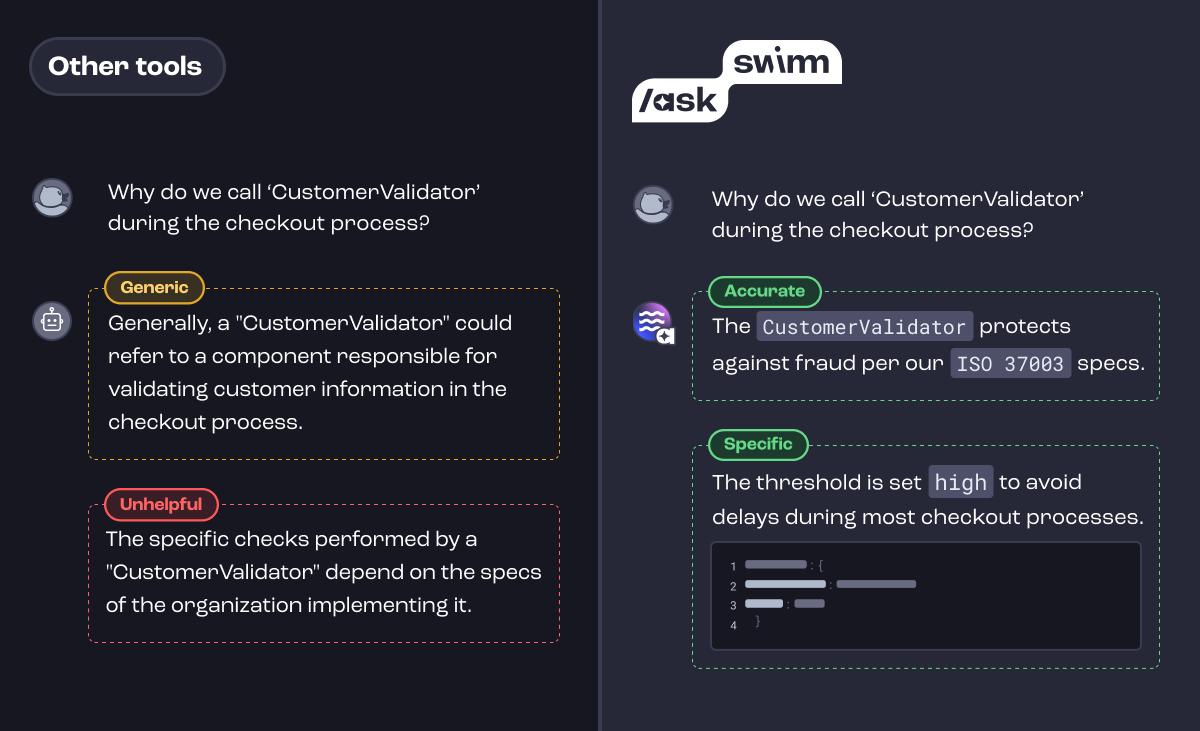
    Swimm today announced it has added a chat tool that enables developers to use natural language to surface insights into code.

    Company CEO Oren Toledano said the /ask Swimm tool makes it simpler to launch queries that enable developers to better understand how code was constructed.

    The /ask Swimm tool aggregates documentation along with other related data to surface factors that are not evident in the code itself, such as documentation of business decisions, product design considerations and decisions concerning why specific architectural choices were made. It automatically captures and updates code-related knowledge to provide a continuous feedback loop as code, documentation, files and repositories are created and updated to provide deeper insights into code that goes beyond what might have been actually documented.

    The overall goal is to provide a mechanism that enables developers to understand how and why code was constructed within the context of an integrated development environment (IDE), said Toledano.

    Swimm has previously made available a platform that uses generative AI platform to create a static analysis of documentation. That capability should make it simpler for organizations to track documentation at a time when generative AI platforms such as ChatGPT are exponentially increasing the amount of code being written. In theory, those platforms should be able to also create documentation for that code, but there will still be a need for tools to track and analyze it.

    In the longer term, Swimm plans to continue to extend its usage of generative AI to provide deeper levels of insights across entire applications and software ecosystems to address that challenge, noted Toledano.

    In the short term, however, it’s clear that AI is making developers more productive than ever. In fact, the volume of code being generated might soon overwhelm existing DevOps pipelines and workflows. Most DevOps teams will need to revamp those workflows as the pace at which more applications than ever are being developed and deployed faster than ever.

    It’s still early days as far as generative AI adoption is concerned, but it’s clear many developers are already using it to write code. How much of that code makes it into a production environment is difficult to determine, but a lot of that code is going to be of varying quality. A general-purpose AI platform such as ChatGPT was trained using code collected from all across the web. The code generated by these platforms is only as good as the examples used to train it, all of which were created by human developers who may have made mistakes, such as including code that has known vulnerabilities.

    Regardless of whether code was generated by a machine or a human, the probability that documentation will need to be analyzed as part of a code review process is always high. The challenge and the opportunity is to determine the best way to apply AI to a longstanding challenge that is now being exacerbated by the existence of AI tools that, with each passing day, are only becoming more accessible to developers.