Tag: QA

  • Sauce Labs Adds Visual Testing Tool to Platform

    Sauce Labs Adds Visual Testing Tool to Platform

    Sauce Labs has added native visual regression testing capabilities to its testing platform to enable DevOps teams to streamline workflows.

    Marcus Merrell, vice president of technology strategy for Sauce Labs, said Sauce Visual provides the ability to test user interfaces without requiring DevOps teams to acquire, maintain and integrate a separate tool.

    The overall goal is to make it possible to test functions and user interfaces in parallel by adding a single line of code to a DevOps workflow, he added. Updates to the visual presentation of a page are automatically highlighted, with any visual inconsistencies automatically surfaced. In comparison, a standalone visual testing tool increases the time it takes to execute a test suite, noted Merrell.

    Sauce Visual natively uses the same tools as the rest of the Sauce test automation platform, and can be integrated into any continuous integration/continuous delivery (CI/CD) workflow. At launch, Sauce Visual is compatible with Java/JUnit, Java/TestNG, WebDriverIO, Selenium, Appium (web) and Cypress testing tools with support for Playwright, Puppeteer, TestCafe, Espresso, and XCUITest forthcoming.

    The Sauce Labs approach also serves to reduce the total cost of application testing at a time when the number of applications organizations are building and deploying only continues to increase exponentially, said Merrell.

    In general, organizations are attempting to strike a balance between shifting responsibility for testing too far left toward developers that typically lack testing expertise and the need to verify application experiences are delivered as expected. Many organizations have shifted more responsibility for testing toward developers in the hope of improving code quality and reducing the number of vulnerabilities that might find their way into a production environment. The challenge is those efforts have also increased the level of cognitive load developers need to carry at the expense of having more time to write application code.

    Of course, in time, artificial intelligence (AI) tools will make it easier to generate test scripts, but there is still going to be a need for testers who were not involved in the writing of code to validate it, noted Merrell. The difference is those testers will not necessarily need to be rocket scientists as the process of creating tests becomes more automated, he added.

    Testing user interfaces is especially problematic for developers because many of them don’t have a lot of expertise in the business functions that the application they are building enables. In addition, there are often minute changes to user interfaces that developers are not always going to discern.

    As always, one of the first things that tends to be reduced whenever a developer falls behind schedule is testing. In a recent Sauce Labs survey found more than two-thirds (67%) admitted they pushed code into a production environment without testing, with more than a quarter (28%) acknowledging they do so on a regular basis.

    The assumption is that if any issues do arise, they can be addressed via the next update to the application. End users, however, are less tolerant of that approach when, in the age of digital services, an alternative application is readily available.

  • mabl Adds Load Testing Tool to Test Automation Suite

    mabl Adds Load Testing Tool to Test Automation Suite

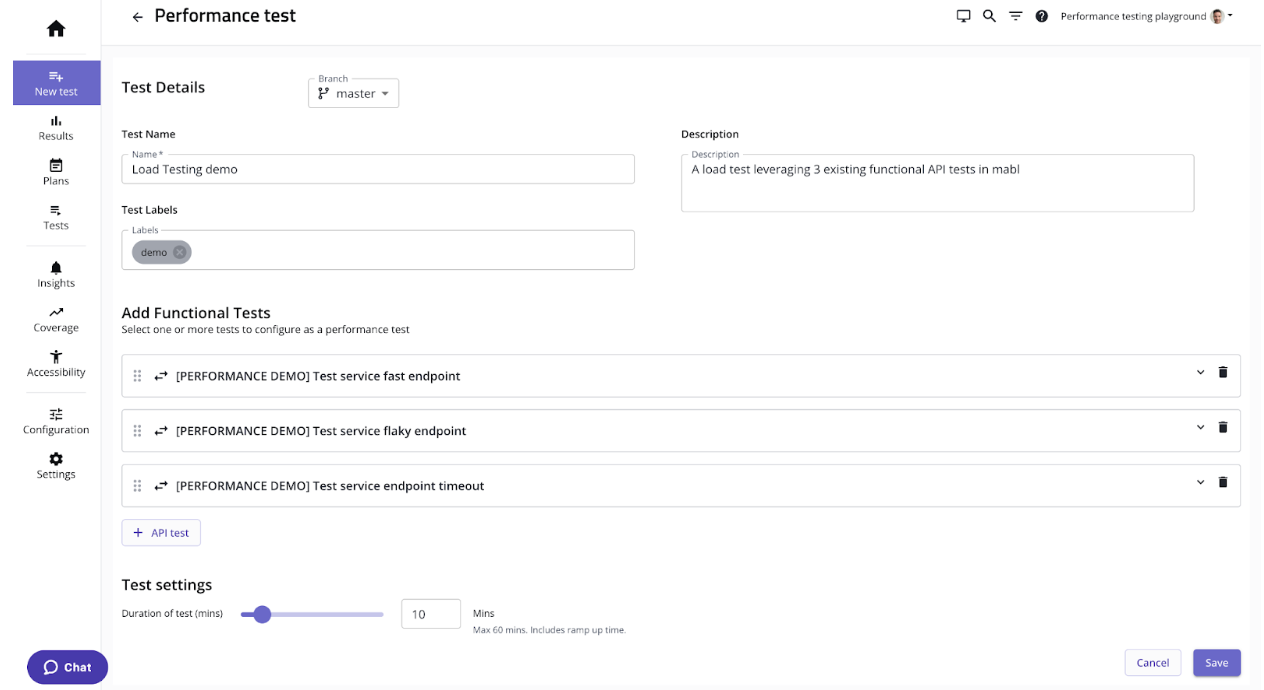
    mabl today added a load testing capability to its portfolio of application testing tools that it makes available via a software-as-a-service (SaaS) platform.

    That capability promises to make it simpler to streamline testing within a DevOps workflow by making available load testing tools that measure application peformance alongside existing mabl tools accessible via a test automation platform.

    Dan Belcher, mabl CEO, said the goal is to make it simpler for developers to run functional and non-functional tests as early as possible within the software development life cycle.

    It’s not clear how much responsibility for testing is shifting left toward developers, but as it becomes simpler to run these tests it is more likely they will be run, noted Belcher. One of the core issues that plagues application development today is the inadequate level of testing. That issue is largely because it takes too much time to create and run relevant tests, he added.

    mabl streamlines that process using a test automation platform based on a low-code tool that makes it simpler to create and manage the testing process. Those tests can be configured to run independently or be integrated with a DevOps pipeline, noted Belcher.

    Shifting testing further left toward developers doesn’t eliminate the need for a dedicated team of testers, but it should reduce the number of routine errors being made. That reduction should free those development teams to focus more of their time and effort on more complex quality assurance (QA) issues, said Belcher.

    Of course, more testing processes will become automated as artificial intelligence (AI) continues to evolve, so most organizations will soon find themselves revamping those processes. In theory, SaaS platforms that aggregate testing data should be in a better position to apply AI models to testing. That’s critical because the pace at which even more complex applications are being built and deployed shows no sign of slowing down.

    In the meantime, DevOps teams should assume they will soon be held more accountable for security issues that arise after an application is deployed. It may be a while, but the number of legislative initiatives focused specifically on application security has increased; it’s only a matter of time before laws that hold organizations liable for security are going to be passed. At the same time, the level of tolerance application software consumers have for issues that arise because some trivial mistake led to, for example, a SQL injection attack, is dropping. The expectation is that application testing is soon going to be a lot more thorough than it has historically been.

    The issue, of course, is that too many development teams tend to view security requirements as obstacles to be overcome rather than as intrinsic elements of the QA process that is supposed to ensure expectations are consistently met and exceeded.

    At this juncture it’s clear that application testing is going to improve. The only thing left to determine now is how much friction will be experienced on the way to achieving that goal.

  • Harnessing the Power of AI Chatbots for Continuous Testing

    Harnessing the Power of AI Chatbots for Continuous Testing

    Artificial intelligence (AI) is revolutionizing the way we develop and test software, especially with the advent of AI chatbots. These intelligent agents have the potential to streamline and automate continuous testing while improving software quality. However, software and QA managers must understand the urgency, opportunities, pitfalls and best practices associated with integrating AI chatbots into continuous testing processes. This blog explains crucial aspects to help your team harness the full potential of AI-driven continuous testing.

    The Urgency of Integrating AI Chatbots Into Continuous Testing

    • Increasing complexity of software applications: Modern software applications are becoming increasingly complex, which makes manual testing time-consuming, error-prone and costly. AI chatbots can analyze vast amounts of data in real-time, identify patterns and learn from the testing process, making them invaluable for continuous testing.
    • Fast-paced development and market demands: Today’s competitive market demands faster release cycles and shorter time-to-market. AI chatbots can help you accelerate testing and development cycles, allowing your team to focus on delivering high-quality software promptly.
    • The growing importance of customer experience: AI chatbots can simulate user interactions and predict user behavior, helping to improve user experiences by identifying potential issues before they become real problems.

    Opportunities for AI Chatbots in Continuous Testing

    • Improved test coverage and accuracy: AI chatbots can execute a large number of tests simultaneously, leading to better test coverage and increased accuracy.
    • Enhanced defect detection: AI chatbots can identify defects early in the development process, reducing the overall cost and time spent fixing them.
    • Efficient resource allocation: By automating repetitive tasks and reducing human intervention, AI chatbots enable teams to allocate resources more effectively, leading to increased productivity.

    Pitfalls to Avoid When Implementing AI Chatbots

    • Over-reliance on AI: AI chatbots are powerful tools, but they should not replace human testers completely. Human intuition, creativity and critical thinking are essential for effective testing.
    • Insufficient training data: To work effectively, AI chatbots require quality training data. Ensure that your chatbot is trained with diverse and representative datasets to minimize the risk of biased or inaccurate results.
    • Integration challenges: Integrating AI chatbots with existing systems and processes can be challenging. Ensure that your team has a clear understanding of the integration requirements and potential issues that may arise.

    Best Practices for Applying AI Chatbots to Continuous Testing

    • Define clear objectives: Establish clear goals and expectations for your AI chatbot to ensure that it aligns with your team’s overall testing strategy.
    • Choose the right AI chatbot platform: Consider factors like cost, scalability, ease of integration and support for programming languages when selecting an AI chatbot platform.
    • Continuously monitor and refine: Continuously monitor your AI chatbot’s performance and make necessary adjustments to improve its effectiveness and efficiency.
    • Foster collaboration: Encourage collaboration between human testers and AI chatbots to leverage the strengths of both.

    Benefits of Applying AI Chatbots to Continuous Testing

    • Improved test coverage and accuracy: AI chatbots can execute a large number of tests simultaneously, leading to better test coverage and increased accuracy. By automating repetitive and complex tasks, AI chatbots can effectively handle edge cases and efficiently test various scenarios, thereby reducing the likelihood of undetected issues in the software.
    • Enhanced defect detection and early issue identification: AI chatbots can quickly identify defects and potential issues early in the development process, reducing the overall cost and time spent on fixing them. By leveraging machine learning and pattern recognition, AI chatbots can predict potential problems and bring them to the attention of developers, allowing for proactive resolution and improved software quality.
    • Efficient resource allocation and increased productivity: By automating repetitive tasks and reducing human intervention, AI chatbots enable teams to allocate resources more effectively. Human testers can focus on higher-level tasks that require creativity, critical thinking, and domain expertise. This leads to increased productivity, as the team can concentrate on delivering high-quality software and improving user experiences.

    Conclusion

    AI chatbots are transforming the landscape of continuous testing, offering unprecedented opportunities to improve software quality and speed up development cycles. By understanding the urgency, opportunities, pitfalls and best practices associated with integrating AI chatbots into continuous testing processes, software managers can effectively harness the potential of these intelligent agents and drive their teams toward success.

  • 5 Unusual Ways to Improve Code Quality

    5 Unusual Ways to Improve Code Quality

    Code quality refers to how well-written and maintainable software code is. It encompasses factors such as readability, efficiency, scalability, reliability, maintainability and security. High code quality ensures that software is easy to understand, modify and extend, has fewer bugs and is less likely to break down. It also reduces development time and costs and improves the overall user experience. One common approach to determine code quality is to use automated tools that analyze the code based on predefined quality standards and generate a report with a numerical score.

    Why is Code Quality Important?

    Generating high-quality code ultimately enhances the end user’s experience. Focusing on creating quality code can also help consumers understand the safety and reliability of the software or program they’re using.

    Low-quality code can affect user experience and satisfaction, making it critical to write high-quality code that functions properly. When developers write low-quality code, it can create vulnerabilities that expose the software to cybersecurity threats, resulting in bugs and functionality issues and impacting the software’s reliability. 

    Here are some additional reasons high-quality code is important: 

    • Enhances code readability: Readability is important because it leads to higher rates of understanding among other developers. A code that’s easy to read is also easy to improve.
    • Improves the level of program sustainability: Program sustainability measures how long a code can survive with minimal changes. High-quality code can last for years, making it more sustainable.
    • Increases transferability: Transferring code from one platform to another is a complicated process. It’s much easier for developers to transfer high-quality code, as they only need to make minimal changes.
    • Lowers costs related to program or software: When software lasts for a long time with few errors, it can save a company money. Instead of paying for additional time to rewrite low-quality code, the company can rely on the original, high-quality source code.

    5 Unusual Ways to Improve Code Quality

    Here are a few ways you may not have thought of which can help your development team improve code quality and end-user satisfaction.

    Bug Bounty

    A bug bounty program is a type of crowdsourced security testing in which an organization offers rewards to independent security researchers or ethical hackers for identifying and reporting vulnerabilities in their software or systems. By offering rewards for vulnerabilities, organizations can incentivize security researchers to find and report security issues before they can be exploited by attackers.

    Bug bounty programs can improve code quality in several ways:

    • Incentivize security testing: Bug bounty programs incentivize security researchers to test an organization’s software or systems for vulnerabilities. This can increase the amount and quality of security testing that is done, leading to a more secure product.
    • Encourage responsible disclosure: Bug bounty programs encourage security researchers to report vulnerabilities directly to the organization rather than publishing them publicly or selling them on the black market. This allows organizations to fix vulnerabilities before they are exploited by attackers.
    • Provide feedback on code quality: Security researchers who participate in bug bounty programs can provide feedback on code quality which can help organizations to improve their development practices and write more secure code in the future.

    Auto-Generated Documentation

    Auto-generated documentation is a type of documentation that is generated from code comments and metadata as part of an automated development pipeline. It is typically generated using tools such as Javadoc, Doxygen, or Sphinx, which parse code comments and metadata to generate HTML, PDF, or other formats of documentation.

    Auto-generated documentation can improve code quality in several ways:

    • Improved code readability: Auto-generated documentation can provide clear and concise descriptions of code functionality, making it easier for developers to understand the code and its purpose.
    • Better code organization: Auto-generated documentation can help developers organize their code by providing a clear hierarchy of classes, methods, and functions, making it easier to navigate and maintain the codebase.
    • Consistency: Auto-generated documentation can ensure that documentation is consistent across the codebase, reducing the risk of errors and misunderstandings.
    • Quality assurance: Auto-generated documentation can be used as a quality assurance tool, helping developers to identify errors and omissions in their code comments and metadata.

    Coding Conventions

    Coding conventions are a set of guidelines and standards that outline how code should be written and formatted to promote consistency and readability. They typically cover aspects such as naming conventions, code structure, formatting, and documentation. 

    By following coding conventions, developers can improve code quality and make their code easier to read and understand, which makes it easier to maintain and modify. They also help ensure that code is consistent across a project or organization, which can make collaboration and integration of different code segments easier.

    Typical elements that coding conventions dictate include:

    • Naming conventions for variables, functions, and classes.
    • Indentation and formatting of code blocks.
    • Use of whitespace and comments to improve readability.
    • Guidelines for handling exceptions, errors, and input/output.

    Quality Gates

    Quality gates are a set of checkpoints or criteria that software must meet before it can progress to the next stage of development. They are typically used in software development processes to ensure that the software is of a certain quality and is ready for release.

    Quality gates can be automated or manual, and they are typically implemented at key points in the development process, such as after unit testing, integration testing, or acceptance testing. They can include metrics such as code coverage, code quality, functionality, performance and security.

    By enforcing quality gates, development teams can catch and address issues earlier in the development process, which can reduce rework, save time and ensure that the final software product meets the required quality standards.

    Smart Code Snippets

    Smart code snippets, also known as intelligent code snippets or live templates, are pre-written code fragments that can be inserted into a code file with placeholders for variables or user-defined inputs. They are designed to help developers write code more efficiently and accurately by reducing the amount of repetitive or boilerplate code they need to write and by providing contextual awareness and intelligence.

    Regular code snippets are static pieces of code that can be inserted into a file as needed. They typically contain pre-written code blocks or templates that can be customized to fit the specific use case.

    In contrast, smart code snippets are dynamic and can adapt to the context of the code being written. For example, a smart code snippet might include placeholders for variables that need to be defined or automatically fill in common code constructs based on the context of the code. 

    Conclusion

    The five lesser-known ways to improve code quality discussed in this article offer a starting point for teams looking to take a fresh perspective on their development process. Improving code quality is critical for the success of any software development project. While there are many established methods and best practices for improving code quality, there are also some less conventional approaches that can be surprisingly effective. By adopting a creative and open-minded approach to software development, teams can identify new ways to improve code quality and build more reliable, efficient and secure software.

    Image Source 

  • Bug Bounty Vs. Crowdtesting Programs

    Bug Bounty Vs. Crowdtesting Programs

    Digital quality and excellent user experiences are more important today than ever. When a digital experience doesn’t work as expected or is rife with friction points or glitches, customers are quick to give up and move on to a better, easier solution. Bugs and defects often come with high stakes and can result in loss of revenue, dissatisfied customers and potential damage to a brand’s reputation.

    With this in mind, software testing is tasked with the important role of catching and fixing bugs and defects before they hit production. There are several approaches to finding bugs in software, two of which are bug bounty programs and crowdtesting. In this article, we’ll examine the values of each.

    Bug Bounty Programs

    A bug bounty program typically involves people outside an organization with software testing experience, leveraging their expertise to hunt down product defects in exchange for money. Bug bounty programs can be a cost-effective way to find defects that otherwise go unnoticed. They provide an outside perspective and a sanity check for digital products to find vulnerabilities and defects.

    From a security perspective, bug bounty programs are also valuable. Today’s security teams have trouble managing the sheer volume of software vulnerabilities found in software. That’s part of the reason behind the growing number of cyberattacks and breaches that continue to be a topic of discussion. Bug bounty programs leverage white-hat hackers to find and report vulnerabilities in an effort to improve overall security posture and support the organization’s own cybersecurity team.

    Bug Bounty Benefits

    Bug bounty programs offer a variety of benefits to organizations, including:

    ● Helping with blind spots: It doesn’t matter how well your software is designed and coded. Defects and bugs, whether minor or major, will find their way into applications. The developers themselves and internal testing teams may only test certain paths based on organizational norms. Bug bounty testers offer a fresh perspective that can help reduce overall blind spots in application testing.
    ● Resource flexibility: Most organizations don’t have the flexibility to scale internal resources on short notice. Bug bounty programs offer outsourced help and are flexible. They can be scaled up if needed to help with finding defects before a major launch. Or, if a business needs to save money, it can be scaled down by either reducing payouts or limiting testers to high-value defects.
    ● Continuous evaluation: Whether an application is in use by customers or is just a prototype, a bug bounty program can go to work finding and revealing bugs and vulnerabilities. Bug bounty programs can continuously search for bugs that help improve the quality of an application.

    Bug Bounty Challenges

    While there are some great benefits to using bug bounty programs, there are challenges, as well, including:

    ● Money focus: As the name suggests, this is a bounty program. High-severity defects come with a higher payout. If a large percentage of bug bounty hunters are focused on high-severity bugs and vulnerabilities because of the higher earning potential, they may miss the smaller defects. This can add up and result in a less-than-ideal user experience, with smaller issues going unfixed.
    ● The perspective of the tester: No matter how experienced and skilled a tester is, everyone is limited by their own blind spots and perspective. A diverse group of testers can help offset this, but there is still no guarantee that they will test the product in the same way that customers will use them. This challenge is multiplied when we add in different devices, operating systems, languages, and locations. Bug bounty hunters may be more focused on finding high-value issues to earn more, while an internal tester may be more invested in a specific product or feature and making sure it works as it should.
    ● Communication: Many have gotten used to working from home or from anywhere and collaborating remotely. Bug hunters work like this too, but they are outsourced assistance from an organization, which requires a bit of extra thought for communication, project scope and qualifications to make sure misunderstandings or lags in progress are kept to a minimum.

    Crowdtesting

    A crowdtesting model leverages skilled testers and testing teams that can be sourced from a globally dispersed community of independent digital experts. Depending on the size and diversity of the community, testers can apply a nearly limitless variety of demographic characteristics, locations, skill levels, spoken languages, abilities, devices, browsers and operating systems into a testing scenario. This breadth of feedback provides valuable insights into how real users will interact with an app, device or digital experience—which may not necessarily be the “typical” way it is intended to be used. This real-world interaction can unearth bugs, friction points and localization issues that may otherwise go unnoticed before the experience is released to actual customers.

    The remote and on-demand nature of crowdtesting provides scalability and timely results in comparison to more traditional testing methods, like offshoring or lab-based testing, which are typically more limited in scope and flexibility. Plus, the crowdtesting model inherently provides the ability to scale testing services up or down as needed to meet the project-based requirements of a company’s internal teams.

    Crowdtesting Vs. Bug Bounty Programs

    Both bug bounty and crowdtesting programs involve digital experts looking for app defects and vulnerabilities with the goal of improving digital quality. These programs can be aligned in this goal and even work in tandem, but there are some notable differences between them worth mentioning.

    ● Scope: Bug bounty program scopes will always be somewhat limited. Defects can be found outside of the payment scope and go unflagged. Crowdtesting allows for either a broader or more specific scope, depending on needs. Organizations can give specific instructions, like making sure UX considerations are taken into account.
    ● Volume: Both crowdtesting and bug bounties rely on skilled professionals who know how to root out bugs and defects. Crowdtesting, however, allows for as many or as few testers as needed. Instead of gathering a moderate amount of defects from a more technical audience, crowdtesting enables testing for any amount of defects from a diverse and vast pool of testers. As a result, crowdtesting finds a larger variety of defects, and across more devices, locations, and OS versions. This can also be a challenge, as internal staff can become overwhelmed by so many bug reports to look through and address. Therefore, prioritization is key.
    ● Flexibility: Digital quality is a multi-faceted process. It’s not just about functional and security bugs but also accessibility assessment, making sure to test using specific devices and use cases, and more. Bug bounties fall short here, while crowdtesting delivers the flexibility to test and address situations your potential customers may face when an application is live.
    ● Specificity: Most bug bounty programs are not tailored. They can be application- or region-specific, but that doesn’t always reflect a target customer use case. Crowdtesting enables an organization to focus on specific demographics in terms of user experience. An organization can specify testers in certain locations with a certain device or devices and who speak specific languages. Crowdtesting isn’t always just about technical ability; it’s about finding the correct group of people needed for the task at hand.

    Both bug bounty and crowdtesting programs provide unique benefits that help organizations improve overall digital quality. Bug bounty programs offer help with organizational blind spots while leveraging testing professionals in a flexible way. Crowdtesting enables businesses to harness the power of real people using actual devices out in the world to test for use cases. It delivers the power to augment internal testing initiatives, helping to improve overall quality, usability, accessibility and more. When improving digital quality and user experience are the goal and end result, bug bounty and crowdtesting programs can each be impactful and helpful for today’s businesses and for improving the user experience.

  • Tools and Strategies to Drive a Developer Culture of Collaboration

    Tools and Strategies to Drive a Developer Culture of Collaboration

    Agile methodologies such as DevSecOps have instilled collaborative habits in many development teams. But developers still struggle to work effectively with other stakeholders in the development process. And hybrid work environments have made collaboration that much more challenging.

    In fact, across departments, employees cite collaboration issues among the chief difficulties of hybrid work, recent research shows. Workers experience deficits in team collaboration, working relationships and connection with the organization’s culture.

    A key problem for developers is connecting information silos as they interact with quality assurance (QA), site reliability engineering (SRE), product management, and lines of business. Developers need to span their own data chasms, too, as they use a wide range of siloed technology tools. In fact, 68% of developers encounter a knowledge silo at least once a week. It’s no wonder they say their two biggest challenges are fragmented information (46% of respondents) and lack of tool integrations (45%).

    There are enough stumbling blocks that your development teams probably aren’t achieving a true culture of collaboration. A culture of collaboration means that collaboration is the default mode of work–with cross-functional teams aligned, team members engaged and productive, and projects consistently achieving desired outcomes.

    As much as collaboration is built on human relationships, technology can help, especially in hybrid work environments. In particular, a collaboration platform purpose-built for technical and operations teams is fundamental to building a developer culture of collaboration.

    Automation + Integration = Collaboration

    Computers are very good at performing repetitious tasks quickly, accurately and consistently. Humans are not. They are, however, well-suited to creative activities and qualitative decisions.

    An effective collaboration platform will automate workflows so that software handles rote tasks. Team members are then freed for deep conversations that lead to better decisions and outcomes.

    Playbooks are a great way to leverage automation to improve collaboration, and your collaboration platform should include them. Playbooks are essentially digitized checklists that, with a single click, route workflows through predefined steps to complete a task.

    For example, it’s not uncommon during development for a code issue to be identified that needs to be escalated for resolution. Typically, this involves redundant texts, emails and phone calls to identify the right decision-makers, plus multiple manual steps for reviews, approvals and status updates across stakeholders and conversations.

    That can all be automated in a collaboration-platform playbook. A single click can launch an automated process to escalate the issue to appropriate team members. Workflows take place in the background, quickly and accurately, while developers continue with their collaborations.

    But developer collaboration isn’t only hampered by manual tasks. It’s also held back by a lack of integration across software tools. Developers, QA specialists, business analysts and other stakeholders use many purpose-specific technology tools. These range from Google Docs to Microsoft Excel, from Figma to Jira to GitLab. So many standalone products used by so many teams result in capability and data silos.

    A useful collaboration platform will unify these tools under a single pane of glass. That way, all team members can continue to work with software that’s purpose-built for their needs, yet all can benefit from integrated access to tools in one context. Combining disparate capabilities in a common context lies at the heart of good collaboration.

    Secure and Collaborative

    Of course, any development project involves intellectual property (IP) and other sensitive data that your organization must protect. It’s imperative that your collaboration platform provide strong security and access control.

    General-purpose collaboration products typically are cloud-based, meaning software-as-a-service (SaaS) offerings hosted by the vendor. That doesn’t always meet the needs of industries such as finance and the public sector that must comply with strict regulatory requirements for data protection.

    A collaboration platform for technical and operations teams should offer an on-premises option. That way, you can retain ownership and control of sensitive data.

    This level of security does more than simply safeguard your IP. It also encourages collaboration because team members know they can communicate and work together freely without running afoul of internal policies or external regulations. Built-in access controls should ensure that each team has access to the data it requires, but only to the data it needs to contribute to the project.

    Digital Tools for Analog Connections

    Ultimately, effective team collaboration is built on personal relationships. An effective collaboration platform will encourage human interaction through virtual check-ins, get-togethers and other digitally enabled means of “analog” connection. That could be as simple as providing a rich palette of customizable emojis that allow for personal expression and help to reveal the person behind digital communication.

    At a more sophisticated level, project retrospectives should be built into your collaboration platform to evaluate process and performance for continual improvement. Retrospectives should be blameless so all team members can benefit from learnings without feeling censured. A playbook can provide predefined guidance on meeting purpose, scope, timeframe, budget and so on. Approached this way, retrospectives provide an opportunity for team-building and strengthening of personal connections.

    Hybrid work environments for developers will continue for the foreseeable future. So will the strategic importance of developer collaboration. A purpose-built technical and operational collaboration platform can help ensure that development teams perform in a culture of collaboration and drive successful application development outcomes.

  • Let the Machines Do It: AI-Directed Mobile App Testing

    Let the Machines Do It: AI-Directed Mobile App Testing

    AI has been in the news a lot lately. We’ve all heard a lot about ChatGPT and you’ve no doubt encountered the end result of a variety of other advances in AI technology of late, such as Lensa. But there’s also a much quieter and less visible shift happening behind the scenes during the development of your favorite apps—AI-directed mobile app testing. Let’s take a look.

    Behind the Scenes

    It’s no secret that every product, no matter the industry, goes through a gauntlet of tests before it’s unleashed on the general public. This goes for everything from a simple object like a cardboard box, for example, to a far more complex product, such as the latest electric vehicle.

    The same goes for the mobile apps on your phone. And if you haven’t given that much thought, then good! It means that the QA team behind the app’s functionality did its job, producing a seamless experience that functioned without a hitch, exactly as you wanted and expected.

    But that’s not always the way it goes, and mobile app testing is only growing more complex. That’s a growing problem that AI will eventually resolve.

    If your app didn’t perform as expected, you—and many other users like you—may delete it and move on to the next app that promises to do the same thing. While this may not seem like a big deal to you as the user, it’s a total disaster for the tireless teams working behind the scenes to ensure a successful app launch or update.

    The adage ‘You only get one chance to make a first impression’ is very true in the mobile app market. It’s a big, crowded and cutthroat mobile app world out there, and users simply have no incentive to put up with an app that doesn’t do exactly what it’s supposed to do. After all, for every single app, there are often several others standing by to scoop up your unhappy (former) users.

    This issue is by no means restricted to small development teams strapped for resources. I’m sure you can think of some high-profile software releases from major companies that have launched in a disastrous state over the past few years (particularly in the tremendously profitable arena of video games).

    So why is it that some teams cut corners when it’s time for testing, only to dearly wish they hadn’t?

    Well, the answer is pretty simple: Up until very recently, mobile app testing has traditionally been time-consuming, complex and bewildering, all too frequently delaying releases and flabbergasting QA teams.

    To understand this ongoing problem, let’s take a look at what this kind of mobile app testing entails and how this landscape has recently started to shift, as well as what’s on the horizon to make it all more efficient.

    Cutting Corners = Consequences

    Once upon a time—in an era that seems like it was really just yesterday—software testing was performed manually, entirely by hand. This was possible because quality assurance personnel only needed to consider a very limited set of variables: There were only so many use cases and form factors to consider, and programs were only expected to do so much.

    It’s hard to imagine testing a modern app manually and having the result be effective. The approach is only reasonable under very limited circumstances. Nowadays, teams use automated tests, which save them a tremendous amount of time, effort and resources.

    Yet these automated tests come with their own problems. Most of these automated tests are hand-coded, meaning that they must be set up and adjusted by specialists with a background in computer programming. Such specialists are not only costly and in demand, but they’re also needed for later aspects of the software development cycle, such as developing new product features and overseeing other aspects of production.

    And this is where companies start to cut corners and miss problems and issues, both large and small. Instead of what is known as shifting left (that is, testing as early in the cycle as possible), many teams, unfortunately, view testing as a burden or afterthought. Only when things go haywire and they have a full-blown crisis on their hands does the need for rigorous app testing become apparent.

    Testing, Machine-Made

    This is where machine learning and artificial intelligence enter the picture. For several years, we’ve known that testing performed by machines will be more and more necessary to handle increasingly complex apps, and it won’t be long before the cost associated with the complex testing scenarios will simply become too much for many developers.

    Fortunately, advances continue to appear on the horizon. These include the much-discussed no-code revolution, which abstracts away much of the noise associated with software development and opens the door to a much wider testing base.

    AI- and machine-learning-based testing is also on the horizon, yet there’s a significant challenge that must be overcome before this can happen at speed and scale. To develop mobile app tests with true intelligence and maximum efficiency, machines must be capable of autonomously completing the following steps:

    1. Comprehension: Draw from the ability to understand what’s changing in an app. For example, the machine must be able to detect differences and issues in a signup sequence or a checkout screen change.
    2. Impact analysis: The machine must know what test cases can cover that change. This sort of identification can be quite tricky.
    3. Test case generation: Next, the machine must possess the ability to generate test cases related to steps one and two. To do this, the machine must draw from several data sets. These include:
      1. Extent test collateral/test cases with product code
      2. Data from actual customer usage so that numbers one and two above may be identified
      3. What user environments look like, including information like how many users are active in the United States and in Europe
      4. Automatic execution: Perhaps the most crucial need is that the machine can perform testing entirely by itself. With the ability to self-execute tests, we’ll have reached a new era in testing.
      5. Reports: Before the testing cycle can begin again, the machine must be able to produce detailed reports that make sense to its human handlers. When it comes to test results, the more detail the machine can provide in as approachable a manner as possible, the better.

    Problems and Solutions

    Some testing platforms are now capable of many of the tasks I highlight above, and quality assurance teams that move away from self-coding tests and toward the future of testing stand to benefit from these solutions (particularly when their competitors do not).

    Partially enabled by AI and ML, no-code solutions provide a stopgap solution until machines can really get a handle on the above five steps. At this point, it’s really just a matter of time: We can already see glimpses of a wholly automated testing cycle where human input is limited and machines do the heavy lifting.

    It’s easier than ever to imagine a world where there’s no need for testing to be an afterthought and software disasters have become a thing of the past.

  • Report: Impact of Bad Software on US Economy Reaches $2.41 Trillion

    Report: Impact of Bad Software on US Economy Reaches $2.41 Trillion

    A report published this week by Synopsys in collaboration with the Consortium for Information & Software Quality (CISQ) estimated that software quality issues might adversely impact the U.S. economy to the tune of $2.41 trillion in 2022.

    Cybercrime losses due to a rising number of software vulnerabilities alone are on track to increase 42% in 2022 after growing 64% in 2021, according to the report.

    More troubling still, the number of failures due to weaknesses in open source software components accelerated by an alarming 650% from 2020 to 2021.

    Finally, the report estimated that overall technical debt would increase to $1.52 trillion in 2022.

    Dr. Anita D’Amico, vice president of cross-portfolio solutions and strategy for Synopsys Software Integrity Group, said that despite these issues, there is cause for optimism. The silver lining is that more organizations are aware of software supply chain issues in the wake of a series of high-profile breaches.

    As more responsibility for application security also is shifted further left toward developers, the number of vulnerabilities being introduced into applications should also begin to decline steadily, she added. In addition, more organizations will soon be following the lead of the federal government by requiring software bills of materials (SBOMs) that will make it simpler to remediate vulnerabilities once they are discovered, noted D’Amico.

    Of course, there are still many cultural and technical issues that need to be resolved before DevSecOps best practices are consistently employed across most organizations. However, the expectation is that cybersecurity teams will be able to concentrate more on crafting cybersecurity policies as application development and IT operations teams assume more responsibility for implementing those policies, said D’Amico.

    But while giving individual developers the tools they need to write more secure code is a major step in the right direction, there is also a need to make sure the builds to which they contribute code also remain secure. As such, DevOps teams need to implement guardrails across every stage of a DevOps workflow to make sure vulnerabilities are not created as code is merged. In addition, DevOps teams now need to be aware of any malware added to an open source software component downloaded from a compromised repository. Even once patched, there’s a good chance another developer will have downloaded the same vulnerable component to construct a different application.

    No one knows for certain how many vulnerabilities may have already been introduced into production environments, but it’s unlikely all those issues will ever be completely addressed. Organizations with limited technical resources will need to prioritize the patching of the most severe vulnerabilities in their application environment based on how accessible code may be to cybercriminals.

    Cybercriminals certainly are getting more adept at exploiting vulnerable code. Developers may soon find themselves being required to update software components deployed by someone else many years earlier. In the meantime, more accountability for application security should lead to better quality code that, over time, will reduce the current unsustainable level of technical debt.