Tag: public cloud

  • With a Multicloud Infrastructure, Control is Key

    With a Multicloud Infrastructure, Control is Key

    Ask any developer or DevOps manager about their first experiences with the public cloud and it’s likely they’ll happily share some memories of quickly provisioning some compute instances for a small project or new app. For (seemingly) a few pennies, you could take full advantage of the full suite of public cloud services—as well as the scalability, elasticity, security and pay-as-you-go pricing model. All of this made it easy for teams to get started with the cloud, saving on both the IT budgets and infrastructure setup time. Public cloud providers AWS, Azure, Google Cloud, Rackspace and others made it easy to innovate.

    Fast forward several years and the early promise of the cloud is still relevant: Services have expanded, costs have (in some cases) been reduced and DevOps teams have adapted to the needs of their team by spinning up compute instances whenever they’re needed. But for many companies, the realities of their hybrid-IT infrastructure necessitates support for more than one public cloud provider. To make this work, IT Ops needs a control layer that sits on top of their infrastructure, and can deliver applications to customers over any architecture, including multicloud. This is true, no matter what the reason teams need to support multi-cloud environments.

    Prepare for the Worst

    As any IT Ops manager, or anyone who has lost access to their web app knows, outages and cloud service degradation happen. Modern Ops teams need a plan in place for when they do. Many companies choose to utilize multiple public cloud providers to ensure their application is always available to worldwide customers, even during an outage. The process of manually re-routing traffic to a second public cloud in the event of an outage is cumbersome, to say the least. Adding an app delivery control plan on top of your infrastructure allows companies to seamlessly and automatically deliver applications over multiple clouds, factoring in real-time availability and performance.

    Support Cloud-driven Innovation

    Ops teams often support many different agile development teams, often in multiple countries or from new acquisitions. When this is the case, it’s likely that the various teams are using many architectures on more than one public cloud. Asking some dev teams to switch cloud vendors is not very DevOps-y. A better option is to control app delivery automation with a cloud-agnostic control plane that sits on top of any cloud, data center or CDN architectures. This allows dev teams to work in their preferred cloud environment, without worrying about delivery.

    Avoid Cloud Vendor Lock-in

    Public cloud vendors such as Amazon Web Services or Microsoft Azure aren’t just infrastructure-as-a-service (IaaS) vendors, they sell (or resell) products and services that could very well compete with your company’s offering. In the beginning, using a few cloud instances didn’t seem like such a big deal. But now that you’re in full production and depend on one of these cloud providers for your mission-critical app, this no longer feels like a great strategy. Adding a second public cloud to your infrastructure lessens your dependence on a single cloud vendor who you may be in “coopetition” with.

    Multiple-vendor sourcing is a proven business strategy in many other areas of IT, giving you more options during price and SLA negotiations. The same is true for IaaS. Cloud services change often, as new services are added or removed, and price structures change. Taking control over these changes in public cloud service offerings, pricing models and SLAs is another powerful motivator for Ops teams to move to a multi-cloud architecture. An application delivery automation platform that can ingest and act on cloud service pricing data is essential.

    Apps (and How They’re Delivered) Have Changed

    Monolithic apps are out. Modern, distributed apps that are powered by microservices are in. Similarly, older application delivery controllers (ADCs) were built for a static infrastructure world, before the cloud (and SaaS) were commonly used by businesses. Using an ADC for application delivery requires a significant upfront capital expense, limits your ability to rapidly scale and hinders the flexibility to support dynamic (i.e. cloud) infrastructure. Using ADCs for multiple cloud environments compounds these issues exponentially. A software-defined application delivery control layer eliminates the need for older ADC technology and scales directly with your business and infrastructure.

    Regain Control

    Full support for multicloud in product may sound daunting. After all, Ops teams already have plenty to worry about daily. Adding a second cloud vendor requires a significant ramp-up period to get ready for production-level delivery, and the new protocols, alerts, competencies and other things you need to think about. You can’t be knee-deep in the details of each cloud and still manage infrastructure. Adding in the complexity of application delivery over multiple clouds can be a challenge, but much less so if you use a SaaS-based application delivery platform. With multicloud infrastructure, control is key.

    About the Author / Andrew Marshall

    Andrew Marshall is the Director of Product Marketing for Cedexis, and has driven product marketing efforts at New Relic, Amazon Web Services and Microsoft. Connect with him on LinkedIn.


  • VMware Unveils IT Automation Tools Suite

    VMware Unveils IT Automation Tools Suite

    VMware over the last two years has been making steady advances in automating the management of IT. At the VMworld Europe 2017 conference VMware unveiled a vRealize Suite 2017 offering that combines the latest releases of vRealize Operations, vRealize Automation, vRealize Business for Cloud and vRealize Log Insight software into a single offering designed to optimize lifecycle management across a software-defined data center (SDDC).

    Mahesh Kumar, senior director of product marketing for cloud management at VMware, says the driving force behind the development of vRealize Suite 2017 is to enable the automation of IT operations in support of an IT organization’s larger DevOps strategy.

    The elements of VMware vRealize have been upgraded as follows:

    • vRealize Operations 6.6 adds tools to help organizations analyze workload placement decisions to automate the balancing of workloads across clusters and data stores. It includes a predictive distributed resource scheduler (pDRS) and native VMware vSAN management and monitoring capabilities.
    • vRealize Automation 7.3 adds support for Admiral 1.1, the lightweight container management portal that VMware previously announced. Virtual Container Host instances generated by VMware vSphere Integrated Containers, Docker hosts, and for Docker volumes can employ vRealize Automation to create and attach volumes to containers. It also delivers increased support for VMware NSX network virtualization software.
    • vRealize Business for Cloud 7.3 is now being exposed as a tab in vRealize Operations 6.6 to better drive cost efficiencies by making operational and cost metrics readily available. It also delivers improved insights into the costs of Amazon Web Services (AWS) and Microsoft Azure public clouds alongside VMware-based private clouds.
    • vRealize Log Insight 4.5 now provides integration with vRealize Operations to provide root-cause analysis of logs and metrics.

    Resistance to IT automation continues to decline. Many IT operations professionals naturally are concerned that IT automation will lead to unemployment. But managing IT operations at the present level of scale required simply can’t be accomplished using manual processes. In addition, developers are voting with their code to employ public clouds that have already been automated. IT teams who want to make a case of continuing to deploy application workloads in a local data center need to be able to provide a cloud-like experience, which can be accomplished only by employing automation. Kumar notes that VMware is trying to arm IT administrators with the analytics required to make a financial case for continuing to deploy applications on instances of VMware running on-premises or in a public cloud.

    Most IT organizations today are focused on automating disparate deployments of IT infrastructure and software. While that represents an advance over manual processes, many of those same organizations now are wrestling with various islands of automation. VMware is trying to unify automation across all the compute, storage and networking technologies it delivers to fashion an SDDC that enables IT organizations to be more agile. Longer term, however, IT organizations that employ stacks of software other than VMware will need to find a way to automate DevOps across heterogeneous IT environments.

    — Mike Vizard

  • Data Science Industry Perspectives in the Cloud

    Data Science Industry Perspectives in the Cloud

    In principle, the cloud is becoming a commodity. Google, Amazon and other companies are trying to commoditize almost everything, including the instruments for data gathering, data storage and data transformation. In the near term, we should expect that platform engineering, which today is overly complex, will become simpler.

    With data engineering, however, the prospects of such simplification in the near future is not that clear. Currently there is no single simple solution even for ETL (extract transform load), such as the Amazon Data Pipelines or Amazon Glue (which hasn’t been fully released). They represent some very humble beginnings of what people are building up right now brick by brick. Data engineers and architects and other professionals are building these to solve real-life cases.

    From the data science point of view, new machine learning-as-a-service solutions are popping up like mushrooms after a spring rain. There are a multitude of them on the market: Big ML, Data Robot, Azure ML, Amazon ML, IBM Watson, Google Prediction and so on. But what is machine learning as a service (MLaaS)?

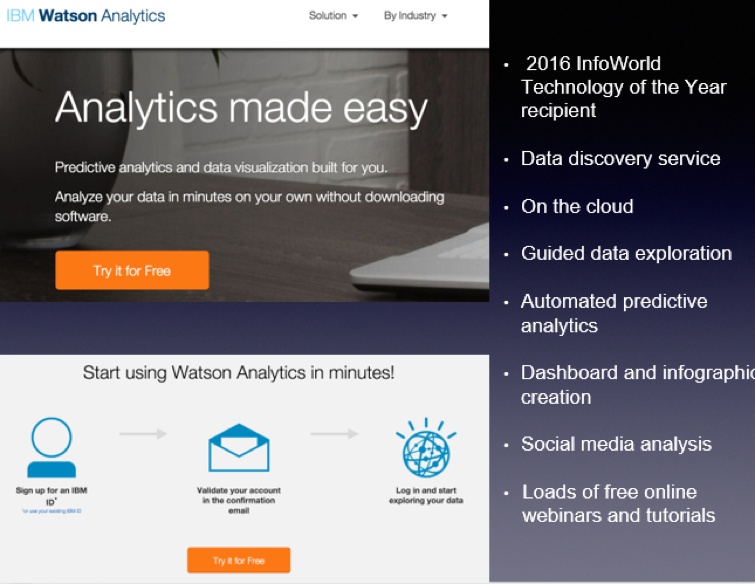
    Let’s look at IBM Watson Analytics as an example:

    MLaaS is a set of preset wizards to create machine learning models and use these models through API. For example, we need to recognize text and separate some facts and data out of it. To do that, we initiate the service in a couple of clicks, insert the original text and get back a marked out and analyzed copy. In this instance, the service is commoditizing NLP (natural language processing). The same goes for VTT (voice-to-text): We insert an audio file and get the text version of the talk back.
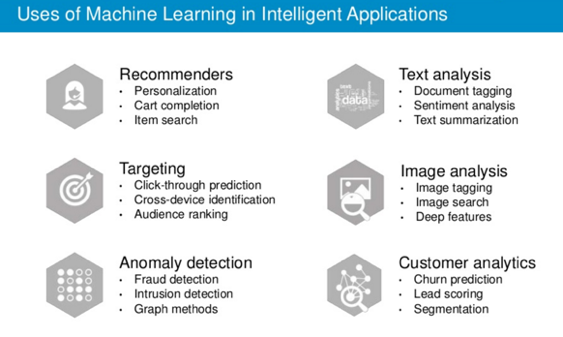
    There are other uses of machine learning technology:

    Machine learning closely works with data. But it is one thing to have data, and another to have actionable data with which you can help users. As seen from the chart, above one of the key trends is the commoditization of data services.
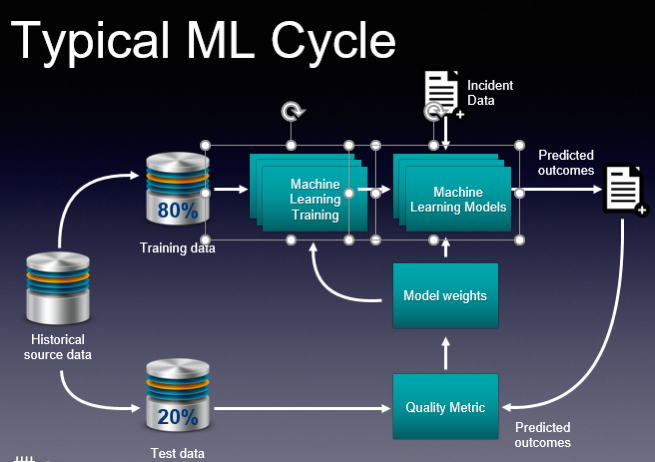
    These basic services do what they are supposed to, and this is great. And you don’t need to employ a data scientist to do some of these tasks. But if you are a company like Grammarly, whose know-how is in actual text recognition, provision of recommendations and text analytics, then ready-made services are insufficient. Grammarly, and companies like it, have to take a hands-on approach that will be very expensive. This is their core business and using third-party services is not viable.

    So how would you go about using ML cloud services?

    Even taking into account a large number of “as a service” solutions, the main challenge is in navigating and understanding “what is better” and “what is best,” and “how it all works.” The issue is that such services are constantly changing. The best choice for you may be to employ tools-consulting services. It’s imperative to understand what is available now and what tools would best suit your business. This is the most basic but essential help you may need.
    Secondly, integrating your operations with these services requires particular engineering efforts. Indeed, most of the data science tasks right now are solved through these cloud “as a service” solutions. But having a proper consulting company with a strong engineering background can help you better utilize such ready-to-use solutions. They offer value to the business at a faster pace. There is no need to invent the wheel, especially when your consultant knows what and where to use.

    If you decide to go to a data science firm where the majority of employees are data scientists, they will create for you some unique genius custom solutions, do great research and so on and so forth. This is what they are good at. This is their bread and butter.

    An end-to-end consulting company may be a better choice for your company, as its goal is to bring value to your business. Consultants will tell you if MLaaS solutions are appropriate for your machine learning needs, and will have a deep understanding of how these services work. A consultancy company also should create and build proper architecture, and provide custom development work that is unique to your services for your business to scale.

    Finally, evolution is key if you plan to grow your business. Start with the ready-made solutions, then in time switch to in-house solutions that can be done with the help of a group of data scientists.

    About the Author / Stanislav Ivashchenko

    Stanislav Ivashchenko is the Senior DevOps Сonsultant at SQUADEX. A certified AWS solutions architect, he is experienced in building, delivering, supporting and optimizing a broad range of software applications. From bare metal to the cloud, from monolith architecture to microservices, he helps improve software delivery processes in startups, mid-sized companies and large enterprises. He has solid skills in orchestrating various DevOps and infrastructure related tools, services and management practices. Connect with him on LinkedIn.


  • DevOps Needs a New Cloud Solution for Best Practices

    DevOps Needs a New Cloud Solution for Best Practices

    Imagine this scenario: You are a company building modern software which is a key driver of your business. To support this, you have grown your infrastructure organically over time by adding servers, storage, networks, security, virtualization software, monitoring, alerting and analytics tools. You have also added a plethora of other middleware, databases, messaging and operating systems that your developers need to build, test and deliver their applications.

    Because of this unplanned organic growth, there is no consistency in the environment. You manage, maintain and operate much of this environment manually. Your various specialist teams (storage, networking, security) begin to form fiefdoms around their respective functional areas. Change becomes extremely difficult and automating across silos turns into a maintenance nightmare. You over-purchase to meet the demand and risk under-utilizing resources. Your costs spiral out of control. You are now finding it a hopeless challenge to meet the needs of your developers—which was the primary purpose of doing all of this in the first place.

    Moving to a Modern Platform

    A modern DevOps platform should address the requirements of both your development and IT/operations teams. It should give software development teams an easy way to consume on-demand compute, storage and networking as well as provide easy access to continuous integration and continuous deployment (CI/CD) tooling and software services that help increase their development throughput and shorten product delivery. In addition, the platform should also empower operation teams to manage, maintain and operate the entire infrastructure environment with very few people using smart software that drives automation and intelligence into the entire stack.

    In short, it should have the ability to break the silos within your IT environment and between development, QA and operations teams. By doing this, you can increase the velocity of software development, improve infrastructure utilization, increase overall operational efficiency and reduce costs.

    Requirements for a Cloud Infrastructure That Streamlines DevOps

    There are several requirements for a modern, cloud-based DevOps platform. Let’s look at the key essentials of such a solution.

    Self-service API-driven infrastructure is a fundamental requirement to enable infrastructure as code, a key attribute to enable DevOps best practice. It allows developers to write code (which can be done using their favorite programming language) and make RESTful API calls to the underlying programmable infrastructure to manage initial deployments and configurations. It also enables them to manage ongoing automated dynamic provisioning of infrastructure, auto-scaling, monitoring and alerting.

    All this automation removes the confusion and error-prone manual steps for the entire application delivery process, including development, testing, staging and production deployments. This, in turn, accelerates software delivery and increases quality.

    However, building such a self-service API-driven infrastructure by yourself is not easy. The key component that drives up the cost is the operational complexity and the cost of experts needed to build and operate it.

    Smart software that drives intelligence into the stack. Very few solutions in the market automatically handle the full life cycle (deployment, upgrades, monitoring, alerting and ongoing resource management) of infrastructure and also allow seamless migration of workloads between private environments and public clouds. Additionally, if self-service is available as a SaaS-based delivery model, it is easy to add more features and workflows very quickly without having IT perform a major upgrade. If your solution comes with an on-premises install, ask how much work IT has to do to maintain this environment and how often new features will get added.

    Hyper-converged Infrastructure (HCI): Eliminating silos in the infrastructure. As mentioned earlier, silos impede velocity because they lead to complexity of operations, lack of consistency in the environment and lack of automation. A hyper-converged cloud design with a software-centric architecture tightly integrates compute, storage, networking and virtualization resources and other technologies from scratch in a commodity hardware box supported by a single vendor. This approach eliminates silos and lowers costs and complexity. It also makes it easy to start small and grow on demand while staying tightly right-sized on capacity and cost.

    A built-in browse-able categorized application store. DevOps engineers need readily accessible CI/CD tools such as Jenkins, Git, Maven or JUnit to automate the development and test pipelines. Additionally, tools such as Ansible, Puppet and Chef help with automated configuration and lifecycle management of workloads. Application developers need to quickly integrate and deploy middleware services such as RabbitMQ, Redis or storage back-ends including MySQL, Postgres, Cassandra or MongoDB. Single-click deployment of such services and other complex multitier network tools and applications greatly automates, accelerates and simplifies the development process.

    Seamless migration between private and public clouds. Developers and testers often need much greater capacity than is available on-premises for scale testing, and they should be able to move their application to a public cloud for such purposes. Alternatively, they may already have some applications running on a public cloud and they may want to bring them back to their private cloud for cost savings or better performance. For these use cases, a private cloud solution should offer seamless bi-directional migration between the public cloud and the private cloud.

    Dashboards and visibility for troubleshooting. One of the key advantages for a private cloud is that you can get complete visibility across the infrastructure and applications. In a public cloud, you can only get VM-level stats but have no control or visibility below that. Make sure that your private cloud solution can provide visibility to developers directly. Many vendors only provide access to IT, thereby controlling what developers can do and making IT a bottleneck in the application development and deployment process.

    Better insights to improve efficiency and capacity management. A cloud requires capacity planning, utilization monitoring, right-sizing of workloads and detecting zombie VMs and unused resources. Look for a solution that comes with built-in analytics, management tools and insights. An even better approach would be having a solution where you don’t have to install the management tool on-premises so that it can deliver its value as a service.

    To meet the needs of application developers and development frameworks and to create an efficient DevOps platform, companies should look at consistent converged architectures managed via smart software. This empowers application developers and operations teams to leverage a consumption model they want, while providing control to IT and making them relevant to your business success.

    Integrated intelligence and insights delivered as a service ensure that you never have to use spreadsheets to decide what to purchase and when. Cloud solutions with smart software ensure that you never have to make a Level 1 support call again; your management software can do that for you.

    About the Author / Kamesh Pemmaraju

    Kamesh Pemmaraju leads product management, product marketing, and technology partnerships at ZeroStack. Kamesh is a seasoned product management/marketing leader with a strong engineering and consulting background. In his most recent product roles at Mirantis and Dell, he focused on delivering private and hybrid cloud solutions to enterprises. He holds a Master of Science in Computer Science from Indian Institute of Science. Connect with him on LinkedIn and Twitter.

     

  • When Bad Things Happen to Good Clouds: Why You Need a Recovery Plan

    When Bad Things Happen to Good Clouds: Why You Need a Recovery Plan

    Amazon S3 storage service recently experienced a widespread five-hour outage in its East Coast availability zone. Many next-generation consumer and business applications rely on a cloud storage, so the S3 outage quickly cascaded and temporarily crippled organizations from Netflix to Slack.

    Cloud outages like this are normal, and notable because they affect so many businesses. The last significant AWS outage was in August 2016. While Amazon S3 is architected for data durability, that doesn’t equal fast recoverability during an outage. As good as cloud platforms are, they still leave a few gaps:

    • Availability zones don’t equal recoverability. S3 is designed to withstand a site outage within a zone, but as the most recent outage shows, networking issues can lead to a widespread outage across an entire region.
    • Data still needs to be backed up. As we noted in a previous blog post, even Amazon recommends backing up data.
    • Recovery can be slow and tedious. It’s one thing to back up data. It’s another thing entirely to recover it. It can take hours or days to recover data after a failure—especially for hyperscale applications and databases.
    • Data is often in one “basket.” If backup data is stored in the same cloud service as the primary data, in the same availability zone, there’s no way to recover data during a widespread outage.
    • Data can get compromised or enter an inconsistent state. The cloud itself doesn’t protect data from application- or database-level corruption, or human error.

    A data backup, recovery and continuity strategy needs to be designed with the cloud in mind. To make sure you can recover quickly, even from a cloud outage:

    • Keep backup data in another service or region. Failures like this one often affect an entire region. A backup and recovery strategy needs to include the ability to recover in another region, cloud service or even a private cloud.
    • Have a fast recovery process. Traditional backup solutions and scripting-based approaches can’t recover data quickly, particularly if the application needs to be recovered to a different topology.
    • Have point-in-time recovery. Since data can get compromised at the early stages of an outage, being able to restore applications quickly to a point in time is important as well.

    The cloud as-a-service architecture is more resilient than traditional infrastructure, and gives you agility. But when failures do happen, they are also entirely out of your control. Don’t ignore recoverability and resiliency of the data because it’s in the cloud, and don’t expect the same recovery processes and tools to work on next-generation, hyperscale applications.

    — Shalabh Goyal

  • Is Cloud Adoption on Your Company’s Horizon?

    Is Cloud Adoption on Your Company’s Horizon?

    Under pressure to increase the speed of innovation in the digital space and outpace competitors, companies large and small are turning to the cloud. Moving to the cloud provides flexibility of infrastructure, transparency of infrastructure costs and many other benefits.

    However, making the transition to the cloud is far more intricate for regulated industries—especially large financial organizations—where security and compliance concerns often trump innovation efforts. According to Cloud Security Alliance, the financial industry is still in the early stages of cloud adoption. In fact, 61 percent of financial leaders say their cloud strategy is in the formative stages. Those financial companies that can shift to the cloud properly will see long-term gains, from both a performance and economic standpoint.

    In 2015, while working at a large international bank, I assisted on a project to help transform how the bank approached digital for retail banking and wealth management. The bank was still approaching most projects as large, monolithic endeavors, where six-month delivery cycles were standard. Infrastructure was owned by IT Operations, and provisioning lacked automation. As such, almost every project began with designing environmental needs from scratch—adding time to both creation and delivery. It was quickly evident that cloud was the bank’s best option, allowing for increased transparency, greater scalability, infrastructure on demand and improved organizational efficiency.

    Shifting to the Cloud

    After working on this project, I learned that to effectively move to the cloud, organizations must understand how to maximize benefits and minimize risks. Here’s how:

    Apply a two-pronged approach

    We realized right away that we needed a system where we could meet our project objectives, while simultaneously exploring the cloud options. To avoid jumping in too quickly and running into non-technical challenges, we adopted a two-pronged approach: we’d build the platform internally using Cloud Foundry PaaS, while exploring the use of external cloud in parallel—without impacting the delivery of the internal platform. To avoid re-architecture and rebuild later on, we had a guiding principle: Whatever is built internally has to be available in the external cloud as well.

    Navigate legal and compliance hurdles

    Regulators are still on the fence when it comes to certain industries adopting the cloud, with regulations still lacking specific policies. For example, in the financial space, lack of close regulation leaves many institutions on their own to sort out contracts with cloud providers based on their individual risk appetite. When regulations are published, they are very high-level and generally state that managing the risk and responsibility for integrity of data is with banks, not with cloud providers. Instead of creating an equal playing field, this tilts the scale toward smaller fintech partners with larger risk appetite±and who more regularly fly under the regulator’s radar.

    Expect roadblocks

    In so many organizations, IT operates in silos. For example, all infrastructure is owned and operated by the IT Operations group, which then recharges that infrastructure back to the businesses based on complex metrics. For cloud to succeed, we need to answer the question of ownership. But that’s not all: Many folks may not believe that organizational issues are a serious problem, and thus, will lack a commitment to be involved. To ease this problem, strong sponsorship from senior leadership is essential.

    Prepare for technical issues

    When implementing a technology solution, things don’t always go smoothly from the start. For example, there might be approved ways to connect with third-party providers that were created before cloud providers came into play. While this kind of issue is easy to solve, it requires a change in internal procedures that must be accounted for.

    Focus on development and testing first, then on production

    While working toward final approval and negotiating the agreement, which can take significant amount of time, conducting a trial run is an effective way to work out any potential problems before full implementation. Signing an agreement to use cloud for development and testing only is less of a hurdle, as no customer data will be transmitted or stored. It’s also important to train anyone who might be involved throughout the process—no matter how big or small their role.

    Conduct a formal project launch and set clear goals

    To drive continuous improvements, it’s essential to establish clear objectives and goals. This provides metrics for benchmarking success and ROI, and encourages the brainstorming of new ideas on a case-by-case basis. Prior to the formal launch, don’t forget to identify key stakeholders and advocates—they will stand behind the project and provide valuable insight into the potential outcomes of decisions.

    Create a transparent culture

    Full transparency is key, even if it means dealing with resistance. Resistance, especially early on, often is unavoidable. However, it is better to deal with resistance, gain support and handle any issues early in the project. Being transparent gains you more support. Or, if the opposition is insurmountable, you can stop the project before wasting too much time or effort. Most important, you want to avoid criticism suggesting that the project is putting the company at risk. By looping in the right people from the start, you’ll have advocates in your corner who will raise red flags and anticipate problems on the horizon.

    Remember that people will want to be involved

    While cloud may still be an unfamiliar concept for many, almost always someone will come out and say, “Actually, I have experience, and already thought about how to do this. How can I get involved?” Bring those people on board, leverage additional insights and increase commitment to the project. This is an exciting change—people want to be on the team that introduces it!

    Large, regulated companies historically have been slow to implement the cloud, due largely to perceived compliance concerns and security risks. However, in an environment marked with rapid innovation, companies are quickly realizing that to stay ahead, adopting a cloud-first business model is a must.

    About the Author / Alexander Kalinovsky

    Alexander Kalinovsky is Director of Engineering at Wipro Digital. He is a senior IT leader with extensive experience managing successful application development and operational teams, along with establishing global development practices and partnering with global organizations. Alex has spent over 10 years working in Financial Services in development and infrastructure, specializing in payment systems and FX solutions. Alex brings his strong FS background and enthusiasm for Agile development to his role at Wipro Digital, driving the digital transformation agenda for many of the world’s leading brands.

  • Protecting Data in Public Cloud and Hybrid Cloud

    Protecting Data in Public Cloud and Hybrid Cloud

    Backup, business continuity (BC) and disaster recovery (DR) have all been a critical part of IT for over 30 years—ever since we began relying on technology to run our businesses. Traditional solutions were designed for the world of on-premises infrastructure and structured applications and relational databases. But the world is changing. In the last blog, I talked about the era of digital transformation and the impetus it has on rethinking and reinventing the fundamental backup and recovery architecture for workloads moving to the cloud and applications being born in the cloud.

    What Changed? Reinventing Backup and Recovery

    Application and data platforms are undergoing the biggest transformation since the dawn of computing. There are several forces at work:

    • New applications. The third-generation applications are geo-distributed, scale across multiple systems, always on and typically are deployed in a cloud-first model.
    • Existing applications are moving to the cloud. They aren’t going away, but companies are moving some or all of them to the cloud. They still need backup and recovery.
    • RPO and RTO windows are shrinking: Enterprises want “always-on” and gone are the days when you could do nightly backups.
    • Smaller companies will go all-in on public cloud. SMBs don’t want to be in the business of IT. They’ve been driving the rapid growth of cloud applications and platforms.
    • Enterprises will build hybrid clouds. Enterprises will deploy applications and data across on-premises and public cloud environments. Scale, compliance and other factors mean they’ll need to keep some systems on-premises.
    • Everyone will use multiple clouds. No one will bet their business on one cloud or one provider. Even now, enterprises are splitting workloads across clouds or cloud and on-premises. Development and test may use one cloud, while the same application might be deployed in a private cloud or a different public cloud.

    Cloud’s Impact on Backup, Recovery and Continuity

    Cloud gives organizations much more agility, operational savings, and a pay-as-you go model. Public cloud providers can also build much more resilient infrastructure. Amazon guarantees 99.95 percent availability for EC2 and 99.99 percent for S3; S3 is designed for 11 nines of data durability, with multiple availability zones. Because the cloud is so reliable—and cheap—it’s quickly becoming a backup target for on-premises data. But that shouldn’t trick us into believing backup and recovery are “built-in” when we run applications in the cloud. Even Amazon itself recommends backup services for all AWS-native applications and cloud databases.

    While service availability and data resiliency addresses infrastructure business continuity and disaster recovery, it doesn’t provide point-in-time recovery or application level intelligence for backup and recovery. As good as the cloud platforms are, they don’t protect against logical errors. And research shows 8 out of 10 errors are logical errors—data corruption, user errors.

    Existing Backup Products and the Cloud

    As we noted above, traditional backup and recovery products don’t meet the needs of cloud applications—even for existing applications that have moved to the cloud, and not just because they were built in a different era. Cloud and distributed architectures present several other challenges:

    • Cloud breaks the media server based architecture of traditional solutions. Cloud applications and data don’t reside on a specific array or disk, so you can’t easily back up what you can’t see. Backups also don’t capture configuration data in the cloud, such as AWS Cloud Formation templates.
    • Cloud doesn’t speak the same language. Legacy solutions talk to tape, disk or virtual disks. Backup and recovery in the cloud means integrating with the right protocols, such as the S3 API or Google Cloud Storage.
    • Backup appliances can’t be moved to the cloud. Existing backup appliances such as EMC Data Domain or NetBackup that work extremely well on-premises can’t be picked up and moved to the cloud.
    • Traditional backup agents won’t scale. If you could get a backup agent running in the cloud, it wouldn’t scale well across dozens or possibly hundreds of nodes.
    • VM is not the right layer of abstraction: This is precisely why the core principle of the Datos IO CODR architecture is a scalable application-centric view of data management and data protection that distinguishes it from conventional approaches. This is the exact reason why the CODR architecture introspects application data and uses global semantic de-duplication to achieve storage efficiencies, instead of relying on traditional de-duplication techniques which treat data as an opaque object (such as a VM or a LUN). The benefit of this approach is fine-grained and highly space-efficient data protection that can span clouds over network links.
    • Cloud Gateway or Migration Services: Unidirectional only.

    Data Protection Must Be Reinvented

    The problem of backup and recovery of cloud applications is novel as there are three critical things a cloud backup and recovery architecture should have:

    • Elastic compute only. The architecture should scale efficiently on elastic compute instances. There shouldn’t be any CapEx costs for servers or appliances.
    • No media servers. Backing up large, scale-out databases requires direct a parallel streaming architecture for data movement between the database and secondary storage. Legacy backup architectures rely on media servers that quickly would become choke points. Direct parallel streaming also allows the data to remain available in native formats.
    • Semantic deduplication. Scale-out application databases typically have a 3x replication factor. If you back up individual nodes or even manage to snapshot the whole database, two-thirds of the backup data is redundant. Over time, backups will be 75 percent to 80 percent inefficient without semantic deduplication that works across a distributed architecture.

    — Shalabh Goyal

  • Protecting Data in Public Cloud and Hybrid Cloud

    Protecting Data in Public Cloud and Hybrid Cloud

    Backup, business continuity (BC) and disaster recovery (DR) have all been a critical part of IT for more than 30 years—ever since we began relying on technology to run our businesses. Traditional solutions were designed for the world of on-premises infrastructure and structured applications and relational databases. But the world is changing. In the last blog, I talked about the era of digital transformation and the impetus it has on rethinking and reinventing the fundamental backup and recovery architecture for workloads moving to the cloud and applications being born in the cloud.

    The Motivations Leading to Reinvent Backup and Recovery

    Application and data platforms are undergoing the biggest transformation since the dawn of computing. There are several forces at work:

    • New applications. The third-generation applications are geo-distributed, scale across multiple systems, are always on and typically deployed in a cloud-first model.
    • Existing applications are moving to the cloud. They aren’t going away, but companies are moving some or all of them to the cloud. They still need backup and recovery.
    • RPO and RTO windows are shrinking: Enterprises want “always-on” and gone are the days when you could do nightly backups.
    • Smaller companies will go all-in on public cloud. SMBs don’t want to be in the business of IT. They’ve been driving the rapid growth of cloud applications and platforms.
    • Enterprises will build hybrid clouds. Enterprises will deploy applications and data across on-premises and public cloud environments. Scale, compliance and other factors mean they’ll need to keep some systems on-premises.
    • Everyone will use multiple clouds. No one will bet their business on one cloud or one provider. Even now, enterprises are splitting workloads across clouds or cloud and on-premises. Development and test may use one cloud, while the same application might be deployed in a private cloud or a different public cloud.

    Cloud’s Impact on Backup, Recovery and Continuity

    Cloud gives organizations much more agility, operational savings and a pay-as-you go model. Public cloud providers can also build much more resilient infrastructure. Amazon guarantees 99.95 percent availability for EC2 and 99.99 percent for S3; S3 is designed for 11 nines of data durability, with multiple availability zones. Because the cloud is so reliable—and cheap—it’s quickly becoming a backup target for on-premises data. But that shouldn’t trick us into believing backup and recovery are “built-in” when we run applications in the cloud. Even Amazon itself recommends backup services for all AWS-native applications and cloud databases.

    While service availability and data resiliency addresses infrastructure business continuity and disaster recovery, it doesn’t provide point-in-time recovery or application-level intelligence for backup and recovery. As good as the cloud platforms are, they don’t protect against logical errors. And research shows 8 out of 10 errors are logical errors—data corruption, user errors.

    But Won’t Existing Backup Products Work in the Cloud?

    As we noted above, traditional backup and recovery products don’t meet the needs of cloud applications—even for existing applications that have moved to the cloud, and not just because they were built in a different era. Cloud and distributed architectures present several other challenges:

    • Cloud breaks the media server based architecture of traditional solutions. Cloud applications and data don’t reside on a specific array or disk, so you can’t easily backup what you can’t see. Backups also don’t capture configuration data in the cloud, such as AWS Cloud Formation templates.
    • Cloud doesn’t speak the same language. Legacy solutions talk to tape, disk or virtual disks. Backup and recovery in the cloud means integrating with the right protocols, such as the S3 API or Google Cloud Storage.
    • Backup appliances can’t be moved to the cloud. Existing backup appliances that work extremely well on-premises can’t be picked up and moved to the cloud.
    • Traditional backup agents won’t scale. If you could get a backup agent running in the cloud, it wouldn’t scale well across dozens or possibly hundreds of nodes.
    • VM is not the right layer of abstraction: Look for technologies that provide a scalable application-centric view of data management and data protection, introspect application data and use global semantic de-duplication to achieve storage efficiencies, instead of relying on traditional de-duplication techniques. The benefit of this approach is fine-grained and highly space-efficient data protection that can span clouds over network links.
    • Cloud Gateway or Migration Services: Unidirectional only.

    The problem of backup and recovery of cloud applications is novel there are three critical things a cloud backup and recovery architecture should have:

    • Elastic compute only. The architecture should scale efficiently on elastic compute instances. There shouldn’t be any CapEx costs for servers or appliances.
    • No media servers. Backing up large scale out databases requires direct a parallel streaming architecture for data movement between the database and secondary storage. Legacy backup architectures rely on media servers that would quickly become choke points. Direct parallel streaming also allows the data to remain available in native formats.
    • Semantic deduplication. Scale-out application databases typically have a 3x replication factor. If you backup individual nodes or even manage to snapshot the whole database, two-thirds of the backup data is redundant. Over time, backups will be 75 percent to 80 percent inefficient without semantic deduplication that works across a distributed architecture.

    — Brian Yin

  • Azure vs. AWS for the Enterprise

    Azure vs. AWS for the Enterprise

    In a previous post we discussed Azure & OpenStack, the less-explored hybrid cloud, and we thought we’d segue on the hybrid cloud theme, and follow up with an additional post focusing on a question we’re often asked …

    Azure or AWS?

    It’s one of the most common questions enterprise customers today face as they look to go to the cloud. According to this year’s Gartner’s Magic Quadrant report, the two cloud powerhouses are the clear market leaders, and as they each add new services to their arsenal and expand their service offerings, customers must decide which one is best-suited for their business needs. This, of course, is in the context of public cloud, whereas the question of OpenStack vs. VMware usually arises in the context of private cloud. And with reports popping up all the time that demonstrate growing numbers around every hybrid cloud mix-and-match scenario, many enterprises are debating on what to bet their cloud strategy.

    To begin this comparison, it’s important to understand how each has evolved. Azure was built as a holistic platform and has been geared toward the enterprise from the beginning. It began as a platform as a service (PaaS), making it easier for developers to build applications without worrying about the servers on which they’re running. In addition, part of the Azure approach always has been to think about how to integrate each service to the platform as a whole and support enterprises’ IT flexibility with keeping specific workloads on-premises while complementing their IT requirements with services running on the cloud.

    AWS, on the other hand, started scaling from the infrastructure from the beginning. Its approach has been to continually be ahead of the innovation curve and offer services that IT operations can easily comprehend and use to support their compute and storage requirements on demand.

    Market Share Comparison: The Path to Growth

    It’s not hard to see why both AWS and Azure have grown into their roles as the market leaders. Today more than 70 Amazon services can be utilized, including the basic compute, storage and network building blocks, as well as “up the stack” services such as database as a service and even frameworks to easily scale mobile applications, databases and more. AWS has a massive public cloud with the largest data centers in the world, and excels at allowing their customers to choose the building blocks they need to create a variety of service offerings.

    That said, Azure is growing as well, and quickly gaining ground on AWS. Microsoft has moved aggressively to match AWS by enhancing and building up its array of offerings. The company has been selling to the enterprise market for decades and, as a result, has garnered strong relationships with many large global organizations. These efforts and relationships seem to be paying off, as a recent survey of 100 CIOs by Morgan Stanley predicted that Azure would be the largest infrastructure-as-a-service (IaaS) vendor by 2019.

    Enterprise-Grade Product Capabilities

    AWS and Azure both provide comprehensive enterprise cloud services, and they both do it well. The core features of AWS include a large suite of infrastructure and application services that enable running nearly everything in the cloud, from traditional enterprise applications to large web-scale workloads. AWS is the clear winner these days in terms of the number of services it offers; the services are well-connected and provide full cloud capabilities for most enterprise needs.

    Azure is also fast closing the gaps with the enterprise cloud market, including with large-size virtual machines, StorSimple Virtual Array, itsNAS offering and the SQL Data Warehouse. In addition, with its recent announcement of Azure Stack, and via solutions such as Cloudify, Microsoft strengthens hybrid architecture and workload mobility between on-premises and public cloud workloads.

    Other factors that are driving enterprises to adopt Azure include the Azure Security Center (ASC), which provides a centralized view of security policies and configurations from multiple Azure subscriptions; the ability for customers to save time and effort through unified operations tools such as SQL Manager, Visual Studio and other such services; and seamless VM migration to migrate servers between disparate environments.

    Growth Strategies

    Microsoft also plans to invest heavily in cloud growth going forward, with a big push and investment in new features and infrastructure. Microsoft’s Intelligent Cloud unit continues to be the focal point of the company’s growth strategy, as the company claims that nearly 60 percent of Fortune 500 companies use at least three of Microsoft’s cloud offerings.

    Both AWS and Azure, in fact, are investing heavy capital expenditures on worldwide data centers and servers. AWS, for example, has just announced a new Asia Pacific region in Mumbai, India, with two availability zones. And with the introduction of new regions in the U.K., Microsoft has announced 34 Azure regions around the world, with 28 generally available today—more than any other major cloud provider. With certifications such as MCSE and many more, Microsoft has more certifications than any other cloud provider in the industry.

    Both AWS and Azure are poised to continue growing, and both companies have big futures in the cloud market. It’s clear, however, that in the cloud game today, Azure is narrowing the functional gap. Azure gives enterprises the ability to use existing Microsoft software licenses under the Enterprise Agreement (EA), giving enterprises better terms and packages. Microsoft enterprise users are potentially ‘power users,’ and prefer a DIY approach versus pre-packaged and opinionated options. This leaves the market open to more collaboration, such as through the use of Docker Swarm. With this type of approach, users have control over the way they run their apps on various platforms, with open-source orchestration to allow consistent management and control of their applications and services.

    — Sharone Zitzman

  • 6 Key Considerations When Migrating to AWS

    6 Key Considerations When Migrating to AWS

    Every day, more and more organizations take the plunge and migrate to the Amazon Web Services public cloud. What they leave behind is the cumbersomeness of the traditional data center, but despite the cloud’s benefits in scalability, agility and efficiency, they discover a new set of challenges that need to be overcome.

    Gartner estimates that more than 50 percent of enterprises will have adopted a hybrid cloud approach by 2017. Transitioning from a traditional on-premise IT infrastructures to a public cloud can be daunting, however, and success requires a different mindset and range of skills. This shift can be particularly challenging for traditional enterprises because they have a lot at stake. Here are the five main challenges in moving to the AWS cloud.

    Cloud Finances

    Different organizations have different financial approaches, and their choices of IT infrastructure reflect this fact. For some, the on-premise approach of making a large, upfront capital expenditure to purchase infrastructure and then capitalizing the investment over time may be the favorable option because they prefer to keep complete control over their IT environment. However, for others, a heavy initial expense is not ideal, so a cloud approach with only ongoing, operational costs is more fitting. This option may be particularly suitable for organizations with fluctuating needs on a monthly basis, as an on-premises data center will not offer them the flexibility they require.

    Regardless of the approach, it is important to compare the respective costs before deciding which one is most suitable. The best option may be to combine both on-premise and cloud to create a hybrid cloud environment. This will allow for steady workloads to be kept onsite while bursts in demand can be processed by an on-demand, public cloud.

    Security, Availability

    The idea of handing over all of your data to a public cloud provider can be a daunting because of the obvious security and availability concerns. However, public cloud providers must adhere to strict compliance protocols and can implement and maintain much higher security levels than on-premise installations because they have more available resources.

    In fact, enterprises have avoided migration to the cloud for a long time due to security concerns. However, this is slowly changing, as IT leaders now realize that running on the public cloud actually can bring the advantage of greater security because AWS has industry-compliant cloud infrastructure (HIPAA and PCI-DSS standards, for example).

    Nonetheless, AWS customers must understand their responsibility in protecting user data and implementing a service level agreement (SLA). For more information, take a look at the AWS “sharing the responsibility” model.

    Rehost (Lift and Shift) vs. Rebuild (Re-architect)

    Migration to the cloud requires some amount of preparation before in-house applications can be moved. Gartner describes five different methods of application migration, and two of them are specifically relevant when discussing IaaS—rehosting and rebuilding.

    Rehosting (also known as the “lift-and-shift” approach) involves taking an application and re-deploying it to a different hardware environment without making changes to the application’s architecture. Although this is a quick-fix solution that will have your application up and running on the cloud quickly, rehosted applications probably will not be able to utilize the main advantages of the cloud (such as horizontal scalability) because they were built on top of custom vertically integrated hardware. Rehosting allows organizations to get away from high on-premises infrastructure costs, but the approach is suited mainly to applications with easily defined patterns.

    Resource-intensive apps (such as those used for image rendering or big data analysis) are more suited to the rebuild (or “re-architect”) approach, in which the original code is scrapped and replaced with new code. These types of applications naturally rely on commodity hardware and have the ability to scale, so keeping them in closed, on-premise silos could mean you end up with performance issues and high costs.

    Rebuilding is naturally a time-consuming and costly process. The solution, therefore, lies somewhere between the two approaches, with the main deciding factors being cost and security of the workloads.

    Get it Right from the Start

    At the beginning of the process, be careful in selecting which apps or services you move to the cloud. If the first few are successful, that will set the tone for the whole migration. If some of the early projects fail, enthusiasm for the migration will dwindle and make it more difficult to complete.

    Be smart by choosing projects that are most likely to be successful, such as non-critical applications or services that can be migrated easily. Make sure your environment is transparent from the start by using modern monitoring and logging systems that can collect large amounts of log data and then parse it to find events and provide insightful information.

    In addition, knowing your cloud environment will significantly increase your success rate. Don’t get too ambitious and try to do it all at once. Follow each small success with another, and your team will ensure a smooth migration.

    Beware of Staff Apprehension

    Any dramatic change within an IT environment will face staff apprehension. You might expect the shift to be met with resistance from corporate management, but the real doubts will come from your IT team. After working with on-premise infrastructure for years, administrators will not welcome any changes they think could jeopardize their jobs. Help your team embrace this shift by making sure they receive suitable training to prepare them for a new set of challenges.

    Log Analysis and Metric Collection

    Organizations moving to AWS suddenly find themselves managing a highly scalable and highly dynamic environment that requires a new type of log analytics and metric collection. The need for centralization of data is crucial in dynamic environments because often you find yourself trying to troubleshoot a problem on servers that no longer exist.

    During the most recent re:Invent, AWS CTO Werner Vogels emphasized the need for centralized log collection as necessary for success in AWS migration:

    IT organizations suddenly gain access to thousands of servers running more applications than ever that also wind up generating more log files than most IT organizations can possibly cope with. … In order to be successful in the cloud, IT organizations need to relentlessly measure how both systems and applications are performing. The problem is that log collection and processing is painful.

    All of the individual components Vogels described each have their own outputs of important log data that need to be analyzed. To ensure a successful AWS migration, logs from your applications, infrastructure and S3 Access buckets—and much more—all must be monitored to ensure all of the parts of your new AWS environment are operating in a way that is secure, highly available and scalable. (To help IT organizations, we have published a free e-book on AWS log analytics with the open source ELK Stack.)

    AWS: A Final Note

    AWS is the preferable public (IaaS) cloud choice for enterprises today, and it looks set to stay this way. To achieve a successful transition during a migration of workloads and products to AWS, the process needs to be carefully planned and implemented in a step-by-step fashion that will prove the benefits of the move to all of the stakeholders.