Tag: public cloud

  • The Cloud Is Booming — But so Is Cloud Waste

    The Cloud Is Booming — But so Is Cloud Waste

    Fueled by the growth in cloud spend, cloud waste will exceed $17.6 billion in 2020.

    Over 90% of organizations will use public cloud services this year. In fact, public cloud customers will spend more than $50 billion on Infrastructure as a Service (IaaS) from providers such as AWS, Azure and Google. This boom is, of course, due to the broader adoption of public cloud services. But, it is also caused by the expansion of infrastructure within existing accounts. Not surprisingly, the growth in spending often exceeds the growth in business. That’s because a huge portion of what companies are spending on cloud is wasted.

    Cloud Computing Is Expanding

    Before getting to the waste, let’s look a little closer at the growth in the cloud sector. Gartner recently predicted that cloud services spending will grow 17% in 2020 and will reach $266.4 billion. While Software as a Service (SaaS) makes up the largest market segment at $116 billion, the fastest growing portion of cloud spend will continue to be IaaS. This will increase 24% year-over-year and surpass $50 billion in 2020.

    Typically, I find that about two-thirds of the average enterprise public cloud bill is spent on compute, which means about $33.3 billion this year will be spent on compute resources. Unfortunately, this portion of a cloud bill is particularly vulnerable to wasted spend. 

    Cloud Waste Is Also Expanding

    As cloud computing growth continues and cloud users mature, we might hope that this $50 billion is being put to optimal use. While I personally do find that cloud customers are more aware of the potential for wasted spending than they were just a few years ago, this does not seem to be correlated with cost optimized infrastructure from the beginning. The fact is, it’s simply not a default human behavior. 

    I frequently run reports for companies having issues with cloud waste. Invariably, I find wasted spend in these accounts. For example, one healthcare IT provider was found to be wasting up to $5.24 million annually on their cloud spend—an average of more than $1,000 per resource per year.

    Below is where the total waste is coming from.

    Idle Resources: Idle resources are VMs and instances being paid for by the hour, minute or second, that are not actually being used 24/7. Typically, these are non-production resources being used for development, staging, testing and QA. Based on data collected from our users, about 44% of their compute spend is on non-production resources. Most non-production resources are only used during a 40-hour work week, and do not need to run 24/7. That means that for the other 128 hours of the week (76%), the resources sit idle, but are still paid for.

    So, I find the following wasted spend from idle resources: $33.3 billion in compute spend, times 0.44 non-production, times 0.76 of week idle, equals to $11 billion wasted on idle cloud resources in 2020.

    Overprovisioned Resources: Another source of wasted cloud spend is overprovisioned infrastructure—that is, paying for resources are larger in capacity than needed. That means you’re paying for resource capacity you’re rarely (or never) using. About 40% of instances are sized at least one size larger than needed for their workloads. Just by reducing an instance by one size, the cost is reduced by 50%. Downsizing by two sizes saves 75%.

    The data I see in client infrastructure confirms this—and the problem may well be even larger. Infrastructure I see has an average CPU utilization of 4.9%. Of course, this could be skewed by the fact that resources I deal with are more commonly for non-production resources. However, it still paints a picture of gross underutilization, ripe for rightsizing and optimization.

    To take a conservative estimate of 40% of resources oversized by just one size, we see the following: $33 billion dollars in compute spend, times 0.4 oversized, times 0.5 overspend per oversized resource, equals to $6.6 billion wasted on oversized resources in 2020.

    The Extent of Wasted Cloud Spend

    Between idle and overprovisioned resources alone, that’s $17.6 billion in cloud spend that will be completely wasted this year. In fact, it could well be higher. Other sources of waste include orphaned volumes, inefficient containerization, underutilized databases, instances running on legacy resource types, unused reserved instances and more. Some of these result in significant one-off savings (such as deleting unattached volumes and old snapshots) whereas others can deliver regular monthly savings. 

    That’s a minimum of about $5 million wasted per day, every day this year, that could be reallocated toward other areas of the business. 

    It’s time to end wasted cloud spend. Perhaps acknowledging the extent of this problem is a good first step.

    — Jay Chapel

  • Ten Years Later — What Is Cloud Native?

    Ten Years Later — What Is Cloud Native?

    Ever since the term cloud native made its debut in 2010, its usage has grown in popularity. Today cloud native is used as a qualifier for innovative, leading edge applications, platforms and systems or cloud-savvy organizations and processes.

    However, what is cloud native exactly? There are some definitions, there are many opinions, but first and foremost there is a lot of confusion: Is my system already cloud native if I follow a microservice-based architecture? Is my system already cloud native if I run containers? Do I have to change development and operations?

    In this post, we cut through any uncertainty and ambiguity and provide an accurate and concise definition of cloud native systems.

    However, first, we have to discuss a set of prerequisite concepts.

    Application + Platform = System

    Frequently, in our day to day conversations, we use the terms application, platform and system interchangeably. Yet in this blog post, we draw a strict distinction:


    • Application: An application is the set of components that are designed and implemented for a specific use case.


    • Platform: A platform is the set of components that are designed and implemented independently of a specific use case.


    • System: A system is the combination of an application and a platform. Generally, we refer to an application as being hosted on a platform.


    End users do not interact with applications or with platforms only; end users interact with systems. Consequently, we will focus our discussion on system-level properties, not application—or platform-level properties.

    Application + Cloud Platform = Cloud System

    A cloud platform is a service provider that enables a service consumer to request and release resources on demand via an Application Programming Interface (API).

    According to this definition, a cloud platform is any service provider that enables a service consumer to request and release resources on demand:


    • Public Cloud Platform: A public cloud platform is a service provider that offers resources outside of its own organization.


    • Private Cloud Platform: A private cloud platform is a service provider that offers resources within its own organization.


    Consequently, a cloud system is any application that is hosted on a cloud platform. However, what is a cloud native system? 

    Responsiveness, Scalability and Reliability

    The distinction of cloud native systems versus non-cloud native systems is drawn along the lines of responsiveness, scalability and reliability. 

    In a nutshell, responsiveness is a system’s ability to meet the users’ expectations. In order to quantify responsiveness, we rely on a set of four related concepts: 

    • Service Level Indicator: A service level indicator is a quantitative observation about the behavior of a system.
    • Service Level Objective: A service level objective is a predicate (a function that yields true or false) on a service level indicator that determines whether the behavior of a system meets an objective.
    • Error Rate: The error rate is the ratio of the number of observations that do not meet their objectives to the number of observations in total for a fixed time interval.
    • Error Budget: The error budget is an upper limit on the error rate.

    Based on the above, we can now define responsiveness of a system as the ability of the system to keep its error rate below its error budget.

    These concepts are best explained with a tangible example: Consider a web application processing HTTP transactions, that is, accepting HTTP requests and returning HTTP responses.

    Service Level Indicators

    Here, we define two SLIs.


    • SLI Latency: determines the latency of a transaction, that is, the time when the request enters the system to the time the response leaves the system. 


    • SLI Result: determines the result of a transaction, that is, the status code of the response.


    SLIs are recorded at the edge of a system, here the Ingress component, to exclude any variation that is outside our control and focus on the performance of the system that is within our control. For example, we do not want to include any variation in observed latency or observed results originating in the users’ network connections. However, we do want to focus on the performance of the system once Ingress accepts the request until Ingress returns the response.

    Next, we define two SLOs.


    • SLO Latency: For this example, we define the SLO Latency to be met if a transaction’s SLI Latency is less than 250 milliseconds.


    • SLO Result: For this example, we define the SLO Result to be met if a transaction’s SLI Result is not in the HTTP 500 range.


    Finally, we set the value of the error rate’s time interval to a 30-day sliding window and the value of the error budget’s to 1%.

    By definition, this system is responsive if the ratio of the number transactions over the last 30 days that do not meet their SLOs to the number of transactions over the last 30 days in total does not exceed 1%.

    Scalability and Reliability

    At this point we have the necessary tools to define scalability and reliability:

    • Scalability is responsiveness in the presence of load.
    • Reliability is responsiveness in the presence of failure.

    So Finally, What Is Cloud Native?

    With the definition of cloud systems and the definition of responsiveness in place, we can now define cloud native systems: A cloud native system is a cloud system that is scalable and reliable by construction.

    The operator “by construction” is in stark contrast to “by requirement”: The design and implementation of a cloud native application guarantees scalability and reliability within the limits set by the service level objectives and error budgets.

    According to this definition a cloud native application must be able to:

    • Autonomously detect and mitigate the presence of load.
    • Autonomously detect and mitigate the presence of failure.

    Discussion

    This post defined the term “cloud native” as a property of a system, not as a property of organizations or processes.

    The defining criteria of a cloud native system are scalability and reliability by construction. Here, the employment of microservices (an architectural choice) or containers (a technological choice) is not a defining criteria of cloud native systems. If you want to know more, head over to—or better yet, get involved with—the Cloud Native Computing Foundation, a Linux Foundation project founded in 2015 with the mission to build a sustainable ecosystem for cloud native systems.

    — Dominik Tornow

  • vArmour CEO: Cloud Security Needs Simplicity

    vArmour CEO: Cloud Security Needs Simplicity

    Cloud computing promised cost savings and simplified IT management, among other things. In many ways, the cloud has lived up to its ideals, and in other ways, such as API security, shadow IT and the securing of clouds across hybrid environments, the cloud has proven challenging.

    To get a sense of how enterprises and security vendors are adapting, we reached out to Timothy Eades, CEO at cloud application security provider vArmour. vArmour was founded in 2011 with backing from Highland Capital Partners, Menlo Ventures, Citi Ventures, Work-Bench Ventures, Redline Capital and Telstra. Timothy Eades has been the CEO since 2013; prior to that role, he was the CEO at Silver Tail Systems.

    Here’s an edited version of our conversation.

    DevOps: How do you see cloud architectures evolving over the years ahead?

    Timothy Eades: There is considerable evolution coming. At vArmour, we have a philosophy about this: Bet on the road maps, not against them.

    I think we are seeing a lot of security vendors starting to scratch their heads and wonder: Where do we invent new security technologies that can help us differentiate? The road maps for winners are going to be those that bake security into their products. This way, cloud technology will only get stronger and more secure. If one imagines an x- and y-axis and the x-axis is the strength of security capability and the y-axis is simplicity, the vendor road maps, for those who will be successful, will be about getting that balance right.

    Currently, there’s considerable complexity involved when it comes to configuring and securing the public cloud. If you are Tim’s Pizzeria and you are running on AWS, it has to be made simple and more intuitive. I was talking to some friends recently about the Windows operating system and how everything has become so simple. But back in the day when you and I were growing up, we used to say “RTFM” almost daily. Nowadays, there is no manual.

    That’s mostly thanks to Steve Jobs. Steve Jobs came along and made everything so simple that it shouldn’t require a manual. The worst-case was it might require a YouTube video to understand.

    The cloud has to go through that same transition. Everything has to be made simpler, more intuitive. Otherwise, we are just going to get very weak configurations, because people are not going to configure it right. They’re not going to secure them right. They believe that they are inherently secure.

    DevOps: What do you think will be the catalyst that will continue to drive cloud vendors getting the simplicity and security balance right?

    Eades: I think it’s going to be a competition. I think the market sees the need for the drive to simplify. And it’s going to take the competition to get there. That’s a real battle between AWS, Azure, VMware and others. The good news is that VMware is going to embed a lot of security capabilities, and that will force Amazon, Azure, and Google Cloud to respond.

    DevOps: Cloud can get complicated quickly; even that small pizza shop may run a dozen cloud services.

    Eades: Yes, they are running a bunch of different services. The funny thing is, there is always a lack of security skills at play, too. And we all know that when businesses put things in the cloud, that they think it just became secure. They don’t have the skills to understand that it’s not as secure as they believe. I think the regulators are still scratching their heads a little bit about all of this because Amazon has been preaching its “shared responsibility” model. But, as we now know, it’s not shared liability.

    And people haven’t woken up yet to that fact, that shared responsibility is not shared liability.

    DevOps: How do you see enterprises consuming the various modalities of cloud in the years ahead, on-premises, public, private cloud and the different mixtures of each?

    Eades: It’s just amazing. Consider a company located in Europe. They have to have data on servers everywhere. So they’re using AWS and Azure and others. I think the large enterprises will continue to be hybrid cloud, but they won’t have a private data center. They just won’t.

    A friend of mine runs cloud security at a large bank in New York. Their current data center will be their last data center. They’re not going to build another data center. They’re just not.

    It’s the lifetime of the applications that they look at, and they wonder: Do I still want a data center? It doesn’t take long for them to get to “no.”

    One of the banks we worked with over the last three years, as they were moving many of their applications into the public cloud, they were trying to understand the interaction of their apps. They wanted to know how stable the performance of their apps is in the public cloud. They will tell you now that they don’t see the difference between their Amazon cloud and their private cloud. There’s no difference because they’ve all the bandwidth that they need.

    If you can’t tell the difference from a usage and from a financial perspective, more enterprises are going to depart from their data centers.

    I think you are going to see a very, very long tail of private data centers among very large enterprises, but the cloud will consume the rest of IT.

    — George V. Hulme

  • The Definition of Faster in the Age of App Capital

    The Definition of Faster in the Age of App Capital

    Businesses want speed. One of the impacts of digital transformation—and the associated pressure to succeed in an app economy—is the desire to move at speed. Nearly half (48%) of organizations are driven by digital transformation to deploy faster according to our State of Application Services 2019.

    But it’s not all about deployment. It’s also about development and responsiveness to threats and changes in demand.

    Organizations want to develop and deliver apps faster. They want to adapt to unpredictable changes in business conditions faster. They want to respond to attacks faster.

    So, how are they going to get it?

    Faster Development

    Deploying more frequently implies you’re first developing faster. That often means adoption of speed-oriented Agile methodologies. GitLab’s 2019 Global Developer Report: DevSecOps found that the majority (54%) are choosing Scrum, while 37% go for Kanban.

    Componentization

    Methodologies aren’t enough if application architectures aren’t well-suited to development styles. Smaller, focused teams sprinting toward frequent releases isn’t really a good fit for developing new features or fixes for traditional and monolithic applications. Componentization through the adoption of microservices and more distributed forms of architecture fit more naturally with modern architectural and operational principles. It’s no surprise that, on average, more than 80% of a modern application is made up of third-party components, heavily weighted toward open source.

    APIs

    Adoption of APIs, as well, is no surprise amongst those seeking faster development through componentized application architectures. APIs decouple implementation from interface and allow teams to make modifications to processing without impacting the use of APIs from other components or applications. This is a common pattern, with an impressive 64% of organizations creating APIs today for use in either internal or external use cases. Nearly 50% of those organizations rely on APIs to get ideas to market faster according to Jitterbit’s State of API Integration 2018.

    Automation (CI/CD)

    The build pipeline, too, has to keep up if frequently deployment goals are to be met. That means CI/CD tools that seamlessly move code from commit to test to release. The most popular CI and build tools in GitLab’s survey were, unsurprisingly, GitLab (61%) followed by Jenkins (36%) and Travis CI (12%). Notably, our own research finds Jenkins in use by 16% for network automation as well—a promising result if organizations are seeking to extend DevOps beyond delivery into deployment.

    Faster Deployment

    Developing faster doesn’t get ideas to market faster. That requires deployment. While born-in-the-cloud technology companies have mastered the delivery-deployment divide with ease, many established enterprises find this transition challenging. Existing organization structures as well as the continued need to support traditional and monolithic applications introduces conflicts that can be challenging to integrate with modern operational demands. But there is no doubt that organizations must overcome these challenges for those applications requiring faster and more frequent deployments.

    Continuous Deployment

    Don’t be fooled; established organizations are embracing automation and applying it to the deployment pipeline. The issue is often that traditional IT structures introduce inconsistent automation and self-service efforts. We see this play out in our own research, where strongly siloed team structures continue to impact automation efforts across IT.

    Team structures matter and organizations whose compass is pointed at automated pipelines will need to address the cultural aspects of continuous deployment if they want to consistently deploy faster.

    Public Cloud

    Traditionally, the inability to achieve continuous deployment has pushed developers and app owners to turn to the public cloud, because it eliminates the obstacles in the slower, enterprise deployment path. The disparity in opinion on frequency of deployments is, in part, a contributor to the issue. Our 2018 NetOps/DevOps survey found that while 55% of DevOps and 52% of cloud architects felt their organization did not deploy frequently enough, only 30% of NetOps and the same percentage of operations agreed. 

    But it’s not the only driver. Digital transformation is certainly a factor; 33% of respondents in our State of Application Services indicated they are intentionally moving to deliver apps from the public cloud as a result of embracing digital transformation initiatives. The ability to easily integrate application services and subsequently automate operation is a huge boon to organizations seeking a faster route to frequent deployment.

    Containers

    In the cloud—but also on-premises—continuous deployment often requires the ability to adopt per-app pipelines and application services that support the model. Increasingly, organizations are turning to containers because of their ability to support rapid updates and operate seamlessly in highly volatile environments. We see containers in demand not only to support modern application architectures such as cloud native—the top container use-case at 33% of respondents to Diamanti’s 2019 Container Adoption Benchmark—but also for infrastructure. The demand for on-premises application services in containers has consistently grown year over year in our own research, rising from just 4% in 2017 to 15% in 2019.

    Faster Responses

    Not everything is about delivery and deployment. Organizations also need speed when it comes to security and operations. In today’s world, where more than half of all app interactions are conducted by bots, it’s important for organizations to respond quickly with a reject message to avoid falling prey to exploits or infection. 

    Real-Time Threat Analytics

    One of the ways organizations are seeking to speed up their ability to respond to attacks is through the adoption of real-time threat analytics. With security continuing to be a top priority and consistent challenge, it was no surprise to see this category ascend into the top five strategy trends and technology in 2019 with 41% of respondents tagging it.

    The availability of intelligent security application services will accelerate as machine learning and automation continue to apply their considerable capabilities to the problem of identifying troublesome traffic faster.

    Orchestration Included

    Machine learning isn’t the only way in which infrastructure and application services are getting smarter. As the need for faster responses to capacity and processing grow along with users, infrastructure and application services are evolving to include orchestration as a core capability rather than an add-on. Application service platforms with integrated orchestration layers will mean services that scale along with demand—on-demand. While such capabilities exist today—indeed, they are part and parcel of cloud and containers—the capabilities to automatically scale up and down based on application and user defined requirements is not native to most systems today. But they will be.

    Faster Identification of Bad Actors

    Finally, organizations need to combat bots for both business and security purposes. Whether organizations need to stop scraping—a real threat to business—or prevent bots from probing for vulnerabilities, identifying bad bot actors faster is critical today. Checking a box (I’m not a robot) isn’t enough today as bots are growing more intelligent and are able to foil such primitive techniques.

    Organizations are turning to Bot Defense services capable of applying more modern, successful techniques to quickly identify and block bad actor bots. We’ve seen the use of bot defense services grow quarter over quarter in response to this need, and expect this trend to continue.

    Faster Development, Faster Deployment, Faster Responses

    When it comes to business’ need for speed today, we wind up looking at processes. Development processes are automated to gain speed with CI/CD. Deployment processes are automated to gain speed with continuous deployment and cloud. Scaling and security processes are being automated by systems and the introduction of orchestration as native to application service platforms.

    Faster, it turns out, relies on an organization’s ability to automate processes across development, deployment and security. 

    — Lori MacVittie

  • IBM Doubles Down on Cloud, But Is Krishna an Interim CEO?

    IBM Doubles Down on Cloud, But Is Krishna an Interim CEO?

    Big news from Big Blue yesterday: IBM CEO Ginni Rometty is stepping down after eight years at the helm. In her stead, IBM is doubling down on the cloud by appointing Arvind Krishna as CEO and member of the board. The real move to watch, though, is the appointment of Jim Whitehurst, Red Hat CEO, as president of IBM and a board member. It’s the first time that someone has held the title of president singularly, and it may portend where the real power will be at Big Blue (and Red).

    Krishna was previously head of the cloud and cognitive software division at IBM. He is an IBM veteran, having been with the company since 1990. His appointment sends a strong signal about how important the cloud is to IBM’s future. In some ways, it is similar to Satya Nadella’s appointment at Microsoft. But perhaps it’s not as strong a signal about the importance of the cloud than the $33 billion IBM spent acquiring Red Hat.

    It is that $33 billion investment and the importance of Red Hat to the new IBM that leads me to believe Krishna may, in fact, be a transitional CEO. The eventual appointment of Whitehurst as CEO and the rise of Red Hat leadership within IBM may in some ways be a reverse-merger type of thing, with Red Hat eventually running the show.

    IBM is a huge beast. A company of Red Hat’s size will find it difficult to change the culture and overcome the inertia at IBM. But frankly, IBM has been transitioning for almost all of Ginni’s time there. While the Enterprise Systems group (Z systems mainframe) is still the cash cow, bringing in a large percentage of revenue, IBM has increasingly tried to be a major cloud player.

    The SoftLayer acquisition didn’t quite give the company what it needed, as it was not a public cloud play. It left IBM unable to compete with Google, Microsoft Azure and AWS in true cloud services. After a few fits and starts, IBM decided that Red Hat, with its open source pedigree and cloud strength in both public and private cloud settings, could be the engine that could as it pertains to cloud.

    The street has not been kind to IBM over the last few years as a result of the botched cloud play, either. At a time when its tech competitors and the market in general have soared, IBM has actually fallen, as has its revenue.

    Mitchell Ashley, founder and managing analyst at Accelerated Strategies Group, agrees with this assessment. “We are seeing a sea change in big tech CEO strategy. Like Microsoft’s elevation of cloud exec Satya Nadella to CEO, IBM is rebuilding its executive ranks from the open source cloud software world with the appointment of Red Hat’s Jim Whitehurst as president and board member,” he said. “How soon the Krishna regime including old-line IBM executives gives way to Whitehurst and other Red Hat executives remains to be seen.”

    IBM CEO Change Elevates Open Source from Digital Anarchist on Vimeo.

    Ashley was not the only analyst to weigh in.

    “IBM bet the farm on cloud with the $34 billion Red Hat acquisition,” said Steve Duplessie, founder and senior analyst at Enterprise Strategy Group (ESG). “It was only a matter of time for the succession. Now the two top dogs running IBM are cloud purists. The old IBM died a while ago and they had to change—I like the move! Their stock lost 26% while the S&P rose over 150%. This lets them remake themselves before it’s too late.”

    Changes at the top don’t always portend success. There is a lot of hard work ahead at IBM as the company continues this journey. Competing with AWS, Google, Microsoft and other players in the cloud space is going to be challenging, given the head starts these players have already. But you really can’t count out IBM, ever.

    One other thing I wanted to mention: With IBM’s appointment of Krishna at IBM, there now are CEOs of Indian descent at Alphabet (Google), Microsoft and IBM. This is very positive for all persons of not only Indian heritage but for all people of color and nationalities. Kudos to these companies and these men for their success. Now, how about some women of color in these roles?

    — Alan Shimel

  • SIOS Technology Automates Rebooting of AWS EC2 VM Instances

    SIOS Technology Automates Rebooting of AWS EC2 VM Instances

    SIOS Technology Corp. this week launched SIOS AppKeeper, a tool that automatically reboots instances of EC2 virtual machines anytime they fail.

    Michael Bilancieri, senior vice president of products and marketing for SIOS, said SIOS AppKeeper is an extension of the work SIOS has historically done to enable servers and clusters to failover. However, many organizations don’t require that level of availability, so SIOS developed AppKeeper to provide a way to automate the process of restarting virtual machines in the cloud, said Bilancieri.

    SIOS AppKeeper also provides a dashboard through which DevOps teams can centrally manage the stream of alerts that are generated when there is an EC2 issue, he said. SIOS AppKeeper is a software-as-a-service (SaaS) application so there is no software to be installed. Instead, organizations log into their AWS account and select which instances and services to monitor and the level of protection they want SIOS AppKeeper to provide.

    Pricing for SIOS AppKeeper starts at $40 per EC2 instance. Monitoring and alert capabilities are provided by default. Restart services, reboot instances and reboot instances only if a restart of services fails are all options. Organizations can opt to access SIOS AppKeeper either via the graphical user interface provided or via an application programming interface (API), Bilanieri said.

    Previously, SIOS AppKeeper was only available in Japan. Based on data from those customers, the average customer with only three AWS EC2 instances experienced downtime at least once a month. With SIOS AppKeeper, customers were able to reduce downtime by 90%, Bilancieri noted.

    SIOS will consider adding support for other public clouds based on customer demand, he said.

    Cloud service providers, in keeping with the “pets versus cattle” ethos, tend to view virtual machines as being disposable. However, whenever there is an issue someone on the IT team still needs to take the time to restart a virtual machine, Bilancieri said.

    Despite the drive to ruthlessly automate in the management of IT in the age of DevOps, there are still many tasks being performed manually. As the number of workloads in cloud computing environments continue to increase, those tasks conspire to slow IT operations. There are, of course, many ways to automate IT processes in the cloud. SIOS is making a case for a simpler approach to managing EC2 instances that doesn’t require IT teams to set up an entire IT automation framework.

    Many IT teams will opt to create their own scripts to manage EC2 instances. However, it’s all too often the case that those scripts are poorly documented and don’t scale especially well over time. In addition, each time the IT professional who wrote a script that the organization depends on leaves the organization, there is no one left to update and maintain the script and new members of the IT team wind up writing yet another script to perform the same function.

    There will always be some type of script floating around the IT environment. However, in the age of DevOps, the time to start reducing the number of those scripts that need to be supported might be at hand.

    — Mike Vizard

  • Opsani Applies AI to Rein in Cloud Costs

    Opsani Applies AI to Rein in Cloud Costs

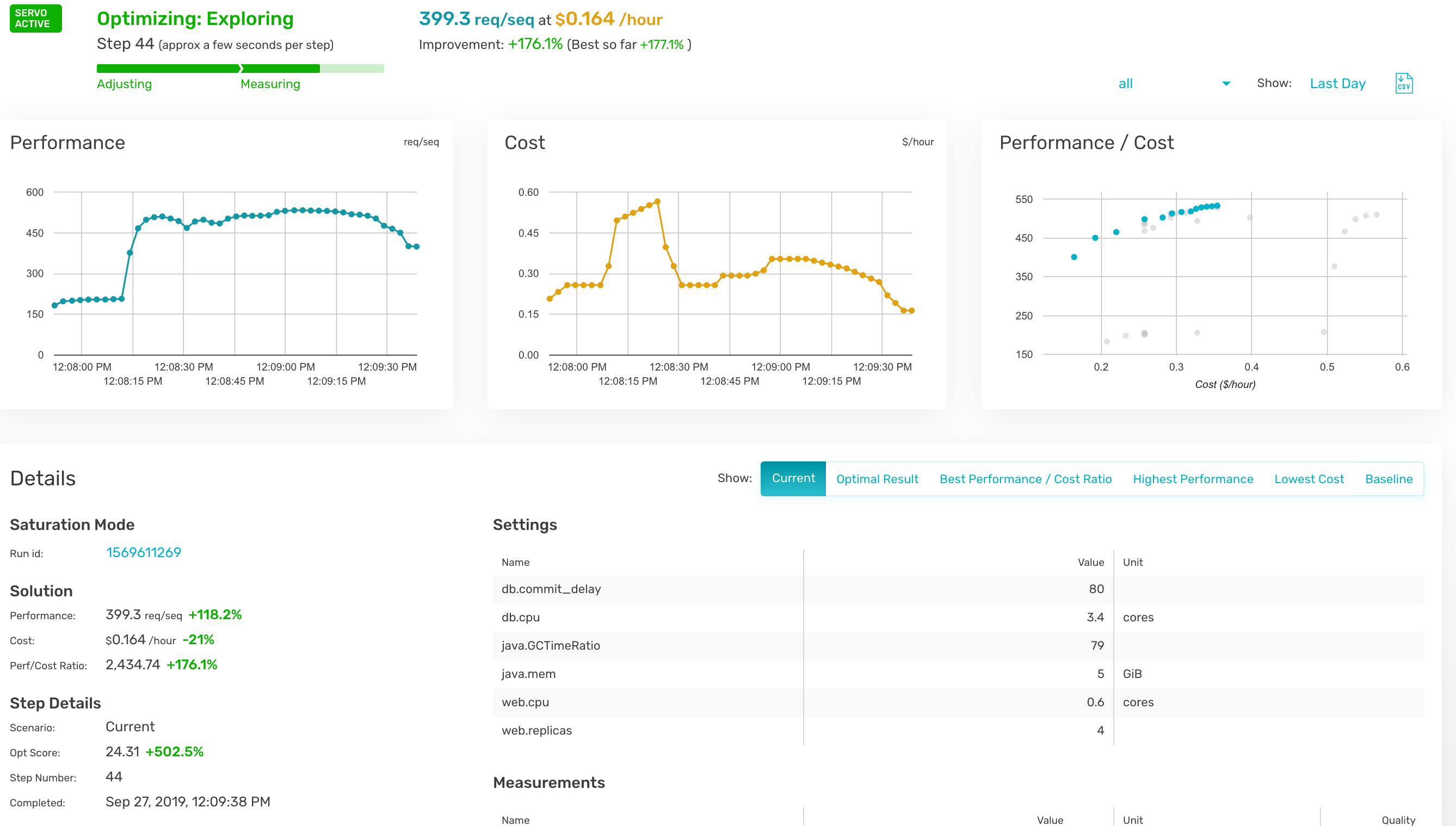
    Opsani has added support for cloud computing environments to its namesake software-as-a-service (SaaS) platform that leverages machine learning algorithms and other forms of artificial intelligence (AI) to optimize the IT environment.

    Company CEO Ross Schibler said Opsani AI not only proactively tunes resources such as CPU and memory, but it also can optimize middleware configuration variables such as Java virtual machine (JVM) type and pool sizes; kernel parameters such as page sizes and jumbo packet sizes; and application parameters such as thread pools, cache timeouts and write delays.

    Given the size and dynamic nature of most cloud computing environments, Schibler said it’s not possible for IT administrators to manually optimize cloud computing environments to match the specific needs of each class of application workload being deployed. The Opsani platform makes it possible to leverage AI to optimize settings for the lowest cost or best performance every second, he said.

    Opsani claims existing customers are seeing more than 200% increases in performance per dollar while saving up to 80% on their cloud spend.

    In addition, Opsani has made available plugins for a variety of DevOps tools including GitHub, Terraform, Jenkins, Spinnaker, Wavefront, DataDog, SignalFX, Prometheus, Splunk and New Relic, on all the major cloud computing platforms.

    Schibler said Opsani can be applied to existing monolithic applications as well as emerging microservices-based applications based on containers running on Kubernetes clusters. The goal is to make it possible for IT teams to rein in cloud costs at a time when most cloud resources are being employed inefficiently, he said.

    Individual developers are deploying applications on virtual machines in the cloud with little to no appreciation for total cost, noted Schibler. Before most IT organizations realize it, the cost of running applications on a public cloud has far exceeded budget allocations. IT organizations not only need tools to rein in those costs, but Schibler noted Opsani also makes it possible to model those costs before an application is deployed or upgraded.

    The adoption of public clouds and DevOps often go hand in hand. The challenge organizations are encountering more often is that as the number of applications running in a public cloud computing environment increases, they often wind up overprovisioning resources. Over time, the need to optimize the consumption of cloud resources becomes a more pressing financial concern. However, most IT organizations don’t have the resources or expertise needed to manually tune each instance of cloud workload. At the same time, the typical IT organization doesn’t have the ability to build its own AI engine. Opsani is making the case for a SaaS platform that provides that capability without requiring an IT organization to build its own AI models from scratch.

    Naturally, many IT professionals are dubious of AI because there may not be enough transparency into the AI models being employed. However, because Opsani is a SaaS platform, the risk of experimenting with AI to optimize cloud workloads is relatively slight. Of course, there’s no absolute requirement to employ AI at all. However, as financial pressure on IT organizations continues to mount, there doesn’t seem to be much of an alternative either.

    — Mike Vizard

  • The Top Six Cloud Computing Trends of 2019

    The Top Six Cloud Computing Trends of 2019

    Cloud computing was one of the hottest topics in the technology and business media throughout 2019. This is no surprise as the cloud sector has been growing rapidly for the last few years. Synergy Research Group recently reported a 37% overall growth year-over-year in public cloud. They also note that it has taken just two years for the public IaaS and PaaS markets to double in size and their forecast shows them doubling again within the next three years.

    While steady growth was expected this year, a few trends of note stand out. When the experts look back at 2019, they will likely stress the following cloud computing trends shaped the year.

    Rise of the Enterprise Cloud Manager

    We recently did a study on ParkMyCloud users which showed that a growing proportion of company technical leads have cloud or the name of their cloud provider–such as AWS–in their job title. This indicates a growing degree of specialization for individuals who manage and architect cloud infrastructure. Whether called enterprise cloud manager, cloud architect or something similar, 2019 saw the rise of a specialized role to oversee and direct cloud operations.

    Consolidated Multi-Cloud Views

    As enterprises large and small continue to adopt and use more than one public cloud, we have seen a rapidly growing need for a consolidated multi-cloud view and ability to take actions across multiple clouds in 2019. Third-party tools that do this provide enterprises the ability to pick a single tool to orchestrate, manage, govern and optimize their hybrid and multi-cloud environments. Many customers also sight the need to simplify operations—native cloud provider tools are not always easy to use.

    Multi-Cloud Arrives

    Multi-cloud truly arrived in 2019 and will only grow in 2020. The majority of organizations now use multiple clouds. In fact, most studies suggest that more than 80% of enterprises have a multi-cloud strategy. Reasons cited include the need to avoid vendor lock-in, the ability to leverage the best in class cloud services from each cloud provider and application efficiency choices.

    More Automation

    One of the biggest tech benefits to a DevOps approach is automating away the manual tasks that bog down operations and critical projects. Thus, the trend toward automation continued to expand in 2019.

    More Abstraction

    IT became more and more abstracted in 2019. This means container usage grew, along with models that allow developers to worry less and less about infrastructure (such as serverless and PaaS).

    Containers Became Mainstream

    Application containerization is more than just a new buzzword in cloud computing; it is changing the way in which resources are deployed into the cloud. More and more companies utilize container services such as Kubernetes and cloud native services such as EKS, AKS and GKS in 2019, 

    Business continued to move to the cloud in 2019 and the six trends described above showed that the sector is growing–sometimes in unpredictable ways. Next year will, no doubt, also contain some surprises. But the trend for expansion of the cloud and related services is unmistakable for the foreseeable future.

    — Jay Chapel

  • An Overview of Cloud Migration and Open Source

    An Overview of Cloud Migration and Open Source

    Most businesses are moving toward making their business processes more user-friendly, through digitization. This shift of business modernization comes with a heavy price for them in terms of money and in terms of time. It is going to take time and a great amount of investment in new innovative technologies.

    Cloud computing is the biggest trend in digital transformation due to its ability to make business applications and infrastructure easily accessible. In the roadmap toward cloud migration, businesses are looking to save capital investment or expenses (CAPEX) and operational expenses (OPEX). 

    Open source technologies come to rescue for such businesses. Be those who are present at public cloud platforms such as AWS, Azure or Google Cloud, or private data centers. The role and emergence of open source technologies simplified the equation of overall expenditure for all enterprises and organizations of any industry domains. Year by year, more open source projects are coming up and solve major challenges which businesses are facing. Companies such as Red Hat and communities like Linux Foundation have a major role in promoting open source projects at the heart of digital transformation.

    Why Open Source at Cloud?

    • The main reason to adopt open source technologies in the process of cloud migration can be avoiding vendor lock-in in the future. Most public cloud vendors have a similar portfolio of open source supports in their offerings. As open-source projects are not owned by one company and its overall framework is common to all of its consumers, any updates to its core files have an impact on all projects. And businesses can simply move their application environment from one cloud to another without worrying about backend environment that is powered by open-source projects. There can be a seamless integration of applications and services developed or deployed by different businesses and vendors.
    • Open source adoption for cloud will help in interoperability with other enterprise solutions that can be located in different data centers. Though, other data centers should be equipped with the same open source projects. This interoperability enables the reuse of software stacks, libraries and components. Such interoperability can help deploy multi-cloud environment for businesses.

    The Cloud-Native Approach in Cloud

    Application containerization has been adopted by many solutions providers and vendors in the last few years and has become significantly popular. This containerization surge has triggered the use of cloud-native applications. Most of the popular cloud-native projects are hosted in Linux Foundation’s CNCF (Cloud Native Foundation) community which nurtures the development of various open source projects. Some of the popular projects are Kubernetes, Prometheus, Envoy, Helm, rkt, Linkerd, Etcd, Jaeger, etc.

    The cloud-native approach involves the utilization of tools for handling containers, micro-services, service mesh, DevOps and continuous integration (CI) and continuous deployment (CD). Cloud-native tools for CI/CD can be Check, Ansible, puppet, etc., and service mesh can be Istio, Linkerd, etc.

    Most of the enterprises tend to involve open source projects from various umbrella’s to build the Cloud migration strategy. Moving to cloud-native management of application can be a prominent requirement for many enterprises.   

    Open Source Cloud Migration Tools

    There are open source tools and frameworks that help with cloud data migration. These tools require modification in terms of coding to make the migration process that suits your infrastructure. To make coding customizations in these tools you might need investment for skilled resources.

    The above projects help enterprises to move data. Bluethroat is an open source project which can be used for migration of overall infrastructure from data center to data center, data center to the cloud, cloud to data center and cloud to cloud. Currently it is powered with limited features and used specifically for AWS. It offers the following features:

    • Migration of infrastructure to AWS.
    • Agentless.
    • Environment discovery.
    • Automatic network creation and server deployment.
    • Linux server migration.

    Conclusion

    Cloud migration has its own challenges in terms of uptime, security and data loss. Most public clouds are evolved to handle data as well as application workload migrations. There are many benefits to open source projects, as discussed in this article. The main advantages of migrating open source frameworks to the cloud are cutting back on expenses and avoiding bottlenecks.

    — Sagar Nangare

  • HPE Adds Control Plane to Greenlake Managed Service

    HPE Adds Control Plane to Greenlake Managed Service

    Hewlett-Packard Enterprise (HPE) announced today it has added a cloud platform to its managed Greenlake service, through which DevOps teams will be able to manage deployments of applications alongside HPE.

    Scott Yow, vice president and general manager for GreenLake Hybrid Cloud Software at HPE, said HPE Greenlake Central provides a control plane that makes it possible for DevOps teams to write, release and deploy code quickly, without having to manage the IT infrastructure directly in an on-premises IT environment.

    Instead, DevOps teams will have access to an array of tools and services from HPE and partners through a marketplace to create a workbench through which they can design and create applications using best DevOps practices, said Yow. For example, HPE will make it possible for DevOps teams to leverage Terraform tools from HashiCorp to enable DevOps teams to manage infrastructure as code.

    Announced at the HPE Discover More Munich event, GreenLake Central is in trial with general availability scheduled for the end of the first quarter of 2020. The goal is to make it possible for DevOps teams to access distributed IT infrastructure in an on-premises IT environment that is managed in much the same way cloud platforms are accessed, said Yow. HPE will provide the expertise required to consistently manage underlying IT infrastructure, while DevOps teams employ Greenlake Central to manage the application environment.

    The Greenlake service also surfaces a dashboard through which IT teams can leverage more than 1,000 controls to meet almost any compliance mandates. Reports generated via that console substantially reduce the time and effort required to audit the IT environment as well.

    HPE is essentially making available a “co-pilot” approach to managing IT infrastructure that enables DevOps teams to focus more of their efforts on managing applications. HPE also published the results of a survey of 1,000 IT decision-makers that finds 86% of respondents agree that “as-a-service” approaches to managing IT are now inevitable and 75% expect their organization to move toward full adoption of such models in less than five years.

    Today the Greenlake service is designed around a series of virtual machine options spanning offerings from HPE, Nutanix and VMware. However, HPE plans to add support next year for a recently launched HPE Container Platform that can be deployed on top of virtual machines or bare-metal servers. IT organizations also should expect HPE to extend the Greenlake control plane to public clouds to advance hybrid cloud computing to ensure IT organizations maintain ownership of the control plane to manage those environments, Yow said.

    Greenlake is at the forefront of an HPE initiative to transition all its offerings into a set of managed services. That “as-a-service” approach has already gained traction with more than 740 customers worldwide, including 160 new customer wins this year. By 2022, HPE has promised to make its entire portfolio available as a service.

    HPE is not the only provider of IT infrastructure leveraging managed services to provide DevOps teams with access to a more flexible IT environment. Historically, these types of managed services were provided by third-party IT services providers. In the age of the cloud, HPE is betting more organizations will prefer to have their IT infrastructure managed by the vendor that built it in the first place. Of course, as part of that transition, HPE is making a case for standardizing on its infrastructure.

    It’s too early to say how the marriage of DevOps and managed services will play out in on-premises IT environments. The one thing that is clear, however, is that DevOps teams increasingly need to manage the IT infrastructure on which their applications are deployed only if they really feel the need to do so.

    — Mike Vizard