Tag: production

  • Best of 2020: Dear Staging: We’re Done

    Best of 2020: Dear Staging: We’re Done

    As we close out 2020, we at devopsy.kinsta.cloud wanted to highlight the five most popular articles of the year. Following is the fourth in our weeklong series of the Best of 2020.

    Dear Staging,

    I’ve been thinking a lot lately, and I’ve come to the decision that it’s time for us to go our separate ways. Our time of working together in the software delivery process has come and gone, and I just can’t look past your shortcomings anymore. I would say it’s not you, it’s me, but let’s not kid ourselves: It is you.

    You’re Too Expensive to Keep Around

    For starters, you’re way too much of a burden on my wallet. With your memory-based cache, web servers and application servers that query a database, you’re costing me more than $100K per environment—and that’s just for your most basic architecture. After factoring in your maintenance fees, necessary certifications, and infrastructure costs, you’re just not practical anymore.

    Businesses regularly review their expenses with a fine-tooth comb and cut out anything that doesn’t provide efficiency and value. You, Staging, offer neither of those, and it no longer makes sense to invest in a dummy environment.

    You Can’t Fulfill My Needs

    When I test my code, I want to know that it works in production. Staging, you can’t give me that. Your environments and your data are different than that of production, which causes inaccuracies in my test results.

    As a tester, this means just because my code works in staging, it won’t necessarily work in production. It’s beyond frustrating when my code passes its test in staging but then fails when it reaches production. You’ve broken my confidence too many times here, and it’s just unacceptable.

    You’ve Lost Your Significance

    I need to test in an environment that makes an impact and provides meaning to my work, and you don’t give me that. If my staging environment is down, it’s not a big deal, and people don’t care to fix it.

    Yes, there was a time when you were relevant, but that was years ago when software development was still gaining traction and staging was the default rather than a choice. Now, I can’t even get anyone else to care about you. When your system goes down, no one will give you the time of day because you’re old, outdated, and not a priority.

    You Slow Me Down

    My time is valuable, and I’m wasting it when I spend it with you. For starters, it’s hard to create an exact replica of production, which means I have to create new data when I test in a staging environment. Because of this, my test results from staging don’t give me the same level of accuracy, so I end up doing more work for less quality.

    Additionally, most companies have more than one staging environment, and it takes time to individually test in each one. Most importantly, end users are not going to use my product in staging; they’re going to use it in production. Why not cut out the middleman and go straight to where the action is?

    I’ve Found Someone New

    Her name is Production, and she gives me what I need. One of the biggest factors is that I’ll never know the differences between you and production until I test there.

    With feature flags, I can safely test in production without fear of breaking something or negatively affecting the customer experience. They allow me to target specific users, which means I can choose exactly who sees the changes I make to the feature. All other users must wait for me to give the green light before they can see the new feature.

    As you can see, Staging, it’s time for us to go our separate ways. We’re no longer compatible, and Production more than fulfills my every need. I’d say good luck in finding someone who considers you valuable, but the truth is, it may be time for you to hang it up permanently.

  • Automation: The Human-Free Zone Approach to Software

    Automation: The Human-Free Zone Approach to Software

    Humans hate repetitive manual tasks. We suck at them—we make mistakes, lose concentration, get bored. Throughout history, humans have instinctually developed automation to keep us away from the hazard-prone, tedious work of these tasks.

    In software, we use configuration management, deployment tools and lean/agile processes born out of factories and the automation principles established there to automate the software factory. Utilizing automation reduces software errors and increases reliability and productivity by allowing the work performed to scale to hundreds and even thousands of systems.

    As we’ve written scripts and functions to help ourselves, we’ve had to implement access control, least privilege, two-person rule and other security principles to secure against the human threat and to prevent catastrophic loss through either a malicious actor, leaked credentials or other type of compromise. And this problem gets more complex and difficult the more automation is involved. However, what if we harness the power of automation to solve our security risks—to remove the human threat mostly or entirely from production by enforcing a single path to production via CI/CD pipelines, building and deploying signed artifacts and system hardening including explicit removal of human/remote access?

    With this, we can validate the chain of custody on all changes to the system while also proving that outside actors cannot make unauthorized changes. This is what we’re looking for when we talk about DevSecOps.

    Automation to the Rescue

    Here are the processes humans should be fully or at least partially removed from to optimize software effectiveness, security and efficiency:

    • Code and pipeline.
    • Artifact deployment.
    • Automated access.

    Code and Pipeline (partial human interaction)

    Let’s start on the left, with our code and pipeline. The rules here are simple and familiar. We start with source code management and the two-person rule. No one individual can write and commit code without approval from someone else. Implementing the two-person rule as well as securing production access ensures that access control happens solely within the pipeline and we have full enforcement of the two-person rule. We can have a full team review along with static code analysis, but the core rule is that no one person has the power to write and commit code, ensuring that a single human cannot be responsible for making a change.

    The code repository is watched by our pipeline with the task of testing, building and verifying a versioned artifact. This artifact is everything in our code at a moment in time. When we think about rollback scenarios, we’re thinking about deploying the previous artifact. This artifact is checksummed so we can attest to its integrity at any point, and we can validate the checksum by pulling the code and building it ourselves.

    Artifact Deployment

    And we need an artifact for not just our application code from development, but also based on what the infrastructure looks like from Operations. This is part of the promise of DevSecOps: Ops writes code that gets checked into repositories just like Development. This allows us to pair our application artifact with our operations artifact. These artifacts together are what we deploy—the system at a moment in time and the application at a moment in time. So, at this point, we’ve established that two humans (at least) have looked at the source code and, once committed, that our pipeline has picked up those changes, performed static code analysis on it and created signed artifacts, ready to be deployed to a test environment. Now that we have our artifacts, we need to deploy them.

    Again, the goal is to not use humans, so after our artifacts are built we must test deployment. The way we ensure security is having the pipeline push the artifacts to a secured artifact store and our systems pull from there as we approve environments to receive the update. This accomplishes two important things: First, by having a push from our pipeline, we again maintain that chain of custody tracing back to source control. Second, we limit which environments are updated by having those systems subscribe to the appropriate artifact stores. The only work humans do here is performing testing and deciding when to promote. The automation actually takes care of the actual promotion work. Now finally, we have the ability to run our artifacts in production.

    Automated Access

    The idea of a continuous delivery pipeline isn’t new and is practiced by many teams today. What we’re going to add to this is a production system that does not have inbound access.

    Because in this design systems pull from the artifact store, the only rule needed is outbound from production to the artifact store. This means you can disable remote management entirely, trusting fully in the chain of custody established in the pipeline. This trust, along with ensuring remote management is disabled, establishes the human-free pipeline. We have shifted user access focus into source code repositories and into the management of the CI/CD pipeline. We have visibility into every stage of the process and eliminated the need for users to have login credentials to production systems. The credential management is also a function of pipeline management, drastically reducing its complexity.

    This is what it means to practice DevSecOps—understanding how automation actually enables the security team to reduce the complexity of our security model and gets security out of the role of blocker and into enabling the business.

  • The Relationship Between Feature Flags and DevOps

    The Relationship Between Feature Flags and DevOps

    From 2017 I’ve started most DevOps conversations with, “DevOps is now boring, and I love it!” What I mean by boring is that we are arguing less and less about why you should embrace DevOps principles and practices and having more and more conversations about how to implement DevOps in the real world. As a result, we are getting even more specific about various implementations. One of those is the use of feature flags to increase application velocity, ability to roll back and maybe even canary releases.

    Feature flags seem obvious, but are still a relatively new endeavor—and, for now, still pretty much isolated to the unicorn dev teams. Feature flags allow developers to logically group features and create a toggle for them that can be switched in testing and even prod. The benefits of feature flags go beyond just getting features out faster:

    1. Launching complex feature sets incrementally versus in bi-weekly sprints (fast waterfall). Sometimes features are more complex and connected to multiple services, back-end changes, etc. With modern microservices-based architectures where small dev teams operate on code bases that are independent, this can be difficult. By grouping all the various changes across the entire application as a feature, it means that teams can release functionality they have built without waiting for everyone else and only after everything is in place to turn on the feature.
    2. Recover from risky releases. Part of having feature flags is you can release functionality to production faster. But this also means that you can release functionality that has not been vetted fully across the entire application. With feature flags, an initial rollback does not need to be related to infrastructure at all; it can just be a matter of toggling a feature in production.
    3. Create a value-based information architecture for your application. Developers still are very guilty of thinking of the application as their code base and their immediate teams. But the application from the user’s perspective is based on value. Feature flags, assuming you use some basic best practices for determining your flag structure and names, can group features by value and thus better align everything in the delivery chain to the value the application provides.
    4. Quality (QA and Q)  teams have more power and can provide more value with feature flags. With feature flags, developers can throw more functionality over the fence to QE faster and enable them to have more control of functionality being tested and released without engaging with Dev.

    I would say the initial driver for feature flags has been for A/B testing and canary releases. However, the reality of A/B testing and canary releases don’t make sense for everyone because their application may not have enough users or transaction volume to be statistically accurate to see the value.

    But the value of feature flags goes well beyond that. The challenge is, if you are not a DevOps and automation-focused organization, these benefits are not going to be there. Feature flags are an outcome to DevOps, but my hope is they also are a driver for DevOps. Organizations are guilty of looking at DevOps from the process improvement perspective only. But the real business benefit of DevOps is the value you provide your application users. And if you have a value-first mindset, not only are feature flags an obvious design pattern but also they necessitate that organizations think about their delivery chain in a highly efficient and critical way. Put another way, if feature flags are an outcome you seek, then DevOps processes are not a choice.

    — Chris Riley

  • When Shift Right is Shift Left

    When Shift Right is Shift Left

    In some areas of IT, we utilize the idea of shift right quite a bit. Testing and security are two areas where it comes up often. The idea is that tracking late in the process–usually while the application is in production–leads us to find more insidious issues that might have remained hidden, and gives us a kind of quick reaction force to mitigate issues.

    All true, and it works relatively well. Some shops use this concept to push off necessary testing, but for the most part it allows us to keep moving while assuring the system is essentially correct. But the idea of catching issues late in this iteration might be misguided. It does do just that, but in the world of cyclical iterations, shift right is also shift left for a future iteration. The idea being that we’re catching something today that will be resolved for the next iteration. And presumably for every iteration after that.

    We often put a temporary fix to resolve the in-production issue, then list it as something to be more permanently resolved in a future iteration. Adding to a future iteration’s to-do list is the ultimate shift left. And that matters. We’re catching it late for this iteration, but early for the next one. And as a result, overall quality increases.

    Standardizing this process would be the next step. If it’s an easy fix–a minor change to code or config–it’s shifted right. If it’s a larger issue that will need to be considered in a future iteration, it is considered shifted left for that iteration. It’s an input, not just a fix. And an input that deserves a high priority if it reflects a negative impact upon the running system.

    In the daily grind, this is pretty much irrelevant. We have a problem and say, “there, that’ll keep it going. Put in an issue to make a better fix and move on.” But in the next iteration’s prioritization, it is far more relevant, “we have this massive pile of things to do, what makes this iteration?” Should include a heavy weighting for things that are limping along on a manual fix. Often, the existence of a workaround reduces the weighting, and these things don’t make the cut. But permanent fixes mean you don’t have to hustle around fixing the same old problem each time the app is deployed, and that’s greatly what DevOps is all about.

    There is an interesting dichotomy between shops/groups with a high iteration rate and those with a much slower cadence. The cost of not permanently fixing these issues is too high when you’re deploying frequently, so they tend to be handled this way already. But slower iteration shops/groups often will let these fixes slide in favor of new functionality. The burden this creates is not worth a shiny new bit on the UI. Start slating permanent fixes for production issues as highest priority, don’t add steps to deployment because you failed to resolve the more fundamental issue.

    DevOps requires speedy resolution, but long-term, any type of development effort requires adequate resolution. With iteration after iteration, you are paying a price for putting off fixes, so don’t. Shift them left in the next iteration, and spend that time of each release on something more productive.

    — Don Macvittie

  • DevOps: Time for Developers to Dig In

    DevOps: Time for Developers to Dig In

     Speaking to developers and project managers at the Gartner Catalyst Show, Jenkins World and Atlassian Summit revealed some insights about how most IT specialist perceive DevOps. Yes, I had a busy end of summer schedule attending events and talking to a wide range of developers and project managers about DevOps.

    two dogs digging together in one hole in the ground

    What I learned is that most people have not yet figured out what is meant by DevOps. What most people told me is that they are doing DevOps explaining they have a CI/CD pipeline. When questioned further about how they perceived DevOps, they believed DevOps was about creating a CI workflow that developers and sometime-testing teams could execute to automate builds, deploys and testing. One of the most ironic of these conversations was project managers making the claim that their CI server performed builds and deploys.

    Well folks, DevOps is not about a CI/CD pipeline. And contrary to popular beliefs, your CI server does not perform builds and deploys any more than it performs automated testing. Your CI/CD pipeline orchestrates build and deploy processes in the same way that it executes an external tool for test automation. The ugly truth is that your CI/CD pipeline is executing one-off build and deploy scripts, the same scripts used in your waterfall practice, but just triggered by your CI/CD process. These scripts cannot easily adapt across the continuous delivery pipeline. Testing and production environments are configured differently. The build and deploy scripts must be tweaked, maintained and debugged in the same way they were during waterfall practices. Once ready, they are then called by your CI/CD workflows. DevOps is different.

    DevOps demands that your developers and operation teams share and collaborate from the earliest phases of a project. In essence, this requires that more of the operational duties be shifted left and directly onto the shoulders of developers. This is precisely were the responsibility and control should be. Operation teams need knowledge and transparency so they can communicate infrastructure requirements early and often to the developers. Eventually what we will see is a decline in the number of operational resources. A “release engineer” who managed production deployments said, “If we define our DevOps process correctly, my job will not exist in the future. Instead, automation will replace the manual Ops scripts, allowing Dev teams to do 70 percent of my work.” And that, my friend, is real DevOps.

    Developers, Dig In

    So it is time for developers to really dig in to DevOps. What I mean is developers must begin walking away from automating most of the processes by a one-off script and begin incorporating tools that perform DevOps tasks from continuous deployment, security scanning and performance monitoring. And different platforms need different tools. Project teams will need the power to select the tools that work for them. The days of “legacy” purchases of a single tool for the enterprise is long gone. High-dollar operational tools are high-risk and incur technical debt when developers choose to use a different solution. DevOps means giving development teams more control and purchasing authority for automation tools that can be managed at a project level, not an enterprise level. These tools must support a process where the developers work on the declarations followed by testing and production consuming the process with a good amount of transparency. Scripts cannot achieve this, even when triggered by CI.

    Our future is becoming more and more complex. Most companies I spoke to still managed over 70 percent of monolithic applications. The writing on the wall is in the 30 percent. With microservices and containers, operational tasks are going to become more complex, not less. The sooner developers can become the core owners of operational tasks, the easier it will be to adopt a microservices architecture. Managing microservices will not be the job for the operations team. It will need to be done by the developers who have the intimate knowledge of their application.

    To mature from CI/CD to DevOps is going to require a close look at the engine under your CI/CD hood. When developers and project managers begin to really dig in and see how the engine is running, it will be clear that achieving DevOps is a bit down the road. And there is urgency in this process. Leaner and better ways of writing and releasing code is upon us. Most of us are just not ready to toss out some of the old habits from waterfall practices to get there.

    Some departing thoughts:

    • Acknowledge that CI/CD is a good place to be, it is just not DevOps.
    • Look carefully at your underlying processes that are called by CI/CD. How well do they support your production environment?
    • Can your CI/CD workflow at Dev support a production deploy? If not take the time to understand why.
    • Are your developers working late to get a code update to production?
    • Do you have a clear continuous feedback loop that shows where a code update is running, and on what exact endpoints?
    • Do your developers know what infrastructure updates are going on in production today?
    • How do your developers communicate infrastructure updates to production teams? Can they do it alone?

    The time is now for self-examination and a clear honest appraisal of just how automated your core operational tasks are. If they are built upon one-off scripts, you should assume you have some work ahead to really begin moving to a DevOps practice that can be declared by developers, consumed by all runtime environments and is transparent to all.

    And remember, microservices are chasing you.

    About the Author / Tracy Ragan

    Tracy Ragan is COO and Co-Founder, DeployHub. She has extensive experience in the development and implementation of business applications. It was during her consulting experiences that Ms. Ragan recognized the lack of build and release management procedures for the distributed platform that had long been considered standard on the mainframe and UNIX.  In the four years leading to the creation of OpenMake Software she worked with development teams in implementing a team-centric standardized build to release process. Connect with her on LinkedIn.

  • Move the Needle in DevOps with Continuous Testing

    Move the Needle in DevOps with Continuous Testing

    Shift-left testing, risk based testing, early testing and technical debt reduction are all predicted to be some of the most sought-after trends in product development life cycle. All of these can be achieved with continuous testing through DevOps, as it emphasizes quicker transitioning of quality products to production environment at a reduced business risk.

    Software Engineer in Test (SEiT) or Software Developer in Test (SDiT) was long-spoken earlier and now implemented as part of DevOps culture. As the software side of the organization moves to continuous testing practices, so, too must the product side of the organization. External market forces including competition, innovation quotient, faster time to market, scalability and lean process initiatives definitely play a role in driving the continuous testing trend.

    From a technical standpoint, test environment creation, full test coverage, regression testing and integration testing of multiple endpoints are key parameters to ensure a faultless production environment when a new feature is added.

    Adopting Testing Tools for DevOps Implementation

    Continuous testing implementation not only includes adoption of right tools and test automation, but also a cultural change to incorporate testing at each stage of the agile development life cycle. It will involve changes right from test planning, test scenarios creation, automation feasibility analysis to test execution.

    Teams need to be restructured in an agile setup to align testers closer to developers and operations teams, and have common goals for product/software delivery. This involves changing the culture and organization structure, which generally takes a longer gestation time. Test management tools such as JIRA and TestNG can help expedite this structuring, as both parties would be aware of the product features that need to be delivered and can view the progress at all times. There also are various open-source tools, including Selenium, Appium, Python robot framework/pytest and JMeter, that aptly meet the needs of agile testing.

    Regression testing generally takes up the bulk of the time, as new features need to be tested every time they are added to avoid critical failures. Hence, automating regression tests have become an imperative as part of continuous testing. JUnit, which is a unit testing framework, promotes test-driven development and early code quality improvement. Bamboo can run tests in parallel batches and support hundreds of build agents providing an early feedback to developers. Automation scripts for test data cleanup, load and execution saves the testing effort of the operations team. Selenium test automation framework for web applications is one of the most famous tools for continuous testing, as it works with a host of programming languages including Java, C#, Groovy, Perl, PHP, Python and Ruby. Appium is another tool used frequently for cross platform mobile application testing.

    Ensuring an Effective Product Release

    Testing UI components and functionality of a product through API-based test automation is another important phase in continuous testing. API test scenario creation also generally needs involvement from the ops team. Considering virtualization of devices, along with applications or services, will accelerate test setup environments. Device virtualization using Raspberry pi helps in testing end–to-end use cases in IoT scenarios. Network virtualization for performance testing ultimately helps improve uptime and reduce outages.

    The orientation of continuous testing with continuous integration and continuous delivery pipeline within an enterprise will determine the long-term success and standing of the final product in the market, from a quality perspective.

    About the Author / Urvashi Babaria

    Urvashi Babaria is a Product manager at eInfochips working in new age areas like IoT, DevOps and CloudOps. She is a techno commercial marketer with nine years of experience in product and project management, business analysis and transformation. She has keen interest in areas of data science including visualization, analytics and modeling. Connect with her on LinkedIn.


  • Spurring the DevOps Adoption Journey

    Spurring the DevOps Adoption Journey

    Every few years, the IT canvas is splashed with a new initiative that sparks enthusiasm among businesses and technologists alike. DevOps is one such philosophy gaining significant momentum in today’s digital transformation landscape. At the same time, the concept remains misunderstood and adoption is slow.

    DevOps embodies Development plus Operations within software development. Traditionally, these two parts of an organization have operated siloed from one another with marked differences in both ethos and approach. The result: delays in launching products and releases to the market. The fundamental principles of DevOps are to reduce barriers between Development and Operations; increase Development autonomy; and to automate Development and Operations activities to reduce wait time (and waste from a customer’s perspective), thus enabling faster time to market—all while keeping the end customer at the center.

    Planning the Adoption Journey

    Here are four different aspects an organization should consider before starting the DevOps adoption journey:

    Conduct an as-is continuous delivery assessment on product development practices and processes within the organization

    This will best determine an organization’s current maturity level across several different parameters, including:

    • Culture and organization
    • Build management and continuous integration
    • Environments and deployments
    • Release management
    • Testing and verification
    • Data management
    • Design and architecture
    • Information and reporting

    This process also includes identifying current automation levels and opportunities to automate, inclusiveness of tools and environments supporting continuous delivery, and an assessment of existing product design to determine if it lends itself to frequent and fast deployments.

    Map the journey of a piece of code from a developer’s desk all the way to when the consumers use it

    Utilizing a development pipeline assessment to study the life cycle of a piece of code through its journey from a developer’s desk to production will best identify “waste” during the life cycle. This assessment should bring out critical information, including the number of environment hops, test pyramid maturity and level of continuous testing, level of provisioning and deployment autonomy and its automation.

    Establish a culture of inclusiveness, autonomy and a sense of a ‘common goal’ within the organization

    Product management, development and operations teams should have a common mission and goal for the product, sprint or release they are working on. The definition here should be the value delivered to the customer as opposed to the value of code, test results, or individual deployment steps. Including operations roles within a close-working scrum team benefits this cause by:

    • Bringing in common views on what a product, release or sprint is intended to deliver.
    • Creating an opportunity to bring forward and address operations needs during the development cycle.
    • Creating a better understanding of mutual expectations and empathy for delivering outcomes that meet customer expectations.

    Measure and track

    Finally, determine parameters the organization would like to establish to track progress towards a successful adoption. The key here is to have a few, simple metrics that truly reflect “value to the end customer.” Here are a few commonly considered metrics:

    • Production deployment frequency: The number of product releases within a specified time.
    • Average lead time for a production change: The typical amount of time it takes for a piece of code to traverse from a developer’s desk through production.
    • Average production recover time: The time taken to bring back production systems after an incident involving a release, release rollback or system outage.
    • Change failure rate in production: The number of releases that did not stick in the live environment and needed either a rollback or an immediate emergency fix.

    The goal and a true measure of successful adoption would be an improvement of all these parameters over time. Internally, they would require strong engineering rigor and cultural realignment to be able to improve these customer-facing metrics.

    Navigating DevOps adoption successfully is neither easy nor fast for a number of reasons. DevOps encompasses different parts of the organization, which historically may have operated in silos and with different ethos. DevOps also questions the status quo regarding engineering roles and practices, and focuses on automation and reskilling, all of which need both upfront time and effort investment. Finally, DevOps believes in and propagates continuous learning and improvement, whereas many organizations may have more stepwise-based programs in place.

    For a midsized IT organization, it could take anywhere from 18 to 24 months or more to be able to reach a reasonable steady state. That’s why it is important to carefully craft a charter that encompasses the above parameters before embarking on this DevOps adoption journey.

    About the Author / Amit Gupta

    Amit Gupta is leader of Ness Digital Engineering’s DevOps practice. He has several years of software delivery background. He has keen interest and has developed deep expertise in establishing practical software development processes especially for globally distributed teams. Amit currently leads Ness Digital Engineering’s DevOps practice, and engages with several customers on such areas as improving engineering effectiveness, engineering tools and process transformation. Connect with him on LinkedIn.

  • SRE vs. DevOps — a False Distinction?

    SRE vs. DevOps — a False Distinction?

    Just a few days before he died at the beginning of the 1990s, a wise man taught us that “the show must go on.” Freddie Mercury’s parting words have long provided the guiding light for many, if not all, ops teams. In their eyes, the production environment should be exposed to minimum risk, even at the expense of new features and problem resolution.

    About 10 years ago, Google decided to change its approach to production management. It took the company only a few years to realize that while R&D focused on creating new features and pushing them to production, the Operations group was trying to keep production as stable as possible—the two teams were pulling in opposite directions. This tension arose due to the groups’ different backgrounds, skill sets, incentives and metrics by which they were measured.

    Trying to bridge this gap between the two groups, one of Google’s ops leaders, Ben Treynor, thought of an innovative solution. Instead of having an Ops team built solely from system administrators, software engineers—with an R&D background and mentality—could enrich the way the team worked with the development group, change its goals and help with automating solutions.

    Site Reliability Engineering, or SRE

    And so, the Site Reliability Engineering position was created. According to Google, SRE engineers are responsible for the stability of the production environment, but at the same time are committed to new features and operational improvement. Google decided its SRE teams should be composed of 50 percent software engineers and 50 percent system administrators. The engineers were driven to use software as a way of solving problems and perfecting what had historically been solved by hand. They integrated easily with the development team, and encouraged code quality improvements and automation testing.

    Understanding the value of SRE, several organizations of various sizes decided to embrace its principles. Some, such as Dropbox, Netflix and Github, are well-known for being at the forefront of technology leadership.

    Wait, Isn’t That DevOps?

    DevOps is a more recent movement, designed to help organizations’ IT department move in agile and performant ways. It builds a healthy working relationship between the Operations staff and Dev team, allowing each to see how their work influences and affects the other. By combining knowledge and effort, DevOps should produce a more robust, reliable, agile product.

    Both SRE and DevOps are methodologies addressing organizations’ needs for production operation management. But the differences between the two doctrines are quite significant: While DevOps raise problems and dispatch them to Dev to solve, the SRE approach is to find problems and solve some of them themselves. While DevOps teams would usually choose the more conservative approach, leaving the production environment untouched unless absolutely necessary, SREs are more confident in their ability to maintain a stable production environment and push for rapid changes and software updates. Not unlike the DevOps team, SREs also thrive on a stable production environment, but one of the SRE team’s goals is to improve performance and operational efficiency.

    Google tried a few approaches to implementing the SRE process before finding the one that suited them best. One of these approaches attempted to tie the number of permitted releases to the product’s stability. The principle underlying this process is that new releases are green-lighted based on current product performance.

    For each service, the SRE team sets a service-level agreement (SLA) that defines how reliable the system needs to be to end users. If the team agrees on a 99.9 percent SLA, that gives them an error budget of 0.1 percent. An error budget is exactly what the name suggests: the maximum allowable threshold for errors and outages. Here’s the interesting thing: the development team can “spend” this error budget in any way they like. If the product is currently running flawlessly, with few or no errors, they can launch whatever they want, whenever they want. Conversely, if they have met or exceeded the error budget, and are operating at or below the defined SLA, all new releases are frozen until they reduce the number of errors to a level that allows the launch to proceed. This process ensures that both the SREs and developers have a strong incentive to minimize the number of errors in production.

    Another interesting approach recommended by Treynor, which is more related to SRE professionalism and efficiency, is allowing SREs to move between projects. Moreover, he suggests allowing SRE engineers to move to development, and even the other way around. As the work done by both teams is similar, these transitions help the Ops team gain better and deeper knowledge of the product and code, and bring the Dev teams into the production space to help them understand its challenges. This strongly promotes a team atmosphere, rather than one in which an individual feels that “I’m on the SRE team for this product.” As part of this approach, Treynor had Dev teams handle 5 percent of the operations workload. This, according to many organizations, adds to the SRE team’s motivation and effectiveness.

    Riddles in the Dark

    Well, SRE seems perfect. As already stated, several large-scale organizations have chosen to move some of their production operations from old Ops to SRE. However, there are still a few questions that need to be asked:

    Is the position of SysAdmin (production/ops) no longer relevant for SysAdmins?

    Historically, almost all system administrators have come into their roles through tech support and similar work, or even just running Linux on their desktops and then transitioning into server work. It should be pretty clear that the same path is not available into SRE. To retain their positions, SysAdmins should now be more code-oriented, have better technological knowledge and be receptive to new methods of conducting the work they already do.

    Can an SRE team prevent production incidents?

    One of the strengths of a professional site reliability engineer is the ability to handle the growth of production load and traffic in-house. Monitoring and analyzing processes and logs with platforms such as the ELK Stack is part of the day-to-day workload, and the team should be able to identify problems as they occur, and even foresee risks to software stability. The power of this position—based on the skill set it requires—lies in developing solutions for these problems and risks. As Ciara, a software engineer in Google’s cloud storage SRE team, described it in a “Life in Google” post, “We solve cooler problems in cooler ways.”

    Are we doing DevOps or are we doing SRE?

    This question is usually asked by people trying to position themselves in the Operations world. According to many companies that implemented SRE in a slightly different way than Google, you don’t have to decide. At Reddit, ops engineers work on reducing toil, improving deployment and scaling processes, but they are referred to as “DevOps.”

    At Logz.io, we bridge the gap between developers and production through the use of automated monitoring and performance stress-testing. And we personally refer to it as “DevOps” rather than “SRE.”

    So, is it Just a Question of Context?

    In her blog, Charity Majors talks about SRE and DevOps being two different operational approaches that any organization can choose to work by, but insists on emphasizing that there is no “correct” approach. Although Google and Dropbox have decided on SRE, this does not mean the rest of the world should do so as well. What fits Google’s needs and organizational philosophy does not necessarily work for other orgs—at any scale. Moreover, Charity believes that DevOps, having grown and evolved within a broader variety of software organizations, is the more flexible, collaborative and adaptable approach, and will work better for most software organizations at all stages of development.

    On the other hand, SoundCloud senior engineer, Matthias Rampke issued a series of tweets on how SRE and DevOps were basically the same, with only one difference—high management support. Though in contradiction to her blog, Charity lent weight to this opinion during an AskMeAnything event that revolved around DevOps and SRE. She shared a story about a friend who was hiring for a startup, which, as an experiment, posted the exact same job description twice, the only difference being that one listing was titled “DevOps engineer,” and the other “SRE.” At the time of relating the story, DevOps was winning by 10 percent or 20 percent. However, all this means is that the job title is irrelevant, and naming an SRE team does not magically bestow qualities upon it. Rather than focusing on the title, organizations must focus on the work being done.

    To summarize, we can quote Matt Simmons, a technologist with many insights into this topic, who says, “Not every infrastructure needs an SRE, but every infrastructure could use an administrator who acted more like one.”

    — Asaf Yigal

  • Breaking the Cycle of Dependency

    Breaking the Cycle of Dependency

    While technology is an important component of DevOps and accelerating delivery, there are other aspects of process and culture that are critical to keeping the cycle moving to realize the goals of reducing lead time to become more responsive to the needs of the business.

    If you go to most agile teams and ask the question of what is stopping them from going faster, they will typically respond that they are waiting for “something.”  Something can include:

    • Waiting for work to enter their backlog
    • Waiting for environments
    • Waiting for another development team to provide some service or capability that is needed

    These obstacles include:

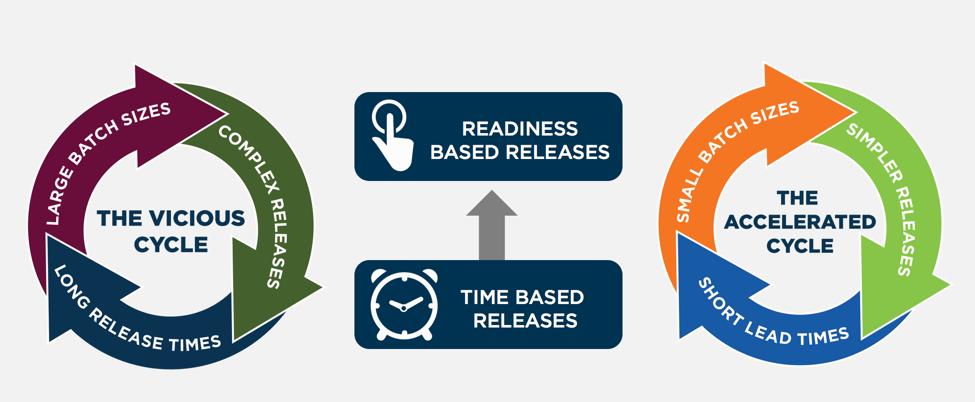
    • Large batch sizes
    • Lack of continuous flow of work into Agile teams’ backlogs
    • Calendar-based gated releases
    • Test environment complexities
    • Environment availability

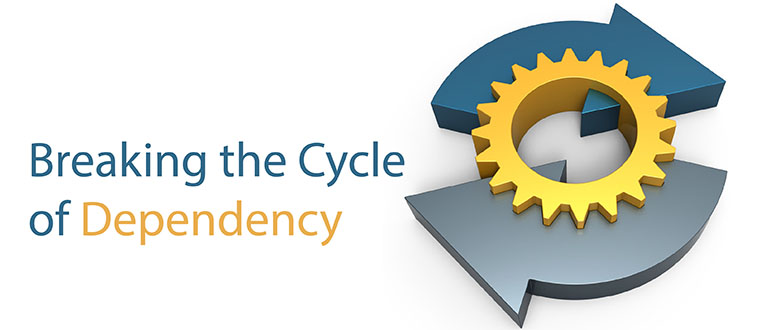
    This manifests itself in the current state as shown below as the vicious cycle. When teams are only delivering system releases a few times a year, then the business believes it needs to pack everything it can think of into that release, since waiting for the next release incurs a delay of months. The leads to large complex releases with many dependencies. This, in turn, slows down the development and testing of these releases and requires a lot of release coordination, resulting in long lead times and the inability to release frequently. And this leads into the cycle repeating.

    So what are the countermeasures needed to break this cycle?  They include:

    • Smaller batch sizes
    • Architectural, design and development decoupling techniques
    • Increased automation
    • Readiness-based release capability

    Smaller batch sizes require applying MVP (minimal viable product) techniques. When IT gains the trust of the business to deliver more frequently, the business will be more open to focus on the minimal product set of highest priority items it believes can deliver business value. Accelerated delivery provides the ability to test business hypotheses and gain feedback from customers more quickly to determine what worked and what needs changed. The enterprises that can turn this crank more quickly gain a huge advantage in the marketplace.

    Modern web architecture techniques (e.g. microservices, APIs), along with design techniques such as feature toggling to enable dark- and canary-launching allow applications to be deployed independently and with direct control of customer impacts. This increases development velocity due to simplifying and reducing the lifespan for managing feature or release branches in the code base.

    Increased automation combined with a move to readiness based releases allows application releases to be deployed when ready rather than waiting for calendar-based change windows. They key here is not sacrificing quality, auditability or security but rather building those capabilities into your applications and delivery pipeline and requiring those certifications are earned before an application can be released.

    About the Author / Carmen DeArdo

    Carmen-DeArdo-sqCarmen DeArdo is the director of Build Technologies at Nationwide Insurance. He is responsible for helping drive accelerated delivery utilizing Lean and DevOps techniques across the end-to-end delivery value stream.  One current focus area is the creation of an integrated delivery pipeline capability.