Tag: Management

  • Flox CLI Tool Makes Managing Custom Developer Environments Simpler

    Flox CLI Tool Makes Managing Custom Developer Environments Simpler

    Flox today made generally available an open source command line interface (CLI) for a namesake tool that enables developers to more easily spin up multiple custom development environments.

    At the same time, the company revealed at the 21st annual Southern California Linux Expo (SCALE 21) that it is now providing access to FloxHub, a free repository for sharing development environments across teams.

    Flox is based on the same declarative framework used to invoke the Nix package management and configuration tool. It allows developers to create environments that contain everything they need to build software, including automatic creation of a software bill of materials (SBOM).

    Ross Turk, head of marketing and developer relations for Flox, said that approach provides developers with a framework for managing multiple development environments that they can spin up using the same methods commonly used to invoke the package managers versus having to master a less familiar approach to manage development environments, he added.

    That capability makes it simpler for developers to both replicate development environments across machines and, when needed, dynamically switch between projects in a way that can be continuously audited by a centralized DevOps team. Instead of requiring a DevOps team to apply the same rigid standard environment across all development projects, each developer is still free to customize their environment based on their personal preferences.

    In addition, developers trying to fix a bug can also now easily reproduce the development environment they were using at the time they were writing the code they needed to review.

    DevOps teams are increasingly finding themselves caught between competing agendas. Many IT leaders are driving the adoption of platform engineering methodologies to centralize the management of DevOps workflows in the hopes of increasing developer productivity and reducing total costs. Conceptually, developers would prefer to have more backend processes managed by those teams, but not to the point where it forces them to use a development environment that has been defined for them. Each developer typically prefers to customize their development environment as the project evolves.

    Arguably, one of the primary reasons developers embrace DevOps is that it gives them more control over their development environments. The challenge is that as each team defines its own DevOps workflow, organizations often later discover they are licensing redundant DevOps tools and platforms.

    In the meantime, it’s not clear to what degree platform engineering might boost developer productivity. It no doubt will reduce the amount of time developers spend managing backend processes, but having that extra time doesn’t directly equate to better code being delivered faster. Writing code is as much an art as science, so it creates levels of inspiration that don’t always occur whenever a developer starts to write code. Instead, platform engineering creates more opportunities for inspiration to strike because they are not spending time on other tasks. At the very least, it should provide more time to run tests on the code that is produced.

    One way or another, as application development continues to evolve, most organizations will find the middle ground that best suits their needs. The challenge now is reducing the amount of time between now and when that goal is eventually achieved.

  • We Will Control the World!

    We Will Control the World!

    One thing about centralizing control is that there always has to be someone in charge. That can be a very good thing or a very bad thing. In IT, it doesn’t even get far enough to be a terrible thing.

    Generative AI and increasing integrations have renewed the insistence from the crowd that it is certain they should control every little thing in your (virtual) data center. The idea that a given vendor should be the configuration and management point for a wide variety of tools – their own, competitors and nearby market tools – has been around forever. Vendors love the idea that they have that level of input into your infrastructure and, let’s be honest, many of us love the idea of having it taken care of for us.

    But there are several questions to ask here. First, what is the likelihood that vendor X will have a great level of support for the tools from other vendors in your infrastructure? I mean, before we even get into the idea that this desire for control is not at all altruistic (we’re not talking Stalin here, but we certainly aren’t talking Washington, either), there is the question of how AI will be able to learn about and configure/manage a competitor’s products. Watching wire traffic? Well, if the competitor’s systems are super-well-known and the format of configuration APIs/files are well known—maybe? But this leads us to the real problem.

    My advice to vendors would be to get their own products under control first. We work in a high-complexity field where the tools require a lot of specific domain knowledge to manage, and even more to manage well. Vendors have generally taken for granted that this level of knowledge would be available. Before making that level of knowledge unnecessary for competitors or spiderwebbing into competitor installs, make your tool(s) damn simple to use. That doesn’t mean you have to simplify it—you have the power of AI and are going to focus on configuration and management. So nearly eliminate configuration issues with your own products.

    Example: “Great Security Tool, I just added an API at https://devopsy.kinsta.cloud/rocks. Please lock it down so it is accessible only to users in the WeRule group, then generate a WAF rule to keep it from being used to access more than three records a day, and only allow GET and POST calls.” Most vendors across the industry aren’t even close to this level of simplicity, so why in the world would you trust them to configure/control other vendor’s products?

    There is a trend to make products cover more of the space they are in. This is very big in security right now, but you also see it in DevOps. CI/CD/CDD/VC/kitchen sink (KS)—I’m okay with that, as it does offer us simplified configuration and better cross-app communication. I think this is a better route than trying to serve as command-and-control for an entire tech stack that the vendor does not own. I still want point products and best-of-breed available, but a lot of us just don’t have the time and resources to implement five different products to get the job done—even if they’re “free,” as we all know, they are not free—so one vendor doing an entire chain is great for that use case, and often the shared information about the app, security, the network, etc. can work together better than the sum of its parts. So let’s stay in the “umbrella app” lane and not get carried away with trying to drive in the “manager of the entire world” lane.

    We’re busy, we’re tired and many of us are jaded. So don’t tell us how you can manage other vendors’ tools, tell us how you’re making it easier to manage yours. Thanks, from all of us in IT.

  • Why Enterprises Should Embrace Data-Driven Software Management

    Why Enterprises Should Embrace Data-Driven Software Management

    Many Fortune 500 companies have recently undergone extensive layoffs and now find themselves having to achieve more with fewer people—while grappling with how to integrate generative AI into their products. They must build while economizing, streamlining and increasing efficiency in every part of their company. Yet one of the most vital cogs of the machinery has struggled to evolve over the past 20 years.

    In fact, until now, managing high-tech engineering teams at the world’s biggest companies has not been all that high-tech.

    Back in the 1970s, the “waterfall” model was introduced: An inflexible process in which each phase of software development depended on the previous one’s completion. Then, around the 2000s, companies started moving towards “agile” models that tracked progress in two-week sprints.

    Now, a third era of software development management is emerging. It’s not waterfall or agile; it’s data-driven.

    Current management systems cannot give managers real-time, granular insights so they can make decisions on the spot and run projects in the most efficient way possible. However, data-driven models generate live data on how teams are progressing which has far-reaching effects on businesses’ productivity and future survival.

    The emergence of DORA, a framework for tracking development metrics makes this possible. For the first time, new tools enable us to capture the software development life cycle automatically, without any manual input from the engineer, leading to fewer roadblocks, a 20% faster cycle time and greater ROI.

    Despite this, only a handful of Fortune 500 companies have embraced data-driven metrics. Here are the reasons that shift should happen now.

    Real-time Insights are Game-Changers

    Until now, companies have been using inaccurate methods to track their software development teams. Project management reports on engineers’ output are reviewed every two weeks, monthly, or even quarterly. This means that impactful changes are made at a delayed point in time rather than when they can make the greatest difference to cycle time.

    In contrast, DORA measures specific real-time performance indicators: Deployment frequency (DF), lead time for changes (LT), mean time to recovery (MTTR) and change failure rate (CFR) (For more information, see here). These far more data-driven metrics measure efficiency and velocity at every key point of day-to-day software development, with feedback to management happening continually.

    Often, individual engineers won’t have enough capacity or oversight to inform managers of specific issues during a cycle. Using DORA metrics is like being able to detect that a team has an abnormally high BPM though they are in a rest phase. It’s a signal of illness; that more or different resources are needed. That then requires you to go in and inspect the micro factors that can be adapted.

    For any Fortune 500 company, this quick turnaround is vital. Any small issue in a product cycle can easily escalate and become a critical problem in a matter of days. Instead, using DORA can accelerate software development and, ultimately, time to market.

    DORA Gives you Internal Benchmarks

    But, how can you tell if something is wrong while using DORA? In the first few months of adoption, it’s likely that companies will compare their internal data to industry benchmarks. Unprecedented data has recently been published that offers general performance benchmarks for each DORA metric based on industry research.

    But the end game is to be able to compare your DORA metrics to your own internal benchmarks. With time, each company will develop its own personal baselines that better represent internal capabilities and limitations based on innumerable variables.

    The purpose of DORA benchmarks, however, is not to draw a fixed red line. Think of it more like a speed limit that ensures that people are working at a steady pace while allowing for flexibility.

    A clear sign that your team may be burnt out is a really low cycle time. At times it can be a technical bottleneck, but the beauty of DORA is that it can also point you towards well-being issues.

    DORA Needs to be Coupled With Granular Insights

    DORA is unparalleled when it comes to flagging managers that something is wrong. DORA metrics can flag that a team has a high cycle time – for example, an abnormally long deployment frequency suggests that engineers are working more slowly or that there may be a build-up of code that isn’t being uploaded to the repository quickly enough during the review process. At that point, you need to zoom in to get more information. There are multiple metrics that provide insights into the exact pain points in a team’s development, and you can develop these internally or via tools or engineering management software that provides more holistic oversight.

    In this particular case, you can use a granular metric called “time to merge from first review” to see how fast engineers incorporate feedback from their peers during code reviews. If it is taking a week for the first review to be carried out, integrated into the code and finally uploaded to the general platform, then perhaps there’s a bottleneck occurring during the review process.

    Perhaps the most important benefit of Engineering Leadership 3.0 is that it no longer has to be a guessing game. If they sense something’s wrong, they can check their DORA dashboard, receive confirmation of the problem, hone in with granular metrics, and take corrective actions immediately.

    Teams that adapt their behavior as a result of these data-driven metrics will add incredible ROI to the company. But these changes can’t happen overnight. It will start with getting buy-in from engineering managers and the executive team. For Fortune 500 companies, that often requires elaborating action plans, integrating external tools to operate the tracking process and training engineering managers (in our case, this takes up to five weeks). But once they’re a part of the business, they will become indispensable in running smoothly without stacking up issues.

  • Forget Change, Embrace Stability

    Forget Change, Embrace Stability

    DevOps is about change. It was introduced to accelerate change, and it has opened up a whole new world of tools and possibilities that are all based on the premise of changing IT. Starting with Agile, we now have DevOps variants and subprocesses that run the entire software development life cycle (SDLC) process.

    Want to make more frequent updates that can regularly show demonstrable progress to business owners? Agile and CI! Need to get the app settled in its inevitable home with automation? You need CD! Want testing and zero-day protections? Start with DevSecOps built into the CI/CD process and add in application and API security! Want to fully automate deployment in the whay builds are automated? Grab a GitOps tool and let’s goooo! The list goes on and on. Literally. We’ve almost got more tools than we have names for spaces at this point.

    And all of those tools introduce change. Most of them introduce a massive amount of change. You don’t get to GitOps without breaking some of your existing processes and reworking them. We have fallen in love with change in IT.

    But there is a funny thing that’s happened along the way; I’ve mentioned it before, but never from this perspective. All great changes require time for consolidation. Be it stock market swings or revolutions, afterward, there is a period of consolidation. In IT, containers are a good example. When they became capable of actually running workloads, IT experienced a period of time when making all the various machines run in VMs was the thing. People weren’t (generally) looking for the new big change in the process, they were just glad that those one-off machines that had custom hardware could now be moved to something more manageable and that spinning up servers could be done in days or weeks instead of the months it used to take when you had to order hardware. But that consolidation created organizational standards and stability that the organization enjoyed for years – even after containers rose to challenge VMs and some organizations even today.

    So every once in a while, take a breather, consolidate gains, create standards that have meaning for your organization, then continue on with whatever the shiny new change is. Make sure that once you have identified, for example, the need for code scanners that can work within or that are complementary to the integrated development environment (IDE), that you have one scanner—or one scanner per programming language—to maintain and monitor instead of one tool per project. That saves time and creates stability, both of which will serve the organization moving forward.

    Change is here to stay; it’s the only constant. IT is caught in a cycle of change followed by change, with the next wave driven by generative AI. But in times of change, seek stability and, in times of stability, seek changes that can have a positive impact. So go standardize and organize before the next wave hits.

    Mostly, the changes will serve the organization by freeing up your time and letting you spend more of your time rocking the IT world. Those systems stay up because of you. More time is more innovation, and more stability means less burnout. All of which is good for the organization.

  • Building New Value in IT Systems Management

    Building New Value in IT Systems Management

    For decades, companies treated the IT system as a cost center not much different from facilities maintenance. The job of IT was to keep the lights on, ensuring that the technology a company used worked and that the costs of keeping it working were kept under control. Those days are well over. Not only is technology an operational necessity, but everyone now recognizes that the way companies strategically use technology—whether they buy it, rent it or build it—has a direct impact on company performance. This goes beyond efficiency. Technology is key for everything from customer acquisition and engagement to competitive differentiation and advantage.

    As it turns out, however, not every company has been able to rethink and reconfigure its IT system to meet these new demands. That’s not surprising. Not only does this require a mindset shift from the C-suite on down, but it also requires restructuring the IT function to ensure it supports business objectives in a consistent and measurable way.

    While transforming IT from a cost center to a profit center can hardly happen overnight, there are three things that any company can do to turn IT into both a business enabler and a business driver.

    1. Establish Full Transparency Over Your IT System

    A mission-critical IT system needs to have a thorough understanding of what the organization’s IT landscape looks like. Spending money on duplicate applications and unused licenses is a waste. Unknown SaaS applications pose a persistent security risk. Optimizing spend and improving security are table stakes for business-enabling IT.

    The fact that anyone in a company with a credit card can subscribe to a SaaS service is the main challenge. Effectively tracking down all SaaS applications and licenses, along with monitoring SaaS usage, can’t be handled manually. What is needed, as with other tedious tasks, is automation. For example, by integrating a SaaS management platform (SMP) with SSO and expense management solutions, organizations can automate the discovery of SaaS. When the SMP also integrates with the primary SaaS vendors companies rely on (Microsoft, Google, Salesforce, etc.), it allows organizations to keep track of usage.

    The goal here isn’t for a centralized IT function to exercise more control over the software used by organizations. Instead, the goal is leveraging automation strategically to produce the kind of data-driven insights that allow organizations to make better, more informed decisions about the technology it uses.

    2. Promote Engineering Efficiency

    All companies today are software companies. This means that the engineering function needs to be thought of us as part of the overall IT estate. Not only does the IT system need to support engineering as it would any other business function, but the technology created by engineering itself inevitably becomes part of the broader technology landscape managed by IT.

    Mission-critical IT supports engineering efficiency in at least two ways. First, IT should provide the tools and capabilities needed to drive engineering efficiency. For a long time, measuring the efficiency of engineering was either not done at all or was based on meaningless vanity metrics such as lines of code. Recently, DORA metrics have emerged as the scientifically validated method, widely trusted by engineering teams themselves, for tracking efficiency. IT needs to enable easy tracking of these metrics.

    IT should also facilitate the creation and maintenance of a service catalog for engineering teams. Maintenance of this catalog not only promotes the reuse of services, itself a hallmark of engineering efficiency but also makes it possible to quickly mitigate security issues associated with microservices (Log4j being just one example from the last 12 months).

    Beyond efficiency, however, IT can also support in-house software creation by helping engineering teams with value stream management so they can track the business impact of the software they create. While efficiency can have a business impact (realized through time/cost savings), software drives the business forward when it effectively meets customer needs. IT can facilitate these insights by connecting the dots between customer feature requests, product changes and increased adoption (of products and features).

    3. Make Enterprise Architecture Strategic

    An IT function serving as a mission-critical part of the organization cultivates a comprehensive overview of the software landscape and supports engineering efficiency, as suggested, by viewing the development environment as an integral part of the broader technology estate. However, IT system leaders need to do something more to effectively collaborate with the business leaders and drive the business forward.

    Specifically, IT leaders need to provide the business with insight into all the ways technology influences business performance. This means highlighting risks that need to be addressed, uncovering opportunities that should be pursued, and suggesting options for future planning. Thoughtful and strategic enterprise architecture management here is the key.

    A strategic approach to enterprise architecture management means focusing less on governance (who gets to use what) and more on reducing complexity to promote agility and quick decision-making. The first step in this direction is the adoption of a common language that aligns the business and IT. Business capabilities and the creation of business capabilities maps for different departments serve this purpose.

    To make decisions about technology, business leaders need to know what they are working with. Reliable and current data is essential. For this reason, your enterprise architecture management needs to prioritize ongoing data collection and the maintenance of data quality.

    Finally, to make objectives and options transparent, IT needs to be capable of strategically displaying all enterprise architecture data in a way that can be easily understood and acted on.

    Where Do You Start?

    Taming an unruly SaaS landscape, making it possible to build better software and guiding technology strategy are all easier said than done.

    The good news is, ongoing innovation has created solutions that are easier to use, effectively leverage automation and integrate with all relevant systems. In other words, the tools are there. All that’s needed is the commitment to transforming the IT system and developing it into the critical business function it can and should be.

  • 4 Ways to Manage Up for Automation

    4 Ways to Manage Up for Automation

    IT decision-makers understand how important a role process automation can play in a post-pandemic recovery. In a recent survey, 68% of these leaders said remote work caused key business processes in their organizations to break down. In the same survey, 97% described process automation as being vital to digital transformation and an important factor in achieving business outcomes.

    So, full speed ahead? Not exactly. While process automation’s benefits are well documented, many organizations remain hesitant to automate too many tasks because they’re afraid they’ll further complicate an already complex IT environment.

    This is where developers can help process automation initiatives get off the ground. They don’t control their organizations’ purse strings and they often don’t take the lead on planning new IT initiatives. But developers are the ones responsible for designing and building the software and tools that drive real business results. In a large sense, they occupy a key role at the heart of digital transformation.

    For organizations to gain the full benefit of process automation, developers need to be more intimately involved in automation projects. They need to have more say in how these initiatives are constructed, how they’re carried out and how they’re improved.

    Automation initiatives aren’t set-it-and-forget-it projects. They must tie in with end-to-end organizational processes, which will evolve over time. Organizations don’t want to bake in processes that won’t suit them two months or two years from now. With this in mind, process automation needs to be nimble, adaptable and smart–and it’s developers who have the skills and the insights needed to drive these initiatives forward, impacting broader organizational success. 

    To take on this larger role, though, developers must be given the right resources, tools and access to make their voices heard. Part of this is empowering them to manage up to senior leaders–on both the IT and business sides–to advocate for the types of automation projects that can drive true digital transformation.

    Here are four ways they can do it.

    Build Automation Demos

    The biggest enemy of a process automation project is time. The C-suite and senior IT leaders don’t want to spend months–if not years–debating the merits and feasibility of automating a series of tasks. They want to know quickly whether a project is viable and whether they should commit resources to it.

    Developers can set a project on the right course by creating a basic demo. It doesn’t need to integrate the complicated set of dependencies planned for the finished project; it just has to show people in power that the project will work. Demonstrate how a manual calculation project gets triggered by a quarterly deadline and estimate the time it will save a department on an ongoing basis. Show the leadership that the pain point workers have cited on feedback reports can be solved.

    Show Proven Examples

    While a demo visualizes how a process can work, a use case can illustrate how such a process has worked in another setting. Examples can be found in any number of places–in a formal case study, a tech article, a GitHub posting, a developer message board or materials supplied by a technology partner. Developers should tap their networks to get advice and run scenarios by peers. The goal is to find a situation where someone solved a similar problem with a manageable set of procedures–and it worked. Having a solid example takes the initiative out of the theoretical realm and gives the developer more credibility.  

    Get an Enterprise Architect on Board

    Once the demo and the use case are secured, the next step is getting buy-in on the vision for the automation initiative. This is the domain of the enterprise architect. It’s important for a developer to get this person on board as an ally. They should work with the enterprise architect to ensure that the set of tasks fits into the company’s architecture – today and in the future. If the company is pursuing a microservices strategy, the developer needs to show how automating a series of product quality checks can be accomplished inside this technology infrastructure.

    Keep Things Simple

    While organizations try hard to operate in an agile manner, sometimes that’s easier said than done. The people developers report to like to plan. Enterprise architects like to define perfect, future-proof architectures. The C-suite likes to envision scenarios and debate ramifications. Developers can break logjams by encouraging others to avoid the temptation to drown in detail. They should get comfortable with the concept, the demo, the use case and the vision–in that order–and then roll it out to the larger organization. 

    While process automation is widely seen as being vital to business transformation, building a project is often more challenging than it needs to be. Encouraging developers to take on larger roles can help organizations move automation initiatives past square one and on the path to digital transformation. 

  • APIs and DevOps

    APIs and DevOps

    As always, there are interesting trends in DevOps, and I wanted to point out one that is starting to bother me: the “API economy,” and how it impacts DevOps decision-makers.

    Traditional infrastructure—SAN, LAN, physical systems, etc.—were generally controlled the best from the command line. While there are a million of them, Cisco IOS is probably the one that you’ll remember best (or you stopped using to read this—just depends upon the shop). When large-scale automation started, these command lines became a bit problematic. After all, scripting was possible, but painful, and often had non-portable hardcoded values.

    Virtualization, and later cloud—and even later SDN and NFV—all made this better, but on a layer over the top of (and normally not well integrated with) the physical layer. Years ago I bemoaned that we had doubled the workload of operations by re-implementing what was already implemented at the physical layer. So we were configuring the physical—even for cloud you have to get to the cloud—and then configuring the virtual.

    Then “Software Devs as Kingmakers” came along, followed by “the API Economy,” and finally we started to see some serious attention paid to APIs by infrastructure vendors that should have done so long ago (some former employers of mine might belong in this group).

    Here is the thing: There is a difference between having an API and having an API that is useful. When shopping for solutions, be they physical or software, don’t allow APIs to be a check box because it’s “the API Economy.” And don’t assume that an API useful to DEVops is what is needed to automate infrastructure. Monitoring APIs—particularly ones that provide you detailed information about an app as it runs—are useful to DEVops, and assuming you have tools that are or can be integrated, might provide value to devOPS.

    But monitoring is not management. devOPS is increasingly automated, and increasingly needs viable APIs that can help them deploy/configure infrastructure. Vendors are responding, but the quality of APIs at this point in time varies widely. So make certain that evaluation looks at APIs available with an eye to suitability to task. devOPS needs management and might be able to use monitoring, while DEVops generally needs monitoring and has little use for management.

    This is not 100% true of course, there are a billion different shops, most doing things in slightly different ways, but think of storage (because it can be done in few enough words to fit in a blog)… An app needs access to storage, ways to be notified of storage space limitations, and possibly to metadata. Operations needs to provision, migrate, backup, replicate… The list goes on. These all contribute to the availability and quality of the application, and are all DevOps, but the focus is different. And having a simple “number of blocks free” API will not help with the DevOPS needs even if it helps developers manage a piece of the application.

    But we have more options than we ever did before! So fear not, just watch what your prospective vendors are doing, and check in with long-term vendors on occasion, too—because things are constantly changing, nearly always improving.

    And keep rocking it. Presumably you are working this out already, knowingly or not, or you wouldn’t have time to read this blog.

    — Don Macvittie

  • How to Become a Great Engineering Manager

    How to Become a Great Engineering Manager

    I wrote recently about the attributes of a 10x software engineer and a 20x one. Consequently, I received a few comments suggesting I create a similar list for engineering managers. I checked online and found a few articles, but none conveyed a full list in my mind. If you consider that software development efficiency has become the No. 1 priority for executives, ranking higher than access to engineering talent or capital, then I guess that’s a topic worth discussing! Engineering managers just might have the biggest impact on the productivity of their engineering teams.

    I’ll first go over the attributes for a good engineering manager, and then list what makes a great one.

    The 10 Attributes of a Good Engineering Manager

    I tried to prioritize this list, from essential to bonus. Feel free to give me your opinion on this in the comments.

    1. Be trusting

    If you refer to what destroys developer productivity most, trust is at the heart of it. Managers need to trust their team and give them some space. Micromanaging means undermining the team’s skills and ability to get things done, and therefore their motivation and self-confidence (which, by the way, they need to address difficult problems). Trust between the managers and their teams should be the foundation of their relationship. And it’s the manager’s role and job to create it, not the other way around. So first, trust your team.

    1. Emotional intelligence and ability to establish trust

    This is linked to the first point. You need mutual trust within a team for it to work well. And again, it’s the manager’s job to ensure that their team trusts them. How does the manager do this? By showing emotional intelligence.

    Engineering managers must be sure to make themselves available for questions, even if they’d rather not be interrupted. This can run counter to high efficiency, but it’s important that managers spend the time to form personal connections, so honest and open conversations happen naturally within the team and with the manager.

    Another important point is to listen to anyone and everyone. When the team gets together for a meeting to sort out a project they plan to do, everyone in the room needs to be heard and considered. The manager needs to respect any experience or insight their team can bring to the table. Any member of the team may be the most knowledgeable on a particular subject.

    Now, this is not Disneyland for sure: Managers might need to be tough and unwavering sometimes. But when that’s the case, it’s important to be transparent about the reasons to keep the hard-earned trust intact.

    1. Ability to shield the team from interruptions

    Interruptions and meetings (consider them planned interruptions) are greatly loathed by developers, and for good reason. They literally destroy their productivity. Developers love projects that move fast; they’re invigorating! Managers would do them a great service by removing distractions, ensuring that they have large chunks of uninterrupted “maker time.”

    A classic example is a really long email exchange on some technical topic with no resolution. The manager could simply put everyone on the thread in one room together for 10 minutes to get the issue resolved promptly.

    1. Ability to manage the team’s motivation

    The team’s motivation is directly linked to their output and the success of their releases. There are many ways to keep the motivation high. Here are just a few:

    • Help the team see their work through the lens of their impact on the company.
    • Don’t worry too much about failure. Things will always fail: builds, deploys, schedules missed, etc. If things fail, take responsibility and focus on the learning. The point is not to have to fix the same issue twice. This will give your team a mindset toward action and growth.
    • Celebrate every achievement, whatever its size. And credit the participants profusely.
    • Be transparent. Default to overcommunicating. While some leaders believe they need to shield their teams from things going on at the executive level to prevent distraction, there’s a difference between productive shielding and unintentionally denying engineers important company context. Managers want their teams to feel included and invested in the direction of the company.
    1. Strong work ethic and cohesion with company culture

    Work ethic means being exemplary in all the ways you expect your team to behave. Lead by example. Managers must embrace the company culture, or it will create confusion sending team members mixed signals of whether or not they should embrace the company’s culture.

    This also means shielding your team from people who don’t act accordingly. For instance, hiring someone with a huge list of qualifications and experience can still be a disaster if they have a different set of values than those held by the company. Or, unfortunately, having to let people go who are not team players or aligned with the company and team culture, whatever their skill level.

    Good managers keep in mind that the team’s productivity as a group is important, not individual performance.

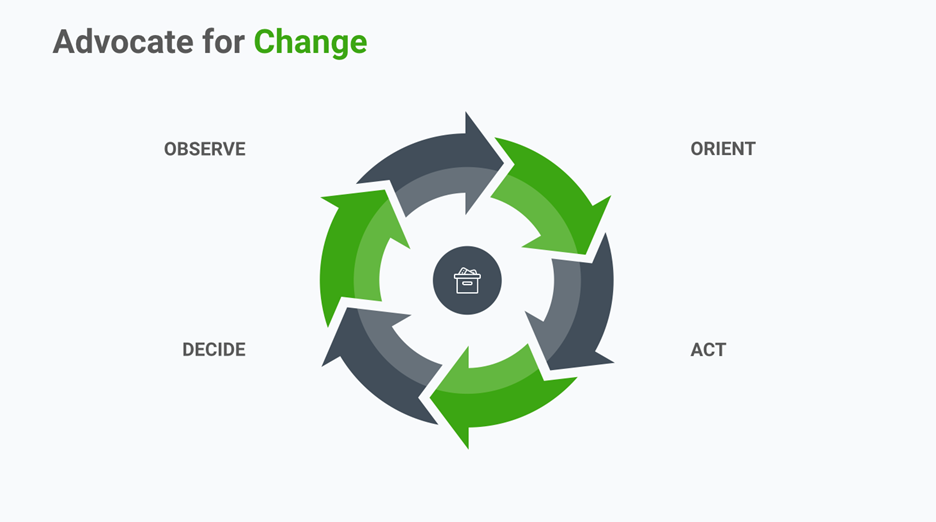
    1. Advocate for change to seek positive evolution in a constant manner

    Good managers install a mindset of positive evolution within the team.  They adopt a state of mind that continuously seeks to improve a certain situation. When a process is slow or cumbersome, they try to turn that around and make it better. One way todo this is using OODA loops: Observe, Orient, Decide, Act.
    1. Ability to work with departments outside of engineering

    The language used by non-technical stakeholders might be very different than that of the development team. However, good managers don’t want to be the Single point of contact, as they would introduce a potential liability into the project—a strong dependency on them. They tend to include their team in relevant discussions, but make sure they protect the team members from continuous interruptions. Good managers try to be the First point of contact, which is a big difference from being the single point of contact.

    1. Mentoring abilities

    Effective managers are measured by the effectiveness of their software teams. Anything that they can do to make each person on their team better makes their overall teams exponentially better. And most of the mentoring is actually about matchmaking team members with high-impact projects that align with their interests, the value they want to create and how they want to grow. That’s when motivation becomes organic.

    There are already so many articles on one-on-one meetings, I won’t spend much time on them. But mentoring also happens every day at every occasion. For instance, if a manager happens to review code or explain certain conventions, they make sure to clearly explain the reasoning why the team is doing something in a particular manner. Good managers are great teachers.

    1. Technical literacy and problem-solving skills

    On the one hand, technically competent managers will have a superior handle on the work that they are managing, and will therefore be better able to make recommendations and evaluate necessary trade-offs. On the other hand, technically talented managers are often better able to garner respect from their teams. Non-technical managers may struggle to manage high-performing individual contributors, who tend to have a tough time taking orders from managers who don’t fully understand their craft.

    But, if you don’t have any engineering background, it doesn’t mean you cannot be a good—or even a great—manager. I would advise you to learn about the technical dimension of the project (with humility) through every interaction you have with your team, and possibly in your off hours. Having enough technical experience to understand the projects and the decisions, mixed with the ability to trust others with technical depth, works really well.

    1. Ability to make hard decisions and manage conflicts

    Good engineering managers will make the courageous decision, even if it isn’t popular. They don’t make the wrong decision just because it is socially right and their team suggests it. Good engineering managers focus on the road and the values they believe in, and not only on the immediate issues they are facing. They don’t just choose best industry practices because they will attract the “right” talent. For instance, managers will avoid  automatically using the latest technologies: they will weigh the pros and cons and make the best choices based on the resources and requirements of their team and company.

    How Can You Become a Great Engineering Manager?

    1. Embody the vision

    Great managers have a natural ability to visualize the future of the company and motivate others to work toward those lofty yet realistic goals. They communicate the company vision at every opportunity by illustrating it contextually in discussions. They challenge the decisions made with, “What if we had 20x more users? Would that be sustainable?” or, “Will this technology decision still be valid in 24 or 36 months?”

    1. Support your team in the short and long term

    At the end of the day, as a technical manager, your job is mostly about humans. Great managers think about supporting their team in two ways: day to day and year to year.

    Great managers help their people devise a long-term plan to be happy and productive at their company. Sometimes, engineers don’t know how to articulate how they want to evolve. This is not an issue, as great managers have built strong relationships and trust with their team members to help them uncover this part and build a plan for:

    • the skills to improve.
    • the technical/non-technical experiences they want to have.
    • how they want to increase the scope of their impact at the company.

    And, naturally, the great managers will help their people to achieve their ambitions (within or maybe even outside the company).

    1. Challenge the team to grow faster

    Great managers try to super-charge learning within their team. They know to push their people out of their comfort zone and challenge them to accomplish things they didn’t even know they could do. But in doing so, they set up strong guardrails to help their team course-correct along the way.

    For instance, one way for engineers to increase their impact is to architect and own increasingly complex technical problems requiring novel solutions. Great managers will throw their people  into the deep end of the pool, with the right mentorship and guardrails, and have them start solving increasingly complex problems immediately. They will also try to maintain a balance between more experienced and less experienced engineers, having them work together and regularly share knowledge. They want to build in opportunities to make sure these conversations are truly bi-directional.

    Another instance is estimates. Do you know this law?

    Hofstadter’s Law: It always takes longer than you expect, even when you take into account Hofstadter’s Law.

    Estimating is hard. When you do it more often, you will get better at it … but you will still get it wrong from time to time. Challenging your team to make estimates is a way to get them used to getting out of their comfort zone.

    1. Embrace the differences

    Diversity is invaluable. All people are different and live different lives. This is incredibly valuable, because your users will also be different. Surround yourself with passionate people of different backgrounds. By background, I don’t only mean gender or race, but also education and past experiences. The more people in the team think differently, the more approaches your team will consider when addressing a problem, which results in better decisions. A great manager understands this and will strive to get input on the same problems from a variety of people with different backgrounds.

    1. Level up the product and engineering partnership

    Great engineering managers know to extract the essence from the user story; they focus first on the core capabilities, providing valuable input and challenging the product as early as possible. They never blame the product on complex features, or make the excuse that some things were not explained in the first place or changed 10 times. They never complain about the lack of visibility on the ideation process. They build such visibility themselves. They challenge the product team with several alternatives for the same idea. They know to explain pros and cons without deep diving into tech level and buzzwords. They help the product team make better decisions and educate them about the technical layers of features.

    1. Know themselves and educate others about themselves

    Great engineering managers have made the effort to understand how they themselves work,  behave,  think and make decisions. Being transparent with their team about these things, builds more trustful and productive relationships. They work on visibility and commitment for their own goals and tasks in front of their team members.

    1. Push their team for ownership as much as possible

    Great engineering managers tend to give more ownership of user stories to their developers. Transferring ownership to developers gives them more motivation to do a great job. Great engineering managers don’t try to own all of the responsibilities or give them all to a few select  individuals (tech leads).

    Great managers know when to give input, when to make decisions, and when to step back and allow the team to take more ownership. They promote a culture of accountability, where they trust each team member to do his or her job and never  insist on full visibility into what their team is doing.

    1. Understand the system’s bigger limitations

    Great managers understand the inefficiencies within the processes and organizations, as well as their own limitations. They share their thoughts to upper management to help the organization grow (and not only their team).

    This concludes my list of the attributes of good to great engineering managers. If you think of any I’ve overlooked or have any ideas or suggestions to add, I would love to hear your thoughts! Please leave your comments and opinions below!

    — John Lafleur

  • The DevOps Management Perception Gap

    The DevOps Management Perception Gap

    The DevOps momentum is fierce in the enterprise today, as executives and middle management recognize the transformative power that continuous delivery of software has for a business. The message that DevOps can lead directly to increased profitability for organizations has seeped into technology leadership consciousness and tech leaders are gung-ho to reap the rewards.

    The problem is that their enthusiasm isn’t necessarily translating into a meaningful enough change in leadership patterns to really optimize the benefits of DevOps. The “2018 Global Developer Report” released by GitLabs recently offers some meaningful evidence of this. Study results hint at some Pollyanna-ish attitudes by managers that potentially could be leading to them resting on their leadership laurels.

    The GitLab study showed that managers are overestimating their DevOps teams’ performance as compared to the developers who are on the ground getting the work done. While 81 percent of managers say DevOps saves time in the development process, only 65 percent of developers agreed with that statement. There was a similar disparity when it came to awareness of speed of delivery capabilities: Approximately 47 percent of managers said their organization deploys code on demand or multiple times a day while only 39 percent of developers said the same.

    This gap could point to a potential disconnect growing within leadership that’s unable to adjust their management style to DevOps’ democratization of everyday development responsibilities. The study shows that almost a third of managers admit they don’t have visibility into what others are working on.

    While individual teams do need to be given the autonomy to get work done with less red tape in the way, leaders still need to provide companywide direction and strategic supervision. In the end, teams need to come together to meet global business goals, and that’s where managers need to step in.

    “What you need your leadership to do is apply systems thinking, and that’s a whole another subject we could get into, but I don’t think executives and leaders know how to really address the, ‘How do I optimize this as a whole?’” Carmen DeArdo, technology director for Nationwide Insurance, recently told devopsy.kinsta.cloud. “You need to really focus on the strategy and make sure you’re removing barriers and allowing teams to innovate and improve your delivery capability.”

    Unfortunately, the GitLabs study proves out DeArdo’s point, showing that leaders are missing their mark in this regard. The survey showed that “unclear direction” is the top challenge named by developers in getting their work done. It was cited by 67 percent of developers as their biggest impediment.

    Meanwhile, managers may not be aware that they’re not providing proper direction. Managers are 35 percent more likely to say they set project expectations up front than developers are to say they receive such requirements right out of the gate. In fact, only half of developers agree that they receive ample expectations and requirements from the start.

    — Ericka Chickowski