
Tag: jmeter

  • 4 Top Tips for Developing a New Feature

    4 Top Tips for Developing a New Feature

    As a backend developer at CA BlazeMeter, I recently had the chance to work on a big feature for our web app. The feature required a massive change on our backend code, a big change on our frontend and multiple migrations. You know what I’m talking about—it was one of those projects that developers fear.

    But, I gained a lot of valuable experience from the project. Not only did we deliver a kick-ass feature, I also learned the importance of teamwork and patience when developing something new. Armed with those two values, and the right tools and technologies, you can deliver a new feature quickly and efficiently.

    Here are a few more things that I learned that should prove helpful whether you’re developing a major feature or one that only requires a minor code change.

    Tip 1: Plan to understand the development requirements

    The process of development starts way before you start coding, with planning. After the product manager decides what needs to be developed, R&D needs to understand the cost: how many days (or weeks) of development the feature will take, how many people will be needed and which APIs are required.

    To do that, the product manager needs to conduct at least three “grooming” sessions with backend, frontend and QA leaders. The grooming sessions start with the product manager presenting the product flow and requirements.

    Since no one wants to read a lot of text (except perhaps the awesome readers of this article), the product manager should prepare mockups. They don’t have to be designed or colorful, but they do need to show the team what the feature looks like in his or her vision. During our grooming sessions, we used Balsamiq, which lets you create screen sketches for how the product is supposed to look, feel and work.
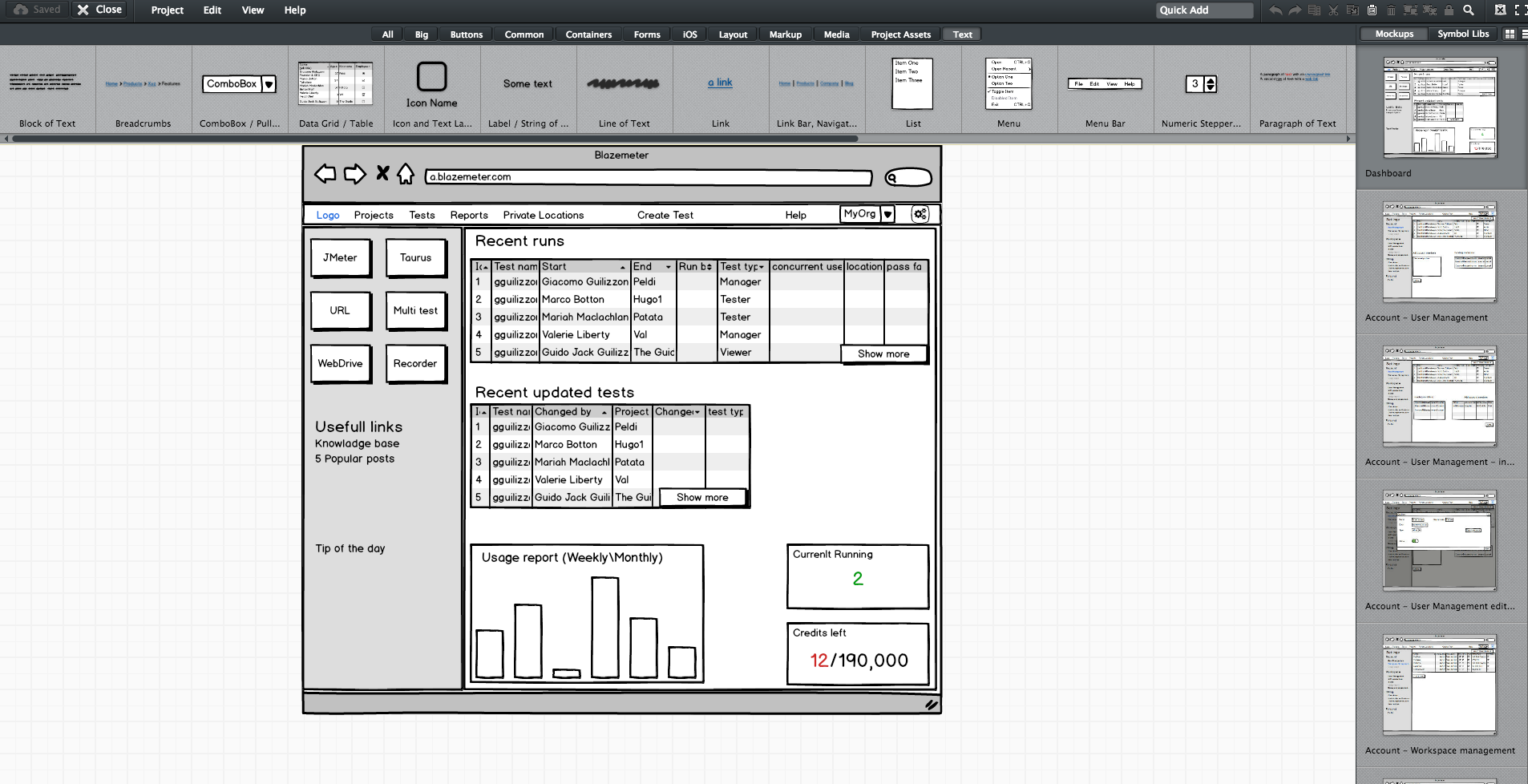
    Editing screen sketches using Balsamiq

    After the initial presentation, the sessions should include a lot of open discussion—asking questions, checking for answers and examining compliance, etc. —until everyone is satisfied and understands what the feature requires from them and from others.

    This is the time and place for frontend, backend and QA to give their opinion about the schedule and to alert and flag any potential problems in development or extreme use cases. It’s the role of the product team to answer questions and change the flow and requirements until there are no R&D rejections.

    Afterward, the frontend and backend leaders need to create a feature development plan, sitting down to determine what data they need to transform the product vision into a real thing. Or in other words, which APIs are required for each flow or button, how long each step is supposed to take, including buffers, and the order of development. APIs are the agreed “contract” between the development teams. After determining the contract terms, each team can proceed individually.

    I recommend you write your APIs in Swagger, which turns YAML files into detailed HTML pages with all the APIs.
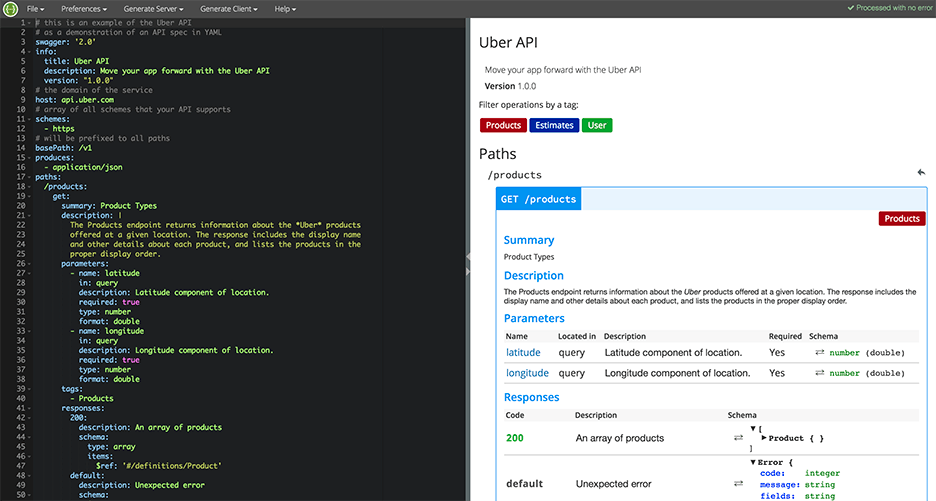
    Swagger Editor

    This plan needs to be transparent to everyone working on the project. In fact, it’s even better if each project participant can add and describe scenarios. Tools such as TestLink and Atlassian do just that. Then, when the code is ready, developers can go over the list and see everything is covered.

    We will need to stick to this schedule later on, especially when new demands unrelated to the feature come in, such as fixing bugs. Sticking to this plan is the best way to distinguish the wheat from the chaff of the development process.

    Start writing automation ASAP

    After planning, we want everyone to start working, and not only the backend. To do that, the backend can prepare mocks, either through outsourcing services such as JSON servers, which show inputs and outputs, or by writing dummy code.

    I mentioned earlier that we used Swagger to write APIs. We also used it to generate a server in NodeJS/Python, like this:

    Generating a JSON Server through Swagger

    From this moment on, frontend can begin writing and building screens and QA can start writing API automated testing, by using tools suh as JMeter. At this point, frontend and QA have the response codes and response bodies; they know which features to put where; and which APIs they need and how to use them.

    QA also know which data they’re missing, such as field names and field data. Sure, the backend code isn’t ready yet and all of the automated exams will return “red” instead of “green,” but the main issue is making sure everyone is as prepared as possible.

    This includes load and performance testing. You can use open-source tools such as JMeter, which is enhanced by CA BlazeMeter. By uploading our test script into, configuring the number of virtual users and ramp-up time, determining geo-locations to test from and analyzing KPIs to determine trends and the health of our system, we can ensure our product is delivered to our customers without crashing.

    This is also true about sending code to QA: Developers should test their code themselves and ensure that when they commit their code, it works 99.9 percent of the time.

    By starting automation as soon as possible, you can minimize future bottlenecks in the development process.

    Ensure the team communicates and works together

    Like I said before, teamwork is the most basic requirement when creating a new feature. This is because new questions arise during development and because requirements change. Therefore, everyone in the team needs to be in sync all the time, from the product manager and the designer to the developers and QA.

    Open communication lines are crucial because everyone is working on the same product at the same time, but each developer or QA should be working on a different part of the product and on different functionalities. Communication ensures each person’s work is compatible with the rest of the team’s work. This saves time, prevents frustration and redundancy and ensures maximum professionalism.

    To make sure everyone knew what was happening, we used Slack and opened a dedicated channel for the creation of this feature. We also had daily (short!) standups where we discussed what we have and what is missing.
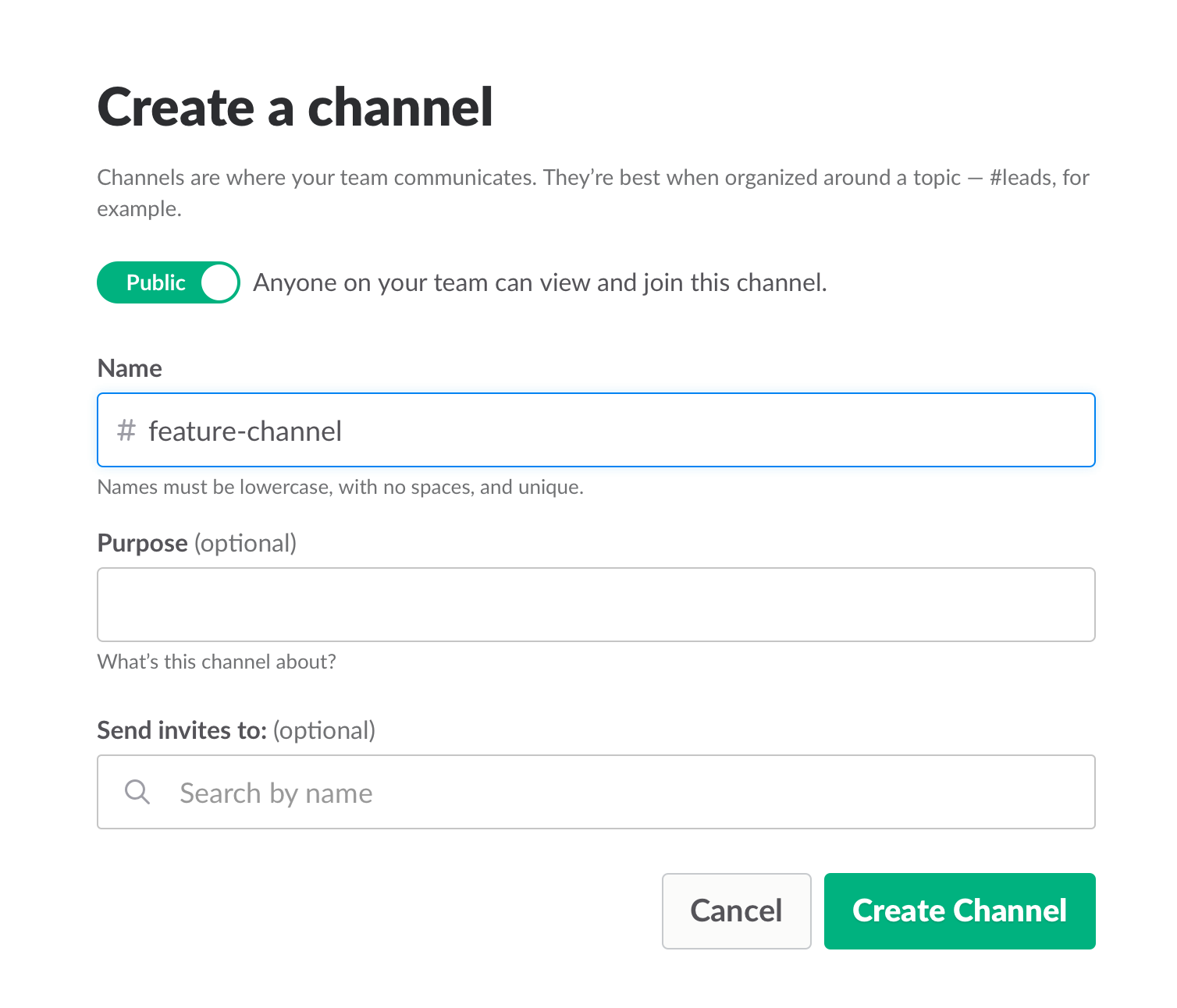
    Opening a Slack channel

    Communication also includes team and assignment management. JIRA, our primary issue tracking tool, offers Kanban-style, Scrum and fully customizable boards, which show the progress of each development task, including the developer assigned to it, and his or her exact status or phase.

    This helps you understand what other people are working on, and just as importantly, where people are stuck. If you can, get everyone to work in an open space and put a large screen in the middle of it. This lets you stay in sync at all times.

    We used JIRA to open and manage bugs as well. This was helpful when multiple QAs found the same bug. It’s important to carefully choose which tickets are opened and put them under one epic, so everyone stays focused.
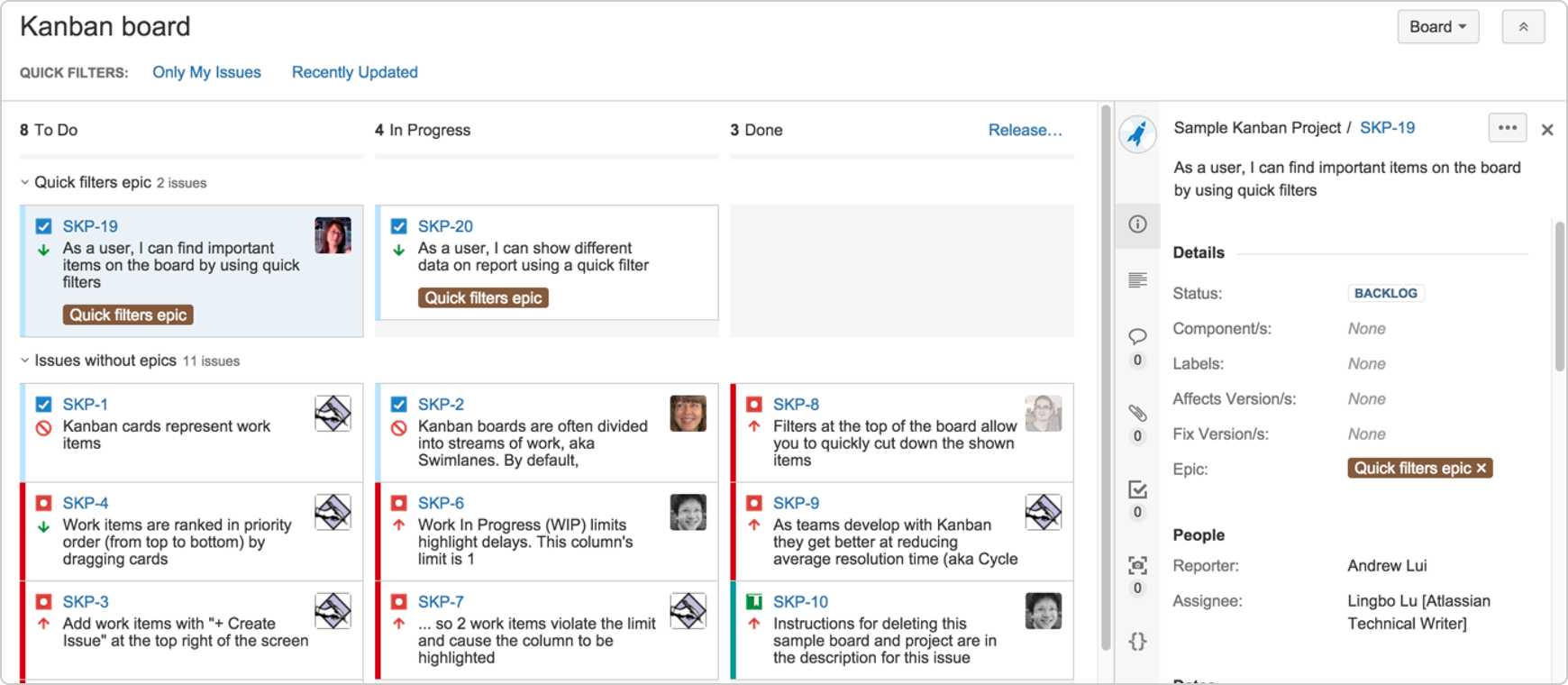
     

    JIRA Dashboard

    Another important aspect of communication is ensuring everyone uses the same terminology, as sometimes people might use the same term to describe different things or different terms to describe the same things. To prevent mixups that could waste your time, make sure everyone is on the same page. For example, do you say “system admin” or “<name (ex. BlazeMeter)> admin”?

    Work on the same development environments

    It’s important that everyone works on identical development environments and even on the same version of the tools and libraries. Otherwise, it could cause an (in)compatibility mess, including a lot of unnecessary back and forth and even might cause bugs to pop up. This environment needs to be as similar as possible to production, but only on a smaller scale.

    Conclusion

    Now look at the feature that came out of all that work here. I’m so grateful that I had the opportunity to work on it with an awesome team.

    I hope these best practices help you the next time you develop a new feature. Don’t forget to keep going agile after development and delivery by running tests in a continuous environment such as Jenkins for every commit.

    CA BlazeMeter works with Jenkins, ensuring you can load test in the cloud and analyze your data while shifting left. You can also use different APM tools, such as New Relic, AppDynamics and CA APM to alert you about errors before QA, which saves time.


    — Dor Atias

  • BlazeMeter Contributes Latest Developments to the JMeter Ecosystem

    BlazeMeter speeds up testing for JMeter users with a Step-by-Step Debugger and Keyboard Shortcuts, demonstrates open source test orchestration tool Taurus at Velocity Conference

    SAN FRANCISCO–(BUSINESS WIRE)–BlazeMeter, the leader in open source-based continuous performance testing, today released a number of key contributions to the JMeter community, helping to advance JMeter from a scripting and load generation tool to a more complete environment where practitioners can develop, debug and execute tests.

    “We’ve heard from developers that several common functionalities could be improved, so we worked on capabilities that make for an easier and more productive experience with JMeter.”

    Tweet this

    Leading the list is the BlazeMeter Step-by-Step Debugger, which simplifies and expedites script development in JMeter 3.0 by allowing testers to debug scripts step-by-step and receive updates in real time. Testers can also skip over the step-by-step approach by setting breakpoints and running scripts until that breakpoint is reached. Now JMeter users can easily pinpoint precisely where the components are executed, understand how JMeter scoping works and, for the first time ever, view the execution order of the test plan. The debugger provides testers with a professional-grade tool to speed design and troubleshooting of sophisticated tests. A detailed guide on how to install and use the debugger is available on the BlazeMeter blog.

    Additionally, a new Keyboard Shortcuts feature dramatically speeds scripting with an entirely new way to drop components into the test plan. Instead of manually inspecting menus to find components, JMeter users can select the command key with another predefined key, enabling them to build entire test plans with a series of keystrokes. As a core JMeter feature, Keyboard Shortcuts is available to all users by default when they install JMeter 3.0. For a demo of this and other helpful new features in JMeter 3.0, view our recent webcast: What’s New in JMeter 3.0 and Q&A.

    BlazeMeter’s Chief Scientist Andrey Pokhilko also released the Plugins Manager — a faster and easier way to work with JMeter Plugins. Historically, installing and removing plugins by downloading file bundles was a complex and manual process that often resulted in menus cluttered with extra plugins. The Plugins Manager eliminates these issues by enabling JMeter users to install and remove plugins through one simple user interface.

    “We’re always looking to develop new features that support the core JMeter community,” said Pokhilko. “We’ve heard from developers that several common functionalities could be improved, so we worked on capabilities that make for an easier and more productive experience with JMeter.”

    “The BlazeMeter Step-by-Step Debugger adds professional-grade power to test development and speeds onboarding of developers and seasoned test practitioners to JMeter,” said Dave Karow, Director of Product Marketing at BlazeMeter. “Andrey’s Plugins Manager reduces complexity and the Keyboard Shortcut feature enables power users to create test plans in the blink of an eye. These features come directly from our engagement with hundreds of enterprise customers who want to move faster and more confidently with JMeter as they distribute responsibility for performance testing out to agile teams, closer to where development occurs.”

    BlazeMeter’s open source initiatives extend beyond the scope of its JMeter contributions. The company continues to support and enhance the open source project Taurus, which offers an automation friendly framework for continuous testing using JMeter and other leading open source tools.

    At Velocity Santa Clara 2016, Pokhilko will reveal how Taurus can bring load testing up a level by adding a consistent layer of automation and a wider scope of functionality to existing open source tools. Specifically, he will be presenting ‘Take Your Load Testing Up a Notch With Open Source Tools’ at 2:10 p.m. on Thursday, June 23. For more details, click on the link here.

    About BlazeMeter
    BlazeMeter ensures delivery of high-performance software by enabling DevOps teams to quickly and easily run open-source based performance tests against any mobile app, website or API at massive scale to validate performance at every stage of software delivery. The rapidly growing BlazeMeter community has over 100,000 developers and includes prominent global brands such as Adobe, Atlassian, Gap, NBC Universal, Pfizer and Walmart as customers. Founded in 2011, the company is headquartered in Palo Alto, California with Research & Development in Tel Aviv, Israel.

    For more information, create a free account at www.blazemeter.com, visit our blog or find us on Twitter @BlazeMeter and onLinkedIn.

  • Continuous Testing Improves Speed, Quality

    Continuous Testing Improves Speed, Quality

    We live in a world that expects immediacy. For a society that gets news updates from Twitter in 140-character increments as it happens while we microwave a complete meal in less than five minutes, anything that takes months—or even weeks or days—seems like an eternity.

    When it comes to continuous performance testing, organizations and developers need to keep up with the accelerated pace of development common in a DevOps environment—but without sacrificing the quality of the testing. That’s the real challenge.

    Twitter can deliver news virtually in real time, but the quality of the “journalism” is sometimes questionable. It’s possible to microwave a meal in a matter of minutes, but few would argue that the resulting food is actually as good as the same dish prepared the old-fashioned way. When it comes to continuous performance testing, you can’t afford to sacrifice the quality of the testing in the name of expediency.

    BlazeMeter thinks it has a way to address that challenge. It recently announced new functionality that allows developers to run tests using Gatling, The Grinder, Locust, Selenium, and JMeter—both locally and in the cloud—in parallel using a single, unified control language.

    BlazeMeter referenced statements from Diego Lo Giudice, vice president & principal analyst for Forrester, who noted during a recent webinar the demand for software development speed is pushing teams to look at delivery cycles in terms of weeks, days, hours and even seconds.

    The ability to run the tests in parallel shortens the build/test cycles. Developers can add more tests without extending the time involved in the testing cycle. Because all of the tests are run simultaneously, the total time will be only as long as the longest single test in the bunch, no matter how many tests are included in the mix. Running the tests simultaneously allows organizations to achieve greater speed without sacrificing the quality of the testing results.

    “Developers that want to excel in the era of continuous delivery need tools that give them the most speed and flexibility possible,” said Andrey Pokhilko, chief scientist at BlazeMeter, in a press release. “We’ve been working with the open source community to develop ideal performance testing tools for any scenario. The new functionality combines the best of our community work with the infrastructure we’ve built up at BlazeMeter, marking a new set of capabilities to bring performance testing to new heights.”

    The new BlazeMeter capability also streamlines testing by giving developers a unified control language for managing it all. BlazeMeter developed a “performance-tests-as-code” format that lets developers define tests using common YAML or JSON file formats. Testing teams can create load and performance tests as small fragments using any text editor. The BlazeMeter format enables developers to manage test logic and performance thresholds for various open source tools without needing to be an expert in the separate tools themselves.

    A unified solution that allows for simultaneously running multiple test loads in parallel seems like a valuable tool for continuous performance testing. If it works as advertised, it seems BlazeMeter has combined simplicity, speed and quality in one.

  • BlazeMeter harnesses open source to deliver continuous testing for DevOps

    BlazeMeter harnesses open source to deliver continuous testing for DevOps

    DevOps is all about efficiency and automation—streamlining development and deployment. In order to deliver quality code quickly a culture of continuity is required—including continuous testing. BlazeMeter provides organizations with a platform for continuous performance testing in a DevOps environment.

    BlazeMeter claims to be a more affordable—and in some ways more powerful—performance testing platform than HP LoadRunner. The platform isn’t completely unique. It is harnesses and repackages the features and capabilities of JMeter similar to the way that the very popular code repository GitHub is built on the open source Git project.

    Open source projects are a very effective engine for creating tools and applications organizations need. The collaborative, crowd-sourced nature of open source projects leads to a solution that is more likely to appeal to a broad consensus. Where open source tools often fall short is in polish and support. Contributors are primarily focused on features and capabilities that impact the tool or platform itself. Organizations, however, also want the metrics and reporting generally provided by an independent software vendor (ISV) as well as the peace of mind of knowing where to turn for support.

    That’s where a company like BlazeMeter shifts the value proposition and makes the open source tool better…for a fee. I’m not suggesting there is anything wrong with that. As I noted above, many organizations crave or demand a solution like BlazeMeter rather than the open source tool it’s built on because they need additional features and support.

    I spoke with BlazeMeter Chief Evangelist Ophir Prusak about new features and capabilities introduced recently by BlazeMeter. Last week the company launched a new suite of features aimed specifically at test automation for a DevOps environment. The key features include KPI (Key Performance Indicators) Trends, which automatically display graphics of KPIs for easy tracking and troubleshooting; password-free Organizations and Projects folders, allowing DevOps teams to effectively collaborate and execute tests; a Single Sign-On, facilitating quick third party access and authentication; and an improved On Premise Load Generator with newer Docker-based technology, providing increased reliability and a simpler installation process.

    Prusak and I spoke about the continuous continuousness of DevOps. We also talked about the blurred line between continuous testing and continuous monitoring. While there are products and services out there that claim to fall under one heading or the other the reality is that continuous monitoring is essentially a form of continuous testing. In that same vein continuous testing—by the very nature of being continuous—also provides organizations with persistent feedback that would alert admins and developers if an issue were present.

    In a DevOps world the traditional role of QA shifts down to the DevOps engineers and developers themselves. BlazeMeter integrates with most existing development lifecycle tools and processes so it can work seamlessly.

    BlazeMeter takes the power of JMeter and packages it up with comprehensive metrics and reporting as well as enterprise-grade support. Organizations that are striving to develop and deploy code more efficiently should check out JMeter—and then take a look at what BlazeMeter brings to the table to determine if the investment makes sense.

  • Testing in the Agile Age

    Testing in the Agile Age

    The Agile Age
    For a business to survive or, dare I say, thrive in the “Agile Age”, it must adopt agile methodologies. The term agile may ring some bells with those of you from the product lifecycle field. But when I say agile, I’m not referring to product lifecycle terms like Scrum or Kanban. I’m talking about agility throughout the organization, starting from the CEO, through marketing, sales, R&D and, of course, to IT operations.

    To compete in today’s environment, you must act and react fast! If you don’t, your competition will beat you to it. Today, the barriers to compete are minimal and the only way to defend one’s stature is by innovating in short iterations.

    Agility facilitates survival in a highly competitive business environment. And it dictates a different DNA. One that can move fast, innovate and work in ridiculously short iterations.

    This new DNA demands an IT infrastructure that supports agility. What was so right in the waterfall-age is sometimes so wrong in the agile-age. While the right IT infrastructure can enhance agility, the wrong infrastructure will add friction and cause failures.

    Five years ago, the vast majority of IT infrastructures were dominated by giants like HP, IBM, Compuware, BMC, etc. Today, you’re more likely to see agile, streamlined companies making waves thanks to their ease of use and excellent ROI for their customers. Companies like Heroku, New Relic and BlazeMeter are fast becoming the new household names in the technology of today and tomorrow.

    Waterfall Vs. Agile Approaches

    A product lifecycle is built out of iterations. As adopting agile methodologies mean you have dozens or hundreds of extremely short iterations every year, the waterfall development cycle is no longer adequate. A typical iteration starts with product marketing specifications, then goes through design, development, QA and finally deployment. During the Waterfall age, this process would take many months to complete. However, in the Agile age, a typicaliteration can take anything from a few days for a minor release to a few weeks for a major release.

    Testing in the Agile Age

    An organization that relies on web or mobile applications to deliver services, benefits and features needs to introduce agility into its product development lifecycle. In order to achieve agility, we need to build applications differently than we did in the past. Bugs, bad user experience and downtime come with a far greater cost than they used to.

    The Agile Age is all About the Continuous Delivery Process

    By moving from Waterfall to Agile, the entire testing process has changed significantly. There can no longer be manual handoffs between development and QA in order to perform testing. There is simply no time as iterations are so short. Testing needs to be automated and performed as part of the cycle and not as the next phase. Today, testing is part of the continuous integration and deployment processes.

    What is Being Tested and by Whom?

    Today, testing is conducted by the entire technical team in all phases of the development lifecycle. Testing starts at the development stage by the developers, continues through the continuous delivery process all the way to post production monitoring of the application’s service level. While testing is performed throughout the product lifecycle, it is carried out by different teams with various skill sets: Dev, DevOps, Performance Engineering, QA, Ops and others. Some of these teams have a comprehensive understanding in the field of performance testing and some have close to zero understanding and little patience to learn. As these teams can no longer do handoffs to the QA team, they must carry out testing on their own. They need to leverage their skill sets and utilize tools that will enable them to perform these tests.

    A Fantastic Story: The Life of the Agile-Age Test Script

    The Agile-Age test script can be used by developers manually for troubleshooting, unit-testing and module-testing. Very quickly, the test is automated and run as part of the continuous integration cycle after each daily build. Prior to production, the test script can be used to run a load test. Once the release is ready for deployment, the test script is attached to the continuous deployment process as part of a Chef or a Puppet recipe to be performed as part of an automated deployment. The same test can also be used to monitor the application service 24/7 post production.

    Open Source Vs. Commercial

    If, in the past, the testing market was dominated by commercial tools such as Loadrunner and QTP, today it is obvious that the use of open source tools for testing such as Apache JMeter and Selenium is becoming increasingly common. Working with a commercial tool binds you to a certain company – making you dependent on its support team and feature roadmap. Open source tools today are far more up-to-date than many of the commercial tools and they give you freedom. With open source tools, you can find one that you like, download it, view a couple of YouTube videos and get going without speaking to anyone. In the past, no CEO would ever be fired for choosing IBM, today it’s the same for choosing open source. Not only do open source tools tend to be more up-to-date than commercial tools, they are also easily integrated with other open source tools and users can share their experiences. Most importantly, they can be altered and customized per use case.


    Conclusions

    For the past four years, we’ve been witnessing an IT revolution. Organizations have a new DNA – which some have started calling ‘DevOps’. This new DNA cannot survive without an IT infrastructure that supports agility. The right IT infrastructure can enhance the agility that DevOps requires, whereas the wrong infrastructure will create friction and ultimately cause failures. Testing has become an integral part of the development lifecycle. It needs to isolate bugs and bottlenecks – but it absolutely cannot stop or slow the release cycle.

    Cloud computing and open source tools have become a great facilitator for agility. They replace many of the old techniques, saving a significant amount of time while enabling users to achieve more with less. Apache JMeter, Selenium and AWS allow the Agile-Age professional to do ten times more with ten times less. In this agile age, an investment in testing might just be the smartest investment an organization can make.