Tag: ITSM

  • BMC Looks to Advance ServiceOps Approach to Managing IT

    BMC Looks to Advance ServiceOps Approach to Managing IT

    During an online BMC Exchange event, BMC announced it expanded its portfolio of IT management offerings as part of an ongoing effort to unify traditional IT service management and DevOps processes under an integrated ServiceOps framework.

    The latest additions to the BMC portfolio includes an update to its Control-M workload automation platform that adds observability tools for monitoring application and data workflows along with additional integrations for cloud services such as AWS Glue, Google Cloud Dataflow and Function and Microsoft Azure Data Factory and platforms such the data lake from Databricks.

    BMC is also making available a preview of a Control M Python client that will extend the reach of the workload automation platform to the code data science teams employ to build artificial intelligence (AI) models.

    In addition, BMC is adding a BMC Helix Digital Workplace studio to make it easier for IT teams to customize the software-as-a-service (SaaS) platform it provides for IT service management (ITSM). Finally, BMC is also making available a version of BMC Helix that is optimized for communications service providers.

    BMC CEO Ayman Sayed said overall the current emphasis on digital business transformation is driving a need to converge the management of multiple IT platforms as organizations reinvent how core processes work across their organization. It’s not possible to drive that level of reengineering across multiple IT platforms without centralizing the management of those platforms using a ServiceOps framework that unifies DevOps and existing ITSM platforms, he noted.

    At the same time, Sayed said organizations need to invest more in artificial intelligence to automate IT operations, also known as AIOps, to augment IT staff that is hard-pressed by the need to manage both emerging and legacy IT platforms. The latest investment BMC has made in AIOps came earlier this month with the acquisition of StreamWeaver, a provider of a set of tools that make it easier to collect massive amounts of data that can be used to more easily train AI models.

    It’s too early to say to what degree IT management processes might become unified. In addition to centralized IT teams, most organizations have business units that often drive their own IT initiatives. However, as organizations realize how many platforms a digital process needs to access the need to centralize the management of IT becomes more apparent. The issue each organization will need to determine is the degree to which that centralization needs to occur.

    It’s clear in the wake of the COVID-19 pandemic that many IT organizations have never been more agile. In some cases, those IT teams are now able to drive a rate of change that is too fast for many businesses to even absorb. In fact, it’s arguable that entire businesses will need to adopt DevOps principles to manage that rate of change.

    In the meantime, IT teams will need to take a harder look at how much time is being spent on manual tasks that could be automated in a way that enables them to be lot more productive than they are today.

  • How ESM Enables Digital Transformation

    How ESM Enables Digital Transformation

    The pandemic has forced organizations of all sizes to overcome colossal challenges and embrace flux. We’ve all heard stories about businesses having to adopt a new communication tool and train staff overnight, but that’s just the tip of the iceberg.

    Many companies are in the middle of fundamental transformation, enabling enterprises to create more business value quickly. Still, digital shifts can also highlight stumbling blocks—such as inefficient management of people, tools and processes.

    As modern business needs grow increasingly complex and require teams to do more with less, C-suite executives have learned that real value lies in customizable systems built for scalability, automation and collaboration. In the same way, companies have embraced DevOps to break down silos between development and operations teams, modern businesses are adopting enterprise service management (ESM) principles to create shared responsibility and opportunity across departments.

    This approach has helped businesses view their digital transformation plans in a new light. Forward-thinking leaders are using ESM to enable a DevOps mindset, to centralize knowledge and ensure efficient digital service delivery within their organizations over the last twelve months.

    The Business Benefits of ESM

    ESM includes the tools and processes that enable an organization to manage the entire life cycle of IT (or other business units’) services. At an organizational level, it can be considered analogous to service-oriented architecture rather than an application architecture level.

    Within larger organizations, multiple teams are often doing similar things to support different parts of the business. Keeping track of requests, prioritizing them and ensuring the right resources are available can be challenging. With ESM, companies can consolidate their resources and provide a consistent way for the organization to consume them. Akin to microservices, employees can easily access shared company services through a uniform interface, streamlining resources management.

    The approach encourages enterprise leaders to see everything the company does as an integral service to the entire business. So, rather than an accounting team merely existing to process purchase orders and take care of payroll, it becomes a service provider. For example, they might create a portal that provides templated service requests for everyday tasks, such as raising a purchase order or understanding if a payment has been received, and a mechanism for capturing ad-hoc work that isn’t otherwise defined.

    The real benefit of this approach is work management. A ticket is raised, and the department dealing with it can have a rotation of people, with whoever is least busy picking up the service request, assessing and resolving it or assigning it to someone else. That’s one reason it’s hardly a surprise that 87% of companies surveyed in 2019 said that they had already incorporated ESM in some way.

    Practices, Not Processes, to Optimize Digitization

    However, with businesses forced to undergo historic digital transformations over the last year, ESM has become even more valuable for organizations. The pandemic has shifted work management to a 100% digital initiative as teams were distributed remotely. A well-executed ESM strategy has enabled enterprises to take their digital-first workflows to a higher level, driving more value from employees and enabling organizations to scale service delivery and create unrivaled customer experiences.

    ESM requires businesses to understand that there is no one-size-fits-all approach to service delivery and encourages them to replace their process-orientated mindset with an approach that focuses on value delivered through practices. These practices, which are built on user interaction and feedback, support agile organizations by helping them accelerate change and make services more available and reliable for customers.

    Furthermore, these practices put users’ pain points and needs front and center to ensure continuous improvement. Through frequent evaluation, enterprises can address the things that matter the most to staff and customers. While this might seem like a basic practice for any company’s digital transformation plans, the truth is in many cases, we’ve found the practice to be widely neglected. A recent report from Eagle Hill Consulting found that one-third of U.S. employees say their company’s technology either doesn’t help or makes it more challenging to serve internal and external customers.

    Digitization driven by these ESM principles can enable businesses to improve operational efficiency, reduce cost and risk, and plan strategically to support their evolving needs. All of these are, of course, what every organization had in mind as goals when the COVID-19 pandemic forced them to rethink how they do business.

    ESM Automation and Cross-Departmental Visibility

    At a high level, ESM sets out to bring all internal services into one place where every employee can easily find what they’re looking for in an instant. Accessing everything in one place also opens the door to leveraging automation. The option for automation means that some previously manual tasks – like providing access to systems – can be automated, speeding up wait times for staff or external customers and ensuring scarce resources, like your best people, are used more efficiently.

    Moreover, common, consistent and shared platforms for all with a single access method gives individual departments enhanced visibility and control throughout the entire organization. Historical silos hampered individual business units’ visibility and understanding of the functions their business provides or how they’re processed. A unified portal where all departments can access resources and receive requests, in the same way, solves that.

    Of course, this isn’t to take away from the inevitable learning curve that comes with digital transformations, especially at the size, scope and scale currently being undertaken. But the turnaround time from disconnected, slow, siloed teams to visible, open, speedy services far outweighs the effort required. In fact, recent research from Digital.ai uncovered just how badly visibility problems and poor internal alignment plagued businesses, with 56% admitting they’re worried that they’ll fail to achieve any return on investment from their stagnant digital transformation initiatives.

    On the other hand, industries like finance, which have upscaled self-service and automation significantly in recent years, have built entirely new business models with collaborative technologies, accelerated innovation cycles, and have learned to make better, faster decisions.

    These companies all embraced technology to empower their employees to help customers get the most from their service. In doing so, they are better able to deliver the best business value, which is core to a DevOps mindset and is achievable with successful ESM strategies.


  • Engineering Applications for DevOps (Part 3)

    Engineering Applications for DevOps (Part 3)

    This blog series explains how to engineer applications for DevOps.

    Topics covered in this blog series:

    • Factors used to decide whether an application is a good candidate for DevOps.
    • Practices to engineer designs for DevOps.
    • DevOps applied to enterprise apps and software services.
    • DevOps applied to COTS systems.
    • DevOps applied to manufactured (embedded) systems software.
    • DevOps applied to software services.
    • Five levels of application maturity.

    This blog covers the topic of DevOps applied to enterprise apps and software services; part three in the series. You can read part one here and part two here.

    DevOps Applied to Enterprise Apps

    An enterprise application assists an organization in solving business problems. Enterprise applications are typically designed to interface or integrate with other enterprise applications used within the organization and to be deployed across a variety of networks (internet, intranet and corporate networks) while meeting strict requirements for security and administration management.

    Proprietary enterprise applications are usually designed and deployed in-house by specialized IT development teams within the organization. However, an enterprise may outsource some or all the development of the application and bring it back in-house for deployment.

    The size and complexity of large enterprise applications, especially older monolithic-architected applications that are not designed in modules, are a challenge when it comes to implementing DevOps. Given the large scale and distributed nature of the people, process and technology components of enterprise applications, it is recommended that enterprises engage very experienced DevOps consultants to determine strategic requirements, roadmaps and plans for DevOps that fully consider all three dimensions (people, processes and technologies) and nine pillars of DevOps before embarking on a major DevOps transformation journey.

    Despite the complexity, with the right strategy and plan, DevOps can deliver enormous ROI for enterprise applications. Amazon and Adobe are just two of many examples of large corporations that have benefited enormously from applying DevOps across the enterprise.

    DevOps Applied to Software Services

    I often hear people ask, “Does DevOps apply to software services as well as it does products?” These are usually people who have only worked in product-oriented organizations, such as companies that manufacture things that have embedded software.

    Ironically, I often hear people ask the opposite question, “Does DevOps apply to products with embedded software as well as it does to services?” These are usually people who have only worked organizations in which software is consumed as a service over an intranet or internet for a price or for free. Examples of these organizations are IT departments (even the IT departments of manufacturers!), government agencies and enterprises such as banks, insurance companies, hospitals and financial trading companies.

    You already know the answer to these two questions if you read the earlier parts of this blog series. The answer to both is clearly ‘Yes!’ Cloud services are doubly interesting to DevOps because not only are cloud services used by DevOps as a preferred infrastructure, as described in the next chapter, but cloud services also use DevOps in the process of creating and deploying software for the implementation of cloud components.

    While we are on the topic of DevOps and services, I want to help clarify some confusion regarding whether “newer” DevOps renders “older” IT service management (ITSM) obsolete or less important. This confusion exists because ITSM has often been regarded as a gatekeeper run by Ops to prevent Dev from getting out of control. While some organizations may have, in fact, implemented ITSM that way, this is not the purpose of ITSM.

    “DevOps tends to focus on the software delivery life cycle and on building and delivering software,” said Jayne Groll, president of the ITSM Academy. For its part, ITSM tends to have a broader focus; it is really looking at all aspects of customer engagement, from fulfilling standard services to ongoing support and operations activities. So, ITSM is “almost like the left and right ends of DevOps.”

    Using ITSM With DevOps

    Here are some recommended engineering practices for using ITSM with DevOps:

    • Training to help DevOps professionals gain an understanding of ITSM, and vice versa, will help both teams find points of integration—not just in technology, but in process, as well.
    • Find ways to automate service change approvals implementation of known, good changes to allow for agility, iteration and innovation. At the same time, hold back high-risk, high-impact changes that might need more than just an individual contributor to sign off on before they make it in front of a customer.
    • Self-service requests, automation flows and IT orchestration are now the front door to IT service management actions. These can and should be happening in the background, automagically created, maintained and measured by our DevOps tools.
    • Embrace Agile service management to take Agile values and apply Scrum-like development practices to process design and improvement. Aim to make more frequent incremental changes rather than design and implement a total end-to-end process in the traditional way.

    What This Means

    This blog is part three of a series to explain how to engineer applications to be most suitable for DevOps. This blog series explains how to engineer applications for DevOps including:

    • Factors to decide whether an application is a good candidate for DevOps.
    • Practices to engineer designs for DevOps.
    • DevOps applied to enterprise apps and software services.
    • DevOps applied to COTS systems.
    • DevOps applied to manufactured (embedded) systems software.
    • Five levels of application maturity.

    This blog covered how DevOps can be applied to enterprise apps and software services. You can read part one here and part two here.

    For more information regarding how to engineer applications for DevOps refer to my book Engineering DevOps.

  • CloudBolt Adds Cloud Cost Tool to Hybrid Management Platform

    CloudBolt Adds Cloud Cost Tool to Hybrid Management Platform

    CloudBolt Software this week added cost management capabilities for Amazon Web Services (AWS) and Microsoft Azure public clouds along with codeless integrations with additional platforms to its hybrid cloud management platform.

    Grant Ho, chief marketing officer for CloudBolt, said the Spring Release of the company’s platform, now generally available, enables IT operations teams to rely much less on custom code to integrate the various elements of a hybrid cloud computing environment. The Spring edition adds support for the VMware vRealize Automation 8 automation platform, the configuration management database provided by ServiceNow as a cloud service and the IP address management platform from SolarWinds.

    CloudBolt

    In the wake of the COVID-19 pandemic, CloudBolt is betting more organizations will look to centralize IT management as part of an effort to reduce the total cost of IT. The cost management capabilities added to the platform enable IT teams to position themselves as more of an independent arbiter of where certain classes of workloads should run, based on cost, at a time when organizations have never had as many options as they do today, noted Ho.

    A recent survey published by CloudBolt found 80% of respondents are prioritizing real-time insight into cost optimization and security remediation. A total of 71% want self-service to be easy for end users, while 62% want an approach to integration that doesn’t require deep domain knowledge or special expertise.

    A full 94% of respondents also noted hybrid cloud computing will be critical to digital transformation. A total of 92% also noted that empowering end users through self-service IT is a digital transformation accelerator, while 99% said successful automation depends on streamlining integrations.

    More than three quarters (78%) noted they lack the visibility necessary to optimize cloud deployments. More than half (56%) also admitted their self-service offerings fail to meet user needs and more than three-quarters (76%) still rely on some form of custom coding when it comes to integration.

    Most enterprise IT organizations are trying to strike a balance between cost and flexibility as IT environments become more distributed. Each time a new platform is added to an IT environment, the total cost of IT rises because additional consoles for managing those platforms need to be staffed. The challenge is finding a way to centralize the management of IT in a way that reduces the number of consoles that have to be mastered without requiring every business unit to standardize on a platform that locks an organization into a single provider.

    It’s unclear to what degree IT organizations will rely on traditional IT service management (ITSM) platforms manned by administrators versus DevOps platforms deployed by site reliability engineers (SREs) to achieve that goal. However, one way or another, the cost of distributed computing environments needs to be reduced, even as they are becoming more complex. The primary issue now is deciding how best to achieve that goal in an IT environment where every application owner tends to view themselves as master of their own IT domain.

  • ServiceNow Shifts to Single Unified Agent

    ServiceNow Shifts to Single Unified Agent

    ServiceNow today unveiled an Agent Client Collector (ACC) that makes it possible for IT teams to capture data from software, hardware and cloud infrastructure.

    Jeff Hausman, vice president and general manager for IT operations management at ServiceNow, said this unified agent will enable IT teams to reduce the number of agents they would otherwise have to deploy to collect the data required to monitor IT environments.

    IT teams will also be able to employ incident management tools that can view that data in a way that eliminates the need to install any remote desktop software, Hausman noted. At a time when many employees will be splitting their time between working from home and the office, that approach reduces the level of IT service management (ITSM) friction that many IT teams today regularly encounter, added Hausman.

    ACC surfaces both configuration and performance data in real-time to provide IT teams with greater visibility. That data can then be used to drive a variety of workflows and playbooks that trigger automated incident responses.

    ServiceNow will employ ACC both within its ITSM platforms and IT operations management (ITOM), hardware asset management (HAM), software asset management (SAM), and security operations (SecOps) tools.

    Hausman said ServiceNow will employ ACC alongside agentless tools for managing IT environments as part of an effort to strike a balance between the amount of software that needs to be deployed and the capabilities that agent software enables. Ultimately, ServiceNow will also open up ACC to third-party tools that offer complementary capabilities, he added.

    More than a few IT organizations are suffering today from a phenomenon known as agent fatigue. Each new tool added to the IT arsenal often requires agent software to be installed within a device, application, server or cloud service. The need to reduce the amount of agent software has given rise to agentless approaches to managing IT resources, but the tradeoff is that, in the absence of an agent, the types of data and capabilities that can be enabled tend to be more limited.

    The market research firm International Data Corp. (IDC) is predicting that 75% of Global 2000 IT organizations will adopt automated operations practices by 2023. A major driver of that increased reliance on automation has been, of course, the COVID-19 pandemic. Not only are organizations making greater use of cloud infrastructure, but application users are not often conveniently located behind a firewall in a corporate office. For the last year, IT teams have been tasked with supporting a largely remote workforce. As more of those employees are vaccinated in the weeks ahead, a lot more of them will be returning to the office. However, it’s unlikely most employees will be working in an office full-time even after the COVID-19 pandemic subsides.

    Regardless of how IT is managed, the overall IT environment will continue to become more complex. As such, it’s now more a question of when rather than if organizations will need to revisit how IT gets managed across what has become a highly distributed environment.

  • ServiceNow Adds Low-Code Tool to Platform

    ServiceNow Adds Low-Code Tool to Platform

    ServiceNow today made available an update, dubbed Quebec, to its Now platform that adds a set of low-code application development tools.

    Marcus Torres, general manager for IntegrationHub and vice president of platform product management at ServiceNow, said the Creator Workflows tool leverages existing App Engine and IntegrationHub capabilities in the platform to make it possible for both end users and professional developers to build custom applications faster using a visual development tool dubbed App Engine Studio. A set of templates that provide a set of pre-built workflows is also included.

    The goal is to make it easier to develop applications that would otherwise not be built because professional developers, using existing tools, would simply not have the time, Torres said.

    The Quebec release of the software-as-a-service (SaaS) platform is also used for IT operations management (ITOM), adding artificial intelligence (AI) capabilities in the form of ITOM Predictive AIOps that surfaces potential issues before they become a major issue. It is now also easier to set up the virtual agents that ServiceNow makes available to enable conversational AI, and there is now an AI search capability built into the ServiceNow portal. ServiceNow gained these capabilities via its recent acquisitions of Loom Systems and Attivio.

    Finally, ServiceNow has added process optimization and workforce optimization modules, along with an engagement messenger module that extends the self-service capabilities it provides to third-party portals, and a universal request tool that enables agents to collaborate and transfer tickets across departments while keeping employees informed of the status of their ticket.

    Thanks to the general enthusiasm for digital business transformation initiatives being accelerated in the wake of the COVID-19 pandemic, reliance on low-code tools to build applications has significantly increased. The challenge organizations encounter, however, is that a low-code tool can build a relatively simple application. However, development means may need to drop down to a lower level of abstraction to address more complex issues as an application continues to evolve. The Creator Workflows tool from ServiceNow is designed to provide development teams with that option.

    In general, ServiceNow is making a case for building applications on the same platform that many IT organizations already employ to manage IT. Many organizations already take advantage of workflows that ServiceNow has built to extend its core platform to address a wide range of uses cases involving, for example, human resources applications. The addition of the low-code tool will make it easier for IT teams to create applications that address use cases unique to their organization.

    Of course, there is no shortage of options when it comes to low-code and no-code tools these days. IT teams will need to decide to what degree platform-specific low-code tools make sense versus adopting low-code tools that enable them to build applications that can be deployed anywhere. Regardless of the path forward, however, it’s clear the number of applications that need to be deployed is dramatically increasing with each passing day.

  • How to Eliminate Incident Inefficiencies

    How to Eliminate Incident Inefficiencies

    In today’s complex, dynamic IT environments, the proliferation of disparate IT Ops, NOC, DevOps and SRE teams and tools is a given – and usually considered a necessity. This leads to the inevitable truth that when an incident happens, often the biggest challenge is collaborating between these teams to understand what happened and resolve the issue. Inefficiencies suffered during this critical stage can have huge impacts on how much each incident costs the business.

    I recently sat down (virtually) with Sid Roy, VP of client services at Scicom, to get a deeper understanding of how IT leaders can more effectively size up these inefficiencies and eliminate them.

    The Costs of IT Incidents

    When asked what a minute of downtime costs, analysts and vendors may provide different answers – but they are more or less aligned around the same order of magnitude – several thousands of dollars per minute. And with an average of five major incidents a month and an average time of six hours for resolution, this easily amounts to millions of dollars a year.

    The three key drivers of these costs are:

    Staffing and team member costs: This includes full-time employees (FTEs), consultants, and overhead when other teams are pulled in to deal with the incident. For many organizations, this can include offshore incident response teams.

    The direct and indirect costs of an IT incident: This includes your infrastructure or capital expenditures like software licenses for monitoring, log and event management, notification, ticketing, collaboration, etc.

    The business impact of an IT incident: This is one of the most challenging and unpredictable variable costs to calculate or manage, and is often the highest of all three drivers. It includes revenue loss/delay or reduction due to a major incident, and the profit or loss due to brand or goodwill impact. It also includes inefficiencies suffered by other parts of the business when critical services they depend on are degraded or unavailable.

    Fragmented Teams Magnify the Challenge

    The incident volume, complexity and throughput obviously affect the number of people and amount of time needed to deal with them and often drive more indirect costs as needed resources pile up. To save on these millions of dollars of costs, you need to be able to collaborate and lower MTTR. As mentioned above, this becomes a challenge in agile IT environments. To help streamline operations, teams need to start asking and answering several key questions:

    • Do you have an up-to-date map of your critical services?
    • Are they prioritized by business criticality (revenue, number of customers, other supported services in the supply chain)?
    • What are the upstream and downstream dependencies of these applications?
    • Have you identified the major infrastructure and application elements in your environment?
    • Are you aligned with the owners of these systems?
    • Do you have real-time knowledge of changes being done to the infrastructure and applications?
    • Do you have monitoring gaps?
    • Which monitoring tools provide you with the best value?

    Answering these questions involves overcoming fragmentation across teams of people, processes and tools – essentially integrating ITSM and ITOM to enjoy the benefits of contextual full-stack visibility and streamlined processes within the organization.

    The Right Combination for Incident Response

    What is the right combination of people, processes and tools we just discussed? Here are the two main guidelines:

    • Set up a major incident management team – ideally, from your existing staff. This team includes three vital roles:
      • The incident manager/incident response commander. This is a designated role in charge of declaring a major incident and taking ownership of it. Their job is to, essentially, stop the bleeding of revenue and costs.
      • The NOC/monitoring team. This is your front line defense. When things go bump in the night or boom in the day, they’re the ones picking it up with their “eyes on the glass” – 24/7. And, they’re in charge of reporting and creating full situational awareness for the incident command through bidirectional communications.
      • The production support team. This team actually effects the required changes and executes the remediating action.
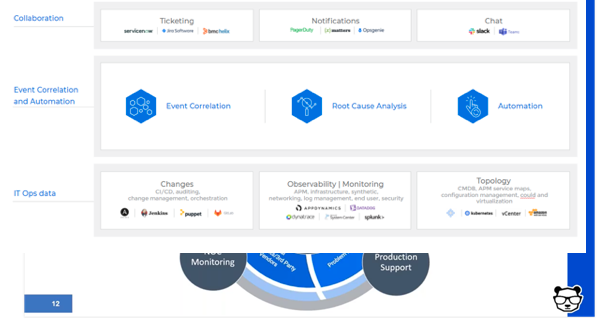
    • Deploy event correlation and automation tools to enable the incident management team. These tools are key, allowing your team to perform the required actions.
      • First, correlate the alerts created by your monitoring and observability tools into a drastically reduced number of high-level, insight-rich incidents by using machine learning and artificial intelligence (ML/AI). Add context to these incidents by ingesting and understanding topology sources, as well. This creates the necessary full-stack visibility and situational awareness.
      • Then, use ML and AI to determine the root cause of these incidents, including correlating them with data streams from your change tools: CI/CD, orchestration, change management and auditing to identify whether any changes in your environment caused these incidents.
      • Finally, automate as many processes as you can to free your IT Ops team from manual, time-consuming tasks. By integrating with collaboration tools, you can also enable the above-mentioned bidirectional communications.


  • DevOps Deeper Dive: Apple Adds Fuel to ITSM Fire

    DevOps Deeper Dive: Apple Adds Fuel to ITSM Fire

    Apple’s acquisition this week of Fleetsmith, a provider of IT service management (ITSM) tools for Apple devices, is reigniting a fierce debate over how best to manage endpoints in heterogeneous IT environments.

    Fleetsmith, along with rivals including Jamf Software and IBM, provides ITSM tools that only manage Apple devices. The company argues that the IT teams managing Apple devices prefer to use tools that feel like MacOs or iOS applications. However, both enterprise environments typically have both Apple and Windows devices. As such, many IT teams have adopted ITSM tools that allow them to centrally manage both platforms.

    Until now, Apple has been relatively neutral in terms of how best to manage its devices. The acquisition of Fleetsmith signals the company is about to focus more on ITSM at a time when many organizations need to revamp their approach to managing endpoints in the wake of the COVID-19 pandemic.

    With more individuals likely to be spending more time working from home, the management of highly distributed endpoints becomes even more challenging. Apple has yet to outline its plans for Fleetsmith or say whether it will continue to support Fleetsmith customers. The assumption is the company will incorporate the Fleetsmith ITSM tools into its portfolio.

    Mac and Windows: Can’t We All Get Along?

    In the meantime, providers of platforms capable of managing heterogeneous endpoints are pressing their cases for increased centralization. Many IT organizations have adopted separate tools for managing Windows and Apple devices; centralizing the management of endpoints presents those organizations with an opportunity to reduce costs.

    “IT teams don’t want to hop around infrastructure, said Greg Keller, CTO for JumpCloud, a provider of ITSM tools. “Centralization creates this single-pane-of-glass efficiency.”

    The need to centralize endpoint management will become even more pronounced as desktop computing moves into the cloud, added Pradyut Roy, a product manager for ManageEngine, a provider of ITSM tools that also span multiple types of endpoints.

    “There is going to be a huge drive to centralize the control plane,” said Roy.

    A survey of 519 IT professionals published this week by ManageEngine finds 47% of organizations are planning to provide more mobile-capable assets to employees. As those endpoints are rolled out, IT teams will need ITSM platforms accessible from anywhere that enable them to manage devices regardless of what network they are connected to at any given time.

    Apple doesn’t have the greatest reputation when it comes to appreciating ITSM requirements in the enterprise. For example, it often changes application programming interfaces (APIs) in ways that are not backward-compatible, so providers of ITSM tools often must make significant updates to their tools. That API issue is likely to become even more significant as organizations that have adopted best DevOps practices look to extend them to applications running on Apple devices.

    ITSM is clearly in a state of flux. Most IT organizations rely on legacy ITIL-based processes to manage IT infrastructure consistently. As businesses begin to require more flexibility, many of those ITIL-based processes will need to be revisited. The opportunity—and the challenge—now is finding a way to converge ITIL and DevOps practices across as many different types of endpoints as possible.

  • Atlassian Acquires Halp to Gain Help Desk Based on Slack

    Atlassian Acquires Halp to Gain Help Desk Based on Slack

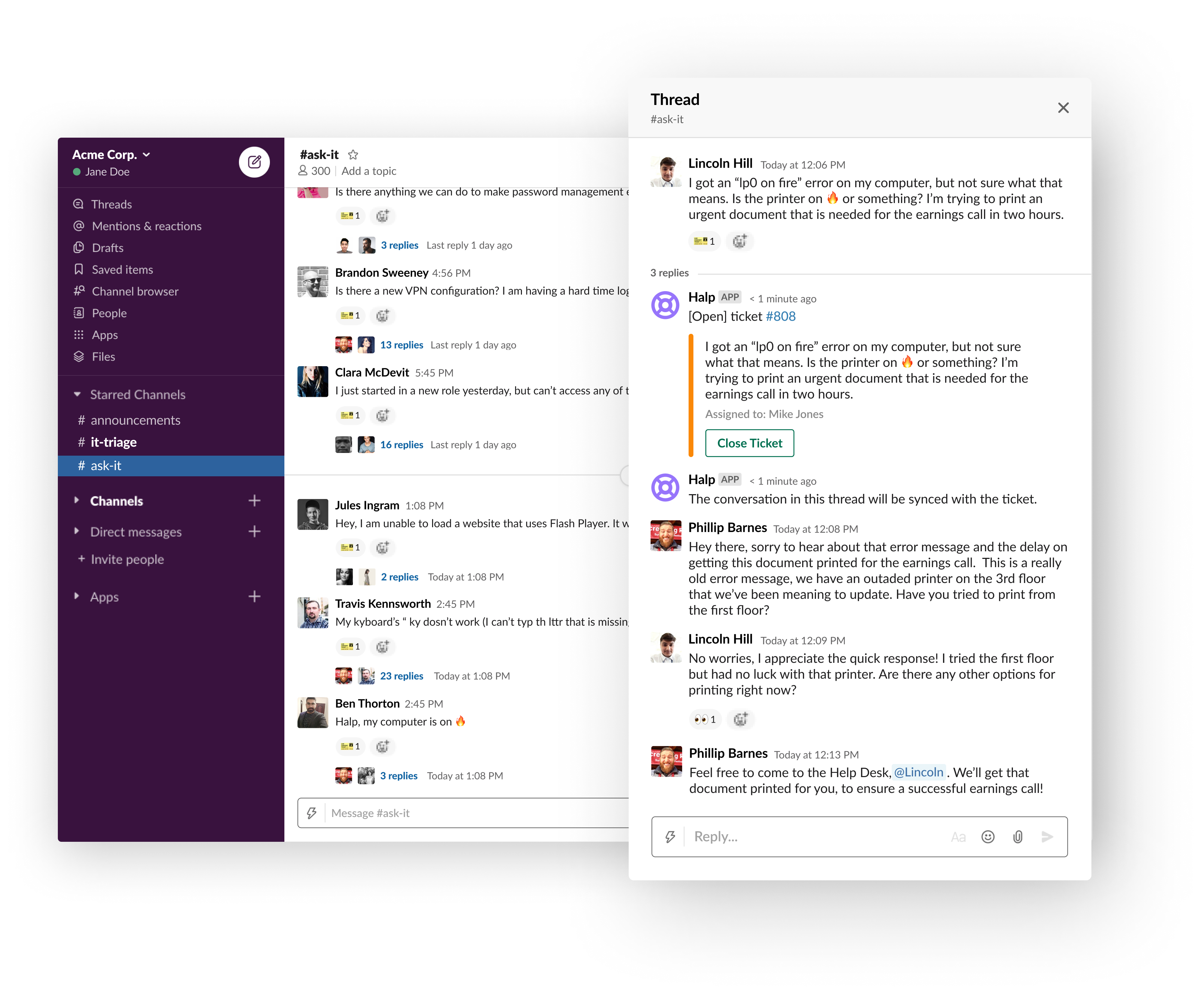
    Atlassian this week announced it has acquired Halp, a provider of a help desk platform that employs Slack as its user interface.

    Steve Goldsmith, head of product integrations at Atlassian, said Halp will provide organizations with a way to manage lightweight processes via an interface that is already commonly used within many organizations. The goal is to provide a level of integration between Halp and the JIRA Service Desk platform from Atlassian to handle more complex requests, he said.

    The Halp platform has already been integrated with Confluence, a knowledge base platform from Atlassian that enables help desk staff to share best practices for resolving known issues. Deeper integrations with JIRA and Confluence will be forthcoming, added Goldsmith.

    At the same time, Atlassian is working on tighter integration between its service desk platform and Microsoft Teams, which has emerged as a popular alternative to Slack, he noted.

    Halp CEO Fletcher Richman said that approach has gained traction because the biggest challenge when it comes to help desks is making it as easy as possible for an employee to generate a help ticket. Halp addresses that issue by enabling end users to simply drag and drop on an emoji to generate a help desk ticket.

    The help desk staff is then provided a web interface through which they can remotely manage tickets and respond to requests via Slack. That approach eliminates the need for the help desk staff to be physically located in an office or employ a virtual private network (VPN) to access a help desk platform running on a local area network, he said.

    Richman noted too often employees wind up supporting each other because the process of generating a ticket is too complex. At a time when many employees are working from home to help combat the COVID-19 pandemic, it’s not really possible for employees to currently provide that mutual support.

    It’s not really clear to how many employees might ever be heading back into an office at this point, so Halp also provides a way for remote employees to more easily remain productive, he added.

    Slack and JIRA, of course, are already de facto standards among many DevOps teams. Halp should provide developers with a means to instantly resolve a wide range of low-level issues in near real-time by generating a help desk ticket via Slack.

    Richman noted that for any IT service management (ITSM) platform to be successful, it needs to meet users where they are. If the platform is too complex or intimidating, users will look to their fellow employees for help first. Before long, however, all the mutual support saps productivity. By making help just a simple Slack message away, many more issues will be resolved by help desk personnel who already know the right answer, he said.

    It’s too early to say how many more help desk tickets might be generated because of Slack. However, in the wake of the rush to remotely enable the entire enterprise, the need for an easier way to provide support is now more apparent than ever.

  • IT Services and DevOps: Friends, Not Foes

    IT Services and DevOps: Friends, Not Foes

    Development and operations, aka DevOps, is the marriage between software development and IT operations. The goal of a DevOps team is two-fold: to more quickly make products that are better for customers, and to align more closely with business goals.

    While it sounds pretty great, something doesn’t sit well. What about your service department?

    Service department representatives often become wary at the mention of DevOps. Why? They don’t want to be left behind or lose their seat at the table. Both DevOps and service teams work toward better customer experience, so how do you keep your services relevant with DevOps at the wheel? Will DevOps be the end of IT service management (ITSM)?

    To answer that last question: no, DevOps isn’t going to end your service department. The fundamental goal of having a DevOps team is to improve the alignment between how IT products are created by development and how the operations staff run them once they’re in the real world.

    It’s excellent that DevOps wants to be more efficient, but your services have to be able to keep up. How will you match services to customers’ demands if the DevOps team goes its way? The solution is easier than it sounds, and there are real benefits to the ITSM-DevOps collaboration.

    Creating a Complete Story

    What’s your service department’s main goal—helping your customers? And the primary purpose of DevOps? Are you helping those same customers? One reason a DevOps team exists is to improve customer experience through better alignment across the organization. But, customer experience is your service team’s area of expertise. So, what do you do?

    You hop on the DevOps train and change the destination to the ITSM-DevOps department. DevOps is about breaking down silos. The word says it all. You go from the development team and the operations team to a single team working toward the same goal. The DevOps team is all about the product, and your team is all about the service. But, what if the DevOps team makes products you can’t support with excellent service?

    Once again, the solution is to work together. As you’re breaking down silos, break down another wall—the wall between product and service.

    Bringing ITSM and DevOps Together

    Although ITSM and DevOps serve the same customers, they work very differently. DevOps creates and manages the product with the goal of keeping things running. They are responsible for the product as a whole but usually focus on a few changes or improvements at once. They often work according to Agile methods.

    In ITSM, however, you’re always getting questions about everything. Your work is unpredictable, and while Agile has a lot to offer, you also need guidelines to create more structure in your team’s work. You probably use the Information Technology Infrastructure Library (ITIL) framework, which may seem slow and complicated to your DevOps colleagues.

    How do you go about uniting the two teams?

    Service desks face two main problems when they aren’t that close to DevOps. The combination is paradoxical because DevOps tends to move too fast and too slowly, depending on who is asked and when something is asked.

    Here’s what happens: The DevOps team has its own pace and plans, working on products and features according to the demands of key stakeholders. The service desk is the place where your customers go to get their issues fixed or to gather help with existing features, and when existing features don’t provide as needed.

    The two tracks aren’t always in sync. For instance, DevOps releases new features faster than they did before development and operations teamed up. That means your service agents are receiving questions they can’t answer yet. Plus, the answers are always changing, so they can’t rely on experience.

    Simultaneously, it can feel like you’re waiting forever for DevOps. You may get calls—even recurring calls—about features that need fixing or functionalities that you don’t offer yet. And receiving help from DevOps can sometimes take time because they are currently working on another part of the product.

    Getting in Sync

    Bringing together DevOps and ITSM can seem like a pacing issue. But you don’t need to work on the same things at the same time, and the question isn’t which branch should be in control.

    Collaboration requires communication. DevOps is excellent news for your service desk, provided your service team knows what’s going on. DevOps should always keep ITSM updated on what they’re working on and expected release dates.

    At the same time, service teams should always communicate their needs to DevOps. If customers have issues you can’t solve with the means you have available, make sure DevOps knows and provide them with the information they need to understand what customers are asking for, prioritize projects and provide a better product.

    DevOps shouldn’t be feared. There is no battle for survival between DevOps and ITSM. Everybody will win when they work together.

    — Jeroen Boks