Tag: IT infrastructure

  • A10 Networks Allies with Dell for ADC Infrastructure

    A10 Networks Allies with Dell for ADC Infrastructure

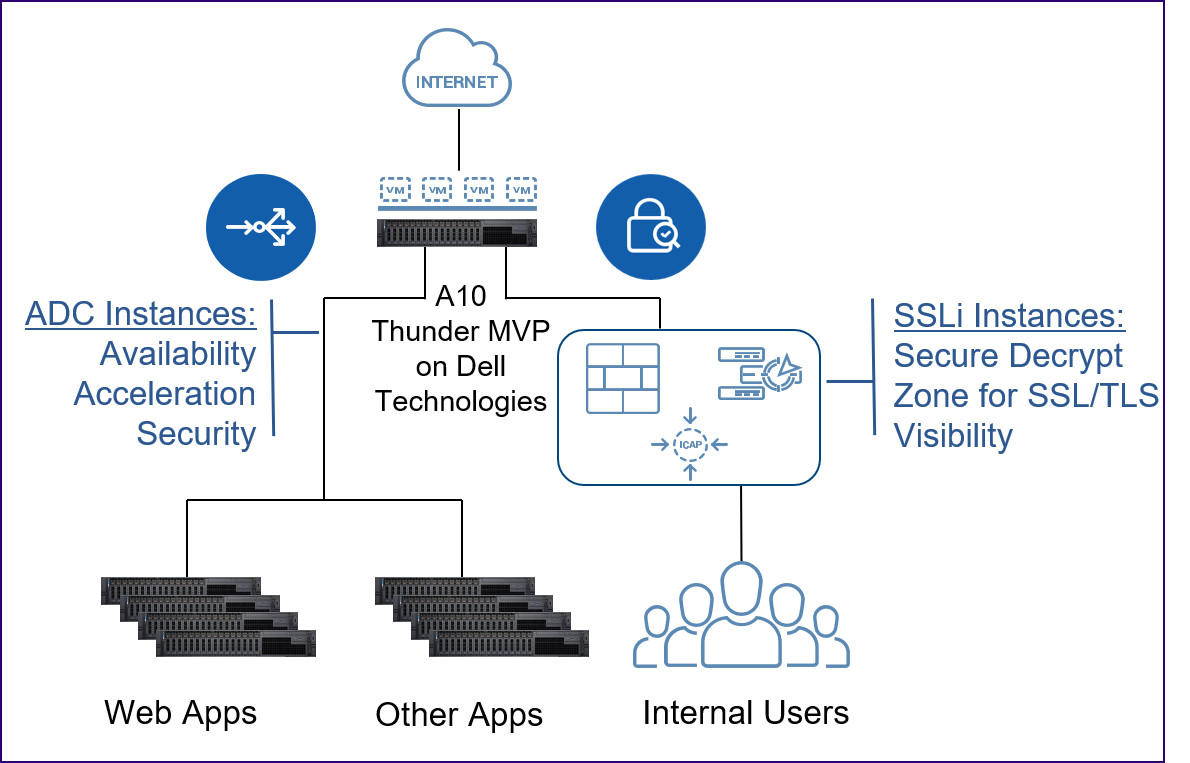
    A10 Networks announced today it has partnered with Dell Technologies to make its application delivery controller (ADC) and A10 Thunder Multi-tenant Virtual Platform (MVP) available on Dell servers.

    Gunter Reiss, vice president of worldwide marketing for A10 Networks, said this alliance reduces the cost of deploying ADCs in on-premises IT environments by taking advantage of industry-standard hardware platforms based on x86 processors beginning in the third quarter. Those servers, however, will only be available in the Americas market.

    Specifically, the A10 Thunder ADCs are designed to run on Dell EMC PowerEdge R640XL and R740XL servers, as well as Dell EMC Virtual Edge Platform 4600. The A10 Thunder MVP is designed to run on Dell EMC PowerEdge R640XL and R740XL servers. IT teams can move A10 ADC licenses across these platforms as they best see fit, said Reiss.
    In the wake of the economic downturn brought on by the COVID-19 pandemic, A10 Networks expects more IT organizations will look to rationalize their server portfolio, he said, noting as a major supplier of those servers, partnering with Dell affords A10 Networks an opportunity to expand the base of potential customers.

    Standardizing on a single server platform also affords some organizations the opportunity to reduce their carbon footprint in the data center, he added.

    It’s too early to say how aggressively IT organizations will be consolidating IT infrastructure. However, the total cost of IT increases whenever an organization adds a new platform or vendor. Many IT organizations have already standardized on a single server vendor as part of an effort to reduce management costs. In fact, Reiss said A10 is betting rival ADC vendors will be shut out of IT environments if they require IT organizations to acquire dedicated hardware.

    In the meantime, the number of ADCs required by IT organizations is increasing as the application environment becomes more complex. The rise of microservices-based applications is requiring IT teams to focus more on application latency issues that occur when more modules of code are sharing access to the same IT infrastructure.

    A10 Networks helps address that issue by embedding analytics into that A10 Harmony Controller that is employed to centrally manage all A10 ADCs deployed in a distributed computing environment. That capability makes it simpler for IT organizations to embrace best DevOps practices, Reiss noted.

    ADCs are also playing a larger role in security by first offloading encrypted SSL/TLS traffic and then providing visibility into that traffic to prevent data leakage.

    In general, Reiss said DevOps teams are exercising more ownership of ADC platforms. Network and security operating teams still play a major role; however, it’s clear IT functions are starting to converge, he said.

    It remains to be seen to what degree those roles will ultimately converge. Each IT organization is likely to pursue a slightly different path toward converging network operations and DevOps. The challenge and the opportunity will be overcoming the inherent cultural challenges associated with bringing together IT teams that historically have not had much cause to interact with one another.


  • Dell Advances Convergence of Compute and Storage

    Dell Advances Convergence of Compute and Storage

    Dell Technologies today launched a revamped midrange storage platform that takes advantage of NVMe interfaces and solid-state drives (SSDs) to deliver 7x the performance of previous Dell EMC PowerStore platforms, in addition to allowing applications to run locally on an instance of a VMware virtual machine.

    Ben Jastrab, senior manager for storage product marketing at Dell Technologies, said the inclusion of a virtual machine in form of an AppsON capability means that rather than having to deploy applications on a server, for example, a data analytics application could be deployed directly on top of the data it needs to access on a storage system. In addition, the latest version of Dell EMC PowerStore adds support for instances of Kubernetes from VMware running on top of a virtual machine. Dell storage systems already provide support for the Container Storage Interface (CSI) needed to provide Kubernetes clusters access to external storage systems.

    Dell has also added support for Ansible and VMware vRealize Orchestrator frameworks to automate the deployment and ongoing maintenance of Dell EMC PowerStore systems. As part of that effort to automate the management of storage systems, Dell added built-in machine learning algorithms to automate labor-intensive tasks such as initial volume placement, migrations, load balancing and issue resolution. Dell EMC CloudIQ storage monitoring and analytics software makes it possible to combine machine learning and human intelligence for real-time and historical performance and capacity analysis.

    Jastrab noted that many of these innovations are made possible because the storage operating system employed within Dell EMC PowerStore has been completely revamped using microservices based on containers. That approach not only makes the operating system more flexible and resilient, but it also will afford Dell the opportunity to experiment with how it might present storage services in the future, he said.

    Automation coupled with technologies such as deduplication and compression will play a critical role in driving the total cost of storage lower in the months ahead, Jastrab said. In the wake of the economic downturn brought on by the COVID-19 pandemic, IT organizations will be under increased pressure to reduce costs at a time when both the amount and types of data that need to be analyzed and stored continue to increase, he noted, adding the Dell PowerStore system can provide access to 2.8PB of data when configured in a scale-up architecture and more than 11PB when configured using a scale-out architecture.

    IT teams will need to determine to what degree they want to rely on proprietary frameworks such as VMware vRealize to automate IT infrastructure versus an open source Ansible framework that can be applied more broadly to multiple platforms. Dell owns VMware, but Jastrab said the company is committed to providing support for multiple IT automation frameworks.

    It’s not clear to what degree applications will shift from being deployed on traditional servers to a storage system. Many next-generation applications are clearly more latency-sensitive than their predecessors, so providing more direct access to data over an NVMe interface may present IT teams with a compelling alternative. Regardless of the approach taken, the line between compute and storage continues to blur.

  • HPE Extends Reach of GreenLake Central

    HPE Extends Reach of GreenLake Central

    Hewlett-Packard Enterprise (HPE) has made available HPE GreenLake Central, a self-service portal through which IT teams can collaboratively manage and monitor instances of servers deployed in IT environments that are managed by HPE on their behalf.

    At its core, HPE GreenLake is a managed service that allows IT organizations to pay for IT infrastructure on a consumption basis. HPE meters usage and HPE ProLiant servers and bills customers accordingly. HPE GreenLake Central provides a portal through which IT teams can track usage themselves and provision applications both from HPE and third-party software vendors.

    Data management and file management software from Cohesity and Qumulo can be provisioned via the self-service portal. In addition, HPE GreenLake systems can now be co-located in data centers managed by CyrusOne.

    Keith White, vice president for HPE GreenLake, said HPE also provides via HPE GreenLake Central integration with Microsoft Azure Access Manager and Amazon Web Services (AWS) Access Manager services to make it easier for IT organizations to compare the cost of deploying workloads on-premises versus in the cloud, in addition to identifying potential compliance issues. IT teams still will need to access a separate portal provided by either AWS or Microsoft to spin up a virtual machine in the cloud.

    HPE claims to now have more than 800 enterprise customers consuming HPE GreenLake services. With many organizations opting to focus their efforts on building and deploying software, HPE is now making the case for a service through which it manages ProLiant servers and associated HPE storage on their behalf. In the wake of the economic downturn brought on by the COVID-19 pandemic, White said HPE expects to see increased demand for consumption-based pricing for IT infrastructure.

    Of course, IT teams have been consuming cloud infrastructure using various consumption-based pricing models for years. However, there are many workloads that for a wide variety of compliance, security and performance issues that still do not lend themselves to being deployed on a public cloud. HPE GreenLake provides the flexibility of a cloud service while still employing IT infrastructure deployed in a local data center.

    It’s unclear in the wake of the downturn how many additional application workloads might be moving into the cloud. The general expectation is that because many local data centers have been inaccessible during the pandemic, more organizations naturally will shift workloads to the cloud. However, a managed service from HPE also serves to eliminate the need to manage servers in an on-premises IT environment that are managed remotely by HPE. IT teams can remotely log into the HPE GreenLake portal from wherever they are located.

    Undoubtedly, the relationship between IT teams and vendors such as HPE is evolving. Many rote infrastructure tasks increasingly are becoming automated not just by the IT team, but also by the vendor that built the server or storage system. Of course, the automation being provided by the IT vendor only applies to their latest generation of infrastructure.

  • Laying the Foundation for a Successful Digital Future

    Laying the Foundation for a Successful Digital Future

    Digital infrastructure is under mounting pressure from a variety of powerful technology trends. Whether that pressure stems from DevOps, the cloud, AI, mobile or big data, almost every organization is looking to the future with an eye on modernizing their mission-critical IT systems.

    Unfortunately, the challenge of future-proofing IT infrastructure is often exacerbated by the widespread reliance on legacy technology. Add to that the growing data connectivity complexities across the entire technology landscape, and you face the difficult task of balancing your networking strategy with your other—sometimes competing—technology priorities.

    In particular, legacy networks often lack the performance, control and flexibility today’s digital business models rely on. And they’re increasingly vulnerable to security risks. If that wasn’t enough to give you pause about your network, older technologies often consume a disproportionate amount of your IT budget that you could otherwise invest in modernizing your underlying IT infrastructure.

    That fundamental disconnect leaves little room for maneuvering when current thinking shows that agility is so closely linked to success—and where having a purpose-built network infrastructure is key to successful digital transformation. Just as a new house needs a solid foundation, your digital future requires the right digital infrastructure to meet your long-term challenges. 

    The Issues of Network Modernization Raise Some Big Questions

    Think for a moment about the key issues you face. Can you afford to be at the mercy of an outdated or inflexible network? Can you ignore the enormous potential of transformative technologies? Are you prepared to risk falling behind more agile competitors? Or, alternatively, can digital transformation give you a significant competitive advantage?

    Whatever your priorities are, the bottom line is digital transformation almost always requires advanced on-demand connectivity that can be deployed quickly and cost-effectively. To meet this need, many businesses are turning to software-defined wide area networks (SD-WANs) and network functions virtualization (NFV) to build agile networks designed to solve your data connectivity needs today and well into the future.

    Meeting the Challenge 1: SD-WANs

    SD-WANs are purpose-built solutions that deliver agile, secure and scalable connectivity by leveraging intelligent software. One of their main advantages is the centralized network orchestration, control and zero-touch provisioning that provides high-performance networking within a borderless infrastructure across highly distributed enterprises. 

    This high level of flexibility facilitates digital transformation, because SD-WANs can leverage all types of connectivity options (such as MPLS, broadband, 4G and 5G) while automating network functions. One big advantage is the ability to simplify the connection of people, devices and locations to the cloud, providing seamless access to the virtual functions and business services they need.

    SD-WANs also help abstract the complexity of the underlying network to create a virtual layer that simplifies a wide range of network operations. The major benefit here is that there’s no need to manage multiple layers of hardware (such as routers, firewalls and load balancers) that have historically complicated network management.

    This is particularly important for geographically distributed organizations that want to simplify branch or remote office networks, given that SD-WANs can connect new offices or branch locations to the corporate network in hours, rather than weeks or months. This provides a proven way to quickly deploy new apps and services while controlling, or even reducing, networking costs.

    Meeting the Challenge 2: NFV

    Combining SD-WANs with NFV can deliver even greater business benefits since NFV utilizes key network functions on an “as-a-service” basis, improving both network agility and efficiency. It achieves this by replacing legacy network hardware with software that runs in the cloud.

    This approach offers a cost-effective way to modernize diverse network functions ranging from intrusion detection to traffic prioritization and network performance optimization. In this way, you can easily reconfigure your networks to meet the data connectivity needs that lie at the heart of digital transformation. Best of all, you can do so without introducing unnecessary risk, complexity or cost.

    Modernizing Your Network for Digital Transformation

    Modernizing your network infrastructure can deliver the appropriate scale, security and performance needed for modern business. In particular, SD-WANs can help ensure your digital transformation goes hand-in-hand with an equivalent modernization of your network infrastructure. As a result, you can simplify your operations, improve security, respond more quickly to business demands and deliver a much more compelling customer experience.

    — Michael Cabra

  • How to Upgrade Critical IT Infrastructure with Zero Impact

    How to Upgrade Critical IT Infrastructure with Zero Impact

    Modern problems require modern solutions. A problem might come up that your software isn’t equipped to handle. This is why enterprises around the globe are spending billions of dollars more today than they did a decade ago.

    It’s never a good idea to leave anything to chance, especially if we’re talking about essential software. Keeping critical infrastructure software up to date means it’s more stable and more secure with the latest bug fixes. Of course, this has to be done without affecting your customers.

    However, this may be easier said than done, especially if you have several years of backlogged software updates. The whole upgrade process has to be carefully planned and monitored. Some best practices have to be kept in mind.

    Plan Your Actions

    Achieving a zero-impact upgrade to critical software requires the utmost attention to detail. You need to know exactly where you are and where you’re going. You also need to make sure that you understand every step you’re taking to achieve your goal.

    • Catalog Your Current State: The first step to planning is to know the state of your software. You have to know where you are, in order to get to where you want to go.

    Check which version of the software you’re running and how old it is compared to the latest version. Your outdated software might prevent you from submitting bug reports if it’s no longer a maintained version. 

    • Read the Changelog and Ask Questions: This next step is as time-consuming as it is important. You’re probably aware that most open software has a changelog that’s available for public consumption. You’ll have to read it all. The changelog is a treasure trove of information and may even point back to specific pieces of code that implement the change.

    It will be time-consuming, and several breaks will be in order to ensure productivity. You may find that you don’t need most of the features and bug fixes you’re reading about, but now you know that much more about the software you’re managing in your infrastructure. 

    Remember to take down notes and questions or comments you may have while you’re reading through it all. You may be surprised to find a minor feature you never knew existed that may be very helpful in your current situation. Or you may find a fix for that one minor, but unfixable, bug that your team had to frustratingly find a workaround.

    Write it all down in your notes. That way you have your own little changelog that you can further trim into only the most crucial things. You can then decide if the minor things belong to the same scope or should be added to the backlog for later. 

    • Test Out Your Theories and Think of Edge Cases: Having a plan is well and good but you’ll have to try it out eventually. But, if it’s execution is done directly in an important environment, you’re doing it wrong.

    Similar to a software development life cycle, software upgrades need to be tested prior to actual execution. While brainstorming edge-case scenarios, take into account what might be different and cause problems in the other environments. 

    Document Everything

    This one goes without saying, but remember to document everything. Reading and documenting everything may sound like a lot of work, but when you need to pick up that work after a long weekend, you’ll be happy that you did.

    Document each and every single step, any caveats or issues you encountered, in a way that you can still understand later. This will help your team perform the upgrades and it also provides documentation to other readers who are interested in how the upgrade process was done.

    Execute Your Plan

    After you’ve done all that, it’s time to finally execute your plan. By this time, you should have already tested your plan so much that you know it will work without a shadow of a doubt.

    Still, it’s common for something unexpected to pop up and you may need to do some live debugging to fix it. Execute your plan with that expectation and assurance that your preparation will hold up to any situation.

    As always, remember to document everything as you may want to refer back to your documentation for the next upgrade or while debugging something later.  

    Conclusion

    Upgrading critical infrastructure software can be difficult if you don’t have a good plan. Check your current state, read the changelog, pay attention to every detail, write down notes, ask questions, test your plan, test it again and document everything. At the end of the day, you’ll be glad that you put in all that upfront work.

    — Robert Mardisalu

  • Lenovo Looks to Automate Edge Computing

    Lenovo Looks to Automate Edge Computing

    Lenovo is extending its IT automation framework for provisioning IT infrastructure out to edge computing platforms.

    Charles Ferland, vice president and general manager for networking and communications service providers at Lenovo Data Center Group, said the Lenovo Open Cloud Automation (LOC-A) framework provides a single pane of glass through which IT teams can not only provision IT infrastructure but also invoke other frameworks to automate, for example, the deployment of virtual machines on top of that IT infrastructure.

    Ferland said while there are plenty of frameworks for automating the deployment of virtual machines, many IT teams will spend weeks manually provisioning IT infrastructure. LOC-A provides a mechanism to reduce the time and effort required to minutes. However, rather than completely reinvent the IT automation wheel, Lenovo decided to also integrate LOC-A with frameworks such as Ansible, Puppet and Chef, he said, noting that approach makes it possible for IT teams to adopt LOC-A without having to replace any of the IT automation frameworks they already might have in place.

    LOC-A can also be extended to edge computing platforms other than ones provided by Lenovo, he added.

    Beyond simply reducing the amount of time required to provision IT infrastructure, Ferland noted LOC-A also serves to reduce errors that typically occur when IT teams manually provision IT infrastructure. In many cases, those configuration errors can lead to cybersecurity issues later. Of course, many IT teams have developed custom scripts to automate the provisioning of IT infrastructure. However, most of those scripts don’t scale and are poorly documented, noted Ferland. When a member of the IT team that wrote the script leaves the company, often the IT team left behind must develop another script. In many cases, IT personnel view the scripts they develop as a tool that belongs to them rather than the company that hired them. Ferland said the primary goal is to provide a scalable IT automation framework that helps IT teams further advance the adoption of best DevOps practices.

    Ferland said Lenovo developed LOC-A to provide a cloud-like experience for on-premises IT infrastructure that is similar to what IT teams experience when provisioning IT infrastructure on a public cloud computing platform. LOC-A is currently being employed by telecommunications carriers including T-Systems.

    It’s no coincidence Lenovo’s decision to extend LOC-A to the edge comes at a time when carriers are creating 5G networks that require applications to be processed in real-time as close to where data is created. Those edge computing platforms are going to be deployed in, for example, locations that IT teams are not going to be able to physically reach easily.

    It’s unclear to what degree IT automation frameworks might induce IT teams to standardize on IT infrastructure at the edge. Lenovo, however, clearly views providing this capability as a means to differentiate its platforms at a time when there is currently very little standardization at the edge. The challenge, of course, is the less standardization at the edge there is, the more difficult it becomes to manage.

    — Mike Vizard

  • Decoding the Modern Enterprise Software Spaghetti

    Decoding the Modern Enterprise Software Spaghetti

    Modern enterprise software architecture is growing increasingly complex. Organizations are jumping on the digital transformation bandwagon in growing numbers. They are striving to become more agile and continuously deliver new code, whether on-premises or to support cloud migration efforts. In the process, IT teams are amassing an ever-growing inventory of applications and databases, which generally includes a blend of custom code, open source and commercial applications.

    “Spaghetti code” is what some call a tangled mess of a program—one that is difficult to follow, poorly documented and almost impossible for anyone but the original developer to troubleshoot or upgrade. Even today, when managers and developers take a more structured and disciplined approach to implementing code, the enterprise remains a patchwork of technology, a kind of spaghetti that can be difficult to understand and detangle.

    Given these layers of complexities, it is imperative for organizations to be equipped with the right processes and tools to map out their IT assets. They need to understand how programs and databases interconnect and how a change in one can have implications across the network that imperil availability, performance or security and negatively impact employees and customers. Here are some best practices that enterprises looking for an easier digital transformation journey can follow.

    Gleaning the Impact of Enterprise Software Changes

    Implementing a software change or embracing a new application that has a puzzling code makeup has plenty of inherent challenges—not to mention potential long-term disruptions for multiple departments, functions and processes within an enterprise. Whether an organization is dealing with inherited applications from a merger or acquisition or simple system migrations, much depends on how it is coded. As a result, enterprises must familiarize themselves with the overall layout of the enterprise architecture, down to the code level. This comprehensive level of analysis aids organizations in identifying the full scope and impact of the desired changes or updates.

    This is especially important for software teams who are operating on tight budgets and strict deadlines. Some important factors to consider in a comprehensive analysis include:

    • Identifying the impact of a change request on the software development project or on a business’s IT infrastructure.
    • Determining which software resources must be modified to implement the requested change.
    • Calculating the cost, time and effort needed to perform the change request.
    • Ensuring that the requested change complies with internal and external regulations.
    • Eliminating or minimizing any security risks associated with the change.

    Decoding the Spaghetti With Automated Discovery and Code Mapping

    A study by research firm Enterprise Management Associates (Next-Generation ITAM) found that the average IT organization uses 11 or more different inventory and discovery tools—some even more than 40. However, none deliver the full picture and they can often contradict each other. As a result, the average IT organization spends 15 hours every week manually resolving discrepancies among its various discovery tools. These hours translate to hefty costs.

    Fortunately, new approaches to discovery blend static and dynamic analysis methods that can operate in real-time to decompose software dependencies down to the code level. These new tools provide significant improvements in discovery and mapping, eliminating the need for multiple, redundant tool use and wasteful manual deconflicting.

    According to a recent Forrester survey, 56% of IT managers don’t have a complete view of dependencies between applications or between applications and infrastructure. However, today’s evolving business landscape dictates that technologies must evolve to keep up with an organization’s shifting needs. Software changes, when implemented strategically, can help businesses be more productive, efficient and profitable.

    To ensure that software changes serve this purpose, IT project managers need to implement a solid software change assessment system. With the help of technology, checklists and processes, organizations can outline a path that yields efficiency. They can understand and decode that tangled mess of software called the modern enterprise tech stack.

    — Soumik Sarker

  • Does Agile Methodologies Work for IT Infra?

    Does Agile Methodologies Work for IT Infra?

    Recently, I had a fascinating conversation with my old friend Joe–the name has been changed but the conversation is real and unedited–an IT Infrastructure program manager from a large IT service provider.

    After a bit of chit-chat on weather and football, we started talking about infrastructure in a typical large enterprise.

    Joe: I am not sure how agile applies to infra space, I can understand it works well for software development, but not in IT Infra space.

    Me: OK, why do you think so?

    Joe: Well, we have lots of coupling between components, infra projects tend to be big migration or upgrade moves and highly risky. I know many large enterprises in Europe that we work for and many of them haven’t looked at agile in the infra space.

    Forty minutes and couple of beers later…

    Joe: I have to send four reports every Friday afternoon on status, risks, issues.

    Me: Why do you need so many reports?

    Joe: I can’t share all the same info to the client that I share internally. There are some risks that we manage internally. My client wants the info on Jira and confluence. My regional manager wants it on an internal tool (some five-word acronym that I forget!). My account manager wants it as a PPT, as this is an important account and he says this needs to be tracked closely. My global manager wants it on a different tool, inherited from a previous merger as my employer was recently acquired by another service provider.

    Basically, most of my Friday is spent copy pasting information across these reports. Then I spend most of Mondays reconciling the numbers and responding to follow-on queries, and Tuesdays justifying the cost of resources, change in resource costs because many projects are usually in Amber or Red. I think it usually works well if I have a good PMO.

    Me: How many people do you have on the current programme?

    Joe: We have four PMs and seven infra resources on this infra upgrade and migration programme. There is a different provider who looks at the application changes and they have a team of managers and developers etc. The seven infra resources I referred to are also busy with BAU work.

    Me: So, you have seven part time infra people who are the actual doers, one programme manager, four PMs and PMO, client side vendor manager(s) and you are running half a dozen projects.

    Joe: Yes, as you can see, we can’t be agile in infra.

    Me: Why do you need projects? And, why do you need so many of them?

    Joe: What? No projects? Surely, that’s how it is always done! How do we ensure control, governance?

    — Aditya Vadaganadam

  • Cisco Extends Ansible Support to Advance DevOps

    Cisco Extends Ansible Support to Advance DevOps

    Cisco Systems announced today that it is further embracing the open source Ansible automation framework on its storage area network (SAN) platform as part of an effort to extend best DevOps practices to IT infrastructure. The latest version of the Cisco MDS 9700 platform modules automates tasks such as VSAN configuration, device-alias and zoning configuration.

    Adarsh Viswanathan, product manager for data center storage at Cisco, said the company has embraced the Ansible framework because it’s an open framework that is now being adopted by enterprise IT organizations to manage infrastructure in a more adroit fashion. The rise of cloud-native applications being developed with DevOps processes not only result in more applications accessing a common pool of data, but also require changes to be made dynamically to the underlying storage platform.

    Cisco is adding support for 64G-line cards when they become available along with support for non-volatile memory express (NVMe) and All-Flash arrays. Cisco has also extended its SAN Analytics software to add support for the NVMe/Fibre Channel protocol along with existing support for SCSI/Fibre channel.

    Viswanathan said support for Ansible will make it simpler for IT organizations to embrace automation at scale. Cisco has previously embraced open application programming interfaces (APIs), OpenStack and Python-based scripts. Ansible takes those efforts to a higher level by make available a declarative framework that doesn’t necessarily require IT operations teams to develop programming expertise, said Viswanathan.

    IT operations teams are coming under increased pressure to provide developers with an IT experience that rivals cloud service providers. Frameworks such as Ansible make it possible for IT operations teams to make IT resources available on-demand to developers using IT infrastructure residing in an on-premises environment.

    Friction between developers and IT operations teams is rising as DevOps processes are employed more widely within enterprise IT environments. Many of those developers have alternatively turned to cloud service providers to build and deploy their applications. However, many organizations still need to deploy applications once they move into a production environment hosted in a local data center. In fact, more than 70% of enterprise applications still run in a local data center a decade after the initial rise of cloud computing. IT operations teams that manage those on-premises IT environments need to provide developers with access to resources they can easily scale up and down as required.

    Cloud-native applications based on microservices will further challenge IT operations teams as the number of application services trying to share a limited set of IT infrastructure resources only increases. In the case of Cisco, those limited resources are rack-based servers attached to SANs such as the Cisco MDS 9700.

    Of course, not every IT operations team is going to embrace DevOps processes overnight. Instead, many of them will be exposed to frameworks such as Ansible as they upgrade servers and storage over time. The one thing that is certain is developers will continue to apply pressure to make that transition sooner than later as more organizations continue to appreciate the extent to which they now depend on software to innovate.

    — Mike Vizard

  • DevOps: ‘Tidying Up’ Your Cloud for Greater Value

    DevOps: ‘Tidying Up’ Your Cloud for Greater Value

    Have you watched Netflix lately? Even if you haven’t, you may have heard of the phenomenon that is Marie Kondo, a tidying consultant who helps families organize their lives to reduce wasted space, material items and time. While watching her carefully organize peoples’ closets, I began to draw parallels between this process and cloud management.

    A recent study found that idle resources and overprovisioning will lead to an excess of $14.1 billion in wasted cloud spend in 2019. Enterprises often view the cloud as a major source of cost savings, but without the proper controls in place, savings are by no means a given.

    Cloud can be a cost savings center, but organizations need governance and transparency to truly wrangle cloud consumption and rein in unchecked spending. One of Marie Kondo’s core principles is to ask if something “sparks joy” before deciding whether to keep it. From my perspective, overspending on cloud only sparks frustration.

    Like the Marie Kondo method, there are ways to reclaim control of your cloud and optimize its capabilities:

    Take Stock of Your Cloud Operations

    Cloud waste is usually a result of overenthusiastic resource deployments—both in terms of the number of resources and their configurations. Frequently, businesses, accustomed to the sunk costs of on-premises IT environments that can’t be recovered, have added a little “wiggle room” in their provisioning. Often designed to prepare for future demand, this extra cushion can mean businesses are paying for unused capacity if the projected demand fails to materialize.

    The same psychology (the sunk costs of on-premises IT infrastructures) has led to resources left running when they are not in use. By some estimates, 44 percent of workloads are non-production workloads, such as those used in quality assurance, development, testing and staging, with a further 15 percent of cloud computing costs stemming from duplicated resources that are no longer required.

    To address this, businesses need to take stock of every element of their IT infrastructure and monitor it regularly to ensure it is not going to waste.

    Rightsize to Optimize

    The next phase of inventorying IT is rightsizing. With rightsizing, businesses must not only identify what has been incorrectly provisioned, but then look to reconfigure those wasted resources to reach optimum levels.

    All too often “zombies”—cloud resources that were once useful but have been discontinued, duplicated or no longer required—are subtly bumping up the monthly costs of cloud, without providing any business benefit.

    The Portal is Your Friend

    Regardless of a company’s cloud provider of choice, there is often a portal to offer greater oversight. Unfortunately, teams can form the bad habit of not using them to their fullest. When used correctly, a portal can enable teams to manually write scheduling scripts or automate the scheduling process to switch off non-production workloads. This is a fast-track trick to savings.

    Maintaining Your Reduced Appetite for Cloud

    While more attention is often placed on cloud deployments at the onset, ongoing resource management is just as critical. Using policy-driven automation can help maintain cloud cost reduction efforts by creating rules within your cloud environment. Automated policies can address a number of scenarios, including:

    • Send an alert when projected month-to-date cloud spend is greater than the monthly budget allotment.
    • Notify cloud managers when daily cloud costs spike more than 10 percent of daily average spend.
    • Delete unattached storage volumes automatically after a set number of days.
    • Report when demand decreases over a certain period of time for a particular resource.

    While the cloud was purpose-built for businesses, cost overruns can put a big damper on IT plans (and budget). But with the right tools and the right team, cloud cost reduction and management can allow your organization to reap the benefits, as they were intended.

    Now, if that doesn’t spark joy in an IT team, I don’t know what will!

    — Samir Mehra