Tag: IT infrastructure

  • How to Keep Your IT Infrastructure Invisible

    How to Keep Your IT Infrastructure Invisible

    IT infrastructure is critical. IT infrastructure enables businesses to run—from day-to-day operational execution to visionary strategic innovation and everything in between. What’s interesting, though, is that people are only aware of it when there’s a problem: HR can’t access the payroll application, customers are complaining about how slow the transactional system is or this month’s cloud bill was double what you expected it to be.

    No one should notice a well-orchestrated environment, but once application performance slows or an outage occurs, people start to grumble. The same is true for IT infrastructure.

    The Top Four Ways Your IT Infrastructure Can Become Undesirably Visible

    Given the complexity of modern hybrid/multi-cloud environments and the applications they support, it’s no surprise that countless things can go wrong—and when they do, your IT team takes the flack.

    If your infrastructure is humming along nicely, that’s a testament to the IT infrastructure team’s hard work and expertise. Sadly, they don’t get the recognition because it’s all invisible to the rest of the organization. It’s only when *BAM!* something happens that the team is scrutinized.

    While there are many ways this can manifest, it usually falls under one of the following four categories:

    • Availability — This may be the most catastrophic because when systems are unavailable, people can’t do whatever it is they need to do.
    • Performance — A system might be available, but that doesn’t mean it’s performing to SLA or user expectations. The result can range from minor annoyance to lost revenue and customer churn.
    • Cost — Runaway expenditures don’t necessarily affect users, but you do not want to be called to account by the finance team or, worse, executive leadership.
    • Compliance — This is another area that may not have a broad impact on user experience, but the repercussions of non-compliance can be financially and reputationally significant.

    Common Infrastructure Culprits and How to Address Them

    To ensure the necessary availability, performance, cost control and compliance to keep your IT infrastructure under the radar, you must understand what can cause problems in these areas. Here are eight common culprits, along with ways you can address them, so your IT team stays invisible.

    Broken or Misunderstood Dependencies
    Your infrastructure is a complex web of interdependent applications and services. Every time you make a change, it could have a rippling effect on the categories mentioned above. Automated discovery and service mapping capabilities enable you to easily trace dependencies throughout your infrastructure to avoid unintended consequences.

    Cloud Waste
    Chances are very high that you’ve got cloud waste. This means that you could be getting billed for a storage block that’s attached to a stopped instance, for compute instances that are not being used, or for unattached load balancers. Finding idle and abandoned resources can keep your monthly cloud bill under control and on budget.

    Un-Breakdownable Cloud Costs
    Cloud bills are notoriously complex, and while cloud providers do offer tools to help you analyze your cloud spend, those tools often don’t answer all the questions your business might have. In addition to adding clarity to such opaque expenses, you need to be able to parse your cloud spend based on what makes business sense to your organization, not what makes technical sense to your cloud provider.

    Poor Capacity Planning
    Your infrastructure needs to meet your business needs, which are continuously evolving. As changes happen, whether it’s increased utilization of existing resources or modified/added resources to support new requirements, workloads could push current capacity and impact performance and stability. You need to be able to forecast infrastructure demands against business objectives to minimize potential issues before they happen.

    Poor Workload Placement Decisions
    Your infrastructure consists of various environments each with its own characteristics. If you migrate a workload without understanding the implications of that particular environment, you could risk performance problems or spiking costs. To prevent this, you need any-to-any migration insights to make better decisions about workload priorities, groups and deployments.

    Poor Reservation Planning
    Reservations (i.e., reserved instances or programmatic discounts) offer discounts for committing to a particular plan. If you plan well, the savings can be significant. But if you don’t use the capacity you’ve bought, the savings might not materialize. To improve cloud resource planning, you need to be able to evaluate your potential savings in varied scenarios.

    Workload Drift
    Over time, your workloads evolve due to changing demand, data volumes, etc. As a result, they can outgrow their current configurations, leading to performance issues or rising costs. This is a natural result of business growth, so the goal isn’t to prevent that drift. Instead, you want to optimize capacity and cost on an ongoing basis to keep your workloads right-sized.

    Slow Problem Troubleshooting and Remediation
    No matter how many precautions you take, something somewhere will inevitably go wrong. And once you become aware of the situation, the clock starts ticking to find the cause and fix it, all of which takes time. The longer the entire process takes, the longer your infrastructure will be visibly and painfully not working as expected. For those cases, you need full-stack visibility with application-centric, AI-based analytics to minimize impact duration as much as possible.

    Keeping the engine running behind the curtain can be a daunting task, but with proper planning and management, your IT team will remain visible to those responsible for managing it and invisible to those in the rest of the organization. Of course, the complexity of today’s cloud infrastructure makes that challenging, and there will be IT fire drills that take place, but it’s about how IT leaders react to the situation and resolve it in the quickest way possible, allowing themselves to return to their preferred place in the shadows.

  • Cloud Orchestration and its Impact on DevOps Teams

    Cloud Orchestration and its Impact on DevOps Teams

    Cloud orchestration refers to the coordination and management of various interconnected cloud services and resources to automate and streamline complex IT processes. In simple terms, it is the process of integrating, synchronizing, and automating various cloud-based components to create a seamless and unified workflow. 

    Cloud orchestration aims to optimize the deployment, management, and use of resources in a cloud environment, improving efficiency, reducing costs, and ensuring that cloud services are delivered in a timely and effective manner. It is related to the concept of CloudOps (cloud operations), which uses cloud orchestration concepts to allow more efficient management of cloud resources. Cloud orchestration is a critical aspect of modern IT infrastructure management, as it enables organizations to manage and control their cloud resources more effectively.

    Difference between Cloud Orchestration and Cloud Automation

    Though the terms cloud orchestration and cloud automation are often used interchangeably, they have distinct differences. 

    Cloud automation refers to the process of automating individual tasks and processes within the cloud environment. It involves the use of scripts, templates and other tools to automate repetitive tasks, such as provisioning resources, deploying applications and configuring environments. The primary goal of cloud automation is to reduce the time and effort needed to manage cloud resources.

    Cloud orchestration is a broader concept that encompasses not only the automation of tasks but also the coordination and management of the entire cloud ecosystem. It involves the integration of various cloud services, tools and resources to create a unified, streamlined workflow. Cloud orchestration ensures that all components in the cloud environment work together seamlessly, automating complex processes and managing dependencies between tasks.

    In essence, cloud automation is a subset of cloud orchestration. While cloud automation focuses on automating individual tasks, cloud orchestration takes a more holistic approach, orchestrating multiple tasks and resources to achieve a higher level of automation and efficiency.

    How Cloud Orchestration Enhances DevOps Practices

    Increased Efficiency and Speed

    One of the main benefits of cloud orchestration in a DevOps context is the ability to increase efficiency and speed in the software development and deployment process. By automating and streamlining various tasks, cloud orchestration eliminates manual processes, reduces the potential for human error and accelerates the overall development cycle. 

    Improved Collaboration and Communication

    Cloud orchestration fosters better collaboration and communication between development and operations teams by providing a unified platform for managing cloud resources. This shared platform enables teams to work together more effectively, breaking down traditional silos and ensuring that all stakeholders have visibility into the development and deployment process. 

    Enhanced Infrastructure and Application Management

    Cloud orchestration simplifies the management of complex cloud infrastructure by providing a single, unified platform for cloud optimization—improving the management of resources, applications and services in the cloud.

     This centralized management approach enables organizations to more easily monitor, control and optimize their cloud environment, ensuring that resources are used effectively and that applications are running smoothly. With cloud orchestration, organizations can more easily scale their infrastructure to meet changing demands, ensuring that they have the resources they need when they need them.

    Improved Monitoring and Troubleshooting

    Cloud orchestration provides improved monitoring and troubleshooting capabilities, enabling organizations to more effectively identify and address issues in their cloud environment. With comprehensive monitoring tools and dashboards, teams can gain insight into the performance of their applications, identify bottlenecks and pinpoint potential issues before they become critical.

    Challenges of Integrating Cloud Orchestration With DevOps

    Despite the numerous benefits of cloud orchestration, integrating it into DevOps practices can present several challenges. Some of the common challenges include:

    • Complexity: Cloud orchestration involves the integration of various cloud services, tools and resources, which can be complex and time-consuming. Organizations may struggle with complexity, particularly if they lack the necessary expertise or resources to effectively implement and manage the solution.
    • Resistance to change: Implementing cloud orchestration requires a change in mindset and approach to software development and deployment. As your organization migrates more systems to the cloud, some team members may be resistant to adopting new processes and tools, making it difficult to fully embrace and realize the benefits of cloud orchestration.
    • Security concerns: As with any cloud-based solution, security is a critical concern when integrating cloud orchestration into DevOps practices. Organizations must ensure that their solution is secure and that they have the necessary policies and procedures in place to protect their sensitive data and resources.
    • Cost and resource constraints: Implementing and managing a Cloud Orchestration solution can be resource-intensive, requiring significant investment in infrastructure, tools, and personnel. Organizations must carefully consider the costs and resources required to implement cloud orchestration and determine whether the benefits outweigh the investment.

    Best Practices to Integrate Cloud Orchestration Into DevOps

    To successfully integrate cloud orchestration into DevOps practices and overcome the challenges mentioned above, organizations should consider the following best practices:

    • Assess your organization’s readiness: Before implementation, evaluate your organization’s readiness for change. This includes assessing your existing infrastructure, processes and tools, as well as your team’s willingness and ability to adopt new practices and technologies.
    • Develop a clear strategy: Develop a clear strategy for integrating cloud orchestration into your DevOps practices. This should include defining your goals and objectives, identifying the tools and resources you will need and establishing a timeline for implementation.
    • Choose the right tools and technologies: Select the appropriate tools and technologies that best meet your organization’s needs and requirements. Consider factors such as ease of integration, scalability, security and cost when evaluating potential solutions.
    • Train and educate your team: Ensure that your team has the necessary knowledge and skills to effectively implement and manage cloud orchestration. This may involve providing training and education on new tools, processes and best practices, as well as fostering a culture of continuous learning and improvement.
    • Monitor and measure success: Continuously monitor and measure the success of your implementation. This includes tracking key performance indicators (KPIs), such as deployment speed, resource utilization and application performance, to ensure that your solution is delivering the desired results.

    Conclusion

    Cloud orchestration is an essential tool for organizations looking to streamline and optimize their IT infrastructure, particularly in the context of DevOps practices. By automating and coordinating complex cloud processes, organizations can improve efficiency, speed, collaboration and overall performance. 

    However, successfully integrating with DevOps can be challenging, requiring a clear strategy, the right tools and technologies and a commitment to continuous improvement. By following the best practices outlined in this guide, organizations can overcome these challenges and fully realize the benefits.


  • Fiberplane Notebook Tool Fosters DevOps Collaboration

    Fiberplane Notebook Tool Fosters DevOps Collaboration

    Fiberplane today announced it is making available a public beta of a namesake real-time collaboration notebook specifically designed for DevOps teams that need to quickly debug IT infrastructure.

    Fiberplane CEO Micha Hernandez van Leuffen said in the wake of the COVID-19 pandemic, it’s clear that the structure of DevOps teams has permanently changed now that more members of those teams work remotely. The challenge is that the tools provided to DevOps teams to manage IT environments were not designed to foster the level of collaboration that is now required, he added.

    Dashboards that were designed in a different era need to be replaced with tools that make it simpler for DevOps teams to collaboratively debug infrastructure in real-time, noted Hernandez van Leuffen.

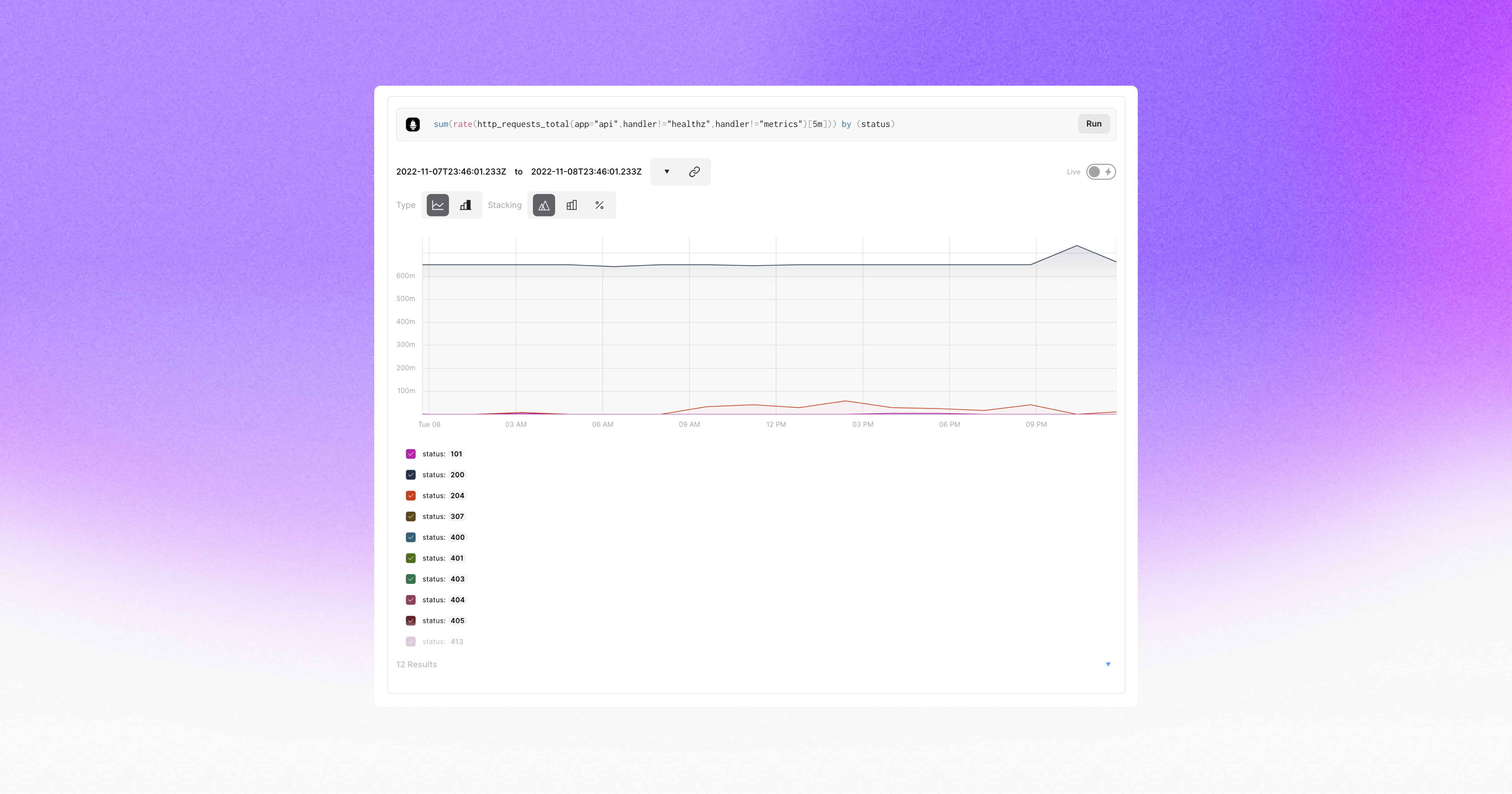
    The Fiberplane notebook achieves that goal by using the same operational transformation algorithm used in Google Docs to enable teams to easily collaborate around a document or spreadsheet. The core platform itself is built in Rust and WebAssembly (Wasm), which Hernandez van Leuffen said makes it simpler to integrate Fiberplane as a plug-in into an existing DevOps workflow. Inside a Fiberplane Notebook, DevOps teams can, for example, write and run PromQL queries and display Prometheus charts alongside other data presented via an integrated graph.

    Fiberplane Notebook’s initial integrations are for Grafana Loki, Elasticsearch and Prometheus monitoring tools. It also exposes both an application programming interface (API) and command line interface (CLI) to automate notebook creation based on specific external events, such as monitoring alerts.

    In effect, Fiberplane is taking the concept of notebooks used for collaboration by data science teams and applying it to DevOps workflows, said Hernandez van Leuffen. The goal is to improve DevOps teams’ productivity by reducing the amount of time it takes to resolve any issue, he added.

    As IT environments become more distributed in the age of the cloud and microservices, troubleshooting issues invariably spans the responsibilities of multiple members of an IT team. Fiberplane, in effect, makes it possible to spin up a virtual war room that enables the members of an IT organization to collaborate until the issue of the moment is resolved.

    The speed at which any IT issue is resolved has become a crucial metric. Given the complexity of IT environments, it’s inevitable that incidents will arise. Ideally, IT teams would discover those issues before they disrupt the business. However, in reality, the metrics organizations use to evaluate the effectiveness of a DevOps team are, unfairly or not, how quickly IT issues are resolved once they are discovered. The longer it takes for a distributed DevOps team to marshal its resources the more likely it becomes that team will be perceived as being inefficient—regardless of what level of application availability is actually achieved.

    Savvy DevOps teams, of course, have implemented a wide range of incident management best practices that create a level of muscle memory for responding to a wide range of issues. The trouble is there will always be unforeseen issues that arise. DevOps teams, as a result, need to find ways to quickly focus on an issue that, for one reason or another, were simply too unpredictable to anticipate; they need to expect the unexpected.