Tag: integration

  • One Team’s Microservices Journey and CD Growth

    One Team’s Microservices Journey and CD Growth

    Dev Manager Vadim Madison published a chronicle of his team’s move from a monolithic application to a microservices model. In the process, the tools and methodologies they used for continuous integration/continuous delivery (CI/CD) had to be expanded and even changed out in several stages. It’s a long read, but with the time, as there are not a lot of people documenting the case of full-on conversion.

    One of the more interesting pieces of his work is the software infrastructure they have to build up to cover CI/CD/monitoring of the application. This is a lot more complex than the original application was, and it all must be managed. One of the benefits of DevOps is to make management of these tools easier, and he does talk a bit about scripting it out and implementing APIs to take problem instances out of the pool and determine what went wrong so they can go through the Dev/CI/CD cycle again.

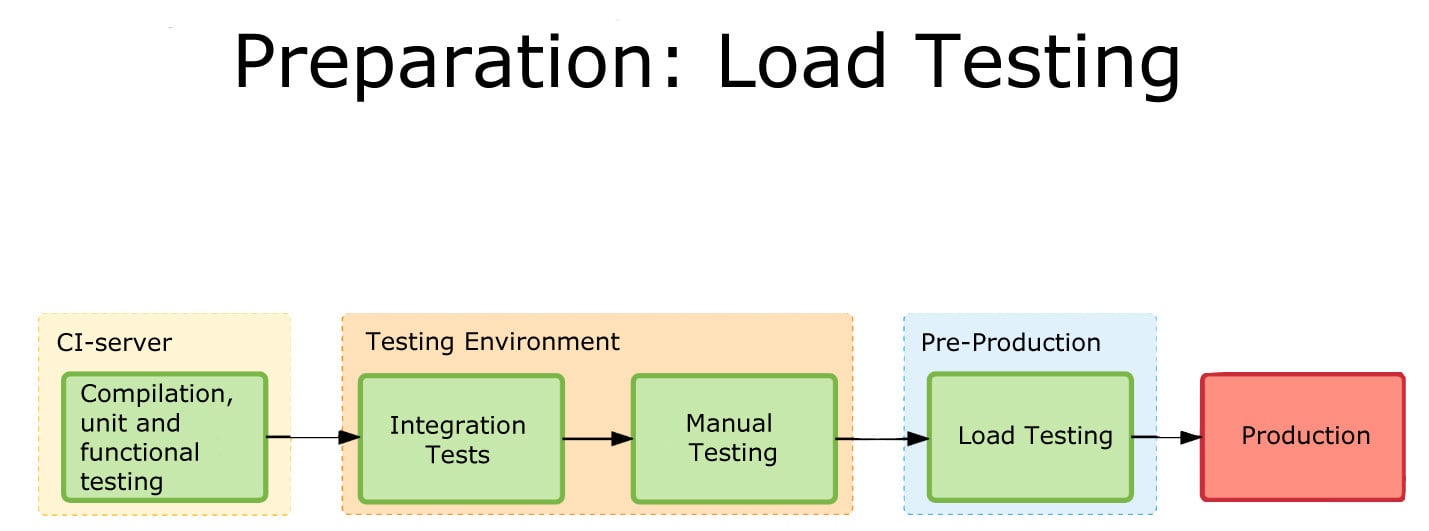
    Load Testing
    One of the graphics showing integration.

    What makes it interesting is where the team found limitations and switched tools midstream. This being a process, Madison at the end alluded to the fact that they have started eliminating TeamCity (or at least limiting what they’re using it for). I think that when most people begin to go high-rate DevOps, or even constant monitored low-rate DevOps, some of the items his team ran into escape their notice until they find an issue. The architectural growth will occur—you are automating more, building more, monitoring more and releasing more. The question is, how far ahead do you look? Until recently, the answer was pretty much, “Not far,” because we didn’t have cases like Madison’s to draw on and see parallels with what we were doing. But that is starting to change.

    CI/CD/ARA vendors can help, of course. Collectively they have a lot of knowledge about the lay of the land, and how people are using the tools to tackle the needs of new architectures. But more public documentation such as Madison’s would be great, too.

    Even though you’re moving at a much faster pace, looking ahead and increasing the steps taken in the CI/CD/ARA space can provide that added bit of resiliency, and monitoring at a level appropriate to your project’s maturity can add that extra bit of “we know, we can recover.” There have been some spectacular failures that were indicated by monitoring, but the volume of data flowing through monitoring was enough to mask it. Today, the best solution is to monitor at the appropriate level and then feed that monitoring back into the system.

    But you’ll be supporting more software infrastructure. The growth of tools is pretty inevitable: As you spread the functionality across machines/instances/containers, you will need to stretch CI/CD/ARA tools to multiple interrelated targets and monitor the overall system and its performance bottlenecks. And for now, the tools chosen will not always be widely known, so a process to bring new Dev/DevOps team members quickly up to speed on the more obscure tools should be on your list of to-dos.

    — Don Macvittie

  • The Top 10 Reasons to Use Cassandra

    The Top 10 Reasons to Use Cassandra

    The Apache Cassandra database is the right choice of database if you are looking for scalability and high availability without compromising performance for your mission-critical applications. Additionally, Cassandra’s support for replicating across multiple data centers is best-in-class, providing lower latency for users and the peace of mind of knowing that you can survive regional outages. To that end, we’ve compiled a list of the Top 10 reasons why enterprises onboarding and deploying mission-critical applications should use Cassandra (Apache Cassandra, DataStax Enterprise).

    1) Requirement for fast writes: Easily deals with data velocity, data variety and data complexity issues

    Many of the challenges associated with next-generation cloud applications center around data volume and data velocity. Is Cassandra able to handle the speed of data coming into the system? The answer is “yes” based on the amount of data and cluster size. Not only does Cassandra come with this ability out of the box, but there are systems of data pipeline architectures being built around ingestion speed. And to top it off, it scales linearly, making it easy to determine the right amount of capacity based on data flow.

    But, there are also two often overlooked components it provides: 1) data variety and 2) data complexity. Data variety is an alternate way of saying that data coming into one database can come in different forms. An example of this would be sensor input from a heart monitor and sensor input from an IV both for the same patient. The second component, data complexity, extends the previous example. The heart monitor might report 100 metrics twice per second under normal operating circumstances and up to 125 metrics once per second while the wearer is sleeping. This means the write patterns, locations, and frequencies can vary. Cassandra handles these situations gracefully.

    2) Can handle massive data sets

    If there were any questions about whether Cassandra is capable of handling large data sets, there is no need to look any further than the companies using it. They operate at massive scale—Netflix, Hulu, Instagram, eBay, Apple, and Spotify all have Cassandra working in interesting ways as part of their offerings.

    The other way you know Cassandra is up to the challenge is in use case examples. Many organizations use it for applications where data grows in an unbounded way very quickly. These include Twitter clones, a web log analytics data warehouse and telemetry or sensor data.

    3) Homogeneous environment

    Unlike some of the legacy distributed systems, Cassandra does not require outside support for synchronization. All of the required components for basic operation are built in. Since Cassandra also operates in a peer-to-peer fashion, this means that there is no master-slave or sharding setup and that all nodes in the ring are equal. Additionally, there is only one machine type that an administrator needs to worry about.

    4) Highly fault-tolerant

    Cassandra employs many mechanisms for fault tolerance. Since it is masterless, there is no single point of failure. There is also the potential for zero downtime rolling upgrades. This is because Cassandra can support the temporary loss of multiple nodes (depending on cluster size) with negligible impact to the overall performance of the cluster.

    The safety net Cassandra offers extends outside of your data center as well. Cassandra allows you to replicate your data to other data centers and keep multiple copies in multiple locations. This helps satisfy many regulatory requirements in addition to being a part of an strong disaster recovery and business continuity plan.

    5) Proven success across enterprise applications and in many use cases already

    There are already many examples where Cassandra is being used effectively. Banks and other financial institutions are storing large quantities of financial data in Cassandra. Analytics companies are using Cassandra to store web analytics data. Medical companies are using Cassandra to store sensor data and other time series inputs. There are also many companies making use of Cassandra for storing internet of things (IoT) data.

    6) Ease of administration

    Cassandra is a straightforward system to administer. With Cassandra being a masterless system, all nodes in the ring are the same—a homogenous system. It’s fault-tolerant and can support the temporary loss of nodes with minimal impact to production performance. This means that nodes are easy to replace and the requirement to replace downed nodes immediately isn’t as strict.

    7) Custom tuning

    There are a lot of knobs and levers that can be turned to get Cassandra to perform optimally for your workload and environment. You can set it up to operate in a way that is consistent with your workload. For example, if you write lots of log data and read infrequently, then there are configuration tweaks to be made for write-heavy systems. If you write heavily to one data center and then do all your reading from another data center, then you can adjust the settings on a data center-by-data center basis.  This idea of tuning isn’t just available at the application level; you can also tune the JVM and Java settings, including GC and logging levels. Changes can even be made by the drivers at connection time to aid in the performance of your system.

    8) Easy to integrate core applications

    A lot of work has been done on data manipulation and parsing systems to integrate with Cassandra. For instance, the full text search engine Apache Solr has been packaged to work with Cassandra to provide full featured search capabilities to an existing Cassandra database. Apache Spark, a big data analytics engine, also has been plugged in to work on an existing database. There are entire suites of tools that can be integrated or bolted on to increase its capabilities. These include Apache Mahout, Kafka and Zipkin, to name a few. This is important because the more tools you have available to you, the more powerful your data becomes. You also have the ability to gain more insight about your data without having to build and maintain the application systems that were previously required.

    9) Excellent Monitoring Options

    Included in the system of tools referenced in No. 8 are monitoring packages. If you are a user of automated monitoring platforms such as Datadog or Netuitive, you’ll find examples of prepackaged agents to monitor the important parts of Cassandra. You can then tack on your own additions of other metrics that are important to you. This is made possible by Cassandra taking advantage of Java MBeans and exposing them to the client. You can use these to get at much of the internal information Cassandra uses to make its own decisions and decide on its own health. Datastax also offers its own monitoring and control application called Opscenter.

    10) Amazing community

    One of the best things about any piece of software is having a great community of developers and experts available to you for help or guidance. There is a huge yearly database summit put on by Datastax, the primary backer and largest contributor of code to Cassandra. It also sponsors community events all over the world so you can meet and interact with other developers around you.

    For open-source software to be successful, there needs to be an ecosystem that develops around it. In the case of Cassandra, there are consultancies, monitoring and troubleshooting systems, plugins, instrumentation systems and backup systems. That is all a set a competencies that your organization no longer needs to own and can use what the greater community has already created. There are even PaaS companies that will completely take over the management for you, leaving you just the development of your application to focus on.

    Given the sizable number of organizations and people that are a part of the ecosystem and the Cassandra community as a whole, there is no shortage of articles, documentation and people willing to help. A welcoming and helpful community isn’t always a given, but in the case of Cassandra, it’s alive and thriving. This is important because software is always about people.  The more of them that you can interact with that have shared your experiences, the better. It also will be easier to find solutions to your problems having a network of people who might have faced them before.

    There are many reasons why Cassandra could be the right tool for your application. Knowing your systems requirements, workloads and future will help you make the right choice. As you can see, if you do choose Cassandra, you are bound to be in good company.

    — Michael Colby

  • How Continuous Can Integration Be?

    How Continuous Can Integration Be?

    My blog, “7 Pillars of DevOps,” identified seven essential best practices areas that make up successful DevOps. One of the seven pillars is continuous integration (CI). The blog explained that the pillars are not silos, but rather foundations that need to be kept in balance. A well-balanced CI implementation performs integrations that are fast enough to fit within the time budget for an end-to-end DevOps pipeline.

    Compared to older waterfall processes in which large software changes were integrated occasionally, the DevOps CI concept of frequent, small, incremental integrations has many merits. Quick feedback on frequent integration problems enables a release consisting of many individual changes to be built incrementally with confidence. The root cause of integration problems can be isolated much faster when the changes are integrated incrementally. Since faster integrations are better, just how continuous can integration be?

    Contrary to the name, integration is never truly continuous. Even if a continuous stream of changes to integrate existed, typical CI process steps (listed below) require a non-zero amount of time. These steps absolutely interrupt the continuous integration cycle to some extent.

    • Merge changes in the integration repository
    • Check integration repository entry criterion
    • Run static analysis scans of the integrated source code
    • Orchestrate the build resources
    • Create the build
    • Save build the artifacts to artifact repository
    • Run unit tests
    • Save unit test results to artifact repository
    • Release the build resources back to the pool
    • Orchestrate the functional build test resources
    • Run functional tests
    • Perform analysis and assessments
    • Save functional test results to the artifact repository
    • Remediate any problems discovered during the above steps
    • Promote the build to the delivery stage
    • Release functional build test resources back to the pool.

    For CI to perform as continuously as possible, there are three categories of CI best practices:

    1. Modularize the product design to support modular CI processing
    • Modular code designs, using 12-factor-app principles, allow incremental changes to be integrated.
    • Microservice architectures enable each portion of a product to be integrated as available rather than requiring the entire product to be integrated at once.
    • Using containers can help to optimize infrastructure orchestration.
    • Re-factoring build schedules to remove any unnecessary build dependencies between modules or microservices eliminates time delays.
    • All changes are checked into a common trunk branch. This requires the ability to toggle feature changes on and off quickly and easily to enable a release whenever it is needed.
    1. Optimize the CI Infrastructure
    • Vertical and horizontal scaling of both the CI build resources and test resources creates an infrastructure optimized for each CI stage run.
    • Predictive orchestration of CI infrastructures enables CI and test resources and processes to be set up in advance.
    1. Accelerate CI processes
    • Pretest and pre-check integration deliverables prior to integration to trunk, to minimize costly remediation delays.
    • Pipeline CI build and test processes to eliminate setup delays between processes.
    • Use Fail fast to prioritize the most important tests as early as possible.
    • Use accelerated testing techniques such as risk-based specific test selection to speed up CI testing.
    • Use in-process analytics that can detect threshold exceptions prior to the end of the CI build or test process.
    • Remediate problems fast using automated rules for roll-backs or targeted problem reporting.
    • Establish a policy for deciding when and how to revert changes that break CI processes so that the pipeline doesn’t get stuck when check-in breaks the trunk.

    The above CI practices commonly reduce the time for CI from many hours to minutes per build. While minutes is still not truly continuous, for most practical purposes CI processing in minutes is fast enough to suit even the most aggressive end-to-end DevOps delivery pipeline goals.

    Summary

    What do you think? Do you agree with the above CI best practices? Are there others you recommend?

    While DevOps implemented with all seven pillars provides a strong foundation for long-term enterprise business improvements, it is important to understand DevOps is not an island. Enterprises implementing DevOps should be aware that DevOps interoperates with other IT systems and practices. Enterprises are well-advised to put in place governance policies that encourage the selection of tool-agnostic IT partners with solutions that best suit the needs of each unique enterprise and can integrate and evolve DevOps together with all their IT systems.

    — Marc Hornbeek

  • Chef Boards the DevOps Express with CloudBees, Others

    Chef Boards the DevOps Express with CloudBees, Others

    You often may have more questions than answers as you progress along your DevOps journey. Which tools should I choose? Do these tools work well together? What have other people done in my situation? You’re often left Googling to find the right integrations and piece together an architectural solution.

    Today, I’m excited to announce that Chef is joining DevOps Express, a new industry initiative comprised of 14 leading DevOps vendors and service providers. Led by CloudBees and Sonatype, and including everyone from Atlassian to GitHub, this initiative is focused on creating solutions that will help you adopt DevOps practices. Specifically, by defining reference architectures and highlighting best practices, supported integrations and solutions, we believe that DevOps Express will simplify and accelerate DevOps adoption for organizations of all kinds.

    DevOps Express uses popular technologies spanning multiple solution components to provide a framework for building reference architectures that are better integrated and supported. Creating reliable and actionable reference architectures for organizations will ease DevOps adoption and minimize risk for organizations.

    DevOps is collaborative by its very nature—it’s all about bringing teams together. This includes cultural transformation, breaking down silos between disparate teams and working together around the common goal of adding value for customers. These principles are just as true for us, the vendors providing tools to help you on your DevOps journey. We, too, must break down silos and work together to provide more value for you, our common customer. I’m looking forward to what we’ll build.

    About the Author / James Casey

    james_caseyJames Casey is vice president of Partner Integration at Chef. His career spans more than 15 years in companies ranging from mobile and finance startups to CERN, the birthplace of the World Wide Web. He specializes in building tools for operating large computing infrastructures. He previously created monitoring tools at CERN for the Large Hadron Collider.

  • Why a Dev/Test Cloud Is Not Optional

    Why a Dev/Test Cloud Is Not Optional

    How do you create a private Dev/Test cloud to standardize processes, tooling and environments across teams? Recently, I participated in an online panel on the subject of, “Creating an Internal Dev/Test Cloud,” as part of Continuous Discussions (#c9d9), a series of community panels about agile, continuous delivery and DevOps.

    Continuous Discussions is a community initiative by Electric Cloud, a provider of continuous delivery to businesses including SpaceX, Cisco Systems, GE and E*TRADE. I am not an employee or vendor of Electric Cloud.

    Below are a few insights from my contribution to the panel:

    What are your thoughts on Dev/Test cloud?

    It’s not a question of why—You don’t really have a choice. I don’t think that this is an optional thing. If you’re moving to this modern software delivery, you’re going to have to build this environment. If by chance you’re already doing some of the continuous integration continuous delivery (CICD) processes without it, it’s not going to last long. If I were to take a slightly different angle, I think the interesting question is where? So where is your Dev/Test cloud?

    I think of Dev/Test as a conceptual thing; it’s your factory. If we talk about it from a singleton point of view—as one environment, for example, or one integration environment that it is not going to support microservices and some of the future architectures—that’s when you might add multiple Dev/Test clouds. For example, if you think you’re going to have your browser grid on-prem or intermingling with your other integration environments, that’s a lot of work, and that’s a lot of maintenance. It’s just not a good idea. But at the same time, it’s actually amazing if you’re doing anything with artifact repos. Even though some of these artifacts are really small—and Docker images can be very small, if those repositories are not on the same network as the rest of your Dev/Test—it could be really slow pulling assets down. So that’s what can be brought on-prem. I think the bottom line is that you’re going to have to get there no matter what. It’s just going to happen. I think how you set it up is the interesting question, since there are a lot of options as far as how to do that.

    What are the challenges of creating a Dev/Test cloud?

    I think the first challenge is parity between your Dev/Test environment and your production environment. Replication would be insane because you’re talking about data centers, a lot of overhead, and it reduces flexibility. And everything we talked about before—the ability of developers to spin out Dev/Test environment and integration environment on a whim. However, there are things that you can absolutely consider, which is consistency between all your configurations, making sure that all your frameworks are consistent because chasing down bugs that cross applications throughout the system are very hard to deal with. But there is always the need to address that.

    And we’re even talking about agents sitting on your nodes. I mean, if you’re running some tooling on your servers, it’s good to know what the potential impact of having those, or not having those on your Dev/Test environment could actually be. I’d say that parity is probably one of the biggest challenges. And then the other challenge is just knowing who owns it, because I think that the best scenarios I’ve seen are when you have a steward of the Dev/Test environment. It could be DevOps, it could be somebody else who’s responsible for maintaining the strategy of what you do with those environments versus it being a wild west. So they don’t own it, but they facilitate making sure that parity exists, and facilitate making sure the automation and the provisioning and everything is as efficient as possible. Developers shouldn’t think about that. Dev/Test should be more of an offering. At the bigger organizations, that’s exactly what they do. They’ve created a shared services or cloud services division that is responsible for setting those up.

    What are the challenges you see people running into when they’re trying to create a Dev/Test cloud?

    It is a huge habit of developers to build locally, and I think that most developers I tell to stop doing that complain. It is a big problem, just from a pure pollution standpoint and the fact that you don’t really know the condition of each developer box, there is no consistency. Hopefully a Dev/Test Cloud is easy enough to utilize that they don’t see the need, and there is some training—I think it goes back to the idea that if you treat it as this singleton thing, you know that some Dev/Test environments live and die within an hour time period. They’re very short. That should be the idea, that you spin it up, put your code and test it quickly, get the IP address. You test it and kill it, and that’s it. You move on and continue coding, and as it moves downstream, you can have a more robust integration environment.

    I do think that there are best-of-breed Dev/Test clouds. I think you have the Dev/Test clouds that are great for the spinning up and down a pole instances. And then I think you have past types environments, and I think you have load testing clouds, and you have functional testing clouds. There may be a reason to break them out into different types. The most important thing is that everything is tightly integrated and that there is a strategy. It’s not just off the cuff, because that’s equivalent to shadow IT. Even if everybody knows it’s happening, it’s the same difference.

    What Are the Prerequisites for a Dev/Test Cloud?

    I think you have to have a steward, somebody who owns it, standardization. You need to have full master scripts, snapshots, images, that represent the de facto Dev/Test environment, and somebody needs to make sure that those are up to date and current so you have consistency across all the locations where these have been spun up. The contradiction is if you are using a performance testing cloud for load testing, a functional testing cloud, where you don’t have control over that infrastructure. In those scenarios, if you’re running Selenium scripts, you’re going outside in, so it doesn’t really matter as much.

    How to do it

    If you’re starting bottom up, you could think about it all the way through before you develop it. But most organizations aren’t in that position; they’re slip-streaming that into something else, and chances are you’ve already had this concept and you’re already using virtualization, so part of it you probably already have, but maybe not in the most efficient way. Many of the organizations I’ve seen start with something small. For example, they start with a robust integration environment. Druva is an example of a company that’s made this transition. But in all the scenarios I’ve seen, there’s been another catalyst, it’s never just been Dev/Test cloud. There’s always been something else. An architecture change to microservices, changing your product from an on-premises solution to a cloud-based solution, which was the scenario with Druva. There always seems to be something else. I don’t think it has to be that way, but it seems like there are other driving factors that necessitate change and the opportunity to change your pipeline, and they’re driven by the application. I don’t think there’s an easy answer. I think you have to rely on automation, you have to rely on tooling. You can’t be afraid of tooling. Don’t let the tool dictate what you do. You should be telling the tool what to do. If eventually you are a Chef shop and Jenkins, and it dictates what you’re doing, then that’s all you’re going to do. And you’ll never be able to adopt a future tool, so think about that. Inertia is a powerful force.

    I have very strong opinions about how Development environments should be set up. Stop building locally, and put it in the cloud.

  • Echidna Takes DevOps to E-Commerce Site Creation

    Echidna Takes DevOps to E-Commerce Site Creation

    The Echidna e-commerce firm installs and evolves e-commerce platforms, providing ongoing development so its clients can leverage e-commerce experiences to the satisfaction of their customers. “We apply carefully selected user experience technology, marketing and analytics abilities to our clients’ strategic goals to do this,” taking what it calls an “anti-Big Bang” approach to continuous deployment, says Mike Pierce, CTO of Echidna.

    “Traditional e-commerce deployments were often Big Bang deployments that people developed on the basis that they had to pressure the business leaders into feeling like they had only one chance to pack as much scope as possible into a large software development project. That approach voids any practical innovation,” says Pierce. With that mindset, it can take years to finish e-commerce sites, and e-commerce companies can go out of business by the time they actually finish such a site, since it would be far out of date by then.

    Echidna sees continuous deployment as one piece in a much larger agility play designed to ensure that businesses compete in digital economies, now and in the future. Continuous deployment is the ultimate goal of DevOps, an approach that enables the business to innovate fast enough to maintain the business’ sharp marketplace edge through acute, turn-on-a-dime competitive dexterity. “In order to do this, continuous deployment helps companies learn to develop high-quality software and deploy it on a rapid, reliable and repeatable schedule,” says Pierce.

    Continuous Deployment Timelines and Challenges

    Depending on the client, its needs and the features in the pipeline, Echidna deploys software to each e-commerce platform from monthly to daily, and at intervals in between those extremes. Echidna seeks to increase the degree of automation of each deployment over time. The challenge is that with so many different clients and platforms, Echidna must achieve its automation victories for each customer individually, solving similar and unique issues. “We are finding our greatest success using PaaS (platform-as-a-service) e-commerce platforms like Four51 because it eliminates a lot of the administrative overhead that is typical with deployments to on-premise platforms,” says Pierce.

    The development model Echidna follows to deploy e-commerce sites affects each software component, even though components deploy at different times. “Payment system modifications require significantly different testing—more testing—and we must deploy them much less often than other components. Marketing components don’t need as much regression testing as other software modules and so we can deploy them much more quickly,” he says.

    The most difficult software to move into continuous deployment in an e-commerce platform are the components that integrate deeply into enterprise systems. That is why Echidna advises business customers to use DevOps methodologies to deploy their enterprise production software at accelerated rates. When they do this, Echidna potentially can speed its deployment of the e-commerce platform components that are enmeshed with those production systems.

    The Four51 Path, Through Jitterbit

    Echidna connects Four51’s OrderCloud to the Jitterbit iPaaS integration server platform, a point-and-click integration tool. “This enables us to streamline further integrations and data exchanges with many of the disparate systems in an ecosystem,” says Pierce. Echidna sees increasing continuous deployment orchestration opportunities as more and more third-party application vendors become compatible with these kinds of integration tools.

    Four51 enables an ecosystem of connected digital services and applications where e-commerce uses numerous disparate systems that exchange data and facilitate work streams in the enterprise in question, Pierce says. “As these systems eliminate disparities and we align them on the central integration and deployment standards that we use, there will be increasing opportunities to introduce clients to lean development practices like continuous delivery and continuous deployment.”

    Conclusion

    Continuous deployment is miles apart from what information technology is used to, especially where manual change management and change control are concerned. But once Echidna exposes its customers to continuous deployment, their managers, C-levels and boards soon begin to witness the accelerated software innovation continuous deployment provides and how this makes information technology—and the business—more nimble, both technologically and competitively.

  • 14 Tools That Raise Web and App Performance

    14 Tools That Raise Web and App Performance

    In the DevOps Era, teams increasingly are turning to a variety of tools to integrate, accelerate and automate. Speed and efficiency are critical. This is especially amplified in continuous delivery (CD), which enables IT teams to achieve fast and reliable releases. If successful, CD allows for a faster time to market, increased operational effectiveness and getting the right product and features to production as quickly as possible and at a high-performing level.

    So, what are some of the tools that can help to raise software performance? Here is a list of 14 that we at log management platform Logz.io love, some of which will be entirely new to you.

    Continuous Integration Tools

    Jenkins

    An extensible continuous integration (CI) engine, Jenkins is a top tool for DevOps engineers who want to monitor the executions of repeated jobs. With Jenkins, DevOps engineers have an easier time with integrating changes to projects as well as access to outputs to notice easily when something goes wrong. It’s not the fastest or the fanciest tool, but it’s really easy to use, and it has a great ecosystem of plugins and add-ons. It is also optimized for easy customization.

    TeamCity

    TeamCity is a major all-in-one and extensible, continuous integration server. Written in Java, the platform helps developers build and test software continuously as well as monitor externally run jobs such as cron jobs and procmail jobs. It increases the scale of automation and is gaining popularity quickly in DevOps circles. The platform is supported in other frameworks and languages by 100 ready-to-use plugins. TeamCity installation is really simple and has different installation packages for different operating systems.

    Bamboo

    Developed by Atlassian, Bamboo does more than just run builds and tests. It connects issues, commits, test results and deployments so the whole picture is available to your entire product team, from project managers to developers and testers to system administrators. Bamboo supports builds in any programming language using any build tool such as Ant, Maven and make, as well as any command-line tool. Build notifications can be customized based on the type of event and received over e-mail, instant message, RSS or pop-up windows in Eclipse-based IDEs and IntelliJ IDEA.

    (For more, a colleague of mine has published a guide to continuous integration tools.)

    Load and Performance Testing Tools

    JMeter

    Apache’s open-source, Java-based JMeter has a user-friendly GUI, making test development and debugging much easier. JMeter has been widely used for 15 years and is now a popular open-source alternative to proprietary solutions such as Silk Performer and HP LoadRunner. One of key benefits of JMeter is that it is scalable. When you need a higher load than a single machine can create, JMeter can execute in a distributed mode—meaning that one master JMeter machine controls a number of remote hosts. JMeter also has multi-protocol support and out-of-the-box support for HTTP, SMTP, POP3, LDAP, JDBC, FTP, JMS, SOAP and TCP.

    BlazeMeter

    For all of the benefits that it brings, JMeter is limited in its capabilities when used as a standalone tool. For an alternative, check out BlazeMeter, a good tool that allows you to run JMeter in the cloud, increasing scalability even further and providing comprehensive test results in easy-to-read graphs. With BlazeMeter, software delivery and DevOps teams can boost their productivity by seamlessly sharing test scripts with their peers for faster feedback, deeper learning and higher performance. BlazeMeter also has easy integrations with leading CI tools including Jenkins and TeamCity.

    Taurus

    Continuing on the previous point, JMeter is a great tool, but it’s not perfect. Automation and integration with other systems is difficult at times, and it’s another tool to learn and master. This where a tool like Taurus comes in. Beyond JMeter, the list of popular free and open-source tools include alternatives such as The Grinder, Gatling or Locust (also a great tool for load testing, Python-based), each having its own advantages and disadvantages. Taurus is an automation-friendly testing tool that extends and abstracts the above tools (as well as Selenium), and helps to overcome various challenges. Taurus provides a simple way to create, run and analyze performance tests. The idea of Taurus is to provide language creation/configuration scripts (in JSON or YAML) in a more user-friendly way. Not only can you create scripts with Taurus, one of its many additional benefits is that you can also use pre-existing scripts.

    Application Performance Monitoring Tools

    New Relic APM

    Application performance monitoring (APM) tools allow you to target bottlenecks with your application’s framework. New Relic is the reigning market leader—and for good reason. It lets you pinpoint precisely where and when bottlenecks are occurring. DevOps engineers can use the tool to spend less time monitoring applications and more time building and deploying. New Relic offers web request monitoring for .NET, Java and more. It automatically shows a component-based breakdown of the most important requests. A popular, reliable tool, New Relic APM is a great choice for DevOps engineers.

    AppDynamics

    AppDynamics is also a great tool that enables you to monitor Java, .NET, PHP and Node.js applications. AppDynamics offers performance management solutions that let developers diagnose and fix application performance problems in real time. AppDynamics’ monitoring capabilities also help to simplify the management of complex, business-critical apps.

    Dynatrace

    Dynatrace helps users to monitor application servers, database servers and web services. Its feature set in terms of .NET offers code-level monitoring (including CPU and wait times), end-to-end tracing and user experience monitoring. It supports the entire application life cycle, from development environments to load testing to production.

    Infrastructure Tools

    AWS CloudWatch

    Amazon offers AWS CloudWatch, which enables operations to see usage and performance information through their APIs. AWS CloudWatch offers metrics on data transfer, disk usage and CPU utilization that can also be configured to trigger notifications and alerts whenever thresholds are exceeded. AWS users can also inject their own metrics through CloudWatch APIs to generate a comprehensive cross-analysis.

    Google Cloud Monitoring (StackDriver)

    Google Cloud Monitoring provides dashboards and alerts for your cloud-powered applications. Teams can review performance metrics for cloud services, virtual machines and common open-source servers such as MongoDB, Apache, Nginx and Elasticsearch. You can also use the Cloud Monitoring API to retrieve monitoring data and create custom metrics.

    Virtualization and Containers

    Docker

    An open platform for distributed applications, Docker is an application for DevOps engineers who want to “build, ship and run any app, anywhere.” Docker makes it easier for developers and SysAdmins to push code from development to production without the inevitable hiccups that come from using different, clashing environments during the entire application life cycle. Docker is driving the trend toward microservices, in which applications are broken into smaller, self-contained components that are packaged and deployed independently as containers.

    (For those who like the platform, we have a guide to Docker monitoring with the ELK Stack.)

    Configuration Management Tools

    Ansible

    Ansible, recently acquired by RedHat, is a the Python-powered IT automation and configuration framework that allows users to manage their systems without configuration or setup. DevOps engineers can leverage Ansible to save time in application deployment, configuration management and continuous delivery, as well as when managing systems. It recently released its latest version.

    Chef

    Chef is a systems and cloud infrastructure framework that automates the building, deployment and management of infrastructure via short, repeatable scripts called “recipes.” But the real power of Chef is in its use of pluggable configuration modules (a.k.a., cookbooks), nearly 2,000 of which are available within the Chef community. Chef can integrate with cloud-based platforms such as Rackspace, Internap, Amazon EC2, Google Cloud Platform, OpenStack, SoftLayer and Microsoft Azure to provision and configure new machines automatically.

    So, that’s it! What do you think of these tools? Are there any others that you prefer as alternatives? I’d love to hear your thoughts in the comments below.

  • Three Ways Dev and Ops Teams Can Manage the Integration Lifecycle

    Three Ways Dev and Ops Teams Can Manage the Integration Lifecycle

    Many enterprise organizations did not invest enough money into integration as they built their cloud or hybrid infrastructures. As if integrating on-premise systems and applications wasn’t tough enough, in today’s cloud era with the rise of hybrid environments, connectivity has only gotten more complicated – especially when combined with the increased speed of deployment. Puppet Labs found that high-performing organizations deploy code 30 times more frequently than their lower-performing counterparts, meaning dev and ops teams are struggling to break down data silos while simultaneously managing constant technology upgrades for line-of-business users.

    There’s no doubt that, whether public or private or hybrid, the cloud is now part of most companies’ infrastructures, and its share will only increase. Goldman Sachs estimates that spending on cloud computing infrastructure and platforms is expected to grow at a 30 percent CAGR from 2013 through 2018 compared with 5 percent growth for overall enterprise IT, while Forrester predicts that 25 percent of all software applications purchased will be cloud-based by 2020.

    With the speed and agility the cloud imposes on businesses, dev and ops need to come together to look at data integration throughout its entire lifecycle, from developing new apps or services on top of existing apps, all the way to the ongoing service, maintenance and upgrades of those applications. The two teams must join forces to manage this process as one comprehensive integration lifecycle, where dev and ops play equal roles solving for new data integration challenges brought about by hybrid deployments and siloes created by line of business users’ cloud purchasing habits.

    Today’s dev and ops teams have to look at data integration as a service, not just a one-off implementation they can hand off. Here are three strategies to help bring the two teams together to jointly manage the data integration lifecycle.

    1. Assess Current Integration Challenges Collaboratively
      Without alignment between dev and ops teams, integration lifecycle can’t be managed successfully. Organizations need to align on the people and process portion first, asking questions like: what systems does each business unit need data from? How likely is it that their needs will change, and how can you plan for a flexible integration as a service? What capabilities will ops need after dev implements the integration?

    After reaching agreement, teams will need to jointly assess and select a data integration as a service technology or platform that allows for joint requirement setting, collaboration, testing and ongoing adjustments throughout the lifecycle of the applications. Selecting the right integration platform as a service at the onset is critical to minimize cost, time and wasted dev and ops cycles down the line as business and technology needs change. The most agile integration option typically consists of a plug-and-play, flexible platform that makes use of APIs and also allows for deeper customization down the road.

     2.Understand the Four Key Stages of Integration Lifecycle Management
    Dev and ops teams are now part of the same cycle dealing with frequent updates and agile product development. It’s no longer about developing, testing and then having ops maintaining, but about a seamless and transparent handoff from dev, to ops and back throughout the entire application and data integration lifecycle.

    To capture the most value from disparate organizational data and to minimize ongoing data and application synchronization costs, dev and ops teams need to adopt a joint integration management strategy that accounts for the four distinct phases of data and application connectivity. These include:

     3. Design phase. After understanding business use cases and selecting a platform, dev and ops must collaborate on priorities – what near-term functionality can they design for based on the plug-and-play layout, and how can they tackle that low-hanging fruit while maintaining the flexibility to meet future requirements?

    By starting with the right technology and a common integration framework, dev and ops teams can design connected core systems and data early on with plug-and-play API connectivity for solutions like CRM and ERP, while maintaining the ability to easily expand functionality with custom/deeper integration capabilities with marketing automation, business intelligence and other apps.

    In addition to functional capabilities, the design phase should address performance and scalability by taking into account throughput and latency. This process involves planning to meet performance expectations, even with the customization and extensions users will likely want down the road. Dev and ops should ask themselves questions like: which company systems will be on premise, in the cloud or hybrid? What are the performance, scalability and security tradeoffs of each approach?

    1. Develop phase. Dev and ops need to work together in the development phase to carefully document key aspects of the integration while building connectivity for specific use cases. This documentation will be critical to the seamless handoff between the two departments, so they both need to be involved in the process. Strategic collaboration and thorough documentation can improve the efficacy of maintenance and debugging activities, help companies adjust to staffing changes and more easily transfer integrations to and from the two teams during the ongoing development and roll-out process.
    2. Deploy phase. Given that you’ll likely deploy in a hybrid environment, make sure you test both on-premise and cloud integrations to ensure that data is flowing freely. To help test integrations and move them into a production environment, look into staging and production environment tools that streamline the process. Infrastructure costs should also be considered, as they may increase unexpectedly if you don’t watch them throughout the deploy phase.
    3. Run phase. Continuously monitor to confirm that the data is flowing as designed. If dev and ops selected the right technology platform, the teams won’t have to worry about ongoing API management, because the platform takes care of it.

    The right platform will also lower downtime and maintenance costs with a multi-tenant management environment that allows the expert for any given situation to dive into the integration backend or runtime. The platform should also provide ongoing diagnostic reports and proactive alerting to allow ops to home in on potential performance issues.

    1. Build a Responsive IT model
      With dev and ops coming together to take advantage of the speed and agility offered by the cloud, the resulting just-in-time services for businesses are turning IT from a cost center into an innovation center. The data integration lifecycle is another result of the new cloud-shaped world, helping dev and ops teams create a more responsive IT model and allowing them to better meet business needs while driving innovation. While shared environments bring with them an additional element of risk, a responsive IT model is an important step towards both short-term and long-term success in the modern connected enterprise.

    These three steps allow dev and ops teams to offer the value, speed, efficiency and opportunity that today’s enterprises require. By adding collaboration and agility at every stage of the integration process to plan, implement, track, debug and update continually, dev and ops teams can scale to respond to the data-driven needs of the business more precisely.

    How have you overcome cloud and hybrid application and data connectivity challenges in your organization? Connect with me in the comments below, or on Twitter at @scribesoft.

    About the Author/John Joseph

    John-Joseph head shotJohn Joseph, VP of marketing for Scribe Software, earned a master’s degree in business administration from the MIT Sloan School of Management, a master’s degree in electrical engineering from the University of Southern California and a bachelor’s degree in electrical engineering from MIT.

  • Infrastructure Automation and API Taxes

    Infrastructure Automation and API Taxes

    That automation is one of the critical components of DevOps is apparent in numerous surveys and studies that focus on the benefits organizations have realized from implementing the approach across operational groups. Automation itself starts with (or should start with) a comprehensive API. That means infrastructure – network and application focused – needs to expose via an API the myriad configuration options it requires as well as optional features it offers.

    It is through these APIs, after all, that integration between devices and systems and across operational groups occurs. The much vaunted SDN or cloud “ecosystem”  is really a euphemism for pre-packaged and validated integration. Integration that occurs via an API.

    These same APIs are available to everyone, of course, and lay a foundation to operationalize app deployments by automating the various provisioning and configuration tasks required to move an app from dev to production.

    APIs allow for fine-grained automation and orchestration, with each and every knob, button and slider option available to be flipped, switched or turned. The more features and functions possible, the more buttons and knobs and sliders there are to manipulate, figuratively speaking.

    Each and every one of those calls to do so needs to be carefully managed. Exceptions happen, errors occur, and any script or tool ought to carefully validate that each and every one of those calls has been successful. Which is going to take a lot of code. Code that itself will introduce the possibility of errors and require maintenance and reviews and all that goes along with good development practices.  Code that will also impact the time required to execute. Given that most APIs are RESTful and require invocation via standard HTTP exchanges, each and every API call incurs time to send, time to execute, and time to receive a response. The overhead is basically an API tax; for every API call you invoke, you’re paying with time… and more time.

    Martin Fowler touches on this in his post “Microservices and the First Law of Distributed Objects“:

    The consequence of this difference is that your guidelines for APIs are different. In process calls can be fine-grained, if you want 100 product prices and availabilities, you can happily make 100 calls to your product price function and another 100 for the availabilities. But if that function is a remote call, you’re usually better off to batch all that into a single call that asks for all 100 prices and availabilities in one go.

    Thus for sufficiently complex systems another option is needed: templates. Templates do not replace APIs, but rather provide an additional and far more compact method of accomplishing the same tasks automatically, but without the overhead imposed by highly granular sets of API calls. Templates encapsulate a configuration; codifying the settings for a variety of knobs, buttons and sliders into a single configuration artifact. In a fine-grained API-base integration, each of those settings must be maintained somewhere external to the automation script or system. Each API call will include one (or maybe two) of those variables as read from some file or system that maintains the application-specific set of data. This introduces many potential points of failure. Whether file or database, variables must be retrieved before being associated with an API call and then transmitted to the receiving device. Errors may occur on read, on format, or on transmission.

    In contrast, if all the variables exist as a single, validated configuration template artifact, it can then be sent, as a single entity, via an API call to the device or service in question. The number of potential points of failure is effectively reduced to read/retrieve and on transmission. This greatly simplifies the process as well as reduces the time it takes to actually execute the configuration of the target device or service.

    In addition to simplifying integration by reducing the provisioning and configuration tasks from potentially hundreds of API calls down to a small set of calls, this has the benefit of fitting much easier into an infrastructure as code strategy, where common configurations are treated as artifacts and stored in repositories much like its application counterparts.

    There is an inflection point at which it becomes advantageous to use a template-based approach over individual API calls. That point occurs before the scripts driving the API-based automation become as complex as an application and thus bring with it associated issues like error rates, time spent troubleshooting and maintainability.

    A template-based approach simplifies upstream workloads and integration as well as discrete automation scripts by reducing the set of variables required to just a few – usually those dependent on network-specific values such as IP addresses and network segmentation membership (tags or ids representing VLAN, VXLAN, NVGRE, etc…).

    This further ensures a consistency (and in turn results in greater stability of the underlying infrastructure) in app deployments.

    APIs are a good thing. They’re a key enabler of software-defined architectures like SDDC, cloud and SDN. But API-enabling infrastructure doesn’t necessarily mean only on a checkbox and radio-button basis. That can be valuable but it can also lead to integration efforts that are just as complex (or more so) than their manual counterparts. A template or policy-based (application-driven) approach  coupled with an API through which to deliver and execute such constructs results in a much cleaner, more consistent and stable means of integrating provisioning processes into the greater software-defined architecture.