Tag: integration

  • Better Together: Why Software-Development Toolmakers Should Embrace Integration

    Better Together: Why Software-Development Toolmakers Should Embrace Integration

    It’s getting harder for businesses that are building technology tools to get attention, traction and ultimately widespread adoption. You can’t just launch an amazing new developer tool and hope developers will find you; providers need to zero in on a specific use case that empowers developers while also ensuring those developers will still have access to the broad ecosystem of other tools they need to do their jobs.

    The more forward-thinking companies in enterprise SaaS, public cloud computing and artificial intelligence are increasingly partnering with companies they might once have considered competitors to elevate the presence of all their brands among end users. By meeting in the middle, and integrating with a common-ground platform, providers join their customers where they are, on the platform that makes the most sense for them.

    Instead of forcing customers to choose, providers can take advantage of powerful network effects, where their tools become more valuable because they’re part of a network. It’s one of the oldest concepts in computing: Metcalfe’s Law states the value of a network is equal to the square of the number of users on that network.

    But building that network yourself can be time-consuming and costly, as many of those who’ve done it alone have discovered. That construction project can easily distract providers from their own core competencies, forcing them to spend time and resources on essential but undifferentiated development work.

    Network Effects

    The mobile side of tech has been operating under these principles since the launch of distribution platforms such as the App Store and Google Play, which introduced mobile developers to millions of potential customers. Those customers want seamless connections between their favorite apps and services to streamline their digital lives. They don’t want every app developer to create their own marketplace with incompatible payment methods, unfamiliar interfaces or strange hoops to jump through.

    The explosion of enterprise software vendors enabled by cloud computing and software-as-a-service models has created similar patterns. Cloud-native developers have embraced distribution channels such as the AWS Marketplace as the best way to find their customers, and enterprise companies such as Box and Dropbox are making integrations with rival products and office productivity tools (like G Suite or Office 365) an important part of their product strategies.

    “What seemed unfathomable merely a decade ago is now becoming commonplace as Fortune 500 companies are mixing and matching best-in-class technologies—from upstarts to cloud mainstays like Salesforce, Workday and ServiceNow—to power their business,” said Aaron Levie, Box CEO.

    But the work required to enable those integrations is substantial.

    Growing companies focused on building best-in-class tools for developers don’t always have the in-house expertise required to strike partnership deals with platforms and support customers with a world-class billing system. Likewise, end users often need to do their own due diligence when considering whether or not a promising new development tool will play nicely with their existing tech infrastructure.

    Go to Market

    Marketplaces are the best way to solve these problems. Service providers need distribution and integration with other development tools to reach end users, and end users want the peace of mind of knowing they’ll be able to properly evaluate a tool under consideration through a certified clearinghouse.

    Companies can certainly build API-level integrations on their own for one-off partnerships or integrations where performance isn’t a major requirement. However, when performance is vital, such as with databases or infrastructure monitoring tools, a more deft touch is required.

    These seamless, low-latency connections are only going to become more important in a multi-cloud world as companies use the power and scale of Kubernetes to build tech infrastructure that spans several different cloud providers and perhaps even their own on-premises servers. True service interoperability will require common frameworks to make sense of all those connections and allow developers to mix and match their favorite tools to create the technology stacks of the future.

    Enterprise software silos are a thing of the past. The future of software development will rely on tools that blend the best available services—no matter where they were born—and link developers, service providers and platform companies in flexible and dependable ways.

    The companies that figure out how to integrate best-of-breed software development tools with the leading platforms and services of our time will win. If you’re just starting out, let someone else handle the complexities of integration and distribution while you focus on creating the best developer tool you can.

    — Jevon MacDonald

  • GitLab Updates Advance Its CI/CD Platform

    GitLab Updates Advance Its CI/CD Platform

    GitLab has expanded the capabilities of its continuous integration/continuous development (CI/CD) platform to include tighter integration with collaboration platforms from Slack and Mattermost along with the ability to support Docker containers running on Windows.

    Version 11.11 of GitLab adds a caching dependency proxy for Docker images to the Premium edition of GitLab along with the ability to provision an instance-level Kubernetes cluster using instances of GitLab that are managed by an internal DevOps team. Those capabilities are arriving on the heels of GitLab last month announcing its initial support for Kubernetes as a platform on which its CI/CD environment now can be deployed.

    The latest edition of GitLab also adds support for multiple assignees for a merge request capability, which allows multiple members of a DevOps team to manage merge requests within a DevOps pipeline.

    Finally, GitLab 11.11 also provides guest access to releases, extends the add-on CI runner minutes to the GitLab Free edition, supports the OpenID Connect authentication protocol, includes serialized commit graphs and simplifies reviews by auto-resolving a discussion whenever a suggestion is applied.

    Priyanka Sharma, technical evangelist for GitLab, said GitLab is starting to see increased interest in using Docker containers to build applications on Windows. A Windows Container Executor for GitLab Runners capability makes it easier to orchestrate pipelines that include Docker containers destined to be deployed on Windows. Previously, DevOps teams needed to rely on a shell executor to orchestrate Docker commands. This update makes it possible to employ Docker containers on Windows in the same way they are deployed on Linux platforms. GitLab also has improved support for PowerShell, in addition to making available helper images for various versions of Windows containers.

    Sharma said GitLab is starting to see IT organizations that have embraced Windows starting to catch up in terms of enthusiasm for Docker containers. Also, DevOps teams that have embraced both Linux and Windows platforms are looking to apply best DevOps practices to both platforms.

    Microsoft has signaled its intention to continue investing in making Docker containers a core element of its overall strategy. As the work progresses in collaboration with Docker Inc., the need for a CI/CD platform that can support Windows environments will become more acute.

    In the meantime, GitLab continues to focus on making it easier to implement best DevOps practices at scale, Sharma said. As enterprise IT organizations continue to embrace DevOps, many of them soon discover the need for a CI/CD platform designed from the ground up to support pipelines that are being accessed by many concurrent users.

    The decision many of those enterprise IT organizations will have to make is how much they will want to rely on an open source versus closed source platform. The enterprise edition of GitLab is a closed source platform, but the company does make available an open source community edition. While the open source Jenkins platform currently dominates among CI/CD platforms, enterprise IT organizations that have adopted DevOps have shown a willingness to embrace proprietary DevOps platforms that address challenges ranging from the scale of deployments to security and compliance.

    It’s too early to say how the next major CI/CD battle involving the shift to microservices will play out. However, if history is any guide, there should be plenty of room for both open source and proprietary CI/CD platforms.

    — Mike Vizard

  • Automation: We Have Not Yet Achieved Balance

    Automation: We Have Not Yet Achieved Balance

    I’m going to start this week’s blog out with a very clear statement that regular readers will already be aware of: I fall on the automation side of the DevOps equation. I see DevOps as automation first, process second. The problem is getting to that “second” part. The act of automating the entire pipeline should, by example, show the benefits of integrating these disparate tools and disparate teams. But it seems it often does not.

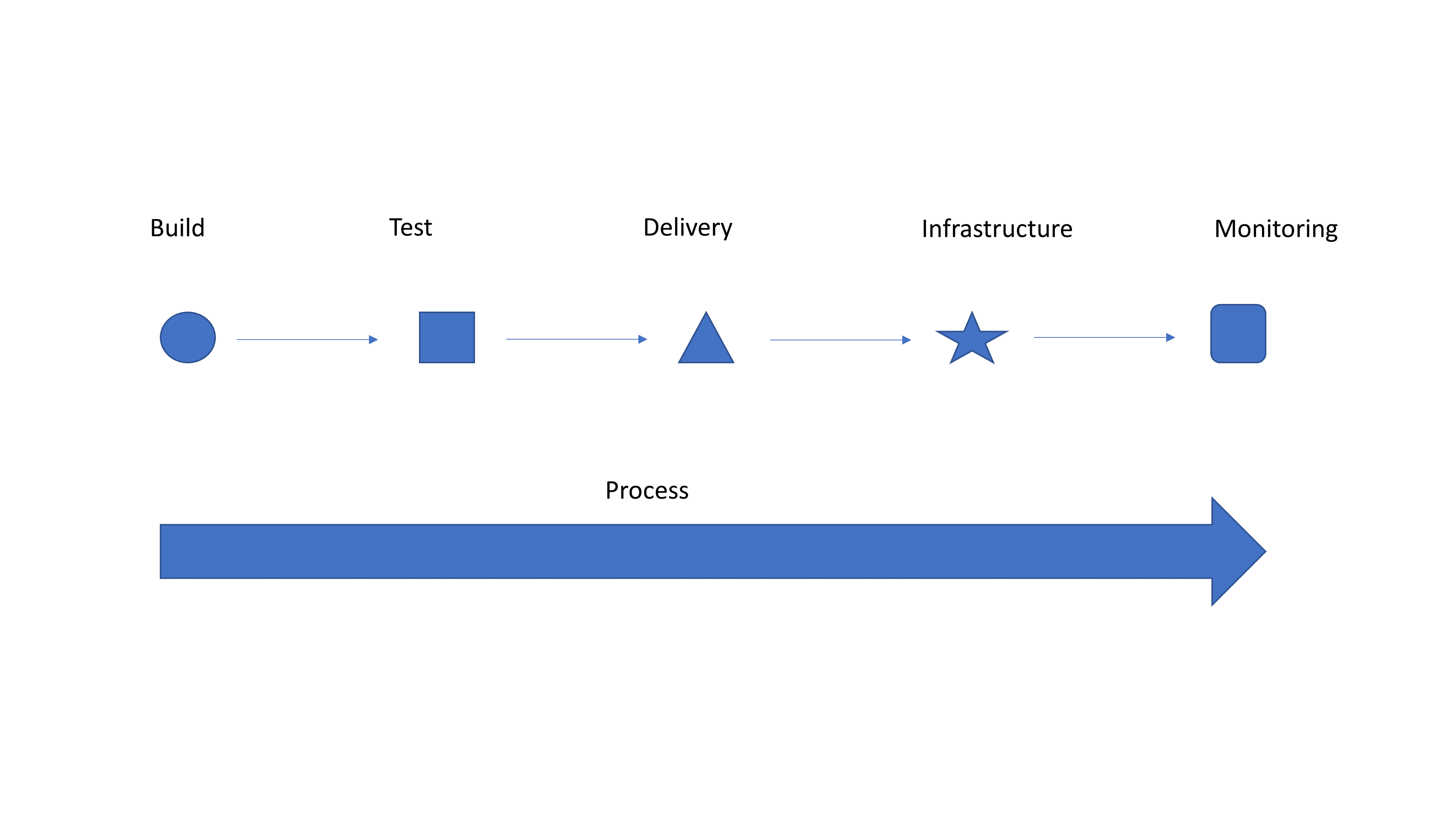
    Simple Graphic for Discussion

    So I’m going to take a second to tell you why it should. If you have integrated tools and teams, kudos! Hopefully you get absolutely nothing out of this blog, and you are enjoying a drink on a beach somewhere while your entire operation is taking care of itself. Everyone else, please read on.

    Look at the generic graphic. Notice how each step on the top is a different shape? That’s because they are individually implemented with limited integration of both people and processes. So you have a tool to submit for testing … Does testing (or monitoring at the end) feed back into your bug tracking system? Does it create tickets to get stuff done? When a container fails, is it simply dropped and a new one spun up to replace it because “they’re just cattle”? If so, does the system take steps to keep the failed container—or at least information about it—alive so troubleshooting can occur? Ignoring failed instances that were replaced and their impact on users was low is exactly how CloudBleed happened a couple years ago.

    Automate first, get the benefits of automation and drive faster delivery. Then take advantage of all that automation and make it into a streamlined process. It’s a massively complex system, even if you deliver everything on a single “platform,” so it will never be perfect. But issues that occur with regularity can be automated also to provide integration between systems. Isolating an instance and sending a notice to the defect tracking system that it is alive but not communicating (because it has been replaced) is something that is relatively easy to script/integrate and offers the ability to find what actually went wrong. Contrasted with just dropping the instance and starting a new one, this process is an order of magnitude better, and with integrated teams, Dev and Ops can work together to resolve whatever caused the instance to go down.

    Strong integration and a smooth pipeline is what technologies such as application release automation are designed to deal with, but most shops see these tools as “unnecessary” overhead. I disagree. Find one you like—there are a million of them—and use it to connect things. It’s just one step, but it is a step to transforming your operational delivery systems from unique snowflakes to part of a collection that works together.

    That’s it. Automate first because the gains are phenomenal, but don’t stop there. Really—don’t. You are doing yourself a disservice if you do. The whole “We’re going to change your world!” crowd is annoying, because changing your world is your decision, but listen to them anyway, and see which of their ideas fit your organization. You’ll be surprised once automation is solidly in place how much of what the process side of DevOps offers makes sense.

    — Don Macvittie

  • IBM Extends Cloud Reach to Include Integration

    IBM Extends Cloud Reach to Include Integration

    At the IBM Think 2019 conference this week, IBM unfurled an IBM Cloud Integration Platform that pulls together a range of tools in a single development platform that the company promises will reduce the amount of time it takes to deploy applications by making it easier to reuse integration code.

    Hillery Hunter, vice president and CTO for IBM Cloud Infrastructure, said by bringing all of its primary integration tools into a single cloud platform, IBM is effectively making an integration platform-as-a-service (iPaaS) environment available for the first time.

    IBM this week also formally rolled out IBM Services for Multicloud Management, a portal through which multiple clouds can be managed using software-as-a-service (SaaS) applications developed by ServiceNow, along with a set of IBM Services for Cloud Strategy and Design through which IBM will advise clients on how to architect the right holistic cloud strategy. The premise of both those services is that organizations soon will be rightsizing workloads to run on whatever cloud or on-premises IT platform that best suits them. The portal developed with ServiceNow provides access to dashboards and analytics designed to enable IT organizations to analyze cloud spend and manage workloads deployed on any platform, including Amazon Web Services (AWS) and Microsoft Azure.

    IBM is also extending the cloud services it provides to include the IBM Cloud Hyper Protect Crypto Service, which makes use of IBM LinuxONE mainframes to provide encryption key management built on the only FIPS 140-2 level 4-based technology.

    Hunter said IBM’s approach assumes organizations have already bought into best DevOps practices and API management to provide the means through which multiple clouds will be managed. The challenge many of those organizations are now wrestling with is implementing processes that determine where a workload not only should be developed and deployed but also moved as its characteristics evolve. To provide that analytics, IBM is employing machine learning algorithms running on distributed instances of Kubernetes to continuously track changes and updates to cloud platforms, said Hunter.

    IBM previously outlined a strategy under which it is trying to meld DevOps and ITIL-based processes to make it easier to manage workloads running on any cloud or on-premises IT environment. While the growth of cloud computing continues at an exponential rate, IBM executives this week took pains to remind conference attendees that 80 percent of enterprise-class workloads still run in on on-premises IT environment. In fact, IBM’s rationalization for spending $34 billion to acquire Red Hat is based on that fact. However, while many workloads will continue to run on-premises, IBM is clearly making a case for centralizing the management of all those platforms on IBM Cloud.

    It most likely will take the better part of the next decade to determine where different types of applications may wind up running. Predictions concerning the percentage of application workloads that will run in the cloud continues to be one of the most hotly debated topics in the IT industry. Whatever the outcome, however, it’s 100 percent certain more than one cloud platform will be involved.

    — Mike Vizard

  • Self-Service Integration: 3 Areas to Watch

    Self-Service Integration: 3 Areas to Watch

    Self-service integration is a priority—more enterprises are turning to it for help in retaining their customer base, delivering a delightful customer experience and making it easier to do business with. It has become a de facto standard for modern-day integration solutions. Enabling business users to build integrations strategically addresses a dire need to establish a smoother symbiosis between people, processes and technologies; marshal them in an order; and align them with business objectives.

    This approach is taking root across digital economies, and more advanced self-service integration features have emerged over time, which means bare minimum features are no longer enough. Enterprises with basic integration capabilities face the same old IT issues they faced earlier with conventional development tools.

    In this blog, we’ll take a look at three critical features of self-service integration capability that can help enterprises sharpen their edge:

    • Business User Capability: Enables business users to develop integrations and helps IT to drive innovations. Business users get built-in constructs to build integrations with heavy coding and rollouts, while IT can monitor all processes and technologies in a B2B network and avoid potential IT issues. With this advantage, business teams can operationalize data without IT getting involved and reduce time to revenue.
    • Any Data Conversion: Modern-day integration solutions offer AI-led data transformation capabilities to convert data between source and target elements. The solution uses past traffic for suggesting data mapping recommendations and further reducing the time that goes into mapping data. Business users get a single interface to map data between source and target elements. Moreover, they can convert multi-gigabyte data in different formats in few minutes, rather than months.
    • IT Governance: Self-service integration provides a drift-to-drive approach for IT governance. IT teams can combine old and new enterprise information systems and set up a concurrent integration strategy to use them for best of advantage. Start-to-end integration helps IT teams to streamline governance and enables business users to expand B2B connectivity. Teams can connect with a universe of applications without heavy resources involved.

    Factoring these three capabilities in the zero code integration strategy can help teams to improve efficiencies, reduce the IT cost and improve B2B data exchange. They can counteract IT challenges in the form of multiple sources of truth and IT silos in minimum steps.

    These three capabilities can help enterprises in improving  process, people and technologies across business. By using these capabilities, enterprises can acquire knowledge faster and interpret data faster. Physical and digital environments can be populated with heuristic methods. Enterprise networks can be connected for more openness, connectedness, intelligence and scope.

    End-to-end data integration improves the analytics process and drives the decision-making process: Data can be prepared for complex operations without complex coding.

    Additionally, with self-service integration, enterprises don’t have to train citizen data scientists for data integration. Data scientists can use sophisticated functionalities for processing data from multitude of sources, and can re-engineer every piece of integration for syncing data with extremely powerful edge devices. They can establish strong neural networks for setting  up diverse and robust architectures. Such systems can be used for complex use cases such as biometrics optimization, personalized medicine, material sciences and more.

    A self-service integration framework is more than an enterprise service bus (ESB) or SOAP web services integration model. it helps in driving IT innovation, keeping things flexible and reducing costs. Modern- day integration solutions deliver out-of-the-box flexibility and reusability for bringing together composite services and executing them in a particular order across enterprisewide deployments. They help organizations grow their B2B networks and add new partners, suppliers, services and sales and support channels.

    Enterprise information systems today generate massive volumes of data. There is a tsunami of information distributed between different B2B networks. Today’s data is being generated in variety of forms and the workloads have become difficult to predict. This veracity—or the ability to handle uncertainty caused by incompleteness, inconsistencies and anomalies of data—is a major barrier to unlock audience intelligence and customer segmentation in high-density computing.

    Coalescing around a self-service integration strategy around these features is important for enterprises. It can help them in decimating the constraints they face on the road to B2B data integration: IT complexity that steadily decreases the pace of business, and silos that make them difficult to work with and slow down time to revenue.

    — Jitesh Banga

  • Salt Security Unveils Platform to Secure APIs

    Salt Security Unveils Platform to Secure APIs

    Salt Security, fresh off raising an additional $10 million in funding, announced a platform that promises to advance the state of DevSecOps by making it possible to detect when application programming interfaces (APIs) are being probed by cybercriminals looking for weaknesses to exploit.

    Salt Security CEO Roey Eliyahu said the Salt Security API Protection Platform employs machine learning algorithms to first establish a baseline for how APIs are being invoked across an IT environment. The software-as-a-service (SaaS) platform then monitors activity to surface any anomalous behavior indicative of cybercriminals engaging in reconnaissance of API traffic flows, he said.

    Armed with that analytics, DevOps teams can then prioritize fixes to any potential security hole cybercriminals might be able to exploit. That approach advances DevSecOps because the Salt Security technology makes it possible to feed requests to address those security issues directly into a continuous integration/continuous deployment (CI/CD) platform—critical, he said, because all too often developers are unclear regarding what cybersecurity professionals are asking them to fix whenever a cybersecurity issue arises.

    Eliyahu noted that, in today’s business environment, security has become a major concern. According to the Open Web Application Security Project (OWASP), nine of the top 10 vulnerabilities in its current Top 10 report include an API component. Insecure APIs were ranked as the third most severe threat to cloud computing in 2018 by the Cloud Security Alliance (CSA), and Gartner predicts that by 2022 API abuses will be the most frequent attack vector resulting in data breaches for enterprise web applications.

    The challenge organizations face is each API is unique to each application and the organization that builds them, which means each has unique logic and, by extension unique vulnerabilities, said Eliyahu. Existing cybersecurity tools lack granular understanding of these because they are designed to protect organizations from known attacks. Attacks that target API logic go unnoticed by these tools because they appear to be authenticated use cases, and then employ subtle methods to probe each for unique vulnerabilities, he noted.

    To thwart those attacks, the Salt Security technology automatically discovers all APIs and associated functionality, said Eliyahu. That’s important because it’s not uncommon for organizations to lose track of the many that might have been exposed over the course of an application’s lifetime.

    APIs in general are often overlooked because much of the focus in any organization tends to be on business logic. But as the number of applications and services continue to proliferate across the enterprise, the number of APIs being exposed has increased dramatically. Those numbers will increase more as organizations embrace microservices to build applications that are more easily updated.

    The issue, of course, is how to secure APIs that often are developed and maintained by teams that weren’t involved in the integration of the original application. Because of that issue, API management has emerged as a discipline unto itself within many organizations. The challenge now is finding a way to ensure those APIs are employed as intended, versus becoming an avenue for data exfiltration that no one is aware of until it’s long too late.

    — Mike Vizard

  • Characterizing and Contrasting Container Orchestrators

    Characterizing and Contrasting Container Orchestrators

    Admiral Calcote, also known as Lee Calcote (@lcalcote) or the Ginger Geek to his friends, gave a presentation titled, “Characterizing and Contrasting Container Orchestrators,” at the 2016 All Day DevOps conference.

    Okay, he isn’t really an admiral—nor does anyone call him that—but he used the title “admiral” to describe what container orchestrators do, relating it to an admiral directing a fleet of container ships. You could also say that they are like the conductor of an orchestra, directing the individuals to work together as a group toward a common goal while each musician is still able to play their own instrument.

    lee1.png

    Lee is the head of Technology Strategy at SolarWinds, and for his talk, he discussed four open-source container orchestrators: Nomad, Swarm, Kubernetes and Mesos-Marathon.

    He emphasized the obvious: There is no one perfect solution. Each organization is different, so for each solution, he looked at:

    • Genesis and purpose
    • Support and momentum
    • Host and service discovery
    • Scheduling
    • Modularity and extensibility
    • Updates and maintenance
    • Health monitoring
    • Networking and load balancing
    • Secrets management
    • High availability and scale

    Lee noted that while there are many core capabilities, any orchestrator must have cluster management and scheduling.

    lee2.png

    He then dove deeper into the four solutions. Below are summaries (the full talk is chock full of information and is online here):

    Nomad

    • Designed for both long-lived and short-lived batch processing workloads
    • Cluster manager with declarative job specifications
    • Ensures constraints are satisfied and resource utilization is optimized by efficient task packing
    • Supports all major OSs and workloads
    • Written in Go and with a Unix philosophy
    • Host discovery: Gossip protocol – Serf is used; servers advertise full set of Nomad servers to clients; creating federated clusters is simple
    • Service discovery: Integrates with Consul
    • Scheduling: two distinct phases – feasibility checking and ranking; optimistically concurrent; three scheduler types when creating jobs
    • Uses task drivers to execute a task and provide resource isolation, but it does not support pluggable task drivers
    • Built for managing multiple clusters/cluster federation

    lee3.png

    Docker Swarm 1.12

    • Simple and easy to set up
    • Architecture is not as complex as Kubernetes and Mesos
    • Written in Go – lightweight, modular and extensible
    • Strong community support
    • Host discovery: used in the formation of clusters by the Manager to discover Nodes (hosts); pull model – worker checks in with the Manager
    • Service discovery: Embedded DNS and round-robin load balancing
    • Scheduler is pluggable and is a combination of strategies and filters/constraints
    • Ability to remove “batteries”
    • Rolling updates are supported
    • Managers may be deployed in a highly available configuration, but does not support multiple failure isolation regions or federation

    lee4.png

    Kubernetes

    • An opinionated framework for building distributed systems
    • Written in Go and is lightweight, modular and extensible
    • Led by Google, Red Hat and others
    • Young – about 2 years old
    • Robust documentation and community
    • Scheduling is handled by kube-scheduler
    • Pluggable architecture and an extensible platform
    • Choice of database for service discovery or network driver and container runtime
    • Supports rolling back deployments, automating deployments and rolling updating applications
    • Inherent load balancing
    • Uses Pods, an atomic unit of scheduling. Each pod has its own IP address, no NAT required and intra-pod communication via localhost

    lee5.png

    Mesos-Marathon

    • Mesos is a distributed systems kernel
    • Mesos has been around the longest (since 2009)
    • Mesos is written in C++
    • Marathon is a framework that runs on top of Mesos
    • Mesos is used by Twitter, AirBnB, eBay, Apple, Cisco, and Yodle
    • Marathon is used by Verizon and Samsung
    • Mesos-DNS generates an SRV record for each Mesos task
    • Marathon ensures that all dynamically assigned ports are unique

    lee6.png

    Wrapping up, Lee provided the following overview comparing the different container orchestration solutions.

    lee7.png

    Lee packed a tremendous amount of information into his talk. If you use containers, his talk is worth your time and is available online here. If you missed any of the other 30-minute long presentations from All Day DevOps, they are easy to find and available free of charge here. Finally, be sure to register you and the rest of your team for the 2017 All Day DevOps conference here. This year’s event will offer 96 practitioner-led sessions (no vendor pitches allowed).  It’s all free and online Oct. 24.

    — Derek E. Weeks

  • Creatures of Habit, Snowflakes and Integration Tax

    Creatures of Habit, Snowflakes and Integration Tax

    Donovan Brown of Microsoft, in conversation with Matt Hilbert of Redgate Software, discusses database DevOps’ biggest challenges

    When DevOps was first talked about in Flickr’s seminal “10 deploys per day” Velocity presentation in 2009, it was regarded by some as strange and alien to corporate culture. It was the antithesis to the accepted way of doing things, a threat to established and proven processes—it was downright dangerous.

    Times have changed. Unicorns such as Uber, Airbnb, Spotify and GitHub couldn’t live without it. Microsoft has embraced it and actively promotes it. It’s become the key to gaining competitive advantage in a technology marketplace that is moving faster and changing quicker than it ever has before.

    But what about the database? Why are practices such as version control, continuous integration and automated deployment being introduced to application development but left on the shelf when it comes to the database? The 2017 “State of Database DevOps survey,” for example, found that continuous integration was in place for 39 percent of applications, but fell to 20 percent for databases. What’s going on?

    In search of some answers, we spoke to Donovan Brown, Principal DevOps Manager at Microsoft and DevOps advocate. Also known as The Man in the Black Shirt, his unofficial tagline is #RubDevOpsOnIt. He lives DevOps. In fact, you can’t stop him talking about it and enthusing about its advantages.

    He describes DevOps as “the union of people, process, and products to enable continuous delivery of value to our end users.” The most important of those three, according to Donovan, is people. It’s also, conversely, the most difficult to fix.

    ‘People are Creatures of Habit.’

    “If you’ve been doing something the same way for 30 years,” he said, “why would you fix it? We all resist change, even if change is for the better, and DevOps requires a lot of change.”

    A large part of that needs to come from the Ops side of the equation because, while processes including version control and continuous integration have become second nature to developers, Ops teams traditionally don’t do them on a daily basis. In fact, Ops are often seen as the opponents of change.

    Donovan does, however, hold his hand up as being partly responsible for the division. “Historically,” he said, “they’ve had to become the gatekeeper because developers like me 20 years ago were wreaking havoc on production servers, running on there with admin credentials. Their job in my opinion has never been to deploy software for us. Their job is to protect and manage the infrastructure, to make sure it runs as efficiently as it can. That history, though, stays with us because there is so much regulation and red tape to get code from the fingers of developers to the hands of users.”

    He sees DevOps as the solution to the problem. “What I’m hoping is that DevOps will help automate what we’re forcing them to do, which was never their job, and rebuild the trust between Dev and Ops. We really need to help Ops people realize that we’re not trying to replace them, we’re trying to empower and enable them to allow us to continuously deliver value.”

    It’s not down to Ops teams on their own, however. C-level executives also have a part to play because they often favor a traditional approach to software development, with targets and long term strategies standing in the way of DevOps.

    “What I’ve noticed in a lot of companies that are struggling to adopt DevOps is that they’re not getting the backing from the executive level,” Donovan saids. “You have this waterfall mentality from the top that still wants GANT charts and milestones, and things that just do not line up with agile thinking at all. I’ve had the best success implementing DevOps in organizations where the C-level executive got it. When you have a grassroots team who get it, but no one else does, they usually get snuffed out by tradition.”

    The database is not separate from Donovan’s goal of people, process and products coming together. Prior to joining Microsoft, he was a Process Consultant and Scrum Master, helping a range of companies introduce DevOps to their development practices. He made sure the database was part of that.

    Then, as now, including the database was a challenge, but Donovan worked around it, using the technologies available to allow customers to treat the database just like every other element in their DevOps solution.

    He does, however, admit it was hard work. “It’s actually the most difficult part of the pipeline to automate because of the risk of failure,” he said. “You can easily roll back a front end; you can’t do the same for your database because any transactions that have occurred during the deployment could potentially be lost. So, it’s a crucial, integral part of your DevOps pipeline and I challenge any company that claims to be doing DevOps that only does it for the front-end but their back-end is still done manually. To me, they’re faking it.”

    ‘Infrastructure as code should not be a special snowflake. It’s just part of your solution.’

    The key is to remember that the code written to make changes to a database is just that: code. Traditionally, it has been managed outside of and separate to application code, with database changes often managed on-the-fly, at the last minute. Consequently, deployments have become worrying at best, with teams on hand for the expected firefight against downtime.

    Include it in version control, however—and continuous integration and automated deployments—and the database can be developed in parallel with applications. Problems are then picked up earlier, deployments become predictable and reliable, downtime and rollbacks are a thing of the past.

    What has made this even more appealing is the tooling now available—software that in Donovan’s days as a consultant was only just emerging. As he admitted: “The tooling had to mature to allow us to get over a lot of the hurdles that are unique to database deployments so that we can have everyone incorporated into the DevOps pipeline, not just the unicorns. Everyone should have the power available to them to be able to take their databases and incorporate them as part of their DevOps pipeline. Until you do, you still have that being the bottleneck.”

    There is a price to pay, however, if by introducing tools to bring DevOps to the database, companies get bogged down by what Donovan calls “the vendor explosion.”

    ‘Every vendor you add to your pipeline also adds integration tax.’

    Integration tax is the cost to companies, in terms of training and introducing unfamiliar ways of working, to use a new piece of software that resolves a piece of the DevOps puzzle. If that cost is too high by, for example, moving people out of the development environment they’re comfortable with, it betrays the ideals of DevOps. One onerous way of working is simply replaced by another.

    Donovan is keen to remove that tax by encouraging companies to work with as few vendors as possible—and preferably those vendors who have already paid the integration tax in advance. By, for example, introducing tools that work inside or alongside existing software, thereby reducing the time it takes to become familiar with them, and making the most of the current infrastructure rather than adding to it.

    Otherwise, Donovan concluded, “You’re paying tax for that integration. When we at Microsoft have partners who create extensions for our products, it’s the vendor and Microsoft who pay the tax in advance.”

    Finally, I asked Donovan what the biggest challenge was for companies who adopt DevOps for the database. His answer was the most telling.

    “If you’re doing DevOps differently for your database and the rest of your system, to me there’s something wrong there. When I think of DevOps, the database is part of that. I don’t need a separate conversation about it.”

    About the Author/Matt Hilbert

    Matt Hilbert is a technology writer at Redgate Software with 20 years’ experience working for lots of the world’s biggest tech companies – and many of the smallest. He has a particular fascination for emerging technologies and is on a continuing mission to decompile, untangle, and explain techspeak to a wider audience, and excite people about the endless possibilities technology offers.

     

  • Avoiding Application Integration Fails

    Avoiding Application Integration Fails

    Trying to integrate applications on your own can eat your project alive. A seemingly simple project may look harmless when you start, but in the end do-it-yourself software delivery tool integrations can devour your entire software process.

    The problem may be that building simple integrations appears easy. How hard can an integration be? But let’s look at what typically happens with integrations down the road using the example of one developer’s story.

    A developer needs to send defects from Zendesk to JIRA, so he builds a one-way integration based on a workflow action (just a trigger). Soon enough, he realizes he is now managing two tools, and keeping them updated has become a big issue—a very manual process and a huge time-sink. So he designs something to support two-way updates. But that’s just the beginning; each tool changes every few months and an integration that seemed so simple on the surface becomes very complicated.

    Then our developer tries to modify a simple JIRA workflow. Again, it seems straightforward, but it’s not, because the tools involved are constantly changing. There are complexities with workflows, and organizations undertake endpoint system upgrades. As a result, one change to the tool breaks everything he’s done. On top of this, it’s difficult now for him to know the hierarchy or how one item relates to another.

    He starts to consider some of the challenges he’s facing. He needs to consider how the description is written in each tool. They are all different, so how does he make sure he conveys the information correctly every time? And each “simple” integration seems to create more pain points, creating auditability and traceability problems. Meanwhile, he has to manage other tools that are continually added to the mix.

    He’s taken a look at both API and custom-tool approaches. He’s found that API integrations are brittle or they become too popular and then have to be maintained for an entire organization. But the alternative—custom tools—typically fall apart quickly.

    And what happens when our developer decides to leave the company? There’s no one left who knows how to maintain the integrations he created. Meanwhile, new tool replacements mean someone has to build new integrations—and the puzzle becomes even more complicated.

    This short scenario illustrates the unexpected challenges developers face in creating and maintaining integrations. The cost of building and maintaining tool integrations in an always-evolving landscape is deceptively high. And when an integration fails and the organization suffers critical downtime, costs (and tempers) skyrocket.

    Many of the common pitfalls are readily evident, such as rich text problems, but the following three areas may be the most challenging to developers addressing integration issues and can’t be easily avoided:

    • Endpoint system upgrades and schema changes
    • Workflow rules and differences
    • Relationships

    Endpoint system upgrades and schema changes: Much of the time, a different team from the one that developed an integration will perform the upgrade. Perhaps a new field was added. Regardless, simple changes to APIs can blow up an integration. API responses may change formats or the expected values for a field may change. When the team upgrades the system the URL may change, so avoiding duplicates is tough. So, too, is ensuring that the change is seamless. Changing some of the underlying features could result in unexpected behavior (and it will be hard to detect where the problem actually is). It may be that JIRA made API changes that caused custom select fields and comments to fail when using the “old way”; however, other features may continue to work as expected, making this failure silent.

    Workflow rules and differences: Workflows are the complexities between systems. It is hard enough to reconcile teams, let alone the tools they use. Tools may require you to enter required fields, and this can constantly change. And workflows may not match up at all. How can you handle these differences without bouncing field values and allowing complex mappings to reconcile these? What happens when a system has a special action to change a status and fields are required at the same time, but the other system is open and doesn’t reflect this?

    Because of these issues, it is critical to get the teams being integrated (e.g. testing and development) to discuss workflows and where the two teams align. These teams need to understand where workflows overlap so they can undertake proper integrations.

    Relationships: These are not always apparent. As you grow and want traceability, you need to have synchronized relationships. How does this requirement trace to a test? How will you manage those relationships? The tools don’t match the way they manage relationships. Some allow one value, others multiple. Some allow relationships across projects and types, others are more restrictive. In addition to the rules of the system, how do you know what items to link once you have synchronized the artifacts? What happens if only one side of the link is synchronized or the items are not synchronized in the order that you expected?

    Getting this all right requires intelligent systems that can look at one system and translate properly to another

    Avoiding Integration Pitfalls

    The first obvious step in avoiding pitfalls is to identify what they will be and when they’ll pop up. To do this, focus not just on the current problem, but also on the future. Consider the bigger picture, understanding that systems constantly change and teams work differently so there will be additional layers of complexity in any integration project down the road.

    As such, my best advice is for development organizations to focus on the software their organizations are counting on them to deliver, not creating and managing tools to build that software. Put internal resources to work in IT areas where you can create competitive advantage for your company. And consider using third parties to address issues such as integrations.

    About the Author / Shawn Minto

    Shawn Minto is the senior director of Technical Services and Support at Tasktop and one of the original team members working with CEO and co-founder, Mik Kersten, on Mylyn prior to Tasktop’s founding.  Shawn began his career at Tasktop as a software engineer, working on all aspects of the product and directly with our customers to support their needs. Currently he works with customers to understand their tool environments and offers suggestions on how to best leverage Tasktop through deployments and support. In his free time, he enjoys being outside, cooking, and renovation projects. Connect with him on LinkedIn and Twitter.

  • Top 5 Issues Curtailing DevOps Adoption

    Top 5 Issues Curtailing DevOps Adoption

    DevOps may seem simple and logical on the surface, yet most of the companies we talk to are struggling in one aspect or another. This is no surprise: Successful DevOps initiatives require putting together a full toolset and simultaneously creating a smart team of developers, testers and project managers who are well-versed in cloud and agile technologies.

    Those tasks alone can take many months of trial and error until you are ready to start DevOps in earnest. After a period of experimentation, it’s time to refine and optimize. Focus shifts to more mature issues such as creating a fully integrated tools stack, supporting a rich test data environment that doesn’t undermine privacy and security, and determining the best DevOps infrastructure strategy for your company.

    Regardless of your DevOps maturity, we’ve outlined some top issues to consider and mitigate, as your DevOps practice evolves.

    Integrating Tools

    As the practice of DevOps matures, we have seen an explosion of tools, both open-source and commercial. These tools serve every discrete need in the process: requirements management, test management, defect tracking, agile planning, source code management, build, deployment, monitoring and more. We calculate there are at least 1,500 such tools available today.

    So, while developers, testers, project managers and business analysts have many sophisticated capabilities to streamline DevOps, those tools must work together. It’s imperative that tools and groups don’t work in silos, but are part of an integrated pipeline. This allows the code to flow seamlessly according to business objectives, from requirements definition to test and dev, production and deployment. Organizations may choose to create these integrations themselves—although that gets costly fast, both at the onset and with ongoing maintenance. Some vendors offer out-of-box integrations with popular tools, although you must consider if these will fit your workflows and needs. A few vendors now offer the best of both worlds—connectors that are simple to set up and with the ability to easily customize the integration when needed.

    Configuration as Code

    A common problem in DevOps is the need to align the environment configuration present when/where the code is written with the environment configuration used in production. By adopting configuration as code (consisting of tools and processes), you can store all configuration data as a file alongside the code. This is valuable because if there are bugs or UI issues, your staff can quickly locate the version of the configuration that matches the code/feature in question and load it into that environment quickly. If we are confident that the environment configuration is accurate, we can narrow down the app failure being most likely due to the code itself.

    Having both code and the configuration setup information in one place is also useful for testing purposes, as infrastructure configurations sometimes differ between development and testing worlds.

    Fast is Not Free

    Software teams have always wrestled with the need to balance speed with quality and cost. You can’t get the best of everything, so teams should figure out where they can compromise and where they can’t. In DevOps, however, the emphasis is almost always on speed. Once you reach maturity, you usually go fast and achieve high-quality results, yet this requires investing in tools, process and people.

    Working smartly can go a long way toward moving faster without sacrificing quality. If your team can figure out how to be efficient and precise, with clear objectives, then you won’t have to do much rework, which adds cost and time. Many people will flaunt the benefits of full automation to work faster. In many cases, however, automation ends up being a more expensive solution to the problem. Automation adds additional maintenance and overhead that needs to be outweighed with saved effort; you will have more tools and integrations to maintain, and more pieces that will break.

    Justify how much automation you need and acquire only the tools necessary to meet your goals. Ideally, organizations should determine the need for speed based on business requirements. Many industries are not driven by speed to market and benefit more by working in a steady, iterative fashion. Make sure you have a sound business reason for working faster and releasing faster, and that you can effectively manage the automation and staff needed to work at that pace.

    Acquiring Test Data

    For high-stakes applications, such as a new e-commerce site or mobile customer app, there is a great deal of risk in launching an app that hasn’t been tested on representative data. Accumulating enough high-quality test data to find bugs and optimize all the key features and scenarios before going live can be a monumental task given today’s big data initiatives, fragmented DB technologies and data privacy/security concerns. Specifically, when companies are dealing with sensitive data, such as customer information and credit card numbers, this is a tricky endeavor.

    One common option is to use real customer data and “scrub” it to remove identifying characteristics. If the cleansing process is not thorough, however, you’re creating tremendous security risks for customers. Another basic option is to create fake data that’s representative of production data. However, that data might not be accurate in all key scenarios, nor comprehensive enough to meet your QA objectives.

    Our analysis is that test data is a complex problem that no one tool can solve, and should be handled with importance as a cross-functional initiative. It’s not unusual to see security, compliance, testing, development and business personnel involved in test data management activities, especially for companies handling sensitive data.

    Internal vs. External Hosting

    DevOps environments seem to run optimally in the cloud. Cloud infrastructure gives organizations the optimal scale, flexibility and speed to run more builds and test faster through highly automated services. Top providers including AWS and Azure offer a full range of DevOps-oriented services to manage infrastructure for you, such as load balancing, log and instance monitoring and automatic backup/failover. With many DevOps vendors hosting their products and services in the cloud as well, it’s logical to host the entire environment there.

    However, this isn’t possible for many organizations with strict security and compliance requirements. Running a DevOps infrastructure internally requires a great deal of configuration, maintenance and software, not to mention staff to maintain it all. Automated testing often can be time-intensive when limited machines are available in the internal network for testing. Running those tests may require waiting for the weekend to free up resources, given the many hours required to complete those jobs. This, in turn, causes significant delays in testing and code quality feedback.

    One solution to this problem is using containers to scale the internal DevOps infrastructure. This allows more tests to run at once and reduces the overall build process time. Companies strictly doing web development can use open-source tools to do this. Conversely, large enterprises with apps on multiple platforms will need to build out a great deal of their own infrastructure.

    It’s a Process

    All of this might seem overwhelming to organizations just getting started with DevOps. But remember that DevOps is a journey taken over time; it is more than just new tools and skills. DevOps is a dramatic and evolving way to develop software and services that meet the frequently changing demands of customers. DevOps is the only way organizations can truly become data-driven operations, supporting new revenue streams and product innovation. When viewing it through this lens, we know that change will be gradual. Celebrate the small wins with low-risk projects first, and work to drive efficiency wherever possible.

    About the Author / Kevin Dunne

    Kevin Dunne pic

    Kevin Dunne is vice president of strategy and business development at QASymphony. Prior to joining QASymphony, Dunne was a business technology analyst at Deloitte. He can be found online at Twitter and LinkedIn.