Tag: infrastructure

  • The (Tool)Chains That Bind

    The (Tool)Chains That Bind

    As DevOps functionality continues to expand, we’re looking at a new vista for freedom of applications. Our apps can be moved around as we need them; we can build-test-deploy on the fly; and we have the ability to monitor whatever is needed. The price we pay is one we gladly take up: implementing new toolchains to drive the transition and getting those toolchains integrated into the entire development and operations process. Yes, we have an entire organizational side, too, but for this blog, we’ll talk about tools.

    Why Tools?

    Why are we going to discuss tools alone if this is about DevOps? Because it is a different set of problems to move from one organizational structure to another versus moving from one toolset to another. While DevOps is giving us independence from a lot of traditional infrastructure issues, the reality is that it is creating dependencies upon the very tools/toolchains we are using to gain that independence.

    Confusing? Let’s try looking at it differently. The new vendor lock-in will be DevOps tools. While they are freeing us from vendor lock-in on several fronts, you are unlikely to make a quick move from, say, Ansible to Puppet or vice versa. It can be done, and some organizations even do a little of both to make sure their options are open. But most shops will pick one and run with it, because that creates a single training and maintenance direction.

    Why Now?

    I (and others) have alluded to this issue in the past, but it is of growing importance as vendors start to take what should be cross-portable tools and customize them to limit portability. Container management, for example, is available on every major cloud vendor these days, but using the vendor’s bundled container service is convenient and more difficult to move away from. That is but one example of many.

    And the importance of these tools/toolchains is growing at the same time that their use is growing. Soon, in a DevOps-heavy shop they will be essential and locked-in as if they were cemented.

    So, What Are You Saying?

    Pick DevOps tools as if they will be there for decades. This is not how DevOps teams are encouraged to think, but you are building a DevOps infrastructure that, if adopted broadly in the organization, will be difficult to move away from to any significant degree. Just like these days you would need a driving reason to port thousands or hundreds of thousands of lines of code, DevOps scripts are growing and the number of DevOps scripts are multiplying. As you fold security, storage and networking into that environment, and build real-time reporting that you are going to rely on for years to come, make certain what you have is good, if not great. In many ways, DevOps thrives on “good enough” without thought to long-term futures, but the investment required to have a fully developed DevOps environment strongly implies that what an average enterprise is doing today will be what it is stuck with for a good long while. That’s not a place for “good enough” if you know there is better out there.

    It’s Not All Unchangeable

    Some bits of the environment can change over time, of course. Better data collation/integration technologies no doubt will take over for whatever you are using for reporting now, as well as AI-based solutions that can plow through the growing pile of machine-generated data to get a systemic view of what is happening. But for the most part, build it like you’ll be maintaining it for years to come, because much of the environment you will be.
    — Don Macvittie

  • So Many DevOps Tools, So Little Time

    So Many DevOps Tools, So Little Time

    I’ve received thousands of emails, ads and sales pitches for tools for every stage of the app life cycle, from automating infrastructure buildout to release planning to building and testing, to delivering applications. If you’re building or rearchitecting an application, you have a surfeit of choice of DevOps tools.

    Ironically, when an organization invests in various DevOps tools, it can lead to disconnected teams that are siloed by tooling. Gartner calls this “disconnected islands of automation.” In addition to a culture problem, it can lead to major incidents and downtime.

    You can’t tool yourself into DevOps. But here’s how to make sure you’re not hurting your team with the wrong tools.

    Step 1: Process Before Tools

    Find out what problems you need to solve, then find tools to fit that need. It sounds simple, but many companies do the opposite: they’ve already picked the tool, and then use it to attack every problem.

    “If all you have is a hammer, everything looks like a nail.” If all you have is one or two main tools, every problem gets fixed by those tools. Our team has been guilty of this, too. When you get really good at one tool, such as Puppet or Chef, the answer to every question is inevitably Puppet or Chef.

    For our team, the fix has been to create process and architecture diagrams without tool names. Instead, we describe what needs to happen at each stage. If I know I’m building a long-running virtual machine, I know I need a configuration management component. Once we agree on the process, then we discuss tools.

    Engineers are practical people who are trained to be constrained by the tools we use. To break out of this mindset, write out your desired code pipeline without tool names, even if you “know” the DevOps tools you’re going to use.

    Step 2: Give Equal Priority to Infrastructure and Application Tools

    A software company recently told me an unhappy story: The company spent years perfecting its continuous delivery pipeline and everything worked together like clockwork. Developers could test and run code in minutes.

    The development team knew how to push code, but nothing was reachable in their region. Some of its delivery tooling was running in the same cloud region, so even though other regions were up, the tools the team wanted to use to perform failover weren’t available. When the team went to fail to DR, the configuration for its DR infrastructure had not been kept up to date with production, so instance sizes were not sufficient to run the application.

    The moral of the story here is that your infrastructure and application need the same level of automation and agility. Even if you have a very mature CI/CD pipeline with gating, approvals, linting, etc., if you don’t have that same discipline and tooling around your infrastructure stack, then you’re equally down. You should have the ability to move your application from one region to another (and if you’re really ambitious, from one cloud to another). Also, if you’re not incorporating application development into infrastructure development, over time your infrastructure will grow out of date.

    You should be asking questions such as:

    • What steps can we take to automate infrastructure provisioning?
    • How can we continually test failure?
    • What steps can we take to survive a platform failure?

    Step 3. Integrate Infrastructure and Application Tools

    The best way to survive a platform failure is to continually “practice” building out entirely new infrastructure and application stacks—as one continuous process, not as two different activities.

    Here’s one extreme example. The team at Logicworks recently worked with a large enterprise software company that was launching an internal product with a custom deployment pipeline. The pipeline included dozens of parallel automated and manual tests, each in a separate development environment. When a new deployment to the development environment occurs, a new set of 45+ dev instances must be created that has the new version of code; when the test is finished, the instances must be terminated. This means that instances in their environment rarely last for longer than 24 hours, and over the course of a single week, hundreds of instances are terminated and rebuilt.

    As you can imagine, this company has never experienced an infrastructure outage it couldn’t recover from, since it already recover from “failure” hundreds of times a week. This is the true meaning of immutable infrastructure: virtual instances are disposable and once you instantiate the infrastructure and code, you never change the instance. This way the infrastructure never strays from its initial, known-good state, operations are simplified and the system is so good at replacing itself that failure is a non-event.

    Ideally, infrastructure automation and application automation are not different stacks with different teams, but the same stack with the same level of destructive testing, so that an advance in your application needs to be tested against the current state of your infrastructure.

    Summary

    The constant release of new DevOps tools and features can be overwhelming. But the biggest challenges for your DevOps team probably have nothing to do with CI/CD tools. I have found that it’s easy to overemphasize tools and deprioritize crucial (albeit less glamorous) automation components such as infrastructure templates and testing.

    Your developers are constantly looking for new libraries and experimenting with new languages and tools for your applications. You need the same level of attention and testing in your full infrastructure and application stack. This will make you choose better application-level tools and prepare you for failure.

    — Jason McKay

  • Canonical announces release of Ubuntu 18.10 ‘Cosmic Cuttlefish’

    Ubuntu 18.10: Multi-cloud, new desktop theme and enhanced desktop snap integration

    London, UK, 18th October 2018; Canonical today announced the release of Ubuntu 18.10, focused on multi-cloud deployments, AI software development, a new community desktop theme and richer snap desktop integration.

    “Ubuntu is now the world’s reference platform for AI engineering and analytics” said Mark Shuttleworth, CEO of Canonical. “We accelerate developer productivity and help enterprises operate at speed and at scale, across multiple clouds and diverse edge appliances.”

    This year, the financial services industry has engaged significantly with Canonical and Ubuntu for infrastructure efficiency on premise and to accelerate their move to the cloud. The push for machine learning analytics and of fintech efforts around blockchain, distributed ledger applications and cryptocurrencies are current drivers of Ubuntu investments and deployments.

    Optimised for multi-cloud computing

    Ubuntu Server 18.10 images are available on all major public clouds, including minimal images popular for container workloads with a small footprint and fast boot time. For private clouds, Ubuntu 18.10 ships with OpenStack Rocky for AI and NFV hardware acceleration and Ceph Mimic to reduce storage overhead. Ubuntu Server 18.10 includes the latest Kubernetes version 1.12 which brings increased security and scalability by automating the provisioning of clusters with transport layer encryption and is more responsive to dynamic workloads through faster scaling.

    Snap momentum strengthens 

    Ubuntu’s secure Linux app store sports 4,100 snaps published by 1,700 developers and supported across 41 Linux distributions. Official desktop snaps from Spotify, Plex and Skype are popular, and major public cloud and server applications are now available including Google Cloud SDK, AWS CLI, and Azure CLI. The new release enables native desktop controls to access files on the host system.

    Improved gaming performance 

    The Linux 4.18 kernel together with updates in Mesa and X.org significantly improve game performance. Graphics support expands to AMD VegaM in the latest Intel Kabylake-G CPUs, Raspberry Pi 3 Model B, B+ and Qualcomm Snapdragon 845.

    Ubuntu 18.10 introduces the GNOME 3.30 desktop and Yaru, the new community-developed default theme. Fingerprint unlock functionality is featured for compatible PCs and the latest versions of Firefox, LibreOffice, and Chromium are included.

    About Canonical

    Canonical is the company behind Ubuntu, the leading OS for cloud operations. Most public cloud workloads use Ubuntu, as do most new smart gateways, switches, self-driving cars and advanced robots. Canonical provides enterprise support and services for commercial users of Ubuntu. Established in 2004, Canonical is a privately held company.

  • How Service Mesh Addresses 3 Key Microservices Challenges

    How Service Mesh Addresses 3 Key Microservices Challenges

    I was recently reading the “Global Microservices Trends” report by Dimensional Research and found myself thinking, “A service mesh could help with that.” Let’s look at three key challenges listed in the report.

    A couple key points in the report make it clear microservices are seeing widespread adoption. It’s also clear that along with the myriad benefits they bring, there are also tough challenges that come as part of the package. From the report:

    • 91 percent of enterprises are using microservices or have plans to.
    • 99 percent of users report challenges with using microservices.

    Major Microservices Challenges

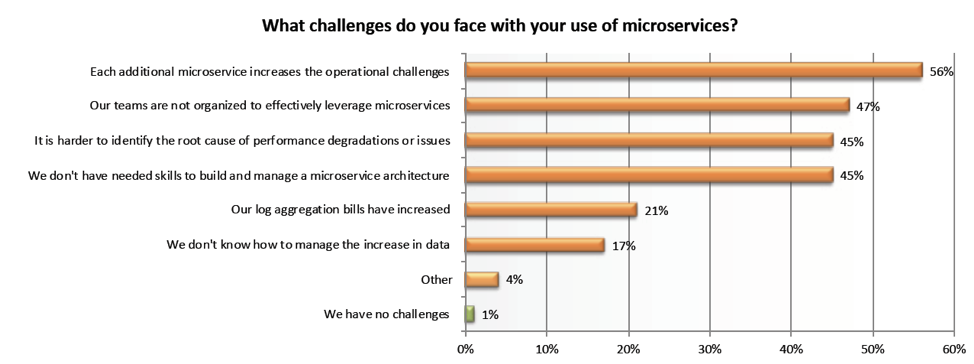
    The report identifies a range of challenges companies are facing.

    Companies are seeing a mix of technology and organizational challenges. We’ll focus on the technological challenges a service mesh solves, but it’s worth noting that one thing a service mesh does is bring uniformity so it’s possible to for all teams to have the same view, reducing the need for certain skills.
    Each Additional Microservice Increases the Operational Challenges

    Not with a service mesh! A service mesh provides monitoring, scalability and high availability through APIs instead of using discrete appliances. This flexible framework removes the operational complexity associated with modern applications. Infrastructure services were traditionally implemented as discrete appliances, which meant going to the actual appliance to get the service. Each appliance is unique, which makes monitoring, scaling and providing high availability difficult. A service mesh delivers these services inside the compute cluster itself through APIs and doesn’t require any additional appliances. Implementing a service mesh means adding new microservices without adding complexity.

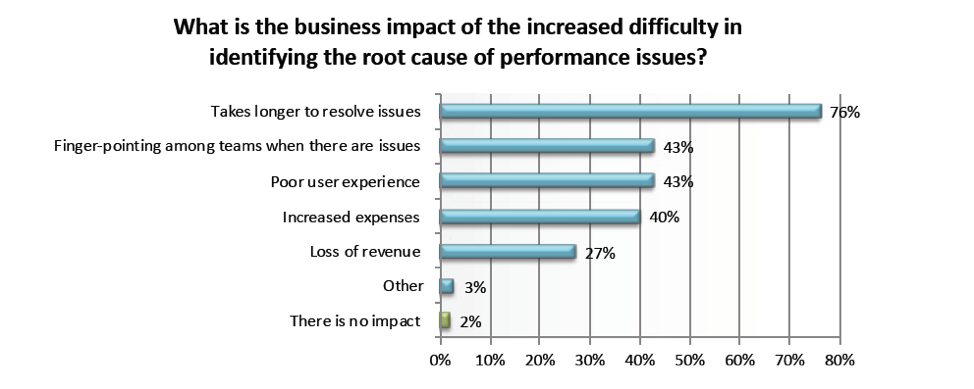
    It is More Difficult to Identify the Root Cause of Performance Issues

    The service mesh toolbox gives you a couple of things that help solve this problem:

    Distributed Tracing: Tracing provides service dependency analysis for different microservices and tracking for requests as they are traced through multiple microservices. It’s also a powerful way to identify performance bottlenecks and zoom into a particular request to identify which microservice contributed to the latency of a request or which service created an error.

    Metrics Collection: With service mesh you also get the ability to collect consistent metrics across your mesh. Metrics are key to understanding what has happened in your applications, and when they were healthy compared to when they were not. A service mesh can gather telemetry data from across the mesh and produce consistent metrics for every hop. This makes it easier to quickly solve problems and build more resilient applications.


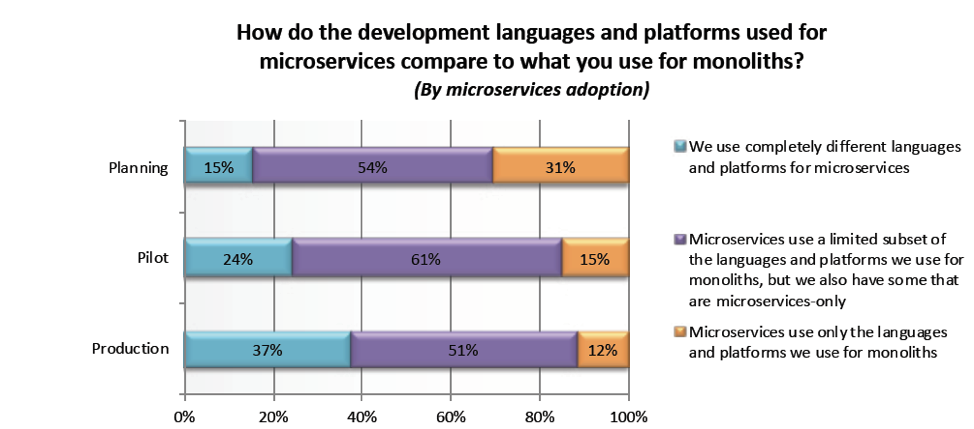
    Differing Development Languages and Frameworks

    Another major challenge that report respondents noted facing was the challenge of maintaining a distributed architecture in a polyglot world. When making the move from monolith to microservices, many companies struggle with the reality that, to make things work, they have to use different languages and tools. Large enterprises can be especially affected by this, as they have many large, distributed teams. Service mesh provides uniformity by providing programming language agnosticism, which addresses inconsistencies in a polyglot world where different teams, each with its own microservice, are likely to be using different programming languages and frameworks. A mesh also provides a uniform, applicationwide point for introducing visibility and control into the application runtime, moving service communication out of the realm of implied infrastructure, to where it can be easily seen, monitored, managed and controlled.

    Microservices are cool, but service mesh makes them ice cold. If you’re on the microservices journey and are finding it difficult to manage the infrastructure challenges, a service mesh may be the right answer. Let me know if you have any questions on how to get the most out of service mesh, I’m happy to talk and you can find me @zjory.

    — Zach Jory

  • Challenges in Leading a DevOps Team at a Fortune 100 Company

    Challenges in Leading a DevOps Team at a Fortune 100 Company

    A manager, an evangelist and a godfather all walk into a bar.

    Okay, this isn’t a bad joke, this is an article about how managers can implement DevOps in large organizations, especially where culture and organizational change hamper efforts. But, I promise, we will talk about managers, evangelists and godfathers.

    Uldis Karlovs-Karlovskis (@UldisKK) works at Accenture Latvia. Accenture is a global consulting giant, employing 400,000 with teams and clients across the globe. Uldis helped bring DevOps into the organization and shared his journey—the good and the bad—at theAllDayDevOps conference in his talk titled, “Lessons in Leading a Fortune 100 Team to a DevOps Philosophy.”

    Uldis joined Accenture in 2012 and faced three top challenges:

    1. How to maintain quality at such growth?
    2. How to enable continuous learning?
    3. How to stay fast and flexible at their size?

    His team was small, they held daily stand-ups that were productive, and they were flexible. Life seemed good, and then his team grew into a “spider.” They still held daily stand-ups, but they were useless because it was just people reporting and no one understood what is going on.

    What did Uldis do? Well, he didn’t freak out, if that is what you are wondering. Actually, he did. One morning he, “woke up, realized I had 25 people under me, freaked out and skipped the job for the day.” He walked around, thinking about it and wondering what to do. He thought about his three to four types of DevOps projects and all of the non-project activities that were monopolizing his time. He realized he focused on the urgent over the important tasks, working 10 to 12 hours per day.

    What is a manager to do? Have people help him, of course. Uldis decided to create an unofficial role that sounds interesting: the subject matter expert (SME). They would work on non-project activities, increase team engagement, improve satisfaction and assess DevOps maturity in projects. Initially, people were motivated to be SMEs, but they were always busy with other things. So the effort failed.

    Uldis had a new idea: Instead of him leading the SME team, he let them decide who wanted to do what, which SME team they wanted to join and who would be the lead SME for each team, and let them set their own goals and how they wanted to work, etc. This helped, but still didn’t solve the problems. Uldis was still burdened with the tyranny of the urgent.

    Back to the drawing board, and a new idea was born: evangelists. Uldis broke down 50 SMEs into seven subgroups and added a little hierarchy because the flat structure wasn’t working. Each evangelist led a guild—one of seven. Team members were to talk to their evangelist before coming to Uldis with questions.

    But, alas, Uldis was still just handling escalations and talks.

    So, what do you do to bring order? Bring in Godfathers.

    Now, team members could always go to the Godfather for help. Uldis decided that, generally, each person would have four topics they may want to talk about. For each topic, they have a person to talk to:

    • SME addresses how to contribute to the company in general
    • Godfather addresses escalations, such as not happy with the team lead
    • Evangelist addresses questions about the person’s skills
    • Team Lead addresses project tasks

    Uldis now realized the benefit of this approach: In a way, now, everyone is focused at some level on sales. As we all know, this is important yet very difficult in any organization—but especially when everyone is an engineer.

    While his approach has helped him and his team, he also acknowledged, “If I did the same thing today, I would fail, but maybe for different issues.”

    Todat, Ulids is looking at improving his culture. As we talk about at AllDayDevOps time and time again, good culture is key to successful DevOps. Uldis, looking at Accenture, noted it doesn’t fit into a typical organizational structure. Reading literature, industry buzz, etc., he realized something was missing from these models, but he wasn’t sure what. He knew they needed to be better.

    He discusses three dominant types or organizational cultures:

    • Pathological – Eight hours of work and your job is done
    • Bureaucratic – Two to 12 hours of work if the process requires it
    • Generative – Two to 12 hours of work and I’ll deliver it

    Uldis is trying to be at the third approach, and the key to achieving it is knowing that if you are having a bad day, you should leave your work for tomorrow when you will be more productive. Tomorrow it may take more than eight hours, but you will put your best into your work.

    His journey is ongoing, but he finished his talk covering a few things they do on his team:

    • Onboard new joiners through a continuous delivery pipeline
    • Meet weekly at lunch
    • Half-yearly performance assessments

    He also provided four takeaways:

    1. Everyone by default is good
    2. Intrinsic over extrinsic
    3. Engagement is your work responsibility
    4. Let them lead

    Uldis told an honest and open story about his journey with the hope it will help others. To hear it firsthand, watch it for free here. You can watch any of the 2017 AllDayDevOps sessions free of charge here.

    — Derek E. Weeks

  • How a Visual Cloud Management Platform Can Address DevOps Woes

    How a Visual Cloud Management Platform Can Address DevOps Woes

    DevOps and cloud are a match made in heaven. However, the advantages of the cloud are apparent only when continuous deployment, development, operations and other DevOps tasks can be performed and automated seamlessly on the cloud. Moreover, many of today’s cloud management platforms do not offer much cross-functional visibility, something DevOps engineers require.

    A visual cloud management platform can be the answer to ensuring DevOps thrives in a cloud environment. Here are few use cases that highlight how a visual platform can solve a DevOps engineer’s woes:

    Partial Visibility Due to Use of Siloed Infra Management Tools

    There are scores of infrastructure-as-code (IaC) and infrastructure automation tools available, with choices for server provisioning, configuration management, automated builds, code deployments, intraservice orchestration and more, from companies including Ansible, CloudFormation, Terraform, Puppet and Chef. But there’s no single tool that meets all needs. At the end of the day, DevOps engineers need to use and manage dozens of siloed IaC tools that help deploy and manage an end-to-end tech stack.

    Customizing a tech stack to meet the engineer’s needs—choosing from Docker Swarm or Kubernetes, MySQL or Postgres, Jenkins or CircleCI, and so on—can be overwhelming. Figuring out how to run the code in dev; how to build and test; how to deploy changes; where to find metrics, logs, and alerts; and so on across several tools is easier said than done.

    While each orchestration tool provides multiple benefits, engineers also must juggle between multiple dashboards cloud service providers (CSPs) offer. As cloud use increases, complexity and partially visibility are bound to happen, making it difficult to make sense of resource usage and perform root-cause analysis. And if the infrastructure is on a multicloud setup, chances are teams/engineers will lose visibility of resource usage.

    A siloed approach to infrastructure management using multiple dashboards is a big ‘no.’

    Solution: An interactive and immersive visual cloud management platform provides visibility across resources, apps, tools, etc., with a complete context of resource usage from a single pane of glass. The visual console must be visually rich and intelligent enough to provide context-aware real-time prescriptive insights and help with operations on a topology view.

    Visualizing Auto-Scaled Containers and Clusters of Containerized Deployments

    Containers are great for making DevOps workflows easier. Their ability to run almost any type of app has made it popular. Today, there are several container orchestration tools available with autoscaling, including Kubernetes. However, when there are large numbers of clusters of containerized deployments, inspecting or monitoring nodes, pods and containers for optimization, cost reduction and handling system malfunctions can get overwhelming.

    Solution:  A visual cloud management platform can show containers and its subcomponents in a relationship view with other cloud resources on a live topology view. Such a tool will help DevOps engineers investigate anomalies quickly and easily.

    Difficulty in Implementing Resource Dependency Mapping an SDN in a Hybrid Cloud Setup

    Software defined networking (SDN), which enables network automation, is typically difficult to define for DevOps, especially in a hybrid environment. Extending network capabilities or automating the network to update itself when there is a change requirement can be quite challenging in a hybrid setup. The need of the hour is a language, such as JSON or XMPP, that will draw dependency mapping and automate network flow with the cognizance of a human.

    AWS and other public cloud service providers provide basic-level dependency mapping. However, a DevOps engineer loses visibility across resource usage when a business has a chunk of SDN components integrated with dozens of resources on the public cloud or in multicloud or hybrid cloud environments.

    Solution: A visual cloud management platform can map resource dependency on a live topology automatically, analyze and define further network connections and automate operations. With such a tool, a DevOps engineer can easily understand the underlying interconnection, understand the entire infrastructure in a snap and keep the infrastructure hail and healthy.

    Finding Unused DR Environments to Maximize Infrastructure Usage

    Increasingly, DevOps engineers are using backup capacity as development environments to maximize their infrastructure investment. Disaster recovery (DR) environments represent an ideal workspace for developers to test their code with the help of virtualization technologies and advanced networking. However, mapping all the tool integrations and finding that extra capacity in an ever-changing multicloud or hybrid cloud environment can be challenging.

    Solution: A visual cloud management platform can provide visibility into third-party integrations on your cloud and also show any backup capacity available for development use.

    Immersive Visual Consoles Becoming the New Normal

    A visual cloud management platform that helps DevOps engineers get a complete and viewable context across cloud services, network flow and topology view of the entire infrastructure from a single pane is the way forward. Such a platform is the solution to solve several DevOps woes. It enables visualization of public/private cloud services and third-party integrations, giving engineers the ability to understand the resource and network relationship in real time; get a complete perspective of infrastructure; perform contextual monitoring, cloud operations, root-cause analysis in a snap; and ensure security and compliance from one place.

    Let’s look forward to a world in which using these immersive visual consoles will be the new normal.

    — Pradeep Kumar

  • ‘Software is Eating the World,’ and DevOps Needs a New Infrastructure to Keep Up

    ‘Software is Eating the World,’ and DevOps Needs a New Infrastructure to Keep Up

    Every Fortune 1000 company should expect to face Uber-like competition in the next decade. These digital disruptors are software companies; they are basing their business models on software platforms, and development of these software platforms is much more agile than in the past. To compete effectively, every company must essentially become a software company, and it must adopt agile software development practices to keep up with the demand for new applications and services.

    Software Development: The Engine of Digital Transformation

    Digital transformation will be the mantra for IT initiatives in 2018, and the underlying technology will be agile software development. IT organizations are at a crossroads: They can either work to become more agile and innovative, or business unit managers will decide to expand their use of public cloud providers, reducing the role and value of internal IT organizations.

    Applications are defining and continuously redefining products, services, customer experience, business processes and competitive advantage. About the only thing not being redefined by applications is the IT infrastructure. As applications and organizations become more dynamic, IT largely operates at the pace it always has. High-velocity DevOps life cycles collide with an IT infrastructure that is optimized for stability and is too complex to keep up. The pace of the organization is slowed down by its applications, while the pace of applications is slowed down by their infrastructure.

    How DevOps’ Role is Changing

    For decades, DevOps organizations have been at the mercy of IT departments, having to request resources for development efforts. DevOps groups have endured long provisioning cycles, waiting days or weeks for IT to provision servers, databases, development tools and other resources. Even the tools for requesting resources are antiquated—most IT departments rely on manual ticketing systems that require requests to be passed from one silo to another before a request is completed.

    But with software development as a corporate priority, companies are now looking for much more streamlined development processes. DevOps now wants to drive the provisioning process. This has given rise to a lot of ad hoc use of public cloud resources by DevOps teams. No longer content to wait for the IT department to provision resources, DevOps organizations are taking control away from the IT department and are provisioning resources themselves with public cloud services such as AWS, Azure or Google. These platforms have enabled agile software development, and the spread of agile software development is integrating development and deployment into a unified continuous integration/continuous development/continuous deployment (CI/CD/CD) process. In the meantime, the IT department wants to maintain control over the infrastructure and software tools in use, as well as the monthly spend on public cloud resources.

    Unfortunately, what began as a fast, ad hoc way of acquiring compute resources from the public cloud has become a significant drain on enterprise resources. Monthly cloud costs are spiraling, and the IT department has little control over these expenditures. In many ways, DevOps has usurped IT’s role in resource provisioning. Also, it’s easy to create a sprawling, undisciplined IT environment where the company is not sure which workloads its developers have on AWS or other public clouds. Finally, the company may be developing applications that use intellectual property or confidential client information—or require high security or government compliance—so using public clouds for DevOps may not be an option.

    What Developers Want

    Clearly, today’s DevOps teams want to be able to select and provision resources as needed. They want to be free to build their own workspaces without waiting for provisioning by the IT department. If cloud platforms accelerate the application life cycle by applying new technology to operations and integrating and aligning applications and infrastructure, the challenge for IT is to regain control over the process. The answer is to deploy a private cloud platform that is as easy to operate and consume as a public cloud. With a self-provisioning private cloud platform, DevOps teams can continue to set up their own workspaces and access the tools they need to complete their development cycle, and IT’s private cloud—rather than a public cloud provider—makes those resources available.

    Compared to public cloud, private cloud delivers improved security and governance, higher performance and lower costs. It also unifies the separate compute, storage and networking silos to deliver a cost-optimized IT infrastructure. With a private cloud, DevOps can have the agility it needs while IT retains the control it needs. It’s a win-win for both groups.

    — Ajay Gulati

  • DevSecOps: If You Build It, They Will Come

    DevSecOps: If You Build It, They Will Come

    Spring training for Major League Baseball in the United States has begun. Millions of people share my love for baseball; however, the same can’t be said for security and compliance—well, at least not yet. Perhaps one day.

    Much like in the immortal baseball movie, “Field of Dreams,” if you build a friendly security and compliance system, the developers and operators will come. At least, that is the contention of Julie Tsai (@446688), senior director of security operations at Box.

    GettyImages-509936368

    I first met Julie at the RSA conference’s DevSecOps Days three years ago and have been following her musings since. I recently watched Julie’s presentation, “Build It and They Will Come-pliant: DevSecOps in the Real World,” from All Day DevOps. Here is a summary of what I learned:

    Good Architecture Sustains Sound Applications and Security

    Julie’s contention is that you can build a system that might actually bring a little joy to developers and operators, and it starts with realizing that, at the end of the day, we are all looking for good architecture. Good architecture sustains sound applications and security. It makes everyone’s life easier, so we all have a little time for baseball (or football or board games or even curling).

    The good news is that DevOps organizations are ahead of the game. Julie pointed out the old joke, “DevOps … isn’t that just where you give the keys to the developers?” Well, no, and it isn’t a specific tool or deployment. For security, it is about being lean on requirements, building compliance in from the start and integrating it across the development life cycle so you can build something that is secure and performant. Besides these being best practices for developers, they also allow you to use your code and policies to appease your auditors, as compliance is built-in. Bottom line: DevOps puts the rigor around security and compliance.

    It Takes a DevSecOps Village

    Julie pointed out a couple of takeaways from DevOps that help security and compliance:

    1. You can own a problem and be an individual leader. You can think globally but act locally by seeing across the silos and bringing a message of empowerment.
    2. It provides a path toward integration to internalize other groups’ values, bring them into your own words and ways and mutually reinforce and thrive. It also informs how people work together.

    Remove Friction to Scale DevSecOps

    The goal here is to ultimately get us something easier to scale and maintain and be compliant and secure. Julie outlines steps to get you closer to this idyllic system:

    1. Use configuration management because it leads to precision and more unified and verifiable work.
    2. Get rid of whatever you can to eliminate mistake factors. You will also get to a place to streamline workflow so there are fewer mistakes.
    3. Extend infrastructure as code. It can become configuration as policy and your audit trail can connect the intent to the execution.

    DevSecOps: Where Things Go Wrong

    With these in place, Julie contends you need to realize the world isn’t perfect, so you need to build a system that injects security and compliance where it is most effective. To find the areas in the development life cycle that it is important to inject, ask these questions:

    1. Where is someone intending to make a change?
    2. When you are releasing it live into your production stack?
    3. What is happening when something isn’t going as expected? Is it being changed back to where you need it to be, are you monitoring it, or are you doing nothing?

    DevSecOps: String Together Wins

    You also need to make it simple. She quoted Mark Burgess, “IT has a detail sickness,” noting that, “We are often burdened by complexity—we love it and dig right in, but it is important to understand the level of granularity you need. You need to look for the things that can make a critical uplift that gives you an incremental improvement. String together the wins.”

    In the end, Julie said to “try to reach a goal of being visible and streamlined and leverage the automation and technology in a way that is joyful in how we use it. It is not about a rigid process that is going to die soon; it is about what we are trying to bring to the whole world so that we work more efficiently and more technical.”

    The entirety of Julie’s presentation—including some live Q&A—is available here. If you missed any of the other 100 speakers at All Day DevOps, you can find their 30-minute presentations here.

    — Derek E. Weeks

  • Continuous Delivery: No Excuses

    Continuous Delivery: No Excuses

    Jez Humble’s (@jezhumble) career has spanned roles through coding, infrastructure, and product development across three continents and organizations of varying sizes. To say he knows a lot about continuous delivery is a total understatement. In 2010, he and Dave Farley literally wrote the book on continuous delivery—and if you have not yet read it, I would suggest you pick up a copy. It’s a fascinating read.

    I’ve heard Jez speak over the years at a number of DevOps conferences, and I was excited when he accepted our invitation to speak at All Day DevOps. At the conference, Jez presented “Continuous Delivery Sounds Great But It Won’t Work Here,” during which he addressed the four reasons he consistently hears from organizations on why continuous delivery won’t work in their organization:

    • We’re regulated
    • We’re not building websites
    • Too much legacy
    • Our people are too stupid

    Jez also outlined the real reasons behind the stated reasons: Their culture sucks and/or their architecture sucks.

    Jez spent his talk addressing each objection.

    We’re Regulated

    Jez noted it took Amazon four years to go from monolithic to service-oriented architecture (2001-2005) but the company did it. Do you think Amazon is the pillar of free enterprise, free of regulation? Not so. Being a publicly traded company, Amazon is heavily regulated; it is subject to Sarbanes-Oxley regulations; it handles personal and corporate financial and proprietary data; and it provides private cloud services to the U.S. government, including highly sensitive data for the Department of Defense.


    null


    Amazon Web Services’ GovCloud, in fact, provides the cloud platform for cloud.gov, the 18F project Jez worked on to address the authority to operate process within the government.

    The old process had screened every software application before it was allowed on a federal IT system. It stifled innovation because it duplicated efforts multiple times over. There was no cross-agency assumption that if one agency approved a software package, it was okay at another agency. Cloud.gov moved controls from operations into infrastructure as a service. Now, agencies can receive software through cloud.gov to integrate into their applications.

    null

    The bottom line is continuous delivery is excellent for heavily regulated environments because it gives assurance to regulators by removing opportunities for human error.

    We Aren’t Building Websites

    Jez’s favorite example is HP LaserJet firmware. HP had a 400-person team spanning three continents. Obviously, the firmware was critical for new printers, but the team was moving slowly. Only 5 percent of their time was spent on innovation. HP tried hiring, firing, insourcing and outsourcing. With business school tried-and-true solutions exhausted, and knowing it had to eliminate non-value adding work to increase innovation, the company looked to continuous delivery with two business goals in mind: 1) Get firmware off the critical path; 2) Achieve 10X increase in development productivity, measured by percent spent on innovation.

    HP had other goals:

    • Reduce hardware variation
    • Create a single package
    • Implement continuous integration
    • Implement comprehensive test automation
    • Create a simulator


    null

    Note: the chart above doesn’t show the 23 percent of time spent managing the automation tests. Time well-spent.

    In the end, between 2008 and 2011:

    • Overall development costs were reduced by ~40 percent
    • Programs under development increased by ~140 percent
    • Development costs per program decreased 78 percent
    • Resources now driving innovation increased by 8X

    Too Much Legacy

    Jez’s example here is Suncorp, one of Australia’s largest insurers (note: Also falls under the “We’re heavily regulated” excuse). Suncorp was burdened with loads of mainframes and legacy systems, but it built a set of test suites with open source tools to move into continuous delivery.

    Our People Are Too Stupid

    Jez looked outside of the software development industry into an old-line manufacturer: automotives. GM’s worst performing plant had been closed down. GM fired every one of the workers from the plant. The workers were notorious for problems ranging from sabotaging cars to drinking to gambling on the job.

    Remarkably, GM’s union leaders convinced Toyota to hire the old GM employees to learn the Toyota processes, and Toyota hired the GM employees to run their new NUMMI plant. Toyota and the old GM employees showed it wasn’t the people that was the problem; it was the leadership, the management system and the use of obstacles. At the GM plant, an employee had a job and a certain amount of time to do it. If it didn’t get done, the assembly line kept running. At the Toyota NUMMI plant, employees were empowered to ask managers for help—without retribution. The car had to be in a good state before proceeded to the next stage of the production line.

    In software development, this is continuous integration. Toyota’s NUMMI is the inspiration for Lean in the United States.


    null

    Jez’s take-home point for any organization is that results aren’t achieved when you adopt practices but don’t implement the culture. You need to:

    • Agree and communicate measurable business goals
    • Give teams support and resources to experiment
    • Talk to other teams
    • Achieve quick wins and share learning
    • Keep going

    Jez dives into more details in his talk, which you can watch here. If you missed any of the other 30-minute long presentations from All Day DevOps, they are easy to find and available free of charge here.

    — Derek E. Weeks

  • DevOps Future: Have a Break Plan

    DevOps Future: Have a Break Plan

    A big tenet of DevOps is, “Automate all of the things.” It’s generally a good policy, and definitely allows us to meet the delivery goals of DevOps. Taking the full-on, all-new technology case, an org could run full automation on the dev side and deploying with an application release automation tool to a fully automated container management system—fast, efficient, programmable, even portable. This level of automation absolutely enables DevOps.

    Until things break.

    Ignore the well-known and easily overcome cases such as, “That container is no longer responding,” and focus on the larger infrastructure environment. Do you have a plan for getting builds out if DevOps has taken you to many builds a day and your entire Jenkins environment just crashed? The easy answer is, “Switch to another Jenkins server,” but if you are big enough to have more than one, workload may be an issue, as might be the Jenkins environment itself. The usual example of Jenkins for client builds and separate Jenkins environment for server builds is a good example. If the client environment drops, you can’t just move it to the server build environment. Test tools and other tools for clients will have to be moved over, and almost certainly the build environment will have to be modified.

    Along those same lines: What if, instead of a few containers dropping, your container management system fails? (It’s software, it will happen.) What’s the plan then? Depending on the type of failure, it could take your entire application or application portfolio down with it. In most organizations, downtime is not something taken lightly, so what is the plan to return to normal function? Waiting until you’re in the middle of a disaster caused by a single bad disk, failed memory chip or an attack exploiting the infrastructure is a bad plan. We’ve been doing this for decades, yet we know software fails, and sometimes it fails spectacularly.

    Once the first rush of DevOps is through, processes are streamlined and automation is basically in place, it’s fair to take a deep breath and plan for how to overcome the break and total failure of each tool in your toolchain. Yes, those tools will change and you’ll have to do a little work each time you add/change one, but what is your preference: a slightly slower adoption of DevOps after the low-hanging fruit is gathered or confront a failure of infrastructure proportions without a plan?

    Long before computers, Benjamin Franklin is credited with having said, “By failing to prepare, you are preparing to fail.” That credo has been repeated often since. There is truth in that statement with any form of automation. That which is automated eventually goes awry. You can plan for it, or suffer the stress of trying to figure out what to do while it’s an emergency. I suggest having a break plan.

    — Don Macvittie