Tag: IDE

  • How Can DevOps Evolve? Platform Engineering

    How Can DevOps Evolve? Platform Engineering

    Kaylee Van De Voorde co-authored this article.

    Has your team adopted a DevOps mindset? Are your engineers using tools like Docker containers, Kubernetes and Terraform? Over the last decade, many engineering teams that adopted DevOps culture and pivoted to cloud-native applications that required rapid scaling may face a new set of problems. 

    DevOps

    DevOps practices have brought operations and software engineering teams together throughout the entire development life cycle, from initial concept through the engineering process to production support. This collaboration paved the way for iterative development: Improving velocity, providing rapid feedback and consequently improving application quality by uncovering bugs and environment requirements earlier without user impact. DevOps automation created a more “blameless” culture that improved trust, collaboration and innovation, which boosted team morale and increased engagement. 

    That said, DevOps teams have encountered many obstacles, including fears of job obsolescence and steep learning curves for every member. Teams that learned how to implement DevOps practices on their projects may have moved more slowly at first while learning how to work together in new ways and adopting new tools.

    What is Platform Engineering?

    So, what is platform engineering? Platform engineering bridges the existing gaps between software, hardware and infrastructure that come with adopting DevOps practices: Automated horizontal scaling, service discovery and cost optimization. Platform engineering makes it even easier and simpler for engineers produce high quality applications quickly by standardizing CI/CD deployments, ensuring that infrastructure is auditable and monitored, automating deployment methods and processes, providing accurate documentation and incorporating FinOps.

    Platform engineering teams can make these improvements available to their teams by creating tools such as an internal developer platform (IDP) that includes APIs that expose internal tools and features within the platform. 

    The Next Evolution

    Evolution does not mean starting from nothing.

    The core tenets of DevOps practices still hold their value; aligning software engineering and operations teams to better create applications that embody business and user functionality and run smoothly within an incorporated infrastructure, automation, security and dedicated site reliability engineering (SRE). Many DevOps teams may already be moving toward an overarching platform engineering culture and simply need to refine their standards. Distinct application teams may already be building similar features to provide platform functionality; a strong indication that a platform engineering team would be beneficial.

    Choosing to create a dedicated platform engineering team has tradeoffs: Building a platform engineering team pulls resources from building applications and new features that the business needs, but application teams could experience an increase in productivity if a separate platform engineering team is created. A dedicated platform engineering team can also provide clear, unified direction and nuanced goals for application teams; this is incredibly important when creating standards and internal tools.

    A platform engineering team is just one way that to advance and improve engineering culture. DevOps teams that may not require platform engineering can continue their growth by refining their existing practices and patterns in their everyday work. 

  • flox Unveils More Accessible Instance of Nix Framework

    flox Unveils More Accessible Instance of Nix Framework

    This week, flox launched a more opinionated implementation of the open source Nix framework that programmatically automates package management and system configuration.

    Fresh from raising an additional $16.5 million in funding, flox CEO Ron Efroni said the company will also make an enterprise edition of its namesake flox framework available later this year.

    The Nix framework has been available since 2003 and provides DevOps teams with a portable, fully isolated development, test and production environment along with a catalog and tools for managing software packages. There are more than 5,000 contributors to the platform, but Nix is based on a unique programming language that many DevOps teams have found challenging to master.

    The flox framework provides a higher layer of abstraction for invoking Nix, and provides a set of guardrails to make the framework more accessible to a wider range of DevOps teams, said Efroni.

    That approach will make it easier to share development environments and packages across teams, machines, individual developers and entire organizations. The framework also provides visibility into the software bill of materials (SBOM) for applications used in production environments to enable real-time vulnerability management and detection without scanning, noted Efroni. That capability makes it easier to discover dependencies spanning multiple architectures; many organizations today still try to track dependencies using spreadsheets and tools that don’t serve to make DevSecOps processes simpler to manage, he added.

    It’s not clear how many organizations are using Nix today, but Efroni said that as software development management continues to become more complex across multiple platforms and architectures, there is a clear need for a different approach to enabling portability at scale. The biggest obstacle is overcoming the psychological biases many DevOps teams have developed toward Nix over the last two decades, he noted. A more opinionated framework should reduce the overall fear factor associated with Nix, noted Efroni.

    Regardless of the frameworks employed, it’s become apparent that DevOps teams are struggling under the weight of all the code they must manage, much of it written in multiple programming languages. Many organizations that embraced DevOps early are now finding the platforms they deployed have become challenging to manage and maintain. As application environments become more complex, there is a need to modernize DevOps workflows. Less clear is whether those efforts might be focused on, for example, containers and serverless computing frameworks versus a framework such as flox that is designed to span multiple architectures and platforms.

    It might be a while before IT organizations develop a unified approach to application development and deployment, given all the preferences of individual development teams. However, with the rise of platform engineering, it’s apparent more organizations are trying to strike a balance between developer freedom and the need to reduce the total cost of DevOps. That cost continues to rise as additional software architectures and platforms are employed.

    In the meantime, flox plans to contribute to both Nix and its own more opinionated version of the framework in the hopes of one day making it easier to achieve that goal.

  • AWS Previews Amazon CodeCatalyst to Automatically Create Dev Environments

    AWS Previews Amazon CodeCatalyst to Automatically Create Dev Environments

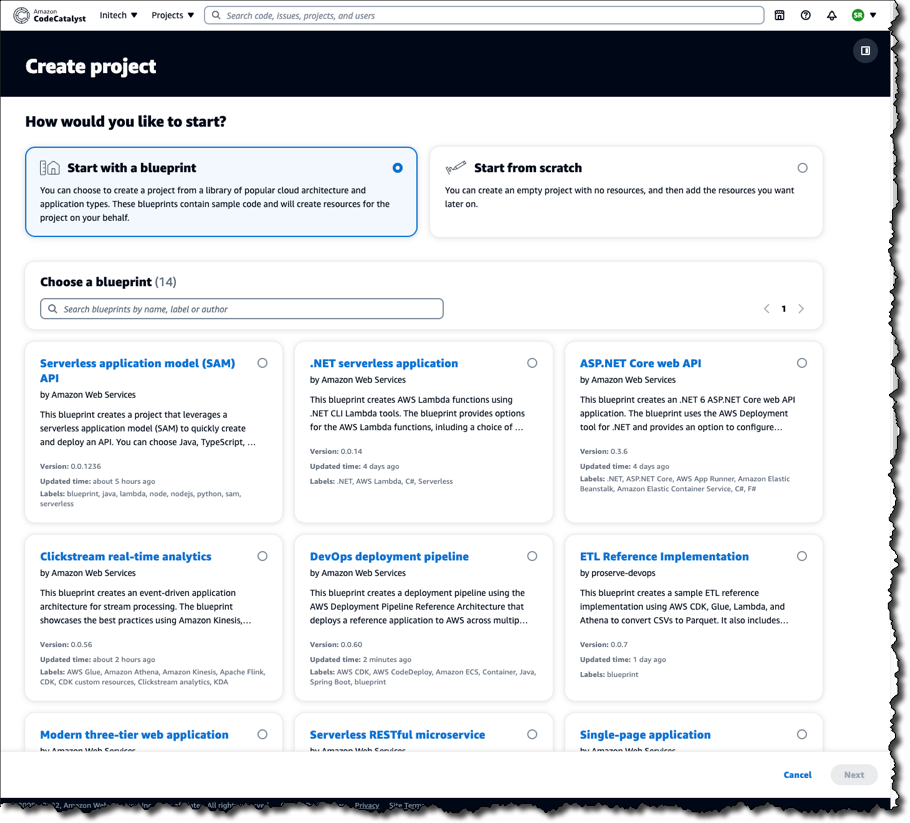
    Amazon Web Services (AWS) this week launched a preview release of the Amazon CodeCatalyst framework that leverages blueprints to automatically provision and configure developer environments in its cloud.

    Announced at the AWS re:Invent 2022 conference, Amazon CodeCatalyst takes advantage of a Project Blueprints tool to launch a source code repository and a project management tracker that are then used to create build and release pipelines. DevOps teams can use either the tools provided by AWS or substitute an instance of, for example, GitHub or the Jira project management software.

    Amazon CTO Werner Vogels told conference attendees the goal is to reduce the friction that developers currently encounter whenever they need to launch a new development project. As part of that effort, Amazon CodeCatalyst promises to make it simpler to consistently replicate development environments using scaffolds in addition to providing dashboards and search capabilities for tracking changes across commits, pull requests and deployments.

    Amazon CodeCatalyst uses a devfile to define the configuration of an environment that comes in four resizable instance options made up of two, four, eight or 16 virtual CPUs. The devfile defines and configures all the resources needed to code, test and debug a project. Devfiles, which are added to the source code repository by the selected blueprint, can also be modified.

    Collectively, those capabilities make it possible to deploy sample TypeScript, Python, Java, .NET, JavaScript, React, Angular and Vue code running in a few minutes. Developers can work with the AWS Cloud9 integrated development environment (IDE) or use tools such as JetBrains IntelliJ IDEA Ultimate, PyCharm Pro, GoLand and Visual Studio Code on their local machine. Developers, as a result, can simply switch between multiple codebases or collaborate with other developers as needed.

    The pipelines can be run on pre-provisioned builds in the cloud or organizations can opt to deploy their own container environments. Developers can incorporate build actions that are built in or provided by AWS partners in addition to incorporating GitHub Actions to compose fully automated pipelines that can be configured using either a visual editor or YAML files. Build and release pipelines enable deployment on Amazon Elastic Container Service (Amazon ECS), AWS Lambda and Amazon Elastic Compute Cloud (Amazon EC2) services.

    In general, Vogels advocated that IT teams should build event-driven applications that are loosely coupled to make it simpler to add new capabilities to existing applications running at scale without impacting the entire codebase. To make it simpler to build those types of applications, AWS added an Amazon EventBridge Pipes tool that creates point-to-point integrations between event producers and consumers in a way that eliminates the need to write that code. AWS also made available in preview a graphical AWS Application Composer tool that makes it simpler to design, configure and build serverless applications using infrastructure-as-code (IaC) definitions.

    It’s not clear to what degree developers will be embracing event-driven applications. As a programming model, event-driven architectures have been around for decades. The issue has been those applications also have tended to be among the most challenging to build and maintain. AWS is now clearly signaling its intent to make building those applications a lot easier.

  • Bringing Development Environments Into the Modern Age

    Bringing Development Environments Into the Modern Age

    It’s time to rethink how we deliver distributed access to software development environments.

    We know how to write code. And there are plenty of well-established tools, techniques and processes for doing so.

    We know what kind of code to write: Functional, scalable and efficient code that’s inherently secure and that we can readily modify whenever and however we need to modify it.

    We know why we write code. We write it to enhance the value we offer customers, to expand our market reach, outperform the competition, cut costs, minimize risks and otherwise engage in what we call “digital transformation.”

    We know who writes code—or, more accurately, the various “whos” who write it. We need developers with a diverse range of skills. And as our needs keep changing, we keep adjusting the mix of in-house and contract developers accordingly.

    We also know when to write code—which is now and for the foreseeable future.

    The one thing we still struggle with is where to write code. Not ‘where’ in the physical sense; we’re way past that. We know that for development teams to be optimally productive, we have to enable everyone to work from any physical location at any time. COVID-19 has dramatically reinforced this principle.

    The ‘where’ we struggle with is the virtual ‘where’ of the developer workspace. Yes, we already provide developers with remote access to development resources. Sort of. But there are a lot—a lot—of problems with the way we do that. These problems adversely impact development every day by, among other things,

    • Bogging developers down in annoying technical problems that hamper their ability to set up their environments.
    • Forcing developers to wrestle with the maddening complexity of configuring and managing the multiple dependencies associated with each project.
    • Trapping developers in an endless cycle of building, terminating and recreating environments as projects begin, end and are resurrected for updates and enhancements.

    Unfortunately, we’ve become so accustomed to these problems that we tend to accept them as normal. But we cannot afford to accept them any longer. Here’s why.

    Development Environments: Insecurity, Lost Productivity and Technical Debt

    One big problem for both developers and the enterprise is that developer workspaces aren’t fully portable. The methods we use to give developers remote access to their environments invariably come with unacceptable insecurity. There’s also the issue of onboarding. When a developer joins a team—whether as a new hire, temporary contractor or current employee switching to another project—it can take days for them to get them fully up to speed with access to all the project-specific resources they need. That ramp-up time invariably frustrates developers.

    On the other hand, offboarding developers can be a security and compliance issue. Piecemeal provisioning of the multiple resources developers need inherently results in the piecemeal deactivation of those same resources. So when a developer quits or is fired—or when a contractor’s contract is up—we can’t be 100% certain that all their permissions have been revoked.

    Moreover, what happens when a developer needs to go back into a project that no one has touched in months or even years? How does a developer recreate the full workspace associated with that project and have high confidence that they’re doing it right?

    The answer is that we can’t. Instead, some unfortunate developer inevitably has to spin their wheels trying to piece together a long-dormant project. All your aging code is thus guaranteed to become “legacy” (which is just another name for ‘code no one is quite sure how to work on’), thereby guaranteeing that your organization will forever be burdened with an ever-growing mountain of resource-draining technical debt.

    The Shoemaker’s Children

    So how can we re-engineer the delivery of remote workspaces so we make life easier for developers while also fulfilling the security and compliance requirements of the enterprise?

    Here are a few ideas to consider:

    • Host developer workspaces in the cloud. Developers provide everybody else with a wealth of cloud resources, yet rarely take full advantage of the cloud themselves. Some resources they need may reside in the cloud, but the complete workspaces they require to be fully productive do not.
    • But why not? Everything a developer needs for every project should exist as a complete, unified, project-specific workspace that’s available to them anywhere—just like all the other SaaS solutions developers build for end-users every day.
    • And given the sophistication of today’s browsers, cloud-based workspaces can be made available to developers without requiring them to install a desktop client. The cloud also enables workspaces to be hosted anywhere to avoid latency delays.
    • Nothing should leave your secure workspace repository. Ever. To ensure the security of all developer work-product, no actual code or data should ever leave the hosting environment.
    • Only screen pixels and keystrokes should move across the network. This remote-access model makes developers’ workspaces fully secure and fully portable. It also provides the best protection against data exfiltration.
    • Simplify the definition and administration of project-specific workspaces. You don’t want developers looking around for tasks in progress, relevant datasets or process workflows. Instead, administrators should be able to configure workspaces that give developers access to all the resources they need for each project via a single sign-on (SSO).
    • Leverage containerization into your workspace hosting. Better, safer enterprise development isn’t just about re-engineering remote workspace access. It’s also about making those workspaces easier to manage on the back end. The best way to do this is containerization, which allows you to flexibly mix-and-match workspace elements. That way, you don’t have to build every workspace from scratch.

    And those workspaces don’t exist as monolithic, “all or nothing” environments that you pray you’ve gotten right. Instead, with containerization, you can build project-specific workspaces more quickly, at less cost and with less risk.

    Effective hosting of fully portable developer workspaces requires other important functionality as well: Inactivity time-outs, cloud cost/utilization controls, etc. Before addressing these details, however, development leaders must first come to terms with the fact that developers need a much better way to work remotely—and that every remote workspace must be a secure one.

  • …And all Those Other DevOps Tools

    …And all Those Other DevOps Tools

    When we started going through the DevOps toolchain for our new project, we found a ton of bits that normally we (and most likely you) wouldn’t pay too much attention to, because they don’t matter—until they do. Then we all pay attention. That’s why we added them to the toolchain list of options before they became a problem.

    It is time to stop, take a look around, make sure you have an inventory of what tools are going into the process of making your secret sauce. The easy one is IDE. For the last little while—say, a decade—we’ve let this largely be a team or an individual decision, but the steps required to do things and the add-ons/libraries used make this less and less about individual choice and more of at least a team, often an organizational decision. We’re doing it at the project level, so functionally equivalent to team. Our Java/Spring app is done in Eclipse because most of you are doing the same for that architecture. But our new Godot project will be in the built-in Godot editor (for Godot Script) and VS Code for C#. Again, because that’s all the rage in several languages, including C#.

    Here is the thing though – if you are using VS Code, you should keep a detailed and current list of plug-ins. I’m not a fan of their whole extension installing methodology through the command palette and want to make sure everyone has the tools needed at hand. In an enterprise setting, the ROI is there to just set it up and distribute to developers what they need in a package. But this is only a real possibility if most developers are on the same platform.

    What Git Desktop client is in use? While all of them support Git command line in the same format, helping each other use the UI for different operations kind of begs for standardization. Our team doesn’t change much, so I’m not terribly worried about this particular issue. We’re officially using GitHub Desktop, but as long as I’m not doing tech support (because you have a tool that you can’t use well), I don’t care if people stick to it. You might care more about that than we do—in this regard, we’re more like a startup than an enterprise. Since they share a command line, we can afford not to care. If you, as an enterprise, are providing ready-to-code environments, that is a different story.

    A couple of years ago we would have had to worry about containers, but these days we’re okay saying Docker locally and Kubernetes for production. While the Godot app doesn’t have a server component (hence the reason we’re keeping the Java/Spring app around), the build environment will be containers because we want to be able to build wherever we need to.

    Keep rocking it. I just thought I’d drop a list of what we’re going over—there is more, of course; this bit was focused on the developer tools side of things. I’ll eventually update with the final full stack, but for now, this bit is being put on the back burner while I look at some other areas. ::waves at security peeps::

  • Gitpod Open Sources Automated Local Development Environment

    Gitpod Open Sources Automated Local Development Environment

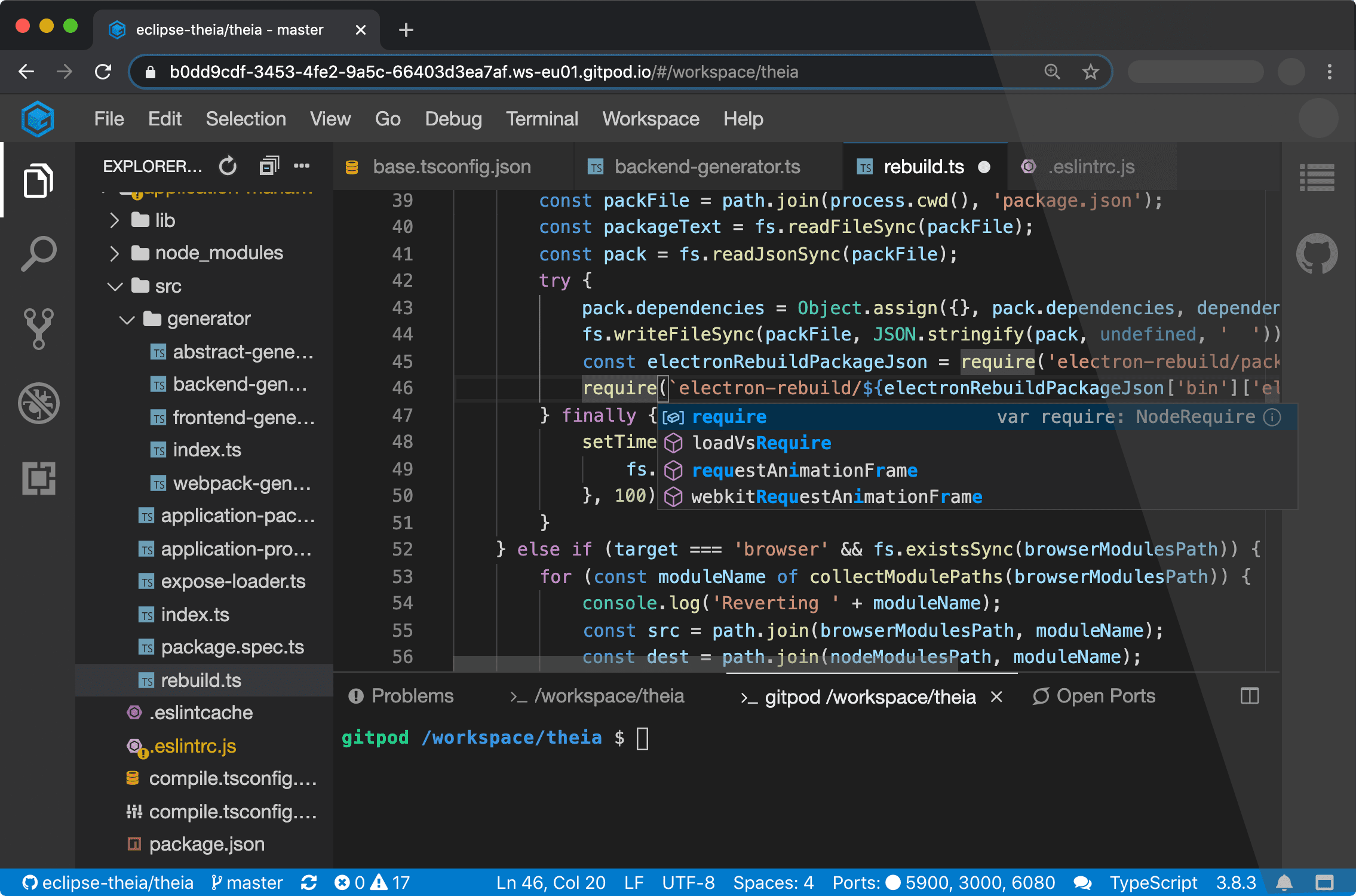
    Gitpod announced today it is making available an instance of its Gitpod integrated development environment (IDE) available under an open source license.

    Company CEO Sven Efftinge said DevOps teams will now have the option of deploying Gitpod themselves as an alternative to the existing cloud service provided by the company.

    Designed to be used in conjunction with repositories such as GitLab, GitHub Enterprise and Bitbucket, Gitpod automates the building of development environments on-premises, Efftinge said. It continuously monitors updates to any Git repository.

    Gitpod will then configure the right tools for a specific git branch, automatically compile machine-executable code and download all the dependencies required to allow developers to build code on-premises. Rather than having to manually configure a desktop environment, developers can start coding in seconds, Efftinge said.

    Gitpod borrows concepts from continuous integration platforms and applies them to development environments, he said, noting developers today typically spend multiple hours per week setting up and maintaining local developer environments.

    By automating that process, he said, the local development environment can also better align with production environments. One of the reasons why code doesn’t work in a production environment when it is first deployed is because the local development environment has been manually configured in a way that doesn’t accurately reflect the production environment, Efftinge noted.

    That issue becomes even more problematic when developers are working on multiple projects involving, for example, separate microservices that are all going to run in different production environments, he added.

    Gitpod also prevents drift by making sure all versions of a local desktop environment among developer teams remain consistent. Collaboration also becomes easier when the members of the teams have standardized on the same instance of a local desktop environment.

    Efftinge said there are already hundreds of thousands of developers using the Gitpod cloud service. The open source edition provides an option that will enable DevOps teams to self-host their own instance, he noted.

    Gitpod, formerly TypeFox, collaborated with Google, Ericsson, Arm and Red Hat to develop the open source Eclipse Theia project, which provides a foundation for building IDEs in the cloud using TypeScript, CSS and HTML. Theia, now being advanced under the auspices of the Eclipse Foundation, consists of a front-end running in a browser or in the local desktop application and a back-end running on any host. Both the front-end and back-end communicate through JSON RPC over WebSockets. Gitpod leveraged that project to build its own cloud-based IDE.

    In the wake of the COVID-19 pandemic, there’s naturally a lot more focus on automation and developer productivity. Most developers will be working from home for the foreseeable future to help combat the spread of the virus. Of course, most developers have been writing code outside the office for years. The challenge now is enabling teams of developers to develop applications as efficiently as possible regardless of where they are located. Eliminating inefficient manual tasks such as maintaining local development environments could be a significant step in that direction.

    It’s not clear yet whether DevOps teams are more or less productive since the onslaught of the COVID-19 pandemic. However, it is apparent the need for a consistent experience among teams of highly distributed developers is acute.

  • Universal Code Search Combinations

    Universal Code Search Combinations

    More potential searches than there are stars in the universe.

    Source code search is not like searching for text on the web—it is more complex and has many more nuances. When we set out to create a Universal Code Search engine, we knew there were many permutations that we had to account for—so many. So we began speculating over how many search permutations we would have to account for.

    First, let’s cover what Universal Code Search is. Search today is not just “Grep and go.” The modern era of big code requires code search to cover many dimensions: repositories, file formats, programming languages, etc. Universal Code Search ties together information from many tools, from repositories on your code host to dependency relationships among your projects and application runtime information, to give developers a single place to quickly explore and better understand all code faster.

    A Universal Code Search must satisfy the following requirements:

    • Search through repositories on any major code host.
    • Search across all commits, making both the current (up-to-date) and past codebases discoverable.
    • Support all programming languages.
    • Support code intelligence for all major languages.

    To quantify how expansive Universal Code Search is, the best metric is the number of search combinations. 

    Developers can search across more than 18 dimensions of code to navigate, explore and understand code.

    Repositories

    Sourcegraph can search across any repository, spanning all Git providers in addition to other source code version control systems. GitHub hosts over 100 million repositories, so using a 17.31% market share, we can estimate there are 577,700,751 searchable repositories. 

    Commits

    Sourcegraph can search any repository, and any commit within the repository. For instance, if the average repository has five developers contributing five commits for 300 days per year over five years, Sourcegraph would be able to search all 37,500 commits using repo:<REPONAME>@<COMMIT>. 

    Branches

    As with commits, Sourcegraph can search all of a repository’s branches. Using the same methodology, we can assume that each of the five developers works on five feature branches per month over five years. This would lead to 1,500 branches on the repository that could be searched using repo:<REPONAME>@<BRANCHNAME>.

    File Type

    Sourcegraph supports all programming languages and developer files, in addition to other text files. Between text and developer files, we conservatively estimate this number to be 1,155 total file types supported.

    Pattern Type

    Sourcegraph allows your search to be interpreted three ways: literally, as a regular expression (regex) or as a structural search pattern. Structural search lets you match richer syntax patterns specifically in code and structured data formats like JSON.

    Search Type

    Four search types are permitted. Whether you need to search over all your code at a given point in time, changes to code or commit messages (diffs or commits), Sourcegraph gives you access to all depths, past and present, of your codebase. *file* *repo*

    Repo Forks and Archives

    Include repository forks in your search, or don’t. Include repository archives, or don’t. These are the four options for searching forks and archives among your codebase in Sourcegraph search. *yes, no, only*

    Case

    Sourcegraph search supports both case insensitive and sensitive search. And when performing a diff or commit search type, there are five more filters you can use.

    Developer

    Search for the author of the code, or for the committer. These are the two options when performing a diff or commit search.

    Time

    Sourcegraph supports searching both before and after a time frame, such as before: “last Thursday,” after: “6 weeks ago” or after: “November 1, 2019.”

    Message

    You can also search diff and commit searches for which the commit message contains a particular string.

    IDE

    Four IDE integrations are supported: VS Code, Atom, IntelliJ and Sublime Text. This helps improve developer productivity by reducing context-switching. The limitations on Sourcegraph’s IDE integrations are limited in performing structural searches, use filters and search past commits. Therefore, most of the dimensions described above don’t apply to IDEs.

    What does this add up to? 2,702,343,531,371,460,001,448 potential code searches across all repos, all programming languages, all code changes, all file formats and all code hosts. Universal Code Search makes it easier and faster to explore, navigate and better understand all code, everywhere. Don’t believe it? Go ahead and see for yourself. Change the assumptions to match your organization.

    — Quinn Slack

  • How to Secure Online Coding Platforms

    How to Secure Online Coding Platforms

    Threat Modeling for Online Coding Platforms

    The evolution of DevOps teams and a greater reliance on cloud-based computing has completely changed the coding process. Now, with Integrated Development Environments (IDEs), coding can be done entirely online. This is convenient, but are online IDEs secure? To answer this, we will focus on two popular cloud-based IDEs: AWS Cloud9 and Visual Studio Online.

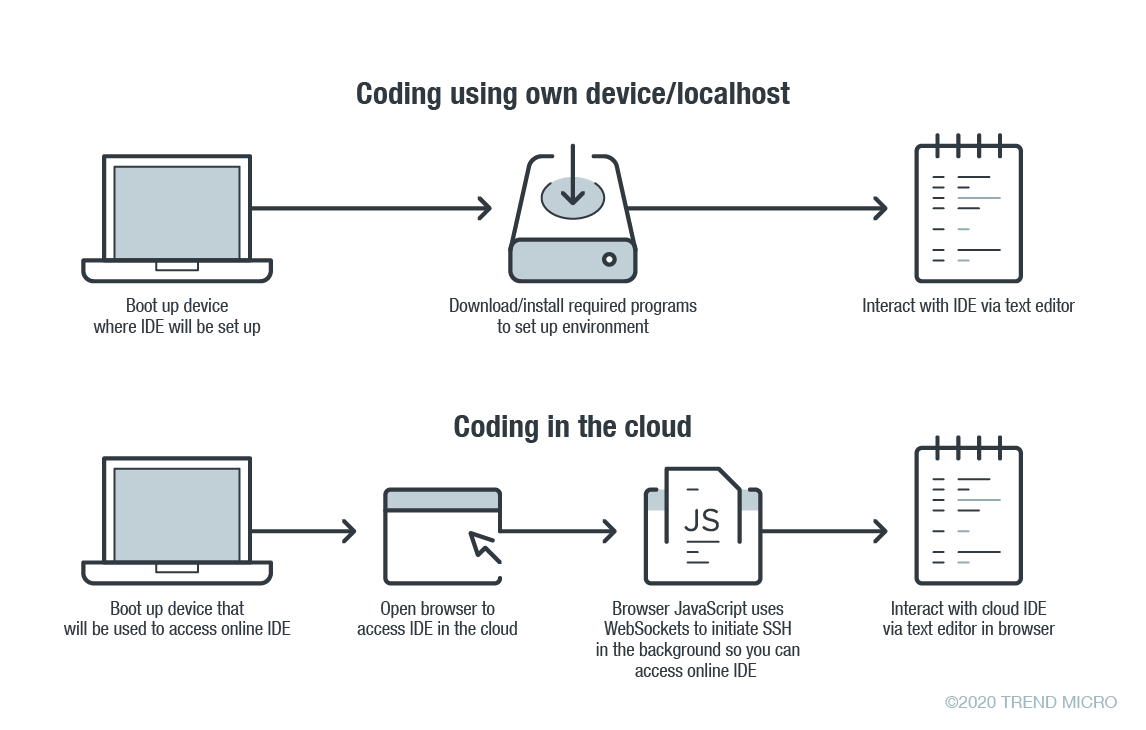
    In online coding, the IDE is rendered inside your browser, the browser JavaScript engine uses WebSockets to initiate an Secure Shell (SSH) connection to your linked device in the background—e.g. virtual private server (VPS)—providing you with the familiar terminal interface to execute commands. The environment—meaning the linked cloud VM/VPS or SSH-accessible device—includes tool configurations (like which tokens are included, or cloud configuration files), a copy of the source code, compilers and other tools that you want to use.

    Figure 1. Local versus cloud-based IDE. Source: Trend Micro.

    The main difference between local and cloud-based coding platforms is where the bulk of the environment resides. In cloud IDEs, the environment is a virtual machine instance inside your cloud provider. In terms of security, this means you are delegating trust to the cloud provider, but you are responsible for preventing any backdoors from opening or introducing misconfiguration issues to the VM. In the case of using your own device with AWS Cloud9, you are responsible for configuring the device securely.

    Linked Devices/VMs Are Not Always Secure

    What is running on the backend often dictates whether linked devices and VMs are secure. As previously described, an SSH-linked device is necessary to use these online coding platforms. In the case of Visual Studio Online (still in preview mode as of this writing), we can find a Visual Studio (VS) Code server running on the machine.

    The code server itself is a Node.js application to which your browser will connect. You can also download the whole ~/.vscode-remote folder and run the server inside your local environment.

    As the owner of the linked device, you have permission to promote yourself to root and install or configure whatever you think you will need. You also have, by default, both Docker and Git pre-installed.

    In the case of AWS-hosted Cloud9, the situation is a little more complicated. The backend necessary for platform communication is located inside the linked device while the frontend remains hosted on a different location. But, like in VS, you can also promote yourself to root.

    This brings us to our first security concern: How secure or private are linked devices/VMs?

    The linked device contains confidential information—access tokens, application configurations, source code, etc., which should be protected against unauthorized access.

    By default, the platform is secured by the provider. However, you should keep in mind that, together with your root access availability, you are also responsible for preventing misconfiguration issues, especially when using third-party plugins. AWS does not provide plugin support for plugins not developed by them.

    There are possible misconfigurations you might make that can lead to security issues. For example, if you set your IDE to be accessible from outside, either intentionally for ease of sharing, or unintentionally, that change can have major consequences.

    In addition, it is not common for access tokens to be stored in encrypted token vaults. A lot of them can be viewed via plaintext configuration files. Without additional security measures, your access tokens can end up exposed to outsiders.

    Once unauthorized access is acquired by cybercriminals, they can compromise your code for their own gain. An example would be the supply chain attack against a software company that modified software updates with malware.

    Browsers Can Introduce Malicious Extensions or Vulnerabilities

    The next security concern is the browser itself. As online coding platforms are accessed from web browsers, you should be very careful when accessing these sites from public, non-domain, shared or unprotected computers.

    Malicious browser extensions are a well-known phenomenon. While an untrusted computer possibly infected with malware presents an obvious risk, it is also possible for an attacker to steal code using a malicious web browser extension.

    Code Extensions and Plugins Can Also Contain Malware

    The main advantage of Visual Studio Online and, generally, the VS Code platform, is the number of extensions available. This in and of itself is yet another possible attack surface.

    Let’s imagine a malicious VS Code extension—a useful-looking extension with an embedded backdoor. The lack of permission checking (such as disk access, network access, process access, etc.) for extensions during installation or use, becomes a security problem. The extent of security checks during extension publishing is limited to having a valid publisher ID and a few image-related restrictions. This means you have to trust the extension developer entirely.

    No Software Application Is Error-Free

    The ever-present possibility of vulnerabilities in any kind of software must be considered as well. In the case of online coding platforms, they can be affected by web-class vulnerabilities since IDEs are web applications. For example, a vulnerability that allows an attacker to execute their own JavaScript code can have control of the IDE or remote linked devices.

    A recent vulnerability affecting the Visual Studio Live Share extension, which is also available for VS Code, shows that we can expect to see another vulnerability affecting online coding platforms in the near future.

    Securing Cloud IDEs Is a Must for DevOps

    Threat modeling allows us to understand the different factors at play that can affect the overall security of a computing environment. Cloud IDEs should be no different from other software, if not more critical to secure.

    Here are some recommendations for each of the security issues we raised:

    • For linked device security — Install trustworthy software. Keep that software updated. Don’t indiscriminately open ports to the internet.
    • For browsers — Work inside trusted and secured environments. Try to avoid using shared computers. Install browser extensions from trusted vendors only.
    • For VS Code extensions — Avoid installing extensions from unknown sources or authors.
    • For vulnerabilities in general — Make sure your environment is updated to the most recent version.

    — David Fiser

  • Che: A Revolutionary IDE for the Mainframe

    Che: A Revolutionary IDE for the Mainframe

    Tools such as the green screens of ISPF and the Eclipse desktop IDE, enhanced with proprietary plug-ins, have served mainframe application developers well over the years and, for those comfortable with them, will continue to do so. However, changes in the broader world of development are creating the conditions for a revolution in mainframe tooling.

    First, mainframe developers are aging out of the workforce, leaving behind extensive code libraries and a workforce skills gap. Those likely to back-fill these roles know and love modern IDEs, especially Visual Studio Code, while the popularity of Eclipse is waning. For example, the annual Stack Overflow Developer Survey found that, over the past year, the popularity of Visual Studio Code grew from 35% to 51%, once again making it the most popular IDE, while Eclipse fell from 19% to 14%. According to Business Insider, 8.5 million developers worldwide use VS Code, creating a huge talent pool.

    Second, application development has made great strides in productivity since the current mainframe dev tools were created, especially in DevOps automation with enablers like task runners, scripting and testing frameworks. The Stack Overflow survey cites scripting language Python as the most sought-after skill among developers, by far.

    Finally, as the velocity of overall software delivery increases, mainframe is a critical component of digital transformation initiatives. According to 451 Research, 24% of companies are releasing application software daily or hourly while, similarly, DORA’s 2019 State of DevOps survey shows 20% of teams are deploying multiple times per day. Software delivery expectations have changed with continuous deployment becoming the new normal and, to remain a vital computing platform for the long term, mainframe app development needs to support this paradigm.

    An Open Source and Cloud Development Technology 

    Rather than an evolution of the existing Eclipse IDE, Eclipse Che is a radical departure. According to the Eclipse Foundation, “Che 7 is the world’s first Kubernetes-native IDE that’s built from the ground up for cloud native application development. It simplifies and accelerates cloud development by allowing developers who are not Kubernetes experts to immediately contribute to cloud native application development efforts. In turn, Che 7 relies upon Eclipse Theia, which provides a highly modular and extensible IDE platform built on modern web technologies that runs on both your desktop or in your browser.”

    For large enterprises, a good analogy for key value proposition of a hosted IDE is Git: usability and collaborative power have made Git the de facto standard for version control and Che’s workspace server offers comparable benefits.  

    Developers working on mainframe applications can use Che via the Che4z subproject. Che4z, whose primary goal is to bring a modern developer experience to mainframe software development, offers an extension pack providing access to the z/OS file system, remote debug and remote editing of COBOL programs with all the expected modern editor capabilities including syntax highlighting, code assist and real time syntax validation. After a beta period, Che4z is now GA.

    Beyond the foundational benefits mentioned above, Che is revolutionary for the mainframe for many reasons.

    Visual Studio Code and More

    Che was architected around a VS Code-like experience from the outset which, with the growth of VS Code, means Che extends its value.  Che is based on Eclipse Theia which provides an in-browser VS Code experience complete with the latest tooling protocols: language server, debug adapter and compatibility with VS Code extensions. 

    The Che4z sub-project, contributed by Broadcom, provides language support for both COBOL and High Level Assembler (HLASM).  The language server protocol (LSP) enables developers to use these languages with Che, VS Code and any other LSP clients (e.g., IntelliJ, VIM, Emacs).

    Bottom line: developers can use VS Code for mainframe development independent of Che adoption (the Code4z extension pack is available on the VS Code marketplace).

    Cross-Platform Applications

    For many Fortune 500 companies, the mainframe hosts critical system-of-record applications and data while the cloud and mobile applications have evolved from user-oriented systems-of-experience. With tech-first startups disrupting entire industries, large companies are deploying more cross-platform applications to maintain, if not win, market share by harnessing the best of both worlds. Cross-platform apps combine modern user experiences with the transactional power and data assets of mainframes.

    Because cloud and mobile developers need to integrate mainframe applications, allowing them to use the tools they know and love is critical. This includes the popular code editors and IDEs they love today as well as the new innovations, such as browser-based, container deployed tools that make them more productive.

    With its workspace server, Che also facilitates pair programming, which is a powerful approach when mainframe and distributed developers need to collaborate on cross-platform applications.

    Bottom line: Che makes the mainframe less of a silo and more like other platforms.

    Open Source-Enabled Vendor Independence

    While open source is not new to the mainframe–zLinux has been around for years–access to off-platform toolchains became possible with the introduction of the Zowe open source framework (described in more detail below). Unlike the incumbent Eclipse vendors, and consistent with the open source vision, the Che4z extensions are open sourced and free to use. There is now an alternative to the proprietary, vendor-controlled model: true open source tooling for mainframe developers.

    Furthermore, Eclipse locked mainframe developers into using a specific set of editors, runtimes and user interfaces for required capability and functionality–thus imposing a steep learning curve. Che, by comparison, offers flexibility via modular design, allowing individual developers to choose the components they need.

    Whether developing for mainframe or other platforms, the Che community welcomes contributions from those passionate about software development. Want to incorporate a lesser-used language? No need to plead with a vendor. Anyone can seek community support for an idea or simply do it themselves. The Che/Che4z communities will ensure the proper procedures are followed before any code is ever released.

    Bottom line: Che provides a more frictionless, fast-moving toolset allowing coding innovations to extend to the mainframe.

    Onboarding and Cost Reduction

    Consider the compatibility and maintenance headaches created by the heavyweight plugins required for Eclipse. For mainframe leaders, the need to reduce costs is an ongoing challenge as is the need to quickly onboard the next-generation of developers. As a container-based IDE with no client footprint, Che eliminates the need for local installation, maintenance and configuration. The potential of moving entire teams currently using Eclipse with customizations to Che provides an attractive opportunity to materially reduce operating costs while simultaneously improving developer productivity.

    Because Che workspaces are containerized, new team members can onboard instantly–open the container, begin work. This means developers, who are high cost resources, can more easily move across projects, teams, departments, etc.

    Bottom line: For mainframe leaders focused on staffing and costs, Che increases the talent pool while eliminating costs.

    Built on Zowe

    The extensions that open the mainframe to the Che IDE are powered by the Open Mainframe Project’s Zowe open source framework, which maintains mainframe-native security standards. Zowe, which was founded by Broadcom, IBM and Rocket Software and is the first open source project based on z/OS, enables developers to manage, control, script and develop on the mainframe just like cloud and other platforms. 

    Command line interfaces (CLIs), which come with platforms such as AWS and Azure, are popular with developers wanting the productivity lift of task runners, scripting and higher levels of automation (i.e., CLIs facilitate DevOps adoption). The Zowe CLI (the mainframe equivalent) magnifies the value of the Che4z stack as any set of commands that run through the CLI can be automated.

    Bottom line: Using Zowe as the foundation for the Che4z mainframe extensions ensures the modern experience extends far beyond the IDE.

    Path Forward

    For leaders wanting to empower developers integrating mainframe code and resources with the most popular and powerful app development tools, Che provides the best of both worlds–the immediacy of VS Code use with the path to full-on, in-the-cloud team collaboration.

    Expanded tool choice, greater alignment with off-platform peers and DevOps-fueled software delivery are all reasons why Che is not only the first Kubernetes-native IDE, but a real revolution for mainframe development.

    — Jean-Louis Vignaud

  • IBM Z Open Editor Support for Language Server Protocol is a Game Changer

    IBM Z Open Editor Support for Language Server Protocol is a Game Changer

    The integrated development environment (IDE) is an indispensable tool for software developers. Before it came along, coding was a laborious, detail ladened undertaking. We’ve become accustomed to the syntax checking and code completion features than even the most basic IDEs provide. These days we tend to forget how hard it was programming with nothing but a rudimentary text editor. Something as simple as finding a missing comma or a misplaced curly bracket that was causing a compilation error could take hours, maybe days should the codebase be big enough. When it came to tracing your way through a seemingly endless chain of functions and classes in order to find the culprit of a runtime error, well…fuggedaboutit! Without the modern IDE, we’d be sunk.

    Well, that was then and this is now. A few years back, a new technology emerged on the technical landscape that’s boosting the power of the IDE, and subsequently the scope of work a developer does and the decisions he or she makes by an order of magnitude. This new technology is Language Server Protocol (LSP).

    LSP Takes the IDE to a Whole New Level

    LSP is a specification developed by Microsoft that standardizes the way certain typical features are implemented within a programming IDE. LSP attempts to consolidate the implementation of IDE commonplace features such as code completion, hover-over tips, jump-to-definition, find-references and syntax checking into a standard format that can be applied to any IDE in an agnostic manner.

    LSP is a technology designed to address the following problem. Imagine that a tools vendor has an idea for implementing a new plugin that will automatically do code completion for programs written in the COBOL programming language. Such a feature might be useful to any number of COBOL programmers. However, not every COBOL programmer is programming using the same tool. Some might be using an IDE such as IBM Developer for z/OS. Another might be using a text editor such as Sublime Text, Atom or even something more basic such as vim. In earlier times, in order to get the feature to market the vendor needed to implement different versions of the plugin in a way that was special to the given development environment. There’d be a team working on a Sublime Text version of the plugin, another team working on the vim plugin so forth and so on. Not only did the tool developer need to accommodate different operating systems, but each team might come up with its own, particular way to implement the feature. As team members left the company and new members arrived to replace them, those new developers needed to learn each particular way the feature was realized. As you can see, not only did the variety breed complexity, but things got very expensive very quickly.

    LSP does away with the need for such specialized tools development. LSP provides a standard protocol that can be implemented in any tool. The protocol defines a set of standard methods, objects and communication methods that provide a common set of services in any IDE.

    Thus, the only work that needs to be done to get the previously described COBOL code complete feature to market is to express it in a way that is compatible with the LSP. The actual work of realizing the feature then involves writing a client that supports the standard. It’s a “one ring to rule them all” process so to speak.

    The LSP specification was originally published by Microsoft specific. But the standard has been embraced as an industry-wide. There are implementations in Java, C++, C#, Python, Scala, Swift and PHP, to name a few. Also, there is an implementation of LSP for COBOL under z/OS, which brings us to IBM Z Open Editor.

    Bringing the Use of LSP to the Mainframe

    IBM Z Open Editor is a free Visual Studio Code extension that provides a state of the art programming experience for COBOL and PL/1 developers. Also, IBM Z Open Editor integrates with Eclipse Che and Eclipse Theia. Integration with Eclipse Che and Theia is particularly interesting because it enables browser-based editing. It’s a powerful tool, even more so given that historically COBOL and PL/1 programmers have lived in the backwaters of modern IDE development. IBM Z Open Editor makes IDE-based software development a general programming experience. Developers can use the same tool to program COBOL as they do in Java or even HTML for that matter.

    LSP Enabled Features in IBM Z Open Editor

    The following is a list of tool features available to mainframe programmers using Visual Studio Code with IBM Z Open Editor enabled:

    • Code completion.
    • Hover over instructions and snippets.
    • Jump to definitions.
    • Workspace symbols.
    • Find references.
    • Diagnostics and syntax error detection.
    • Outline view.
    • Previewing of included copybooks on hover.
    • Navigate to copybooks.
    • Code template snippets.
    • Refactoring such as “rename symbol.”
    • Variable completion.

     Using a single IDE to program in a variety of languages is a trend that’s been evolving for a while. However, adding LSP into the mix allows any IDE to present a consistent set of design time features. For example, one IDE is now able to do code-completion, hover-over reporting and variable tracing regardless of the programming language in play.

    For example, Figure 1 below shows the COBOL code completion feature of IBM Z Open Editor plugin for Visual Studio Code. IBM Z Open Editor uses LSP to facilitate code completion.

    Figure 1: IBM Z Open Editor uses the Language Server Protocol to facilitate context-sensitive code completion.

    Figure 2 shows the search and sort features of IBM Z Open Editor, which again implemented according to the LSP.

    Figure 2: Using LSP to implement IBM Z Open Editor’s sortable and searchable outline view for navigation.

    Finally, Figure 3 shows how the IBM Z Open Editor takes advantage of the extensibility capabilities of LSP to implement a feature that resolves and loads copybooks for preview. A copybook is code that can be copied from a master source and inserted into several different programs or into a variety of places in a single program. A copybook is used to define the physical layout of program data, variables for example, as well as instances of procedural code.

    Figure 3: IBM Z Open Editor extends LSP to review and load a copybook within Visual Studio Code.

    Clearly, LSP brings a lot of power to the mainframe programming experience. Now tools developers can create a unified programming experience using a common methodology. But where things really get interesting is when LSP is used to report data that goes beyond standard programming and code management activities, to a place where the real-time behavior of those using deployed code is being reported. In other words, LSP makes it possible not only to get information about code that is local to the developer’s desktop but also about the code as it is being used at runtime out on the internet.

    Beyond the Mainframe: The Long Term Significance of LSP

    LSP is extensible by design. As you read above, IBM Z Open Editor extends LSP to allow programmers to preview and load copybooks. This is done by extending the protocol.

    The typical IDE to server interaction under LSP is that the LSP client reports to the LSP server when a code document has been opened, changed, saved and closed. Then, once the LSP server is aware that a code document is in play, the server can inspect the document and report back events that are relevant to the programming language (Figure 4).

    Figure 4: LSP uses a predefined set of commands and request/response objects to support programming IDE is a language and operating system agnostic manner.

    For example, the LSP server can inspect the document to make sure the code is syntactically correct. If an error is encountered the server reports back the starting and ending location of the error, along with a message. In the case of the copybook review feature, the client reports back the location of the cursor in the code window and the server determines an opportunity for a copybook review and informs the client accordingly.

    While the copybook preview feature is powerful, it’s confined in scope to the immediate document. This is good. But, imagine what it would be like if the server had knowledge of all instances of the code deployed and running on computers connected to the internet?

    Suppose for example, that your code was powering an API running on the internet and you had the ability to learn about the number of calls to a particular function backing the API or better yet, imagine that you had the ability to learn about function calls that encountered particular problems, such as a pattern of mistyped parameters or high latency calls. Then imagine if that global runtime behavior was reported right in the IDE? Such information would change the very nature of how a programmer approaches his or her work. More importantly, it would change the way an enterprise manages programmers.

    What if a programmer could decide what to work on based on global runtime behavior reported into the IDE via an LSP extension? For example, going back to the imagined pattern of mistyped parameters, let’s say that when a developer hovers over the related function in IDE a warning icon appeared informing the developer of 1000 instances of mistyped called were made at the global level. The developer decides that such an error rate is unacceptable. Then, he/she examines the developer documentation and discovers that the parameter type definitions for the function are poorly described and that the document needs to be corrected. The developer then makes updating that developer documentation a critical path, part of the day’s work that needs to be delivered immediately.

    Given the power that LSP brings to the programming experience, such a scenario is entirely possible. In fact, there are companies out there such as Apollo Graph Manager that presently allow developers and third parties to register their production APIs in order to collect the sort of global information described above and have it reported in an IDE via LSP. As those of us who have been in the software business for a while have come to learn, once a feature such as global reporting catches on, it’s only a matter of time until it becomes an industry-wide practice. It’s only a matter of time before globally collected runtime metrics delivered to a programmers LSP become commonplace.

    Again, the ramifications are significant. Once a programmer has the ability to make fundamental decisions about feature development and deployment schedules, what then becomes the role of the project manager and the product manager?

    To take the issue one step further, how much power should a programmer be given? And in terms of general business practices, how much should the programmer know about a company’s products? These questions might seem fantastic, but keep in mind at one time companies guarded their source code as a trade secret. Today, more code than not is shared between companies as part of the open-source movement. As a result, the way code is made and a developers work has changed. The same possibility exists due to the growing trend to extend the capabilities of the LSP. The ramifications of LSP go well beyond simply reporting syntax errors and doing code completion. LSP will change the way the entire industry works, from mainframe programming to developers working in the cloud or on commodity hardware.

    Putting it All Together

    Given current trends, there’s little doubt that LSP will make even the most rudimentary code editor a powerhouse tool for software development. Standardizing IDE features into a common format allows new features for any development tool to be implemented faster and at a reduced cost. In no time at all we might even figure out a way to use LSP to make is so large bodies of code can be written automatically with just a few guiding keystrokes from the developer’s keyboard no matter the programming language. It’s a real possibility.

    Not only will LSP making coding easier and faster, but it’s also going to change the role of the software developer. Once all the code running on the internet becomes LSP aware and accessible, developers will get runtime information about how their code is performing at runtime on a global level. The trend is already in play. As history has shown, the further down a technology goes into a given population, the more powerful that population becomes and the greater the ramifications when the power is exerted. There’s a very real possibility the information that LSP enabled IDEs provides will make the day-to-day programmer more prominent in the product decision-making processes that are presently the responsibilities of program and project managers. Once that shift takes place we’re likely to see another industry-wide transformation take place in the way software is made and delivered. History has shown that such transformations have long term benefit, but in the short term are disruptive and disturbing. We’ll do well to be prepared.

    — Bob Reselman