Tag: hybrid cloud

  • Hybrid Cloud: How to Avoid Twice the Problems

    Hybrid Cloud: How to Avoid Twice the Problems

    Regardless of how enthusiastically you embrace the cloud, unless you’re a brand new business, you have already have an infrastructure running your applications. Odds are, you’re either renting space in one or more data centers. Or maybe long ago you reached the tipping point and built a data center or two of your own.

    Regardless, moving to the cloud is going to be a process. You’re going to be working on a scale of months, if not years. During that time, how do you manage and secure assets that are in more than one environment—especially when those environments are radically different?

    The Data Center

    Your data center environment is probably well-established. You’ve got a mature technology stack, a high level of rigor around manual processes and a traditional “castle walls” perimeter-based approach to security.

    Specialized teams are in place for the networking infrastructure, operating system management, security, data center logistics and other areas. Each team does a great job running the day-to-day of their areas and planning for the five-to-seven-year life cycle of their technologies.

    The challenge here is that this structure has lead to a slow, stable cadence around innovation and encourages each team to work in their own silo. Common ground and management is established through a formal change management process. This results in stability, but at a very high cost when it comes to rapidly iterating on ideas.

    The Cloud

    In stark contrast, the cloud is constantly changing. New technologies are deployed quickly, systems such as continuous integration/continuous deployment (CI/CD) enforce what used to be a manual process and capacity planning is basically a thing of the past.

    Just as the cloud is delivered in a different manner, teams working in the cloud also are delivering in a very different manner.

    When assets are available on demand and at a higher level of abstraction, a lot of the work associated with deploying a new application is handled by automation, allowing you to focus on solving problems for your customers.

    Reconciliation

    It’s clear that the data center and cloud are two very different environments. How do you reconcile having assets in each without simply duplicating all of your tooling and processes?

    Tools

    Start with the tools that your teams are using today. Odds are, the set of tools you’re leveraging in the cloud more closely aligns with what you want to achieve around application delivery.

    Cloud-first tools also are more likely to be able to handle the rapid pace of change and the large-scale environments normal to the cloud. These traits make it easier for cloud-first tools to adapt to the data center.

    Make sure you’re pushing your cloud-first tools in to the data center and not the other way around.

    Responsibilities

    Leveraging more cloud services from a variety of providers means that the day-to-day operational and security responsibilities are spread out among teams and organizations. This can pose some serious challenges if not addressed properly.

    You need to ensure responsibilities are defined clearly for all involved and there is a spirit of cooperation so that you can avoid finger-pointing when things hit the fan.

    Remember that service level agreements (SLAs) represent the worst-case scenario. Solutions and services always should beat the stated SLA. If a team or organization you’re working with is consistently blowing their SLA or barely meeting it, it’s time to re-evaluate their involvement.

    Process

    Your processes define how the responsible teams are going to use the tools you’ve deployed. Data center processes are the weak spot in joint hybrid environment processes.

    The traditional workflows typically are too slow and require too much manual work to support the style of work the cloud promotes. Take the processes you use in the cloud (think CI/CD), map out where you absolutely have to make exceptions for the data center, and use those as your baseline processes.

    The goal here it to double down on your DevOps culture shift and force it into the data center. You want to maximize your current data center investment while not slowing down the culture transformation you’ve started with DevOps.

    Security

    The last piece of the puzzle (at least a high level) is security. It’s crucial you view security as a unified layer across all of your environments.

    Security is challenging enough without creating additional work for your teams.

    Security controls need to integrate with your preferred cloud service providers and be applicable inside the data center. The traditional perimeter is gone, and tools that still try to defend your data under that principle are needlessly increasing your risk.

    Modern controls need to be applied as close to the workload and data as possible. They need to present a unified front across environments and still handle the speed and scale of the cloud.

    That may seem like a tall order, but there’s a lot of work being done in the vendor and open-source communities to modernize the approach to hybrid security rapidly.

    The Way Forward

    Even in a best-case scenario, you’re going to be dealing with hybrid environments for months–if not years–to come. Doubling your workload or ignoring the challenges will only make matters worse. It’s best to tackle the problem head on.

    Here are the three keys to remember:

    1. Aim for one set of processes,
    2. Push cloud tools into the data center, and
    3. View security as a unified layer.

    This is a difficult task. You are not going to get it right the first time. The key is to ensure your teams are working together, communicating regularly and iterating often.

    What are your experiences managing hybrid environments? Let me know on Twitter, where I’m @marknca, or leave a comment below.

    BTW, if you’re looking for a deeper dive on the topic of hybrid environments, watch my webinar hosted by devopsy.kinsta.cloud, “Handling The Realities of Hybrid Cloud.” Watch below or over on the Trend Micro site.

  • Health Care’s Shift to the Cloud via the Hybrid Cloud, Part 2

    Health Care’s Shift to the Cloud via the Hybrid Cloud, Part 2

    In part one of this series, we looked at how the healthcare industry has changed, requiring integrations and interoperability that were not previously needed.

    Having established that the cloud is the way to go and that the hybrid cloud is the stepping stone hospital CIOs are comfortable with, we must ask how DevOps can help.

    DevOps in Health Care

    The legacy HL7 connection technology healthcare facilities use is a great example of how DevOps brings interoperability to health care and the hybrid cloud. “We have a cloud-hosted HL7 interface that can connect to any number of different hospitals and to our system as well. That’s something that would be very difficult to do without a cloud-based HL7 interface,” said Mayank Thanawala, CTO of HealthLoop, a provider of a cloud-based platform to automate follow-up medical care.

    Another challenge hybrid cloud can address concerns the registries that track patient episodes and the bundled payment initiatives that health insurance companies use to pay the hospital systems, Thanawala noted. “The challenge is that hospitals have to get the patient data into the registries in order to receive payment.”

    A hybrid cloud makes it easier to submit data to the registries because it provides an opportunity to connect to the registries using a system that already connects with the EMR system also and contains other data useful for registries and payments.

    Thanawala illustrated registry solutions in the hybrid cloud. The Comprehensive Care for Joint Replacement Program is a large registry hosted by Medicare CMS. Hospitals need data such as diagnosis histories from medical records and patient-reported survey information to submit to this registry. “So, in an example of a hybrid cloud, HealthLoop is a cloud system that uses a web interface to ask the patients the questions and collect the data. Then we use this hybrid cloud-based HL7 interface to query the on-premises EHR (electronic health records) system for all the rest of the data, fill in the blanks, create this file for this registry, and basically solve the hospital’s problem,” he said.

    How DevOps Speeds the to the Hybrid Cloud

    DevOps and the move to containers have helped accelerate health care’s move to the hybrid cloud. “When you deploy a Ruby on Rails API in, say, a Docker container, because of how the container is configured it is going to take care of logging for all of the applications and transactions and putting those in a store that will keep the transactions for the seven-year period that HIPAA requires,” Thanawala said. This automation saves the hospital CIO the step of having the logging set up.

    In the same way, if encryption of data both in flight and at rest is set up automatically in the container default configurations, that’s another matter the hospital CIO doesn’t have to worry about, he said.

    If applications are set up as microservices in containers so that they already perform all these functions when containers are created or scaled up, the hospital and HIPAA requirements surrounding these activities automatically are met. “This lets startups like HealthLoop focus on building app functionality so we don’t have to worry about these other more involved matters,” Thanawala noted.

    Even with health care’s complex move to the hybrid cloud, the modularity, completeness and singularity of applications in container technology as microservices make it possible to configure the containers, use them as building blocks and to build out efficient, scalable solutions in the cloud, he said. “It allows companies such as Catalyze, a medical systems integration and compliance organization, which we use to offer its products in a PaaS (platform-as-a-service) model using compliant containers so that we can simply deploy the containers and not have to worry about building compliance.”

    Saving Time, Effort, Worry

    HealthLoop’s story is a great example of how the automation and modularity of DevOps components such as containers and microservices can make or break new business opportunities, such as taking health care to the cloud and solving interoperation challenges.

  • Health Care’s Shift to the Cloud via the Hybrid Cloud, Part 1

    Health Care’s Shift to the Cloud via the Hybrid Cloud, Part 1

    The changing healthcare scene is dragging hospital systems into the cloud to enable the interoperability necessary for the industry to send electronic medial records (EMRs) and other data to outside systems such as registries that enable bundled payments.

    Because health insurance companies and Medicare only pay for patient episodes rather than for each subsequent treatment regardless of whether they’re medically necessary, hospitals must follow each treatment and take responsibility for them all. This gives hospitals incentive to get treatments right the first time.

    devopsy.kinsta.cloud paints the landscape behind the healthcare industry’s DevOps-enabled move to the hybrid cloud together with illustrations of how DevOps speeds that transition.

    The Old World Order in Health Care

    The Old World order for health care dictated that each hospital maintain its own isolated, protected, siloed and closed systems and patient health records, which in the not-too-distant past were maintained entirely in paper documents and charts. “That closed system was a file cabinet,” said Mayank Thanawala, CTO of HealthLoop, a provider of a cloud-based platform to automate follow-up medical care.

    Patients likely would have outpatient visits with their doctors at the local clinic adjacent to the hospital. Interoperability between the hospital systems and the clinic systems amounted to hospital staff faxing over the patient record or chart or sending it over via Sneakernet.

    A transition still occurring to move all that into EMRs/EHRs (electronic health records), although in a similar model as paper, with closed systems tied to the hospital and local clinics. “These are mostly not cloud systems but are rather on premises with largely client-server topologies,” Thanawala said.

    Pain Points Driving Health Care’s Shift to the Cloud

    In the old billing model, the hospital or physician billed the patient’s insurance or Medicare for each individual visit and procedure, treating them as separate, disconnected events even when the patient had the same treatment twice for a single need. “Insurance companies and specifically Medicare are now saying, ‘Hospitals, we don’t really care about all these complications, we care about the overall cost. If your patient had to go to the emergency room and had to have you perform the same surgery over again, that’s on you. We’re only paying for that initial surgery,’” Thanawala said.

    The result is that the hospital must know whether the patient had additional care or the same care twice for the same need, where they had the procedure or treatment and what that was. A closed system, electronic or paper cannot address these requirements. “That is driving the need for interoperability between systems across different organizations, which is driving the shift to the cloud to handle that need,” Thanawala noted.

    Delays in the Industry’s Shift to the Cloud

    There is a breadth and complexity to health care that requires a great deal of cloud infrastructure, which is creating delays in the industry’s move to the cloud. Health care and HIPAA regulations demand tight, auditable security, which is easier to achieve with the current on-premises systems. “There’s not a lot of confidence in cloud security. It’s getting better, but hospital CIOs have great responsibility and want to be the kings of their domains where security and control are concerned,” Thanawala said.

    At the same time, and because it can be problematic for hospitals to update workflow technologies, the cloud must support legacy connections such as HL7 that are not going away. “HL7 is designed to work within a network. Once you talk about cloud systems accessing HL7, you are talking about site-to-site VPNs for security and developing to embedded older technologies such as versions 8 or 9 of Internet Explorer,” he said.

    The fact that the data so heavily affects people’s lives, including life-or-death situations, makes the proper scalability, security, stability, uptime and privacy, as well as all the other goals of the cloud and DevOps, doubly important. “It adds another level of scrutiny and pressure to the move to the cloud,” Thanawala said.

    Take, for example, auditing, which touches every piece of healthcare data with such intensity. “From a systems perspective, you have to start thinking about auditing systems and tracking all transactions seven years back, which puts a lot of pressure on logging systems and databases,” he noted.

    As for uptime, if a healthcare system goes down, how does it affect life-or-death situations in that moment?

    How Health Care’s Transition to the Hybrid Cloud is Unique

    “The hybrid cloud gives the hospital CIO the ability to maintain control over what they need to control and still look to the cloud to enable the integration and interoperability with outside systems,” Thanawala said. This is important because of the many factors that make transitioning to the cloud unique in the healthcare industry, including:

    • Users in hospitals blame their systems—systems the CIO is responsible for—for any number of challenges and errors.
    • Healthcare facilities don’t really have to scale in the cloud quickly, because in health care there already is a defined patient population and facilities won’t have a large number of new users signing up that it can’t handle.
    • Service providers must convince hospital CIOs that collaborating with cloud technologies, including opening up VPNs and ports where necessary, is worth the risk.

    Digging into DevOps

    In part two of this series, we’ll explore how DevOps helps to enable the hybrid cloud in health care.

  • Case Study: Laserfiche Builds Hybrid Cloud for ECM

    Case Study: Laserfiche Builds Hybrid Cloud for ECM

    Laserfiche is a privately owned software development company that creates enterprise content management (ECM), business process automation, workflow, records management, document imaging and webform software. The company provides secure document management, image capture, electronic forms, workflow automation, digital signatures and DoD 5015.2-certified records management, “Automating and streamlining business processes with prepackaged solutions for contract management, HR onboarding and new account openings,” says Thomas Phelps, vice president of Corporate Strategy & CIO.

    Laserfiche also maintains a business process library including templates that enable its customers to hit the ground running on new ECM deployments.

    The business counts Fortune 500 companies among its customers, serving industries including government, education, health care and finance. “We’re an enterprise content management software leader in state and local government, with a majority of the Center for Digital Government’s top digital cities and counties as our customers,” Phelps says.

    This is the story of the company’s addition of a cloud infrastructure and its plans for a hybrid cloud.

    Embracing DevOps and its Culture in Preparing for the Cloud

    Laserfiche embraced DevOps and its methodologies and tools simultaneously as it began development on its cloud infrastructure, the Laserfiche Cloud, which the company announced in January 2014 at the company’s worldwide Empower user conference.

    With that, Laserfiche took a sharp detour from its usual scrum development practices, adopting DevOps for its ability to encompass the development needs and demands of a cloud project.

    To use DevOps to move up the timetable on bringing the Laserfiche Cloud to life, the company had to swallow the DevOps culture, tools and processes whole. “We created a separate, dedicated cloud infrastructure team responsible for rapid deployments of test and production environments. We assigned a member of each software product team as a designated Laserfiche Cloud liaison to represent each product team including Laserfiche Forms, Laserfiche Mobile and Laserfiche Connector teams with respect to any feature updates, testing or releases for Laserfiche Cloud,” Phelps says.

    Though the Laserfiche Cloud infrastructure development team works in unison, each team member has the opportunity and responsibility to isolate, program and interweave software and services. Proper governance and controls ensure this means progress rather than setbacks for the ongoing cloud project.

    Development adopted PowerShell scripts, open-source and homegrown tools and Chef to promote advancement of a DevOps pipeline for its cloud infrastructure.

    Software Development Before DevOps and the Cloud

    Before moving to DevOps, the company developers relied on scrum-based agile development methods. The process followed from planning two-week sprints, through developer programming on desktop machines, unit testing, committing daily code changes, testing using daily automated builds and ultimately ending with retrospectives. Software products were tested individually by their own teams on separate VM clusters assigned to each team.

    That process allowed for one big release per year with smaller releases before and after. “Before DevOps, we manually uploaded release packages to our support site for customers and resellers to download, install and configure the Laserfiche ECM,” Phelps notes.

    After DevOps, with the Cloud

    The Laserfiche Cloud, a software-as-a-service (SaaS)-based ECM subscription service, offers mobile synchronization, e-forms and workflow automation in addition to its previous services, once offered only on premises. “The Laserfiche Cloud provides robust granular system security, encryption and audit reporting to bring centralized control and transparency to business operations,” Phelps says.

    With the cloud infrastructure in place, the company now is using the same DevOps culture, structure, tools and people to develop a hybrid cloud version. “We’re developing a hybrid solution, using Laserfiche Web Access, to provide access to hosted content and enable collaboration with third parties, business partners and customers,” Phelps notes.

    Results, Benefits

    “Instead of taking days or weeks for information technology or our software testers to deploy new VMs and infrastructure, the cloud infrastructure team can spin up new test environments within hours,” Phelps says.

    The company progressed from one major product release a year to updates every one to three months by automating the process of configuring new environments and deploying software. “Many software engineering teams have begun adopting a cloud-first development system where they develop and test binary packages and use internal tools to deploy the packages for testing,” he notes.

    Laserfiche can now satisfy customers with larger, swifter feature enhancements to its Laserfiche Cloud. “The cloud infrastructure team works closely with our software engineering teams, using accelerated release management processes, to perform upgrades in hours within an approved maintenance window,” Phelps says.

  • Managing Application Performance in Hybrid Clouds

    Managing Application Performance in Hybrid Clouds

    Keeping pace with changes to your networks, systems and applications can feel like a full-time job. As applications support more data types in more distributed environments—often in real time—it becomes imperative to have a clear picture of your end-to-end computing environment.

    Just as important is making sure your apps take advantage of the adaptability and efficiency of microservices, document data models and other cloud-focused technologies.

    All those much-touted benefits of cloud computing—efficiency, agility, scalability—come to nothing if your applications don’t perform as expected. The growing prevalence of hybrid cloud infrastructures makes managing app performance trickier than ever. According to a recent survey conducted by Riverbed and reported in a Jan. 29 article in Data Center Journal by Riverbed Marketing Director Steve Brar, 89 percent of IT pros claim poor application performance hinders their operations, with 58 percent report application performance glitches each week and 36 percent experience application performance problems each day.

    Even worse, 71 percent of the IT managers surveyed are “in the dark” about why the apps are running so poorly, and 37 percent have turned to unsupported apps to fill the breach when such problems occur, which exacerbates the growing problem of shadow IT. On the plus side, the managers believe that making application performance more visible improves productivity (58 percent), customer service (54 percent), product quality (49 percent), employee engagement (46 percent) and revenue generation (43 percent).

    Brar identifies five requirements to ensure end-to-end application performance visibility:

    1. Network- and app-aware path selection directs traffic to one of three branches: one MPLS-based, one IPSec-protected Internet link and one that exits directly to the Internet.
    2. Dynamic tunneling via a central control plane allows backhauling of branch data to the data center over an IPSec link.
    3. Use secure web gateways in conjunction with advanced threat detection.
    4. Use a QoS function that manages traffic from the source (inbound) rather than from the destination (outbound) to avoid slowing business-critical inbound data flows unnecessarily.
    5. Implement a unified management plane that has an intuitive interface and is based on such high-level abstractions as applications, sites, uplinks or networks, depending on the unique characteristics of your IT infrastructure.

    Cloud Application Management: The IT Basics Still Apply

    It isn’t unusual for IT departments to feel they’re losing control of their network infrastructure when they migrate applications to the cloud. Cahit Akin writes in an April 22, 2015, article on Network Computing that capacity management, change control and other IT fundamentals are just as important for managing your cloud infrastructure—if not more so, considering the likely increase in network traffic that results.

    The key is to consider the cloud part of your internal network architecture. Three WAN-optimization techniques transfer easily to cloud infrastructure management:

    1. Caching images and other common elements on the local device helps ensure network bandwidth is reserved for the most important data.
    2. Deduplication minimizes your backups and other secondary network traffic by ensuring only changed data is updated.
    3. Compression removes unnecessary data from files to make them smaller and reduce overall bandwidth use.

    The same features of a typical WAN optimization tool apply to improving the performance of cloud-based applications, notes TechTarget.

    The challenge for IT is to keep pace with the tremendous changes in the nature of applications themselves. Data is collected, aggregated and analyzed from diverse sources, including IoT sensors, clickstreams, logs and social media data, as Ravi Dharnikota writes in a Feb. 5 article on DataInformed. Dharnikota states that IT has to support “anything, anytime, anywhere.”

    Rather than a point-to-point approach to integration, you have to rearchitect your systems based on microservices that communicate via lightweight REST APIs. This way you distribute execution of integrations, which lowers costs and increases efficiency. If you aren’t already, you need to break out of the row-and-column rut and adopt document data models that support semi-structured and unstructured data.

    Design Apps to Leverage Batch and Real-Time Processing

    The only way to deliver an infrastructure that meets the anytime, anywhere nature of modern apps is to be adaptable enough to support both batch processing and real-time processing. Along with this comes the ability to determine which apps require real-time attention, and which can be shifted into batch-processing mode. Dharnikota cites the Lambda architecture as an example of one that accommodates batch and real-time processing by balancing latency and throughput.

    However, the Lambda architecture’s shortcomings are explained by LinkedIn’s Jay Kreps in a July 2, 2014, article on O’Reilly Radar. Ultimately, you have to maintain code that produces the same result in two complex, distributed systems. According to Kreps, it’s much simpler and efficient to improve the stream processing system to support both batch and real-time modes. Doing so would entail increasing the system’s inherent parallelism by “replaying history very, very fast.”

    MorpheusData-Kreps-parallelism

    An alternative to the dual-processing-mode Lambda architecture enhances the stream processing of a single-mode system to reprocess the full data log to mimic both batch and real-time modes.

    In this model, reprocessing is required only when the code changes. Rather than two full duplicates of your code, you simply update the single set. The recomputation is done by a job that is merely an improved version of the same code: it runs on the same framework and takes the same input data, although the parallelism needs to be increased to ensure fast performance.

    To optimize performance further, you could combine two output tables. However, having two separate tables, at least for a brief period, lets you revert to the old logic in an instant via a button that redirects the application to the older output table. To prevent the new version of the code from degrading performance in comparison to the old version, add an automatic A/B test or bandit algorithm that lets you control the cutover.

  • 6 Key Considerations When Migrating to AWS

    6 Key Considerations When Migrating to AWS

    Every day, more and more organizations take the plunge and migrate to the Amazon Web Services public cloud. What they leave behind is the cumbersomeness of the traditional data center, but despite the cloud’s benefits in scalability, agility and efficiency, they discover a new set of challenges that need to be overcome.

    Gartner estimates that more than 50 percent of enterprises will have adopted a hybrid cloud approach by 2017. Transitioning from a traditional on-premise IT infrastructures to a public cloud can be daunting, however, and success requires a different mindset and range of skills. This shift can be particularly challenging for traditional enterprises because they have a lot at stake. Here are the five main challenges in moving to the AWS cloud.

    Cloud Finances

    Different organizations have different financial approaches, and their choices of IT infrastructure reflect this fact. For some, the on-premise approach of making a large, upfront capital expenditure to purchase infrastructure and then capitalizing the investment over time may be the favorable option because they prefer to keep complete control over their IT environment. However, for others, a heavy initial expense is not ideal, so a cloud approach with only ongoing, operational costs is more fitting. This option may be particularly suitable for organizations with fluctuating needs on a monthly basis, as an on-premises data center will not offer them the flexibility they require.

    Regardless of the approach, it is important to compare the respective costs before deciding which one is most suitable. The best option may be to combine both on-premise and cloud to create a hybrid cloud environment. This will allow for steady workloads to be kept onsite while bursts in demand can be processed by an on-demand, public cloud.

    Security, Availability

    The idea of handing over all of your data to a public cloud provider can be a daunting because of the obvious security and availability concerns. However, public cloud providers must adhere to strict compliance protocols and can implement and maintain much higher security levels than on-premise installations because they have more available resources.

    In fact, enterprises have avoided migration to the cloud for a long time due to security concerns. However, this is slowly changing, as IT leaders now realize that running on the public cloud actually can bring the advantage of greater security because AWS has industry-compliant cloud infrastructure (HIPAA and PCI-DSS standards, for example).

    Nonetheless, AWS customers must understand their responsibility in protecting user data and implementing a service level agreement (SLA). For more information, take a look at the AWS “sharing the responsibility” model.

    Rehost (Lift and Shift) vs. Rebuild (Re-architect)

    Migration to the cloud requires some amount of preparation before in-house applications can be moved. Gartner describes five different methods of application migration, and two of them are specifically relevant when discussing IaaS—rehosting and rebuilding.

    Rehosting (also known as the “lift-and-shift” approach) involves taking an application and re-deploying it to a different hardware environment without making changes to the application’s architecture. Although this is a quick-fix solution that will have your application up and running on the cloud quickly, rehosted applications probably will not be able to utilize the main advantages of the cloud (such as horizontal scalability) because they were built on top of custom vertically integrated hardware. Rehosting allows organizations to get away from high on-premises infrastructure costs, but the approach is suited mainly to applications with easily defined patterns.

    Resource-intensive apps (such as those used for image rendering or big data analysis) are more suited to the rebuild (or “re-architect”) approach, in which the original code is scrapped and replaced with new code. These types of applications naturally rely on commodity hardware and have the ability to scale, so keeping them in closed, on-premise silos could mean you end up with performance issues and high costs.

    Rebuilding is naturally a time-consuming and costly process. The solution, therefore, lies somewhere between the two approaches, with the main deciding factors being cost and security of the workloads.

    Get it Right from the Start

    At the beginning of the process, be careful in selecting which apps or services you move to the cloud. If the first few are successful, that will set the tone for the whole migration. If some of the early projects fail, enthusiasm for the migration will dwindle and make it more difficult to complete.

    Be smart by choosing projects that are most likely to be successful, such as non-critical applications or services that can be migrated easily. Make sure your environment is transparent from the start by using modern monitoring and logging systems that can collect large amounts of log data and then parse it to find events and provide insightful information.

    In addition, knowing your cloud environment will significantly increase your success rate. Don’t get too ambitious and try to do it all at once. Follow each small success with another, and your team will ensure a smooth migration.

    Beware of Staff Apprehension

    Any dramatic change within an IT environment will face staff apprehension. You might expect the shift to be met with resistance from corporate management, but the real doubts will come from your IT team. After working with on-premise infrastructure for years, administrators will not welcome any changes they think could jeopardize their jobs. Help your team embrace this shift by making sure they receive suitable training to prepare them for a new set of challenges.

    Log Analysis and Metric Collection

    Organizations moving to AWS suddenly find themselves managing a highly scalable and highly dynamic environment that requires a new type of log analytics and metric collection. The need for centralization of data is crucial in dynamic environments because often you find yourself trying to troubleshoot a problem on servers that no longer exist.

    During the most recent re:Invent, AWS CTO Werner Vogels emphasized the need for centralized log collection as necessary for success in AWS migration:

    IT organizations suddenly gain access to thousands of servers running more applications than ever that also wind up generating more log files than most IT organizations can possibly cope with. … In order to be successful in the cloud, IT organizations need to relentlessly measure how both systems and applications are performing. The problem is that log collection and processing is painful.

    All of the individual components Vogels described each have their own outputs of important log data that need to be analyzed. To ensure a successful AWS migration, logs from your applications, infrastructure and S3 Access buckets—and much more—all must be monitored to ensure all of the parts of your new AWS environment are operating in a way that is secure, highly available and scalable. (To help IT organizations, we have published a free e-book on AWS log analytics with the open source ELK Stack.)

    AWS: A Final Note

    AWS is the preferable public (IaaS) cloud choice for enterprises today, and it looks set to stay this way. To achieve a successful transition during a migration of workloads and products to AWS, the process needs to be carefully planned and implemented in a step-by-step fashion that will prove the benefits of the move to all of the stakeholders.

  • IBM AND CATALOGIC SOFTWARE TO ANNOUNCE JOINT SOLUTIONS FOR HYBRID CLOUD AND DEVOPS IN LIVE ONLINE EVENT FEBRUARY 2ND

    Live Online Event Will Present Details of New Set of Solutions That Combine Catalogic Software’s ECX Data Management Platform With Various IBM Storage Offerings and IBM SoftLayer Cloud

    /EINPresswire.com/ — WOODCLIFF LAKE, NJ — (Marketwired) — 01/27/16 — IBM® and Catalogic Software today announced that they will hold a live online event next week to introduce a new series of tested and validated joint solutions for both Hybrid Cloud operations and for DevOps, in addition to other important IT use cases. The event will be carried via live online stream on Tuesday, February 2nd at 11 AM Eastern. The event is open to the public, and available by registering at the following link: http://data.catalogicsoftware.com/en/ibm/catalogic-launch-event-lp-feb-2-2016

    The event will be co-hosted by IBM VP of Storage, Bina Hallman, and Catalogic Software CEO, Ed Walsh. The session will demonstrate how Catalogic’s data management software platform leverages IBM storage to deliver key functionality like self-service provisioning and automation — fundamental attributes of a modern, dynamic infrastructure. This powerful combination allows IT to easily deploy resources and move data in support of operations in the Cloud or in support of DevOps processes.

    The companies are not releasing significant details ahead of the formal announcement, but have revealed that each of the solutions being introduced combines Catalogic’s ECX software based copy data management platform with one of IBM’s primary storage offerings including the Storwize® family of storage arrays, SAN Volume Controller with IBM Spectrum Virtualize™ software, the IBM FlashSystem™ V9000 storage array, and storage software offering IBM Spectrum Protect™.

    Next week’s event will include live demonstrations that showcase how IBM storage can be leveraged as the infrastructure in key use cases. To exemplify the Hybrid Cloud capabilities, one demonstration will show how IBM storage clients can easily extend operations to the public cloud, using ECX’s automation and data management capabilities to orchestrate the process of creating live application environments in IBM’s Public Cloud division, SoftLayer, as well as in Amazon Web Services. A second live demonstration will show how leveraging ECX’s data management allows the IT organization to use IBM storage as the primary infrastructure in a DevOps environment.

    “Together with IBM, we are bringing powerful solutions to market that directly address some of the most pressing challenges that enterprise IT teams have today,” said Walsh. “We knew that a live presentation with detailed demonstrations was the best way to convey the value that these solutions can bring to our clients, and we are thrilled to be joined by Bina Hallman in our live broadcast next week.”

    About Catalogic Software
    Catalogic Software is the market’s leading software provider of intelligent Copy Data solutions. Founded in 1996 and with thousands of customers worldwide, Catalogic’s mission is to enable IT organizations to leverage their copy data, delivering significant reductions to CAPEX and OPEX while providing superior services to the business. With its software products, Catalogic helps clients Manage, Orchestrate and Analyze their Copy Data across their enterprise and cloud in support of mission critical IT functions including disaster recovery, test/dev, DevOps, next generation data protection, and business analytics. Catalogic has a state-of-the-art Partner Program, and its products are sold exclusively through its global network of distributors and value-added resellers. Visit the Catalogic Partner page at www.catalogicsoftware.com/en/partners, and download a free trial version to see the impact of ECX firsthand at: www.catalogicsoftware.com/en/products/trial

    Press Inquiries:

    Joanne Hogue
    Smart Connections PR
    410.658.8246
    Email Contact

  • Five things to understand about Enterprise DevOps Solutions

    Five things to understand about Enterprise DevOps Solutions

    There is a lot of buzz in the industry around selling and consuming DevOps. Unfortunately there isn’t the same level of understanding or even a common definition about DevOps between consumers and service providers. In my experience the past couple of years of evangelizing DevOps, the following 5 aspects come to my mind as critical factors while considering and implementing enterprise DevOps solutions:

    1. Evolving Architectural models

    If you are a geek like me, and if you haven’t heard any of the following terms, you’ll probably google them immediately – Container technology, Microservices architecture, single page web apps (SPA), Node.js, mobile web apps, The Internet of things (Mobile awareness, sensors & wearables etc.), web APIs – these are the current trends in the application development space. Almost all of them disrupt traditional architectural models. And the reason I point this out is because they’ll also disrupt your traditional software development lifecycle (SDLC). The number of code & deployable units is only going in one direction, and that’s up. Very rapidly actually! That means source code management, build management, deployment & release management, dependency management, all become so much more relevant and cumbersome. The ONLY meaningful way to make these kinds of disruption manageable is through a mature DevOps approach, and a robust platform to enable DevOps. Developers always want to do the new and coolest thing. Enterprises will be well served to adopt a DevOps strategy NOW, before their own developers will cause so much disruption, that their IT strategy may fall flat.

    1. Integration with existing security and governance models

    More and more enterprises are headed towards a hybrid model of IT which involves traditional on-premise data centers, public cloud, private cloud and consumption of domain specific Software as a Service & Platform as a Service capabilities. Hybrid model also poses the same kinds of challenges discussed with some of the new architectural trends. How do you manage releases across so many disparate entities and providers? A centralized DevOps strategy can help mitigate issues posed in a hybrid model to a large extent. But the question is – what about the corporate policies around security and governance? Do we throw away existing tools & capabilities around change management, ticketing etc.? Disruption is a good thing for innovation, but too much disruption can also lead to disastrous outcomes. One of the key challenges that I’ve encountered while implementing an enterprise DevOps solution is to integrate the platform with existing security models and tools. Not all of them work together seamlessly all the time. But the key to success is to evaluate where the gaps are, and only bringing in new tools or capabilities where necessary, and not just for the sake of it (sell a solution, not a bunch of products).

    1. DevOps enablement

    One of my mentors in IBM used to say, that “a fool with a tool, is still a fool”. How true that is in the world of DevOps! Tooling is a key ingredient towards automation. In fact the concept of DevOps is not new at all, but the kinds of tools available today make automation possible in so many levels that was unthinkable a decade ago. But just providing a platform of seamlessly integrated tools for SDLC isn’t going to work. A level of “design thinking” is absolutely necessary towards DevOps enablement. A DevOps engineer should always be slotted in as a key member of this enablement team. Someone that can coach teams while starting new projects on – What elements of the tooling would apply for them? How to on-board the DevOps platform? What elements of automation are already available vs ones that’ll need to be newly created? What will be the roles and responsibilities of current team members in a DevOps world? – These are the elements that enterprises struggle with. Without a credible enablement program, a DevOps strategy is bound to be very slow in adoption, or just simply fail.

    1. Transformation Investment

    An enterprise DevOps platform and enablement program doesn’t come for free. I’ve constantly been challenged with questions like – what Line of business (LOB) is going to pay for it? Can’t we just use “open source” and make this all free? Can we only pay for what & when we use? All these are fair questions. And the debate about centralized IT expenditure vs LOB expenditure isn’t a new one, and will not go away either. But DevOps is disruptive enough and WILL challenge some of these old ideas and habits. “Automation as a Service” is certainly a viable option that can be availed on a consumption model. Open source tools are available by the dozen. And what comes for free with open source tools is just the usage license, and nothing else. You’ll still have to integrate them with your platform, still write automation scripts and manage them, and enterprise grade tools are usually not totally free and there is some cost involved in acquiring and managing them. All that being said, DevOps IS very much an investment. It is an investment for speed of delivery, higher quality of deliverables through automation and perhaps some cost take out in the form of reduced or re-assigned resources that were performing traditional activities in SDLC. There are several models to ascertain return on investment (ROI) on such investments, but I’ll refrain from getting into that discussion in this article. I’ll just leave this with the infamous cliché – there is no free lunch!

    1. Top Down vs Bottoms up buy-in

    Typically I’ve been involved in DevOps strategy conversations for enterprises at the executive levels, and they seem to be all over it. They love some of the cost take out numbers when they see it, deployment cycle time reduction and aggressive time to market fascinates them. And legitimately so. Getting executive level buy-in and support is absolutely key for any transformation to be successful, DevOps included. But just a top down approach isn’t going to make DevOps successful. It is imperative to reach out to developers and architects under each tower or LOB and get their buy-in as well. Developers and testers love their tools and methods, and are very unwilling to give them up if the strategy calls for standardization of tools (which, by the way has to happen to some degree to gain efficiencies). DevOps also redefines roles in development and testing teams through the level of automation it brings in. This causes a lot of grief amongst the staff, and as a service provider and enabler, I’m sometimes perceived as the ‘enemy’, which is never a good sign for a successful transformation. Developers and testers also have the domain knowledge around how builds are done today, what the application component dependencies are, what test scenarios are more relevant and so on and so forth, information that is so critical to understand for automation. Make friends with the developers and testers to be successful.

    About the Author/ Sunil Joshi

    Sunil JoshiSunil is an Executive Architect with IBM. He is currently the Application Development & Innovation (AD&I) DevOps offering owner for Global Business Services. He is IBM Senior Certified and Open group certified Distinguished Architect. His specialization are in the areas of hybrid cloud solutions, platform as a service and DevOps strategy. He’s created complex hybrid solutions on cloud and DevOps for large enterprises. Sunil has authored several IBM Redbooks, blogs and also a co-author of the IBM Cloud Computing Reference Architecture (CCRA).

    Sunil is passionate about international music, multi-cultural cuisine, active sports and mentoring school & college students on career path and technology.

    Contact Sunil on  linkedin twitter

  • DevOps in a Hybrid Model

    DevOps in a Hybrid Model

    As enterprises have begun to demystify the value proposition around cloud adoption, several best practices, optimization techniques and delivery models have been described in the technical community around cloud enablement and large scale adoption. While the debate between choosing private cloud vs. public cloud model has been longstanding, enterprises have been looking to mitigate the level of software disruption caused by such large transformation. A Hybrid model is thus a very appealing prospect since enterprises can still technically control the security policies and governance models, while also taking advantage of capacity bursting and other benefits of the cloud.

    As with most technologies, adopting a hybrid cloud solution doesn’t buy you a free lunch either. There are several complications that are being discovered as enterprises mature into this model. One of the biggest challenges is to keep the software development lifecycle in sync across multiple target environments that are the basic backbone of a hybrid cloud model. Thus, having a robust DevOps solution is one of the key necessities for making a hybrid model work.

    The Business Case for a Hybrid Cloud Model

    In today’s complex business world, enterprises either by choice, or by circumstances, are choosing a hybrid model of IT solution. Enterprises are best served by implementing a “best of breed” solution, which means a combination of several domain specific SaaS (Software as a Service) and PaaS (Platform as a Service) solutions. This also eliminates any risks of a “vendor-lock in”.

    So by design, a hybrid model will have a combination of the following characteristics:

    • Multiple platforms within an enterprise architecture
    • Both traditional as well as virtual platforms
    • Domain specific SaaS/PaaS solutions, typically in a multi-vendor scenario
    • Lack of standardization across cloud platforms (hypervisors, hardware types supported, so on and so forth)

    Now, the challenge is to make IT delivery work seamlessly around these characteristics. This is only possible by a high degree of automation in the delivery process, operations process as well as the business planning processes. Those are the very elements a DevOps platform attempts to solve.

    The Challenges of Cloud Adoption

    Let’s take a quick look at some of the core existing IT capabilities built into a large enterprise.

    •  Security model

    One of the biggest challenges towards cloud adoption is the notion of extended or revamping existing enterprise security model for cloud (and as a consequence, into DevOps solutions). How can one make sure the same security policies for data classifications and user management are applied especially on a public cloud model? Will existing audit processes suffice in a cloud model? Can existing security policies be leveraged as-is or with minor modifications and still be able to take advantage of a cloud model? These challenges will drive enterprises into a hybrid solution.

    •  Support and Governance models

    Many enterprises have built up a history and matured best practices around IT governance and support structure (think ITIL). The cloud model in many ways disrupts those practices. One of the ways to mitigate the disruption is to adopt some form of a hybrid model so some best practices and core support capabilities can still be leveraged while taking advantage of the cloud.

    One of the emerging business models for enterprises is to avail a more “managed services” model so they can focus more on their core business capabilities rather than on IT. In a managed services model, one or more service providers will be responsible for portions of the overall cloud solution while the enterprise would retain responsibilities over centralized capabilities like security. So the “hybrid” nature is not just limited to physical environments, but also around support models.

    Implementing a DevOps strategy could help mitigate a lot of these issues.

    Hybrid DevOps Scenario

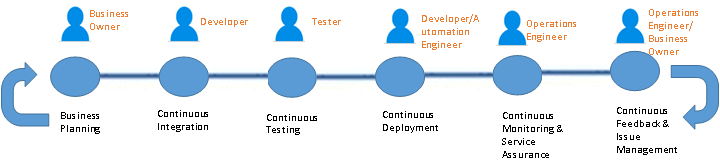
    A typical SDLC (Software Development Life cycle) DevOps looks like the following.

    Sunil's Blog 1

    Figure 1 – A Typical DevOps Pipeline

    The aforementioned actors in figure 1 may or may not actually be “people” since in a true DevOps world, those actors are replaced with some degree of automation. But it sets the context on what types of roles & responsibilities are expected in a typical pipeline.

    Now, imagine this pipeline that is multi-folds, across several application or components. This is the real nightmare of deployment and release management issues that one has to account for since in a hybrid model. Each of these applications/components may technically reside in a totally different environment developed and managed by totally separate groups with different service level agreements.

    A centralized DevOps platform, standardized across these application environment boundaries (for the most part) to provide a single pane of control over code, release and deployment management is what is required for a successful adoption of hybrid solutions.

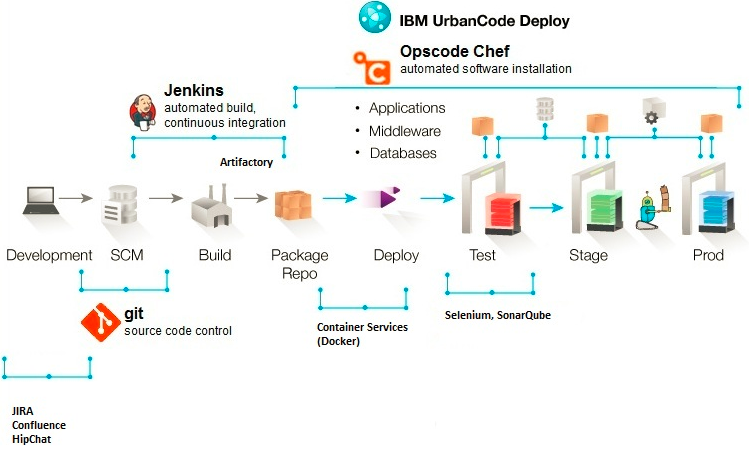
    Here is an indicative centralized architecture to solve the deployment and release management issue described above:

    Sunil's Blog 3

    Figure 2 – DevOps Platform Architecture Example

    The components listed in figure 2 is purely indicative and shouldn’t be misconstrued as any product marketing or messaging. The main challenge will be to standardize components to the extent possible (this is easier said than done) and stitch together a meaningful platform that works within an enterprise (based on existing tooling & processes, skills, funding etc.). Bear in mind I’m merely touching the surface in this article with regards to a DevOps platform, and limiting this to a tooling discussion. Bigger challenges do exist in the form of process and organizational transformation, which are also necessary to make a DevOps implementation successful. I’ll pen those topics in a separate article 🙂

    Summary

    DevOps for Hybrid cloud implementations will soon become the de facto model for process transformation in large enterprises. There is simply no other way to go about such large transformation in a purist way. There is a wide verity of use cases for a hybrid model, and most enterprise situations would fall under one or more of those categories. A robust DevOps platform is absolutely critical to making a Hybrid cloud adoption successful.


    About the Author/ Sunil Joshi

    Sunil JoshiSunil is an Executive Architect with IBM. He is currently the Application Development & Innovation (AD&I) DevOps offering owner for Global Business Services. He is IBM Senior Certified and Open group certified Distinguished Architect. His specialization are in the areas of hybrid cloud solutions, platform as a service and DevOps strategy. He’s created complex hybrid solutions on cloud and DevOps for large enterprises. Sunil has authored several IBM Redbooks, blogs and also a co-author of the IBM Cloud Computing Reference Architecture (CCRA).

    Sunil is passionate about international music, multi-cultural cuisine, active sports and mentoring school & college students on career path and technology.

    Contact Sunil on  linkedin twitter

  • Webinar: Build, test and deploy mobile apps with back-end mainframe services securely in a hybrid cloud

    Webinar: Build, test and deploy mobile apps with back-end mainframe services securely in a hybrid cloud

    You may already have a good understanding of the hybrid cloud and its benefits. But how do you get the value of the last three decades of investment in your backend infrastructure into the hands of your end users faster?

    In this webcast we will demonstrate how you can take advantage of the latest IBM technologies to quickly and easily incorporate your backend services into your mobile applications running on IBM Bluemix. We will also highlight the latest capabilities of IBM DevOps Services (IDS) and IBM Bluemix that support the end-to-end mobile development lifecycle.

    Join Kristal York, Executive Mobile Strategist, PointSource an IBM Business Partner and Rosalind Radcliffe, Distinguished Engineer, Chief Architect for CLM and DevOps as they take you on an in-depth tour of the IBM DevOps Services and Bluemix, an open-standard, cloud-based platform for building, managing and running mobile apps that connect with your back-end services securely.


    Recorded Thursday, June 25, 2015

    VIDEO

    SLIDES

    [seoslides embed_id=”2e765888697b” script_src=”https://devopsy.kinsta.cloud/embed-script/build-test-and-deploy-mobile-apps-with-back-end-mainframe-services-securely-in-a-hybrid-cloud/7999/” overview_src=”https://devopsy.kinsta.cloud/slides/build-test-and-deploy-mobile-apps-with-back-end-mainframe-services-securely-in-a-hybrid-cloud/” site_src=”https://devopsy.kinsta.cloud” site_title=”devopsy.kinsta.cloud” title=”Build, test and deploy mobile apps with back-end mainframe services securely in a hybrid cloud” /]


    Your Host:

    alan_new_head_shot Alan Shimel, Editor-in-Chief devopsy.kinsta.cloud, An often-cited personality in the security and technology community and a sought-after speaker at industry and government events, Alan has helped build several successful technology companies by combining a strong business background with a deep knowledge of technology.

    About Panelists:

    kelly-ibm-devops

    Kristal York, Executive Mobile Strategist, PointSource an IBM Business Partner

    Kristal joined PointSource in 2012 and has led teams in the financial, retail and insurance verticals. She excels at fostering a collaborative environment and leading others to solve complex business problems.  Kristal’s prior experience as a business analyst has helped as a mobile strategist to define and analyze our customer’s mobile moments. She translates those mobile moments into a mobile strategy across the organization’s business processes and systems.  Mobile demands an iterative approach so Kristal helps analyze strategic planning, usability, research, as well as consistent updating.  She uses her business analytics skills to help define adoption rates and sentiment analysis once the app is launched.  Previously, Kristal was at Cartus for 12 years, most recently Senior Business Analyst, Business Analytics and Mobile Product Owner.

    RosalindRosalind Radcliffe, Distinguished Engineer, Chief Architect for CLM and DevOps, Member of the Academy of Technology

    A Distinguished Engineer within the IBM organization, Rosalind is Chief Architect for CLM and DevOps. She is responsible for driving the DevOps for multi-platform architecture; this includes System z and Power system.