Tag: High availability

  • Site Reliability Engineering (SRE) Comes of Age in 2022

    Site Reliability Engineering (SRE) Comes of Age in 2022

    The site reliability engineer (SRE) role is still gathering steam across organizations. In January 2022, LinkedIn listed SRE as the 21st job with the highest global demand throughout the past five years. That’s pretty high for such a specific tech role. And, looking to the future, it appears the SRE practice will only continue to gain adoption as a method to support high availability, reliability and improved digital customer experiences. The SRE approach is also essential to meet service-level agreements (SLAs) and internal service-level objectives (SLOs).

    I recently met with Kurt Anderson, SRE architect, and Emily Arnott, content writer from Blameless to get their take on the top trends and predictions for the SRE practice in 2022. According to the Blameless team, 2022 will likely see increased adoption of the SRE role throughout companies and across internal departments.

    Just as manufacturing sets high standards for its quality assurance, digital applications now require the same high reliability to meet inflated user expectations. To address these new realities, SREs have their work cut out for them—they must confront how to unify disparate DevOps tools and must drill farther down to unearth specific user experience qualms—all without adding to alert fatigue.

    Increasing SRE Adoption

    As mentioned above, the SRE role has seen tremendous growth in recent years and doesn’t show signs of slowing. SRE as a practice was first popularized by Google in 2015. Today, they define it simply as “what happens when you ask a software engineer to solve an operational problem.” This equates to maintaining high levels of reliability for digital services by creating errors budgets, designing SLAs/SLOs and optimizing process automation over time.

    To Arnott, we’re still seeing SRE adoption take off at an exponential rate as more and more companies embrace Google’s SRE doctrine. “During the pandemic, more and more companies were forced to adopt a digital strategy. Reliability has to be fundamental to that strategy.” Arnott foresees SRE becoming a fruitful role at startups, which may initially have been intimidated by the prospect.

    “The practice of SRE is a scale issue,” Anderson explained. It can be difficult for time-pressed companies to enact an SRE program when their attention is already so divided. However, as new requirements force warp-speed innovation, we’re seeing greater DevOps adoption. And the SRE role, consequentially, is becoming more of an imperative.

    More Unification of Multi-Tool Condition

    Most DevOps professionals would agree—we live in a multi-tool world. For example, multi-cluster management concerns are bringing a plethora of new tools to the fold. And computing environments are just as diverse, often combining multiple clouds and composed of hybrid estates that house various clusters of microservices. Even within the same organizations, different teams may opt for differing DevOps tooling. Anderson believes that SREs can bring “more unification to a fractured DevOps adoption across a single company.”

    As companies adopt more software, there’s inevitably some degree of tool sprawl, Anderson said. For example, there may be competing methods to monitor the use of digital services. The platform team may be using Datadog, an app team may be using New Relic and another team may be using Prometheus. These tools don’t speak the same language and generate different logs, creating silos.

    For Arnott, the future involves accepting the innate complexity of the microservices era and using an agnostic layer that can receive data from anywhere to identify meaningful incidents.

    Observability Gets a Bigger UX Emphasis

    The SRE role is definitely a trend that has been growing and will continue to grow in importance, Anderson said. And as more organizations turn digital, it’s becoming necessary; with this shift comes enormous pressure to exceed user experience expectations. “Competition and people’s expectations are so high right now,” said Arnott. “If you are unreliable, it’s unacceptable these days.”

    Whereas DevOps focuses more on getting applications into production, SRE takes a more UX-focused approach. Take Netflix, for example, which has invested heavily in a core SRE team that ensures robust and reliable user-facing services. “A key underpinning to keeping our customers happy and streaming is a strong focus on reliability,” according to the Netflix Technology Blog.

    To cater to this new paradigm, teams will require a deeper understanding of observability based on particular cohorts of users, said Arnott. SREs require precise user experience contexts, such as an uptick of lags or increased error responses. But they also must discover the contributing factors behind these bugs. “SLOs and error budgets are like taking your temperature—they tell you if something is wrong. They don’t tell you why you have a fever.”

    SRE Takes Cues From Manufacturing

    As reliability becomes more and more central to a company’s brand presence, it’s only natural that something that important would be elevated into the executive suite, Anderson explained. As a reference example, he pointed to the fact that manufacturing industries often appoint a chief reliability officer. In traditional manufacturing, product lines undergo a statistical process control with rigorous testing to ensure quality. Analogous positions exist across industries, such as chief quality officers in financial services.

    The takeaway is that as reliability becomes more of defining competitive metric, tech companies may require a similarly high-level C-suite position to align on that idea and to direct teams to implement SRE practices. Of course, the necessity for such a title will entirely depend on organizational size and makeup.

    Greater Reliance on SLOs to Avoid Broken SLAs

    A service-level agreement (SLA) is typically a formal contract built around the reliability of a digital service with an external partner, which, if breached, may result in financial penalties or other forms of restitution. This agreement could exist between a software provider and an end user but is more strictly enforced in a B2B context.

    On the other hand, a service-level objective (SLO) is more of an internal target. SLOs are often set at a lower threshold than SLAs. For example, perhaps an SLA ensures a user login fails no more than 10 out of one million attempts, but the SLO is set at two out of one million.

    Setting internal SLOs helps keep engineers abreast of modest customer experience issues before they become a major incident that results in fines. “Some companies treat SLOs as just another alert; they should be representative of user experience,” said Anderson. It makes sense that as SRE initiatives begin to mature, companies will slowly start to adopt even more competitive goals to deliver superior user experiences and avoid unsatisfied partners.

    Final Thought: Don’t Play The Blame Game

    A big part of the SRE doctrine is the concept of blameless postmortems. Because when you’re in the middle of an incident, the worst thing to do is point fingers. “Blaming triggers a defense mechanism and when you’re in a defensive mode, you can’t respond well,” said Anderson.

    Instead, it’s better to keep an open mind when performing these retrospectives—accept that what occurred happened for a reason, and seek to discover that reason to make positive improvements. “What can we change at a systemic level to become more resilient?” inquires Arnott. “What is the origin of that mistake? What information was lacking? What communication should have happened to prevent this?”

    Typically, accidents don’t occur intentionally or due to incompetence but rather due to holes in the process. By not playing the blame game, companies are better positioned to fix issues as they progressively release new features. Then, hopefully, with the right SRE approach in place, teams can advance their digital services to meet the high stakes of today’s modern user experience expectations.

  • Business Continuity in the Azure Cloud: Understanding the Options

    Business Continuity in the Azure Cloud: Understanding the Options

    There are numerous ways to assure business continuity for applications running within the Azure cloud via various high availability and disaster recovery provisions. But, selecting the best and most cost-effective provisions for each and every application can be extraordinarily difficult owing to the myriad choices available. At best, making poor choices during development can waste money. At worst, a wrong choice can cause failover provisions to fail when needed during operation.

    All business continuity provisions involve hardware and software redundancy, data replication and some means of failover and failback. Purpose-built failover clustering software has long been among the most popular choices based on its proven dependability and cost-effectiveness. The clusters are relatively easy to deploy in an enterprise data center using shared storage. But with no shared storage available in the public cloud, configuring failover clusters in Azure becomes considerably more challenging.

    This article examines the options available for high availability (HA) and disaster recovery (DR) provisions within and for the Azure cloud. Special emphasis is given to SQL Server as a particularly popular application for Azure.

    Options Available Within the Azure Cloud

    The Azure cloud offers redundancy at three layers: within data centers, within regions and across multiple regions. Within data centers, Availability Sets are used to distribute redundant servers across different fault domains located in different racks, which protects against failures at the server and rack levels. This affords some protection for some failures, but provides no protection during a sitewide failure, such as the one that occurred in September 2018 in Azure’s South Central US Region. The 99.95 percent Service Level Agreement (SLA) only guarantees that in an Availability Set with two or more servers, at least one will have external connectivity, but it does nothing to assure availability at the application level.

    To protect against sitewide failures, Azure is now offering Availability Zones (AZs). Regions with AZs have at least three data centers interconnected via a high-bandwidth, low-latency network that supports synchronous replication. Azure offers a 99.99 percent SLA for AZs, but again, only guarantees at least one server will have external connectivity—nothing less and nothing more.

    For redundancy during major disasters, Azure offers Region Pairs, in which each region is paired with another in the same geography (e.g. United States or Europe). The regions are separated by at least 300 miles to protect against widespread disasters that might impact an entire region, including across multiple AZs. By pairing regions, Microsoft is able to apply updates one at a time to prevent the “update gone bad” scenario and will prioritize the recovery of at least one region in each pair during an Azurewide outage. But again, Azure only guarantees “dial tone” for the servers, leaving it to the customers to ensure availability at the application level.

    Options Available in OS and SQL Server Software

    Windows Server Failover Clustering (WSFC) is a standard operating system feature that is utilized by many applications to provide HA protection in enterprise data centers. However, WSFC requires some form of shared storage, which historically has not been available in any public cloud, including Azure’s.

    Microsoft addressed this problem in the Datacenter Edition of Windows Server 2016 by adding Storage Spaces Direct (S2D), a software-defined, virtual storage area network. But because the cluster must reside entirely within a single data center, S2D is incompatible with Availability Zones. Applications that require multisite HA/DR protection will, therefore, need to use third-party failover clustering software, log shipping or some other additional provision(s).

    With no equivalent to WSFC or S2D for Linux, HA/DR protection requires either the use of open source software, such as Pacemaker, or a third-party failover clustering solution. Because supporting open source software requires a substantial and ongoing commitment, only the largest organizations have the wherewithal to even consider this do-it-yourself option.

    SQL Server, whether for Windows or Linux, offers two of its own HA/DR features: Failover Cluster Instances and Always On Availability Groups. FCIs afford two major advantages: inclusion in the Standard Edition; and protection for the entire SQL Server instance, including system databases. A notable disadvantage is the need for cluster-aware shared storage, including the virtual variety with S2D, which is only supported for SQL Server 2016 and later.

    Always On Availability Groups is SQL Server’s more robust HA/DR offering, capable of delivering recovery times of 5-10 seconds and recovery points of seconds or less. Its disadvantages include the lack of protection for the entire SQL instance and the need to license the more expensive Enterprise Edition, which can be cost-prohibitive for many applications.

    A significant disadvantage with all application-specific options is the need for DevOps staff to use different HA and/or DR solutions for different applications. Having multiple HA/DR solutions inevitably increases complexity and costs, making this another reason why application-agnostic third-party solutions are so popular.

    The Third-party Failover Clustering Software Option

    Being agnostic with respect to both applications and platforms enables purpose-built failover clustering software to provide a complete HA/DR solution for virtually all Windows and Linux applications. Application-agnosticism eliminates the need to have different HA/DR solutions for different applications. Platform-agnosticism makes it possible to leverage, while not being dependent upon, various capabilities and services within the Azure cloud, making this option suitable for use in private, public and hybrid cloud environments.

    Failover clustering solutions include, at a minimum, real-time data replication, continuous monitoring for detecting failures at the application level and configurable policies for failover/failback. All are designed to satisfy mission-critical recovery time and recovery point objectives, and most also offer a variety of value-added capabilities to simplify implementation and management.

    Clustering with Confidence

    Whether used individually or in various combinations, all of these options can have a role to play in making HA and DR protections more effective and more affordable for all applications—from those that can tolerate some downtime, to those that demand five 9s of uptime. But be sure that the options chosen afford protection at the application level for all likely failure scenarios.

    — Dave Bermingham

  • Hosting Scalable WordPress on AWS

    Hosting Scalable WordPress on AWS

    Do you own or manage a WordPress site? Is it complex, with a lot of traffic? I’m going to show you the ideal architecture to host a highly available and scalable WordPress site on AWS.

    This blog is intended to show a distributed architecture in AWS for WordPress CMS websites. You will be able to identify the different layers of services needed to run a high-traffic WordPress site.

    The Concepts of a Highly Scalable and Available Environment

    Let’s start by looking at what a highly scalable and available environment means—and what it includes:

    High Availability: On IT it means that a system can operate without any service disruption or interruption for a long time, as well as a system that has redundant components. (In our case, the redundant Infrastructure will be our high availability — thanks, AWS, for making this easier!)

    Distributed Services — Loose Coupling: The art of distributing different components of a system in the same network. We will be doing this to leverage the load of any resource and have dedicated hosts for a service.

    Scalability: A system’s ability to monitor the user demand and automatically increase or decrease resources. This scalability will be provided by the following AWS Resources: AWS ELB, AWS EC2, AWS S3, AWS RDS.

    One essential part of innovation is always to stay up to date and implement the best technology available.

    First Things First

    If you are planning to follow this blog, it is because you are looking to migrate to Amazon Web Services or you already have an environment or some resources allocated there.

    If you are already on AWS, we have also compiled a very concise checklist, which is available here.

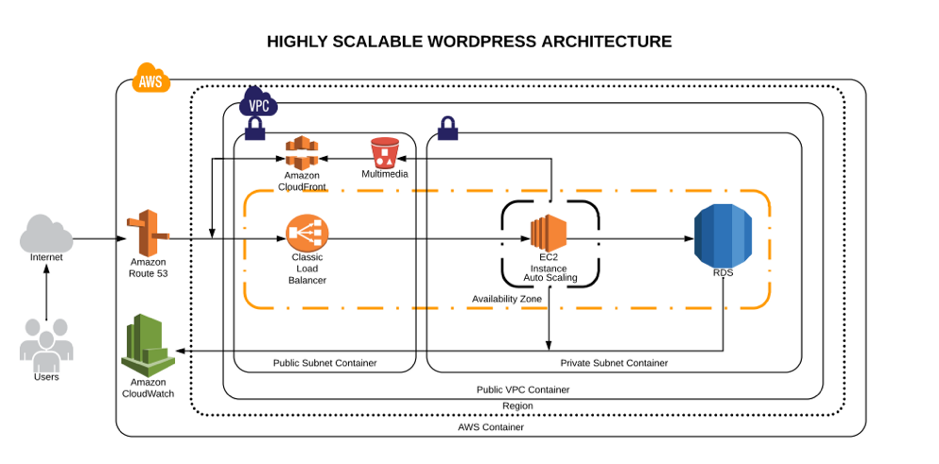
    Architecture Diagram

    High scalable and available WordPress environment on AWS Cloud

    AWS Services Explained

    1. Route53: This service will help us to manage all the upcoming requests (traffic) for our domain. AWS Route53 will also be the DNS manager, so here we will point our domain registrar to be the manager. Once it has been migrated here, we can add the A records, Cnames or TXT records and many other more.
    2. AWS VPC: The AWS VPC is a service that allows us to have a private network in which we will allocate our cloud computing resources. That means nobody has access to it—only ourselves.
    3. AWS Private Subnet: The private subnet is the subnet in which we are going to deploy the resources we don’t want outsiders to have access to. In this case, our database will be only accessible by the application.
    4. AWS Public Subnet: The public subnet is the subnet in which we are going to deploy the resources we want to make public — such as the server for our website.
    5. AWS S3: Amazon Simple Storage Service will be our content storage solution. Here, our WordPress installation(s) will have the content available whenever it scales up or off.
    6. AWS CloudFront: CloudFront combined with S3 will help us to spread the content faster to the end users. This way our WordPress multimedia content will be spread all over the AWS CDN network (edge locations), which will be used from our application to reduce the latency. Users will be served by the closest edge location available. So faster content = faster site.
    7. AWS Load Balancer: Here is the tricky part. The AWS ELB will allow us to distribute the traffic load between our instances available or in use depending on how the auto scaling is set.
    8. AWS EC2: Instances—also called “VMs”—the service on AWS for acquiring computing power. AWS EC2 will allow us to host our WordPress site and files we need.
    9. AWS Autoscaling: This will be the solution for our highly available and scalable WordPress site. AWS Autoscaling will take care of always having a minimum quantity of instances available for the public, and in case something goes wrong, it will replace the instance with a healthy one. This way our site will always be available. Autoscaling will also benefit our WordPress by creating instances based on the traffic demand and will help us to save costs while the traffic is low.
    10. AWS RDS and Multi A-Z: RDS will be the service in which we will host our WordPress database. The service is completely free and fully managed by AWS, which means we won’t need to worry about the database management anymore. Also useful is that RDS instances can have replication between them, which adds even more scalability. Also, enabling the Multi-Availability Zone (Multi A-Z) feature will provide us high availability. Keep an eye on this, however, since the price will is double for the RDS.
    11. AWS Cloudwatch: AWS Cloudwatch will be our trusted supervisor. Cloudwatch will be in charge of monitoring all the resources in our AWS account. It will keep an eye on the metrics that are predefined or as default by AWS resources, such as CPU usage, memory usage, disk IO and networking.

    Did I forget about EFS? Nope. In my experience, EFS has not been a huge help when it comes to sharing the WordPress files only. However, you can try using EFS; that way, the content will be replicated much faster and easier.

    If you want to learn more about the technologies and the approach that should be taken to create this kind of environments, take a look at this post.

    Millions of Page Views Served

    Here’s how this environment will be able to serve millions of page views/visitors:

    Traffic Flow

    Once visitors hit your domain on their browser their request is passed to the internet, then routed to your DNS manager. The DNS manager (Route53) will solve the request to the specified server and the web server then will serve the application.

    WordPress High Performance

    What will happen when your traffic increases? Here is an example:

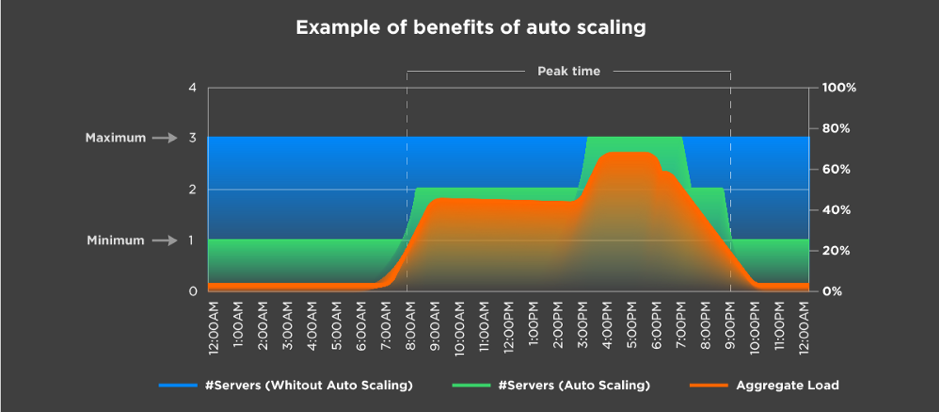
    Autoscaling example

    Let’s say you have set the autoscaling to one as the minimum number of instances and a maximum number of three instances. Based on different metrics, your environment will be able to scale out depending on the load it receives.

    In the image above, we can see that depending on the aggregate load, the environment continues to satisfy the demand by creating more instances as it grows. The same happens the other way.

    This means a lot when you are calculating the TCO of your cloud environment. It also means you won’t run out of memory or other resources; instead, you will have a more available system.

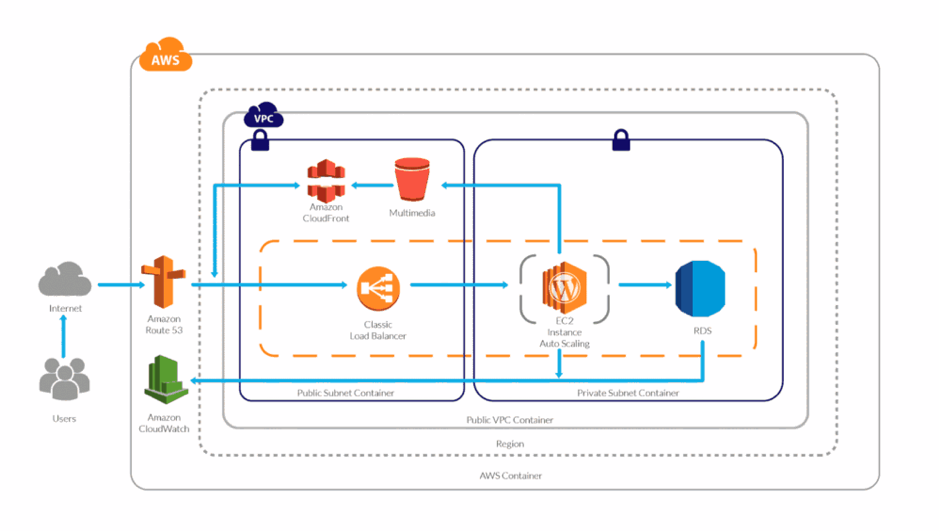
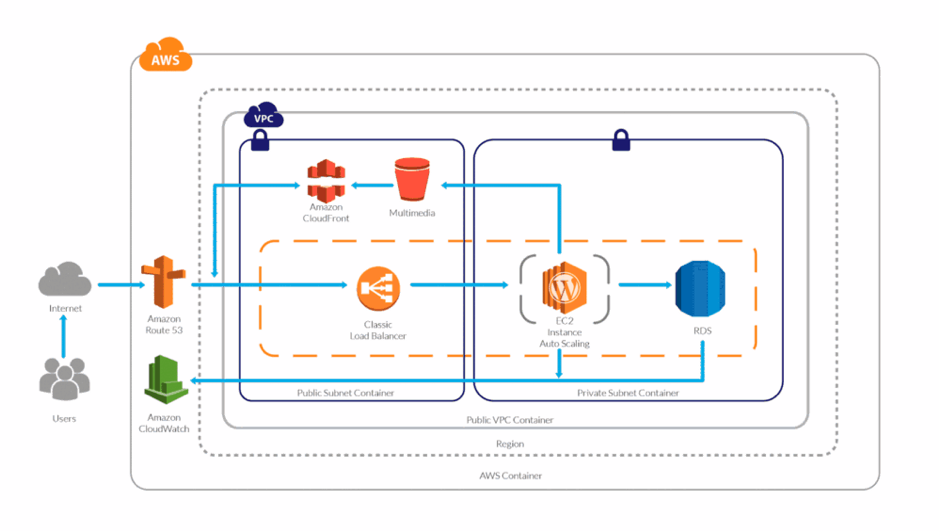
    And you might be wondering, What is going to happen to my AWS Resources? Here’s a visual:

    WordPress High Performance Scaling

    The answer is simple: More demand or traffic, more servers to meet it.

    Server Caching/WordPress Caching

    Server-side caching or WordPress-side caching happens with a plugin or is embedded in AH host. Whenever someone requests the homepage, for example, the request is passed to the database to retrieve the homepage information. Caching creates a temporary file (I say temporary, because you can specify the expiration) so when your request comes, it will check for the files it generates instead of processing the request to the database.

    This way, we can serve faster pages/content to our users and reduce the database consumption.

    If you yet don’t have a caching system implemented, make sure you do from now on, as it speeds up your website dramatically.

    Content Delivery Network

    In a few words,  the content delivery network (CDN) the network of servers or services in which your content will be hosted and this network will be used to transfer the content to all the visitors. Using a CDN will help you to spread your content around the world faster than having it hosted on your server.

    CPU/Memory Performance

    Based on the CPU and memory metrics, our stack will be able to scale up or scale in as desired. This way our response time will always be the same between all the servers and no instance will experience overload due to CPU or memory (these are the annoying 500’s errors).

    Instance Types

    On AWS we have different instance types that we can use depending on the workload we have. It’s important to choose the right instance type.

    AWS instance types


    If you don’t know which to use, read this blog.

    Definitely using the correct instance type for our WordPress will help, as well as selecting the number of resources for it to run.

    And there you have it —you now know how your site can support millions of page views with a distributed system.

    Backup and Disaster Recovery

    It is essential to have a backup strategy as well as a disaster recovery solution in case something happens to our WordPress installation or our environment. Luckily, AWS offers a lot of redundancy between all its services.

    There are different ways in which we can protect our application and users’ data:

    1. WordPress plugins to back up the site (S3).
    2. Disaster recovery for infrastructure (physical).
    3. Backup for user data (DB — RDS).
    4. Backup for application code.

    Amazon Web Services already provides different backup solutions for all its services, so we can create backups for the RDS with one click and perform the configurations for backups with EC2.

    Pro Tips

    1. To increase the performance use a database, query and page caching plugin.
    2. Increase the RDS performance with a dedicated Aurora RDS.
    3. Use S3 and CloudFront to deliver the content faster.
    4. Enable alarms on AWS Cloudwatch.
    5. Enable the billing alarm to avoid unwanted charges for usage.
    6. Use Reserved Instances—if you are going to stay in AWS for a long time reserve, it can save you up to 30 percent.
    7. Use a version control system to track your changes and deploy to the instances.

    Conclusion

    This article outlines what I consider an ideal architecture for a high-performance/high-traffic WordPress site. As you can see, Amazon provides us with all the tools and technologies to do it, but sometimes it can be challenging.

    As always, if you think I missed anything, please post it in the comments!

    If you would like to get more techie blogs, subscribe to our newsletter.

    — Guillermo Vélez

  • In Determining DevOps issues, Sometimes It’s the Process

    In Determining DevOps issues, Sometimes It’s the Process

    It is pretty much standard DevOps process that when a server instance starts having problems, you simply kill it and start another. This is in line with the idea that servers are cattle and there isn’t a ton of difference between them.

    But it creates a problem that no amount of CI/CD or automated provisioning can overcome. That’s the blindness problem. CI and CD miss some bugs, simply because of the wild variations possible in inputs when humans are involved, or unique issues of hardware or platform that DevOps tries to ignore as much as possible. While our tooling cannot be so over-arching that we have data points on everything, and we can track down problems to the routine that is causing them, a service degrading performance or outright crashing is indicative of one of those blind spots.

    If you’ve been in a highly dynamic DevOps environment, you know this is no simple problem. But it is one we have to resolve, because killing and restarting is simply masking a problem. Indeed, it is this very process that turned Cloudbleed from a simple and understandable programmer error into front page news. They knew their servers would occasionally have memory over-runs, even crashing on occasion; they would just spawn another instance and keep moving along. The ability to create another so easily reduced their desire/need to fix the underlying problem. But the problem was bigger than they knew.

    The problem we face is, of course, how much time and work is invested in monitoring, and how do we know what’s really important. This problem gets worse when you have an instance that stops responding, or starts hogging resources. Getting it offline is imperative, but re-creating the issues that caused it to go off the rails may not be so easy. In fact, often it is not at all easy.

    Long term, we need a way to pick up the exact problem area, create a bug report and get it back into the Dev/CI/CD system that is reliable. Short term, don’t ignore errors in production unless you know exactly what is going wrong.

    Sure, it’s easy to kill and/or restart an instance to “recover” from an error. It’s easy to chuck your app on the public internet without any security, too. Just because it’s easy doesn’t make it a good idea.

    So watch those logs, don’t mask problems and stay on top of it all, even if the complexity sometimes has you reeling a bit. Because application reliability might be impacted—and application availability is, in the end, the whole point.

    — Don Macvittie

  • DevOps answers to high availability

    DevOps answers to high availability

    Everyone want’s their application SLA to be 99.99999%. However with some applications it is not a desire, it is mandatory. The Consequences of failure in mission critical applications are drastic. And with commercial applications damaging, it is reputation, and internal support costs.

    (more…)