Tag: GIT

  • Should You Migrate to Git? Part 1

    Should You Migrate to Git? Part 1

    There are many factors to consider when making the decision whether to migrate your source code. Is it appropriate for the project? Will it work? How might it impact the quality and performance of the finished product?

    Git can help make the decision easier. Git is an open source version control system for tracking changes in computer files and coordinating work on those files among multiple people (Wikipedia’s definition, not mine).

    Git is gaining in popularity and many industries are now moving to it for a number of reasons. For one, Git’s design and performance are remarkably good among all distributed version control system (DVCS) tools. Also, Git can move work quickly between servers without losing history.

    Git has a wide variety of plug-ins for IDEs, and it also comes equipped with a wide variety of tools to help users navigate the history system. Each occurrence of the source contains the complete history tree, which can be useful when developing without an internet connection.

    Plus, Git was created by Linus Torvalds, who also created Linux, which gives it a certain caché.


    Related Content:

    5 Open Source SIEM Tools Worth Checking Out

    Configuration Files and DevOps


    Git’s popularity has been bolstered by killer apps and services such as GitHub, and some very popular projects used it, which further increased its visibility.

    Git nowadays is very popular, but it is recommended companies don’t migrate tools so frequently. Also, there are challenges in  pre-migration and post migration worth considering.

    Distributed revision control uses a peer-to-peer model rather than using a centralized server to store code updates. While a peer-to-peer model would work better for global, open source projects, it may not be ideal in other situations. The downside to a dedicated server approach is that when the server is down, no clients are able to access the code.

    Pros:

    • Great for those who hate centralized version control system (CVCS)
    • Dramatic increase in operation speed
    • Full history tree available offline
    • Distributed, peer-to-peer model
    • Cheap branch operations
    • Attracting lot to non-technical due its open source features (Git is GPLv2)

    Cons:

    • Learning curve for those used to SVN
    • Not optimal for single developers

    Companies That Have Migrated

    Many of today’s new enterprise technologies are centered around free, “open source” technology. As a result, many big companies, from financial giants to retailers to services firms, prefer open source platforms. With the introduction of GitHub many companies have migrated their code base to Git.

    The most popular open source project serves as a “version-control system” for tracking changes and coordinating work between software developers.

    Some very well-known names use Git, including:

      • AWS
      • Reddit
      • Twitter
      • PayPal
      • LinkedIn
      • Gnome
      • Adobe
      • HubSpot
      • Mozilla
      • DropBox

    Terminology

    Git has it own terminology that users, or those considering using it, should become familiar with. Here are some terms worth knowing:

    • Master – the repository’s main branch. Depending on the workflow, it is the one people work on or the one where the integration happens.
    • Clone – copies an existing Git repository, normally from some remote location to your local environment.
    • Commit – posting files to the repository (the local one); in other VCSes it is often referred to as “check-in.”
    • Fetch or pull – Also known as “update” or “get latest” in other VCSes. The variance between fetch and pull is that pull combines both fetching the latest code from a remote repo and performing the merging.
    • Push –  submitting the code to a remote repository.
    • Remote – these are “remote” locations of your repository, normally on some central server.
    • SHA – every commit or node in the Git tree is known by a unique SHA key. You can use them in various commands to manipulate a specific node.
    • head – a reference to the node to which our working space of the repository currently points.
    • branch – similar to other VCSes; however, a branch in Git is actually nothing more special than a particular label on a given node. It is not a physical copy of the files as in other popular VCSes.

    — Amit Anan

  • Feature Branching vs. Feature Flags: What’s the Right Tool for the Job?

    Feature Branching vs. Feature Flags: What’s the Right Tool for the Job?

    A dev team’s branch management strategy can have a significant impact on the rate at which it can release high-quality software. In this article we’ll explore the pros and cons of several different approaches for enabling multiple concurrent streams of dev work in the same codebase. We’ll see that two major factors—the cost of merge conflicts and the ability to release streams of work independently—are often in tension, but that Feature Flags provide a way to resolve that tension.

    Merge Conflicts

    New products start off as a small codebase, usually only being worked on by a handful of developers. This situation doesn’t call for much formal process. However, even when a team consists of just two devs, it’s still preferable to avoid working on the same files at the same time to avoid merge conflicts.

    Unfortunately, even when we’re trying to avoid stepping on each other’s toes, it’s still pretty common for work streams that seem unrelated to end up touching the same files. Sometimes it’s these unexpected merge conflicts that can cause the most pain—any iOS developer who’s been around the block a few times probably has acquired some scar tissue from an epic three-way XIB merge in their past. In this article we’ll explore some different ways to deal with the challenge of merge conflicts when multiple developers are working on the same codebase.

    Some people might argue that merge conflicts aren’t that big a deal these days and mostly are solved if you just use modern tools such as Git. This is unfortunately not true. Git certainly makes creating branches trivial, but it does not always make merging parallel changes within those branches trivial. It has some powerful features to automatically merge changes when possible. These automatic merge heuristics can feel almost magical at times, but they are not actually magical. If you make parallel changes that affect a large XML file—for example, a XIB or an IDE project file—Git likely will not be able to merge those without human assistance.

    Most importantly, Git cannot automatically resolve semantic conflicts. For example, imagine that in one branch Alice renames a method and in another branch Bob adds a new usage of that method. When those two branches are merged, Git will do nothing to help resolve the fact that Bob’s branch is calling a method using the old name. Bob’s code is calling a method that no longer exists. In fact, Git will not give Alice or Bob any clue that there is a conflict, since these semantic conflicts aren’t detectable by our current set of tools.

    We’ll only find semantic conflicts when we try to compile our merged codebase, and even then only a subset of them. If the codebase is in a dynamically typed language such as javascript, we might not find out until our users start reporting app crashes in production.

    Beyond the productivity hit of having to manually resolve these inevitable merge conflicts, the spectre of introducing a conflict can have a more pernicious, long-term effect on a codebase. A developer who sees an opportunity to incrementally improve the quality of the codebase is slightly disincentivized to do so if they sense that it could lead to a merge conflict.

    The calculus for whether the effort of making a small improvement is worth the investment gets shifted as the cost of that change becomes higher. This introduces a subtle drag working against the internal quality of a codebase over time. What’s more, the type of small but broad refactorings that can gradually improve a codebase—or stop it gradually degrading—are exactly the type of changes that often lead to a merge conflict. In my opinion, this is the true hidden cost of branch-based development—it disincentivizes the sort of “boy scout rule” improvements that can prevent areas of a codebase from gradually degrading into no-go zones.

    So, having established that merge conflicts are a Bad Thing, let’s look at how we might avoid them.

    Working Directly on Master

    A small team starting out on a new app might initially try to mitigate the risk of a big unexpected merge conflict by having all devs push frequently to a shared master branch—one of the central tenets of continuous integration. When everyone is frequently synchronizing their changes in a shared master branch, an unexpected merge conflict is revealed earlier and is easier to deal with.
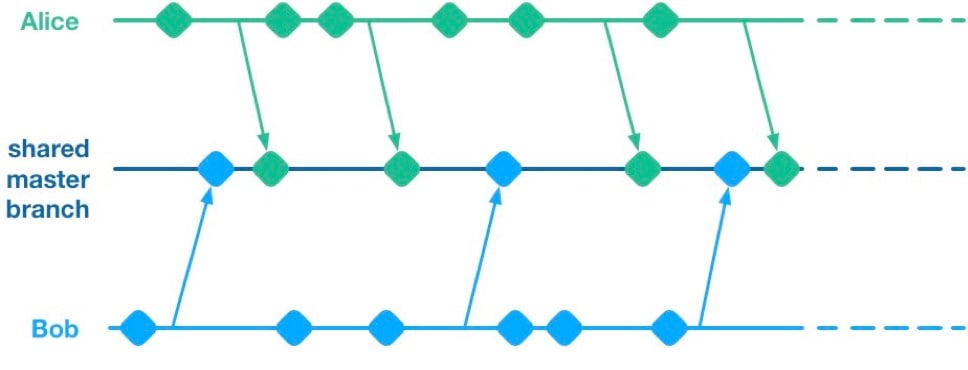
    Unfortunately, having multiple streams of work landing on a shared master branch comes with a big drawback: If any of the streams of work are not ready for release, then nothing on the shared branch can be released. Let’s see why using a hypothetical example.

    Alice and Bob are a two-dev team working on a mobile app. They have two streams of work in progress. Bob is working on a big overhaul of how user preferences work, while Alice is finishing off a critical new feature for the app which the big bosses have decreed must be pushed to the app store by the end of the week. This team is trying to avoid big merge conflicts by frequently pushing their code changes to a shared master branch as they go.

    On Thursday, Alice is wrapping up her changes and doing some testing. While giving the app a general run-through she notices that the user preferences section is crashing. She asks Bob if he knows why. Bob explains that he’s in the middle of overhauling that area of the code. It’s taken a little longer than he expected and it might be buggy for a while. Alice gives Bob a look. She explains to him that her feature has to get to the app store this week. Bob gulps. Over the course of two long days Bob and Alice are able to roll back Bob’s changes, some of which had gotten tangled up with changes that Alice had been making as part of her new feature. They manage to ship to the app store by Saturday, and a crisis is averted.

    We see here that because Alice and Bob were both committing to a shared branch, their independent streams of work became entangled. Alice could not release her changes without Bob’s and vice versa. This is the huge drawback of working on a shared branch—although we will discover later on that there are ways to mitigate this.

    Feature Branches

    To avoid this issue of coupled work streams, dev teams very often will move away from pushing in-progress code onto a shared branch. Some teams will opt to continue working on master on their local machines but only push to the team’s shared repo once the work is complete. Other teams will opt to use Feature Branches, maintaining separate streams of work on isolated branches and only merging them into master once they’re complete.

    As an aside, it’s interesting to note that when using a distributed source control system like Git, these two approaches are essentially equivalent; the only difference is whether the unmerged in-progress changes are visible in a remote feature branch or hidden on a dev’s local master. As such, I’ll talk about both variants as Feature Branching.
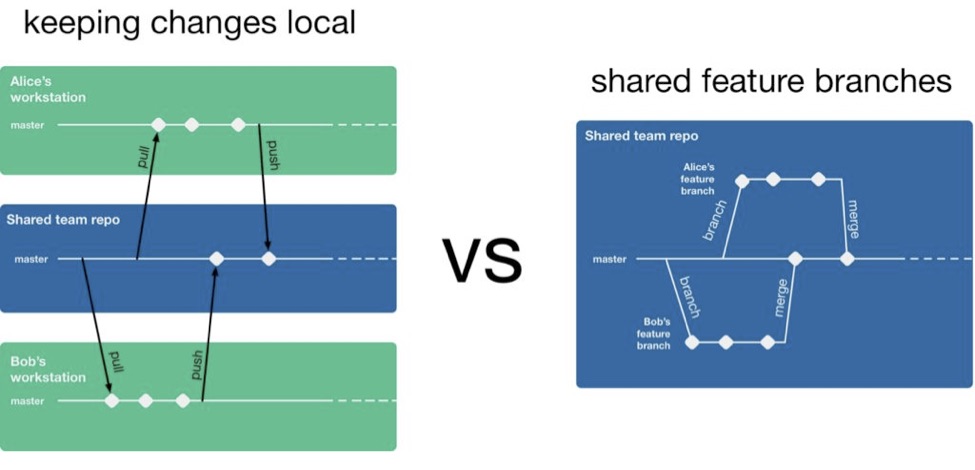
    So, if a team is using feature branching, then all their problems are solved, right? Unfortunately not. We’ve now re-introduced the risk of painful merges. Work that is being done on a feature branch is not integrated with other changes until it is merged to a shared master branch. Whenever two streams of work both touch the same files, either inadvertently or intentionally, there is a latent merge conflict which continues to grow in size until one of those stream’s branch lands on master. Some teams will try to mitigate this issue by frequently merging changes from master back into in-flight feature branches.
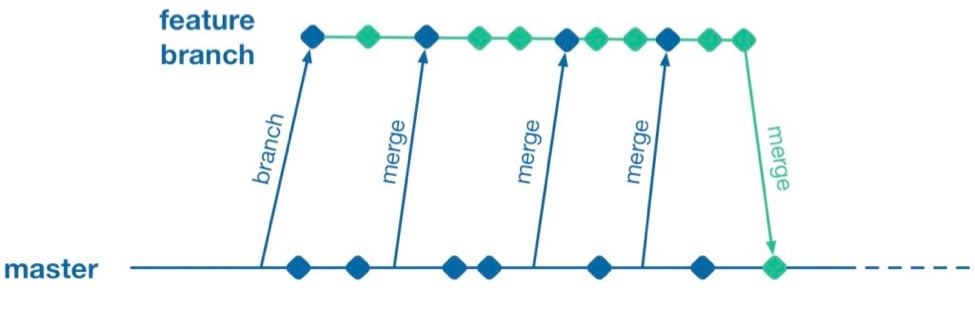
    However, this does not help when parallel changes are occurring on isolated branches. Alice’s branch will only see Bob’s changes when his feature branch lands on master. The latent merge conflict between these parallel changes is now waiting for Alice the next time she merges from master.
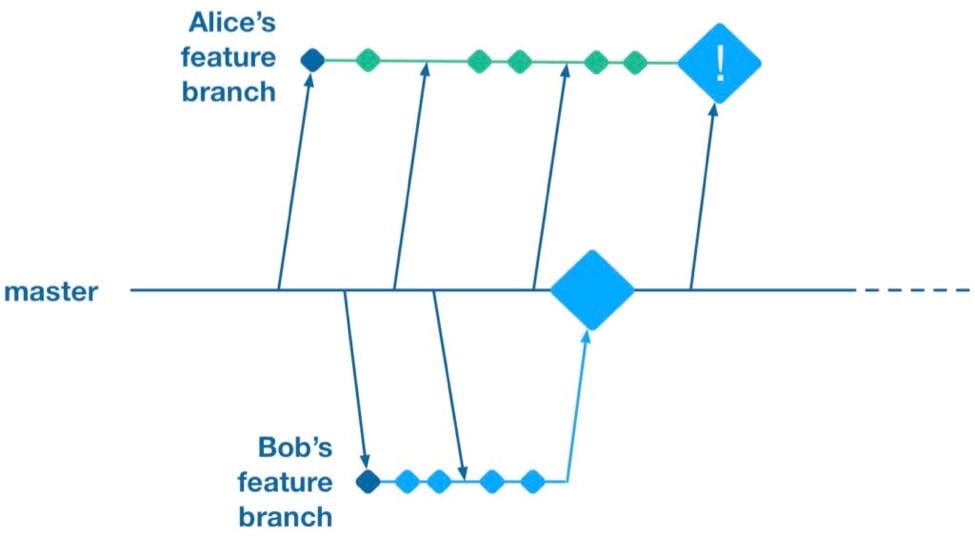
    (Thanks to Martin Fowler’s feature branch writeup for inspiring the above illustration)

    Some teams attempt to solve this problem by “cross-merging”—pulling work on one feature branch across into another feature branch to break down the size of latent merge conflicts between those branches.
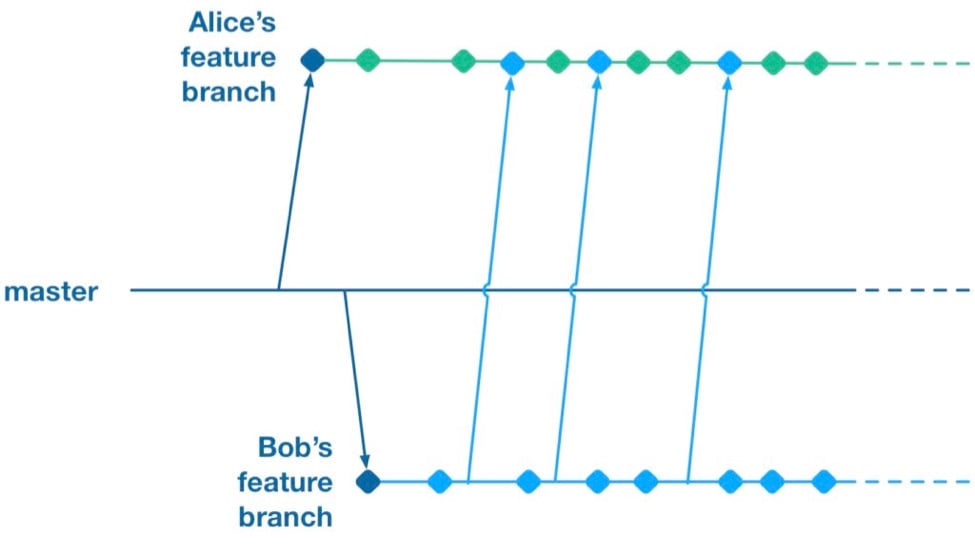
    However, as soon as you merge two feature branches together you’ve essentially created a shared branch of in-progress work, and are back to the same problem as teams who are pushing in-progress changes to a shared master: Code changes from both work streams are now intermingled. Your features are now coupled together and cannot be released independently.

    To summarize, feature branches allow teams to decouple streams of work such that they can be released independently. However, they introduce a risk of large merge conflicts when parallel feature branches contain large sets of changes. Remerging from master into feature branches only helps once parallel work has already landed, and cross-merging between branches couples features together in the same way as working on a shared master.

    Feature Flags

    What alternative does a team have if they want to avoid the merge conflict risks Feature Branches introduce? They could go back to frequently integrating changes on trunk, but we established that this has the major drawback that formerly independent streams of work are now coupled together and cannot be released independently. This is where a technique called feature flags (aka feature toggle, bits or flippers) can help.

    A feature flag is a way to isolate work-in-progress code by placing it behind a “flag” or “toggle.” The work-in-progress code will only be exercised if the flag is flipped on. Otherwise, it will sit within the codebase as “latent code.” Here’s a sketch of how a basic feature flag might be used:

    if( featureFlags.isOn(“my-new-feature”) ){
    showNewFeatureInUI();
    }

    Unless the my-new-feature flag has been configured as “on,” the new feature will not be exposed within the app’s UI. This means the app can be released even if the code implementing new feature is totally bug-ridden, as long as that feature’s flag is flipped off.

    By using feature flags, in-progress changes can be pushed into a shared branch without blocking release from that branch. If Bob is halfway through his feature and Alice wants to push a release of her feature, the team can do that by creating a release where Alice’s completed feature is flipped on while Bob’s half-finished feature is flipped off. We get the benefit of continuous integration of developer work streams (reduced risk from merge conflicts) while still keeping release of those work streams decoupled.

    This technique is not particularly new. It is part of a family of techniques sometimes referred to as trunk-based development (you can tell the technique is not new because the name uses trunk rather than the mastermoniker, which is more common today due to git’s predominance). Flickr, Etsy, Github and Facebook are some better-known proponents of the technique. Facebook’s use of feature flags is one of the key enablers for its famous ability to deploy facebook.com from a shared branch twice daily.

    Drawbacks of Feature Flags

    As with the other approaches discussed so far, feature flags have their share of drawbacks. They introduce a fair amount of noise into a codebase as we now need to explicitly implement some sort of branching logic for any incomplete feature. This noise can lead to some messy code over time unless care is taken to retire old feature flags once they are no longer necessary. Testers can take a while to get comfortable with feature-flagged apps—the idea of shipping unfinished, untested code to the app store takes a while to get used to. If the flags can be controlled remotely at run time, then teams need to understand that the new configuration of flags must be tested before being applied to apps deployed to end users.

    Finally, certain types of changes are particularly hard to protect via feature flags—broad but shallow changes that touch a lot of files can be a challenge. Happily, feature flagging is not an all-or-nothing approach; feature branches can still be used for a change that would be particularly fiddly to implement behind a flag.

    Succeeding with Feature Flags

    When a team starts to adopt feature flagging they will usually run afoul of some of the challenges discussed above, and eventually figure out ways to mitigate them. Here are some of those techniques for working successfully in a feature-flagged codebase.

    Expire Your Flags

    A lot of teams get a bit flag-happy when they first start using the approach. They tend to introduce a lot of flags, but not take the time to retire the flags once they not longer need to control whether a feature is on or off. Make sure to take the time to retire old flags—they introduce design drag in your codebase and confusion when managing flags. Some teams take quite aggressive approaches ensure old flags are expired, such as setting “timebombs” when they create a flag, or having it throw an exception if it’s still in use after a certain period of time. Other techniques include adding a flag removal task to the team’s backlog at the time the flag is created as a reminder.

    Flags Aren’t a Silver Bullet

    It doesn’t always make sense to use a feature flag for a new stream of work. Flags lend themselves best to a new feature or alternative feature where access to the feature can be controlled from a single point in the code—often by showing or hiding a button or changing what happens when you tap some part of the UI. Other types of work, such as internal refactoring, is hard to protect behind a flag. For that type of work, consider using a feature branch, ideally breaking the work down into smaller chunks that can be implemented incrementally in a series of branches rather than one long-lived branch. This will reduce the risk of a large merge conflict growing over time.

    Summary

    Feature flagging and feature branches are both ways to decouple parallel code changes and allow teams to release changes with less coordination overhead. Feature branches are easy to get started with, but can lead to painful merge conflicts. This risk of merge conflicts tends to disincentivize making incremental improvements to a codebase, and can lead to areas of the codebase becoming “no go” zones. Feature flags allow teams to practice true continuous integration and totally decouple code changes from feature release, at the cost of some complexity in implementing each flag.

    Feature flags are not a silver bullet and aren’t always the right choice, but it’s easy for a team to experiment with the approach. You can get started simply with a single hard-coded if/else statement, see how it goes and take it from there.

    About the Author / Pete Hodgson

    Pete Hodgson is a consultant to Rollout.io, a software engineer and an architect. His clients range from early-stage San Francisco startups to Fortune 50 enterprises, focused on enabling continuous delivery of software at a sustainable pace via practices like test automation, feature flags, trunk-based development and DevOps. Pete is a frequent podcast panelist, regular conference speaker in the US and Europe, and a contributing author.


  • Git: One Giant Leap Toward DevOps

    Git: One Giant Leap Toward DevOps

    If you work in an organization that has not yet embraced DevOps, then you might be wondering where to begin. Fortunately, there are many good answers. But I want to introduce one simple starting point that you probably haven’t heard: introducing Git to operations. By itself, Git might not seem like a meaningful way to overcome the barriers between dev and ops. Yet, Git provides some capabilities that mark the difference between the lowest performing IT organizations and the highest. And the difference in IT performance can translate into substantial business benefits. The highest performing IT organizations have noticed the following benefits:

    • They are about twice as likely to exceed profitability, market share and productivity goals.
    • Their employees reported far higher levels of job satisfaction.
    • They realize 50 percent higher market capitalization growth over a three-year period.

    To be clear, no amount of data will ever prove that use of Git leads directly to growth, profit, productivity and job satisfaction. What the Puppet Labs’ “State of DevOps Survey” does show is the incredible range between low and high performance in IT organizations. The rate of deployment has hovered at 30 times faster for high-performing organizations over the lowest. The 2014 survey showed 50 percent fewer deployment failures, while 2015 showed 60 percent fewer deployment failures, when comparing highest to lowest. The survey also indicates which practices separate the highest performers from the lowest. According to the State of DevOps Survey, the top two indicators of high performance are:

    • Version control of all production artifacts (surprisingly, a far greater predictor of performance than version control of source code); and
    • Peer review of production changes (in contrast to external change approval).

    It’s not that these two practices magically yield business benefits. Indeed, ITIL has long recognized management of production artifacts and review of production changes as best practices. But too many organizations still believe faster deployment and higher reliability are trade-offs. What is “magical” in high-performing organizations is they realize they can have both faster deployment and higher reliability by collaborating across organizational boundaries and automating intelligently. That means dev and ops sharing goals, measurements and tools. So one way in which these practices differ from typical ITIL practices is how dev and ops perform them collaboratively. More specifically, when dev and ops use the same tool for version control, they can better share techniques and workflows. For example, the peer review of changes can include both dev and ops. Thus, Git is a gateway to DevOps.

    Git has long provided those two capabilities for software developers: Developers use Git to version source code and developers use pull requests to perform peer review of source code. With a few tips about how to apply Git to configuration files, operations can use pull requests to perform peer review of configuration changes. Now with git-lfs, operations can also version production artifacts, which often are large, binary files that historically have not worked well with Git. More advanced concepts such as infrastructure as code and dedicated binary repositories, for example, build on version control, so even if the role of Git changes over time, the skills and collaborations remain valuable.

    In summary, the business case of Git for Ops is simple. The Puppet Labs survey shows meaningful upside for low performing IT organizations to become high performing. The survey shows high performing organizations are characterized by both rapid deployment and high reliability, not picking one over the other. Two practices that characterize high performing IT organizations are version control of production artifacts and peer review of changes. Git is now well-positioned to provide both capabilities. If you’re ready to start introducing operations to Git, don’t forget that Bitbucket has no limits to the number of private repositories.


    About the Author/Ian Buchanan

    ianWhile Ian Buchanan has broad and deep experience with both Java and .NET, he is best known as a champion of agile methods in large enterprises. He is currently the Developer Partisan for Developer Tools at Atlassian, where he focuses on the emerging DevOps culture and the application of Bitbucket and Bamboo for better continuous integration and continuous delivery. During his career, he has successfully managed enterprise software development tools in all phases of their life cycle, from cradle to grave. He has driven organization-wide process improvement with results of greater productivity, higher quality and improved customer satisfaction. He has built multinational agile teams that value self-direction and self-organization. When not speaking or coding, you are likely to find Ian indulging his passions in parsers, meta-programming and domain-specific languages.

  • What If We Had Git for DevOps?

    What If We Had Git for DevOps?

    I used to hate Git. Compared to my previous source control systems (SVN, SourceForge and floppies), it was cryptic, opaque and hard to learn. It was comfortable to create a set of files and folder, then snapshot them as a unit. It was simple to understand and improved my individual productivity.

    But that snapshot created a huge tangled mess when I tried to collaborate with other developers.

    Once I got over the learning curve, Git revolutionized how I wrote code. Small changes made a lot more sense with frequent integrations. I could easily review the impacts of collaborators’ changes. Even more critically, I could keep my work around while I tooled their incremental fixes and improvements. Development—especially open source development—is a team sport and requires tools that facilitate collaboration at the most fundamental level.

    But it was not just learning Git; I also had to adapt how I structured projects and collaborated.

    In that context, DevOps automation has been missing the equivalent of Git. We need composability!

    Can a Git Model Work in DevOps?

    We’ve been building great configuration automation tools (Chef, Puppet, Ansible and Saltstack) over the last few years and now there’s a new wave of cloud templates (AWS CloudFormation, OpenStack Heat, Terraform) entering the fray. These tools are like my original source control systems: they create a vertically integrated stack of configuration that works for a specific case and platform. There are ways to merge them into new stacks, but that ends up feeling like creating a whole new stacks.

    Why does merging scripts create new stacks? Changes in other components often break each other.

    When you reuse someone’s script, their changes can quickly break your carefully built automation. Instead of collaborating, you’re just forking their work. It feels like we’re running around data centers with automation on floppies. When we fix something in one module, it’s very hard to push that back into the community—we have not built clear, functional boundaries between modules that isolate changes in a way that reduces the risk of using other authors’ scripts and makes it easier to contribute improvements.

    Isolating changes does not mean we don’t break integration! It just makes it easier to collaborate upstream.

    The answer in our experience is to think of ops scripts like Git: Even inside of a larger set, we need to make the parts independent and decomposable. How do we translate Git into ops terms? Repos are like full systems—directories map to components, files to roles. Like Git, when we make incremental changes to any item, the whole system is impacted. However, we can still isolate that change down to a single line so we can manage collaborative work. This works when the impacts of changes are isolated (like a text file) and fails when changes are part of a tightly integrated unit (like an image file).

    We already have git with ops scripts. How is this different?

    We are suggesting an even more composable approach. Each ops role should be designed as a functional role with clear inputs and minimal side effects. To achieve that isolation, we’ve been building an orchestration platform, Digital Rebar, to feed the right inputs into existing opts scripts. That allows collaboration within a module without unexpected external side effects. It also allows reuse of modules because changes are well isolated.

    When changes are contained, incremental and managed, the whole system is more tolerant to multiple authors. In that way, we may build system automation that’s more Git-like.

  • At the Intersection of Git and DevOps

    At the Intersection of Git and DevOps

    Everyone knows Git. It’s a favorite developer tool and for good reason. Developers love its flexibility, speed and ability to branch locally and in place. It also appeals to the attraction to community development.

    But as developers adopt Git within enterprises, IT managers face the challenge of reconciling the needs of developers with the needs of the larger organization, especially when it comes to DevOps. In this article, we will examine some of these challenges and suggest best practices that can alleviate them.

    Performance

    IT organizations often rely on performance and low latency as key indicators of the adoptability of any solution. Speed tests run against Git’s network operations generate impressive results, since the Git protocol for transferring data is highly optimized. Over time, however, an internal implementation reveals limitations that can impact the speed and efficiency of the delivery pipeline.

    First, Git works very well for small projects. Yet, when projects grow larger, many teams will feel the pinch of its all-or-nothing architecture. A developer who needs to work on a project must retrieve (or “clone”) every file associated with it. For enterprise software, this necessity is not always feasible or desirable. Large projects can require a lot of disk space and time to clone, even though much of the repository content may not be relevant to that developer. The all-or-nothing approach of a Git clone also compromises security—users will have the same access to the whole repository, whether they should have it or not.

    Second, Git is optimized for fairly small assets, such as code and configuration files. But many organizations need to version large binary files such as images, videos and CAD designs. Large binary files are also often the product of the build system. Such content can quickly bloat the size of a repository and, by extension, the file systems of contributing developers. A less obvious issue with large files is the fact that some Git functions require the calculation of hash values over the contents of the repository. As a result, large binary assets can inexplicably reduce some operations to a crawl while others execute almost instantly. To address these issues, you should employ an external store for your large binary assets. There are no formal standards for external asset stores, but there are options available, including git-annex and Git LFS.

    The solution that Git offers is to separate components into dedicated repositories or to use Git submodules. Both approaches lead to what is known as Git sprawl, a condition that increases complexity and risk. Git sprawl can be avoided using the narrow cloning approach. Narrow cloning enables developers to retrieve just the subset they need from the contents of a code repository. Although the developer community has long requested this feature, Git currently provides no support for narrow cloning. For these reasons, you should standardize on a Git management system that offers narrow cloning, while using shallow cloning as much as possible to limit file revisions.

    As long as repositories are logically divided along component lines, developers might not experience any immediate problems with Git sprawl. Build and test teams, by contrast, are likely to feel the pain immediately. Trying to find all the correct and related revisions of files from many different repositories is an expensive and risky process. Builds will frequently fail if the input files are not correct. The ideal agile workflow supports build and test on every check-in, especially on the mainline. If builds frequently fail, the build and test system will not be able to keep up with the development pace and will slow down the entire DevOps pipeline.

    Another bad practice that can result from Git sprawl is having inconsistent or conflicting branching models for different teams or repositories. Dealing with the idiosyncrasies of individual developers or teams is needlessly frustrating and inefficient for the build and test teams. But Git provides no support for defining or enforcing branching strategies across multiple development teams. For this reason, it is critical to define an overall branching strategy, socialize it throughout the organization and review practices on an ongoing basis.

    Hosting

    Hosting options for cloud deployments of Git are plentiful. Organizations embracing Git need to evaluate these options carefully because the choice will impact not only information security but also DevOps. Developers generally seek options that make it easy to create new projects, clone or fork and push their work, preferably with great review tools and a simple method to deliver units of work to the master branch.

    The developer’s desire for ease of use is often at odds with DevOps’ need for scalability. Available Git management systems vary significantly in their capacity to support enterprise IT, with capabilities ranging from single-server topology all the way up to clustering and, in some cases, high availability. Note that none of the solutions supports disaster recovery. Therefore, organizations need to identify tools for backup and recovery, while also defining internal processes to ensure the system can be restored after a catastrophic event.

    Security

    Developers’ need for speed and customizability also often run counter to the enterprise’s need to protect the intellectual property locked away in Git. The key issue is that Git lacks a robust and manageable mechanism for fine-grained access control. Git is limited to providing security in the form of authentication; users must present credentials (username/password or SSH key) to access private repositories. Once the user has accessed the repository, Git has no way of controlling what that user does. While this works well for democratized, community-based open source development, it creates security holes and compliance problems for enterprises.

    For these reasons, it is critical to think through the necessary roles and permissions that will enable developers and DevOps to do their jobs, while minimizing the risk incurred by hosted Git solutions. Personnel should always be provided with “least privilege” access to assets—that is, they should be given only the permissions necessary to complete their tasks. For compliance purposes, it is often necessary to provide logs showing who did what when. This requirement is especially true for enterprises in regulated industries such as health care and finance. Git, however, gives users the ability to destroy virtually every form of historical evidence. Again, this is useful for developers, but detrimental to information security and governability.

    In summary, DevOps is penetrating enterprise IT departments at the same time that Git management solutions are proliferating. The differences among competing Git management solutions become most apparent in the context of DevOps. Remember, DevOps has to manage everything across the application lifecycle. Evaluating Git solely from the perspective of development teams, without considering the requirements of DevOps, can be a recipe for the failure of your DevOps initiative.

    About the Author/Mark Warren

    MarkWarren_BW2Mark Warren is Product Marketing Director at Perforce, based in the United Kingdom. Mark has more than 25 years of experience working with development and product management teams in software development tools and configuration management.
  • Why Continuous Integration Doesn’t Work

    Why Continuous Integration Doesn’t Work

    Continuous integration is easy. Download Jenkins, install, create a job, click the button, and get a nice email saying that your build is broken (I assume your build is automated). Then, fix broken tests (I assume you have tests), and get a much better looking email saying that your build is clean. Then, tweet about it, claiming that your team is using continuous integration.

    I’ve seen it multiple times in multiple projects. The start is always bright and smooth. Problems start later when the build gets broken again and we simply don’t have time to fix it. We’re simply busy doing something else and a few broken unit tests shouldn’t be a distraction for us. After all, we all know that unit testing is not for a team working with deadlines, right?

    Wrong. Continuous integration can and must work. The latest build should always be clean. Always.

    What is Continuous Integration?

    Nowadays, software development is done in teams. We develop in feature branches and isolate changes while they are in development. Then, we merge branches into master (Git usage is assumed). After every merge, we test the entire product, executing all available unit and integration tests. This is what is called continuous integration, abbreviated as CI.

    Sometimes, some tests fail. When this happens, we say that our “build is broken”. Such a failure is a positive side effect of quality control because it raises a red flag immediately after an error gets into master. It is a well-known practice, when fixing that error becomes a top priority for its author and the entire team. The error should be fixed right after a red flag is raised by the continuous integration server.

    # Why Continuous Integration Doesn’t Work?

    CI is great, but the bigger the team (and the code base), the more often builds get broken. And, the longer it takes to fix them. I’ve seen many examples where a hard working team starts to ignore red flags, raised by Jenkins, after a few weeks or trying to keep up.

    The team simply becomes incapable of fixing all errors in time. Mostly because the business has other priorities. Product owners do not understand the importance of a “clean build” and technical leaders can’t buy time for fixing unit tests. Moreover, the code that broke them was already in master and, in most cases, has been already deployed to production and delivered to end-users. What’s the urgency of fixing some tests if business value was already delivered?

    In the end, most development teams don’t take continuous integration alerts seriously. Jenkins or Travis are just fancy tools for them that play no role in the entire development and delivery pipeline. No matter what continuous integration server says, we still deliver new features to our end-users. We’ll fix our build later. And it’s only logical.

    # What Is a Solution?

    The solution I propose is simple — prohibit anyone from merging anything into master and create scripts that anyone can call. The script will merge, test, and commit. The script will not make any exceptions. If any branch is breaking at even one unit test, the entire branch will be rejected.

    In other words, we should raise that red flag before the code gets into master. We should put the blame for broken tests on the shoulders of its author.

    Say, I’m developing a feature in my own branch. I finished the development and broke a few tests, accidentally. It happens, we all make mistakes. I can’t merge my changes into master. Git simply rejects my push, because I don’t have the appropriate permissions. All I can do is call a magic script, asking it to merge my branch. The script will try to merge, but before pushing into master, it will run all tests. And if any of them break, my branch will be rejected. My changes won’t be merged. Now it’s my responsibility — to fix them and call the script again.

    In the beginning, this approach slows down the development, because everybody has to start writing cleaner code. At the end, though, this method pays off big time.

    In my projects I automate this merging operation using www.rultor.com, a free hosted DevOps service. Its usage is explained in this article: Rultor.com, a Merging Bot. I would be glad to answer your questions, just shoot me an email.

  • Perforce: The biggest little secret in DevOps

    Perforce: The biggest little secret in DevOps

    Quick can you name a company that is 15 years old, never took a dime of venture money, has over 250 employees, over 10,000 customers and was widely profitable from day one? Until last week me neither. That was when I  was briefed by Dhruv Gupta, Director, Product Marketing and Bob Dever, Director, Corporate Marketing for Perforce.

    perforce customersPerforce is a DevOps powerhouse. Take a look at the customer cloud to the right to get an idea of who some of the 10,000+ customers they have are. Perforce is all about version control. They do that and do it well. Whether you are talking about version control of your code, documents or analytics, Perforce has a solution for you.

    When you think about it, you can see why Perforce is such a DevOps play.  DevOps is all about continuous delivery or at least rapid release.  How can you accelerate your releases without keeping track of the different versions? Without version control you quickly have a mess. Perforce has in some ways enabled continuous delivery and rapid iteration. They truly are the biggest, little secret in DevOps.

    For many years Perforce was really the only choice in town for version control (there were others, but it became a leader in the space pretty quickly) but the rise of GIT, a distributed version control system (DVCS) gave some an alternative. But GIT lacked the enterprise features (read security and team management) that larger organizations needed.  Its popularity among lone wolf and smaller dev teams though was unmistakable. It is easy.

    Perforce has recognized this and has just released a new hybrid version of their solution. This hybrid version allows developers and dev team managers to use GIT and Perforce’s P4 in one hybrid version control platform. A best of both world solutions give DevOps teams the ability to move fast with GIT and have the security and enterprise functionality that P4 allows.

    When you start thinking about DevOps Unicorns like Netflix for instance or Salesforce, the sheer magnitude of what Perforce is managing comes into clarity. In Salesforce for instance you have 3,000 Engineers making 4,000 – 9,000 Code Changes a day with 550,000 Tests / Hour. Keeping versions straight is not the kind of thing you do in a spread sheet.

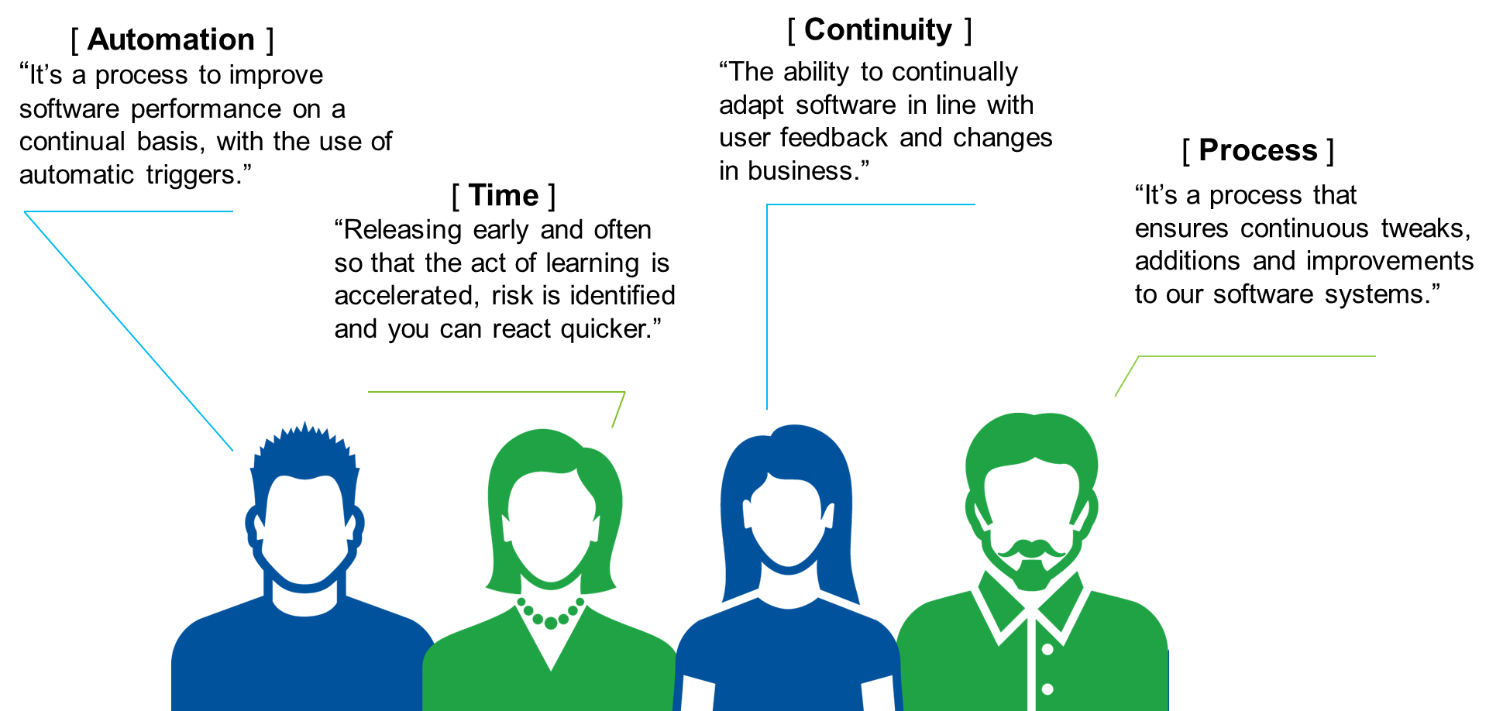
    It in a Continuous Delivery environment where Perforce really shines. They are making a big bet on enterprises adopting the Continuous Delivery model. However there are some fundamental questions to answer first. According to Perforce though you need to define what does Continuous Delivery mean to you? They conducted a survey:

     perforce cd


    According to Perforce they think of Continuous Delivery as this:

    • Deliver working product to users as quickly as possible
    • Every change (check-in) leads to a potential release
    • Give business the option to release – what, when, to whom
    • A change in process and culture

     perforce cd pipeline

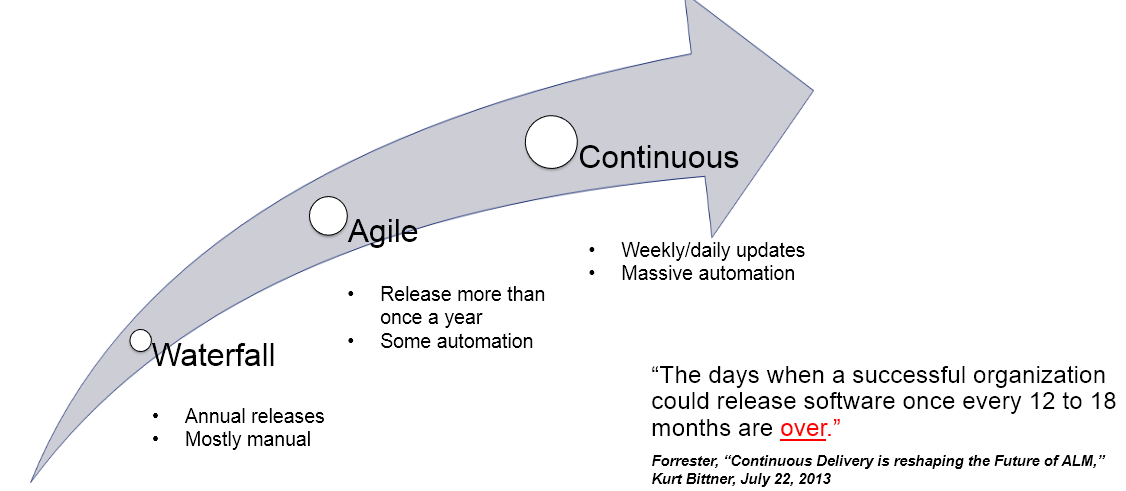
    Most importantly though, Continuous Delivery is not just something Perforce thinks is crucial. Waterfall release models are obsolete and even Agile is just a way stop towards Continuous.

     perforce cd arrow


    According to Perforce’s own survey they see Continous Delivery attaining critical mass:

     perforce cd adoption

     Is this a case of when you are a hammer everything is a nail or are we at the dawn of the age of Continuous Delivery? Perforce is making a bet that it is. They are already very successful, any more and they may just lose their status as the biggest, little secret in DevOps.