Tag: GIT

  • GitHub Updates Server Platform for On-Prem IT Environs

    GitHub this week rolled out a series of offerings including updates to its server platform that includes a major update to the on-premises edition of the Git-based repository for source code.

    Scheduled to be available next week, GitHub CEO Nat Friedman noted via a pre-recorded video that opened the online GitHub Universe event that version 3.0 of GitHub Enterprise Server was the first update to the platform made in years. It brings with it support for capabilities such as GitHub Actions and Packages, as well as support for code scanning and, in beta, a secrets scanning capability that GitHub already makes available via its cloud service.

    GitHub Enterprise 3.0 server platform now also supports GitHub Mobile to enable developers to work remotely.
    The Microsoft subsidiary is also moving to extend the capabilities of its cloud service with the addition of an auto-merge capability, available in beta, that allows authors of pull requests to opt in to having a pull request merged automatically once its required reviews or status checks have passed. Previously, DevOps teams were required to wait until pull requests were completed before moving on to the next task.

    GitHub also announced that its previously previewed Discussion collaboration tool is now available as a public beta on all public repositories. The company plans to extend the capability to GitHub Mobile soon.

    Other capabilities being added in beta include environments to more easily isolate workflows among team members, a dependency review tool, support for required reviewers, access to deployments and deployment logs and a workflow visualizer for DevOps pipelines.

    GitHub is also providing DevOps teams with a dark mode option available in beta.

    Finally, GitHub has extended its GitHub Sponsors program to enable organizations to contribute funds directly to developers working on specific open source projects. Many of those contributors are finding they can make as much money via contributions as they previously had for a single employer, noted Freidman.

    Friedman said GitHub is, as ever, committed to continuing to improve the developer experience. Naturally, those capabilities will continue to manifest themselves first on the GitHub cloud platform.

    The degree to which that sits well with IT organizations that prefer to develop applications using repositories they deploy and control remains to be seen. While more application development is occurring in the cloud than ever, there are still plenty of organizations that are wary of making intellectual property available on any type of cloud platform. Many organizations are also pursuing hybrid approaches that employ a mix of Git-based repositories based on the sensitivity of the application development project.

    Regardless of the Git repository employed, automated workflows that are enabled by GitOps processes are becoming more widely employed. Less clear is to what degree those GitOps workflows will need to be extended across multiple Git repositories at a time when enterprise IT environments are becoming more hybrid. In those environments, parity between on-premises and cloud-based Git repositories will rapidly become an essential requirement.

  • Oracle Proposes Replacing Mercurial SCM for Java With Git

    Oracle Proposes Replacing Mercurial SCM for Java With Git

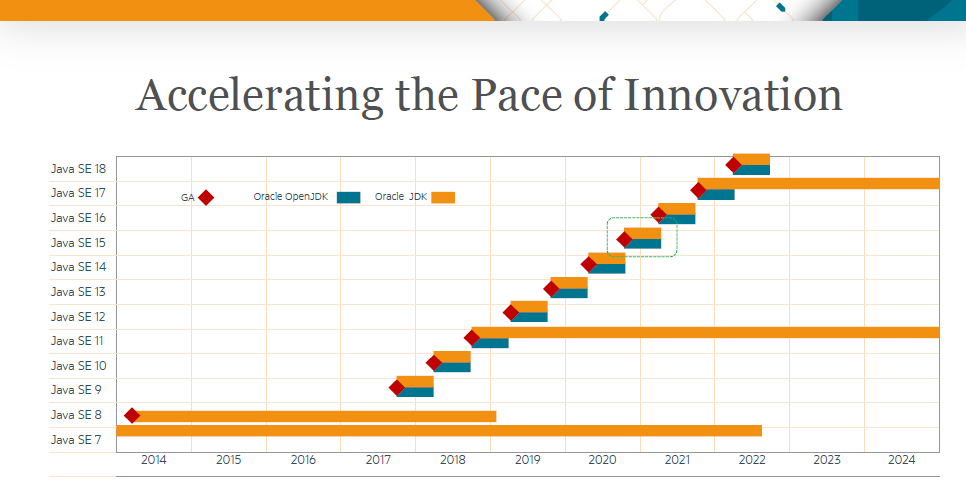
    Oracle today at its Oracle Developer Live—Java event proposed making a bevy of updates to Java that includes replacing the Mercurial source code management (SCM) platform, which is the repository Oracle created to share updates to the Java community, with Git starting with the initial availability of Java 16 and then migrating the project itself to GitHub.

    In addition, Oracle has developed server-side tooling compatible with GitHub and GitLab and client-side tooling compatible with Git and Mercurial to aid in the migration. The effort is based on the Project Skara initiative, which already provides read-only Git mirrors of all active and consolidated lines of development for the Mercurial SCM repository.

    Oracle is also proposing to add a Vector application programming interface (API), along with enabling some C++ features in Java 16.

    Oracle today also announced enhancements to Java 15, including support for Edwards-Curve Digital Signature Algorithm, hidden classes and reimplementing the legacy Datagram Socket application programming interface (API). In addition, support for a more advanced garbage collection tool as well as text blocks has been finalized.

    Other capabilities that have been advanced but are not finalized in Java 15 includes support for sealed classes, enhanced pattern matching, records and an API for accessing foreign memory.

    Chad Arimura, vice president of Java developer relations, said collectively the latest innovations show the venerable programming language is still vibrant. Despite a plethora of options most enterprise IT organizations still rely mainly on Java to build applications even as they transition to building microservices-based applications based on containers deployed on Kubernetes clusters. As such, Java is not in danger of suffering the same fate as the COBOL programming environment, which from a pace of innovation has grown comparatively stale, noted Arimura.

    Many of those organizations are also well down the path toward adopting best DevOps practices that revolve around a Git repository. Adoption of Git as the SCM repository for the Java project will further those efforts by simplifying workflows for organizations that have standardized on Git repositories, he said.

    While Java continues to dominate development of applications in the enterprise, it’s also true organizations of all sizes are employing a wider range of programming tools. By embracing Git and GitHub, the Java community will be able to more fluidly coexist with a wide range of open source projects being created using a diverse range of programming tools. Enterprise developers are clearly still relying on Java to write most of their server-side applications, but more client-side code is being developed using frameworks based on, for example, JavaScript.

    In the meantime, however, IT organizations looking to modernize application portfolios should be able to count on the fact that nearly 30 years after its initial launch, Java remains relevant. The challenge now is determining where best to rely on Java alongside a plethora of other programming tools that developers of all ages now regularly employ.

  • OverOps Taps Into Git Repos to Accelerate Code Reviews

    OverOps Taps Into Git Repos to Accelerate Code Reviews

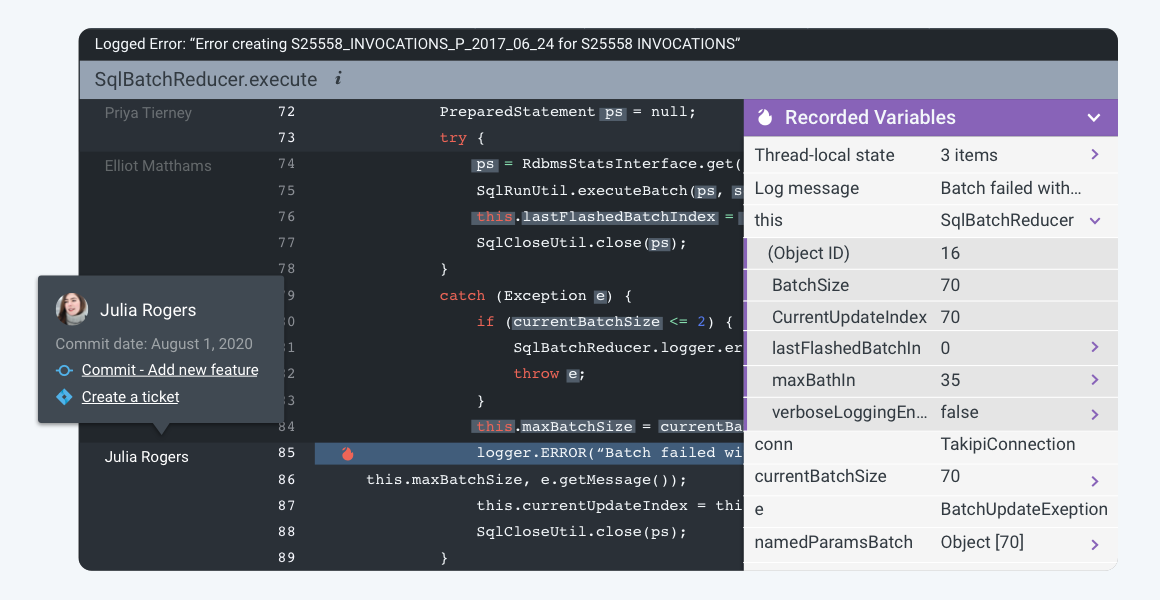
    OverOps this week announced it has added support for a git blame and automated source attach capability to its namesake platform for analyzing code that surfaces both root cause data for every error as well as the identity of the developer who owns that code.

    Eric Mizell, vice president of solution engineering at OverOps, said once those developers are identified, the OverOps platform will automatically alert them about the errors in the code.

    Every Git repository provides access to a git blame tracking command that identifies the authors of source code and the last time files were modified source file. The git blame and automated source attach capability extends that tracking command to accelerate the process of fixing errors that are discovered by the OverOps platform, which leverages machine learning algorithms and other forms of advanced analytics to perform static and dynamic analysis of code to detect errors in code before a DevOps team promotes code into a production environment.

    Mizell said this latest capability accelerates the remediation process by automatically routing critical alerts to the developers responsible for the last commit.

    Ultimately, DevOps teams should be able to spend less time in “war rooms” trying to resolve issues in a production environment because errors in code will have been addressed much earlier in the application development life cycle, he said.

    Naturally, there’s a lot of sensitivity when it comes to analyzing code. It will be up to each IT organization to determine the level of visibility into the quality of the code being created by each developer. Most organizations will simply route alerts to individual developers to address without making each issue the topic of a team review. However, organizations may want to track what types of errors are being made consistently to better inform training requirements.

    Regardless of approach, most experienced developers don’t want to spend a lot of time discovering the same issues multiple times when reviewing code someone else wrote. Tools that automate the discovery of those issues should enable development teams to focus their efforts on the more complex issues that inevitably arise when building modern applications.

    In the wake of economic downturn brought on by the COVID-19 pandemic, there’s a lot more pressure on DevOps teams to become more efficient. In many cases, the velocity at which applications need to be built, tested and deployed in the wake of the economic downturn has increased as organizations invest more in digital business transformation.

    Not every developer will enjoy have the code they wrote analyzed by a machine. However, most coders take pride in their work and would prefer to address in their own way any issue that may arise. The challenge is putting in place a code review process that results in better code being deployed faster without unnecessarily antagonizing the most valuable contributors to the digital success of any organization.

  • Instana Applies DevOps to APM Agent Management

    Instana Applies DevOps to APM Agent Management

    Instana has announced it has become the first provider of an application management platform (APM) to enable IT teams to automate the deployment of agent software to monitor IT environments using any Git repository of their choice.

    Jim Hirschauer, director of product management and sales enablement for Instana, said agent software used to instrument an IT environment, including software and infrastructure, can now use a Git repository to automate the configuration of agent software during startup and reboot in addition to being able to pin a specific version of Instana agent software to a branch within a Git repository.

    One of the challenges any DevOps team faces when instrumenting an IT environment is the agent software employed to collect data and metrics needs to be managed like any other piece of software. By adding support for Git repositories, Instana is making it possible to apply DevOps processes to the management of that agent software, he said.

    The ability to configure agents as code also means DevOps teams can turn on and off agents as part of an effort to reduce agent management fatigue, he added.

    By embracing GitOps practices Instana is looking to distinguish itself from rival APM platform providers by “walking the talk” when it comes to best DevOps practices, Hirschauer said.

    The ability to configure agents as code follows a recent update to the Instana APM platform that, among other things, added support for Redis Enterprise Monitoring Sensor, IBM MQ Monitoring Sensor and NGINX tracing, which automatically integrate with Instana End User Monitoring (EUM) to natively extract tracing requests.

    Although competition across the APM space is crowded, Instana as a startup is trying to take advantage of two macro trends to supplant rivals. The first is the shift toward converging the management of software and IT infrastructure. The Instana APM platform discovers all application service components and application infrastructure and then automatically deploys monitoring sensors that trace all application requests and profiles every process. It then detects application and infrastructure changes in real-time, adjusting its own models and visualizing the changes and any performance impact without requiring any human configuration or even application restarts.

    The second trend is the rise of microservices. Historically, IT teams have used APM platforms to only monitor their most mission-critical applications because of the cost of deploying agent software. However, given the inherent complexities of microservices-based applications, IT teams are employing APM platforms more broadly to monitor dependencies.

    It’s too early to say how this latest round in the APM platform wars will play out. However, there are more organizations than ever evaluating APM platforms, many of which would never have employed one before. The good news is that as open source agents become more widely available, the cost of employing APM platforms should come down. However, open source agents are still not quite as simple to configure and deploy as most proprietary agent software. DevOps teams will need to decide for themselves how much that convenience is worth.

  • Review, Review, Review

    Review, Review, Review

    Ossification is an issue in IT, and always has been. It is borne largely out of staff and management knowing what to expect from existing software/infrastructure, and the deep product knowledge that allows teams to make existing systems do what is needed. But this becomes a series of rocks that the ship of progress smacks into.

    Contrary to popular belief, DevOps and other new methodologies are not immune to this problem. Quite the contrary, we’ve spoken with people that say “We’re a Jenkins shop,” which sounds exactly like “We’re an Oracle shop” of a decade ago. The wave just ushered in new tools, it didn’t change tendencies. OK, it did more than usher in new tools, but it didn’t change tendencies.

    So, it’s time for a friendly reminder: Review what you are doing, review cloud usage, review tools in the toolchain, review methodologies, review security posture (which has suffered in this environment for far too many shops) and review customer satisfaction.

    Many organizations used the push of Agile and DevOps to update stagnant parts of the infrastructure and development toolsets. Don’t let them become stagnant again. Just as you don’t want change for the sake of change, you don’t want to stay with one tool or methodology just because it is comfortable.

    This isn’t some easy task that I ⁠— or anyone else, no matter how much they try to tell you differently ⁠— can dictate to an organization. There isn’t a handy list, because no two organizations are exactly the same. Not in toolsets, not in culture and not in appetite for risk. The only thing we can offer is guidance to look closely at where you are, what’s available in a given area ⁠— Application Release Orchestration, for example ⁠— and evaluate the available tools just like you were making a fresh choice and did not have a tool in place. Then do the same for processes. Is this the best process for what we’re trying to achieve? Are there tweaks we can make to it? Should we completely change the process to take in changes in environment that have happened since we adopted this process?

    Finally, if you don’t have someone responsible for monitoring cloud costs, appoint someone. Get them the tools, help them understand where the money is going and what cloud-based server usage is. Could these servers be spun down outside of business hours? Could we follow the sun better by staggering cloud data centers in which cloud servers are active, rather than hosting them always in one location or leaving them on 24/7 in multiple locations? Is one team using a cloud feature no one else is? If so, how does it apply, and are the other teams not using it because they don’t need it, or is there some other solution they’ve adopted?

    Basically, question everything. We’re launching a new project that will be a simple dynamic app. Make a few selections from a limited list, get a summary of what you should do and why. It is all really quite simple. Should we host in a web page or make it a standalone mobile app? If mobile app, what tools for development and what targets? Integration of Git — should it be local or on one of the big providers? Do we want any team member to trigger builds on commit or do we want someone managing branch merging before-hand?

    These are all things we already do on other projects, but we’re digging in and seeing what could be better. What could we improve, and what would the rewards for that improvement be? It takes a bit of time and some discussion. We’re confident we’ll burn through it in the next day or so and come up with a plan for development and architecture that best suits the app, but is informed by where we’re at now. It’s been a fun exercise, to be honest. If nothing else, it gave us a strong reminder that any given cloud provider’s “simple” pricing is not that simple, and we need to pay more attention to app characteristics versus fees.

    You’ve rocked it this far, even kept the lights on during the great shift to working from home. Don’t stop improving the environment though, find innovative ways to make it better and keep clipping along.

  • GitHub Extends Scope and Reach of Repository

    GitHub Extends Scope and Reach of Repository

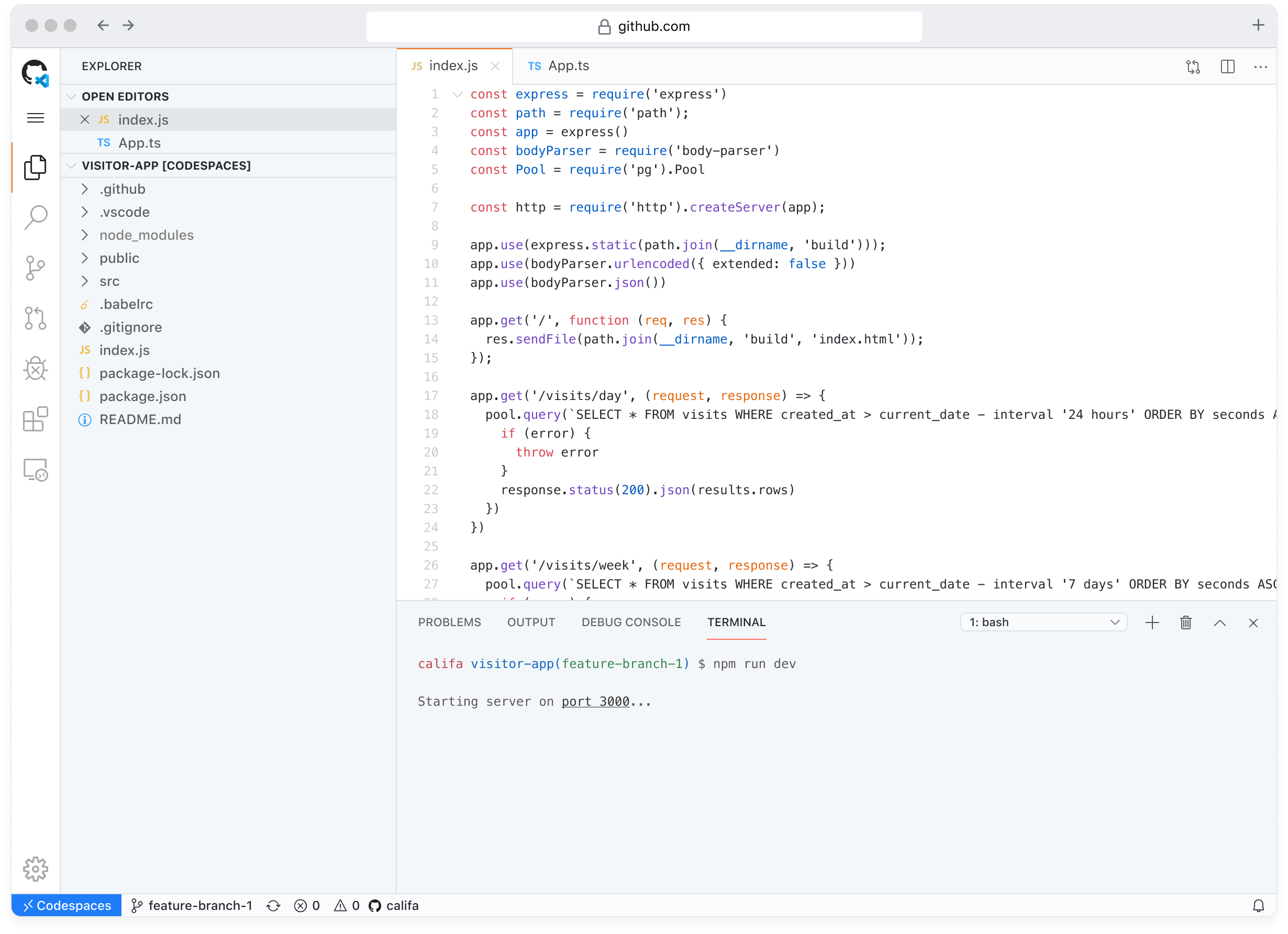
    GitHub today at its GitHub Satellite virtual conference announced it has made it easier for developers to either launch a project or join an existing project on its repository and has added collaboration tools directly within the platform.

    GitHub is also moving to advance DevSecOps by adding code scanning tools and making secret scanning tools available for private repositories, in addition to making available GitHub Private Instances to provide organizations in highly regulated industries access to a more secure managed implementation of the GitHub repository.

    Max Schoening, VP of Product Design, said GitHub Codespaces removes a lot of friction associated with starting or joining a project by enabling developers to spin up a project in seconds. In many cases, he said, developers never launch a project simply because the effort required was too great relative to the value of the effort.

    Available in limited public beta, GitHub Codespaces should not only improve developer productivity but also significantly increase the number of projects being hosted on GitHub, said Schoening.

    GitHub Discussions, meanwhile, will provide a threaded format to organize unstructured conversations without having to leave the GitHub repository. Scheduled to be available in beta shortly, GitHub Discussions should increase developer productivity in addition to providing a place for developers to maintain a frequently asked questions document. Over time, Schoening said GitHub expects millions of communities to be formed around GitHub Discussions.

    GitHub is also moving to make DevSecOps a natural extension of any application development project. GitHub Advanced Security Cloud provides access to native code scanning and secret scanning tools that can be embedded within the developer workflow. Currently in beta, GitHub Advanced Security Cloud is based on security tools it gained via its acquisition of Semmle last year. Every Git push can now be scanned using a CodeQL semantic analysis engine to discover vulnerabilities. GitHub Advanced Security Cloud is designed to be an extension of an existing GitHub Advanced Security service.

    Finally, GitHub Private Instances will provide a fully managed alternative that, among other things, allows for bring-your-own-key encryption, backup, archiving and compliance with various regional data sovereignty requirements. GitHub did not reveal, however, when GitHub Private Instances will be available.

    As GitHub continues to evolve as an arm of Microsoft, there is no doubt more IT teams will be embracing DevOps. The biggest challenge is often making it easy to get started. In fact, many developers may find themselves unconsciously embracing best DevOps and DevSecOps processes as they, for example, employ scanning tools baked into the GitHub repository.

    Of course, no one knows for sure whether organizations will continue the pace of application development projects in the wake of the economic downturn brought on by the COVID-19 pandemic. However, Schoening noted the amount of time between pull requests has declined on the GitHub repository, which he suggests is an indication of increased activity and productivity now that more developers are working away from the office.

  • Kong Brings Collaboration to Designing APIs

    Kong Brings Collaboration to Designing APIs

    Kong has launched an open source tool for designing application programming interfaces (APIs) designed to make it easier for teams of developers to collaboratively edit an API specification that can be stored in a Git repository.

    Based on the open source Insomnia API management platform the company gained last year by acquiring Floating Keyboard Software Inc., the Insomnia Designer tool for designing APIs integrates natively with the testing capabilities embedded in the Insomnia API management platform to make it easier to collaboratively design both REST and GraphQL services.

    As part of that effort, Kong is also releasing plugins that enable teams to automatically embed Kong Gateway policies directly into their API specification files within a Git repository.

    Greg Schier, technology tech lead for Insomnia at Kong, said the goal is to streamline the workflow for designing APIs by enabling teams to share updates to edits of API specifications using best GitOps processes.

    For example, DevOps teams can now search for API designs to discover details such as Git Status and Git Branch. They also can automatically generate configurations for both Kubernetes and Kong for Kubernetes within the individual API spec file. Developers can also select Kong plugins that provide capabilities such as authentication or rate-limiting to govern their API’s behavior.

    As organizations embrace microservices-based applications the need to be able to design, build, deploy and maintain APIs has become more critical. Each microservice within an application exposes its own APIs. Organizations that embrace microservices soon find they need to potentially build thousands of APIs. Rather than address each of those API as an isolated project, Kong is making the case for constructing a set of workflows that make it easier to design and construct APIs within the context of a larger DevOps process.

    The goal should be to eventually make the testing of APIs a natural extension of the unit testing process embedded within a continuous integration/continuous delivery (CI/CD) platform, said Schier.

    Within far too many organizations the designing and building of APIs is still an afterthought. There is naturally a lot of focus on building microservices, but once they are constructed not nearly as much attention is paid to the API. And yet, while microservices frequently are replaced, it is the API that remains constant. All the dependencies between the microservices that make up an application are only manageable because of the APIs employed to connect them all. Rather than constructing APIs after a microservice is built, Kong is making the case for consistently designing and building APIs in keeping with best DevOps practices.

    In the wake of the COVID-19 pandemic, it’s hard to say at what rate organizations will be building and deploying new applications. What is for certain is the bulk of new applications will be based on cloud-native microservices to make them more flexible and resilient. That way when the next major crisis erupts, organizations will be able to respond more adroitly to rapidly changing business conditions because the enterprise architecture now revolves around APIs.

  • DevOps Deeper Dive: Git Turns 15

    DevOps Deeper Dive: Git Turns 15

    Git, the version control system that arguably has enabled many DevOps advances over the last decade, is turning 15 this month. Git was developed by Linus Torvalds, best known for his contributions to Linux, and was so-named after he and the rest of the Linux community referred to it as “that stupid content tracker.” The term “Git” is British slang for “contemptible person.”

    Today, Git is now arguably one of the most important and successful open source projects ever launched. For the past 15 years, the Git project has been led by Junio Hamano, a software engineer who today works for Google.

    Git gained traction among developers because it provides support for rapid branching and merging of code in a way that also enables visualizing and navigating a non-linear development history. While even as far back as 2005 that was not a new idea, Git has emerged as the de facto standard for version control.

    “Git is an essential part of everything we do,” said Pratik Wadher, a vice president at Intuit, which has made extensive use of the version control system within the context of multiple DevOps initiatives over the last half-dozen years. “It’s the single source of truth.”

    As the de facto standard, Git has been the driving force behind what is now a multi-billion segment of the IT industry. In fact, with more individual developer and organizations contributing to Git than ever, the pace of innovation remains surprisingly strong 15 years into the open source project.

    GitLab, GitHub, Microsoft and Google, for example, contributed a partial clone capability, available as an experiment via GitHub and GitLab, that makes it easier to work with large files. Instead of having to clone every file in a Git repository, it soon will become possible to more efficiently set up clones of repositories regardless of the size of the files in that repository.

    That capability not only will prove critical to teams of developers working across multiple geographic regions but also will enable DevOps teams to employ Git to develop, for example, gaming applications that require DevOps teams to routinely work with large files, said Brendan O’Leary, senior developer evangelist for GitLab.

    “It will enable new use cases,” said O’Leary.

    The steady flow of innovations over the past 15 years has kept the base of organizations that rely on Git coming back for more. “The interesting thing about Git is that it has had real staying power,” said Kelly Stirman, vice president of product strategy and marketing for GitHub.

    In terms of industry standards, Git can take its place alongside SQL and Linux in terms of impact, noted Stirman.

    That staying power has even surprised some of the most ardent proponents of DevOps. “It’s been quite a journey,” said Ido Green, vice president of technology for JFrog, noting no one really knew 15 years ago just how big an impact the repository would have on software development.

    Today, most organizations are employing Git because development teams don’t know any other way to manage source code.

    “Git is now the default way to manage source code,” said François Dechery, chief strategy officer for CloudBees. “Ten years ago that was not the case.”

    Where Git will be 10 years from now is, of course, anyone’s guess. But with the rise of various forms of artificial intelligence (AI) and the eventual embrace of best DevSecOps practices, it’s clear there are still many innovations to come that will revolve around a Git repository in some way.

  • ‘DevOoops’ Moves: SCM Conflicts

    ‘DevOoops’ Moves: SCM Conflicts

    DevOps’ ultimate aim is to create efficiencies in the software delivery process. But it doesn’t always work out that way. Sometimes DevOps initiatives lead to mistakes—something we lovingly call a “DevOoops.” CloudBees recently polled some colleagues and came up with five examples of a DevOoops in action. Following is a discussion submitted by solution architect Will Refvem about siloed departments.

    Scenario:

    One of the biggest challenges in DevOps is SCM. Early in my career, being given access to Git repositories was a bit like handing a belt-fed machine gun to a drunken toddler. My biggest DevOoops moment came when I was trying to master the basics of Git in a project that used Git submodules—don’t, just don’t—and had a series of bash scripts that implemented a primitive CI/CD workflow by running in the environments we were deploying to (seriously). I can’t tell you how many merge conflicts and detached HEADs I encountered, or how I got out of them. Fortunately, we were using the fork-PR model, so I did no real damage.

    Software configuration management (SCM) is key not only for versioning, but also for providing a shared view of code and other assets, from development through to production. Giving proper consideration to your SCM structure, branching and merging model, access controls, etc., will support collaboration, reliability and traceability—all key for DevOps success.

    In the 2019 DevOps and Jenkins Community Report, 66 percent of organizations respondents reported the use of modern solutions SCMs, specifically GIT-based solutions GitHub or BitBucket. But the older SCM solutions aren’t going away completely—45 percent of all organizations still use pre-GIT, pre-DVCS (distributed version control systems) such as Perforce, Subversion and CVS. While it’s possible to apply DevOps practices using these legacy solutions, it is important (and more challenging) to design a branching/merging model and surrounding workflow, which supports the key aspects of DevOps such as peer review, collaboration and short-lived branches.

    Modern SCMs such as GitHub have features that inherently support collaboration, including the game-changing Pull Request, making it much easier to implement processes that best support CD and DevOps.

    Poorly designed CD workflows or inadequate CD systems create friction multiple ways. If the interactions are too cumbersome, users will not commit code to the pipeline frequently enough. If it’s difficult to access the pipeline and create visibility into the process, it can lead to unresolved conflicts.

    You need to pick the right tool. If you don’t have the option to get the modern tool, you need to take the time to design a legacy tool.

    It’s also important to consider two other issues in relation to this DevOoops example: branching and acquiring the appropriate level of DevOps skills.

    • Branching: A proper branching and merging model is required to ensure you are feeding the appropriate inputs into your DevOps pipeline, such that you are able to continuously integrate, test and ultimately deploy changes. A simple guide here is encapsulated in the KISS (keep it simple, stupid) principle. If you need a full-wall whiteboard or a spreadsheet fit for an accountant to list your active branches, you need to rethink things. Get as close to the ideal of mainline trunk development as possible, with short-lived feature branches, minimal application versions, etc.
    • Skills: As organizations seek to implement DevOps, most likely new tools and practices will be implemented simultaneously. It’s important to understand and accommodate the fact that there will be bumps and bruises as you learn to use these new tools and practices. For instance, shifting from centralized version control such as Apache Subversion (SVN) to distributed version control such as Git is a paradigm shift that can be difficult to fully grasp and result in destructive mistakes, such as deletion of nodes from the change history, overwriting changes or misconfiguration access control. Consider hiring for these new skills and/or account for time and training.

    Takeaways

    • A proper branching and merging model are required to ensure that you are feeding the appropriate inputs into your DevOps pipeline to let you continuously integrate, test and ultimately deploy changes.
    • If you are using a pre-Git legacy SCM solution, develop a branching and merging strategy within the legacy solution to achieve appropriate velocity in your DevOps model.
    • Consider that you will need to develop new skills to adopt new SCM tools and practice and account for this in your plan.

    — Brian Dawson

  • Picking a Git for the Enterprise

    Picking a Git for the Enterprise

    Some of my Agile and DevOps transformation work, not surprisingly, involves helping clients with tooling adoption—to set up, scale and operate across the organization. This blog piece is about a recent experience of setting up Git across a client organization.

    Git, as most of you are aware, is a fundamental building block for many of the modern engineering practices associated with Agile and DevOps. Software configuration management tools such as Git, in simple words, allow you to track and manage your software code and configuration changes in the most-effective, efficient and distributed way. Git, as the choice of source control, has remained steadfast over the years, while other tools across various categories of DevOps tools have seen their fortunes go up and down with the ever-changing technology landscape of DevOps tools. In fact, one new buzzword is GitOps—some even calling it the next stage of evolution for DevOps.

    Origins of Git

    More than a decade ago , the Linux community faced a challenge  because none of the existing revision control tools met their need for a distributed version control tool. And from that need Git was born. In the words of the creator of Git, Linus Torvalds, “The main issues with SCMs is the politics around who can make changes.” Ever since its creation, Git has radically changed the notion of software configuration management (SCM), by enabling engineers to work remotely and autonomously. (If you are new to Git and interested in exploring more about Git and its features, Atlassian has a tutorial and GitHub has a list of resources.)

    Git and More

    While Git as the core product is fundamentally the same whichever flavor your prefer—GitHub, GitLab or Bitbucket—the wrapper around it determines the important non-functional characteristics such as operatability, security, usability and maintainability. Our quest for an enterprise-scale Git focused on the wrapper and not the core product itself, as much has been written, debated and documented on the core product of Git itself already. The value and relevance to enterprises is in the wrapper that these productsplatforms provide.

    We looked at the core product and related offerings; as you can imagine, the three tooling vendors have different positioning and taking different directions with the future road map for their respective tools. Bitbucket’s strength lies in the fact that Atlassian is bundling the product with the omnipresent Jira Software and Confluence. GitLab’s road map seems to be taking the product beyond Git and into the idea of a single product for your entire pipeline automation, from concept to cash. GitHub, which is being acquired by Microsoft, is increasingly relying on the strength of integrations with other tools and the workflow capability the company is bundling with it.

    (I avoid an overemphasis on the commercial aspect in this blog; however, I’m not ignoring it completely. Part of the reason is due to the fact that enterprise pricing is not entirely transparent and may vary wildly depending on organization’s negotiating capability, the scale of usage, future potential and marketable track records as perceived by the tooling vendors. This blog is also not meant to be a feature by feature comparison, as this is something you can Google and find out yourself very easily.)


    The Verdict

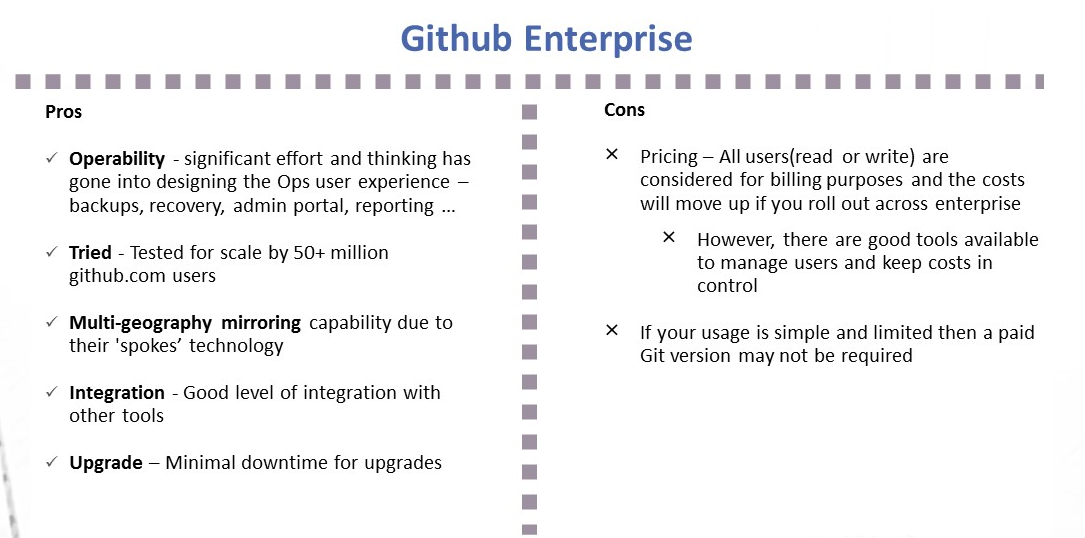
    Github Enterprise pros and cons
    Image1; Github Enterprise – Pros and Cons
    Gitlab Ultimate and features
    Image 2:  Gitlab Ultimate – Pros and Cons

    My Recommendation: It Depends

    1. I liked the vision of GitLab as a single-stop tooling platform for continuous integration/continuous delivery (CI/CD), which goes beyond source control. I think the tool is simple and intuitive to use and great for small to midsized setups or even large enterprises that are focused on having smaller and autonomous teams.
    2. GitHub seems to be well-suited for large and complex enterprises with significant outsourced and offshore-based technology teams.

    I would love to hear your views on what has been your thinking with regards to choosing a Git-based product for your enterprise or teams. Meanwhile, here are some links you might find useful in your decision-making:

    1. Why and how GitLab abandoned Microsoft Azure for Google Cloud – https://venturebeat.com/2018/04/06/why-and-how-gitlab-abandoned-microsoft-azure-for-google-cloud/
    2. Tooling integrations of GitLab – https://docs.gitlab.com/ee/integration/README.html#doc-nav%20for%20list%20of%20integrations
    3. GitHub add-ons are listed at Addons are listed at https://github.com/marketplace
    4. Security and scalability info of GitHub is at https://github.com/jonico/github_security_and_scalability_overview
    5. Products that integrate with GitHub platform – https://github.com/works-with
    6. Pricing of GitLab – https://about.gitlab.com/pricing/

    — Aditya Vadaganadam