Tag: devsecops

  • Why Over-Permissive CI/CD Pipelines are an Unnecessary Evil

    Why Over-Permissive CI/CD Pipelines are an Unnecessary Evil

    Balancing the speed of innovation with security is an age-old problem in software development. This is no different in modern DevOps. Development teams want a frictionless path to deploy new code but often struggle with access permissions that are linked to services. The CI/CD pipeline makes it easier for developers to quickly introduce new features and updates, in an agile way. As application changes move through the CI/CD pipeline, automation can allow changes to happen very quickly, without creating downtime or delays on the customer side.

    Permissions of CI/CD Servers

    When it comes to the permissions of CI/CD servers, DevOps often don’t want to deny access. After all, the wide access permissions are part of allowing the speed of innovation, and development teams are regularly—and often understandably—cautious about putting least-privilege or other access rules in place.

    But there are some security risks to consider. Any developer being granted admin permissions to deploy new code is open to vulnerabilities, weaknesses and misconfigurations. Cloud sprawl has created a lack of visibility into whether or not the infrastructure is properly set up and connected with logging tools. How does the development team know if things are getting properly patched?

    The balance is extremely sensitive. DevOps need the speed of change and the ability to innovate freely, but security teams can’t handle the growing risk. Something has to change that can allow security to shift left and get involved earlier in the CI/CD pipelines rather than getting in the way.

    Reducing the Risk Without Impacting Innovation

    Here are some suggestions for accelerating the speed of innovation while maintaining a healthy security posture:

    • Map threats and secure connections. Conduct a threat modeling exercise to map threats to the pipeline. Remember that every connection to the CI/CD pipeline is a potential point of compromise. Regularly patch and scan all services that connect to the pipeline and block the devices if they fail to meet security policy requirements.
    • Learn to love logs. When a security issue arises in production, developers, IT engineers and security engineers need to react quickly and efficiently to solve the problem. Logging is critical for enabling fast and coordinated responses. Waiting on manual sharing of sensitive data can slow down reaction times. But when every stakeholder can get the data they need from logs, access to information is no longer the weakest link in the security incident remediation process.
    • Tighten access control and enforce strong admin permissions. Be specific about who has access to which data. Clear and enforced separation of duties should ensure no one person or account can access more than necessary in the continuous software delivery pipeline. Improperly credentialed users or bad actors can’t establish control over the entire pipeline and mess with the code or processes. Moreover, they won’t easily be able to penetrate deeper into other corporate systems and data.
    • Leverage flags to manage risks. Developers often use feature flags (or feature toggles) to add new features to applications while mitigating the risk that those features will introduce performance or stability issues. Although most developers likely don’t think of feature flags as a security tool, they can be used for that purpose, too. New features are prime vectors for security vulnerabilities, especially if developers haven’t thoroughly tested them yet.

    Many security teams do not realize that just because their network is private, they’re still sharing pipelines with third parties, including anyone from maintenance to the team deploying your mobile app. By embracing these tools, developers can shift left, shoring up defenses early in the process, without adding a blocker to the pace of innovation coming from DevOps CI/CD pipelines.

  • 15 Ways Software Becomes a Cyberthreat

    15 Ways Software Becomes a Cyberthreat

    Software is an integral part of private and commercial life; there is no way around it. You need software to do your taxes, book a flight or browse the internet. Software has made our lives much easier in so many ways. However, as we become more reliant on software we also become more vulnerable to cyberattacks.

    This article will explore 15 different ways that software can end up becoming a cybersecurity threat. By understanding these risks, you can take steps to protect yourself and your business.

    Lack of Security Features

    Many popular software programs either lack basic security features or the features that are present lose functionality, leaving users vulnerable to attack. For example, Adobe Reader and Microsoft Word have both been found to have security vulnerabilities. If you use these programs, make sure you keep them up to date with the latest security patches.

    If you are worried about having to deal with downtime while installing new software updates, you can always schedule them for a time when you know you won’t be using your computer. This way, you can be sure that your software is always up-to-date and secure.

    Poor Password Security

    One of the most common ways users’ accounts get hacked is through the use of weak or easily guessed passwords. If you use a program that requires a password, make sure to use a strong one that would be difficult for someone to guess.

    Additionally, if you use the same password for multiple accounts, an attacker only needs to figure out that one password to gain access to all of your accounts. This is why it’s important to use different passwords for different services. If you can’t remember all of your different passwords, you can use a password manager to help you keep track of them.

    Consider using both a password manager—to take advantage of the more robust security these applications typically have—as well as a password randomizer, which will generate long, random passwords for you. Many password managers include a randomizer feature.

    Phishing Attacks

    Phishing attacks can impact any type of software program. In a phishing attack, an attacker will try to trick you into giving them your password or other sensitive information by masquerading as a legitimate website or program. Be very careful about any emails or messages you receive that ask for personal information, and never click on links in these messages unless you’re absolutely sure they’re legitimate.

    Phishing that takes place through software programs can also happen through messaging programs, like Skype or Facebook Messenger, or through email programs, like Gmail. Be sure to be cautious about any links or attachments you receive through these programs, as well.

    Keyloggers

    Keyloggers are malicious programs that are installed on your computer without your knowledge. Once they’re installed, they can track every keystroke you make, which means they can easily steal passwords and other sensitive information. Keyloggers can be installed through email attachments, malicious websites or even infected USB drives.

    To protect yourself from keyloggers, never install software from untrustworthy sources. Be very careful about what emails you open and what websites you visit. If you do get a keylogger on your computer, make sure to run a malware scan as soon as possible to remove it.

    Drive-by Downloads

    Drive-by downloads are another type of malicious software that can be installed on your computer without your knowledge. These types of programs are usually downloaded when you visit a malicious website or click on a malicious link. Once they’re installed, they can do things like steal your passwords or track your web browsing.

    To protect yourself from drive-by downloads, be careful about what websites you visit and what links you click on. If you think you may have downloaded a malicious program, run a malware scan as soon as possible.

    Malware

    Malware is malicious software that can infect your computer without you even knowing about it and, once it’s there, it can do things like steal your passwords or data or give an attacker remote access to your machine. From there, attackers can potentially access your organization’s IT infrastructure. Be very careful about what email attachments you open and what websites you visit, as these are two of the most common ways malware can end up on your computer.

    The software you use can also be used to introduce ransomware into your system. A malicious actor could create a fake version of a popular software program and distribute it online. When users download and install the fake software, they unknowingly grant the attacker access to their system. Or, an attacker could exploit vulnerabilities in software programs to gain access to a user’s system. Once inside, the attacker could install ransomware and encrypt the user’s files.

    Unsecured Wi-Fi Networks

    If you use public Wi-Fi networks to connect to the internet, you may be putting yourself and your organization at risk. These networks are often unsecured, which means that anyone else on the network can snoop on your traffic and see what you’re doing. If you need to use public Wi-Fi, make sure to connect to a secure VPN first so that your traffic is encrypted and private.

    Social Engineering

    Social engineering is a type of attack where an attacker tries to trick you into doing something that will give them access to your account or data. For example, they may pretend to be a customer support agent for a program you use and ask you for your password so they can “fix” an issue with your account.

    Or, they may send you an email that looks like it’s from a trusted source but actually contains a malicious link. Be very careful about any communications you receive, even if they appear to be from a legitimate source.

    Unsafe Browser Extensions

    If you use a web browser like Google Chrome or Mozilla Firefox, you may have installed some extensions to add additional features or functionality. But some of these extensions can actually introduce security risks. For example, an extension might have access to all of the websites you visit and the data you enter into them. Be very selective about which extensions you install, and only install ones from trusted sources.

    WordPress Plugins

    If you have a WordPress website, be careful about which plugins you install. Some plugins can introduce security risks, for example, by giving attackers access to your website or database. Install only trusted plugins, and make sure to keep them up-to-date. Also, while browsing new plugins, it is important that you ensure you are downloading and installing plugins that are regularly updated. Take a look at the last time the software was updated before deciding to install it.

    Adware

    Adware is a type of software that displays advertising on your computer, often in the form of pop-up ads. While not all adware is malicious, some forms of it can track your online activities and even collect sensitive information like your passwords or credit card numbers. Be careful about what programs you install, and always read the EULA before agreeing to anything.

    Google Docs

    Google Docs is a popular cloud-based word processing application that is part of Google Workspace. While it’s generally safe to use, there have been some reports of malicious actors using it to spread malware or launch phishing attacks. If you use Google Docs, be sure to only open documents from trusted sources and never click on any links in a document unless you’re absolutely sure they’re safe.

    Third-Party App Stores

    If you use an Android device, you may be tempted to download apps from a third-party app store instead of the official Google Play store. While there are some legitimate app stores out there, many of them are full of malware and other malicious programs. It’s always best to stick to the official app store for your device to avoid these risks.

    Outdated Software

    One of the most important things you can do to keep your computer safe is to make sure all of your software is updated to the latest version. Software developers regularly release updates that patch security vulnerabilities, so it’s important to install these updates as soon as they’re available. You can typically set your software to update automatically or you can check for updates manually on a regular basis.

    Commandeering For Loops

    Commandeering for loops is a type of attack where an attacker takes control of your computer by sending malicious commands through the command-line interface. This can happen if you accidentally download and run a malicious program or if you visit a website that has been compromised by an attacker. To protect yourself from this type of attack, be careful about the programs you download and run and only visit websites that you trust.

    Conclusion

    Software, in its myriad forms, is crucial to running both our businesses and enhancing our personal lives. There is almost no way to avoid using several, if not dozens, of different programs on a daily basis. But as we’ve seen, even the most innocuous-seeming software can pose a serious security risk if it’s not used properly. But understanding the attack vectors ahead of time can help protect yourself and your organization from these risks and keep your data safe.

  • Progress Expands Scope of Compliance-as-Code Capabilities

    Progress Expands Scope of Compliance-as-Code Capabilities

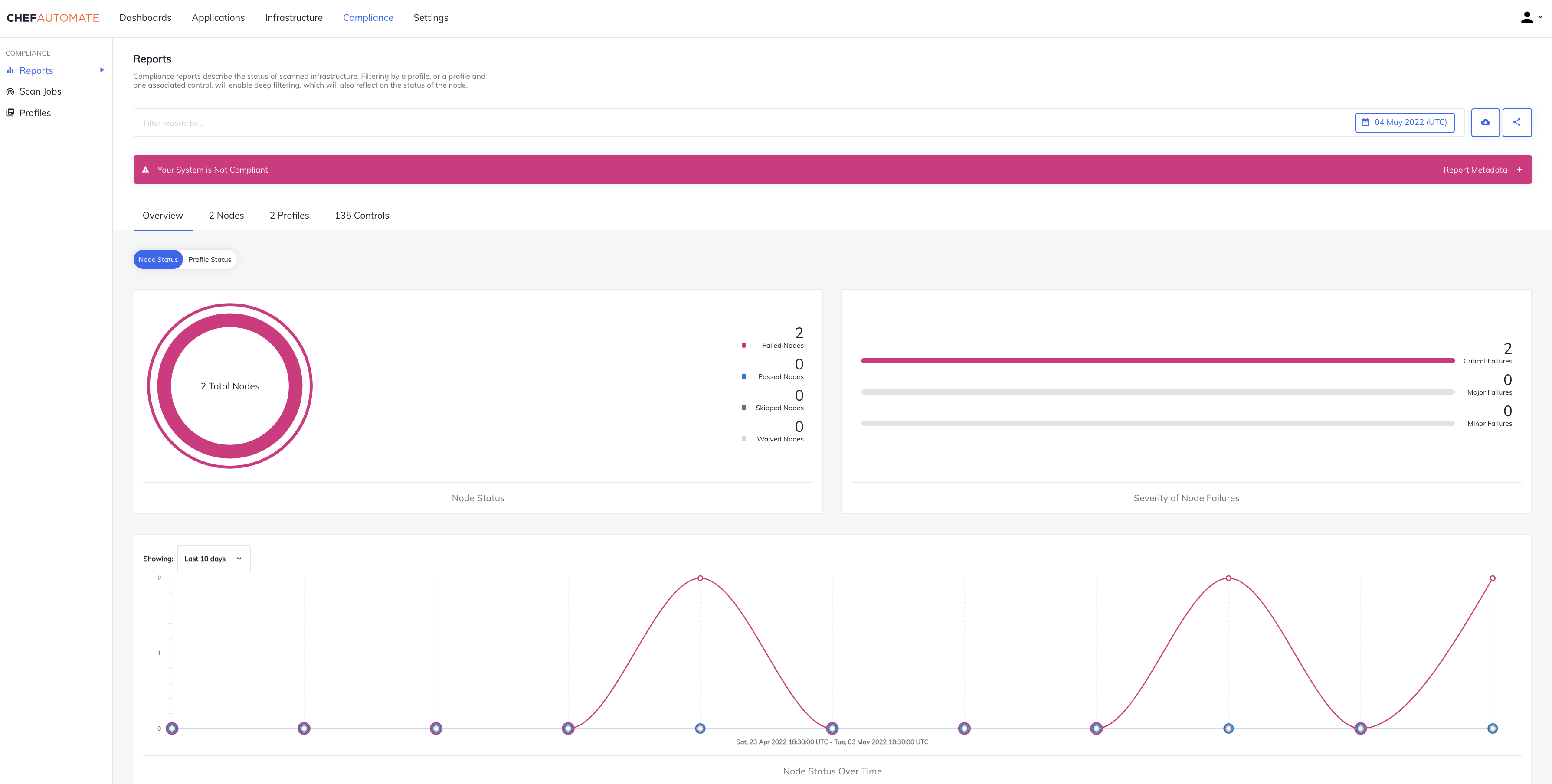
    Progress this week extended its DevSecOps portfolio—built atop the Chef automation framework it acquired in 2020—to now include the ability to programmatically address compliance mandates.

    At the same time, Progress has updated the Progress Chef InSpec framework for automating the discovery of compliance issues to add support for SAP ASE, IBM DB2, Mongo, Cassandra, Oracle, MS SQL platforms along with RHEL, CentOS, Ubuntu and macOS Monterey.

    Progress has also updated the Progress Chef Enterprise Automation Stack (EAS) to add the ability to combine infrastructure configuration processing with compliance audits within a single consolidated policy definition along with a high availability capability that makes certain the platform is always accessible.

    Prashanth Nanjundappa, vice president of product management for Progress, said Progress Chef Cloud Security enables DevOps teams to take advantage of a single policy-as-code platform to consistently implement compliance policies alongside security controls across both multiple public clouds and on-premises IT environments.

    Progress Chef Cloud Security leverages certified industry benchmarks, such as the Center for Internet Security (CIS) benchmark, to continually scan and automatically detect security configuration issues at multiple stages within a DevOps pipeline. Progress has now expanded CIS benchmark profile coverage for Amazon Web Services (AWS), Microsoft Azure and Google Cloud Platform (GCP) to include more than 100 customizable pre-built service and resource templates. DevOps teams can take advantage of automated creation of code, test and documentation artifacts for those resources. Finally, visibility into the status and expected completion time for compliance scans has been added along with advanced Shell command support for control and testing without file output.

    In general, the ability to address compliance requirements within a DevSecOps workflow has become crucial because the number of misconfigurations that occur in the cloud has exploded. Developers that often have little to no security or compliance expertise are programmatically provisioning cloud infrastructure in a way that, for example, leaves ports wide open. As IT organizations embrace more cloud computing platforms, that security issue only compounds, noted Nanjundappa.

    More challenging still, cloud computing environments are becoming more complex with the rise of cloud-native applications based on platforms such as Kubernetes. The odds a developer is going to make a mistake only increase with each microservice deployed.

    Progress is betting that, as cloud computing evolves, responsibility for security and compliance will increasingly shift left toward DevOps teams; they’ll be responsible for implementing polices defined by cybersecurity and compliance specialists. The goal is to provide a set of guardrails that make configuration mistakes less likely because policies are being tested within the context of a DevSecOps workflow, said Nanjundappa.

    It’s only a matter of time before software supply chain security reviews that are occurring in the wake of a series of high-profile breaches force the DevSecOps issue within more organizations. The goal, of course, should be to eliminate the need to identify DevSecOps as separate from a DevOps workflow. Regardless of the approach, however, the one good thing about all this attention is that application environments will inevitably become a lot more secure.

  • How to Secure CI/CD Pipelines With DevSecOps

    How to Secure CI/CD Pipelines With DevSecOps

    Many companies are adopting a DevOps approach in their workflows as IT moves toward a more automated and cloud-native world—but for some industries, this migration isn’t easy. Many of these companies—in finance, health care, government—are obligated to meet compliance requirements. For these organizations, DevSecOps adds necessary security focus to the DevOps methodology.

    Compliance means adhering to certain standards and controls to ensure that applications are secure. But compliance only goes so far. How many applications contain third-party dependencies inside? How expensive would it be for a company in the financial industry, for example, to fail to meet compliance standards?

    Initially, containerizing an application while complying with requirements of whichever framework or standards apply to your organization could seem close to impossible. Within the cloud-native landscape, however, technologies are also rapidly evolving to enable healthy migration and ensure that applications can meet compliance standards without being rewritten from scratch.

    First, let’s look at the standards organizations must adhere to in terms of compliance.

    CIS Benchmarks for Kubernetes and Docker

    The Center for Internet Security (CIS) benchmarks offer guidelines for the correct use of containers in applications. The CIS benchmarks specifically discuss Docker and Kubernetes.

    NIST SP 800-190

    The U.S. government’s National Institute of Standards and Technology (NIST) defines containers as a form of virtualized operating systems within its application container security guide.

    PCI

    The payment card industry (PCI) standards are a framework that helps protect data in the e-commerce and retail areas.

    HIPAA

    The Health Insurance Portability and Accountability Act (HIPAA) sets the compliance standard for patient data protection in health care.

    Securing Infrastructure via CI/CD Pipelines

    All these standards guide organizations to keep their infrastructure secure and compliant with their specific industry best practices, but security doesn’t end (or even start) there.

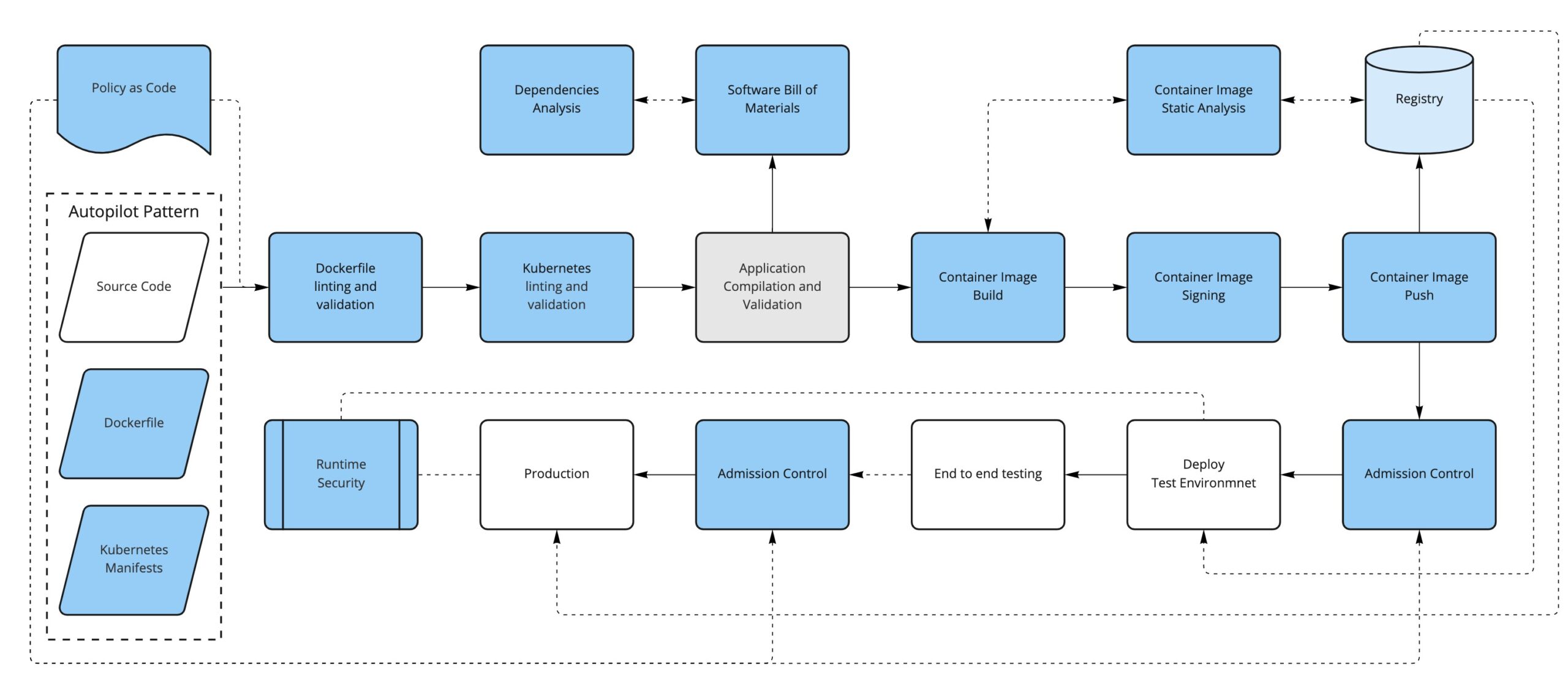
    Secure systems start from the design stage and from the code itself; you should aim to have security controls and enforcement built in as early as possible in the development life cycle. The practice of moving security checks earlier in the development pipeline (and, thus, nearer the source code) is known as shift left.

    You likely already have CI/CD pipelines in place for your application(s), and this is a great place to shift left your security checks. There are some great tools in the CNCF portfolio to help you achieve this.

    Enter Containers

    In the cloud-native world, containers are first-class citizens. From the DevSecOps point of view, containers represent a new attack surface to consider, starting with how the container image is defined and what ends up inside the container (the Dockerfile) to how the container evolves over time in response to new vulnerabilities that might be found.

    The first thing we can do is to convert our written policies to something that we can automate (such as code); for example, using a tool like OPA/conftest and a Dockerfile linter like hadolint, we can validate that the Dockerfile is compliant with our security policies.

    For instance, we could have a policy in place to limit the base images used to build new containers (limiting the FROM directive in the Dockerfile, for example).

    The second thing to consider is that, depending on how it has been built, a container image can have not only our application but also additional software included, like dependencies and operating system binaries.

    This additional software could have new vulnerabilities discovered in the future, so we should monitor the images that we have already built and pushed to our registry by periodically scanning them to find if they are open to any vulnerabilities that weren’t known at the time of building the container image.

    Just as before, we could sign our application artifacts. Now, our deliverable artifact is a container image, so it is preferable to be able to sign container images. In this way, we can trust that the container image we run comes from us and that it has been through our security process. There are projects like Notary, Grafeas and sigstore/cosign that can help with the container signature process.

    Running Containers in Kubernetes

    If we are running containers, the next logical step is to consider how we run them. Kubernetes use is on the rise as a solution to orchestrating containers across several machines. Introducing Kubernetes into the equation requires considering yet another attack surface in our DevSecOps workflow.

    Manifests

    Alongside our application’s source code, we will have the Kubernetes manifests that define how to deploy our application into a Kubernetes cluster.

    We can take the same approach as the container definition: Define some policies-as-code to enforce early in the process so our manifests are aligned with our security policies (not running untagged images, running images only from our trusted sources, ingress must have TLS, not using node port services, for example) and lint the YAML files to fail early if there are syntax problems, for example.

    We could also enforce most of the same policies and some additional ones at runtime when the manifests get applied to the cluster via a Kubernetes Admission Controller.

    Some tools that can help us with these enforcements are OPA/conftest, kubeval or kubelinter for linting and validation and, for the admission controls, we can use OPA/Gatekeeper or Kyverno, in addition to the API server admission plugins.

    Secrets

    Secrets require special attention since they contain sensitive information.

    If you’re using a GitOps approach, application secrets are often stored in repositories. Here are some resources that discuss sealed secrets in GitOps and Kubernetes secrets. 

    RBAC

    Do not use default service accounts: Define explicit service accounts associated with their permissions so you know exactly who can do what.

    Avoid the use of wildcards in roles and cluster roles; with RBAC you can define fine-grained permissions for users and for service accounts, as well.

    Know Your Dependencies

    Another attack surface that we need to consider is the application’s dependencies. It is important to first know what they are and if they have any known vulnerabilities. To help us with that, we can create a software bill of materials for the application and run an analysis on it.

    Finally, just like we periodically check for the images stored in the registry, we can continuously analyze what’s running in our Kubernetes cluster. This will ensure that there is no suspicious activity like abnormal network requests, images with critical CVEs running, etc.

    Conclusion

    By now, you should have a better idea of what it takes to secure your pipeline. Keep in mind, however, that this is mostly about process and cultural change.

    First of all, you need to know your attack surface—that is not only a technological choice, it’s also about what you think is important.

    These concepts are hard to apply from the beginning, so a better approach is to introduce changes, get used to them and think about how to improve the existing process step by step.


    Join us for KubeCon + CloudNativeCon Europe 2022 in Valencia, Spain (and virtual) from May 16-20—the first in-person European event in three years!

  • DevSecOps: Realities of Policy Management

    DevSecOps: Realities of Policy Management

    Policy management is essential to scale cloud environments and is key to secure DevOps practices. It enables organizations to manage policies put in place that secure the cloud environment, ensure Kubernetes configurations are secure and enable the continuous monitoring of a company’s overall security posture. 

     As businesses migrate workloads across multi-cloud architectures to achieve the agility and scalability needed to keep up with the pace of digital transformation, the growing demands placed upon developers often leave a gap that exposes potential threats and risks in the configuration settings, making security an even greater focus in DevOps. In fact, IDC’s 2020 survey found that 67% of breaches in the cloud are caused by misconfigured applications or infrastructure, including some of the industry’s largest breaches like Marriott’s second breach.

     To add to this, the first State of Policy Management report by Nirmata and the creators of the CNCF project Kyverno revealed that nearly 50% of users in cloud-native environments have now adopted some type of policy management solution. This tipping point of mainstream adoption across production cloud-native environments is making it critically important for DevOps teams to look at their practices and simplify and operationalize policy management across their Kubernetes stack by eliminating vulnerabilities through built-in, curated policies, without the barrier of learning complex policy languages. But this widespread adoption also acknowledges that organizations are finally realizing the need to put attention, investment and innovation into addressing security and compliance gaps as they adopt Kubernetes through proper DevSecOps practices and tools so applications being built can empower businesses.

    To confidently build cloud applications in Kubernetes, DevSecOps teams need to accept these DevSecOps realities and apply policy management effectively. 

     Customization Creates Security Risks

    Kubernetes can be highly customized, but DevSecOps teams need visibility into what’s happening in each cluster as organizations scale to ensure application reliability and security. Exploits on containers—including malware installation, cryptomining, host access and privilege escalation—offer opportunities for more security vulnerabilities. They can exist in images, production-accessible container registries, failed builds and third-party admission controllers in Kubernetes clusters.

    To address these risks in applications running on Kubernetes, it’s important to protect your environment with three A’s: Authentication, authorization and admission. This should be done at the cluster layer which enables secure access to authenticated entities that are authorized to perform certain actions. One way to accomplish this is through policy management. In fact, according to the State of Policy Management report, the top use case for policy management is for Kubernetes admission control (31%). When a request is authorized, having a policy in place ensures the request goes through another set of filters. For example, an authorized request may be rejected by an admission controller due to quotas or due to other higher-priority requests. In addition to validation, admission webhooks can also mutate incoming requests as a way of processing request objects for use before reaching the Kubernetes API server. 

    Configuration Issues

    Container images, namespaces, runtime privileges, persistent storage and control plane, together with network policies that are not compatible with best practices, are a source of misconfiguration and risk exposures. It’s this potential for greater risk exposures that have led configuration management to be a key driver of policy management adoption. In the Nirmata State of Policy Management report, it ranked third in security tools that are adopted today and fourth for the organization’s plans for future adoption.

    There are several ways to define security policies to protect cloud environments. Policies can be used for auditing purposes, to reject pod creation or to mutate the pod and limit what it can do. By default, pods can receive traffic from any source and send traffic to any destination. Network policies allow you to limit the ingress and egress access for your pods. The network policy typically translates to firewall rules.

    Lack of Adequate Authorization 

    Cloud authentication allows authorized users to securely access information stored in the cloud with authentication provided through cloud-based services. In The State of Policy Management report, key findings revealed that more than 24% of respondents today are using tools like policy management to authenticate users accessing applications. With data theft one of the fastest-growing and most expensive cybercrimes, the ability to process information and have strong authorization measures needs to be part of DevSecOps best practices.  

    In Kubernetes environments, as a user request is authenticated, it goes through an authorization workflow that decides if the request should be granted. It evaluates the request attributes against all policies and allows or denies the request. The main authorization mechanism is role-based access control (RBAC). Each authenticated request has an HTTP verb like GET, POST or DELETE, and authenticated entities have a role that allows or denies the request. Other authorization mechanisms include attribute-based access control (ABAC), node authorization and webhook mode.

    As the trend of moving security further to the left in the application life cycle accelerates, developers are being required to take active responsibility for it, which creates a higher desire for automation. The rapid releases can expose applications to many vulnerabilities, raising the risk of a breach.  With DevSecOps, organizations can transform the development pipeline by shifting security and compliance to the left, enabling developers to check the code before every commit. In doing so, security and compliance vulnerabilities can be identified and fixed in development, saving the organization from high costs and negative publicity from potential breaches. 

    There’s no doubt that Kubernetes is complex and challenging to adopt. On top of this, the development landscape is flooded with tools and more demands are being placed on engineers.  These shifts are changing the traditional role of a developer, leaving a gap for organizations to address to get the most out of DevOps. But by taking a secure, continuous, iterative approach that also includes policy management, companies can reduce the risk and exposure of their cloud environments. The more mature an organization’s DevOps practices are, then generally, the stronger the security and compliance practices are—they grow in relation to each other. The most innovative companies accept policy management in DevSecOps as a necessity of development and adopt some level of policy management best practices. With the right implementation tools like policy management and security and compliance best practices, organizations can remain efficient in agile and DevOps while adhering to critical go-live deadlines—which can’t be missed in this fast-paced business environment. 

  • Self-Service Helps Devs Solve Cloud Security and Compliance

    Self-Service Helps Devs Solve Cloud Security and Compliance

    Organizations that need compliance must follow a growing number of security standards—PCI, HIPAA, SOC 2 and GDPR just to name a few. Every new standard gives rise to an exhaustive list of hard-to-implement security controls.

    Cloud providers like AWS have tried to help, but there is still a lot left for developers to do to secure their infrastructure. Cloud providers give you the raw materials necessary to remain compliant, but you’ll have to learn how to use them.

    It may be easier to envision the scale of the compliance challenge by working through an example. PCI DSS is a typical security standard. When moving to the cloud, you’ll have to figure out how to take your compliant infrastructure and implement it using cloud technologies.

    PCI has several requirements regarding network architecture and firewall barriers. For example, specification 1.1.4 calls for a “firewall at each internet connection and between any demilitarized zone (DMZ) and the internal network zone.”

    Segmentation is the goal. Your network can’t allow traffic to move freely to wherever it wants. You need to set up rules and carefully guard sensitive areas of the system.

    In AWS, we’d suggest implementing this requirement using a mixture of services. Testing, staging and production regions of your application should each be in their own VPC. You’ll also need intelligent use of Security Groups, identity and access management (IAM) and instance profiles. Lock everything down and only open the necessary ports. A web application firewall (WAF) should protect the perimeter.

    IaaS services like RDS and Elasticsearch should be isolated via security group. Platform services like Dynamo, S3, SQS and Secrets Manager should be isolated via IAM. Lambda has one leg in the security group and another in IAM.

    PCI control 6.1 states that you must have a mechanism in place to identify security vulnerabilities within your compliant systems. How can you accomplish this in AWS?

    Automation is your best friend in application security. As the speed of development increases, security must keep up. And while there will always be a place for humans to dig into applications through penetration testing to find tricky vulnerabilities, automation will help you find the low-hanging fruit.

    AWS Inspector is an API-based service that will proactively scan and assess your application for vulnerabilities and warn you about them. This is an automatic process once it is set up, but it requires an administrator to choose what to test.

    Other tools exist to automate application security, such as Wazuh. As with AWS Inspector, there is effort involved in setting it up, initially. But once you complete the configuration, you’ll have a constant security scan running to find vulnerabilities before they reach production. And should some slip in, the scans will continue to search and find vulnerabilities before attackers exploit them.

    PCI Requirement 7 states that you must “restrict access to cardholder data by business need to know.” You’ll need to know who has access to what within your application and when they can access it.

    Restricting access in a cloud environment can be challenging because you require administrators to configure the services that your application needs to work. How can you limit access while allowing the admins to do their jobs?

    Orchestrating access control will require careful use of AWS Security Groups, IAM and federated tokens. Give your admins a token for access that expires quickly. Whitelist trusted IPs for access only to the areas of your environment that are necessary for the user’s role.

    The whitelist of IPs and the security groups will need to be kept up-to-date to make sure no holes open when personnel changes. Keep a tight grip on access control in your cloud environment.

    PCI Requirement 10 outlines the need to track and monitor all access to network resources and cardholder data. As your cloud environment grows, you’ll need more help to keep tabs on changes and user activity.

    AWS CloudTrail can be used to track user activity and API usage. But you’ll have to make sure that CloudTrail can’t be disabled without your knowledge to hide someone’s illicit activity. AWS IAM and Config services can be used to make sure CloudTrail can’t be disabled and to alert you if it is.

    CloudTrail can cover user activity, but what about infrastructure changes? You may need to bring in another tool, such as ELK, to track changes to your infrastructure. You can then marry the data from CloudTrail and ELK into a single SIEM for dashboarding.

    From this example and just these few requirements, you can see that the cloud is not a “push-button” solution.

    And this is only one example. Remaining compliant with SOC 2, HIPAA, GDPR, NIST and a host of other standards will require the same careful planning and execution.

    Planning for Compliance

    First, your team must stitch together many different software tools that help with compliance. Second, you must run periodic scans on your infrastructure and security controls after you provision your resources which essentially place Band-Aids on top of the holes you’ve created. Instead, applying controls during the provisioning process places a secure foundation under your developers’ code.

    DevOps teams try to maintain control over infrastructure and application deployment processes to avoid any mistakes from developers. Suddenly, developing software in the cloud begins to look the same as developing on-premises—delays, disappointment and frustration.

    Three things lead to successful cloud compliance:

    1. Careful planning and execution
    2. Automation to provision the necessary controls while you build your infrastructure
    3. Ongoing maintenance to adapt to changing regulations and standards

    You can help developers unlock the power and agility of cloud development while remaining compliant. But you must enable self-service for them as much as possible while maintaining security and compliance. The only way is to give them control of doing things they want while hiding low-level details that can get them in trouble.

  • Datadog Unfurls Application Security Service

    Datadog Unfurls Application Security Service

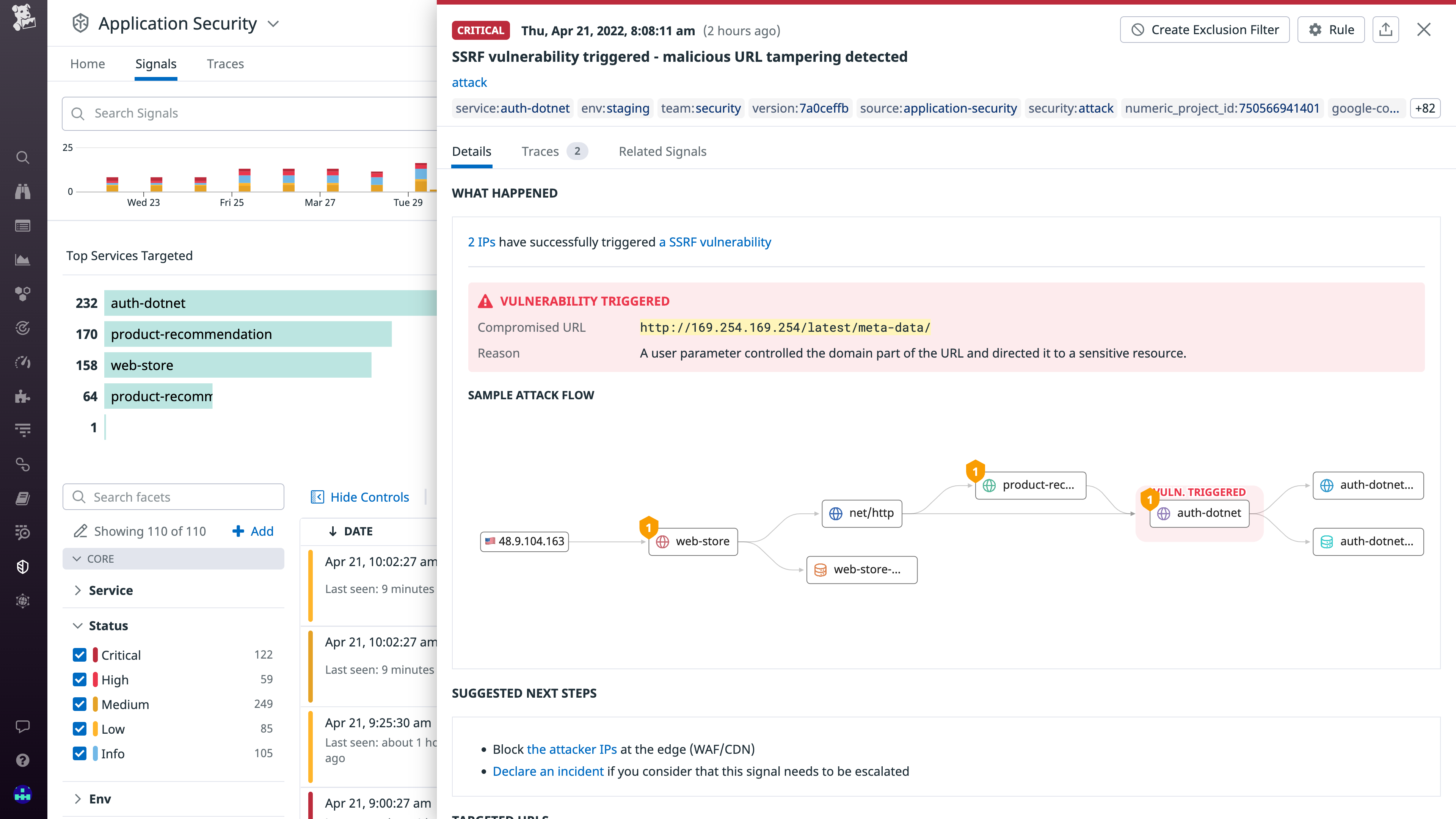
    Datadog, Inc. today made generally available an Application Security Monitoring (ASM) service that is based on the same agent software that many DevOps teams already use to monitor applications.

    Pierre Betouin, vice president of product for the cloud security platform at Datadog, said ASM is designed to make it simpler for DevOps teams to add additional DevSecOps best practices to their existing workflows. The ASM service is based on a runtime application self-protection (RASP) engine and web application firewall that Datadog gained with the acquisition of Sqreen a year ago.

    ASM then employs distributed tracing to discover code-level vulnerabilities such as server-side-request forgeries (SSRFs), SQL injection and cross-site scripting (XSS) flaws. It is designed to extend an existing Datadog Cloud Security Platform that includes cloud security posture management (CSPM), cloud workload security (CWS) and cloud SIEM services.

    The overall goal is to make it simpler for DevOps teams to address application security by eliminating the need to deploy and maintain a separate set of agents within applications, said Betouin. That approach reduces resistance among DevOps teams that would otherwise be concerned about the additional overhead another approach to application security would add to an application environment, he added.

    The number of organizations looking to implement DevSecOps best practices is expected to increase in the weeks and months ahead in the wake of a series of high-profile breaches and zero-day vulnerability disclosures. Many organizations are now performing security reviews across their entire software supply chain as part of an effort to discover any malicious malware that might have been inserted into applications.

    The challenge those organizations face is that as application environments become more dynamic, maintaining application security becomes more difficult as code is continuously updated. The best way to address that engineering challenge is to extend the reach of an observability platform that many DevOps teams already have in place, noted Betouin. Ultimately, the goal is to automate application security as much as possible but that’s not going to be achievable if DevOps teams lack the context required, he added.

    It’s not clear at what rate organizations are embracing DevSecOps best practices. However, it’s clear that DevOps teams are being held more accountable for application security. Most developers are now charged with becoming application security experts overnight, so the only way to effectively ensure application security is to uncover security flaws before applications are deployed in production environments.

    There are, of course, multiple ways of achieving that goal. Datadog is betting that the path of least resistance is via a cloud service that connects to agent software inserted within those applications. DevOps teams have been inserting agent software, in one form or another, into those applications for years. The issue is that with each new agent added there is yet another software component that needs to be deployed and regularly updated. If not carefully tracked, a DevOps team could find itself attempting to manage an entire portfolio of agent software for every platform employed.

  • What Should Elon Musk Do? | Passwordless Future: Tense | WebKit iOS Monopoly Ends?

    What Should Elon Musk Do? | Passwordless Future: Tense | WebKit iOS Monopoly Ends?

    Welcome to The Long View—where we peruse the news of the week and strip it to the essentials. Let’s work out what really matters.

    This week: Everyone has Twitter advice for Elon, passwordless vision is vacuous, and Apple prevented from forcing Safari. (more…)

  • Defining the Next Cycle of Technology

    Defining the Next Cycle of Technology

    We’re in the middle of what we at ScyllaDB dubbed The Next Tech Cycle. Not “The World of Tomorrow” nor “The Shape of Things to Come” nor “The Wave of the Future”—because it’s already here today. We’re right in the middle of it. It’s a wave that’s carrying us forward, but it began with trends that got their start earlier this century.

    Everything is co-evolving, simultaneously, from the hardware you run on to the languages and operating systems you work with to the operating methodologies you use day-to-day. All of those familiar technologies and business models are themselves undergoing revolutionary change.

    This Next Tech Cycle Goes far Beyond “Big Data”

    We’re talking about huge data. Welcome to the Zettabyte Era. This era, depending on who is defining it and what it is measuring, either started in 2010 (if you’re measuring total data stored on earth) or in 2016 (if you’re measuring total internet protocol traffic in a year).

    Right now, individual data-intensive corporations are generating information at the rate of petabytes per day and storing exabytes in total. There are some prognosticators who believe we’ll see humanity, our computing systems and our IoT-enabled machinery generating half a zettabyte of data per day by 2025.

    Yet, conversely, we’re also seeing the importance of small data. Look at the genomics revolution.

    Because the RNA gene sequence of, say, COVID-19 is actually not that big, data-wise—you can store it in less than 100kb; less than an ancient floppy. But it is increasingly important to understand every single byte of that information because vaccinating against this global pandemic requires understanding every change of that rapidly-evolving pathogen.

    So, this next tech cycle has to scale everything from huge data and small data systems. And the database you will use and the data analytics you perform need to align with the volume, variety and velocity of the data you have under management.

    “Great! Now Make it All Multi-Cloud!”

    Also, this next tech cycle is not just the “cloud computing cycle.” AWS launched in 2006. Google Cloud was launched in 2008. And Microsoft Azure was formally launched in 2010. So, we’re already well over a decade past the dawn of the public cloud. Yet this next tech cycle definitely builds on the ecosystems, methodologies and technologies these hyperscalers provide.

    The database you use also has to align with where you need to deploy it. Does it only work in the cloud, or can it be deployed on-premises far behind your firewall? Does it just work with one cloud vendor or is it deployable to any of them? Or all of them simultaneously? These are important questions.

    Just as we do not want to be locked into old ways of thinking and doing, the industry does not want to be locked into any one technology provider.

    If you’ve just been mastering the art of running stateful distributed databases on a single cloud using Kubernetes, that’s not good enough. Now you’re being asked to do it all over again; this time in a hybrid or multi-cloud environment using Anthos, OpenShift, Tanzu, EKS Anywhere or Azure Arc.

    Computing Beyond Moore’s Law

    It’s also not the basic broadband or wireless internet revolutions. We’re a full two decades into both of those. Yet the advent of gigabit broadband and the new diverse range of 5G services—also capable of scaling to a gigabit—enable incredible new opportunities in real-time data streaming services, IoT and more.

    So how does your database work when you need to connect to systems far and near? How important are the limitations of the speed of light to your latencies? How well do you deal with data ingested from hundreds of millions of endpoints at gigabit-per-second scale?

    And finally, underpinning all of this are the raw capabilities of silicon, summed up by the transistor and core counts of current generation CPUs. We’ve already reached 64-core CPUs. The next generation(s) will double that, to the point where a single CPU will have more than 100 processors. Fill a rack-based high-performance computer with those and you can easily get into thousands of cores per server.

    And all of this is just traditional CPU-based computing. You also have GPU advancements that are powering the world of distributed ledger technologies like blockchain. Plus, all of this is happening concurrently as IBM plans to deliver a 1,000 qubit quantum computer in 2023 and Google plans to deliver a computer with one million qubits by 2029.

    This next tech cycle is powered by all of these fundamentally revolutionary capabilities. It’s what’s enabling real-time full streaming data from anyone to anywhere. And this is just the infrastructure.

    If you dive deeper into that infrastructure, you know that each of the hardware architecture bottleneck points is undergoing its own revolution.

    We’ve already seen CPU densities growing. Yet vanilla standalone CPUs themselves are also giving way to full systems on a chip (or SoCs).

    And while they’ve been used in high-performance computing in the past, expect to see commonly-available server systems with greater than 1,000 CPUs. These will be the workhorses —or, more specifically, the warhorses—of this next generation: Huge beasts capable of carrying mighty workloads.

    Memory, another classic bottleneck, is getting a huge boost from DDR5 today and DDR6 in just a few years. Densities are going up, so you can expect to see warhorse systems with a full terabyte of RAM. These and larger scales are going to be increasingly common—and, for businesses, increasingly affordable.

    Storage is also seeing its own revolution with the recently-approved NVMe base and transport specifications, which will enable much easier implementation of NVMe over fabrics.

    Now, software will have to play catch-up to these capabilities. Just as it took time for kernels and then applications inside of a vertically scaled box to be made async everywhere, shared-nothing, sharded-per-core, and NUMA-aware, this next tech cycle is going to require systems to adapt to whole new methodologies of getting the most from these new hardware capabilities. We will need to reconsider many foundational software assumptions.

    Evolving Methodologies: Agile and Beyond

    Speaking of methodologies, just look at these from the dawn of the millennium and onward. As an industry, we’ve moved from batch operations and monolithic upgrades performed with multi-hour windows of downtime on the weekend to a world of streaming data and continuous software delivery performed 24 × 7 × 365 with zero downtime ever.

    And by migrating to the cloud (and this always-on world) we’ve exposed ourselves and our organizations to a world of random chaos and security threats. We now have to operate fleets of servers autonomously and orchestrate them across on-premises, edge and multiple public cloud vendor environments.

    While Scrum has been around since the 1980s, and continuous integration since 1991, in this century, the twelve principles of the Agile Manifesto in 2001 altered the very philosophy—never mind the methodologies—underlying the way software is developed.

    The Agile Manifesto’s very first line talks about the highest priority being “to satisfy the customer through early and continuous delivery of valuable software.”

    However, the specific term continuous delivery (CD), as we know it today, didn’t take hold until 2009. It was then joined to continuous integration and coincided with the birth of what we now know as DevOps.

    With that, you had a framework for defining change-oriented processes and software life cycles through a responsive developer culture that now, a decade or two into this revolution, everyone takes as a given.

    This graph shows how continuous integration (CI) and continuous delivery (CD) evolved independently. They were eventually conjoined by the term CI/CD, whose popularity as a search term only began to rise around 2016 and did not displace the two separate terms until early in 2020. It is now increasingly rare to refer to CI or CD separately, according to Google Trends.

    Onto that baseline were built tools and systems and philosophies that extended those fundamental principles. The Chaos Monkeys of the world, as well as the pentesters, want to break your system—or break into them—to uncover flaws and defects long before something stochastic and catastrophic or someone maliciously does it for you.

    Cloud-native technologies like Kubernetes and single-source-of-truth for infrastructure methodologies like GitOps were created out of sheer necessity to scale systems to the hundreds of thousands of production software deployments under management.

    DevSecOps

    And that’s still not enough. We’ve already seen software supply chain attacks like SolarWinds, low-level system attacks like Spectre, Meltdown and Zombieload, or human-factor threats like viral deep fakes and millions of fictitious social media accounts using profile images generated by generative adversarial networks, never mind millions of IoT-enabled devices being nefariously harnessed for distributed denial-of-service (DDoS) botnet attacks. Just recently, news broke of the Log4j vulnerability—our best wishes to anyone who was patching code this past holiday season.

    These are all just the bowshocks of what’s still to come.

    So now, your AI-powered security systems are locked in combat every day in real-time against the threat actors attempting to undermine your normal operations. We know this because a growing number of intrusion prevention and malware analysis systems are built at terabyte-and-beyond scale using distributed databases as their underlying storage engines.

    Hence, these days, rather than just DevOps, increasingly we talk about DevSecOps—because security cannot be an afterthought. Not even for your MVP. Not in 2022.

    And these methodologies are continuing to evolve.

    Summary

    This next tech cycle is already upon us. We’re in the thick of it. You can feel it in the same way you’d yearn for major life or career change. Maybe it’s a programming language rebase. Is it time to rewrite some of your core code as Rust? Or maybe it’s in the way you are considering repatriating certain cloud workloads or extending your favorite cloud services on-premises such as through an AWS Outpost. Or maybe you’re actually looking to move data to the edge? Planning for a massive fan-out? Whatever this sea change means to you, you’ll need rock-solid infrastructure that’s available today to take workloads into production right now, but flexible enough to keep growing with your emerging, evolving requirements.

  • MDR for DevSecOps: How Managed Security Can Help You Shift Left

    MDR for DevSecOps: How Managed Security Can Help You Shift Left

    What is managed detection and response (MDR)? Managed detection and response (MDR) is an outsourced service that helps organizations detect threats on endpoints, respond to them and carry out proactive threat hunting.

    MDR services typically include an endpoint detection and response (EDR) platform, which is deployed on company endpoints, and human security experts. MDR providers give their customers access to security analysts and engineers who can help with endpoint security, network security management, triage of alerts and responding to real security incidents (here’s some further reading and more background on managed detection and response platforms).

    Why is MDR Important?

    Traditional managed security services (MSS) offer basic monitoring and alerting that do not provide the context and guidance needed to identify, respond to and remediate real security incidents. It leaves organizations exposed to many threats that pass through these basic services.

    How MDR Helps Protect Organizations

    MDR provides a proactive, outcome-driven approach that goes beyond the scope of what MSS vendors can offer. Common MDR services include:

    • Continuous network and endpoint monitoring.
    • Security orchestration.
    • Threat hunting.
    • Integrated response actions like remote threat containment.
    • Advanced MDR services also offer extended detection across clouds such as AWS, GCP, Azure and common SaaS suites like Google Workspace and Office 365. Other providers can protect incident command systems (ICS) and supervisory control and data acquisition (SCADA) systems within operational technology (OT) environments.

    What is DevSecOps?

    DevSecOps is a software development methodology that unifies previously disparate development (Dev), security (Sec), and operations (Ops) teams. It aims to integrate security across all development life cycle phases, including design, development, testing, deployment and delivery. It involves using automation to integrate security across all phases.

    In the past, security tasks were performed at the end of the development pipeline by a separate security team. Next, the product was tested by a quality assurance (QA) team. This approach worked when developers released software updates only once or twice per year. However, once software development teams adopted Agile and DevOps pipelines to reduce the development time, security became a bottleneck.

    How DevSecOps Improves Security

    DevSecOps integrates security into Agile and DevOps pipelines. It ensures teams can address security issues during the early phases of the development cycle. As a result, teams can apply fixes when it is easier and faster to remediate before products are released to production.

    DevSecOps makes security a responsibility shared by all teams, including Dev, Sec and Ops. It is no longer the sole responsibility of one team that creates a security silo. Instead, it enables teams to automate secure software delivery, prioritizing security without slowing down the software development cycle.

    How Managed Detection and Response (MDR) Solutions Benefit DevSecOps

    DevOps has revolutionized application development. However, due to the high velocity of modern development methods, they can introduce security gaps and flaws.

    In addition to regular security breaches occurring across the DevOps pipeline, new and sophisticated attacks, most significantly supply chain attacks infect the development systems themselves or third-party software components. This results in mega-attacks that can compromise millions of devices before being detected.

    How can MDR help?

    MDR is a relatively new cybersecurity offering but is beginning to have a major impact on companies seeking better protection with lower operational overhead. There are many overalls between MDR and DevOps. To integrate cybersecurity into production and deployment pipelines, some organizations are turning to a DevSecOps approach and MDR can help.

    DevSecOps makes cybersecurity an integral part of the entire DevOps life cycle. As more organizations implement DevSecOps, they can supplement the knowledge and security best practices of in-house teams with the security expertise provided by MDR services.

    How MDR Keeps DevOps Ahead

    MDR keeps DevOps teams ahead of the latest threats by keeping developers up-to-date on emerging threats and vulnerabilities and providing advanced tools for continuous security monitoring and response in their development and deployment pipelines. A key benefit of MDR is that it provides access to experts who can take action to prevent attacks, not just provide recommendations.

    MDR becomes a supporting element that allows developers to write more secure code as well as better secure their DevOps environment. With the help of MDR technology and experts, it becomes easier to identify advanced threats that can bypass security controls before they impact the DevOps environment or the resulting software product.

    Considerations for Selecting an MDR Solution

    • There are several important considerations when choosing an MDR platform suitable for a DevOps environment:
    • Understanding of attack surfaces common in a DevSecOps environment, and the ability to monitor and control the relevant environments.
    • Measures are taken to eliminate false positives and prioritize alerts. DevOps teams operate at high velocity and do not have time to wade through irrelevant alerts.
    • Automated triage and response at all stages of the development lifecycle. In earlier stages, this should take the form of actionable recommendations for developers, and in later stages, full incident response for production environments.

    All of this is useful as you find the right way to shift your organization to a true DevSecOps process.