Tag: devops

  • Where Does the Database Fit into Continuous Delivery?

    Where Does the Database Fit into Continuous Delivery?

    Continuous delivery (CD) is increasingly becoming the norm in software development, with companies releasing updates more and more frequently. Those that aren’t are exploring how they can catch up. But in all of this push to DevOps and CD, it’s vital not to forget the database. Changes to applications or web services often require changes to the database, which means companies need an end-to-end process that spans both application and database development if they want to successfully embrace CD.

    However, many companies still work in silos, with applications and databases developed separately. So while the ability to deploy application changes across environments is relatively common, supporting databases in a truly elastic environment remains a major challenge for organizations.

    To find out the current state of database DevOps, and how it can be included in CD, Redgate surveyed 1,000 SQL Server professionals across the world. While we found companies were keen on implementing DevOps, with 80 percent saying they will have adopted it within the next two years, only 20 percent are currently applying DevOps practices such as version control, continuous integration or automated deployment to their databases.

    The Need for Change

    This isn’t because companies don’t recognize the need for database DevOps—37 percent said they are deploying database changes either more than once a week or daily, demonstrating a requirement for automation. Indeed, the main driver for adopting DevOps in this area is to increase the speed of database changes (cited by 26 percent of respondents), followed by freeing up developers for more added value work (17 percent).

    Companies also recognize the drawbacks of continuing traditional, siloed database development practices—26 percent said it increased the risk of failed deployments or downtime when introducing changes. This was followed by slow development and deployment cycles and an inability to respond quickly to changing business requirements (both 18 percent). Sixteen percent also cited poor visibility of the change management process as another issue. This shows the vital importance of fast, successful database changes and deployments to business today.

    For companies with 5,001-10,000 employees, slow development and release cycles were seen to be more of a drawback than application downtime, while for organizations with more than 10,000 employees, the inability to respond quickly to changing business requirements was deemed to be a slightly more significant downside.

    Moving to DevOps for the Database

    As well as understanding the business need, the survey showed that organizations are now better structured to enable continuous delivery for database changes. The old picture of companies made up of silos of developers and database administrators that don’t work together, for example, is far from the truth. Seventy-five percent of companies had teams that included developers who were working across databases and applications, with just 25 percent having dedicated database developers. In 60 percent of companies, developers were responsible for building database deployment scripts. Fifty-eight percent of companies said the integration between the two was either good (38 percent) or great (20 percent), meaning teams work together on a planned or ad hoc basis. Just 12 percent classed integration as poor, with DBAs working in silos.

    However, the research highlights two challenges to overcome:

    Different processes and tools—Despite the levels of integration within organizations, there is still a gap between how companies operate and automate when it comes to applications and databases. For example, while 81 percent of respondents use version control for their applications, just 58 percent apply it to database development. Thirty-nine percent use continuous integration for applications, yet only 20 percent apply the same practice to their database. Clearly, there is still more that can be done to bring the two together through common practices and the use of third party tools.

    The skills gap—The greatest obstacle to moving to an overall DevOps way of working was a perceived lack of appropriate skills (cited by 21 percent of respondents), ahead of a lack of alignment between the development and operations teams (20 percent). Only 9 percent said that their executive leadership didn’t support the shift.

    When it came to integrating database changes into the DevOps process, consistency was top of the list of obstacles, with 32 percent believing that synchronizing application and database changes would be the biggest challenge, followed by overcoming different approaches to application and database development (25 percent). Perhaps unsurprisingly, 19 percent also mentioned preserving and protecting business critical data as the largest obstacle to overcome.

    It’s Happening Sooner Than You Think

    The good news is that many companies are confident they can quickly overcome the process and skills challenges. When asked how long they estimated it would take their organization to move from traditional database development practices to a fully automated process for deploying database changes, more than half (51 percent) said it could be done within a year, with 20 percent believing it could be achieved in six months.

    Digging down into the data, those that have already adopted DevOps in other processes are much more confident the switch can be achieved quickly. Sixty-eight percent of this group cite 0 to 12 months as the time it would take to move to a fully automated database development process, compared to 28 percent of those who had no plans to adopt DevOps practices. In fact, 43 percent of this latter group cited more than two years as their estimate.

    Our research shows that organizations recognize the potential of applying DevOps to the database to gain all of the advantages CD brings. They see that it speeds up software development, frees developers to do more value-added work and increases the rate at which database changes are delivered.

    At a time when organizations need to operate in a faster, more seamless manner to thrive in ever more competitive markets, introducing DevOps and CD to the database can transform their development process. To read more about the research and the “State of Database DevOps,” download the full management report.

    About the Author  / Matt Hilbert

    Matt Hilbert is a technology writer at Redgate Software with 20 years’ experience working for lots of the world’s biggest tech companies – and many of the smallest. He has a particular fascination for emerging technologies and is on a continuing mission to decompile, untangle, and explain techspeak to a wider audience, and excite people about the endless possibilities technology offers.

  • Preventing the DevOps Dilemma

    Preventing the DevOps Dilemma

    Clayton Christensen, in his bestseller, “The Innovator’s Dilemma,” first outlines how innovation occurs, and then why large incumbents often fail to recognize, leverage and invest in new innovations in their industries. What is interesting about his view is that failure isn’t directly correlated to simply not recognizing, or even adopting, new innovations, but rather that it occurs because these companies attempt to apply or force the innovation into existing architectures, business processes and customer bases.

    Definition of DevOps

    Perform a Google search for “DevOps” and you’ll be presented with thousands of results, each with their own nuanced definition of the term. More often than not, the discussion is around tactical approaches to “implementing or adopting DevOps,” as if it were concrete entity or a role/job title. The core goal of DevOps is really about disrupting a culture to be adaptive to the changing needs of the enterprise, and provide a strategic framework to scale and gain efficiencies.

    ‘DevOps Dilemma’

    The “DevOps Dilemma” often occurs when the cultural adoption isn’t driven by taking a fresh, holistic view of solutions and architectures, but instead automation and measurement approaches are layered on top of the current development and operations run-books. Instead of embracing true agility, this is a “waterfall-esque” approach that neither captures the true essence of the value of DevOps nor does it typically improve operational excellence and efficiency. The cultural shift toward DevOps needs to take a continuous approach where everyone is trying to improve and evolve the business by leveraging the core tenets of DevOps—collaboration, automation, measurement and sharing.

    Where To Start?

    One strategy for preventing DevOps dilemma and undertaking a successful cultural transformation to DevOps would be to do so in conjunction with a greenfield project. That assures that you don’t “bolt it onto” existing processes and methodologies. It also sends a clear message of the importance of combining effort with resources and moving dedicated focus away from the current status quo. This often also can result in creating a flexible playbook that you can use to go back and improve the areas that compose your core business. Your engineers will learn valuable new skills and rapidly evolve, and the company will be much better positioned for attracting new and developing existing talent.

    About the Author / Mike D. Kail

    Mike D. Kail is chief innovation officer at Cybric. Prior to CYBRIC, Mike was Yahoo’s chief information officer and senior vice president of Infrastructure, where he led the IT and global data center functions for the company. Prior to joining Yahoo, Mike served as vice president of IT operations at Netflix, where he was responsible for employee technology and various cloud engineering components. He has been widely recognized for his insightful industry commentary on social media Twitter, and was recently named by the Huffington Post as one of the “Top 100 Most Social CIOs on Twitter.” Connect with him on LinkedIn and Twitter.
  • 6 Big, Bad Mistakes in Configuration Management, Part 2

    6 Big, Bad Mistakes in Configuration Management, Part 2

    In Part One of my article on big, bad mistakes in configuration management, I reviewed the dangers of using the wrong tools for the configuration management job. Provisioning management tools, application release automation tools and continuous integration tools each have their place in your DevOps toolchain. But they should not be used as a substitute for ongoing configuration management. In this article I am focused less on misusing tools and more on bad practices, limited thinking and short-sightedness that should be avoided.

    Mistake No. 4: Direct Server Access to Production

    This one may not bite you … until it does. I’ve worked with many companies where developers have direct access to Production. This is not good. And, in many cases, it is a violation of compliance policies. Please don’t take offense, my developer friends. You shouldn’t want direct access to Production. I find that 9 times out of 10, your code is not the problem—the configuration is the problem. However, you’re being asked to log directly into the server to do comparisons between your environment (where it worked just fine) and Production. This leads to the, “How did he fix it?” problem, and it leads to the dreaded typos and other manual errors. I’ve witnessed companies lose millions of dollars in a matter of minutes because someone logged directly into a server and made an incorrect configuration change.

    The question is, How do you cut off direct access to Production? How do you quickly find configuration differences between environments without logging into the server? The answer is a good configuration management solution that quickly shows differences between the environments for all your tiers. This is easy when you’re doing file-to-file comparisons, but what about registry key comparisons, or WebSphere comparisons? Find a configuration management tool that gives you visibility fast, exactly when you need it, for the important parts of the stack that keep your applications running. And insist on a configuration management solution with robust RBAC (role-based access control) over what changes can be made, where and when they can be made, who can make them and even who can approve them.

    Mistake No. 5: Leaving Your DBAs Out of the Picture

    The majority of companies I work with have completely disconnected database and middleware teams—the DBAs don’t really know what the middleware team is doing and the middleware team has no visibility into what the DBAs are doing. I believe there are a couple reasons for this: people and technology. We won’t worry about the people aspect today, other than to say that each team thinks the other team is “quirky” J. From the technology aspect, traditional tools simply do not provide configuration visibility into both the middleware and the database tier. So the DBAs end up having one toolset, and the middleware team a completely different toolset. This prevents collaboration, orchestrated releases, and the complete configuration picture that’s needed to make sure your application is fully configured, performing, and running correctly.

    This is a big problem. In fact 37 percent of survey respondents admitted that they relied on scripting and manual processes to determine which databases were used by which applications in their ecosystems. And another 38 percent admitted they don’t even have a way to determine this information. Talk about blindfolds! My advice is to find a solution that both middleware and database teams can use. That doesn’t necessarily mean the DBAs will replace their favorite tools, but they’re now involved in the process, allowing that collaboration and orchestration that was missing.

    Also, if you use a single, integrated configuration management solution your management, middleware, OS and DBA teams will all have visibility into every aspect that makes the application run. The middleware team can see if there are schema changes that may be causing an application issue as opposed to spending hours looking for a middleware configuration issue they’ll never find, or vice versa. Having one unified tool cuts down on the mean time to diagnose because you can see all the tiers in one place.

    Mistake No. 6: Focusing Only a Single Part of the Stack

    The previous “big, bad mistake” segues nicely into this one: focusing on just a single part of the stack. There are many tiers supporting your application, and we’ve touched on several in this series—namely middleware, database and OS. Within each tier you may be supporting different technologies. Some applications may be running on IIS with a SQL Server back end while others run on WebSphere with an Oracle back end. Then you have the operating system settings to worry about: making sure registry keys are set, system services have the right accounts, filesystem permissions are accurate, all the correct versions of Linux packages are installed, etc.

    Based on a lack of comprehensive coverage up and down the application stack, many companies have chosen to explore configuration management tools for just a single part of it. These point tools tend to focus on the most business-critical applications, the one where they hit the most configuration issues or simply the one that’s most difficult to manage. This is not necessarily a bad thing to do, but take care not to be too single-minded. Try not to choose a configuration management solution that works well for one part of the stack but not others, or that works very well in one environment (Linux/Unix), but not very well in another (Windows). Managing these disparate point solutions, with maddening gaps and overlaps in coverage, can be exhausting.

    Choose a tool that’s extensible to other parts of the stack, business or other teams. My suggestion is to make a list of all present and future technologies you use that need configuration management support. Divide them into different parts of the stack and then rank them from “most onerous to manage and/or most business critical” to “nice to have.” Refer to this list when evaluating configuration management tools so you don’t lose sight of the forest from the trees. Make sure the tool can support all your top items and ask about their road map for your “nice to haves.”

    Tune into our upcoming webinar, which will touch on these topics as well.

    About the Author / Kristy McDougal

    Kristy McDougal leads Product and Sales Engineering for Orca, an application release and configuration automation solution for DevOps teams. Prior to launching Orca, Kristy was a Senior Pre-Sales Consultant within BMC Software’s worldwide DevOps specialist team. Before BMC, Kristy held technical positions at VaraLogix, Virtual Bridges, Global Foundries and Advanced Micro Devices. Her experience includes Unix systems administration, systems engineering, pre-sales consulting and post-sales services. Kristy is ITIL Foundation-certified and is an electrical engineering graduate of the University of Texas at Austin.
  • 6 Big, Bad Mistakes in Configuration Management, Part 1

    6 Big, Bad Mistakes in Configuration Management, Part 1

    Configuration problems come in many flavors. Some are mere nuisances. Often though, configuration errors can lead to more serious mishaps like application performance problems, policy compliance violations or even security vulnerabilities. They can often go undetected, quietly doing their damage in the background while everyone’s attention is focused elsewhere.

    Unfortunately, I find that configuration management is an area where many companies either 1) put it as a “last to solve” on their priority list (when arguably it’s quite important), or 2) try to solve it with a do-it-yourself fix, but in a way that’s not always extensible or that doesn’t end up working with their DevOps toolchain.

    Usually, I find configuration issues stemming from the age old problem: using the wrong tool for the job. In this blog I’ll address six big, bad mistakes of configuration management. (For the sake of brevity, three will be addressed here and three in an upcoming blog.)

    Before I get into it, though, there are so many definitions of configuration management that it warrants a brief summary so we’re all on the same page. I’m talking about the ongoing configuration management of the infrastructure tiers supporting your applications—the middleware, database and OS-level configurations that keep your applications’ lights on and everyone happy.

    Mistake No. 1: Only Considering Provisioning

    Notice I just mentioned the word “ongoing” in my definition of configuration management. I find that so often people forget to take the ever-important “ongoing” into consideration. I have many conversations with folks wanting to implement a “provisioning tool.” On the surface, they think they need just that: a tool that provisions infrastructure including all the tiers of the application. But when I probe further, what they’re really wanting is something that provisions and then continues to monitor, manage and fix. There’s a big difference there.

    Some tools do great at provisioning but lack the visibility and “ongoing” configuration management needs. Think of a provisioning tool as waving a bat at a piñata. Yes, you can “blow away your environment” and start over, but that blindfold prevents true visibility and ongoing interaction.

    When looking for configuration management, be sure to focus on your current and future needs. Do you just need a provisioning tool? Or do you need an ongoing configuration management tool? Or both? Most tools that tout doing both do one much better than the other, so be sure to do your research.

    Mistake No. 2: Using an ARA Tool to Manage Configurations

    In a previous position I spent quite a bit of time onsite with clients helping them automate their application deployment processes. What I found is that around 80 percent of “application deployment” tasks are actually configuration tasks. The application deployment is the easy part; it’s the configuration management aspect that causes all of the headaches. I would spend the majority of my time onsite hurriedly writing little scripts that would be hurriedly inserted into the deployment process that would set the application pool, restart the service, change a heap size, etc. I had to write the scripts because application deployment products are workflow automation engines with process wrapped around them. They are not meant to be infrastructure configuration management products.

    It bears repeating: Traditional application deployment solutions are not meant to be infrastructure configuration management products. They can get you part of the way there, but 1) you’ll need to script it all, which is not extensible and defeats the true purpose of a tool, and 2) they simply catapult your application (one way only!) into the next environment (i.e. Test to Staging, Staging to Prod), so you can forget about the “ongoing” piece we discussed above. Compare that one-way catapult launch to the complexity of routinely engineering one safe launch (and landing!!!) after another on an aircraft carrier on the open seas. A mission-critical task like this requires advanced technologies, visibility, communication and coordination to account for constantly changing environmental factors.

    Mistake No. 3: Using a CI or Build Automation Tool When You Need Configuration Management

    As bad as misusing an application release tool when you really needed a configuration management solution, it’s even worse using a continuous integration tool for this. Like many DevOps solutions, CI tools are particularly helpful for developers. CI tools like Jenkins and Bamboo require Dev teams to share or check in their updated code into a repository. The CI tool then detects potential problems early by automatically verifying builds for the developer. From the Dev team’s perspective, there is no more wondering if their code is going to work, and they spend less time debugging and redoing. The financial benefits of CI and the early warning system they provide should be obvious and considered a must-have for developers.

    But while detecting coding errors early saves a lot of hassle for the Dev and Test teams, Ops teams do not directly benefit from CI. Here’s why: Operations teams are concerned with the application release into Production environments and then the ongoing configuration management of the entire application stack including the application, middleware, database and operating system. Once the (application) baton is passed to them, they require visibility into and intelligence about the application’s operating environments—well after Dev and UAT. As good as they are for Dev teams, CI tools are simply not equipped to provide ongoing operations support, visibility and coordination in Production that modern Configuration Management solutions provide.

    These are just a few big, bad mistakes in configuration management and they focus largely on misusing tools beyond their intended scope. I will follow up with a Part II companion article that addresses configuration management practices to be avoided.

    Tune into our upcoming webinar, which will touch on these topics as well.

    About the Author / Kristy McDougal

    Kristy McDougal leads Product and Sales Engineering for Orca, an application release and configuration automation solution for DevOps teams. Prior to launching Orca, Kristy was a Senior Pre-Sales Consultant within BMC Software’s worldwide DevOps specialist team. Before BMC, Kristy held technical positions at VaraLogix, Virtual Bridges, Global Foundries and Advanced Micro Devices. Her experience includes Unix systems administration, systems engineering, pre-sales consulting and post-sales services. Kristy is ITIL Foundation-certified and is an electrical engineering graduate of the University of Texas at Austin.

  • DevOps Viewpoints from Pink17

    DevOps Viewpoints from Pink17

    I recently had the opportunity to cover Pink17, Pink Elephant’s 21st Annual International IT Service Management Conference & Exhibition in Las Vegas, Nevada. In this case, what happened in Vegas did not stay in Vegas; instead, most came home with actionable takeaways surrounding Pink17’s theme, “Communicate, Connect. Change,” to help grow their businesses.

    The content-rich and comprehensive program, with inspirational keynote speakers, 12 tracks and more than 120 sessions, was a veritable smorgasbord of subjects spanning the IT service management (ITSM) spectrum. This included many thoughtful and informative DevOps-focused tracks. The event as a whole was a well-organized and executed conference. The attendees whom I spoke with thought the sessions were relevant and the peer networking invaluable. Whether you were there for a strategic vision, a tactical plan or operational know-how, Pink17 delivered.

    In this article, I’ll present some key takeaways from the conference along with some interesting conversations I had along the way with three of Pink Elephant’s thought leaders including their visions for DevOps in the ITSM space.

    IT Success is About Delivering Business Value

    In his opening remarks, George Spalding, executive vice president of Pink Elephant, had a message for IT professionals: “You must start planning DevOps by 2017 or by 2020 your business will be irrelevant.”

    This message was supported throughout many of the DevOps sessions, such as in “Agile, Lean, and DevOps – Working Together To Increase ITSM Efficiency,” presented by Troy DuMoulin, VP Research & Development for Pink Elephant. In this session, DuMoulin revealed how Agile, Lean and DevOps practices can work together to help organizations achieve the elusive challenge to be better, faster and cheaper.

    According to DuMoulin, much has changed in the IT world in last three years, and although many of the practices are the same, IT professionals now need to do their jobs faster, while at the same time delivering additional business value. “The language has changed. No longer do we talk about maturity, robustness, compliance, risk and availability,” said DuMoulin. “Now Agile, Lean, and DevOps are all about the concept of speed, and efficiency is key.”

    We Didn’t Invent DevOps—It’s Always Been There. The IT Community is Just Refining It

    According to several DevOps speakers, DevOps isn’t just one entity but rather a system of dynamic parts that work collectively together. When everything is about a quest for fast flow, DevOps can be considered a system of value generation. According to DuMoulin and others at Pink17, the key for ITSM professionals to realize is that a DevOps culture is about creating a fast flow for their existing work—not replacing it.

    DevOps Teams Deliver Real Value to Successful DevOps

    In her session, “DevOps Teams: A Continuous Engagement Approach,” Jayne Groll, co-founder and board member of the DevOps Institute (DOI) and also a member of the Pink Think Tank, provided insight into emerging DevOps roles, skills and competencies that are delivering real value to successful DevOps. In particular, she explored various models for DevOps teams to support continuous engagement, shared accountabilities, faster deployments and increasing trust between DevOps, Ops, Security, QA and Support.

    Besides defining the emerging roles and skills in DevOps, including those focused on people, practices and automation, Groll also discussed models and approaches for the creation of DevOps teams including how their value creation differs from today’s hierarchal IT organization.

    “The DevOps Teams are continuous and cross-functional,” said Groll. “These teams demonstrate ‘CALMS’ values—Culture, Automation, Lean, Measurement and Sharing.”

    Make Sure the Right People are at the Table at the Right Time

    Jack Probst, principal consultant at Pink Elephant and a member of the Pink Think Tank, thinks when most people talk about DevOps they see it as an automation play, when really it’s an organizational change and culture effort because people are really rethinking the way in which work will be conducted. According to Probst, the biggest challenge for IT professionals is finding the time to make sure all the right people are at the table at the right time. Regardless of DevOps tools that are used, if people aren’t talking to each other—DevOps won’t work.

    “For me, DevOps is defining the way you put the LEGO pieces together in an organization to make it work,” said Probst.  “DevOps has a lot of buzz, but at its core, it’s a people issue. Adopt and adapt and figure out what’s important and make it work inside your organization.”

    Furthermore, to avoid short-sighted thinking and get the optimal results in a DevOps initiative, organizations need to think of DevOps in terms of people and culture and not only tools.

    Start with Why?

    In her session, “The Yellow Brick Road & The Effective Organizational Change Manager,” Robin Hysick, management consultant with Pink Elephant, discussed the Change Management Body of Knowledge (CMBok)’s 13 critical knowledge areas, the related professional certification levels and how the methods are techniques covered by the CMBok can help organizations manage successful projects and transformative initiatives.

    Robin’s perspective on integrating DevOps into an existing ITSM system is all about the why.

    “The first thing an organization needs to do is to first understand why? I like to refer people to Simon Sinek and his ‘Golden Circle’ explanation,” said Hysick. “We’ve never done this in IT. … Organizations won’t succeed with DevOps and change management until they know why they’re doing what they’re doing.”

    In addition, Hysick teaches the DevOps Institute’s DevOps Foundation and Certified Agile Service Management courses. She says when people come to these classes they usually have no idea what DevOps is—when they leave they understand the concept behind DevOps and where it came from. Most importantly, IT professionals return from the classes knowing exactly what to ask their decision makers so they can best determine how to achieve a DevOps solution.

    Conclusion

    So what were my takeaways from my Pink17 Vegas experience? Mainly that DevOps isn’t only about tools, automation or continuous delivery—it’s about people. The right people at the same table who have the intelligence and the passion for getting to the heart of their business’s why factor?

    Too often IT managers are so busy in the day-to-day needs of quickly producing their products they forget the reason they are doing it in the first place. And the most important question gets lost in our frenetic world of disruptive technology: Why?

    At Pink17 IT professionals learned that to have a successful DevOps initiative, they need to take a beat before they run off to their next sprint or say “we’re doing DevOps now,” and figure out why their business wants to “do DevOps?” What is the business problem they are trying to solve? What change do they want to make it? Why will it benefit their business? What are the opportunities or urgencies of their business and then define what they need to do to make the outcome happen? Whether it’s bringing more tools to bear, implementing automation or more, it all should start with, Why?

    Did you attend Pink17? What were some of your favorite sessions? Looking to attend Pink18, read more here.

    — Ingrid Sides

  • Configuration Management vs. Application Release Automation

    Configuration Management vs. Application Release Automation

    There are many areas of Development and Operations toolchains that are clear to understand and compartmentalize. CI/bBuild, source control, artifact repositories, log management, APM and others each are relative easy to comprehend what they do and what tools are available within each area. There may be debates about whether Git is better than Subversion, AppDynamics or New Relic, or whether to choose Splunk vs Elastic Stack, etc., but what the tools are used for is in little doubt.

    I don’t think this is as clear for configuration management and application release automation areas. Both of these areas overlap in multiple areas—both are fundamentally providing automation capabilities, they share common taxonomy such as “desire state” and “declarative/imperative,” both are looking to achieve streamlining of system and application updates, and both are concerned with issues including reliability, audit and accelerating release cycles.

    So what is the difference between them? This is what I intend to try to highlight in this post.

    What Are Configuration Management Tools Best Used For?

    So the very short answer is configuration management tools—Puppet, Chef, Ansible and Salt, for example—are server configuration management tools. They are primarily used for the provisioning and ongoing configuration management of servers. They apply changes to infrastructure using an “infrastructure as code” approach where the “desired state” of infrastructure is stored in a repository—usually a source control system—and updates are applied to managed systems to ensure they are in compliance with the infrastructure’s “desired state.”

    Changes to these systems should be made using the config management tool interface/language, with the automation routines normally written in Ruby or Python and configurations exposed as properties in something like JSon or YAML. Any changes made directly on a target server, will likely be reverted to the “desired state” definition when the agents or systems next synchronize with the master.

    They can also be used to deploy and manage certain types of applications very effectively. This is I believe is the route of much of the confusion, as some organizations/applications use configuration management systems for provisioning, infrastructure configuration and application deployments. They normally do this by deploying system and application changes in exactly the same way.

    What is Application Release Automation, Then?

    So the predominant difference in my opinion is that application release automation does not see an “application” and a “server” as the same thing. The application, rather than the server, is the core construct. An application is often made up of many components, each of which may run on the same or different servers; they may have relationships with each other or they may be version-dependent on other components.

    Application release automation tools allow organizations to define the components and structure of an application within a deployment tool, often allowing components to be released together—in many cases, orchestrated in a specific order.

    Why Are Configuration Management Tools Used to Manage Applications?

    Configuration management tools can be used very effectively to manage certain types of application runtimes—predominantly those where the server and the application are synonymous. So, for example, if you have an Ubuntu server, which runs a stateless application or microservice and is not version-dependent or closely coupled with other applications components in your environment, it may be right to use a configuration management tool for the application as well. The server and the application in this sense are one—much in the same way a container and an application are often see as one and the same. Many cloud native applications are designed in this way.

    How is Enterprise Release Automation Different?

    The short answer is that today most enterprise organizations may have components of their infrastructure that are loosely coupled based on cloud native runtimes, but the majority of it has not been designed this way. Certain hubs within the organization may be architecting and designing much more contemporary cloud native architectures that require no orchestration, but much of services and core systems were implemented prior to this.

    In these organizations, the server and the application are different things. They are not synonymous. A server will have:

    • JBoss or WebSphere installed on it;
    • Some configuration that joins it to a cluster or cell or domain;
    • An application that is deployed to it via some external controller using a REST API, JMX or some proprietary API (not just by connecting to the underlying operating system and copying something onto it); and
    • Some relationships with other components that make it not loosely coupled (web servers, databases, etc.).

    These types of application deployments require a certain amount of coordination and orchestration, which server configuration management tools were not designed to do and are not usually best suited to achieve.

    ARA tools generally allow application release processes to be designed and orchestrated, building in dependencies and processes into the workflows, to support more sophisticated (or complex!) application deployments. It is not the automation they are better at doing for enterprise releases but the the coordination, orchestration and processes they provide.

    This comes to the heart of what I feel is often not a mature understanding of the tooling: One category of automation tooling is not applicable for all use cases. I am not saving any of the ARA tools are better than Ansible, Puppet or Chef; I am saying one is a truck and one is a car: They are good at different things. ARA tools won’t effectively provision a 25,000-node cluster like Facebook does using Chef, nor can Chef effectively be used to manage most enterprise release automation requirements that are not based on loosely coupled cloud-native applications.

    Are There Other Differences?

    The obvious answer is, of course, yes. There are many differences between the configuration management tools themselves, let alone between the server configuration management and application release automation tools. However, one noticeable difference I often point out is that in most ARA tools, users create their automation process in a graphical user interface, not using a scripting framework.

    Server configuration management tools generally have a scripting framework, configured using a text editor with formats in Python, Ruby, YAML, etc. They require the user to have a significant experience and skills do this if they are to be effectively implemented.

    Most ARA tools use a graphical editor to perform these activities. So, instead of writing scripts in shell with if, for and while loops, calling recipes in a Python script to install a product, users achieve much of this capability using a visual editor. Now in the DevOps world the mention of a UI often gets people running—a lot of DevOps or automation engineers like scripting, they are familiar with it and enjoy learning new languages. Much as they probably like using vi as a text editor. But having to know that “ESC, :, wq” is how you save and a close a document in vi is not for everybody. File, save or file, close works for other people.

    I started Ultra Trail Running recently, and there is a lot of machismo about routes not being marked and GPSes not used. Part of the attraction is that you use a map and a compass. Well, personally I’d rather have a GPS and focus on just running. Much the same as I would prefer to get something automated without having to script it if I didn’t need to. Power capabilities are usually provided in ARA tools for people to invoke scripts in Shell, Python, Ruby, PowerShell, etc., but they attempt to cover the most common tasks without the need to script.

    Let Your Requirements Determine Your Tooling

    If I were building a next-generation platform as a service (PaaS) using Docker and Kubernetes, I would recruit a small number of highly skilled and highly paid individuals to do this and let them take a lead on the tools they chose to deliver that—accepting Ansible, Stackstorm or something similar most likely fits the bill.

    However, if I worked in an enterprise organization with 20 or 200 different applications to manage and operations staff who are not programmers, then application release automation tools are probably more appropriate for the organization. It is these organizations that ARA tools are designed for.

    Scaling DevOps projects and resourcing them is also becoming increasingly problematic for organizations today—and one of the reason for this is that the most commonly used configuration management tooling was designed by an extremely smart open-source community trying to address issues for technology startups looking to scale modern relatively homogenous technology stacks to often massive scale.

    This, however, is not the problem for most enterprises. Citibank, Barclays, GlaxoSmithKline or other such companies are not deploying massive amounts of the same types of servers. They are deploying a large number of different applications, each with many different development and test instances, at a relatively small scale (perhaps in the hundreds for a particular type in production).

    Server configuration management tooling is likely appropriate to manage the operating system and basic configuration of hundreds or thousands of servers that exist in these organizations, but they are not designed—nor, in my experience, being implemented—to manage the application that sit on top of them.

    Summary

    Server configuration management tooling was designed and is most effective at managing large homogeneous infrastructures. If you were designing a new application infrastructure today, then it would absolutely make sense to standardize on a small number of common runtimes with loosely coupled applications that can be released, scaled and managed independently. If your environment looks like this and you have or are willing to recruit a new breed of DevOps engineer that is technically competent with config management tooling, then open-source config management tools may be appropriate for both your infrastructure and your applications.

     Application release automation tooling was designed to meet the release automation challenges that exist in most enterprise organizations—i.e. the ones that have a long established investment in technology services and are not able or willing to move to the most modern application and infrastructure design patterns. The problem statement here is not managing a small number of runtimes at scale, but instead they have a large number of disparate applications, each at relatively small scale. These heterogeneous environments often have relatively complex release processes that necessitate orchestration and coordination, which is what ARA tools are best suited for.

    However, even organizations with the largest variety of application runtime have normally standardized the provisioning, operating system, storage, security and other things so the underlying infrastructure is relatively homogeneous. In this case, server configuration management tools are mostly likely the best choice to manage the infrastructure, combined with an application release automation tool to manage the applications that sit on top of them.

    About the Author / Dave Sayers

    Dave Sayers is a co-founder and technical services director of MidVision, a provider of Release Automation and Continuous Delivery Software. He works closely with customers and partners on DevOps and Automation initiaitves throughout Europe and North America and is responsible for devising and managing the partner and channel strategy. Connect with him on LinkedIn.

  • Beware False DevOps Metrics

    Beware False DevOps Metrics

    Metrics are important for any manager seeking to continuously improve critical work processes and the resulting work-product.

    That’s why DevOps leaders need DevOps metrics. With the right ones, those leaders can guide their organization’s adoption of DevOps best practices—progressively optimizing staff productivity, business agility and customer experience.

    But, what are the right metrics for DevOps success? And, what are the wrong ones?

    These next few blogs will offer field-proven guidance on DevOps metrics. Much of the material in these upcoming blogs can be found in the book, “DevOps for Digital Leaders,” which I co-wrote with Kieran Taylor and Peter Waterhouse. And I’d love for you to comment below so we can all share lessons learned about how to effectively measure DevOps maturity—and, just as important, how not to measure it.

    Change Your Metrics, Change Your Culture

    DevOps leaders tend to struggle with metrics because DevOps entails changes that are both operational and cultural—and span different teams or functional areas, including development, test and operations. So inexperience may cause leaders to adopt new ones that are counterproductive—or, as is often the case, continue using traditional ones that don’t align well with the cross-functional nature of DevOps objectives.

    Three pitfalls have proven to be especially common in the transition to DevOps:

    • Vanity metrics. These appeal to the “hero” mentality of individual coders, rather than the collaborative process goals of cross-disciplinary DevOps and continuous delivery teams. They include total lines of code produced and total function points created. If incentives are linked to these metrics, developers can focus too much on volume at the expense of other essential activities such as refactoring and design simplification.
    • Those that promote interteam conflicts. Metrics that pit teams against each other undermine critical DevOps behaviors—such as code-sharing, mentoring and constructive peer reviews. So, while gamification may be useful in other areas of the business, Agile leaderboards that rank teams based on the prevention of extraneous deployments and changes can actually work against DevOps culture.
    • Traditional metrics. Many DevOps leaders persist in utilizing traditional/incumbent ones such as mean time between failures (MTBF) and the ratio of full-time equivalents (FTEs) to servers. But while these may have been useful in the past, they can work at cross-purposes with DevOps transformation. After all, with faster delivery of services, some failure is to be expected. And as IT improves its responsiveness to the business, it must look past costs alone to total economic impact.

    What Makes a DevOps Metric Useful?

    While future blogs will propose some specific metrics that DevOps leaders should find useful in their efforts to bring about cultural transformation, here are a few general guidelines to consider:

    They must be obtainable.

    A metric won’t do you any good if you can’t actually capture it. So you need DevOps tools that help you capture the metrics you need. You may also have to measure some attributes indirectly. For example, rather than measuring employee morale directly, it may make sense to use staff retention rates—which you can readily capture—as your performance indicator.

    They must be reviewable.

    Any metric you choose to employ as part of your DevOps leadership effort must be able to stand up to rigorous scrutiny in a business context. Your credibility as a leader depends on your ability to communicate its relevance to the stated values and mission of the team.

    They must be incorruptible.

    It’s never a good idea to promote metrics that can be influenced by individual team members or any group as a whole. You should also be on guard against metrics remaining entrenched—despite the fact that they may inhibit change—because bonuses are linked to SLAs associated with them.

    Metrics must be actionable.

    Useful metrics must enable DevOps leaders to make better decisions about workflows, incentives, policies, training, tools or some other “lever” of transformation. Not every such decision will be a game-changing one—but incremental gains in knowledge lead to incremental improvements in process, which collectively do change the game.

    In my next blog, I’ll discuss the metrics that DevOps leaders are using today to successfully drive the digital transformation of their businesses. In the meantime, if this is a topic that interests you, be sure to request a free copy of my book, “DevOps for Digital Leaders.”

    — Aruna Ravichandran

  • Scaled Agile: Faster Feature Cycle Time, Improved Time to Value

    Scaled Agile: Faster Feature Cycle Time, Improved Time to Value

    Do you remember when the business imperative was improving feature cycle time? As if we just needed to deliver more stuff faster to win in the marketplace. I wouldn’t say that times have changed, but I would say we were just scratching the surface, and rightfully so. After all, we have to start somewhere. The adoption of agile methodologies have proven successful in helping redefine the characteristics and behavior of development teams and, in the process, have certainly helped speed feature delivery cycle time. Great! Is your business more successful now?

    Our goal then, and now, should have been to improve time to value. What good is it to deliver more stuff faster if it’s not the right stuff? How do you know whether it’s the right stuff? How do you make smarter decisions so that you know?

    Agile & Lean at Scale

    The Agile Manifesto explains the key tenets of agile transformations that lead us to this thought: It’s all about value, vision and quality—and rethinking what quality means—in terms of customer value. I didn’t make this up … a team of really smart people from different organizations and industries collaborated and the result is a truly inspiring set of guidance to help teams focus to deliver faster, smarter and better. The thing is, without adopting this guidance at scale, without thinking about what value means and how to prioritize investments into the delivery of value from the top down, we’re back to the same old decision-making process that often takes us off track.

    Business owners, portfolio managers, analysts, solution architects, product managers … all of these roles that operate largely on the “business” side need to think lean and agile and collaborate with engineering continuously to drive the organization as a whole to work faster, smarter, better. Aristotle said: “The whole is greater than the sum of its parts.” Think about that in terms of creating a unified, collaborative organization that marches to the same drum beat, uses the same language, follows the same process to make decisions and drive change. Regardless of whether you are operating at the portfolio or team level, or somewhere in between, you are essentially planning and executing, planning and executing. Your deliverables may be different but the goal is the same: deliver value faster, get feedback, rinse and repeat.

    Addressing the Whole Transformation

    Convinced? Maybe just intrigued? Fair enough. Let’s talk about how to do this, starting with my warning: Change is hard, especially when you’re trying to transform the mindset of an organization and do real work at the same time, so it’s not for the weak or meek. I’m not trying to scare you, just making sure you enter this with eyes wide open.

    With that out of the way, let me enforce the need to consider the whole transformation to be successful; this is not just about the process and it’s even less about the tools that support that process. It’s about the cultural change, first and foremost. There is no tool or magic pill for that. A well-defined, cohesive process is key, however, in uniting the tribes, so in this way it helps with the culture issue. Finally, embedding a well-defined process in tooling just makes things easier because you knock off the requirements related to collaboration, traceability and reporting with the tooling. Remember: people, process, tools.

    SAFe is the Recipe

    So what scaled agile process should you use? Well, I can tell you that you do not need to develop your own process, there are several out there. I favor the Scaled Agile Framework (SAFe) for a number of reasons: it is extremely well-defined, it covers nearly any size and complexity, and it is flexible despite what some may think. At the same time, it’s just a framework—there is no one size fits all and you do not have to adopt every aspect. But you don’t need to start from scratch, either. Be smart about this and take advantage of the invaluable insight that went into the development of SAFe 4.0. My team has done that and I’ve worked with several large enterprise organizations that have as well.

    I love analogies to illustrate a point and simplify what might otherwise be complex, so let me leave you with this one: scaled agile transformations are like cooking. Start with a simple recipe (especially if you’re an inexperienced cook), learn the art and how to adjust seasoning as you go, and fine-tune the dish after feedback from your family. Then try it again. Do you get it? Same with scaled agile: Start with a good framework (SAFe), learn about it, take what is valuable from it for your organizational needs and try it out for an iteration, get feedback from your team and make adjustments to the process for the next iteration. Simple.

    Please visit our SAFe landing page on jazz.net for all things “SAFe”! We are here to help you with your scaled agile transformation (SAFe or not), so don’t hesitate to reach out.

    The IBM SAFe Team (safeinfo@bg.vnet.ibm.com)

    About the Author/ Amy Silberbauer

    Amy is a Solution Architect charged with the definition and delivery of the Enterprise Scaled Agile and IBM DevOps Plan solutions and strategy for the IBM Watson IoT line of business. She is a recognized subject matter expert on scaled agile and software development lifecycle solutions, including enterprise modernization, SOA and collaborative DevOps. She has been with IBM for 29 years and has two decades of software development experience as an engineer, architect and manager. She is a certified SAFe Program Consultant experienced in leading and consulting on multiple internal and external SAFe (Scaled Agile Framework) transformations.

    Connect with Amy on LinkedIn.

  • DevOps in Legacy Systems: A Mission Impossible?

    DevOps in Legacy Systems: A Mission Impossible?

    The word “legacy” evokes mixed reactions from the IT and business crowds alike. For those who depend on legacy systems such as the zSeries and iSeries platforms, it is a way to deliver stable and reliable applications into production. Business stakeholders who may not know the intricacies of the technology often take a view of, “Why fix it when it ain’t broken?”

    mainframe

    On the other hand, for those who haven’t experienced the joys and pains of legacy systems , legacy world will continue to defy their logic and assumptions because their view of the world is shaped by the open system world which has completely different characteristics: being more malleable to change and easy to maintain etc. Hence there is this great divide between the legacy and new worlds. Add Agile and DevOps to the equation with the lofty goals of increased release frequency and reduced lead times, we end up with a divide that is too far to bridge.

    cobol code

    The likes of Gartner have come up with constructs such as two-speed delivery to help deal with this legacy challenge. In my view, there is a problem with the idea of dual-speed because it is based on a wrong analogy to start with — that of allowing vehicles to move at different speeds depending on whether you are on the motorway or a city road. That analogy works well for traffic management scenarios but not for complex IT architectures we see in the enterprise. The dependencies across the systems in the enterprise landscape are just too intricate and too tightly coupled to be defined using such a binary logic. In my experience, I find that many Agile and DevOps transformations hit the roadblock and never achieve the desired levels of productivity and effectiveness because of an oversimplified view of these complex dependencies across legacy and open systems.

    The three biggest challenges that prevent a legacy DevOps transformation are mindset problems, architectural constraints and tooling limitations.

    The Mindset Problem

    “There are no legacy systems, just legacy thinking.” That’s a great quote I heard recently from an engineer in a large organization trying to adopt DevOps at enterprise scale. The initial resistance from teams to move into DevOps ways is due to reluctance to change, emerging from an inertia of doing things a certain way for years if not decades. The mindset problem is as much a problem for those outside the legacy world as those inside. The “outsiders”—typically leadership, management team and consultants—tend to oversimplify the problem and, too often, rely on examples from the open systems world. This just alienates the incumbent legacy teams and makes them even more skeptical of DevOps driven change. The outsiders need to have a genuine appreciation of the challenges with legacy architecture and need to work in collaboration with the legacy teams if they really want to transform their organization.

    Architectural Constraints

    Legacy systems have certain characteristics such as being static, tightly coupled and monolithic blocks of procedural code. These systems were not built for the modern Agile workflows that focus on incremental and iterative deliveries. A significant majority of these systems are written to operate in batch mode.Testing the systems requires cycling through multiple business days, which simply limits the level of agility you want to introduce in the organization. I am currently working with a legacy engineering team in the financial services space where you have to cycle through a minimum of 20 business days to simulate even 70 percent of the test scenarios. However, there are a number of solution options to overcome the architectural challenges; they range from killing applications to migrating to modern platforms or re-engineering legacy code. Not surprisingly, the right approach depends very much on your context.

    Tooling

    Tooling in the legacy world to support a DevOps ways of delivery has always been a challenge. But it is fast changing now, thanks to a number of startups and even old-school IT product companies investing in this space. If you consider zSeries as an example, there are better IDEs (integrated development environments) such as RDz that can replace traditional code editors typically based on “green screens.” These IDEs provide great features such as better navigation, debugging, split views and searches on the legacy code. One of the CIOs I worked with made it clear to his team that he wanted to get rid of “green” screens from the IT floor. There are tools such as SmartBear Collaborator that support a great peer review experience and help bring one of the original XP practice of pair programming to the legacy world. There are tools such as endeavor from CA that promise automated build and deployments in the z-series world. Similarly, there are tools that support test automation of mainframe applications and tools for code coverage and code quality checks on legacy programming languages like COBOL. XATester looks like a promising tool for unit test automation from a Danish startup called Xact.

    While this write-up is not intended to be a compendium of all DevOps and engineering tools, the central message is that there are a number of DevOps tools emerging on the legacy landscape which can help your legacy delivery teams get on to the DevOps and Agile journey.

    What is more important is for organizations to realize that many of these legacy systems will remain part of their IT landscape for the next foreseeable future and it is time to invest in these core systems. They may not look as appealing as the digital platforms, but they are fundamental for businesses and you cannot ignore them on your DevOps journey. DevOps in the legacy world is not going to be smooth, but it is certainly not a mission impossible!

    — Aditya Vadaganadam

  • Advancing DevOps with Diagrams

    Advancing DevOps with Diagrams

    The Application model can be incredibly useful to map out application features, planned changes and current flaws, and even for roadmapping. The model takes organizational time and effort, and can only be created and maintained when a universal language has been developed by a modeling team. The effort is well worth the cost, however, since it can lay the foundation for a better DevOps environment.

    The modeling team will represent various organizational backgrounds and must bridge gaps of understanding that are common between technical and non-technical personnel. The team also will include operations and development professionals so that collaborations produce not just deeper understandings, but also lay framework that meets, corporate, Dev and Ops needs from the beginning.

    Diagrams can be used by the modeling team to foster the understanding and creation of a universal language by adding more context to ideas and processes. Diagrams serve as a drill-down exercise and can be drawn on a whiteboard, sketched on a notepad or formalized with a UML tool.

    Diagrams become more technically correct as they are iterated on, and can be easily retained for future discussions. Further, the base of some diagrams often enable other types of diagrams that can be helpful to the development team (such as Class or ERD) and provide a level of technical documentation. They also provide a base of discussion for the modeling team to relay discussions back to their organizational units for feedback and improvement.

    Last, and perhaps most importantly, diagrams help to remove ambiguity that is inherent to narrative descriptions and discussions. Removing ambiguity is at the heart of the universal language and enables clear communication, a key tenant of DevOps.

    We can show this drill-down in diagramming by focusing on a small and simple operation: describing what happens when a new customer enters a banking system for a business loan.

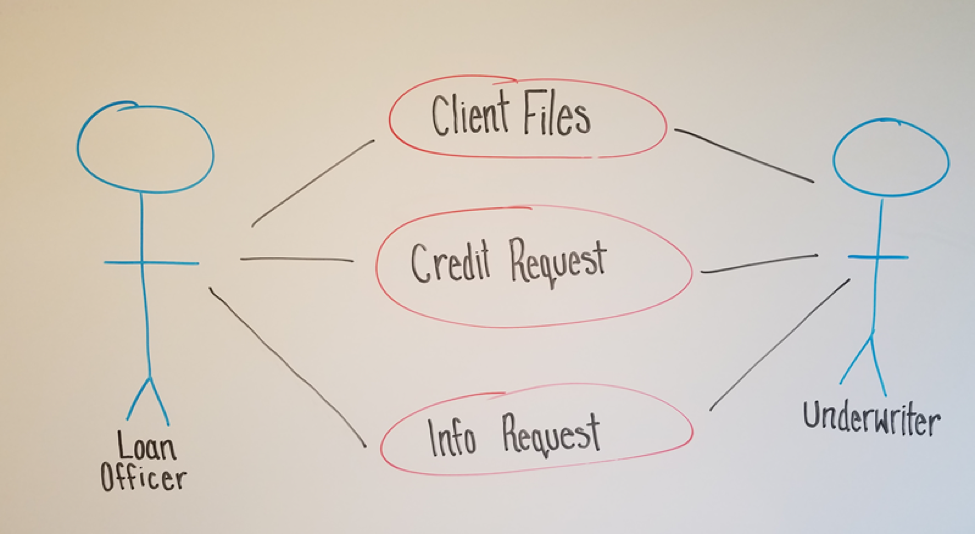
    UseCase Diagram

    A common place to start is a UseCase Diagram like the one below.

    The diagram shows a few key points of data:
    • There are two types of employees (actors) that are involved: a Loan Officer and an Underwriter
    • The Loan Officer and the Underwriter interact with three business elements: Client Files, Credit Requests, Requested Information

    This diagram might not seem very useful to those outside of the discussion, but it is the first step to creating more in-depth and useful diagrams.

    Activity Diagram

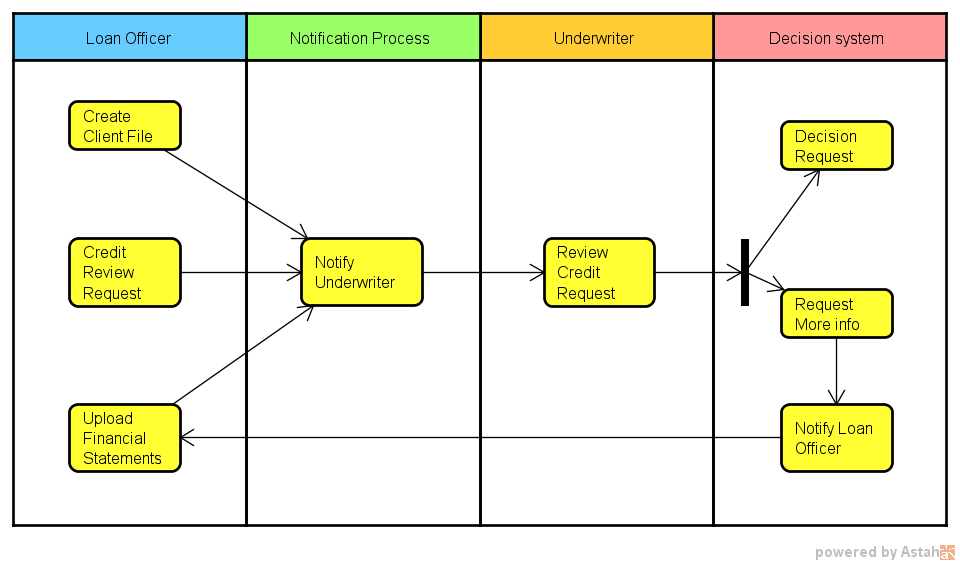
    A logical and easy step from a UseCase Diagram is an Activity Diagram. It takes many of the same concepts and expands them to a step-by-step order of procedures, which are established by discussion of current procedures as well as compliance and regulatory needs.

    By partitioning procedures into vertical “swim lanes” we now have an order to the processes as well as who or what is responsible for it.
    The first partition, labeled Loan Officer, shows three processes (Create a Client File, Create a Credit Request, and Upload Financial Statements) that they are responsible for before the system can do anything. All three pieces must be present before moving beyond this first position.

    Once those items are taken care of, the system then notifies the second Actor, the Underwriter, that there is a credit review for him or her to perform as well as where to locate the needed data.

    The Underwriter then decides whether the loan is approved. Whether this is a semi-automated process or done entirely by humans is beyond the scope of this diagram; all we need to know is that a decision happens next. What we can see is that the Underwriter has two options. He or she can:

    1. Decide on the loan (approve or deny—again, beyond the scope), at which case the system takes over from there.
    2. Request more information from the Loan Officer (perhaps the wrong files were uploaded or more data from the client is needed). The system would then notify the Loan Officer and the process starts over.

    Activity Diagrams are useful for documentation because they start to add structure to the overall business process. They also start to define which processes are:

    • Managed by humans
    • Managed by the application being developed
    • Represent a system that the application will interact with, and operations will need to secure

    Even if not 100 percent technically correct (as our sample isn’t entirely correct), they still represent information in a meaningful way that anyone with little or no guidance can understand.

    Data Flow Diagram

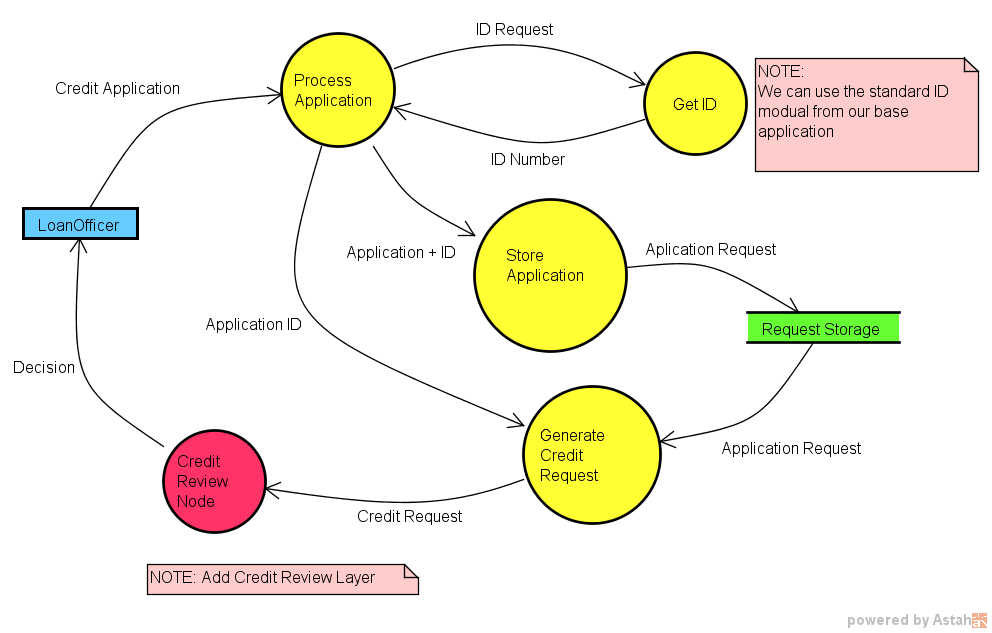
    With Data Flow Diagrams (DFD) the diagrams start to map out the system and procedures that happen and the flow of data. DFDs, which are more involved than the other diagrams so far, become keenly useful in showing how different processes interact. Even though DFDs become more detailed as more layers are added, they are still understandable and explainable to any member of the modeling team no matter the background.

    Operations teams often find them helpful since they map out when sensitive data may be accessed or stored. In our example, things such as corporate tax returns will be stored and accessed; there obviously would need to be some security measures implemented to ensure only those with clearance can see them.

    Discussions are key when creating Data Flow Diagrams because it would be very rare for an individual to have all of the knowledge needed to create one without questions and answers. Based on our current diagrams and a few questions such as:

    • Are Client IDs manually created, or is it part of a system?
    • Do requests go to specific people or are they delivered via queue?
    • Is the credit decision part of the original application or saved as a separate file?

    A DFD can be drawn up:

    The DFD may look complex at first, but when taken piece by piece it is quite simple and understandable with very little (if any) explanation. It also can be helpful to the Dev team because it isolates specific processes at a granular level.

    For example, the Dev team may see the process “Get ID,” know that it’s a system process (non-manual) and realize that they already have a module like that in an existing application that they can use for this application.

    Of course, this would be one of many DFDs created during an Application Model, which is another key advantage of using DFDs. Data Flow Diagrams can be layered, starting with a context diagram and working down granularly to the smallest process needed. This layering also naturally helps to break down the application to discreet parts, helping both in creating different parts of the Application Model as well as having natural starting and stopping points for conversations.

    With the idea that there can be many diagrams used during these discussions, it can be useful to use a modeling tool to easily create, edit, layer and store the diagrams for future use.

    Other Diagrams

    Of course, these are only a few diagrams, but they demonstrate how a process of diagramming can be useful to help a modeling team communicate. While a team could start with a Data Flow Diagram, it would be a much more difficult process. However, by walking through a UseCase and an Activity, it becomes easier since it breaks a system down into digestible parts.

    It also provides the modeling team easy-to-understand diagrams when they go back to their business units. They can explain the Application Model and get quality feedback, as well as suggestions to be added into the Model.

    These diagrams also can be helpful for teams as a starting point for documentation. The DFD is a good starting point for:

    • The Development team to create a detailed class and component diagrams that outlines the application architecture.
    • A deployment diagram for Operations to note which data to isolate behind a firewall with limited access.

    While no process of diagramming can create a universal language by itself, diagrams are supremely helpful to create team clarity. They also serve as a memory of Application Model discussion so that human error and memory can be reduced. Last, by helping to eliminate ambiguity among the modeling team, they help drive better communication that is part of the essence of DevOps.

    Note diagrams were created in Astah Professional and used with permission. To learn more about Astah and modeling please visit the company’s website.

    About the Author / Scott Reece

    ReeceScott Reece is a huge fan of the greater visibility and communication enabled by DevOps. As a Friend of Astah Scott has been successfully closing project communication gaps by using models and team building. With more than 10 years of project management experience, Scott currently serves as a Partner Director at Inedo.