Tag: devops

  • SRE vs. DevOps — a False Distinction?

    SRE vs. DevOps — a False Distinction?

    Just a few days before he died at the beginning of the 1990s, a wise man taught us that “the show must go on.” Freddie Mercury’s parting words have long provided the guiding light for many, if not all, ops teams. In their eyes, the production environment should be exposed to minimum risk, even at the expense of new features and problem resolution.

    About 10 years ago, Google decided to change its approach to production management. It took the company only a few years to realize that while R&D focused on creating new features and pushing them to production, the Operations group was trying to keep production as stable as possible—the two teams were pulling in opposite directions. This tension arose due to the groups’ different backgrounds, skill sets, incentives and metrics by which they were measured.

    Trying to bridge this gap between the two groups, one of Google’s ops leaders, Ben Treynor, thought of an innovative solution. Instead of having an Ops team built solely from system administrators, software engineers—with an R&D background and mentality—could enrich the way the team worked with the development group, change its goals and help with automating solutions.

    Site Reliability Engineering, or SRE

    And so, the Site Reliability Engineering position was created. According to Google, SRE engineers are responsible for the stability of the production environment, but at the same time are committed to new features and operational improvement. Google decided its SRE teams should be composed of 50 percent software engineers and 50 percent system administrators. The engineers were driven to use software as a way of solving problems and perfecting what had historically been solved by hand. They integrated easily with the development team, and encouraged code quality improvements and automation testing.

    Understanding the value of SRE, several organizations of various sizes decided to embrace its principles. Some, such as Dropbox, Netflix and Github, are well-known for being at the forefront of technology leadership.

    Wait, Isn’t That DevOps?

    DevOps is a more recent movement, designed to help organizations’ IT department move in agile and performant ways. It builds a healthy working relationship between the Operations staff and Dev team, allowing each to see how their work influences and affects the other. By combining knowledge and effort, DevOps should produce a more robust, reliable, agile product.

    Both SRE and DevOps are methodologies addressing organizations’ needs for production operation management. But the differences between the two doctrines are quite significant: While DevOps raise problems and dispatch them to Dev to solve, the SRE approach is to find problems and solve some of them themselves. While DevOps teams would usually choose the more conservative approach, leaving the production environment untouched unless absolutely necessary, SREs are more confident in their ability to maintain a stable production environment and push for rapid changes and software updates. Not unlike the DevOps team, SREs also thrive on a stable production environment, but one of the SRE team’s goals is to improve performance and operational efficiency.

    Google tried a few approaches to implementing the SRE process before finding the one that suited them best. One of these approaches attempted to tie the number of permitted releases to the product’s stability. The principle underlying this process is that new releases are green-lighted based on current product performance.

    For each service, the SRE team sets a service-level agreement (SLA) that defines how reliable the system needs to be to end users. If the team agrees on a 99.9 percent SLA, that gives them an error budget of 0.1 percent. An error budget is exactly what the name suggests: the maximum allowable threshold for errors and outages. Here’s the interesting thing: the development team can “spend” this error budget in any way they like. If the product is currently running flawlessly, with few or no errors, they can launch whatever they want, whenever they want. Conversely, if they have met or exceeded the error budget, and are operating at or below the defined SLA, all new releases are frozen until they reduce the number of errors to a level that allows the launch to proceed. This process ensures that both the SREs and developers have a strong incentive to minimize the number of errors in production.

    Another interesting approach recommended by Treynor, which is more related to SRE professionalism and efficiency, is allowing SREs to move between projects. Moreover, he suggests allowing SRE engineers to move to development, and even the other way around. As the work done by both teams is similar, these transitions help the Ops team gain better and deeper knowledge of the product and code, and bring the Dev teams into the production space to help them understand its challenges. This strongly promotes a team atmosphere, rather than one in which an individual feels that “I’m on the SRE team for this product.” As part of this approach, Treynor had Dev teams handle 5 percent of the operations workload. This, according to many organizations, adds to the SRE team’s motivation and effectiveness.

    Riddles in the Dark

    Well, SRE seems perfect. As already stated, several large-scale organizations have chosen to move some of their production operations from old Ops to SRE. However, there are still a few questions that need to be asked:

    Is the position of SysAdmin (production/ops) no longer relevant for SysAdmins?

    Historically, almost all system administrators have come into their roles through tech support and similar work, or even just running Linux on their desktops and then transitioning into server work. It should be pretty clear that the same path is not available into SRE. To retain their positions, SysAdmins should now be more code-oriented, have better technological knowledge and be receptive to new methods of conducting the work they already do.

    Can an SRE team prevent production incidents?

    One of the strengths of a professional site reliability engineer is the ability to handle the growth of production load and traffic in-house. Monitoring and analyzing processes and logs with platforms such as the ELK Stack is part of the day-to-day workload, and the team should be able to identify problems as they occur, and even foresee risks to software stability. The power of this position—based on the skill set it requires—lies in developing solutions for these problems and risks. As Ciara, a software engineer in Google’s cloud storage SRE team, described it in a “Life in Google” post, “We solve cooler problems in cooler ways.”

    Are we doing DevOps or are we doing SRE?

    This question is usually asked by people trying to position themselves in the Operations world. According to many companies that implemented SRE in a slightly different way than Google, you don’t have to decide. At Reddit, ops engineers work on reducing toil, improving deployment and scaling processes, but they are referred to as “DevOps.”

    At Logz.io, we bridge the gap between developers and production through the use of automated monitoring and performance stress-testing. And we personally refer to it as “DevOps” rather than “SRE.”

    So, is it Just a Question of Context?

    In her blog, Charity Majors talks about SRE and DevOps being two different operational approaches that any organization can choose to work by, but insists on emphasizing that there is no “correct” approach. Although Google and Dropbox have decided on SRE, this does not mean the rest of the world should do so as well. What fits Google’s needs and organizational philosophy does not necessarily work for other orgs—at any scale. Moreover, Charity believes that DevOps, having grown and evolved within a broader variety of software organizations, is the more flexible, collaborative and adaptable approach, and will work better for most software organizations at all stages of development.

    On the other hand, SoundCloud senior engineer, Matthias Rampke issued a series of tweets on how SRE and DevOps were basically the same, with only one difference—high management support. Though in contradiction to her blog, Charity lent weight to this opinion during an AskMeAnything event that revolved around DevOps and SRE. She shared a story about a friend who was hiring for a startup, which, as an experiment, posted the exact same job description twice, the only difference being that one listing was titled “DevOps engineer,” and the other “SRE.” At the time of relating the story, DevOps was winning by 10 percent or 20 percent. However, all this means is that the job title is irrelevant, and naming an SRE team does not magically bestow qualities upon it. Rather than focusing on the title, organizations must focus on the work being done.

    To summarize, we can quote Matt Simmons, a technologist with many insights into this topic, who says, “Not every infrastructure needs an SRE, but every infrastructure could use an administrator who acted more like one.”

    — Asaf Yigal

  • ShiftLeft & DevOps: A Narrative Within a Narrative?

    ShiftLeft & DevOps: A Narrative Within a Narrative?

    I procrastinated watching the season finale of “Westworld” just because I ended up reading a day later how Dolores ended the episode! I don’t know who to blame: my inquisitiveness or that guy who couldn’t hold himself. It kind of feels stale when you know the ending.

    Finally, I finished weeding through the multiple narratives across the episodes, and the flashback narrative merged seamlessly with the current one. That got me thinking about using that as an analogy and maybe understand whether the concept of ShiftLeft is really actually a “narrative within a narrative” of #DevOps.

    Ok, so what is ShiftLeft?

    I came across the term at my fav go-to source, @DevOps.com, where Alan wrote on how much to Shift Left and its diminishing returns, and another very old article on the continuous testing approach, which primarily seeks to test early and often, to catch defects, yeah, early!

    Then it was thrown at me in the context of identifying repeatable activities, often manual with consistent results, performed by the Support & Operations team, and moving that work left from Level-3 all the way to L-0. Empowering the help desk, I would say!

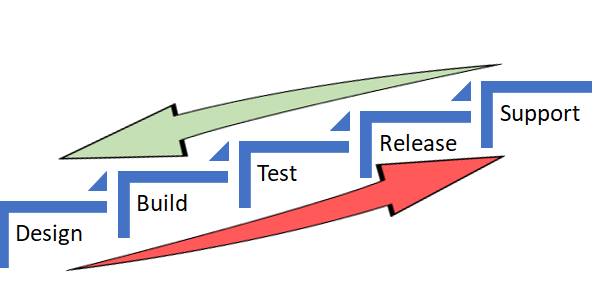
    In both the scenarios, the underlying objective was to catch defects and or reduce life support activities early in the cycle (below) which costs more and more as we move up the food chain, which in turn makes a release and subsequent maintenance cheaper.


    As Alan also referred in the same article to the IBM Study, it’s almost 100 times more expensive to fix an eventual production defect which cost about six times more if caught at Implementation stage or about 15 times more if found during testing. Thus, “Early identification and prevention can improve reliable software delivery” would be the mantra.

    Now, to the crux of this article, Is ShiftLeft not what we aim to achieve via DevOps?

    DevOps basically creates a collaborative, non-siloed cultural change to bring both Development and Operations together early in the game.

    Throw in a bunch of tools to facilitate CI/CD, pull in the security guys early, expand automated testing coverage, include change and release—who are the catalysts, as I call these functions in my earlier article here—squeeze in a few monitoring tools and dashboards and voila! You have a complete and mostly successful DevOps team to dish out the most appetizing feast of quality software repeatedly.

    A table for two (Dev & Ops) has become a party of six! Yaaay!!

    So, from DevOps standpoint, ain’t we doing the same as ShiftLefting (If I may coin the word) with the resulting cost effectiveness, more efficiently?

    We do when we as a team make shorter and frequent sprints; gain insight, not just on how to code better or leaner but also by learning from the masters in Operations who run that software on the infrastructure they monitor and support daily. Or perform the VA scan early, or push a scenario as unit test instead of regression, and/or raise flags on potential capacity challenges.

    So again, isn’t DevOps team already doing that ShiftLefting as part of its charter?

    There is a limit to moving things left, but then, if your organization is still doing wireframes under a waterfall or is in the process of setting up a DevOps team, then this approach could be a stop-gap arrangement, an eventual merging of a narrative within a new narrative.

    But then my argument would be, Why stop-gap and why not a full frontal? Why not embrace the DevOps model, which comes preinstalled with all the ShiftLeft possibilities?

    Even if we are aware how an episode ends, procrastinating raises the risk of being left behind in the race to deliver quality, cost-effective product quickly.

    Technology is redefining businesses: Transportation is an app and soon probably will be driverless; banks are rebranding as tech companies in FinServ business; a fridge can reorder milk; trash cans can be Wi-Fi-enabled! Ah, the internet of things. Is Alexa listening?

    My other relevant posts are here and here.

    Thank you for the time.

    — Abdul Salaam Khurram

  • Using DevOps Metrics Effectively

    Using DevOps Metrics Effectively

    If you’re a DevOps leader, you have a very tough job. You have to radically transform processes and behaviors that have been ingrained in IT for decades. You have to adopt new technologies quickly while still delivering code quickly and cost-efficiently. And you have to do all this better than your peers at other companies. Otherwise, you’ll simply slow your company’s progress in the new digital marketplace while your better-performing competitors gain advantage.

    The good news is that the right metrics can help you gauge your success. Metrics can both tell you if you are traveling down the right path, or need to adjust, and help you prove the success of your DevOps initiatives to the rest of the business. But first you have to get them—and just as importantly, you have to use them.

    I wrote two previous blogs talking about how to get the metrics—one outlining what not to measure and another that delved into determining which metrics are right for your organization. In this blog, we will explore the latter part: how to use metrics to ensure ongoing DevOps success.

    Consider the Audience

    Measurements of any sort have two primary audiences: internal and external. The same metrics can be used and gathered for both, but the intent—and how they are communicated—is different.

    For internal audiences, you are measuring things to gain a better understanding of your own performance. It’s important to know what adjustments need to be made: where to double down and where to change course. Like a racing car pit crew monitoring hundreds of sensors on a vehicle, your DevOps team should be constantly looking at ways to extract the maximum performance and value from your efforts. Metrics will help you do this.

    External audiences are less concerned about the nuances and details and more concerned with the actual outcomes. Going back to the racing car analogy, external audiences care about lap times and top speeds; not about the operating temperature of the engine. It’s important to keep this difference in mind when you are communicating results to business leaders. Don’t bog them down with nuances and details; instead, show the results.

    Best Practices for Communication

    For both internal and external audiences, there are five best practices to consider when communicating metrics:

    1. Automation. Automation isn’t just important for efficiency and consistency in the software development life cycle, it is also useful for capturing and communicating DevOps metrics. Tools that automatically record and communicate your results will help you keep your finger on the pulse of your organization without getting bogged down in measuring and reporting.
    2. Evolution. The savviest DevOps leaders don’t marry themselves to a specific set of metrics. They intuitively understand that the metrics they use to evaluate DevOps progress will mature as the DevOps practice itself matures. The metrics you measure in the first six months may not be the ones you measure in year two.
    3. Action. This perhaps goes without saying, but metrics need to be communicated to both audiences listed above. It can be challenging communicating results when they are not what was expected, but the best way to communicate less-than-optimal metrics is to have an action plan to remediate any possible issues.
    4. Communication. As noted above, action and communication go hand in hand. Once you know what’s working and what’s not working, you should have a solid plan on next steps. When something’s working well, the plan should focus on how to replicate success; when something is not working as well, the actions should focus on future improvements.
    5. Self-examination. Metrics aren’t just indicators of what your team is doing right and doing wrong. They’re also useful diagnostics for leadership decisions and leadership style. So remember to take the responsibility and share the credit.

    When you marry the above best practices with the other measurement tips outlined in my previous blogs, you will not only be able to gather the right metrics, you’ll know what to do with them. Remember that, like DevOps itself, the practice of measuring DevOps success is something that can be started slow and expanded.

    Not every organization has the time or the resources to measure everything that should—or could—be measured. So, start slow, focus on the metrics that matter to your organization and use the best practices outlined above to guide you. For those who want to learn more about DevOps and DevOps metrics, my book, “DevOps for Digital Leaders,” explores these topics—and more—in a much more detail.

    Happy measuring!

    — Aruna Ravichandran

  • VMware CEO Stakes Out DevOps Position

    VMware CEO Stakes Out DevOps Position

    At the Dell EMC World 2017 conference this week, VMware CEO Pat Gelsinger waded into an increasingly heated DevOps debate by suggesting that most developers are too “lazy” to be really interested in IT operations.

    At a time when factions within the DevOps community are making the case for developers to be responsible for DevOps on an end-to-end basis, Gelsinger contends that most developers want to get out of being involved with IT operations as quickly as possible so they can spend more time developing applications.

    The VMware approach to DevOps is closely aligned with Pivotal, a sister company operating under the Dell Technologies umbrella that curates an instance of the platform-as-a-service (PaaS) environment developed by the Cloud Foundry Foundation.

    Gelsinger notes that the two primary reasons developers have shifted workloads to public clouds is perceived costs and the fact that invoking infrastructure as a service (IaaS) via an application programming interface (API) is simpler. To combat both those issues, Dell EMC has been rolling out preintegrated converged and hyperconverged infrastructure that, for certain classes of workloads, is less expensive to own over multiple years. Those systems are optimized to run either VMware or Microsoft virtualization software within a software-defined data center that exposes IT infrastructure resources via APIs. In effect, Dell EMC is applying a cloud operating model on top of IT infrastructure deployed inside the data center to close what Gelsinger describes as an “easy gap” between public clouds and internal IT operations. As those systems are more widely deployed, Dell EMC and VMware jointly contend that IT organizations will be in a better position to inject more agility into their DevOps processes.

    Many IT operations professionals have a vested interest in the outcome of those efforts because developers have been doing an end run around internal IT operations teams by deploying applications directly on to a public cloud. The challenge VMware recognizes, says Gelsinger, is that the entire DevOps space currently is chaotic. Each IT organization not only has a different view concerning to what level of DevOps integration it wants to achieve, but none of them are at the same point in making that DevOps journey. In fact, there’s a raging debate over the merits of PaaS environments versus lighter-weight container-as-a-service (CaaS) environments.

    Dell EMC, in collaboration with VMware and Pivotal, has invested heavily in a Cloud Foundry platform that it makes available as a Pivotal Cloud Foundry (PCF) offering is increasingly automated, from an IT operations perspective. The latest version includes a rolling update capability that requires no human intervention. Pivotal claims one financial services customer has deployed 10,000 application containers on an instance of PCF that is managed by only four IT operations people. Couple that level of automation with the automation that VMware and Dell EMC are driving into the underlying IT infrastructure, and it shows that DevOps will be profoundly different than today. Less clear is who inside the IT organization will be exactly managing what.

    — Mike Vizard

  • One Team’s Microservices Journey and CD Growth

    One Team’s Microservices Journey and CD Growth

    Dev Manager Vadim Madison published a chronicle of his team’s move from a monolithic application to a microservices model. In the process, the tools and methodologies they used for continuous integration/continuous delivery (CI/CD) had to be expanded and even changed out in several stages. It’s a long read, but with the time, as there are not a lot of people documenting the case of full-on conversion.

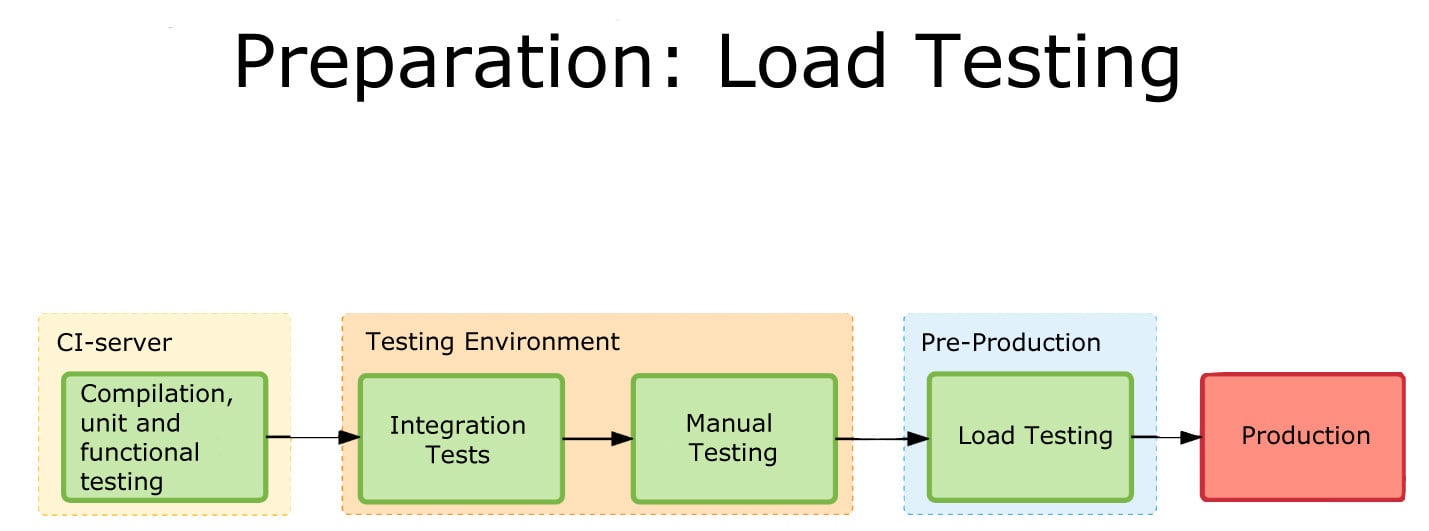
    One of the more interesting pieces of his work is the software infrastructure they have to build up to cover CI/CD/monitoring of the application. This is a lot more complex than the original application was, and it all must be managed. One of the benefits of DevOps is to make management of these tools easier, and he does talk a bit about scripting it out and implementing APIs to take problem instances out of the pool and determine what went wrong so they can go through the Dev/CI/CD cycle again.

    Load Testing
    One of the graphics showing integration.

    What makes it interesting is where the team found limitations and switched tools midstream. This being a process, Madison at the end alluded to the fact that they have started eliminating TeamCity (or at least limiting what they’re using it for). I think that when most people begin to go high-rate DevOps, or even constant monitored low-rate DevOps, some of the items his team ran into escape their notice until they find an issue. The architectural growth will occur—you are automating more, building more, monitoring more and releasing more. The question is, how far ahead do you look? Until recently, the answer was pretty much, “Not far,” because we didn’t have cases like Madison’s to draw on and see parallels with what we were doing. But that is starting to change.

    CI/CD/ARA vendors can help, of course. Collectively they have a lot of knowledge about the lay of the land, and how people are using the tools to tackle the needs of new architectures. But more public documentation such as Madison’s would be great, too.

    Even though you’re moving at a much faster pace, looking ahead and increasing the steps taken in the CI/CD/ARA space can provide that added bit of resiliency, and monitoring at a level appropriate to your project’s maturity can add that extra bit of “we know, we can recover.” There have been some spectacular failures that were indicated by monitoring, but the volume of data flowing through monitoring was enough to mask it. Today, the best solution is to monitor at the appropriate level and then feed that monitoring back into the system.

    But you’ll be supporting more software infrastructure. The growth of tools is pretty inevitable: As you spread the functionality across machines/instances/containers, you will need to stretch CI/CD/ARA tools to multiple interrelated targets and monitor the overall system and its performance bottlenecks. And for now, the tools chosen will not always be widely known, so a process to bring new Dev/DevOps team members quickly up to speed on the more obscure tools should be on your list of to-dos.

    — Don Macvittie

  • Quali CloudShell Rises to Multi-Cloud DevOps Challenge

    Quali CloudShell Rises to Multi-Cloud DevOps Challenge

    Multi-cloud computing is now an everyday reality for most IT organizations. Because of that, most DevOps teams are trying to figure out how to apply a repeatable set of processes against multiple clouds; rather than having to manage a unique pipeline for each cloud, DevOps teams want to be able to deploy application workloads on any cloud as necessary.

    With that goal in mind, Quali has extended its CloudShell tools for modeling production environments in a sandbox to include support for both Azure and OpenStack environments. Previously, CloudShell only supported Amazon Web Services (AWS) and VMware.

    Shashi Kiran, chief marketing officer for Quali, says version 8.0 of CloudShell makes it possible for developer, test, QA and compliance teams to create a truly authentic replicas of a production environments. That replica can then be used to create a blueprint of an application spanning all the physical or virtual infrastructure, data, applications, tools and services in that environment.

    CloudShell 8.0 also includes support for application configuration management using either a custom script or playbook created using the open-source Ansible IT automation framework. In addition, DevOps teams now can edit some app details directly within blueprints.

    Via a CloudShell web portal, shells now can be centrally managed, updated and removed. The new version also offers enhanced single sign-on (SSO) support, enabling more SAML security features and integration with third-party identity management tools. Finally, CloudShell 8.0 includes increased control of blueprint max reservation time, advanced search improvements and access to new table views.

    Kiran says CloudShell is unique in that it gives DevOps teams access to a model that eliminates the surprises that commonly occur when developers attempt to move an application into a production environment. Given the level of scale involved in modern applications, it’s not possible for developers to effectively replicate a production environment on their own machines. The result is a lot of rolling back of applications after they’ve been deployed into production. CloudShell eliminates that problem, says Kiran, by giving developers and IT operations teams access to a sandbox in which to make sure that applications work as expected once they are deployed in production.

    Rolling back applications in a multi-cloud world has become especially problematic. IT organizations now need to deploy applications locally on a private cloud and in a public cloud. But from an IT operations perspective each of those clouds is becoming more complex, which means the opportunity is greater for something to go awry when it comes time to deploy an application into production. Include the number of target platforms in the age of the cloud and the probability  that an application will work seamlessly the first time it’s deployed is virtually nil. Multiply all the application deployments and updates an IT organization is trying to manage, and it quickly becomes apparent how much time and effort is being lost.

    Production environments need to be as pristine as possible. The only way to make sure they remain that way is to make sure that every application that runs on them doesn’t ever get the chance to adversely affect their condition.

    — Mike Vizard

  • I Can’t Go to That DevOps Conference

    I Can’t Go to That DevOps Conference

    Last year, I was able to attend 18 DevOps conferences. I saw some awesome presentations, met incredible people and expanded my knowledge of the latest practices at each conference. While my role as the DevOps Advocate for Sonatype enables me to get out to all of these conferences, not everyone has the time, the budget, or the approval to get to even one event a year.

    DevOps for the Masses

    This is what led me and my colleague, Mark Miller, to found the All Day DevOps conference last year. Our dream was to build a DevOps conference for the masses. We decided to offer 57 online sessions over 15 hours and 15 times zones, and registration would be free. Our initial goal was to see if we could find 1,000 people to attend (because that sounded like a big number at the time), but the idea of a free online event caught a viral wind and we ended up having over 13,500 people register to attend.

    Every session delivered during the conference was shared by a DevOps practitioner. We had a simple rule for the conference and that was: no vendor pitches.

    Team Time

    People also told us that they valued having the chance to talk to other attendees they met at DevOps conferences, so we set up a free Slack channel for All Day DevOps. By the time conference was over, we recorded more than 10,000 conversations between the speakers, attendees and organizers.One of the things that fascinated us most about the conference was that organizations such as Accenture, Capital One, Ericsson, Oracle, Target, Telstra and many others had more than 20 employees attending the event. A few of these had hundreds. None of them needed to approve expenses for travel, hotels or conference fees. They just watched and joined in the conversations from their homes or offices.

    Here are some of the folks who spoke at last year’s event across our CI/CD, Modern Infrastructure and Automated Security tracks. This year, we have also added a DevOps in Government track to the agenda.

    The event was so successful, we set it on the schedule again. All Day DevOps 2017 will take place Oct. 24. It’s online, it’s free and this year’s event will run for 24 hours. Therefore, no matter where you live, if you have an internet connection, you will be able to tune in to join us.

    A Few Things to Know

    1. You can register for free at www.AllDayDevOps.com. Invite your entire DevOps team to join. Everyone registering will have free access to all 57 recorded sessions from 2016.

    2. The CFP is open through May 31. If you have a story to share, we want to hear from you. Remember, no vendor pitches are permitted.

    3. All Day DevOps is a community event. Last year more than 40 DevOps meetups and software companies helped us spread the word. For those that helped, we added their logo to the site. Same applies to this year. Apply to be a supporter here.

    Please join us for this year’s event!

    Finally, a big thank you goes out to DevOps.com, which helped us promote last year’s event to all of their readers. We are excited to have them helping us to promote the 2017 conference as well!

    — Derek E. Weeks

  • Get Ready to Become a Full-Spectrum Engineer

    Get Ready to Become a Full-Spectrum Engineer

    The more things change, the more they stay the same. In software development, change has been a constant. I’ve been a software engineer for more than 25 years and have had to morph, pivot and learn new things to remain current and in demand. Plus, the industry swings like a pendulum between the need for specialists and generalists and that cannot be ignored: The advent of new architectures, methodologies and disciplines drives the need for specialists. Once assimilated, the market drifts back toward generalists.

    Back in the day, it was not uncommon to have 50+-person teams building applications using the Waterfall methodology. From a technology perspective, development was kept in silos for each specialty. It was uncommon for a developer to straddle specialties such as GUI, business logic, database and quality assurance.

    The swing back to generalists was driven by the shift to Agile. When the Agile methodology became prevalent, we saw the teams of 50 reduced to teams of six to 12. The reduced team size also reduced the number of specialist you could have on a team. Developers needed to know more and do more. Today, most companies are looking for generalists who can do it all—otherwise known as the full-stack engineer. These developers work on web applications and can operate in any vertical tier of the application. They write HTML, CSS and JavaScript for high-performing and functional UI for the front end. They can also work from the server side to develop the business logic to support the UI. Behind that are the database schema and queries they write to move data in and out of the application.

    Enter the Full-Spectrum Engineer

    DevOps has ushered in a new trend. Teams are moving from batched releases of functionality to single-piece flow. In other words, we no longer think about collecting the work of multiple engineers over multiple sprints into a release. Our ability to bring value to the customer as soon as possible and out-innovate the competition will be driven by releasing the work of a single engineer as soon as it is ready. This typically is accomplished through a continuous integration/continuous delivery (CI/CD) pipeline directly from the source repository through automated testing and finally deployment into production, preferably without any human intervention.

    What does this mean for developers? Plenty. Here’s a look at the major capabilities needed by software engineers who want to thrive as full-spectrum engineers (FSEs.)

    1. Be a good software engineer. That means keeping up with the latest trends in design and implementation. You need to assimilate new frameworks and open-source libraries into your first party code to build software quickly. Furthermore, you must understand scale and performance of the system under load. Creating services that scale out and back based on demand will enhance the user experience.
    2. Have an eye toward quality. This means testing both the functional and non-functional aspects of the application. Well-written unit tests are just the beginning. An FSE must think about how to create automated regression tests that can run in a staging environment to assure that the entire system will not be negatively impacted by their deployment. Testing for non-functional aspects such as performance are a must as well.
    3. Understand the complexities of deployment. Whether that be containers, cloud or infrastructure as code, you need to know where and how the software runs and be able to create those environments from scratch. Using stable, version controlled configurations for the running environment will ensure that Dev, QA, Staging and Production all look and behave the same. That makes testing repeatable and operations more straightforward.
    4. Don’t forget about operating the software. As part of a DevOps team, you will be expected to take part in pager duty. When writing new functionality, consider how to debug it remotely and whether your teammates will be able to do the same. That means logging and other telemetry are critical but insufficient. Turn that data into information that can be consumed by both people and machines. Can the software detect that it is not running properly? Can it heal itself? Can it call for help?
    5. Make security a priority. The fast pace of software development means that there is no longer time to wait for a security analysis or pen test when your release candidate is ready to deploy. Security standards should be part of the acceptance criteria and security scanning must be added to your definition of done. Use tools that can provide quick feedback and diagnosis of security vulnerabilities while writing code as well as identify vulnerabilities in your open-source components. This preventative scanning will not only train you to write secure code, but it will also allow the software to run successfully through the assurance scans that are part of any good CI/CD pipeline.

    DevOps is turning the concept of a full-stack engineer on its side. Now the vertical tiers of technology and architecture are secondary to the horizontal disciplines that must be mastered to create software at the speed of DevOps. While I am eager to tell you that the future of software development is generalist, it does not mean that we should get rid of our specialists. What it does mean is that we will need fewer of them—the skills and capabilities of a full-spectrum engineer are the future of software development. DevOps has smashed the velocity barrier but to reach the full potential will require a new breed of multi-disciplined generalists—Full-Spectrum Engineers.

    About the Author / Peter Chestna

    As Director of Developer Engagement at Veracode, Pete provides customers with practical advice on how to successfully roll out developer-centric application security programs. Relying on more than 10 years of direct AppSec experience as both a developer and development leader, Pete provides information on best practices amassed from working with Veracode’s 1,000+ customers. Pete joined Veracode in 2006 as a platform developer and was instrumental in delivering the first version of Veracode’s service to customers. Later, as Director of Platform Engineering, Pete managed the Agile teams responsible for delivering Veracode’s SaaS platform and built the first DevOps team. Follow him on Twitter @PeteChestna.

  • Get Your DevOps Right With These 7 Technologies

    Get Your DevOps Right With These 7 Technologies

    Editors’ Note: As with all of our contributed articles, the views expressed in this article are of the author, not DevOps.com. Due to its vendor-agnostic stance, DevOps.com does not endorse any particular technology.

    There was a time when the operations team and the developers regularly were at each other’s throats. The developers were never satisfied with production code updates and the server administrators chafed at developers piling up the serve requests and circumventing the processes.

    However, the battle lines have been somewhat erased since the advent of DevOps. IT teams adopting DevOps can move rapidly from concept to production to enhance the business impact, quality and velocity of the application delivery. Many organizations are shifting to DevOps because of its high efficiency and the number of people taking DevOps training are also increasing due to numerous job opportunities in this field.

    DevOps Technologies to Know

    A number of technologies have emerged to help in the shift to DevOps, providing services ranging from the configuration management to application portability. Following is a list of seven technologies worth noting.

    Splunk

    Splunk is used for detecting and fixing issues across the life cycle of an application in real time. It allows the developers to see data from the production environments, eliminating the need to access production machines. Splunk enables DevOps processes including continuous integration and deployment.

    The Splunk platform is used for DevOps to:

    • Provide end-to-end visibility across each and every component of the DevOps tool chain.
    • Utilize the objective metrics to make sure the code meets the quality SLAs and is operational.
    • Correlate the business metrics with changes in code to obtain new business insights.

    ScriptRock GuardRail

    ScriptRock Guardrail is designed to rapidly pinpoint the differences in configurations on desktops and servers, comparing the states between systems and over time. ScriptRock Guardrail shows what has changed, helping simplify diagnostics and decreasing downtime.

    Developers who work with agile methodologies are accustomed to a test-first way of working with the unit tests, making sure that everything works as planned. As continuous delivery becomes more prevalent, the DevOps and Ops teams need to take a similar approach. This is where the ScriptRock GuardRail comes into its own, providing you the tools to construct and build infrastructure level unit tests and view the results visually, thus making it very easy to rapidly drill into the real problem and get your services running.

    ScriptRock GuardRail focuses on addressing the key prerequisites to any DevOps, and, more precisely, initiative and automation. They are described below.

    • Visibility: The GuardRail platform delivers visual configurations showing differences between like devices, configuration drift monitoring and automated visualization and scanning of network device and server configurations.
    • Accountability: Users can curate and filter configurations to generate policies that can be utilized to ratify the configurations on a continuous or ad hoc basis.
    • Automation: All the policies can be exported to Windows PowerShell DSC, Docker, Ansible, Puppet and Chef.

    ScriptRock GuardRail works with any automation tool and can be delivered as single-tenant SaaS, multitenant SaaS or a virtual appliance on-premises.

    SaltStack

    The SaltStack Enterprise Software helps DevOps organizations by organizing the systematic motion of code into production by maintaining the complicated infrastructures refined for optimal application delivery and business service. While DevOps is not a tool, it requires a tool-centric approach to enable continuous delivery. SaltStack helps to configure as well as quickly deploy the dynamic applications and general-purpose infrastructure they run on. DevOps is gaining wide popularity around the world because of the tools like SaltStack that enhances its efficiency.

    SaltStack is a cloud infrastructure tool and delivers the systems management for application configuration, cloud building, server provisioning and data automation. It is an event-driven tool and can automate the tasks within DevOps workflow and makes the operations highly approachable for the developers. SaltStack provides a common language and common way to manage the servers and thus helps to bridge the gap between Devs and Ops.

    Puppet

    Automation is the foundation for many DevOps practices. It is the key to continuous delivery and faster deployments. Automation imposes consistency across the production, testing and development environments. It makes sure users can rapidly orchestrate the changes throughout the infrastructure: container and cloud deployments, virtual machines and bare-metal servers.

    No matter where it runs, Puppet provides a standard way of operating as well as delivering a software. Users define what they want their infrastructure and apps to look like utilizing an easy-to-read common language. From there, they can enforce, test and share the changes they want to make across their data center. Reporting and visibility is available at every step of the way to help prove compliance and make decisions.

    The Puppet Enterprise enables users to test changes before deploying them to production. With Puppet Enterprise, the infrastructure is defined as code, which enables users to adopt the best practices of agile development including automated deployment and testing, and deliver the software more reliably. This is because the configurations are consistently promoted, shared and tested across all environments, from Dev laptops through test to production.

    Atlas

    Atlas was the first commercial product released by HashiCorp, provider of open-source tools that enable the efficient deployment of software-defined applications and data centers. Atlas provides visibility into the infrastructure, including virtual machines, containers and servers, in addition to service discovery and configuration management. Building on the popular open-source projects of HashiCorp such as Terraform, Consul, Serf, Packer and Vagrant, the closed-source proprietary Atlas enables DevOps across different cloud services, which include OpenStack, Azure, Google Compute Engine and AWS, and provides a dashboard for maintaining, deploying and developing applications.

    Many engineers are shifting to Atlas today for their organizations’ customer engagement platforms. Atlas brings it in one place and enables the companies to handle end-to-end starting from configuration management to container deployments across various cloud environments. Every open-source tool is fine alone, but the capability to handle and orchestrate them as a whole is extremely powerful.

    Chef

    Chef is a cloud infrastructure and systems framework that automates the management, deploying and building of the infrastructure via repeatable, short scripts known as “recipes.” But the actual strength of Chef lies in its utilization of the pluggable configuration modules(also known as cookbooks), about 2,000 of which are available through Chef community. Facebook, the high-profile user of Chef, recently open-sourced few of its own Chef cookbooks, which include its Grocery Delivery and Taste Tester testing framework, which watches a source code repository such as Git and keeps the local Chef server in sync.

    The complex tasks are automated by Chef that are otherwise resource- and time-intensive. But, more importantly, Chef allows users to focus their efforts on improving and innovating the quality of their services. It also opens the door to more efficiency and collaboration across the organization.

    Docker

    Through its containerization technology, Docker brings portability to the applications wherein the applications run in self-contained units that can be moved across the platforms. It consists of Docker Hub, a cloud service for workflow automation and application-sharing and Docker Engine, which is a lightweight packaging and runtime tool.

    Docker has revolutionized the containerization of applications enabling DevOps to package any kind of application in a lightweight environment. The packaging is done in a way as easy as installing a mobile app. Docker is considered as the most popular DevOps tool. By using docker, the developers can containerize their apps and can run them anywhere. Built on top of Linux containers, docker is a powerful ecosystem where DevOps can use many apps (available on Docker Hub) to the maximum advantage.

    About the Author / Savaram Ravindra

    Ravindra was born and raised in Hyderabad, India, popularly known as the ‘City of Pearls’. He is presently working as a Content Writer at Appmajix Technologies. His previous professional experience includes Programmer Analyst at Cognizant Technology Solutions. He holds a Masters degree in Nanotechnology from VIT University. He enjoys spending time with his friends. He can be contacted at savaramravindra4@gmail.com. Connect with him also on Twitter and LinkedIn.

  • How Much QA is Enough in Software Development?

    How Much QA is Enough in Software Development?

    People working in quality assurance as testers, managers or engineers know what it’s like having to justify their existence; it’s been part of the job for many years. QA experts have had to fight the perception that what they do is a bottleneck, overkill and it slows everyone down.

    Finally, however, QA is getting the attention that it deserves. Companies are gradually investing more in QA skills and tools. This began with the onset of Agile and DevOps—methodologies which have now infiltrated mainstream software development practices everywhere. Since those practices focus on speed, efficiency and quality, engineering leaders have grown to understand that great products are not achievable without adequate QA checks and balances. Another risk is the unflinching nature of high user expectations: Thanks to social media, one user complaint can quickly escalate into others across the web, creating an uncomfortable perception problem for the software provider.

    Robust testing practices can prevent egregious flaws in the software that result in poor user experience and performance—or, worse, a breach. True, testing can sometimes get in the way of speed. Yet no matter how fast you release a product, if it doesn’t work well, no one’s going to buy it, much less use it.

    Nevertheless, we can continually improve the QA practice to fit into modern development teams’ workflow. Testers need to work with developers and master automated testing, while developers need to sometimes engage in testing; everyone should think about the appropriate level and amount of testing. You can have too much of a good thing.

    The Right QA Balance

    The below ideas can help your organization reduce conflict between QA aficionados and those who would rather code and release as fast as possible.

    1: Assess, analyze and report. Developers and testers alike are highly technical; they like numbers. Therefore, the more that the QA team can quantify the risk of an application, provide evidence as to the effectiveness of current QA practices and use metrics to show the need for more QA resources when warranted, the faster that everyone will get on board.

    There are plenty of tools that can deliver common quality metrics such as total number of defects, defect leakage, test coverage, test pass/fail rates, test completion rates, code coverage and application uptime. It’s important to share and discuss these metrics throughout the development team and with product and business managers. What constitutes high quality for the development team may not be the case with executives who are closer to the end user/customer.

    2: The gut check. After metrics, take into consideration the comfort level of your team and company concerning product flaws. In regulated spaces, or for applications that collect sensitive private data, the tolerance for bad code and security gaps is usually low. Gather feedback from different perspectives and roles in the organization for a balanced perspective on the QA practice and areas for improvement.

    3: Get people involved. Quality assurance is no longer a separate activity from development; especially when you are practicing Agile and DevOps, the responsibility for quality is shared. Therefore, developers, business analysts and operations managers all should be doing their work with an eye to quality, delivering feedback regularly to the QA team. Provide opportunities and incentives for any team member to attend events and training related to software quality.

    4: Streamline testing. Test automation tools are helping product teams be more comprehensive in testing, by automating low-risk test cases so that testers can focus their exploratory and manual methods on high-risk or new features. This is a positive development, although testers must take time to learn how to use the tools. Some other ways that can help teams be more efficient in testing include:

    • Conducting more testing early in the sprint. This avoids the 11th hour disaster of finding a major flaw right before the release deadline.
    • Per Agile methods, dividing development tasks into smaller chunks with team members from different disciplines to ensure testing is being done all the time and with visibility by all.
    • Using test driven development (TDD) or behavioral driven development (BDD), which requires that QA, developers and business stakeholders meet at the beginning of a project to agree upon requirements and test cases. Developers then write code against the test, until it passes. New tools are helping bridge the gap by writing requirements and user stories in plain English.
    • Outsourcing part of the testing load during a major project, which can help increase coverage and reduce stress on your team. However, understand that too much outsourcing will undermine any efforts to develop QA as an internal best practice and “mindset” for software teams.

    If your team is committed to QA as a best practice, not an afterthought, those at the top will need to invest properly in the right tools, training and people to get results. Misconceptions about QA still exist; contrary to the view of some DevOps experts, we can’t (and shouldn’t) automate every test. As well, even though developers are now testing the code they write, you still need experienced testers on your team. With the pace of innovation and the high stakes in the marketplace, organizations need more—not fewer—people engaged in testing.

    For testers who love their job, as many of them do, it’s an exciting time to be in the field. Companies increasingly are seeing the value of QA and testers continually are gaining more tools and tactics to excel at helping their organizations produce really great software.

    About the Author / Kyle McMeekin

    Kyle McMeekin is Senior Sales Engineer at QASymphony. Prior to QASymphony, he was a programmer analyst at Cognizant Technology Solutions. Connect with him on LinkedIn.