Tag: devops

  • Maturity Models Help Measure the DevOps Journey

    Maturity Models Help Measure the DevOps Journey

    DevOps professionals often encounter clients who struggle with sorting through the “what”s and “how”s of where they are in their journey, and how they can either get started with—or improve upon—their current practices.

    As a project progresses, we often find that diving into a technical solution up front without taking a holistic view of where our clients are in the aforementioned journey will result in undesirable outcomes. That’s because no two projects or clients are alike, and there are a surprising number of dependencies within DevOps practices that must be satisfied before overall success is achieved.

    For example, a client who wants to jump right into a microservices-based architecture will have trouble without first implementing CI/CD practices and utilizing infrastructure as code. That’s where a measurement tool can come in handy, especially one that can help to identify a logical progression in these cases.

    Having seen more than a few clients facing this challenge, we set out to create a Maturity Model to provide an easy way to determine reasonable next steps in both helping clients improve practices and quickly assessing where they currently stand.

    To begin, we took a comprehensive look at the many ways we’ve helped clients with their DevOps practices, searching for common patterns that would help guide and characterize how an organization performed. Additionally, we examined our internal practices and procedures, using numerous projects we have done to self-evaluate the effectiveness of our teams and approaches. From there, we gleaned what we considered to be five distinct realms that constitute a comprehensive view of DevOps maturity and developed appropriate questions within the realms to evaluate performance.

    So who can benefit from engaging in a maturity evaluation?

    Anyone, really, at every level of an organization. To see where you are in your DevOps evolution, log on to answer a few questions and they receive easy-to-understand recommendations. We can discuss results in-depth with anyone who wants a more thorough understanding of where they are in their practice or more personalized advice. Or, just enjoy the exercise. Either way, the questions will help expose certain ways in which your practices can incrementally improve.

    About the Author / Matt Brewster

    Matt Brewster is DevOps Team Lead for Seattle-based Base2 Solutions. His proficiencies include deployment/build/test automation and infrastructure, systems integration and analysis, performance automation and analysis, infrastructure virtualization and containerization, aerospace information technology, software quality assurance and rapid prototyping. Matt’s DevOps/Infrastructure knowledge includes VMWare, AWS, Virtualbox, Docker, Vagrant, Ansible, Chef, Linux, Nginx and Jenkins.

  • Operations Management Puts the ‘Ops’ in DevOps

    Operations Management Puts the ‘Ops’ in DevOps

    Awareness and anticipation of operational management, best practices can improve your app at every stage of its life cycle

    How important or interesting you find the “operations management” aspects of DevOps methodologies likely depends on your background, experience and how many operational horror stories you have lived through. If you have been on the hot seat when services are impacted, woken up in the middle of the night when major outages occur or dragged into blame-battle war room calls while you and your team scramble to restore service, then the importance you place on operations management may be very high.

    However, if you have avoided such experiences, it would surprise no one if the operations management aspects of DevOps are not top of mind. When everything is smooth sailing, then it is understandable that you might be reluctant to make any significant changes to your daily routine. However, in agile, fast-moving environments, things can go wrong very fast, even if your organization separates duties intentionally to create an “operational firewall” to keep ill-advised code or configuration changes to a minimum. Using effective ways to lend your app expertise to assist during impactful situations can make your life much easier and limit disruption to conducting your other duties.

    You may work in an organization which is new to owning and managing operations management tools. It is becoming more common for organizations outside of a central IT operations team to do so as scopes of responsibility expand. Several analyst firms have published recent studies that nearly half of purchase and usage of operations tools is already done outside of IT operations teams. This trend is predicted to grow to the majority in a few years.

    Configuration and automation tools are also becoming more commonly owned outside the data center. Such shifts in responsibility make efforts of operational skill-building, incident readiness and resolution more challenging. As the number of different groups deploying these tools expands, the likelihood of overload of notifications, alerts, events and general operational noise starts to rise dramatically. Note: I will be presenting a webinar on how new operations management tools can help you carry out the best practices, join me in this conversation Thursday, Oct 26.

    Organizations deploying new apps and management tools in the cloud naturally look to manage those workloads from the cloud as well. Other organizations with legacy applications often are managing digital transformation leading to transformative projects for operations management. Whether your organization is already leveraging cloud-based tools or you are part of an organization undergoing transformation, you may have the challenge of a hybrid set of workload deployments, both cloud-based and on-premises. For your organization, this could mean finding a pragmatic complementary approach to deploy and manage the new, cloud-based applications and their associated management tools. Such an approach may not need to be isolated from your current tools and methods. Sufficient tool interoperability could support a federated, phased path.

    In this blog series, we will explore the common operational challenges many DevOps teams are facing today, how traditional IT operations best practices could be leveraged for use in a DevOps methodology and how new operations management tools can help you carry out those best practices to meet your goals on an on-going basis.

    Here’s a preview of the forthcoming blog topics:

    Let the Noise Wail Without Going Deaf

    Unless your applications and services exist in a vacuum sealed chamber of silence, agile development, continuous rollouts and updates and infrastructure system changes create a plethora of events that range in severity of impact, validity and meaningfulness. Those events tend to come from multiple monitoring and configuration tools or reflect many different parts of your applications and underlying services. This mixture of events and alerts leads to what is commonly known as operational “noise.”

    Smart Ops Action: Taking the Right Action for Ops Traction

    Empowering anyone in your organization who contributes to restoring service when incidents occur can ensure their time is well spent, with the intended results. All too often, operations teams effectively identify and triage incidents, yet fall short of empowering first responders to actually resolve problems. Bolstering your team’s efforts to take the actions necessary to resolve the situation at hand and restore service promptly is achievable—if done right.

    Boring is Best! How Can You Thrill Your DevOps Stakeholders with Boredom?

    Strive for stability and structure in production without stifling development agility. Don’t try to thwart the innovation and chaos that results from agile development and constant rollouts—get structure and stability where you have control so you can focus your talented team members to be supportive, valuable contributors to innovation and agility.

    Fuel innovation and make your stakeholders smile with boredom by effectively turning chaos into stable operations.

    If you’re a veteran IT operations practitioner with years of experience helping your company’s applications, services and underlying infrastructure run efficiently, these tips may be obvious. Hopefully you’ve been successful advocating these best practices to your development and line of business colleagues.

    If you are new to operations—and especially if you are amongst the growing population of DevOps professionals who are understandably reluctant to conduct triage, investigation, diagnosis or resolution of operational incidents—rest assured there is relief. Tried-and-true best practices carried out with new, easy-to-use tools can empower your team to conduct these unwanted tasks like a seasoned veteran, regardless of operational experience. Learn more.

    About the Author / James Moore

    James Moore is Principal Offering Manager, IBM, responsible for offering management and strategy for IBM HybridCloud Operations Insight solutions including IBM Cloud Event Management, Runbook Automation and Alert Notification. James joined IBM from the Candle acquisition in 2004, where he was product manager for Candle’s Application Response Time product lines. James has over 15 years’ experience in event management, application performance management, and business service management. Connect with him on LinkedIn and Twitter.

  • With Distelli Technology, Puppet Expands DevOps Portfolio

    With Distelli Technology, Puppet Expands DevOps Portfolio

    At its PuppetConf 2017 conference, Puppet made it clear its ambitions now extend well beyond its namesake IT automation framework for IT infrastructure. On the heels of acquiring Distelli in September, the company announced it is adding several products to its portfolio based on technologies developed by Distelli.

    The new offerings include Puppet Pipelines for Apps, to automate commits; Puppet Pipelines for Containers, to automate the building of Build Docker Images from a source repository and then deploying them on a Kubernetes cluster; and Puppet Container Registry, to host Docker images and unify views of them regardless of whether the repositories are local or remote.

    At the same time, the Blueshift platform developed to automate deployments of container platforms such as Kubernetes, Docker Swam and Mesos is also being enhanced. The Kubernetes module now installs the container cluster in a more secure way that is also highly available. The Docker module adds support for Puppet Code Manager, Docker Swarm mode and Docker Secrets. A Kream tool makes it easier to deploy Kubernetes and Helm, a package manager for Kubernetes, at the same time. Helm also now can manage applications deployed on Kubernetes.

    In addition, the company announced Puppet Discovery, a tool that makes it simpler to identify infrastructure distributed across a hybrid computing environment, and Puppet Tasks, which employs new open-source agentless software dubbed Puppet Bolt to automate entry-level IT tasks. Bolt is capable of running existing scripts written in any framework and executing them on any platform that Puppet supports.

    The company is also adding a Task Manager to Puppet Enterprise that makes it easier to manage ad hoc tasks and executing them across hundreds of Puppet nodes. The latest release of Puppet Enterprise includes tools for inspecting packages deployed on and a tool to simplify configurations of those nodes.

    Puppet has also expanded its alliance with Splunk to tighten integration between the two IT operations’ platforms, and formed new alliances with Baracuda Networks, CloudPassage, Conjur/CyberArk, Cumulus Networks, Electric Cloud, F5, Intelliment Security, Onyx Point, Praecipio Consulting and Sensu. In addition, the Puppet module for the Microsoft Azure cloud has been updated to provide access to more disk storage, expanded networking support and support for Azure tags.

    Tim Zonca, vice president of marketing and business development, says with these products Puppet should no longer be considered a one-product company. It is now committed to developing a full range of DevOps management capabilities. That’s significant, notes Zonca, because today there is too much tension between IT operations teams and developers caused by silos of automation across various DevOps processes. As part of that effort, the company is also committing to start to synchronize the release cycles of the various elements of its portfolio.

    As DevOps continues to mature, the line between how infrastructure, applications and security are managed continues to blur. Many IT organizations prefer to acquire a set of DevOps tools from one vendor because it simplifies purchasing and support. Over time, those vendors combine those tools into an integrated suite that aims to unify the management of infrastructures, applications and security. Most vendors today are a long way from unifying those functions, but a wave of consolidation across the DevOps sector suggests the race is on to provide a unified DevOp stack capable of being employed across multiple platforms.

    The percentage of IT organizations that make extensive use of IT automation frameworks such as Puppet is relatively small. Much of the resistance to IT automation frameworks can be attributed now to simple inertia. But as the size and scope of IT environments exceed the capabilities of an internal IT team to manage manually, it’s now only a matter of time before reliance on IT automation increases.

    Puppet and other vendors also have infused their platforms with machine learning algorithms to expand the scope of what can be automated within an IT environment. In general, Zonca says reliance on those capabilities tends to increase in time once the DevOps teams gains confidence in the algorithms’ abilities to make the right decision. Until such time, Zonca says most IT professionals employ those algorithms to either present them with a series of suggested options based on the most recent events that have occurred. Given the nearly infinite number of possibilities that can be inferred from those events, most DevOps teams already are going to need all the machine learning algorithm help they can get.

    — Mike Vizard

  • How an Integrated Tool System Helps Implement DevOps

    How an Integrated Tool System Helps Implement DevOps

     DevOps is the marriage of application development teams with system operations teams, their philosophies and actions.

    In an agile environment, development, testing and operations all must work together to meet frequent iterations, releases and delivery goals. This calls for a collaborative development environment that supports data orchestration with other lifecycle tools.

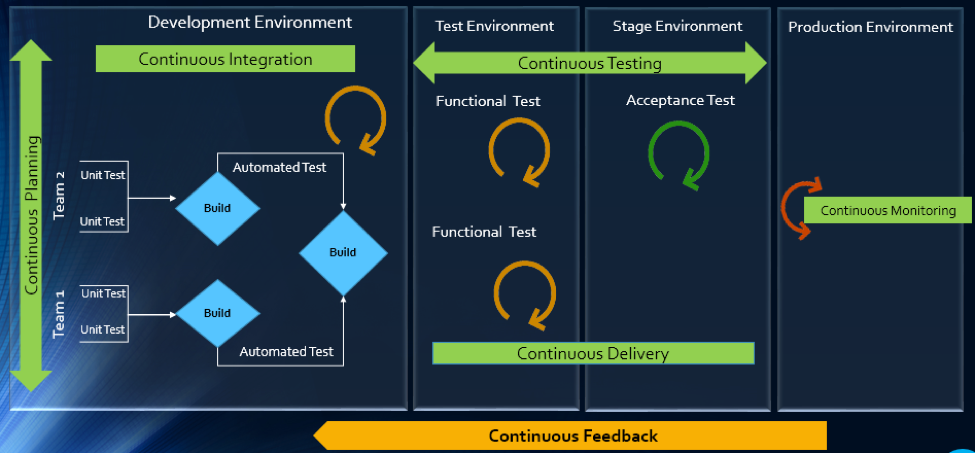
    The article will explain how multitool integration support can help organizations perform the DevOps life cycle, which includes continuous planning, continuous integration, continuous testing, continuous monitoring, continuous delivery and continuous feedback mechanism.
    The Drivers of DevOps

    Today, with the increasing competition and the need for an early market release, the software development industry is undergoing a paradigm shift. Agility has become an inevitable process across all organizations. In addition, shorter ROI cycle spans, frequent releases, increased CRs and different IT systems and tool technologies have made the situation critical.

    The industry demands higher transparency, maximum visibility, minimum turn-around time, lesser human intervention and efficient processes at every stage, from development to delivery.

    However, organizations that use specialized tools to manage builds, deployments and delivery processes continue to face difficulties when it comes to data orchestration and process automation across the tool chain.

    In an agile environment, developers and testers need to ensure not only that code changes work and integrate well, but also  that frequent iterations do not make the product unstable. Hence, seamless cross-tool collaboration is very important here.

    The process chain consisting of Code –> Build –> Provision –> Test –> Defect Fix –> Deploy –> Release needs to run continuously and smoothly without compromising delivery deadlines or the product quality.

    Automation is the Catch Line

    With the rising demand for continuous delivery and sprint-based development, manually setting up a test, build and deployment environment is burdensome and time-consuming.

    Software teams need to automate the entire cycle of build, provisioning and deployment of test environments, including the tools, scripts and test data to ensure rapid delivery. They also need to collaborate around the application architecture and monitor event-action-based mechanism for seamless data flow across the tool chains.

    Reports show the most important DevOps components are IT automation, agile development and collaborative teaming of personnel. Therefore, without centralized orchestration of tools, achieving DevOps is not a realistic situation. Since organizations spend around 73 percent of their DevOps budget in tool acquisition, it is important they know how to get the tools working together to overcome DevOps obstacles.

    In the process of connecting their existing and new toolsets, most organizations search for an integration methodology that is scalable, reliable and easy to maintain. Point-to-point integration between tools help, but to a limited extent. Even a single change in integration rules involves complex coding and high maintenance across development, test and deployment cycles.

    How ESB-based Integration Can Help

    An enterprise service bus (ESB)-architected integration hub connects both the existing and the new tools to support a seamless data flow between them across the DevOps life cycle.

    Once integrated, the data from both the development and the operations tools become readily available for use to every stakeholder. The benefit of using ESB-based integration is that you can add or remove any tool based on your connectivity requirements.

    In a typical scenario, DevOps teams use a series of cross-functional tools starting from project planning to delivery and operations. Neither of these tools comes with built-in integration features, which results in inconsistent flow of information among tool users.

    Project managers use application lifecycle management (ALM) or Agile planning tools to detail the scope of work and tracking progress reports. Upon unit testing, developers use a different tool to check in a code from their integrated development environment (IDE) to the source code management (SCM) repository. They also perform a code quality analysis before committing to the SCM.

    In such a scenario, continuous integration (CI) can be achieved only when developers bring these planning, unit testing, code analysis and SCM tools under one roof. That is, connecting the tools through a common integration hub. It also helps developers to manage everything from within the IDE.

    After successful check-ins, build engineers trigger the SCM tools for automated build and testing. Upon a successful build, testers engage in continuous testing using manual and test automation tools, followed by provisioning for continuous deployment. They also perform load testing, API testing and security testing using separate tools. An integration support helps to keep the real-time data flowing between the build and the testing tools uninterrupted and seamless.

    A DevOps system also includes application performance monitoring (APM) tool for continuous monitoring of memory consumption, CPU usage, database health and release tracking. Operations team use help desk/ IT service management (ITSM) tools for continuous feedback generation and customer support. And delivery managers use continuous delivery tools for defining and tracking release pipeline through graphical interface.

    When all these tools are connected to a central integration hub, product release and help desk operations become faster and efficient. The integration between development and ITSM tools facilitates continuous feedback generation, which helps to improve the product quality.

    Through an integrated tool ecosystem, project managers can create a DevOps workflow based on business logic and automate the data movement across tool systems. Business analysts, developers, testers and delivery managers can also get real-time update on development progress and keep track of actionable items. Supervisors can route cross-tool data to a central repository and generate meaningful reports and analytics before taking business decisions.
    Fig: ESB Integration Bus Facilitating Adoption of DevOps

    An ESB-based integration tool helps organizations to implement and leverage the best DevOps practices by establishing connections across all participating tools. An integrated tool ecosystem helps achieve the following:

    • Real-time collaboration between development, delivery and operations tools
    • Continuous planning from requirements capturing and review to design and code analysis
    • Cross-tool traceability for defining relationships between various data objects
    • Test strategy implementation for continuous testing
    • Continuous integration through automatic triggering of build on successful completion of code check-in
    • Continuous testing through workflow based automatic triggering of both manual and automated test cases
    • Scheduled test automation script execution enabling continuous delivery
    • Continuous monitoring of release quality through reports and dashboards
    • Automated defect identification and resolution for faster help desk response
    • End-to-end traceability providing better release predictability and change impact analysis
    • Meaningful reports, metrics and KPIs for quick decision-making
    • Continuous delivery through tracking release pipeline

    How Inter-tool Connectivity Brings Continuity

    To understand the stages of engineering practice, let us consider a sample DevOps scenario in an IT service organization.

    The organization uses an ITSM tool to manage support tickets submitted by customers. On submission of a ticket, it is automatically passed on to an ALM tool as user stories or defects for internal development.

    On allotting to a sprint, developers and testers view the user stories or defects from IDE, SCM and test tool. Once the coding is complete and codes get checked in at an SCM tool, an automatic build gets triggered using a build tool. Upon successful completion of the build, tool provisioning is done through a virtual machine.

    The successful build can be automatically deployed using a deployment tool and automated tests can be executed through a test automation tool. The test results are then captured and linked with test cases and the source requirements for traceability.

    The defects that are raised in the defect tracking tool for failed test cases can be automatically routed to developers for fixing.
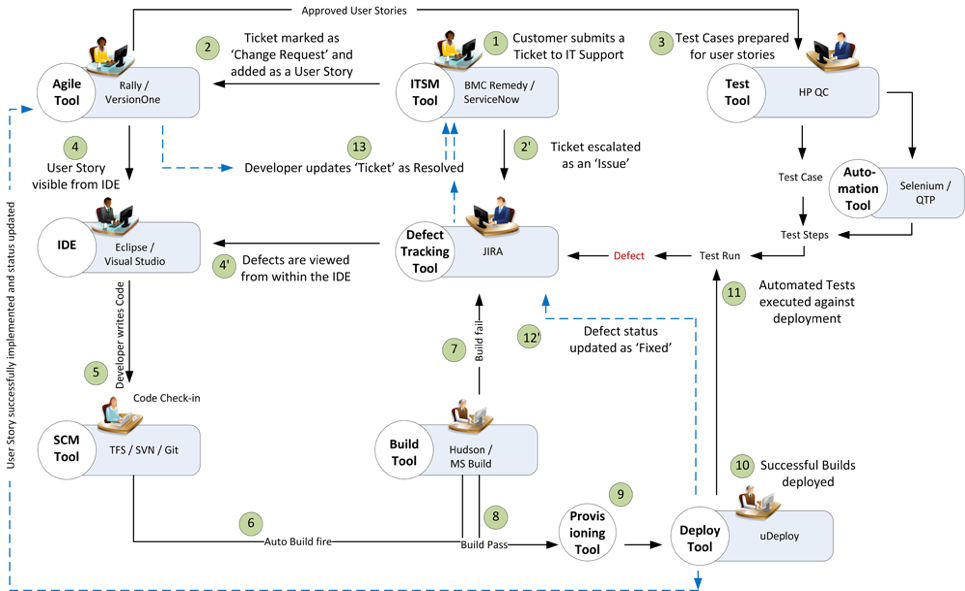
    Fig: DevOps scenario achieved in a collaborative tool environment

    Once connected to an integrated tool system, users get a complete visibility of the tool records and their relationships from within their own tools. Developers, testers and help desk managers can get complete traceability view between development artifacts and change requests or defects.

    When all the tools participating in DevOps sync with each other, developers can easily view the support tickets reported by the operations team right from their own IDE.

    The help desk team also gets a real-time update whenever a change request gets implemented or a defect is resolved by the development team. It eliminates the latency in communication between the Dev and Ops teams to a great extent.

    In addition, customers get frequent updates from the help desk team, which makes them happy and confident about the product performance.

    Conclusion

    Implementation of DevOps is not a “Do once and forever” type of task. Just deploying the right set of tools to the right users will not serve the purpose. Proper connectivity between and across the DevOps tools chain is necessary if you want to create a collaborative work environment around the Dev and Ops teams.

    An integrated tool system saves considerable amount of time and effort, which would otherwise be wasted on manual execution, monitoring and reporting of data during DevOps implementation.

    About the Author / Sanat Singha

    Sanat Singha is a senior technical and web marketing writer. He takes special interest in ALM process, technologies and tools integration as an industry. Sanat does content marketing, professional blogging, social media promotion and website analytics.

  • QA/Testing and DevOps: Partners, Not Adversaries

    QA/Testing and DevOps: Partners, Not Adversaries

    Software testing and QA is sometimes given low priority during development. The idea of treating software testers as adversaries by the developers seems old-fashioned and is short-sighted. It’s hard to believe that such an attitude can still exist, and yet it still persists, even in a modern DevOps team. But a DevOps-focused software team benefits when it considers QA/testing as an integral part of developing high-quality applications.

    In a business setting, the hidden costs of buggy or unsecure software are lost productivity, revenue and extra work by the development team (and even extra work by users, if the software isn’t running right). QA/testing helps test for system flaws, vulnerabilities and security issues, so why wouldn’t a DevOps team be supportive?

    QA/testing can help an enterprise avoid big mistakes. In fact, the DevOps Institute notes, “With the advent of DevOps and the movement to break down silos between developers and operations, it becomes critically important that all members of an IT team—regardless of what tools they use, or role they play—understand the essentials of testing.” And, according to Puppet, a standard for automating the delivery and operation of software, high-performing enterprises build quality testing into each stage of their software development process.

    Make QA/Testing a Priority

    Whether your DevOps-focused developers are handling the QA/testing themselves or passing it along to QA/testing specialists, it’s something that must be done. Ideally, developers themselves would handle QA/testing in an integrated DevOps environment, and that’s why some developers see it as an unwelcome chore. It’s not something they’re usually trained in, and they might struggle with it or see it as a burden. That could be the reason why some DevOps teams hit a “software testing bottleneck.” As data from a Vanson Bourne survey commissioned by Appvance shows, 73 percent of 200 enterprise IT decision makers in the United States have adopted DevOps processes, but 57 percent of those adoptees experienced a bottleneck during software testing that impacts how quickly new and updated software can be released.

    On the flip side, the developer’s company may have QA/testing professionals in-house, so the developers are hands-off in that area. Needless to say, the relationship between developer and the QA/testing pro could get a little rocky. Just think about it: The role of the QA/testing specialist is to find problems and point out issues with the developer’s code. Or, perhaps the developer or engineering staff is lagging behind schedule, so the team inevitably needs QA/testing to rush its processes, further creating a tense or adversarial relationship between the two groups.

    At one of my startups a while back, we worked for months on our first software release of a web application for an online marketplace. Late on a Wednesday night, we let the CEO of our company try it out—and the app immediately crashed. “Gee,” I said, “It was working on my computer.” Of course, it really wasn’t. We had synchronization problems, which are common in multi-threaded applications that access the same information for multiple users. And we made the mistake of letting the CEO be the first simultaneous user to try it out (creating a bad impression), instead of making organized QA/testing a priority at our company.

    QA/testing in a DevOps environment can help your team avoid mistakes, so passion for app functionality doesn’t supersede quality and robust bug-free software. In the end, what you need from your team is passion for both functionality and quality/testing. Otherwise, you’ll deliver a faulty product and lose customers or users—unnecessarily—because of a bad first impression by your software.

    Two Approaches for Integrating QA/Testing with DevOps

    When you’re integrating QA/testing into your DevOps environment, there are two different approaches or procedures to ponder. First is the more traditional test of the full system, sometimes called integration testing. The second is test driven development (TDD), which is popular in Agile and Scrum methodologies. The main difference between the two is in how software code is tested. During integration testing, developers review and test the code. Then, for critical facets of the software, a peer review of code is completed. Afterward, testers create scripts and deploy an array of integration and system tests. These could include scalability testing, load testing, stress testing and very importantly, security testing. Code vulnerability, SQL injections and malicious code would be things to think about.

    Under TDD, the order in which testing appears in the cycle is reversed. Each developer first writes “unit tests” and then writes the code. This is done iteratively in such a way that every discrete section of code is automatically tested. When new code is sent to the integration server, the tests go with it. The server itself runs unit tests for all the code that developers deposit in the server. On top of this, testers design system and integration tests to run automatically by the integration server. Finally, testers perform any manual tests that are impossible to automate. In this way, the integrity and quality of the code is constantly guaranteed.

    Academic studies and field experience suggest that TDD increases development time by approximately 15 percent … but hold on. Experience also shows that total cost of ownership of TDD-developed software is lower than software using integration testing only. It’s worth noting that by using TDD and integration testing, a company can deploy software of world-class quality that exhibits less than 0.3 errors per 1,000 lines of code during 18 months of use.

    QA/Testing: A Partner in Your Software’s Success

    If you’re hesitant about integrating QA/testing into your DevOps team and instead tempted to outsource it, you may want to push pause. It’s actually quite challenging if you do development in-house and expect to simply outsource what you think is independent QA with cheap testers. Outsourcing QA/testing and assuming that piece is done is not really outsourcing—it’s staff augmentation at a distance and it usually doesn’t work. You don’t want a “siloed team” to handle a critical component such as QA/testing. Instead, outsource QA/testing and bring your in-house and outsourced teams together around a common DevOps culture and mindset.

    DevOps experts Bob Aiello and Leslie Sachs, in an IBM report, say quality software “… requires not only a shift in behavior, but a dramatic shift in the organizational culture as well.” So whether you outsource or have an in-house squad, your developers and the entire team should take ownership of QA/testing, and remain open to new ways to test code efficiently.

    Ultimately, QA/testing should not be viewed as a time-consuming, disruptive chore by anyone on your team or in your enterprise. Think of it as a partner in your software’s success—not an adversary.

    About the Author / Steve Mezak

    Steve Mezak is founder and CEO of Accelerance, a leader in global software development outsourcing, as well as the author of “Software Without Borders,” co-author of, “Outsource or Else: How a VP of Software Saved His Company,” and a CIO columnist.


  • CA Technologies Acquires Runscope for API Monitoring

    CA Technologies Acquires Runscope for API Monitoring

    There’s a pressing need for a variety of monitoring tools more than ever. But given the proliferation of application programming interfaces (APIs) inside the enterprise, demand for API monitoring tools in particular is rapidly expanding. To address that requirement, CA Technologies has acquired Runscope, a provider of an API monitoring service delivered as a software-as-a-service (SaaS) application.

    Ali Siddiqui, general manager for agile operations at CA Technologies, says Runscope will complement CA Blazemeter continuous testing tools the company acquired last year and the CA API Management platform based on the technology CA Technologies gained when it acquired Layer 7 Technologies in 2013.

    While the API Economy has been a phenomenon for external-facing web and mobile applications for years now, Siddiqui notes that IT organizations have only begun to rely on APIs to ingrate internal applications in recent years. The number of private internal APIs that have been published already dwarf the number of external public APIs. Because those internal APIs have now reached a critical mass, Siddiqui says the time is now right for CA Technologies to add an API monitoring service to portfolio of DevOps tools.

    He notes that the rise of microservices inside enterprise IT organizations also will exacerbate existing API monitoring and management challenges. Each microservice generates its own API, which needs to be maintained and monitored. Before too long IT organizations will find themselves trying to unravel the interdependencies of thousands of microservices that all expose an API that can be developed in any number of programming languages.

    These days it’s not uncommon to see dedicated management teams focusing on specific APIs. Rather than treating the API as an afterthought, many IT organizations have come to realize it’s the quality and robustness of the API that ultimately determines the quality of the application experience. In fact, most service level agreements (SLAs) going forward will require access to data being generated by APIs to make sure the terms of any agreement are being met. As such, it’s starting to make sense in some organizations to organize DevOps teams around critical APIs, rather than specific elements of application logic that, in the age of the containers, will soon be more frequently updated.

    There’s no shortage of API monitoring tools these days, and Siggiqui says CA Technologies is committed to making sure the Runscope service remains open in terms of integration with other API management and testing tools. However, eventually there will be incentives provided to organizations that choose to standardize on multiple DevOps tools from CA Technologies.

    Despite the proliferation of monitoring tools, the percentage of application workloads that are instrumented remains relatively small. The reason for this is that the cost of monitoring every enterprise application has often proven prohibitive. The issue that enterprise IT organizations will have to confront as dependencies between microservices increase will be figuring out how to implement instrumentation across all those services in a way that doesn’t wind up breaking the budget.

    — Mike Vizard

  • Is AWS Cloud Per-Second Billing Boon or Bane for DevOps Engineers?

    Is AWS Cloud Per-Second Billing Boon or Bane for DevOps Engineers?

    Amazon’s introduction of its AWS services in 2006 with a per-hour billing model for compute resources was a game-changer for the IT world. Since then, AWS has taken over the cloud computing market as a leader, while broadening the range of cloud services offered every year. However, the per-hour billing business model was one of the major issues for many customers—in particular, those who had applications using EC2 for only minutes at a time.

    Recently, AWS announced support for per-second billing of its EC2 service, addressing the aforementioned concerns. Of course, this also created controversy among the per-hour supporters. While I won’t get into the pros and cons across the whole enterprise, one group in particular is affected from the new per-second model: DevOps engineers.

    Here are the top five implications for DevOps teams as a result of per-second billing:

    Autoscale without worrying about cost

    Most engineers were vary of autoscaling at will, mostly because of EC2’s hourly charges even though they might need additional compute capacity for just 15 minutes. With per-second billing, DevOps engineers don’t have to worry—it’s as simple as scaling your EC2 instance as you need to, and when you need to.

    No more custom logic for hourly batches

    Many customers use EC2 for jobs and batch processing purposes. Due to the hourly pricing, engineers have written custom logic to benchmark and constantly tune the number of nodes in their batch clusters to ensure they are cost-optimized. Per-second billing frees up headaches for DevOps engineers that are using EC2 for batch processing and job clusters.

    The need to speed up EC2 launches

    With per-second billing, it’s important to take advantage of prebaked Amazon Machine Images (AMI) for launching your EC2 instances, instead of complete configuration setup on every instance launch. This will reduce the costs for you, by saving anywhere from five to 15 minutes. It’s time to create prebaked AMIs for faster instance launches, ultimately saving costs.

    Dilemma of Lambda or EC2

    Be prepared to compare whether to use Lambda or EC2 for new workloads and applications more often than you are used to. Your benchmarking between Lambda and EC2 has become a little more dicey. The serverless lambda just got competition from EC2 again.

    Your big data just got easier

    With EMR also supporting per-second billing, your job has become a lot easier. As a , you no longer need to constantly benchmark your EMR clusters for number of nodes and job processing times to be optimized for per-hour billing.

    DevOps engineers have a lot to benefit from per-hour billing, but also much to consider when it comes to time-to-deployment and choosing a compute service. Now is the the time for DevOps engineers engineers to bring these concerns to their CIOs to make a smooth transition to the new AWS business model.

    About the Author / Vijay Rayapati

    Vijay Rayapati, CEO of cloud management platform company Botmetric, identifies himself as a technology entrepreneur, passionate about creating products, building high-performance teams, and solutions that solve real-world business issues. Vijay is a popular speaker in India and the US, and has co-authored a popular book, “Learning Big Data.” Connect with him on LinkedIn and Twitter.

  • Bridging the Gap Between ITSM and Software Engineering

    Bridging the Gap Between ITSM and Software Engineering

    Considering the individual roles of IT service management (ITSM) and software engineers, it seems obvious they should work closely together. ITSM tracks internal and external customer issues and engineering fixes code-related issues (such as defects) that IT cannot fix on its own.

    However, more often than not, coordination between these two departments is poor, which—critically—undermines customer response times and damages application satisfaction. It’s important to remember that the quality of customer response isn’t just about speed, it’s about giving customers insight into the state of the issue.

    The disconnect between ITSM and engineers, often caused by individual priorities and semantic differences, makes this real-time insight difficult. Both teams have individual and shared concerns, and separating these while simultaneously improving collaboration is a big challenge.

    Addressing this relationship is an important step in optimizing ITSM and DevOps integrations, alongside focusing on IT help desk enhancement requests to product management, and tracking code from build to release and back.

    The Flow of Information on Things that Matter

    Most of the tickets generated by the IT help desk can be handled internally with no help from engineering, but it’s the tickets that do need help which require consideration. For these issues, there needs to be an open flow of information on the things that matter between these two teams.

    IT help desk must give engineering enough information to understand the defect and its impact on the customer. Meanwhile, engineering needs to be able to give the help desk a sense of when to expect the fix, when the fix is done and be able to request more information when required.

    Information that should be shared from the help desk to engineering includes the following:

    • Severity – Engineering needs a sense of the importance of the defect. If everything comes in as “High Priority,” nothing is high priority. The help desk must understand that engineering already has its own internally generated set of defects, as well as defects found by QA and other sources. For these customer defects to be prioritized and fixed in a timely manner, engineering needs to know how impactful they are to the customer.
    • Description – This is perhaps the most important piece of information the help desk can pass along. The more contextual information that can be shared, the better. It’s immensely important to provide engineering with the necessary steps to reproduce the specific defect, which version of your tool the customer is using, the general environment, etc. Sometimes this is best in structured fields, while other times it’s important to simply write out everything.
    • Screenshots and other visual information – Along with the written description of the problem, engineering often requires logs and/or screenshots. As the saying goes, “A picture is worth a thousand words.”

    Now that engineering has the vital information it needs to fix the defect, it has a responsibility to provide useful information back to the help desk:

    • Planned release – This should not be a firm commitment, but rather an estimate to give the help desk general timing. While the actual date of the fix may vary, it’s still useful to be able to tell a customer,”This is coming soon,” rather than, “We realize this is a problem and it’s on our backlog to fix.”
    • Engineering status – While this is a single defect to your customer and to them only has one status, there are really two statuses your organization will care about:
      • Status of the ticket in your ITSM tool
      • Status of the defect in your defect tracking/agile planning tool

    It’s very important that the ITSM tool contains both statuses to provide more information and context to the help desk. Imagine the benefit of knowing that the defect is “In Triage,” “In Progress,” or “In Verification” and being able to provide that information to a customer.

    • Actual release/released – As opposed to the planned release information, this lets the help desk know that the customer’s issue has been resolved. Imagine running a report from your ITSM tool indicating the defects fixed in your most recent release. Your IT help desk can proactively reach out to customers to let them know to upgrade, enabling you to offer more proactive customer communications.

    Finally, and perhaps most important, you allow your teams to talk about the “same thing” even when it exists in different tools and they speak a different language. There are four core ways to do this: 

    • Cross-tool tracking – Each artifact in each system should have the ID (and ideally URL) of its twin artifact in the other system. If a help desk representative needs to talk to an engineer about a defect, the rep needs to let engineering know which defect it is in the engineering tool, not just in the ITSM tool.
    • Routing – IT help desks often support multiple products, each of which have multiple components that may belong to a different engineering team. The help desk needs some indication which component and/or team should work on the defect. This information will help the IT help desk know which team to reach out to for help.
    • Filtering – Not every ticket in the ITSM tool needs engineering help (that’s a good thing). However, there should be some indication on the IT ticket if it has been sent to engineering. You do not want to send the same defect to engineering twice (confusing) or to assume it’s been sent when it hasn’t (poor time to resolution or issue overlooked).
    • Communication – IT and engineering need a shared way to talk about a specific defect that they both care about. The closer this communication can be to the native commenting that already occurs, the better. Ideally this is not via email as that communication vehicle does not stay attached to the artifacts in question, meaning information can be hard to find or get lost.

    The Benefits

    Customers will love it – Improved communication means happier customers. Customers can plan their upgrades with more certainty, and their trust grows since your organization is able to deliver on its promises. No longer will they feel like their issues are being thrown into a black hole.

    Better engineering focus – Engineering gets pulled in a variety of directions, contending with feature work as well as internally generated defects. The more information it has, the easier it is to prioritize and deliver more value to customer. Without the ability to share the severity of a defect, you risk two undesirable outcomes:

    • The defect is fixed instead of more important work, which hurts all your other customers.
    • Other, less-important work is prioritized, which can threaten your relationship with this customer.

    Better trust across your organization – Open communication fosters trust and understanding. Providing insight into prioritization and status let’s your help desk feel part of the development process. No longer will staff feel like their requests are being ignored with no idea when they will be fixed. Enhanced cross-team communication also helps engineering to avoid feeling like work is simply being thrown over the fence. Obtaining more context around a defect is invaluable.

    Next Steps for Total DevOps Integration

    To fully integrate your ITSM and engineering teams, there are still (at least) two other processes to implement:

    • A method for the IT help desk to provide enhancement requests to your product team: These enhancement requests are similar, but distinctly different from the defects described above. Consequently, they need to be prioritized and triaged by a different team.
    • The other process to implement is the traceability from task to code to build and back again. To properly inform customers that their problem is fixed in this version of your product, it’s important to correlate features, stories and bug fixes with the actual version of your product that includes them for the first time.

    Bridging the gap between ITSM and engineering teams brings your company closer to customers. While making your organization work as a unified whole is an incredibly complex problem, addressing this relatively small, but vital, piece of the puzzle helps you on your journey to integrating your whole software value stream. This change of mindset, combined with connecting all teams, tools, disciplines and processes in an enterprise’s software value stream, optimizes collaboration, productivity, efficiency and most importantly, value delivered to the customer.

    About the Author / Trevor Bruner, Product Manager, Tasktop

    Trevor Bruner is Product Manager at Tasktop Technologies. His background includes experience in financial services, oil and gas and as a Navy submarine officer. Connect with him on LinkedIn and Twitter.


  • Oracle on the March Toward Automated CI/CD Services

    Oracle on the March Toward Automated CI/CD Services

    At its OpenWorld 2017 conference today, Oracle charted a course forward that essentially creates a managed DevOps platform spanning a broad number of application types and styles.

    The Oracle Application Development Platform is a subset of the Oracle Cloud Platform optimized for application development. Siddhartha Agarwal, vice president of product management and strategy, says the company is working to automate every aspect of DevOps with an eye toward making it possible for organizations to concentrate all their efforts on developing applications versus managing them.

    The latest step in achieving that goal are updates to the Oracle Application Development Platform, which now incorporates the Oracle Container Native Application Development Platform based on the open-source Kubernetes container orchestration engine, and Oracle Container Engines, a container pipeline management service based on the Wercker software the company acquired earlier this year. The company also announced it is adding support for the Go and Java Enterprise Edition programming languages to existing support for Java Standard Edition, Node.js, PHP Ruby and Python runtimes.

    Other options being added to the Oracle Application Development Platform include Fn.a, an open source serverless computing project based on software the company gained when it acquired Iron.io, as well as an implementation of the Open Service Broker that enables applications developed for the Cloud Foundry platform-as-a-service (PaaS) environment to be deployed on Oracle Cloud. The company is also making available an instance of a BOSH Cloud Provider Interface to automate the deployment of those Cloud Foundry workloads.

    Meanwhile, the Oracle Data Hub Cloud Service now also supports the open-source Cassandra database alongside existing support for MongoDB, Postgres and other databases to be added in the future. However, the core Oracle database remains the primary data engine service. In fact, Oracle Database 18c, announced earlier in the week, employs machine learning algorithms to manage instances of the company’s relational database autonomously with no human intervention required.

    Finally, the company is adding a Blockchain Cloud Service that allows developers to access an implementation of open-source Hyperledger blockchain software, as well as an intelligent chatbot platform that can incorporate in mobile computing applications.

    Agarwal says his company is committed to making available both commercial and open-source platforms available via an Oracle Cloud Platform that provides access to x86, Sparc and graphical processing units (GPUs). Agarwal says the company expects IT organizations to mix and match back-end services as they see fit. But increasingly all those back-end services will be managed under the auspices of a fully managed continuous integration/continuous development (CI/CD) platform.
    Long-term, Agarwal says there may even come a day when application workloads are able to self-describe themselves, which would then enable the company to deploy them automatically on the best-suited back end.

    Naturally, it may be a while before the level of DevOps nirvana gets achieved. But as machine learning algorithms and other forms of artificial intelligence (AI) advance, it’s clear that the weight IT organizations are expected to carry is increasingly shifting more toward building applications than managing the underlying infrastructure on which they run.

    — Mike Vizard

  • Configuration Files and DevOps

    Configuration Files and DevOps

    When DevOps appeared on the scene, configuration file management tools already existed. They weren’t used by everyone, but a fair number of organizations saw the power of configuration file versioning/management, and were using them.

    An interesting thing seems to have happened while DevOps evolved. Those tools are more popular, but while we’ve standardized on things like Puppet and Chef for installs, and Jenkins for continuous integration/continuous delivery (CI/CD), configuration file management seems to have gotten less standardized.

    While it is easy to argue (convincingly, IMO) that most people use Git for configuration file versioning, there are a ton of other solutions out there being utilized also. And plenty of places that have no solution in the works.

    There are even a few new vendors cropping up that are basing their existence on the idea that configuration file management should be similar to using the source code git repository, but not the same as using the source code git repository.

    What Are We After?

    That brings us to the question, What is it that we hope to gain from configuration file management? Which should take us back one step further to ask, “Which configuration files?” There is a vast difference between configuration files for a piece of network gear, the configuration files for infrastructure apps such as Docker and the configuration files for your application.

    There is a valid argument that all of the above are relevant and should be stored somewhere, but that argument does not imply they should all be stored in the same manner, nor with the same frequency.

    What does make sense is standardization on a given platform with version control capabilities. The question then becomes, Which platform?

    And That’s Where We Are

    My company uses Git for this storage, right next to application code. But we use regular storage with a naming scheme for switch and router configuration backups because we want them backed up with our other file-based data. Most companies are similarly split.

    The simple answer is, “Throw it all into Git,” and I think that’s where most DevOps teams are. But I don’t think we have the long-term answer in front of us yet. A toolset that can manage and version, and is aware of the idiosyncrasies of popular hardware/software/cloud solution configuration files is likely where we’ll end up. That will offer easier use, ease of management, a centralized store for configurations and some automated check upon the inevitable manual configuration changes.

    Until Then …

    Until then, it is best not to vary too far from the best fit for your organization. We’re content that we know where to get all of our configuration files back from, even if it is split between two platforms. There is one single piece of hardware in our infrastructure that in an emergency would be lost, and that’s because it is massive and only supports backup to attached USB disk.

    For most organizations, Fit is “good enough,” and allows for spawning new copies of servers/apps with the correct configuration during the deploy process, so is probably where you want to be right now.

    For enterprise grade networking gear, the configuration files are complex, and unlikely to be hand-edited these days (though we all know that person who can). So any system that gives you a backup of the configuration file you can re-import is good enough.

    For now.

    — Don Macvittie